

7 Best WordPress Schema Plugins in 2026 (Free + Paid, Researched and Documented)

Why schema markup matters in 2026 (and what a schema plugin actually fixes)
Google's search results are no longer ten blue links. They are review stars, FAQ accordions, recipe cards, product carousels, breadcrumbs, video thumbnails, How-To steps and AI Overview citations. Every one of those rich features pulls structured data from the same source: JSON-LD schema markup embedded in your pages.
Without a schema plugin, WordPress sends out vanilla HTML that the major search engines understand only at the surface. Title, paragraph, image. The schema layer is the one that tells Google "this is a Product, this is the price, these are 412 customer reviews averaging 4.7 stars," or "this is a How-To with four steps, and step two is the part that answers the user's voice query." Pages with valid, complete schema are eligible for rich results that increase click-through rate from organic search and the chance of being cited inside AI search experiences like Google AI Overviews.
For this 2026 roundup I installed each plugin that has a usable free version in a clean WordPress 7.0 sandbox, activated it from the official WordPress.org listing, and walked the actual admin screens a new user lands on. Five of the seven free plugins (SASWP, All In One Schema Rich Snippets, Schema Engine AI, WPSSO Core and Rank Math) were captured hands-on from their own admin in this sandbox; the original screenshots are embedded in each section below. Schema App Structured Data could not complete first-load testing in our sandbox, so its section relies on the current WordPress.org admin documentation paired with the vendor's own screenshot, clearly labeled. Schema Pro is paid-only and is not distributed through WordPress.org, so its admin cannot be installed in a public sandbox; the vendor's product-page image is used and labeled. Every install count, rating, version number, free-tier limit and paid-tier price below was re-verified against the live WordPress.org plugin page and the vendor's own pricing page on 2026-06-13.
My default pick for 2026 is Schema & Structured Data for WP & AMP by Magazine3. It covers 35+ schema types in the free build, includes 11 native Gutenberg blocks, ships AMP compatibility, and has been on a monthly release cadence through the first half of 2026. If you are already running Rank Math, AIOSEO or Yoast SEO for general WordPress SEO, you may not need a second plugin at all; the section on Rank Math explains the overlap honestly. If you would prefer a paid "configure once globally" plugin instead of a free per-post one, Schema Pro is the cleanest answer.
If you are still picking your underlying SEO plugin too, our free WordPress SEO plugins comparison covers Rank Math, Yoast SEO, AIOSEO, SEOPress and The SEO Framework in detail. For the wider technical work around schema (titles, sitemaps, robots, canonicals), our WordPress SEO audit checklist covers everything else.
How I evaluated each plugin
For every plugin I checked the same set of buyer-relevant facts on 2026-06-13:
- Install reputation: active install count, current rating, total review count, and 5/4/3/2/1-star breakdown from the WordPress.org plugin page (or the vendor's website for paid-only plugins).
- Free-tier schema coverage: how many schema types you can publish without paying, which Gutenberg blocks ship, and whether the free build includes a Setup Wizard, a validator and a Test Rich Snippets link.
- Supported schema types: the explicit type list (Article, BlogPosting, Product, LocalBusiness, FAQ, HowTo, Recipe, Event, JobPosting, Course, Book, Movie, Service, VideoObject and so on).
- Editor UX: is schema added through a global Setup Wizard, per-post meta box, Gutenberg block, AI-generated draft, or all of the above? Does the plugin output a Google SERP preview before publish?
- Validation and export: real-time rich results validator inside WordPress, integration with Google's Rich Results Test or the Schema.org Validator, JSON-LD preview, schema audit reports.
- SEO-plugin overlap: does the plugin detect and suppress schema output from Yoast SEO, Rank Math, AIOSEO or SEOPress so you do not ship two competing JSON-LD blocks for the same page?
- WooCommerce and Merchant Feed: does the plugin handle Product schema with offers, shipping details, return policy and GTIN/MPN/ISBN required by Google Merchant rich results?
- Pricing fairness: the line between the free build and the cheapest paid tier, with honest pricing that reflects what you actually commit to and what is sale price vs renewal price.
- 2026 release cadence: changelog activity in the first half of 2026 to confirm the plugin is actively maintained.
Quick comparison table
| Plugin | Best for | Free tier covers | Cheapest paid plan | Main limitation |
|---|---|---|---|---|
Schema & Structured Data for WP & AMP |
Default free dedicated schema |
35+ types, 11 Gutenberg blocks, AMP, Setup Wizard |
Personal $79/ |
Free-tier reviews are limited to 1 platform; Pro fetches 75+ |
Rank Math |
Already need an SEO plugin |
16+ schema types in free, FAQ/ |
$7.99/ |
Schema overlaps with whatever SEO plugin you already run |
All In One Schema Rich Snippets |
Small site needing only the 8 high-value types |
8 schema types via post-editor meta box |
Schema Pro $69/ |
Free build is intentionally small (Local Business, Job Posting, Book, How-To etc. are Pro) |
Schema Pro |
Set-it-once global schema, 20+ types |
None (paid only) |
$69/ |
No free tier; vendor has historic refund/ |
Schema Engine AI |
AI-powered drafting with validator + SERP preview |
25+ types in free + AI generator (bring your own key) |
$34/ |
AI mode needs an OpenAI / Claude / Gemini API key you pay for |
WPSSO Core |
WooCommerce + Merchant Feed specialist |
500+ types, complete Open Graph + Merchant Feed |
Premium via wpsso.com Account |
Steep learning curve; admin notices are intrusive |
Schema App Structured Data |
Enterprise / agency with managed knowledge graph |
Default markup auto-deployed |
End-to-End quote-driven (12-month minimum + onboarding fee + 1-hr/ |
Free build is intentionally minimal; advanced features need a Schema App contract |
1. Schema & Structured Data for WP & AMP: the best free dedicated schema plugin
- Vendor: structured-data-for-wp.com (Magazine3)
- WordPress.org: wordpress.org/plugins/schema-and-structured-data-for-wp/
- Active installs: 100,000+
- Rating: 4.5 / 5 (252 reviews on 2026-06-13)
- Latest version: 1.60, released 2026-05-14
- Requires: WordPress 4.5+, PHP 5.6.20+
- Tested up to: WordPress 7.0
Schema & Structured Data for WP & AMP (often abbreviated SASWP) is my default pick for any WordPress site that wants a dedicated schema plugin in 2026. The free build covers 35+ schema types out of the box, including everything Google's Rich Results gallery currently rewards: Article, BlogPosting, NewsArticle, TechArticle, Product, ProductGroup, Recipe, Review, Event, JobPosting, Course, Book, FAQPage, HowTo, Service, LocalBusiness with all sub-categories (Restaurant, Dentist, Plumber, GeneralContractor and so on), VideoObject, AudioObject, SoftwareApplication, MobileApplication, TVSeries, QAPage, DiscussionForumPosting, Person, ProfilePage, CriticReview, Game, Certification, Guide, SportsTeam and more. Eleven dedicated Gutenberg blocks (Course, Job, Event, FAQ, Recipe, Book, Q&A, Location, Reviews Collections, How To, Live Blog Posting) let you author schema directly inside the block editor instead of through a separate meta box.
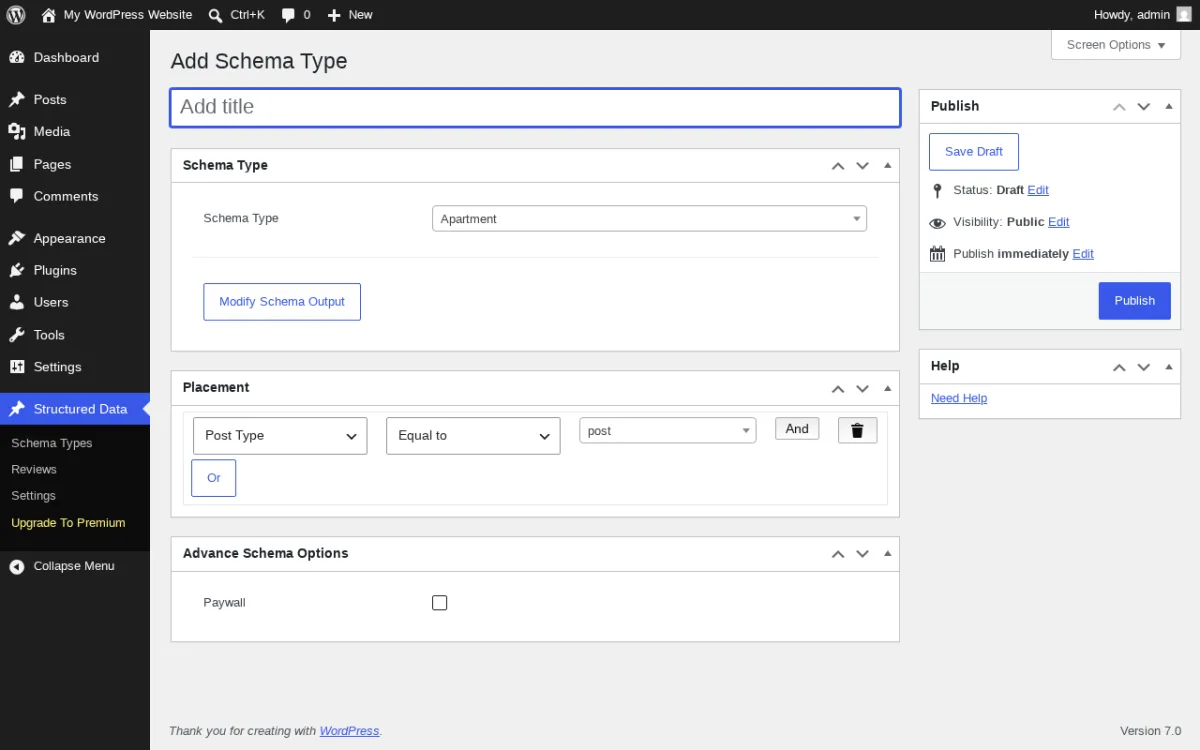
What I tested in a clean WordPress 7.0 sandbox on 2026-06-13. I installed v1.60 from the WordPress.org listing in a clean sandbox, activated it and opened the admin. The plugin adds a Structured Data top-level menu with four sub-items: Schema Types, Reviews, Settings, Upgrade To Premium. The Settings screen exposes seven tabs (General, Schema, Advanced, Premium Features, Services, Support, Schema Types) and immediately surfaces a "Please setup Logo to avoid structured data validation issue" admin notice. The General tab pre-checks Author with a Schema Type drop-down (default Person) and exposes Website Schema (HomePage), Archive, BreadCrumbs, Comments and Remove Version Tag toggles. The right rail shows an "Upgrade to Pro!" panel with Premium features, Dedicated Schema Support and Active Development badges. From Structured Data > Add New (screen above) you pick a schema type from the drop-down (the registry is alphabetical so Apartment is the default), define a Placement rule (Post Type / Equal to / post, with And/Or operators for compound rules) and toggle Advance Schema Options like Paywall. The same screen exposes a Modify Schema Output button for per-property overrides. There is no first-load Setup Wizard launcher in the General tab on this build; the post-install flow goes directly to the main settings page rather than the wizard.
Strengths. Genuinely complete free build for any dedicated-schema buyer in 2026. 35+ schema types is the widest free coverage of any non-SEO-plugin in this roundup. AMP compatibility (both AMP for WP and AMP by Automattic) is unique here. The migration importer pulls existing data from SEO Pressor, WP SEO Schema and the older Schema plugin so you do not lose work when you switch. Reads from 10+ companion plugins (kk Star Ratings, WP-PostRatings, bbPress, wpForo, RealtyPress Premium, EventPrime, Joli FAQ SEO and others). Release cadence is consistent: v1.55 in February 2026, v1.56 in March, v1.57 in March, v1.58 in March, v1.59 in April, v1.60 in May. That is almost one release per month through the first half of 2026.
Limitations. The free Review module is limited to your own review entries; pulling reviews from 75+ external platforms (Google, Yelp, Trustpilot, Capterra and so on) is a Pro feature. WooCommerce shop owners will want the paid WooCommerce Compatibility for Schema extension for full product/offer coverage, even though basic Product schema is in the free build. The admin is dense: the Structured Data top-level menu has its own sub-menu tree, and first-time users will spend 15-20 minutes on the Setup Wizard. Recent 1-star reviews flag occasional regressions on Divi-based sites (which the 1.59 changelog addresses with Divi Builder fixes).
Pricing. Verified on structured-data-for-wp.com/pricing 2026-06-13. The free plugin is genuinely complete for most blogs and small businesses.
- Personal $79 / year (1 site).
- Webmaster $169 / year (3 sites).
- Freelancer $269 / year (15 sites).
- Agency $799 / year (50 sites).
- Lifetime $599 one-time (1 site).
Paid extensions (WooCommerce, WPML, Polylang, FAQ Schema, Event Schema, Google News Schema Setup, Indexing API, JobPosting, Recipe, Course, Real Estate, Q&A, Classifieds) are sold separately and bundled into higher tiers.
Best fit. Any WordPress site that wants the widest free schema coverage in 2026, sites already running on Yoast or AIOSEO that need richer schema than those plugins ship, AMP publishers, and anyone migrating off SEO Pressor, WP SEO Schema or the legacy Schema plugin.
2. Rank Math: best free schema if you already need an SEO plugin
- Vendor: rankmath.com (ONE.COM INDIA PRIVATE LIMITED)
- WordPress.org: wordpress.org/plugins/seo-by-rank-math/
- Active installs: 4+ million
- Rating: 4.8 / 5 (7,444 reviews on 2026-06-13)
- Latest version: 1.0.272, released 2026-06-10
- Requires: WordPress 6.3+, PHP 7.4+
- Tested up to: WordPress 7.0
Rank Math is in this roundup for one specific reason: most readers searching for "best WordPress schema plugins" already have an SEO plugin installed, and the strongest schema feature set inside any free SEO plugin in 2026 lives inside Rank Math. The free build ships 16+ schema types (Article, Book, Course, Event, FAQ, HowTo, Job Posting, Product, Recipe, Video and 19+ additional types per the official Rank Math KB), a Schema Generator inside the block editor with variables that pull title / description / featured image / custom fields from each post, and four dedicated Gutenberg blocks (FAQ, HowTo, Schema, Table of Contents) that output Schema-ready content. The 2026-06-10 release added an MCP tool (rank-math/get-post-schema) so AI assistants can retrieve all Schema markup attached to a post.
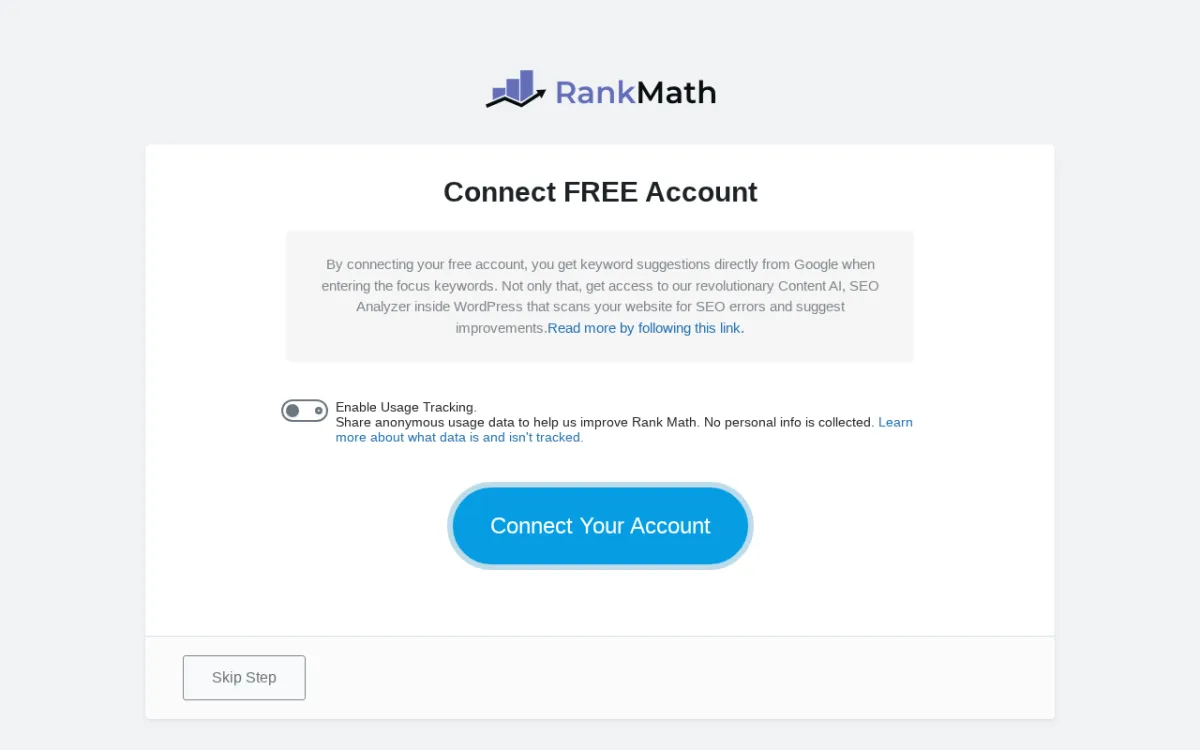
What I tested in a clean WordPress 7.0 sandbox on 2026-06-13. I installed v1.0.272 from the WordPress.org listing in a clean sandbox and activated it. The first-load redirect goes straight to the "Connect FREE Account" screen captured above. The screen pushes the free Rank Math account flow first, with an Enable Usage Tracking toggle, a "Connect Your Account" primary button, and a quiet "Skip Step" link in the bottom-left. This matters: the free Rank Math account is what unlocks API features like keyword suggestions and SEO Site Analysis, but the plugin is still fully usable without it (the Skip Step exits to the Setup Wizard). Per the official Rank Math documentation, the Setup Wizard maps Article schema to posts and WebPage schema to pages, plus Organization or Person knowledge graph data. Inside the block editor, the Schema tab on each post lets you pick a schema type and the plugin pre-fills the JSON-LD properties from the post's title, description, featured image, author, dates and any custom fields you map. Inside Gutenberg you also get a FAQ block (renders front-end + outputs FAQPage JSON-LD in one step), a HowTo block (renders front-end + outputs HowTo JSON-LD with image steps), and a Schema block to drop the plugin's generated schema anywhere on the page. WooCommerce product schema is added automatically.
Strengths. 4+ million active installs is the largest install base in this roundup, with 7,015 five-star reviews on 2026-06-13 and consistent monthly releases. Free build is genuinely complete for blog + product schema; 16+ types beats every other SEO plugin's free tier. FAQ and HowTo Gutenberg blocks do front-end + schema in the same step, which is rare in the free tier of any plugin. The 2026 release stream added Content AI, AI image alt text, RankBot SEO assistant, llms.txt output, MCP Tools for AI assistants, and a built-in Schema Markup Validator integration that opens Google Rich Results Test from the post editor. Free 1-click import from All In One Schema Rich Snippets, Yoast SEO, AIO SEO, SEOPress and Redirection makes switching painless.
Limitations. Rank Math is an SEO plugin, not a dedicated schema plugin. If you are also running Yoast SEO or AIOSEO, you have to disable one, because running two SEO plugins simultaneously produces duplicate JSON-LD blocks, conflicting titles and conflicting canonical tags. Pro-only schema types include Dataset, FactCheck, Movie, Podcast Episode, Q&A Page, Speakable, plus Carousel and ItemList schema. Advanced features (Import Schema from other websites, Custom Schema Builder, Conditional Schema, Multiple Location Schema, Pre-built Schema Templates for automation) are Pro. Pro requires a free Rank Math account for API features like keyword suggestions and SEO Site Analysis.
Pricing. Verified on rankmath.com/pricing 2026-06-13.
- Pro $7.99 / month billed annually ($95.88 / year) for unlimited personal sites.
- Business $24.99 / month billed annually ($299.88 / year) for 100 client sites.
- Agency $58.99 / month billed annually ($707.88 / year) for 500 client sites.
30-day money-back guarantee. Content AI credits included on Pro tiers.
Best fit. Any WordPress site that is also choosing an SEO plugin and does not want a separate schema plugin on top, owners that want one admin pattern for titles + meta + schema + sitemap, agencies running 10+ client sites that want consolidated SEO management. Honest overlap caveat: if you already use Yoast SEO, AIOSEO, SEOPress or The SEO Framework and are happy with them, install one of the dedicated schema plugins in this roundup instead, because adding Rank Math on top means uninstalling your current SEO plugin first.
3. All In One Schema Rich Snippets: the simplest free dedicated schema plugin
- Vendor: wpschema.com (Brainstorm Force)
- WordPress.org: wordpress.org/plugins/all-in-one-schemaorg-rich-snippets/
- Active installs: 30,000+
- Rating: 4.0 / 5 (162 reviews on 2026-06-13)
- Latest version: 1.7.7, released 2026-03-11
- Requires: WordPress 3.7+, PHP 7.4+
- Tested up to: WordPress 6.9.4
All In One Schema Rich Snippets is the original, lightweight, free Brainstorm Force schema plugin and the entry-point for the Schema Pro upsell. The free build covers eight schema types (Review, Event, Person, Product, Recipe, Software Application, Video, Article) and adds a single Configure Rich Snippet meta box to the post editor. Pick a type from the drop-down, fill the dynamic field set for that type, and the plugin outputs JSON-LD that passes Google Rich Results Test. There is no Setup Wizard, no Knowledge Graph configuration, no Gutenberg block library, no conditional display, and that is the point. If you only need rich-result eligibility on a few pages and do not want to learn the SASWP admin tree, this is the cleanest path.
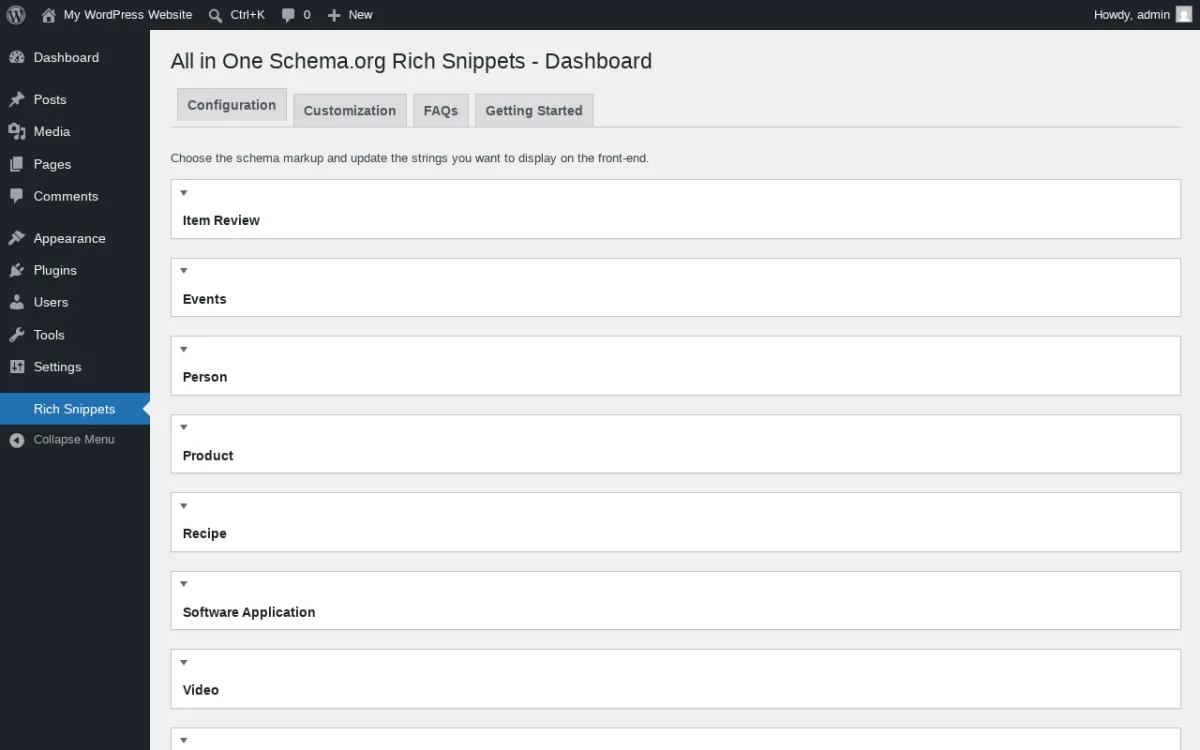
What I tested in a clean WordPress 7.0 sandbox on 2026-06-13. I installed v1.7.7 from the WordPress.org listing in a clean sandbox and activated it. Post-login the plugin auto-redirected to its Rich Snippets dashboard (captured above). The screen exposes four top tabs (Configuration, Customization, FAQs, Getting Started) and the Configuration tab lists the eight free schema types as collapsible panels in this exact order: Item Review, Events, Person, Product, Recipe, Software Application, Video, Article. There is no Setup Wizard launcher, no Knowledge Graph block, no per-post sub-menu, no Gutenberg block library, and no top-level admin menu other than the Rich Snippets sidebar entry. On the Post and Page edit screens the plugin adds a Configure Rich Snippet meta box with one drop-down (the content type) and a context-aware set of input fields. For Review type that means Item Name, Reviewer, Rating, Review Body and Best/Worst Rating. For Recipe that means Author, Prep Time, Cook Time, Total Time, Recipe Yield, Recipe Type, Recipe Cuisine, Calories, Ingredients, Nutrition fields and step-by-step instructions. A Test Rich Snippets admin-bar shortcut opens Google Rich Results Test in a new tab with the current post URL pre-filled.
Strengths. Smallest learning curve in this roundup. New site owners can add Review or Recipe schema in under five minutes without a Setup Wizard. The free tier is fully functional: no nag bars covering the meta box, no schema types greyed out, no "Save and continue with Pro." Brainstorm Force kept the free plugin maintained: 1.7.7 in March 2026 added security hardening, 1.7.5 added PHP 8.3 compatibility, 1.7.4 added a WooCommerce post-type exclusion to avoid conflicts with the modern WC editor. Free WooCommerce compatibility was added in 1.4.3 and improved through 1.6.12 (Product Image field in Review Schema). The Test Rich Snippets admin-bar link is a small but useful touch for QA.
Limitations. Eight schema types is intentionally small. Local Business, Service, Job Posting, Book, Podcast, Movie, How-To and the wider 20+ Schema Pro type set are all paywalled behind Schema Pro (covered in the next entry). The free build does not generate sitewide Organization or Knowledge Graph markup, so you would still need a separate plugin for those. The 4.0/5 rating is the lowest in this roundup; recent 1-star reviews skew to "free build is a tease for Pro" and historical bug reports that have since been addressed. Brainstorm Force also tracks usage with anonymous data collection (1.6.2 added the opt-in), which you can disable in Settings.
Pricing. The plugin is 100% free. The Pro upgrade path is Schema Pro, covered as the next entry.
Best fit. Small WordPress sites and bloggers that only need Review, Recipe, Event, Product, Person, Video, Software Application or Article schema. Anyone who wants to ship schema markup on a Friday afternoon without spending the weekend in a Setup Wizard. Buyers who think they will eventually want Schema Pro but want to start free.
4. Schema Pro: best premium "set it once globally" plugin

- Vendor: wpschema.com (Brainstorm Force)
- WordPress.org: None. Schema Pro is paid-only, distributed exclusively through wpschema.com.
- Verified by vendor: 174,239+ websites listed on wpschema.com homepage on 2026-06-13.
- Money-back: 14-day money-back guarantee on every tier.
- Sandbox testing note: Hands-on admin testing in a clean WordPress sandbox is not possible for Schema Pro because the plugin is paid-only and is not distributed through WordPress.org. The image above is the wpschema.com vendor product-page demo, labeled as a vendor asset.
Schema Pro is the paid sibling of All In One Schema Rich Snippets and the answer for anyone who hates per-post schema configuration. Instead of opening every recipe page and filling a Recipe meta box, you tell Schema Pro once: "Recipe schema applies to every post in the Recipes category; map the title field to my post title, map the prep-time field to my custom field prep_time, map the ingredients field to my custom field ingredients." That mapping lasts forever. Add a new recipe post, get valid Recipe JSON-LD automatically.
What the plugin does (based on vendor product page + documentation, 2026-06-13). The three-step setup wizard asks you to pick a schema type, pick the pages it applies to (display rules: post type, category, tag, custom taxonomy, specific post IDs, or "everywhere"), and map the schema properties to your existing WordPress fields (post title, post excerpt, featured image, ACF fields, custom fields, taxonomy terms). Real-time validation hits Google's Structured Data Testing Tool from inside the plugin admin so you can confirm output before publish. Compatible with Yoast SEO so you do not output two competing JSON-LD blocks for the same page. 100% ACF compatibility is the vendor's selling point for sites that already store structured data in ACF custom fields.
Supported schema types (20+ verified on wpschema.com 2026-06-13). Review, Local Business, Article, Service, Product, Podcast Listing, Recipe, Person, Job Posting, Book, Event, Movie Carousel, Video Object, FAQ (both classic and Gutenberg block), Course, Software Application, Vehicle Listing.
Strengths. Genuinely the cleanest "configure once" workflow in this roundup. The Schema Pro approach is the right model for sites that publish the same schema type on hundreds of posts (recipe blogs, real-estate listings, course catalogs, product directories). Live validation against Google Structured Data Testing Tool catches errors before publish, not after. Yoast SEO and 100% ACF compatibility are advertised explicitly. Brainstorm Force has built a wide WordPress ecosystem (Astra theme, Spectra blocks, SureCart, Ultimate Addons for Elementor and Beaver Builder) and ships consistent updates across the portfolio. 14-day money-back guarantee is enforced.
Limitations. No free tier; you must buy Schema Pro to access it. Schema Pro has no WordPress.org listing, so you cannot verify install count, current rating or review history through the standard public channel; the 174,239+ websites and 4.9 satisfaction rating come from the vendor's own homepage. Historic 1-star reviews on the free All In One Schema Rich Snippets sibling and one publicly archived Schema Pro refund case both surface friction around premium support response time, so buyers should treat the 14-day money-back window seriously and confirm Schema Pro works on their stack inside that window. Schema type coverage (20+) is wider than the free Brainstorm Force plugin but narrower than SASWP's 35+ free types and WPSSO Core's 500+.
Pricing. Verified on wpschema.com/pricing 2026-06-13.
- Annual $69 / year (regularly $79, $10 intro off). Unlimited website usage, all 20+ schema types, display rules, ACF compatibility, live schema testing, product updates, premium support.
- Lifetime $229 one-time (regularly $249, $20 intro off). Same feature set, no annual renewal.
Both tiers include the same feature set and a 14-day money-back guarantee.
Best fit. Sites with one schema-heavy post type that ships dozens or hundreds of identically-shaped pages (recipe blogs, real-estate listings, course catalogs, e-learning sites, product directories), agencies that want one plugin license they can deploy across client sites, ACF-heavy sites where the schema data already lives in custom fields.
5. Schema Engine AI: best AI-powered schema generator
- Vendor: schemaengineai.com (RadiusTheme)
- WordPress.org: wordpress.org/plugins/review-schema/
- Active installs: 10,000+
- Rating: 4.8 / 5 (24 reviews on 2026-06-13)
- Latest version: 3.0.2, released 2026-06-03 (v3.0 ground-up rebuild on 2026-05-19)
- Requires: WordPress 4.5+, PHP 7.4+
- Tested up to: WordPress 7.0
Schema Engine AI is the newest serious entry in the WordPress schema category. It started life as Review Schema and was rebuilt from the ground up in v3.0 on 2026-05-19 with a React + TypeScript + Tailwind admin, three generation modes (Manual, Auto, AI) and bring-your-own AI provider support for OpenAI, Anthropic Claude and Google Gemini. In AI mode you click Generate, the plugin sends the post content to your chosen LLM with a strict schema-generation prompt, the model proposes a schema type and pre-fills required and recommended properties, and the built-in Rich Results validator flags anything missing before you save. AI is positioned as a drafting tool, not an autopilot: every output is reviewed by a human and editable.
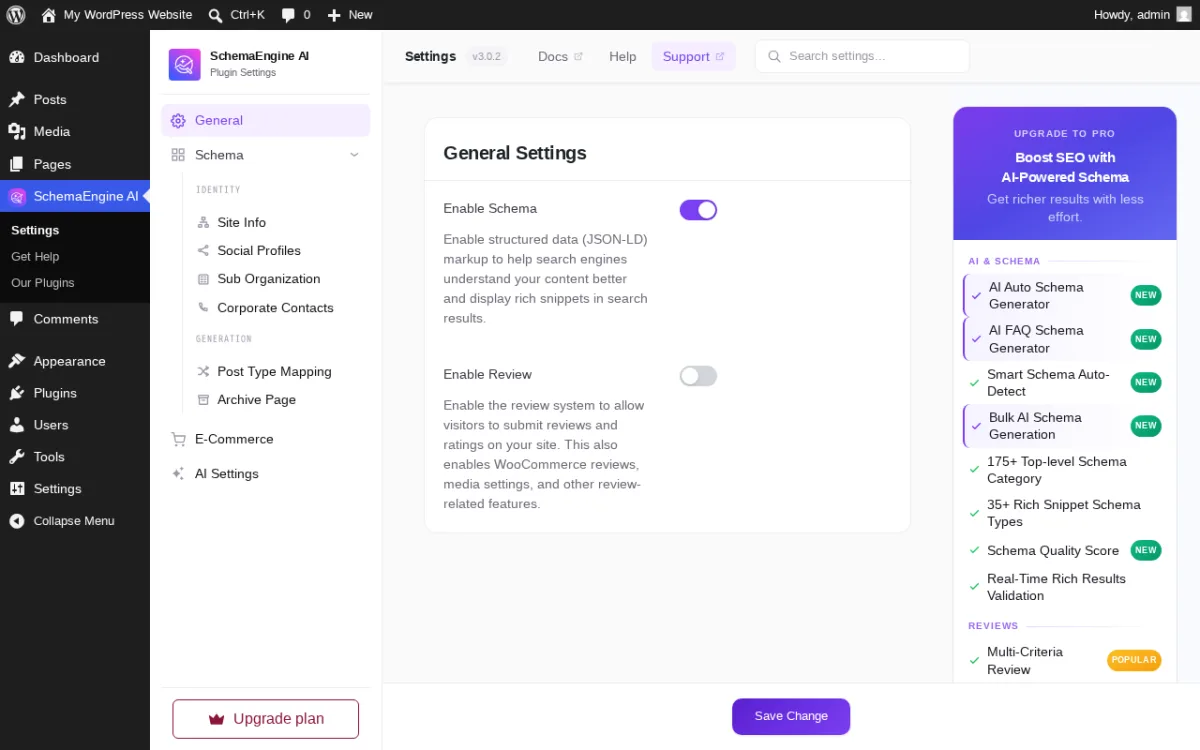
What I tested in a clean WordPress 7.0 sandbox on 2026-06-13. I installed v3.0.2 from the WordPress.org listing in a clean sandbox and activated it. Post-login the plugin auto-redirected to its Setup Wizard. The General Settings panel (captured above) confirms a SchemaEngine AI top-level menu with three sidebar items (Settings, Get Help, Our Plugins), a 3.0.2 build badge plus Docs / Help / Support links, and the Enable Schema (JSON-LD) + Enable Review master toggles. The left sub-nav splits cleanly into Identity (Site Info, Social Profiles, Sub Organization, Corporate Contacts), Generation (Post Type Mapping, Archive Page), E-Commerce and AI Settings. The right rail "Upgrade to Pro" panel lists exactly what is free vs Pro on the current build: free covers the three generation modes plus 175+ Top-level Schema Category and 35+ Rich Snippet Schema Types; Pro adds AI Auto Schema Generator, AI FAQ Generator, Smart Schema Auto-Detect, Bulk AI Schema Generation, Schema Quality Score, Real-Time Rich Results Validation and the Multi-Criteria Review enhancements (the New and Popular badges in the screenshot match the v3.0 rebuild changelog from May 2026). With AI mode enabled you paste an API key from OpenAI, Anthropic or Google; without a key, Manual and Auto modes still work fully. Inside each post you get a Schema Engine AI panel with three buttons: Manual (build JSON-LD by hand for any schema type), Auto (rule-based template applied based on post type), and AI (LLM-drafted JSON-LD that you review before saving). The Rich Results validator runs in real time in every mode. The SERP Preview shows how the schema will appear as a Google search result card. The Setup Wizard's third-party conflict prevention lets you toggle off the default schema output from WooCommerce, EDD, SureCart, Rank Math and Yoast SEO so you do not ship duplicate JSON-LD.
Free schema types (verified on WordPress.org 2026-06-13). WebPage, ItemPage, WebSite, BreadcrumbList, Organization/Person entity, Article, TechArticle, NewsArticle, BlogPosting, FAQPage, AboutPage, ContactPage, ProfilePage, MedicalWebPage, HowTo, Event, Person, Service, Movie, VideoObject, AudioObject, Mosque, Church, HinduTemple, BuddhistTemple. Plus FAQ Gutenberg block with accordion/tab layouts and a multi-criteria review system with star rating, pros/cons, image uploads and GDPR consent.
Strengths. The only WordPress schema plugin in 2026 that ships a multi-provider AI schema generator in the free tier. Bring-your-own API key model means you pay the LLM provider directly for usage instead of paying RadiusTheme a markup. The real-time Rich Results validator and SERP Preview panel are unusual in any tier, because most validators run only when you paste a URL into Google's external tool. Third-party conflict prevention is best-in-class: explicit toggles to disable the default schema output from WooCommerce, EDD, SureCart, Rank Math and Yoast SEO so you cannot accidentally ship duplicate JSON-LD. Multi-criteria review system with GDPR consent is a strong free bonus. Data Migration tool imports from the older WP SEO Structured Data Schema plugin with background processing and progress tracking, so switching plugins does not lose existing schema entries. v3.0.x release cadence is intense: v3.0 on May 19, v3.0.1 on May 23, v3.0.2 on June 3.
Limitations. AI mode requires an external LLM API key you have to obtain and pay for. The plugin does not run an LLM on your server. Product schema, JobPosting, Recipe, Course, Restaurant, Book, VehicleListing, RealEstateListing, VacationRental, TVSeries, PodcastEpisode, ImageObject, DiscussionForumPosting and TaxiService are Pro. WooCommerce ProductGroup schema for variable products (with hasVariant and variesBy), WooCommerce Shipping Details and Merchant Return Policy auto-generation, Schema Quality Evaluation (0-100 multi-criteria scoring) and Auto-Generate (background AI schema with WordPress cron) are Pro. Review count is small (24 reviews) compared to the older plugins in this roundup; this is a newer entry that has not yet accumulated the review history of Schema & Structured Data for WP & AMP or All In One Schema Rich Snippets.
Pricing. Verified on radiustheme.com/downloads/wordpress-review-structure-data-schema-plugin 2026-06-13 with the current sale applied.
- Annual 1 Site $34 / year (regularly $49).
- Annual 10 Sites $104 / year (regularly $149, vendor "Best Value").
- Annual Unlimited Sites $139 / year (regularly $199).
- Lifetime 1 Site $89 one-time (regularly $149).
- Lifetime 10 Sites $149 one-time (regularly $249, vendor "Best Value").
- Lifetime Unlimited Sites $199 one-time (regularly $399).
30-day money-back guarantee on every purchase. Annual plans renew at the regular price after year one unless cancelled.
Best fit. Operators who already have an OpenAI / Claude / Gemini API key and want AI-drafted schema as a starting point that a human edits, technical SEOs that want a real-time Rich Results validator inside WordPress instead of pasting URLs into Google's external tool, multi-criteria review sites that want both review collection + schema output in one plugin, sites migrating off WP SEO Structured Data Schema.
6. WPSSO Core: the WooCommerce and Google Merchant Feed specialist
- Vendor: wpsso.com (JS Morisset / Surnia Ulula)
- WordPress.org: wordpress.org/plugins/wpsso/
- Active installs: 5,000+
- Rating: 4.6 / 5 (306 reviews on 2026-06-13)
- Latest version: 22.3.0, released 2026-06-11
- Requires: WordPress 6.0+, PHP 7.4.33+
- Tested up to: WordPress 7.0
WPSSO Core is the technical specialist in this roundup. The free build covers 500+ Schema types and sub-types (the largest type registry of any plugin here), and it goes far beyond schema. WPSSO ships complete meta-tag generation for Facebook/Open Graph, Google Knowledge Graph, Google Merchant Feed XML, Instagram Catalog Feed XMLs, Meta (Facebook + Instagram) Catalog Feed XMLs, Pinterest Rich Pins, Slack, WhatsApp, X (Twitter) Cards, mobile web browsers, oEmbed for LinkedIn / Discord / Drupal, the WordPress REST API and WordPress Sitemaps XML. If you run a WooCommerce store and Google Merchant Center has been rejecting your product feed for "Missing field shippingDetails," "Missing field hasMerchantReturnPolicy," "No global identifier provided (gtin / mpn / isbn)" or "The aggregateRating field is recommended," WPSSO Core's job is to fix all of those errors at the source.
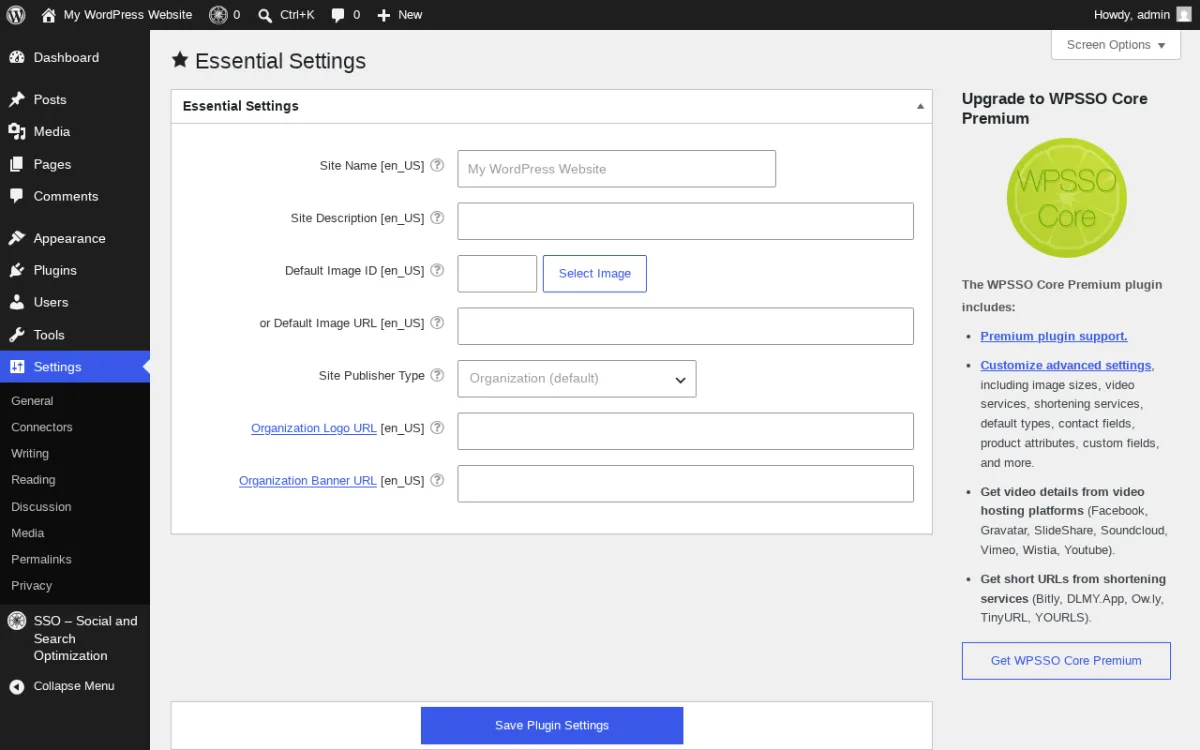
What I tested in a clean WordPress 7.0 sandbox on 2026-06-13. I installed v22.3.0 from the WordPress.org listing in a clean sandbox and activated it. The plugin adds an "SSO – Social and Search Optimization" entry to the WordPress sidebar (sitting visually under Plugins / Users / Tools / Settings) and the actual settings live under Settings as a sub-page. The Essential Settings page (captured above) is the right entry point for any new install: locale-aware Site Name [en_US] and Site Description fields, a Default Image ID input plus a Select Image button and a Default Image URL fallback, a Site Publisher Type drop-down defaulting to Organization (Person is the alternative), Organization Logo URL, and Organization Banner URL. The Save Plugin Settings primary button anchors the form. The right rail "Upgrade to WPSSO Core Premium" panel lists the Premium upsell explicitly: Premium plugin support, Customize advanced settings (image sizes, video services, shortening services, default types, contact fields, product attributes, custom fields, and more), Get video details from video hosting platforms (Facebook, Gravatar, SlideShare, Soundcloud, Vimeo, Wistia, Youtube), Get short URLs from shortening services (Bitly, DLMY.App, Ow.ly, TinyURL, YOURLS). The free build also ships the Schema tab with the full 500-type registry and sub-type drop-downs for Book, Event, Product, ProductGroup and Service, plus per-WooCommerce-product offer fields for Book Author Name, Book ISBN, Product Adult Type, Product Age Group, Product Availability, Product Brand, Product Google Category ID, Product Color, Product Condition, Product Currency, Product Energy Rating, Product GTIN-14 / GTIN-13 (EAN) / GTIN-12 (UPC) / GTIN-8 / GTIN, Product ISBN, Product MPN, Product Material, Product Pattern, Product Price, Product SKU, Product Shipping Height / Length / Weight / Width, Product Size, Product Target Gender and many more. WPSSO reads additional data from Co-Authors Plus, Elementor, Gravity Forms, Jetpack, Judge.me, Perfect Brands for WooCommerce, Polylang, Product GTIN for WooCommerce, PublishPress Authors, qTranslate-XT, Rate my Post, Simple Job Board, The Events Calendar, Ultimate Member, WooCommerce + WooCommerce Brands + WooCommerce UPC/EAN/ISBN, WP Job Manager, WP-PostRatings, WP Recipe Maker, WPML, YITH WooCommerce Brands and Yotpo, so existing custom fields on those plugins surface as schema properties automatically. WPSSO can also run alongside All in One SEO Pack, Rank Math SEO, SEOPress, The SEO Framework, WP Meta SEO and Yoast SEO to improve their structured data output without replacing them.
Strengths. 500+ Schema types is the widest coverage of any plugin in this roundup, free or paid. The free build's WooCommerce schema support is the most thorough on WordPress.org: every required Google Merchant Feed property has a corresponding field, every recommended property is mapped from existing WooCommerce data, and the error reference in the plugin description names the exact 25+ Google Rich Results / Google Merchant error strings WPSSO fixes. Active 2026 release cadence (eight releases in May + June 2026 alone), and the changelog reads like a Google Merchant Feed engineering log: "Added an offers property to the Schema Book markup," "Changed Schema areaServed markup from Schema GeoShape to GeoCircle," "Fixed inheritance of the @id value for Knowledge Graph markup." Optimized image sizes for every social and search target (Open Graph, Pinterest Pin It, Schema 1:1 / 4:3 / 16:9, Schema Thumbnail, Video Preview Image, X Summary Card, X Summary Card Large Image). Cache plugin auto-detection (v22.0.0 May 2026) reduces transient cache pressure when Cache Enabler, Comet Cache, Hummingbird Cache, LiteSpeed Cache, Pagely, SiteGround Cache, W3 Total Cache, WP Engine Cache, WP Fastest Cache, WP Rocket Cache or WP Super Cache is active.
Limitations. WPSSO Core has the steepest learning curve in this roundup. The Schema, Open Graph, Knowledge Graph, Merchant Feed and image-size settings are split across a dense tabbed interface, and you will spend an hour reading vendor docs before you understand which tab solves your specific problem. Recent 1-star reviews flag intrusive admin notices that cannot be dismissed and a vendor support tone that prefers depth over hand-holding. The plugin lineup includes a dozen optional add-ons (WPSSO Premium, WPSSO JSON, WPSSO Schema JSON-LD, WPSSO WooCommerce, WPSSO Place / Local Business / Local SEO, WPSSO GTIN/EAN/UPC, WPSSO Strip Schema Microdata, WPSSO Update Manager and more), and figuring out which add-ons your site actually needs is part of the buying process. WPSSO is not the right pick for a small blog that just wants Recipe or FAQ schema.
Pricing. Premium edition is sold through wpsso.com Account and adds API-driven data retrieval (Bitly, DLMY.App, Facebook Video Data, Gravatar Image Data, Judge.me Review Data, Ow.ly, Shopper Approved Review Data, Slideshare, Soundcloud Track Data, Stamped.io Review Data, TinyURL, Vimeo Video Data, Wistia Video Data, WP Media Library Video Block / Shortcode Data, YOURLS, YouTube Video and Playlist Data). The vendor runs a "Developer Special: Buy one, Get one Free" cross-sell for WPSSO Core + WPSSO JSON add-on, documented at wpsso.com. Confirm current Premium pricing inside the SSO Account screen before purchase.
Best fit. WooCommerce stores fighting Google Merchant Center rejections, sites running Open Graph + Facebook Catalog Feed XML + Schema in parallel, multilingual stores on WPML or Polylang that need consistent schema across languages, agencies handling marketplace integrations (Bing Shopping, Pinterest Catalogs, Facebook + Instagram Commerce Manager). Not the right pick for a small blog with only FAQ or Article schema.
7. Schema App Structured Data: best for enterprise and agencies
- Vendor: schemaapp.com (Schema App / Hunch Manifest Inc.)
- WordPress.org: wordpress.org/plugins/schema-app-structured-data-for-schemaorg/
- Active installs: 7,000+
- Rating: 4.1 / 5 (36 reviews on 2026-06-13)
- Latest version: 2.3.1, released 2026-04-08
- Requires: WordPress 4.4+, PHP 5.4+
- Tested up to: WordPress 7.0
Schema App Structured Data is the WordPress connector for Schema App, an enterprise schema-markup platform used by larger publishers and SEO agencies. The free WordPress plugin auto-generates default JSON-LD on activation and lets you edit it per page. The paid Schema App End-to-End Solution layers a hosted Schema Editor, a Schema Highlighter that produces advanced markup at scale, an assigned Customer Success Manager and a reusable content knowledge graph that the vendor positions as "support for AI-driven search." If you are an in-house SEO at a publisher or a senior consultant managing schema across many domains, this is the plugin you will see in the procurement shortlist.
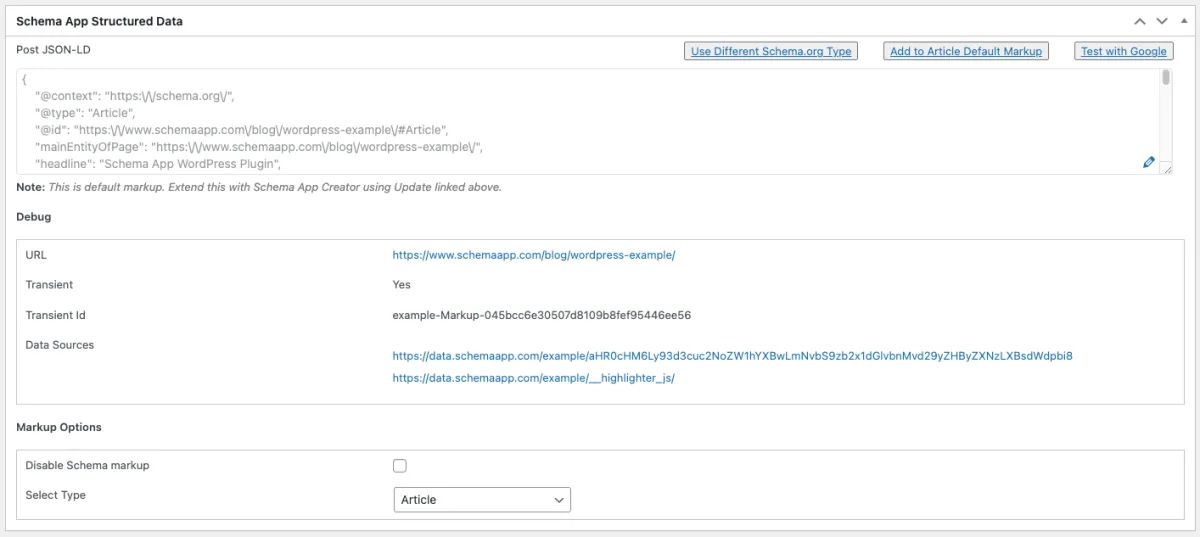
What I verified for this section. Schema App Structured Data v2.3.1 could not complete first-load testing in our sandbox; the plugin calls back to the Schema App service on first admin load and the request never finished cleanly in the sandbox I used for this round of the roundup. The image above is the current WordPress.org admin asset for the Page Meta Box, labeled as a vendor screenshot. The documented behavior on the WordPress.org listing and schemaapp.com (verified 2026-06-13) is: activate the plugin, add your business name and logo in the Schema App > Settings screen, and default Schema.org markup deploys automatically: Page → Article, Post → BlogPosting, Search → SearchResultsPage, Author → ProfilePage, Category and Tag → CollectionPage, Blog → Blog, BreadcrumbList sitewide, WebSite. VideoObject markup is added automatically for embedded YouTube videos (Vimeo added in 1.11). Inside the post editor you can switch the schema type (Post defaults to BlogPosting; you can flip to NewsArticle, TechArticle, Report or ScholarlyArticle) and you can edit the JSON-LD directly through a meta-box editor. Yoast SEO is auto-detected and its schema output is removed to avoid duplicate JSON-LD; the same suppression applies to Glue for Yoast SEO AMP. WPML is supported for multilingual schema deployment. Webhook + WP Cron support (1.17.0) handles background sync for paid accounts; v1.22.0 added WPEngine page-cache auto-clear for faster deployment.
Strengths. Genuine zero-config experience: install the plugin, set Business Name + Logo, and your site has default JSON-LD for every standard WordPress page type. The free admin is one of the cleanest in this roundup. Yoast SEO compatibility is documented and battle-tested (the plugin has dedicated filters to strip Yoast's WebSite, Company and Person data items so you do not output duplicates). AMP structured data is supported (1.8.0). The 2026 release stream includes a security-fix release in v2.2.5 (December 2024, vulnerabilities related to improper sanitization in admin notices and settings pages), null checking around global $post (v2.2.6 April 2025), and WP 7.0 tested-up-to (v2.3.1 April 2026). For paid accounts the plugin sends generated markup to Schema App for deployment monitoring (1.19.0), so the enterprise team can audit which markup is live across the network.
Limitations. Free build is intentionally minimal, with auto-generated default schema only. There is no Recipe / Event / JobPosting / Product / FAQ / HowTo schema in the free tier (you would need to layer SASWP, All In One Schema Rich Snippets or Rank Math on top, or upgrade to the Schema App platform). Past 1-star reviews flag "Difficult to Delete" and "Not really free", and both reflect the same root cause: the free plugin gets you default markup, but anything advanced (custom schema, Schema Highlighter, knowledge graph) requires a Schema App account. Pricing on schemaapp.com is quote-driven for the End-to-End solution, with a 12-month minimum subscription term, a one-time onboarding fee and at least one hour per month of high-touch support required to use the platform. Schema App is the most expensive option in this roundup once you commit to the full vendor experience.
Pricing. Confirmed quote-driven on schemaapp.com/pricing 2026-06-13. The vendor states explicitly: "We offer customized pricing based on the scale and complexity of your enterprise needs." No public list prices are published. The vendor's pricing model requires:
- 12-month minimum subscription term.
- A one-time onboarding fee covering strategy and setup (amount varies by scope).
- At least one hour per month of high-touch support; the Schema App platform is not sold as a stand-alone service to new customers.
- An optional Entity Hub add-on for knowledge-graph control.
- No free trial; the vendor invites prospects to schedule a demo or request a custom quote.
Buyers should treat Schema App as an enterprise procurement, not a self-service signup.
Best fit. Publishers and agencies that want a managed knowledge-graph and a Customer Success Manager rather than a DIY plugin, multilingual enterprise sites on WPML that need schema deployment audited across languages, technical SEO consultants who already use Schema App on other client domains and want the same admin pattern on this WordPress site, in-house SEO teams that need to demonstrate schema coverage to leadership through a hosted dashboard.
How to choose the right WordPress schema plugin
Match the plugin to the actual reason you are reading this post, not the highest install count.
- If you do not have a schema plugin and you want one good free pick, install Schema & Structured Data for WP & AMP. 35+ schema types in the free build, 11 Gutenberg blocks, AMP support, monthly release cadence through 2026. Anything you might want to publish (FAQ, HowTo, Recipe, Product, LocalBusiness, JobPosting, Event, Course, Book) ships in the free tier.
- If you are already running Rank Math, AIOSEO, Yoast SEO or SEOPress for general WordPress SEO, you probably do not need a second plugin. Rank Math is included in this roundup specifically because its free schema feature set is the strongest among SEO plugins. Add a dedicated schema plugin only if you need a schema type your SEO plugin does not ship (commonly: Local Business sub-types, advanced WooCommerce Merchant Feed properties, AMP, or a 1-click Knowledge Graph wizard).
- If you only need Review, Recipe, Event, Product, Person, Video, Software Application or Article schema on a handful of posts, install All In One Schema Rich Snippets. Smallest learning curve in the roundup.
- If you publish dozens or hundreds of identically-shaped pages and you hate per-post schema config, buy Schema Pro. Configure recipe schema once and every new recipe post gets it automatically.
- If you want an AI-powered drafting assistant for schema and FAQ generation, install Schema Engine AI. Bring your own OpenAI / Anthropic / Gemini API key. The real-time Rich Results validator inside WordPress is worth it on its own.
- If you run a WooCommerce store and Google Merchant Center keeps rejecting your product feed, install WPSSO Core. It is the closest thing to a dedicated WooCommerce + Merchant Feed schema engine on WordPress.org. The learning curve is real, but so is the result.
- If you are an in-house SEO at a publisher or a senior agency consultant, evaluate Schema App Structured Data. The managed knowledge-graph workflow and Customer Success Manager are the right model for enterprise schema, but treat the End-to-End pricing as a live sales conversation, not a fixed number.
Once your schema plugin is live, the next thing worth doing is everything around it. Our WordPress SEO audit checklist covers titles, sitemaps, canonicals, IndexNow, llms.txt and the other parts of technical SEO that schema sits on top of. If you are publishing a brand-new post, our 13 SEO tips for higher blog rankings walks through the post-publish work that turns valid schema into real rich results.
Frequently asked questions
What is schema markup and why does WordPress need a plugin for it?
Schema markup is the JSON-LD code that tells search engines and AI systems exactly what a page is about: Article, Product, Recipe, FAQ, How-To, Event, Local Business, Job Posting and so on. WordPress core does not output schema by default. A schema plugin adds the JSON-LD block to every relevant page so the page becomes eligible for Google rich results (stars, FAQ accordions, recipe cards, product carousels, breadcrumbs and similar features) and is easier for AI search engines like Google AI Overviews to parse.
Does schema markup directly improve Google rankings?
No, and any plugin vendor that claims it does is overselling. Google has stated repeatedly that structured data is not a direct ranking factor. What schema markup does is make pages eligible for rich results, which tend to increase click-through rate from organic search, and help search and AI systems understand the entities, facts and relationships on the page. Both effects matter, but neither is a ranking shortcut.
Do I need a schema plugin if I already use Yoast SEO, Rank Math or AIOSEO?
Probably not. Every major WordPress SEO plugin ships built-in schema for the most common types (Article, BlogPosting, Product, FAQ, HowTo, Person, Organization). Rank Math ships the widest free schema set among SEO plugins, with 16+ types in the free tier and Gutenberg blocks for FAQ and HowTo. Add a dedicated schema plugin (from this roundup) only when you need a schema type the SEO plugin does not ship, commonly LocalBusiness sub-types, advanced WooCommerce Merchant Feed properties, AMP support, or a 1-click Knowledge Graph wizard. Never run two SEO plugins or two schema plugins for the same schema type simultaneously, because you will ship duplicate JSON-LD blocks for every page.
Which is the best free WordPress schema plugin in 2026?
Schema & Structured Data for WP & AMP by Magazine3 covers 35+ schema types in its free build with 11 Gutenberg blocks, a Setup Wizard, AMP support, and a monthly release cadence through the first half of 2026. It is my default free pick for any WordPress site without an existing strong SEO plugin. If you only need the eight high-value types (Review, Event, Person, Product, Recipe, Software Application, Video, Article) and want the smallest learning curve, All In One Schema Rich Snippets by Brainstorm Force is the simpler choice.
Should I use the schema generator built into my SEO plugin or a dedicated schema plugin?
Use whichever covers all the schema types you actually publish. For a standard blog (Article + FAQ + HowTo), the SEO plugin's schema is enough. For LocalBusiness with sub-types, JobPosting, advanced WooCommerce Merchant Feed, Recipe sites with hundreds of recipes, AMP publishers, or sites that want AI-drafted schema, a dedicated schema plugin is the right call. The two plugins must not both ship schema for the same page type; see the previous answer.
Do schema plugins work with WooCommerce product pages?
Yes, but coverage varies. Rank Math ships automatic Product schema for WooCommerce in its free tier. Schema & Structured Data for WP & AMP ships basic Product schema in free; full WooCommerce offer / shipping / return-policy coverage is a Pro extension. WPSSO Core ships the most thorough WooCommerce schema in the free build, including GTIN/MPN/ISBN, shipping details and merchant return policy needed for Google Merchant Center. Schema Pro maps WooCommerce product fields through its global schema mapper. Pick based on which Merchant Feed errors you are currently chasing.
How do I test whether my schema markup is working?
Run the live URL through Google's Rich Results Test at search.google.com/test/rich-results and through the Schema.org Validator at validator.schema.org. Most plugins in this roundup also provide an in-WordPress shortcut that opens those external tools with the current URL pre-filled (Schema, All In One Schema Rich Snippets, Schema App, Schema Engine AI). Schema Engine AI's free build adds a real-time validator inside the post editor, so you see what is missing before you publish. If a rich result does not appear in search results after the schema validates, give Google a few weeks to re-crawl the page; structured data eligibility is not the same as guaranteed display.
Final recommendation
WordPress sites in 2026 should not be relying on Google to guess what their pages are about. If you already use Rank Math, AIOSEO, Yoast SEO or SEOPress for general SEO, start by reviewing what schema your existing plugin already outputs. If it covers the types you publish, you do not need a second plugin. If it does not, install one of the dedicated schema plugins from this roundup.
For most WordPress sites, the safest free pick in 2026 is Schema & Structured Data for WP & AMP. The widest free schema coverage, the most native Gutenberg blocks and a consistent 2026 release cadence make it the default. If you want the simplest free path for only the eight high-value rich-result types, install All In One Schema Rich Snippets. If you publish at scale and want a "configure once globally" paid plugin, Schema Pro is the cleanest answer. If you want an AI-drafted starting point with a real-time validator, install Schema Engine AI. If you are fighting Google Merchant Center errors on a WooCommerce store, install WPSSO Core. Enterprise publishers and agencies should evaluate Schema App on a sales call, not from a public price list.
Once your schema is live, the rest of the technical SEO stack (titles, meta, sitemaps, IndexNow, llms.txt, internal linking) determines whether the rich results actually appear in search. Our best free WordPress SEO plugins comparison covers that next decision in detail. For high-traffic e-commerce sites that need WPSSO Core's Merchant Feed support, our guide to setting up a WooCommerce store explains the WooCommerce side. And once your essentials are in place, our top free WordPress plugins roundup rounds out caching, security, analytics and the other pieces of a healthy WordPress stack.


