

Best Free WordPress SEO Plugins for 2026 (Compared)

If you run a WordPress site, the SEO plugin you pick is one of the few decisions that touches every page you publish. It sets your titles, your meta descriptions, your schema, your sitemap, and how AI search engines see your content.
The good news: in 2026 the free tiers of the top WordPress SEO plugins are stronger than ever. The not-so-good news: the differences between them are now subtle, and the wrong choice still costs you time, conflicts, or features you thought were free.
For this 2026 refresh I spun up a fresh WordPress Playground site per plugin, installed each one from the official WordPress.org repository, and opened the wp-admin screen the average new user actually lands on. I re-checked every install count, rating, version number, and price below against the live WordPress.org listing and the vendor’s own pricing page on 2026-05-23. For features that go beyond the initial landing screen, I cross-checked the vendor’s current WordPress.org admin screenshots, the 2026 changelog, and the live pricing page so the feature and free-tier claims in each plugin entry reflect the product as it ships today.
If you want broader, non-plugin SEO context first, our WordPress SEO Optimization guide (Part 1) and the SEO audit checklist cover the work that happens around the plugin.
How I evaluated these plugins
For each plugin I checked the following inside the sandbox install where possible, and cross-referenced the rest against the vendor’s current WordPress.org admin screenshots, 2026 changelog, and pricing page:
- Free-version usefulness. Is the free tier enough to ship a real site, or is it a tease for the paid plan?
- Setup speed. How fast can a non-expert finish the setup wizard and start publishing?
- Core technical SEO coverage. Titles, meta, canonicals, XML sitemaps, schema, robots, breadcrumbs.
- Content analysis depth. Readability, focus keyword/keyphrase support, SERP preview.
- Modern search readiness. Schema breadth, IndexNow, llms.txt and AI-crawler signals for AEO/GEO.
- Performance and admin bloat. How aggressive the upsells and dashboard nags are, and how heavy the admin feels in day-to-day use.
- Pricing fairness when you outgrow free. Per-site cost, what is locked behind paid, and renewal behavior.
- Reputation signals. WordPress.org active installs, current rating, recent release cadence.
Quick comparison table
| Plugin | Best for | Active installs | Rating | Free version | Cheapest paid plan (annual) |
|---|---|---|---|---|---|
| Rank Math | Maximum free features and built-in AI | 4M+ | 4.8 / 5 | Yes, very generous | $7.99/mo, billed annually ($95.88/yr), unlimited personal sites |
| Yoast SEO | Beginner-friendly defaults and ecosystem | 10M+ | 4.8 / 5 | Yes, solid core | €118.80/yr ex VAT, 1 site |
| All in One SEO (AIOSEO) | Established alternative with strong WooCommerce SEO | 3M+ | 4.7 / 5 | Yes, with clear paid upsells | $49.50/yr (intro), 1 site; renews $99 |
| SEOPress | Privacy-first, fully white-label, agency-friendly pricing | 300,000+ | 4.8 / 5 | Yes, fewer artificial limits | $49/yr, 1 site (or $149/yr unlimited) |
| The SEO Framework | Zero-bloat, no upsells in admin, expert defaults | 200,000+ | 4.9 / 5 | Yes, treated as the product | Free; optional paid extensions via Extension Manager |
1. Rank Math: best free feature set in 2026
- WordPress.org: https://wordpress.org/plugins/seo-by-rank-math/
- Active installs: 4+ million
- Rating: 4.8 / 5 (7,432 reviews)
- Latest version: 1.0.270, released May 14, 2026
- Requires: WordPress 6.3+, PHP 7.4+
- Tested up to: WordPress 7.0
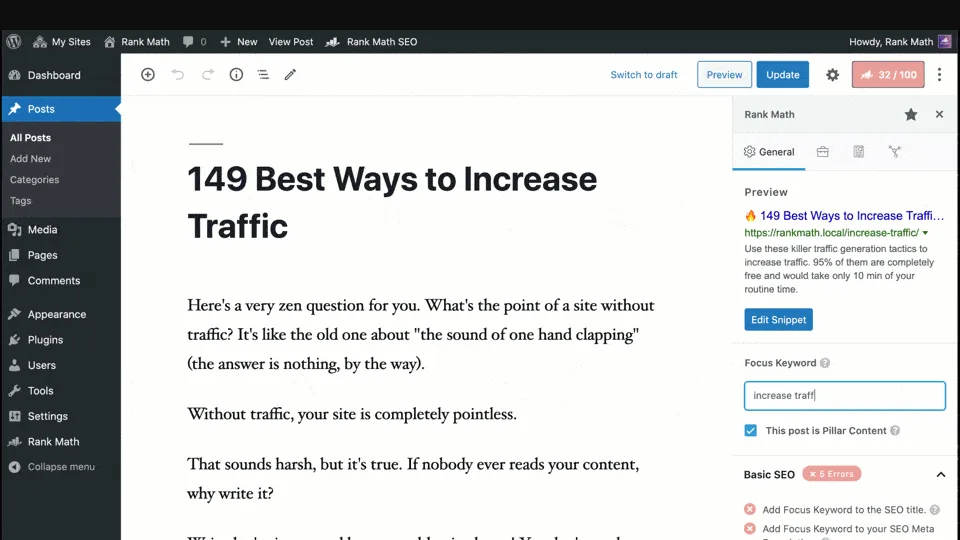
What I checked. Rank Math auto-installed from the WordPress.org repository and routed me straight into its setup wizard. The wizard and the post-install admin are feature-dense, which is consistent with how much Rank Math packs into its free tier. I verified the rest through Rank Math’s current WordPress.org admin screenshots, the 2026 changelog, and the live pricing page. The vendor screenshot above shows what the post editor sidebar looks like in a configured install: a focus-keyword field, a live SERP snippet preview, a Basic SEO checklist with green/red dots, and the SEO score in the top toolbar.
Why it earns the top spot in 2026. Rank Math still ships free features competitors usually paywall: unlimited focus keywords per post, schema markup for 16+ types, an integrated 404 monitor and redirection manager, Google Search Console and Analytics inside WordPress, and a guided setup wizard that imports cleanly from Yoast, AIOSEO, or SEOPress. The 1.0.270 release continues the push into AI: the free tier now includes Content AI with 40+ AI tools for SEO writing, image alt-text generation, and the RankBot assistant. AI Link Genius for automated internal linking is in Pro, but the free internal linking suggestions are still better than most competitors at the same tier.
What I liked. Free covers what most blogs and small businesses need without ever opening the wallet. The schema editor is the most thorough in the category. The Search Console and Analytics integration is genuinely useful right out of setup.
Watch-outs. The setup wizard requires a free Rank Math account to enable keyword suggestions and SEO site analysis (a working email is enough; no card). The admin is the most feature-dense in this comparison, so first-time users will need a few minutes to learn the navigation. A few users in 2026 reviews flag pending Divi 5 compatibility, so confirm builder compatibility before migrating.
Pricing if you outgrow free. Rank Math Pro starts at $7.99/month billed annually ($95.88/year) for unlimited personal sites and 500 tracked keywords. Business is $24.99/month annually for up to 100 client sites; Agency is $54.99/month annually for 500 client sites. Each plan renews at a slightly higher rate ($8.99, $27.99, $64.99 per month).
Best fit. Bloggers, niche site owners, and small WordPress agencies who want as much in the free tier as possible and a smooth path to one inexpensive Pro license later.
Free download Rank Math website
2. Yoast SEO: the safe default that keeps modernizing
- WordPress.org: https://wordpress.org/plugins/wordpress-seo/
- Active installs: 10+ million
- Rating: 4.8 / 5 (27,810 reviews)
- Latest version: 27.6, released May 12, 2026
- Requires: WordPress 6.8+, PHP 7.4+
- Tested up to: WordPress 7.0
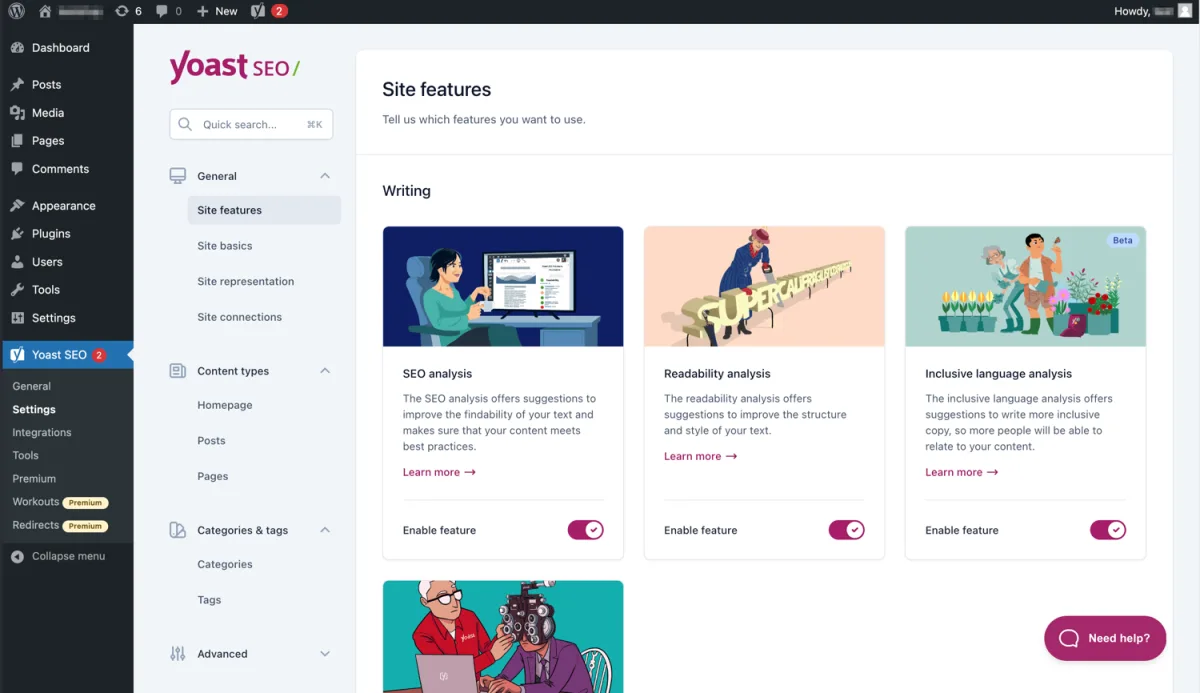
What I checked. Yoast auto-installed cleanly and the post-install welcome screen appeared as expected. The full first-time configuration flow that follows is the most beginner-friendly entry point in the category, but I verified the rest of the feature set, including the Site Features panel, settings layout, and free-tier coverage, against Yoast’s current WordPress.org admin screenshots and 2026 documentation. The screenshot above is the Site Features admin panel you reach right after the welcome screen, with enable/disable toggles for SEO analysis, Readability analysis, Inclusive language analysis, Cornerstone content, and the other 2026 features.
Why it still earns its place. Yoast is the SEO plugin the largest WordPress audience uses, and the 2-week release cadence shows. Version 27.6 added the Content Planner inside Yoast SEO Premium, with limited AI “sparks” available in the free tier. The traffic-light readability and SEO analysis, SERP previews for desktop and mobile, automatic schema, canonical handling, breadcrumbs, FAQ and HowTo blocks, and the new LLMs.txt management are all in free. The configuration wizard remains the most beginner-friendly entry point in the category.
What I liked. Conservative, safe defaults. Migration from Rank Math or AIOSEO is genuinely seamless. The free version is honestly enough for most blogs and small business sites. Integrations with Google Site Kit, Elementor, Semrush, Wincher, Algolia, Jetpack, and WooCommerce mean Yoast slots into most existing stacks with minimum extra configuration.
Watch-outs. Premium is the most expensive of the mainstream options on a per-site basis. The free dashboard surfaces more upsell prompts than SEOPress or The SEO Framework. A handful of useful features (redirect manager, internal linking suggestions, IndexNow, social previews for Facebook and X) only unlock in Premium.
Pricing if you outgrow free. Yoast SEO Premium is €118.80/year (ex VAT) per single website. Bulk discounts apply when you buy multiple subscriptions at checkout. Premium includes Local SEO, Video SEO, and News SEO at no extra cost.
Best fit. Beginners who want minimum decisions, content teams who value 24/7 support and predictable release cycles, and sites where the Yoast Premium add-ons (Local, Video, News) are genuinely useful.
Free download Yoast SEO website
3. All in One SEO (AIOSEO): the established alternative
- WordPress.org: https://wordpress.org/plugins/all-in-one-seo-pack/
- Active installs: 3+ million
- Rating: 4.7 / 5 (5,127 reviews)
- Latest version: 4.9.7.2, released May 18, 2026
- Requires: WordPress 5.7+, PHP 7.2+
- Tested up to: WordPress 6.9.4
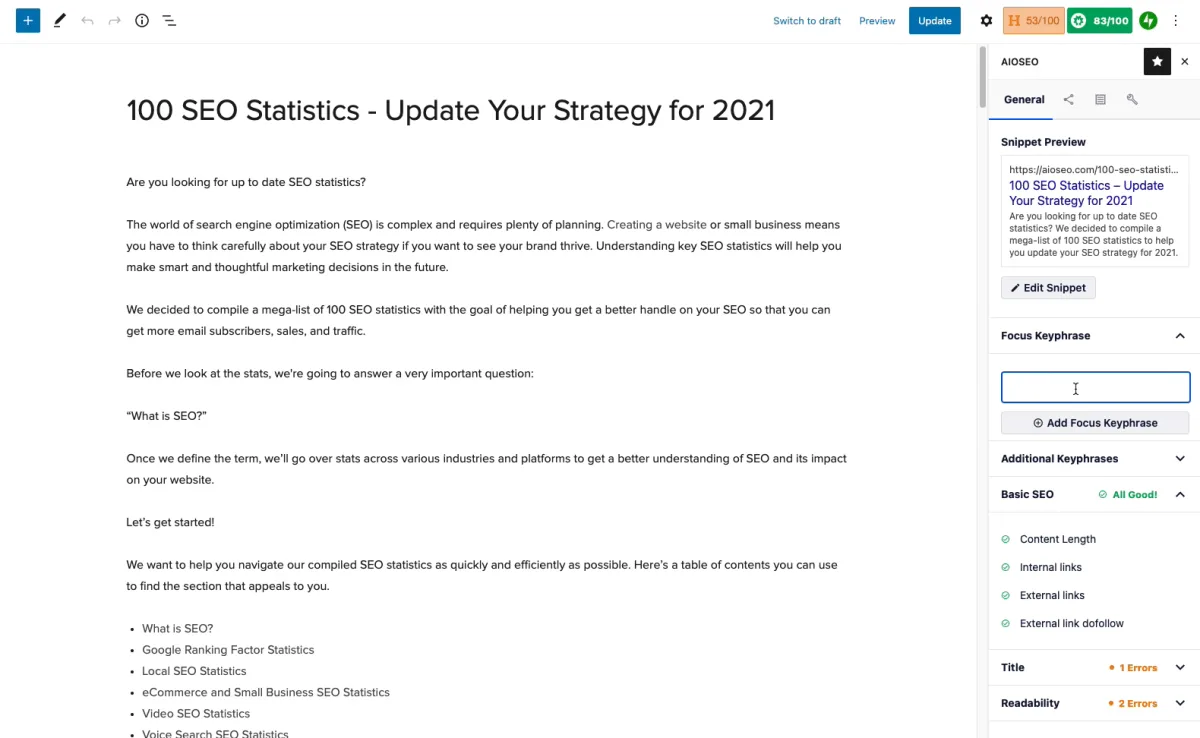
What I checked. AIOSEO auto-installed and landed on its main dashboard. The dashboard is feature-dense and visually loud (more upsell tiles than the other four plugins), which is consistent with AIOSEO’s position inside the WPBeginner / Awesome Motive ecosystem. I verified the editor experience, sitemap and schema settings, and the free-vs-paid split through AIOSEO’s current WordPress.org admin screenshots, the 2026 changelog, and the live pricing page. The screenshot above is the block-editor sidebar you spend the most time in once setup is done: snippet preview, focus keyphrase, Basic SEO checks for content length / internal links / external links / dofollow, plus Title and Readability score buttons in the right rail and the headline analyzer score in the top toolbar.
Why it earns a spot. AIOSEO is the longest-running WordPress SEO plugin, originally released in 2007 and now under the Awesome Motive umbrella alongside WPForms and MonsterInsights. The 2026 lineup added the AI Schema Generator, bulk AI generation for meta titles and descriptions, the new SEO Checklist, an LLMs.txt generator, and full Divi 5 Visual Builder support.
The free version covers TruSEO content analysis with unlimited keywords, a schema generator, XML sitemaps (including video, news, and RSS), Open Graph and X (Twitter) card management, knowledge graph fields, and webmaster tools integrations for Google Search Console, Bing, Yandex, Baidu, and Pinterest. WooCommerce SEO basics are in free; the deeper modules sit in Pro.
What I liked. AIOSEO’s documented setup wizard is structured to finish in under five minutes, with the longest decision points being industry selection and the webmaster-tools verifications. Author SEO (E-E-A-T) blocks, the keyword rank tracker (Pro), and the SEO Revisions tool are real differentiators if you publish regularly. Migration from Yoast, Rank Math, or SEOPress is one click.
Watch-outs. The free dashboard is the loudest of the five plugins in this list. Several genuinely useful features (Link Assistant for internal linking, Local SEO, smart sitemap controls, anything beyond the default IndexNow setup) live behind Pro. Several user reviews from 2026 explicitly call out pricing as the main friction.
Pricing if you outgrow free. AIOSEO Pro starts at $49.50/year (1 site, intro 50% off the $99 list price), Plus is $99.50/year (3 sites), Pro is $199.50/year (10 sites), and Elite is $299.50/year (100 sites). Renewals are at the full prices.
Best fit. WooCommerce stores, multi-author publications, and sites already inside the WPBeginner / Awesome Motive ecosystem (WPForms, MonsterInsights, OptinMonster).
4. SEOPress: privacy-first, white-label, agency-friendly
- WordPress.org: https://wordpress.org/plugins/wp-seopress/
- Active installs: 300,000+
- Rating: 4.8 / 5 (1,229 reviews)
- Latest version: 9.8.5, released May 20, 2026
- Requires: WordPress 6.5+, PHP 7.4+
- Tested up to: WordPress 7.0
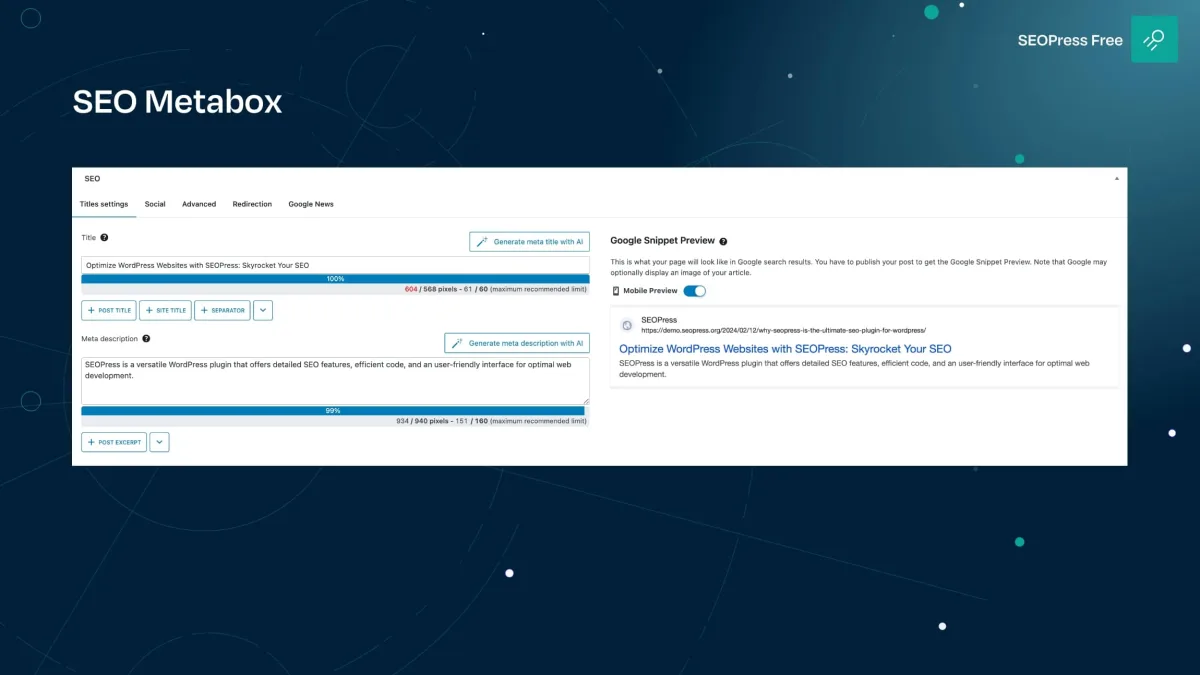
What I checked. SEOPress auto-installed and landed on its main settings screen. The 9.8 release rebuilt the admin on the WordPress Design System, and the layout reflects that: native-looking, dense, and built around the new Cmd/Ctrl+K command palette. I verified the rest of the experience, including the universal SEO metabox, social previews, sitemap behavior, and the free-vs-paid split, against SEOPress’s current WordPress.org admin screenshots, the 9.8.x changelog, and the live pricing page. The vendor screenshot above is the new SEOPress SEO metabox: Titles settings tab on the left with title/meta description fields and pixel-width counters, AI Generate buttons inline, and a live Google Snippet Preview on the right.
Why I recommend it for agencies. SEOPress is the option I quietly recommend to agencies and privacy-conscious site owners. The 9.8 release rebuilt the plugin on the WordPress Design System and shipped a Cmd/Ctrl+K command palette for jumping across 240+ settings. The free tier already includes content analysis with unlimited target keywords, a universal SEO metabox for every major page builder (Gutenberg, Elementor, Divi, Bricks, Oxygen, Breakdance, WPBakery, Avada, Kadence), Google and social previews, XML/HTML sitemaps, image SEO, redirections at the post level, IndexNow, llms.txt with the new Agent Readiness toggle, and one-click migration from Yoast, Rank Math, AIOSEO, and The SEO Framework.
There are no dashboard upsell nags in free. White-label is a default option, not a paid feature, which is why agencies keep choosing it.
What I liked. Most useful SEO settings are in free, not paywalled. Privacy-by-design and built-in GDPR friendliness fits European clients without extra work. Pricing is the friendliest of the paid options in this list.
Watch-outs. Smaller user base than Yoast or Rank Math, so community tutorials and theme integrations are less plentiful. The AI features (auto title/description generation, AI alt text) are Pro-only.
Pricing if you outgrow free. SEOPress PRO is $49/year for 1 site or $149/year for unlimited sites. SEOPress Insights (rank tracking and backlinks) is sold separately.
Best fit. Freelancers, WordPress agencies managing many client sites, and any site owner who wants a clean admin without upsells.
Free download SEOPress website
5. The SEO Framework: zero-bloat, expert defaults
- WordPress.org: https://wordpress.org/plugins/autodescription/
- Active installs: 200,000+
- Rating: 4.9 / 5 (375 reviews)
- Latest version: 5.1.4
- Requires: WordPress 6.0+, PHP 7.4+
- Tested up to: WordPress 6.9.4
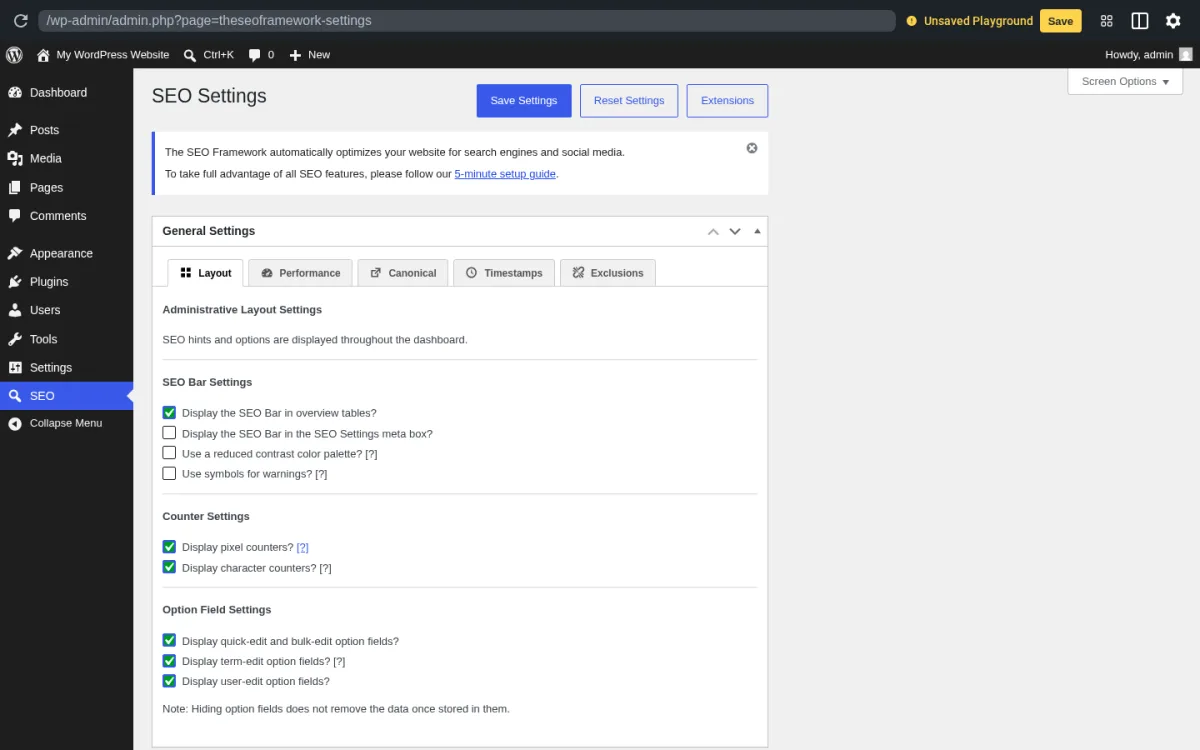
What I tested. The SEO Framework was the easiest of the five plugins to navigate end-to-end. After auto-install I landed directly on the SEO Settings page (screenshot above) and worked through all five General Settings tabs: Layout, Performance, Canonical, Timestamps, and Exclusions. The post-list “SEO Bar” feature can be toggled directly from the Layout tab, along with the option to display the SEO Bar inside the SEO Settings meta box, a reduced-contrast color palette, and symbol-based warning markers. There are no ads, no upsell prompts, no AI nags, and no separate “Premium” plugin offer anywhere in the admin. Everything in the screenshot is the actual default after a clean install.
Why it earns its place. TSF auto-generates safe meta titles and descriptions out of the box, prevents canonical errors on pagination and multisite domain mapping, blocks SEO and AI training crawlers via a priority-based robots.txt generator, and outputs structured data without forcing you to learn the UI. The recent v5.1 “Profound” update added a real-time canonical URL tracker in the editor, refined the accessibility-first color scheme, and added an option to set canonical and redirect URLs for the homepage.
What I liked. It is the lightest full-featured SEO plugin in this list and noticeably the most responsive admin in this round of testing. The white-label admin feels native to WordPress. Color-coded SEO bars on the post list give you a clear “fix this first” cue. Support replies personally and quickly.
Watch-outs. Smaller community than the big 3, fewer YouTube tutorials. No built-in analytics, AI writing, or 404 monitoring; the philosophy is that those belong outside the SEO plugin. Some paid extensions are installed through a separate Extension Manager plugin, which a few users find surprising on first install.
Pricing if you outgrow free. TSF stays free. Optional paid extensions (Focus for keyword research, Articles for richer schema, Transport for cross-plugin migration, Monitor, Local, AMP) come through the free Extension Manager plugin.
Best fit. Developers and SEO-literate site owners who want a plugin that quietly does the right thing without filling the dashboard with ads or trying to upsell.
Free download The SEO Framework website
How to choose the right WordPress SEO plugin
The category is mature enough that the wrong choice usually is not catastrophic, but the right choice removes friction every time you publish.
- You want the most free features: pick Rank Math.
- You want the safest, most documented choice for a non-technical client: pick Yoast SEO.
- You run a WooCommerce store or sit inside the WPBeginner ecosystem: pick AIOSEO.
- You manage many client sites and want a clean white-label admin at a fair price: pick SEOPress.
- You want a calm, lightweight plugin that just works and never nags: pick The SEO Framework.
A few rules apply to all of them:
- Run only one SEO plugin at a time. Two SEO plugins on the same site usually fight over titles, sitemaps, and canonicals.
- Use the built-in migration tool when you switch. Every plugin in this list now supports one-click migration from at least Yoast and Rank Math.
- Decide on free-vs-paid based on which one feature you actually need (redirect manager, schema templates, rank tracker, internal linking AI), not on the marketing pages.
- Re-validate your XML sitemap and canonical setup right after the switch. Most “I lost rankings after changing SEO plugin” stories start there.
For the work that sits before and after the plugin, our WordPress SEO importance primer and the SEO audit task list are the next two reads, and the best Google tools for WordPress covers Search Console, Analytics, and friends.
FAQ
What is the best free SEO plugin for WordPress in 2026?
For most users, Rank Math offers the most free features (unlimited focus keywords, schema, redirection manager, 404 monitor, internal linking suggestions, AI content tools). Yoast SEO is the safer beginner default. The SEO Framework is the right pick if you want a plugin that never nags you.
Is Rank Math better than Yoast SEO?
It depends on what you mean by “better.” Rank Math gives you more in the free tier and is faster to configure for advanced features. Yoast SEO has a larger user base, more tutorials, a more conservative release model, and stronger automatic schema. Both ship near-identical core SEO output once they are configured.
Can I run two SEO plugins on the same WordPress site?
No. Running two SEO plugins together creates duplicate meta tags, conflicting canonical URLs, and broken sitemaps, and it commonly costs you rankings. Migrate fully from one to the other using the built-in import wizards.
Will switching SEO plugins hurt my Google rankings?
Not if you use the official one-click migration inside the new plugin and re-verify your XML sitemap and canonical setup afterwards. Rank Math, AIOSEO, SEOPress, and The SEO Framework all support one-click migration from Yoast and from each other.
Do I really need to pay for a premium SEO plugin?
For most blogs and small business sites, no. The free tiers of all five plugins in this list cover titles, meta, schema, sitemaps, social previews, and basic redirects. Paid plans become worth it when you need a real redirect manager, automated internal linking, ranking tracker, multi-site management, or a full schema editor.
What is the lightest WordPress SEO plugin?
The SEO Framework is the leanest of the mainstream options and is explicitly built to avoid bloat. SEOPress is the next-lightest after its 9.8 performance pass. During this round of testing, The SEO Framework’s admin felt the most responsive of the five plugins.
Do these plugins work with WooCommerce?
Yes. All five output basic product SEO in free. For richer WooCommerce SEO (product schema with GTIN/MPN/brand, OG price/currency, noindex on cart/checkout/account), AIOSEO Pro and SEOPress PRO are the strongest. Yoast offers a dedicated paid WooCommerce SEO extension.
Conclusion
The “free” tier in WordPress SEO has quietly become very good in 2026. Rank Math and Yoast cover the majority of cases. SEOPress and The SEO Framework are the smart choice when admin cleanliness and price predictability matter. AIOSEO is the natural fit if you already live inside the WPBeginner stack or run WooCommerce at scale.
Whichever one you pick, install only one, use the migration wizard, re-validate your sitemap, and then spend the saved time on content and internal linking. That is where rankings actually move.


