

No Hype: 9 WordPress Social Media Plugins That Actually Work
 Senior Content Writer
 Head of Marketing

"Best WordPress social media plugin" is really three different questions. The first is auto-posting your new content out to Facebook, LinkedIn, Threads, Pinterest and the rest. The second is pulling your Instagram, Facebook, YouTube or TikTok content back into your site as live feeds. The third is giving visitors the share buttons they use to push your posts onto their own networks. No single plugin does all three jobs well, so the right 2026 stack is one plugin per job.
This roundup gives you the top pick for each category with a one-paragraph rationale and an honest pricing snapshot, followed by the runners-up and the full rationale in each section.
Quick answer: The best WordPress social media plugin depends on the job. For auto-posting WordPress content to social networks, FS Poster is the top pick (26 networks, from $58/year). For showing social feeds on your site, Smash Balloon leads (from $49/year per network plugin). For visitor share buttons, AddToAny is the free default (300,000+ active installs). Most sites run one plugin from each group. Last verified: 8 September 2026.
How I evaluated these picks
This guide consolidates findings from three deeper hands-on category reviews I published on auto-posting, social feeds and share buttons. For each pick:
- I tested the plugin on a real WordPress install where the free tier allowed it. For paid-only plugins, I worked through the vendor pricing page, official docs and a spread of recent positive and critical reviews.
- I scored every product on the same criteria: feature richness, ease of use, frontend or admin performance, pricing reality across the renewal year (not just the intro discount), and WordPress.org reputation.
- Every install count, rating and pricing figure below was checked again against the live WordPress.org listing or the live vendor pricing page on 8 September 2026.
The three categories of WordPress social media plugins
Before the rankings, a quick map of what each category actually does and when you need it. These are not subjective labels: every plugin you will see below fits cleanly into one of the three groups, and almost none of them try to span more than one.
- Auto-posting and scheduling plugins. Push your WordPress posts, products or pages out to your own social accounts the moment you publish (or on a schedule). This is the right pick if your KPI is "every new post shows up on Facebook, LinkedIn, Pinterest, X, Threads and the rest, without me copy-pasting captions seven times."
- Social feed and widget plugins. Pull content from your social accounts (Instagram, Facebook, YouTube, TikTok, X, plus reviews) and render it inside WordPress as a feed, grid, slider or sidebar widget. This is the right pick if you want your site visitors to see your latest Instagram posts, your Facebook page, your TikTok grid or your Google reviews without leaving your page.
- Social share button plugins. Add the small Facebook / X / LinkedIn / Pinterest / WhatsApp buttons that let your visitors share your content to their own networks. Visitor-facing only. They never post anything from your accounts.
The three jobs are complementary, not interchangeable. The cleanest setup for most WordPress sites in 2026 is one plugin per job: an auto-poster for outbound, a feed plugin for the inbound display people see on your site, and a share-button plugin for the share clicks on individual posts.
Quick picks: best plugin in each category
If you want the short answer first, here is the top pick I would recommend in every category. Skip ahead to the full section for the runners-up and the rationale.
| Category | Top pick (2026) | Why | Starting price |
|---|---|---|---|
Auto-posting and scheduling |
FS Poster |
26 essential networks on every plan (five extra channel types from Plus up), modern admin, real Calendar plus a recurring Planner, optional Lifetime tier for 30 websites. |
$58/ |
Social feeds and widgets |
Smash Balloon |
Family of seven plugins under one customizer (Instagram, Facebook, X, YouTube, TikTok, Reviews, Social Wall) with the largest review base in the category. |
$49/ |
Social share buttons |
AddToAny Share Buttons |
Free, fast, around 95 networks, no account required, 19 years of continuous maintenance, 300,000+ active installs on WordPress.org. |
Free |
None of those three is going to replace the other two. The right "best WordPress social media plugin" for your site is usually one of each.
All nine plugins compared
The full shortlist in one table. Prices are the lowest paid tier at the time of writing.
| Plugin | Category | Free tier | Starting price | Best for |
|---|---|---|---|---|
FS Poster | Auto-posting | No (14-day money-back) | $58/ | Widest network coverage, agencies, WooCommerce |
Jetpack Social | Auto-posting | Yes (8 networks) | $4.95/ | Simplest setup for 2 to 4 mainstream networks |
Blog2Social | Auto-posting | Yes (14 networks, manual share) | €72/ | Freemium buyers who want a calendar |
Smash Balloon | Feeds | Yes (per plugin) | $49/ | Polished multi-network feeds |
WP Social Ninja | Feeds | Yes | $89/ | Feeds plus reviews and chat in one license |
Easy Social Feed | Feeds | Yes | $89/ | Cheapest four-network feed bundle |
AddToAny | Share buttons | Yes (fully free) | Free | Fast, no-account share buttons for any site |
Sassy Social Share | Share buttons | Yes | Free, paid add-ons | Deeper styling and share-to-AI buttons |
Hubbub Lite | Share buttons | Yes (4 networks) | Pro $99/ | Per-post share stats, Pinterest blogs |
Best WordPress social media auto-posting and scheduling plugins
This is the category most buyers are searching for when they type "best social media plugin for WordPress." An auto-poster takes a WordPress post you just published and puts it on Facebook Pages, LinkedIn, Threads, Pinterest, X, TikTok, YouTube Shorts or any other network. You never copy the title and link into seven tabs by hand.
The plugins worth shortlisting in 2026 are FS Poster, Jetpack Social and Blog2Social. Each one wins a different buyer profile.
1. FS Poster: broadest network coverage with a real Calendar and Lifetime path
- Best for: agencies, WooCommerce stores and publishers that need the widest network coverage
- Category: auto-posting and scheduling
- Free tier: no, 14-day money-back guarantee instead
- Starting price: $58/year intro on Single (1 site, renews at $65); optional one-time Lifetime for 30 sites
- Networks: 26
- WordPress.org: not listed (premium plugin)
- Vendor: FS Code
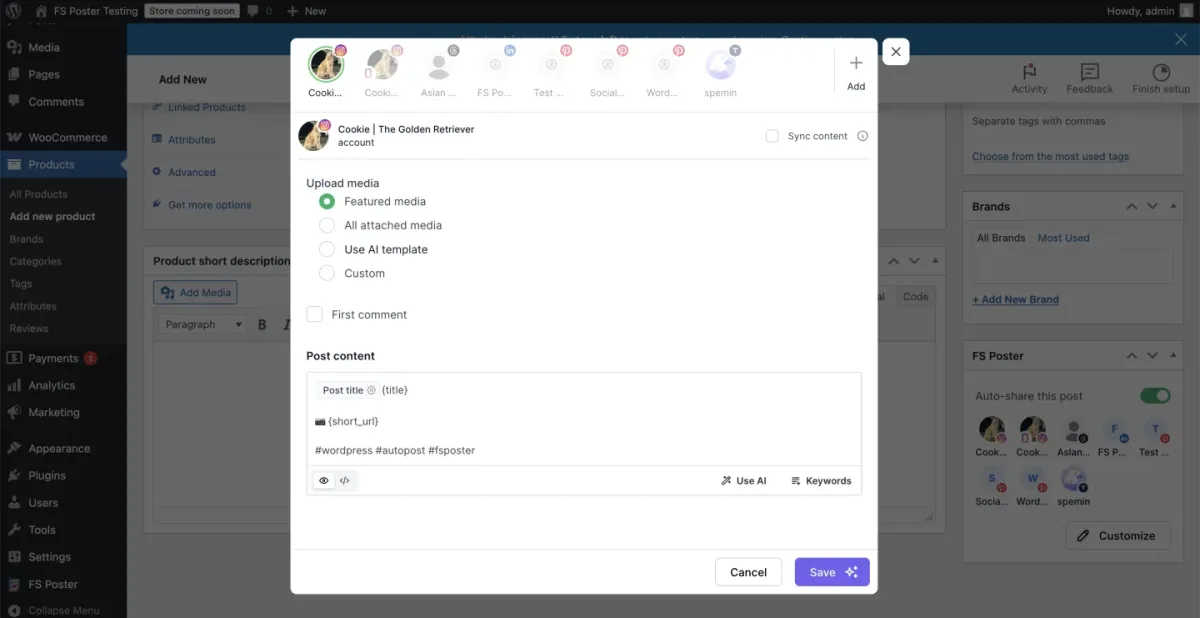
FS Poster is the WordPress-native social auto-poster I keep recommending to agencies, WooCommerce stores and publishers running multiple sites. It is the only plugin in the category with a 26-network roster, including the long tail (Bluesky, Mastodon, Threads, Truth Social, Telegram, Reddit, Discord, VK, Pinterest, TikTok, YouTube Community, YouTube Shorts) plus a generic Webhook destination and a WordPress-to-WordPress connector. Everything sits inside a modern v8 admin app with a real Calendar and a recurring Planner for evergreen reshares. Share Now lets you publish a one-off social post without first creating a WordPress post. WooCommerce auto-share works out of the box, with per-channel category filters that route products by collection or tag.
Pricing starts at $58/year intro on Single (renews at $65/year, 1 site); Plus runs $109/year intro (3 sites); Developer runs $229/year intro (15 sites). For long-term or multi-site buyers there is also an optional one-time Lifetime tier covering 30 websites. There is no free version. Instead, a 14-day money-back guarantee applies to every paid plan, including Lifetime. Every plan covers the 26 essential networks with no add-ons stacked on top. Single leaves out five channel types that Plus, Developer and Lifetime include: Google Business profiles, LinkedIn company pages, Facebook groups, YouTube Community and YouTube Shorts.
Pros:
- 26 networks including the long tail, with no add-ons to buy.
- Calendar, recurring Planner and WooCommerce auto-share are built in.
Cons:
- No free version, only a 14-day money-back guarantee.
- Single skips five channel types: Google Business profiles, LinkedIn company pages, Facebook groups, YouTube Community and YouTube Shorts.
2. Jetpack Social: simplest install if you only need 2 to 4 mainstream networks
- Best for: sites that publish to a few mainstream networks and want the simplest setup
- Category: auto-posting and scheduling
- Free tier: yes, 8 networks with unlimited shares
- Starting price: $4.95/month for the first year ($59.40), then $9.95/month
- Networks: 8
- WordPress.org: 3.3/5 from 74 reviews
- Vendor: Automattic
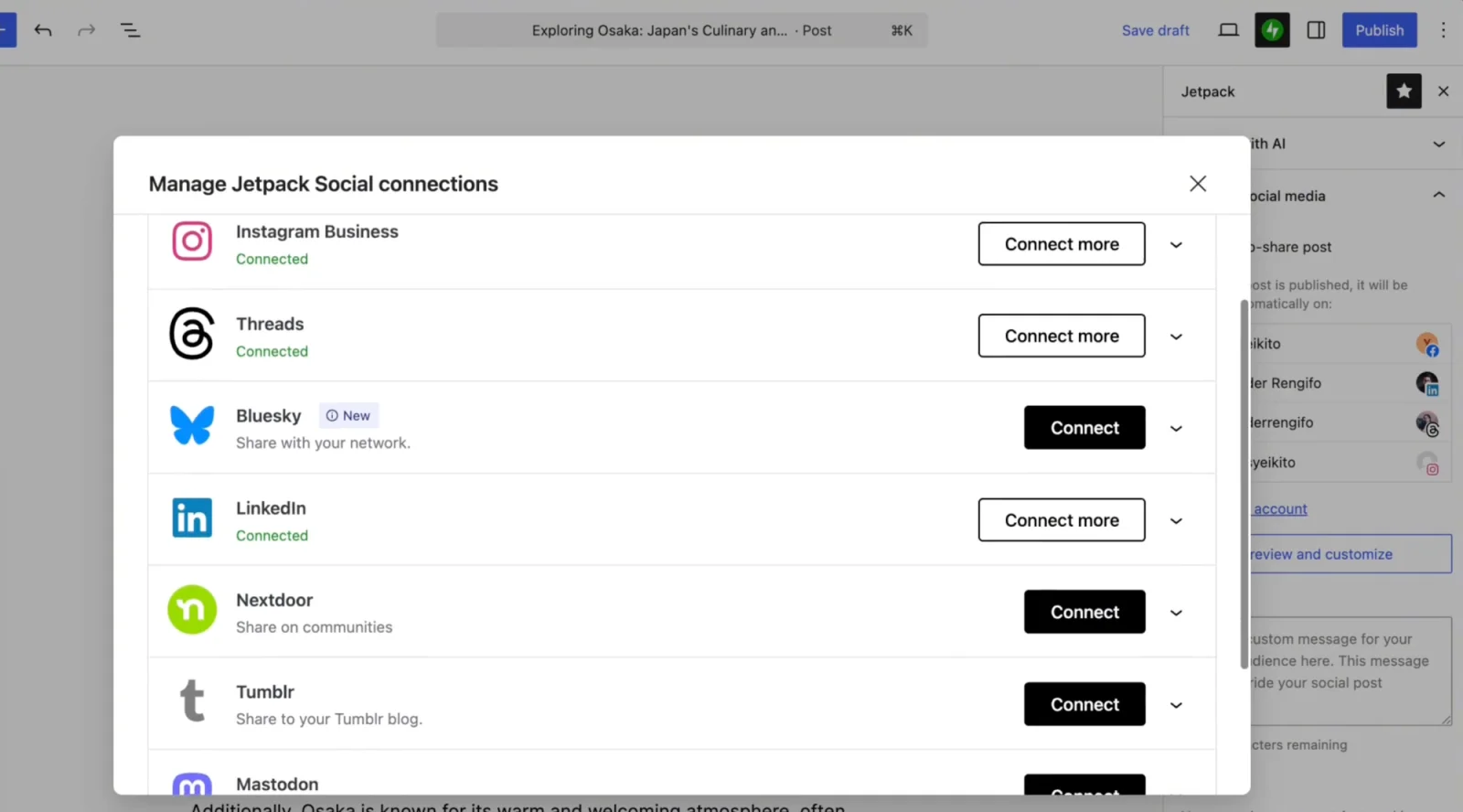
Jetpack Social is Automattic's stripped-down WordPress publishing plugin and the lowest-friction install in the category. The whole workflow lives in the Gutenberg sidebar: pick the networks, write one shared caption, click Publish, and the post auto-shares to all connected accounts within roughly two minutes. The Free tier covers 8 networks (Facebook Pages, Instagram Business, Threads, LinkedIn, Bluesky, Nextdoor, Tumblr, Mastodon) with unlimited shares since the September 2024 change. There is no Pinterest, X, TikTok, Reddit, Discord, Telegram or YouTube support, which is the trade-off for the simplicity. The paid Social plan is $4.95 a month for the first year ($59.40), then $9.95 a month ($119.40 a year) on renewal.
Pros:
- Free auto-share to 8 networks with unlimited shares.
- Zero-configuration workflow inside the Gutenberg sidebar.
Cons:
- No Pinterest, X, TikTok, Reddit, Discord, Telegram or YouTube.
- Needs a WordPress.com account connection, and the 3.3/5 WordPress.org rating is the lowest in this guide.
3. Blog2Social: best freemium pick with an in-WordPress calendar
- Best for: buyers who want a real free tier and an in-WordPress calendar before paying
- Category: auto-posting and scheduling
- Free tier: yes, 14 networks with manual share
- Starting price: €72/year (Smart)
- Networks: 14 on Free, more on paid tiers and add-ons
- WordPress.org: 4.5/5 from 2,097 reviews, 50,000+ active installs
- Vendor: Adenion
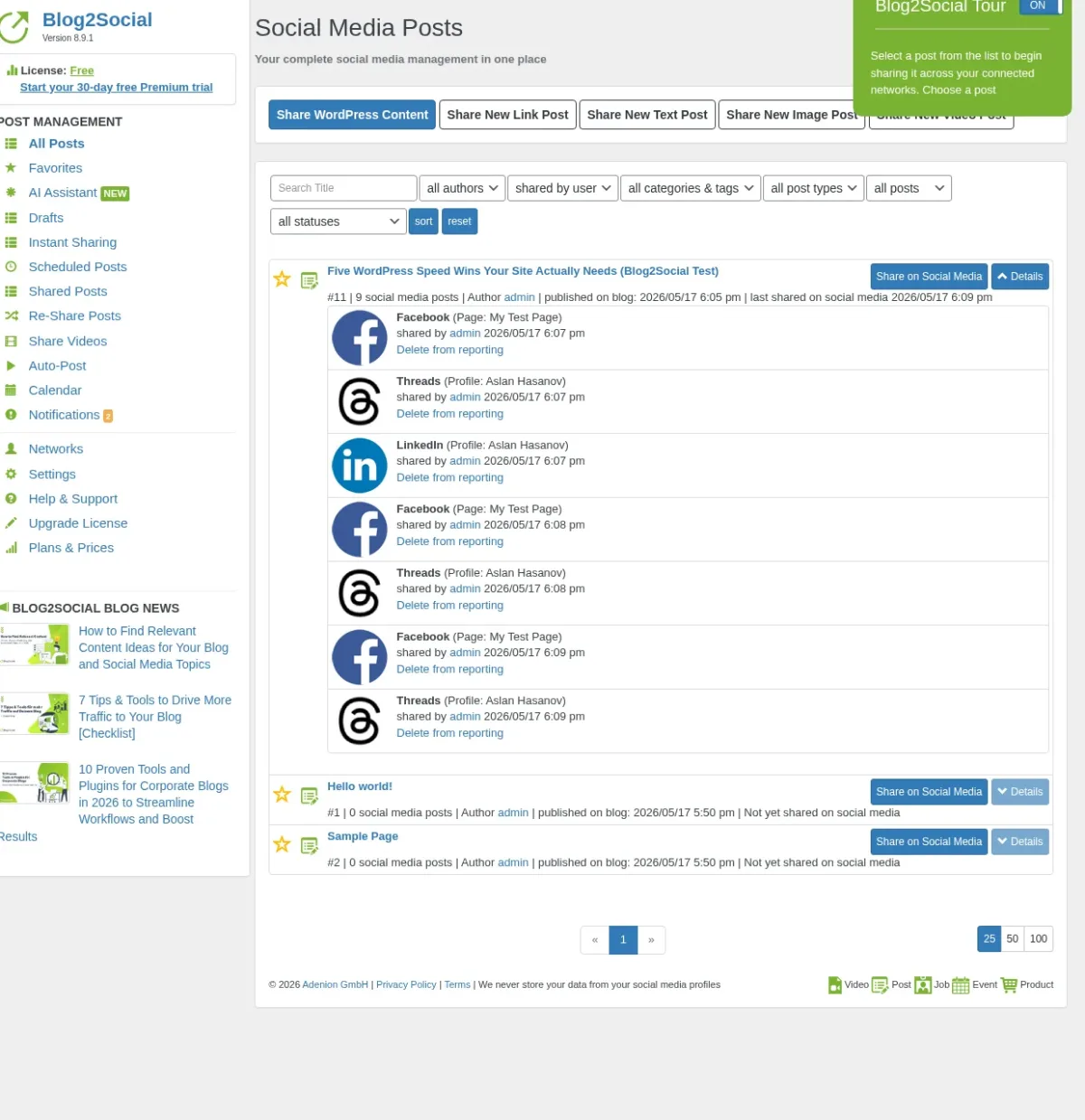
Blog2Social is Adenion's German-built freemium plugin and the best pick when you specifically want a usable free tier before paying. The Free version covers 14 networks with manual share, per-network captions, save-as-draft, a free Chrome/Firefox extension and the same in-WordPress drag-and-drop calendar exposed on paid tiers. Auto-share on publish is a paid feature. The entry tier (Smart) is €72.00/year at checkout. X (Twitter) and YouTube/Vimeo video posting are sold as separate add-ons, so the real price for a fully featured stack can climb. With 4.5/5 from 2,097 reviews on WordPress.org and 50,000+ active installs (verified 2026-09-08), Blog2Social has the highest-volume trust signal in the WordPress social-plugin segment.
Pros:
- Real free tier with 14 networks and the drag-and-drop calendar.
- Largest review base of any WordPress social plugin.
Cons:
- Auto-share on publish is paid only.
- X and YouTube/Vimeo video posting are separate add-ons.
Best WordPress social media feed and widget plugins
This is the other half of the workflow. Instead of pushing your WordPress content out to social networks, these plugins pull your social content back into WordPress. They render it as an Instagram grid, a Facebook timeline, a YouTube channel block, a TikTok profile feed, an X timeline or a reviews wall.
If you have searched for an "Instagram feed widget for WordPress" or a "Facebook social media widget," you are looking at the same product category. The embed surface is exposed as a Gutenberg block, a shortcode, a Classic widget, a dedicated Elementor or Beaver Builder widget, or server-rendered output inside the theme template.
The plugins worth shortlisting in 2026 are Smash Balloon, WP Social Ninja and Easy Social Feed.
4. Smash Balloon: category leader for multi-network feeds
- Best for: multi-network feeds with the most polished live customizer
- Category: social feeds and widgets
- Free tier: yes, a free version of each feed plugin
- Starting price: $49/year intro per plugin (renews at $98); All Access $299/year intro
- Networks: Instagram, Facebook, X, YouTube, TikTok, Reviews, Social Wall (seven plugins)
- WordPress.org: Instagram Feed: 4.9/5 from 4,350 reviews, 1+ million active installs
- Vendor: Smash Balloon
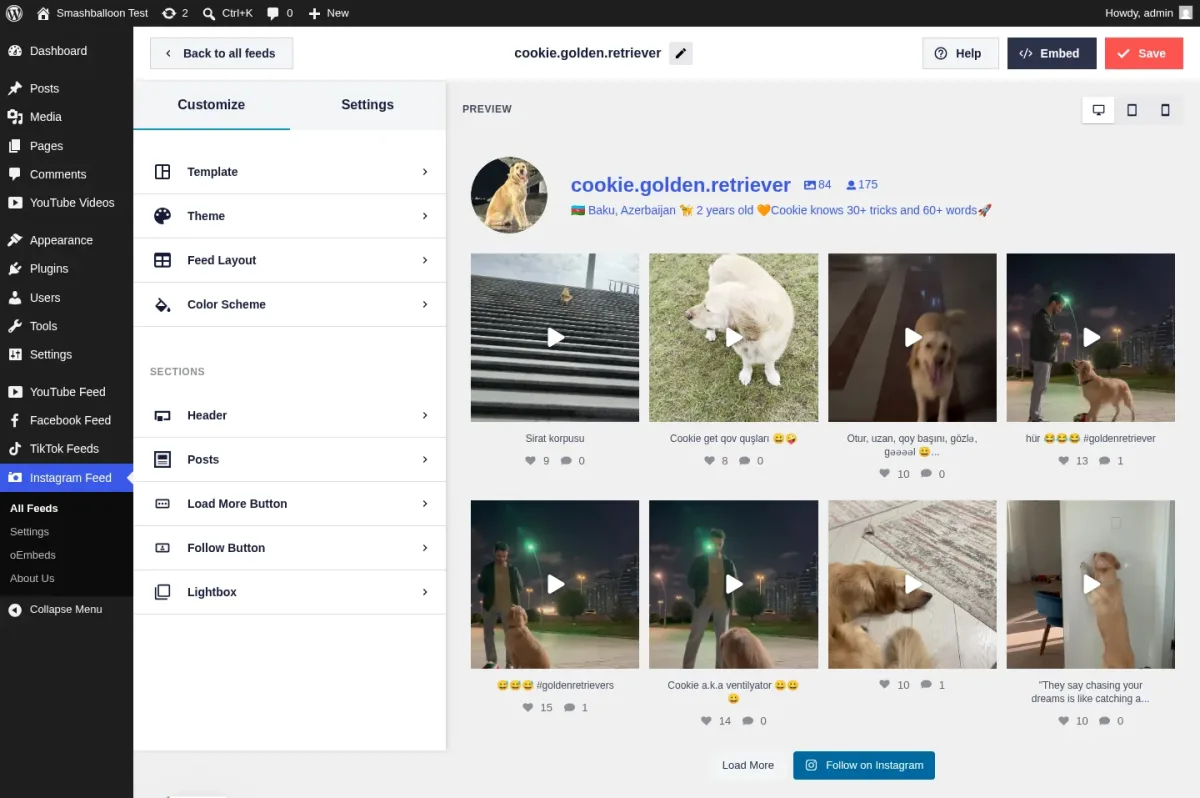
Smash Balloon is the polished category leader. It is the only product in this list with a full family of seven plugins under one customizer and one brand: Instagram Feed Pro, Custom Facebook Feed Pro, X (Twitter) Feed Pro, Feeds for YouTube Pro, TikTok Feeds Pro, Reviews Feed Pro and Social Wall. Instagram Feed alone has 1+ million active installs and 4.9/5 from 4,350 reviews on WordPress.org (verified 2026-09-08), and the wider family carries the largest review base in the WordPress feed-plugin category. The live customizer renders real posts the moment you pick a source. The saved feeds expose advanced types per network: Reels, Stories, Hashtag, Tagged and Shoppable Instagram, Facebook Albums and Events, YouTube Playlists and Live Streams, TikTok Profile and templates. Downtime backup caching keeps your feeds rendering when Meta, X or YouTube break their APIs.
Pricing is per network and renews at full list price after year one. Single-plugin Basic is $49/year intro (renews at $98/year), Plus is $99/year intro for 5 sites, and Elite is $149/year intro for 10 sites. The All Access Bundle is $299/year intro for all seven plugins on unlimited sites (renews at $598/year). Every plan has a 14-day money-back guarantee. Single-plugin Basic is the right entry point if you only need one network. All Access becomes the clearer choice once you need three or more.
Pros:
- Best-in-class live customizer with advanced feed types per network.
- Downtime backup caching keeps feeds up when an API breaks.
Cons:
- Per-network pricing that doubles on renewal ($98 Basic, $598 All Access).
- Seven separate plugins to keep updated.
5. WP Social Ninja: bundle play for feeds, reviews, chat, popups and testimonials
- Best for: small businesses that want feeds, reviews and chat widgets in one license
- Category: social feeds and widgets
- Free tier: yes
- Starting price: $89/year Single Site ($71 on the current discount)
- Networks: 5 feed networks, 10+ review sources, 15+ chat channels
- WordPress.org: 4.8/5 from 71 reviews, 30,000+ active installs
- Vendor: WPManageNinja
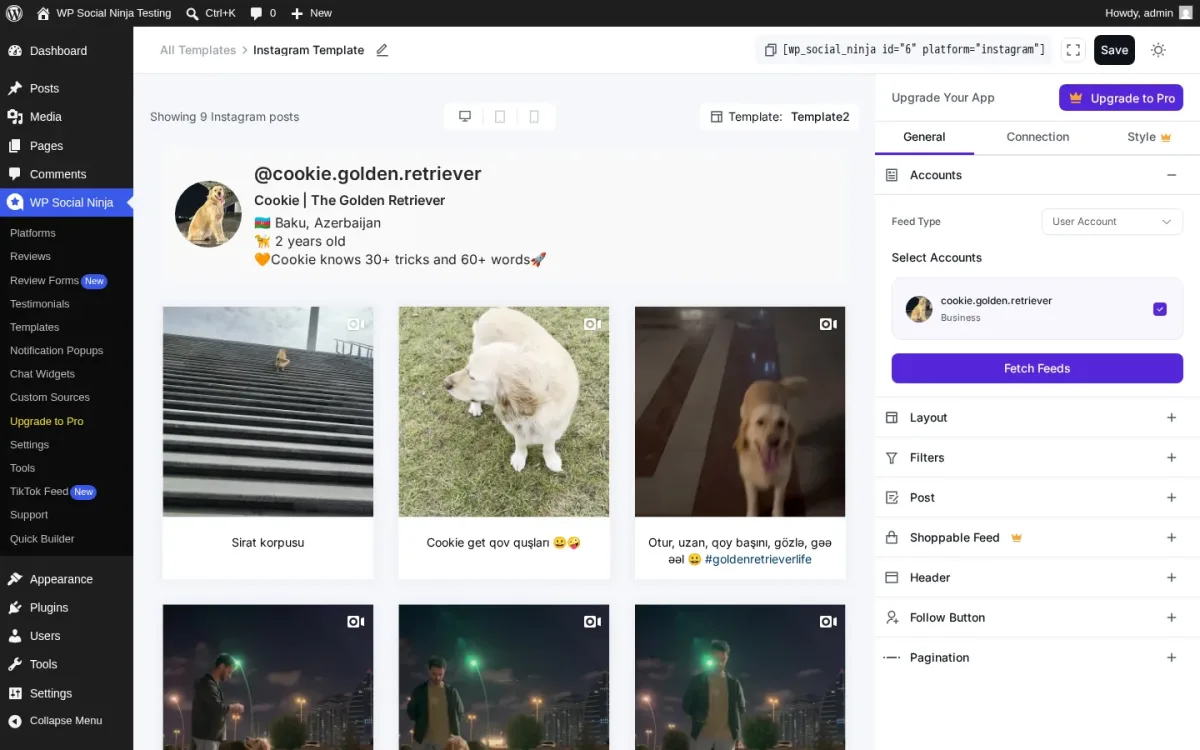
WP Social Ninja from the WPManageNinja team (Fluent Forms, FluentCRM, FluentCart) is the strongest credible bundle play in the WordPress social-proof niche. One plugin, one admin UI and one license cover 5 social feed networks (Instagram, Facebook, YouTube, TikTok, X) and 10+ business review sources, from Google Business Profile, Facebook, Yelp and Tripadvisor to Airbnb, Booking.com, AliExpress, Amazon, WooCommerce, FluentCart and Judge.me import. It also ships 15+ chat-widget channels, notification popups and a testimonial slider. A small business often runs a feed plugin, a Google Reviews plugin, a Click-to-Chat plugin and a social-proof popup tool side by side. One Single Site license replaces all four at $89/year list price ($71 on the current discount). 4.8/5 from 71 reviews on WordPress.org and 30,000+ active installs (verified 2026-09-08).
Pros:
- Feeds, reviews, chat widgets and popups in one license.
- Highest rating in the feed category at 4.8/5.
Cons:
- Only 5 feed networks.
- Small review base (71) next to Smash Balloon.
6. Easy Social Feed: all four mainstream networks under one COMBO license
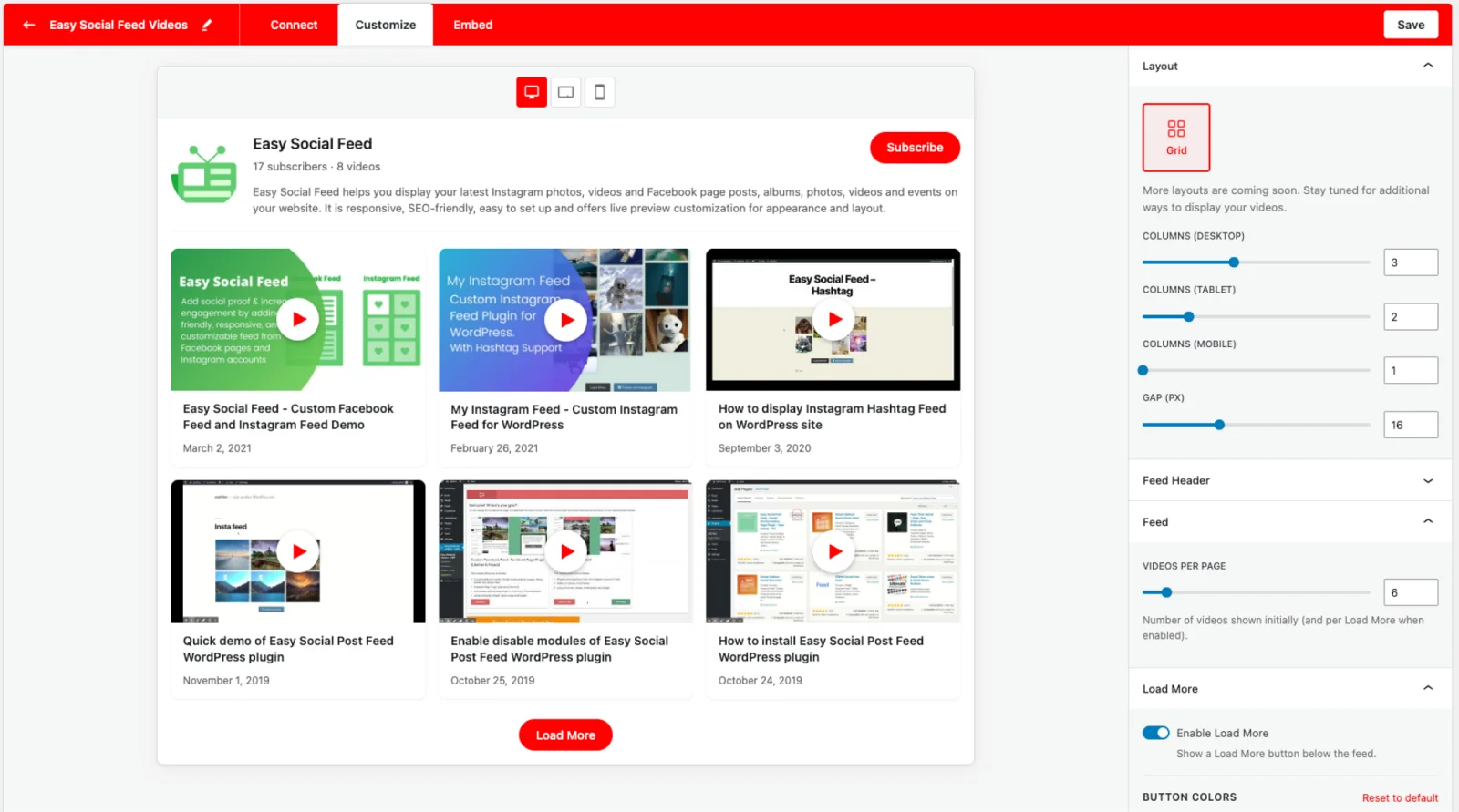
- Best for: the cheapest way to get Facebook, Instagram, YouTube and X feeds in one plugin
- Category: social feeds and widgets
- Free tier: yes
- Starting price: $89/year COMBO; $259 one-time COMBO Lifetime
- Networks: 4
- WordPress.org: 4.6/5 from 502 reviews, 30,000+ active installs
- Vendor: Malta Themes
Easy Social Feed from Malta Themes is one of the cheapest credible "all four mainstream networks in one plugin" picks in this niche. Facebook, Instagram, YouTube and X (Twitter) sit under one admin menu, one license and one update cadence. The YouTube module shipped in v6.7.5 (Q4 2025) and the X module in v6.7.6 (May 2026), so the vendor is actively widening the plugin. The $89/year COMBO bundles all four network modules under one Pro license, which is materially cheaper than buying the Smash Balloon Facebook, Instagram, YouTube and Twitter plugins one by one. The $259 one-time COMBO Lifetime is one of the few real lifetime SKUs in this niche. 4.6/5 from 502 reviews on WordPress.org with 30,000+ active installs (verified 2026-09-08).
Pros:
- Cheapest four-network COMBO and a real lifetime SKU.
- Active development: YouTube and X modules shipped in the last year.
Cons:
- Fewer feed types and less customizer polish than Smash Balloon.
- The X module only shipped in May 2026, so it is less proven.
Best WordPress social share button plugins
Share buttons are the third leg of the stack. They sit on individual posts (and sometimes on product pages or sidebars) and let your visitors share your content to their own social accounts. They never post anything from your accounts; they are visitor-facing only.
For around 80% of WordPress sites, the right call is a free, well-maintained share-button plugin from WordPress.org. The three picks below cover almost every realistic buyer profile.
7. AddToAny Share Buttons: the safe default for almost any WordPress site
- Best for: almost any site that needs fast, free share buttons with no account
- Category: social share buttons
- Free tier: yes, fully free with no paid tier
- Starting price: free
- Networks: around 95
- WordPress.org: 4.7/5 from 1,113 reviews, 300,000+ active installs
- Vendor: AddToAny
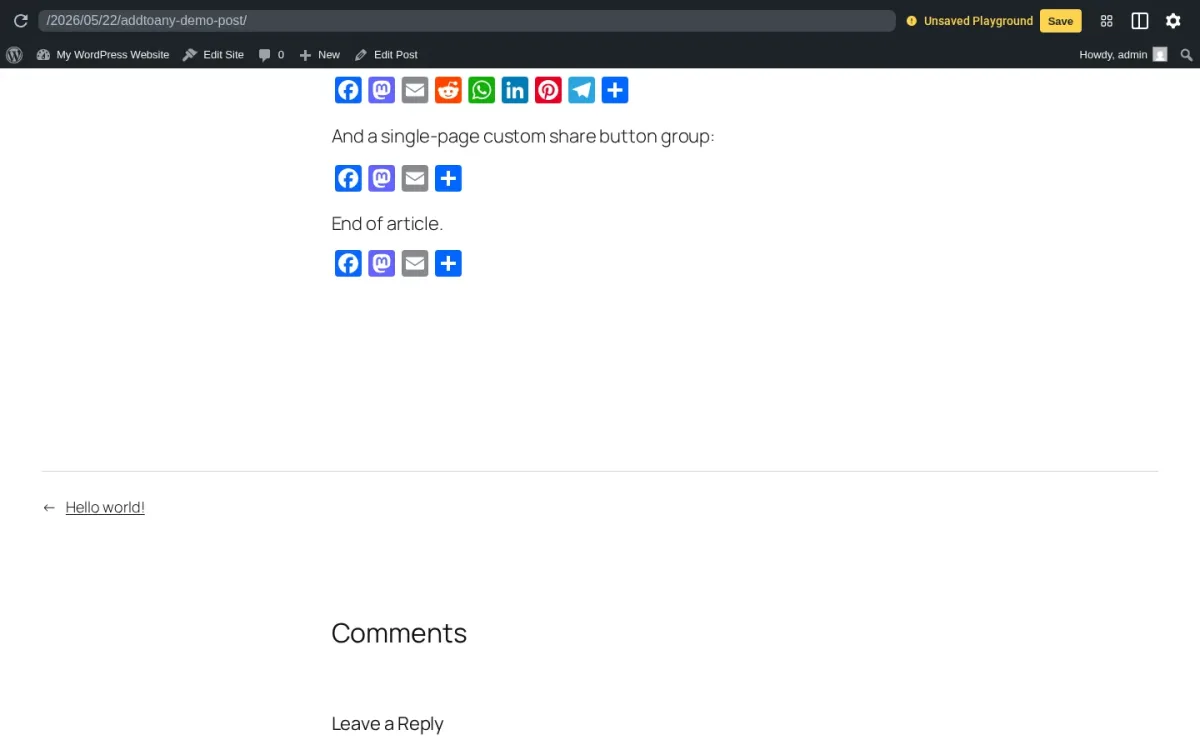
AddToAny is the default-recommended free social share buttons plugin for WordPress. It has been on WordPress.org continuously since 2007, has 300,000+ active installs (the most in the category), and is rated 4.7 stars from 1,113 reviews (verified 2026-09-08). The install-to-rendered-buttons flow takes under three minutes: install from WordPress.org, go to Settings, AddToAny, pick the networks you want and the buttons appear at the top or bottom of every post. Default support covers around 95 networks including the modern set (Bluesky, Mastodon, Threads, WhatsApp, Telegram, WeChat, Microsoft Teams) with no add-on. Scripts load async/defer, the universal "+" menu module is lazy-loaded, and there is no nag screen, no paid-tier teaser and no cloud account requirement. Free, with no paid tier sold today.
Pros:
- Fully free, no account, no paid tier.
- Around 95 networks with async loading and no nag screens.
Cons:
- No share analytics or dashboard.
- Fewer styling options than Sassy Social Share.
8. Sassy Social Share: deeper free customization plus share-to-AI buttons
- Best for: sites that want deeper styling control and share-to-AI buttons for free
- Category: social share buttons
- Free tier: yes
- Starting price: free; paid add-ons sold per feature
- Networks: around 95
- WordPress.org: 4.8/5 from 522 reviews, 100,000+ active installs
- Vendor: Heateor
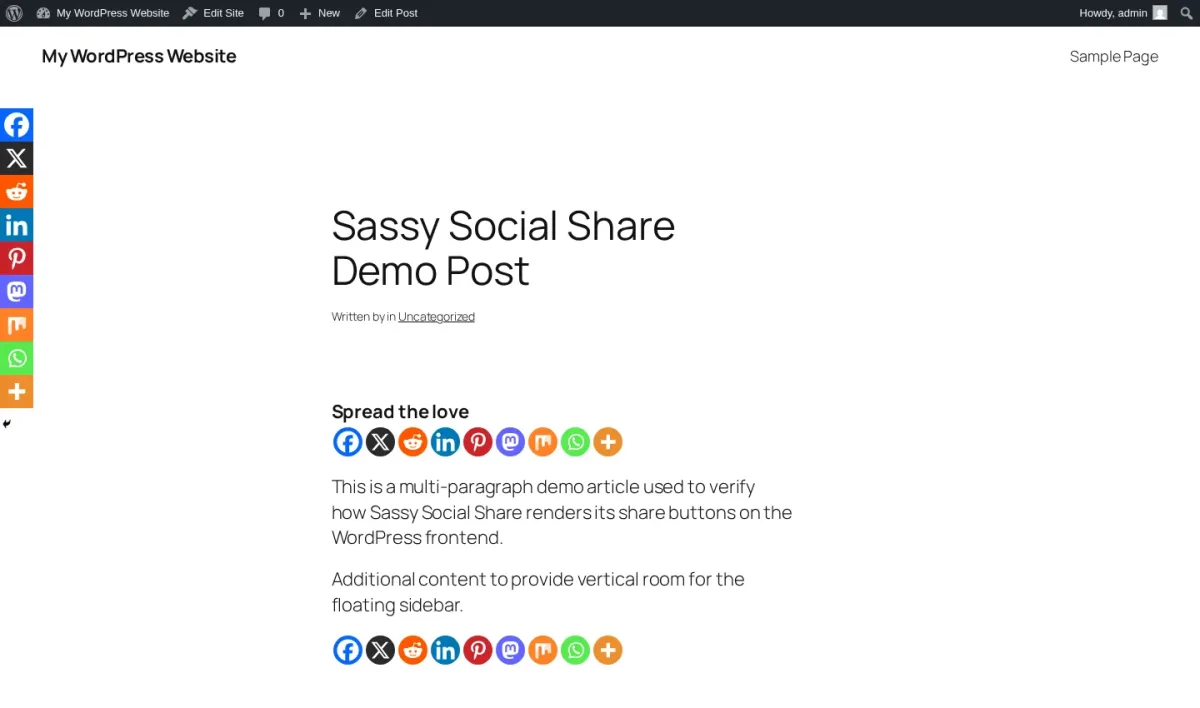
Sassy Social Share is the runner-up free WordPress share-button plugin on WordPress.org. It has 100,000+ active installs and 4.8/5 from 522 reviews, the highest average in the share-button category (verified 2026-09-08). It covers around 95 networks, including an AI cluster (ChatGPT, Grok, Perplexity, Google AI, Claude) added in August 2025. Share clicks go directly to each network's official endpoint with no third-party redirector, and no tracking cookies land in the visitor's browser. The admin UI is denser than AddToAny's (seven tabs vs two). The paid add-ons are sold per feature on heateor.com, and the free version is the practical recommendation. One caution: the last plugin update was in September 2025, so check the changelog before relying on it for new networks.
Pros:
- Highest rating in the share-button category, plus share-to-AI buttons.
- No third-party redirector and no tracking cookies.
Cons:
- Denser seven-tab admin UI.
- Last plugin update was September 2025.
9. Hubbub Lite: per-post share dashboard for recipe and lifestyle bloggers
- Best for: recipe and lifestyle blogs that need per-post share stats and Pinterest tooling
- Category: social share buttons
- Free tier: yes, 4 networks
- Starting price: Pro $99/year, Pro+ $179/year
- Networks: 4 on Lite, 18+ on Pro
- WordPress.org: 4.7/5 from 173 reviews, 30,000+ active installs
- Vendor: NerdPress
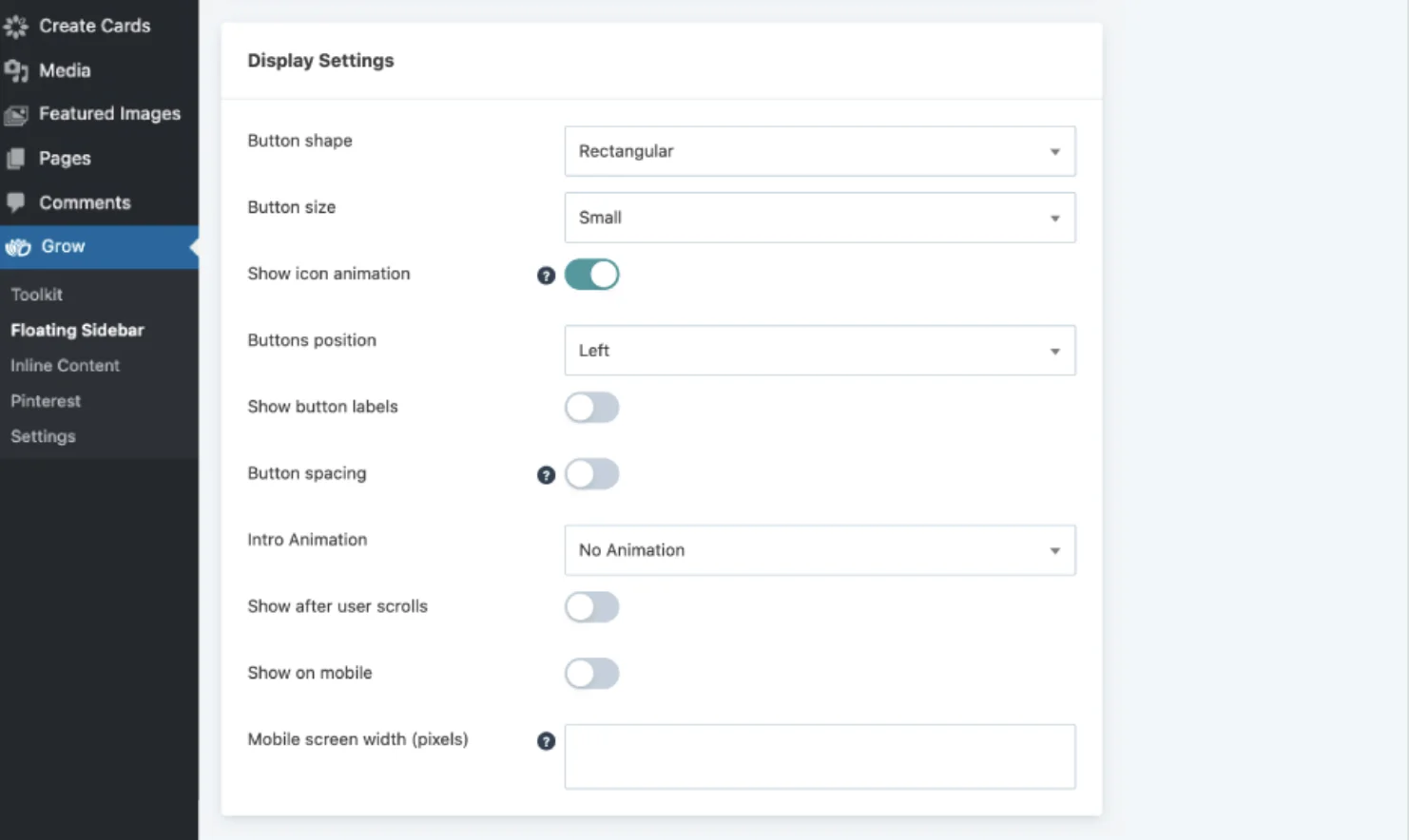
Hubbub Lite (formerly Grow Social by Mediavine, now maintained by NerdPress) is the share-button plugin built around the in-WP Hubbub Dashboard: per-post share counts, sortable Engagement Stats and a Missing Information preview that flags posts missing social-card data. No other free share-button plugin matches that dashboard out of the box. The trade-off is that the free tier ships only 4 networks (Facebook, X, LinkedIn and Pinterest). Pro at $99/year opens 18+ networks and adds the Sticky mobile bar, Click-to-Tweet, custom colors, Bitly and GA UTM tagging. It also adds the deep Pinterest tooling: hidden Pin images per post, a hover Pin It button, and a custom Pinterest title and description per image. Pro+ is $179/year, and every paid tier has a 30-day guarantee. 4.7/5 from 173 reviews on WordPress.org with 30,000+ active installs (verified 2026-09-08).
Pros:
- The only free share plugin with a per-post share dashboard.
- Deep Pinterest tooling on Pro.
Cons:
- Free tier covers just 4 networks.
- Sticky mobile bar and Click-to-Tweet are Pro only.
Best WordPress social media plugin by use case
Now that you have the top picks per category, here is the direct answer for the most common buyer situations.
What is the best WordPress plugin to auto-post to social media?
FS Poster. It covers 26 networks including Bluesky, Mastodon, Threads, Telegram, Reddit, Discord, TikTok and YouTube Shorts, ships a Calendar and a recurring Planner, and has a one-time Lifetime tier. Pair it with AddToAny for share buttons and skip a feed plugin until you need to display social content on your site.
What is the best free WordPress social media plugin?
It depends on the job. For auto-posting, Jetpack Social Free auto-shares to 8 networks with unlimited shares, and Blog2Social Free covers 14 networks with manual share and a calendar. For feeds, the free versions of the Smash Balloon plugins are the most polished. For share buttons, AddToAny is fully free with no paid tier at all.
What is the best social media plugin for WooCommerce stores?
FS Poster. WooCommerce auto-share works out of the box, and per-channel category filters route products to the right accounts by collection or tag. Add AddToAny on product pages if you want customer share buttons.
What is the best plugin to show an Instagram feed on WordPress?
Smash Balloon Instagram Feed Pro is the deepest paid option, with Reels, Stories, Hashtag, Tagged and Shoppable feed types. Spotlight Social Media Feeds has one of the most polished free Instagram tiers in the niche. WPZOOM Social Feed is one of the lightest picks if Core Web Vitals matter on a single-account site.
What is the best social media plugin for a small local business?
WP Social Ninja. A restaurant, gym, salon or agency that needs Google reviews, a WhatsApp chat button and a small Instagram grid gets all three in one license. Handle share buttons separately with AddToAny.
What is the best social media plugin for agencies running many sites?
FS Poster on the Plus, Developer or Lifetime tier for auto-posting, Smash Balloon All Access for feeds and AddToAny for share buttons. Three plugins, three jobs, no overlap.
What is the best share button plugin for Pinterest-heavy blogs?
Hubbub Lite, or Hubbub Pro at $99/year for the hidden Pin images, hover Pin It button and custom Pinterest titles. Add FS Poster on the auto-posting side if you want recipes pushed to Pinterest and the rest automatically.
The mistake to avoid is installing two plugins in the same category and expecting them to play well together. Two share-button plugins fight for the same template hooks. Two auto-posters can dispatch the same post twice. Two feed plugins double the JavaScript and CSS. One plugin per job is the rule.
FAQ: WordPress social media plugins
Do I need multiple WordPress social media plugins?
Most WordPress sites end up with two or three: one auto-poster, one share-button plugin and (optionally) one feed plugin. They solve different problems and do not overlap. What you should not do is install two plugins in the same category, because they will fight for the same hooks and slow your site down.
Is there a free WordPress social media plugin that does everything?
No. No single free plugin does outbound auto-posting, inbound feed display and visitor-facing share buttons well in the same install. The closest "bundle" option is WP Social Ninja, which combines feed display, business reviews, chat widgets, popups and testimonials into one license, but it does not auto-post WordPress content out to your social networks. For that you still need a dedicated auto-poster like FS Poster or Blog2Social.
Will WordPress social media plugins slow my site down?
The well-maintained ones in this guide are designed not to. AddToAny, Sassy Social Share and Social Warfare self-host their assets and load most JavaScript asynchronously. Smash Balloon caches feeds server-side, lazy-loads images and serves WebP. FS Poster, Blog2Social and Jetpack Social do almost all of their work in the admin and on the WordPress publish hook, so they add no visible weight to your frontend pages. The two exceptions worth flagging are Shareaholic and ShareThis on the share-button side. Both depend on third-party CDNs that load remote bundles on every page. If Core Web Vitals matter to you, prefer AddToAny or Sassy Social Share instead.
What is the difference between social share buttons and an auto-posting plugin?
Social share buttons are visitor-facing. They let people who land on your page push your content to their own social accounts. An auto-posting plugin does the opposite: when you publish a new post on your WordPress site, the auto-poster pushes it out to your own social accounts (Facebook, X, LinkedIn, Pinterest, Instagram, Bluesky, Mastodon, Threads, Telegram, Reddit and so on). The two categories solve opposite problems, and most sites run both.
Final verdict
If you take only one thing away from this guide, let it be that "best WordPress social media plugin" is a question with three answers, not one. Pick the best tool for each job and let them complement each other.
For auto-posting and scheduling, FS Poster is the plugin I would recommend to most serious buyers in 2026: 26 networks in one plugin, a real Calendar plus a recurring Planner, a WordPress Posts-list bulk action and an optional Lifetime tier for long-term or multi-site buyers. Jetpack Social is the simplest install if you only publish to 2 to 4 mainstream networks and value the Automattic brand. Blog2Social is the strongest freemium alternative if you specifically need a free tier first.
For displaying social feeds on your WordPress site, Smash Balloon is the polished category leader. WP Social Ninja is the strongest single-license bundle if you also need business reviews, chat widgets and popups. Easy Social Feed is the cheapest "all four mainstream networks in one plugin" pick with a real Lifetime SKU.
For visitor-facing share buttons, AddToAny is the right default for around 80% of WordPress sites: free, fast, around 95 networks, no account, 19 years of continuous maintenance. Sassy Social Share is worth a look if you want share-to-AI buttons baked in today. Hubbub Lite is the right pick if you specifically want a per-post share dashboard or you run a Pinterest-heavy blog.
Three plugins, three jobs, one clean WordPress + social media stack that handles outbound publishing, inbound display and visitor sharing without any of them stepping on the others. That is the setup that actually works in 2026.


