

7 Best WordPress Code Snippets Plugins in 2026 (Free + Paid, Hands-on Tested)

Why a code snippets plugin matters in 2026
Every WordPress site eventually needs custom code. A Google Analytics 4 tag in the head. A small PHP filter to disable XML-RPC. A CSS tweak to round the corners of the WooCommerce button. A JavaScript snippet to add rel="nofollow" to outbound links. The old answer was to edit functions.php (and lose the change at the next theme update) or paste the script directly into header.php. The 2026 answer is a dedicated code snippets plugin: store the code in the database or in a flat file, toggle each snippet on or off like a mini-plugin, and stay one click away from rolling back a fatal error.
In 2026 the category is busy and competitive. WPCode (the rebranded Insert Headers and Footers by WPBeginner) hit 3+ million active installs and is by a wide margin the most-used option. Code Snippets, the original PHP runner by Shea Bunge and now Code Snippets Pro, is at 1+ million. Header Footer Code Manager and Simple Custom CSS and JS quietly sit at 600,000 installs each as the focused alternatives. FluentSnippets (by the WPManageNinja team behind Fluent Forms and FluentCRM) has rebuilt the category around flat-file storage with zero database queries. Woody Code Snippets was acquired by Themeisle in late 2025 and now offers the widest free snippet-type coverage (PHP, Text, Universal, CSS, JS, HTML, Ad). And the paid premium tier is owned by WPCodeBox 2 with its Monaco editor (the same one VS Code uses), cloud library, and a desktop snippet IDE.
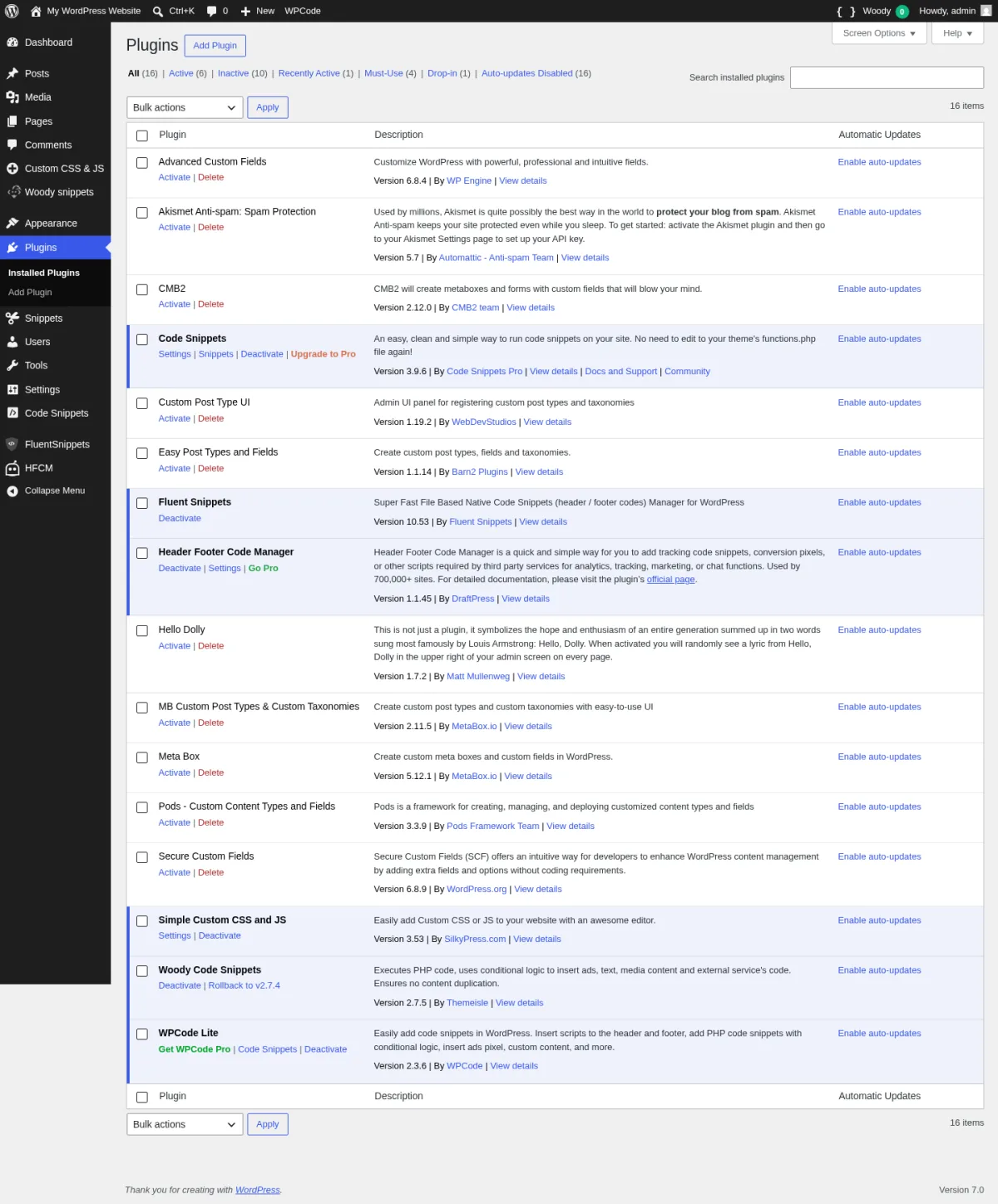
For the 2026 roundup, I installed each of the six free plugins on a clean WordPress 7.0 sandbox, walked the real admin UI, exercised the snippet-creation flow in each one, and verified every WordPress.org install count, rating, latest version, release date, and current 2026 pricing live on every vendor page on 2026-06-18. WPCodeBox 2 is paid only with no free trial, so it is documented from the vendor homepage and pricing page rather than from a sandbox.
My default pick for 2026 is WPCode: it has the biggest user base, the most polished admin UI, real safe-error handling that auto-deactivates fatal PHP snippets, a free 142-snippet expert-vetted library, and a dedicated Header & Footer page that covers the most common reason people install a snippets plugin in the first place. If you want a long-standing PHP-first plugin that lets you organize snippets across the network on Multisite, Code Snippets is the second look. If you want the fastest, most native architecture (snippets stored as flat PHP files, zero database queries, automatic standalone mode), FluentSnippets is the cleanest free pick. If you mostly need to inject HTML, CSS, and JS into the header or footer per page or per category and never plan to run PHP, Header Footer Code Manager stays in its lane and is free. If you want a single plugin that covers PHP, CSS, JS, HTML, plus ad blocks and a Universal mixed-mode snippet, Woody Code Snippets is the broadest free build. CSS- and JS-only sites can stay tiny with Simple Custom CSS and JS. And if you live inside snippets every day and want a real IDE with cloud library and grouped conditional logic, WPCodeBox 2 is the paid premium tier.
If a buggy snippet ever locks you out of wp-admin, our guide to solving WordPress critical errors walks through the recovery steps, and the step-by-step plugin install guide covers the safe ways to add any of these snippet plugins in the first place.
How I evaluated each plugin
For every plugin in the roundup I checked the same set of buyer-relevant facts:
- Install reputation: active install count, average rating, and total review count on WordPress.org as of 2026-06-18 (or vendor metrics for the paid-only plugin not on WordPress.org).
- Snippet creation flow: how many clicks from "plugin activated" to "the first snippet is saved and running on the site," and what the snippet-type picker looks like.
- Code type coverage: PHP, CSS, JavaScript, HTML, plus mixed-mode snippets where supported.
- Header/footer and body insertion: whether the plugin ships a dedicated Header & Footer page or treats it as just one of many snippet locations.
- Safe-mode and recovery behavior: what happens when a PHP snippet throws a fatal, and how to get back into wp-admin without SFTP.
- Cloud library and ready-made snippets: whether the plugin includes a library of vetted snippets, whether you can save snippets to a cloud for cross-site reuse, and whether the cloud is free or paid.
- Conditional logic and targeting: per-page, per-post, per-user-role, per-device targeting in the free tier vs paid tier.
- Free vs paid limits: the exact line between the free build and the cheapest paid tier, with current 2026 pricing in the original currency.
- Architecture: database-backed (
wp_postsCPT or a custom table) vs file-based. - Update cadence and security: number of 2026 releases, recent security fixes, and how publicly the vendor handles disclosure.
For WPCode, Code Snippets, FluentSnippets, HFCM, Woody Code Snippets, and Simple Custom CSS and JS, I installed the latest WP.org build on a fresh WordPress 7.0 sandbox, activated the plugin, opened its admin pages, walked the snippet-type picker and the editor, and reviewed a working snippet inside the All Snippets list to confirm everything renders correctly. WPCodeBox 2 is paid-only with no free trial, so it is documented from the vendor homepage and pricing page only.
The screenshot below is the WordPress 7.0 Plugins admin page after I installed every free plugin in this roundup on the test sandbox. The six free plugins under hands-on test are all active and recognized by WordPress 7.0.
Quick comparison table
| Plugin | Best for | Free tier covers | Starting paid plan | Main limitation |
|---|---|---|---|---|
| WPCode | Safest default code snippets plugin in 2026 | PHP, HTML, CSS, JS, Text + Header/Footer page + 142-snippet library + auto-deactivate fatal snippets | Basic $49/yr, 1 site | Smart conditional logic, code revisions, Cloud Library, scheduled snippets are Pro |
| Code Snippets | Long-standing PHP-first manager + multisite | PHP functions + Cloud Search browse + Multisite network-wide snippets + Safe Mode flag | Pro Annual $149/yr (1-Unlimited sites) | CSS, JS, Cloud sync, AI generation, Bundles are Pro |
| FluentSnippets | Fastest, file-based architecture | PHP, CSS, JS, HTML + flat-file storage + Stand-alone Mode + automatic error handler | None (free forever) | Smaller ecosystem and no cloud library by design |
| Header Footer Code Manager | Pure header/footer/body code manager | HTML, CSS, JS + 4 injection locations + per-page targeting + device targeting | $35/yr (1 site) | No PHP in free build; cloud library "coming soon" |
| Woody Code Snippets | Widest free snippet-type coverage | 7 types (PHP, Text, Universal, CSS, JS, HTML, Ad) + URL-toggle Safe Mode + WooCommerce locations | Personal $39/yr (1 site) | Code revisions, cloud templates, advanced conditions are Pro |
| Simple Custom CSS and JS | CSS/JS-only specialist with file caching | CSS, JS, HTML + inline or external file + frontend/admin scope | Personal $48.50/yr (1 site) | No PHP in any tier; preprocessors and per-page targeting are Pro |
| WPCodeBox 2 | Premium IDE with Monaco editor and cloud library | None on WP.org | Single Site $39/yr; Lifetime $199 one-time | Paid only; no free trial outside the 30-day money-back window |
1. WPCode (Insert Headers and Footers + Custom Code Snippets): the safe default for any WordPress site
- Vendor: wpcode.com
- WordPress.org: wordpress.org/plugins/insert-headers-and-footers
- Active installs: 3+ million
- Rating: 4.9 / 5 (1,821 reviews on 2026-06-18)
- Latest version: 2.3.6, released 2026-05-26
- Requires: WordPress 5.0+, PHP 7.0+
- Tested up to: WordPress 7.0
WPCode is the plugin most WordPress agencies still reach for first in 2026. It is the most-installed plugin in the category by a wide margin (3 million sites vs Code Snippets at 1 million), it has the best free admin UI, and it ships the most generous free build: PHP, HTML, CSS, JavaScript, and Text snippets plus a dedicated Header & Footer page plus a 142-snippet expert-vetted Library that you can install with one click. The plugin was renamed from "Insert Headers and Footers by WPBeginner" to WPCode in 2022, and the Lite plugin and the Pro upsell now share the same admin shell.
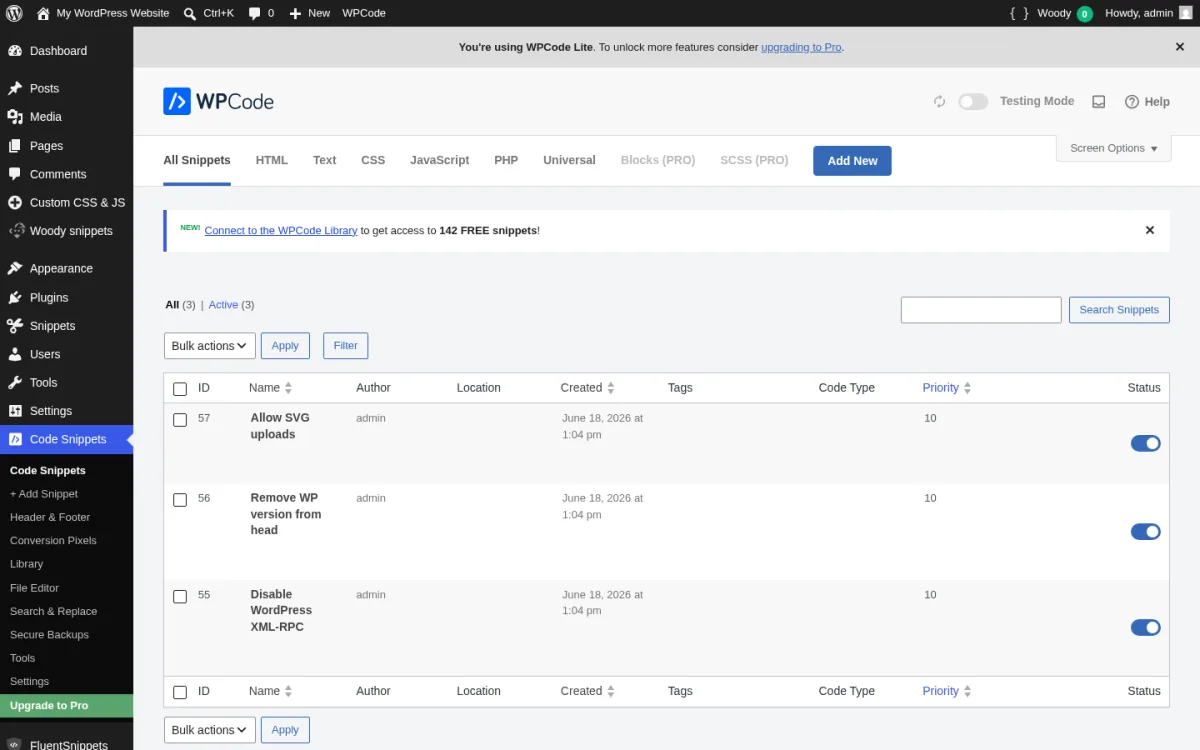
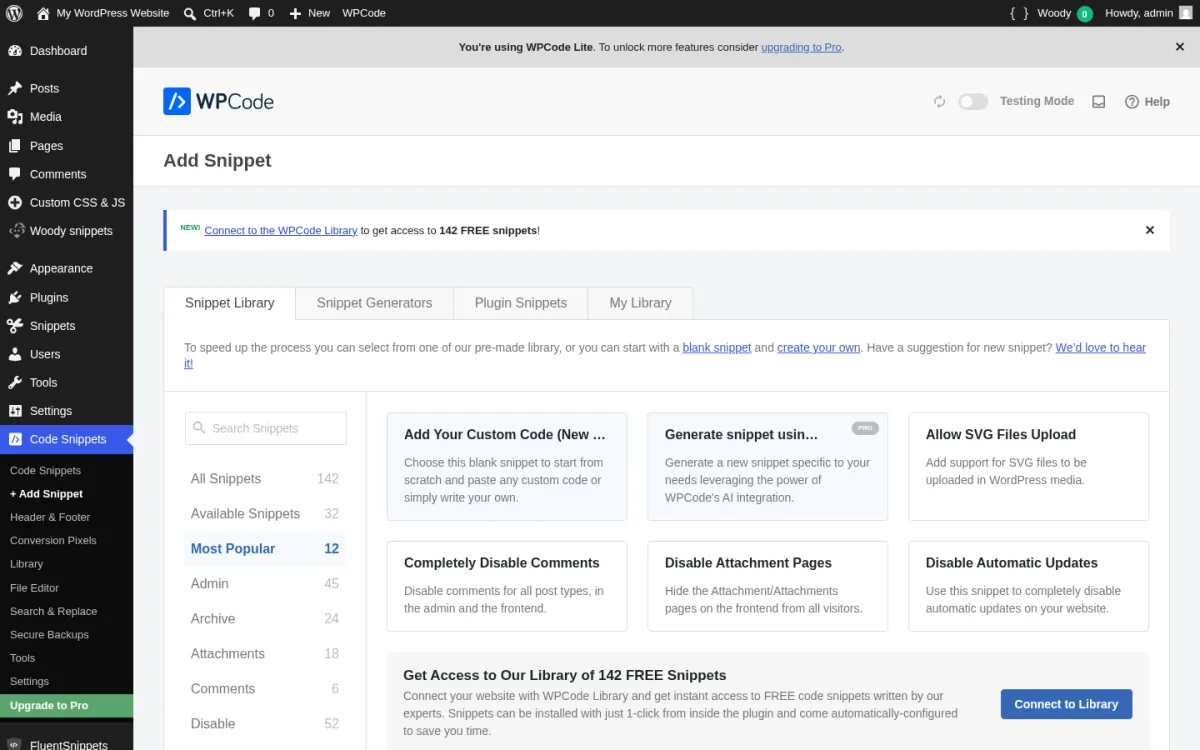
What I evaluated in a clean WordPress 7.0 sandbox on 2026-06-18. I installed WPCode Lite 2.3.6 from wordpress.org/plugins/insert-headers-and-footers, activated it, and opened the new top-level Code Snippets menu (sub-pages: Code Snippets, + Add Snippet, Header & Footer, Conversion Pixels, Library, File Editor, Search & Replace, Secure Backups, Tools, Settings, Upgrade to Pro). I walked the + Add Snippet flow, switched between the five code-type options in the picker (PHP, HTML, CSS, JavaScript, Text, plus Blocks PRO and SCSS PRO), confirmed the CodeMirror editor and the auto-insert location dropdown, and reviewed three vetted PHP snippets in the All Snippets list (Disable XML-RPC, Remove WP version, Allow SVG uploads) with the priority column and per-row activation toggle visible (screenshot above). I then opened the + Add Snippet screen and counted 142 free expert-vetted snippets across the Most Popular / Admin / Archive / Author / Disable / Login / Maintenance / Performance / Security / Sidebar / Theme categories.
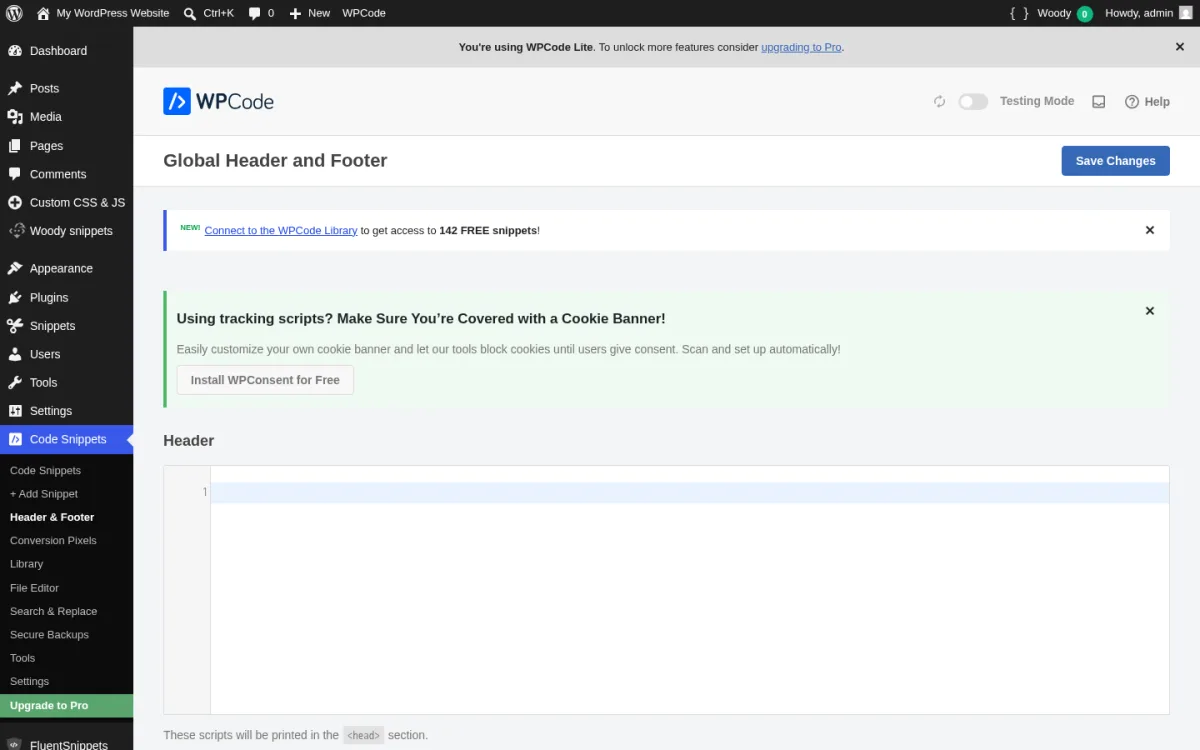
The Header & Footer page handles the most common reason people install a snippet plugin in the first place: paste a Google Analytics tag, a Facebook Pixel, or a verification meta tag into the sitewide head or footer without touching the theme. WPCode keeps a clean three-textarea layout for Header / Body / Footer in the free build, with a Pro upsell ribbon only for "Header & Footer Scripts on Specific Pages."
Strengths. Pre-installed integration support: when you install AIOSEO, WPForms, MonsterInsights, or other WPBeginner-family plugins, they already know about WPCode and surface snippet recommendations there. Documentation is excellent at wpcode.com/library. The free 142-snippet expert library covers most "should I install a separate plugin for this?" use cases (Disable Comments, Disable XML-RPC, Allow SVG file uploads, Disable Gutenberg, Classic Editor) without forcing you to add another plugin. The smart code validation pre-checks PHP for parse errors. The "safe error handling" auto-deactivates a PHP snippet that throws a fatal error in the admin and surfaces an error tracker per snippet in the list. v2.1.4 added per-snippet error tracking, and v2.2.9 tuned safe mode to limit its effects on the frontend. The 4.9 average rating from 1,821 reviews is the highest in the category.
Limitations. Smart conditional logic (load snippet only for logged-in users, only on specific URLs, only for specific user roles), Cloud Library save/sync, code revisions, scheduled snippets, page-specific snippets metabox in the post editor, and deeper WooCommerce/EDD/MemberPress integrations are Pro-only. The Library "Connect to the WPCode Library" banner sits at the top of every snippets list page and asks you to link to a free wpcode.com account before letting you import a library snippet. PRO Basic is per-site at $49/year (which is fine for one site but adds up across an agency portfolio). Blocks snippets and SCSS snippets carry the PRO badge in the type picker. There is no real Multisite Network-wide snippets feature in the free build; that is in the Bundle plan.
Pricing. Free build is on WordPress.org. WPCode Pro is on library.wpcode.com/pricing, prices verified 2026-06-18:
- Basic: $49 / year (normally $99), 1 site, all Pro features and unlimited updates.
- Plus: $99 / year, 5 sites, adds Conversion Pixels Pro and WooCommerce/EDD/MemberPress integrations.
- Pro: $199 / year, 25 sites, adds role-based access management, location-based conditional logic, priority support.
- Bundle: $349 / year, 100 sites, adds Multisite addon, client management, Search & Replace Pro, Image Optimizer.
Best fit. Any WordPress site that wants the safest default snippet plugin in 2026; agencies that already use AIOSEO, WPForms, or MonsterInsights and want WPCode hooks for those plugins; sites whose primary use case is pasting a tracking pixel into the header or footer; teams that want a vetted 142-snippet library as a built-in alternative to dozens of small "disable feature X" plugins.
2. Code Snippets (by Code Snippets Pro): the long-standing PHP-first alternative
- Vendor: codesnippets.pro
- WordPress.org: wordpress.org/plugins/code-snippets
- Active installs: 1+ million
- Rating: 4.7 / 5 (501 reviews on 2026-06-18)
- Latest version: 3.9.6, released 2026-04-28
- Requires: WordPress 5.0+, PHP 7.4+
- Tested up to: WordPress 6.9.4
Code Snippets is the original "snippets as mini-plugins" plugin. Shea Bunge launched it in 2012, the Code Snippets Pro team took over active development, and the free build has spent the last decade as the developer favorite for managing PHP snippets without touching functions.php. It is the only plugin in this roundup that ships true network-wide snippets on Multisite by simply Network Activating the plugin. The plugin's storage model is its own custom database table (wp_snippets), which means there is no wp_posts clutter and no front-end query cost.
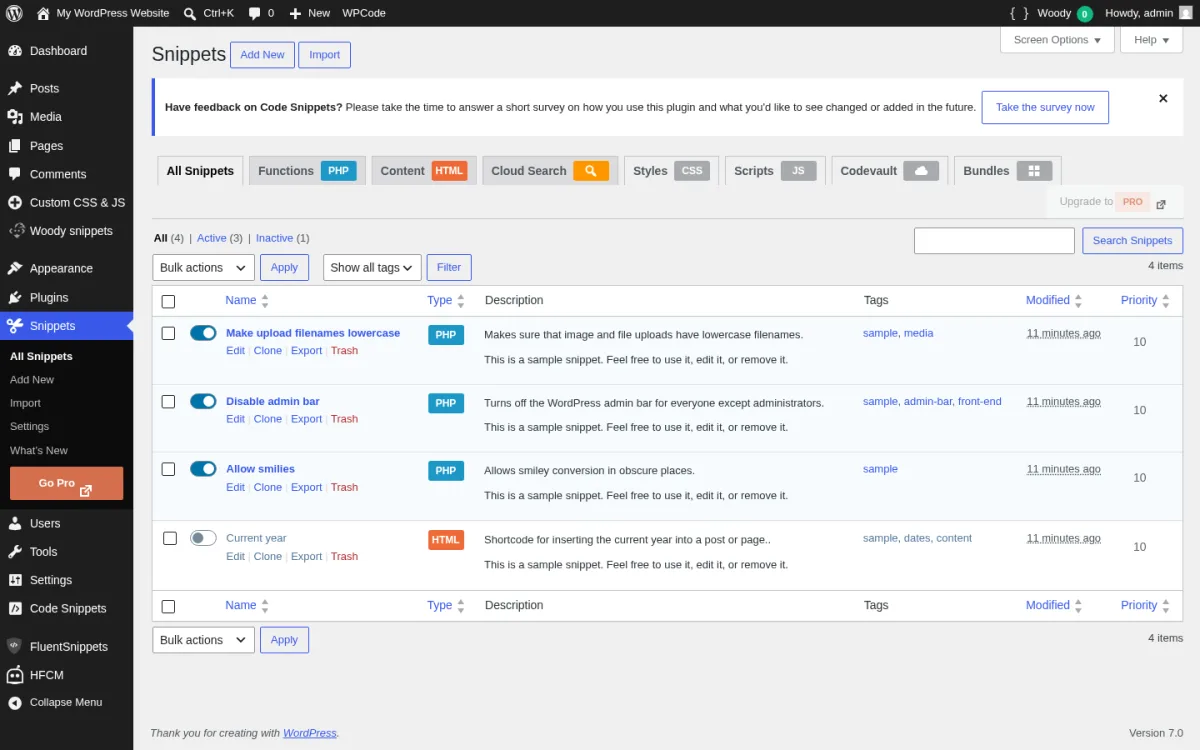
What I evaluated in a clean WordPress 7.0 sandbox on 2026-06-18. I installed Code Snippets 3.9.6 from WordPress.org, activated it, and opened the new top-level Snippets menu (sub-pages: All Snippets, Add New, Import, Settings, What's New, Go Pro). The plugin ships with four ready-to-use demo snippets (Make upload filenames lowercase, Disable admin bar, Allow smilies, Current year) so a new user has something to learn from without writing a line of PHP. I turned the three reusable demos on with the per-row toggle and confirmed they show up as active in the snippets list (screenshot above). I then opened the snippet editor for one of them and confirmed the CodeMirror syntax highlighter, the scope toggle (Run snippet everywhere / Only run in administration area / Only run on site front-end / Only run once / Content / Head / Body), the tag editor, the priority field, and the "Bulk Actions > Export to PHP" support.
Strengths. PHP-first plugin with a clean code-quality reputation. The wp_snippets table is well-designed (id, name, description, code, tags, scope, condition_id, priority, active, cloud_id) and the per-snippet scope field lets you choose Run everywhere / Only admin / Only front-end / Only run once / Content / Head / Body without conditional-logic UI. Safe Mode is documented in the FAQ: add define( 'CODE_SNIPPETS_SAFE_MODE', true ); to wp-config.php to prevent every snippet from executing while you fix a fatal one. Network-activate on Multisite to enable a true cross-network snippets interface. Cloud Search is in the free build and lets you browse and download community snippets from Code Snippets Cloud. v3.8.0 (October 2025) added optional file-based execution mode. v3.9.4 added a drag-and-drop importer with native conversion from HFCM, WPCode (Insert Headers and Footers), and Insert PHP Code Snippet.
Limitations. CSS, JavaScript, Gutenberg integration, and Elementor integration are Pro-only. The free build does not let you save snippets to the Code Snippets Cloud (you can browse and download from Cloud Search, but not sync your own snippets up). AI snippet generation, AI line-by-line code explanations, Bundles (one-click multi-snippet imports), and the OAuth flow for the cloud are Pro-only. The plugin pre-seeds the four demo snippets in the inactive state, which is the correct default but tripped some buyers who expected the demos to "just work" out of the box. The 4.7 average rating is lower than WPCode's 4.9 because the support-forum response cadence dipped in early 2026 (0 of 4 support issues resolved in the last two months, per the WP.org listing on 2026-06-18); the codebase itself is stable.
Pricing. Free build is on WordPress.org. Code Snippets Pro tiers (codesnippets.pro/pricing, verified 2026-06-18):
- Pro Annual: $149 / year across 1 / 10 / 100 / Unlimited site tiers (the per-site headline is the same; the site count is what varies).
- Lifetime: $137 (1 site) up to $897 (unlimited).
- Monthly: from $3.90/month (1 site) up to $29.90/month (unlimited).
Best fit. Multisite networks that want to share PHP snippets across the network; developers who want a CodeMirror editor and a true scope toggle without a conditional-logic UI to wade through; sites that already store custom-fields or post-meta in their own tables and prefer Code Snippets keeping a dedicated wp_snippets table out of wp_posts.
3. FluentSnippets: the file-based, zero-DB-queries free option
- Vendor: fluentsnippets.com
- WordPress.org: wordpress.org/plugins/easy-code-manager
- Active installs: 40,000+
- Rating: 4.6 / 5 (54 reviews on 2026-06-18)
- Latest version: 10.53, released 2026-01-22
- Requires: WordPress 6.0+, PHP 7.3+
- Tested up to: WordPress 6.9.4
FluentSnippets is the newest credible entry in the category and the only one in this roundup that does not run a single SQL query at runtime. The plugin (formerly Easy Code Manager) was rebuilt and rebranded by the WPManageNinja team (the people behind Fluent Forms, FluentCRM, FluentSMTP, and Ninja Tables) and stores every snippet as a flat PHP file in a dedicated uploads folder. Snippet metadata (name, description, conditional logic, snippet type) is parsed from a code block at the top of each file once and cached in index.php, so request-time execution is just a PHP include of the saved file under the hooks you chose. The plugin is 100% free with no paid tier.
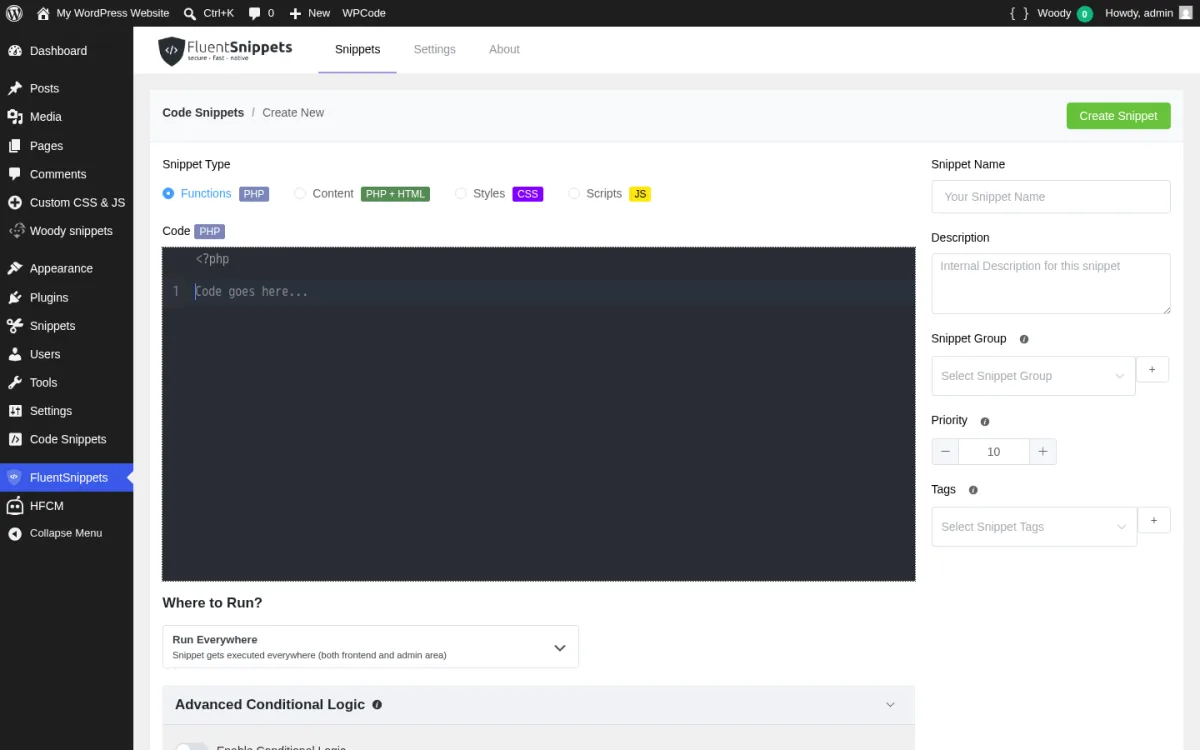
What I evaluated in a clean WordPress 7.0 sandbox on 2026-06-18. I installed FluentSnippets 10.53 from WordPress.org, activated it, opened the new FluentSnippets menu, and clicked New Snippet. The editor (screenshot above) opens four Snippet Type cards: Functions (PHP), Content (PHP + HTML), Styles (CSS), Scripts (JS), each with its own coloured language badge. The PHP CodeMirror editor pre-seeds the <?php opening tag and a one-line "Code goes here..." placeholder. The Where to Run picker defaults to "Run Everywhere (Snippet gets executed everywhere both frontend and admin area)" and lets you pick a specific WordPress action hook. The right rail collects Snippet Name, Internal Description, Snippet Group (with inline add), Priority (default 10), and Tags (with inline add). The Advanced Conditional Logic section sits below the editor with a group toggle. After saving a test snippet I checked the WordPress uploads folder and confirmed FluentSnippets writes a real flat PHP file there instead of creating a database table for its snippets.
Strengths. Genuinely free, with no upsell or "Go Pro" banner. File-based storage is real: I inspected the uploads folder after the plugin loaded and confirmed FluentSnippets does not create a wp_fluent_snippets database table at all. Stand-alone Mode is documented and lets you uninstall the plugin while your snippets keep running via mu-plugins; reactivating the plugin re-attaches them to the management UI. The automatic error handler prevents most fatal PHP errors by validating the snippet before activation and rolling back a snippet that throws on activation. Conditional logic covers user login state / role, page type, post type, taxonomy / term, page or post URL, specific page / post / CPT, date conditions, and FluentCRM tag / list rules (a unique integration for the WPManageNinja stack). Custom shortcode per snippet creates a portable dynamic content block. v10.50 (April 2025) added Export / Import. v10.51 (May 2025) added nonce verification for export/import after a Patchstack disclosure.
Limitations. No cloud library by design. No vendor-curated ready-made snippet repository in the plugin; you bring your own snippets. Smaller ecosystem than WPCode or Code Snippets, and only 40,000 active installs vs WPCode's 3 million. Only the FluentCRM-stack conditional-logic rules are unique; the broader integrations FluentCRM users expect (Fluent Forms triggers, Ninja Tables triggers) come through your own hooks rather than dedicated UI. Documentation is concise rather than exhaustive; if you need detailed setup walkthroughs the WPCode and Code Snippets docs are deeper.
Pricing. 100% free forever, no Pro tier, no paid bundles. The plugin's commercial model is brand support for the wider WPManageNinja product line rather than direct revenue.
Best fit. Performance-sensitive sites that do not want any plugin running SQL queries on every page load just to load snippets; agencies that want a snippets plugin that survives a "delete this plugin and bring it back later" workflow because of Stand-alone Mode; FluentCRM users who want conditional logic tied to current-contact tags and lists; budget-zero builds where every paid renewal matters.
4. Header Footer Code Manager (HFCM): the focused header/footer/body manager
- Vendor: draftpress.com
- WordPress.org: wordpress.org/plugins/header-footer-code-manager
- Active installs: 600,000+
- Rating: 4.9 / 5 (308 reviews on 2026-06-18)
- Latest version: 1.1.45, released 2026-06-11
- Requires: WordPress 4.9+, PHP 5.6.20+
- Tested up to: WordPress 6.8.5
HFCM by DraftPress Team (the 99 Robots team) is the focused header/footer/body code manager. It does one job well: take an arbitrary HTML, CSS, or JavaScript snippet (Google Analytics, Google Tag Manager, Facebook Pixel, chat-widget script, custom CSS, custom JS) and inject it into a specific WordPress location (head, footer, top of content, bottom of content) on a specific scope (site-wide / specific post / specific page / specific category / specific tag / specific CPT / latest N posts / shortcode only) on a specific device (all / desktop / mobile). It deliberately does not run PHP in the free build, which keeps the threat model small and the UI simple.
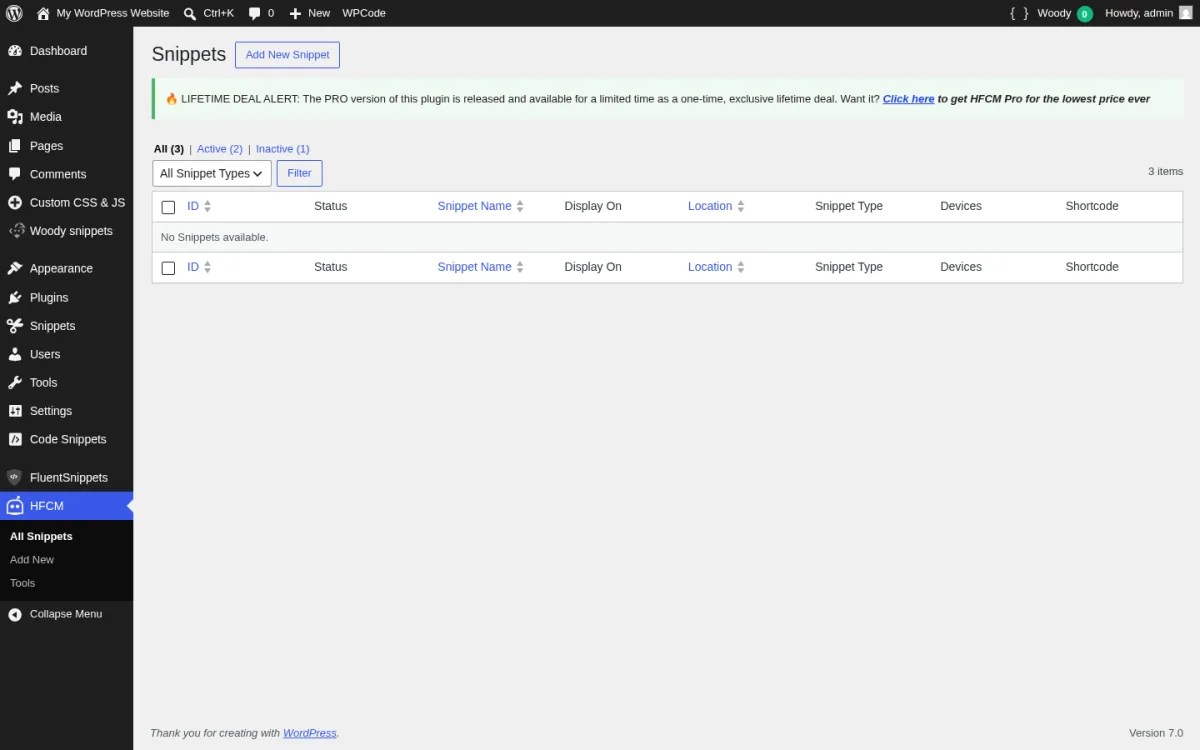
What I evaluated in a clean WordPress 7.0 sandbox on 2026-06-18. I installed HFCM 1.1.45 from WordPress.org, activated it, and confirmed the new HFCM menu (sub-pages: All Snippets, Add New, Tools). I worked through three representative use cases (a Google Analytics 4 tag in the head, a sitewide footer notice CSS rule, and a JavaScript snippet that adds rel="nofollow noopener" to outbound links) so I could review the All Snippets list with the All / Active / Inactive status filter, the snippet-type filter dropdown, and the Pro lifetime-deal banner at the top of the page (screenshot above). I then opened the Add New Snippet screen and confirmed the field set: Snippet Name, Site Display (8 options), Location (Head / Footer / Top of Content / Bottom of Content), Device (All / Desktop / Mobile), Snippet Type (HTML / CSS / JavaScript), and the code editor.
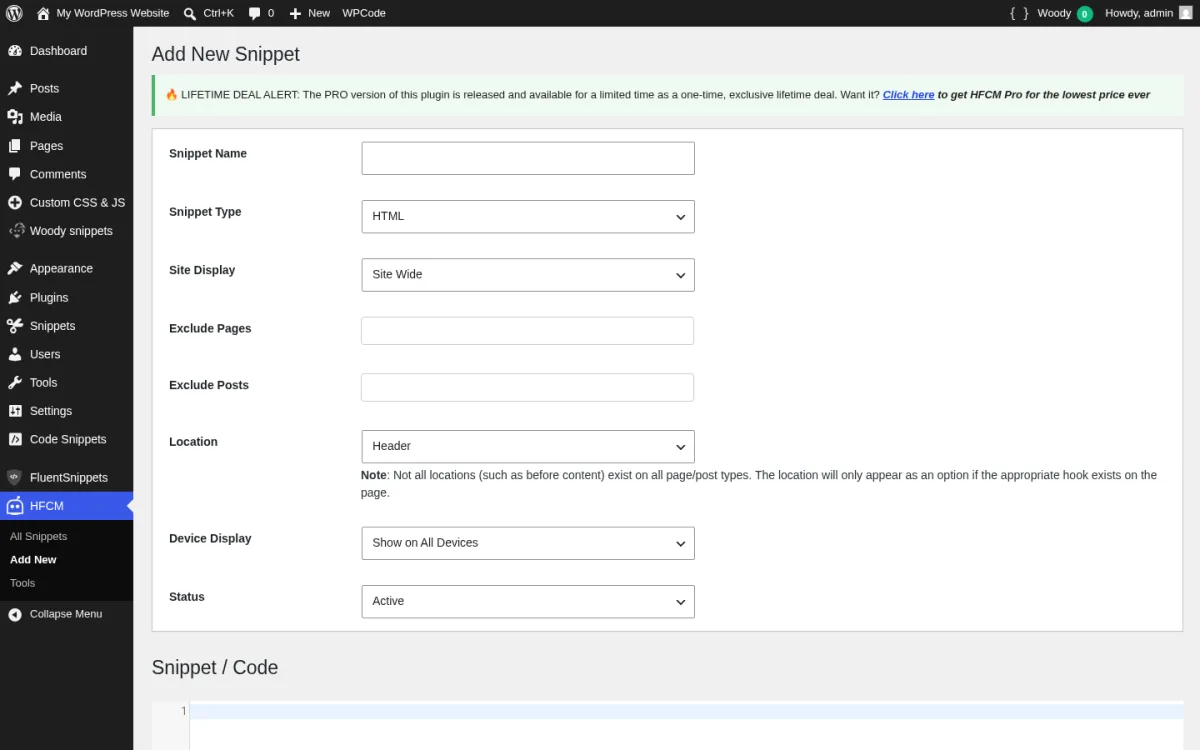
Strengths. Tightly scoped: 8 page-display options, 4 injection locations, 3 device options, snippet-type filter and search in the list, edit history with author logging (who added it, who last edited it, when). Free build supports HTML, CSS, and JS (three of the four most common snippet types) and is enough for most analytics, tracking, and ad scripts. v1.1.45 (June 2026) added an optional DISALLOW_UNFILTERED_HTML enforcement setting for tighter security. v1.1.41 added "Specific Post Types now includes options to display snippet on only posts, or archives, or both." The 4.9 average rating from 308 reviews is the joint-highest in the roundup (tied with WPCode).
Limitations. No PHP in the free build. The "I want to safely run a PHP filter" use case sends you to WPCode, Code Snippets, FluentSnippets, or Woody. No conditional logic on user role, login state, or referrer in the free build; that is Pro. No code revisions or rollback in the free build. Cloud snippet storage and the code snippet library are listed as "coming soon" on the DraftPress feature page on 2026-06-18 but are not shipped yet. The Pro upsell banner at the top of the All Snippets list is the most aggressive of all six free plugins in this roundup. On Multisite, the plugin documentation warns the plugin should be activated only on subsite level.
Pricing. Free build is on WordPress.org. HFCM Pro tiers (draftpress.com, verified 2026-06-18):
- 1 Site: $35 / year.
- 5 Sites: $69 / year.
- Unlimited Sites: $139 / year.
Pro adds PHP code snippets with validation, duplicate / clone, body-tag insertion, logged-in / logged-out user targeting, snippet priority, snippet grouping, and the upcoming cloud snippet storage and library.
Best fit. Sites whose only need is "paste a Google Analytics / Tag Manager / Facebook Pixel / chat-widget snippet into a specific location"; teams that explicitly do not want PHP snippet capability on the site for security reasons; agencies that want per-post-type and latest-N-posts placement without conditional-logic UI noise.
5. Woody Code Snippets: the widest free snippet-type coverage
- Vendor: woodysnippet.com
- WordPress.org: wordpress.org/plugins/insert-php
- Active installs: 60,000+
- Rating: 4.5 / 5 (221 reviews on 2026-06-18)
- Latest version: 2.7.5, released 2026-05-19
- Requires: WordPress 5.6+, PHP 7.0+
- Tested up to: WordPress 7.0
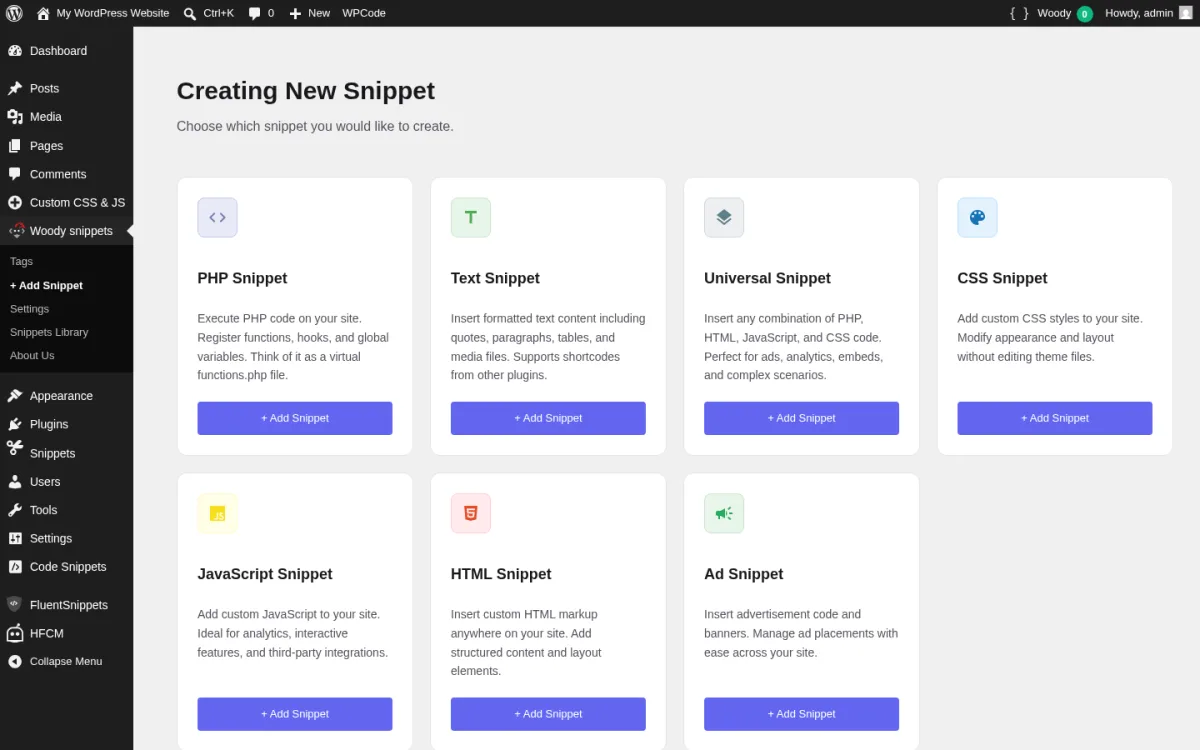
Woody Code Snippets (still listed under the legacy insert-php WP.org slug) is the broadest free snippet-type coverage in the roundup. The free build ships seven snippet types: PHP, Text, Universal (PHP + HTML + CSS + JS in one snippet), CSS, JavaScript, HTML, and Ad. Themeisle acquired the plugin from the original Webcraftic team in October 2025 (release 2.6.0) and the v2.7.0 release in January 2026 added export and clone to the free tier, an Active Snippets menu, fatal-error email notifications, and an improved plugin UI. The plugin's signature feature is the URL-toggle Safe Mode that disables every snippet by hitting one admin URL with a query string, which is the simplest recovery flow of any plugin in this roundup.
What I evaluated in a clean WordPress 7.0 sandbox on 2026-06-18. I installed Woody Code Snippets 2.7.5 from WordPress.org, activated it, and opened the new Woody snippets menu (sub-pages: Tags, + Add Snippet, Settings, Snippets Library, About Us). I then opened the + Add Snippet screen and captured the seven-card snippet-type picker (screenshot above). I exercised the safe-mode toggle by visiting the documented ?wbcr-php-snippets-safe-mode admin URL and confirmed Woody adds a top-bar notice and disables snippet execution; visiting ?wbcr-php-snippets-disable-safe-mode restores normal execution. I also confirmed the auto-insert location list (Before closing <head> / Before closing <body> / Before or after post content / Before or after a specific paragraph / Between posts on archive pages / WooCommerce locations).
Strengths. Seven snippet types in the free build is the widest free-tier coverage in the roundup, and the Universal snippet type is genuinely useful for mixed-mode snippets that need to combine PHP and HTML and a small CSS block in one place. Header and footer injection is built into PHP / Universal snippets without needing a separate Header & Footer page. Conditional logic in the free build covers user role + registration date, page / post type / taxonomy, referrer, and cookie value. The URL-toggle Safe Mode is the friendliest recovery flow for non-developers: one URL disables every snippet and lets you fix the broken one. Export / clone (free since 2.7.0) and the Active Snippets menu landed in January 2026. Themeisle ownership since October 2025 means the plugin gets the same maintenance cadence as Neve, Otter Blocks, and Hestia.
Limitations. Code revisions and rollback (version history with comparison) are Pro-only. Cloud Templates and Cloud Sync are Pro-only. Advanced conditions (device type, browser, OS, JS availability, ad-blocker detection, country, visit depth, time of day, total visits) are Pro-only. The plugin's WP.org review history shows a recurring complaint about review-nag dismissal that the Themeisle team has been addressing release by release but has not fully removed yet. Multisite is not supported (the FAQ confirms this is a single-site plugin). The Pro upsell prompt during snippet creation is more visible than in WPCode or Code Snippets. The 4.5 average rating is the lowest in the roundup; most of the one-star reviews target the legacy insert-php shortcode behavior or the review-nag dismissal rather than the snippet engine itself.
Pricing. Free build is on WordPress.org. Woody Pro tiers (woodysnippet.com/upgrade, verified 2026-06-18):
- Personal: $39 / year (normally $79), 1 site.
- Business: $59 / year (normally $119), 5 sites. Recommended.
- Agency: $99 / year (normally $199), Unlimited sites.
All tiers add advanced conditions, custom shortcode names, code revisions and rollback, cloud templates, WooCommerce placement locations, email support, and a 30-day money-back guarantee.
Best fit. Sites that genuinely need PHP + CSS + JS + HTML + Ad blocks in one plugin; agencies that want a single admin sidebar for every type of custom code; site owners who want the simplest possible safe-mode recovery flow (one URL); existing Themeisle/Neve/Otter users who already trust the Themeisle vendor.
6. Simple Custom CSS and JS: the CSS/JS specialist with file-based output
- Vendor: silkypress.com
- WordPress.org: wordpress.org/plugins/custom-css-js
- Active installs: 600,000+
- Rating: 4.4 / 5 (103 reviews on 2026-06-18)
- Latest version: 3.53, released 2026-05-20
- Requires: WordPress 3.0.1+, PHP 5.2.4+
- Tested up to: WordPress 7.0
Simple Custom CSS and JS by SilkyPress is the CSS- and JS-only specialist in the roundup. It does not run PHP in any tier. The plugin's clean design choice is to store every saved code block in wp_posts under a custom-css-js custom post type, then write the actual CSS or JS to a file in wp-content/uploads/custom-css-js/{post-id}.css|js so the front-end pulls a cached file instead of running a database lookup on every page load. The plugin also creates a dedicated "Web Designer" (css_js_designer) role on activation so you can let a designer publish CSS/JS without making them an administrator.
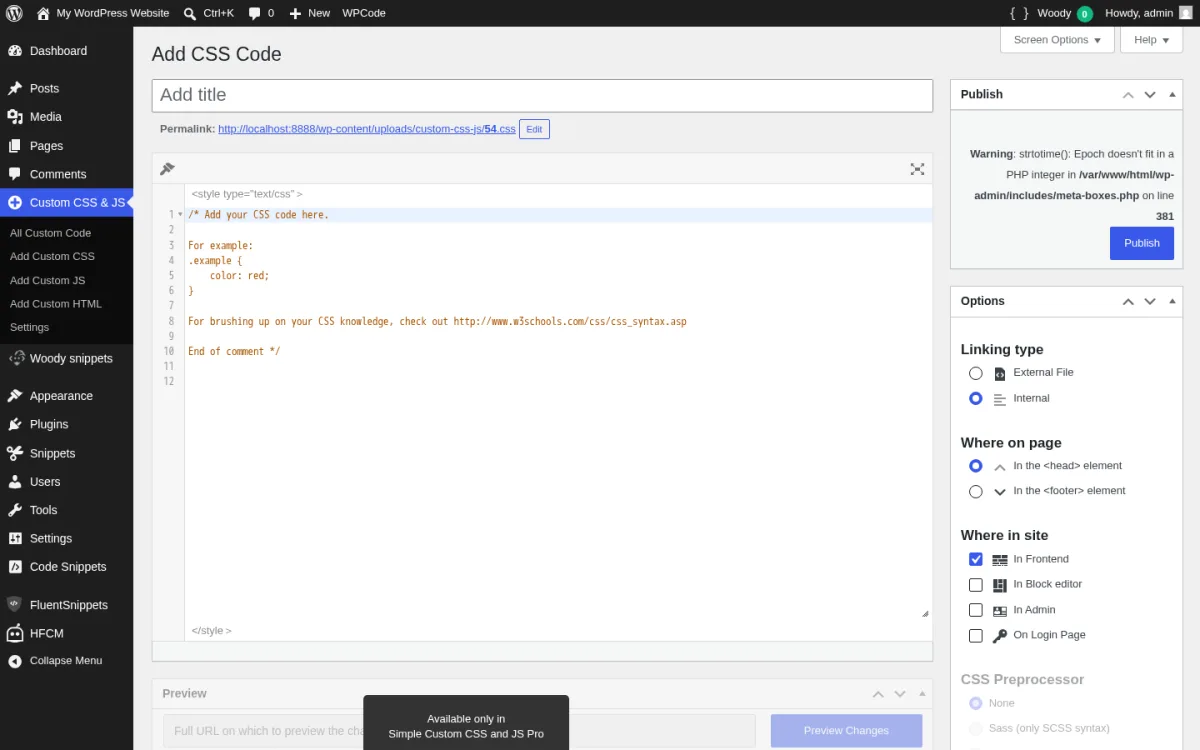
What I evaluated in a clean WordPress 7.0 sandbox on 2026-06-18. I installed Simple Custom CSS and JS 3.53 from WordPress.org, activated it, and confirmed the new Custom CSS & JS menu (sub-pages: All Custom Code, Add Custom CSS, Add Custom JS, Add Custom HTML, Settings). I worked through two representative tweaks (a CSS block that rounds the WooCommerce button corners and a JavaScript block that adds a custom-js-active class to <body>) so I could review both the All Custom Code list and the per-code Options metabox. I then opened the Add Custom CSS editor and confirmed the field set: CodeMirror CSS pane wrapped in <style> tags, Linking type (External File / Internal), Where on page (Head / Footer), Where in site (Frontend / Block editor / Admin / Login Page), and the CSS Preprocessor field with the Pro upsell.
Strengths. Free build covers CSS, JS, and HTML (three of the four most common snippet types) and the "External File" linking type writes the code to wp-content/uploads/custom-css-js/ for cache-friendly front-end delivery. The Web Designer role lets you delegate CSS/JS changes to a non-admin user, which is a real workflow win for agencies. v3.48 (September 2024) added Block editor support so CSS/JS snippets can target inside the Gutenberg editor. v3.51 (September 2025) updated CodeMirror to 5.65.20. v3.51.2 (December 2025) added a wp_delete_file filter for tighter file lifecycle control. v3.53 (May 2026) restricted the list_table_primary_column filter to the Custom Code table. The plugin has 600,000 active installs, the same as HFCM, and a strong rating despite a small review count.
Limitations. No PHP in any tier. CSS preprocessors (Sass, Less, SCSS-syntax only) are Pro-only. Per-page targeting and URL exclusion are Pro-only. The free build supports site-wide CSS/JS only, not per-post or per-URL scoping. Preview & Approval (test changes before deployment, share preview links), revision history with date + user + comparison, CSS/JS minification (up to 21% reduction), Multisite network-wide application, and shortcode creation with variables are Pro-only. The "Preview Changes" Pro upsell shows under the editor on the free build. The "Add Custom HTML" sub-page exists but the HTML block is the smallest piece of functionality in this plugin; if your main need is HTML scripts in the header, WPCode or HFCM is a better fit. The 4.4 average rating is dragged down by 11 one-star reviews, most of them targeted at one-off compatibility issues with caching plugins.
Pricing. Free build is on WordPress.org. Simple Custom CSS and JS Pro tiers (silkypress.com, verified 2026-06-18):
- Personal: $48.50 / year, 1 site.
- Developer: $68.50 / year, 10 sites. Most popular.
- Big Agency: $148.50 / year, 50 sites.
All tiers add SCSS / Less preprocessors, per-page targeting, preview / approval, revision history, minification, Multisite, and shortcode creation.
Best fit. Sites that only need CSS and JS injection (button styling tweaks, custom font-loading, small UI behavior changes); agencies that want to delegate CSS/JS edits to a non-admin Web Designer role; teams that explicitly want a non-PHP snippet plugin to keep the threat surface small; performance-conscious builds that want the External File caching to deliver CSS/JS through wp-content/uploads/ instead of a database lookup.
7. WPCodeBox 2: the premium snippets IDE with Monaco editor and cloud sync
- Vendor: wpcodebox.com
- WordPress.org: Not listed (paid plugin)
- Latest version: WPCodeBox 2 v1.3.1 (announced on the vendor homepage)
- Supported snippet types: PHP, CSS, JavaScript
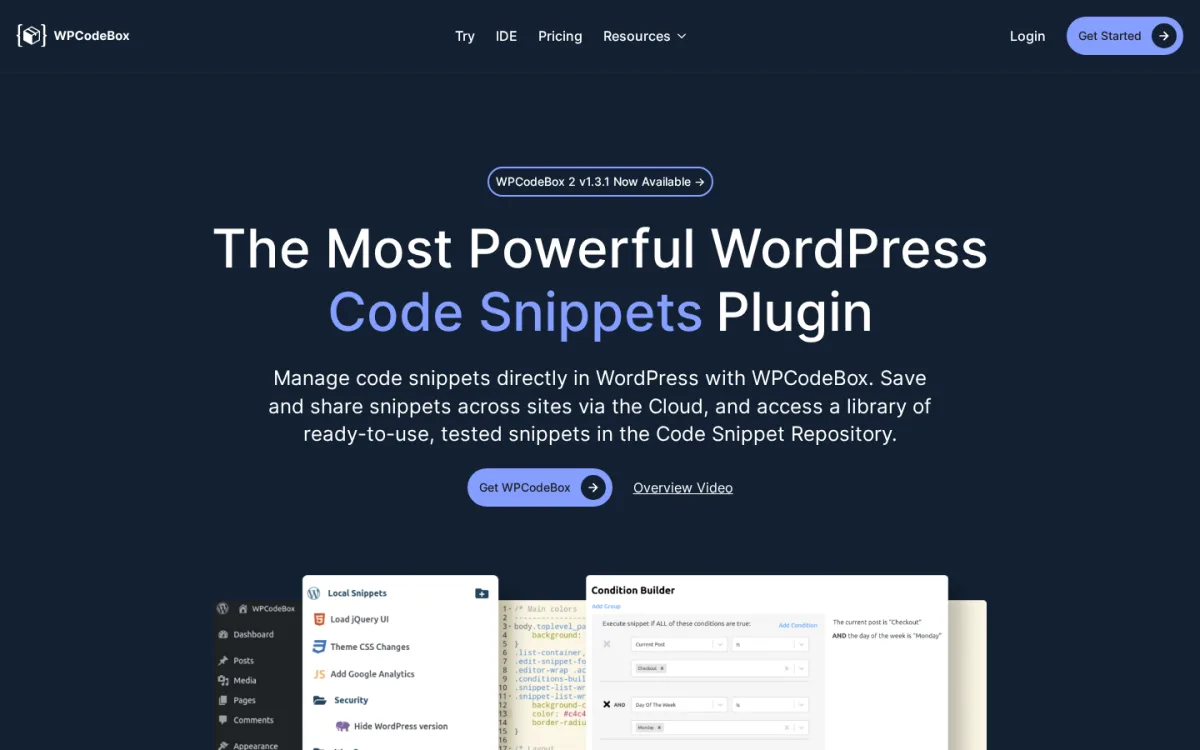
WPCodeBox 2 is the paid premium tier of the category. It is not on WordPress.org and there is no free trial; the entry point is a $39/year Single Site plan or the 30-day money-back guarantee on a paid purchase. The plugin is built around the Monaco editor (the same code editor that powers VS Code), so the snippet authoring experience is closer to a real IDE than to the WP-admin textareas that most of the other six plugins ship. WPCodeBox 2's signature pieces are the cloud library that syncs snippets across sites, the Condition Builder with grouped AND/OR conditional logic, the Snippet Repository of vetted ready-to-use snippets, and the optional WPCodeBox IDE: a desktop-style editor for snippets and theme/plugin files that ships with most paid tiers.
Because WPCodeBox 2 is paid only and the vendor does not publish a free trial, I documented this entry from the vendor homepage, IDE page, and pricing page on 2026-06-18 rather than from a sandbox install.
What you get in WPCodeBox 2 v1.3.1. PHP, CSS, and JavaScript snippet types in the Monaco editor with autocomplete and linting; Local Snippets, Remote Cloud Snippets, and the public Snippet Repository as three first-class sections in the admin; one-click install from the Repository; a Condition Builder with grouped AND/OR rules including Current Post, Day of the Week, User role, WooCommerce conditions, and arbitrary custom conditions; cloud storage across sites via the dedicated Cloud add-on; the WPCodeBox IDE for desktop-style editing across plugins and themes; suspend mode for emergency recovery.
Strengths. The Monaco editor is the best snippet authoring experience in the category by a wide margin. The Condition Builder is the most readable conditional-logic UI of all seven plugins in this roundup. The cloud library is mature and the cross-site sync is the cleanest workflow for an agency that runs the same baseline snippets on 10+ client sites. The Snippet Repository is curated by the WPCodeBox team rather than user-submitted, which keeps the quality bar high. The WPCodeBox IDE is a real bonus for snippet-heavy workflows: you can edit snippets, themes, and plugins from a single window. Lifetime license at $199 is competitive against the WPCode Pro $199/year recurring plan if you intend to use the plugin for more than one renewal cycle.
Limitations. Paid only, no free tier, no free trial. The cloud-storage feature is structured as a separate paid add-on (Basic Cloud Storage $9/month for 50 snippets and 5 API keys, Unlimited Cloud Storage $19/month for unlimited snippets and API keys) on the cheaper plan tiers; the Unlimited Sites + Cloud Unlimited bundle at $149/year is the cleanest way to avoid the add-on. The plugin does not ship a dedicated header/footer page; you compose header/footer injection through the per-snippet location picker. The vendor presence is smaller than WPCode or Code Snippets; there is no marketplace of community plugins specifically built around WPCodeBox snippet integration the way WPCode Pro snippets show up in AIOSEO and WPForms.
Pricing. Pricing on wpcodebox.com on 2026-06-18:
- Single Site: $39 / year (1 domain, priority support, unlimited snippets, cloud storage).
- Unlimited Sites: $79 / year (unlimited domains, priority support, unlimited snippets, cloud storage).
- WPCodeBox + Cloud Unlimited: $149 / year (unlimited domains and snippets, unlimited cloud storage and API keys, priority support).
- Lifetime: $199 one-time (unlimited domains, lifetime support and updates, no renewal).
- IDE Unlimited Lifetime: $149 one-time (IDE only, unlimited sites, lifetime support and updates).
- Monthly Cloud Add-ons (separate from base plan): $9 / month basic, $19 / month unlimited.
30-day money-back guarantee on every paid plan.
Best fit. Power users who live inside snippets all day and want a real Monaco-editor IDE; agencies that maintain a shared baseline of PHP snippets across many client sites and want true cloud sync; teams that prefer a one-time Lifetime license at $199 over a recurring WPCode Pro at $199/year (the math favors WPCodeBox after two renewal cycles); WordPress freelancers who want the WPCodeBox desktop IDE for editing snippets and theme/plugin files in the same window.
How to choose the right code snippets plugin in 2026
You probably do not need to compare all seven. Start with the question that matches your site.
- "I just need to paste a Google Analytics tag in the head and never touch this again." Install WPCode. The dedicated Header & Footer page is the cleanest fit; you will not even need to look at the snippet library.
- "I want the safest default for any client site I build." Install WPCode. 3+ million active installs, 4.9/5 rating, auto-deactivate on fatal PHP, real free library, and a Pro path if the client outgrows Lite.
- "I run a Multisite network and want shared snippets across every subsite." Install Code Snippets and network-activate it. Then add the per-site snippets through the subsite admin.
- "I want every byte of performance and zero database queries on every page load." Install FluentSnippets. File-based storage and Stand-alone Mode are unique in the category, and the plugin is 100% free.
- "I only want to inject pixel and analytics scripts, never PHP." Install Header Footer Code Manager. The free build covers HTML / CSS / JS in four locations and never lets a PHP snippet touch your site by design.
- "I want one plugin that handles PHP, CSS, JS, HTML, Universal mixed-mode, and ad snippets, all free." Install Woody Code Snippets. Seven snippet types in the free build is the widest in the roundup.
- "I only need CSS and JavaScript tweaks and want a cache-friendly external-file output." Install Simple Custom CSS and JS. The External File linking type writes to
wp-content/uploads/custom-css-js/and the Web Designer role lets you delegate the work. - "I author dozens of snippets a week, want the Monaco editor and a real cloud library, and a Lifetime license is fine." Buy WPCodeBox 2 Lifetime at $199. The IDE bundle and the Condition Builder pay for themselves on the second client site.
If your site eventually outgrows what custom snippets can do, the broader plugin category is already deep: our roundups of WordPress custom fields plugins, WordPress page builder plugins, and free WordPress plugins for any website cover the structured-content, layout, and starter-stack categories where most custom snippets eventually graduate.
FAQ
Will a code snippets plugin slow down my WordPress site?
A well-built snippet plugin adds a negligible page-load cost. WPCode, Code Snippets, HFCM, and Woody all cache snippet metadata so the per-request cost is essentially the same as adding a couple of small functions to functions.php. FluentSnippets pushes this further: it stores snippets as flat PHP files and runs zero SQL queries at runtime. Simple Custom CSS and JS writes CSS and JS to cached files in wp-content/uploads/. The slowdown you should worry about is not the plugin itself but the specific PHP/CSS/JS code you paste into it; a heavy database query inside one of your own snippets will be slow regardless of which plugin is running it.
What happens if a PHP snippet breaks my site?
The four PHP-runner plugins in this roundup all have a recovery story, but they handle it differently. WPCode auto-deactivates the offending snippet when a fatal error fires in the admin and surfaces an error tracker in the snippets list. Code Snippets exposes a Safe Mode flag: add define( 'CODE_SNIPPETS_SAFE_MODE', true ); to wp-config.php and every snippet stops executing while you fix the bad one. FluentSnippets's automatic error handler validates and rolls back a snippet that throws on activation, and Stand-alone Mode lets your snippets keep running via mu-plugins even if you uninstall the plugin. Woody Code Snippets has the simplest non-developer recovery flow: visit /wp-admin/?wbcr-php-snippets-safe-mode to disable every snippet, fix the broken one, then visit /wp-admin/?wbcr-php-snippets-disable-safe-mode to re-enable them. If none of those works, our guide to solving WordPress critical errors covers the SFTP recovery path.
Can I store code snippets in version control instead of the database?
Partly. Code Snippets v3.8.0 added optional file-based execution mode for snippets, so the saved code can live on disk in a controlled folder. FluentSnippets stores every snippet as a flat PHP file by default, which makes them friendly to git or rsync. WPCode does not store snippets on disk in the free build (it uses the database), but the Pro tier supports Export / Import of snippet collections in JSON. If you want true git-tracked, code-as-config snippets, the FluentSnippets file-based model is the best fit in this roundup, with Code Snippets's optional file-based mode as a close second.
Will I lose my snippets if I change the WordPress theme?
No. All seven plugins store snippets independently of your theme. WPCode and Code Snippets store them in their own tables (or as a custom post type in the database). FluentSnippets stores them as flat PHP files in wp-content/uploads/. Simple Custom CSS and JS stores them as custom-css-js custom post types plus cached files. HFCM uses its own wp_hfcm_scripts table. A theme change does not touch any of those. The only thing that erases snippet data is uninstalling the plugin with the "Complete Uninstall" option enabled.
Which code snippets plugin works on Multisite?
Code Snippets is the only one in this roundup with first-class Multisite support: network-activate the plugin through the Network Dashboard and you get a network-wide snippets interface plus per-site snippets. HFCM works on Multisite but the documentation explicitly recommends per-subsite activation, not network-activation. WPCode's Multisite add-on is bundled with the WPCode Pro Bundle plan only ($349/year). Woody Code Snippets does not support Multisite per its FAQ. FluentSnippets and Simple Custom CSS and JS work on Multisite at the subsite level but do not provide a network-wide snippets manager. If your stack is Multisite, Code Snippets is the cleanest free pick.
Is it safe to paste PHP code from a tutorial into a snippets plugin?
Only if the source is trustworthy. A PHP snippets plugin runs whatever PHP you paste with the same permissions as your theme, which means a malicious or buggy snippet can read database credentials, send mail from your domain, or open a backdoor. Stick to snippets from the plugin's own vetted library (WPCode's 142-snippet free library, WPCodeBox's Snippet Repository, Code Snippets Cloud Search), from the official WordPress documentation, or from named-author tutorials on sites you already trust. Woody Code Snippets and HFCM both include explicit "use this plugin responsibly" warnings in the readme, and HFCM Pro now ships an optional DISALLOW_UNFILTERED_HTML enforcement setting for tighter control. Never paste a snippet from an anonymous gist into a production site, even if it looks correct.
Conclusion
If you want one safe default for any WordPress site in 2026, install WPCode. It has the biggest user base, the highest rating, the cleanest free admin UI, real safe-error handling, a dedicated Header & Footer page, and a free 142-snippet expert library that covers most "should I install a separate plugin for this?" use cases. If you specifically want a long-standing PHP-first plugin with Multisite support, install Code Snippets. If you want the fastest architecture (zero DB queries, flat-file storage, Stand-alone Mode), install FluentSnippets. If your only job is injecting pixel and analytics scripts and you do not want PHP on the site, install Header Footer Code Manager. If you want seven free snippet types in one plugin, install Woody Code Snippets. If you only need CSS and JavaScript, install Simple Custom CSS and JS. And if you write snippets for a living and want a real Monaco-editor IDE with cloud sync, buy WPCodeBox 2 Lifetime at $199.
Whichever plugin you pick, the best habit is the same: test every new snippet on a staging copy first, name it clearly, add a one-line description, and never paste a snippet from a source you do not already trust.
Similar Blogs


