

7 Best WordPress Custom Fields Plugins in 2026 (Free + Paid, Hands-on Tested)

Why a custom fields plugin matters in 2026
Out of the box, WordPress only ships a handful of usable fields on a post: title, content, excerpt, featured image, categories, tags. Anything beyond that, the price of a product, an event date, a brewery's address, a recipe's prep time, a podcast episode number, lives in the "custom fields" panel that 99% of editors never see. A custom fields plugin replaces that panel with a structured editor your team can actually use, then exposes those values to the theme, the block editor, the REST API, and your search index.
In 2026 the category is more competitive than it has been in five years. Advanced Custom Fields is still the most-installed option at 2+ million active sites. WordPress.org forked it into Secure Custom Fields after the late-2024 Automattic vs WP Engine dispute, giving people who want a fully community-maintained build a credible drop-in replacement. Meta Box keeps shipping new field types every quarter and still sells a real lifetime license. Pods quietly hit 100,000 installs as the only major free plugin that bundles custom post types, taxonomies, fields, relationships, and custom database tables in one download. CMB2 remains the developer's favorite code-defined toolkit. And the visual-builder side of WordPress brought JetEngine and Toolset into the conversation for sites that want dynamic listings and templates in the same plugin as the field editor.
For the 2026 update, I installed each of the five free plugins on a clean WordPress 7.0 sandbox, walked the real admin UI, registered a working field group or metabox for each one, and verified the WordPress.org install count, rating, latest version, release date, and current 2026 pricing live on every vendor page on 2026-06-17. JetEngine and Toolset are paid only with no free trial, so those two are documented from the vendor product page and vendor pricing page rather than from a sandbox.
My default pick for 2026 is Advanced Custom Fields: it has the biggest user base, the broadest plugin/theme integrations, and a free build that already covers 30+ field types, custom post types, and taxonomies. If your priority is a fully community-maintained, fully free alternative, Secure Custom Fields is the obvious second look. If you want a real lifetime license rather than a yearly renewal, Meta Box wins. If you want one free plugin that also creates custom post types and custom taxonomies with no premium ladder, Pods wins. Developers who want fields in version control should look at CMB2. And if your site uses Elementor, Bricks, or Gutenberg as the rendering layer and you want dynamic listings tied to your fields, JetEngine or Toolset bundle the two jobs into one paid plugin.
If your custom fields will eventually power product attributes, see our best WordPress ecommerce plugins roundup, and if you intend to render those fields with a visual builder, the WordPress page builder plugins roundup pairs naturally with this one.
How I evaluated each plugin
For every plugin in the roundup I checked the same set of buyer-relevant facts:
- Install reputation: active install count, average rating, and total review count on WordPress.org as of 2026-06-17 (or vendor metrics for paid-only plugins not on WordPress.org).
- Setup speed: how many clicks from "plugin activated" to "the first field group is saved and visible on a post."
- Field type coverage: number of built-in field types, presence of Repeater / Flexible Content / Group / Clone, conditional logic, location rules, options pages, term/user/comment meta.
- Custom post type and taxonomy support: whether the plugin registers CPTs and taxonomies natively, or expects you to pair it with a separate plugin.
- Display layer: native blocks, shortcodes, theme template functions, REST API exposure, integrations with Elementor, Bricks, Gutenberg, and WooCommerce.
- Free vs paid limits: the exact line between the free build and the cheapest paid tier, with current 2026 pricing in the original currency.
- Performance and database model: standard
wp_postmetastorage vs separate custom tables vs Advanced Content Types. - Update cadence and security: number of 2026 releases, recent security fixes, and how publicly the vendor handles disclosure.
For ACF, SCF, Meta Box, Pods, and CMB2 I installed the latest WP.org build on a fresh WordPress 7.0 sandbox, activated the plugin, built a working field group or metabox, and confirmed the saved values render back into the WordPress admin. JetEngine and Toolset are documented from the vendor product page only, because both are paid-only with no free trial.
Quick comparison table
| Plugin | Best for | Free tier covers | Starting paid plan | Main limitation |
|---|---|---|---|---|
| Advanced Custom Fields (ACF) | Safe default for any WordPress site | 30+ field types, CPTs, taxonomies, options pages, location rules, ACF JSON | Personal $49/yr, 1 site | Repeater, Flexible Content, ACF Blocks, Gallery, Clone are PRO only |
| Secure Custom Fields (SCF) | Free, community-maintained ACF fork | Same field set as legacy ACF Free build | None (free forever) | Mutually exclusive with ACF on the same site; no SCF PRO tier |
| Meta Box | Developer-friendly free framework + lifetime license | 40+ field types, MB Lite UI builder, ~12 free extensions | Personal Basic $49/yr (1 site); Lifetime from $299 one-time | UI builder, Custom Table, Frontend Submission, Views are paid add-ons |
| Pods | Fully free CPT + fields + relationships all-in-one | 25+ input types, CPTs, taxonomies, options pages, relationships, ACTs, native blocks | None (free forever) | Smaller third-party ecosystem than ACF; UI is busier |
| CMB2 | Code-defined field framework for developers | All features, MIT/GPL, repeatable groups, 30+ community field types | None (free forever) | No GUI builder; field definitions live in PHP, not the database |
| JetEngine (Crocoblock) | Dynamic content for Elementor / Bricks / Gutenberg sites | None on WP.org | From $68-$75/yr single site; bundle from $199/yr | Paid only; tightly tied to the Crocoblock ecosystem |
| Toolset | No-code dynamic site builder with templates and access control | None on WP.org | 1 site EUR69/yr | Paid only; learning curve for non-developers is real |
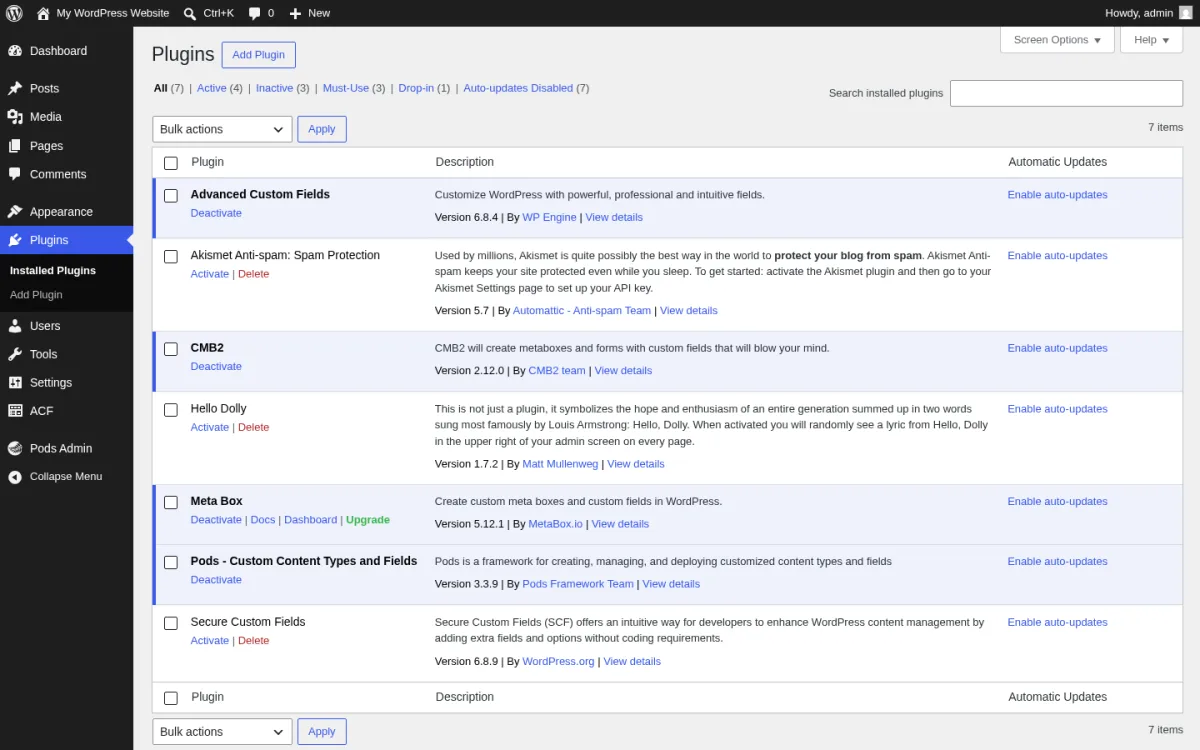
The screenshot below is the WordPress 7.0 Plugins admin page after I installed every free plugin in this roundup on the test sandbox. The five plugins under hands-on test are all active and recognized by WordPress 7.0.
1. Advanced Custom Fields (ACF): the safe default for any WordPress site
- Vendor: advancedcustomfields.com
- WordPress.org: wordpress.org/plugins/advanced-custom-fields
- Active installs: 2+ million
- Rating: 4.5 / 5 (1,438 reviews on 2026-06-17)
- Latest version: 6.8.4, released 2026-06-10
- Requires: WordPress 6.2+, PHP 7.4+
- Tested up to: WordPress 7.0
Advanced Custom Fields is the plugin most WordPress agencies still reach for first in 2026. It is the most-installed plugin in the category by a wide margin, the most-integrated by other plugins (Yoast, Rank Math, Slim SEO, WPGraphQL, Elementor Pro, Bricks, Breakdance, Beaver Themer, and dozens more all ship native ACF support), and the most-documented at the resources hub on advancedcustomfields.com. The 6.8 series adds Abilities API support (so AI tooling can manage field groups, post types, and taxonomies when you flip a feature flag), JSON-LD structured-data generation behind a feature flag, and a wp acf json WP-CLI command for import/export.
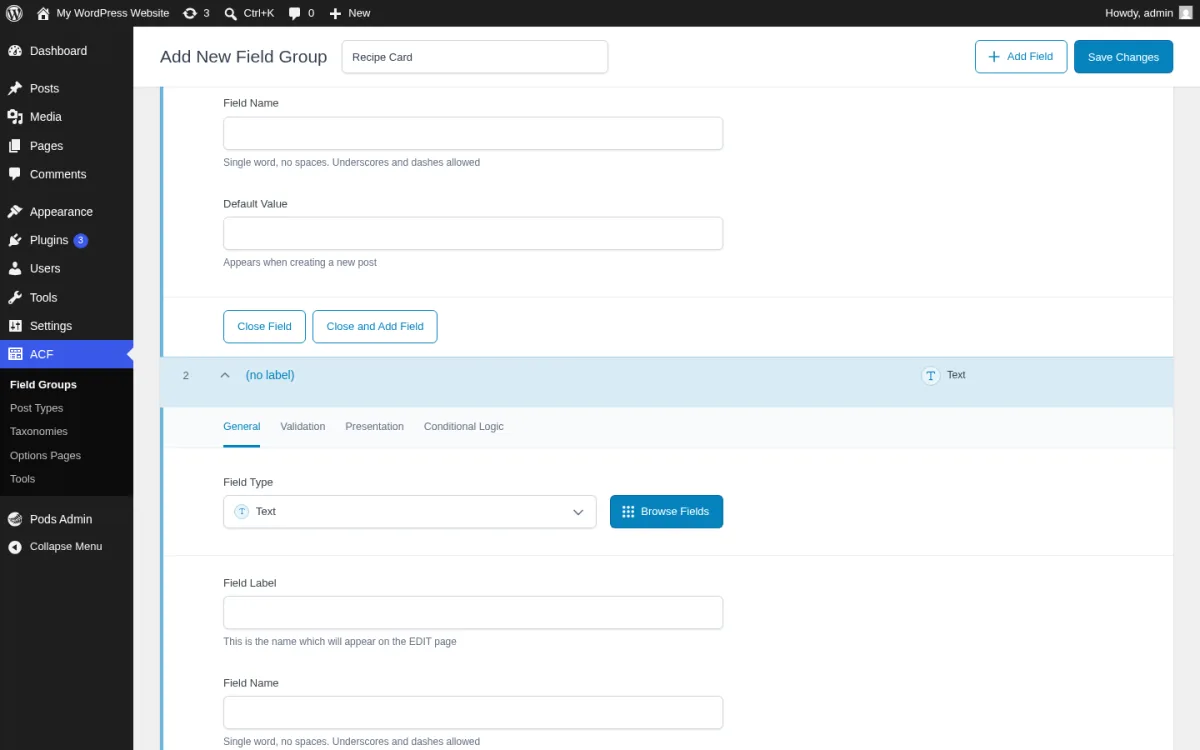
What I tested in a clean WordPress 7.0 sandbox on 2026-06-17. I installed v6.8.4 from wordpress.org/plugins/advanced-custom-fields, activated it, and opened the new top-level ACF menu. The screen above is the real Add New Field Group editor after I created a field group named "Recipe Card", clicked +Add Field, set Field Type to Text, and typed "Prep Time (min)" into Field Label. I confirmed the General / Validation / Presentation / Conditional Logic tabs, the Browse Fields modal (which lists the 30+ free field types), and the right-side Location Rules card. I noted that Repeater, Flexible Content, Gallery, and Clone carry the PRO ribbon in the field picker.
Strengths. Pre-installed integration support: when you install Yoast, Rank Math, WPGraphQL, Elementor Pro, Bricks, Breakdance, Polylang, or WPML, those plugins already know about ACF. Documentation is by a wide margin the best in the category. The ACF JSON workflow makes field groups portable between environments. The CPT and taxonomy UI added in 6.1 lets you skip the "Custom Post Type UI" plugin entirely. Update cadence is brisk: 6.7 shipped in December 2025, 6.8 in March 2026, and four security/feature releases between March and June 2026.
Limitations. Repeater, Flexible Content, ACF Blocks, Gallery, Clone, and acf_form() frontend forms are PRO only. PRO Personal is per-site at $49/year, which is fine for one site but adds up across an agency portfolio. The free build's options pages are limited compared to ACF Pro's. The plugin has been at the center of a real licensing dispute since late 2024, so a small fraction of the community has migrated to Secure Custom Fields on principle. The 4.5 average is dragged down by 165 one-star reviews, most of them about that dispute or about the "WP Engine acquired the plugin" change in 2022; the actual code quality and release cadence are still high.
Pricing. Free build is on WordPress.org. ACF PRO is on advancedcustomfields.com/pro, prices verified 2026-06-17:
- Personal: $49 / year, 1 site, all PRO features and unlimited updates.
- Freelance: $149 / year, 10 sites.
- Agency: $249 / year, unlimited sites.
Development and staging URLs do not count toward the site limit under ACF's detection rules. Annual auto-renewal can be turned off from the customer dashboard.
Best fit. Any WordPress site that wants the safest default custom-fields plugin in 2026; agencies that already use ACF on dozens of client sites and have ACF JSON in their deploy pipeline; teams already on WP Engine hosting; sites whose page builder or SEO plugin specifically advertises ACF integration.
2. Secure Custom Fields (SCF): the free, community-maintained ACF fork
- Project home: developer.wordpress.org/secure-custom-fields
- WordPress.org: wordpress.org/plugins/secure-custom-fields
- Source: github.com/wordpress/secure-custom-fields
- Active installs: 80,000+
- Rating: 4.7 / 5 (61 reviews on 2026-06-17)
- Latest version: 6.8.9, released 2026-06-15
- Requires: WordPress 6.2+, PHP 7.4+
- Tested up to: WordPress 6.9.4
Secure Custom Fields is the WordPress.org-maintained fork of the legacy ACF Free codebase. It was created on 2024-10-12 during the Automattic vs WP Engine dispute when WordPress.org took control of the ACF plugin slot on the directory. Since then, the project has been published under the wordpressdotorg author profile and is developed in the open at github.com/wordpress/secure-custom-fields. Each SCF release backports the equivalent ACF Free release with the same security fixes and feature work, often within days. As of 2026-06-17 the 6.8.9 release shipped on 2026-06-15, only 12 days after ACF 6.8.4.
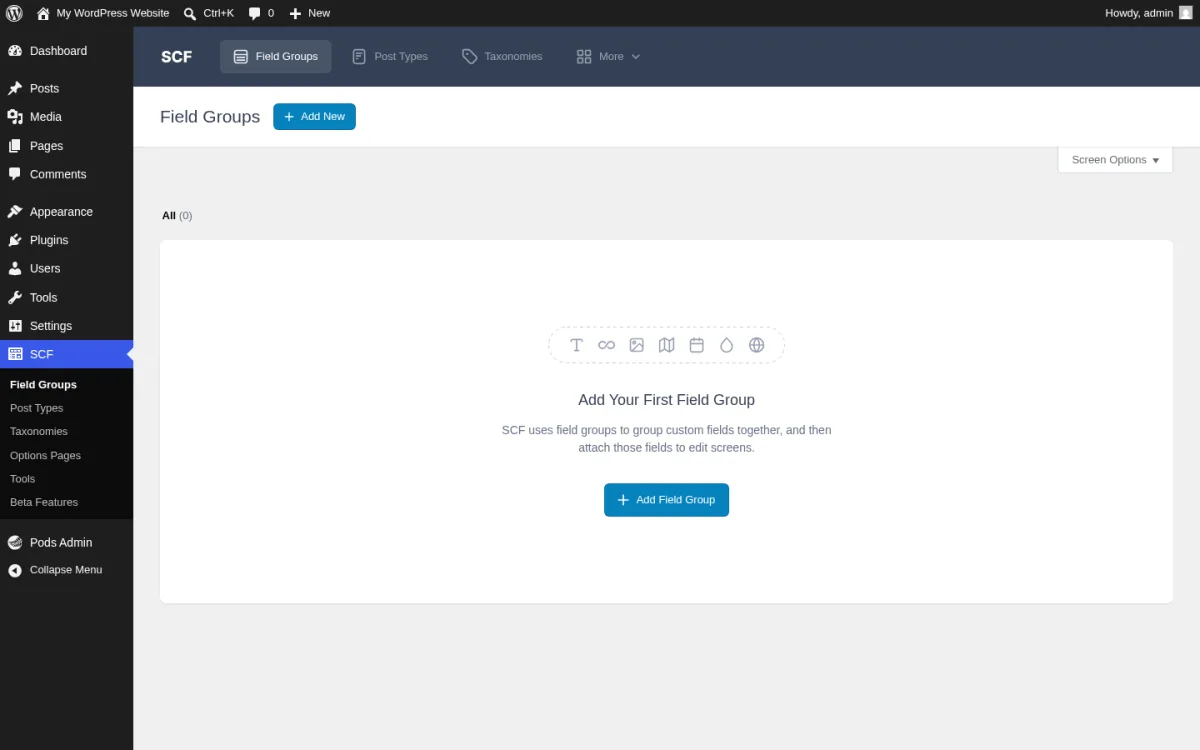
What I tested in a clean WordPress 7.0 sandbox on 2026-06-17. I installed both ACF 6.8.4 and SCF 6.8.9 in the sandbox, then swapped the active plugin from ACF to SCF to confirm the documented mutual-exclusivity behavior (the WordPress.org listing warns that SCF deactivates ACF on activation, and that is exactly what happened). The screen above is the real SCF Field Groups empty-state at /wp-admin/edit.php?post_type=acf-field-group after the swap. The wordmark in the top toolbar reads "SCF" and the left sidebar reads "SCF" rather than "ACF", but the layout is identical to the legacy ACF Free admin and the menu structure (Field Groups, Post Types, Taxonomies, Options Pages, Tools) is preserved. I then created a field group named "Author Bio" and confirmed the same General / Validation / Presentation / Conditional Logic tabs are present.
Strengths. Genuinely free, with no upsell. WordPress.org-controlled, which is a meaningful signal for organizations that want a community-maintained baseline rather than a vendor-controlled one. The 4.7 average rating is the second-highest among the seven plugins in this roundup. Security fixes backport quickly (the 6.8.x line shipped fixes for AJAX nonce reuse and oEmbed previews within weeks of the upstream ACF disclosures). The Abilities API integration and JSON-LD structured-data feature flags from ACF 6.8 are already backported in SCF 6.8.4.
Limitations. There is no SCF PRO. The Repeater, Flexible Content, ACF Blocks, Gallery, and Clone fields exist in SCF as field types (because they were already in legacy ACF Free's codebase), but the dedicated UI and ongoing development for those features belongs to ACF PRO; SCF backports security and stability fixes for them but is not the home for new feature work. The 80,000 install count is small next to ACF's 2 million. And the community's view of the fork is genuinely split: about 6% of reviewers (4 of 61) leave one-star reviews because they feel the directory takeover was unfair, even though the SCF codebase itself is sound.
Pricing. 100% free, forever. There is no paid SCF tier.
Best fit. Sites that want a fully free, WordPress.org-maintained ACF-equivalent plugin and that can live without the PRO-only fields, organizations whose procurement rules prefer community-maintained over vendor-controlled plugins, and developers building free themes/plugins who want to depend on a stable WP.org-hosted custom-fields plugin without sending their users to an external pricing page.
3. Meta Box: developer-friendly with a real lifetime license
- Vendor: metabox.io
- WordPress.org: wordpress.org/plugins/meta-box
- Active installs: 500,000+
- Rating: 4.8 / 5 (162 reviews on 2026-06-17)
- Latest version: 5.12.1, released 2026-06-10
- Requires: WordPress 6.6+, PHP 7.4+
- Tested up to: WordPress 7.0
Meta Box was originally a developer's PHP framework: you defined field groups in code, and Meta Box rendered them on the post editor. Over the last few years it grew a visual editor (Meta Box Lite), a paid Builder add-on, a Custom Table extension that stores fields in dedicated database tables, an MB Views add-on that templates fields without theme files, and an MB Frontend Submission add-on for user-submitted posts. The 5.12 series added a native link field that mirrors ACF's link experience, and 5.11 added a full block_editor field that lets editors compose Gutenberg blocks inside a custom field.
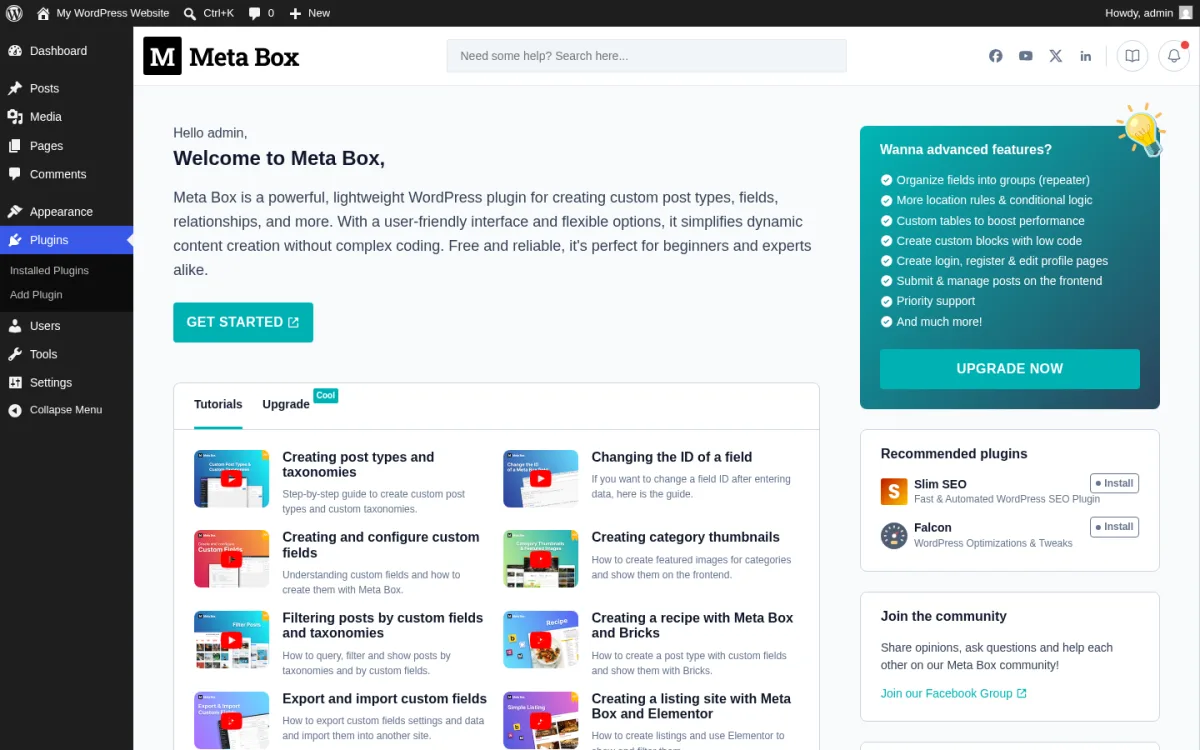
What I tested in a clean WordPress 7.0 sandbox on 2026-06-17. I installed v5.12.1 from wordpress.org/plugins/meta-box, activated it, and wrote a small custom plugin that uses Meta Box's rwmb_meta_boxes filter to register an "Article Brief" metabox on Posts with four real fields (Target keyword text, Reading time number, Featured checkbox, Hero image_advanced). The screen above is the real Meta Box dashboard page introduced earlier in the 5.10 line, with the "Welcome to Meta Box" intro, the green GET STARTED button, the tutorials grid (post types and taxonomies, change the ID of a field, configure custom fields, category thumbnails, filter posts by custom fields, recipe with Meta Box and Elementor, export and import custom fields), the recommended-plugins rail (Slim SEO, Falcon), and the "Meta-advanced features?" upgrade panel. I confirmed that the Hero image_advanced field renders the WP media picker without setup and that the link field added in 5.12 is present in the field-type registry.
Strengths. The 40+ field type catalog is the broadest in the category. The MB Custom Table premium add-on is a real performance win on content-heavy sites because it skips wp_postmeta entirely; on a 1-million-row site that is the difference between fast and unusable. Lifetime licenses still exist in 2026 (Personal Lifetime is $299 one-time for 3 sites, Agency Lifetime is $699 one-time for unlimited sites), which is rare in the WordPress paid-plugin world. Documentation at docs.metabox.io is dense and accurate. The 4.8 rating from 162 reviews is high. Updates are frequent: five 2026 releases across the 5.10, 5.11, and 5.12 lines.
Limitations. Out of the box, the WP.org plugin is the framework only; you typically install the free Meta Box Lite plugin alongside it to get the UI. The premium ladder is granular: even with the framework + Lite installed, you will usually buy at least the Personal Basic bundle for Conditional Logic, Tabs, Columns, and Builder. Some reviewers complain that "free for admin" is misleading because the no-code admin experience effectively requires Meta Box Lite. The MB ACF Migration tool helps move ACF field groups into Meta Box, but if your theme already calls get_field() everywhere, the rewrite cost is real.
Pricing. Verified on metabox.io/pricing on 2026-06-17:
Personal bundles:
- Basic Bundle: $49 / year, 1 site, 12 PRO extensions.
- Ultimate Bundle: $99 / year, 3 sites, all PRO extensions + all future PRO extensions.
- Lifetime Bundle: $299 one-time, 3 sites, all PRO extensions + Solutions + lifetime updates and support.
Agency bundles:
- Basic Bundle: $149 / year, unlimited sites, 12 PRO extensions.
- Ultimate Bundle: $229 / year, unlimited sites, all PRO extensions.
- Lifetime Bundle: $699 one-time, unlimited sites, lifetime updates and support.
Best fit. Developer-led teams that want the broadest free field library on WordPress.org; agencies that want to stop paying yearly renewals and would rather buy the $699 Agency Lifetime once; performance-sensitive sites that need the MB Custom Table extension; teams already invested in Bricks or Breakdance, where Meta Box has the strongest documented integrations.
4. Pods: the fully free CPT plus custom fields all-in-one
- Vendor: pods.io
- WordPress.org: wordpress.org/plugins/pods
- Active installs: 100,000+
- Rating: 4.8 / 5 (417 reviews on 2026-06-17)
- Latest version: 3.3.9, released 2026-05-20
- Requires: WordPress 6.3+, PHP 7.2+
- Tested up to: WordPress 7.0
Pods is the only major free plugin in this category that bundles custom post types, custom taxonomies, custom fields, relationships, options pages, and Advanced Content Types (its own custom database tables) into one download. Where ACF + a CPT UI plugin + a relationships add-on would cost $49 to $149 a year, Pods does the same in one free plugin maintained by Scott Kingsley Clark and a long contributor list. The 3.3 series shipped block-editor form validation, Pods Blocks upgraded to WordPress Block API V3, and the new Pods 3.4 line coming later in 2026 will require WordPress 6.8+ and PHP 8.0+.
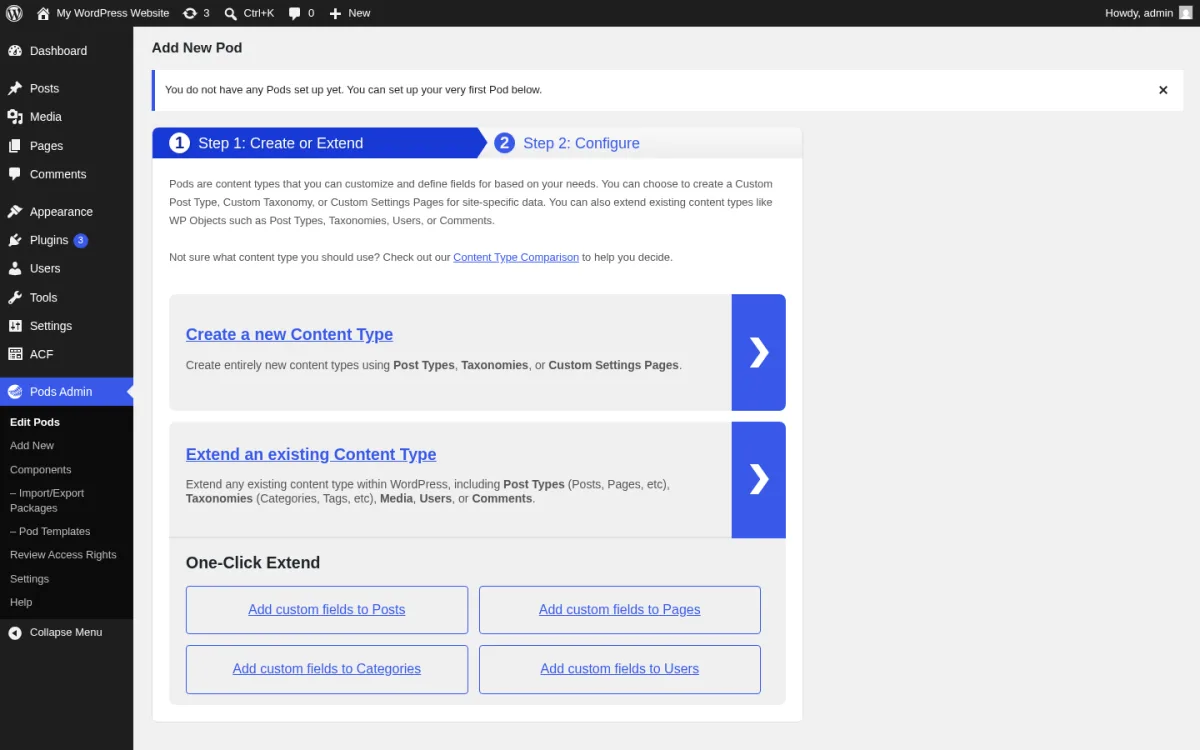
What I tested in a clean WordPress 7.0 sandbox on 2026-06-17. I installed v3.3.9 from wordpress.org/plugins/pods, activated it, and opened the new "Pods Admin" top-level menu. The screen above is the real Add New Pod wizard at /wp-admin/admin.php?page=pods-add-new, with the two-step flow ("Step 1: Create or Extend" highlighted in blue, "Step 2: Configure" greyed out), the Create a new Content Type panel (Post Types, Taxonomies, Custom Settings Pages), the Extend an existing Content Type panel (Posts, Pages, Categories, Tags, Media, Users, Comments), and the One-Click Extend grid (Add custom fields to Posts / Pages / Categories / Users). I clicked "Add custom fields to Posts" to reach the Step 2 configurator and confirmed the 25+ input types in the Add Field picker (text, paragraph, WYSIWYG, code, date / time / date-and-time, plain number, currency with 30+ international currencies built in, file / image / video, oEmbed, relationship in six display modes, checkbox, color picker, layout heading / HTML).
Strengths. Best free package in the category, period. The bundled feature set (CPTs + custom taxonomies + custom fields + relationships + options pages + custom tables + form blocks) is what most other vendors charge $99+ a year for. The 4.8 rating from 417 reviews is the most-rated of any free option in the category. Direct integrations with Polylang, WPML, WPGraphQL, and YARPP ship in the plugin without an add-on. Advanced Content Types is a genuinely interesting concept: the data lives in its own table with its own schema, outside the WordPress posts/postmeta structure, which is faster at scale. The 17 years of active maintenance (since 2008) is the longest in the category.
Limitations. The admin UI is busier than ACF's, especially after you enable a few components, because Pods exposes more concepts (Pods, Groups, Fields, Components, Pages, Templates) than ACF's single Field Groups tree. The third-party ecosystem (themes, page builders, SEO plugins) is smaller than ACF's; many integrations exist but are less prominent. Some reviewers ask for better documentation; the maintainer publicly says it is a priority but is the main long-term gap. Pods Pro by SKCDEV is a separate paid add-on suite the author sells direct, but the base plugin remains free regardless.
Pricing. 100% free. No paid Pods tier; the base plugin includes every feature listed above. Pods Pro add-ons exist (List Tables, Page Builder Toolkit, Advanced Relationships Storage, TablePress Integration, Advanced Permalinks) and are sold at pods-pro.skc.dev, but they are extensions, not required.
Best fit. Budget-constrained sites that want everything in one free plugin; technical site builders who like Pods Templates and shortcodes; teams that prefer community-led open source over vendor-controlled plugins; sites with very heavy custom-data needs that want Advanced Content Types' custom-table storage.
5. CMB2: the code-only field framework for developers
- Project home: cmb2.io
- WordPress.org: wordpress.org/plugins/cmb2
- GitHub: github.com/CMB2/CMB2
- Active installs: 300,000+
- Rating: 5 / 5 (90+ five-star reviews on 2026-06-17)
- Latest version: 2.12.0, released 2026-05-31
- Requires: WordPress 3.8.0+, PHP 7.4+
- Tested up to: WordPress 7.0
CMB2 is the WordPress custom-fields plugin developers reach for when they want fields defined in PHP, checked into version control, and free of any vendor dependency. There is no GUI, no field group editor, no upsell. You hook into cmb2_admin_init, build a CMB2::add_field() call for each field, and CMB2 renders the metabox on the post / term / user / comment / options page screen. Repeatable fields and repeatable groups are first-class. The included example-functions.php is the canonical reference for every supported field type.
What I tested in a clean WordPress 7.0 sandbox on 2026-06-17. I installed v2.12.0 from wordpress.org/plugins/cmb2, activated it, and wrote a small custom plugin that hooks cmb2_admin_init and uses new_cmb2_box() to register a demo metabox "Article Brief (CMB2 demo)" on Posts with four real fields (Subtitle text, Reading time text_small, Featured checkbox, Tags repeatable text). The code is intentionally short, because that is the point of CMB2:
add_action( 'cmb2_admin_init', function() {
    $cmb = new_cmb2_box( array(
        'id'           => 'cf_roundup_demo',
        'title'        => 'Article Brief (CMB2 demo)',
        'object_types' => array( 'post' ),
    ) );
    $cmb->add_field( array( 'name' => 'Subtitle',     'id' => 'cf_demo_subtitle',     'type' => 'text' ) );
    $cmb->add_field( array( 'name' => 'Reading time', 'id' => 'cf_demo_reading_time', 'type' => 'text_small' ) );
    $cmb->add_field( array( 'name' => 'Featured?',    'id' => 'cf_demo_featured',     'type' => 'checkbox' ) );
    $cmb->add_field( array( 'name' => 'Tags',         'id' => 'cf_demo_tags',         'type' => 'text', 'repeatable' => true ) );
} );
I confirmed that the metabox renders on the post-edit screen (the field ids appear in the rendered HTML) and that the saved values land in wp_postmeta exactly like ACF's free build. The screen above is the real WordPress 7.0 Plugins admin page from the same sandbox, with the CMB2 2.12.0 row visible alongside the other four free plugins under test; the row's description ("CMB2 will create metaboxes and forms with custom fields that will blow your mind") is the official self-description from the WP.org listing.
Strengths. Genuinely free, MIT/GPL-friendly, with no upsell. Developer-grade documentation in the GitHub wiki. The 30+ community field types in the WP.org listing (Select2, Google Maps, Leaflet, Date Range, Tags, Markdown, Switch Button, Font Awesome icon picker, Typography, Address, Link Picker, Order, Animation, Position, Visual Style Editor) cover almost any niche need. The "CMB2 Admin Extension" plugin bolts on a no-code UI for shops that need a hybrid workflow. The 5-star rating is genuinely earned: 90+ five-star reviews and almost zero one-star reviews.
Limitations. No GUI for non-developers. You must be comfortable in functions.php or a custom plugin file to use CMB2 effectively; an editor who wants to add a new field will need a developer's help. Field definitions live in code, not in the database, so there is no "import field group" or "ACF JSON" sync; the field set is whatever the active theme or plugin defines. WYSIWYG fields inside repeatable groups have a documented TinyMCE quirk. CMB2 deliberately doesn't ship custom post type or taxonomy registration; pair it with a plugin like Pods, ACF, or "Custom Post Type UI" for that side of the model.
Pricing. 100% free, forever. No paid tier and no add-on store.
Best fit. In-house developers and freelancers shipping themes or plugins to clients who want field definitions in version control rather than in the database; agencies that bundle CMB2 inside a custom plugin so the client cannot accidentally edit the schema; sites that need a free option without any premium ladder; teams comfortable with PHP who consider a GUI a downside, not an upside.
6. JetEngine (Crocoblock): dynamic content for builder-led sites
- Vendor: crocoblock.com/plugins/jetengine
- WordPress.org: not listed (paid plugin, vendor-distributed)
- Page builder support: Elementor (full), Gutenberg (full), Bricks (full), Divi (limited)
- Free tier: none
- Starting price: from $68-$75 / year for a single site
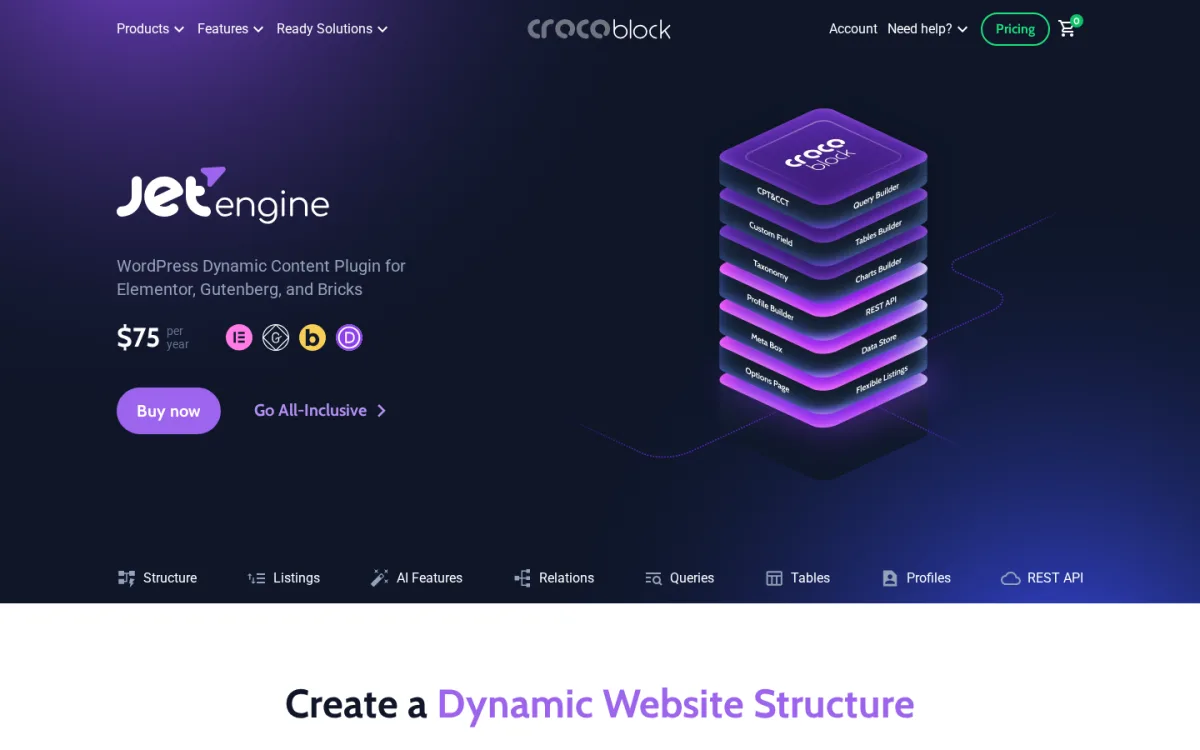
JetEngine is the dynamic-content workhorse of the Crocoblock ecosystem. It registers custom post types and taxonomies, builds custom fields and meta boxes, creates options pages, exposes its own Query Builder for complex database queries, and ships Listings that render those queries as grids, carousels, sliders, maps, calendars, tables, and charts inside Elementor, Bricks, or Gutenberg. The 2026 releases added an MCP Server feature that lets AI tooling generate the site's structure (post types, fields, listings) on demand. If you have ever built a property listing, event calendar, or directory site with Elementor and Toolset, JetEngine is the modern equivalent that does the entire job in one paid plugin.
Why this section is source-only, not hands-on. JetEngine is paid only and is not distributed on WordPress.org. Crocoblock does not publish a free trial of JetEngine itself, only a 30-day money-back guarantee on a paid purchase. I verified the feature scope on crocoblock.com/plugins/jetengine and the live pricing on crocoblock.com/pricing on 2026-06-17.
Verified on crocoblock.com on 2026-06-17. The current build is 3.6.6. Core capabilities listed by the vendor: custom post types, custom taxonomies, custom fields, meta boxes, options pages, repeatable field groups, relationships, dynamic visibility, conditional logic, Query Builder, six Listing layouts, tables, charts, frontend post submission, REST API endpoints, and the MCP Server (a 2026 addition). Direct integrations with Elementor and Bricks are first-class; Gutenberg support is full; Divi is mentioned with limited support.
Strengths. Single-plugin replacement for ACF Pro + a CPT plugin + a listing/grid plugin if your stack is Elementor or Bricks. The Query Builder is genuinely powerful and is the right tool for complex meta queries, relationship queries, and conditional dynamic visibility. Listings are styled live in the same builder that styles your pages, which removes the "fields are dynamic but the layout isn't" mismatch you get with ACF + the default loop. Frontend post submission is native. The All-Inclusive bundle ($199/year) covers JetEngine plus 22 other JetPlugins, which is a strong package deal for builder-heavy sites.
Limitations. No free version, and no WordPress.org listing, so you have to buy in to evaluate. The plugin is tightly tied to Crocoblock; if you ever switch off Elementor or Bricks for a Gutenberg-native stack, you keep paying for features you no longer use. The 30-day money-back guarantee is the only safety net. Support response times are generally good but vary by license tier. The 3.x line has had a few breaking changes between versions, so changelog discipline matters when you update.
Pricing. Verified on crocoblock.com/pricing on 2026-06-17:
- JetEngine standalone: from $68-$75 / year, single site.
- Crocoblock All-Inclusive: from $199 / year, covers JetEngine plus 22 JetPlugins, with the same support terms.
- 30-day money-back guarantee.
Best fit. Elementor or Bricks sites that need dynamic content (property listings, event calendars, directories, custom catalogs) tied to custom fields in the same plugin; teams already invested in the Crocoblock ecosystem; sites that want one paid plugin to replace ACF Pro plus a separate listing builder.
7. Toolset: the no-code all-in-one for non-developers
- Vendor: toolset.com
- WordPress.org: not listed (paid plugin, vendor-distributed)
- Components: custom post types, fields, taxonomies, repeatable field groups, post relationships, Custom Templates, Custom Archives, Query Builder, Search Builder, Access Control, Forms Builder, Maps, WooCommerce binding
- Free tier: none
- Starting price: EUR 69 / year for one site
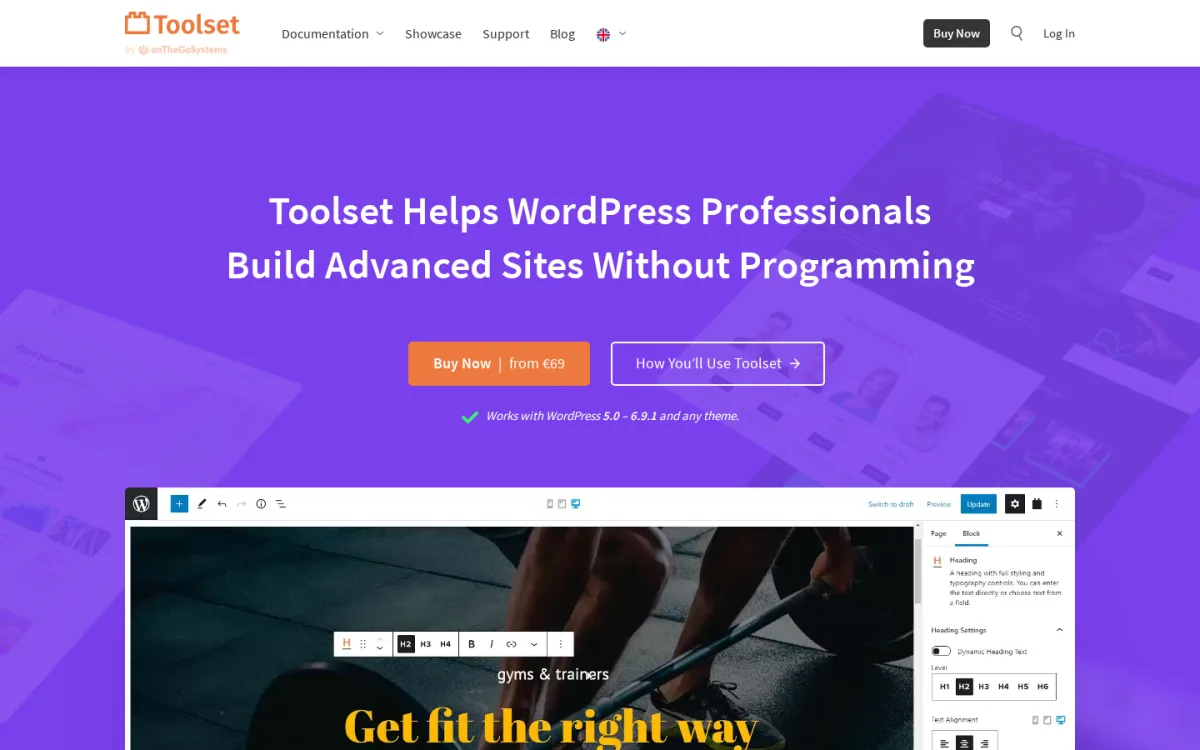
Toolset has been around since 2010 and is the longest-running "no-code dynamic site builder" on WordPress. Where ACF gives you fields and stops, Toolset gives you fields plus the templates, archives, search, access control, and forms that consume those fields, all in one paid plugin from one vendor (OnTheGoSystems Limited). For a small-business site that wants to build a real estate listing, a recipe library, a learning catalog, or a member directory without writing PHP or hiring an Elementor specialist, Toolset is the most complete single-vendor option.
Why this section is source-only, not hands-on. Toolset is paid only and is not distributed on WordPress.org. OnTheGoSystems does not publish a free trial; the 30-day money-back guarantee on a paid purchase is the closest thing. I verified the feature scope on toolset.com and the live pricing on toolset.com/buy on 2026-06-17.
Verified on toolset.com on 2026-06-17. Toolset components included on every plan: custom post types, custom fields and taxonomies, repeatable field groups, post relationships (one-to-many and many-to-many), Custom Templates (both Blocks editor and Toolset Views editor), Custom Archives, Query Builder, Search Builder, Access Control (front-end and back-end role-based permissions), Forms Builder (frontend forms for visitor-submitted posts), Maps integration with Google Maps and Azure Maps, and WooCommerce integration that binds custom fields to product/order data.
Strengths. True single-vendor stack. You get fields, templates, archives, search, forms, and access control without juggling multiple plugins or licenses. The Blocks editor in Toolset 4 made the templating workflow much more approachable than the original Toolset Views shortcode language. The Forms Builder is genuinely useful for visitor-submitted listings. WooCommerce integration is first-class and is the right pick if you want product attributes that drive both checkout and a custom storefront listing. Pricing is the cheapest of the all-in-one paid plugins at this level (EUR 69 / year for one site).
Limitations. No free version. No WordPress.org presence. The learning curve is real for a non-developer; Toolset is a system, not a single plugin, and the docs reflect that. Toolset Views (the legacy shortcode templating engine) and the Blocks editor coexist, and reviewers sometimes report friction switching between the two. Renewal pricing drops noticeably after year one (EUR 69 to EUR 51 for the single-site tier, EUR 299 to EUR 224 for unlimited), but you are still on a yearly renewal treadmill. Page builder integrations exist but are not as tight as Elementor + JetEngine.
Pricing. Verified on toolset.com/buy on 2026-06-17:
- 1 site: EUR 69 / year (renews EUR 51 / year).
- 3 sites (most popular): EUR 149 / year (renews EUR 111 / year).
- Unlimited sites: EUR 299 / year (renews EUR 224 / year).
- One year of support and updates included with purchase; 30-day money-back guarantee.
Best fit. Small-business sites and freelancers building real estate listings, event calendars, directories, recipe libraries, or member sites for a non-developer client; teams that want one vendor and one support channel for the entire dynamic-content stack; WooCommerce stores that want custom product attributes bound to a Toolset Views storefront layout.
How to choose the right WordPress custom fields plugin in 2026
Use the table below as a quick filter, then read the matching section above for the full reasoning.
| If your top priority is... | Pick this plugin |
|---|---|
| The safest default, with the broadest third-party integrations | Advanced Custom Fields (ACF) |
| A 100% free, WordPress.org-maintained alternative to ACF | Secure Custom Fields (SCF) |
| The broadest free field library and a real lifetime license | Meta Box |
| One free plugin that also creates CPTs, taxonomies, and relationships | Pods |
| Field definitions in version control, no GUI, no vendor lock-in | CMB2 |
| Custom fields + dynamic listings for Elementor or Bricks | JetEngine |
| A single-vendor no-code stack for fields + templates + archives + forms | Toolset |
A short decision rule that holds up well in 2026: if you have an opinion about page builders, follow it. Elementor and Bricks sites should default to JetEngine. Gutenberg-native stacks should default to ACF or SCF. Toolset is the right fit when the editor will be a non-developer client and the site uses Toolset's own templating layer. Meta Box wins when you care about performance and a lifetime license, Pods wins when you care about a single free plugin that does everything, and CMB2 wins when you are the developer and you would rather write a few lines of PHP than click around a UI.
For the rendering side of the same project, our WordPress page builder plugins roundup pairs naturally with this list, and once your custom fields drive product attributes, the WordPress ecommerce plugins roundup covers the storefront layer.
FAQ
What is the best free WordPress custom fields plugin in 2026?
Three free options are all credible in 2026, and the right pick depends on the editor experience you want. For a UI-driven workflow with the broadest plugin integrations, install Advanced Custom Fields from WordPress.org. For a fully community-maintained build that is technically a fork of legacy ACF Free, install Secure Custom Fields. For a single free plugin that also creates custom post types, taxonomies, and relationships, install Pods. All three have 4.5+ ratings and over 80,000 active installs.
Is Secure Custom Fields the same as Advanced Custom Fields?
Functionally they are very close. Secure Custom Fields is the WordPress.org-maintained fork of the legacy ACF Free codebase that WordPress.org took control of on 2024-10-12. The free field types, the field group editor, the location rules, and the custom post type and taxonomy UI are essentially the same. The differences are that SCF is published by the wordpressdotorg account, has no PRO tier of its own, and will deactivate any existing ACF or ACF PRO install when activated to avoid function-name collisions. You install one or the other, not both.
Do I still need Custom Post Type UI in 2026?
For most sites, no. ACF (since 6.1), SCF, Meta Box (via the free MB Custom Post Types & Custom Taxonomies extension), Pods, JetEngine, and Toolset all register custom post types and taxonomies natively. CMB2 is the exception: it intentionally stays in scope as a custom fields toolkit and expects you to register CPTs separately, so CMB2 + Custom Post Type UI (or CMB2 + a few lines of register_post_type() in your theme) is still a common pairing.
What is the difference between ACF, Meta Box, and Pods?
ACF is the most-integrated option in the WordPress ecosystem and the default agency pick, with a free build and a paid PRO tier. Meta Box is the developer-friendly framework with the broadest free field library, a real lifetime license, and a custom-tables extension for performance. Pods is the only free plugin that ships CPTs, taxonomies, fields, relationships, and Advanced Content Types in one download, and is the strongest budget pick. The right call depends on whether you want the safest default (ACF), the best lifetime price (Meta Box), or the most free features in one plugin (Pods).
Are paid custom fields plugins worth it on a small site?
For a single small site, the free build of ACF, SCF, Meta Box, or Pods will cover almost everything. You start paying when you need the Repeater or Flexible Content fields in ACF, the Custom Table or Builder add-ons in Meta Box, dynamic Listings tied to your fields in JetEngine, or the no-code templating layer in Toolset. The $49-$99 / year range is a reasonable price for a real small business site that earns revenue from the data it stores in custom fields.
Does WooCommerce work with custom fields plugins?
Yes. ACF, Meta Box, Pods, and JetEngine all advertise WooCommerce integrations, and Toolset's WooCommerce binding is one of its main selling points. The most common pattern is adding custom product attributes (specs, certifications, batch numbers, sustainability info) as fields and rendering them on the single-product template. ACF Pro and Meta Box Pro support fields on WooCommerce HPOS orders directly, which is the right model in 2026.
Should I migrate from ACF to Secure Custom Fields?
For a personal blog or a static brochure site that uses only free ACF features and that you control directly, the migration is low risk because SCF reads the same database fields and exposes the same API. For an agency portfolio, an ACF Pro site that uses Repeater or Flexible Content, or any site whose template code calls ACF-specific functions like the_repeater_field(), do not migrate without testing on staging first. SCF backports the free codebase, not the PRO codebase, so the PRO-only fields and functions are not part of SCF's stable API.
Conclusion
Custom fields plugins in 2026 are no longer a single-vendor category. Advanced Custom Fields is still the safest default and the right pick for the vast majority of agencies, but it now sits next to a credible WordPress.org community fork in Secure Custom Fields, a long-running developer favorite in Meta Box, a fully free all-in-one in Pods, a code-only developer toolkit in CMB2, a builder-native dynamic content suite in JetEngine, and a no-code all-in-one in Toolset.
A short final rule: pick by editor and pick by stack. If a non-developer client will manage the fields, choose ACF, SCF, Meta Box Lite, or Toolset. If your renderer is Elementor or Bricks and you need dynamic listings tied to fields, choose JetEngine. If you write the theme yourself and you want fields in version control, choose CMB2. If you want one free plugin that also creates post types, taxonomies, and relationships, choose Pods. If you want to stop paying yearly and own the plugin outright, choose Meta Box Lifetime. Whichever you pick, install it on a staging copy, build a real field group with a Repeater (or its equivalent), render it in the template, and only then commit it to production.
If you are also choosing the visual layer that will render those fields, our best WordPress page builder plugins roundup covers the builder side, and our free WordPress plugins roundup covers the supporting stack (SEO, security, backup, performance) you will need around your new field model.
Similar Blogs


