

LatePoint Review (2026): Pricing, Features, Pros & Cons

You may like the look of LatePoint at first glance, but the real question is whether the free plugin is enough or whether you actually need the Starter, Scale, or Agency plan to run a real service business inside WordPress. And does the all-features-in-every-paid-plan promise hold up once you add a real service, a real agent, and a real customer to the system?
I tested LatePoint in a hosted WordPress environment with the Pro Features add-on and the broader paid add-on stack switched on, then walked the public booking widget through the full Service → Date & Time → Customer Information → Verify Order Details → Submit flow as a real customer. I checked the setup, booking journey, admin calendar, pricing, UI, and public user feedback so this review can give you a practical verdict, not a marketing rewrite.
What Is LatePoint?
LatePoint is a self-hosted WordPress appointment booking plugin built for service-based small businesses — salons, beauty studios, fitness coaches, photographers, tutors, consultants, clinics, and similar one-on-one operations. It runs as a freemium plugin on WordPress.org plus three paid plans on latepoint.com. Its commercial pitch is “set up in 10 minutes, no nickel-and-diming”: every paid plan unlocks every feature and every add-on, and the only difference between paid tiers is how many WordPress sites you can activate the license on. The plugin lives inside WordPress, but every LatePoint admin screen renders an isolated SaaS-style panel — when you load any LatePoint page, the standard WordPress sidebar and top bar are hidden and you work inside LatePoint’s own chrome.
LatePoint Quick Verdict
LatePoint is a strong fit if you want a modern WordPress booking widget with a real freemium entry point and one all-inclusive paid plan that does not nickel-and-dime you for individual add-ons. Its biggest strength is the polished, isolated SaaS-style admin and the live-preview Booking Form customizer; its biggest caveat is the heavily restricted free tier and the absence of multi-language coverage, white-labeling, graphical reports, and a native mobile app at any tier.
| Criteria | Verdict |
|---|---|
| Best for | Solo professionals and small studios that want a modern, lightweight WordPress booking plugin with a freemium starting point and one all-inclusive paid plan |
| Starting price | Free on WordPress.org; Starter from $79/ |
| Free version / trial | Yes — genuine free version with multiple agents, multiple services, basic email notifications, and Stripe-only payments; 14-day money-back guarantee on paid plans |
| Tested environment | Hosted WordPress sandbox with LatePoint and the Pro Features add-on activated, plus the additional paid Pro add-ons (Google Calendar + Meet, Zoom, Mailchimp, the major payment gateways, Twilio SMS, WhatsApp, Short.io) |
| Strongest features | Isolated SaaS-style admin, live-preview Booking Form customizer with drag-to-reorder steps, all-features-in-every-paid-plan licensing, visual Automation Workflows, Form Fields editor with Required + Width toggles, broad one-click Add-ons catalogue |
| UI / UX score | 8.4 / 10 |
| Feature depth score | 7.6 / 10 (with the bundled Pro add-on stack enabled) |
| Performance impression | Fast — admin pages opened in roughly one to two seconds and the public widget moved between steps without lag |
| Public rating / source | 4.9 / 5 on WordPress.org with 100,000+ active installations; 4.8 / 5 on Trustpilot |
Pros
- Genuinely modern, isolated SaaS-style admin that hides the standard WordPress chrome on every LatePoint screen.
- All-features-in-every-paid-plan licensing — paid tiers differ only by number of sites, with no per-add-on math.
- Live-preview Booking Form customizer with a colour swatch picker, Border Style dropdown, and drag-to-reorder Steps panel.
- Real free tier on WordPress.org, with a clear paid path when the free limits bite.
Cons
- Heavily restricted free tier: Stripe-only payments, no Google Calendar 2-way sync, no customer dashboard, no recurring appointments, no OTP.
- Limited multilingual support — only a small set of bundled locales in the free plugin and broader languages remain a long-standing open feature request.
- No white-label / backend rebrand option, so agencies cannot deploy under a client brand without LatePoint chrome showing.
- No native mobile app and no chart-based reporting module.
Testing Summary
- Installed LatePoint in a hosted WordPress sandbox and activated the LatePoint Pro Features add-on plus the additional paid Pro add-ons (Google Calendar + Meet, Mailchimp, the available payment gateways, Twilio SMS, WhatsApp, Short.io, Zoom).
- Created a real test agent (senior wellness therapist, 7-day weekly schedule), connected the agent to the default Main Location, and saved a real $95 service in the Services module.
- Published a public WordPress page with the LatePoint book-button shortcode and walked the public booking widget end-to-end as a customer through Service Selection → Date & Time → Customer Information → Verify Order Details → Submit.
- Completed two real front-end bookings in a single session and confirmed both appeared in the admin Appointments list, on the Calendar, and as auto-created customer records.
- Cross-checked the pricing page on latepoint.com and the WordPress.org listing for plan limits, free vs Pro feature split, and current rating.
- Read public reviews on WordPress.org, Trustpilot, Reddit / r/WordPress, and community comparison sites (presscompare.com, arraytics.com, wpbookster.com).
LatePoint Features That Matter
LatePoint’s feature list is broader than its lightweight reputation suggests once the Pro Features bundle is in play, but it is intentionally narrower than the catalogues older WordPress booking plugins ship. There is no loyalty / gift card / staff commission / product inventory layer, and the product takes a clear “do the booking job well, leave everything else to other plugins” stance. Below are the four feature areas that genuinely matter when buyers choose between LatePoint and other WordPress booking plugins.
Isolated SaaS-style admin
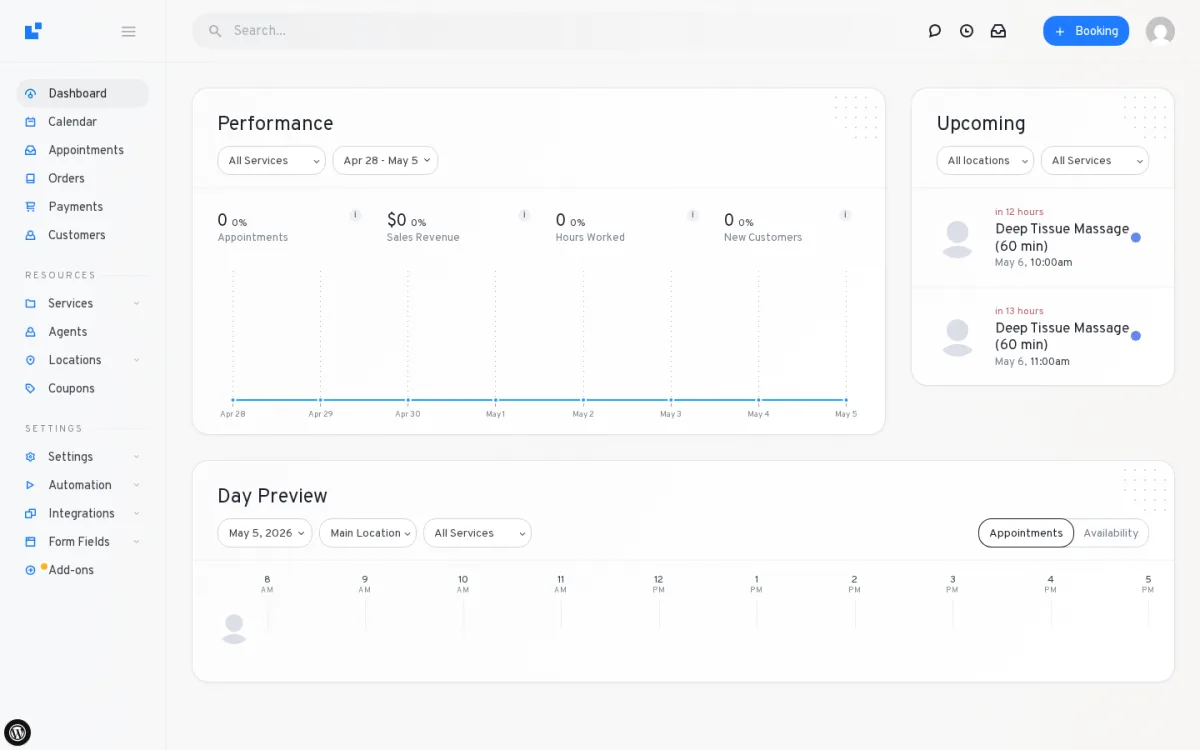
When you load any LatePoint screen, the standard WordPress sidebar and top bar are gone and you work inside LatePoint’s own left rail (Dashboard, Calendar, Appointments, Orders, Payments, Customers, then Services, Agents, Locations, Coupons, then Settings, Automation, Integrations, Form Fields, Add-ons) and a top bar with global search, chat / clock / inbox icons, a “+ Booking” quick-create, and the admin avatar. In testing, the panel felt closer to a SaaS booking app than to a typical WordPress plugin admin — and that is the right baseline for non-technical staff who have to use the system every day.
Public booking widget and confirmation flow
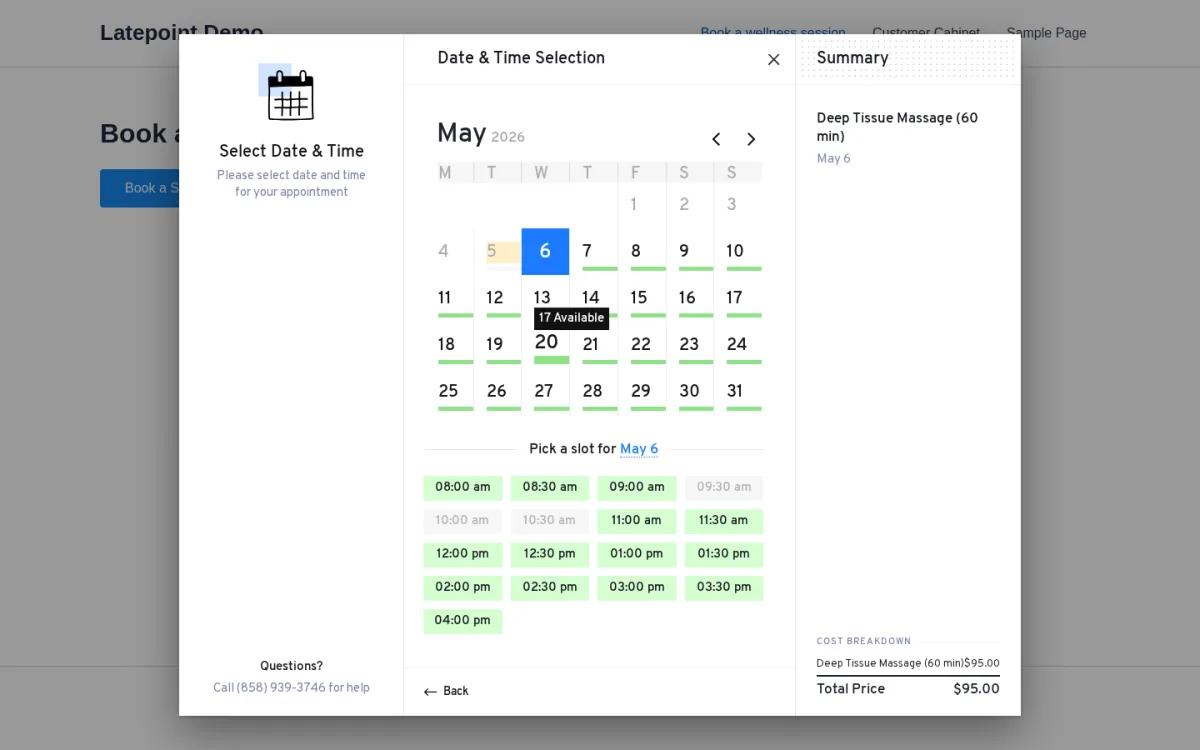
The booking widget renders as an overlay modal with a clean step strip, a friendly left-side step icon and helper text, and a right-side Summary panel that updates as the customer progresses. The Date & Time picker shows a full-month calendar with green availability bars under each bookable date and slides in a vertical time list at the configured slot interval as soon as a date is picked. After Verify Order Details is submitted, LatePoint renders an Appointment Confirmed page with the Order code plus Add to Calendar, Print, and Show QR buttons. In testing, two consecutive customer bookings landed cleanly in the admin Appointments list and on the Calendar without retry.
Live-preview Booking Form customizer with drag-to-reorder steps
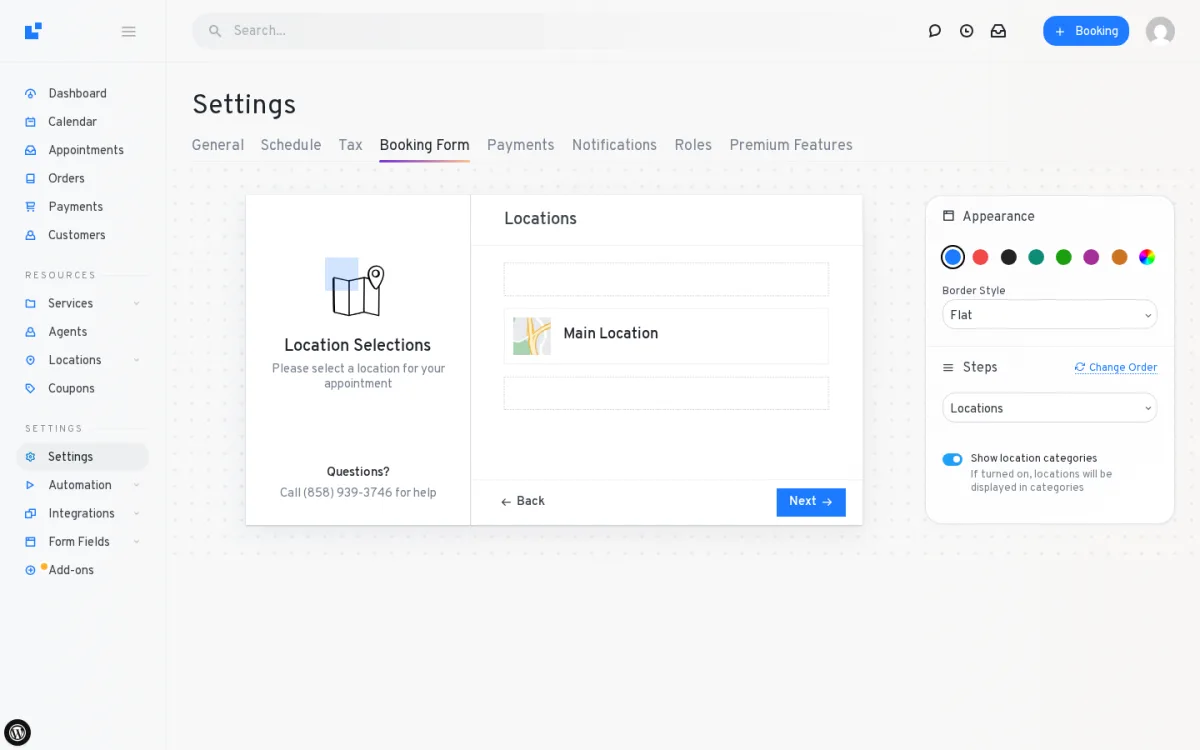
This is one of the most beginner-friendly admin panels in the product. The Booking Form Settings page renders a live preview of the public widget alongside an Appearance card with a colour swatch picker, a Border Style dropdown, and a Steps panel that lets you drag and reorder the booking steps and switch the wizard tabs between Left and Top. For a small business owner who wants to brand the widget without writing CSS, this is one of the strongest day-to-day usability wins LatePoint offers compared with older WordPress booking plugins.
Visual Automation Workflows and one-click Add-ons catalogue
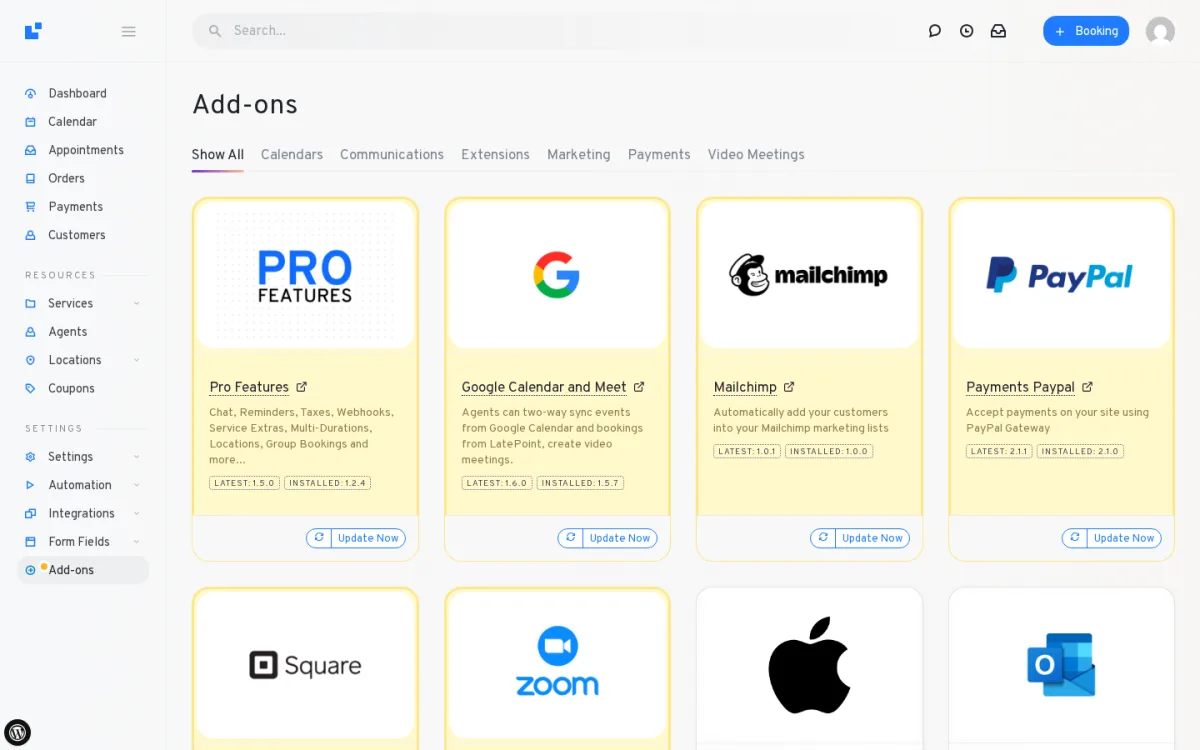
The Automation module ships with a visual workflow builder and a default New Booking Notification workflow that fires whenever a booking is created — the model is Trigger → Conditions → Actions → Time Offset, so reminders, follow-ups, and recurring messages can be wired up without code. The Add-ons catalogue is where the all-features-in-every-paid-plan pitch becomes obvious: a tab strip across the top (Calendars, Communications, Extensions, Marketing, Payments, Video Meetings) and one-click Activate / Activated tiles for Google Calendar + Meet, Apple Calendar, Outlook + Teams, Zoom, the major payment gateways (PayPal, Square, Mollie, Braintree, Flutterwave, MercadoPago, Paystack, Razorpay, SureCart, WooCommerce), Twilio SMS, WhatsApp, Mailchimp, and Short.io.
LatePoint Ease of Use / UI & UX
For a non-technical staff member, LatePoint is one of the easiest WordPress booking plugin admins I have walked through. The setup is mostly painless and day-to-day actions feel light and SaaS-style.
- Setup experience — The published “10 minute” claim is realistic for the basic widget. Configuring the agent, creating one service with a duration and price, and publishing one WordPress page with the LatePoint book-button shortcode is enough to put the booking widget live, and most paid Pro add-ons activate with a one-click toggle in the Add-ons catalogue.
- Admin navigation — The isolated SaaS-style panel removes the standard WordPress sidebar / top bar on every LatePoint screen, which keeps the workspace focused on booking work rather than core WP admin.
- Frontend booking experience — The public widget feels modern: a step strip, a Summary panel that updates as the customer progresses, full-month calendar with availability bars, and an Appointment Confirmed page with Add to Calendar, Print, and Show QR buttons.
- Editing and managing appointments — Datatables are searchable, sortable, filterable, and pagination is clean. The Appointments list exposes Date, Time Left, Status, and Payment Status filters, plus Table Settings and Download .csv.
- Friction points — The Services list card displays the price-range aggregate rather than the actual charge, so a $95 service can look like “$0” on the list card while the public widget correctly bills $95. There is no white-label / backend rebrand option. The OTP gate on first contact (when the corresponding Settings → General toggle is on) lifts trust on new customer data but adds a one-off step the buyer should know about.
LatePoint Pricing & Value
LatePoint’s commercial model is unusually simple: a real free plugin on WordPress.org plus three paid plans on latepoint.com, each available in Annual or Lifetime billing, with the full feature catalogue and add-ons included in every paid plan. The figures below were verified on the official pricing page.
- Free — $0 for 1 site. Includes the basic booking form, multiple agents and services, basic email notifications, Stripe payments only, the admin calendar, and 6 native Gutenberg blocks. It does not include Google Calendar 2-way sync, the customer dashboard, recurring appointments, OTP, Zoom / Google Meet, WhatsApp / SMS, or most Pro add-ons.
- Starter — $79/year sale price ($99 regular) or $199 lifetime sale price ($249 regular) for 1 site. Includes all paid features and all add-ons.
- Scale — $149/year sale price ($249 regular) or $399 lifetime sale price ($599 regular) for 5 sites. Includes all paid features and all add-ons.
- Agency — $299/year sale price ($499 regular) or $599 lifetime sale price ($1,299 regular) for 100 sites. Includes all paid features and all add-ons.
A 14-day money-back guarantee applies to paid plans, and lifetime plans also offer an 11-month installment option. There are no feature differences between paid tiers — only the site cap and price change. For a single-site service business, Starter is the most-used tier and the lifetime version pays back inside roughly 30 months. The free version is a real product and a reasonable long-running trial, but the Stripe-only payment limit and the missing Google Calendar / customer dashboard / recurring appointments / OTP caps make it more of an evaluation tier than a long-term production tier.
LatePoint Support, Documentation & Reputation
LatePoint support runs through email and a ticket system on latepoint.com plus the WordPress.org community support forum for free-tier users. There is no live-chat channel.
Public ratings put support on the good side of the band — 4.9 / 5 on WordPress.org and 4.8 / 5 on Trustpilot at the time of writing. Reviewers consistently mention easy setup, responsive support, and several years of stable production use. Negative threads tend to focus on the misleading free-tier marketing (Google Calendar advertised but Pro-only) and a documentation gap reported by a smaller share of 4-star Trustpilot reviewers, rather than ticket latency. Documentation lives at wpdocs.latepoint.com — organised by core plugin and add-on, screenshot-heavy on the popular pages, lighter on advanced configurations. YouTube tutorial coverage exists but is thinner than larger competitors’ catalogues.
Across Reddit / r/WordPress, presscompare.com, arraytics.com, and wpbookster.com, the recurring positives are the lightweight code, the all-features-in-every-paid-plan model, and the long market history. The recurring negatives are weak event-booking support, limited multilingual coverage, fewer integrations overall than the larger WordPress booking plugins, and the multisite licensing rule that requires a separate license per WordPress sub-site.
Best LatePoint Alternatives
If LatePoint is close but not a perfect match, these are the alternatives most worth comparing. For a wider WordPress booking shortlist, see our roundup of the best WordPress appointment booking plugins, and for a deeper side-by-side breakdown of the plugins closest to LatePoint on workflow fit and pricing, see the round-up of LatePoint alternatives.
Booknetic
A polished WordPress booking plugin that bundles features and add-ons into tiered annual or lifetime plans, ships an isolated SaaS-style admin dashboard, and includes broader multilingual support, white-labeling, graphical reporting, and a native mobile app. The closest direct alternative when those gaps weigh on the decision — see the full Booknetic review and the Booknetic vs LatePoint comparison for the head-to-head decision.
Amelia
A heavyweight WordPress booking plugin known for a polished admin UI and a strong Events module. A natural shortlist option if events are central to your operation rather than one-on-one appointments — see the full Amelia review and the Amelia vs LatePoint breakdown for the head-to-head decision.
BookingPress
An all-inclusive WordPress booking plugin that bundles a broad add-on catalogue and many payment gateways into every paid plan. Worth a look if you want even broader feature breadth than LatePoint with a similarly modern booking widget — see the full BookingPress review and the BookingPress vs LatePoint breakdown for the head-to-head decision.
Bookly Pro
An older, mature WordPress booking plugin with a large paid add-on catalogue and a one-time CodeCanyon license option. A fit if you specifically prefer add-ons à la carte instead of all-in pricing — see the full Bookly Pro review.
Who Should Use LatePoint?
LatePoint is the right pick when you want a modern, lightweight WordPress booking plugin with a freemium entry point and one all-inclusive paid plan, and you do not need broad multilingual coverage, white-label, native mobile, or chart-based reporting.
Good fit for:
- Solo professionals and small studios that want a polished booking widget without a per-add-on shopping list.
- Buyers who like a free starting point and are happy to upgrade only when they hit Stripe-only / Google-Calendar / customer-dashboard limits.
- Lifetime-license buyers who prefer a one-time fee on Starter to a recurring SaaS bill.
- Operators who care about admin polish — the isolated SaaS-style chrome and the live-preview Booking Form customizer are real, day-to-day quality-of-life wins.
Skip it if:
- You need broad multi-language coverage, RTL support, and a built-in visual translator.
- You are an agency that has to deploy under a client brand with full white-labeling.
- You need a native iOS or Android app for staff or admins.
- You need graphical, chart-driven reporting by staff or service.
Final Verdict
LatePoint is worth considering when you want a modern, lightweight WordPress booking plugin and you can live with a freemium tier capped at Stripe-only payments and a paid step that gives you everything in a single plan. The isolated SaaS-style admin, the live-preview Booking Form customizer, the visual Automation Workflows engine, and the broad Add-ons catalogue all delivered real day-to-day quality-of-life advantages in this hands-on test. The biggest limitation is the gap when broad multilingual coverage, white-labeling, a native mobile app, or chart-based reporting are non-negotiable — at that point, an alternative such as Booknetic is a natural shortlist mate to compare against. Within the broader WordPress appointment booking plugin market, LatePoint sits firmly on the lightweight, SaaS-feel side of the shelf rather than the heavy add-on-marketplace side, and that positioning is where it shines.
LatePoint FAQ
Is LatePoint free?
Yes — there is a real free LatePoint plugin on WordPress.org with multiple agents, multiple services, basic email notifications, and Stripe-only payments. Premium add-ons, Google Calendar 2-way sync, the customer dashboard, recurring appointments, OTP verification, and all non-Stripe gateways sit behind the paid plans (Starter, Scale, Agency).
How much does LatePoint cost?
On the official pricing page, LatePoint Starter is $79/year (regular $99) or $199 lifetime (regular $249) for 1 site; Scale is $149/year or $399 lifetime for 5 sites; Agency is $299/year or $599 lifetime for 100 sites. All paid plans include every feature and every add-on with a 14-day money-back guarantee.
Does LatePoint support Stripe and PayPal?
Yes. Stripe is included in the free version. PayPal, Square, Mollie, Razorpay, Paystack, Flutterwave, Mercado Pago, Braintree, SureCart, and WooCommerce gateways are bundled with every paid plan as one-click activations in the Add-ons page.
Does LatePoint have a mobile app?
No. LatePoint does not ship a native iOS or Android app — all admin and staff work runs through the browser. Booknetic is the most common alternative cited by buyers who need a native mobile app.
Does LatePoint support multiple languages?
Limited. The free plugin ships with only a small set of bundled locales, and broader multilingual coverage is a long-standing open feature request on the company’s ideas board. Buyers who serve multilingual markets should compare with WordPress booking plugins that ship with stronger out-of-the-box language coverage.
What is the best LatePoint alternative?
Booknetic is the closest direct alternative if you want a modern isolated admin, bundled features, stronger multilingual support, white-labeling, graphical reporting, and a native mobile app. Amelia, BookingPress, and Bookly Pro are also strong shortlist candidates depending on whether you weight Events, all-inclusive bundling, or the Bookly add-on ecosystem most.


