

FluentBooking Review: Pricing, Features, Pros & Cons

You may like FluentBooking the moment you see the public booking page, but the real question is whether it can run your full appointment workflow inside WordPress without leaving you wishing for the things a service-business plugin would have given you for the same money. The follow-up question is which Pro plan actually fits — single-site, five-site or agency. I tested FluentBooking Pro 2.0.05 in a provisioned WordPress environment, set up a working schedule, a host calendar and a one-on-one event, ran a real attendee booking through the public landing page, then cancelled it and checked how the admin handled it. I also walked through pricing, the WPManageNinja ecosystem fit, the WordPress.org reputation and the alternatives buyers usually shortlist next. This review is a practical buyer breakdown — not a marketing summary.
What Is FluentBooking?
FluentBooking is a WordPress appointment booking plugin from WPManageNinja, the team behind FluentCRM, Fluent Forms and FluentSMTP. It is positioned as a self-hosted Calendly alternative: hosts publish bookable event types, attendees pick a time on a public booking page, and bookings live inside WordPress instead of a SaaS dashboard. It is built for coaches, consultants, sales and marketing teams, and small WordPress-first businesses that prefer one-time pricing and data ownership. The product is delivered as a pure WordPress plugin with a free WordPress.org base and a Pro upgrade that bundles every paid feature into one license.
FluentBooking Quick Verdict
FluentBooking is a strong pick when you want a Calendly-style scheduler inside WordPress with one license that unlocks every feature. It is a weaker pick when you need a multi-staff, multi-location service-business booking platform with packages, loyalty and broad regional payment gateways.
| Criteria | Verdict |
|---|---|
| Best for | Coaches, consultants, sales teams and small WordPress-first businesses that want a Calendly alternative |
| Starting price | Free WordPress.org plugin; Pro Solo from $79/ |
| Free version / trial | Free WordPress.org plugin + 14-day money-back guarantee on paid plans |
| Tested environment | Provisioned WordPress 6.9 site at fluent-booking.hex.az; FluentBooking Pro 2.0.05 with a valid activated license |
| Strongest features | 11-tab event editor, two-pane public booking widget, host Landing Page, all-included Pro license, native FluentCRM/ |
| UI/ | 8.5/ |
| Feature depth score | 7.5/ |
| Performance impression | Smooth — admin pages load in ~1–2s, public booking widget feels instant on the test environment |
| Public rating / source | 4.7/ |
Pros
- Calendly-style admin and public booking flow with a polished confirmation page
- One Pro license unlocks every feature; plan tier only changes site count
- Deep WPManageNinja ecosystem fit (FluentCRM, Fluent Forms, FluentSMTP, FluentCart, Fluent Boards)
- Genuine free version on WordPress.org so buyers can de-risk the choice
Cons
- Narrower payment route list (Stripe, PayPal, WooCommerce, FluentCart, Offline)
- No native Cancel / Reschedule action on the admin booking detail screen
- No booking packages, customer portal, waiting list or native mobile app
- Smaller community footprint than older WordPress booking plugins
Testing Summary
- Accessed the test environment at fluent-booking.hex.az on WordPress 6.9 with FluentBooking Pro 2.0.05 and confirmed the license shows as activated.
- Created a Working Hours 9–5 availability schedule and made it the default schedule for new events.
- Created a host calendar tied to the admin user, added a one-on-one Discovery Call event with a 30-minute duration and an Attendee Phone Number location.
- Enabled the host Landing Page and submitted a real booking on the public URL as Hannah Müller, picking 11:00 AM on May 4.
- Verified the booking landed under Bookings → Upcoming with the right host, attendee, time and meeting details, then opened the booking detail screen.
- Cancelled the booking from the customer-facing confirmation link (the admin detail screen does not surface a Cancel button) and confirmed the booking moved to the new Cancelled tab.
- Reviewed pricing on fluentbooking.com/pricing, scanned WordPress.org ratings and reviews, and checked third-party WordPress blogs and Reddit threads for recurring sentiment.
FluentBooking Features That Matter
Event Type editor with 11 well-organized tabs
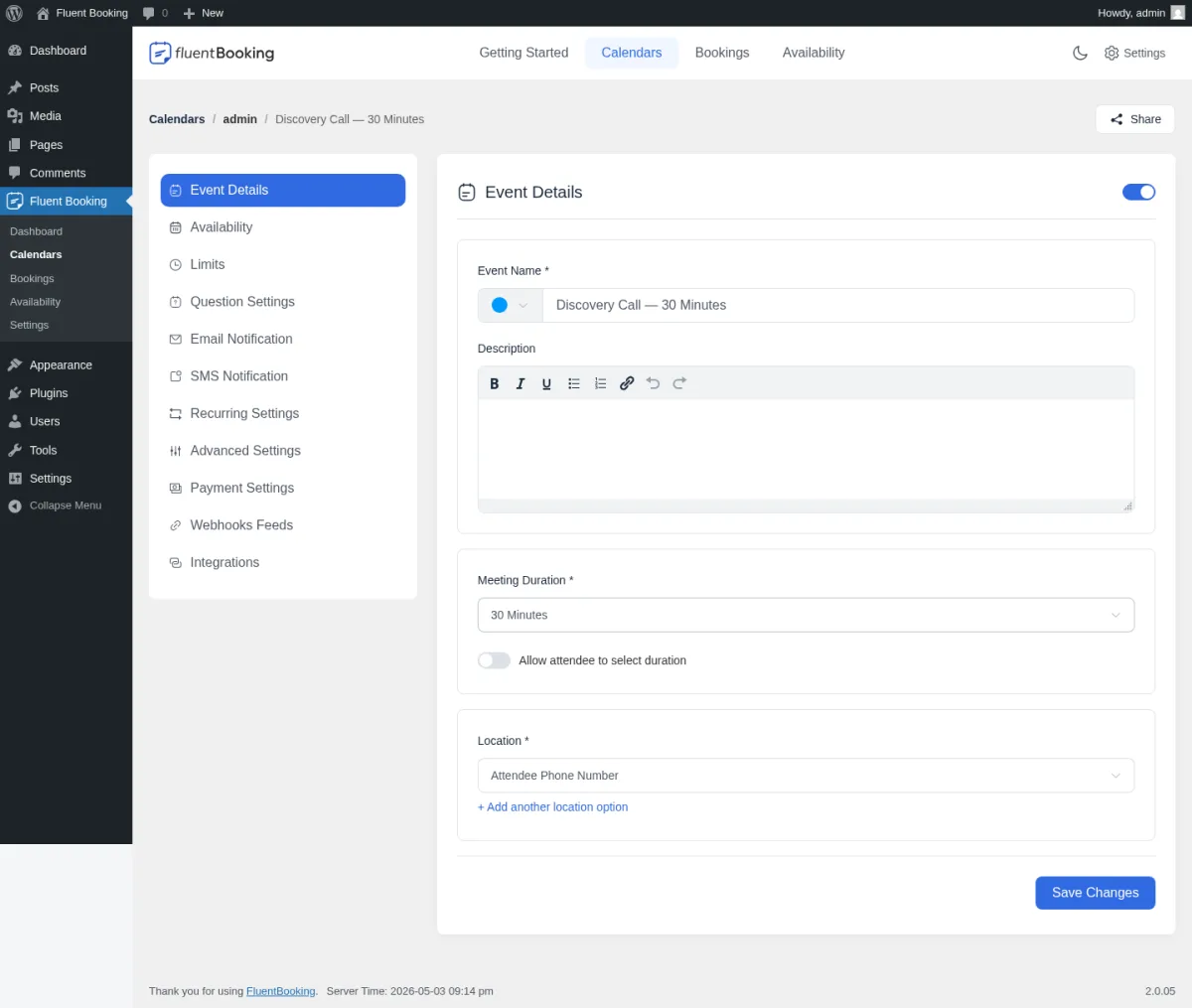
The event editor is where most of the buyer's day will happen. The sidebar groups Event Details, Availability, Limits, Question Settings, Email Notification, SMS Notification, Recurring Settings, Advanced Settings, Payment Settings, Webhooks Feeds and Integrations into clearly named tabs. In testing, going from a blank calendar to a working bookable event took under two minutes through the 3-step wizard. This is the single biggest reason FluentBooking feels closer to a SaaS scheduler than to a typical WordPress booking plugin.
Public booking landing page and date/slot picker
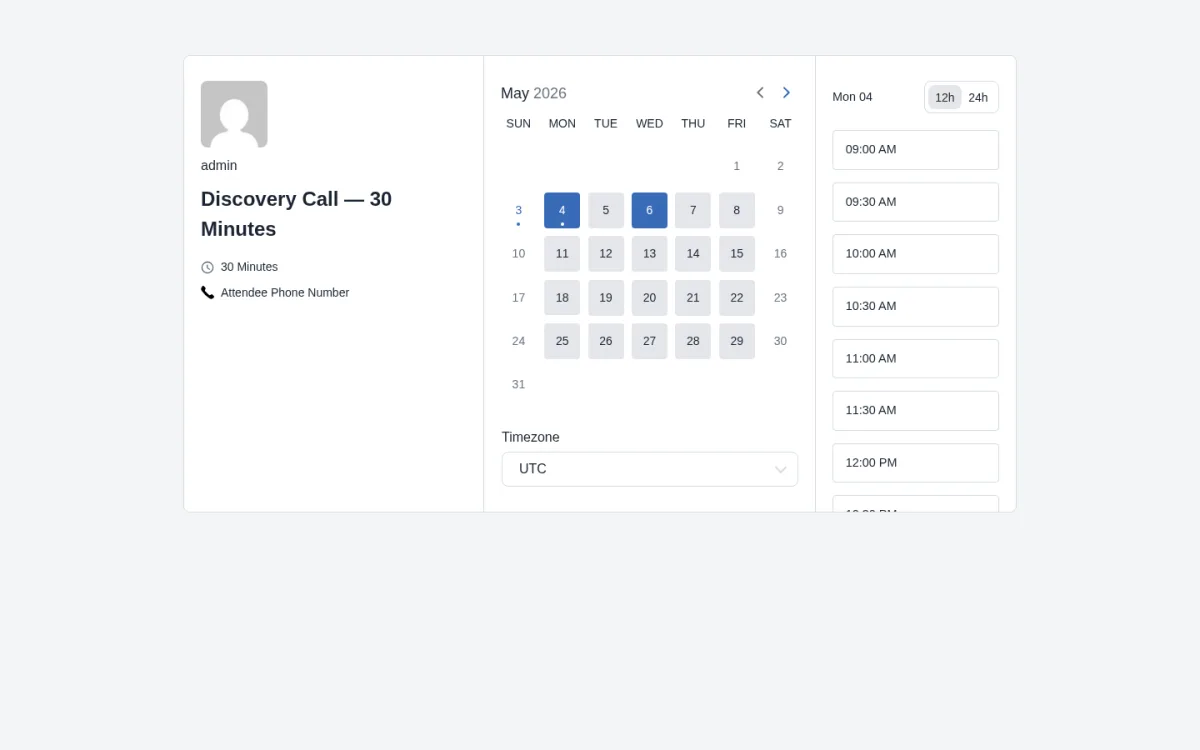
The public flow is two-pane and Calendly-shaped: a month grid on the left with non-bookable days greyed out, a vertical time-slot list on the right scoped to the chosen day, and a 12h / 24h toggle. Working Hours 9–5 was respected exactly during testing — weekends greyed out, weekday slots in 30-minute steps from 09:00 AM to 04:30 PM. The host Landing Page gives every host a single shareable URL that lists all their event types — useful when a coach or consultant wants one link to share everywhere.
Polished attendee confirmation page
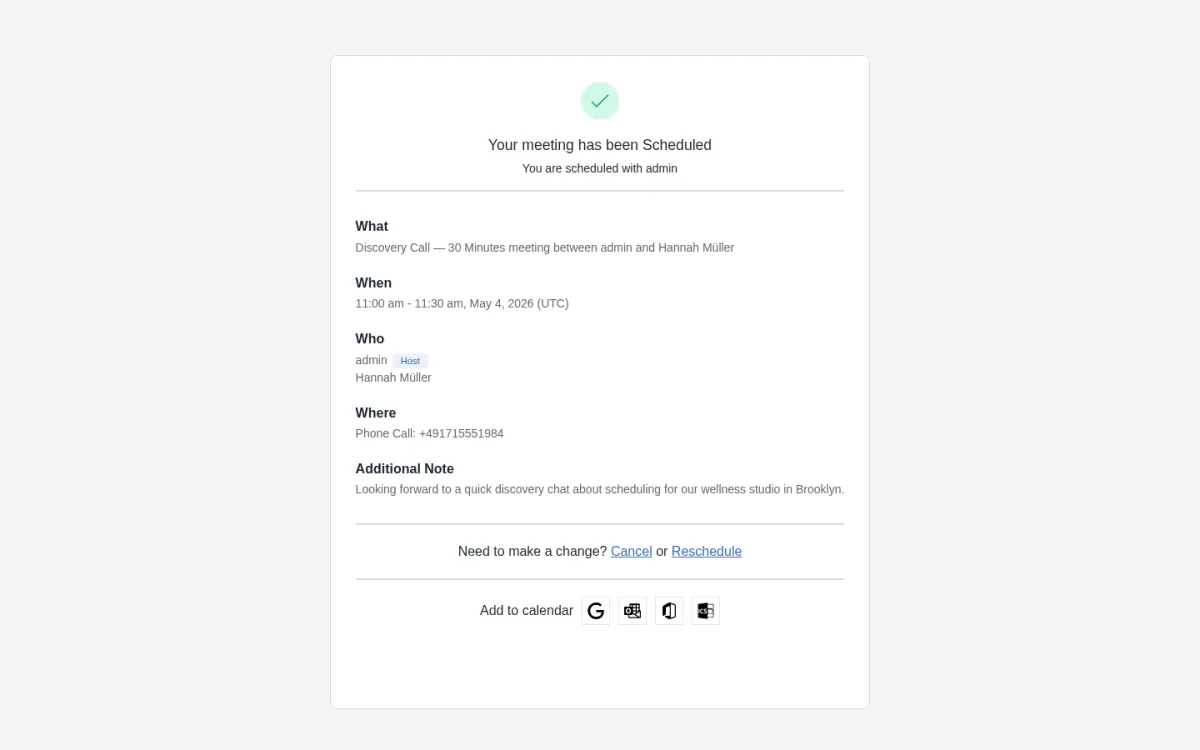
The post-submit confirmation is one of the strongest parts of the front-end: a "Your meeting has been Scheduled" headline followed by What / When / Who / Where, the attendee's note, plus inline Cancel or Reschedule and Add to calendar shortcuts. Most schedulers leave calendar export to the email; FluentBooking lands it on the page, which removes a real friction point for the customer.
Admin Bookings list and detail with activity log
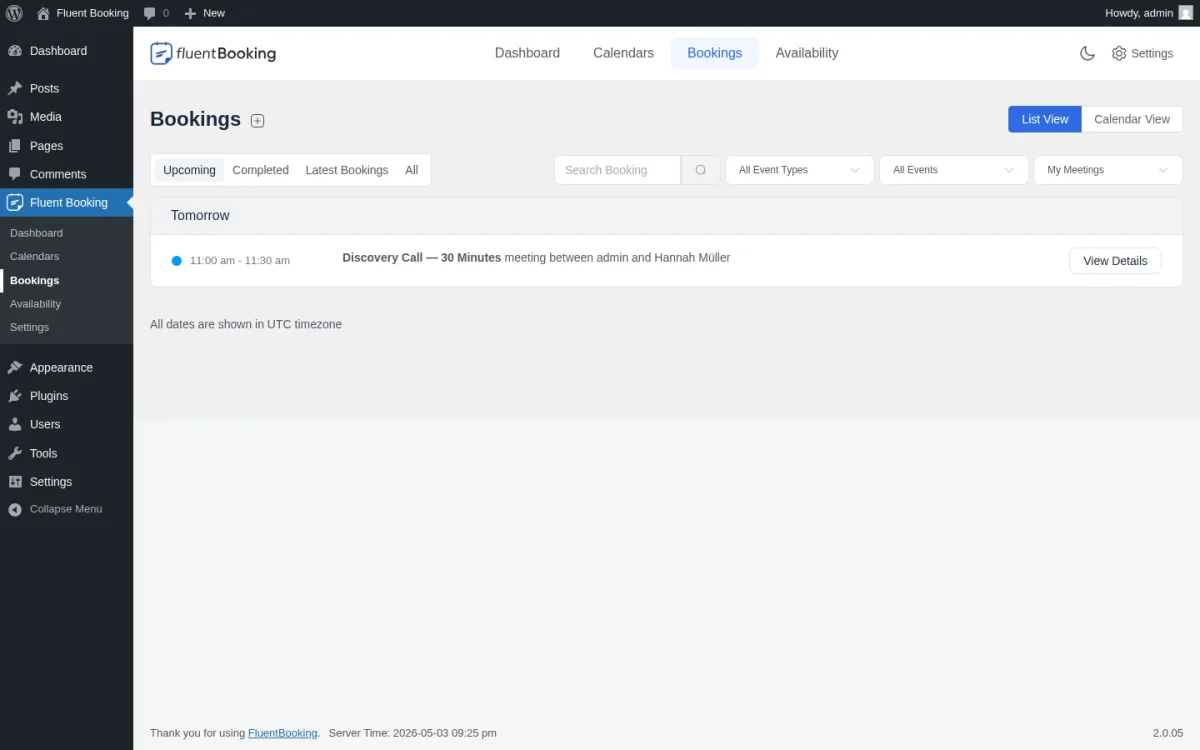
The admin Bookings screen is the operational backbone for hosts. The tab strip exposes Upcoming, Completed, Cancelled and All; a List View / Calendar View toggle switches between the simple list and a visual month/week/day calendar. The booking detail screen is information-dense, with Invitee Information, Meeting Information and a Meeting Activities timeline that records every booking event — including email-send attempts. The notable gap is that the detail screen does not show a Cancel or Reschedule button, so admins who need to cancel on a customer's behalf either share the public confirmation link or rely on the activity log.
Calendar sync, video meetings and notifications
FluentBooking ships connectors for Google Calendar / Meet, Outlook Calendar / MS Teams, Apple Calendar, Nextcloud Calendar, Zoom (per-host OAuth) and Twilio for SMS / WhatsApp. Each integration has its own Settings sub-page with OAuth instructions; once connected, calendar sync is two-way and Zoom / Meet / Teams meeting links are auto-generated on booking. Per-event email notifications cover confirmation, reminder, cancellation, reschedule and approval-request templates with editable subject + body and FluentBooking placeholders. Live OAuth, real Twilio SMS and live Stripe charges depend on third-party credentials, which I documented as setup-dependent rather than product gaps.
WPManageNinja ecosystem and webhooks
The Event → Webhooks Feeds and Event → Integrations tabs cover automation: native FluentCRM and Fluent Forms hooks (deep — booking events trigger CRM automations and tag contacts), plus Zapier, Make, Pabbly Connect, FlowMattic, WP Fusion and raw webhook delivery on every booking event. The Settings → Advanced Features & Addons screen also adds opt-in Frontend Portal (a public WordPress page that renders the FluentBooking app via shortcode) and Coupon modules. This is where FluentBooking most clearly punches above its weight if you already run on the WPManageNinja stack.
FluentBooking Ease of Use / UI & UX
FluentBooking is one of the cleanest WordPress booking plugin admin experiences I have used. The setup is fast, the day-to-day actions feel light, and the Calendly DNA shows in every screen.
- Setup experience — Going from a fresh WordPress install to a confirmed booking took about 15 minutes in testing: build a schedule, add a host calendar, save an event, enable Landing Page features, submit a booking from the public URL.
- Admin navigation — The top-tab bar (Getting Started / Calendars / Bookings / Availability / Settings) keeps the admin shallow, and the event editor sidebar groups 11 tabs into a logical flow that mirrors how Calendly organizes the same job.
- Frontend booking experience — The themeless, mobile-friendly two-pane widget, the inline 12h / 24h toggle and the calendar-shortcut confirmation page are well above the WordPress booking plugin baseline.
- Editing/managing appointments — Day-to-day work felt fast; the admin behaves like a single-page app and modals open instantly. The friction point is the booking detail screen, which does not expose a Cancel or Reschedule action and pushes admin-side cancellations through the customer link.
- Learning curve — Core scheduling is genuinely beginner-friendly; advanced flows (webhooks, Twilio, calendar OAuth, payments) need a little WordPress-admin comfort and assume the WPManageNinja ecosystem is in place.
FluentBooking Pricing & Value
FluentBooking sells a free WordPress.org plugin plus three Pro tiers (Solo, Small Business, Agency), each available in Annual and Lifetime billing. The full Pro feature set is included in every paid plan — the only difference between tiers is the site count and support window. Prices below were verified live on fluentbooking.com/pricing and reflect the regular (non-promotional) rates.
- Free — $0; unlimited sites. Includes unlimited calendars/hosts, one-on-one events, custom booking questions, basic email notifications, offline payment, Elementor + Gutenberg blocks and Fluent Forms integration. Excludes calendar sync, Stripe / PayPal, Zoom / Meet / Teams, SMS / WhatsApp, group / round-robin / one-off / collective events, webhooks, Zapier and most advanced settings.
- Solo (Single Site) — $79/year or $249 lifetime; 1 site. Includes the full Pro feature set plus 1 year of priority support (annual) or lifetime support and updates (lifetime).
- Small Business (5 Sites) — $199/year or $436 lifetime; 5 sites. Same feature set as Solo, scaled to 5 sites.
- Agency (50 Sites) — $399/year or $749 lifetime; 50 sites. Same feature set as Solo, scaled to 50 sites.
A 14-day money-back guarantee applies to paid plans. The free version is a real product on WordPress.org, not a demo, which lets buyers wire up the booking widget on a live site before paying. FluentBooking also runs promotional campaigns periodically; buyers should check the official pricing page for current sale pricing before purchasing.
The decision is mostly about scale and licensing model. Solo lifetime is the most-used tier and the natural fit for a single coach, consultant or freelancer. Small Business is the meaningful inflection point for small WordPress agencies managing several client sites. Agency targets larger agencies and resellers. Because every plan unlocks every feature, the plan choice is purely site count — there is no per-add-on shopping list to assemble. The trade-off is a narrower payment route list (Stripe, PayPal, WooCommerce, FluentCart, Offline) than service-business booking plugins offer; if regional gateways like Mollie, Razorpay or Mercado Pago are mandatory, plan to bridge them through WooCommerce.
FluentBooking Support, Documentation & Reputation
FluentBooking support runs through email and a ticket system on fluentbooking.com. Each Pro plan includes priority support — annual plans for one year, lifetime plans for the lifetime of the license. The WordPress.org rating sits at 4.7/5 from 41 reviews with 20,000+ active installs at the time of this review, and multiple reviewers explicitly praise support responsiveness, which puts support firmly in the "good" band rather than the mixed band several older booking plugins sit in.
Documentation is a real strength: fluentbooking.com/docs covers core features, OAuth integration walkthroughs, Twilio setup, payment configuration, FluentCRM mappings and webhook examples in detail, and the WPManageNinja YouTube channel hosts tutorials for every major feature. For a relatively young product, the doc coverage is unusually mature.
Across third-party WordPress blogs (marketingwithwp, wunderlandmedia, bloggingjoy, blogmarketingacademy) and Reddit threads on r/Wordpress, the picture is consistent. Most-praised: the clean Calendly-style admin and public widget, the all-inclusive Pro license, the deep WPManageNinja integration and the data-ownership angle versus Calendly. Most-criticized: a smaller community footprint compared with older booking plugins, missing booking packages / customer portal / waiting list / native mobile app, a narrower payment route list and a setup that assumes WordPress is already in place.
Best FluentBooking Alternatives
If FluentBooking is close but not a perfect match, these are the most relevant alternatives to compare. For a wider WordPress booking shortlist, see the best WordPress appointment booking plugins roundup, and for a deeper side-by-side breakdown of the plugins closest to FluentBooking on workflow fit and pricing, see the round-up of FluentBooking alternatives.
Booknetic
The closest direct alternative for service businesses that need a fuller WordPress booking platform — multi-staff, multi-location, packages, loyalty, native mobile app and broad payment gateway coverage. Integrations are à-la-carte add-ons rather than bundled, which lifts the ceiling but also the per-feature cost. See the full Booknetic review for a deeper look.
Amelia
A heavyweight WordPress booking plugin known for a polished admin and a strong Events module. A good shortlist option if events-with-tickets are central to your operation. See the full Amelia review for the feature and pricing picture.
BookingPress
A modern WordPress booking plugin that bundles 45+ premium add-ons on Standard and 60+ on Professional / Enterprise plus 20+ payment gateways into every paid plan. Closer match for service businesses that want gateway breadth and a live-preview Customize module. See the full BookingPress review for the breakdown.
LatePoint
A clean WordPress booking plugin with competitive lifetime pricing and a slick UI. Worth a look if you specifically prefer LatePoint's flat pricing and visual style. See the full LatePoint review for the fit.
Who Should Use FluentBooking?
Good fit for:
- Coaches, consultants and freelancers who want a Calendly alternative with data ownership and one-time pricing.
- Sales and marketing teams already running on FluentCRM that want booking events to trigger contact-level automations natively.
- Small WordPress agencies that need a Small Business or Agency license to install one scheduler across several client sites without per-add-on math.
- Operators who care about public booking quality — themeless mobile-first widget, inline 12h/24h toggle, calendar-shortcut confirmation, single-URL host Landing Page.
Skip it if:
- You run a multi-location service business (salons, spas, clinics, fitness chains) that needs services, locations, staff, packages, loyalty and waiting lists.
- You depend on regional payment gateways like Mollie, Razorpay, Mercado Pago or Paystack as a native one-click integration.
- Cancelling on a customer's behalf is part of your daily workflow and you want a one-click admin Cancel button rather than the customer link.
- A native iOS / Android admin app is a hard requirement.
Final Verdict
FluentBooking is worth it when you want a Calendly-style scheduler inside WordPress and you value a single all-inclusive license over per-add-on math. The event editor is clean, the public booking widget converts well, the host Landing Page is genuinely useful, and the WPManageNinja ecosystem turns it from a scheduler into a multi-plugin operating system if you already run FluentCRM and Fluent Forms. The biggest limitation is scope — there are no booking packages, no customer portal, no waiting list, no native mobile app, and the payment gateway list is narrower than service-business plugins offer. In the broader WordPress appointment booking market, FluentBooking sits in the modern Calendly-alternative slot, while Booknetic, Amelia, BookingPress and LatePoint cover the heavier service-business slot. For coaches, consultants, sales teams and small agencies, FluentBooking is one of the cleanest WordPress scheduler picks available.
FluentBooking FAQ
Is FluentBooking free?
Yes — there is a real free plugin on WordPress.org with unlimited calendars and hosts, one-on-one events, custom booking questions, basic email notifications and offline payment. Calendar sync, Stripe / PayPal / WooCommerce / FluentCart payments, Zoom / Google Meet / MS Teams, SMS / WhatsApp, group / round-robin / one-off / collective events, webhooks, Zapier and most advanced settings sit behind the Pro license.
How much does FluentBooking cost?
On the official pricing page, FluentBooking Pro Solo is $79/year or $249 lifetime; Small Business (5 Sites) is $199/year or $436 lifetime; Agency (50 Sites) is $399/year or $749 lifetime. All paid plans include every Pro feature with a 14-day money-back guarantee. Promotional pricing runs periodically, so check the official pricing page before purchase.
Does FluentBooking support Stripe, PayPal and Zoom?
Yes. Stripe and PayPal are bundled into every Pro plan, with WooCommerce, FluentCart and Offline as additional payment routes. Zoom, Google Meet and Microsoft Teams meeting links are auto-generated on booking once you complete the per-host OAuth. SMS and WhatsApp run through Twilio.
Does FluentBooking have a mobile app?
No. FluentBooking does not ship a native iOS or Android admin app — all admin and host work runs through the WordPress admin in a browser. If a native mobile app is mandatory, Booknetic is the most common alternative cited by buyers.
Is FluentBooking a good Calendly alternative?
For WordPress site owners, yes. FluentBooking matches Calendly on the core scheduling job (event types, availability, two-way calendar sync, Zoom / Meet / Teams meeting links, attendee form, calendar-shortcut confirmation) with the additional benefits of data ownership and one-time pricing. The trade-offs are a smaller community footprint, a narrower payment gateway list and a setup that assumes WordPress is already in place.
What is the best FluentBooking alternative?
Booknetic is the closest direct alternative for service businesses that need a fuller WordPress booking platform — multi-staff, multi-location, packages, loyalty, native mobile app and a much broader payment gateway list. Amelia, BookingPress and LatePoint are also strong shortlist candidates depending on whether you weight Events, gateway breadth or lifetime pricing most.


