

Simply Schedule Appointments Review: Pricing, Features, Pros & Cons

You may like Simply Schedule Appointments at first glance — the WordPress.org rating is unusually clean and the marketing pitch sounds simple — but the real question is whether its annual single-site licensing, Pro-tier feature gates, and list-style admin can handle your actual booking workflow without becoming a problem later. I tested Simply Schedule Appointments on a private WordPress test site running the Pro Edition license, walked the booking flow end-to-end, checked the admin and Settings hub, cross-checked official annual and lifetime pricing, and read the public review picture on WordPress.org plus third-party WordPress reviews. This review breaks down where it works well and where it may not be the right fit.
What Is Simply Schedule Appointments?
Simply Schedule Appointments — usually shortened to SSA — is a self-hosted WordPress appointment booking plugin built by NSquared. It targets solo professionals and small service teams that want a clean, accessible booking widget on their own WordPress site instead of a SaaS scheduler like Calendly. Typical buyers are consultants, coaches, lawyers, tutors, therapists, personal trainers, yoga studios, photographers, and small clinics. It is plugin-only — there is no SaaS, no hosted dashboard, no separate hybrid product. The pitch is anti-bloat: a fast 5-minute setup, a focused feature ladder, and a real free Basic edition on WordPress.org backed by paid Plus, Professional, and Business editions for Google Calendar, payments, SMS, video meetings, team scheduling, and resource booking.
Simply Schedule Appointments Quick Verdict
SSA is a strong fit for a single-site solo professional who wants a clean booking widget on WordPress. It becomes a harder sell once you need multi-site coverage on one license, multi-location service management, a visual admin calendar, or payment gateways beyond Stripe and PayPal.
| Criteria | Verdict |
|---|---|
| Best for | Solo consultants, coaches, and small service teams running one WordPress site |
| Starting price | Free Basic edition; annual Plus from $99/ |
| Free version / trial | Yes — fully functional free Basic edition on WordPress.org; 30-day money-back on paid plans |
| Tested environment | Pro Edition on a private WordPress 6.9.4 test site, real front-end booking submitted end-to-end |
| Strongest features | Multi-block per-day availability with auto lunch-gap, three Booking Flow layouts, Save-to-Calendar + Reschedule + Cancel on the confirmation, visitor-timezone auto-detection |
| UI/ | 8.6/ |
| Feature depth score | 7.4/ |
| Performance impression | Snappy admin SPA and responsive front-end widget; performance follows your hosting more than the plugin |
| Public rating / source | 5/ |
Pros
- Setup wizard reads WordPress timezone, date format, and week-start automatically — usable booking widget in under five minutes.
- Polished app-style admin with an accessibility-aware front-end widget and a live contrast-ratio checker.
- Three Booking Flow layouts (Expanded, Express, First Available) make a credible Calendly-on-WordPress experience.
- Confirmation screen surfaces Save-to-Calendar, Reschedule, and Cancel side-by-side — most competitors leave that to email.
Cons
- Every annual tier is single-site — multi-site coverage requires the separate lifetime SKUs at higher upfront prices.
- Team scheduling and Resource booking are gated to the most expensive Business tier.
- No drag-and-drop admin calendar — only a list view with a date-range filter.
- Only Stripe and PayPal as payment gateways; no Square, Mollie, Razorpay, Mercado Pago, or WooCommerce.
Testing Summary
How I tested SSA for this review:
- Accessed Simply Schedule Appointments Pro Edition on a private WordPress test site (WordPress 6.9.4, PHP 8.3.30) with an active Pro license.
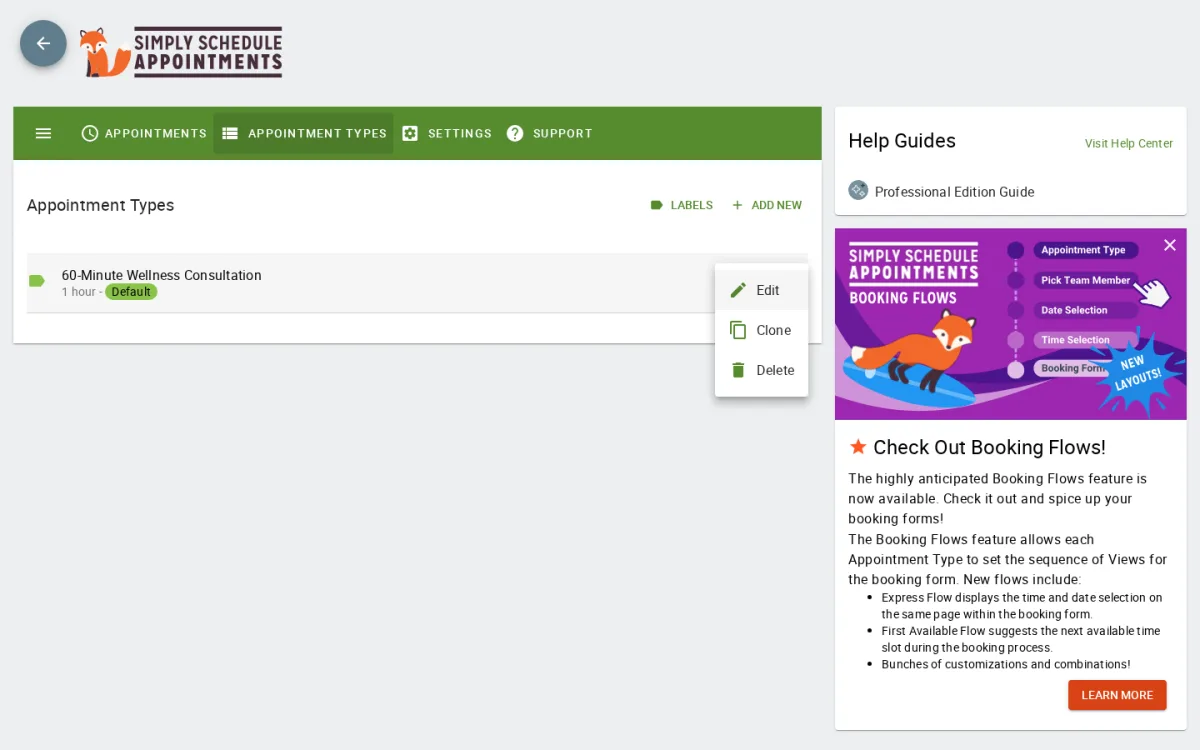
- Reviewed the post-Setup-Wizard configuration, checked the appointment type editor, and configured a 60-Minute Wellness Consultation type with Mon–Fri 9–12 + 13–17 availability and a 60-minute minimum notice.
- Embedded the per-type
[ssa_booking type=consultation-phone-call]shortcode on a public WordPress page and walked the visitor flow end-to-end as a non-logged-in visitor on America/New_York. - Submitted a front-end booking (Marcus Bennett, 10:00 AM EDT) and verified that it landed in admin Appointments with the correct customer, time, and email.
- Worked through the Settings hub — General Settings, Styles, Translations, Advanced Scheduling Options, Notifications, Import/Export, Manage License — plus the Support diagnostics tab.
- Cross-checked official pricing on simplyscheduleappointments.com/pricing/ and the separate lifetime SKUs on simplyscheduleappointments.com/lifetime-pricing/.
- Reviewed SSA's WordPress.org rating profile (5/5 from 154 reviews) and sampled publicly visible reviews plus third-party WordPress reviews from BlogVault and WPGlob.
Simply Schedule Appointments Features That Matter
There is no shortage of toggles in SSA. For a buyer decision, four features actually move the needle.
Multi-block per-day availability with automatic lunch-gap
SSA lets you split each weekday into multiple available blocks — for example 09:00–12:00 plus 13:00–17:00 — and the front-end widget automatically excludes the lunch gap from the slot grid. In testing, a Wednesday 10:00 AM booking offered Morning slots up to 11:00 and Afternoon slots from 1:00 onward, with 12:00 and 12:30 simply absent. That sounds small, but most competitors require a separate "break" record or one continuous schedule with manual workarounds. For service businesses with predictable lunch breaks, it is a real time-saver and one of the cleaner availability models in the WordPress booking category.
Three Booking Flow layouts (Expanded, Express, First Available)
Each appointment type can pick one of three visitor-side layouts. Expanded is the default — separate Date, Time, and Customer Information screens. Express collapses Date and Time onto a single screen with a full month grid, which is the closest "Calendly-on-WordPress" experience SSA delivers. First Available auto-suggests the next open slot. The switch lives in the Booking Flow accordion of the appointment type editor, and SSA documents all three as Pro-tier-included layouts. For a buyer trying to decide between SSA and a SaaS scheduler, the Express layout is the strongest argument that you can keep the Calendly feel without leaving WordPress.
Front-end booking widget with timezone auto-detection
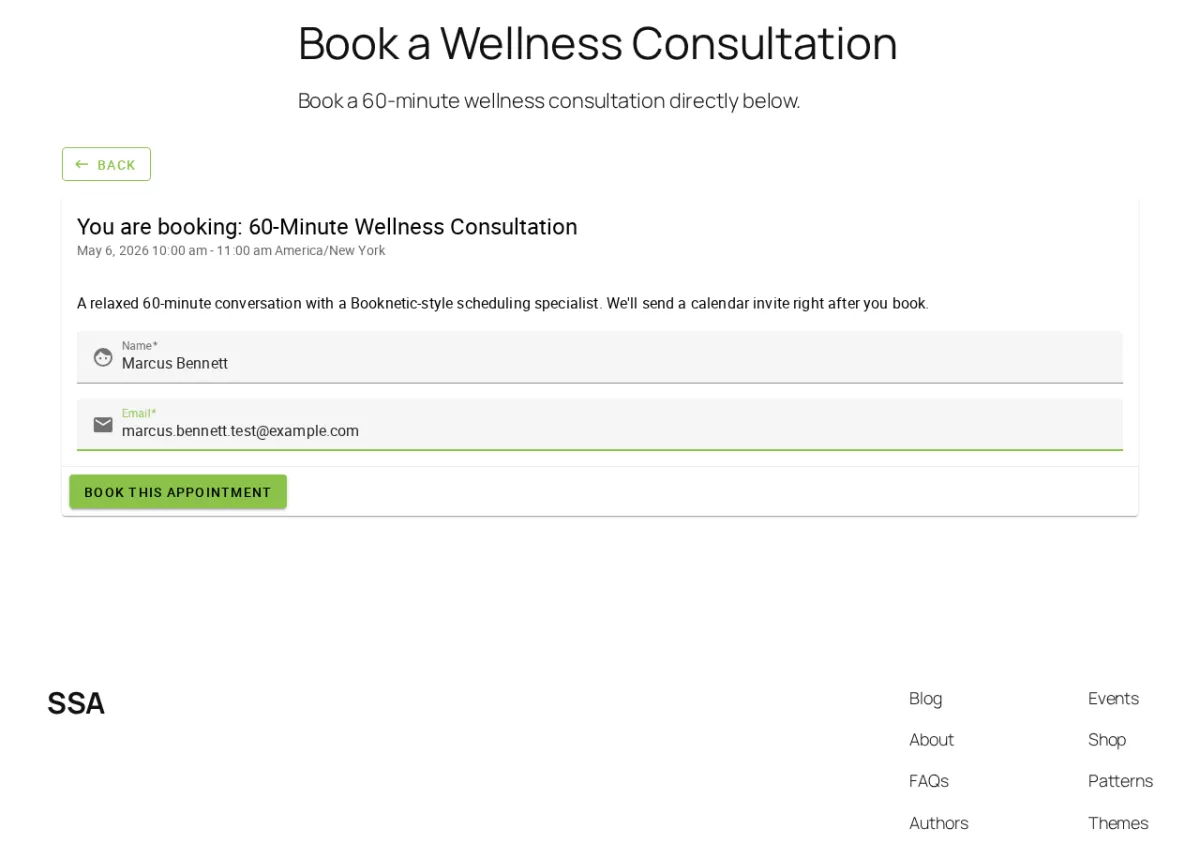
The visitor-side widget auto-detects the visitor's timezone, shows it in the header with a pencil edit icon, and walks Date → Time → Customer Information → Confirmation in a clean accessible flow. Slots are grouped under Morning, Afternoon, and Evening headings — useful for screen-reader users and a small but real accessibility win. In my run, the booking submitted in well under a second and the confirmation rendered almost immediately. If your customer base is global, the timezone behaviour saves a round of back-and-forth that most older WordPress booking plugins still get wrong.
Confirmation screen with Save-to-Calendar, Reschedule, and Cancel
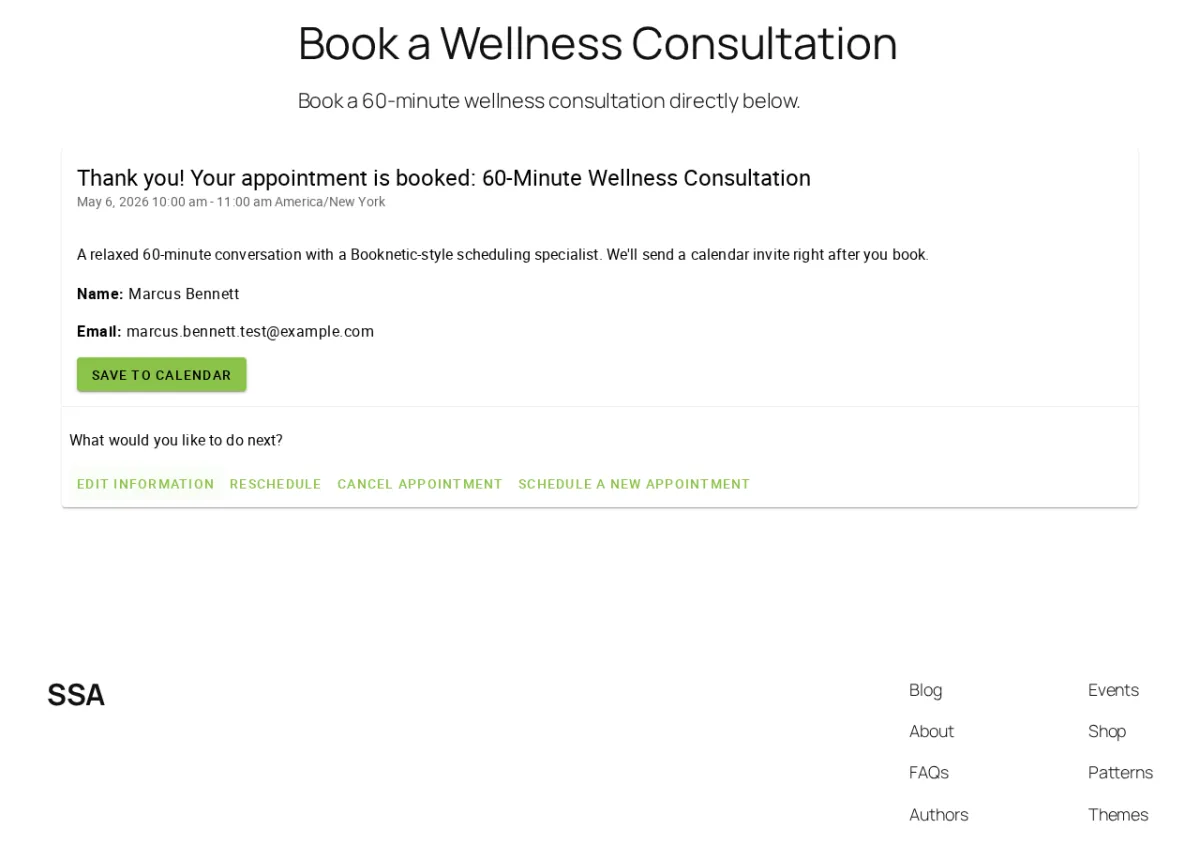
After submit, SSA shows a single confirmation screen with a Save-to-Calendar shortcut sitting next to Edit Information, Reschedule, Cancel Appointment, and Schedule a New Appointment. Most WordPress booking plugins force the customer to dig through a confirmation email to reschedule. SSA puts the action right there. For service businesses where last-minute rescheduling is normal — coaching, therapy, salons — that is a meaningful conversion-quality detail.
Settings hub, license management, and Import/Export
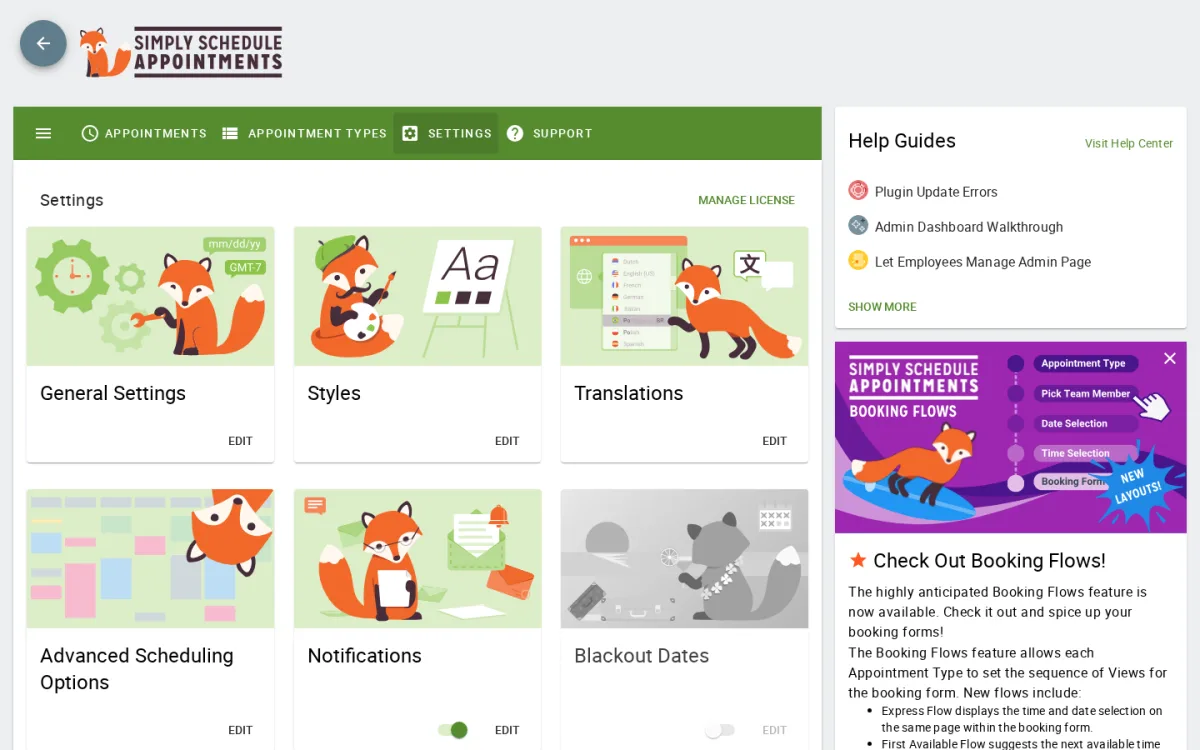
The Settings hub is a single scrollable list of edit-rows for every SSA module, with AVAILABLE IN BUSINESS chips on Team and Resources to telegraph the upgrade path. Import/Export deserves its own mention: the export tool produces a code blob with three independent components — settings, appointment types, and appointments — and enforces the dependency chain on import. For agencies that build SSA setups for clients, that is a real migration tool, not just a backup helper.
Simply Schedule Appointments Ease of Use / UI & UX
The admin SPA is genuinely modern for a WordPress booking plugin and lands a working calendar quickly. The friction shows up in the per-section settings drill-down and in the absence of a visual admin calendar.
- Setup experience — The wizard reads WordPress timezone, date format, and week-start automatically and exits to a dashboard that already links the auto-installed shortcode. The five-minute claim is realistic; the only required tweak in testing was lowering the default 24-hour minimum notice to 60 minutes for same-day bookings.
- Admin navigation — The in-app sidebar (Appointments / Appointment Types / Settings / Support) is clean and snappy; switching between tabs feels closer to a SaaS scheduler than a 2018-style WP plugin admin. The Appointment Type editor's eight-section accordion is one of the more legible per-record editors in this category.
- Frontend booking experience — Iframe-isolated widget, accessibility-aware slot grouping, visitor-timezone auto-detection, and a confirmation screen with self-serve actions. It is hard to find something to criticise here aside from the iframe itself, which limits theme-CSS reach for site owners who want deep visual customisation.
- Editing and managing appointments — A list with date-range filter, search, and CSV export. Functional, but no Month/Week visual and no drag-to-reschedule. For a solo consultant this is fine; for a small team that needs a whole-day visual at a glance, it feels thin.
- Settings drill-down — Every Settings sub-section opens its own page with its own Save action. Predictable, but the round-trip means a small change can take three or four clicks (hub → Edit → save → back) where a multi-tab settings page would be one.
Simply Schedule Appointments Pricing & Value
SSA is sold in two billing models: annual subscriptions on the main pricing page and a separate lifetime page with three site-count tiers. The two pages list distinct SKUs and are not interchangeable on the same shopping cart, so multi-site buyers who only land on the annual page will not see lifetime as an option.
Annual subscriptions (one site per license; year-1 introductory price followed by full-price renewal):
- Basic Edition — Free; 1 site; setup wizard, unlimited appointment types, blackout dates, email notifications, page builder integrations, Translations, GDPR/HIPAA-capable storage.
- Plus Edition — $99/yr intro, $129/yr renewal; 1 site; adds Google Calendar sync, Zoom/Meet/Webex video meetings, custom form fields, group/class bookings, time-triggered notifications, Gravity Forms / Formidable Forms, MemberPress, Mailchimp, Facebook Pixel, premium support.
- Professional Edition — $199/yr intro, $249/yr renewal; 1 site; adds Stripe + PayPal payments, Twilio SMS, GA4/GTM, webhooks (Zapier/Make), LifterLMS, customizable Booking Flows.
- Business Edition — $399/yr intro, $499/yr renewal; 1 site; adds Team scheduling, Resource booking, priority support, one Zoom onboarding call.
Lifetime packages (separate one-time purchase, three site-count tiers):
- Plus Lifetime — $299 (1 site) / $449 (25 sites) / $549 (1,000 sites)
- Pro Lifetime — $499 (1 site) / $699 (25 sites) / $799 (1,000 sites)
- Business Lifetime — $899 (1 site) / $999 (25 sites) / $1,299 (1,000 sites)
A 30-day money-back guarantee applies to both billing models. The free Basic edition is a real product, not a demo, which lets you wire up SSA on a live site before paying.
For a single-site solo consultant who only needs Google Calendar conflict detection and video meetings, annual Plus is the natural starting point. For anyone taking payment on the booking widget, Professional is the realistic floor. Business is the only path to Team scheduling and Resource booking, which means even a two-person team lands at a higher price than a solo Pro license. Agencies and multi-site operators usually end up on the multi-site lifetime SKUs ($449–$1,299 depending on tier and site count). The pricing is reasonable for a polished single-site product, but heavy at scale and confusing if buyers do not realise the lifetime page exists.
Simply Schedule Appointments Support, Documentation & Reputation
Support runs through three channels: the WordPress.org plugin support forum (where SSA staff respond directly), an in-plugin "Contact Support Team" button on the Support tab, and the contact form on simplyscheduleappointments.com. Premium support is included with every paid plan; Business adds priority support and a Zoom onboarding call. WordPress.org reports SSA resolved 7 of 8 support topics in the last two months and the public rating profile (5/5 from 154 reviews) places SSA's support firmly in the "good" band. Multiple recent reviewers report responses within an hour, including on the free tier.
Documentation is genuinely strong. The Help Center on simplyscheduleappointments.com covers setup, appointment types, scheduling options, integrations, payments, notifications, and troubleshooting in deep, screenshot-rich articles, and the team maintains a YouTube tutorial channel. Recurring praise from public reviews focuses on ease of setup, support response time, accessibility focus, and Calendly-style ergonomics with WordPress data ownership. Recurring complaints centre on the absence of multi-location, no partial-day blocking on a specific day (full-day blackouts only), only Stripe and PayPal as payment gateways, no recurring-series customer self-booking, and the year-1 introductory pricing rising 25–30% on renewal with no grandfathering. Coverage on Capterra, G2, and Trustpilot is minimal; public sentiment is concentrated on the WordPress.org listing.
Best Simply Schedule Appointments Alternatives
If SSA is close but not the right fit, three or four WordPress-native alternatives are worth shortlisting before you buy.
Booknetic
The closest direct alternative when single-site annual cost compounding is the sticking point. Booknetic ships multi-location, recurring appointments, 11+ payment gateways, a native mobile app, and lifetime pricing that often comes in below SSA's multi-site lifetime SKUs. Read the full Booknetic review for a deeper look at workflow and total cost.
Amelia
A heavyweight WordPress booking plugin with a polished admin and a mature Events module that covers QR-coded e-tickets and waiting lists. Amelia is a good shortlist option when events alongside appointments are central to your operation. Our Amelia review covers the tradeoffs and the post-9.0 stability picture.
FluentBooking
A newer Calendly-style WordPress entrant focused on a clean, scheduler-first experience. FluentBooking is often pitched at users defecting from SSA who want a flatter interface and a lower entry price. The full FluentBooking review walks through where it fits.
BookingPress
An all-inclusive WordPress booking plugin with bundled add-ons across every paid tier and a generous free version. BookingPress is worth a look when you want a wider integration catalog without per-add-on shopping or a richer free starting point. See the full BookingPress review for details.
For the broader picture, see the cluster roundup on the best WordPress appointment booking plugins, and for a deeper side-by-side breakdown of the plugins closest to SSA on workflow fit and pricing, see the round-up of Simply Schedule Appointments alternatives.
Who Should Use Simply Schedule Appointments?
Good fit for:
- Solo consultants, coaches, lawyers, tutors, and therapists running a single WordPress site.
- Buyers who want a real free starting point and a paid upgrade path that follows a feature ladder rather than per-add-on shopping.
- Operators who care about accessibility and clean UX — WCAG-AA focus, contrast-ratio checker, screen-reader-friendly slot grouping.
- WordPress-native solo professionals defecting from Calendly who want the same Express-style experience inside their own site.
Skip it if:
- You run multiple sites and want consolidated annual licensing — only the lifetime SKUs cover more than one site.
- You run a multi-location service business — SSA does not ship a multi-location module.
- You expect a Month/Week visual admin calendar with drag-to-reschedule.
- You need payment gateways beyond Stripe and PayPal (Square, Mollie, Razorpay, Mercado Pago, WooCommerce are not supported).
- You need a native mobile app for staff or admins — SSA does not ship one.
Final Verdict: Is Simply Schedule Appointments Worth It?
Simply Schedule Appointments is worth choosing when you run a single WordPress site, value a clean accessible booking widget over a kitchen-sink feature catalog, and are happy paying via either an annual subscription or a one-time lifetime license that scales by feature ladder. The setup wizard genuinely lands a working calendar in five minutes, the admin SPA is among the more legible in this category, the three-flow Booking Flow system is a credible Calendly-on-WordPress experience, and the WordPress.org reputation is well-earned. The biggest limitations are the single-site cap on every annual tier, the absence of a visual admin calendar, and the thin payment-gateway list. In the broader WordPress booking plugin market, SSA is the natural pick for the "solo professional who wants Calendly without leaving WordPress" segment — buyers who need multi-location, multi-gateway payments, a native mobile app, or true multi-site licensing should compare it side-by-side with Booknetic, Amelia, or FluentBooking before committing.


