

BookingPress Review: Pricing, Features, Pros & Cons

You may like the look of BookingPress at first glance — a modern booking widget, a free Lite plan, and paid tiers that bundle dozens of add-ons into one license. The real question is whether that bundled-add-on model genuinely saves you money compared with à-la-carte booking plugins, and whether the Standard plan is enough or you need to climb to Professional or Enterprise.
I ran a hands-on test of BookingPress in the official BookingPress sandbox, configured a service category and a paid service, walked the full customer booking journey end-to-end on the front-end, and verified the booking landed in admin Appointments, Calendar, Customers and Payments. I also checked pricing on the official site, browsed the documentation, and read through the public review trail on WordPress.org, Capterra, Trustpilot, GetApp and a few WordPress community threads.
This review breaks down where BookingPress works well, where the rough edges are, and which type of WordPress site owner it is actually the right fit for.
What Is BookingPress?
BookingPress is a self-hosted WordPress appointment booking plugin built by Repute InfoSystems. It runs entirely inside WordPress and renders a multi-step booking widget on the front-end, plus a modern admin panel for managing services, staff, locations, customers, and payments. It targets WordPress-based service businesses — salons, spas, clinics, coaching practices, fitness studios, photographers, and consultants — that prefer a self-hosted plugin to a SaaS scheduler. Its commercial pitch is value density: paid plans bundle a large catalog of add-ons together, instead of metering features one by one.
BookingPress Quick Verdict
BookingPress is a strong pick if you want a polished WordPress booking widget and you prefer paying once for a plan that already includes the add-ons you need. The biggest caveat is that BookingPress isn't currently distributed through WordPress.org, so installs and updates flow from the official site rather than the WP plugin directory.
| Criteria | Verdict |
|---|---|
| Best for | WordPress service businesses that want a modern booking widget with bundled add-on plans |
| Starting price | Free Lite plan; Standard from $89/ |
| Free version / trial | Yes — Lite plan with unlimited websites and unlimited appointments; 14-day money-back guarantee on paid plans |
| Tested environment | Official BookingPress sandbox, latest stable build, full paid add-on catalog enabled |
| Strongest features | 4-step booking widget, Customize live preview with drag-to-reorder steps, Notifications template editor, large add-on catalog with one-click activation |
| UI/ | 8.0/ |
| Feature depth score | 8.6/ |
| Performance impression | Snappy admin, no lag in the booking widget, ~1–2 second page loads on the sandbox |
| Public rating / review source | 4.6/ |
Pros
- Bundled add-on plans (Standard 45+ add-ons; Professional and Enterprise 60+; 20+ payment gateways) avoid the per-add-on shopping list common in this category.
- Modern, SaaS-style admin with an in-app top-tab navigation and a live-preview booking-form customizer.
- Genuine free Lite tier with unlimited websites and the option of a one-time lifetime license.
- Booking confirmation page includes Booking ID and Add-to-Calendar shortcuts (Google, Yahoo, Outlook, iCal) — most competitors only deliver these via email.
Cons
- Not currently available on WordPress.org; install and updates run through the official site.
- Validation rough edges around the Location and Staff Member add-ons make the first hour of setup frustrating for non-technical admins.
- Reporting is functional but visually thin — no graphical breakdown by staff or location.
- Public reviews flag mixed support response times for enterprise-level issues.
Testing Summary
Here is exactly what I checked during this hands-on test:
- Logged into the official BookingPress sandbox and confirmed the BookingPress admin loads with its in-app top-tab navigation (Calendar / Appointments / Payments / Customers / Services / Locations / Staff Members / Discounts / Reports / Customize / More).
- Created a service category, a $120 60-minute deep-tissue massage service, and a multi-location record.
- Walked the full front-end booking widget end-to-end as a customer — Service → Date & Time → Basic Details → Summary — and submitted a real booking.
- Verified the booking landed correctly in Appointments, the Calendar, Customers (auto-created record), and Payments.
- Reviewed Customize, Notifications, Settings, Reports, Discounts, and the full Add-ons catalog (modules, payment gateways, integrations).
- Cross-checked plan inclusions and pricing against bookingpressplugin.com/pricing.
- Read the public review trail on WordPress.org, Capterra, Trustpilot, GetApp and several WordPress community threads.
Items that genuinely couldn't be exercised in the sandbox — live Stripe / PayPal charges, real SMS / WhatsApp / Telegram delivery, OAuth-bound calendar sync and Zoom / Meet / Teams meeting auto-creation — are documented as setup-dependent in the testing notes rather than as product weaknesses.
BookingPress Features That Matter
BookingPress ships a lot, so I focused on the features that move the buying decision rather than every menu in the admin.
Multi-step booking widget
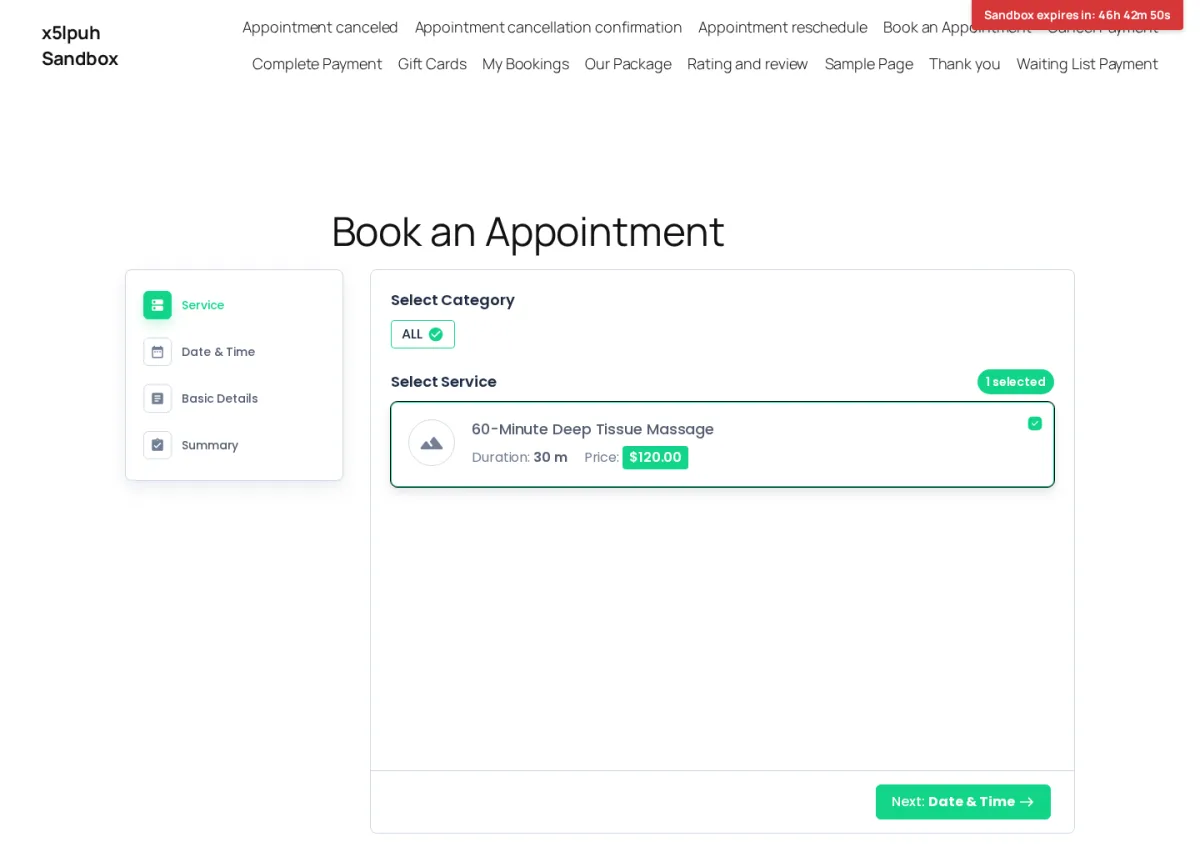
The 4-step wizard (Service → Date & Time → Basic Details → Summary) renders on the auto-installed Book an Appointment page with rounded cards, a left-side step navigation, and generous spacing. Selecting the service was a single click on a + icon, the indicator updated cleanly, and the Next button enabled. The visual quality is well above what most WordPress booking plugins ship at this price point.
Date & Time selection
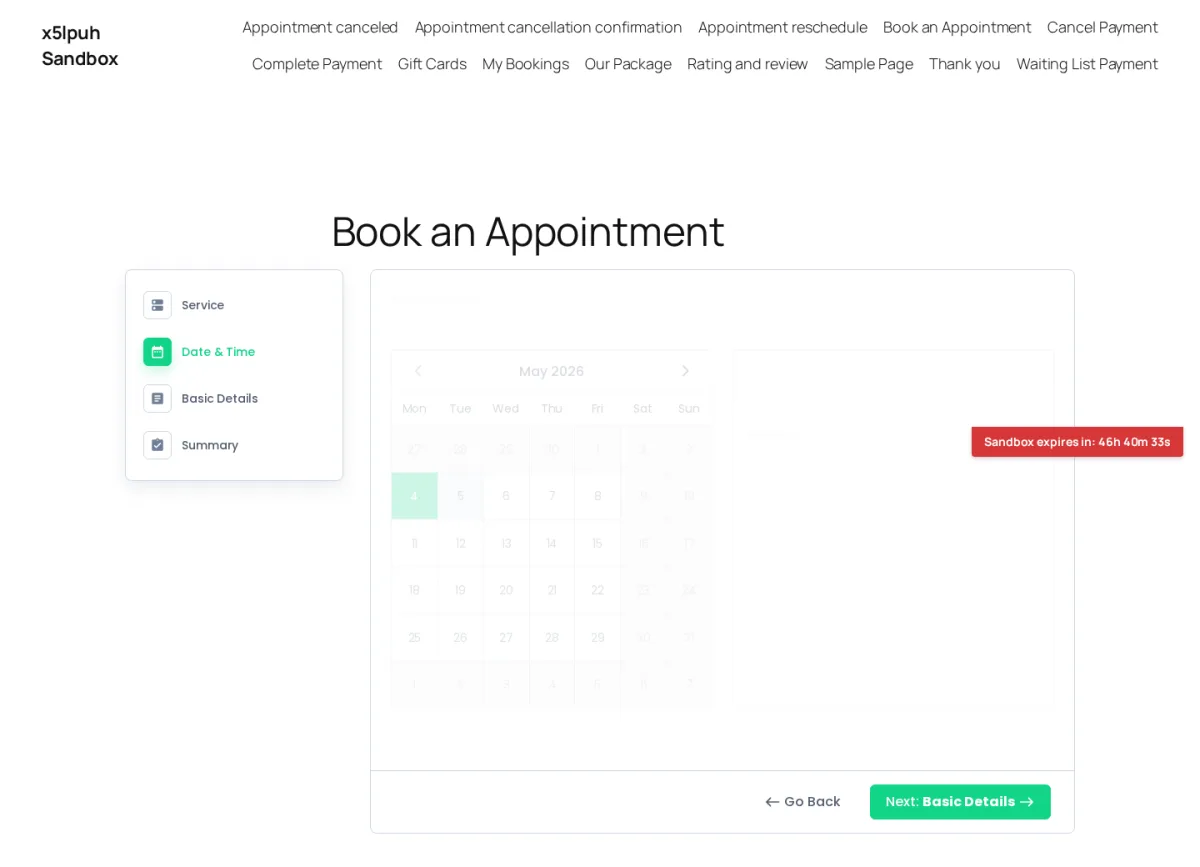
The Date & Time step uses a full-month calendar plus a vertical time-slot list grouped by Morning / Afternoon / Evening. Picking an available slot auto-advances to Basic Details — no manual "Next" click — and the slot list refreshed instantly when I switched dates. It's one of the cleaner front-end booking flows I've tested in the WordPress booking plugin space.
Booking confirmation with calendar shortcuts
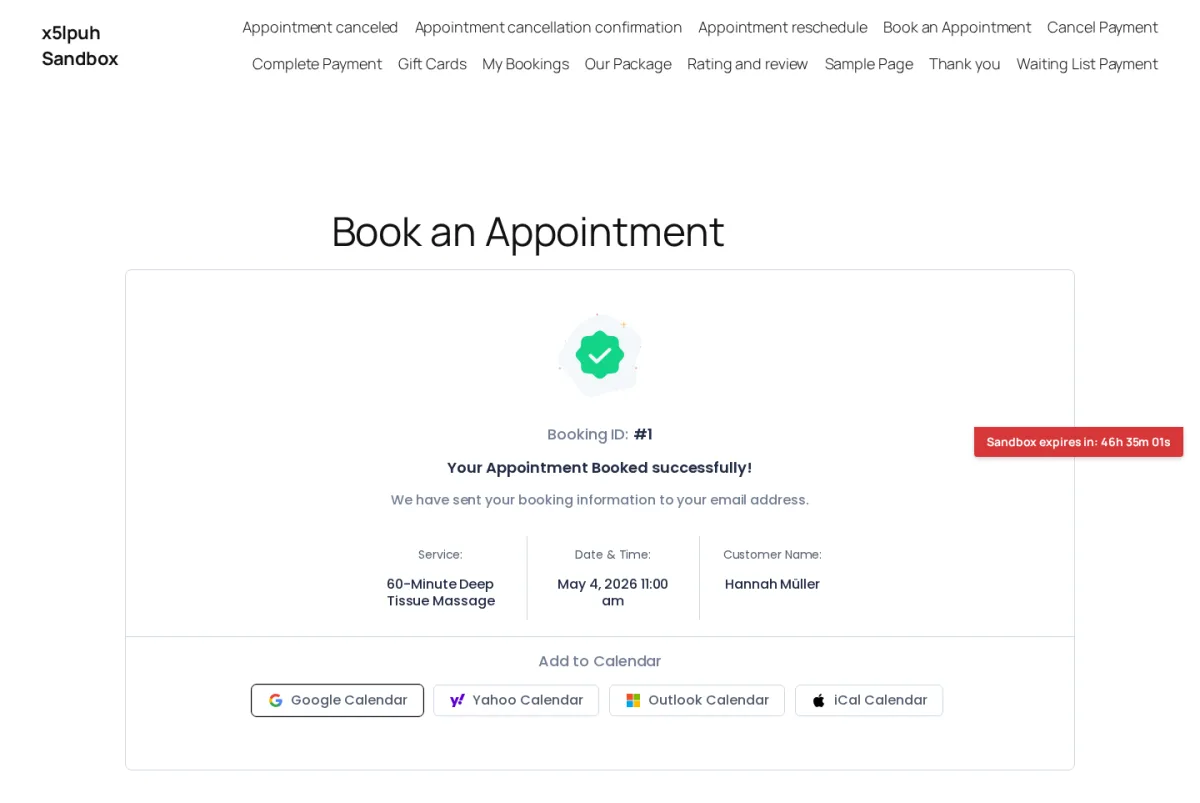
The post-submit confirmation page is one of BookingPress's quiet wins: a green check, the Booking ID surfaced prominently, and four Add-to-Calendar shortcuts (Google, Yahoo, Outlook, iCal). Most competitors push these to email only. Putting them on the confirmation page reduces the chance the customer forgets the appointment.
Customize / Appearance live preview
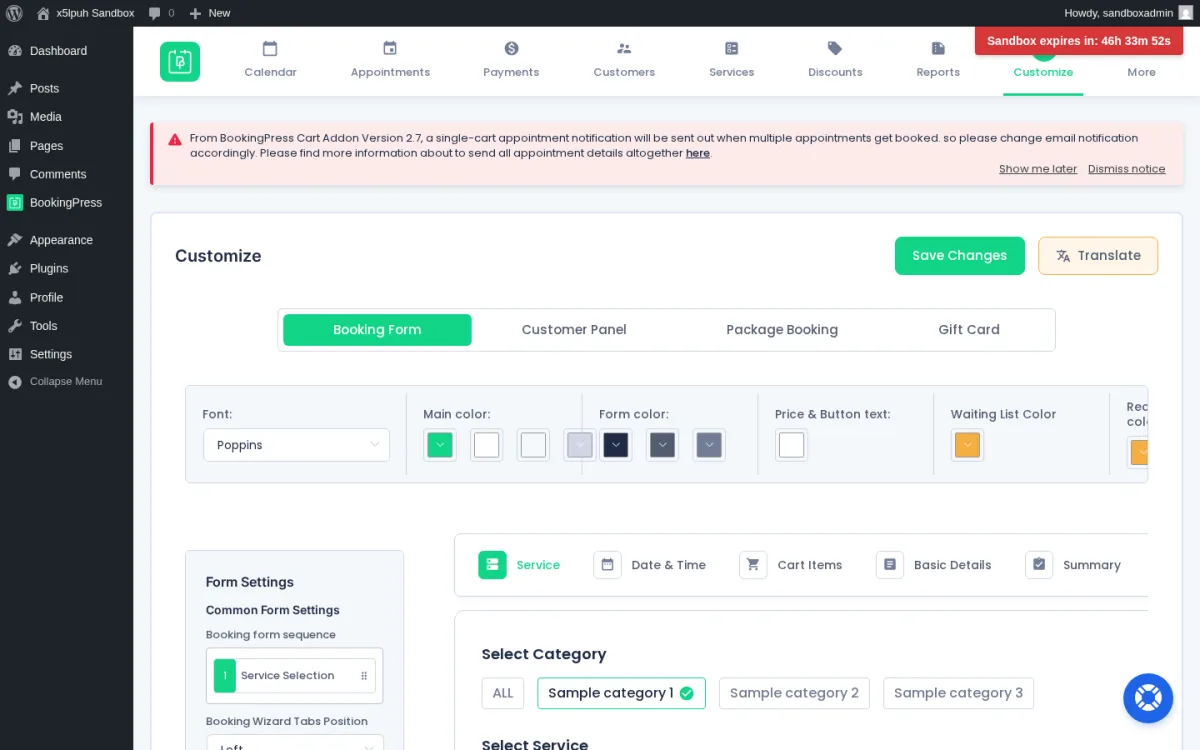
Customize is where the admin feels genuinely modern. Four tabs (Booking Form / Customer Panel / Package Booking / Gift Card) each render a live preview alongside font, color, and step-order controls. You can drag-and-drop reorder the booking steps and switch the wizard tabs between Left and Top. For a non-developer who wants a branded widget without writing CSS, this is one of the strongest day-to-day usability advantages BookingPress offers.
Notifications template editor
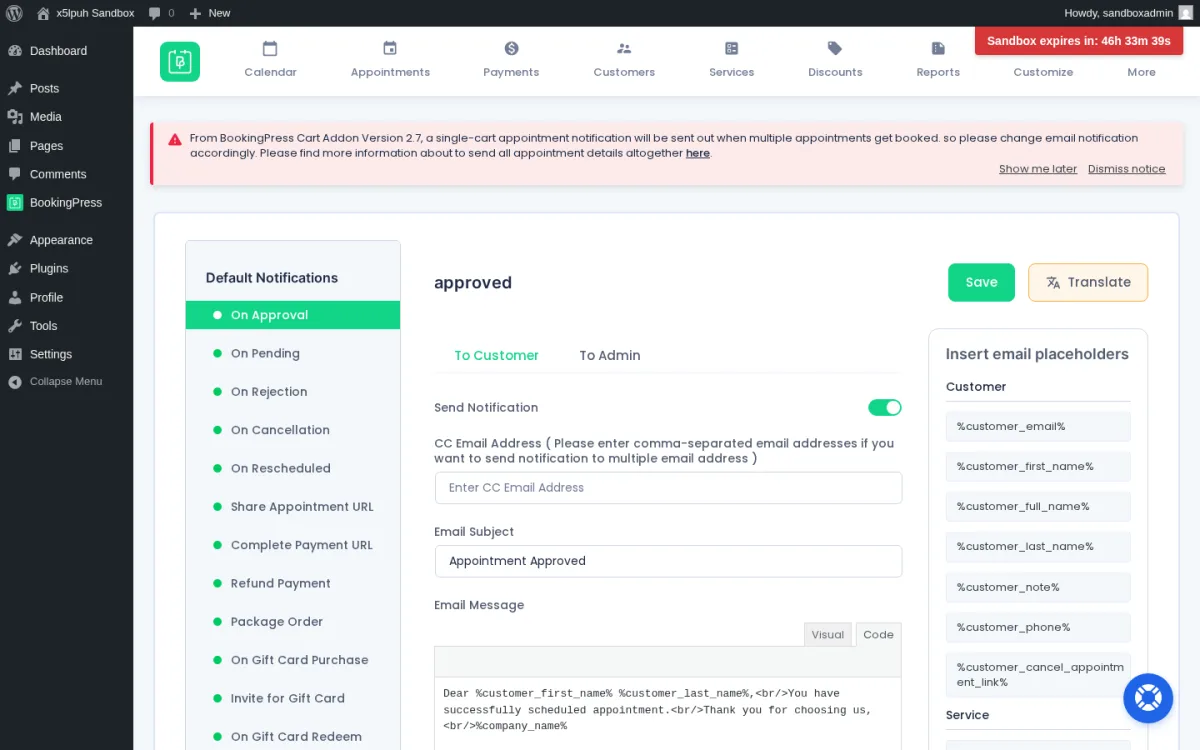
Notifications ships a deep template catalog covering On Approval, On Pending, On Rejection, On Cancellation, On Rescheduled, Share Appointment URL, Complete Payment URL, Refund Payment, Package Order, Gift Card events and more, with separate To Customer / To Admin tabs. The placeholder library (%customer_first_name%, %customer_full_name%, %customer_phone%, %customer_cancel_appointment_link% and similar) is unusually long. Activating SMS, WhatsApp, or Telegram add-ons surfaces equivalent template categories for those channels.
Add-ons catalog with one-click activation
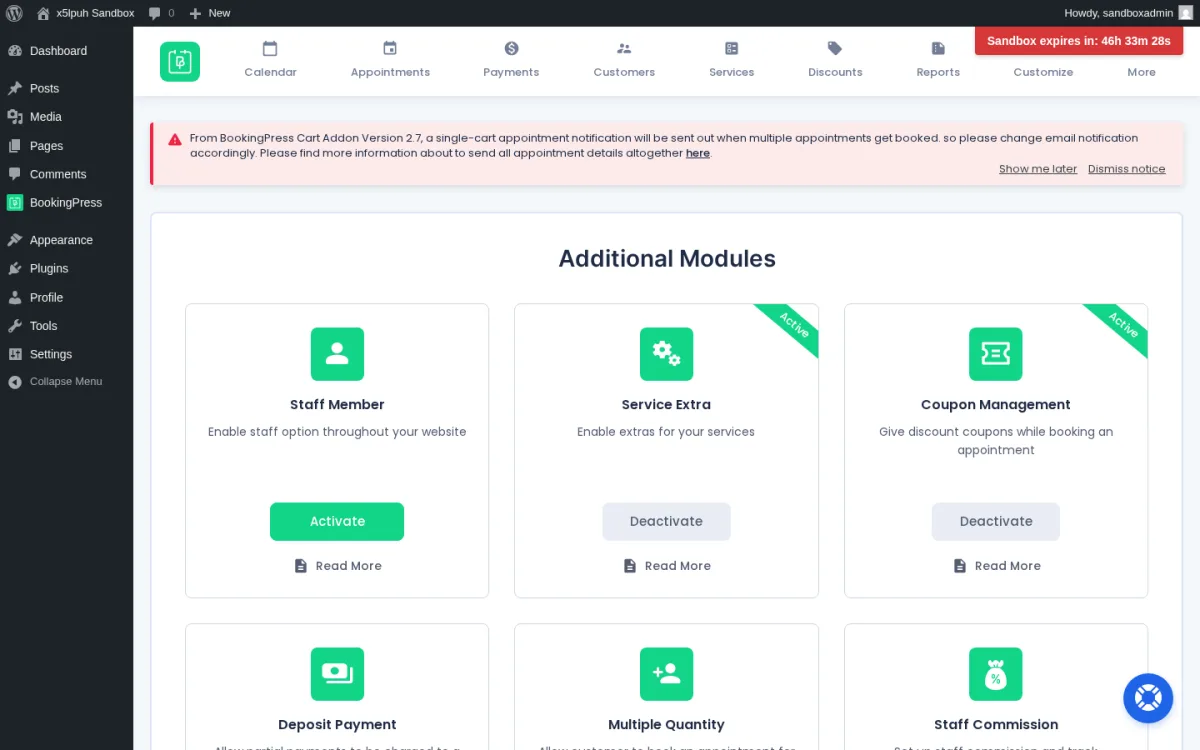
The Add-ons page is where the bundled-plan pitch becomes obvious. Modules cover Staff Member, Service Extras, Service Package, Cart, Recurring Appointments, Waiting List, Custom Service Duration, Happy Hours Pricing, Multi-Location, Multi-Language, Deposit Payment, Coupons, Tax, Invoice, Gift Card, Tip, Ratings & Review, plus admin extensions like Roles & Capabilities, Two-Factor Authentication, and a REST API. Payment gateways cover 20+ providers spanning Stripe, PayPal, Mollie, Square, Braintree, Worldpay, Skrill, Klarna, Paddle, 2Checkout, Authorize.net, WooCommerce and regional options like Razorpay, PayUMoney, Paystack, PayFast, Pagseguro, Mercado Pago, ECPay, PayMongo and Airwallex. Integrations cover Apple / Google / Outlook calendar sync, Zoom / Google Meet / Microsoft Teams, automation via Zapier / n8n / Make.com, marketing via Mailchimp / AWeber / Omnisend / FluentCRM, plus SMS / WhatsApp / Telegram channels.
The full 60+ add-on catalog is mainly available on Professional and Enterprise; Standard ships with 45+ add-ons, and modules like Location, Recurring Appointments, Service Package, Advanced Discount, Gift Card and Multi-Staff Bookings live on the upper tiers. Buyers should map the add-ons they actually need against plan tiers before purchase.
BookingPress Ease of Use / UI & UX
The admin is one of the most modern WordPress booking plugin UIs I've used. Most day-to-day actions feel SaaS-style rather than 2018-style WordPress.
- Setup experience — The sandbox came with every BookingPress front-end page (Book an Appointment, Thank you, My Bookings, Gift Cards, Our Package, Cancel/Complete/Waiting List Payment, etc.) already published. To get a working booking I only had to close the post-install Setup Wizard, create a Service Category, create a Service, and avoid the Location Addon's required-location validation. End-to-end first booking took about 15 minutes.
- Admin navigation — An in-app top-tab navigation (Calendar / Appointments / Payments / Customers / Services / Locations / Staff Members / Discounts / Reports / Customize / More) sits above the page content. Datatables are searchable, sortable and filterable, with clean pagination.
- Frontend booking experience — The booking widget transitions between Service → Date & Time → Basic Details → Summary without lag. Auto-advance after a time-slot click reduces the number of clicks a customer has to make to commit.
- Editing and managing appointments — Appointments uses a familiar datatable with sortable columns and a status pill (Pending / Approved / etc.). The Calendar Month view shows each booking as a card with the customer name and time, with Today / Month / Filter / + Add new affordances.
- Friction points — The Location Addon adds a non-obvious required dependency to every Service form, and the validation toast doesn't anchor visually to the offending section. The Staff Member Addon's Add Staff form requires an existing WordPress User and silently rejects save when the chosen user is already linked to another staff record. Neither blocks the product, but both deserve a polish pass.
BookingPress Pricing & Value
BookingPress's pricing is unusually simple — a free Lite plan plus three paid tiers, each available in Annual or Lifetime billing. The figures below come from the official pricing page on bookingpressplugin.com/pricing/.
- Free (Lite): $0 for unlimited websites; unlimited appointments, fully customizable, limited support, PayPal supported per the official pricing card. Most other premium gateways, SMS / WhatsApp, calendar sync and video meetings sit behind paid plans.
- Standard: $89/year (regular $99) or $229 lifetime for 1 site; 45+ add-ons, 20+ payment gateways, premium support, staff management. Higher-tier modules like Location, Recurring Appointments, Service Package, Advanced Discount, Gift Card and Multi-Staff Bookings are not advertised on the Standard plan card.
- Professional: $139/year (regular $199) or $379 lifetime for up to 3 sites; 60+ add-ons, 20+ payment gateways, premium support, plus the higher-tier modules above advertised on the plan card.
- Enterprise: $249/year (regular $499) or $599 lifetime for up to 20 sites; 60+ add-ons, 20+ payment gateways, premium support, plus the POS Addon (Stripe), Roles & Capabilities and REST API as Enterprise-only highlights.
A 14-day money-back guarantee applies to paid plans. Lifetime licenses include unlimited updates while the plan's published support window applies.
The Free Lite plan is a real product, not a demo, which lets prospective buyers wire the booking widget on a live site before paying. For most single-site service businesses the value sweet spot is Standard at $229 lifetime; multi-site shops or operators who need Recurring Appointments, Multi-Staff Bookings, or a POS flow should plan for Professional or Enterprise. Either way, BookingPress avoids the per-add-on math that older plugins like Bookly Pro require.
One contextual note for buyers: BookingPress isn't currently distributed through WordPress.org; the plugin is sold and downloaded directly from bookingpressplugin.com. Confirm how updates flow through the official site or built-in plugin updater before purchase.
BookingPress Support, Documentation & Reputation
Support runs through email and a ticket system on bookingpressplugin.com. Each paid plan includes a premium support entitlement, with the Standard Lifetime plan advertising 3 Year Premium Support on its plan card. There is no live-chat channel.
Documentation is genuinely strong. The bookingpressplugin.com/documents site covers core and every paid add-on with detailed, screenshot-rich articles, and the team maintains a YouTube tutorial channel. For self-service learners, this is one of BookingPress's strongest non-product assets.
Public ratings come out mixed-positive overall. WordPress.org reviews still surface a 4.6/5 average from 175 reviews even though the plugin is no longer distributed there. Capterra sits at 4.5/5 from ~71 reviews and GetApp mirrors that with the same dataset. Trustpilot is the lowest at 4.3/5 from ~81 reviews, where 1-star reviews flag slow enterprise-tier responses and a strict no-refund stance. G2 has minimal coverage. Common praise themes: bundled add-on value, modern UI, broad payment gateway support, helpful documentation. Common criticism themes: WordPress.org availability, calendar-sync flakiness, and reporting depth.
Best BookingPress Alternatives
If BookingPress is close but not a perfect match, these are the alternatives I'd compare against. For a wider WordPress booking shortlist, see the best WordPress appointment booking plugins roundup, and for a deeper side-by-side breakdown of the plugins closest to BookingPress on workflow fit and pricing, see the round-up of BookingPress alternatives.
Booknetic
A polished WordPress booking plugin that bundles features and add-ons into tiered annual or lifetime plans, ships an isolated SaaS-style admin dashboard, and adds broader multilingual support, white-labeling, graphical reporting and a native mobile app. The closest direct alternative if those gaps weigh on the decision — see the full Booknetic review and the Booknetic vs BookingPress comparison for the head-to-head decision.
Amelia
A heavyweight WordPress booking plugin with a polished admin UI and a strong Events module. A good shortlist option if events are central to your operation alongside appointments — see the full Amelia review, and the Amelia vs BookingPress breakdown for the head-to-head decision.
LatePoint
A modern WordPress booking plugin with a slick UI and an all-features-in-every-paid-plan licensing model. Worth a look if you prefer flat pricing and a freemium starting point on WordPress.org over BookingPress's bundled-tier model — see the full LatePoint review, and the BookingPress vs LatePoint breakdown for the head-to-head decision.
Bookly Pro
An older, mature WordPress booking plugin with a large paid add-on catalog and a one-time CodeCanyon license option. The right pick if you specifically want add-ons à la carte instead of all-in pricing — see the full Bookly Pro review.
Who Should Use BookingPress?
Good fit for:
- WordPress service businesses that want a broad bundled feature set in one plan instead of building a per-add-on shopping list.
- Buyers who like a free starting point and are comfortable installing the plugin from the official site rather than the WP plugin directory.
- Lifetime-license buyers who prefer a one-time fee over a recurring SaaS bill.
- Operators who care about booking widget polish — the live-preview Customize module and the calendar-shortcut confirmation page are real conversion advantages.
Skip it if:
- The WordPress.org listing is a non-negotiable trust and update channel for you.
- You need graphical, chart-driven analytics by staff or location.
- Non-technical client admins will manage Location and Staff Member add-ons day-to-day — the validation friction will burn support hours.
- You depend on enterprise-grade, fast support SLAs; public reviews flag latency at that tier.
Final Verdict
BookingPress is worth considering if you want a modern WordPress booking plugin and you value bundled add-on plans over per-add-on math. The booking widget converts cleanly, the Customize live-preview module is a real advantage, and the Free Lite plan lets you de-risk the decision before spending anything.
It becomes a harder sell when graphical reporting depth or fast enterprise support are non-negotiable. In those situations, Booknetic is the natural shortlist mate — and Amelia, LatePoint or Bookly Pro fit different buyer profiles depending on whether Events, flat pricing, or the Bookly add-on ecosystem matter most.
Within the broader WordPress appointment booking plugin market, BookingPress lands as a strong "modern bundled" option for single-site service businesses that want a wide range of features unlocked from day one, while keeping in mind that the full 60+ add-on catalog only kicks in on Professional and Enterprise.


