

Amelia Review (2026): Pricing, Features, Pros & Cons

You may like the look of Amelia at first glance, but the real question is whether the plan ladder will quietly push you onto a tier you didn't budget for, and whether the plugin has settled down after a rocky version 9 launch. I tested Amelia in a fully licensed WordPress environment, ran a full booking through the front-end widget, and worked through the admin module by module to see what the buyer experience actually looks like.
This review is a hands-on editorial test, not a vendor rewrite. I checked setup, the booking workflow, pricing, the admin UI, and public reputation across WordPress.org, Capterra, Trustpilot, and Reddit before forming a verdict.
What Is Amelia?
Amelia is a self-hosted WordPress booking plugin from Melograno Ventures (originally TMS). It runs appointments, group bookings, packages, recurring services, and ticketed events from inside WordPress admin and renders a step-by-step or catalog-style booking widget on any page via shortcode. It is built for service businesses — beauty and wellness, healthcare, fitness, photography, coaching, event agencies — that want bookings on their own WordPress site rather than on a separate SaaS scheduler. There is a free Lite edition on WordPress.org plus four paid plans.
Amelia Quick Verdict
Amelia is one of the more polished booking-plugin admins on WordPress, with a strong booking widget and a real events module. The trade-off is plan-tier gating for the integrations most production sites end up needing.
| Criteria | Verdict |
|---|---|
| Best for | WordPress service businesses and event organizers that want a polished booking widget and are comfortable matching a plan tier to their integration list |
| Starting price | Free Lite on WordPress.org; paid plans from $49/ |
| Free version / trial | Yes — free Lite on WordPress.org; 15-day money-back guarantee on paid plans |
| Tested environment | Licensed WordPress 6.9.4 install with Amelia v9 |
| Strongest features | Step-by-step booking widget, Catalog (categories / services / extras / packages / resources), Notifications matrix (email / SMS / WhatsApp), Customize hub with live preview, Events module with QR e-tickets |
| UI/ | 8.4 / 10 |
| Feature depth score | 8.7 / 10 |
| Performance impression | Snappy admin SPA, no lag in the front-end widget |
| Public rating | WordPress.org 4.6 / 5 (760+ reviews); Capterra 4.9 / 5 (240+ reviews); Trustpilot 3.6 / 5 (230+ reviews) |
Pros
- One of the most polished WordPress booking admins I have tested
- Built-in events module with QR e-tickets — rare in this category
- Deep notifications matrix (email, SMS, WhatsApp) with per-event templates
- Active release cadence and serious documentation
Cons
- Plan-tier gating: most production sites end up on Pro to unlock calendar sync and video meetings
- Public support reputation is mixed — strong on Capterra, weaker on Trustpilot
- No native mobile app for staff or admins
- Empty default state and a couple of unintuitive setup quirks
Testing Summary
- Tested Amelia in a licensed WordPress 6.9.4 install with full administrator access.
- Set up a Location, an Employee, and a paid Service from scratch in the empty test environment.
- Published a WordPress page with the
[ameliastepbooking]shortcode and walked the public booking flow as a real customer. - Submitted a full booking and verified that it landed in Bookings, on the Calendar, on the Customers list, and in the Dashboard counters.
- Worked through 37 feature checklist items across 15 admin modules, including Catalog, Notifications, Customize, Custom Fields, Finance, and Features & Integrations.
- Cross-checked pricing on the official Amelia pricing page and read public reviews on WordPress.org, Capterra, Trustpilot, and Reddit.
Amelia Features That Matter
I am not going to list every Amelia feature — the plugin has a long catalog. These are the five that move the buying decision the most.
Step-by-step booking widget
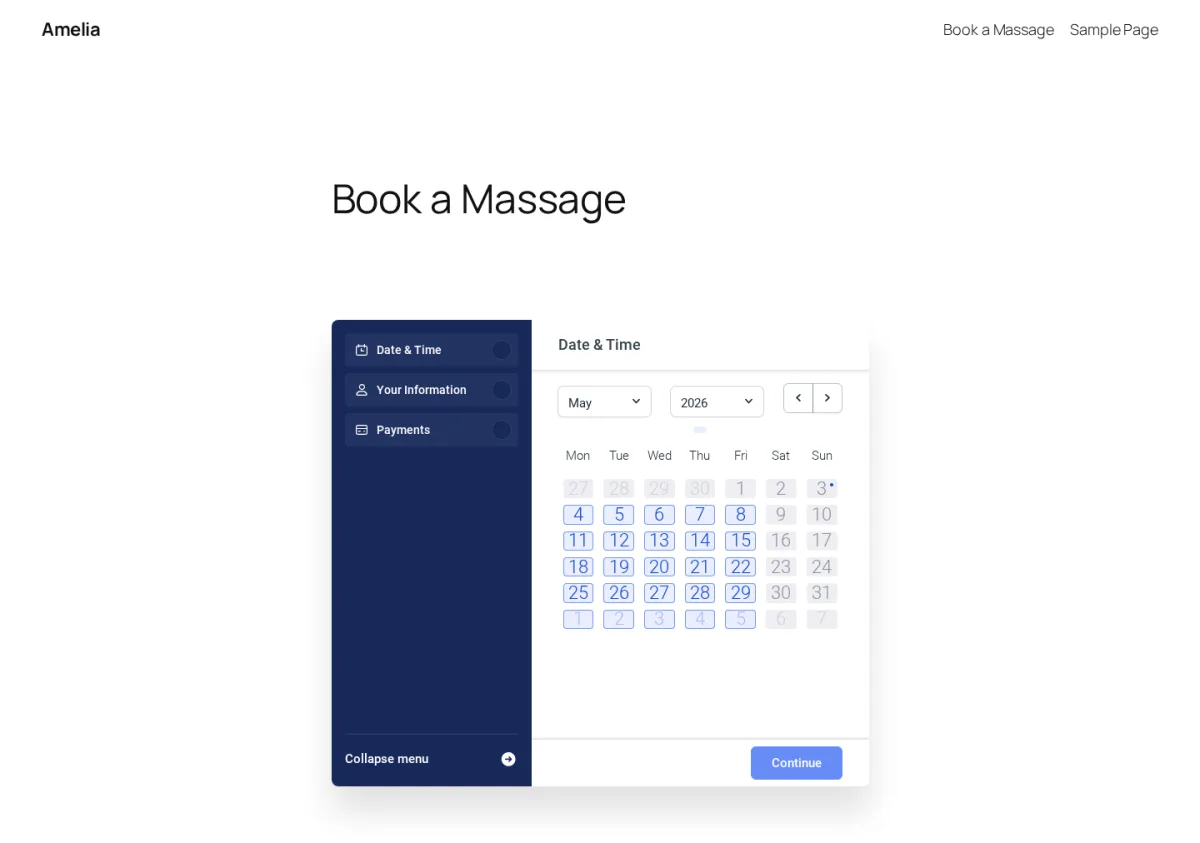
The front-end widget renders as a clean three-step strip: Date & Time → Your Information → Payments, with a left-side step menu and a single "Continue" button per step. With one category and one service, Amelia auto-skipped the explicit service-picker screen and put the customer straight into the calendar, which is the kind of small detail that lifts the experience. Picking a date instantly revealed a 30-minute slot strip for the assigned employee, and the chosen slot showed up in the side menu before I even needed to confirm it.
Catalog with categories, services, extras, packages, resources
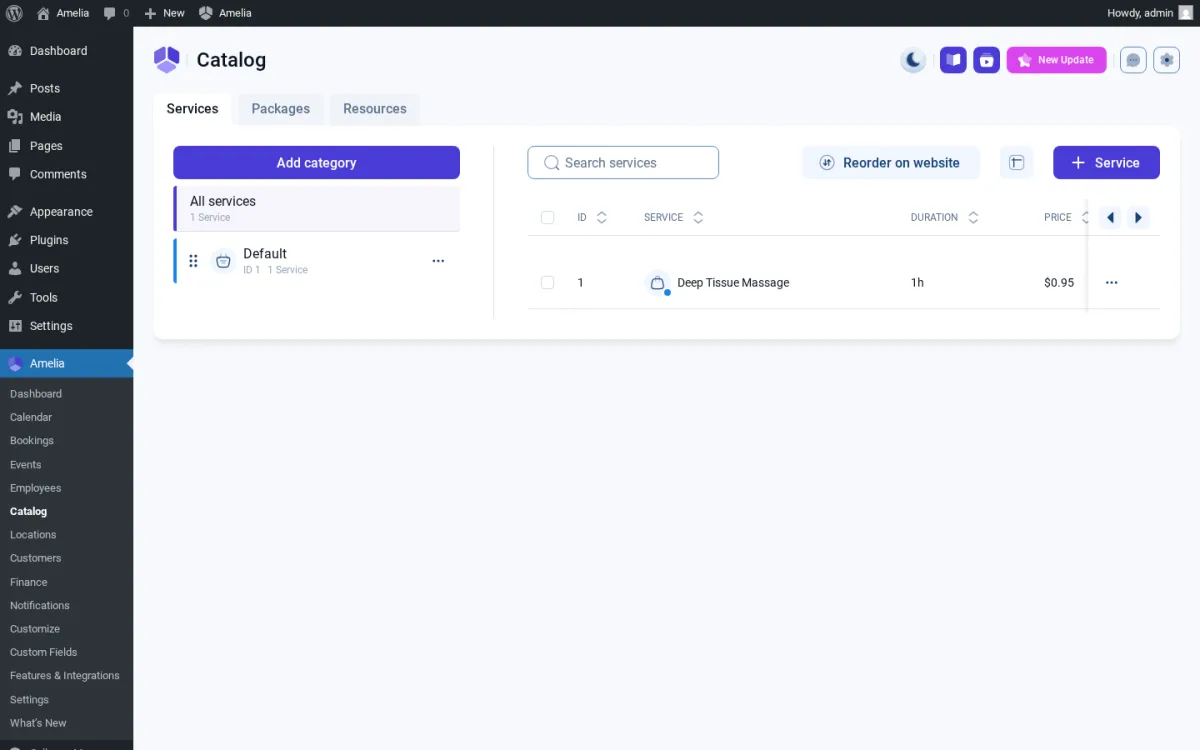
Catalog is where Amelia's data model gets ambitious — Services, Packages, and Resources tabs, hierarchical categories, per-service Pricing & duration, Extras, Gallery, and Settings. The service editor is a full-page experience with side-menu navigation, not a modal, which is what you want once you start configuring buffers, capacity, and per-service pricing. This is also the area where higher plan tiers unlock more (Packages, Resources), so the Catalog is essentially Amelia's growth lane.
Notifications across email, SMS, and WhatsApp
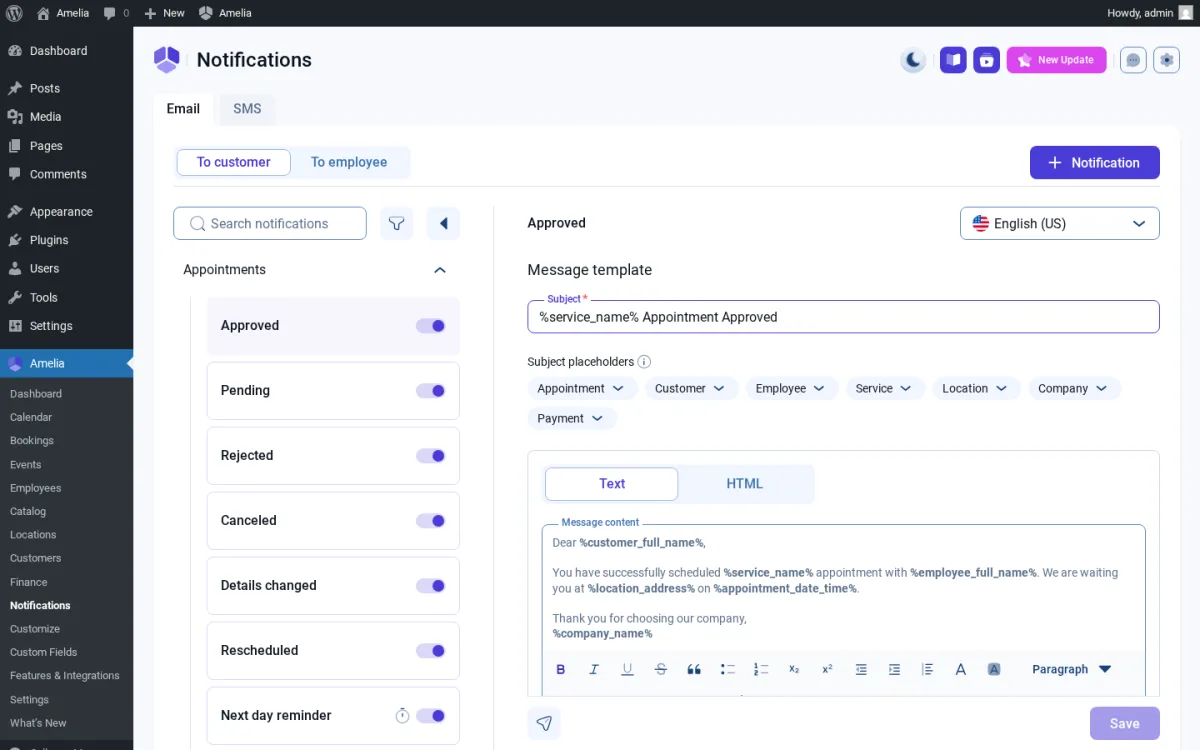
The Notifications module is one of Amelia's most complete surfaces. It splits into Email and SMS tabs, then To Customer / To Employee sub-tabs, and exposes a long event list — Approved, Pending, Rejected, Cancelled, Rescheduled, Reminders, Follow-up, plus dedicated Events templates with E-ticket. The template editor uses placeholder pills for Appointment / Customer / Employee / Service / Location / Company / Payment, which makes editing safer than typing raw shortcodes. WhatsApp and live SMS still depend on a configured provider, but the templates exist regardless.
Customize hub with live preview
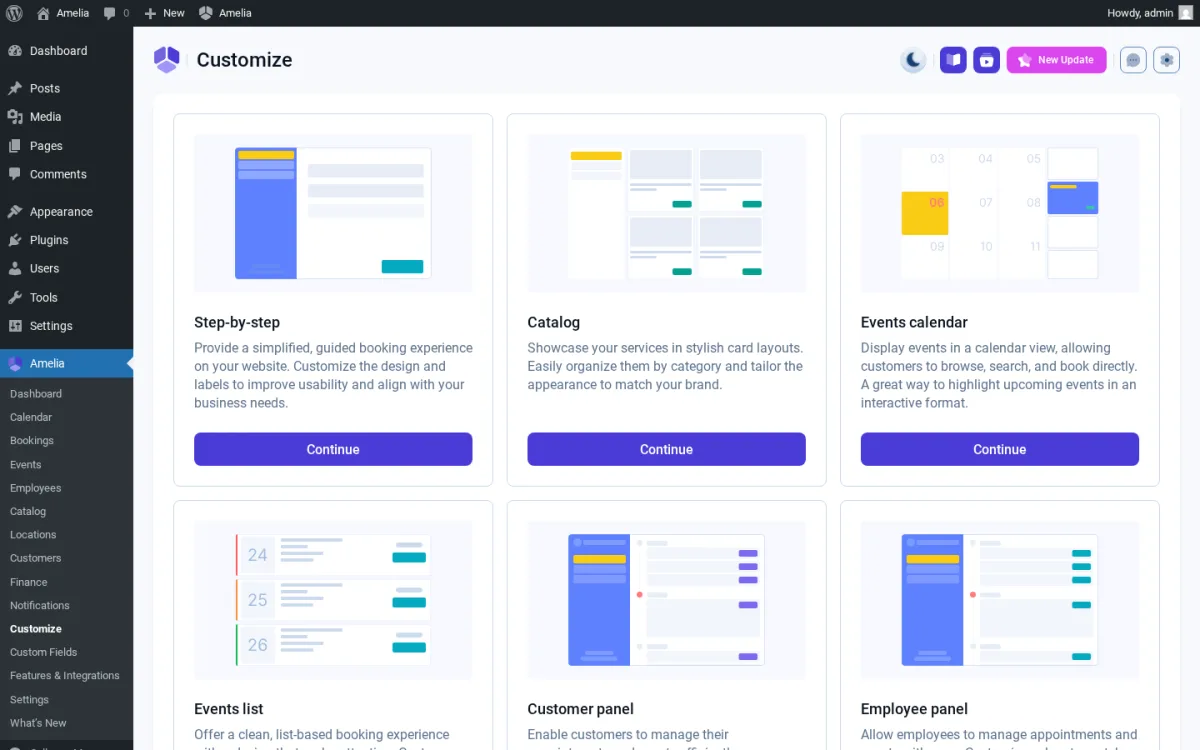
Customize is a dedicated branding surface with six editors — Step-by-step, Catalog, Events calendar, Events list, Customer panel, Employee panel — each with a live preview pane. Most WordPress booking plugins do not have a surface like this at all; you usually adjust appearance through theme CSS or buried settings. For agencies setting up multiple sites, the Customize hub alone is a real workflow advantage.
Events module with QR e-tickets
The Events module is a genuine differentiator versus most other WordPress booking plugins. It handles one-time and recurring events, multiple ticket tiers (VIP / General / Early Bird), waiting lists, and QR-coded e-tickets attached to confirmation emails. If your business sells appointments and ticketed events from the same site, Amelia replaces what would otherwise be a separate event platform.
Amelia Ease of Use / UI & UX
Amelia has the most modern admin in this category, but it is also a deep product, and the day-to-day depends on how comfortable you are navigating its layered configuration.
- Setup experience — The licensed test site shipped completely empty. To take the first booking I had to create a Location, then an Employee (which requires a Location to save, with no helpful empty-state pointer), then a Service, then a WordPress page with the
[ameliastepbooking]shortcode. Plan for ~10 minutes of clean clicking before the front-end is live. - Admin navigation — The plugin uses a clean Vue + Element Plus design with SPA navigation between modules, dark/light theme, and side-menu inside each editor. Everything feels modern, but Amelia still sits inside the WP admin chrome — non-technical staff still see Posts, Pages, and Plugins alongside the booking screens.
- Frontend booking experience — The customer-facing widget is one of the cleanest in the category. The three-step flow is short, the slot picker is responsive, and the post-submit confirmation page includes Add to Calendar buttons and the full appointment summary.
- Editing and managing appointments — Bookings, Calendar, and Customers are linked tightly. Row-click opens a detail panel with status, time, customer, and payment fields. Default behavior auto-approves new bookings, which is fine for most service businesses but worth knowing if you prefer a manual review queue.
- Learning curve — The biggest cognitive cost is that Amelia's configuration is split across three places: classic Settings tabs, the Features & Integrations toggle panel, and the per-module Customize editors. Knowing whether a given setting lives in Settings → Bookings, Features & Integrations → Coupons, or Customize → Step-by-step is part of getting fluent.
Amelia Pricing & Value
Amelia ships a free Lite version on WordPress.org and four paid tiers. Verify exact numbers on the official pricing page before buying — Amelia runs sales regularly, so you may see a sale price next to a higher regular price.
- Lite (Free) — 1 domain, 1 employee, Square payments only, basic step booking. Distributed via WordPress.org.
- Starter — From $49 / year, 1 domain. Adds automated notifications, group bookings, coupons, service extras, taxes, invoices, multilingual, custom reminders, recurring appointments, and deposit payments.
- Standard — From $89 / year or $299 lifetime, 1 domain. Adds multiple payment gateways (PayPal, Stripe, Mollie, RazorPay, WooCommerce, Stripe Connect), REST API, marketing analytics, packages, resources, cart, WhatsApp, and refunds.
- Pro — From $149 / year or $449 lifetime, 5 domains. Adds Google / Apple Calendar two-way sync, Zoom / Google Meet / Microsoft Teams, event tickets with QR codes, waiting list, custom service duration, pricing-by-people, webhooks, and WP Fusion.
- Elite — From $259 / year or $799 lifetime, unlimited domains. Adds developer-level customization across all modules.
A 15-day money-back guarantee applies to paid plans, and lifetime licenses include lifetime support. Paddle is the payment processor.
The decision is mostly about which integrations you need rather than the headline price. Starter is fine if you only need Square on a single domain. Standard is the rational floor for any site that needs more than one payment gateway. Most production sites I would recommend Amelia to end up on Pro the moment Google Calendar, video meetings, or event tickets enter the brief — the Pro tier is where the pricing actually starts making sense.
Amelia Support, Documentation & Reputation
Support runs through a ticketing system on the official site plus a Discord community for peer chat. There is no public response-time SLA on the support pages.
The public picture on support quality is split. Capterra Customer Service sits at 4.9 / 5 across 240+ reviews — the strongest rating Amelia has anywhere. Trustpilot, where dissatisfied customers tend to land, sits at 3.6 / 5 across 230+ reviews, with recurring complaints about response times around the v9 release window, tickets being closed for staying open too long, and a "blamed on user setup" pattern. That puts Amelia's overall support quality in the "mixed" rather than the "good" tier — fine for the majority, but rough for buyers who land in the wrong queue.
Documentation is genuinely strong. The official knowledge base is organized by industry (beauty, healthcare, yoga, fitness, photography, coaching, automotive, event agencies) and by solution area (appointments, scheduling, WooCommerce, events). There is a published changelog, a developer / WP-hooks section, and a YouTube channel with setup tutorials. Self-serve learners rarely run out of material.
WordPress.org sits at 4.6 / 5 across 760+ reviews, which is consistent with the editorial impression — most paying users are happy, with a vocal minority describing the v9.0 launch as bumpy and the plan ladder as aggressive.
Best Amelia Alternatives
If Amelia is close but not a perfect match, these are the alternatives I would shortlist. For the broader picture, see the roundup of best WordPress appointment booking plugins, and for a deeper side-by-side breakdown of the plugins closest to Amelia on workflow fit and pricing, see the round-up of Amelia alternatives.
Booknetic
The closest direct WordPress alternative if you want a modern SaaS-style admin, a native mobile app, and a flexible add-on marketplace inside the panel. A good shortlist option when Amelia's plan-tier gating doesn't fit your budget — see the full Booknetic review for pricing and setup detail.
LatePoint
A modern WordPress booking plugin with a slick admin and a Pro Features add-on stack for OTP verification and other commercial extras. Worth comparing if you specifically prefer LatePoint's flat pricing model — the LatePoint review breaks the plan ladder down in more detail.
BookingPress
A lower-priced WordPress booking plugin with a strong free tier and a clean booking widget. A better fit for smaller sites that want a working free path without event tickets — the BookingPress review covers the feature ceiling and add-on pricing, and the Amelia vs BookingPress breakdown walks through the head-to-head decision.
Bookly Pro
A long-standing CodeCanyon-distributed WordPress booking plugin with broad community use and a deep add-on catalog. A reasonable pick if you want a more traditional plugin model with a freemium entry point and a wide ecosystem of extensions — see the full Bookly Pro review for the plan ladder and add-on detail.
If you are open to a hosted SaaS scheduler instead of a WordPress plugin, Amelia's cloud sibling Trafft (from the same parent company) is the natural side-by-side comparison there — but it sits outside this WordPress-plugin shortlist.
Who Should Use Amelia?
Good fit for:
- WordPress service businesses (salons, clinics, fitness studios, coaches, photographers) that want bookings directly on their site.
- Event organizers who also do appointments — the events module with QR e-tickets is a real differentiator.
- Buyers who care about modern admin UX, dark/light theme, and live-preview branding.
- Teams comfortable with the Pro tier, which is where most production sites end up.
Skip it if:
- You need a native iOS or Android app for staff and admin.
- Your team needs a stability-first track record before adopting a plugin that recently went through a major version transition.
- Your budget cannot stretch to Pro and your integration list demands calendar sync, video meetings, or event tickets.
- You only need a single basic free booking form — simpler plugins will fit better and cost nothing.
Final Verdict
Amelia is worth considering when you want one of the most polished booking admins available on WordPress and you are willing to choose a plan tier that matches your integration list. The booking widget converts cleanly, the Customize hub gives real branding control, and the events module with QR e-tickets is a genuine differentiator most competitors do not offer.
The biggest limitations are plan-tier gating that pushes most production sites to Pro, a publicly mixed support reputation, the lack of a native mobile app, and the lingering reputational tail from the v9 launch window. For agencies and service businesses that need a serious WordPress-native booking platform and accept the Pro-tier reality, Amelia is one of the strongest options in this category. For buyers who want one all-inclusive price, a native mobile app, or a stability-first track record, comparing it side-by-side with Booknetic and LatePoint before you buy is worth the hour — the Booknetic vs Amelia and Amelia vs LatePoint breakdowns each walk through one of those pairings in detail.


