

Booknetic Review (2026): Features, Pricing & a Hands-On WordPress Test

Does Booknetic actually fit your booking workflow, or will you outgrow its admin once you add real staff, multiple locations, and live payment flows? And on which plan does it stop feeling like a deal — Standard, Premium, or only Elite?
I wanted answers before recommending it, so I tested Booknetic 5.2.6 on a fresh WordPress 6.9.4 environment. I worked through the General Settings, the location/staff/service model, and a complete frontend booking as a real customer. I cross-checked the official pricing and changelog pages and read public feedback from CodeCanyon, Capterra, Trustpilot, the Booknetic Discord, and current WordPress threads. The aim of this review is practical, not promotional: where Booknetic earns the click, and where buyers should stop and think.
What Is Booknetic?
Booknetic is a WordPress appointment booking and scheduling plugin that runs entirely on a self-hosted WordPress site. It is built for service businesses — wellness studios, clinics, salons, fitness centers, tutors, consultants, agencies — that prefer WordPress-native control over a separate SaaS scheduler. The product covers the standard booking jobs (services, staff, locations, schedules, customers, payments, notifications) inside a dedicated admin panel and renders a step-by-step booking widget on the public site through a single shortcode. Most commercially important features (Stripe, Google Calendar, Zoom, SMS, white labeling) are sold as paid Boostore add-ons rather than bundled into the base plan.
Booknetic Review Quick Verdict
Booknetic is one of the most complete WordPress booking plugins I have tested in 2026, but the value story works best on Premium or Elite — Basic is intentionally bare.
| Item | Verdict |
|---|---|
| Best for | WordPress-based service businesses, multi-location brands, and agencies |
| Starting price | $45/ |
| Free version / trial | No live free version on the pricing page; 14-day money-back guarantee |
| Tested environment | WordPress 6.9.4 + Booknetic 5.2.6 + full Boostore add-on suite enabled |
| Strongest features | Step-by-step booking widget, dedicated admin dashboard, Workflow engine, Boostore marketplace |
| UI/ | 8.7/ |
| Feature depth score | 9.2/ |
| Performance impression | Snappy: admin pages 1–2s, frontend wizard transitions under 1s |
| Public rating | CodeCanyon 4.91/ |
Pros
- A genuinely complete WordPress booking system — you can run a real service business inside it
- Dedicated SaaS-style admin panel that hides the usual WordPress chrome
- Strong frontend conversion flow with cart, confirm, and calendar export
- Boostore brings the entire add-on catalog inside the admin, not behind a separate checkout
Cons
- Payments, calendar sync, video meetings, SMS, and white labeling are paid Boostore add-ons
- Basic plan ships with zero paid add-ons, so most buyers will need Standard or higher
- Setup curve is real for non-technical users when several add-ons need credentials at once
- No published free version on the main pricing page, so paid plans are the practical entry point
Booknetic Testing Summary
- Installed Booknetic 5.2.6 and the full Boostore add-on suite on a WordPress 6.9.4 staging site at testing.fs-code.com
- Reviewed General Settings (time slot length, default appointment status, time-zone handling, week start, date/time format)
- Verified an existing location, staff member, service category, and paid service, plus a public page with the
[booknetic]shortcode - Submitted a complete frontend booking as a realistic customer (Priya Shah → Bright Path Wellness Studio → Initial Wellness Consultation, $85.00, 2026-05-12) and confirmed the booking was approved with a confirmation number
- Verified the booking landed in the admin Calendar, Appointments datatable, and Customers list, and that Reports + Dashboard counters updated correctly
- Opened the Workflow, Boostore, Appearance, Coupons, Packages, Payments, and Reports modules to confirm they load and expose the documented controls
- Read pricing, plan limits, and changelog from booknetic.com and cross-checked public reviews on CodeCanyon, Capterra, Trustpilot, Reddit, and the Booknetic Discord
Booknetic Features That Matter
I am not going to walk through every screen. These are the five capabilities that actually shape the buying decision.
1. The frontend booking widget
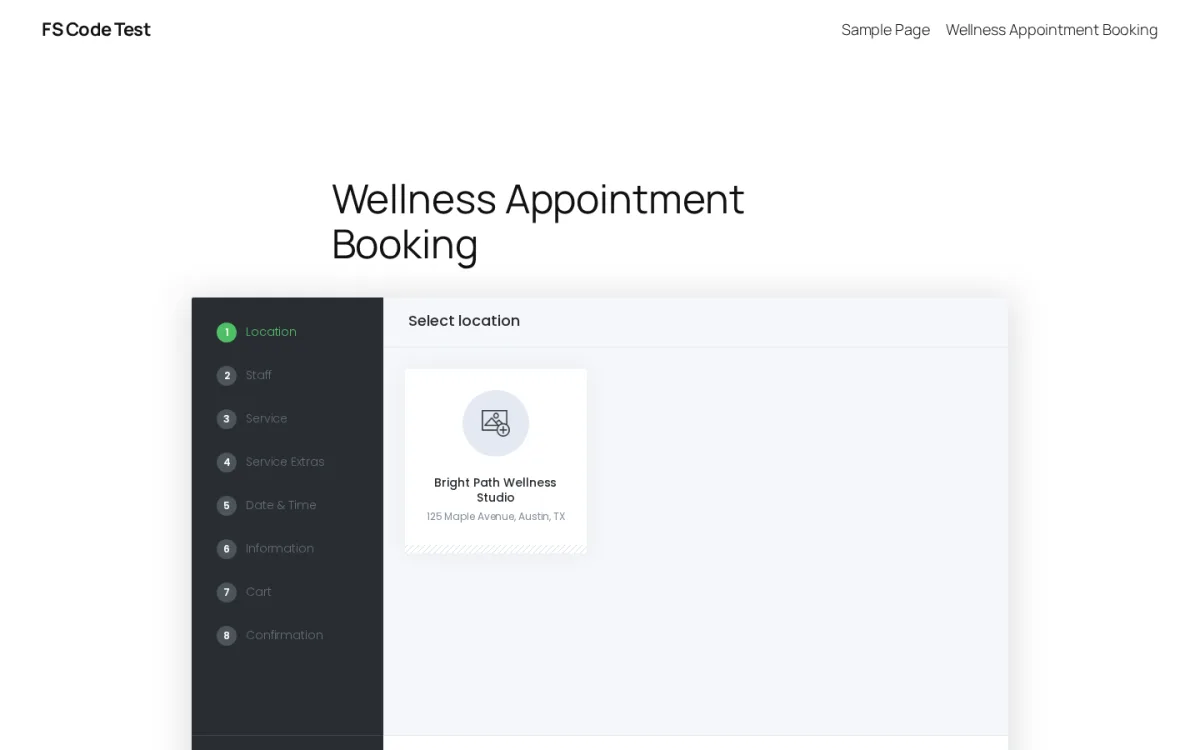
The frontend widget is the customer-facing surface, and it is one of the cleaner step-by-step flows I have tested on WordPress. After dropping the [booknetic] shortcode on a public page, the wizard renders Location → Staff → Service → Service Extras → Date & Time → Information → Cart → Confirmation with a clear step strip on the left, and the Service Extras step auto-skips when no extras are configured.
In testing, picking a location auto-loaded the linked staff, the staff card filtered the linked services, and the Date & Time step rendered the calendar grid with available days marked in green. Picking the date moved straight into Information without forcing a manual confirm — a small detail that adds up across hundreds of bookings.
2. The dedicated admin dashboard
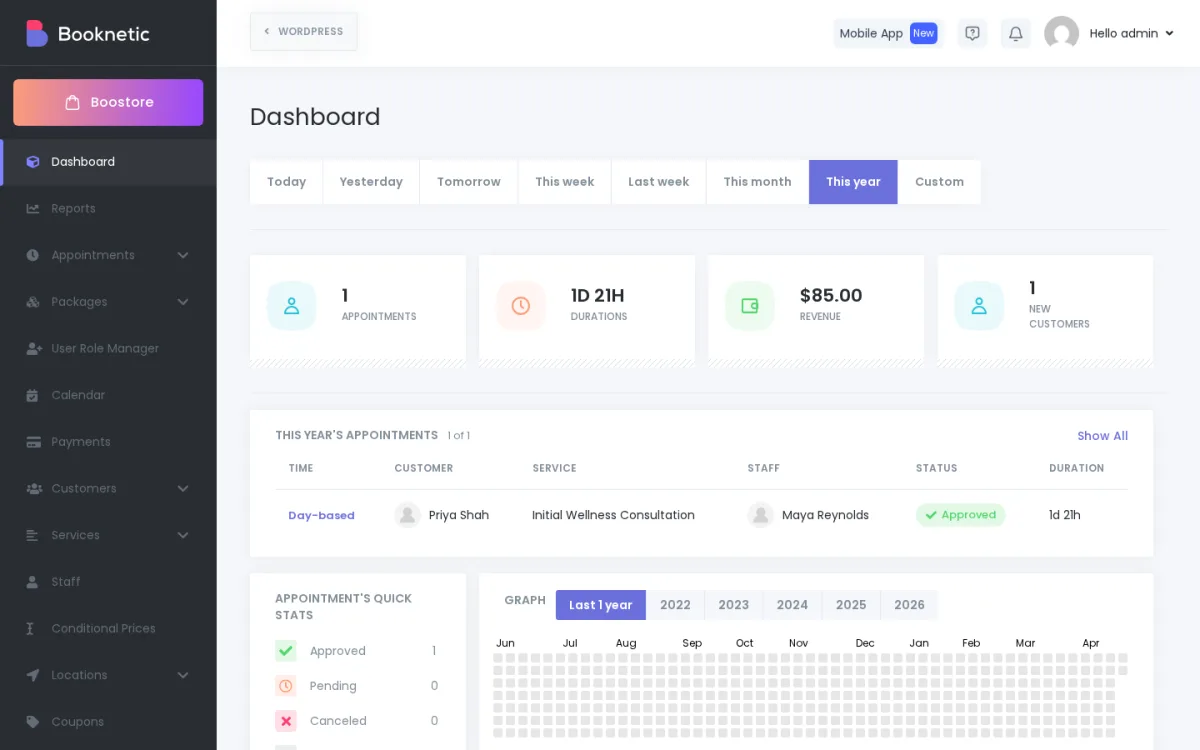
Booknetic does not behave like a normal WordPress plugin in the admin. It loads its own full-screen panel with its own sidebar, hiding the standard WordPress chrome while you are inside it. The dashboard surfaces stat cards (appointments, total duration, revenue, new customers) and a revenue graph filtered by date range, plus a "This year's appointments" list at the top.
After my single test booking, the "This year" view showed 1 appointment, $85.00 in revenue, 1 new customer, and the booking row I had just submitted from the frontend. For service businesses where staff log in every day, that SaaS-style view is a real workflow advantage over plugins that bolt onto the standard WordPress admin pages.
3. The admin Calendar
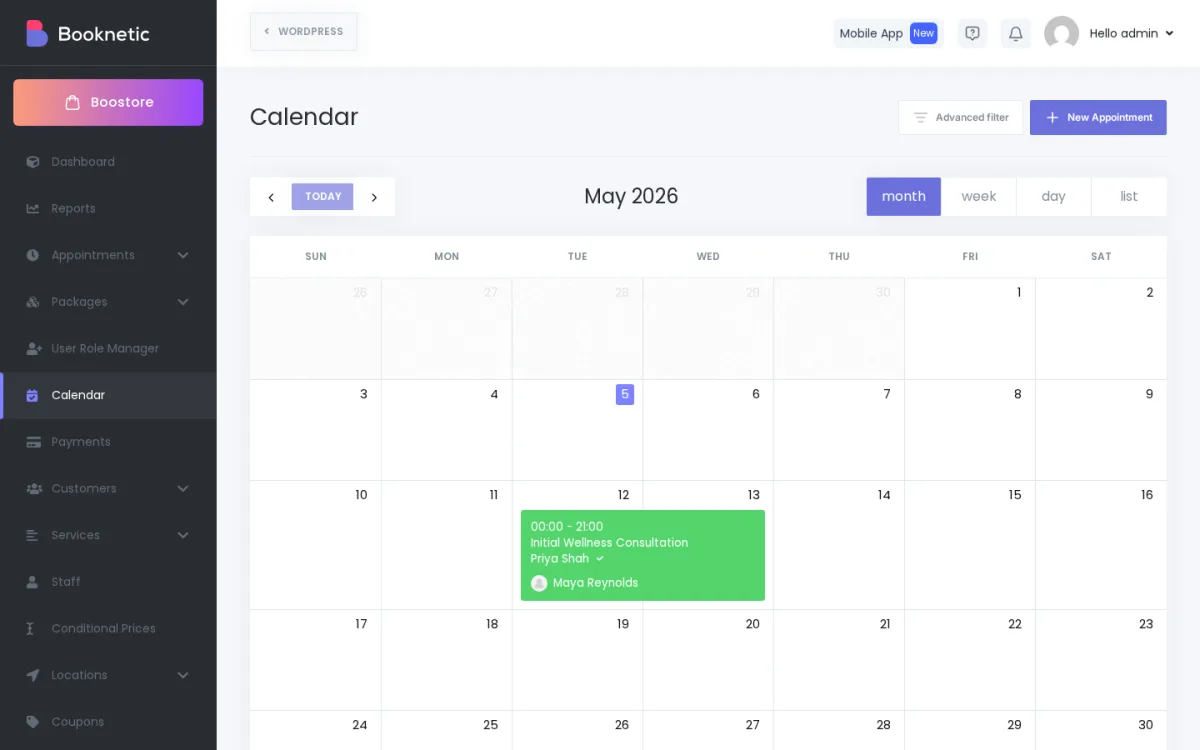
The Calendar offers Month, Week, Day, and List views. Each booking renders as a color-coded card with time, service, customer, and staff, and the card supports drag-and-drop rescheduling. An "Advanced filter" surfaces staff, service, and status filters for teams who need a narrower view.
In my test, the appointment created from the frontend appeared instantly in the May 12 cell with the right service and staff. This is the screen most service-business admins will spend the largest share of their time in, and Booknetic gets it right.
4. Workflow automation
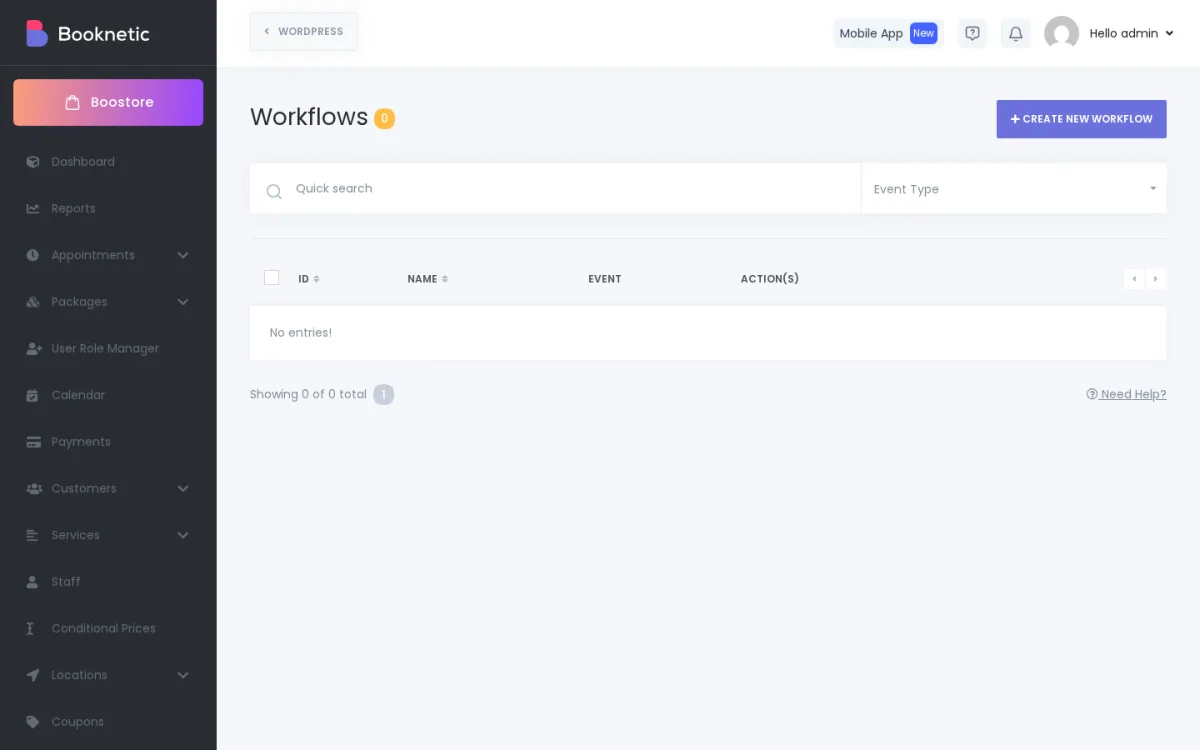
Workflow is Booknetic's "when X happens → do Y" engine. It maps booking events (created, approved, rescheduled, completed, cancelled) to actions like email, SMS, WhatsApp, Telegram, webhook, or Mailchimp. The Workflows datatable was empty in my environment, but the "Create New Workflow" button and Event Type filter were both available, and the builder supports the full event/action matrix.
This is what turns Booknetic from "a booking form" into a real automation tool. Live SMS, WhatsApp, and Telegram channels need third-party credentials (Twilio, Telegram), which is normal for any WordPress booking plugin and not unique to Booknetic.
5. Boostore — the in-panel add-on marketplace
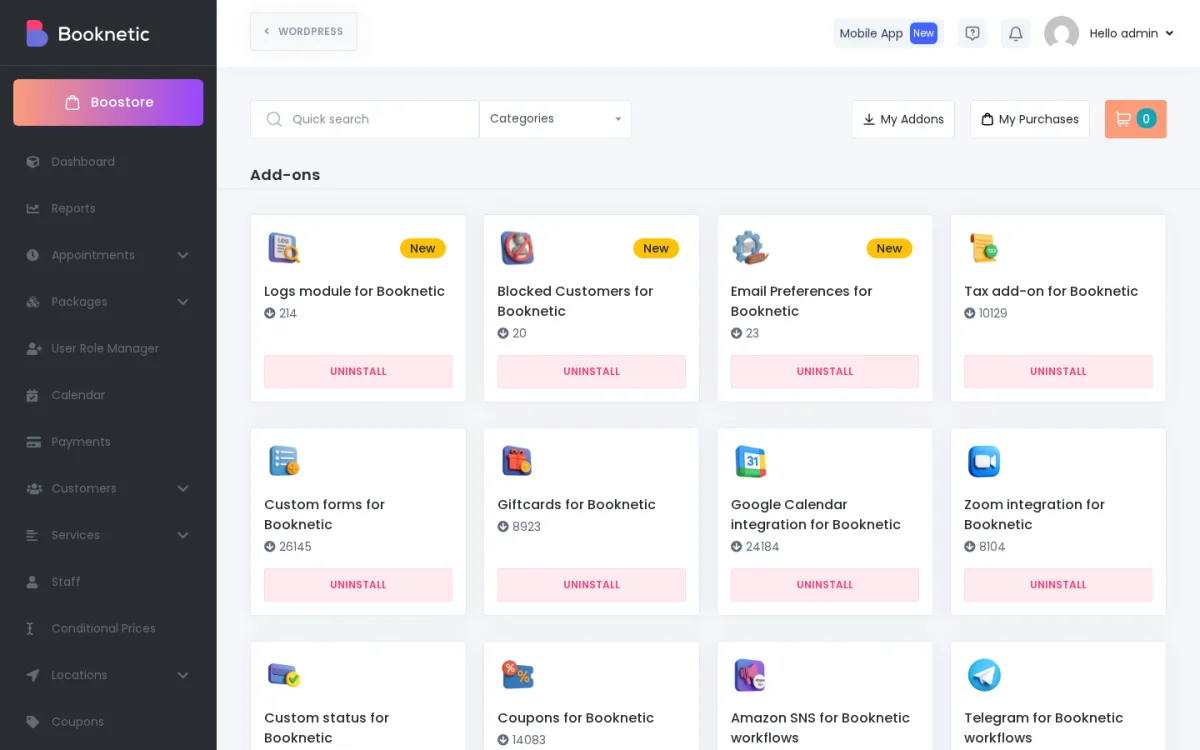
Boostore is where the rest of Booknetic actually lives. Inside one tab, you can browse, purchase, install, and uninstall add-ons without leaving the admin. The catalog covers payment gateways (Stripe, PayPal, Square, Mollie, Razorpay, Mercado Pago), video meetings (Zoom, Google Meet), calendar sync (Google Calendar, Outlook), staff commissions, packages, gift cards, loyalty points, white labeling, taxes, custom forms, custom statuses, Telegram, Amazon SNS, and more.
On one hand this is a real differentiator — most competing plugins either bundle everything into a heavy install or push you to a separate website to buy add-ons. On the other hand, this is also where Booknetic's pricing complexity comes from. Plan choice maps to how many of these add-ons you can install for free, so it pays to plan your add-on mix before you pick a tier.
Booknetic Ease of Use / UI & UX
Day-to-day, Booknetic is easier to operate than most legacy WordPress booking plugins, but it is still a deep product. How easy depends on whether you only need a basic schedule or full multi-staff multi-location automation.
- Setup experience. A "Starting Guide" walks new admins through Company details, Business hours, Create location, Create staff, and Create service in a logical order. Plan an extra hour after the basics for payment, calendar sync, and notification add-ons that need third-party credentials.
- Admin navigation. The dedicated panel splits cleanly into Dashboard, Calendar, Reports, Appointments, Packages, Customers, Services, Staff, Locations, Workflow, Boostore, Appearance, Coupons, and Settings. Most modules use the same datatable + modal pattern, so the learning curve flattens after the first few screens.
- Frontend booking experience. The customer-facing wizard is short, predictable, and converts cleanly all the way to a confirmation number with calendar export. The phone field requires picking a country before validation passes, which protects data quality but trips up new admins who try to type a number first.
- Editing and managing appointments. From either the Calendar card or the Appointments datatable, status changes, customer details, and rescheduling are reachable without leaving the row, and the search/filter combination is fast even on a large list.
- Learning curve. Booknetic is not "open the plugin and go" for non-technical owners. Once a couple of bookings have flowed through, the model clicks; before that, the General Settings and the Service modal each carry a fair amount of optionality.
Booknetic Pricing & Value
The headline plans on the official pricing page are:
- Basic — $45/year or $99 lifetime; 1 domain; 6 months of support; no paid add-ons included.
- Standard — $99/year or $239 lifetime; 1 domain plus a staging license; 6 months of support; 8 paid add-ons of your choice.
- Premium — $199/year or $599 lifetime; 5 domains plus 5 staging licenses; 1 year of support; 19 paid add-ons of your choice.
- Elite — $299/year or $899 lifetime; unlimited domains; 1 year of priority support; all 50+ paid add-ons included.
At the time of this review, the main pricing page does not list a free version, so paid plans are the practical entry point. All paid plans include the full core plugin, the REST API, the free Email Notifications add-on, and unlimited updates. There is also a 14-day money-back guarantee on paid plans.
The plan logic is mostly about how many add-ons are bundled, not core feature caps. That makes Premium the most natural fit for a serious single business that needs Stripe + Google Calendar + Zoom and a few extras, and Elite the natural fit for agencies or multi-location brands that want every add-on included up front. Basic and Standard are still real options for solo operators, but only if you are honest with yourself about which add-ons you actually need.
For service businesses already paying for a SaaS scheduler every month, the math typically lands in Booknetic's favor on Premium or Elite once you add up 12 months of subscription fees.
Booknetic Support, Documentation & Reputation
Booknetic offers live chat, a ticket system, email, and a Discord community of around 2,633 members. Support coverage is included for 6 months on Basic and Standard and 1 year on Premium and Elite, with priority response on Elite.
Documentation is one of the stronger parts of the product. The official library covers getting started, settings, every add-on, integrations, and the developer / REST API surface, and there are tutorials on YouTube plus active peer help on Discord.
Public reputation is mostly positive but mixed depending on where you read. CodeCanyon shows 4.91/5 from 471 reviews — paying customers there consistently praise the dashboard, frontend widget, Workflow engine, and Boostore. Capterra rates the product 4.5/5 from 103 reviews with ease of use at 4.4 and customer service at 4.3. Trustpilot is the outlier at 3.4/5 from 21 reviews, with more divided support and reliability sentiment. Recurring complaints across all sources are predictable: add-on cost, the gap between Basic and the plans that actually include the add-ons buyers need, and a learning curve that catches non-technical owners on day one.
Best Booknetic Alternatives
If Booknetic is close but not a perfect match, three or four alternatives are worth a serious look. For the broader cluster, see our roundup of the best WordPress appointment booking plugins, and for a deeper side-by-side breakdown of the plugins closest to Booknetic on workflow fit and pricing, see the round-up of Booknetic alternatives.
Amelia
The most direct WordPress competitor on feature scope and reputation, with a stronger story around events booking and ticketing. Choose it over Booknetic when events and recurring sessions sit at the center of your model — see the full Amelia review.
Bookly
A long-standing WordPress booking plugin with broad community use and a freemium entry point. It earns a place on the shortlist when a free starting tier matters more than the deepest feature set, and the paid tier covers most small-business needs — read the Bookly Pro review to compare.
LatePoint
A modern WordPress booking plugin with a slick UI and a competitive flat lifetime pricing approach. It is the natural choice when you specifically prefer LatePoint's pricing model and lighter add-on philosophy — the LatePoint review covers it in detail, and the Booknetic vs LatePoint comparison covers the head-to-head decision.
FluentBooking
A newer WordPress entrant focused on cleaner setup and a simpler scheduler-style experience for one-on-one bookings. It fits when you want lighter weight than Booknetic for individual practitioners or solo consultants — see the FluentBooking review before shortlisting.
Who Should Use Booknetic / Who Should Skip It
Good fit for:
- WordPress service businesses (wellness, clinics, salons, fitness, consulting, tutoring) that want a polished booking flow on their own site
- Multi-staff and multi-location brands that need real schedule, location, and staff modeling, not a single calendar
- Agencies running multiple client booking sites that want a Boostore-style add-on catalog inside the admin
- Operators who would rather pay a plugin annually (or once for lifetime) than a SaaS scheduler monthly
Skip it if:
- You only need a single basic booking form on a personal site
- You want one fixed price with everything included and refuse to manage paid add-ons
- You need an enterprise CRM, marketing automation suite, or BI stack baked into the same tool
- Your site is not on WordPress — Booknetic is plugin-only, so SaaS schedulers will fit you better
Final Verdict: Is Booknetic Worth It?
Booknetic is worth considering if you want a serious WordPress-native booking system that can actually run a real service business, not just a single calendar. The product feels complete and modern in daily use, the admin dashboard removes a lot of the WordPress clutter that competing plugins drag in, and the Workflow + Boostore combination gives Booknetic real depth. The biggest limitation is the add-on model: payments, calendar sync, SMS, and video meetings live in paid Boostore add-ons, so the value story works much better on Premium or Elite than on Basic. In the broader WordPress appointment booking plugin market, Booknetic competes head-to-head with Amelia on feature scope (the Booknetic vs Amelia breakdown walks through that pairing in detail) and trades very well against Bookly, LatePoint, and FluentBooking once your business is past the "one calendar" stage.


