

6 Best Booknetic Alternatives for WordPress in 2026 — Tested & Compared

If you are weighing Booknetic for a WordPress appointment booking workflow — or already running it and curious whether a different plugin would suit your setup better — the real question is which other options match the buyer profile you actually fit. Booknetic is one of the strongest WordPress booking plugins on the market in 2026, with deep functionality and a polished admin; its model just leans in a particular direction. Most commercially important integrations (payments, calendar sync, video meetings, SMS, white labeling) ship as Boostore add-ons rather than baked-in features, the main pricing page focuses on paid plans, and the Premium and Elite tiers bundle the most value. That shape is a great fit for some buyers and a less natural fit for others — and it is what sends some readers down a Booknetic-alternative search.
To answer that, I tested six of the most relevant Booknetic alternatives across licensed environments, hosted sandboxes, and full-feature trials, then walked the front-end booking flow end-to-end on each one. I cross-checked live pricing pages, sampled rating patterns from WordPress.org, CodeCanyon, Capterra, and Trustpilot, and read recent Reddit and WordPress community threads to ground the ranking in real-user context — not marketing copy. The shortlist below leans on the same hands-on evidence that informed the cluster's product reviews; nothing here is sourced from outside that evidence base.
This is a hands-on editorial guide, not a vendor comparison page. If you only need the headline pick, scroll to the quick comparison table; if you want the reasoning, the full ranked list is below.
Why Look for a Booknetic Alternative?
Booknetic is a strong choice for most WordPress service businesses — the front-end widget converts cleanly, the admin Calendar handles drag-and-drop rescheduling, and the Workflow + Boostore combination gives the product real depth. The full hands-on Booknetic review walks through the product in detail. Even so, every booking plugin makes design trade-offs, and a few of Booknetic’s choices fit some buyer profiles better than others. The reasons below are buyer-fit considerations rather than red flags — places where another plugin’s model may simply line up more naturally with how you want to buy and run a booking workflow.
The Boostore add-on model. Booknetic uses an à la carte Boostore catalog — payments (Stripe, PayPal, Square, Mollie, Razorpay, Mercado Pago), calendar sync, video meetings (Zoom, Google Meet), SMS, WhatsApp, white labeling, and several commerce extras are sold as add-ons rather than bundled into a single base plan. Standard includes 8 add-ons of your choice, Premium 19, and Elite all 50+. Buyers who have already mapped their integration mix often find this approach gives them a leaner license; some buyers may prefer a plugin where every feature is unlocked at every paid tier and there is no per-add-on math at purchase time.
Paid plans as the main entry point. Booknetic’s main pricing page focuses on paid plans rather than a free WordPress.org tier, so most buyers evaluate the product through the live demo, video walkthroughs, and the money-back window. That works well for buyers who already know they want a premium WordPress booking plugin; some buyers may prefer alternatives that ship a free WordPress.org plugin they can install on a live site before paying.
Tier structure. Basic, Standard, Premium, and Elite are differentiated mostly by how many Boostore add-ons each tier includes rather than by hard feature ceilings, which lets buyers right-size their license to the specific integrations they need. Some buyers may prefer the simpler shape of a single all-inclusive paid plan where every feature is unlocked at every tier and the only variable is site count.
Day-one configurability. Booknetic’s General Settings and Service modal expose a lot of optionality, which is part of why the platform scales so well for multi-staff, multi-location service businesses. The trade-off is a slightly steeper day-one ramp; some buyers — especially solo professionals and non-technical service-business owners — may prefer a plugin tuned for a five-to-ten-minute setup with fewer decisions before the first booking lands.
Review-source mix. Booknetic’s strongest signals sit on the WordPress-buyer-aligned channels — CodeCanyon (4.91/5 from 471 reviews) and Capterra (4.5/5 from 103 reviews), both well above category averages. Trustpilot, with a much smaller sample of 21 reviews, sits lower at 3.4/5. The CodeCanyon and Capterra footprints carry the most weight for plugin-buying decisions; some risk-averse buyers may still prefer alternatives whose Trustpilot profile is consistently above 4/5.
None of these are red flags — they are buyer-fit considerations. Booknetic remains a credible default for many WordPress service businesses, and the right alternative depends on which of these trade-offs lines up with your specific workflow and budget.
Quick Comparison: Best Booknetic Alternatives
If you only have time for the shortlist, here are the six alternatives I would compare against Booknetic, with the one-line reason each one earns its place.
| Alternative | Best for | Starting price | Free version / trial | Strongest reason to choose it over Booknetic | Main limitation | Full review |
|---|---|---|---|---|---|---|
LatePoint | Solo professionals and small studios that want one all-inclusive paid plan | Free on WordPress.org; Starter from $79/ | Yes — real free WP.org plugin; 14-day money-back on paid plans | All-features-in-every-paid-plan licensing — no per-add-on math | Heavily restricted free tier; no white-label; no native mobile app | |
Amelia | Service businesses and event organizers that also sell paid events | Free Lite on WordPress.org; paid plans from $49/ | Yes — free Lite on WordPress.org; 15-day money-back on paid plans | Built-in events module with QR-coded e-tickets, plus polished admin | Plan-tier gating still pushes most production sites to Pro | |
BookingPress | WordPress service businesses that need broad payment gateway coverage | Free Lite (unlimited sites); Standard from $89/ | Yes — Lite plan with unlimited sites; 14-day money-back | 60+ bundled add-ons and 20+ payment gateways in one plan | Not currently distributed through WordPress.org | |
Bookly Pro | WordPress-savvy buyers who want a real free WP.org entry point | Free base plugin on WP.org; Pro from $49/ | Yes — real free Bookly on WP.org; 30-day money-back | 10+ years on the market; mature add-on catalogue; perpetual lifetime license | Per-add-on math is at least as real as Booknetic's | |
FluentBooking | Coaches, consultants, and sales teams that want a Calendly alternative | Free WP.org plugin; Pro Solo from $79/ | Yes — real free WP.org plugin; 14-day money-back | Calendly-style scheduler inside WordPress with FluentCRM hooks | Not built for multi-staff multi-location service-business workflows | |
Simply Schedule Appointments | Solo consultants and small service teams on a single WordPress site | Free Basic on WP.org; Plus from $99/ | Yes — real free Basic on WP.org; 30-day money-back | Cleanest setup experience; accessibility-aware widget; 5/ | Single-site annual licensing; only Stripe + PayPal as gateways |
The full ranking, including the reasoning behind each placement, is below.
1. LatePoint
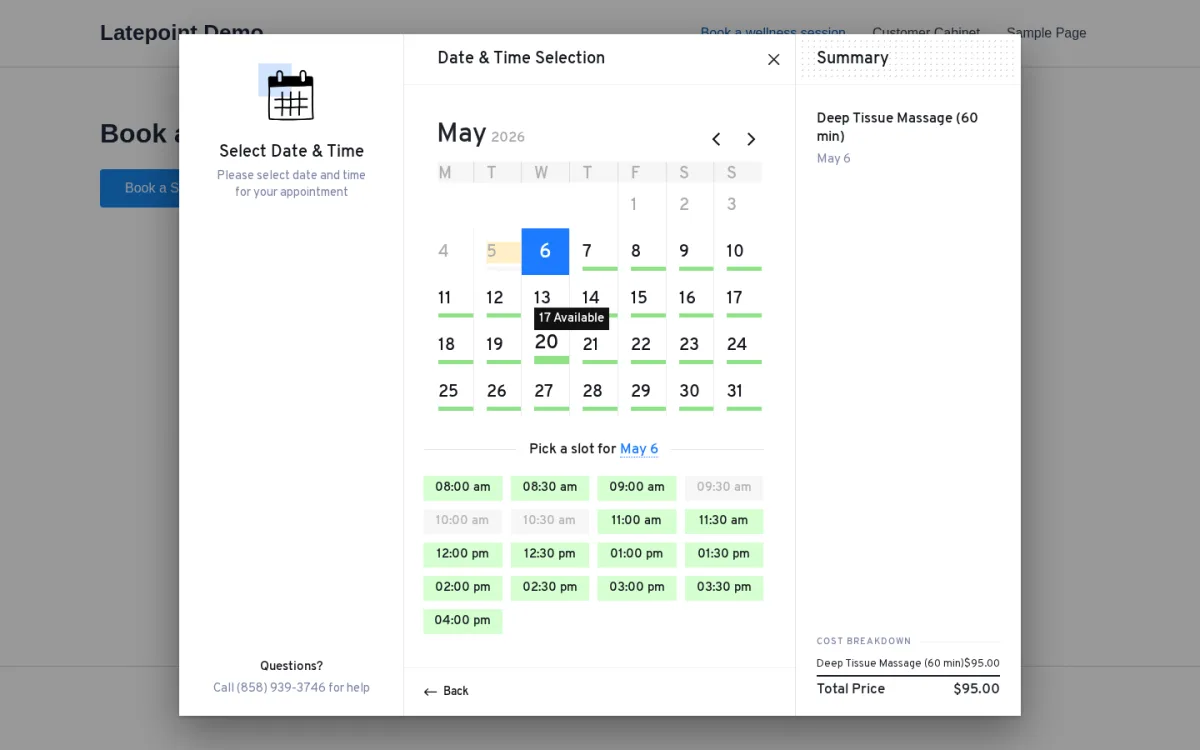
Best for: Solo professionals and small studios that want a polished, isolated SaaS-style admin and one all-inclusive paid plan.
In hands-on testing, LatePoint is the cleanest direct answer to the specific reasons most buyers leave Booknetic. I configured a senior wellness therapist with a 7-day schedule, a $95 service, and a public booking page in well under 10 minutes — which is the company's published claim and matches what I observed. The admin loads as a fully isolated SaaS-style panel inside WordPress (the standard WordPress sidebar disappears entirely on every LatePoint screen), and the live-preview Booking Form customizer with drag-to-reorder steps is one of the most beginner-friendly customizers I tested anywhere.
Why it is a strong alternative to Booknetic: Two design decisions directly counter Booknetic's biggest pain points. First, the all-features-in-every-paid-plan licensing — Starter, Scale, and Agency differ only by site count, so there is no per-add-on math to do at purchase time. Every payment gateway, calendar sync, video meeting integration, SMS connector, and automation feature is included in every paid plan. Second, the WordPress.org listing is a real free plugin — multiple agents, multiple services, basic email notifications, and Stripe-only payments — which gives buyers a credible due-diligence path that Booknetic's pricing page does not. For the head-to-head decision, see the Booknetic vs LatePoint breakdown.
What stood out in testing: The admin chrome alone is a real day-to-day quality-of-life win. The left rail (Dashboard, Calendar, Appointments, Orders, Payments, Customers, Services, Agents, Locations, Coupons, Settings, Automation, Integrations, Form Fields, Add-ons) and the top bar (global search, chat / clock / inbox icons, "+ Booking" quick-create) feel closer to a SaaS booking app than a WordPress plugin. Two consecutive front-end bookings landed cleanly in the admin Appointments list and on the Calendar without retry, and the public widget renders as an overlay modal with a Summary panel that updates as the customer progresses.
Main strengths:
- All-features-in-every-paid-plan licensing — paid tiers differ only by site count, with no per-add-on math.
- Real free tier on WordPress.org with a clear paid path when the free limits bite.
- Modern isolated SaaS-style admin that hides the standard WordPress chrome on every LatePoint screen.
- Live-preview Booking Form customizer with a color swatch picker, Border Style dropdown, and drag-to-reorder Steps panel.
Main limitations:
- Heavily restricted free tier: Stripe-only payments, no Google Calendar 2-way sync, no customer dashboard, no recurring appointments, no OTP.
- Limited multilingual support; broader languages remain a long-standing open feature request on the company's ideas board.
- No white-label / backend rebrand option.
- No native mobile app and no chart-based reporting module.
Pricing snapshot: Free on WordPress.org; Starter from $79/yr (sale, regular $99) or $199 lifetime (sale, regular $249) for 1 site; Scale from $149/yr or $399 lifetime for 5 sites; Agency from $299/yr or $599 lifetime for 100 sites. 14-day money-back guarantee. Public ratings: WordPress.org 4.9/5 with 100,000+ active installs; Trustpilot 4.8/5.
Read the full review: LatePoint review
2. Amelia
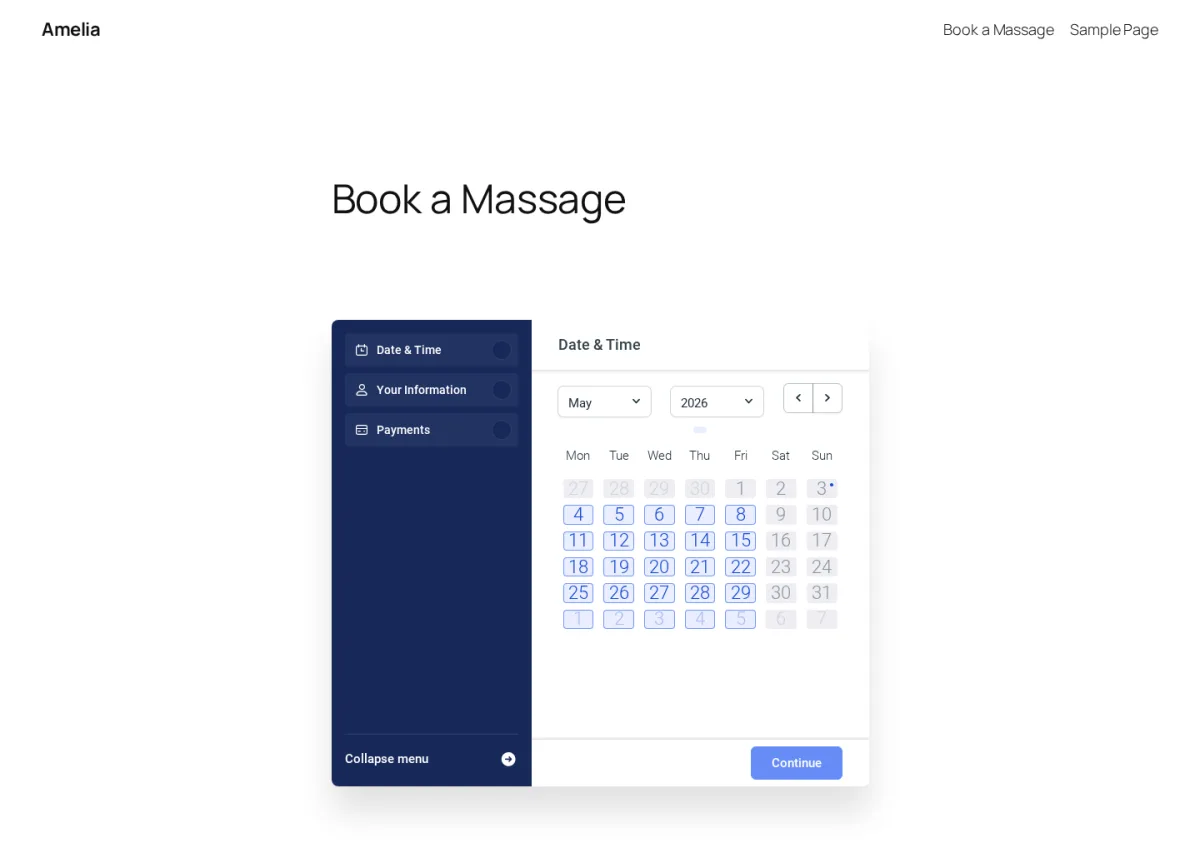
Best for: Service businesses and event organizers that want a polished admin and a built-in events module.
Amelia is the closest direct head-to-head alternative on feature scope. In testing on a licensed WordPress 6.9.4 install, I started from a completely empty environment, created a Location, an Employee, and a paid Service from scratch, then walked the public widget through Date & Time → Your Information → Payments end-to-end. The booking landed cleanly in Bookings, on the Calendar, and on the Customers list, and the dashboard counters updated as expected.
Why it is a strong alternative to Booknetic: Two reasons. The first is the Events module — one-time and recurring events, multiple ticket tiers (VIP / General / Early Bird), waiting lists, and QR-coded e-tickets attached to confirmation emails. Booknetic does not ship a comparable events module, so if your business sells appointments and ticketed events from the same site, Amelia is the natural pick. The second is the Customize hub — a dedicated branding surface with six live-preview editors (Step-by-step, Catalog, Events calendar, Events list, Customer panel, Employee panel) — which most competing WordPress booking plugins simply do not have at all. For agencies setting up multiple sites, the Customize hub alone is a real workflow advantage. For the head-to-head decision, see the Booknetic vs Amelia breakdown.
What stood out in testing: The Notifications module is one of the deepest in the category. It splits Email and SMS tabs, then To Customer / To Employee sub-tabs, and exposes a long event list (Approved, Pending, Rejected, Cancelled, Rescheduled, Reminders, Follow-up, plus dedicated Events templates with E-ticket). The template editor uses placeholder pills for Appointment / Customer / Employee / Service / Location / Company / Payment, which is safer than typing raw shortcodes. Picking a date instantly revealed a 30-minute slot strip for the assigned employee, and the chosen slot showed up in the side menu before I had to confirm — small details that lift Amelia above the WordPress booking-plugin baseline.
Main strengths:
- One of the most polished WordPress booking admins available, with a Vue + Element Plus design and dark/light theme.
- Built-in events module with QR-coded e-tickets — rare in this category.
- Deep notifications matrix across email, SMS, and WhatsApp with per-event templates.
- Real free Lite plugin on WordPress.org with a clear paid upgrade path.
Main limitations:
- Plan-tier gating still pushes most production sites onto Pro to unlock Google Calendar two-way sync and video meetings — so the all-bundled story is partial, not complete.
- Public support reputation is mixed — strong on Capterra, weaker on Trustpilot in the wake of the v9 launch window.
- No native mobile app for staff or admins.
- Empty default state with a couple of unintuitive setup quirks (Employee requires a Location to save).
Pricing snapshot: Free Lite on WordPress.org; Starter from $49/yr; Standard from $89/yr or $299 lifetime; Pro from $149/yr or $449 lifetime; Elite from $259/yr or $799 lifetime. 15-day money-back guarantee. Public ratings: WordPress.org 4.6/5 from 760+ reviews; Capterra 4.9/5 from 240+ reviews; Trustpilot 3.6/5 from 230+ reviews.
Read the full review: Amelia review
3. BookingPress
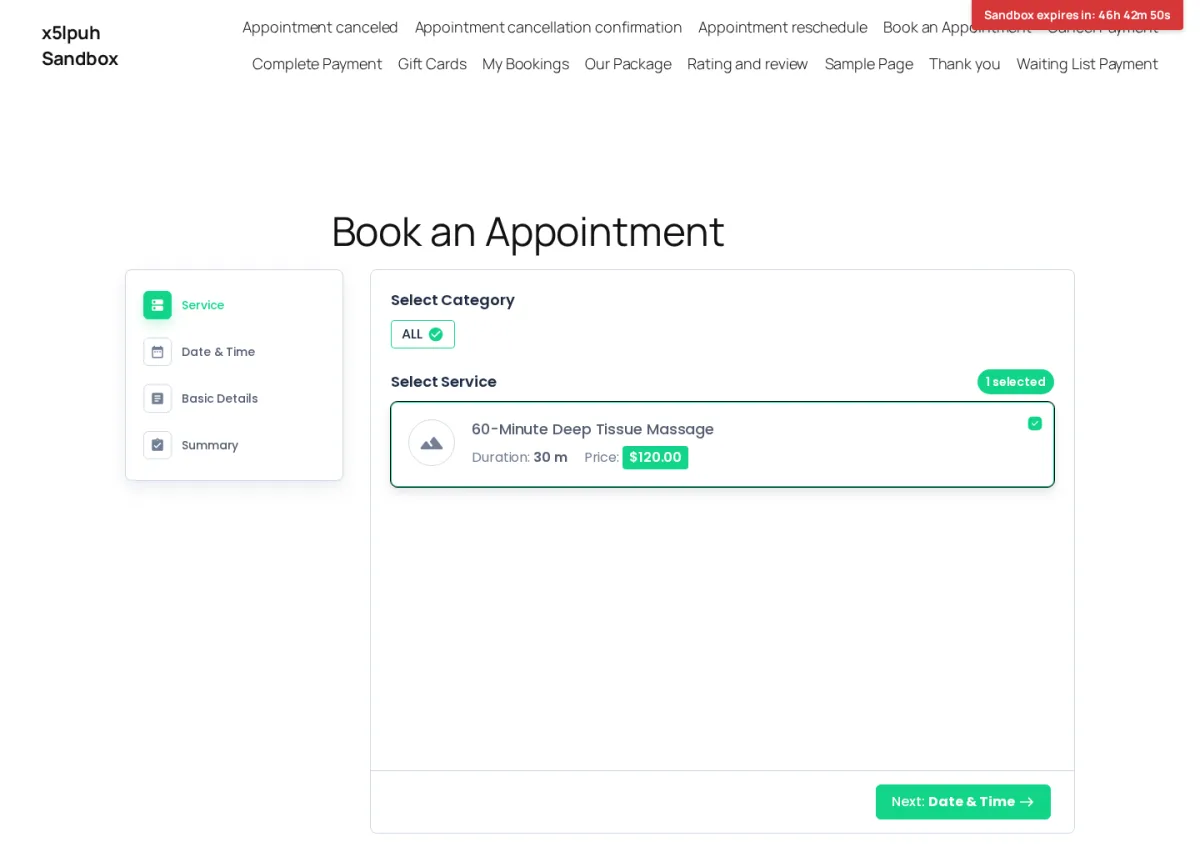
Best for: WordPress service businesses that want bundled add-ons and broad payment gateway coverage in one plan.
BookingPress is the most direct counter to Booknetic's add-on math. In testing on the official BookingPress sandbox with the full paid add-on catalog enabled, I configured a $120 60-minute deep-tissue massage service, walked the booking widget through Service → Date & Time → Basic Details → Summary, and the post-submit confirmation page surfaced the Booking ID inline with four Add-to-Calendar shortcuts (Google, Yahoo, Outlook, iCal) — quietly one of the strongest confirmation screens in the category.
Why it is a strong alternative to Booknetic: Two things move the buying decision against Booknetic specifically. First, the bundling model is different — Standard ships with 45+ add-ons, Professional and Enterprise with 60+ — so the per-add-on shopping list that Booknetic Boostore makes you do at purchase time is replaced with a single bundled tier. Second, BookingPress's payment gateway list is unusually broad: 20+ providers spanning Stripe, PayPal, Mollie, Square, Braintree, Worldpay, Skrill, Klarna, Paddle, 2Checkout, Authorize.net, WooCommerce, plus regional options like Razorpay, PayUMoney, Paystack, PayFast, Pagseguro, Mercado Pago, ECPay, PayMongo, and Airwallex. If you operate in markets where regional gateways matter, BookingPress's bundled coverage often beats what you would assemble from Booknetic Boostore at the same price point. For the head-to-head decision, see the Booknetic vs BookingPress breakdown.
What stood out in testing: The Customize module is where the admin feels genuinely modern. Four tabs (Booking Form / Customer Panel / Package Booking / Gift Card) each render a live preview alongside font, color, and step-order controls, and you can drag-and-drop reorder the booking steps. For a non-developer who wants a branded widget without writing CSS, this is one of the strongest day-to-day usability advantages BookingPress offers.
Main strengths:
- Bundled add-on plans replace the per-add-on shopping list common in this category.
- 20+ payment gateways across global and regional providers, all bundled into every paid plan.
- Genuine free Lite tier with unlimited websites and a one-time lifetime upgrade option.
- Booking confirmation page includes Booking ID and Add-to-Calendar shortcuts inline.
Main limitations:
- Not currently distributed through WordPress.org; install and updates run through the official site.
- Validation rough edges around the Location and Staff Member add-ons make the first hour of setup frustrating for non-technical admins.
- Reporting is functional but visually thin — no graphical breakdown by staff or location.
- Public reviews flag mixed enterprise-tier support response times.
Pricing snapshot: Free Lite (unlimited sites); Standard $89/yr or $229 lifetime (1 site); Professional $139/yr or $379 lifetime (3 sites); Enterprise $249/yr or $599 lifetime (20 sites). 14-day money-back guarantee. Public ratings: WordPress.org 4.6/5 from 175 archived reviews; Capterra 4.5/5 from ~71 reviews; Trustpilot 4.3/5 from ~81 reviews.
Read the full review: BookingPress review
4. Bookly Pro
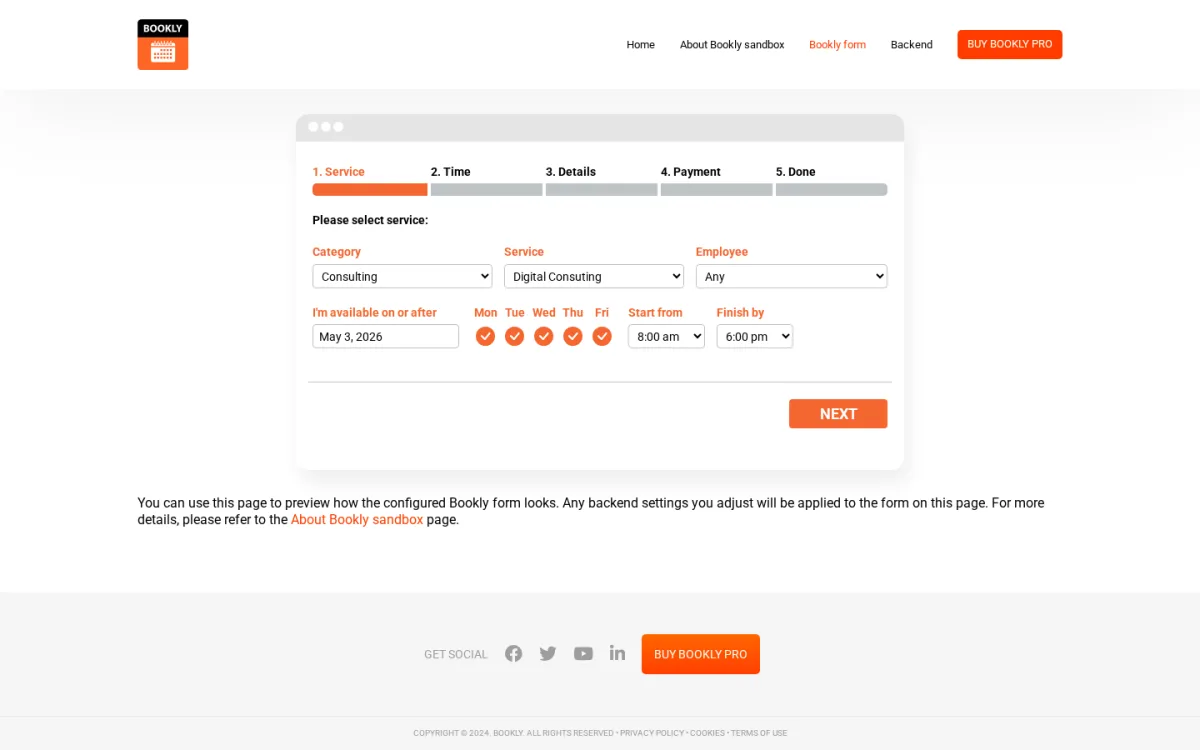
Best for: WordPress-savvy buyers who want a real free WordPress.org entry point and a mature long-running plugin.
Bookly Pro is the alternative to pick when the lack of a Booknetic free version is the dealbreaker. The free Bookly plugin has been on WordPress.org since October 2014, and the paid Pro extension has 1,173+ paid reviews on CodeCanyon — the largest paid-review footprint in the category. In testing on the official Bookly sandbox with the Pro license plus 40+ paid add-ons activated, I committed a $540 Digital Consulting booking on the front-end and the booking landed in admin Appointments, Calendar, Customers, and Dashboard exactly as expected.
Why it is a strong alternative to Booknetic: Two reasons. First, the WordPress.org free tier is genuinely usable — 1 staff member, up to 5 services, basic email + SMS templates, and Local payment — which lets buyers wire up the booking widget on a live site before paying anything. Second, the Lifetime tier on the official site is the same one-time, perpetual license historically distributed on CodeCanyon, so subscription-averse buyers can avoid annual renewals entirely. The Email Notifications module on Pro is also one of the strongest non-widget modules in the category — granular per-event, per-recipient templates with reminders, follow-ups, evening agendas, and birthday greetings.
What stood out in testing: Picking Consulting filtered the service dropdown, choosing Digital Consulting auto-loaded staff Nick Knight, and the Time step rolled out a multi-day grid of 15-minute slots grouped by day for the selected staff member. Clicking a slot advanced the wizard immediately and printed a clear handover line confirming the service, staff, date, and price ("$540.00") before the Details step — a small but useful conversion moment. The Add-ons page, where Bookly's economy lives, covers payment gateways, calendar sync, scheduling extensions, commerce, ops, and verticals like Events; the same modules are bundled together at a discount inside the Business and Ultimate plans.
Main strengths:
- Genuine free tier on WordPress.org that lets buyers de-risk before paying.
- Mature, broad add-on catalog covering payments, calendar sync, locations, recurring appointments, packages, and verticals like Events.
- Strong Email Notifications module with reminder, follow-up, agenda, and birthday templates available on Pro.
- Lifetime tier on the official site is the same one-time, perpetual license historically distributed on CodeCanyon — only the Annual tier renews.
Main limitations:
- The most commercially important capabilities — Stripe, two-way Google Calendar, recurring appointments, locations, custom fields, customer/staff portals — sit in paid add-ons rather than the Pro plan, so the per-add-on math problem is at least as real as Booknetic's.
- Admin UI feels like a 2014–2018 WordPress plugin: dense datatables, persistent upsell menu items, no isolated SaaS-style booking dashboard.
- No native iOS or Android mobile app for staff or admins.
- Capterra Customer Service rating sits at 3.7/5; reviewers describe slow ticket cycles.
Pricing snapshot: Free base plugin on WordPress.org; Pro $49/year or $129 lifetime; Business $199/year or $399 lifetime; Ultimate $399/year or $799 lifetime. 30-day money-back guarantee. Public ratings: CodeCanyon 4.54/5 from ~1,173 reviews; WordPress.org 4.4/5 from 562 reviews on the free plugin; Capterra 4.0/5 from ~70 reviews.
Read the full review: Bookly Pro review
5. FluentBooking
Best for: Coaches, consultants, sales teams, and small WordPress agencies that want a Calendly alternative with data ownership and one-time pricing.
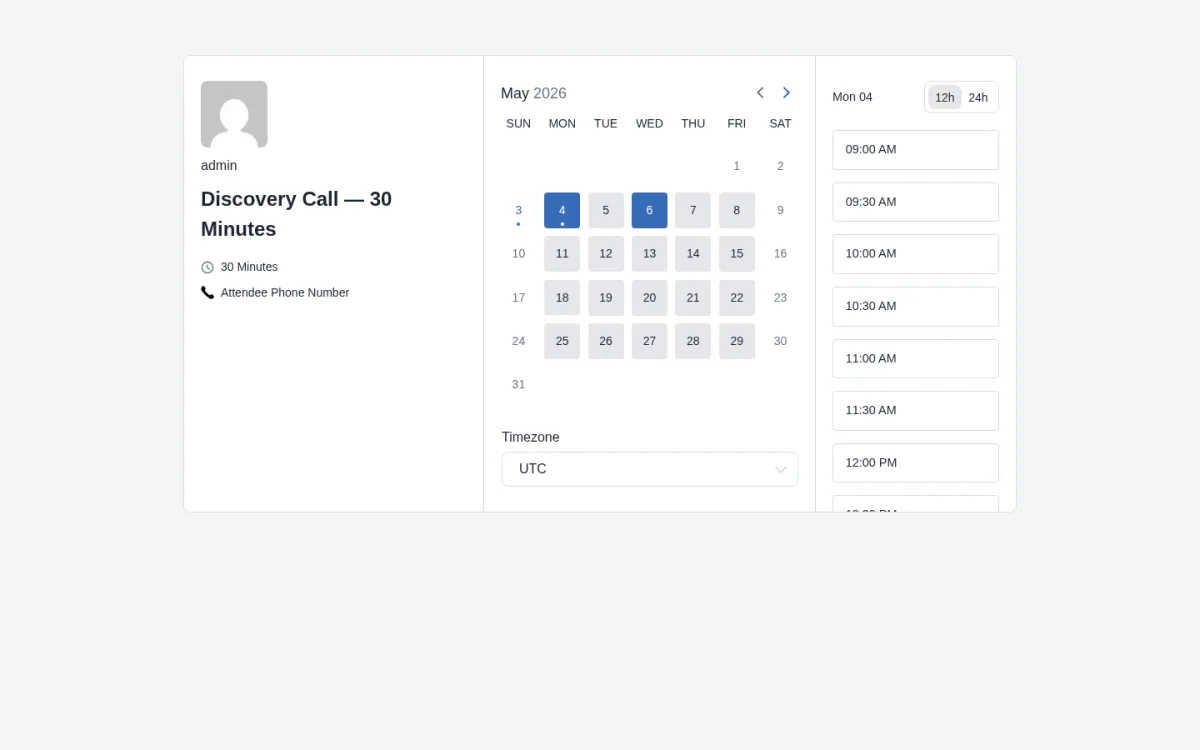
FluentBooking is the right answer when you realize you are looking at Booknetic for a job a Calendly-style scheduler would do better. In testing on a provisioned WordPress 6.9 environment with FluentBooking Pro 2.0.05, I built a Working Hours 9–5 availability schedule, a host calendar tied to the admin user, and a one-on-one Discovery Call event in about 15 minutes; the public landing page rendered the bookable event types under a single shareable URL, and the post-submit confirmation surfaced What / When / Who / Where with inline Cancel or Reschedule and Add-to-calendar shortcuts.
Why it is a strong alternative to Booknetic: Three reasons. First, FluentBooking sits in the Calendly-alternative slot rather than the multi-staff multi-location service-business slot — if your job is one-on-one bookings with a coach, consultant, sales rep, or freelancer, FluentBooking's Event Type editor and host Landing Page deliver a cleaner experience than configuring Booknetic's full Service → Staff → Location model. Second, every Pro plan unlocks every feature; Solo, Small Business, and Agency differ only by site count, so the per-add-on math goes away. Third, the WPManageNinja ecosystem fit is genuinely deep: native FluentCRM and Fluent Forms hooks turn each booking into a CRM automation trigger, plus Zapier / Make / Pabbly Connect / FlowMattic / WP Fusion and raw webhook delivery. For buyers already running on the WPManageNinja stack, this is where FluentBooking turns scheduling into a multi-plugin operating system.
What stood out in testing: The 11-tab Event Type editor (Event Details, Availability, Limits, Question Settings, Email Notification, SMS Notification, Recurring Settings, Advanced Settings, Payment Settings, Webhooks Feeds, Integrations) mirrors how Calendly organizes the same job, and going from a blank calendar to a working bookable event took under two minutes. The themeless, mobile-friendly two-pane public widget, the inline 12h / 24h toggle, and the calendar-shortcut confirmation page all sit well above the WordPress booking-plugin baseline.
Main strengths:
- Calendly-style admin and public booking flow inside WordPress with data ownership and one-time pricing.
- One Pro license unlocks every feature; plan tier only changes site count.
- Deep WPManageNinja ecosystem fit (FluentCRM, Fluent Forms, FluentSMTP, FluentCart, Fluent Boards).
- Genuine free version on WordPress.org so buyers can de-risk the choice.
Main limitations:
- Narrower payment route list (Stripe, PayPal, WooCommerce, FluentCart, Offline) — no native Mollie, Razorpay, Mercado Pago, Paystack, Square, or Klarna.
- Not built for multi-staff, multi-location service-business workflows — no booking packages, no customer portal, no waiting list.
- No native admin Cancel or Reschedule action on the booking detail screen; admin-side cancellations route through the customer link.
- Smaller community footprint than older WordPress booking plugins (20,000+ active installs versus 100,000+ for the broader market leaders).
Pricing snapshot: Free WordPress.org plugin; Pro Solo $79/yr or $249 lifetime for 1 site; Small Business $199/yr or $436 lifetime for 5 sites; Agency $399/yr or $749 lifetime for 50 sites. 14-day money-back guarantee. Public ratings: WordPress.org 4.7/5 from 41 reviews with 20,000+ active installs.
Read the full review: FluentBooking review
6. Simply Schedule Appointments
Best for: Solo consultants, coaches, lawyers, tutors, therapists, and small service teams running one WordPress site.
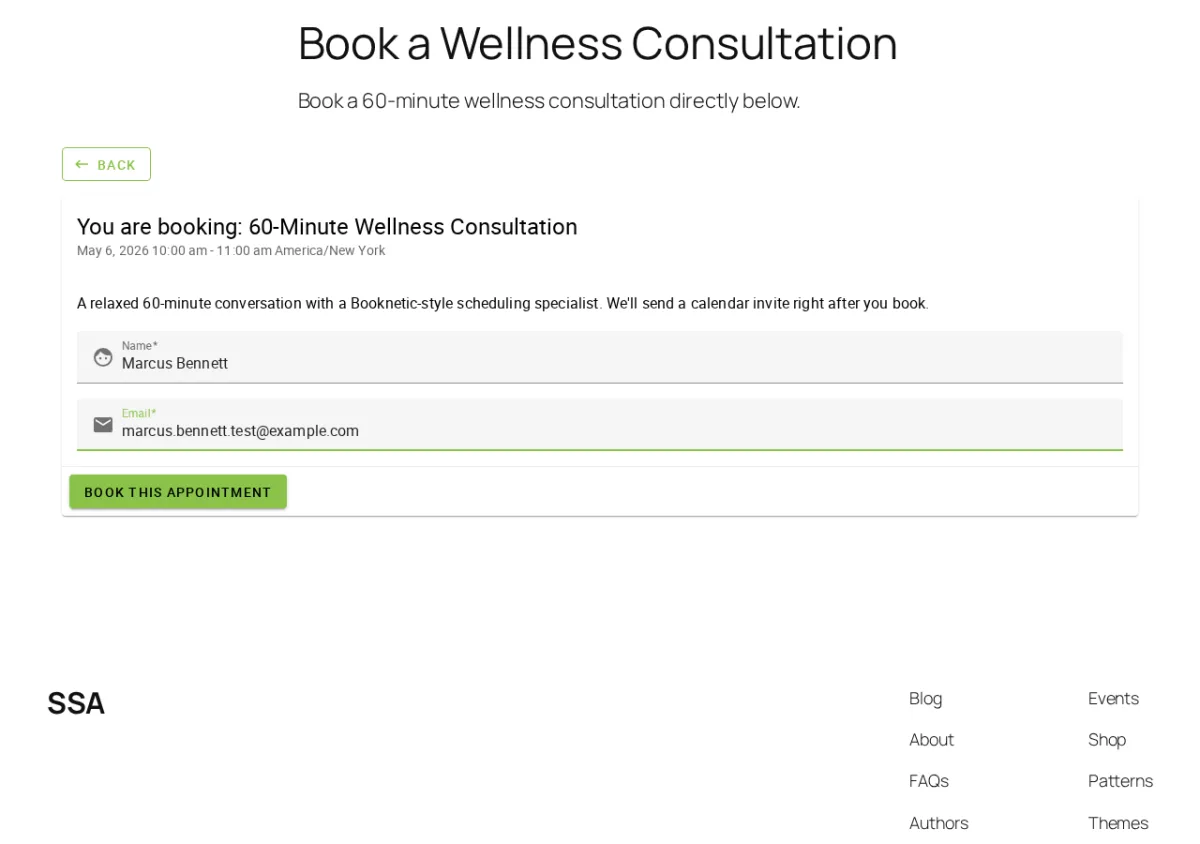
Simply Schedule Appointments — usually shortened to SSA — is the right pick when you realize you do not need Booknetic's full multi-location, multi-staff, multi-gateway model. In testing on a private WordPress 6.9.4 site with the Pro Edition license, the Setup Wizard auto-detected the WP timezone, date format, and week-start, the Appointment Type editor built a working starter type in under five minutes, and the visitor-side widget auto-detected the visitor's timezone and walked through Date → Time → Customer Information → Confirmation.
Why it is a strong alternative to Booknetic: Three reasons. First, the setup is the cleanest in this set — five minutes from install to a live booking widget — which is the answer when Booknetic's day-one learning curve is what is putting you off. Second, SSA's WCAG-AA accessibility focus (live contrast-ratio checker in the Styles module, screen-reader-friendly Morning / Afternoon / Evening slot grouping, accessible front-end widget) is genuinely rare in this category. Third, the WordPress.org rating profile is the strongest in this entire shortlist — 5/5 from 154 reviews on top of 60,000+ active installs — and recent reviewers report support responses within an hour, including on the free tier.
What stood out in testing: The post-submit confirmation page surfaces Save-to-Calendar, Edit Information, Reschedule, Cancel Appointment, and Schedule a New Appointment side by side — a meaningful conversion-quality detail that most competitors leave to email. The multi-block per-day availability with automatic lunch-gap exclusion is also unusually clean — split a weekday into 09:00–12:00 plus 13:00–17:00 and the front-end widget excludes 12:00 and 12:30 from the slot grid automatically, which most competitors require a separate "break" record or manual workaround for.
Main strengths:
- Setup wizard reads WordPress timezone, date format, and week-start automatically — usable booking widget in under five minutes.
- Polished SPA admin with an accessibility-aware front-end widget and a live contrast-ratio checker.
- Three Booking Flow layouts (Expanded, Express, First Available) make a credible Calendly-on-WordPress experience.
- Confirmation screen surfaces Save-to-Calendar, Reschedule, and Cancel side-by-side — most competitors leave that to email.
Main limitations:
- Every annual tier is single-site — multi-site coverage requires the separate lifetime SKUs at higher upfront prices.
- Team scheduling and Resource booking are gated to the most expensive Business tier.
- No drag-and-drop admin calendar — only a list view with a date-range filter.
- Only Stripe and PayPal as payment gateways; no Square, Mollie, Razorpay, Mercado Pago, or WooCommerce.
Pricing snapshot: Free Basic Edition on WordPress.org; Plus from $99/yr intro / $129 renewal or $299 lifetime; Pro from $199/yr intro / $249 renewal or $499 lifetime; Business from $399/yr intro / $499 renewal or $899 lifetime; multi-site lifetime SKUs ($449–$1,299) on a separate page. 30-day money-back guarantee. Public ratings: WordPress.org 5/5 from 154 reviews with 60,000+ active installs.
Read the full review: Simply Schedule Appointments review
Side-by-Side Decision Notes
This list spans full WordPress booking platforms, Calendly-style schedulers, and accessibility-first solo plugins, so the right pick depends mostly on which Booknetic pain point pushed you to look elsewhere.
- Choose LatePoint if the per-add-on Boostore math is the dealbreaker and you want one all-inclusive paid plan plus a polished isolated SaaS-style admin.
- Choose Amelia if you also run paid events alongside appointments and want a built-in Events module with QR-coded e-tickets in the same plugin.
- Choose BookingPress if your priority is a broad payment gateway list (especially regional providers like Razorpay, Mercado Pago, Paystack, PayMongo, or Klarna) bundled into a single tier.
- Choose Bookly Pro if a real free WordPress.org entry point matters more than admin polish and you are willing to assemble add-ons à la carte or buy a Business / Ultimate bundle.
- Choose FluentBooking if you are actually shopping for a Calendly alternative inside WordPress, not a multi-staff multi-location service-business platform — especially if you already run on FluentCRM and Fluent Forms.
- Choose Simply Schedule Appointments if you run a single WordPress site, value a clean accessible widget, and only need Stripe and PayPal as payment gateways.
- Stay on Booknetic if you have already mapped your Boostore add-on mix to Premium or Elite, you want the most complete WordPress booking platform on the market, and you value the in-panel add-on marketplace, the dedicated SaaS-style admin, the Workflow automation engine, and the strongest CodeCanyon/Capterra rating profile in this set.
If your business straddles two profiles — for example a multi-location service business that also runs paid events — Amelia and BookingPress are the most natural pair to compare side by side before you decide.
For a wider WordPress booking shortlist (including the source product itself and three more plugins outside this six-alternative list), see the cluster roundup of the best WordPress appointment booking plugins.
FAQ
What is the best Booknetic alternative?
LatePoint is the strongest direct alternative for most buyers leaving Booknetic over the Boostore add-on math. It ships an isolated SaaS-style admin, all-features-in-every-paid-plan licensing, and a real free WordPress.org tier — three of the most common reasons buyers shortlist a Booknetic alternative. Amelia is the natural runner-up when feature depth is the dominant criterion or when paid events sit alongside appointments. BookingPress is the right pick when broad payment gateway coverage is the priority.
Is there a free Booknetic alternative?
Yes — LatePoint, Amelia, Bookly Pro, FluentBooking, and Simply Schedule Appointments all ship a real free version on WordPress.org. BookingPress also offers a genuine free Lite plan, but it is distributed through the official BookingPress site rather than the WordPress.org plugin directory; install and updates run through bookingpressplugin.com. LatePoint and Bookly Pro have the largest free WordPress.org user bases (100,000+ active installs and 562 free reviews respectively); SSA has the highest WordPress.org rating profile (5/5 from 154 reviews); BookingPress's Lite plan is the only one in this set that allows unlimited websites on its free tier.
Which Booknetic alternative is best for agencies?
For agencies that need to deploy a booking plugin across multiple client sites, LatePoint Agency ($299/yr or $599 lifetime for 100 sites), BookingPress Enterprise ($249/yr or $599 lifetime for 20 sites), and FluentBooking Agency ($399/yr or $749 lifetime for 50 sites) are the best multi-site-licensed picks. LatePoint and FluentBooking both deliver every Pro feature on every site without per-add-on math, which simplifies multi-client rollouts.
Which Booknetic alternative is best for beginners?
LatePoint and Simply Schedule Appointments are the easiest to live in for non-technical admins. LatePoint's published "10-minute setup" claim matches what I observed in testing, and the live-preview Booking Form customizer with drag-to-reorder steps is one of the most beginner-friendly customizers I tested anywhere. SSA's setup wizard reads WordPress timezone, date format, and week-start automatically — usable booking widget in under five minutes — and the accessibility-aware widget is a real win for inclusive sites.
Should I switch from Booknetic to one of these alternatives?
Not necessarily. Booknetic is one of the most complete WordPress booking plugins on the market, with the highest CodeCanyon rating in the category (4.91/5 from 471 reviews) and a Premium / Elite value story that often beats SaaS schedulers on a 12-month basis. Switch only if a specific Booknetic pain point — Boostore add-on math, the lack of a free version, plan-tier complexity, the day-one learning curve, or the Trustpilot reputation tail — is genuinely blocking your decision. If you have already mapped your add-on mix to Premium or Elite and the Boostore catalog covers what you need, staying on Booknetic is rational.
Final Verdict
If you only take one recommendation from this guide: LatePoint is the cleanest Booknetic alternative for most readers, because it directly answers the three biggest reasons buyers leave Booknetic — the per-add-on Boostore math, the missing free WordPress.org tier, and the plan-tier complexity — while still delivering a polished isolated SaaS-style admin that matches Booknetic on day-to-day UX quality.
If LatePoint is not the right fit, the closest shortlist alternatives are Amelia (polished admin plus a genuine events module with QR e-tickets) and BookingPress (60+ bundled add-ons and 20+ payment gateways in a single tier). For a real free WordPress.org entry point and a mature, long-running plugin, Bookly Pro is the standard. For a Calendly-style scheduler inside WordPress — when one-on-one bookings are the actual job — FluentBooking is the cleanest option in the six I tested. And for a solo professional who runs a single WordPress site and values a clean accessible widget, Simply Schedule Appointments has the strongest WordPress.org rating profile in the category.
Booknetic remains a credible default for multi-staff, multi-location WordPress service businesses on Premium or Elite, and the choice between Booknetic and these alternatives depends entirely on which buyer profile you fit. The safest buying logic is to choose based on workflow fit, tested usability, the price-to-value at the tier you actually need, and the support and reputation evidence you can verify before purchase — and then validate your shortlist against your specific service, staff, and payment requirements before you commit.
Similar Blogs


