

7 Best WordPress Survey Plugins in 2026 (Free + Paid, Hands-on Tested)

Why WordPress needs a survey plugin in 2026
WordPress core ships posts, pages, comments and a block editor. It does not ship a survey, a poll, an NPS report, a Likert scale, a star rating, a question pool or a popup feedback widget. None of that exists in WordPress on its own. You need a plugin.
A real WordPress survey plugin does five things at once. It registers a survey or poll data model so each survey is editable and reusable. It ships question types that fit the job (single choice, multiple choice, dropdown, scale, NPS, Likert, ranking, star rating, text). It collects responses and stores them in the WordPress database, in an external SaaS account, or in a connected sheet, instead of dropping them into your inbox. It shows a result page or a real-time dashboard so you can see what your visitors actually picked. And it works on a page, a post, a sidebar, a popup, an email, or a standalone landing page, with sane defaults and no developer.
For this roundup I checked twelve well-known WordPress survey, poll and feedback plugins and narrowed them down to seven. For all seven I installed the free plugin on a clean WordPress 6.9.4 sandbox, walked the admin, inspected every survey or poll creation screen, and looked at exactly what the free build ships. The plugins are compared on what a WordPress site owner cares about in 2026: free vs paid limits, question types and scales, NPS and Likert support, popup and embed display options, integrations with email and CRM tools, real 2026 pricing, and the right fit per audience.
How I evaluated these WordPress survey plugins
I evaluated each plugin against the same criteria, in this order:
- What works for free: does the free build actually run a usable survey or poll, or is it a trial?
- Question types and scales: single choice, multiple choice, dropdown, paragraph, NPS (0-10), Likert (5 or 7 point), star rating, ranking, slider, matrix.
- Result display: real-time dashboard, charts, CSV/PDF export, NPS report, per-question breakdown.
- Display and triggers: shortcode, Gutenberg block, sidebar widget, popup with on-load / on-click / exit-intent triggers, email widget.
- Lead capture and integrations: name/email capture, native Mailchimp/ActiveCampaign/HubSpot, Google Sheets, Slack, Zapier, webhooks.
- Builder UX: drag-and-drop builder, conversational layout, multi-page sections, conditional logic, Pro upsell pressure.
- Pricing fairness: real 2026 prices on the vendor pricing pages, including site limits and refund window.
- Public adoption: WordPress.org active install counts, rating distribution and recent changelog activity, checked on 2026-06-20.
- Best-fit user: small business chasing customer feedback, editorial site running engagement polls, marketer running NPS, agency embedding conversational surveys, brand running quick widget polls.
For each plugin I installed the WordPress.org build on a clean FrankenPHP + SQLite WordPress 6.9.4 sandbox, walked at least the dashboard, the survey or poll list, and one or two secondary admin pages (Settings, Templates, Integrations, Add-ons, Popup Survey, Submissions), and verified the free vs Pro feature split directly in the admin UI. Each plugin entry below uses the same structure: what the plugin does, what I checked, key features, strengths, drawbacks, pricing, and best fit.
Quick comparison: 7 best WordPress survey plugins
| Plugin | Best for | Free version | Paid starts at | Strongest point | Main limitation |
|---|---|---|---|---|---|
| WPForms | All-round survey, poll and NPS inside the most popular form builder | Yes (WPForms Lite) | $49.50/yr promo (Basic, 1 site) | Surveys & Polls addon ships beautiful reports, NPS, Likert and star ratings on Pro | Survey reports and Likert/NPS fields are Pro-only ($199.50/yr promo Pro tier) |
| Formidable Forms | Advanced surveys with NPS, Likert, ranking and a Views layer | Yes (Lite) | $39.50/yr promo (Basic, 1 site) | NPS, Likert, ranking and the Views layer; only WP form builder with a full survey toolkit and front-end data display | Survey-style fields and Visual Views require Business ($199.50/yr promo) or Elite |
| UserFeedback (MonsterInsights) | Widget-style micro-surveys, NPS popups and exit-intent feedback | Yes (Lite) | $49.50/yr promo (Plus, 1 site) | Popup widget + 20+ templates + AI summaries + heatmaps + Slack/webhooks/Google Sheets on free | Widget format only; for a full-page survey use a form builder |
| Crowdsignal Forms (Automattic) | Free Gutenberg polls, NPS and applause from the team behind Polldaddy | Yes (Lite plugin + free Crowdsignal account, 2,500 signals/month) | $15/month annual (Premium, unlimited signals) | 6 native Gutenberg blocks (Poll, Vote, NPS, Feedback, Applause, Embed); cloud reporting and analytics by Automattic | Quizzes/forms live on Crowdsignal.com; free tier capped at 2,500 signals/month |
| YOP Poll | Free dedicated WordPress poll plugin with vote logs and bot protection | Yes (free) | YOP Poll Pro (price gated by direct order; in-admin upgrade link) | Unlimited polls, schedule windows, custom fields, IP/cookie blocking, Cloudflare Turnstile + reCAPTCHA, full vote logs all on free | One question per poll; surveys with multiple sections need a different plugin |
| Survey Maker by AYS | Polished freemium survey plugin with lifetime Pro pricing | Yes (free + Pro lifetime) | One-time lifetime pricing (Business, Enterprise, Agency tiers) | Unlimited surveys/sections/questions free, popup survey, anonymous survey, Logic Jump and ChatGPT in Pro | Advanced question types (NPS, Matrix, Ranking, Slider, File Upload) are Pro-only |
| Quill Forms | Typeform-style conversational survey plugin | Yes (free) | Pro yearly subscription (in-admin Upgrade link) | One-question-at-a-time UI, modern theming, 60+ Pro integrations, AI form generation, open source on GitHub | Jump logic, calculations, payments and most integrations are Pro-only |
All install counts, ratings and version numbers were verified on 2026-06-20 directly on the WordPress.org plugin pages and vendor sites.
1. WPForms: the best all-round WordPress survey plugin (and form builder)
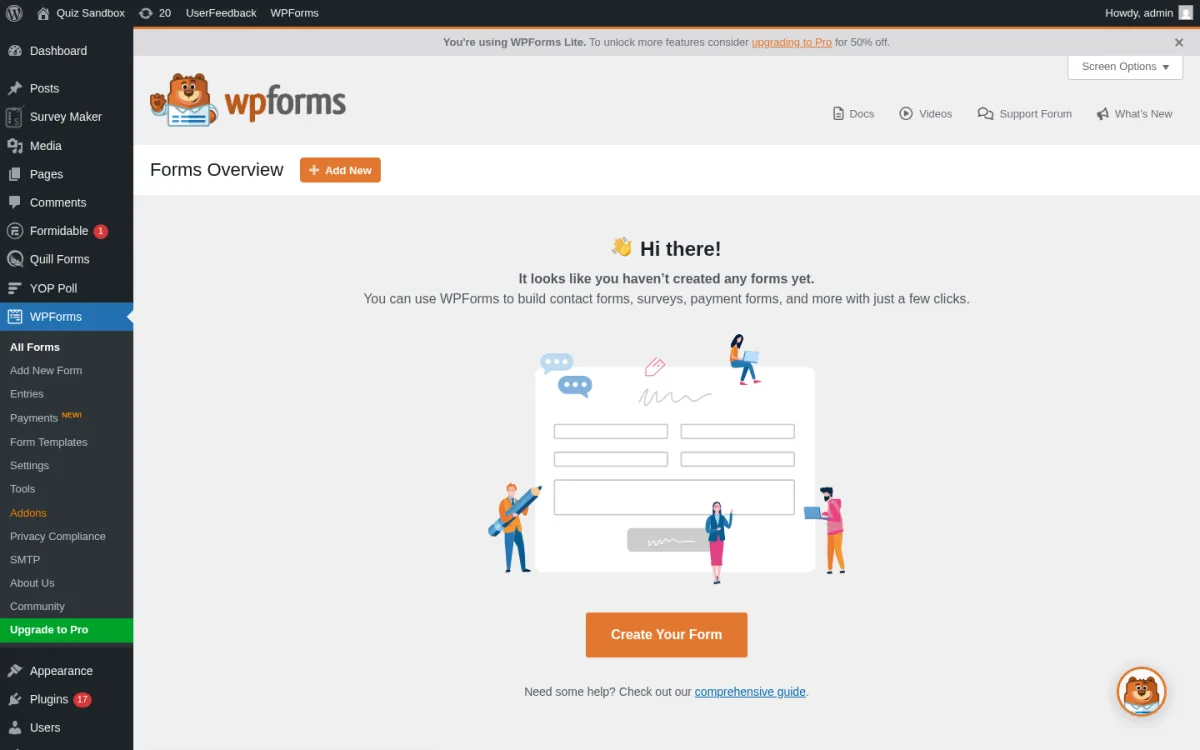
Category: WordPress form builder by Awesome Motive with a dedicated Surveys & Polls addon on the Pro tier. Best for: site owners who want one plugin that handles their contact form, their newsletter form and their survey, with a beautiful reports view on Pro.
WPForms is the most-installed form builder on WordPress.org and the easiest entry point for a non-developer. The free Lite plugin handles contact forms, newsletter signup forms, simple feedback forms and a drag-and-drop builder with reCAPTCHA, hCaptcha and Cloudflare Turnstile spam protection. The Surveys & Polls addon, available from the Pro tier, turns WPForms into a real survey plugin. It ships Likert scale, star rating, NPS (0-10) and ranking field types, plus a stunning reports view that visualizes the data as pie charts, bar charts and word clouds, and an interactive poll that updates the results in real time on the front end.
What I checked
- Installed WPForms Lite 1.10.2 via WP-CLI. The plugin activated cleanly and registered the WPForms menu (All Forms, Add New Form, Entries, Payments NEW, Form Templates, Settings, Tools, Addons, Privacy Compliance, SMTP, About Us, Community, Upgrade to Pro).
- Walked the empty Forms Overview, the Add New Form template gallery, the Settings page and the Addons page. Confirmed the Surveys & Polls addon and the survey-style field types (NPS, Likert, Star Rating) are clearly gated behind a Pro upgrade CTA.
- Verified the WPForms Gutenberg block auto-registers, and that the same form can be embedded as a shortcode, in a sidebar widget, or in a modal.
- The current WPForms Lite listing on WordPress.org on 2026-06-20: version 1.10.2, tested up to WordPress 7.0, PHP 7.4 or higher.
- Public adoption: WPForms Lite is one of the top 50 most-installed WordPress plugins of all time (millions of active installs) and ships in the WPBeginner editor recommendations.
Key features
- Drag-and-drop form builder with 300+ pre-built form and survey templates.
- Free Lite ships contact, newsletter, feedback, suggestion box and request-a-quote templates.
- Surveys & Polls addon on Pro: NPS, Likert, star rating, ranking, interactive polls with real-time updates.
- Built-in Survey Reports with pie/bar/word-cloud visualizations.
- Email integrations: Mailchimp, AWeber, Constant Contact, Drip on Plus+; Salesforce, HubSpot, Pipedrive on Elite.
- Smart conditional logic, multi-page forms, file uploads, payments (Stripe, Square, PayPal) on Pro+.
- Marketplace addons: User Registration, Form Locker, Save and Resume, Coupons, Calculations.
Strengths
- Easiest builder UX in this category. Genuinely usable by a non-technical site owner.
- Survey Reports view is the cleanest, most printable result dashboard on this list.
- One plugin replaces a contact form, an opt-in form and a survey.
- 14-day money-back guarantee on every paid tier.
Drawbacks
- The actual survey-style fields (NPS, Likert, ranking) live on the Pro tier, not the free Lite plugin.
- Aggressive Pro upsell inside the Lite admin (upgrade banners, locked templates, dimmed addons).
- Surveys & Polls is a paid addon, so the entry-point cost is the Pro tier rather than Plus.
Pricing (2026)
- Free on WordPress.org as WPForms Lite.
- Basic $49.50/yr promo ($99/yr regular), 1 site.
- Plus $99.50/yr promo ($199/yr), 3 sites. Adds Mailchimp, AWeber, Drip, Constant Contact and smart workflows.
- Pro $199.50/yr promo ($399/yr), 5 sites. Adds Surveys & Polls, payments (Stripe, Square, PayPal), Zapier and 1,500+ integrations.
- Elite $299.50/yr promo ($599/yr), unlimited sites. Adds Salesforce, HubSpot, Pipedrive, Authorize.Net, webhooks and multisite.
- 14-day refund. Verified on wpforms.com/pricing on 2026-06-20.
Verdict: pick WPForms if you want one plugin that handles your contact form, your newsletter form and your survey, and you would rather invest in a polished reports dashboard than wire your own. The Lite tier is enough for a simple feedback form; the Pro tier is the cleanest path to a real NPS or Likert survey with beautiful reports. If you already have a separate contact form plugin, the FS Code best WordPress contact form plugins roundup covers the alternatives.
2. Formidable Forms: the best WordPress survey plugin with NPS, Likert, ranking and Views
Category: advanced WordPress form builder by Strategy11 with a survey-focused field set, real-time reports and a front-end data display layer. Best for: site owners who outgrow basic surveys and want NPS, Likert, ranking, star rating fields plus a Views layer that turns the survey responses into a searchable directory or chart.
Formidable Forms is the depth pick on this list. It is the only WordPress form builder that bundles a real survey toolkit (NPS, Likert, ranking, star rating, summary review) and a Views layer that lets you display the responses as a searchable directory, a leaderboard, a job board, an event calendar, or a chart, all without leaving WordPress. The free Lite plugin ships unlimited forms, conditional confirmations, AJAX submissions, GDPR consent fields, Akismet and reCAPTCHA/hCaptcha/Turnstile. The Business tier ($199.50/yr promo) unlocks the Survey fields (NPS, Likert, star rating, ranking), the visual form styler, conversational forms, payment forms and the Views layer. The Elite tier ($299.50/yr promo) adds Salesforce, HubSpot, Highrise and Zoho integrations plus the AI form builder.
What I checked
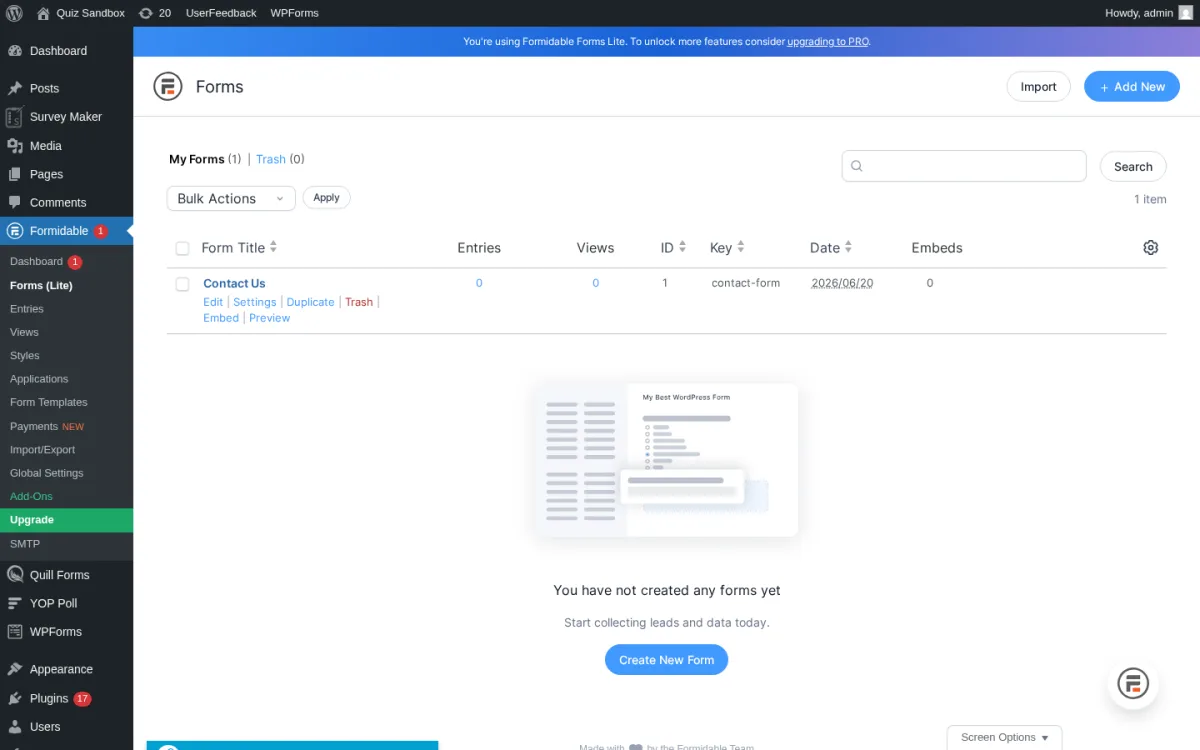
- Installed Formidable Forms Lite 6.32 via WP-CLI. The plugin activated cleanly, auto-seeded a "Contact Us" sample form (form key
contact-form, ID 1) and registered the Formidable menu (Dashboard, Forms (Lite), Entries, Views, Styles, Applications, Form Templates, Payments NEW, Import/Export, Global Settings, Add-Ons, Upgrade, SMTP). - Walked the Forms list, the Entries page, the Views page (which previews Grid, Table, Calendar and Timeline view templates), the Form Templates gallery and the Add-Ons page. Confirmed the Survey-style fields and the Views layer are clearly gated behind Business+ upgrade modals.
- Verified the Formidable Gutenberg block auto-registers, and the same form can be embedded via shortcode
[formidable id=x]or a Simple Form block. - The current Formidable Forms listing on WordPress.org on 2026-06-20: version 6.32, last updated 3 days ago (June 16, 2026), tested up to WordPress 7.0, PHP 7.0 or higher.
- Public adoption: 300,000+ active installs and 4.8/5 from 1,373 ratings.
Key features
- Drag-and-drop builder with 300+ templates, including NPS Survey, Customer Satisfaction Survey, Course Evaluation, Patient Intake.
- Free Lite ships unlimited forms, entries, AJAX validation, GDPR consent, multi-page forms, reCAPTCHA/hCaptcha/Turnstile.
- Survey fields on Business+: NPS, Likert, ranking, star rating, scale, summary review.
- Visual Views (Plus+): display form data as Grid, Table, Calendar, Timeline.
- Real-time graphs and charts on Plus+.
- Email integrations: Mailchimp, AWeber, ActiveCampaign, MailPoet, Constant Contact, GetResponse, Campaign Monitor on Plus+; Salesforce, HubSpot, Zoho on Elite.
- Stripe, Square, PayPal, Authorize.Net payment forms; AI form builder on Business+.
- WPML and Polylang compatibility on every tier.
Strengths
- Deepest survey field set in this roundup once you upgrade to Business.
- Views layer is unique: you can publish your survey responses as a searchable directory or a leaderboard, no extra plugin needed.
- 1,373 reviews and 4.8/5 average is the largest review base for a dedicated survey/form builder on this list.
- Multilingual on every tier via WPML and Polylang.
Drawbacks
- Survey-specific fields (NPS, Likert, ranking) require the Business tier, not Plus.
- The admin is heavier than WPForms for a single-form site.
- The free Lite tier covers basic forms and entries but does not include the Views layer or visual styler.
Pricing (2026)
- Free on WordPress.org as Formidable Forms Lite.
- Basic $39.50/yr promo ($79/yr regular), 1 site.
- Plus $99.50/yr promo ($199/yr), 3 sites. Adds Visual Views, real-time graphs, Mailchimp/ActiveCampaign/HubSpot/AWeber and 30+ addons.
- Business $199.50/yr promo ($399/yr), 7 sites. Adds Survey fields (NPS, Likert, ranking, star rating), payments (Stripe, PayPal, Square, Authorize.Net), form-to-PDF, AI forms, conversational forms.
- Elite $299.50/yr promo ($599/yr), unlimited sites. Adds Salesforce, HubSpot CRM, white labeling and 325+ templates.
- 14-day refund. Verified on formidableforms.com/pricing on 2026-06-20.
Verdict: pick Formidable Forms if you have outgrown a basic contact form and you want a real NPS or Likert survey with charts, plus the ability to publish responses on the front end as a directory or leaderboard. The Lite tier is enough for the contact form on your About page; the Business tier is the right entry point if NPS, Likert and ranking are non-negotiable.
3. UserFeedback: the best WordPress popup micro-survey and NPS widget
Category: widget-style WordPress feedback and survey plugin by MonsterInsights (Awesome Motive). Best for: site owners who want a Hotjar-style micro-survey popup that asks one question at a time, plus NPS surveys, post ratings and heatmaps, without using a SaaS subscription.
UserFeedback is a different shape from the rest of this list. Instead of a full-page form, it ships a small widget that pops up in the corner of your site and asks one short question or a 0-10 NPS scale. You can target the widget by page, by device, by URL, by user role, by exit intent, by geo location, by time on page, and by cookie state. The Lite plugin ships 20+ templates (NPS, customer satisfaction, content suggestion, blog post idea, churn reason, exit feedback), every common question type (rating, scale, multi-choice, radio, star, open text, date, image), Slack and Google Sheets and webhook integrations, post ratings on every blog post, and weekly email summaries. The Pro tiers add page-level targeting, advanced device targeting, heatmaps with click tracking, AI summaries that distill open-text feedback into themes, and email survey widgets you can embed in a Mailchimp or HubSpot campaign.
What I checked
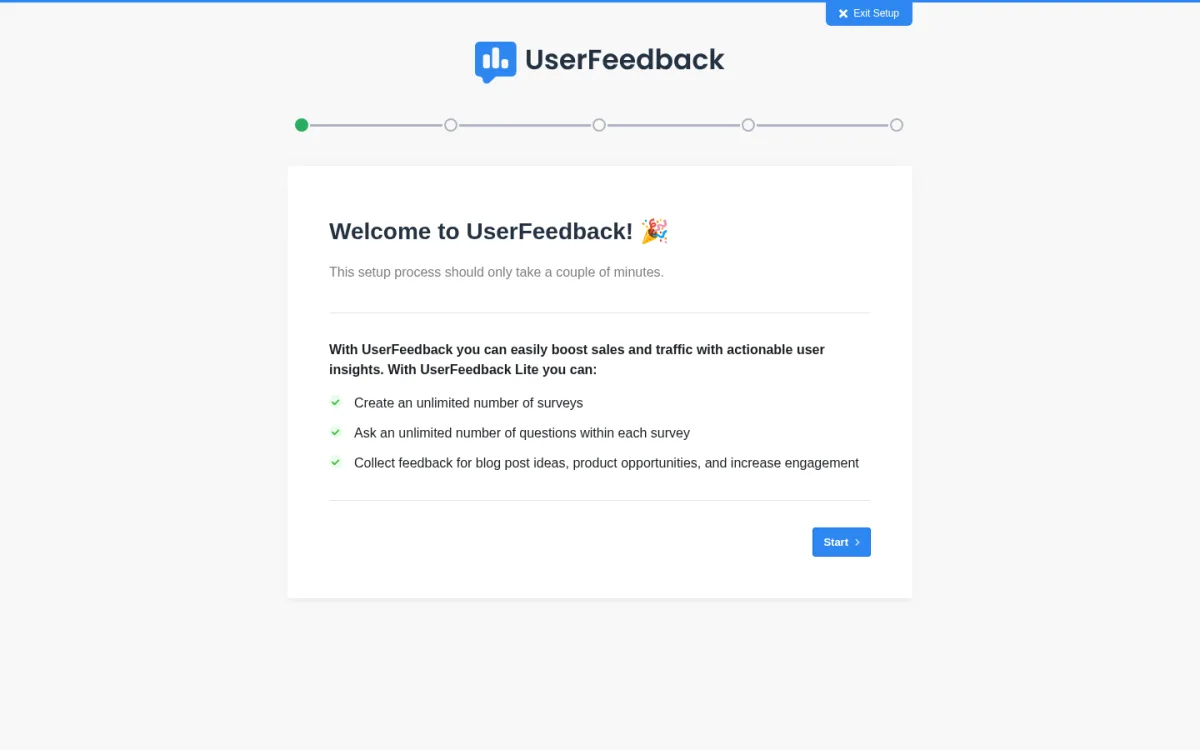
- Installed UserFeedback Lite 1.11.2 via WP-CLI. The plugin activated cleanly, ran a multi-step React onboarding wizard, and registered the UserFeedback menu (Surveys, Results, Post Ratings NEW, Email Surveys NEW, Heatmaps NEW, Settings, Addons, Integrations, SMTP, About Us).
- Walked the onboarding wizard, the Surveys list, the empty Results dashboard and the Addons page. Confirmed the templates and question types load directly inside the SPA after the wizard.
- Verified the UserFeedback admin bar item ("Hey you're not collecting any website feedback! Launch a UserFeedback survey now.") triggers the launch flow.
- The current UserFeedback Lite listing on WordPress.org on 2026-06-20: version 1.11.2, last updated 4 weeks ago, tested up to WordPress 6.9.4, PHP 7.4 or higher.
- Public adoption: 200,000+ active installs and 4.8/5 from 302 ratings.
Key features (free Lite)
- Unlimited surveys, unlimited questions, unlimited responses.
- 20+ question templates: NPS, CSAT, content rating, blog post idea, exit feedback, post ratings.
- 7 question types: rating, scale, multi-choice, radio, star, open text, date, image.
- Conditional redirect after submit.
- Slack notifications, Google Sheets integration and generic webhooks on the Lite tier.
- Weekly email summary of new responses.
- AI Summaries in Pro: distil open-text feedback into themes with one click.
Strengths
- Highest free-tier integration count in this roundup (Slack, Google Sheets, webhooks all on Lite).
- 200,000+ active installs in a category most plugins struggle to break 10k.
- Easiest path to an NPS survey in WordPress without a SaaS.
- Native pairing with MonsterInsights for Google Analytics segmentation.
Drawbacks
- Widget format only. For a full-page survey that visitors fill out in a long sit-down session, use WPForms, Formidable, Survey Maker or Quill Forms instead.
- Heatmaps, advanced device targeting, geo restrictions, AI summaries and email survey widgets are Pro-only.
- The onboarding wizard runs on first activation; you cannot jump straight to the Surveys list until you finish or exit it.
Pricing (2026)
- Free on WordPress.org as UserFeedback Lite.
- Plus $49.50/yr promo ($99/yr regular), 1 site. Custom branding, premium templates, CSV/XLSX export.
- Pro $99.50/yr promo ($199/yr), 5 sites. NPS reports, AI summaries, post ratings, advanced targeting (device, scheduling, geo), webhooks, conditional logic.
- Elite $149.50/yr promo ($299/yr), 25 sites. Heatmaps, multisite support, client management, premium support.
- 14-day refund. Verified on userfeedback.com/pricing on 2026-06-20.
Verdict: pick UserFeedback if you want a Hotjar-style micro-survey that pops up at the right moment, or if you want NPS on your WordPress site without a SaaS subscription. It is the lightest survey plugin on this list (no full-page form, no checkout flow) and the only one that ships Slack and Google Sheets integrations on the free tier. Pair it with an email newsletter plugin so the feedback you collect can drive an outreach sequence.
4. Crowdsignal Forms: the best free Gutenberg poll, NPS and applause bundle (by Automattic)
Category: Automattic-built block-editor poll, NPS, feedback and applause plugin, built on the Polldaddy heritage. Best for: bloggers, editorial sites and Automattic customers who want a free Gutenberg-native poll, NPS, applause and feedback block bundle, with cloud reporting on Crowdsignal.com.
Crowdsignal Forms is the Automattic answer to "I just want to drop a poll into my blog post". It is a Gutenberg-only plugin (no WP-admin menu) that ships six native blocks: Poll, Vote, Measure NPS, Feedback, Applause and Crowdsignal Embed. Each block stores responses on Crowdsignal.com, where the same Polldaddy/Crowdsignal team you already know hosts the reporting dashboard. The free Crowdsignal account is good for 2,500 signals (responses) per month; over that, signals are still recorded but you need the Premium plan to see the reports. The block bundle is the easiest in-line poll for a long blog post, and the Applause block is unique on this list. Crowdsignal has been operating since 2006 (originally as Polldaddy) and the brand is trusted by the BBC, the Tate Modern and the WordPress.com publishing team.
What I checked
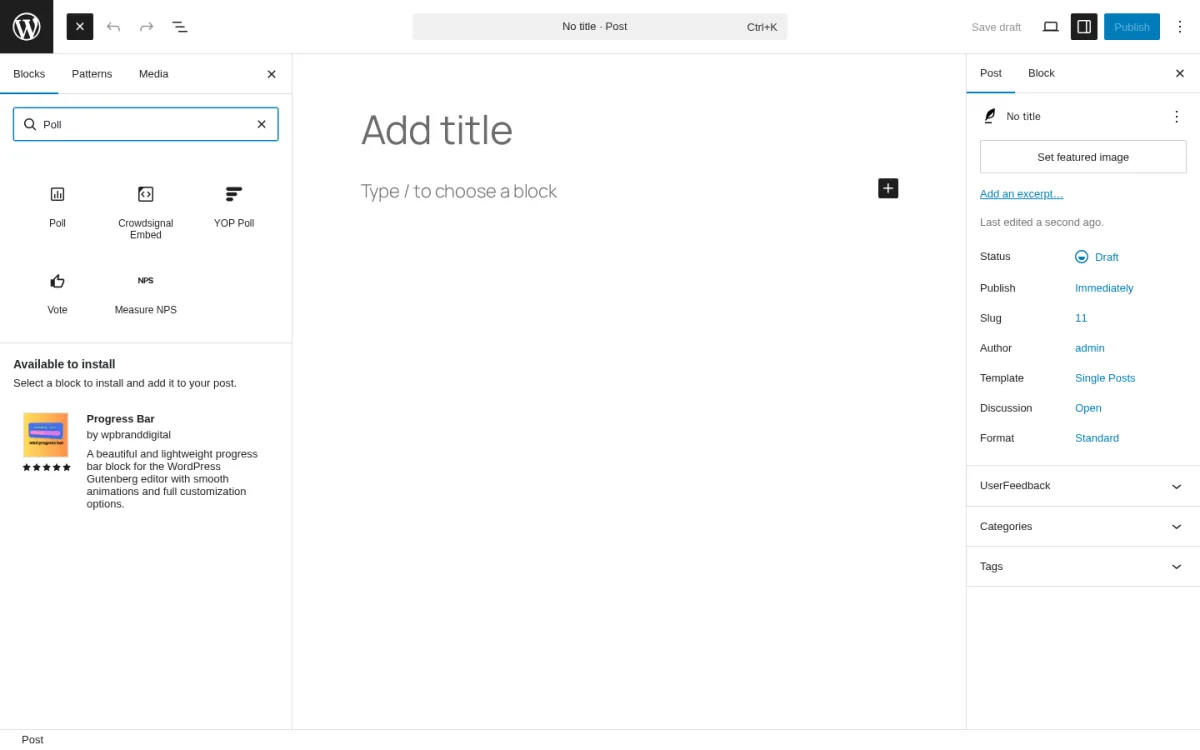
- Installed Crowdsignal Forms 1.8.1 via WP-CLI. The plugin activated cleanly with no admin menu page; instead, the six Gutenberg blocks (Poll, Vote, Measure NPS, Feedback, Applause, Crowdsignal Embed) registered into the block inserter.
- Created a new draft post in Gutenberg, opened the block inserter, typed "Poll" and confirmed all six Crowdsignal blocks appear in the search results, plus the related YOP Poll block from plugin #5.
- Walked the block sidebar settings for the Poll block: single-choice vs multi-choice, hide votes vs show votes, close date, redirect, response prevention, theme styling.
- The current Crowdsignal Forms listing on WordPress.org on 2026-06-20: version 1.8.1, last updated 2 weeks ago, tested up to WordPress 7.0, PHP 5.6.20 or higher.
- Public adoption: 200,000+ active installs and 5/5 from 4 ratings. The plugin is comparatively new (2020), but the broader Crowdsignal/Polldaddy product has been operating since 2006.
Key features (free plugin + free Crowdsignal account)
- Six native Gutenberg blocks: Poll, Vote, Measure NPS, Feedback, Applause, Crowdsignal Embed.
- Polls with single-choice or multiple-choice answers and a real-time results bar.
- NPS block with 0-10 scale and the standard Promoter/Passive/Detractor split.
- Feedback block: floating feedback button on any page, captures rating + optional comment.
- Applause block: lets readers cheer a post (unique on this list).
- Crowdsignal Embed: paste in a Crowdsignal-hosted quiz or form and it embeds inline.
- Hosted reporting dashboard on Crowdsignal.com with geo-location, IP analytics, response export.
- First 2,500 signals (responses) per month are free.
Strengths
- Built and maintained by Automattic, the company behind WordPress.com, WooCommerce, Tumblr.
- Most Gutenberg-native option in this roundup. No shortcodes, no widgets, just blocks.
- The Applause block is unusual and a good fit for a long-form editorial site.
- 5/5 rating and an extremely active 2025/2026 release cadence (block API v3 migration, iframe-safe selectors, hardened survey data handling).
Drawbacks
- The plugin alone is half the picture; you must connect a Crowdsignal.com account for reporting.
- The free signal cap is 2,500/month. Editorial sites can blow through that during one viral poll.
- No admin menu and no shortcode, so visiting site owners often miss the plugin entirely.
- One question per Poll block. Multi-question surveys live on the Crowdsignal.com builder.
Pricing (2026)
- Free plugin + free Crowdsignal.com account: unlimited polls/surveys, first 2,500 signals/month, basic embed, Crowdsignal branding.
- Premium $15/month annual ($25/month monthly), unlimited signals, Google Sheets, branching logic, exports, priority support, no Crowdsignal branding, custom CSS.
- Business $45/month annual ($59/month monthly), unlimited signals, custom domain, custom CSS, advanced API, up to 50k email surveys/month.
- 30-day money-back guarantee. Verified on crowdsignal.com/pricing on 2026-06-20.
Verdict: pick Crowdsignal Forms if you write blog posts in Gutenberg and you want a one-block poll, NPS or applause widget without leaving the editor. The free plugin plus the free Crowdsignal account is enough for most editorial sites, and the Premium plan is the cheapest unlimited-signal cloud-hosted poll tier on this list. If your survey needs an in-WordPress builder and full-page form, look at WPForms or Formidable Forms instead.
5. YOP Poll: the best free dedicated WordPress poll plugin in 2026
Category: free, dedicated WordPress poll plugin maintained since 2012 and completely rewritten in 2026 (v7.0) using React and a modern REST API. Best for: editorial sites, sports sites, news sites and forum communities that need a self-hosted poll with vote logs, bot protection and full control of the response data inside WordPress.
YOP Poll is the workhorse dedicated poll plugin on WordPress.org. The free build runs unlimited polls in parallel, schedules polls with start and end dates, supports single-choice and multiple-choice answers, optional "Other" free-text answers, and result display modes (before vote, after vote, on a custom date, after the poll ends, or never). Voter restrictions cover cookie, IP and username; bans can be applied globally or per poll; bot protection ships built-in plus Cloudflare Turnstile, reCAPTCHA v2/v3 and hCaptcha. Voters can submit custom fields (name, email, age, anything) which are then exported to CSV. Logs track every vote attempt for auditing. Version 7.0 (released earlier in 2026) is a complete React + REST rewrite that keeps every 6.x poll, vote, template and setting on upgrade.
What I checked
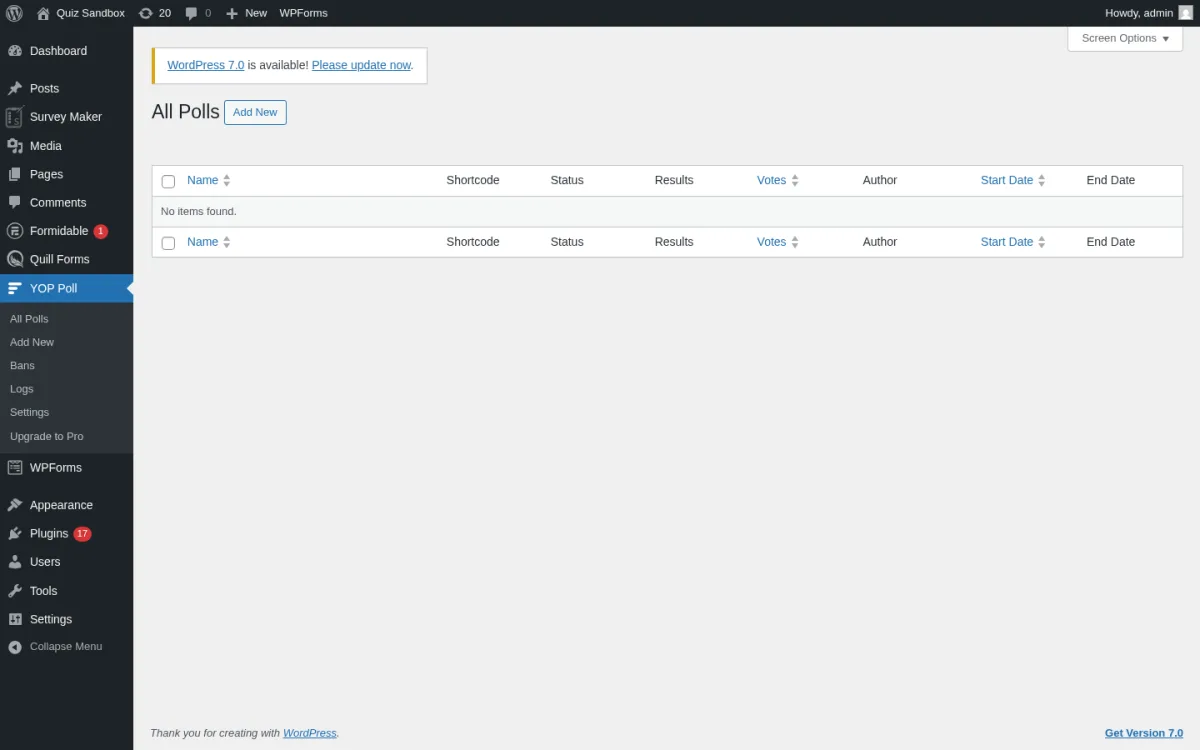
- Installed YOP Poll 7.0.5 via WP-CLI. The plugin activated cleanly and registered the YOP Poll menu (All Polls, Add New, Bans, Logs, Settings, Upgrade to Pro).
- Walked the empty All Polls list (columns: Name, Shortcode, Status, Results, Votes, Author, Start Date, End Date), the Add New Poll wizard, the Bans page and the Logs page.
- Verified the YOP Poll Gutenberg block auto-registers and the plugin ships four "smart" shortcodes (
[yop_poll id="-1"]for the current active poll,-2for the most recent,-3for a random active, and[yop_poll_archive]for the archive). - The current YOP Poll listing on WordPress.org on 2026-06-20: version 7.0.5, last updated 5 days ago, tested up to WordPress 7.0, PHP 7.4 or higher.
- Public adoption: 10,000+ active installs and 4.4/5 from 448 ratings.
Key features (free)
- Unlimited polls in parallel.
- Single-choice and multiple-choice questions; optional "Other" free-text answer.
- Schedule polls with start and end dates.
- Voter custom fields (name, email, age, anything you need); CSV export of votes.
- Result display modes: before vote, after vote, custom date, after poll ends, or never.
- Vote logs with sorting, search and CSV export.
- Voter bans by cookie, IP or username; global or per-poll.
- Built-in anti-spam plus Cloudflare Turnstile, reCAPTCHA v2/v3 and hCaptcha support.
- Gutenberg block + four smart shortcodes + sidebar widget + poll archive shortcode.
Strengths
- The 7.0 rewrite makes the admin instant; no full-page reloads.
- Modern React-based admin paired with a stable PHP REST API.
- Free tier covers vote logs, CSV export, Cloudflare Turnstile and per-poll bans, all things competitors gate behind Pro.
- 448 ratings is the largest review base for a dedicated poll plugin on WordPress.org.
Drawbacks
- One question per poll. Surveys with multiple sections need a different plugin.
- The 7.0 rewrite landed earlier in 2026 and the 7.0.x release stream is still fixing edge cases (date sorting, accessibility, CSV column fixes for Other answers). Keep auto-updates on.
- The Pro upgrade link routes to a vendor order page that has had complaints in the past about delivery. Read recent reviews before paying.
- Default styling is functional rather than polished.
Pricing (2026)
- Free on WordPress.org. The free tier is genuinely the workhorse here.
- YOP Poll Pro: the upgrade link in the admin sidebar opens the vendor order page on yop-poll.com. We did not validate the current Pro price during this run; cross-check the live page before paying.
Verdict: pick YOP Poll if you run an editorial site, a sports site, a news site or a forum and you want a self-hosted poll with full vote logs, bot protection, and unlimited concurrent polls, all on the free tier. The 7.0 rewrite makes it the most usable dedicated poll plugin on WordPress.org in 2026. If you need a Likert/NPS-style scale or branching logic, use WPForms, Formidable Forms or Quill Forms instead.
6. Survey Maker by AYS: the most polished dedicated survey plugin with lifetime Pro pricing
![Survey Maker by AYS 5.2.3.0 Surveys list with the auto-seeded Customer Satisfaction Survey Template visible (Sections 4, Questions 7, Submissions 0, Status Published 2026/06/20, shortcode [ays_survey id='1']). Top promo strip shows the Survey Maker by AYS logo, Create online surveys quickly, and an Upgrade One-time payment CTA. Left sub-menu: Dashboard, Surveys, Survey Categories, Popup Survey, Submissions, Export / Import, General Settings, How to use, Our products, PRO Features.](https://www.fs-code.com/storage/posts/PjqVculiNc3pF0rxMOdZhTWxBHtQK1DHPFK0qrJ8.webp)
Category: freemium dedicated WordPress survey, questionnaire and feedback-form plugin by Ays Pro. Best for: site owners who want a polished freemium survey UI, do not want a yearly subscription, and want a clean one-time lifetime upgrade path to NPS, Matrix, Slider and ChatGPT integration.
Survey Maker by AYS is the dedicated survey counterpart to Quiz Maker by AYS. The free tier ships unlimited surveys, sections and questions, 7-9 free question types (Radio, Checkbox, Dropdown, Paragraph, Short text, Number, Yes or No, Name field, Email field), drag-and-drop sectioned multi-page surveys, randomized questions and answers, an answer summary chart, popup survey with on-load / on-click / exit-intent triggers, anonymous survey mode, restriction by IP and user role, and a result page with redirect after submit. The Pro tier (sold as a one-time lifetime licence) adds advanced question types (NPS, Matrix, Ranking, Slider, Star Rating, File Upload, Phone), Logic Jump, Conditional Results, Conversational survey (chat-style flow), Calculation feature for cost or quote estimators, Mailchimp/Zapier/Google Sheets/Slack/Stripe/PayPal integrations, ChatGPT-assisted question writing and multilingual surveys.
What I checked
- Installed Survey Maker 5.2.3.0 via WP-CLI. The plugin activated cleanly, auto-seeded a "Customer Satisfaction Survey Template" (4 sections, 7 questions) and registered the Survey Maker menu (Dashboard, Surveys, Survey Categories, Popup Survey, Submissions, Export / Import, General Settings, How to use, Our products, PRO Features).
- Walked the Surveys list, the Survey Categories page, the Popup Survey screen, the Submissions tabs (Summary / Individual / Submissions / Analytics) and the General Settings page. The PRO Features tab enumerates everything you get on each lifetime tier.
- Opened the Add New Survey screen (Add New > Survey builder) and confirmed the intro, questions, fields, styles and settings tabs all render.
- The current Survey Maker listing on WordPress.org on 2026-06-20: version 5.2.3.0, updated 2 days ago, tested up to WordPress 7.0, PHP 7.0 or higher.
- Public adoption: 6,000+ active installs and 4.8/5 from 77 ratings.
Key features (free)
- Unlimited surveys, unlimited sections, unlimited questions.
- 7-9 free question types (Radio, Checkbox, Dropdown, Paragraph, Short text, Number, Yes or No, Name field, Email field).
- 20+ free survey style options.
- Drag-and-drop sectioned multi-page surveys.
- Randomize questions and answers.
- Result message; redirect after submit.
- Popup survey on free (on-load / on-click / exit-intent triggers).
- Anonymous survey mode.
- Restriction by IP, by User ID, by login-only.
- Individual submissions view + submissions summary on free.
Strengths
- Cleanest dedicated survey admin in this roundup.
- One-time lifetime Pro pricing means no annual renewal.
- Free tier already covers popup survey, anonymous survey, restriction rules and multi-page sections.
- Auto-seeds a Customer Satisfaction Survey Template on activation so new users have a working starter to clone.
- 4.8/5 with 77 reviews indicates a happy small-but-real user base.
Drawbacks
- Advanced question types (NPS, Matrix, Ranking, Slider, Star Rating, File Upload, Phone) are Pro-only.
- Email integrations (Mailchimp, Zapier, Google Sheets, Slack), payment gateways and Conditional Results live in Pro.
- The admin renders a Pro upsell banner and a YouTube promo card on the Surveys list; expect some upgrade noise on the free tier.
- Smaller install base (6k) than WPForms or Formidable.
Pricing (2026)
- Free on WordPress.org.
- Pro lifetime tiers (Business, Enterprise, Agency) sold via the AYS Pro vendor site. The vendor pricing page was unreachable from our headless probe (Cloudflare 403), so confirm the current Business/Enterprise/Agency price directly on ays-pro.com/wordpress/survey-maker before purchase.
- One-time payment; renewal is optional after year one.
Verdict: pick Survey Maker by AYS if you want a clean, dedicated WordPress survey plugin and you would rather pay once for a lifetime licence than subscribe yearly. The free tier alone is enough for a customer-satisfaction survey, a popup feedback widget or an anonymous internal employee survey. The lifetime Pro is the cheapest path to NPS, Matrix and ChatGPT-assisted survey design on this list.
7. Quill Forms: the best Typeform-style conversational survey plugin for WordPress
Category: free, open-source WordPress conversational form/survey/quiz plugin by Mohamed Magdy (UK-based, open source on GitHub). Best for: site owners who want a Typeform-style "one question at a time" survey experience hosted on their own WordPress site, with modern theming, AI form generation and 60+ integrations on the Pro tier.
Quill Forms is the Typeform alternative on this list. The free build ships 12 question blocks (Welcome screen, Date, Email, Dropdown, Multiple Choice, Statement, Range Slider, Website, Short Text, Long Text, Thank You, Group), a clean conversational layout that animates between questions, full theming (fonts, colours, backgrounds), custom CSS, email notifications and entries inside the WordPress admin. The Pro tier adds Jump Logic, a calculation engine for cost/quote/quiz scoring, partial submission tracking, drop-off rate analytics, AI form generation from a topic, payments (Stripe, PayPal, Square, Authorize.Net, Mollie, Razorpay, 2Checkout, BTCPay), and a 60+ integration catalog (HubSpot, Salesforce, Mailchimp, ActiveCampaign, Zapier, Webhooks, Google Sheets, Notion, Airtable, Slack, Discord, Twilio, Calendly, ConvertKit, Klaviyo, MailPoet, Constant Contact). The plugin is open source on GitHub.
What I checked
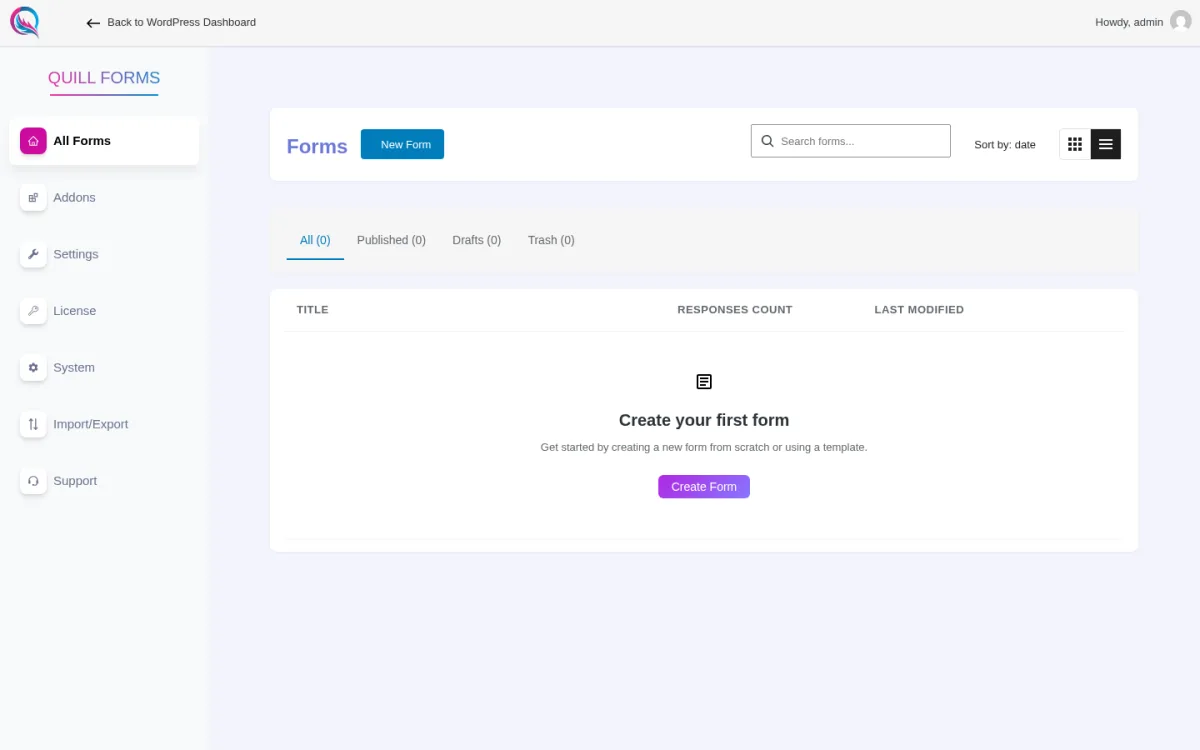
- Installed Quill Forms 5.6.1 via WP-CLI. The plugin activated cleanly and registered the Quill Forms menu (All Forms, Addons, Settings, License, System, Import/Export, Support) with the empty-state "Create your first form" panel.
- Walked the All Forms page (All / Published / Drafts / Trash tabs at 0), the Addons page (which clearly lists every Pro integration), the Settings and License pages.
- Verified the Quill Forms admin opens in a full-screen SPA outside the WordPress admin chrome ("Back to WordPress Dashboard" link in the top-left), which is the same pattern as Typeform.
- The current Quill Forms listing on WordPress.org on 2026-06-20: version 5.6.1, last updated 4 months ago, tested up to WordPress 6.9.4, PHP 7.1 or higher.
- Public adoption: 3,000+ active installs and 4.8/5 from 44 ratings.
Key features (free)
- 12 question blocks including Welcome screen, Statement, Group, Range Slider, Multiple Choice.
- Typeform-style one-question-at-a-time conversational flow with smooth animations.
- Full theming controls: fonts, colours, backgrounds, custom CSS.
- Email notifications inside the WordPress admin.
- Entries dashboard on free (since v4.0 in late 2024).
- No Quill Forms branding on the free tier.
- Open source on GitHub.
Strengths
- The only true Typeform-style WordPress plugin on this list.
- Free tier already covers email notifications, entries and a no-branding rendering.
- Modern SPA-style admin that feels closer to Typeform than to a WordPress plugin.
- Open source under the GPL, hosted on GitHub for contributors.
Drawbacks
- Jump logic, calculations, payments, AI form generation and almost all integrations require the Pro tier.
- 3,000+ active installs is a comparatively small base; expect a younger community than WPForms or Formidable.
- Pro pricing page was unreachable from our headless probe; confirm the current tier price on quillforms.com/pricing before subscribing.
- The plugin admin lives outside the WordPress admin chrome; site owners coming from WPForms or Formidable will need a minute to orient.
Pricing (2026)
- Free on WordPress.org with 12 blocks, theming, custom CSS, email notifications and entries.
- Pro yearly subscription via quillforms.com (the in-admin Upgrade link). The vendor pricing page was unreachable from our headless probe; cross-check live pricing on quillforms.com/pricing before subscribing.
Verdict: pick Quill Forms if you have been paying Typeform and want to bring the same conversational survey experience back to your own WordPress site, with full ownership of the response data. The free tier alone is enough for a clean conversational contact survey; the Pro tier is the cheapest path to jump logic, AI form generation and a 60+ integration catalog. If you would rather stick with a classic full-page form, see WPForms or Formidable Forms above.
How to choose the best WordPress survey plugin for your site
Most of the buying decision in 2026 comes down to three questions: what shape your survey takes (popup widget vs full-page form vs inline poll), how deep your reporting needs go, and how comfortable you are with a SaaS connection.
- If you want one plugin that handles your contact form, your newsletter form and your survey, install WPForms. The Lite tier is enough for a simple feedback form, and the Pro tier unlocks the Surveys & Polls addon with NPS, Likert and a beautiful reports view.
- If you need NPS, Likert, ranking and star rating fields plus a Views layer that publishes the responses on the front end, buy Formidable Forms Business. It is the deepest survey field set on this list and the only WordPress form builder that lets you display the responses as a directory, a job board or a chart.
- If you want a Hotjar-style popup micro-survey or an NPS widget that asks one question at the right moment, install UserFeedback. The Lite tier already ships Slack, Google Sheets and webhooks; the Pro tier adds heatmaps and AI summaries.
- If you write blog posts in Gutenberg and you want a one-block poll, NPS, applause or feedback widget, install Crowdsignal Forms plus a free Crowdsignal account. The first 2,500 signals/month are free.
- If you run an editorial site, sports site, news site or forum community and you want a self-hosted poll with vote logs and bot protection, install YOP Poll. The free tier is the workhorse.
- If you want a polished dedicated survey plugin with one-time lifetime pricing, install Survey Maker by AYS. The free tier already handles popup, anonymous and multi-page surveys; the lifetime Pro is the cheapest path to NPS, Matrix and ChatGPT-assisted question writing.
- If you want a Typeform-style conversational survey hosted on your own WordPress site, install Quill Forms. The free tier handles the conversational UI; the Pro tier adds jump logic, payments and 60+ integrations.
A practical pattern in 2026 is to pick one survey plugin from this list and pair it with the rest of your stack: a contact form plugin for non-survey traffic, an email newsletter plugin so the survey leads feed an outreach sequence, a popup plugin for the wider notification bar and exit-intent flow, and an anti-spam plugin so the survey form does not get hit by bots. If your survey is actually a quiz with right and wrong answers, the FS Code best WordPress quiz plugins roundup covers QSM, Forminator, Quiz Maker by AYS, HD Quiz, Watu and Thrive Quiz Builder.
FAQ
What is the best free WordPress survey plugin in 2026?
For most small business and editorial sites, WPForms Lite is the easiest free entry point because the same plugin doubles as your contact form. For dedicated survey work without paying, Survey Maker by AYS and UserFeedback Lite are the strongest options. Survey Maker is best for full-page multi-section surveys, and UserFeedback is best for a popup micro-survey or an NPS widget. For free polls specifically, YOP Poll is the workhorse dedicated poll plugin.
What is the best WordPress survey plugin for NPS (Net Promoter Score)?
UserFeedback Pro is the strongest dedicated NPS pick because it ships the standard 0-10 scale, the Promoter/Passive/Detractor segmentation, and a built-in NPS report. WPForms Pro with the Surveys & Polls addon offers NPS plus a polished reports dashboard. Formidable Forms Business offers NPS plus a Views layer to display the responses as a chart or directory. Crowdsignal Forms offers a free Gutenberg NPS block backed by an Automattic-hosted Crowdsignal account.
What is the best WordPress poll plugin in 2026?
YOP Poll is the strongest free dedicated WordPress poll plugin in 2026. It runs unlimited polls in parallel, schedules polls, logs every vote, supports voter custom fields, blocks duplicate votes by cookie, IP and username, and includes Cloudflare Turnstile + reCAPTCHA + hCaptcha bot protection on the free tier. Crowdsignal Forms is a strong alternative for Gutenberg-first sites that prefer cloud-hosted reporting by Automattic.
Can I build a Typeform-style conversational survey on WordPress?
Yes. Quill Forms is the most direct Typeform alternative on WordPress.org; the free build ships the one-question-at-a-time UI with full theming, smooth animations and no plugin branding. Survey Maker by AYS offers a "Conversational Survey" mode on the Pro tier, and Formidable Forms Business offers a Conversational Forms addon. Pick Quill Forms if the conversational UI is non-negotiable; pick AYS or Formidable if you also need full-page surveys in the same plugin.
Do free WordPress survey plugins support lead capture?
Yes, partly. WPForms Lite, Formidable Forms Lite, UserFeedback Lite, YOP Poll, Survey Maker by AYS and Quill Forms all collect name and email fields on the free tier. UserFeedback Lite goes furthest, with native Slack, Google Sheets and webhook integrations on the free tier. WPForms, Formidable, Survey Maker and Quill Forms keep the native Mailchimp/ActiveCampaign/HubSpot/Zapier integrations behind a Pro tier. Crowdsignal collects responses on Crowdsignal.com and routes them via Google Sheets on the Premium plan.
How much does a paid WordPress survey plugin cost in 2026?
It depends on the model:
- Annual subscription: WPForms Pro from $199.50/yr promo, Formidable Forms Business from $199.50/yr promo, UserFeedback Pro from $99.50/yr promo, Quill Forms Pro yearly via the vendor site.
- Monthly SaaS: Crowdsignal Premium from $15/month annual ($25/month monthly).
- Lifetime one-time payment: Survey Maker by AYS Business/Enterprise/Agency lifetime tiers via ays-pro.com.
Pick a paid tier when you actually need a Pro-only feature (NPS reports, Likert, conditional logic, AI summaries, payment gateways, lifetime ownership). Most small business and editorial surveys never need to leave the free tier.
Should I host my survey on WordPress or on a SaaS like Typeform or SurveyMonkey?
Host on WordPress when you want full ownership of the response data, no ongoing SaaS fee, and a survey that keeps working even if a vendor goes away. Pick WPForms, Formidable Forms, UserFeedback, YOP Poll, Survey Maker by AYS or Quill Forms. Host on a SaaS like Typeform or SurveyMonkey only when you need enterprise integrations, an external research panel, or a cross-platform survey that does not live on your WordPress site at all. Crowdsignal Forms is the middle ground: the plugin lives in WordPress but the data lives on a Crowdsignal.com account hosted by Automattic.
Conclusion
There is no single "best WordPress survey plugin" that fits every site. The right pick in 2026 depends on whether you are running a small business chasing customer feedback, an editorial site running engagement polls, a marketer running NPS, a brand running quick widget polls, or an agency embedding conversational surveys for clients.
- The strongest all-rounder is WPForms.
- The deepest survey field set is Formidable Forms at the Business tier.
- The strongest popup micro-survey and NPS widget is UserFeedback.
- The most Gutenberg-native poll, NPS and applause bundle is Crowdsignal Forms by Automattic.
- The strongest free dedicated poll plugin is YOP Poll.
- The most polished dedicated survey plugin with lifetime pricing is Survey Maker by AYS.
- The strongest Typeform-style conversational survey is Quill Forms.
If you already know what shape your survey takes (full-page form, popup widget, inline poll, or conversational flow), pick the plugin from this list that matches that shape, install it on the free tier first, and only upgrade when you see a real feature the free build cannot cover.


