

10 Best WordPress Popup Plugins in 2026 (Free and Paid, Compared)

Picking a WordPress popup plugin in 2026 looks simple from the outside and rarely is. A good popup plugin is supposed to do four things at once: build campaigns without forcing you to write code, fire them at the right moment (on load, on scroll, on exit, on click, on form submit), target the right visitor (page, device, country, returning vs new), and pipe the captured email straight to the marketing tool you already use. Some plugins nail all four. Some are amazing free popup builders but charge for exit intent and analytics. Some bundle popups with a full CRM. Some are SaaS with a thin WordPress connector. And every comparison post you will read this year still quietly leaves out the free version's real cap on the number of campaigns you can ship.
I went through ten WordPress popup, notification bar, WooCommerce conversion, and block-native campaign plugins that genuinely deserve the shortlist in 2026. For the five self-hosted popup picks (Popup Maker, Popup Builder by Sygnoos, Hustle, Icegram Engage and Brave Popup Builder) I installed each plugin into a clean WordPress sandbox, opened the popup creation flow, the trigger and targeting catalogs, and the email integration list, and read a wide spread of recent positive and critical reviews on each one. For OptinMonster and HubSpot the builder UI lives inside a paid or connected SaaS account, so those entries are source-verified from the live WordPress.org connector listing, the vendor pricing page, vendor docs and recent customer reviews rather than a sandbox tour. The ConvertForce entry is source-verified from the partner brief, the live convertforce.com product and pricing pages, and the WordPress.org listing (80+ active installs, 5/5 from 1 review, v0.0.10, tested up to WordPress 7.0). The Notibar entry is source-verified from the live WordPress.org plugin listing (8,000+ installs, 4.8/5, v3.1.4 published 2026-06-11), the public changelog, the ninjateam.org pricing page and recent reviews; it has not been re-tested in a fresh sandbox for this update. The YayBoost entry is source-verified from the live WordPress.org plugin listing, the yaycommerce.com pricing page and vendor documentation. The list intentionally includes Notibar as the dedicated notification bar pick, YayBoost as the WooCommerce-specific conversion toolkit and ConvertForce as the Gutenberg-native popup builder pick because the on-site message buyer often needs formats beyond modal popups: block-native campaign creation for WordPress editor users, a focused notification bar for announcements, and a WooCommerce-native set of sales triggers (exit-intent, free shipping bar, social proof) for stores. Below is a buyer-facing summary of what each pick uniquely wins for, what its free version actually unlocks (or whether it has one at all in 2026), what its current pricing looks like at checkout (not the marketing-page intro number), and which kind of WordPress site I would point at each one.
If you are still deciding what kind of site you are building first, the best types of websites to create in WordPress hub is a useful upstream read; this roundup picks up where that one stops, at the moment you have decided you want to capture leads, recover abandoning visitors and grow an email list, and now need to choose the popup plugin that will run those campaigns.
How I evaluated these picks
The ten plugins below are the ones that consistently sit at the top of the WordPress popup, notification bar, and WooCommerce conversion categories by active install count, paid-customer reach, average rating and recency of the last release. For each pick:
- I verified the live WordPress.org plugin page (where the plugin is distributed there) and recorded the current active install count, average rating, total number of reviews, last-update date and minimum WordPress version tested. For OptinMonster, HubSpot, ConvertForce, Notibar and YayBoost, where the builder UI lives inside the vendor account, the WordPress.org listing is the canonical source, or the update is based on a verified partner brief, I used the vendor's official site, the live WordPress.org listing, public demos, recent independent review sites and the vendor's own pricing page as the primary sources.
- I installed and activated Popup Maker, Popup Builder by Sygnoos, Hustle, Icegram Engage and Brave Popup Builder in a clean WordPress sandbox and, for each of those five, created a real popup or campaign end to end. For Popup Maker I configured a Time Delay / Auto Open trigger with a 5 second delay. For Popup Builder I opened the Main Options panel with the Display Rules, Events and Conditions tabs and set the display rule to "Everywhere". For Hustle I walked the Create Pop-up wizard from name and Email Opt-in type through into the Choose a Template grid. For Icegram Engage I configured the Display Rules with Where? Homepage, When? Always and the Device targeting group. For Brave I clicked the floating + button, chose + New Popup / Widget, and opened the template chooser with its mix of free and PRO-badged templates. The screenshots in the body are real captures from those installs, not promotional images. For OptinMonster, HubSpot, ConvertForce, Notibar and YayBoost, the per-plugin notes are based on vendor pricing pages, vendor docs, the live WordPress.org listing, the partner brief where applicable and recent customer reviews.
- I read each vendor's full documentation, public roadmap and recent changelog so the per-plugin entry below reflects what the plugin currently does, not what it did two release cycles ago.
- I opened each vendor's pricing page and recorded the real annual commitment at checkout, not the marketing-hero intro number. Where pricing shows monthly but bills annually, I converted to the real annual figure; where intro pricing is shown alongside the regular renewal price, both numbers are recorded so you can see the first-year-versus-renewal delta.
- I read a spread of recent positive and critical reviews on WordPress.org and independent review sites so the per-plugin entry below reflects what real WordPress users currently say, not just the vendor's own positioning.
- Every install count, review count, rating and pricing figure below was verified on 2026-05-31 for the original seven picks, on 2026-06-17 for the Notibar addition, and on 2026-06-23 for the YayBoost addition, and on 2026-06-25 for the ConvertForce addition.
The ranking is not "best to worst." Each plugin is a credible 2026 pick for a specific buyer profile, and the order roughly reflects how often a typical WordPress site owner falls into each profile, not a 1-to-10 quality gradient.
Quick picks: best WordPress popup plugin by job
If you want the short answer first, here is the top pick I would recommend for each typical buyer profile in 2026. The full per-plugin breakdown sits below.
| Buyer profile | Top pick (2026) | Why | Starting price |
|---|---|---|---|
You want the most established premium popup platform with the deepest targeting, the most templates and the cleanest revenue attribution, and you do not mind paying for a SaaS account |
OptinMonster |
1M+ WordPress connector installs, signature Exit-Intent technology, OnSite Retargeting, 700+ templates, smart tags, and the broadest integration catalog of any plugin in this roundup. |
Basic $7/ |
You want a dedicated WordPress notification bar plugin for announcements, sale banners, maintenance notices or top-of-page CTAs, and you want it free |
Notibar |
Multiple notification bars from a React-powered live editor, full scheduling, three-state Dismiss, per-page include/ |
Free; Pro $29/ |
You run a WooCommerce store and want a single plugin that bundles exit-intent popups, a free-shipping progress bar, stock scarcity alerts, social proof indicators and next-order coupons in one settings panel |
YayBoost |
WooCommerce-native sales booster with exit-intent popup, free shipping bar, stock scarcity, live visitor count, frequently bought together, and next-order coupon features, all configurable without code; free core with Pro upgrades for advanced targeting and analytics. |
Free; Pro $59/ |
You want a lightweight, Gutenberg-native popup plugin for notification bars, lightbox popups and slide-ins, and you prefer building campaigns with WordPress blocks instead of a separate SaaS or custom popup builder |
ConvertForce |
Block Editor-native workflow with three campaign types, time-delay trigger in the free version, page and category display rules, responsive output, static social proof use cases, and Pro triggers for exit intent, scroll depth and user inactivity. |
Free; Pro from $39.50/ |
You want the strongest free WordPress popup plugin available in 2026, installable from WordPress.org with no SaaS account required |
Popup Maker |
700,000+ active installs, 4.9/ |
Free; Pro $59.40 first year (regular $99/ |
You want one plugin with one yearly price that unlocks every popup type and extension, and you run several sites |
Popup Builder by Sygnoos |
200,000+ installs, 4 free popup types (Image, HTML, Facebook, Subscription) and 28+ extensions; one annual plan unlocks every Pro extension across 2, 10 or unlimited sites with no per-feature add-ons. |
Starter $49.95/ |
You want exit-intent in the free version and you can live with a 3-of-each module cap (3 popups, 3 slide-ins, 3 share bars, 3 embeds) |
Hustle |
Smart Exit-Intent in the free build, 19 email and CRM integrations including MailChimp, ActiveCampaign and HubSpot, plus scheduling, A/ |
Free; Pro via WPMU DEV membership |
You want more than popups: action bars, slide-ins, sticky notes, inline messages and toast notifications across the whole site |
Icegram Engage |
Popups, action bars, toast notifications, messengers, inline messages and overlays from one plugin, a real template gallery, and reasonable Pro pricing ($129/ |
Free; Pro $129/ |
You want full creative freedom in the free version with a real drag-and-drop builder, every email and CRM integration unlocked, and no per-feature pricing |
Brave Popup Builder |
A genuine visual editor with 10 elements, 15 starter presets, and all 23-25 newsletter and CRM integrations in the free build; flat per-site-count pricing for Pro. |
Free; PRO $59/ |
You want popups and a real CRM, email automation, live chat and chatbots from the same free account |
HubSpot All-In-One Marketing |
Free HubSpot CRM, contact management, live chat, chatbots, forms and popups bundled inside one WordPress plugin, designed for B2B and service businesses that need a CRM and not just a popup tool. |
Free; HubSpot Marketing Hub paid tiers from Starter up |
1. OptinMonster: best for serious marketers and agencies
OptinMonster is the premium popup platform that most "best of" lists put on the top spot, and on its own merits in 2026 it still earns the position. The WordPress.org connector lists 1,000,000+ active installs, the marketing claim is 1.2 million customers, and the feature matrix is by some distance the deepest in this roundup. The catch is that OptinMonster is not really a WordPress plugin; it is a SaaS popup platform with a thin WordPress connector. Every popup, every template, every targeting rule and every analytics report lives in your optinmonster.com account, and you need a paid subscription (or the credit-card-required free trial) to do anything meaningful with it.
What that buys you is significant. OptinMonster's signature Exit-Intent technology detects when a visitor is about to leave the page and fires a campaign at exactly that moment, with documented case-study lifts in the 5-10% range on opt-in rates. Beyond that the plugin offers smart page-level targeting, OnSite Retargeting for new versus returning visitors, geolocation-based targeting and translation, device-based campaigns, scroll-trigger and inactivity sensors, scheduled campaigns, A/B testing that actually plays nicely with WordPress caching, smart tags that personalise the message with the visitor's name or location, and reliable conversion analytics that won't be skewed by your cache plugin. There are 700+ templates, a drag-and-drop builder with a Canvas mode for fully custom designs, and integrations with every major email service: Constant Contact, Mailchimp, AWeber, Keap, ActiveCampaign, ConvertKit, Brevo, GetResponse, Campaign Monitor, Drip, HubSpot, Klaviyo, MailerLite, MailPoet, Marketo, Ontraport, Pardot, plus Zapier, webhooks, and Uncanny Automator for the integrations that aren't native.
The pricing on the optinmonster.com page is currently quoted at 60% off for the first 12 months. The real annual numbers are Basic $210/year (1 site, 2,500 monthly impressions, page targeting, scroll triggers, no exit-intent), Plus $570/year (up to 2 sites, 10,000 impressions, A/B testing, content locking, device targeting), Pro $870/year (up to 3 sites, 25,000 impressions, the famous Exit-Intent, countdown timers, smart tags, two sub-accounts) and Growth $1,470/year (up to 5 sites, 100,000 impressions, geolocation, OnSite Retargeting, OnSite Follow Up Campaigns, eCommerce integrations, unlimited sub-accounts). There is a 14-day no-risk money-back double guarantee. Note that the headline Exit-Intent feature is on the Pro plan and up, not Basic or Plus, so factor that into the comparison.
I would point a serious content business, an e-commerce store with real monthly revenue, or a marketing agency at OptinMonster. I would not point a hobby blog or a brand-new site at it: the price is justified only when you are already capturing enough traffic to amortise it, and the free WordPress plugins in this roundup will cover that earlier stage perfectly well.
2. Notibar: best dedicated WordPress notification bar plugin
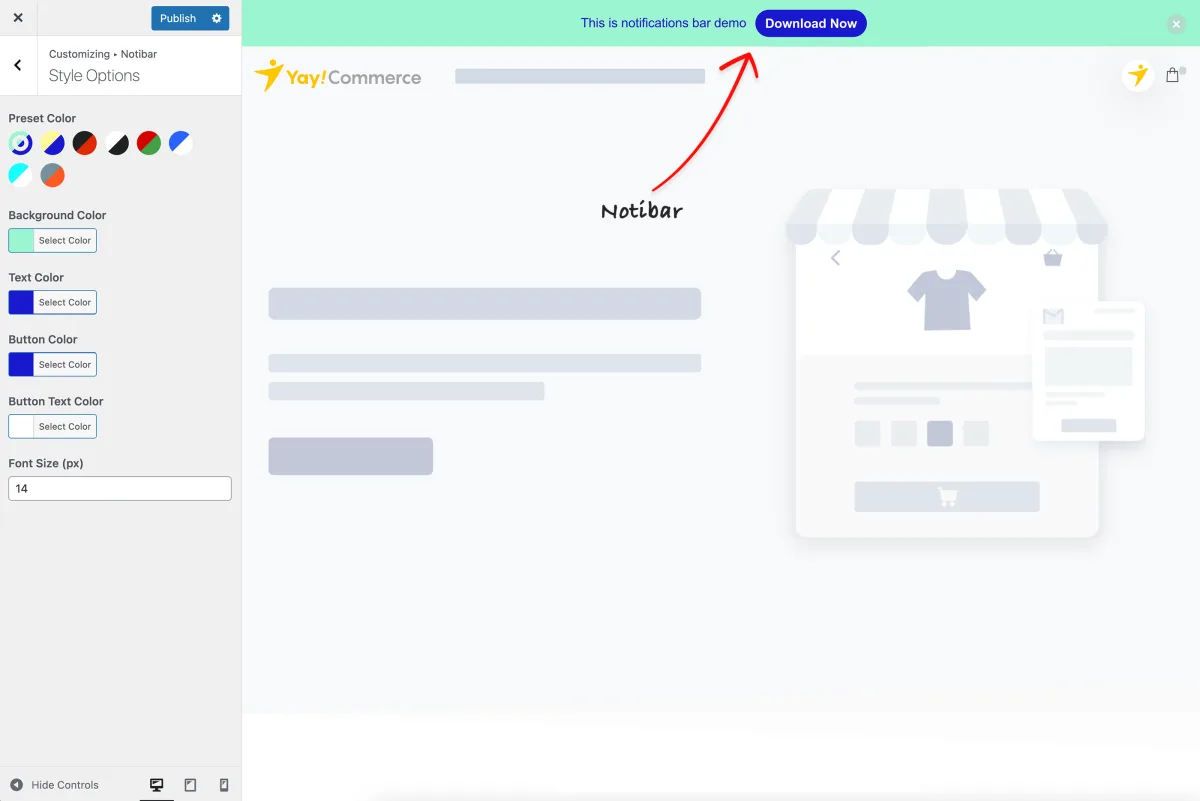
Notibar sits in a slightly different lane to the rest of this list. It is not a popup builder; it is a dedicated WordPress notification bar plugin built by Ninja Team (the same team behind YayCommerce), and it focuses on the top-of-page (and, in Pro, bottom-of-page) message format that announces something specific: a sale, a maintenance window, a privacy update, a fundraising appeal, a new launch, a thin lead-capture banner. If your site needs both a popup and a focused notification bar at the same time, Notibar is the cleanest free way to ship the bar without dragging in a heavier all-in-one tool.
The WordPress.org listing puts Notibar at 8,000+ active installs and a 4.8/5 rating from 70 reviews (65 of them 5-star), with v3.1.4 published on 2026-06-11 and the changelog confirming compatibility with WordPress 7.0, Divi 5, the Brandy WooCommerce theme, lazyload and object cache. The free build is unusually generous for a notification bar plugin. You can create multiple bars (not just one) and manage them from a dedicated Notibar admin menu with a React-powered WYSIWYG editor and instant live preview. Each bar carries its own content, style preset, fixed-or-absolute positioning, text alignment and container width, click-to-action button, separate mobile content and CTA, scheduling (a start and end date/time plus a daily ON/OFF schedule), a three-state Dismiss control (close permanently, collapse/toggle, or disabled), per-bar include/exclude rules on specific pages and posts, drag-and-drop reordering, one-click duplicate, Export/Import migration, and raw HTML and CSS support. The plugin is 100% mobile-responsive, hit WCAG Level AA accessibility in v2.1.9, and integrates with the WPML String Translation addon so a published bar's text, button label and button URL register automatically as translatable strings under the notibar domain. Polylang support is currently a documented stub, and the docs are honest that full Polylang integration is planned for v3.2+; for now Polylang sites need a couple of pll_register_string() calls from a child theme or custom plugin.
What is gated to Notibar Pro is the conversion-and-targeting layer. Pro unlocks Rotation mode for A/B testing across multiple bars (cycle by sequence or random, with a custom interval and pause-on-hover), targeting by custom post type (including WooCommerce products), advanced reports with per-bar click and dismiss tracking plus analytics charts (trend over time and per-bar comparison, added 2026-06-04 in v3.1.3), the ability to display a bar at the bottom of the screen, conditional display by user role, logged-in state or specific users, and scheduling in visitors' local timezones. Pricing on ninjateam.org is genuinely flat: Single Site $29/year or $79 lifetime, 5 Sites $49/year or $159 lifetime, Unlimited Sites $99/year or $299 lifetime. The lifetime tiers are unusual in this category and useful if you maintain a fixed portfolio of sites; the public pricing page does not list a money-back guarantee, so plan around that if it matters to you.
The fair criticism is scope. Notibar does one thing (notification bars) deliberately well; it does not build modal popups, slide-ins, exit-intent overlays or full-page interstitials. If you want a single tool that handles everything, the multi-format plugins later in this list (Icegram Engage at #8, or any of the popup-first picks) will do that. But if you have already picked a popup plugin, or you simply do not need a popup, Notibar is the cleanest free way to add multiple scheduled, dismissible, mobile-aware notification bars to a WordPress site without bolting them onto a heavier product. I would point a content site, an e-commerce store running periodic sale and shipping announcements, or a SaaS marketing site running release notes and maintenance windows at Notibar. The free build covers the basics generously, and Pro's $29/year single-site tier is one of the lowest entry prices in this roundup if you eventually need rotation, role targeting or analytics.
3. YayBoost: best WooCommerce sales booster with exit-intent popup
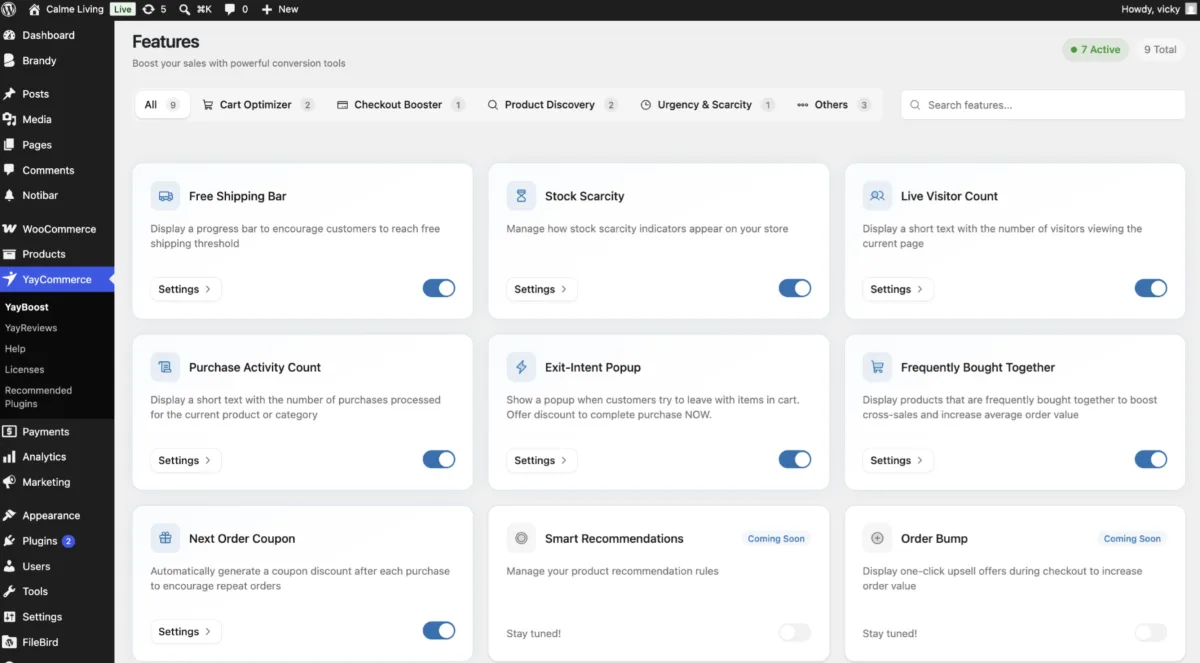
YayBoost is a different kind of entry in this roundup. Rather than a general popup builder, it is a WooCommerce-native conversion toolkit built by YayCommerce (the same team behind Notibar at #2 in this list), and its popup capability is one piece of a broader set of sales triggers. If you run a WooCommerce store and need exit-intent popups, a free-shipping progress bar, stock scarcity alerts and social proof indicators from a single settings panel with no coding, YayBoost is worth a close look.
The free build ships seven conversion modules, each independently toggleable. The exit-intent popup fires when a shopper's cursor moves toward the browser's back button or address bar, giving you one last chance to keep them on site with an offer or email capture. The free shipping bar displays a progress indicator showing how much more a customer needs to add to qualify for free shipping, one of the most reliably effective cart-value nudges in WooCommerce. Stock scarcity indicators surface low-inventory warnings on product pages to create urgency. The live visitor count shows how many people are currently viewing a product, with a simulated mode in the free build and real-time tracking in Pro. The frequently bought together module surfaces a curated product bundle (up to 3 products in the free build) beneath the add-to-cart button. The next-order coupon generates and displays a discount code for the customer's next purchase, useful for first-time buyer retention. The email capture popup rounds out the free set. Each module is configured from the YayBoost settings panel in the WordPress dashboard with live preview; no code is required for any of them.
YayBoost Pro extends each module with more targeting and styling options. The free shipping bar gains a visual progress bar style and full detail mode. The live visitor count switches from simulated to real-time. The exit-intent popup gains IP and geolocation restrictions (useful for excluding countries from specific campaigns). The frequently bought together module expands to 4 or more products with a list layout option. The next-order coupon gains fixed cart and free shipping discount types. Version 1.2.0, published May 29, 2026, added card and badge styles for purchase activity count, rich content for features and quick config presets, giving you a sense of the team's active development pace since the initial March 2026 launch.
Pricing on yaycommerce.com is running an introductory offer through July 31, 2026: Single Site $59/year (regular $99/year) or $199 lifetime, 5 Sites $139/year (regular $199/year) or $399 lifetime, Unlimited Sites $399/year (regular $499/year) or $799 lifetime. A 30-day money-back guarantee covers all paid plans. The plugin requires WooCommerce to be installed and activated; it does not run on non-WooCommerce sites.
The honest caveat is maturity. YayBoost launched in March 2026 and is still in its early months on WordPress.org. The install count is modest and there are no public reviews yet, which is expected for a plugin this new. The team has a track record with other YayCommerce products, the changelog shows steady development, and the free feature set is genuinely useful for WooCommerce stores. If you want a conversion toolkit with years of peer reviews behind it, the other plugins in this roundup have that. If you run WooCommerce and want a free, no-code bundle of the conversion tactics that work in ecommerce (shipping bars, social proof, exit-intent, upsells), YayBoost is the most focused pick in this list for that job.
I would point a WooCommerce store owner who wants multiple sales-boosting tools from one free plugin at YayBoost. It is not a replacement for a general popup builder if your goal is lead capture or notification bars; those needs are better served by Popup Maker, Notibar or Icegram Engage elsewhere in this roundup. But for WooCommerce-specific conversion optimization, YayBoost bundles more relevant tools in one place than any other plugin here.
4. ConvertForce: best Gutenberg-native popup builder for block editor users
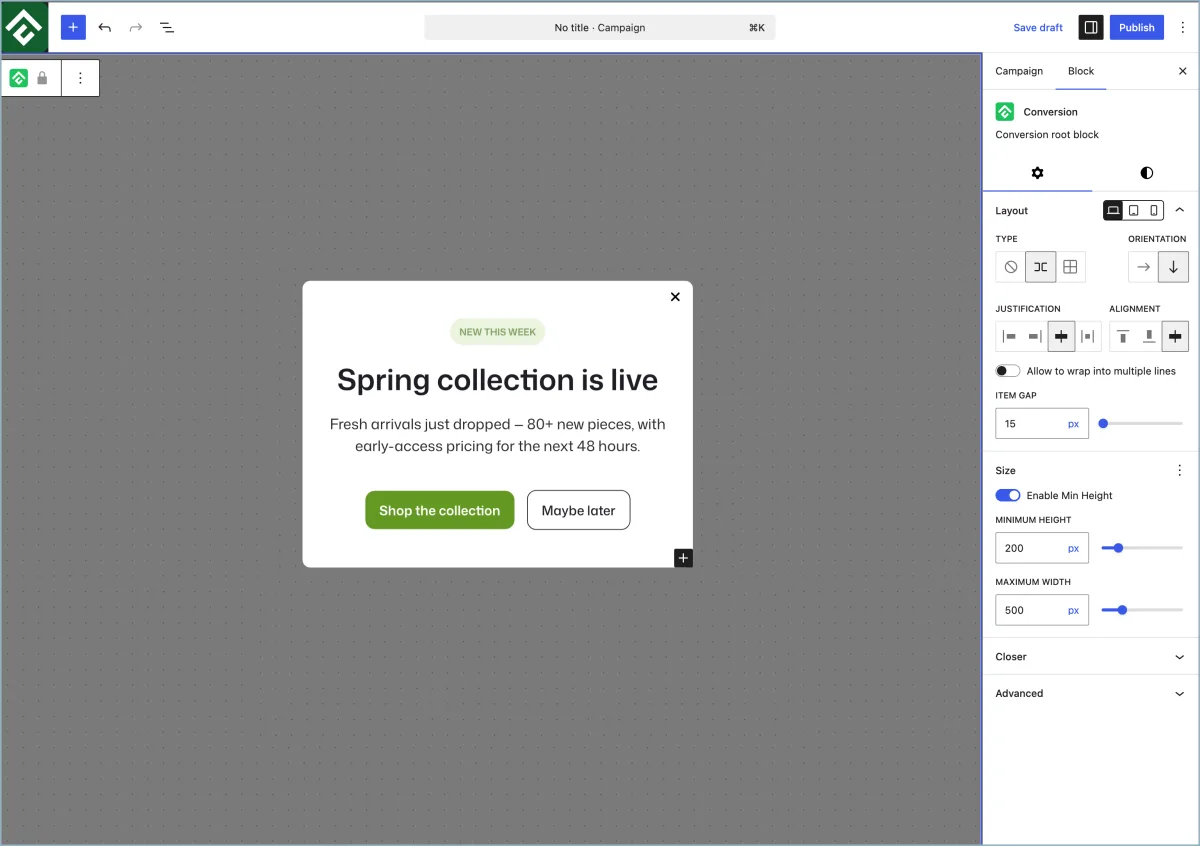
ConvertForce is one of the newer names in this category, but it earns the #4 spot for a very specific buyer: WordPress users who want popup, notification bar and slide-in campaigns built inside the native block editor. Instead of sending you into a separate SaaS dashboard or a proprietary popup canvas, ConvertForce lets you compose campaign content with the same Gutenberg blocks you already use for posts and pages, then choose the campaign type, display rules, trigger and appearance from the WordPress admin.
The plugin supports three campaign formats: notification bars, lightbox popups and slide-ins. Notification bars fit sitewide announcements, sale banners, product launches, cookie notices and simple CTA strips. Lightbox popups are better for newsletter offers, key promotions and direct lead-capture moments. Slide-ins sit between the two: visible enough to catch attention, but less interruptive than a centred modal, which makes them useful for testimonials, trust badges, star ratings and other static social proof.
The free version is already practical for basic campaigns. It includes all three campaign types, unlimited campaigns, unlimited impressions, responsive output, display conditions for pages and categories, and a Time Delay trigger. ConvertForce Pro adds the behaviour-based triggers that more conversion-focused teams will want later: Exit Intent, Scroll Depth and User Inactivity. The public ConvertForce site also positions performance as a core reason to choose it, citing WP Hive benchmarks in the top 1% for memory usage, top 5% for page-speed impact, roughly 11.19 KB added to the frontend, zero custom database tables and zero wp_options entries.
Pricing is straightforward at the time of this update. ConvertForce is free on WordPress.org. ConvertForce Pro is currently listed at launch pricing of $39.50/year or $124.50 lifetime for unlimited sites, with regular pricing shown as $79/year and $249 lifetime. Both paid plans include a 30-day money-back guarantee. The WordPress.org listing is still young: version 0.0.10, 80+ active installs, 5/5 from 1 review, tested up to WordPress 7.0, and a minimum WordPress requirement of 6.1.
The honest caveat is maturity. ConvertForce does not yet have the same install base, template library, analytics depth, A/B testing system or email marketing integration catalog as long-established tools like Popup Maker, Hustle, Icegram Engage or OptinMonster. It is also intentionally Gutenberg-native, so sites still relying on the Classic Editor should not choose it until they are ready to move campaign creation into the block editor.
I would point bloggers, small business sites, product marketing pages, SaaS landing pages and WordPress agencies at ConvertForce when they want a lightweight, block-native way to publish announcement bars, promotional popups and slide-ins without adding a bulky popup platform. I would not point advanced ecommerce or list-growth teams at it yet if they need mature analytics, A/B testing, native CRM integrations and revenue attribution from day one.
5. Popup Maker: best free WordPress popup plugin in 2026
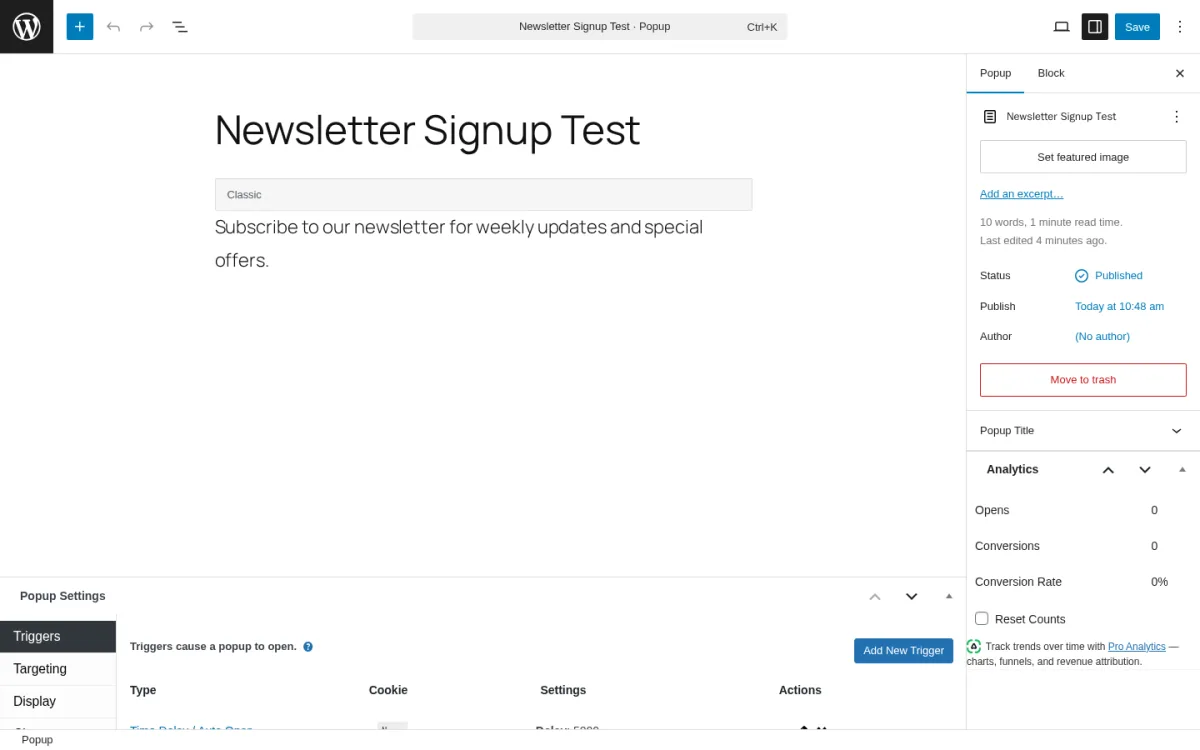
Popup Maker is the WordPress popup plugin I would install on a brand-new site today without thinking about it. With 700,000+ active installs and 4,498 reviews averaging 4.9 out of 5 stars, it is by some distance the most-loved popup plugin on WordPress.org, and the free version is genuinely useful rather than a stripped-down trial. I installed Popup Maker from WordPress.org into a clean WordPress sandbox on 2026-05-31, created a "Newsletter Signup Test" popup end to end, configured a Time Delay / Auto Open trigger at a 5 second delay in the Triggers tab, and inspected the Targeting and Display panels along with the right-rail Analytics widget. The screenshot above is taken from that real install.
The free build covers unlimited popups (no daily impression cap, no per-popup limit), click-button-to-open and auto-open triggers (with optional delay), form-submission triggers, basic but practical targeting on posts, pages, custom post types, post categories, post tags and custom taxonomies, front-page and blog-page targeting, cookie-based display frequency to prevent popup fatigue, a visual popup editor with custom positioning and animations, mobile-responsive layouts and full Gutenberg block editor support. It also integrates out of the box with every major WordPress form plugin (Ninja Forms, Gravity Forms, Contact Form 7, WPForms, WSForm, Fluent Forms, Mailchimp for WordPress, Formidable Forms, Forminator, Elementor Pro Forms, HappyForms, Kali Forms, Bit Form, HTML Forms, Beaver Builder Forms, Newsletter) and accepts copy-paste form HTML from MailChimp, AWeber, Infusionsoft, GetResponse, ConvertKit, Constant Contact, MailPoet, FluentCRM and HubSpot.
What is gated to the paid tier is the popular stuff: Exit-Intent and Scroll-trigger sit on Popup Maker Pro, along with advanced behavior targeting (geolocation, OS, browser, user role, login status, previous popup interactions), scheduling, forced interaction, bulk operations, popup analytics, trackable Call-To-Action management and FluentCRM integration. Popup Maker Pro+ layers full revenue attribution, WooCommerce, Easy Digital Downloads and LifterLMS integrations on top of Pro. Pricing on wppopupmaker.com runs at 40% off for the first year: Pro $59.40 first year (regular $99/year for 1 site, scaling up to $779/year for 100 sites), Pro+ $149.40 first year (regular $249/year for 1 site, scaling up to $1,499/year for 100 sites). Both tiers carry a 30-day money-back guarantee.
I would point any new WordPress site, blog or small business at Popup Maker first. The free version will keep you happy for months, and the moment you outgrow it (you need exit-intent or analytics), Pro at $99/year is by far the most reasonable upgrade in this category.
6. Popup Builder by Sygnoos: best for multi-site agencies on a flat budget
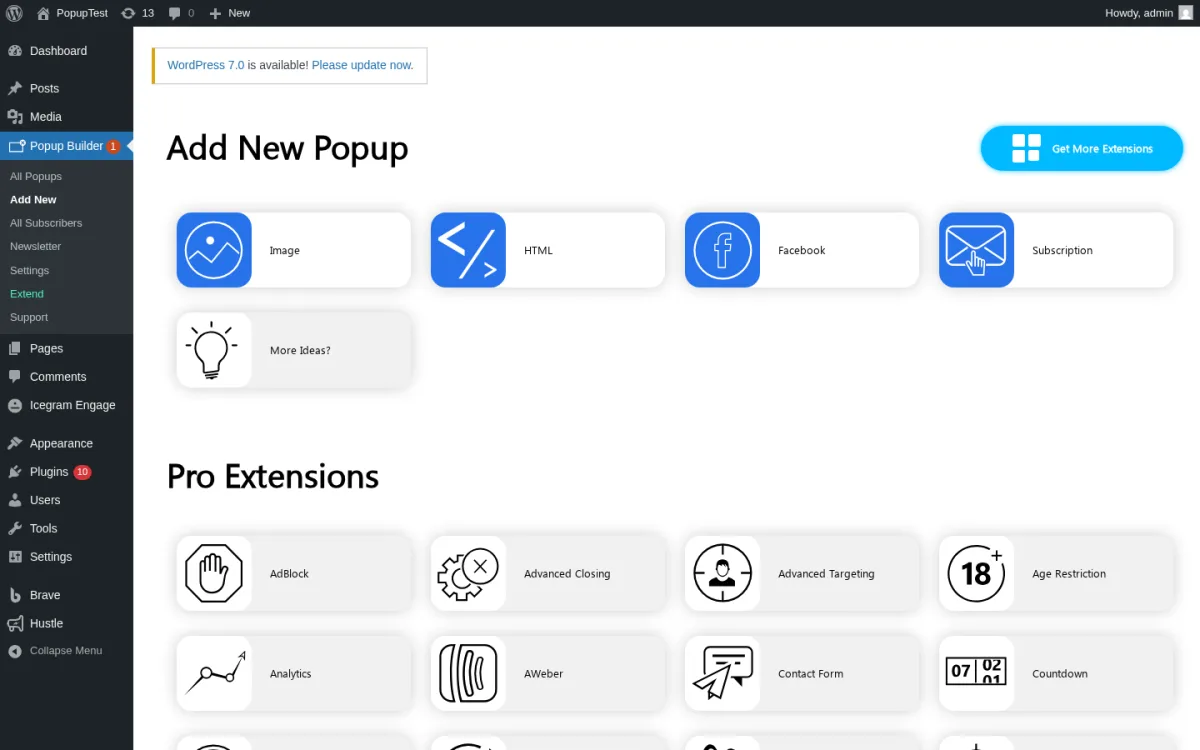
Popup Builder by Sygnoos sits at 200,000+ active installs and a 4.7/5 average rating from 2,208 reviews, making it the second-largest free popup plugin on WordPress.org. I installed Popup Builder 4.4.4 from WordPress.org into a clean WordPress sandbox on 2026-05-31, created a "Sale Banner Test" popup end to end, and opened the Main Options editor with the Display Rules tab set to "Everywhere", plus the Events and Conditions tabs that configure on-load delay, on-click triggers and per-page visibility. The Add New Popup screen (the screenshot above) is the moment that makes Popup Builder feel different from the rest of this roundup: the four free popup types and the 28+ Pro extensions are laid out side by side, so you can see exactly what is unlocked at every tier before you commit.
The free build ships four popup types: Image (great for product promos and lead-magnet covers), HTML (anything you can write in HTML or stuff into a shortcode), Facebook (for page likes and share counts), and Subscription (your basic email opt-in form). You also get on-load and on-click triggers, popup opening delay, a floating-button scroll trigger, mobile-responsive design, full design customisation, WPML and Polylang support and integration with WooCommerce, Mailchimp, Contact Form 7, Ninja Forms, Gravity Forms, TablePress, Formidable Forms, WP Google Maps and Divi Builder.
The Pro extensions are where the platform's value really shows. There are 28+ extensions in total: Video popups, Web Push Notification popups, Exit Intent, Mailchimp popups, WooCommerce popups, Login popups, Subscription Plus (with segmentation, GDPR fields, gender), iframe popups, Countdown popups, Age Restriction, AdBlock detection, Gamification (spin-a-wheel), Geographic targeting, Social popup, Recent Sales notifications, Restrict Content, and more. The pricing model is what makes Popup Builder particularly interesting for agencies and freelancers: on popup-builder.com, the Starter plan is $49.95/year for 2 sites, Business is $89.95/year for 10 sites, and Agency is $145.95/year for unlimited sites. Every tier includes every Pro extension. There are no per-feature add-ons.
The trade-off is that the Free version is much narrower than Popup Maker's: no exit-intent, no scroll trigger and only four popup types. The plugin requires PHP 5.3.3 (yes, really) which is the most lenient minimum in this roundup; that is convenient if you are on a legacy host but is also a hint that some of the codebase is old. I would point a small freelance or agency shop that manages 5-20 client sites at Popup Builder, because $89.95/year flat for the Business plan across 10 sites is unbeatable value when you need exit-intent and gamification on every site.
7. Hustle by WPMU DEV: best free popup plugin with exit-intent built in
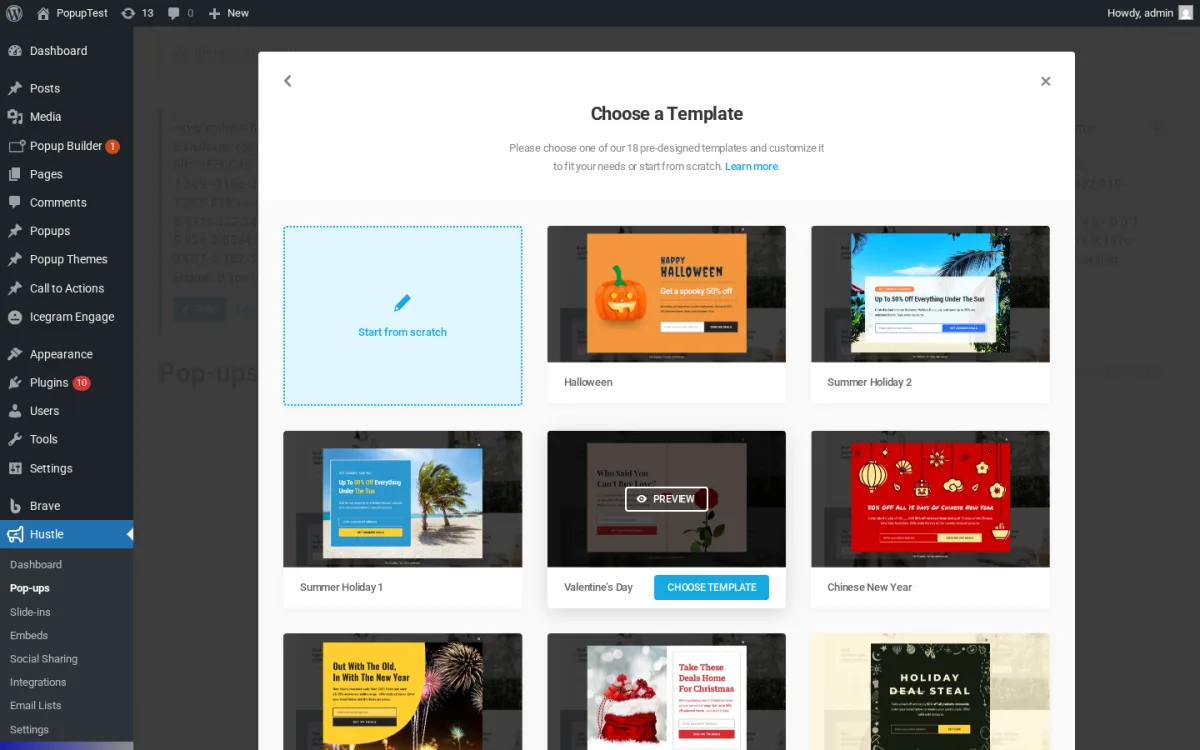
Hustle is WPMU DEV's marketing-and-popups plugin, currently sitting at 90,000+ active installs and a 4.4/5 rating from 857 reviews. The headline reason Hustle deserves a slot in this roundup is that it is the only major free WordPress popup plugin where Smart Exit-Intent ships in the free version (not on the paid tier), alongside scroll, time-on-page and inactivity triggers. I installed Hustle 7.8.13.1 from WordPress.org into a clean WordPress sandbox on 2026-05-31, opened the Pop-ups module, clicked CREATE, filled the "Create Pop-up" wizard with a name and the Email Opt-in type, and advanced to the Choose a Template picker shown in the screenshot above. The free-build template grid included Start From Scratch, Halloween, Summer Holiday 1 and 2, St Patrick's, Chinese New Year, Valentine's Day, Holiday Deal and several more, with no Pro-only ribbon on any of them. After picking a template the editor exposed the Display / Conditions panels where time on page, scroll, exit-intent and inactivity triggers all sit in the free build.
The Hustle pop-ups module rendered the standard empty-state with CREATE and IMPORT buttons, the dashboard rendered the conversion summary (Active Modules count, Average Conversion Rate, Total Conversions, Most Conversions, Last Conversion) and the integrations grid rendered all 19 free email and CRM integrations: AWeber, ActiveCampaign, Brevo, Campaign Monitor, Constant Contact, ConvertKit, GetResponse, HubSpot, iContact, Mad Mimi, MailChimp, MailerLite, MailPoet, Mailster, Mautic, SendGrid, Sendy, Zapier, Zoho CRM, plus Newsletter (thenewsletterplugin.com) added in v7.8.13.
The friendly catch is the module cap. The free build of Hustle limits you to 3 pop-ups, 3 slide-ins, 3 social share bars and 3 embeds. For a typical small business or content site that is enough; for an e-commerce store running a category-specific exit popup, a free-shipping bar, a winter-sale countdown banner and a newsletter slide-in, you will run out of slots quickly. Pro removes the cap but is sold as part of the WPMU DEV membership rather than as a one-time Hustle license; the current bundle trends around $7.50/month annual or $79/month month-to-month with a 7-day free trial. If you only want Hustle, that pricing model is awkward; if you also want WPMU DEV's other plugins (Smush image optimisation, Hummingbird performance, Forminator forms, Defender security, Snapshot backups), the bundle starts to make sense.
I would point a small site that absolutely needs exit-intent in the free version and is willing to live with the 3-of-each module cap at Hustle. If you want unlimited campaigns without a SaaS subscription, Popup Maker Pro at $99/year for one site is a more straightforward upgrade path.
8. Icegram Engage: best for popups plus action bars and toasts
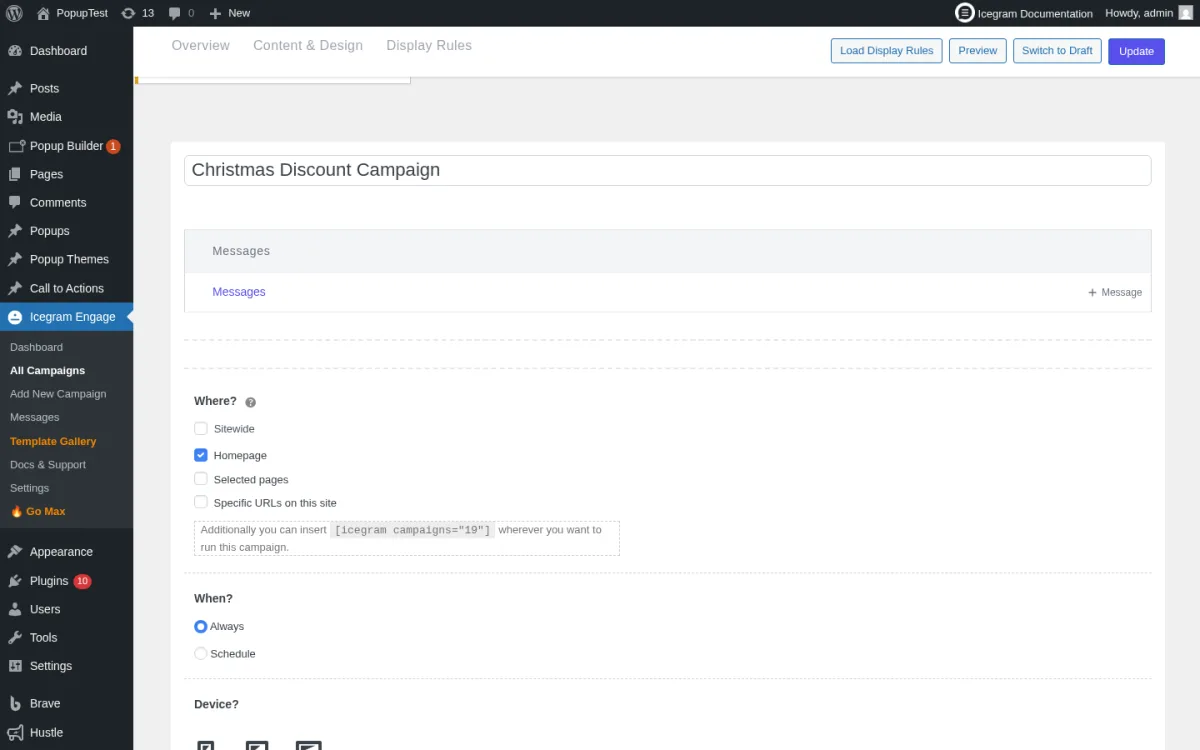
Icegram Engage sits at 10,000+ active installs on the WordPress.org listing (the vendor cites 20,000+ in marketing copy), a 4.7/5 rating from 368 reviews, and a healthy 60-day release cadence. What sets Icegram apart from the rest of this roundup is that it is not really a "popup" plugin at all; it is a multi-format on-site messaging plugin where popups are one of six message types. I installed Icegram Engage 3.1.42 from WordPress.org into a clean WordPress sandbox on 2026-05-31, created a "Christmas Discount Campaign", and opened the campaign edit screen with the Overview / Content and Design / Display Rules tab strip. The screenshot above shows the configured Display Rules: Where? set to Homepage (with Sitewide, Selected pages and Specific URLs as the other options, plus the live shortcode for manual placement), When? Always with Schedule as the alternative, and the Device targeting group below.
The free build ships popups, header and footer action bars, toast notifications, messengers (a chat-style nudge), inline messages and overlays. The Template Gallery rendered cleanly on first activation, with a search box, a Show All filter, and a grid of free ready-made templates: Essential (white 10% off offer), Black (black-background variant), Christmas (festive 45% off layout), Free (Black Friday template) and more rows below the fold. Trigger options in the free build include time-delay, scroll position, user action and page targeting; basic device targeting and two-step opt-in are also free. The Pro-locked items are the ones most plugins charge for: exit-intent, advanced user-behaviour targeting, A/B split testing, geographical targeting, animation effects, the sticky/badge/ribbon additional message formats, and remote campaigns.
Pricing on icegram.com is reasonable in 2026: free Starter (1 site, core features), Pro $129/year (1 site, exit-intent, advanced targeting, 100+ themes, enhanced analytics), Max $229/year (up to 3 sites, A/B testing, geo targeting, animation effects, premium themes). All paid plans carry a 30-day money-back guarantee.
I would point a content site, business site or online store that wants more than just popups at Icegram Engage. If you also need a sticky free-shipping bar, a category-specific announcement ribbon and an inline newsletter form embedded in your blog posts, Icegram covers all of that from one plugin and one license. If popups are all you need, Popup Maker or Brave will get you there for less. If you only need a focused notification bar, Notibar at #2 will do that more cleanly than Icegram's bar format.
9. Brave Popup Builder: best free drag-and-drop popup builder
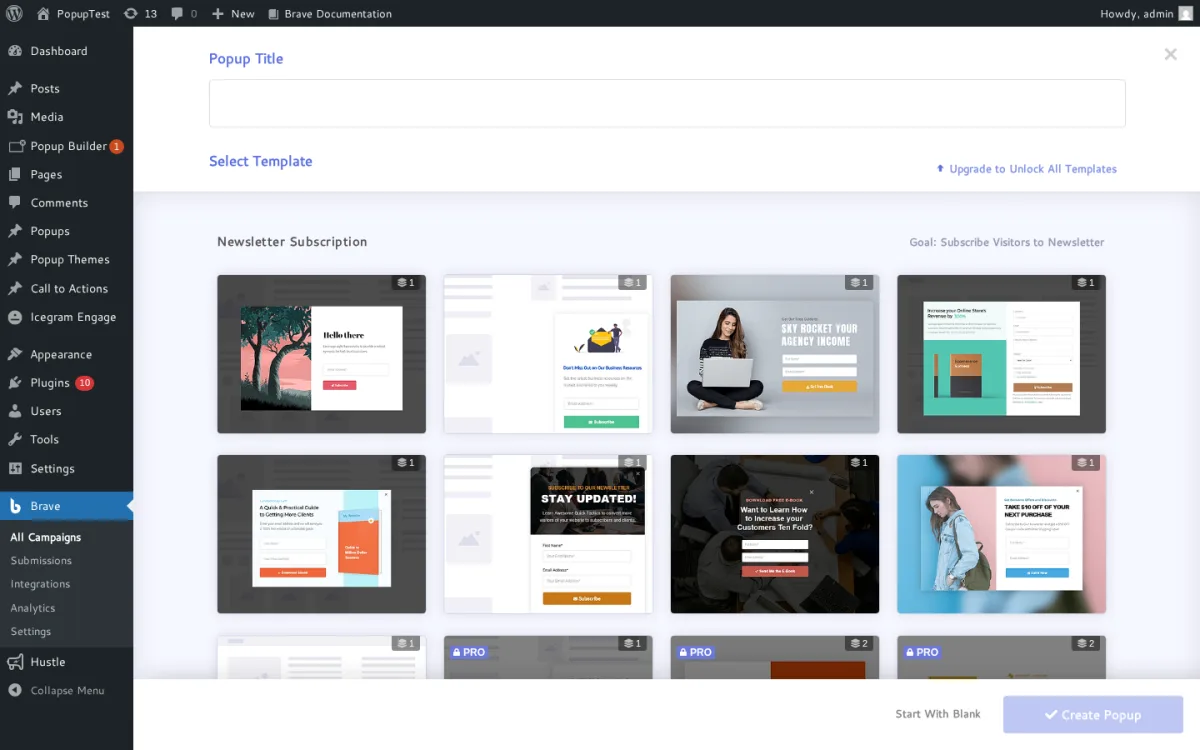
Brave Popup Builder is the most interesting free popup plugin in this roundup if you care about design freedom. With 20,000+ active installs, a 4.8/5 rating from 209 reviews, and an unusually clean drag-and-drop visual editor, Brave looks and feels like a small premium product that happens to have a generous free tier. I installed Brave Popup Builder 0.8.5 from WordPress.org into a clean WordPress sandbox on 2026-05-31, clicked the floating + button on All Campaigns, selected + New Popup / Widget from the New Campaign menu, and advanced into the template chooser shown in the screenshot above. The Newsletter Subscription category surfaced a mix of free templates and PRO-badged premium templates, with a clear "Upgrade to Unlock All Templates" link for the gated tiers, plus a Start With Blank CTA for fully custom builds.
The free build covers a real drag-and-drop visual editor with 10 elements (Text, Image, Shape, Button, Form, List, WordPress Posts, Single Post, WooCommerce Products and a raw Code element for shortcodes and custom HTML), 15 starter presets that can be imported with one click, click-open triggers, a Custom Goal tracker that tells you when a popup hits its target, customisable display frequency to avoid annoying visitors with the same popup, separate desktop and mobile design layouts, animations, and built-in advanced forms (newsletter opt-in forms, feedback forms, contact forms). What is striking is the integration catalog: in the free build, Brave already connects to MailChimp, Mailjet, MailPoet, SendGrid, Brevo, HubSpot, ActiveCampaign, AWeber, ConvertKit, Constant Contact, Campaign Monitor, GetResponse, MailerLite, Ontraport, SendPulse, Moosend, Zapier, The Newsletter Plugin, Pabbly, Klaviyo, FluentCRM, Sendy, OmniSend, MailWizz and Mailster. That is more integrations than Popup Maker Free.
What is gated to the Pro tier is the conversion-focused stuff: exit-intent, scroll-percentage trigger, multi-step popups (great for survey-style lead magnets), advanced animations on individual elements, advanced targeting by device, role and traffic source, Zapier and Integromat sends, real-time goal notifications via email, SMS or push, Google Analytics event integration, automated email reply on form submission, auto-download files on submit, the Pixabay/Giphy/icon libraries (1.3M images, 1M animated stickers, 30K icons), and 100 additional presets. Pricing on getbrave.io is genuinely flat: PRO $59/year for 1 site, Mega $99/year for 10 sites, Ultimate $199/year for 100 sites. Every tier includes every feature. A 30-day money-back guarantee applies to all tiers.
The one gentle caveat is release cadence. The latest release on the WordPress.org listing is v0.8.5 from 2026-01-26, four months before this audit. By comparison Popup Maker, Popup Builder by Sygnoos and Hustle all shipped a release within the previous 60 days. Brave is well-supported, but if you need a plugin where new WordPress compatibility patches land fast, the cadence is worth knowing.
I would point a content site or a small e-commerce store that cares about design quality at Brave Popup Builder. If you want creative freedom in the free version and a Pro upgrade that is genuinely cheaper than Popup Maker, Brave is the pick.
10. HubSpot All-In-One Marketing: best for businesses that need a CRM, not just popups
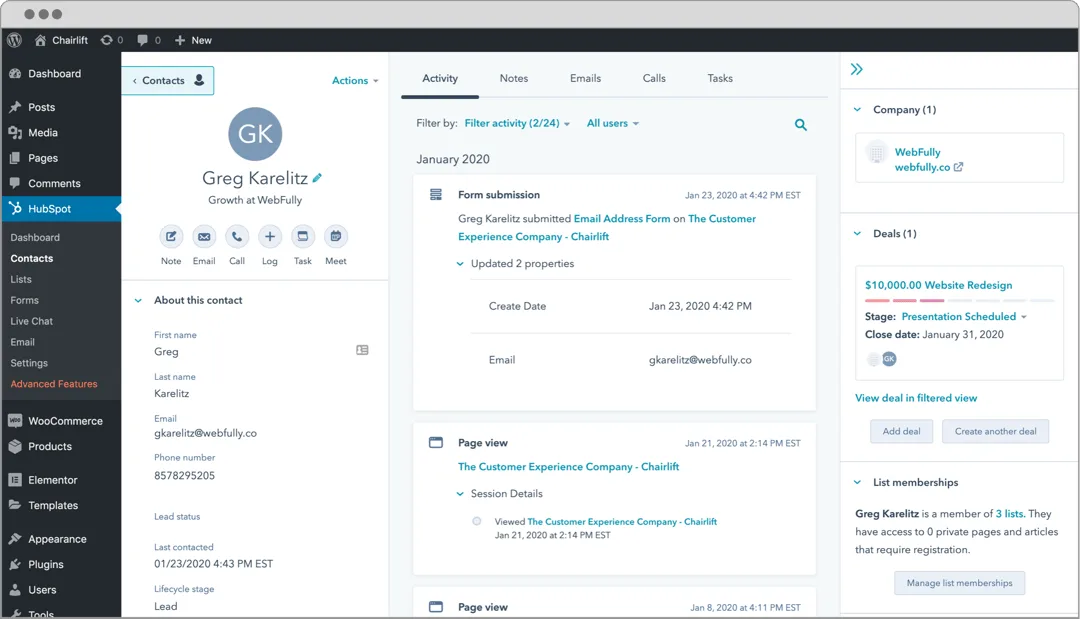
HubSpot All-In-One Marketing is the WordPress plugin you install when popups are only one piece of a bigger marketing-and-sales stack. The WordPress.org connector sits at 200,000+ active installs and a 4.3/5 rating from 207 reviews, and the free product bundles things no other plugin in this roundup attempts: a real free CRM with contact management, an email marketing tool with 20+ pre-designed templates and a drag-and-drop builder, automated email campaigns based on form submissions, live chat and chatbots (concierge, qualify-leads, meetings, tickets, knowledge base, offline), a marketing analytics dashboard, and yes, forms and popups. The popup builder is part of the HubSpot account rather than the WordPress plugin, but it covers the four most-used types out of the box: embedded forms, standalone-page forms, dropdown banner popups and slide-in left or right boxes. Template options include contact-us, newsletter signup, event registration, talk to an expert, book a meeting and gated content.
HubSpot's WordPress plugin is genuinely free; you only pay if you upgrade to the HubSpot Marketing Hub paid tiers (Starter, Professional, Enterprise) which add marketing automation, lead scoring, smart content, advanced segmentation, A/B testing, retargeting and SLA support. Current HubSpot Marketing Hub Starter pricing is in the low double-digits per month from the HubSpot pricing page, and the Professional and Enterprise tiers are positioned at marketing teams and enterprise budgets respectively. Even on the paid tiers, the popup tools remain free.
The trade-off is that HubSpot wants to live at the centre of your marketing stack. The popups are designed to feed leads into HubSpot's CRM and nurture them through HubSpot's email automation, not to pipe into MailChimp or ConvertKit (though HubSpot integrates with both). If you already have a marketing toolkit you like, HubSpot is overkill; if you are starting from zero and need a CRM, email, chat and popups in one place, HubSpot's free tier is the single best deal in this roundup.
I would point a B2B service business, a consultancy or a small agency that needs proper lead tracking and follow-up at HubSpot. If you are running a blog, a content site or a single-product WooCommerce store, the rest of HubSpot is more than you need, and a focused popup plugin from this list will serve you better.
How to pick the right WordPress popup plugin for your site
Most popup plugins in 2026 can technically run the same campaign. The differences that actually matter when you are choosing one are smaller, more specific, and usually a function of which features sit in the free version versus the paid tier. Here is how I would think about it.
If you are on a brand-new site with no email list yet: install Popup Maker free. You will not need Pro features for at least the first six months, and the click-to-open and auto-open triggers will get a basic newsletter opt-in popup live in 20 minutes. When you eventually need exit-intent or analytics, the $99/year Pro upgrade is reasonable.
If you prefer building popups with Gutenberg blocks: ConvertForce. It gives you notification bars, lightbox popups and slide-ins without a separate builder, and the free Time Delay trigger is enough for simple announcements, lead magnets and static social proof. Upgrade only if you need exit intent, scroll-depth or inactivity triggers.
If you need a focused notification bar across the top of the site, not a popup: Notibar. Multiple bars, scheduling, mobile-specific content, and the three-state Dismiss control are all free, the admin UI is built around the customizer with instant live preview, and Pro at $29/year or $79 lifetime is the lowest entry price in this roundup if you eventually need rotation A/B testing or role-based display.
If you want exit-intent in the free version and you can live with three popups: Hustle is the only credible option. The 3-popup cap is real, but the free Smart Exit-Intent is a serious value, especially if you only need one homepage popup and one product-page popup.
If you are an agency running multiple client sites: Popup Builder by Sygnoos at $89.95/year for 10 sites is the best per-site value in this category, with all 28+ extensions included. Brave Mega at $99/year for 10 sites is the alternative if you prefer Brave's drag-and-drop builder over Popup Builder's popup-type catalog. If the bulk of those client sites only need notification bars, Notibar's 5 Sites $49/year (or $159 lifetime) and Unlimited Sites $99/year (or $299 lifetime) tiers are also worth pricing against the popup options.
If you care about design quality and creative freedom in the free version: Brave Popup Builder. The drag-and-drop editor, the 10 free elements and the 23-25 free integrations make it the most generous "build-it-from-scratch" free build in this roundup.
If you want more than popups on your site: Icegram Engage covers popups, header and footer bars, slide-ins, toast notifications, inline messages and overlays from one plugin. If you also need a sticky free-shipping bar plus a category announcement ribbon plus an inline newsletter form, Icegram is built for that combination.
If you have real traffic and real revenue to protect: OptinMonster. The Exit-Intent technology, OnSite Retargeting, smart tags and reliable analytics that play nicely with caching are designed for sites that already capture leads daily and need every conversion percentage point. Plan on Pro ($870/year) or Growth ($1,470/year) for the features you are actually paying for.
If you also need a CRM, email automation, live chat and chatbots: HubSpot All-In-One Marketing. The free tier really does include all of those for free, and the popups are designed to feed the CRM. Treat the popup tool as one feature inside a bigger stack rather than the whole reason to install the plugin.
If you run a WooCommerce store and want conversion tools built specifically for ecommerce: YayBoost. The free build gives you an exit-intent popup, a free-shipping progress bar, stock scarcity indicators, live visitor count, frequently bought together, and a next-order coupon, all from a single settings panel with no code required.
And whatever you pick, one practical reminder: a popup plugin only earns its place if the leads it captures actually go somewhere. If you have not already chosen an email tool, the best email and newsletter WordPress plugins roundup is the natural next read. If your popup form is going to live inside a contact form, the best WordPress contact form plugins roundup pairs naturally. And if you are stacking many free plugins on the same site, the 10 best free WordPress security plugins to protect your site roundup is worth a glance before you go live.
FAQ
What is the best free WordPress popup plugin in 2026?
Popup Maker. It sits at 700,000+ active installs and a 4.9/5 average rating from 4,498 reviews, the free build covers unlimited popups, click and auto-open triggers, post and page targeting, and 17+ form plugin integrations, and the Pro upgrade is the most reasonable mature general-purpose path at $99/year for one site. ConvertForce is the alternative if you specifically want a Gutenberg-native workflow for notification bars, lightbox popups and slide-ins. Hustle is the alternative if you specifically need exit-intent in the free version and can live with the 3-popup cap. Brave Popup Builder is the alternative if you want a real drag-and-drop visual editor and every email and CRM integration unlocked in the free build. If you specifically need a focused notification bar rather than a popup, Notibar is the dedicated pick: multiple bars, scheduling, mobile-specific content and per-page rules are all in its free build. If you run a WooCommerce store, YayBoost is the dedicated pick for ecommerce conversion tools: exit-intent popup, free shipping bar and social proof features in a single free plugin.
Do free WordPress popup plugins support exit intent?
Some do, most do not. In this roundup, Hustle includes Smart Exit-Intent in the free version. Popup Maker, Popup Builder by Sygnoos, Icegram Engage, Brave Popup Builder and ConvertForce all gate exit-intent to their respective Pro tiers. OptinMonster includes Exit-Intent only on the Pro plan and up. HubSpot's free build covers basic popup form types but not behaviour-based exit-intent at the WordPress level. Notibar is a notification bar plugin rather than a popup plugin and does not ship exit-intent in either tier; it focuses on scheduled and dismissible bar messages instead. ConvertForce Free includes a Time Delay trigger, while ConvertForce Pro adds Exit Intent, Scroll Depth and User Inactivity. YayBoost includes an exit-intent popup in its free build, but it is designed specifically for WooCommerce stores rather than general-purpose lead capture.
How much does a WordPress popup plugin cost in 2026?
The range is wide. Free options exist (Popup Maker, Popup Builder, Hustle, Icegram Engage, Brave Popup Builder, HubSpot, ConvertForce, Notibar, YayBoost). Premium standalone plugins start at $29/year (Notibar single site), $39.50/year launch pricing (ConvertForce Pro unlimited sites) and $49.95/year (Popup Builder Starter for 2 sites), and run up to $1,470/year (OptinMonster Growth). The most common Pro upgrade price for a single-site self-hosted plugin is around $29-$129/year (Notibar Pro $29/year, ConvertForce Pro $39.50/year launch price, Brave PRO $59/year, YayBoost Pro $59/year intro, Popup Maker Pro $99/year, Icegram Pro $129/year). Agency and multi-site licenses scale up from there. Where the vendor runs an intro offer, the body above quotes both the first-year intro and the renewal price.
What kind of popup converts best?
Plugin choice is less important than the popup design and the offer. In the OptinMonster case studies, the highest-impact patterns are: exit-intent popups with a real reason to stay (a discount code, a free guide, a content upgrade), content upgrade popups that offer a related downloadable resource at the bottom of a blog post, a single-field email-only opt-in (asking only for email, not name + email, almost always beats a two-field form), and timed delays that give the visitor at least 30-45 seconds before the popup appears. The same patterns work whether you build the popup in OptinMonster, Popup Maker, ConvertForce or Brave.
Can I run a WordPress popup plugin and a contact form plugin on the same site?
Yes, and almost every plugin in this roundup is built for that combination. Popup Maker, Hustle, Brave Popup Builder and Popup Builder by Sygnoos all integrate with Contact Form 7, Gravity Forms, WPForms, Fluent Forms, Ninja Forms and Forminator, so you can embed the contact form you already trust inside a popup. For a comparison of the contact form plugins themselves, see the best WordPress contact form plugins roundup.
Will a popup plugin slow down my WordPress site?
It can if you pick badly. Heavy popup plugins that load every campaign script on every page, even when no popup is set to display, are a real cause of front-end performance regressions. Of the plugins in this roundup, Brave Popup Builder explicitly markets itself as built for performance (loads minimal assets, lazy-loads after page render, no third-party CDN calls); Popup Maker has historically been lightweight on the front end with the option to defer asset loading; OptinMonster runs from the SaaS edge and is decoupled from your WordPress page render. Hustle and Icegram are heavier on first load because they ship more on-page features. ConvertForce is positioned as a lightweight block-native option and its public WP Hive report cites roughly 11.19 KB added to the frontend with zero custom database tables. Notibar is a notification bar plugin rather than a popup plugin and is correspondingly lighter; the v3.1.4 release on 2026-06-11 specifically improved lazyload and object-cache compatibility. YayBoost loads only the scripts for active modules, which keeps its front-end footprint lean for a multi-feature plugin. Whichever plugin you choose, audit your site with a real performance tool (PageSpeed Insights, WebPageTest, GTmetrix) before and after activation to confirm there is no Largest Contentful Paint regression.
Is a notification bar plugin different from a popup plugin?
Yes, and the difference matters when you are choosing what to install. A notification bar plugin renders a thin, dismissible bar fixed to the top (or, in Notibar's Pro tier, the bottom) of every page, with a short message and an optional CTA button. It is the right format for sitewide announcements, sale banners, shipping deadlines, maintenance notices and persistent secondary CTAs. A popup plugin renders a centred modal, a slide-in box or a full-screen overlay that interrupts the visitor with a stronger ask, usually a lead-capture form, an exit-intent offer or a content upgrade. The two formats coexist well: many sites run a single notification bar at the top of every page for the always-on message, plus one or two popups for the higher-intent lead capture moments. If you only need one, pick on the format your message actually fits. If you need both from inside the WordPress block editor, ConvertForce is the cleanest single-plugin option. The cleanest free two-plugin combination is Notibar for the bar plus Popup Maker for the popup; the cleanest mature all-in-one alternative is Icegram Engage at #8.
Final verdict
For most WordPress site owners in 2026, the answer is Popup Maker free. It is by far the most-installed and most-loved free popup plugin on WordPress.org, the free build genuinely covers the basics, and the Pro upgrade at $99/year for one site is reasonable when you eventually need exit-intent or analytics. If you specifically want to build campaigns inside Gutenberg, ConvertForce is the lightweight block-native pick. If you specifically need exit-intent in the free version and can live with a 3-popup cap, Hustle is the alternative. If you care about design freedom in the free version and want every email and CRM integration unlocked, Brave Popup Builder is the alternative. If you are running serious traffic and need the deepest targeting and revenue attribution available in this category, OptinMonster is still the premium choice. If you want a CRM, email, live chat and popups in one free product, HubSpot is the answer. If your real need is a focused notification bar rather than a popup (announcements, sale banners, maintenance notices, top-of-page CTAs), Notibar is the dedicated pick: a generous free build, three-state Dismiss, scheduling, mobile-specific content, and a $29/year Pro tier that is among the lowest entry prices in this list. And if you run a WooCommerce store and want a single free plugin that covers exit-intent popups, a free-shipping progress bar, stock scarcity, social proof and next-order coupons without writing a line of code, YayBoost is the most focused pick for that job. Pick the one that matches your traffic level, your message format and your existing stack, install it on a clean staging environment first, and ship one popup or one bar at a time.


