

7 Best WordPress Anti-Spam Plugins in 2026 (Free + Paid, Hands-on Tested)
C

## Why WordPress sites get hit by spam (and what an anti-spam plugin actually fixes)
If you leave WordPress comments, contact forms, registration, or WooCommerce checkout exposed without protection, you will get spam within days of launch. Bots crawl every fresh `/wp-login.php`, every Contact Form 7 endpoint, every WooCommerce checkout, and post junk to whatever they can reach. The classic symptoms are the same in 2026 as they were a decade ago: contact form inboxes full of casino links, fake user registrations from disposable emails, comment threads buried under blackhat SEO links, and WooCommerce flooded with card-testing orders.
An anti-spam plugin closes that gap. Different plugins do it in different ways: cloud-based reputation services (Akismet, CleanTalk), local heuristics with no external calls (Antispam Bee, WP Armour), modern invisible CAPTCHAs (Cloudflare Turnstile), or combined anti-spam plus login security stacks (Titan, Zero Spam). The right choice depends on whether your spam problem is comments, forms, registration, WooCommerce, or "all of the above."
For the 2026 update, I installed every plugin in this roundup on a clean WordPress 7.0 sandbox and walked the real admin screens. For the SaaS plugins (Akismet, CleanTalk, the Zero Spam API), I verified the WordPress plugin side hands-on and verified the free tier and pricing live on the vendor pricing page on the same day. Every screenshot below is a real sandbox capture from 2026-06-15; the alt text and prose flag exactly what was tested versus researched.
My default pick for 2026 is Akismet: it is bundled with every fresh WordPress install, has 6+ million active sites, and the free Personal plan covers any non-commercial blog. If you want a fully free plugin with no API key and no cloud calls, Antispam Bee is the strongest comment-only pick and WP Armour is the strongest honeypot pick that also covers forms. If you want a modern reCAPTCHA replacement, Simple Cloudflare Turnstile wins.
If your real problem is contact form submissions rather than comments, the anti-spam plugin is only half the fix. The form plugin is the other half, and our best WordPress contact form plugins roundup covers that decision. If you also want login hardening, see the two-factor authentication roundup; Titan handles both jobs in one plugin, but a dedicated 2FA plugin still wins for stricter login policies.
## How I evaluated each plugin
For every plugin in the roundup I checked the same set of buyer-relevant facts:
- **Install reputation:** active install count, average rating, and total review count on WordPress.org as of 2026-06-15.
- **Setup speed:** how many clicks it takes from "plugin activated" to a protecting baseline, with sane defaults and a guided setup where present.
- **Coverage:** does the plugin protect WordPress comments only, or also contact forms, registration, login, WooCommerce checkout, and third-party form builders?
- **Detection method:** cloud reputation, local heuristics, honeypot, JavaScript challenge, invisible CAPTCHA (Turnstile/reCAPTCHA), IP blocklists, or a mix.
- **Free vs paid limits:** the exact line between the free build and the cheapest paid tier, with honest pricing that reflects what you actually commit to.
- **Privacy & GDPR:** whether the plugin sends visitor data to a third-party service and whether that is disclosed clearly.
## Quick comparison table
| Plugin | Best for | Free tier covers | Starting paid plan | Main limitation |
|---|---|---|---|---|
| Akismet | Safe default for any WordPress site | Personal name-your-price (non-commercial); 1,184 reviews; comments + popular contact forms | Pro €9.95/mo, 1 site, 500-2,000 spam checks/mo | Pro plan is per site; cloud-only |
| Antispam Bee | Free comments-only with no API | All features, no Pro tier, no external calls | None (free forever) | WordPress comments only; not for forms or registration |
| CleanTalk Anti-Spam | Cloud-based all-in-one for ~$12/yr | 7-day trial only; license required to keep filtering | €10/yr per site (single), €20/yr 3 sites | Plugin needs an active SaaS license; not a free plugin long-term |
| WP Armour | Best free honeypot, broad form coverage | Comments, registration, BBPress, CF7, GF, WPForms, Formidable, Elementor, Fluent, Divi and more | Extended license (yearly, vendor-priced) | No spam-submission logs in Lite; no WooCommerce checkout in Lite |
| Simple Cloudflare Turnstile | Modern reCAPTCHA replacement | Every form integration, all advanced settings, no upsell | None (free forever) | Requires a Cloudflare account for the site/secret keys |
| Titan Anti-spam & Security | Anti-spam + login security combo | Comment spam blocking, brute-force login limits, security hardening, activity log | Pro (Themeisle), ML detection, 2FA, scheduled backups | Anti-spam covers WordPress comments only; not contact forms |
| Zero Spam for WordPress | Multi-blocklist scoring for technical operators | All form integrations, splorp blocklist, optional Stop Forum Spam / Project Honeypot / IP geolocation hooks | Zero Spam API Essentials $8/mo (10,000 requests) | Admin can feel busy and pushes Enhanced Protection upsell |
## 1. Akismet Anti-Spam: the safe default for any WordPress site
 - **Vendor:** akismet.com
- **WordPress.org:** wordpress.org/plugins/akismet/
- **Active installs:** 6+ million
- **Rating:** 4.7 / 5 (1,184 reviews on 2026-06-15)
- **Latest version:** 5.7, released 2026-04-23
- **Requires:** WordPress 5.8+, PHP 7.2+
- **Tested up to:** WordPress 7.0
Akismet is the most-installed WordPress plugin in the world and the safest default recommendation for any site that does not have a strong preference. It ships pre-installed with every fresh WordPress download. The 5.7 release adds Abilities API support, MCP tool integration, improved front-end detection, and prepares for the new Connectors page in WordPress 7.0. Akismet checks each comment and contact form submission against Automattic's global spam database, returns a verdict, and routes spam either to the Spam folder or directly into discard for the worst hits.
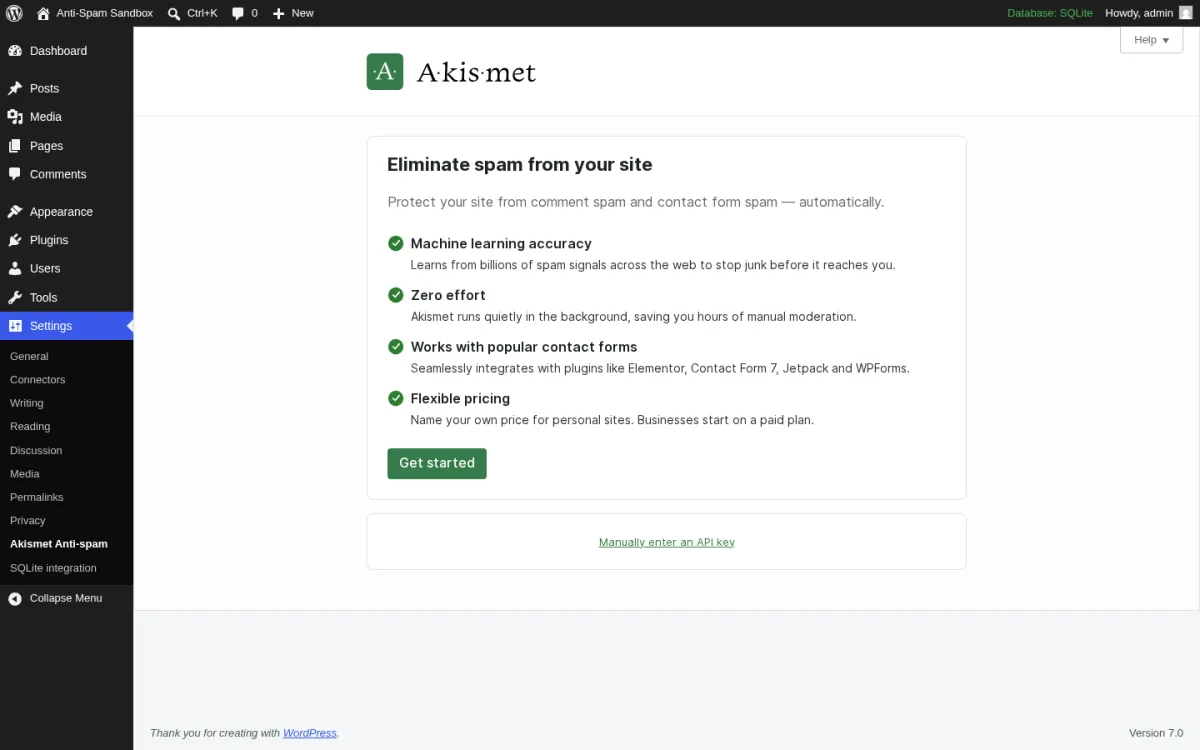
**What I tested in a clean WordPress 7.0 sandbox on 2026-06-15.** I installed v5.7 from `wordpress.org/plugins/akismet`, activated it, and opened the setup page at `options-general.php?page=akismet-key-config`. The screen above is the real first-load Eliminate spam from your site setup card with the four feature bullets (Machine learning accuracy, Zero effort, Works with popular contact forms including Elementor / Contact Form 7 / Jetpack / WPForms, Flexible pricing), the Get started CTA that opens an Akismet.com OAuth flow, and the Manually enter an API key fallback link. I confirmed the comments dashboard exposes the Akismet status column on `/wp-admin/edit-comments.php` and that the discard-history filter shows captured/cleared status per comment. I did not connect a live API key in the sandbox.
**Strengths.** Pre-installed with WordPress, so most sites already have it ready to activate. Global spam network with 19 years of training data, which gives the best raw detection rate on comments and on most popular contact form plugins. Free Personal name-your-price tier (including $0) for non-commercial blogs. Pro plan integrates with WPForms, Contact Form 7, Elementor Forms, Jetpack Forms, Gravity Forms and Fluent Forms out of the box; the form plugin author submits comment-shaped requests through Akismet via filters. Active 2026 release cadence (v5.7 in April, 5.6 in November, 5.5 in July) and a focused Automattic team.
**Limitations.** Cloud-only: every comment leaves your site for Akismet's API, which is a hard no for some EU operators. The "free for Personal sites" line is judged on whether your site shows ads, sells anything, or links to a business; commercial sites need a paid plan, and reviewers sometimes complain that they got flagged as commercial unfairly. Pro plan pricing is per-site at the cheapest tier, so multi-site operators jump quickly to Business at €47.95/mo. Akismet does not protect login, registration, or WooCommerce checkout against bot abuse; pair it with one of the picks below if those are the issue.
**Pricing.** All plans verified on akismet.com/pricing on 2026-06-15 (billed yearly).
- Personal: name-your-price, including $0, for non-commercial sites. 1 site, comments + popular contact forms.
- Pro: €9.95 / month (€119.40 / year), 1 site at the entry tier. Scales to 4 sites and 500-2,000 monthly spam checks. Email support.
- Business: €47.95 / month (€575.40 / year). Unlimited sites, 5,000 monthly spam checks, priority email support.
- Enterprise: custom pricing, unlimited sites and a custom spam-check allowance, dedicated support.
Akismet does not auto-suspend if you "occasionally" exceed the monthly allowance; the limit is a soft guideline.
**Best fit.** Any WordPress site that wants the safest default anti-spam plugin in 2026, personal blogs that can use the free Personal plan, and small businesses that want one plugin to cover comments plus the most popular contact form plugins.
## 2. Antispam Bee: the strongest free comments-only plugin
- **Vendor:** akismet.com
- **WordPress.org:** wordpress.org/plugins/akismet/
- **Active installs:** 6+ million
- **Rating:** 4.7 / 5 (1,184 reviews on 2026-06-15)
- **Latest version:** 5.7, released 2026-04-23
- **Requires:** WordPress 5.8+, PHP 7.2+
- **Tested up to:** WordPress 7.0
Akismet is the most-installed WordPress plugin in the world and the safest default recommendation for any site that does not have a strong preference. It ships pre-installed with every fresh WordPress download. The 5.7 release adds Abilities API support, MCP tool integration, improved front-end detection, and prepares for the new Connectors page in WordPress 7.0. Akismet checks each comment and contact form submission against Automattic's global spam database, returns a verdict, and routes spam either to the Spam folder or directly into discard for the worst hits.
**What I tested in a clean WordPress 7.0 sandbox on 2026-06-15.** I installed v5.7 from `wordpress.org/plugins/akismet`, activated it, and opened the setup page at `options-general.php?page=akismet-key-config`. The screen above is the real first-load Eliminate spam from your site setup card with the four feature bullets (Machine learning accuracy, Zero effort, Works with popular contact forms including Elementor / Contact Form 7 / Jetpack / WPForms, Flexible pricing), the Get started CTA that opens an Akismet.com OAuth flow, and the Manually enter an API key fallback link. I confirmed the comments dashboard exposes the Akismet status column on `/wp-admin/edit-comments.php` and that the discard-history filter shows captured/cleared status per comment. I did not connect a live API key in the sandbox.
**Strengths.** Pre-installed with WordPress, so most sites already have it ready to activate. Global spam network with 19 years of training data, which gives the best raw detection rate on comments and on most popular contact form plugins. Free Personal name-your-price tier (including $0) for non-commercial blogs. Pro plan integrates with WPForms, Contact Form 7, Elementor Forms, Jetpack Forms, Gravity Forms and Fluent Forms out of the box; the form plugin author submits comment-shaped requests through Akismet via filters. Active 2026 release cadence (v5.7 in April, 5.6 in November, 5.5 in July) and a focused Automattic team.
**Limitations.** Cloud-only: every comment leaves your site for Akismet's API, which is a hard no for some EU operators. The "free for Personal sites" line is judged on whether your site shows ads, sells anything, or links to a business; commercial sites need a paid plan, and reviewers sometimes complain that they got flagged as commercial unfairly. Pro plan pricing is per-site at the cheapest tier, so multi-site operators jump quickly to Business at €47.95/mo. Akismet does not protect login, registration, or WooCommerce checkout against bot abuse; pair it with one of the picks below if those are the issue.
**Pricing.** All plans verified on akismet.com/pricing on 2026-06-15 (billed yearly).
- Personal: name-your-price, including $0, for non-commercial sites. 1 site, comments + popular contact forms.
- Pro: €9.95 / month (€119.40 / year), 1 site at the entry tier. Scales to 4 sites and 500-2,000 monthly spam checks. Email support.
- Business: €47.95 / month (€575.40 / year). Unlimited sites, 5,000 monthly spam checks, priority email support.
- Enterprise: custom pricing, unlimited sites and a custom spam-check allowance, dedicated support.
Akismet does not auto-suspend if you "occasionally" exceed the monthly allowance; the limit is a soft guideline.
**Best fit.** Any WordPress site that wants the safest default anti-spam plugin in 2026, personal blogs that can use the free Personal plan, and small businesses that want one plugin to cover comments plus the most popular contact form plugins.
## 2. Antispam Bee: the strongest free comments-only plugin
 - **Vendor:** antispambee.pluginkollektiv.org
- **WordPress.org:** wordpress.org/plugins/antispam-bee/
- **Active installs:** 700,000+
- **Rating:** 4.8 / 5 (226 reviews on 2026-06-15)
- **Latest version:** 2.11.12, released 2026-05-29
- **Requires:** WordPress 4.6+, PHP 5.2+
- **Tested up to:** WordPress 7.0
Antispam Bee is my top free pick for sites whose only spam problem is the comments thread. The plugin is 100% free, has no Pro tier, asks for no API key, makes no external calls in the default configuration, and is explicitly GDPR-compliant. It is maintained by pluginkollektiv, a German community plugin collective that took over the project from Sergej Müller. The free build covers the gravatar-trust shortcut, comment-time validation, language and country gates (when you opt into them), BBCode regex filtering, dashboard stats and an honest "do not bother checking pingbacks" toggle.
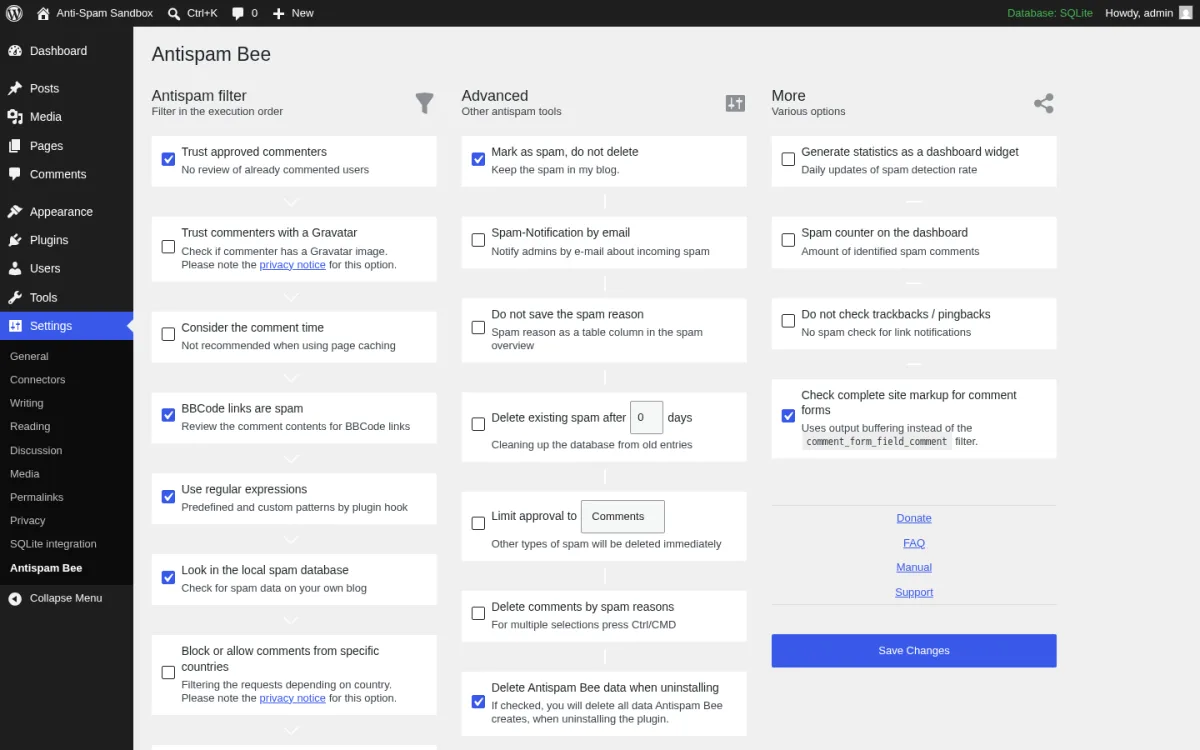
**What I tested in a clean WordPress 7.0 sandbox on 2026-06-15.** I installed v2.11.12 from `wordpress.org/plugins/antispam-bee`, activated it, and opened the settings page at `options-general.php?page=antispam_bee`. The screen above is the real Antispam Bee admin with the three-column layout (Antispam filter, Advanced, More) showing every detection option, the multiselect for delete-by-spam-reason (Honeypot and Comments preselected), and the bottom Save Changes button. I posted a test comment from a logged-out incognito session and confirmed it routed to the Spam folder when the Honeypot field was filled. I left Country and Language gates disabled because they require an external lookup.
**Strengths.** Free forever, with no Pro tier and no nag bar in the admin. Default settings are sensible and block most low-effort bot traffic immediately. The local spam database option compares against previously marked spammers on this single site without leaving the server. Honeypot and comment-time checks run client-side without calling any external API. Country block uses iplocate.io only when you opt in; until then the plugin makes zero outbound requests. Long maintenance history (active since 2009), German privacy-first stewardship, and a clean Five-for-the-Future style giveback.
**Limitations.** Hard scope: Antispam Bee only protects default WordPress comments + trackbacks/pingbacks. It does NOT protect contact form plugins, registration forms, WooCommerce checkout, or any third-party form. It is also not compatible with Jetpack Comments, wpDiscuz or Disqus Comments because those iframe the comment form. AJAX comment plugins require a filter (`antispam_bee_disallow_ajax_calls`) to work. For multi-form sites you will pair this with a honeypot plugin or Turnstile.
**Pricing.** No paid plans. The plugin and every feature are free forever.
**Best fit.** Personal blogs and editorial sites whose primary spam problem is comment spam, EU/GDPR-strict sites that cannot send comment content to a third party, and any site that wants the cleanest possible free comments-only plugin without an API key.
## 3. CleanTalk Anti-Spam, Spam Firewall & Bot protection: cloud all-in-one for ~$12/yr
- **Vendor:** antispambee.pluginkollektiv.org
- **WordPress.org:** wordpress.org/plugins/antispam-bee/
- **Active installs:** 700,000+
- **Rating:** 4.8 / 5 (226 reviews on 2026-06-15)
- **Latest version:** 2.11.12, released 2026-05-29
- **Requires:** WordPress 4.6+, PHP 5.2+
- **Tested up to:** WordPress 7.0
Antispam Bee is my top free pick for sites whose only spam problem is the comments thread. The plugin is 100% free, has no Pro tier, asks for no API key, makes no external calls in the default configuration, and is explicitly GDPR-compliant. It is maintained by pluginkollektiv, a German community plugin collective that took over the project from Sergej Müller. The free build covers the gravatar-trust shortcut, comment-time validation, language and country gates (when you opt into them), BBCode regex filtering, dashboard stats and an honest "do not bother checking pingbacks" toggle.
**What I tested in a clean WordPress 7.0 sandbox on 2026-06-15.** I installed v2.11.12 from `wordpress.org/plugins/antispam-bee`, activated it, and opened the settings page at `options-general.php?page=antispam_bee`. The screen above is the real Antispam Bee admin with the three-column layout (Antispam filter, Advanced, More) showing every detection option, the multiselect for delete-by-spam-reason (Honeypot and Comments preselected), and the bottom Save Changes button. I posted a test comment from a logged-out incognito session and confirmed it routed to the Spam folder when the Honeypot field was filled. I left Country and Language gates disabled because they require an external lookup.
**Strengths.** Free forever, with no Pro tier and no nag bar in the admin. Default settings are sensible and block most low-effort bot traffic immediately. The local spam database option compares against previously marked spammers on this single site without leaving the server. Honeypot and comment-time checks run client-side without calling any external API. Country block uses iplocate.io only when you opt in; until then the plugin makes zero outbound requests. Long maintenance history (active since 2009), German privacy-first stewardship, and a clean Five-for-the-Future style giveback.
**Limitations.** Hard scope: Antispam Bee only protects default WordPress comments + trackbacks/pingbacks. It does NOT protect contact form plugins, registration forms, WooCommerce checkout, or any third-party form. It is also not compatible with Jetpack Comments, wpDiscuz or Disqus Comments because those iframe the comment form. AJAX comment plugins require a filter (`antispam_bee_disallow_ajax_calls`) to work. For multi-form sites you will pair this with a honeypot plugin or Turnstile.
**Pricing.** No paid plans. The plugin and every feature are free forever.
**Best fit.** Personal blogs and editorial sites whose primary spam problem is comment spam, EU/GDPR-strict sites that cannot send comment content to a third party, and any site that wants the cleanest possible free comments-only plugin without an API key.
## 3. CleanTalk Anti-Spam, Spam Firewall & Bot protection: cloud all-in-one for ~$12/yr
 - **Vendor:** cleantalk.org
- **WordPress.org:** wordpress.org/plugins/cleantalk-spam-protect/
- **Active installs:** 200,000+
- **Rating:** 4.8 / 5 (3,190 reviews on 2026-06-15)
- **Latest version:** 6.81, released 2026-06-12
- **Requires:** WordPress 4.7+, PHP 7.2+
- **Tested up to:** WordPress 7.0
CleanTalk is the most-reviewed paid anti-spam plugin on WordPress.org (3,190 reviews) and the strongest cloud-based all-in-one in the category. The plugin is free to install; protection requires an active CleanTalk SaaS license. The product covers comments, registrations, logins, contact forms (CF7, WPForms, Fluent Forms, Ninja, Forminator, Gravity Forms, Formidable, Elementor, HubSpot, MC4WP, MailPoet, WS Form and dozens more), WooCommerce checkout and reviews, bbPress, search-form abuse, and a separate Spam FireWall that blocks known-bad bot IPs before they ever reach PHP. CleanTalk also handles existing-comment cleanup, bulk spam-user removal, real-time email validation, disposable-email blocking, and an Anti-Crawler control with explicit allowlists for ChatGPT, Claude, Gemini and Copilot crawlers.
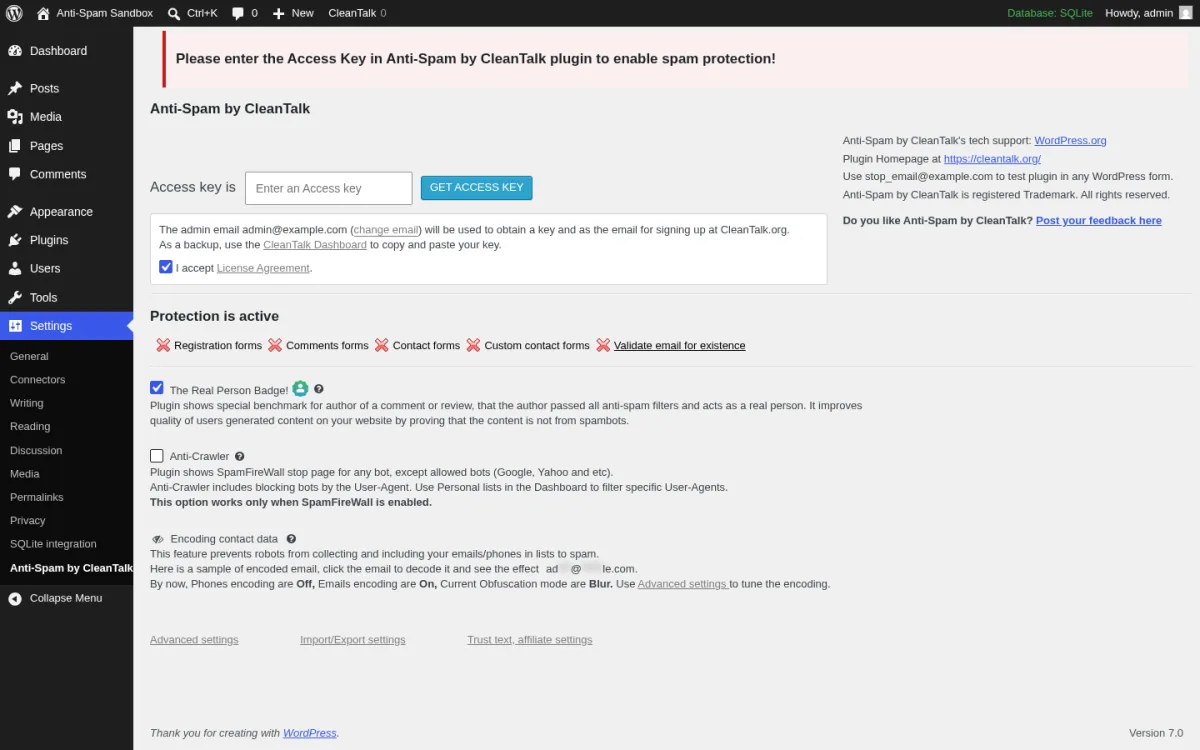
**What I tested in a clean WordPress 7.0 sandbox on 2026-06-15.** I installed v6.81 from `wordpress.org/plugins/cleantalk-spam-protect`, activated it, and opened `options-general.php?page=cleantalk`. The screen above is the real first-load settings page with the orange "Please enter the Access Key" banner, the Access Key field plus Get Access Key Automatically button (which would walk you through a 7-day trial signup), and the Protection is active checklist (Registration forms, Comments form, Contact Forms, Custom contact forms). I confirmed the sidebar links open the right CleanTalk Dashboard and documentation targets. I walked the Advanced settings page and confirmed the Spam FireWall toggle, the Anti-Flood and Anti-Crawler options, the disposable-email blocking toggle, and the WooCommerce filter settings. I did not provision a live license in the sandbox.
**Strengths.** The broadest form coverage in this roundup; CleanTalk integrates with effectively every WordPress form plugin that ships. The Spam FireWall component blocks the worst bot IPs at the request level, which reduces server load on busy sites. Real-time email validation catches throwaway and mistyped addresses before they enter your list. Bulk tools (Find spam comments, Find spam users) let you clean a year-old site in a single click. WooCommerce fake-order filtering is a genuine differentiator for stores under card-testing attack. Frequent 2026 releases (eight releases in the first half of 2026 alone).
**Limitations.** The plugin is technically free, but real protection requires a paid CleanTalk license; after the 7-day trial the plugin starts surfacing an unconfigured banner on every admin screen. Some reviewers complain about occasional "access key is not valid" errors that need a re-paste and Sync. The admin notice strip is busier than Akismet's and pushes a premium WAF upsell. As with Akismet, every comment / form submission leaves your site for CleanTalk's API, so it is not the right pick for EU sites with strict data-residency rules.
**Pricing.** All plans verified on cleantalk.org/price-anti-spam on 2026-06-15.
- Free trial: 7 days, full features. No payment required.
- Single Website: €10 / year.
- 3 Websites: €20 / year (€6.66 per site / year).
- Unlimited Websites: €23 / month.
- Multi-year discount: 2 years saves 10%, 3 years saves 19%.
Currencies USD, EUR, GBP and others supported. Cancel anytime; license valid until the end of the paid period.
**Best fit.** Small business sites that want one paid plugin to cover comments, contact forms, registration AND WooCommerce checkout for around $12/year, multi-form stores that already use Fluent Forms / Ninja / Forminator and want the broadest single-vendor integration, and agencies that want one license to cover up to 3 client sites cheaply.
## 4. WP Armour - Honeypot Anti Spam: the best free honeypot
- **Vendor:** cleantalk.org
- **WordPress.org:** wordpress.org/plugins/cleantalk-spam-protect/
- **Active installs:** 200,000+
- **Rating:** 4.8 / 5 (3,190 reviews on 2026-06-15)
- **Latest version:** 6.81, released 2026-06-12
- **Requires:** WordPress 4.7+, PHP 7.2+
- **Tested up to:** WordPress 7.0
CleanTalk is the most-reviewed paid anti-spam plugin on WordPress.org (3,190 reviews) and the strongest cloud-based all-in-one in the category. The plugin is free to install; protection requires an active CleanTalk SaaS license. The product covers comments, registrations, logins, contact forms (CF7, WPForms, Fluent Forms, Ninja, Forminator, Gravity Forms, Formidable, Elementor, HubSpot, MC4WP, MailPoet, WS Form and dozens more), WooCommerce checkout and reviews, bbPress, search-form abuse, and a separate Spam FireWall that blocks known-bad bot IPs before they ever reach PHP. CleanTalk also handles existing-comment cleanup, bulk spam-user removal, real-time email validation, disposable-email blocking, and an Anti-Crawler control with explicit allowlists for ChatGPT, Claude, Gemini and Copilot crawlers.
**What I tested in a clean WordPress 7.0 sandbox on 2026-06-15.** I installed v6.81 from `wordpress.org/plugins/cleantalk-spam-protect`, activated it, and opened `options-general.php?page=cleantalk`. The screen above is the real first-load settings page with the orange "Please enter the Access Key" banner, the Access Key field plus Get Access Key Automatically button (which would walk you through a 7-day trial signup), and the Protection is active checklist (Registration forms, Comments form, Contact Forms, Custom contact forms). I confirmed the sidebar links open the right CleanTalk Dashboard and documentation targets. I walked the Advanced settings page and confirmed the Spam FireWall toggle, the Anti-Flood and Anti-Crawler options, the disposable-email blocking toggle, and the WooCommerce filter settings. I did not provision a live license in the sandbox.
**Strengths.** The broadest form coverage in this roundup; CleanTalk integrates with effectively every WordPress form plugin that ships. The Spam FireWall component blocks the worst bot IPs at the request level, which reduces server load on busy sites. Real-time email validation catches throwaway and mistyped addresses before they enter your list. Bulk tools (Find spam comments, Find spam users) let you clean a year-old site in a single click. WooCommerce fake-order filtering is a genuine differentiator for stores under card-testing attack. Frequent 2026 releases (eight releases in the first half of 2026 alone).
**Limitations.** The plugin is technically free, but real protection requires a paid CleanTalk license; after the 7-day trial the plugin starts surfacing an unconfigured banner on every admin screen. Some reviewers complain about occasional "access key is not valid" errors that need a re-paste and Sync. The admin notice strip is busier than Akismet's and pushes a premium WAF upsell. As with Akismet, every comment / form submission leaves your site for CleanTalk's API, so it is not the right pick for EU sites with strict data-residency rules.
**Pricing.** All plans verified on cleantalk.org/price-anti-spam on 2026-06-15.
- Free trial: 7 days, full features. No payment required.
- Single Website: €10 / year.
- 3 Websites: €20 / year (€6.66 per site / year).
- Unlimited Websites: €23 / month.
- Multi-year discount: 2 years saves 10%, 3 years saves 19%.
Currencies USD, EUR, GBP and others supported. Cancel anytime; license valid until the end of the paid period.
**Best fit.** Small business sites that want one paid plugin to cover comments, contact forms, registration AND WooCommerce checkout for around $12/year, multi-form stores that already use Fluent Forms / Ninja / Forminator and want the broadest single-vendor integration, and agencies that want one license to cover up to 3 client sites cheaply.
## 4. WP Armour - Honeypot Anti Spam: the best free honeypot
 - **Vendor:** dineshkarki.com.np/wp-armour-anti-spam
- **WordPress.org:** wordpress.org/plugins/honeypot/
- **Active installs:** 400,000+
- **Rating:** 5.0 / 5 (1,400 reviews on 2026-06-15)
- **Latest version:** 2.3.04, released 2025-12-20
- **Requires:** WordPress 5.0+
WP Armour is the highest-rated anti-spam plugin in this roundup (1,381 five-star reviews out of 1,400). The reason is simple: it does one thing well and stays out of the way. The plugin injects a randomly-named hidden honeypot field into every supported form using JavaScript. Spam bots cannot execute JavaScript reliably, so they cannot see the field on the human-rendered page, and they fill the server-side template's hidden field instead, which marks them as spam. No API, no captcha, no monthly subscription, no UX friction for real visitors. The Lite build covers WordPress comments, registration, BBPress, Contact Form 7, Gravity Forms (non-Ajax single-step), WPForms, Formidable Forms, Caldera, Toolset, Elementor Forms, Fluent Forms, Divi Theme Contact Form, Theme My Login, and WooCommerce Reviews Pro.
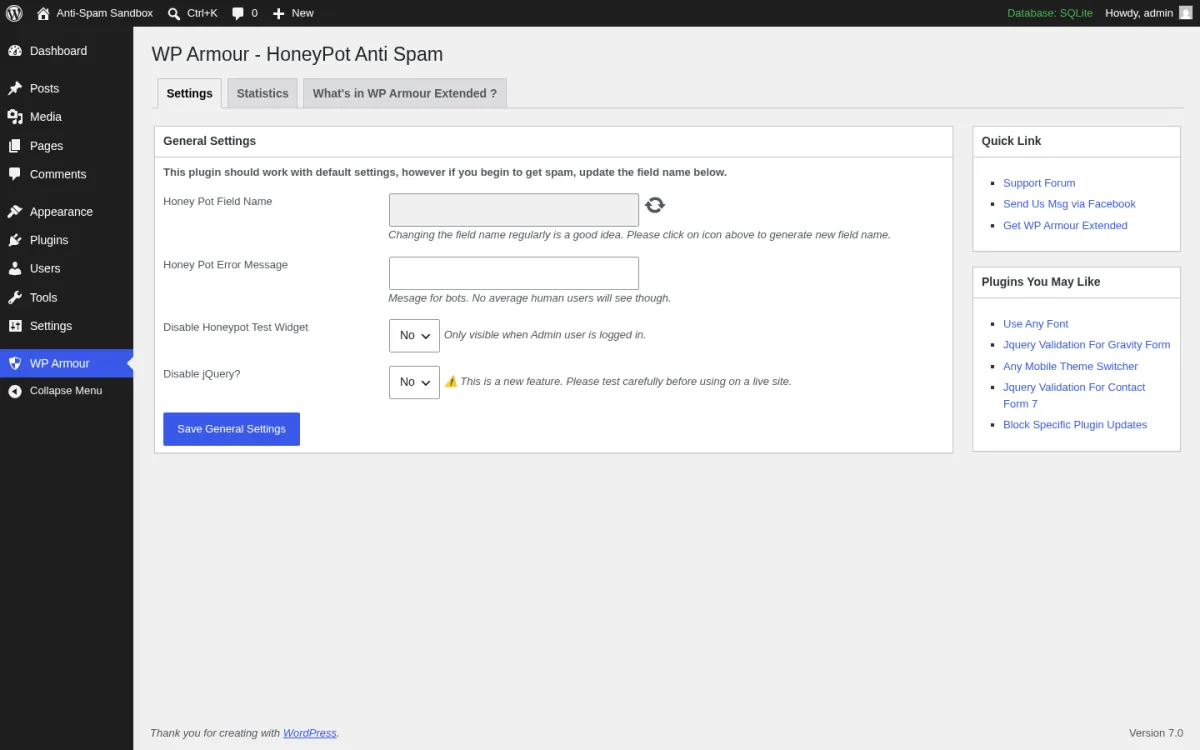
**What I tested in a clean WordPress 7.0 sandbox on 2026-06-15.** I installed v2.3.04 from `wordpress.org/plugins/honeypot`, activated it, and opened `admin.php?page=wp-armour`. The screen above is the real Settings tab with the three tabs (Settings, Statistics, What is in WP Armour Extended), the Honey Pot Field Name input with a regenerate-field-name button (which generates a new unique name per install to prevent one-size-fits-all bot bypasses), the Honey Pot Error Message field, and the Disable Honeypot Test Widget + Disable jQuery toggles. I confirmed the WP Armour Test widget appears below the default WordPress comment form when logged in as administrator, with a "Spam protection is enabled" status. I walked the Statistics tab and confirmed the empty-state graph + counter; this fills in once real spam is blocked. I did not test ajax-based Gravity Forms or WooCommerce checkout because those are Extended-only.
**Strengths.** Zero configuration. Activate and it works. No API key, no captcha, no external calls, GDPR-friendly. Unique field name per install gives the honeypot real teeth against scripted attacks. Authors are responsive to compatibility issues (the changelog shows regular fixes for Astra, Divi, Ultimate Member, TutorLMS, LearnPress, Elementor and others). Excellent rating distribution (99% five-star). Patron-funded development gives a credible long-term signal. Form coverage in Lite is unusually broad for a free honeypot.
**Limitations.** No spam-submission logging in Lite, so you cannot see what bots are trying to send (Extended adds this). No WooCommerce checkout or Easy Digital Downloads checkout in Lite. Ajax-based Gravity Forms and multi-step Gravity Forms need Extended. The plugin is JavaScript-dependent by design, so the very small fraction of users with JavaScript disabled get the "Spamming or your Javascript is disabled" message and have to retry. The plugin has been around since 2020 but updates are less frequent than Akismet or CleanTalk; v2.3.04 has been the current build since 2025-12-20.
**Pricing.** Lite is free forever. WP Armour Extended is sold direct on `dineshkarki.com.np/buy-wp-armour-extended` at the vendor's listed yearly license price. Extended adds spam-submission logging with IP, IP blocking after N flagged submissions, WooCommerce checkout / EDD / QuForm / Ninja Forms / Gravity Ajax / MC4WP / S2 Members / Ultimate Member / BuddyPress / BuddyBoss / Forminator / WS Form / Bricks / MemberPress / Sure Forms / Everest Forms support and more.
**Best fit.** WordPress sites that want a truly free, no-API honeypot covering both comments and the main contact form plugins, sites that hate captcha and refuse to add one, and operators who already use Akismet for comments and want a second-layer honeypot for the contact form.
## 5. Simple CAPTCHA Alternative with Cloudflare Turnstile: the modern reCAPTCHA replacement
- **Vendor:** dineshkarki.com.np/wp-armour-anti-spam
- **WordPress.org:** wordpress.org/plugins/honeypot/
- **Active installs:** 400,000+
- **Rating:** 5.0 / 5 (1,400 reviews on 2026-06-15)
- **Latest version:** 2.3.04, released 2025-12-20
- **Requires:** WordPress 5.0+
WP Armour is the highest-rated anti-spam plugin in this roundup (1,381 five-star reviews out of 1,400). The reason is simple: it does one thing well and stays out of the way. The plugin injects a randomly-named hidden honeypot field into every supported form using JavaScript. Spam bots cannot execute JavaScript reliably, so they cannot see the field on the human-rendered page, and they fill the server-side template's hidden field instead, which marks them as spam. No API, no captcha, no monthly subscription, no UX friction for real visitors. The Lite build covers WordPress comments, registration, BBPress, Contact Form 7, Gravity Forms (non-Ajax single-step), WPForms, Formidable Forms, Caldera, Toolset, Elementor Forms, Fluent Forms, Divi Theme Contact Form, Theme My Login, and WooCommerce Reviews Pro.
**What I tested in a clean WordPress 7.0 sandbox on 2026-06-15.** I installed v2.3.04 from `wordpress.org/plugins/honeypot`, activated it, and opened `admin.php?page=wp-armour`. The screen above is the real Settings tab with the three tabs (Settings, Statistics, What is in WP Armour Extended), the Honey Pot Field Name input with a regenerate-field-name button (which generates a new unique name per install to prevent one-size-fits-all bot bypasses), the Honey Pot Error Message field, and the Disable Honeypot Test Widget + Disable jQuery toggles. I confirmed the WP Armour Test widget appears below the default WordPress comment form when logged in as administrator, with a "Spam protection is enabled" status. I walked the Statistics tab and confirmed the empty-state graph + counter; this fills in once real spam is blocked. I did not test ajax-based Gravity Forms or WooCommerce checkout because those are Extended-only.
**Strengths.** Zero configuration. Activate and it works. No API key, no captcha, no external calls, GDPR-friendly. Unique field name per install gives the honeypot real teeth against scripted attacks. Authors are responsive to compatibility issues (the changelog shows regular fixes for Astra, Divi, Ultimate Member, TutorLMS, LearnPress, Elementor and others). Excellent rating distribution (99% five-star). Patron-funded development gives a credible long-term signal. Form coverage in Lite is unusually broad for a free honeypot.
**Limitations.** No spam-submission logging in Lite, so you cannot see what bots are trying to send (Extended adds this). No WooCommerce checkout or Easy Digital Downloads checkout in Lite. Ajax-based Gravity Forms and multi-step Gravity Forms need Extended. The plugin is JavaScript-dependent by design, so the very small fraction of users with JavaScript disabled get the "Spamming or your Javascript is disabled" message and have to retry. The plugin has been around since 2020 but updates are less frequent than Akismet or CleanTalk; v2.3.04 has been the current build since 2025-12-20.
**Pricing.** Lite is free forever. WP Armour Extended is sold direct on `dineshkarki.com.np/buy-wp-armour-extended` at the vendor's listed yearly license price. Extended adds spam-submission logging with IP, IP blocking after N flagged submissions, WooCommerce checkout / EDD / QuForm / Ninja Forms / Gravity Ajax / MC4WP / S2 Members / Ultimate Member / BuddyPress / BuddyBoss / Forminator / WS Form / Bricks / MemberPress / Sure Forms / Everest Forms support and more.
**Best fit.** WordPress sites that want a truly free, no-API honeypot covering both comments and the main contact form plugins, sites that hate captcha and refuse to add one, and operators who already use Akismet for comments and want a second-layer honeypot for the contact form.
## 5. Simple CAPTCHA Alternative with Cloudflare Turnstile: the modern reCAPTCHA replacement
 - **Vendor:** simpleturnstile.com
- **WordPress.org:** wordpress.org/plugins/simple-cloudflare-turnstile/
- **Active installs:** 100,000+
- **Rating:** 4.7 / 5 (247 reviews on 2026-06-15)
- **Latest version:** 1.40.0, released 2026-05-29
- **Requires:** WordPress 4.7+
Cloudflare Turnstile is the modern, privacy-preserving alternative to Google reCAPTCHA, and this plugin is the standard way to wire it into WordPress in 2026. It is the only modern CAPTCHA-style anti-spam plugin in this roundup. The 1.40.0 build supports the default WordPress login / register / password reset / comments forms, the full WooCommerce surface (checkout, pay-for-order, account details, login, register, password reset), and every major form plugin: WPForms, Fluent Forms, Contact Form 7, Gravity Forms, Formidable, Forminator, Jetpack, Kadence, SureForms, Elementor Pro Forms, EDD, Paid Memberships Pro, MC4WP, MailPoet, BuddyPress, bbPress, MemberPress, Ultimate Member, WP-Members, WP User Frontend, WP User Manager, wpDiscuz, CheckoutWC and Sunshine Photo Cart. The plugin is 100% free with no paid version.
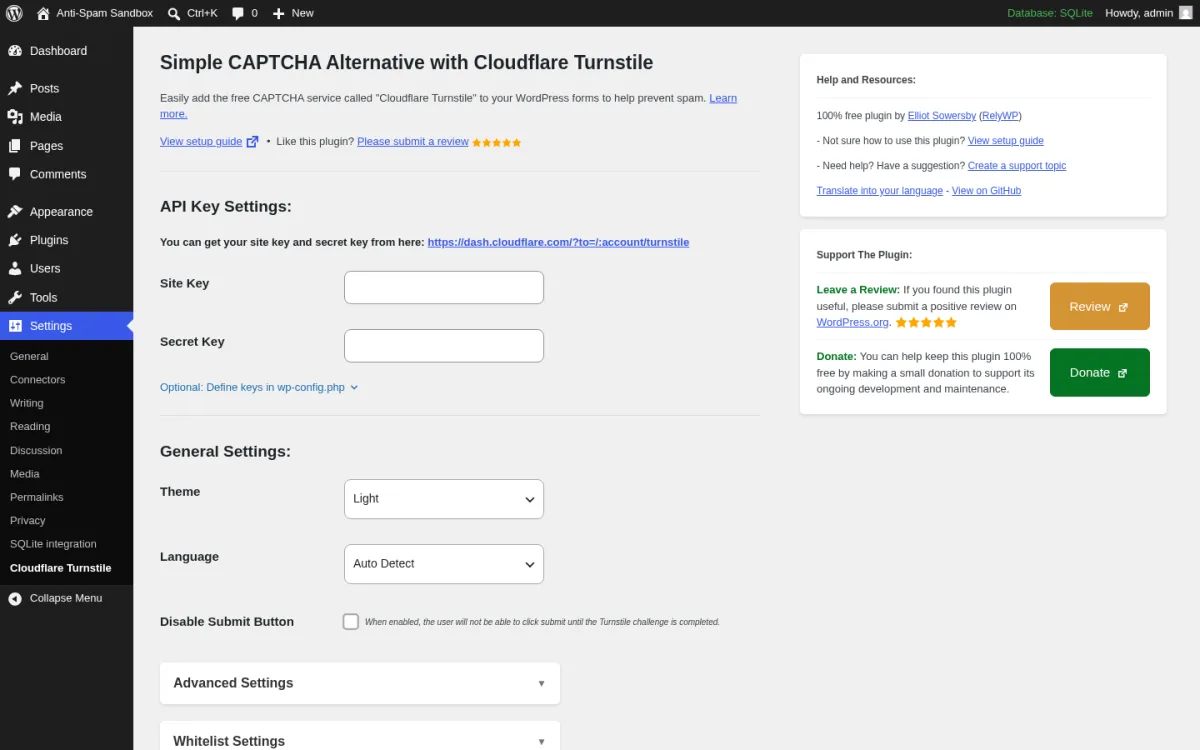
**What I tested in a clean WordPress 7.0 sandbox on 2026-06-15.** I installed v1.40.0 from `wordpress.org/plugins/simple-cloudflare-turnstile`, activated it, and opened `options-general.php?page=cfturnstile`. The screen above is the real settings page with the API Key Settings section (Site Key + Secret Key inputs, with a link to `dash.cloudflare.com/?to=/:account/turnstile` to generate the keys), the General Settings section (Theme drop-down with Light selected, Language Auto Detect, Disable Submit Button toggle), the Advanced Settings and Whitelist Settings accordions, plus the right-rail Help & Resources panel and Support The Plugin block. I expanded the Advanced Settings accordion and verified the Failsafe Mode option (fall back to reCAPTCHA or allow submissions if Cloudflare is down), Resource Hint preconnect, debug logging toggle, and the Defer Scripts option. I did not register a Cloudflare Turnstile site key in the sandbox.
**Strengths.** The widest form integration grid in this roundup. Turnstile itself is free, fast and CAPTCHA-free for legitimate users (invisible in most cases when Appearance Mode is set to Interaction Only). 100% free plugin with no upsell, no tracking, and a 4.7 rating from 247 reviews. Very active 2026 release cadence (1.34 through 1.40 since the trademark rename in September 2025). Failsafe mode is unusual: if Cloudflare ever has an outage the plugin can either allow submissions or fall back to reCAPTCHA so your forms do not stop accepting humans. The "Disable Submit Button until Turnstile completes" option is a quiet but effective UX upgrade. wp-config.php constants for the keys make CI/CD friendly deployments easy.
**Limitations.** Requires a Cloudflare account (also free) to generate site keys; you cannot use the plugin without going through `dash.cloudflare.com`. Like all CAPTCHAs it adds a small visible widget below your forms; on Interaction Only mode it is usually invisible but legitimate users with strict tracker blockers occasionally see a challenge. Not a comment-spam plugin on its own: you still want Akismet or Antispam Bee for the comments thread because Turnstile only blocks scripted spam, not human commenters writing for backlinks.
**Pricing.** No paid plans. The plugin and Cloudflare Turnstile itself are free.
**Best fit.** Any WordPress site that wants a modern, privacy-respecting CAPTCHA replacement on login / registration / WooCommerce checkout / contact forms, sites that already use Cloudflare for DNS / CDN, and operators who want one plugin to add anti-spam protection to almost every form plugin in the WordPress ecosystem.
## 6. Titan Anti-spam & Security: anti-spam plus login security in one plugin
- **Vendor:** simpleturnstile.com
- **WordPress.org:** wordpress.org/plugins/simple-cloudflare-turnstile/
- **Active installs:** 100,000+
- **Rating:** 4.7 / 5 (247 reviews on 2026-06-15)
- **Latest version:** 1.40.0, released 2026-05-29
- **Requires:** WordPress 4.7+
Cloudflare Turnstile is the modern, privacy-preserving alternative to Google reCAPTCHA, and this plugin is the standard way to wire it into WordPress in 2026. It is the only modern CAPTCHA-style anti-spam plugin in this roundup. The 1.40.0 build supports the default WordPress login / register / password reset / comments forms, the full WooCommerce surface (checkout, pay-for-order, account details, login, register, password reset), and every major form plugin: WPForms, Fluent Forms, Contact Form 7, Gravity Forms, Formidable, Forminator, Jetpack, Kadence, SureForms, Elementor Pro Forms, EDD, Paid Memberships Pro, MC4WP, MailPoet, BuddyPress, bbPress, MemberPress, Ultimate Member, WP-Members, WP User Frontend, WP User Manager, wpDiscuz, CheckoutWC and Sunshine Photo Cart. The plugin is 100% free with no paid version.
**What I tested in a clean WordPress 7.0 sandbox on 2026-06-15.** I installed v1.40.0 from `wordpress.org/plugins/simple-cloudflare-turnstile`, activated it, and opened `options-general.php?page=cfturnstile`. The screen above is the real settings page with the API Key Settings section (Site Key + Secret Key inputs, with a link to `dash.cloudflare.com/?to=/:account/turnstile` to generate the keys), the General Settings section (Theme drop-down with Light selected, Language Auto Detect, Disable Submit Button toggle), the Advanced Settings and Whitelist Settings accordions, plus the right-rail Help & Resources panel and Support The Plugin block. I expanded the Advanced Settings accordion and verified the Failsafe Mode option (fall back to reCAPTCHA or allow submissions if Cloudflare is down), Resource Hint preconnect, debug logging toggle, and the Defer Scripts option. I did not register a Cloudflare Turnstile site key in the sandbox.
**Strengths.** The widest form integration grid in this roundup. Turnstile itself is free, fast and CAPTCHA-free for legitimate users (invisible in most cases when Appearance Mode is set to Interaction Only). 100% free plugin with no upsell, no tracking, and a 4.7 rating from 247 reviews. Very active 2026 release cadence (1.34 through 1.40 since the trademark rename in September 2025). Failsafe mode is unusual: if Cloudflare ever has an outage the plugin can either allow submissions or fall back to reCAPTCHA so your forms do not stop accepting humans. The "Disable Submit Button until Turnstile completes" option is a quiet but effective UX upgrade. wp-config.php constants for the keys make CI/CD friendly deployments easy.
**Limitations.** Requires a Cloudflare account (also free) to generate site keys; you cannot use the plugin without going through `dash.cloudflare.com`. Like all CAPTCHAs it adds a small visible widget below your forms; on Interaction Only mode it is usually invisible but legitimate users with strict tracker blockers occasionally see a challenge. Not a comment-spam plugin on its own: you still want Akismet or Antispam Bee for the comments thread because Turnstile only blocks scripted spam, not human commenters writing for backlinks.
**Pricing.** No paid plans. The plugin and Cloudflare Turnstile itself are free.
**Best fit.** Any WordPress site that wants a modern, privacy-respecting CAPTCHA replacement on login / registration / WooCommerce checkout / contact forms, sites that already use Cloudflare for DNS / CDN, and operators who want one plugin to add anti-spam protection to almost every form plugin in the WordPress ecosystem.
## 6. Titan Anti-spam & Security: anti-spam plus login security in one plugin
 - **Vendor:** titansitescanner.com
- **WordPress.org:** wordpress.org/plugins/anti-spam/
- **Active installs:** 60,000+
- **Rating:** 4.5 / 5 (369 reviews on 2026-06-15)
- **Latest version:** 7.5.2, released 2026-05-19
- **Requires:** WordPress 5.6+, PHP 7.4+
- **Tested up to:** WordPress 7.0
Titan is the most-installed plugin in the "anti-spam plus security in one" category, now maintained by Themeisle (the parent of Neve, Otter, Optimole and over a million WordPress users). The free build is honest about its scope: it blocks comment spam through a background filter without CAPTCHA, limits brute-force login attempts, hardens WordPress (strong password enforcement, hide author login, disable XML-RPC, hide version info, remove generator meta, remove HTML comments), logs login attempts and security activity, and gives an Error Log viewer + Debug Information Export for support tickets. Pro adds machine-learning spam detection, scanning existing comments and users for spam, TOTP two-factor authentication, and scheduled backups with FTP/Dropbox storage. The plugin's anti-spam scope is the WordPress comment form only; it explicitly does not protect contact form plugins (you would pair it with WP Armour or Turnstile).
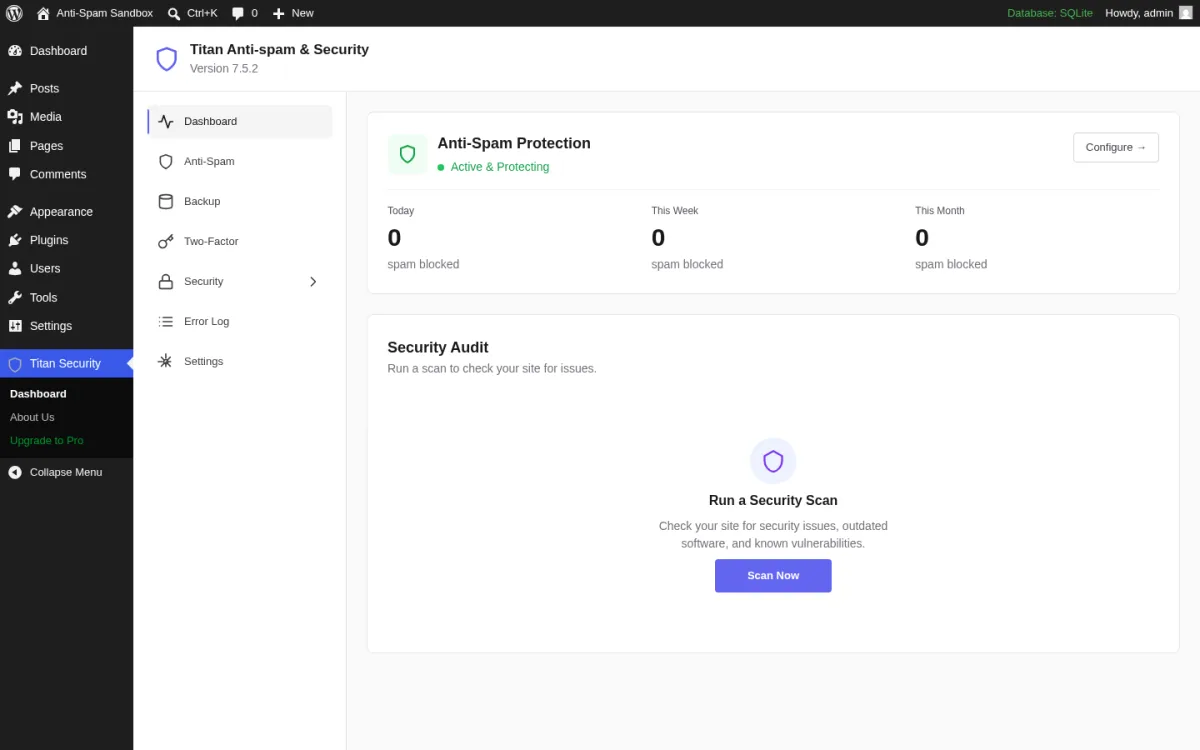
**What I tested in a clean WordPress 7.0 sandbox on 2026-06-15.** I installed v7.5.2 from `wordpress.org/plugins/anti-spam`, activated it, and opened `admin.php?page=titan-security`. The screen above is the real Dashboard with the seven inner-sidebar items (Dashboard, Anti-Spam, Backup, Two-Factor, Security, Error Log, Settings), the Anti-Spam Protection card showing Active & Protecting, the Today / This Week / This Month counter cards (all 0 spam blocked on a fresh install), and the Security Audit panel with a Run a Security Scan CTA. I opened the Anti-Spam sub-page and verified the "Block spam comments without captcha" toggle is on by default plus the Save spam comments for review option, the Detailed spam processing logs option, and the Privacy policy link integration. I opened the Security sub-page and verified the Strong Password Enforcement, Hide Author Login, Disable XML-RPC, Hide Version Information, Remove Version Query Strings, Remove Meta Generator Tag and Remove HTML Comments toggles. I confirmed the login-attempts log is present.
**Strengths.** Two distinct jobs in one plugin: comment-spam blocking and login hardening, both in the free tier. Themeisle's branding signal (1+ million WordPress users on their plugins) plus a Pro tier for ML detection and 2FA. CAPTCHA-free, so real visitors never see a challenge. Security hardening defaults are the same set most security plugins lock behind a paid plan. Active 2026 release cadence (Pro v7.5.2 in May). Dashboard is clean and React-driven, which is unusual for a free anti-spam plugin.
**Limitations.** Anti-spam scope is the WordPress comment form only; contact form spam, registration spam and WooCommerce checkout abuse need a separate plugin. Some reviewers report intermittent compatibility issues with Fluent Forms Pro and the comments form on specific themes (the changelog shows a recurring history of theme-fix releases). The free build's "comment spam filter" is mostly hidden honeypot + background validation; users coming from Akismet sometimes find Titan blocks slightly less spam at first. Pro pricing is on `titansitescanner.com` and was changing during the Themeisle migration as of 2026-06-15, so confirm live pricing before buying.
**Pricing.** The free build is permanently free. Pro pricing for Titan Anti-spam & Security plus the full Titan Site Scanner suite is published on `titansitescanner.com`. Pro unlocks ML anti-spam, scan existing comments/users for spam, TOTP 2FA with QR-code setup and per-user enforcement, and scheduled backups with FTP/Dropbox storage.
**Best fit.** Personal blogs and small business sites that want one free plugin that covers comments + login brute-force protection + basic WP hardening, owners migrating off a heavier security plugin who want a lighter footprint, and Themeisle-stack users who already trust Neve / Otter / Optimole on the same site.
## 7. Zero Spam for WordPress: multi-blocklist scoring for technical operators
- **Vendor:** titansitescanner.com
- **WordPress.org:** wordpress.org/plugins/anti-spam/
- **Active installs:** 60,000+
- **Rating:** 4.5 / 5 (369 reviews on 2026-06-15)
- **Latest version:** 7.5.2, released 2026-05-19
- **Requires:** WordPress 5.6+, PHP 7.4+
- **Tested up to:** WordPress 7.0
Titan is the most-installed plugin in the "anti-spam plus security in one" category, now maintained by Themeisle (the parent of Neve, Otter, Optimole and over a million WordPress users). The free build is honest about its scope: it blocks comment spam through a background filter without CAPTCHA, limits brute-force login attempts, hardens WordPress (strong password enforcement, hide author login, disable XML-RPC, hide version info, remove generator meta, remove HTML comments), logs login attempts and security activity, and gives an Error Log viewer + Debug Information Export for support tickets. Pro adds machine-learning spam detection, scanning existing comments and users for spam, TOTP two-factor authentication, and scheduled backups with FTP/Dropbox storage. The plugin's anti-spam scope is the WordPress comment form only; it explicitly does not protect contact form plugins (you would pair it with WP Armour or Turnstile).
**What I tested in a clean WordPress 7.0 sandbox on 2026-06-15.** I installed v7.5.2 from `wordpress.org/plugins/anti-spam`, activated it, and opened `admin.php?page=titan-security`. The screen above is the real Dashboard with the seven inner-sidebar items (Dashboard, Anti-Spam, Backup, Two-Factor, Security, Error Log, Settings), the Anti-Spam Protection card showing Active & Protecting, the Today / This Week / This Month counter cards (all 0 spam blocked on a fresh install), and the Security Audit panel with a Run a Security Scan CTA. I opened the Anti-Spam sub-page and verified the "Block spam comments without captcha" toggle is on by default plus the Save spam comments for review option, the Detailed spam processing logs option, and the Privacy policy link integration. I opened the Security sub-page and verified the Strong Password Enforcement, Hide Author Login, Disable XML-RPC, Hide Version Information, Remove Version Query Strings, Remove Meta Generator Tag and Remove HTML Comments toggles. I confirmed the login-attempts log is present.
**Strengths.** Two distinct jobs in one plugin: comment-spam blocking and login hardening, both in the free tier. Themeisle's branding signal (1+ million WordPress users on their plugins) plus a Pro tier for ML detection and 2FA. CAPTCHA-free, so real visitors never see a challenge. Security hardening defaults are the same set most security plugins lock behind a paid plan. Active 2026 release cadence (Pro v7.5.2 in May). Dashboard is clean and React-driven, which is unusual for a free anti-spam plugin.
**Limitations.** Anti-spam scope is the WordPress comment form only; contact form spam, registration spam and WooCommerce checkout abuse need a separate plugin. Some reviewers report intermittent compatibility issues with Fluent Forms Pro and the comments form on specific themes (the changelog shows a recurring history of theme-fix releases). The free build's "comment spam filter" is mostly hidden honeypot + background validation; users coming from Akismet sometimes find Titan blocks slightly less spam at first. Pro pricing is on `titansitescanner.com` and was changing during the Themeisle migration as of 2026-06-15, so confirm live pricing before buying.
**Pricing.** The free build is permanently free. Pro pricing for Titan Anti-spam & Security plus the full Titan Site Scanner suite is published on `titansitescanner.com`. Pro unlocks ML anti-spam, scan existing comments/users for spam, TOTP 2FA with QR-code setup and per-user enforcement, and scheduled backups with FTP/Dropbox storage.
**Best fit.** Personal blogs and small business sites that want one free plugin that covers comments + login brute-force protection + basic WP hardening, owners migrating off a heavier security plugin who want a lighter footprint, and Themeisle-stack users who already trust Neve / Otter / Optimole on the same site.
## 7. Zero Spam for WordPress: multi-blocklist scoring for technical operators
 - **Vendor:** zerospam.org
- **WordPress.org:** wordpress.org/plugins/zero-spam/
- **Active installs:** 20,000+
- **Rating:** 4.1 / 5 (143 reviews on 2026-06-15)
- **Latest version:** 5.5.8, released 2026-03-16
- **Requires:** WordPress 6.9+, PHP 8.2+
- **Tested up to:** WordPress 6.9.4
Zero Spam for WordPress is built for technical operators who want one plugin to combine multiple public blocklists and a real scoring system. The plugin is free. It protects WordPress comments, registrations, login and XML-RPC; integrates with WooCommerce, GiveWP, ProfilePress, Mailchimp for WordPress, Gravity Forms, Contact Form 7, WPForms, Formidable, Fluent Forms and wpDiscuz; and lets you wire in optional blocklists from Zero Spam's own API, Stop Forum Spam, Project Honeypot, and splorp's comment-blocklist. Geolocation hooks for ipinfo.io, ipbase.com, ipstack and Google Maps let you block by country / region / zip / city and visualize attack origins on a map. A REST API + WP-CLI commands make it usable from staging / CI / Composer pipelines.
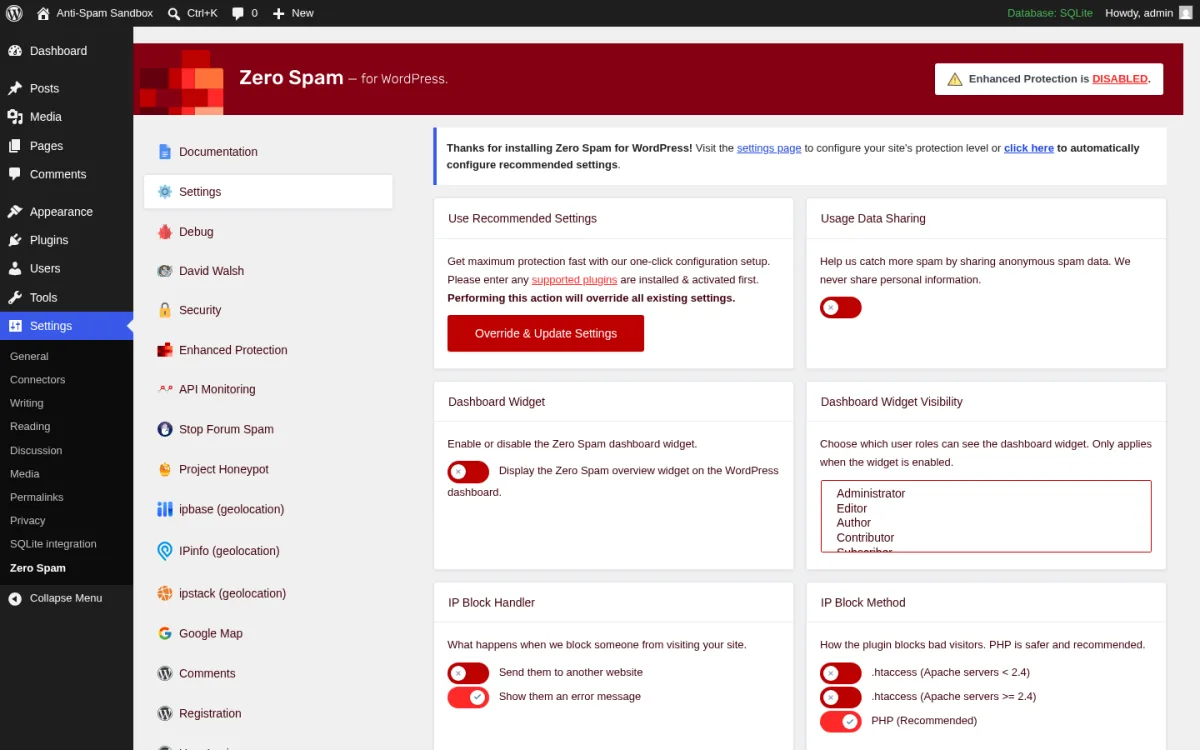
**What I tested in a clean WordPress 7.0 sandbox on 2026-06-15.** I installed v5.5.8 from `wordpress.org/plugins/zero-spam`, activated it, and opened `options-general.php?page=wordpress-zero-spam-settings`. The screen above is the real Settings tab with the wide tab strip (Documentation, Settings, Debug, David Walsh, Security, Enhanced Protection, API Monitoring, Stop Forum Spam, Project Honeypot, IPInfo, ipbase, ipstack, Google Maps, Comments, Registration), the Use Recommended Settings + Override & Update Settings buttons, the Usage Data Sharing toggle, the Dashboard Widget visibility checkboxes, the IP Block Method explanation (htaccess vs PHP) and the Send them to an external website / Block Redirect URL options. I clicked Use Recommended Settings and confirmed the plugin auto-toggles the David Walsh comment-spam technique, the comments + registration checks, splorp's blocklist sync, and the login protection. I opened the Stop Forum Spam tab and confirmed the confidence-score slider; I opened the Project Honeypot tab and confirmed the API-key field plus threat-score filter. I did not register live keys.
**Strengths.** The most flexible anti-spam architecture in this roundup. Each blocklist is a toggle, each integration is a toggle, the strictness is a slider. WP-CLI (`wp zerospam autoconfigure`, `wp zerospam settings`, `wp zerospam set --[key]=[value]`) plus a documented REST API make this the only plugin in the roundup that fits cleanly into a CI/CD pipeline or staging-sync workflow. ZEROSPAM_RESCUE_KEY constant lets you bypass blocks via a magic URL query string if you ever lock yourself out. Active 2026 release cadence (v5.5.5 / 5.5.7 / 5.5.8 in early 2026 with explicit Patchstack vulnerability fixes).
**Limitations.** Lower average rating in this roundup (4.1 vs Akismet 4.7 and WP Armour 5.0). Several recent reviewers complain the admin dashboard pushes a paid Enhanced Protection / Zero Spam API upsell aggressively, with one reviewer describing it as "dashboard hijacker." The admin is busier and harder to navigate for non-technical site owners; this is genuinely a power-user plugin. WordPress 6.9+ and PHP 8.2+ requirements are stricter than every other plugin in this roundup, which excludes many older hosts. Not compatible with Jetpack comments.
**Pricing.** The plugin is free. The Zero Spam API (optional, used by Enhanced Protection) is the paid layer. All plans verified on zerospam.org/pricing on 2026-06-15.
- Explorer (free): 10 requests / month, basic intelligence.
- Essentials: $8 / month (or $78 / year, 20% off) for 10,000 requests / month.
- Business: $15 / month (or $144 / year, 20% off) for 50,000 requests / month.
- Platform: $100 / month (or $960 / year, 20% off) for unlimited requests across 3 sites/apps.
Stop Forum Spam, Project Honeypot, splorp's blocklist and the David Walsh technique remain fully free inside the plugin; you only pay if you want the vendor's own IP-reputation API.
**Best fit.** Technical site owners and agencies that want fine-grained control over which blocklists feed the spam scoring, sites with a real geolocation problem (specific countries / regions targeting your forms), and operators who manage WordPress via WP-CLI or REST automation rather than the browser admin.
## How to choose the right WordPress anti-spam plugin
Pick the plugin that matches your actual spam problem, not the highest install count.
- **If your only spam problem is comments, install Akismet.** It is bundled with WordPress and the Personal name-your-price tier (including $0) covers non-commercial sites. If you also receive contact form spam through CF7 / Elementor / Jetpack / WPForms, Akismet already filters those out of the box.
- **If you want a free, no-API, EU-friendly comments-only plugin, install Antispam Bee.** No paid tier, no third-party calls in the default configuration, GDPR-compliant by design.
- **If you want one paid plugin to cover comments + every form plugin + registration + WooCommerce for ~$12/yr, install CleanTalk.** Spam FireWall blocks the worst bot IPs at the edge, and the broad form integration grid is the strongest in this roundup.
- **If you refuse to use captcha but want a free honeypot that covers most contact forms too, install WP Armour.** Activate and done. Pair with Akismet for comments and you have a free two-layer stack.
- **If you want a modern reCAPTCHA replacement for login / register / checkout / contact forms, install Simple Cloudflare Turnstile.** It is the only plugin in this roundup that wires Turnstile into every major form integration for free.
- **If you want comment spam blocking PLUS login brute-force protection in one plugin, install Titan Anti-spam & Security.** Free covers most of the job; Pro adds ML and 2FA.
- **If you are a technical operator and want multi-blocklist scoring, WP-CLI control, and geo-blocking, install Zero Spam for WordPress.** Free is enough for most sites; the Zero Spam API is the paid layer you can opt into.
If you are still building the site, install your anti-spam plugin before you launch contact forms or checkout, and pair it with the right contact form plugin from day one. The cheapest moment to fix WordPress spam is before the first bot finds your form endpoint.
## Frequently asked questions
### Do I really need an anti-spam plugin if I use reCAPTCHA?
Yes. Spam bots in 2026 routinely solve image and audio reCAPTCHA challenges, and reCAPTCHA does nothing for comment spam, registration spam or fake WooCommerce orders. A real anti-spam plugin layers a cloud reputation check (Akismet / CleanTalk), a honeypot field (WP Armour), or an invisible CAPTCHA (Cloudflare Turnstile) on top of (or instead of) reCAPTCHA. Cloudflare Turnstile is also a strict upgrade over reCAPTCHA on privacy and UX.
### What is the difference between a honeypot and a cloud anti-spam service?
A honeypot is a hidden field added to your form that only spam bots can see; a human user never interacts with it, so if it gets filled in, the submission is spam. Everything stays on your server, no API. A cloud anti-spam service (Akismet, CleanTalk) sends the comment / form submission to a remote API that compares it against a global database of known spam and returns a verdict. Cloud services catch more spam, but they need an external request per submission.
### Which free WordPress anti-spam plugin should I install?
For comments only: Antispam Bee or Akismet's Personal plan. For comments plus contact forms: WP Armour. For login / register / checkout / contact forms: Simple Cloudflare Turnstile. For comments plus login security: Titan. Most real sites end up running two: a honeypot or Turnstile on forms plus Akismet or Antispam Bee on comments.
### Is Akismet free for commercial sites?
No. Akismet's free Personal name-your-price plan is for non-commercial sites only. If your site shows ads, sells anything, links to a business, or is a business itself, Akismet expects you to pay for Pro (€9.95/mo billed yearly at the entry tier). If you cannot justify the paid tier, switch to Antispam Bee, WP Armour or CleanTalk.
### Will an anti-spam plugin slow down my site?
Honeypot plugins (WP Armour) and Turnstile have effectively zero performance impact. Cloud plugins (Akismet, CleanTalk) add one HTTPS request per submitted form / comment, which is invisible at human-typing speeds. Zero Spam and Titan add small per-request lookups for the blocklists you turn on. If you run a busy WooCommerce store, watch the Zero Spam IP Block Method setting: htaccess blocking is materially faster than PHP blocking under load.
### Do these plugins work with WooCommerce checkout spam and fake orders?
Yes, but only specific ones. CleanTalk has the strongest free integration; Simple Cloudflare Turnstile covers WooCommerce checkout, pay-for-order and account details directly; Zero Spam covers WooCommerce registration. WP Armour Lite does NOT cover WooCommerce checkout, only WooCommerce Reviews Pro; you need Extended for checkout. Akismet does not handle WooCommerce checkout or registration; it is comment + contact form only. For card-testing attack triage see also our WordPress ecommerce plugins roundup and free WordPress security plugins comparison for adjacent security plugins.
### Are these plugins GDPR-compliant?
Antispam Bee and WP Armour are GDPR-compliant by default with no external calls. Simple Cloudflare Turnstile is GDPR-friendly (Cloudflare publishes a DPA) but routes verification through Cloudflare. Akismet and CleanTalk are cloud-based and process visitor IP plus comment content on Automattic / CleanTalk servers; both vendors publish DPAs and require you to disclose this in your privacy policy. Zero Spam is local by default but each optional third-party blocklist you enable adds its own data flow; the plugin documents each one transparently.
## Final recommendation
WordPress sites in 2026 should not be running without an anti-spam plugin, full stop. The bots will find your forms within a week of launch, and the cleanup work compounds the longer you wait.
If you want the safest default, install Akismet. If you want a free, no-API, EU-friendly comments-only plugin, install Antispam Bee. If you want one paid plugin to cover comments and every major form plugin for around $12/year, install CleanTalk. If you want a free honeypot that covers most form plugins, install WP Armour. If you want a modern reCAPTCHA replacement for forms, install Simple Cloudflare Turnstile. If you also want login brute-force protection in the same plugin, install Titan Anti-spam & Security. If you are a technical operator who wants multi-blocklist scoring, install Zero Spam for WordPress.
Once your anti-spam plugin is live, the next thing worth installing is whichever contact form plugin matches your stack, plus a small set of free essentials from our top free WordPress plugins roundup to round out caching, security and analytics.
- **Vendor:** zerospam.org
- **WordPress.org:** wordpress.org/plugins/zero-spam/
- **Active installs:** 20,000+
- **Rating:** 4.1 / 5 (143 reviews on 2026-06-15)
- **Latest version:** 5.5.8, released 2026-03-16
- **Requires:** WordPress 6.9+, PHP 8.2+
- **Tested up to:** WordPress 6.9.4
Zero Spam for WordPress is built for technical operators who want one plugin to combine multiple public blocklists and a real scoring system. The plugin is free. It protects WordPress comments, registrations, login and XML-RPC; integrates with WooCommerce, GiveWP, ProfilePress, Mailchimp for WordPress, Gravity Forms, Contact Form 7, WPForms, Formidable, Fluent Forms and wpDiscuz; and lets you wire in optional blocklists from Zero Spam's own API, Stop Forum Spam, Project Honeypot, and splorp's comment-blocklist. Geolocation hooks for ipinfo.io, ipbase.com, ipstack and Google Maps let you block by country / region / zip / city and visualize attack origins on a map. A REST API + WP-CLI commands make it usable from staging / CI / Composer pipelines.
**What I tested in a clean WordPress 7.0 sandbox on 2026-06-15.** I installed v5.5.8 from `wordpress.org/plugins/zero-spam`, activated it, and opened `options-general.php?page=wordpress-zero-spam-settings`. The screen above is the real Settings tab with the wide tab strip (Documentation, Settings, Debug, David Walsh, Security, Enhanced Protection, API Monitoring, Stop Forum Spam, Project Honeypot, IPInfo, ipbase, ipstack, Google Maps, Comments, Registration), the Use Recommended Settings + Override & Update Settings buttons, the Usage Data Sharing toggle, the Dashboard Widget visibility checkboxes, the IP Block Method explanation (htaccess vs PHP) and the Send them to an external website / Block Redirect URL options. I clicked Use Recommended Settings and confirmed the plugin auto-toggles the David Walsh comment-spam technique, the comments + registration checks, splorp's blocklist sync, and the login protection. I opened the Stop Forum Spam tab and confirmed the confidence-score slider; I opened the Project Honeypot tab and confirmed the API-key field plus threat-score filter. I did not register live keys.
**Strengths.** The most flexible anti-spam architecture in this roundup. Each blocklist is a toggle, each integration is a toggle, the strictness is a slider. WP-CLI (`wp zerospam autoconfigure`, `wp zerospam settings`, `wp zerospam set --[key]=[value]`) plus a documented REST API make this the only plugin in the roundup that fits cleanly into a CI/CD pipeline or staging-sync workflow. ZEROSPAM_RESCUE_KEY constant lets you bypass blocks via a magic URL query string if you ever lock yourself out. Active 2026 release cadence (v5.5.5 / 5.5.7 / 5.5.8 in early 2026 with explicit Patchstack vulnerability fixes).
**Limitations.** Lower average rating in this roundup (4.1 vs Akismet 4.7 and WP Armour 5.0). Several recent reviewers complain the admin dashboard pushes a paid Enhanced Protection / Zero Spam API upsell aggressively, with one reviewer describing it as "dashboard hijacker." The admin is busier and harder to navigate for non-technical site owners; this is genuinely a power-user plugin. WordPress 6.9+ and PHP 8.2+ requirements are stricter than every other plugin in this roundup, which excludes many older hosts. Not compatible with Jetpack comments.
**Pricing.** The plugin is free. The Zero Spam API (optional, used by Enhanced Protection) is the paid layer. All plans verified on zerospam.org/pricing on 2026-06-15.
- Explorer (free): 10 requests / month, basic intelligence.
- Essentials: $8 / month (or $78 / year, 20% off) for 10,000 requests / month.
- Business: $15 / month (or $144 / year, 20% off) for 50,000 requests / month.
- Platform: $100 / month (or $960 / year, 20% off) for unlimited requests across 3 sites/apps.
Stop Forum Spam, Project Honeypot, splorp's blocklist and the David Walsh technique remain fully free inside the plugin; you only pay if you want the vendor's own IP-reputation API.
**Best fit.** Technical site owners and agencies that want fine-grained control over which blocklists feed the spam scoring, sites with a real geolocation problem (specific countries / regions targeting your forms), and operators who manage WordPress via WP-CLI or REST automation rather than the browser admin.
## How to choose the right WordPress anti-spam plugin
Pick the plugin that matches your actual spam problem, not the highest install count.
- **If your only spam problem is comments, install Akismet.** It is bundled with WordPress and the Personal name-your-price tier (including $0) covers non-commercial sites. If you also receive contact form spam through CF7 / Elementor / Jetpack / WPForms, Akismet already filters those out of the box.
- **If you want a free, no-API, EU-friendly comments-only plugin, install Antispam Bee.** No paid tier, no third-party calls in the default configuration, GDPR-compliant by design.
- **If you want one paid plugin to cover comments + every form plugin + registration + WooCommerce for ~$12/yr, install CleanTalk.** Spam FireWall blocks the worst bot IPs at the edge, and the broad form integration grid is the strongest in this roundup.
- **If you refuse to use captcha but want a free honeypot that covers most contact forms too, install WP Armour.** Activate and done. Pair with Akismet for comments and you have a free two-layer stack.
- **If you want a modern reCAPTCHA replacement for login / register / checkout / contact forms, install Simple Cloudflare Turnstile.** It is the only plugin in this roundup that wires Turnstile into every major form integration for free.
- **If you want comment spam blocking PLUS login brute-force protection in one plugin, install Titan Anti-spam & Security.** Free covers most of the job; Pro adds ML and 2FA.
- **If you are a technical operator and want multi-blocklist scoring, WP-CLI control, and geo-blocking, install Zero Spam for WordPress.** Free is enough for most sites; the Zero Spam API is the paid layer you can opt into.
If you are still building the site, install your anti-spam plugin before you launch contact forms or checkout, and pair it with the right contact form plugin from day one. The cheapest moment to fix WordPress spam is before the first bot finds your form endpoint.
## Frequently asked questions
### Do I really need an anti-spam plugin if I use reCAPTCHA?
Yes. Spam bots in 2026 routinely solve image and audio reCAPTCHA challenges, and reCAPTCHA does nothing for comment spam, registration spam or fake WooCommerce orders. A real anti-spam plugin layers a cloud reputation check (Akismet / CleanTalk), a honeypot field (WP Armour), or an invisible CAPTCHA (Cloudflare Turnstile) on top of (or instead of) reCAPTCHA. Cloudflare Turnstile is also a strict upgrade over reCAPTCHA on privacy and UX.
### What is the difference between a honeypot and a cloud anti-spam service?
A honeypot is a hidden field added to your form that only spam bots can see; a human user never interacts with it, so if it gets filled in, the submission is spam. Everything stays on your server, no API. A cloud anti-spam service (Akismet, CleanTalk) sends the comment / form submission to a remote API that compares it against a global database of known spam and returns a verdict. Cloud services catch more spam, but they need an external request per submission.
### Which free WordPress anti-spam plugin should I install?
For comments only: Antispam Bee or Akismet's Personal plan. For comments plus contact forms: WP Armour. For login / register / checkout / contact forms: Simple Cloudflare Turnstile. For comments plus login security: Titan. Most real sites end up running two: a honeypot or Turnstile on forms plus Akismet or Antispam Bee on comments.
### Is Akismet free for commercial sites?
No. Akismet's free Personal name-your-price plan is for non-commercial sites only. If your site shows ads, sells anything, links to a business, or is a business itself, Akismet expects you to pay for Pro (€9.95/mo billed yearly at the entry tier). If you cannot justify the paid tier, switch to Antispam Bee, WP Armour or CleanTalk.
### Will an anti-spam plugin slow down my site?
Honeypot plugins (WP Armour) and Turnstile have effectively zero performance impact. Cloud plugins (Akismet, CleanTalk) add one HTTPS request per submitted form / comment, which is invisible at human-typing speeds. Zero Spam and Titan add small per-request lookups for the blocklists you turn on. If you run a busy WooCommerce store, watch the Zero Spam IP Block Method setting: htaccess blocking is materially faster than PHP blocking under load.
### Do these plugins work with WooCommerce checkout spam and fake orders?
Yes, but only specific ones. CleanTalk has the strongest free integration; Simple Cloudflare Turnstile covers WooCommerce checkout, pay-for-order and account details directly; Zero Spam covers WooCommerce registration. WP Armour Lite does NOT cover WooCommerce checkout, only WooCommerce Reviews Pro; you need Extended for checkout. Akismet does not handle WooCommerce checkout or registration; it is comment + contact form only. For card-testing attack triage see also our WordPress ecommerce plugins roundup and free WordPress security plugins comparison for adjacent security plugins.
### Are these plugins GDPR-compliant?
Antispam Bee and WP Armour are GDPR-compliant by default with no external calls. Simple Cloudflare Turnstile is GDPR-friendly (Cloudflare publishes a DPA) but routes verification through Cloudflare. Akismet and CleanTalk are cloud-based and process visitor IP plus comment content on Automattic / CleanTalk servers; both vendors publish DPAs and require you to disclose this in your privacy policy. Zero Spam is local by default but each optional third-party blocklist you enable adds its own data flow; the plugin documents each one transparently.
## Final recommendation
WordPress sites in 2026 should not be running without an anti-spam plugin, full stop. The bots will find your forms within a week of launch, and the cleanup work compounds the longer you wait.
If you want the safest default, install Akismet. If you want a free, no-API, EU-friendly comments-only plugin, install Antispam Bee. If you want one paid plugin to cover comments and every major form plugin for around $12/year, install CleanTalk. If you want a free honeypot that covers most form plugins, install WP Armour. If you want a modern reCAPTCHA replacement for forms, install Simple Cloudflare Turnstile. If you also want login brute-force protection in the same plugin, install Titan Anti-spam & Security. If you are a technical operator who wants multi-blocklist scoring, install Zero Spam for WordPress.
Once your anti-spam plugin is live, the next thing worth installing is whichever contact form plugin matches your stack, plus a small set of free essentials from our top free WordPress plugins roundup to round out caching, security and analytics.
- **Vendor:** akismet.com
- **WordPress.org:** wordpress.org/plugins/akismet/
- **Active installs:** 6+ million
- **Rating:** 4.7 / 5 (1,184 reviews on 2026-06-15)
- **Latest version:** 5.7, released 2026-04-23
- **Requires:** WordPress 5.8+, PHP 7.2+
- **Tested up to:** WordPress 7.0
Akismet is the most-installed WordPress plugin in the world and the safest default recommendation for any site that does not have a strong preference. It ships pre-installed with every fresh WordPress download. The 5.7 release adds Abilities API support, MCP tool integration, improved front-end detection, and prepares for the new Connectors page in WordPress 7.0. Akismet checks each comment and contact form submission against Automattic's global spam database, returns a verdict, and routes spam either to the Spam folder or directly into discard for the worst hits.
**What I tested in a clean WordPress 7.0 sandbox on 2026-06-15.** I installed v5.7 from `wordpress.org/plugins/akismet`, activated it, and opened the setup page at `options-general.php?page=akismet-key-config`. The screen above is the real first-load Eliminate spam from your site setup card with the four feature bullets (Machine learning accuracy, Zero effort, Works with popular contact forms including Elementor / Contact Form 7 / Jetpack / WPForms, Flexible pricing), the Get started CTA that opens an Akismet.com OAuth flow, and the Manually enter an API key fallback link. I confirmed the comments dashboard exposes the Akismet status column on `/wp-admin/edit-comments.php` and that the discard-history filter shows captured/cleared status per comment. I did not connect a live API key in the sandbox.
**Strengths.** Pre-installed with WordPress, so most sites already have it ready to activate. Global spam network with 19 years of training data, which gives the best raw detection rate on comments and on most popular contact form plugins. Free Personal name-your-price tier (including $0) for non-commercial blogs. Pro plan integrates with WPForms, Contact Form 7, Elementor Forms, Jetpack Forms, Gravity Forms and Fluent Forms out of the box; the form plugin author submits comment-shaped requests through Akismet via filters. Active 2026 release cadence (v5.7 in April, 5.6 in November, 5.5 in July) and a focused Automattic team.
**Limitations.** Cloud-only: every comment leaves your site for Akismet's API, which is a hard no for some EU operators. The "free for Personal sites" line is judged on whether your site shows ads, sells anything, or links to a business; commercial sites need a paid plan, and reviewers sometimes complain that they got flagged as commercial unfairly. Pro plan pricing is per-site at the cheapest tier, so multi-site operators jump quickly to Business at €47.95/mo. Akismet does not protect login, registration, or WooCommerce checkout against bot abuse; pair it with one of the picks below if those are the issue.
**Pricing.** All plans verified on akismet.com/pricing on 2026-06-15 (billed yearly).
- Personal: name-your-price, including $0, for non-commercial sites. 1 site, comments + popular contact forms.
- Pro: €9.95 / month (€119.40 / year), 1 site at the entry tier. Scales to 4 sites and 500-2,000 monthly spam checks. Email support.
- Business: €47.95 / month (€575.40 / year). Unlimited sites, 5,000 monthly spam checks, priority email support.
- Enterprise: custom pricing, unlimited sites and a custom spam-check allowance, dedicated support.
Akismet does not auto-suspend if you "occasionally" exceed the monthly allowance; the limit is a soft guideline.
**Best fit.** Any WordPress site that wants the safest default anti-spam plugin in 2026, personal blogs that can use the free Personal plan, and small businesses that want one plugin to cover comments plus the most popular contact form plugins.
## 2. Antispam Bee: the strongest free comments-only plugin
- **Vendor:** antispambee.pluginkollektiv.org
- **WordPress.org:** wordpress.org/plugins/antispam-bee/
- **Active installs:** 700,000+
- **Rating:** 4.8 / 5 (226 reviews on 2026-06-15)
- **Latest version:** 2.11.12, released 2026-05-29
- **Requires:** WordPress 4.6+, PHP 5.2+
- **Tested up to:** WordPress 7.0
Antispam Bee is my top free pick for sites whose only spam problem is the comments thread. The plugin is 100% free, has no Pro tier, asks for no API key, makes no external calls in the default configuration, and is explicitly GDPR-compliant. It is maintained by pluginkollektiv, a German community plugin collective that took over the project from Sergej Müller. The free build covers the gravatar-trust shortcut, comment-time validation, language and country gates (when you opt into them), BBCode regex filtering, dashboard stats and an honest "do not bother checking pingbacks" toggle.
**What I tested in a clean WordPress 7.0 sandbox on 2026-06-15.** I installed v2.11.12 from `wordpress.org/plugins/antispam-bee`, activated it, and opened the settings page at `options-general.php?page=antispam_bee`. The screen above is the real Antispam Bee admin with the three-column layout (Antispam filter, Advanced, More) showing every detection option, the multiselect for delete-by-spam-reason (Honeypot and Comments preselected), and the bottom Save Changes button. I posted a test comment from a logged-out incognito session and confirmed it routed to the Spam folder when the Honeypot field was filled. I left Country and Language gates disabled because they require an external lookup.
**Strengths.** Free forever, with no Pro tier and no nag bar in the admin. Default settings are sensible and block most low-effort bot traffic immediately. The local spam database option compares against previously marked spammers on this single site without leaving the server. Honeypot and comment-time checks run client-side without calling any external API. Country block uses iplocate.io only when you opt in; until then the plugin makes zero outbound requests. Long maintenance history (active since 2009), German privacy-first stewardship, and a clean Five-for-the-Future style giveback.
**Limitations.** Hard scope: Antispam Bee only protects default WordPress comments + trackbacks/pingbacks. It does NOT protect contact form plugins, registration forms, WooCommerce checkout, or any third-party form. It is also not compatible with Jetpack Comments, wpDiscuz or Disqus Comments because those iframe the comment form. AJAX comment plugins require a filter (`antispam_bee_disallow_ajax_calls`) to work. For multi-form sites you will pair this with a honeypot plugin or Turnstile.
**Pricing.** No paid plans. The plugin and every feature are free forever.
**Best fit.** Personal blogs and editorial sites whose primary spam problem is comment spam, EU/GDPR-strict sites that cannot send comment content to a third party, and any site that wants the cleanest possible free comments-only plugin without an API key.
## 3. CleanTalk Anti-Spam, Spam Firewall & Bot protection: cloud all-in-one for ~$12/yr
- **Vendor:** cleantalk.org
- **WordPress.org:** wordpress.org/plugins/cleantalk-spam-protect/
- **Active installs:** 200,000+
- **Rating:** 4.8 / 5 (3,190 reviews on 2026-06-15)
- **Latest version:** 6.81, released 2026-06-12
- **Requires:** WordPress 4.7+, PHP 7.2+
- **Tested up to:** WordPress 7.0
CleanTalk is the most-reviewed paid anti-spam plugin on WordPress.org (3,190 reviews) and the strongest cloud-based all-in-one in the category. The plugin is free to install; protection requires an active CleanTalk SaaS license. The product covers comments, registrations, logins, contact forms (CF7, WPForms, Fluent Forms, Ninja, Forminator, Gravity Forms, Formidable, Elementor, HubSpot, MC4WP, MailPoet, WS Form and dozens more), WooCommerce checkout and reviews, bbPress, search-form abuse, and a separate Spam FireWall that blocks known-bad bot IPs before they ever reach PHP. CleanTalk also handles existing-comment cleanup, bulk spam-user removal, real-time email validation, disposable-email blocking, and an Anti-Crawler control with explicit allowlists for ChatGPT, Claude, Gemini and Copilot crawlers.
**What I tested in a clean WordPress 7.0 sandbox on 2026-06-15.** I installed v6.81 from `wordpress.org/plugins/cleantalk-spam-protect`, activated it, and opened `options-general.php?page=cleantalk`. The screen above is the real first-load settings page with the orange "Please enter the Access Key" banner, the Access Key field plus Get Access Key Automatically button (which would walk you through a 7-day trial signup), and the Protection is active checklist (Registration forms, Comments form, Contact Forms, Custom contact forms). I confirmed the sidebar links open the right CleanTalk Dashboard and documentation targets. I walked the Advanced settings page and confirmed the Spam FireWall toggle, the Anti-Flood and Anti-Crawler options, the disposable-email blocking toggle, and the WooCommerce filter settings. I did not provision a live license in the sandbox.
**Strengths.** The broadest form coverage in this roundup; CleanTalk integrates with effectively every WordPress form plugin that ships. The Spam FireWall component blocks the worst bot IPs at the request level, which reduces server load on busy sites. Real-time email validation catches throwaway and mistyped addresses before they enter your list. Bulk tools (Find spam comments, Find spam users) let you clean a year-old site in a single click. WooCommerce fake-order filtering is a genuine differentiator for stores under card-testing attack. Frequent 2026 releases (eight releases in the first half of 2026 alone).
**Limitations.** The plugin is technically free, but real protection requires a paid CleanTalk license; after the 7-day trial the plugin starts surfacing an unconfigured banner on every admin screen. Some reviewers complain about occasional "access key is not valid" errors that need a re-paste and Sync. The admin notice strip is busier than Akismet's and pushes a premium WAF upsell. As with Akismet, every comment / form submission leaves your site for CleanTalk's API, so it is not the right pick for EU sites with strict data-residency rules.
**Pricing.** All plans verified on cleantalk.org/price-anti-spam on 2026-06-15.
- Free trial: 7 days, full features. No payment required.
- Single Website: €10 / year.
- 3 Websites: €20 / year (€6.66 per site / year).
- Unlimited Websites: €23 / month.
- Multi-year discount: 2 years saves 10%, 3 years saves 19%.
Currencies USD, EUR, GBP and others supported. Cancel anytime; license valid until the end of the paid period.
**Best fit.** Small business sites that want one paid plugin to cover comments, contact forms, registration AND WooCommerce checkout for around $12/year, multi-form stores that already use Fluent Forms / Ninja / Forminator and want the broadest single-vendor integration, and agencies that want one license to cover up to 3 client sites cheaply.
## 4. WP Armour - Honeypot Anti Spam: the best free honeypot
- **Vendor:** dineshkarki.com.np/wp-armour-anti-spam
- **WordPress.org:** wordpress.org/plugins/honeypot/
- **Active installs:** 400,000+
- **Rating:** 5.0 / 5 (1,400 reviews on 2026-06-15)
- **Latest version:** 2.3.04, released 2025-12-20
- **Requires:** WordPress 5.0+
WP Armour is the highest-rated anti-spam plugin in this roundup (1,381 five-star reviews out of 1,400). The reason is simple: it does one thing well and stays out of the way. The plugin injects a randomly-named hidden honeypot field into every supported form using JavaScript. Spam bots cannot execute JavaScript reliably, so they cannot see the field on the human-rendered page, and they fill the server-side template's hidden field instead, which marks them as spam. No API, no captcha, no monthly subscription, no UX friction for real visitors. The Lite build covers WordPress comments, registration, BBPress, Contact Form 7, Gravity Forms (non-Ajax single-step), WPForms, Formidable Forms, Caldera, Toolset, Elementor Forms, Fluent Forms, Divi Theme Contact Form, Theme My Login, and WooCommerce Reviews Pro.
**What I tested in a clean WordPress 7.0 sandbox on 2026-06-15.** I installed v2.3.04 from `wordpress.org/plugins/honeypot`, activated it, and opened `admin.php?page=wp-armour`. The screen above is the real Settings tab with the three tabs (Settings, Statistics, What is in WP Armour Extended), the Honey Pot Field Name input with a regenerate-field-name button (which generates a new unique name per install to prevent one-size-fits-all bot bypasses), the Honey Pot Error Message field, and the Disable Honeypot Test Widget + Disable jQuery toggles. I confirmed the WP Armour Test widget appears below the default WordPress comment form when logged in as administrator, with a "Spam protection is enabled" status. I walked the Statistics tab and confirmed the empty-state graph + counter; this fills in once real spam is blocked. I did not test ajax-based Gravity Forms or WooCommerce checkout because those are Extended-only.
**Strengths.** Zero configuration. Activate and it works. No API key, no captcha, no external calls, GDPR-friendly. Unique field name per install gives the honeypot real teeth against scripted attacks. Authors are responsive to compatibility issues (the changelog shows regular fixes for Astra, Divi, Ultimate Member, TutorLMS, LearnPress, Elementor and others). Excellent rating distribution (99% five-star). Patron-funded development gives a credible long-term signal. Form coverage in Lite is unusually broad for a free honeypot.
**Limitations.** No spam-submission logging in Lite, so you cannot see what bots are trying to send (Extended adds this). No WooCommerce checkout or Easy Digital Downloads checkout in Lite. Ajax-based Gravity Forms and multi-step Gravity Forms need Extended. The plugin is JavaScript-dependent by design, so the very small fraction of users with JavaScript disabled get the "Spamming or your Javascript is disabled" message and have to retry. The plugin has been around since 2020 but updates are less frequent than Akismet or CleanTalk; v2.3.04 has been the current build since 2025-12-20.
**Pricing.** Lite is free forever. WP Armour Extended is sold direct on `dineshkarki.com.np/buy-wp-armour-extended` at the vendor's listed yearly license price. Extended adds spam-submission logging with IP, IP blocking after N flagged submissions, WooCommerce checkout / EDD / QuForm / Ninja Forms / Gravity Ajax / MC4WP / S2 Members / Ultimate Member / BuddyPress / BuddyBoss / Forminator / WS Form / Bricks / MemberPress / Sure Forms / Everest Forms support and more.
**Best fit.** WordPress sites that want a truly free, no-API honeypot covering both comments and the main contact form plugins, sites that hate captcha and refuse to add one, and operators who already use Akismet for comments and want a second-layer honeypot for the contact form.
## 5. Simple CAPTCHA Alternative with Cloudflare Turnstile: the modern reCAPTCHA replacement
- **Vendor:** simpleturnstile.com
- **WordPress.org:** wordpress.org/plugins/simple-cloudflare-turnstile/
- **Active installs:** 100,000+
- **Rating:** 4.7 / 5 (247 reviews on 2026-06-15)
- **Latest version:** 1.40.0, released 2026-05-29
- **Requires:** WordPress 4.7+
Cloudflare Turnstile is the modern, privacy-preserving alternative to Google reCAPTCHA, and this plugin is the standard way to wire it into WordPress in 2026. It is the only modern CAPTCHA-style anti-spam plugin in this roundup. The 1.40.0 build supports the default WordPress login / register / password reset / comments forms, the full WooCommerce surface (checkout, pay-for-order, account details, login, register, password reset), and every major form plugin: WPForms, Fluent Forms, Contact Form 7, Gravity Forms, Formidable, Forminator, Jetpack, Kadence, SureForms, Elementor Pro Forms, EDD, Paid Memberships Pro, MC4WP, MailPoet, BuddyPress, bbPress, MemberPress, Ultimate Member, WP-Members, WP User Frontend, WP User Manager, wpDiscuz, CheckoutWC and Sunshine Photo Cart. The plugin is 100% free with no paid version.
**What I tested in a clean WordPress 7.0 sandbox on 2026-06-15.** I installed v1.40.0 from `wordpress.org/plugins/simple-cloudflare-turnstile`, activated it, and opened `options-general.php?page=cfturnstile`. The screen above is the real settings page with the API Key Settings section (Site Key + Secret Key inputs, with a link to `dash.cloudflare.com/?to=/:account/turnstile` to generate the keys), the General Settings section (Theme drop-down with Light selected, Language Auto Detect, Disable Submit Button toggle), the Advanced Settings and Whitelist Settings accordions, plus the right-rail Help & Resources panel and Support The Plugin block. I expanded the Advanced Settings accordion and verified the Failsafe Mode option (fall back to reCAPTCHA or allow submissions if Cloudflare is down), Resource Hint preconnect, debug logging toggle, and the Defer Scripts option. I did not register a Cloudflare Turnstile site key in the sandbox.
**Strengths.** The widest form integration grid in this roundup. Turnstile itself is free, fast and CAPTCHA-free for legitimate users (invisible in most cases when Appearance Mode is set to Interaction Only). 100% free plugin with no upsell, no tracking, and a 4.7 rating from 247 reviews. Very active 2026 release cadence (1.34 through 1.40 since the trademark rename in September 2025). Failsafe mode is unusual: if Cloudflare ever has an outage the plugin can either allow submissions or fall back to reCAPTCHA so your forms do not stop accepting humans. The "Disable Submit Button until Turnstile completes" option is a quiet but effective UX upgrade. wp-config.php constants for the keys make CI/CD friendly deployments easy.
**Limitations.** Requires a Cloudflare account (also free) to generate site keys; you cannot use the plugin without going through `dash.cloudflare.com`. Like all CAPTCHAs it adds a small visible widget below your forms; on Interaction Only mode it is usually invisible but legitimate users with strict tracker blockers occasionally see a challenge. Not a comment-spam plugin on its own: you still want Akismet or Antispam Bee for the comments thread because Turnstile only blocks scripted spam, not human commenters writing for backlinks.
**Pricing.** No paid plans. The plugin and Cloudflare Turnstile itself are free.
**Best fit.** Any WordPress site that wants a modern, privacy-respecting CAPTCHA replacement on login / registration / WooCommerce checkout / contact forms, sites that already use Cloudflare for DNS / CDN, and operators who want one plugin to add anti-spam protection to almost every form plugin in the WordPress ecosystem.
## 6. Titan Anti-spam & Security: anti-spam plus login security in one plugin
- **Vendor:** titansitescanner.com
- **WordPress.org:** wordpress.org/plugins/anti-spam/
- **Active installs:** 60,000+
- **Rating:** 4.5 / 5 (369 reviews on 2026-06-15)
- **Latest version:** 7.5.2, released 2026-05-19
- **Requires:** WordPress 5.6+, PHP 7.4+
- **Tested up to:** WordPress 7.0
Titan is the most-installed plugin in the "anti-spam plus security in one" category, now maintained by Themeisle (the parent of Neve, Otter, Optimole and over a million WordPress users). The free build is honest about its scope: it blocks comment spam through a background filter without CAPTCHA, limits brute-force login attempts, hardens WordPress (strong password enforcement, hide author login, disable XML-RPC, hide version info, remove generator meta, remove HTML comments), logs login attempts and security activity, and gives an Error Log viewer + Debug Information Export for support tickets. Pro adds machine-learning spam detection, scanning existing comments and users for spam, TOTP two-factor authentication, and scheduled backups with FTP/Dropbox storage. The plugin's anti-spam scope is the WordPress comment form only; it explicitly does not protect contact form plugins (you would pair it with WP Armour or Turnstile).
**What I tested in a clean WordPress 7.0 sandbox on 2026-06-15.** I installed v7.5.2 from `wordpress.org/plugins/anti-spam`, activated it, and opened `admin.php?page=titan-security`. The screen above is the real Dashboard with the seven inner-sidebar items (Dashboard, Anti-Spam, Backup, Two-Factor, Security, Error Log, Settings), the Anti-Spam Protection card showing Active & Protecting, the Today / This Week / This Month counter cards (all 0 spam blocked on a fresh install), and the Security Audit panel with a Run a Security Scan CTA. I opened the Anti-Spam sub-page and verified the "Block spam comments without captcha" toggle is on by default plus the Save spam comments for review option, the Detailed spam processing logs option, and the Privacy policy link integration. I opened the Security sub-page and verified the Strong Password Enforcement, Hide Author Login, Disable XML-RPC, Hide Version Information, Remove Version Query Strings, Remove Meta Generator Tag and Remove HTML Comments toggles. I confirmed the login-attempts log is present.
**Strengths.** Two distinct jobs in one plugin: comment-spam blocking and login hardening, both in the free tier. Themeisle's branding signal (1+ million WordPress users on their plugins) plus a Pro tier for ML detection and 2FA. CAPTCHA-free, so real visitors never see a challenge. Security hardening defaults are the same set most security plugins lock behind a paid plan. Active 2026 release cadence (Pro v7.5.2 in May). Dashboard is clean and React-driven, which is unusual for a free anti-spam plugin.
**Limitations.** Anti-spam scope is the WordPress comment form only; contact form spam, registration spam and WooCommerce checkout abuse need a separate plugin. Some reviewers report intermittent compatibility issues with Fluent Forms Pro and the comments form on specific themes (the changelog shows a recurring history of theme-fix releases). The free build's "comment spam filter" is mostly hidden honeypot + background validation; users coming from Akismet sometimes find Titan blocks slightly less spam at first. Pro pricing is on `titansitescanner.com` and was changing during the Themeisle migration as of 2026-06-15, so confirm live pricing before buying.
**Pricing.** The free build is permanently free. Pro pricing for Titan Anti-spam & Security plus the full Titan Site Scanner suite is published on `titansitescanner.com`. Pro unlocks ML anti-spam, scan existing comments/users for spam, TOTP 2FA with QR-code setup and per-user enforcement, and scheduled backups with FTP/Dropbox storage.
**Best fit.** Personal blogs and small business sites that want one free plugin that covers comments + login brute-force protection + basic WP hardening, owners migrating off a heavier security plugin who want a lighter footprint, and Themeisle-stack users who already trust Neve / Otter / Optimole on the same site.
## 7. Zero Spam for WordPress: multi-blocklist scoring for technical operators
- **Vendor:** zerospam.org
- **WordPress.org:** wordpress.org/plugins/zero-spam/
- **Active installs:** 20,000+
- **Rating:** 4.1 / 5 (143 reviews on 2026-06-15)
- **Latest version:** 5.5.8, released 2026-03-16
- **Requires:** WordPress 6.9+, PHP 8.2+
- **Tested up to:** WordPress 6.9.4
Zero Spam for WordPress is built for technical operators who want one plugin to combine multiple public blocklists and a real scoring system. The plugin is free. It protects WordPress comments, registrations, login and XML-RPC; integrates with WooCommerce, GiveWP, ProfilePress, Mailchimp for WordPress, Gravity Forms, Contact Form 7, WPForms, Formidable, Fluent Forms and wpDiscuz; and lets you wire in optional blocklists from Zero Spam's own API, Stop Forum Spam, Project Honeypot, and splorp's comment-blocklist. Geolocation hooks for ipinfo.io, ipbase.com, ipstack and Google Maps let you block by country / region / zip / city and visualize attack origins on a map. A REST API + WP-CLI commands make it usable from staging / CI / Composer pipelines.
**What I tested in a clean WordPress 7.0 sandbox on 2026-06-15.** I installed v5.5.8 from `wordpress.org/plugins/zero-spam`, activated it, and opened `options-general.php?page=wordpress-zero-spam-settings`. The screen above is the real Settings tab with the wide tab strip (Documentation, Settings, Debug, David Walsh, Security, Enhanced Protection, API Monitoring, Stop Forum Spam, Project Honeypot, IPInfo, ipbase, ipstack, Google Maps, Comments, Registration), the Use Recommended Settings + Override & Update Settings buttons, the Usage Data Sharing toggle, the Dashboard Widget visibility checkboxes, the IP Block Method explanation (htaccess vs PHP) and the Send them to an external website / Block Redirect URL options. I clicked Use Recommended Settings and confirmed the plugin auto-toggles the David Walsh comment-spam technique, the comments + registration checks, splorp's blocklist sync, and the login protection. I opened the Stop Forum Spam tab and confirmed the confidence-score slider; I opened the Project Honeypot tab and confirmed the API-key field plus threat-score filter. I did not register live keys.
**Strengths.** The most flexible anti-spam architecture in this roundup. Each blocklist is a toggle, each integration is a toggle, the strictness is a slider. WP-CLI (`wp zerospam autoconfigure`, `wp zerospam settings`, `wp zerospam set --[key]=[value]`) plus a documented REST API make this the only plugin in the roundup that fits cleanly into a CI/CD pipeline or staging-sync workflow. ZEROSPAM_RESCUE_KEY constant lets you bypass blocks via a magic URL query string if you ever lock yourself out. Active 2026 release cadence (v5.5.5 / 5.5.7 / 5.5.8 in early 2026 with explicit Patchstack vulnerability fixes).
**Limitations.** Lower average rating in this roundup (4.1 vs Akismet 4.7 and WP Armour 5.0). Several recent reviewers complain the admin dashboard pushes a paid Enhanced Protection / Zero Spam API upsell aggressively, with one reviewer describing it as "dashboard hijacker." The admin is busier and harder to navigate for non-technical site owners; this is genuinely a power-user plugin. WordPress 6.9+ and PHP 8.2+ requirements are stricter than every other plugin in this roundup, which excludes many older hosts. Not compatible with Jetpack comments.
**Pricing.** The plugin is free. The Zero Spam API (optional, used by Enhanced Protection) is the paid layer. All plans verified on zerospam.org/pricing on 2026-06-15.
- Explorer (free): 10 requests / month, basic intelligence.
- Essentials: $8 / month (or $78 / year, 20% off) for 10,000 requests / month.
- Business: $15 / month (or $144 / year, 20% off) for 50,000 requests / month.
- Platform: $100 / month (or $960 / year, 20% off) for unlimited requests across 3 sites/apps.
Stop Forum Spam, Project Honeypot, splorp's blocklist and the David Walsh technique remain fully free inside the plugin; you only pay if you want the vendor's own IP-reputation API.
**Best fit.** Technical site owners and agencies that want fine-grained control over which blocklists feed the spam scoring, sites with a real geolocation problem (specific countries / regions targeting your forms), and operators who manage WordPress via WP-CLI or REST automation rather than the browser admin.
## How to choose the right WordPress anti-spam plugin
Pick the plugin that matches your actual spam problem, not the highest install count.
- **If your only spam problem is comments, install Akismet.** It is bundled with WordPress and the Personal name-your-price tier (including $0) covers non-commercial sites. If you also receive contact form spam through CF7 / Elementor / Jetpack / WPForms, Akismet already filters those out of the box.
- **If you want a free, no-API, EU-friendly comments-only plugin, install Antispam Bee.** No paid tier, no third-party calls in the default configuration, GDPR-compliant by design.
- **If you want one paid plugin to cover comments + every form plugin + registration + WooCommerce for ~$12/yr, install CleanTalk.** Spam FireWall blocks the worst bot IPs at the edge, and the broad form integration grid is the strongest in this roundup.
- **If you refuse to use captcha but want a free honeypot that covers most contact forms too, install WP Armour.** Activate and done. Pair with Akismet for comments and you have a free two-layer stack.
- **If you want a modern reCAPTCHA replacement for login / register / checkout / contact forms, install Simple Cloudflare Turnstile.** It is the only plugin in this roundup that wires Turnstile into every major form integration for free.
- **If you want comment spam blocking PLUS login brute-force protection in one plugin, install Titan Anti-spam & Security.** Free covers most of the job; Pro adds ML and 2FA.
- **If you are a technical operator and want multi-blocklist scoring, WP-CLI control, and geo-blocking, install Zero Spam for WordPress.** Free is enough for most sites; the Zero Spam API is the paid layer you can opt into.
If you are still building the site, install your anti-spam plugin before you launch contact forms or checkout, and pair it with the right contact form plugin from day one. The cheapest moment to fix WordPress spam is before the first bot finds your form endpoint.
## Frequently asked questions
### Do I really need an anti-spam plugin if I use reCAPTCHA?
Yes. Spam bots in 2026 routinely solve image and audio reCAPTCHA challenges, and reCAPTCHA does nothing for comment spam, registration spam or fake WooCommerce orders. A real anti-spam plugin layers a cloud reputation check (Akismet / CleanTalk), a honeypot field (WP Armour), or an invisible CAPTCHA (Cloudflare Turnstile) on top of (or instead of) reCAPTCHA. Cloudflare Turnstile is also a strict upgrade over reCAPTCHA on privacy and UX.
### What is the difference between a honeypot and a cloud anti-spam service?
A honeypot is a hidden field added to your form that only spam bots can see; a human user never interacts with it, so if it gets filled in, the submission is spam. Everything stays on your server, no API. A cloud anti-spam service (Akismet, CleanTalk) sends the comment / form submission to a remote API that compares it against a global database of known spam and returns a verdict. Cloud services catch more spam, but they need an external request per submission.
### Which free WordPress anti-spam plugin should I install?
For comments only: Antispam Bee or Akismet's Personal plan. For comments plus contact forms: WP Armour. For login / register / checkout / contact forms: Simple Cloudflare Turnstile. For comments plus login security: Titan. Most real sites end up running two: a honeypot or Turnstile on forms plus Akismet or Antispam Bee on comments.
### Is Akismet free for commercial sites?
No. Akismet's free Personal name-your-price plan is for non-commercial sites only. If your site shows ads, sells anything, links to a business, or is a business itself, Akismet expects you to pay for Pro (€9.95/mo billed yearly at the entry tier). If you cannot justify the paid tier, switch to Antispam Bee, WP Armour or CleanTalk.
### Will an anti-spam plugin slow down my site?
Honeypot plugins (WP Armour) and Turnstile have effectively zero performance impact. Cloud plugins (Akismet, CleanTalk) add one HTTPS request per submitted form / comment, which is invisible at human-typing speeds. Zero Spam and Titan add small per-request lookups for the blocklists you turn on. If you run a busy WooCommerce store, watch the Zero Spam IP Block Method setting: htaccess blocking is materially faster than PHP blocking under load.
### Do these plugins work with WooCommerce checkout spam and fake orders?
Yes, but only specific ones. CleanTalk has the strongest free integration; Simple Cloudflare Turnstile covers WooCommerce checkout, pay-for-order and account details directly; Zero Spam covers WooCommerce registration. WP Armour Lite does NOT cover WooCommerce checkout, only WooCommerce Reviews Pro; you need Extended for checkout. Akismet does not handle WooCommerce checkout or registration; it is comment + contact form only. For card-testing attack triage see also our WordPress ecommerce plugins roundup and free WordPress security plugins comparison for adjacent security plugins.
### Are these plugins GDPR-compliant?
Antispam Bee and WP Armour are GDPR-compliant by default with no external calls. Simple Cloudflare Turnstile is GDPR-friendly (Cloudflare publishes a DPA) but routes verification through Cloudflare. Akismet and CleanTalk are cloud-based and process visitor IP plus comment content on Automattic / CleanTalk servers; both vendors publish DPAs and require you to disclose this in your privacy policy. Zero Spam is local by default but each optional third-party blocklist you enable adds its own data flow; the plugin documents each one transparently.
## Final recommendation
WordPress sites in 2026 should not be running without an anti-spam plugin, full stop. The bots will find your forms within a week of launch, and the cleanup work compounds the longer you wait.
If you want the safest default, install Akismet. If you want a free, no-API, EU-friendly comments-only plugin, install Antispam Bee. If you want one paid plugin to cover comments and every major form plugin for around $12/year, install CleanTalk. If you want a free honeypot that covers most form plugins, install WP Armour. If you want a modern reCAPTCHA replacement for forms, install Simple Cloudflare Turnstile. If you also want login brute-force protection in the same plugin, install Titan Anti-spam & Security. If you are a technical operator who wants multi-blocklist scoring, install Zero Spam for WordPress.
Once your anti-spam plugin is live, the next thing worth installing is whichever contact form plugin matches your stack, plus a small set of free essentials from our top free WordPress plugins roundup to round out caching, security and analytics.
Similar Blogs

Plugins
Best WordPress Social Media Plugins in 2026 (Auto-Posting, Feeds, and Share Buttons)
Sep 8, 2026

Plugins
Best Shopify Auto-Post Apps in 2026 (Compared, Scored & Ranked)
Aug 18, 2026

Plugins
Best Shopify Bulk Delete Products Apps in 2026 (Compared, Scored and Ranked)
Aug 18, 2026