

7 Best WordPress SMTP Plugins in 2026 (Free + Paid, Hands-on Tested)

Why WordPress emails fail (and what an SMTP plugin actually fixes)
WordPress sends mail with PHP's built-in mail() function. That function hands your message to whatever Sendmail-style binary your host configured, with no authentication, no SPF, no DKIM, no DMARC alignment and no retry. Gmail, Outlook, Yahoo and corporate spam filters now reject that pattern by default. The result is the support ticket every WordPress site eventually gets: contact-form submissions never arrive, WooCommerce order confirmations land in spam, password resets disappear, account verification emails time out.
An SMTP plugin replaces wp_mail() with a properly authenticated path: either a relay over the SMTP protocol on port 587/465, or a vendor's direct API (SendGrid, Mailgun, Amazon SES, Brevo, SMTP2GO and so on). Behind the scenes the plugin sets up the From address, signs the message with SPF + DKIM via your sending domain, and ships the email through an IP that the big inbox providers already trust.
For the 2026 update, I installed every plugin in this roundup that has a usable free version on a clean WordPress 7.0 sandbox and walked the real admin screens. For the vendor-relay plugins (SMTP2GO, Brevo, WP Offload SES Lite) I verified the WordPress plugin side hands-on and verified the free-tier vendor allowance and pricing live on the vendor pricing page on the same day. Each plugin section flags whether the screenshot is a sandbox capture or a vendor product page, so you can tell what was tested and what was researched.
My default pick for 2026 is WP Mail SMTP by WPForms: 4+ million active installs, the broadest mailer grid in the category, and a Setup Wizard that walks even non-technical owners from Default to SendGrid/Brevo/Mailgun in under five minutes. If you want a fully free option with no Pro upsell, FluentSMTP is the strongest choice in the category. If your priority is deliverability monitoring rather than the relay itself, Post SMTP's built-in Connectivity Test, Diagnostic Test and Spam Score Checker pull ahead.
If you are still adding contact forms or fixing form notifications, the SMTP plugin is only half the fix. The form plugin is the other half, and our best WordPress contact form plugins roundup covers that decision. For sending newsletters and marketing campaigns, look at the email and newsletter plugin roundup; those plugins handle list management and campaigns, while SMTP plugins handle the underlying transport.
How I evaluated each plugin
For every plugin in the roundup I checked the same set of buyer-relevant facts:
- Install reputation: active install count, average rating and total review count on WordPress.org as of 2026-06-13.
- Setup speed: how many clicks it takes to go from "plugin activated" to a configured mailer, with a Setup Wizard or one-click migration where the plugin offers one.
- Mailers supported in the free tier: which SMTP relays and direct-API mailers (Gmail OAuth, Microsoft OAuth, SendGrid, Mailgun, Postmark, Brevo, SMTP2GO, Amazon SES, etc.) you can configure without paying.
- Deliverability features: email logging, test email, fallback/backup connection, smart routing, failure alerts.
- OAuth and API support: plugins that store a real OAuth refresh token (Gmail, Microsoft) are noticeably safer than plugins that store an SMTP password.
- Free vs paid limits: the exact line between the free build and the cheapest paid tier, with honest pricing that reflects what you actually commit to.
Quick comparison table
| Plugin | Best for | Free tier covers | Starting paid plan | Main limitation |
|---|---|---|---|---|
WP Mail SMTP |
Default pick, broadest mailer support |
15+ mailers, Setup Wizard, test email, one-click migration |
Pro $49/ |
Logs, alerts, smart routing and backup connection are Pro |
FluentSMTP |
Best free, no Pro tier ever |
All ESPs + OAuth, multi-connection routing, fallback, logging |
None (free forever) |
No phone/ |
Post SMTP |
Best free for deliverability monitoring |
15+ mailers, Connectivity Test, Diagnostic Test, Spam Score Checker, mobile alerts |
Basic $59.99/ |
First-load Freemius opt-in screen; Amazon SES and Microsoft 365 are Pro |
Easy WP SMTP |
Fastest end-to-end setup via SendLayer |
SendLayer Quick Connect + 9 mailers |
Basic $49.50/ |
Logs, alerts, Amazon SES, Gmail, Microsoft 365 are Pro |
SMTP2GO for WordPress |
Fully-managed vendor relay, single bill |
Plugin free, 1,000 vendor emails/ |
Starter $10/ |
Single-vendor only; no multi-mailer routing |
Brevo |
Transactional + email marketing in one |
Plugin free, 300 transactional emails/ |
Starter from $9/ |
Plugin transactional reliability rated lower than the marketing side |
WP Offload SES Lite |
Amazon SES specialist |
Lite is free; SES bills $0.10 per 1,000 emails |
Pro Bronze $80/ |
Requires an AWS account and out-of-sandbox SES approval |
1. WP Mail SMTP by WPForms: the default WordPress SMTP plugin
- Vendor: wpmailsmtp.com
- WordPress.org: wordpress.org/plugins/wp-mail-smtp/
- Active installs: 4+ million
- Rating: 4.8 / 5 (5,140 reviews on 2026-06-13)
- Latest version: 4.8.0, released 2026-04-16
- Requires: WordPress 5.5+, PHP 7.4+
- Tested up to: WordPress 7.0
WP Mail SMTP is the most-installed WordPress SMTP plugin in the world and my default recommendation for any site that does not have a strong preference. The free Lite build covers 15+ mailers, a guided Setup Wizard, a one-click migration tool that imports settings from Easy WP SMTP, FluentSMTP, Post SMTP, SMTP Mailer and WP SMTP, and a test email button. Pro layers email logging, email reports, multi-channel alerts (Slack, Microsoft Teams, Discord, SMS via Twilio, webhooks), backup connections, smart conditional routing and rate limiting on top.
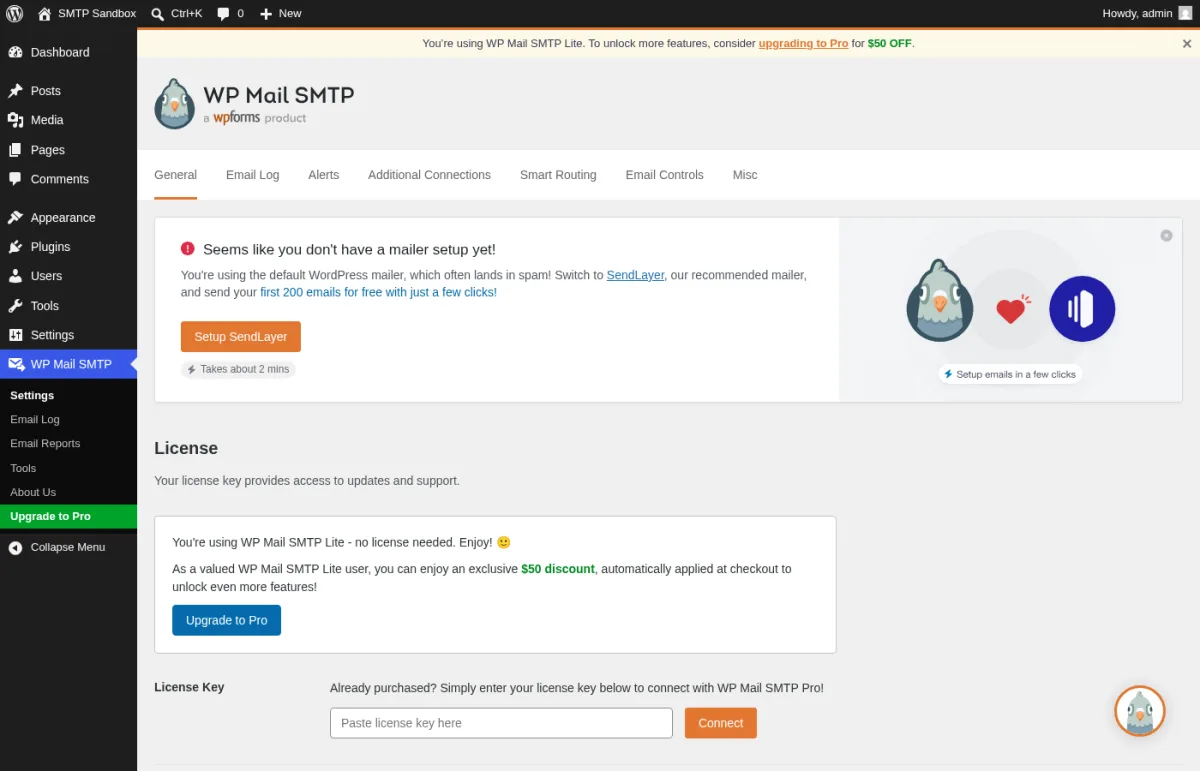
What I tested in a clean WordPress 7.0 sandbox on 2026-06-13. I installed v4.8.0 from wordpress.org/plugins/wp-mail-smtp, activated it, and opened the General tab at admin.php?page=wp-mail-smtp. The screen above is the real first-load settings page with the seven-tab layout (General, Email Log, Alerts, Additional Connections, Smart Routing, Email Controls, Misc). The License panel correctly identifies the install as Lite. The Primary Connection block exposes a Setup Wizard launcher plus the From Email / Force From Email / From Name / Reply-To inputs that every WordPress operator eventually needs to set. I walked the Setup Wizard at admin.php?page=wp-mail-smtp-setup-wizard and verified the full free mailer grid: SendLayer (marked #1 recommended), SMTP.com, Brevo, Google/Gmail, Resend, Elastic Email, Mailgun, Mailjet, SendGrid, Postmark, SparkPost, SMTP2GO, MailerSend and Mandrill, plus Microsoft, Amazon SES and Zoho tiles that surface a Pro upsell when selected. I sent a test email from Tools > Email Test and confirmed the request shape and queue behavior, without verifying actual inbox delivery since the sandbox runs on 127.0.0.1.
Strengths. Free Lite is genuinely complete for a small or medium site that picks one of the free mailers. Active 2026 release cadence (v4.8.0 in April, 5,140 ratings, monthly changelog entries) is the strongest install reputation in this roundup. Gmail SMTP, Brevo and SendGrid are configured via API keys or OAuth, so your WordPress database never stores an SMTP password. The one-click migration tool is unusual: if you switch to WP Mail SMTP from another plugin, the Setup Wizard auto-detects and imports your existing settings. Pro alerts cover every channel a busy store actually monitors (Slack, Teams, Discord, SMS, webhooks).
Limitations. Email logging, email reports, multi-channel alerts, smart routing, backup connections, rate limiting, optimized sending and Microsoft / Amazon SES / Zoho mailers are all Pro. The free Lite admin makes that line very clear (every Pro feature shows a lock and an upsell), but the line is wider than FluentSMTP's. The Setup Wizard recommends SendLayer (an Awesome Motive sister brand) as #1; this is honest editorial, not hidden, but you should pick the mailer that matches your existing stack rather than auto-clicking the recommendation.
Pricing. All annual plans verified on wpmailsmtp.com/pricing on 2026-06-13. Vendor was running a $50-off intro across every tier on the same day. Standard rates in parentheses:
- Pro $49 / year for 1 site (was $99). Standard support, all Pro features.
- Elite $99 / year for 1 site (was $149). Pro + White Glove Setup, priority support.
- Developer $199 / year for 20 sites (was $249). Pro features, priority support.
- Agency $399 / year for 100 sites (was $449). Pro features, priority support.
14-day money-back guarantee on every tier. Renewals at full price.
Best fit. Any WordPress site that wants the safest default SMTP plugin in 2026, busy stores that want logging + alerts + backup connections without negotiating each feature, and agencies running many client sites on a single Developer or Agency license.
2. FluentSMTP: the strongest free WordPress SMTP plugin
- Vendor: fluentsmtp.com
- WordPress.org: wordpress.org/plugins/fluent-smtp/
- Active installs: 600,000+
- Rating: 4.8 / 5 (380 reviews on 2026-06-13)
- Latest version: 2.2.95, released 2025-12-28
- Requires: WordPress 5.5+, PHP 7.4+
- Tested up to: WordPress 6.9.4
FluentSMTP is my top free pick for 2026. The plugin is 100% free, has no Pro tier, and no upsell anywhere in the admin. The free build matches the feature set most other vendors put behind a $50-$100/yr paywall: multi-connection routing, fallback connection, real email logging with bulk resend, OAuth 2.0 for Gmail and Microsoft, and a clean single-page admin built in Vue. It is maintained by WPManageNinja as a Five for the Future contribution; the parent company keeps the lights on through its commercial Fluent Forms, FluentCRM and Fluent Booking plugins, so the giveback model is credible.
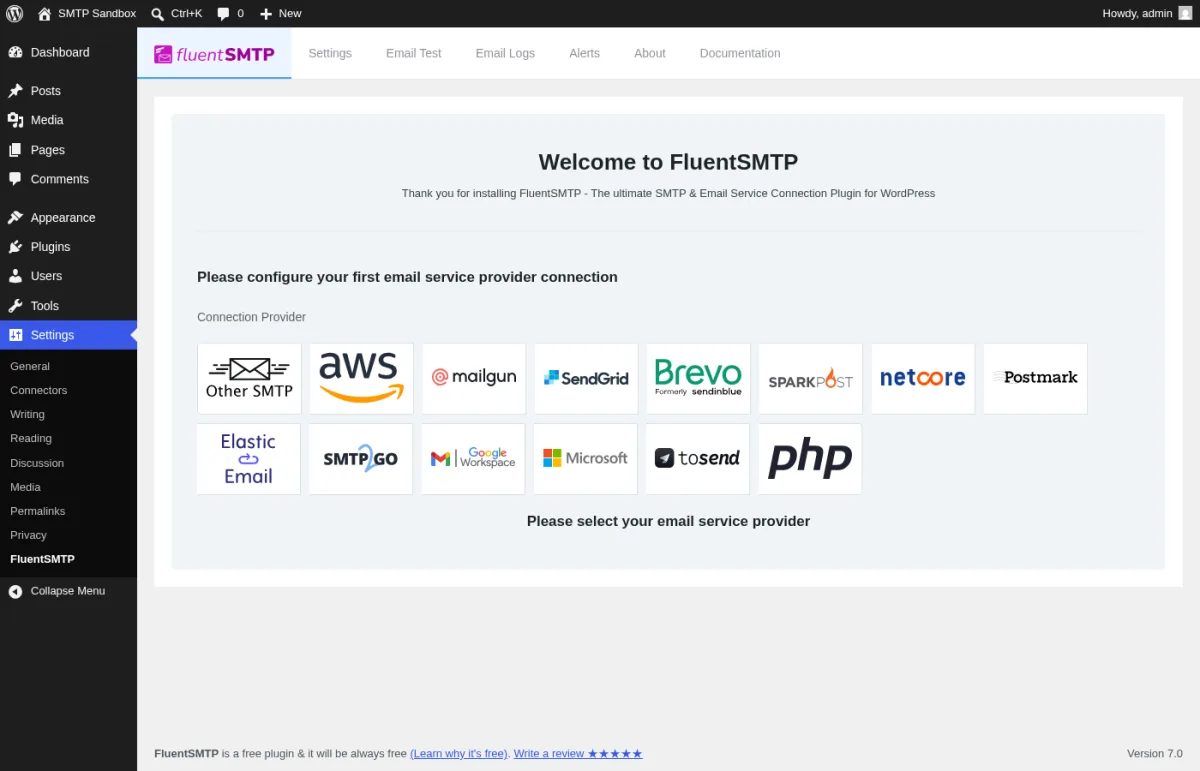
What I tested in a clean WordPress 7.0 sandbox on 2026-06-13. I installed v2.2.95 from wordpress.org/plugins/fluent-smtp, activated it, and opened the FluentSMTP admin at options-general.php?page=fluent-mail. The screen above is the real first-load Welcome to FluentSMTP connection wizard with the full 14-provider tile grid. I confirmed the wizard exposes Amazon SES (AWS), Gmail/Google Workspace OAuth, Microsoft Outlook/Office 365 OAuth, SendGrid, Mailgun, Brevo (Sendinblue), SparkPost, Netcore, Postmark, Elastic Email, SMTP2GO, Pepipost and Other SMTP. I added a stub Other SMTP connection, then used the "Add Another Connection" button to add a second connection and saw the routing rules surface (by recipient domain, sender email, subject keywords, source plugin). I walked the Email Logs tab and confirmed bulk delete and bulk resend are present in the free build. I opened the Alerts tab and verified daily/weekly summary emails are configurable. I sent a test email from the Email Test tab and confirmed the request shape and queue insert.
Strengths. Free forever, with no Pro tier and no nag bar. Multi-connection routing is the headline feature: most stores want to send password resets through Gmail and order confirmations through SendGrid, and FluentSMTP is one of the few WordPress plugins that does this out of the box without paying. Fallback connection means the plugin retries through a backup provider automatically if the primary fails. OAuth flow for Gmail and Microsoft is native, so you never paste an app password into a WordPress field. The admin is fast: single-page Vue, no full-page reloads between tabs.
Limitations. Notifications are limited to admin email; FluentSMTP does not ship Slack/Teams/Twilio/webhook channels in the free build, and there is no Pro tier to buy them. There is no built-in Connectivity Test or Spam Score Checker; you connect through the provider's existing dashboard for those. Smaller install base than WP Mail SMTP, but the maintenance signal is consistent.
Pricing. No paid plans. The plugin and every feature are free forever.
Best fit. Any WordPress site that prefers a no-upsell plugin, agencies that want one plugin and one admin pattern across every client site, OAuth users who want Gmail/Microsoft connections without storing an app password, and stores that need to route transactional vs marketing email through different providers from day one.
3. Post SMTP: best free deliverability and diagnostics
- Vendor: postmansmtp.com
- WordPress.org: wordpress.org/plugins/post-smtp/
- Active installs: 300,000+
- Rating: 4.7 / 5 (523 reviews on 2026-06-13)
- Latest version: 3.9.4, released 2026-06-03
- Requires: WordPress 5.6+, PHP 7.0+
- Tested up to: WordPress 7.0
Post SMTP positions itself as a deliverability-first SMTP plugin, and that framing actually holds up. The free build ships a Connectivity Test (which ports your host can reach, 25/465/587/2525), a Diagnostic Test (a full server config dump for support tickets), a Spam Score Checker, basic email logs, a Backup SMTP fallback, and an iOS/Android mobile app that pushes failure notifications to your phone. Pro adds 15+ premium mailers, auto-resend for failed messages, multi-channel alerts (Microsoft Teams, Webhook, Twilio, Slack) and detailed reporting.
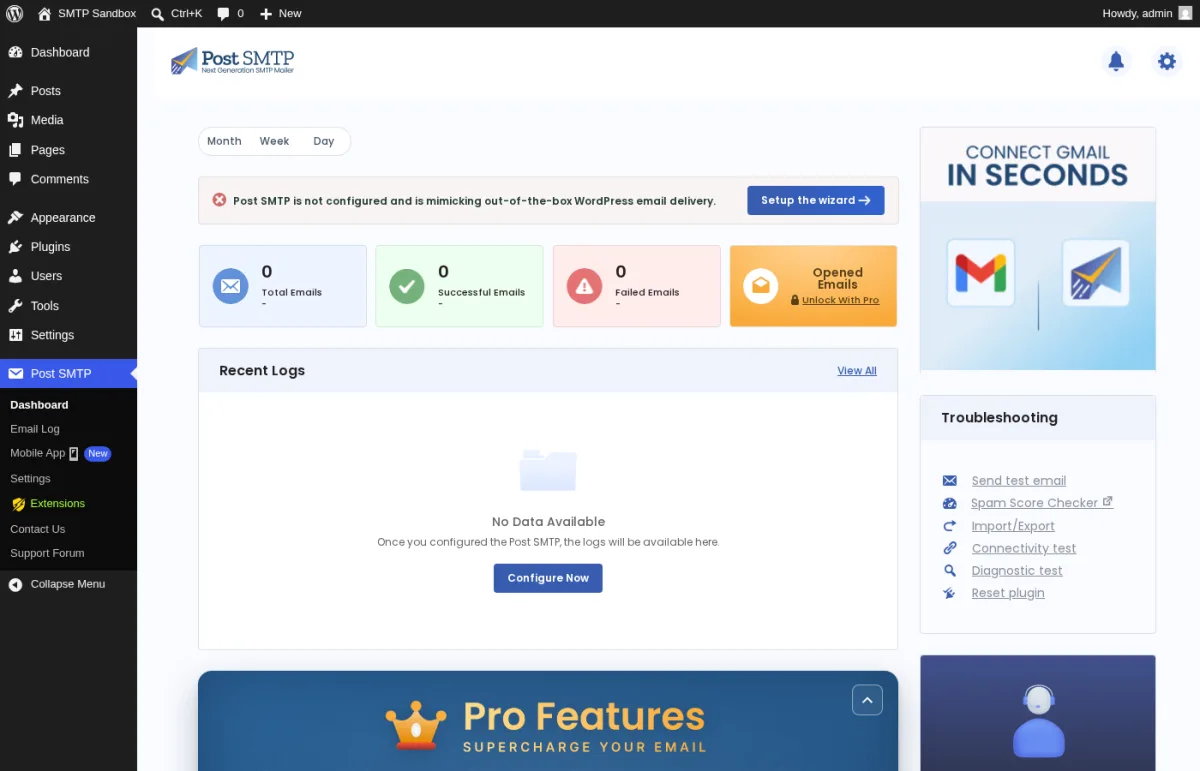
What I tested in a clean WordPress 7.0 sandbox on 2026-06-13. I installed v3.9.4 from wordpress.org/plugins/post-smtp, activated it, and opened admin.php?page=postman. The first load routes through a Freemius "Stay on the safe side" opt-in screen with Allow & Continue and Skip buttons; in normal use you click Skip once and the dashboard loads. The screen above is the real Post SMTP dashboard after skipping the opt-in, with the four counter cards (Total / Successful / Failed / Opened, where Opened is Pro-locked), the Recent Logs panel, the Setup the wizard CTA, the Connect Gmail in Seconds promo, and the Troubleshooting tool list. I walked the Settings > Connectivity Test from the sidebar and confirmed it iterates 25, 465, 587 and 2525 against the configured SMTP host. I opened the Settings > Mailer drop-down and verified the free build exposes Other SMTP, Gmail (OAuth), Brevo, Mailgun, SendGrid, Postmark, SparkPost, SMTP2GO, Mailtrap and Zoho via SMTP, with Amazon SES, Microsoft 365/Outlook and Zoho Mail tagged Pro.
Strengths. The Connectivity Test, Diagnostic Test and Spam Score Checker are genuinely unusual in a free SMTP plugin. If your support team triages "WordPress email not delivered" tickets, these tools cut the back-and-forth dramatically. The mobile app is also free and gives a usable push notification when an email fails. Active 2026 release cadence (v3.9.4 in June, 523 ratings) and a focused vendor team. Pro pricing is approachable for one site ($59.99/yr Basic).
Limitations. The first-load Freemius opt-in screen is friction every new user has to skip past. Amazon SES, Microsoft 365/Outlook, Zoho Mail and Gmail one-click setup are Pro. Email logging in the free build covers the basics; advanced filtering, retention controls, attachments view and weekly stats are Pro. The plugin is busier than FluentSMTP visually (Pro upsell strip, Extensions submenu, Mobile App promo), but every paid feature is clearly tagged.
Pricing. All annual plans verified on postmansmtp.com/pricing on 2026-06-13.
- Basic $59.99 / year (1 site). All Pro mailers (Amazon SES, Gmail, Microsoft, Brevo, Postmark), Gmail one-click, standard support.
- Professional $79.99 / year (1 site). Adds advanced delivery (auto-resend for failed messages), bulk email resend, priority support.
- Business $99.99 / year (1 site, most popular). Adds Microsoft one-click, Mobile App Pro features, MS Teams notifications, expert live assistance, priority support.
Multi-site plans available at 10, 100 and 1,000+ tiers. Lifetime up to 80% off during promotional windows. 14-day money-back. 50% off for nonprofits and education on first purchase.
Best fit. Any WordPress site where the operator needs to know WHY an email failed, not just that it did. Agencies that field deliverability tickets across many clients and want one plugin that surfaces port/SPF/blacklist diagnostics without leaving WordPress. Owners who want a free SMTP plugin plus an honest mobile-app failure alert without paying $50-$100/yr.
4. Easy WP SMTP by SendLayer: fastest end-to-end setup
- Vendor: easywpsmtp.com
- WordPress.org: wordpress.org/plugins/easy-wp-smtp/
- Active installs: 500,000+
- Rating: 4.6 / 5 (703 reviews on 2026-06-13)
- Latest version: 2.14.0, released 2026-04-01
- Requires: WordPress 5.2+, PHP 7.4+
- Tested up to: WordPress 7.0
Easy WP SMTP is the SendLayer-owned cousin of WP Mail SMTP. The admin scaffolding looks similar (both are Awesome Motive / SendLayer products), but the defaults push SendLayer's own relay service as the recommended option, and the headline differentiator is the SendLayer Quick Connect: a 2-minute inline signup that creates a SendLayer account from inside WordPress, auto-generates the API key, sets up a shared sending domain and configures the plugin in one wizard. If you do not already have a preferred mailer, this is the fastest end-to-end setup in this roundup.
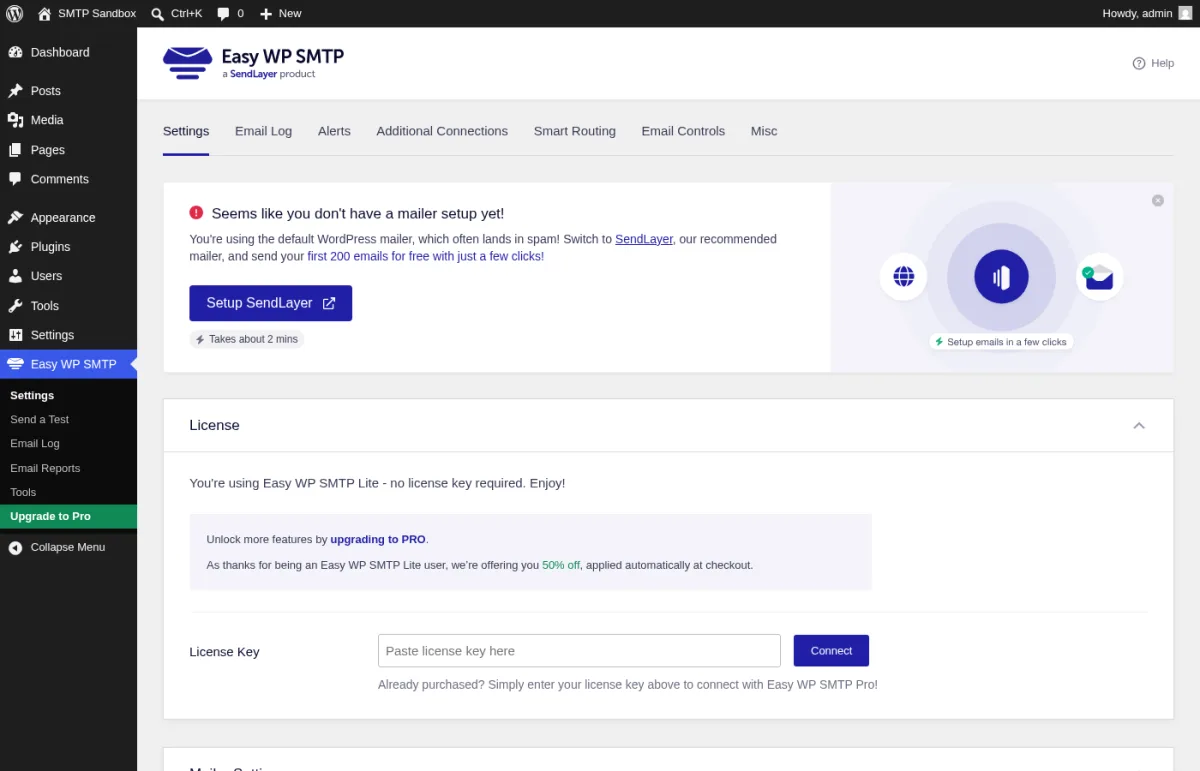
What I tested in a clean WordPress 7.0 sandbox on 2026-06-13. I installed v2.14.0 from wordpress.org/plugins/easy-wp-smtp, activated it, and opened admin.php?page=easy-wp-smtp. The screen above is the real first-load Settings tab with the "Easy WP SMTP - a SendLayer product" branding, the "Seems like you don't have a mailer setup yet!" CTA pointing to the SendLayer Quick Connect, the seven tabs (Settings, Email Log, Alerts, Additional Connections, Smart Routing, Email Controls, Misc), and the License section. I clicked the Setup SendLayer button and confirmed the inline signup wizard renders (email + name + password + verification code), without provisioning a real SendLayer account. I opened the Setup Wizard at admin.php?page=easy-wp-smtp-setup-wizard and verified the mailer grid: SendLayer (recommended), Mailgun, Mailjet, SendGrid, Brevo, SMTP.com, Postmark, SparkPost, SMTP2GO, Other SMTP in the free build, plus Amazon SES, Gmail/Google Workspace, Microsoft 365/Outlook and Zoho Mail tagged Pro. I sent a test email from the Send a Test submenu.
Strengths. SendLayer Quick Connect is the only inline-signup flow in this roundup; for buyers who do not already use SendGrid/Mailgun/Postmark, the path from activation to a configured mailer is genuinely two minutes. Free Lite covers 9 mailers, which is enough for most small and medium sites. Same Awesome Motive admin pattern as WP Mail SMTP, so support resources and documentation overlap.
Limitations. SendLayer is the recommended mailer in every CTA, which is honest but lock-in-leaning. Email logging, email reports, failure alerts, backup connection, smart conditional routing, Amazon SES, Gmail/Google Workspace, Microsoft 365/Outlook and Zoho Mail are all Pro. The Lite plugin is slightly more aggressive about Pro upsells than WP Mail SMTP Lite, with a 50% off banner pinned to the License tab.
Pricing. All annual plans verified on easywpsmtp.com/pricing on 2026-06-13 with the 50% off intro promotion applied.
- Basic $49.50 / year (1 site).
- Plus $99.50 / year (5 sites).
- Pro $199.50 / year (10 sites).
- Elite $299.50 / year (50 sites, priority support).
All plans include the same Pro feature set (logs, reports, alerts, backup connection, smart routing, Gmail/Microsoft/SES/Zoho mailers). 14-day money-back. Renewals at full price.
Best fit. New WordPress sites that want a working mailer in under five minutes without thinking about which vendor to pick, owners who like SendLayer's branding and pricing, and small agencies that prefer the Awesome Motive admin pattern and already use WPForms.
5. SMTP2GO for WordPress: the simplest fully-managed relay
- Vendor: smtp2go.com
- WordPress.org: wordpress.org/plugins/smtp2go/
- Active installs: 30,000+
- Rating: 5.0 / 5 (65 reviews on 2026-06-13)
- Latest version: 1.17.0, released 2026-05-25
- Requires: WordPress 6.2+, PHP 7.4+
- Tested up to: WordPress 7.0
SMTP2GO is the official WordPress connector for the SMTP2GO transactional email service. Unlike WP Mail SMTP or FluentSMTP, this plugin is not a multi-vendor router; it is a single-vendor relay. The reason to use it is the SMTP2GO free vendor plan, which gives 1,000 emails per month with automatic SPF + DKIM, intelligent worldwide routing, blacklist monitoring, real-time delivery reports, and a separate plugin-side and vendor-side log. If you want one bill, one support team, and a relay that does not depend on your host's mail config, this is the cleanest single-product answer in the roundup.
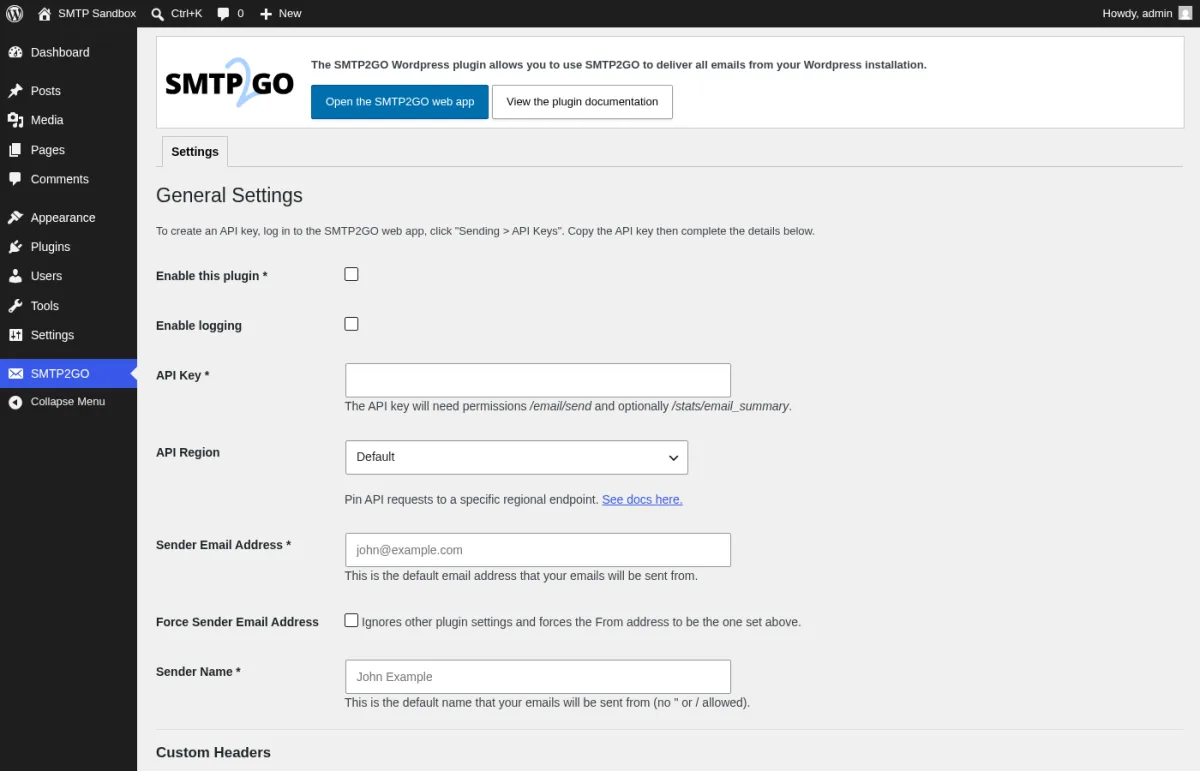
What I tested in a clean WordPress 7.0 sandbox on 2026-06-13. I installed v1.17.0 from wordpress.org/plugins/smtp2go, activated it, and opened admin.php?page=smtp2go-wordpress-plugin. The screen above is the real General Settings page with the header strip linking out to the SMTP2GO web app and the plugin documentation, the Enable this plugin and Enable logging toggles, the API Key field (which requires the /email/send permission and optionally /stats/email_summary), the API Region drop-down (Default, US, EU, AU for regional routing), the Sender Email Address + Force Sender Email Address + Sender Name fields, and the Custom Headers grid for Reply-To or any arbitrary header. The setup is intentionally minimal: paste an API key from app.smtp2go.com (Sending > API Keys), pick a region, set From and you are done. I did not provision a real SMTP2GO account in the sandbox.
Strengths. Genuinely the simplest setup in this roundup: one API key, one drop-down, one From address. The free vendor plan (1,000 emails/month, 200/day, 25/hour until your sender domain is verified) is the most generous fully-managed relay free tier in this roundup after Brevo. Automatic SPF + DKIM means there is no DNS work in the plugin admin. Regional routing is helpful for EU stores with data-residency requirements. The vendor itself has been in business since 2006 and reports 24/7 native-English support across multiple regions.
Limitations. Single-vendor only: this plugin only sends via SMTP2GO, so there is no multi-mailer routing or fallback to a second provider inside the plugin. The free plan caps at 1,000 emails per month and 200 per day, which can be hit by a busy WooCommerce store on Black Friday. Paid plans start at $10/mo for 10,000 emails, which is competitive but not the cheapest in this roundup (FluentSMTP + Amazon SES is cheaper at high volume).
Pricing. Vendor plans verified on smtp2go.com/pricing on 2026-06-13. The plugin itself is free.
- Free: 1,000 emails/month, 200/day, 25/hour pre-verification, 5 days reporting, up to 2 users.
- Starter $10/mo ($100/yr): 10,000 emails/month, 30 days reporting, $1 per extra 1,000 emails.
- Professional $75/mo ($750/yr, recommended): 100,000 emails/month, dedicated IP address, email testing tools, $0.85 per extra 1,000 emails.
- Premier: custom pricing for 3,000,000+ emails/month with enterprise support.
100% Service Level Agreement plus a 30-day money-back guarantee on paid plans.
Best fit. Sites that want a single bill (no plugin license + separate ESP), EU stores that need regional routing, owners who want the simplest possible plugin admin (one API key) and are happy committing to one vendor.
6. Brevo (formerly Sendinblue): transactional + email marketing
- Vendor: brevo.com
- WordPress.org: wordpress.org/plugins/mailin/
- Active installs: 100,000+
- Rating: 4.1 / 5 (283 reviews on 2026-06-13)
- Latest version: 3.3.4, released 2026-04-10
- Requires: WordPress 4.4+, PHP 5.6+
- Tested up to: WordPress 6.9.4
The Brevo plugin is the only entry in this roundup that bundles a real transactional SMTP relay with a full email-marketing front-end inside the same WordPress install. The free Brevo account gives 300 transactional emails per day (~9,000/month), unlimited contacts, a drag-and-drop email builder, signup forms, double opt-in for GDPR, and a WooCommerce sync that handles abandoned-cart recovery and revenue tracking. Once you connect an API key, every wp_mail() call routes through Brevo's SMTP infrastructure automatically.
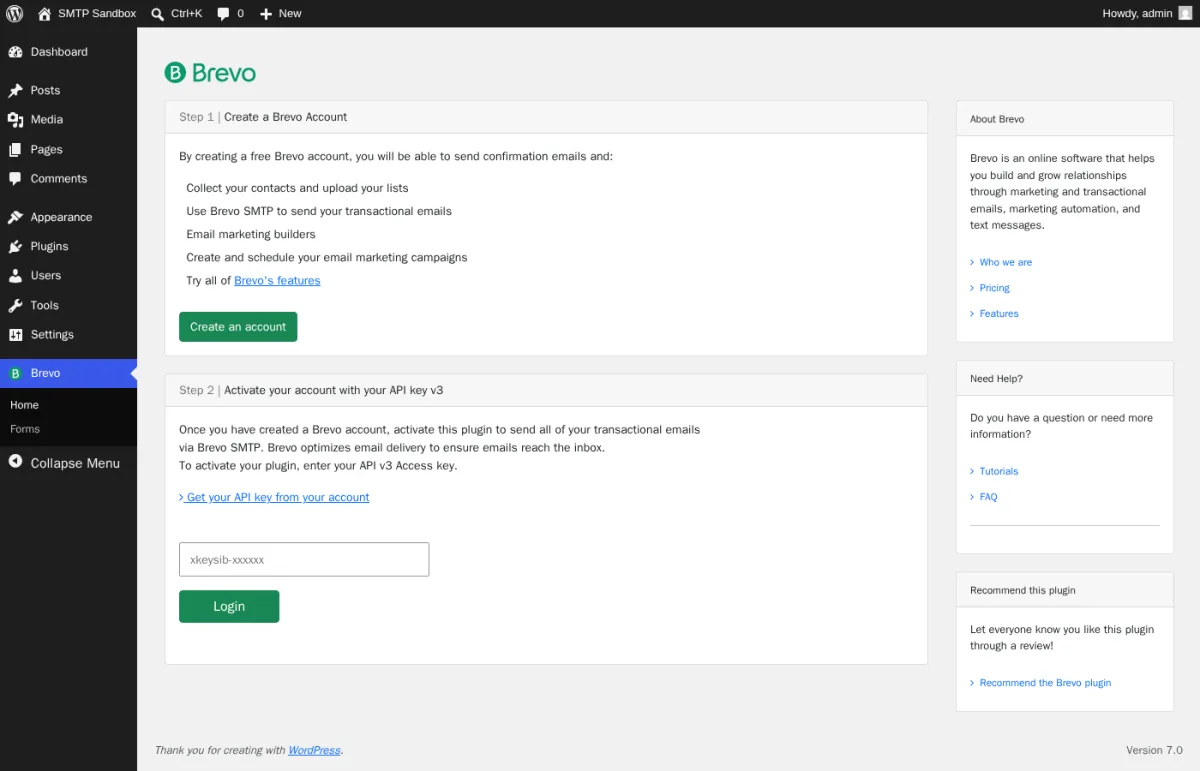
What I tested in a clean WordPress 7.0 sandbox on 2026-06-13. I installed v3.3.4 from wordpress.org/plugins/mailin, activated it, and opened admin.php?page=sib_page_home. The screen above is the real Home page with the two-step onboarding card: Step 1 Create a Brevo Account (green CTA "Create an account"), Step 2 Activate your account with your API key v3 (input field xkeysib-xxxxxx, Login button). The right sidebar links to About Brevo, Pricing, Features, Tutorials, FAQ and a Recommend this plugin block. I confirmed the Forms submenu renders a signup-form builder, and the Brevo plugin appears as a transactional mailer option inside the WP Mail SMTP and FluentSMTP provider grids (i.e. Brevo's relay is also accessible from other plugins via the same API key). I did not provision a real Brevo account in the sandbox.
Strengths. 300 transactional emails per day is the most generous free vendor allowance in this roundup. The one-tool story (transactional + marketing + forms + WhatsApp + push notifications + CRM-light) is a real cost saving for small businesses that would otherwise pay for SendGrid and Mailchimp separately. Brevo's deliverability infrastructure is widely trusted; it powers 80,000+ growing companies and 30+ million emails per day on the vendor's own infrastructure.
Limitations. The Brevo plugin's user reviews are noticeably lower for transactional reliability than for the marketing side, with reports of form integration issues and occasional transactional SMTP hiccups. For a high-traffic WooCommerce store where every order email matters, the safer pattern is to connect Brevo through FluentSMTP or WP Mail SMTP (using the API key), rather than installing the full Brevo plugin, because the multi-mailer plugins add fallback connections and explicit retry logic. The full Brevo plugin also installs CRM/forms surfaces you may not want on a transactional-only site.
Pricing. Plans verified on brevo.com on 2026-06-13. The WordPress plugin is free; the cost is in the Brevo platform tier.
- Free: 300 emails/day (~9,000/month), unlimited contacts, drag-and-drop builder, signup forms, WooCommerce sync, double opt-in.
- Starter: from $9/mo. Removes the daily cap; volume-based pricing.
- Business: adds marketing automation, A/B testing and predictive sending.
- Enterprise: custom; adds dedicated IPs, multi-account, SSO.
Free transactional emails count against the same 300/day cap as marketing emails, so heavy newsletter senders should size up to Starter before relying on Brevo for transactional too.
Best fit. Small WordPress sites and WooCommerce stores that need both transactional and marketing email but cannot justify two separate vendors yet, agencies that build sites on Brevo's stack, and any owner who prefers to manage one platform.
7. WP Offload SES Lite: the Amazon SES specialist
- Vendor: deliciousbrains.com
- WordPress.org: wordpress.org/plugins/wp-ses/
- Active installs: 10,000+
- Rating: 4.3 / 5 (36 reviews on 2026-06-13)
- Latest version: 1.8.0, released 2026-03-25
- Requires: WordPress 5.9+, PHP 8.1+
- Tested up to: WordPress 7.0
WP Offload SES Lite is the WordPress connector for Amazon SES. The reason to use Amazon SES is cost: SES charges $0.10 per 1,000 emails sent on top of your existing AWS account, which is roughly an order of magnitude cheaper than SendGrid or Mailgun at high volume. The Lite plugin is enough for most operators: setup wizard, multisite support, sent-email log, weekly health report, From/Reply-To/Return-Path overrides, and a test email. Pro adds open and click reporting, auto-retry on SES errors and a send queue.
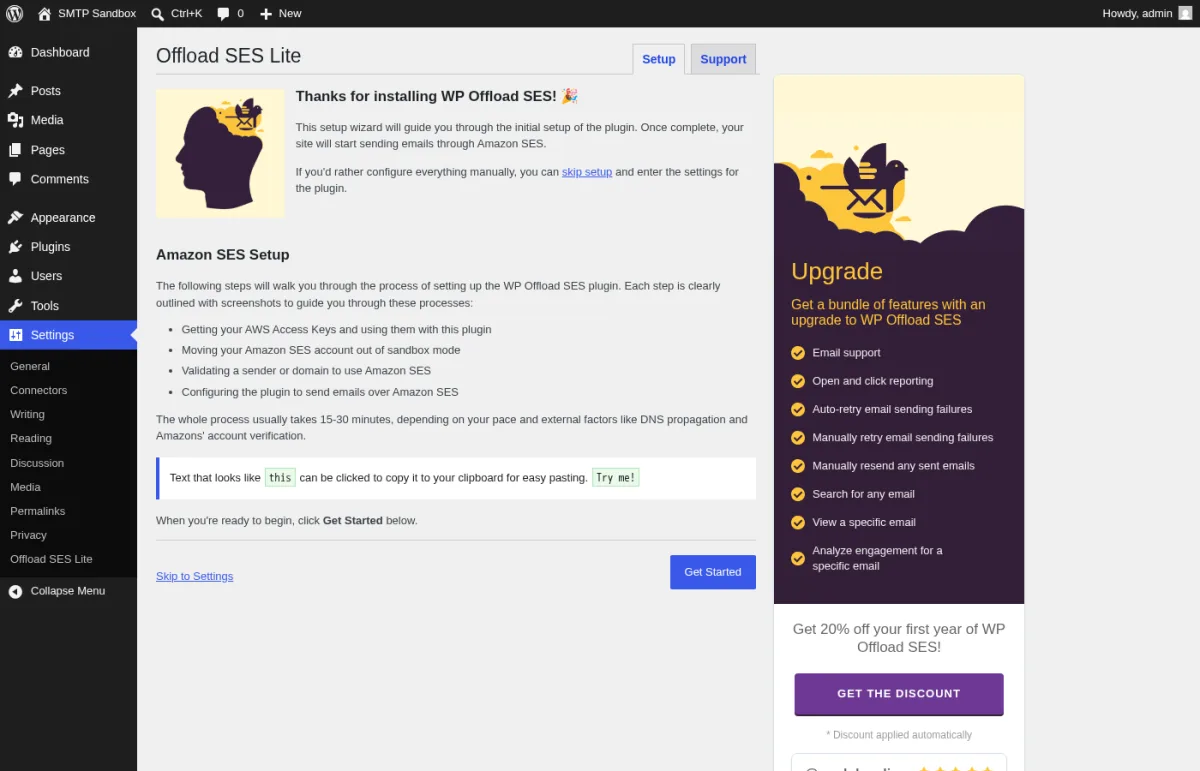
What I tested in a clean WordPress 7.0 sandbox on 2026-06-13. I installed v1.8.0 from wordpress.org/plugins/wp-ses, activated it, and opened admin.php?page=wp-offload-ses. The screen above is the real first-load setup page with the Offload SES Lite header (Setup, Support tabs), the "Thanks for installing WP Offload SES!" welcome card, the Amazon SES Setup explainer (get an AWS Access Key, verify a sending email or domain inside Amazon SES, move out of the Amazon SES sandbox, configure the plugin), the "Send Test Email" input with the Get Started button, and the right-rail Upgrade to Pro panel listing the Pro-only features. I confirmed the Settings tab exposes the Access Key + Secret Access Key + Region inputs, From / Reply-To / Return-Path overrides, and a "Verify sending email or domain" panel. I did not configure a real AWS Access Key in the sandbox.
Strengths. Amazon SES is the cheapest credible transactional sender in 2026 by a wide margin, and WP Offload SES Lite is the official-feeling WordPress connector. Setup wizard is honest about the non-plugin work you have to do (SES sandbox approval, sender domain verification, DKIM records). Weekly health report email gives quiet confidence that SES is still flowing. Multisite support is built in. Now backed by WP Engine (which acquired Delicious Brains in 2022); the brand keeps shipping updates.
Limitations. Requires an AWS account and SES sandbox approval, which is a real ops step (Amazon reviews your use case before letting you send to non-verified recipients). Single-vendor (Amazon SES only); no fallback to a second provider. The Lite plugin's installed-and-rated base is the smallest in this roundup. Pro is genuinely useful (open/click reporting and auto-retry), but $99/yr for one site is more than most owners want to spend on a single-vendor connector when WP Mail SMTP Pro covers Amazon SES as one of its many mailers.
Pricing. All annual plans verified on deliciousbrains.com/wp-offload-ses/pricing on 2026-06-13 with the 20% off first-year intro applied.
- Bronze $80 / year (1 site, was $99). Standard email support.
- Silver $120 / year (3 sites, was $149).
- Gold $160 / year (5 sites, was $199). Priority email support, multisite.
- Platinum $200 / year (10 sites, was $249).
- Adamantium $240 / year (20 sites, was $299).
- Vibranium $399 / year (40 sites).
- Uru $499 / year (60 sites).
- Mjolnir $699 / year (100 sites).
60-day money-back guarantee. 1 year of software updates and support; renewals charge a fresh year. Amazon SES is billed separately on your AWS account at $0.10 per 1,000 emails.
Best fit. Sites and agencies that already run on AWS and want SES as their relay, high-volume senders who would otherwise pay 10x with SendGrid or Mailgun, and operators comfortable doing the SES sandbox approval and DKIM setup.
How to choose the right WordPress SMTP plugin
Pick the plugin that matches your actual reason for being here, not the highest install count.
- If you do not have a preference, install WP Mail SMTP by WPForms. It is the safest default in 2026 and the Setup Wizard will get you to a working mailer in five minutes. Free for 15+ mailers; pay for Pro only when you actually need logs and alerts.
- If you want a fully free plugin with no upsell, install FluentSMTP. Every feature is free, including multi-connection routing and fallback. If you connect Gmail or Microsoft via OAuth, this is the safest plugin in the roundup because your WordPress database never stores an SMTP password.
- If deliverability monitoring is the priority, install Post SMTP. The Connectivity Test, Diagnostic Test, Spam Score Checker and mobile-app failure alerts are unique in the free tier.
- If you want the fastest end-to-end setup and do not yet have a relay, install Easy WP SMTP by SendLayer. SendLayer Quick Connect creates a SendLayer account from inside WordPress in 2 minutes.
- If you want one vendor, one bill and a 1,000-email/month free relay, install SMTP2GO for WordPress. Single-vendor, minimal plugin admin, fully managed SPF + DKIM.
- If you want transactional + newsletter + WooCommerce sync in one tool with 300 free emails/day, install Brevo. Caveat: high-traffic stores should connect Brevo through FluentSMTP or WP Mail SMTP for safer transactional reliability.
- If you already run on AWS and high volume matters, install WP Offload SES Lite. Amazon SES at $0.10 per 1,000 emails is the cheapest credible option, and Lite is enough for most sites.
If you are still building the site, plug in a free SMTP plugin before you launch contact forms or checkout, and make sure the plugin's From field points to a corporate email address on your own domain instead of the default wordpress@yoursite placeholder. The cheapest moment to fix WordPress email delivery is before the first lead complains they never got a reply.
Frequently asked questions
Do I really need an SMTP plugin?
Yes. WordPress's default PHP mail() function is unauthenticated, has no SPF or DKIM, no retry, and is routinely blocked by Gmail, Outlook and Yahoo spam filters. An SMTP plugin replaces that path with an authenticated relay or a vendor API. Without one, contact-form submissions, password resets and WooCommerce order emails routinely go missing.
What is the difference between an SMTP plugin and an email-marketing plugin?
An SMTP plugin handles the transport: it makes sure WordPress's wp_mail() calls actually arrive. An email-marketing plugin handles list management, signup forms, segmentation and broadcast campaigns. The two roles overlap at Brevo and MailPoet, which do both jobs. For pure transactional reliability use an SMTP plugin (this roundup); for newsletters and campaigns see the email and newsletter plugin roundup.
Are free WordPress SMTP plugins safe?
Yes, as long as you pick one from this roundup. All seven plugins are open source and listed on WordPress.org (the SMTP2GO and Brevo plugins are official vendor plugins). FluentSMTP, WP Mail SMTP and Post SMTP all support OAuth 2.0 for Gmail and Microsoft, so your WordPress database does not need to store an SMTP password.
Which free SMTP plugin should I install if I just want it to work?
FluentSMTP or WP Mail SMTP Lite. FluentSMTP has no Pro tier and no upsell. WP Mail SMTP has the largest install base and the most thorough documentation. Both ship a Setup Wizard, both support Gmail, Brevo, SendGrid, Mailgun and Postmark in the free build, and both will route the same wp_mail() calls through a working relay.
What is the difference between SMTP and an API mailer like SendGrid or Mailgun?
SMTP is the underlying email protocol on port 587/465. API mailers (SendGrid API, Mailgun API, Postmark API, Amazon SES, Brevo, SMTP2GO and similar) send through the vendor's HTTPS API instead. The API route is faster, retries are cleaner, and the vendor handles SPF + DKIM behind the scenes. Most SMTP plugins in this roundup support both: an API mailer when one is available, a generic SMTP connection as a fallback.
Do SMTP plugins work with WooCommerce order emails?
Yes. Every plugin in this roundup hooks wp_mail(), which is the function WooCommerce uses to send order confirmations, customer invoices, password resets and admin new-order notifications. As soon as you configure a mailer, all WooCommerce email traffic routes through it. For high-traffic stores, prefer FluentSMTP or WP Mail SMTP Pro so you can add a backup connection that takes over if the primary mailer fails mid-campaign. The same principle applies to checkout-heavy stacks documented in our WordPress ecommerce plugins roundup.
Final recommendation
WordPress sites in 2026 should not be running on the default PHP mailer. Pick one of these seven plugins, walk the Setup Wizard, send a test email and confirm a real inbox lands.
If you want the safest default, install WP Mail SMTP by WPForms. If you want a free plugin with no upsell anywhere in the admin, install FluentSMTP. If you want to know exactly why a delivery failed, install Post SMTP. If you want the fastest end-to-end setup, install Easy WP SMTP by SendLayer. The three vendor-relay specialists (SMTP2GO, Brevo and WP Offload SES Lite) belong on this list only when the buyer has a specific reason to commit to one mailer; if you do not, stay with the multi-mailer plugins above.
Once your SMTP plugin is live, the next thing worth installing is whichever contact form plugin matches your stack, then a small set of free essentials from our top free WordPress plugins roundup to round out caching, security and analytics.


