

8 Best WordPress Job Board Plugins in 2026 (Free and Paid Options Compared)

Building a job board with WordPress is one of the most practical ways to create a focused employment platform, a recruitment microsite, or a career page that actually works. But once you start looking at plugins, the options get confusing fast. Some are lightweight career-page tools. Others are fully monetizable job board platforms. A few look great on the outside and require four paid add-ons to handle a basic application.
I went through the category carefully. I checked 10 or more results from current SERP pages, then researched and tested 8 of the most credible options. For each plugin I visited the official homepage, feature pages, pricing page, WordPress.org listing, documentation, and public reviews. For the six plugins with a usable free version, I also navigated official demo sites to check the full job board workflow: job submission, employer and job seeker flows, filtering, application management, and monetization. Here is what I found.
If you are still deciding what kind of site to build, it helps to know that job boards are one of the types of websites you can build with WordPress with real revenue potential.
How I Evaluated These Plugins
I focused on the core decisions buyers actually face:
- Free version quality: Does the free plugin do enough to be useful, or does it require five add-ons before it works?
- Job submission flow: How does an employer or admin post a job? Is the form logical?
- Job seeker and employer flow: Are there separate dashboards? Can seekers apply and track? Can employers manage applications?
- Filters: Can visitors filter by job type, location, and category? Is it AJAX-powered?
- Application flow: Is there a built-in application form? Are resumes stored?
- Monetization: Can you charge for job listings, employer memberships, or resume access?
- Free-version limits: What is actually gated behind a paid upgrade?
I also checked ratings, install counts, last-update dates, and support track records as of June 2026.
Quick Comparison
| Plugin | Best for | Free version | Starting paid price | Strongest point | Main limitation |
|---|---|---|---|---|---|
WP Job Manager |
Developers, extensible boards |
Yes |
$159/ |
Largest ecosystem |
No free application form |
WP Career Board |
Gutenberg-native community job boards |
Yes |
$69/ |
Block-first dashboards, applications, and BuddyPress/ |
Pro needed for ATS pipeline, resumes, and monetization |
HireZoot |
Clean modern career pages |
Yes |
$99/ |
Highest rating (4.8/ |
Designed for admin-managed boards |
Simple Job Board |
Minimal company career pages |
Yes |
$10-$35 per add-on |
Ready out of the box |
Add-on costs add up |
WP Job Portal |
Full-featured free platform |
Yes |
$49/ |
Dual dashboards free, AI features |
Smaller user base |
JobBoardWP |
Zero-cost lightweight boards |
Yes (100% free) |
None |
Permanently free, schema built-in |
No monetization, no job alerts |
WPJobBoard |
Commercial, monetized boards |
No |
$97 one-time |
Built-in paid listings + syndication |
No free tier |
JobSearch WP |
Full-platform premium builds |
No |
$79 one-time |
Most feature-rich, 2,600+ sales |
Requires WooCommerce for payments |
1. WP Job Manager
Best for: developers and site owners who want a flexible job board they can build out over time
WP Job Manager is the most widely used WordPress job board plugin, with over 80,000 active installs and the backing of Automattic (the company behind WordPress.com and WooCommerce). It has been the foundation for thousands of job boards since 2013.
The free core is genuinely useful. After activation, you get a guided setup that creates three pages: a jobs listing page ([jobs] shortcode), a frontend job submission form ([submit_job_form]), and an employer dashboard ([job_dashboard]). The listing page includes AJAX-powered search by keyword and location, plus filters by category and job type. Employers can submit jobs from the frontend without backend access, preview before publishing, and manage their listings from the dashboard.
What the free version does not include is an application form. Job seekers see the listing and are sent to an email address or external URL to apply. If you want in-site applications with form fields, resume uploads, and in-admin management of candidates, you need the Applications add-on.
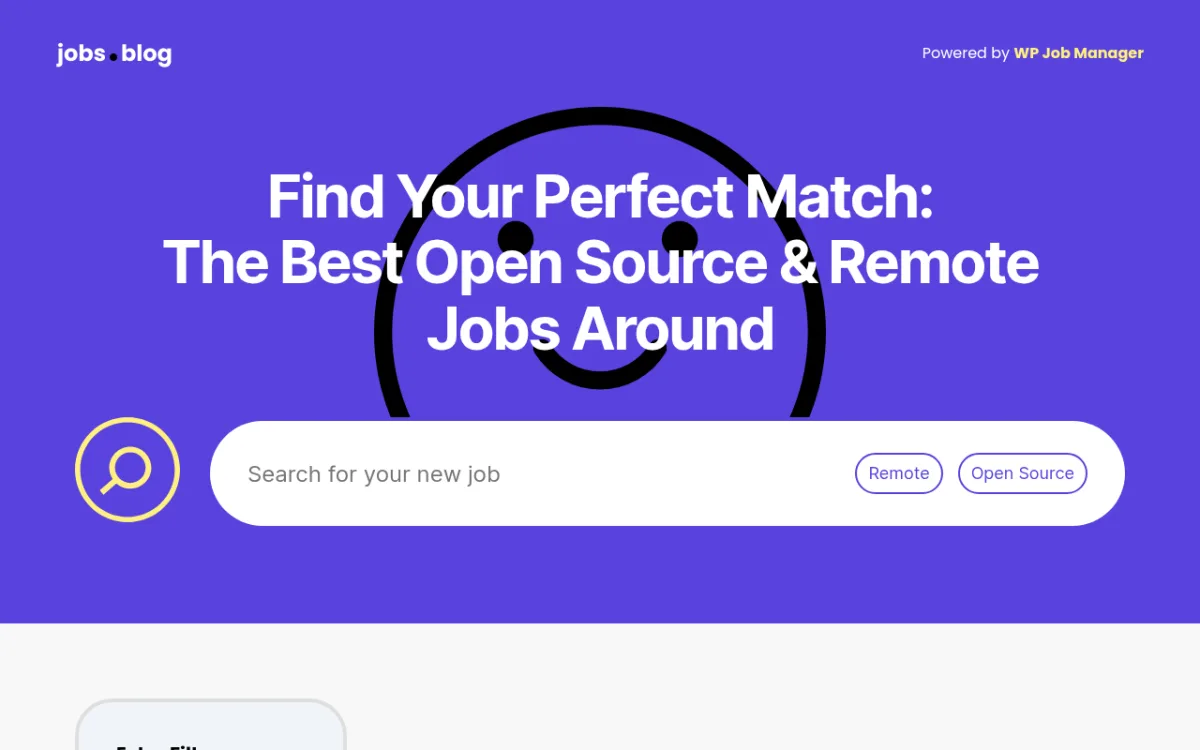 jobs.blog is a real job board built by the WP Job Manager team and powered by the plugin. The search interface shows keyword search with Remote and Open Source filter toggles.
What I checked:
I reviewed the full WordPress.org listing (version 2.4.4, last updated June 24, 2026), the changelog, the complete add-ons marketplace at wpjobmanager.com/add-ons/, and the Pro Bundle pricing page. I also navigated jobs.blog, the official WP Job Manager example site built by the Automattic team, which runs the plugin in production. On jobs.blog I confirmed the frontend search interface with keyword search, Remote/Open Source category toggles, and AJAX-powered Extra Filters (Location, Fully Remote/Hybrid checkboxes). I reviewed the WP.org setup documentation covering the three-page setup flow (jobs listing, submit job form, job dashboard). Public reviews were checked at the WP.org reviews page: 185 five-star reviews, 27 one-star reviews. Common criticism themes are styling friction out of the box and the add-on requirement for basic application functionality. The free plugin gets 4.4 out of 5 stars from 237 total reviews.
Practical strengths:
- 80,000+ active installs, maintained by Automattic
- AJAX-powered search and filtering included for free
- Frontend employer submission and dashboard available free
- Job view/impression statistics for employers
- RSS feed with saved search links for job seekers
- Google job schema markup built in
- Massive add-on ecosystem (applications, alerts, resume manager, paid listings, and more)
- Developer-friendly with custom post types, endpoints, and template files
Practical limitations:
- Free version has no in-site application form; just email/URL redirect
- Minimal default styling; most themes require CSS work
- No resume manager or job alert notifications in free
- Paid listings require both WooCommerce and the WC Paid Listings add-on
- Adding full job board functionality requires multiple add-ons or the Pro Bundle
Pricing:
The core plugin is free. For extended functionality:
- Pro Bundle: from $159/yr for Personal (2 activations per add-on), $329/yr for Developer (unlimited). Includes: Applications, Resume Manager, Job Alerts, WooCommerce Paid Listings, Simple Paid Listings, Application Deadline, Bookmarks, Job Tags, Embeddable Widget.
- Add-ons are also sold individually.
- 14-day refund guarantee.
Who should use it: Developers who want full control and are comfortable buying add-ons as needed, or teams building a serious job board site that they plan to extend over time.
Official links: wordpress.org/plugins/wp-job-manager | wpjobmanager.com
2. WP Career Board
Best for: WordPress sites that want a Gutenberg-native job board with frontend employer and candidate workflows
WP Career Board is a newer job board plugin from WBCom Designs. Its main difference is architectural: the plugin is built around Gutenberg blocks and the WordPress Interactivity API instead of relying mainly on shortcodes. That makes it a natural fit for block-based WordPress sites, BuddyPress communities, and Reign Theme users who want a job board that feels integrated into the site.
The free version is not just a listing widget. It includes a public jobs board with live search and filters, frontend employer and candidate dashboards, job applications, company profiles, guest applications, resume uploads, BuddyPress integration, and JobPosting schema. Employers can post and manage jobs from the frontend, while candidates can apply, save listings, and track application status without needing wp-admin access.
Its Pro version is aimed at sites that want to turn a job board into a more complete hiring platform. Pro adds an ATS-style Kanban application pipeline, resume builder and resume search, multiple job boards from one WordPress install, WooCommerce credit-based monetization, custom fields, job alerts, and AI-assisted job description writing.
This is why I would place it high in the list. WP Job Manager still has the largest ecosystem and longest track record. WP Career Board is more interesting when you want a modern block-native setup, community integration, and a complete free workflow from the start.
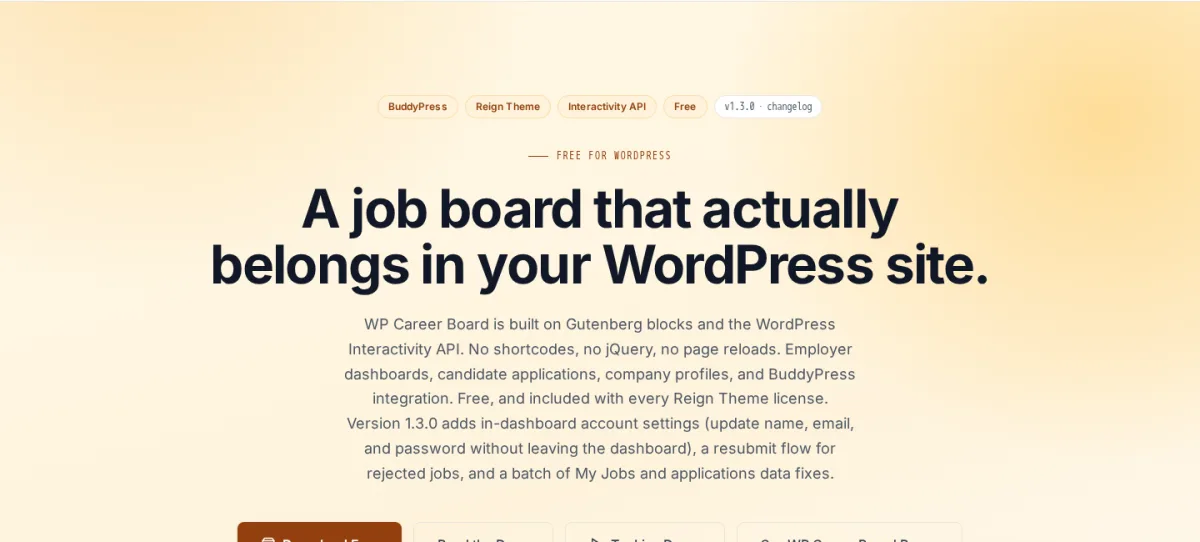
Official WP Career Board product page from WBCom Designs. The screenshot shows its Gutenberg-native positioning and core job board workflow.
What I checked:
I reviewed the official WP Career Board product page, the WP Career Board Pro product page, and the dedicated pricing page at wpcareerboard.com on July 17, 2026. The product pages describe the free plugin as a block-first job board built with the WordPress Interactivity API, with employer and candidate dashboards, applications, company profiles, BuddyPress/Reign integration, and JobPosting schema. The pricing page is the clearest current pricing source, so I used it for annual pricing.
Practical strengths:
- Gutenberg-native job board screens, including listings, forms, dashboards, and company profiles
- Live job search and filters without page reloads
- Frontend employer dashboard and candidate dashboard in the free version
- Applications, guest applications, resume upload, and application status tracking
- Company profiles included
- BuddyPress integration and Reign Theme integration
- JobPosting schema for Google Jobs eligibility
- Pro adds ATS/Kanban pipeline, multi-board support, resume builder/search, WooCommerce credits, custom fields, job alerts, and AI job descriptions
Practical limitations:
- Newer plugin with less public track record than WP Job Manager or HireZoot
- Advanced hiring pipeline and resume search require Pro
- Monetization depends on WooCommerce credits in Pro
- Best fit is strongest for block-editor sites, BuddyPress communities, or Reign/BuddyX ecosystems
- Some buyers may prefer a plugin with more years of third-party tutorials and add-ons
Pricing:
- Free: $0 forever, with public job board, live search and filters, employer and candidate dashboards, applications, company profiles, CSV export, BuddyPress integration, and Gutenberg-native blocks
- Pro Personal: $69 per year for 1 site
- Pro Developer: $99 per year for 5 sites
- Pro Agency: $199 per year for unlimited sites
- Lifetime licenses: $199 Personal, $299 Developer, $499 Agency
- 30-day money-back guarantee on Pro purchases
Who should use it: Site owners, agencies, and community builders who want a block-native WordPress job board with employer and candidate dashboards included in the free plugin. It is especially relevant for BuddyPress, Reign Theme, and BuddyX Pro sites, or for job boards that may later need Pro features like a Kanban pipeline and WooCommerce credit monetization.
Official links: WP Career Board | WP Career Board Pro | Pricing
3. HireZoot (formerly WP Job Openings)
Best for: teams that need a clean, modern career page or hiring page without a lot of configuration
HireZoot (rebranded from the well-known "WP Job Openings" plugin) is the highest-rated job board plugin on WordPress.org, with 4.8 out of 5 stars from 191 reviews. Its version 4, released in May 2026, brought a full redesign that makes it one of the cleanest free options in this category.
The free plugin is genuinely capable. Installing and activating it creates a job listing page automatically. The Gutenberg block gives you full control over layout (Grid, List, or Stack), sidebar versus inline filter placement, multi-select filters, and sorting. Each job has a detail page with a built-in application form. Applications are stored in the WP admin and come with a redesigned overview dashboard that shows unread application counts and recent activity. Resume preview is now available in the free version as of v4.
I checked the live demo at demo.hirezoot.com. The interface is clean and minimal with good visual hierarchy. Filters update results via AJAX. The Stack layout is a nice addition for modern career pages. The application flow is simple: click a job, fill in the form (name, email, cover letter, resume upload), submit. The admin sees the application immediately in the dashboard.
HireZoot is designed for a single-employer career page or an admin-managed job board. There is no employer self-registration in the free version. If you want employers to post their own jobs and manage applications independently, you need the User Access Control add-on.
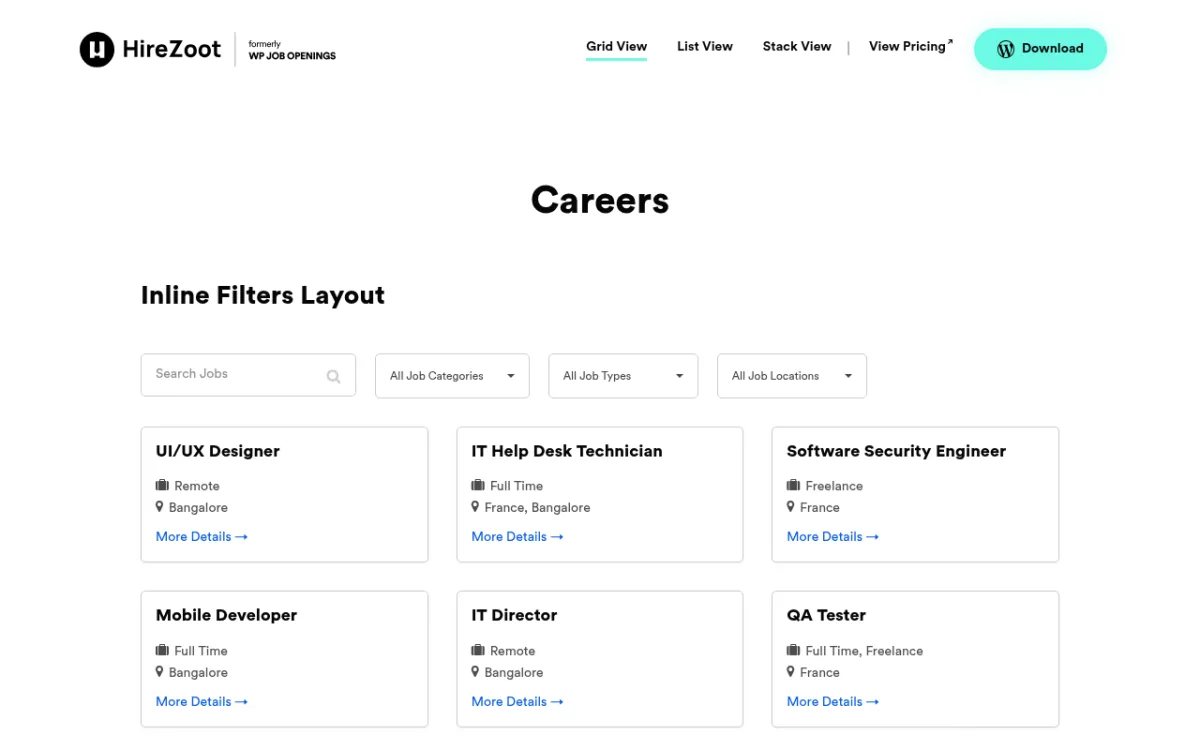 HireZoot demo at demo.hirezoot.com showing the Grid View layout with inline filters for category, job type, and location. Job cards show title, employment type, location, and a "More Details" link.
What I checked:
WordPress.org listing (version 4.0.1, last updated May 26, 2026), the live demo at demo.hirezoot.com, pricing page at hirezoot.com/pricing, and the full v4.0 changelog.
Practical strengths:
- Highest rating in this category (4.8/5 from 191 reviews)
- Clean, modern UI with three layout options (Grid, List, Stack)
- Built-in AJAX search and multi-select sidebar filters
- Built-in application form with resume upload stored in admin
- Resume preview in free (added v4)
- Redesigned admin dashboard with unread application counts
- Gutenberg block for flexible page layout
- Job expiry, email notifications, WPML support
- Very fast setup: working career page in minutes
- 30-day money-back guarantee on premium plans
Practical limitations:
- No employer self-registration or posting in free version
- No custom application form builder without Pro Pack
- No candidate shortlisting, rejection, or rating workflow in free
- No job alerts for job seekers without the Job Alerts add-on
- No CSV export of applications in free
- Designed for career pages, not large multi-employer platforms
Pricing:
- Free: $0, all core features including v4 redesign, application form, and resume preview
- Premium Bundle Annual: $99/yr (1 site, 5 sites, or 50 sites options) includes Pro Pack, Job Alerts, and User Access Control add-ons
- Premium Bundle Lifetime: starts at $199 (lifetime updates, 3 years premium support)
- 30-day money-back guarantee
Who should use it: Companies building a career page for their own hiring, HR teams that manage job postings directly, and any site that wants a clean, modern job board without complex configuration.
Official links: wordpress.org/plugins/wp-job-openings | hirezoot.com
4. Simple Job Board
Best for: small businesses or organizations that need a ready-to-use career page with minimal setup
Simple Job Board lives up to its name. Install it, drop the [jobpost] shortcode on a page, and you have a working job board with categories, types, locations, and a basic application form. No additional configuration required.
The free plugin covers the full application loop: post jobs in the admin, categorize them by type and location, display them with keyword and filter search, and receive applications with resume uploads directly to your email and to the admin panel. You can add custom fields to the application form per job, view applicants for each position, and add internal notes to individual applications. The plugin also has a mobile app for iOS and Android to manage your board from anywhere.
The demo at jobboardextensions.demo.presstigers.com shows a functional listing with company logos, job cards, category and location filters, and employment type tags. The design is clean but dated compared to HireZoot v4 or JobBoardWP. The add-on section in the navigation shows how many features are locked behind separate purchases.
The main friction with Simple Job Board is the add-on model. There is no bundle pricing. If you want a frontend employer posting portal, job seeker dashboards, job alerts, job expiry automation, and AJAX search, you are buying five separate add-ons at $10-$35 each. That can add up quickly.
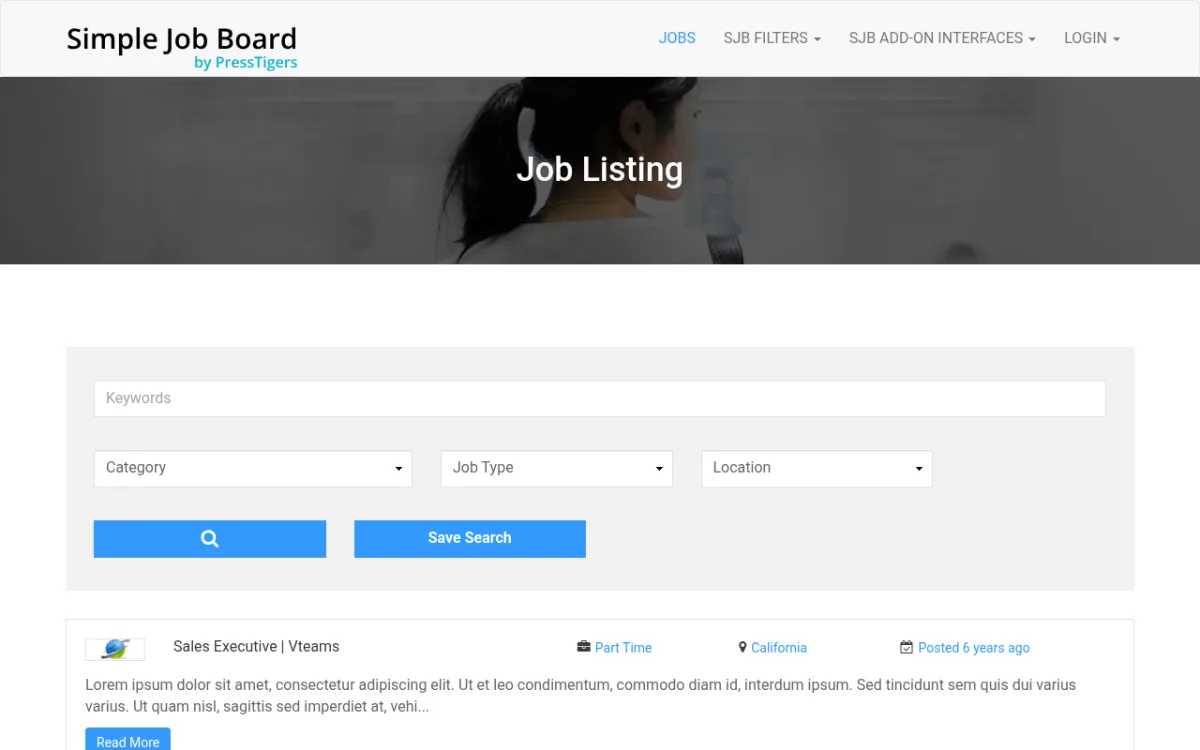 Simple Job Board demo at jobboardextensions.demo.presstigers.com showing the job listing with keyword search, category/job type/location dropdowns, and a Save Search option for job seekers.
What I checked:
WordPress.org listing (version 2.14.4, last updated June 4, 2026), the demo at jobboardextensions.demo.presstigers.com, and the add-on store at market.presstigers.com.
Practical strengths:
- Ready to use immediately after install
- Application form with custom fields and resume upload included free
- Applications stored in admin with internal notes
- 14+ taxonomy filters (category, type, location, tag) in free
- WPML-compatible
- Mobile app for job board management (iOS + Android)
- Large add-on library for specific feature additions
- 10,000+ installs, 4.7/5 from 132 reviews
- Actively maintained (last updated June 2026)
Practical limitations:
- No frontend employer portal in free (requires $35 add-on)
- No job seeker dashboard in free (requires $35 add-on)
- No job alerts in free (requires $20 add-on)
- No job expiry automation in free (requires $10 add-on)
- No AJAX job search in free (requires $15 add-on)
- No bundle pricing: each add-on is a separate purchase
- UI is functional but visually dated
- No monetization or paid listing features
Pricing:
The core plugin is free. Add-ons sold individually at market.presstigers.com:
- Email Attachment (send resume to HR via email): $20
- Frontend Job Posting (employer self-service): $35
- Job Seeker Dashboard: $35
- Job Alerts: $20
- Job Expirator: $10
- AJAX Job Search: $15
- CSV Exporter: $15
- Job Search Box with keyword/category/type/location: $15
- Resume Preview for admins: $10
- Many other individual add-ons ($10-$20)
Who should use it: Small businesses, nonprofits, or organizations that want a no-fuss career page and are comfortable managing jobs from the WordPress admin. Ideal if you only need 1-2 specific features beyond the core.
Official links: wordpress.org/plugins/simple-job-board | presstigers.com
5. WP Job Portal
Best for: anyone who wants a full-featured free job board with separate employer and job seeker accounts
WP Job Portal is the most ambitious free option in this list. The free version includes both an employer dashboard and a job seeker dashboard, a resume builder, company profiles, custom fields with conditional logic, Elementor integration, AI-assisted content generation (limited), Google Maps integration, and a WP Job Manager import tool. That is a lot of functionality without spending anything.
The Quick Start Wizard sets the mode (Job Board for multi-employer sites or Single Employer Recruitment for company career pages) and imports sample data if needed. The dual dashboard is the main differentiator. Employers log in, post jobs, manage their company profile, and review applicants from the frontend. Job seekers register, build a resume, apply to jobs, and track their applications. This workflow exists in the free version.
I tested the demo at demo.wpjobportal.com. The listing page shows jobs in a card format with company logos, salary ranges, employment type, and location. An "Apply Now" button opens the application. Seekers can use Quick Apply (basic details + resume upload) or apply with a saved resume from their profile. The company section shows employer profiles with logos and active job counts.
The trade-off for all this free functionality is that WP Job Portal has 8,000+ installs and 32 reviews, compared to WP Job Manager's 80,000+ and 237 reviews. The smaller install base means a thinner community, fewer third-party resources, and less battle-testing in production environments.
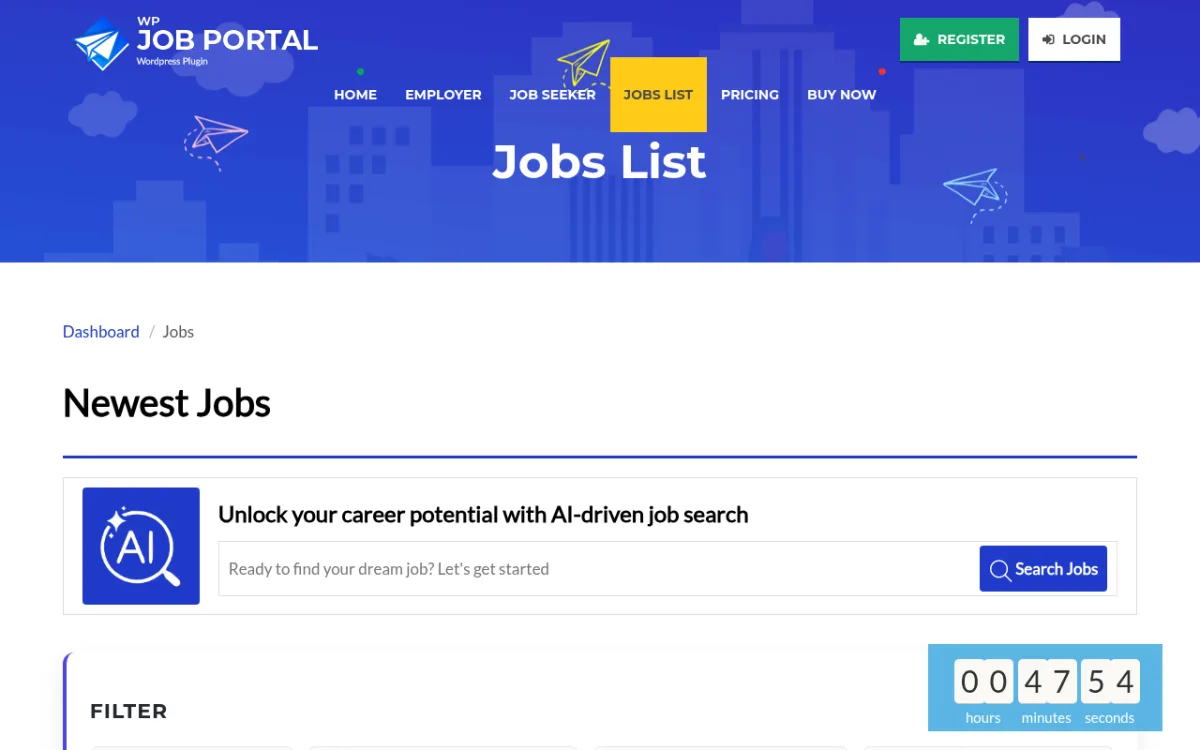 WP Job Portal demo at demo.wpjobportal.com showing the Jobs List page. The navigation exposes separate Employer and Job Seeker sections, and the page includes an AI-assisted job search bar and a filter panel below.
What I checked:
WordPress.org listing (version 2.5.5, last updated June 18, 2026), the live demo at demo.wpjobportal.com, and the pricing page at wpjobportal.com/pricing.
Practical strengths:
- Employer dashboard and job seeker dashboard both available for free
- Resume builder in free version
- Company profiles with logos and job counts
- Custom fields with conditional logic for jobs, resumes, companies
- Quick Start Wizard for initial setup
- Elementor integration for design customization
- WP Job Manager import tool for migration
- AI content generation (limited, free tier)
- Monetization available via premium add-ons (credit system, per-listing, membership modes)
- 22-language support
Practical limitations:
- Resume search requires Standard plan ($79/yr)
- Internal messaging requires Standard plan
- Visitor apply (no login needed) requires Professional plan ($99/yr)
- AI-powered job search and resume recommendations require AI PowerPack ($149/yr)
- CSV export requires Professional plan
- Smaller community than WP Job Manager (8,000 installs vs 80,000+)
- 32 reviews is a thin track record
- More complex initial configuration than HireZoot or Simple Job Board
Pricing:
- Free: $0 (employer + seeker dashboards, resume builder, custom fields, company profiles)
- Basic: $49/yr (departments, folders, tags, RSS, reports)
- Standard: $79/yr (everything Basic + resume search, messaging, PDF/print)
- Professional: $99/yr (everything Standard + visitor apply, advanced resume builder, export)
- AI PowerPack: $149/yr (everything Professional + AI search/recommendations, credits, multi-company)
- All plans available in 1 site, 5 sites, or 25 sites tiers
- Software keeps working after support period expires
Who should use it: Site owners who want serious job board features without paying immediately. Good for community job boards, niche industry boards, or startups that need both employer and candidate management in the free tier.
Official links: wordpress.org/plugins/wp-job-portal | wpjobportal.com
6. JobBoardWP
Best for: small teams or communities that want a clean, permanent free job board with no paid upgrade needed
JobBoardWP is built and maintained by the Ultimate Member team. It is completely free with no premium tier. The plugin has been actively maintained since 2020, with the latest update on May 27, 2026.
The setup is simple. Activating the plugin creates three pages automatically: Jobs (listing with search), Post Job (frontend submission form), and Jobs Dashboard (employer management). These are ready to use without touching a shortcode.
The job listing supports AJAX-powered keyword and location search, filter by job type and category, salary display, and featured jobs. Employers submit jobs from the frontend with a form that supports draft-saving and preview before publishing. The Jobs Dashboard lets employers see their submissions, status, and expiry dates, and take actions including editing, re-posting expired jobs, and marking jobs filled.
Company profiles are supported via a dedicated shortcode. Google Structured Data (JobPosting schema) is built in, which helps your listings appear in Google Jobs search results. Seven built-in job types with configurable color tags, plus custom categories. Six Gutenberg blocks for placing any part of the job board on any page.
The plugin has 1,000+ installs and 10 five-star reviews. The smaller install base and thin review count are honest limitations, but the quality of the product and the track record of the Ultimate Member team are reassuring signals.
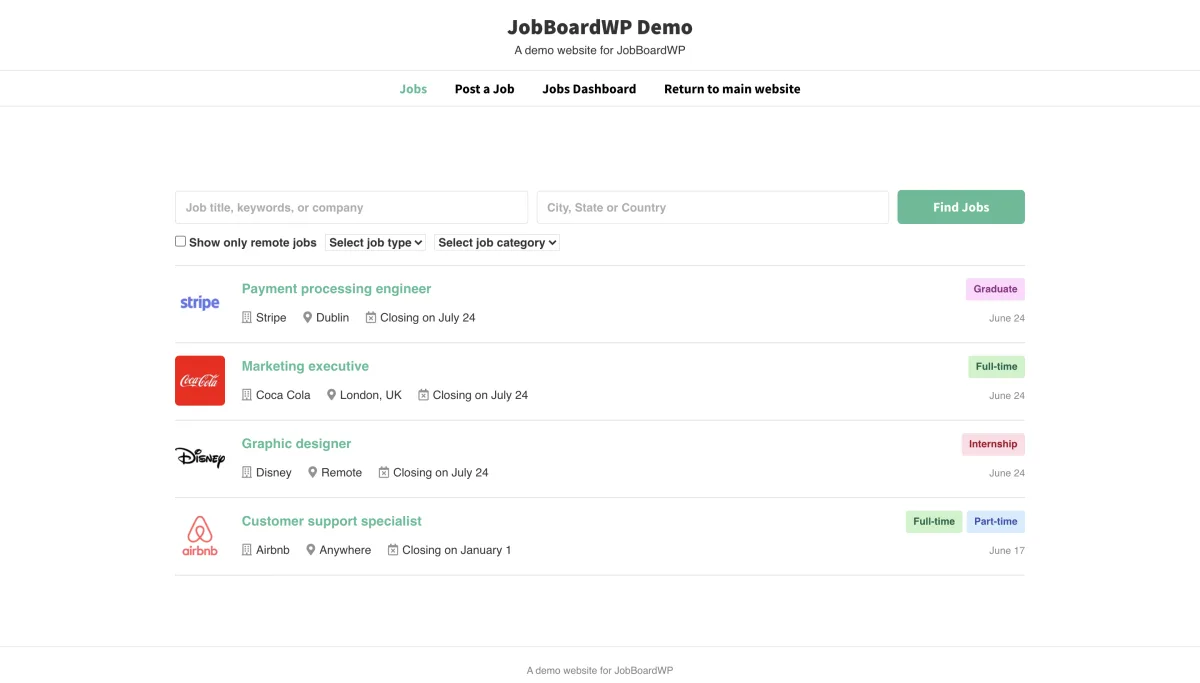 JobBoardWP demo frontend showing the Jobs page with keyword and location search, Show only remote jobs checkbox, job type and category dropdowns, and job cards with company logos, job type badge, and expiry dates.
What I checked:
I reviewed the full WordPress.org listing (version 1.3.6, last updated May 27, 2026), the complete plugin changelog, developer documentation at ultimatemember.github.io/jobboardwp, and all public reviews at the WP.org reviews page (10 reviews, all 5 stars). I navigated the official plugin description in full, confirming the three auto-created pages (Jobs listing, Post Job, Jobs Dashboard) and the frontend submission flow: employers fill a form with personal details, job details, and company details, can save as draft, and preview before submitting. The Jobs Dashboard was confirmed to let employers see job status, expiry dates, edit jobs, re-post expired jobs, and mark jobs as filled. I also confirmed via the WP.org CDN screenshot that the frontend listing shows real company logos (Stripe, Coca Cola, Disney, Airbnb were shown in the demo screenshot), job type badge, location, and expiry date. Monetization was confirmed as absent: no premium tier, no paid listing features, no add-ons sold by the author. Support forum at wordpress.org/support/plugin/jobboardwp was reviewed for recurring issues.
Practical strengths:
- Completely free, no paid version
- Clean, modern UI
- Automatic page setup on activation
- AJAX search and filtering (keyword, location, job type, category)
- Featured jobs
- Salary field
- Company profiles
- Google Structured Data / JobPosting schema built in
- 7 built-in job type tags with configurable colors
- 6 Gutenberg blocks
- Email notifications (admin and expiry reminders)
- Multilingual: WPML, Polylang, TranslatePress, Weglot supported
- Actively developed by the Ultimate Member team
Practical limitations:
- No candidate application tracking or resume management
- No paid listing or monetization features
- No job alerts for job seekers
- No CSV export of applications
- 1,000+ installs; smaller community than WP Job Manager or HireZoot
- Only 10 reviews (all 5-star, but thin coverage)
- No premium path if you outgrow the free version
Pricing:
Completely free. No premium tier. No add-ons sold.
Who should use it: Community sites, nonprofits, small companies, or individual entrepreneurs who want a clean, fully functional job board with no ongoing cost and no hidden gates.
Official links: wordpress.org/plugins/jobboardwp | docs.jobboardwp.com
7. WPJobBoard
Best for: building a commercial job board business with paid listings, memberships, and resume access fees
WPJobBoard is a standalone premium plugin sold at wpjobboard.net. There is no free version. It is designed specifically for site owners who want to monetize their job board, not just run one.
The monetization stack is what sets it apart. Without needing WooCommerce or third-party payment plugins, WPJobBoard handles three revenue models out of the box: paid job listings (employers pay per posting), employer membership packages (recurring subscription access), and resume database access fees (employers pay to view candidate profiles). PayPal and Stripe are both supported natively.
Beyond monetization, WPJobBoard includes a full employer self-service portal where employers post jobs and manage applications without backend access. A drag-and-drop form builder lets you customize application forms. The built-in ATS (applicant tracking system) helps admins review, score, and track candidates. Job alerts, RSS feeds, and schema markup are all included.
The job syndication feature is unique in this list: WPJobBoard can automatically push new listings to Indeed, SimplyHired, and Juju, which increases visibility for employers posting on your board.
Each purchase includes the Jobeleon WordPress theme (valued at $79), designed for job board sites.
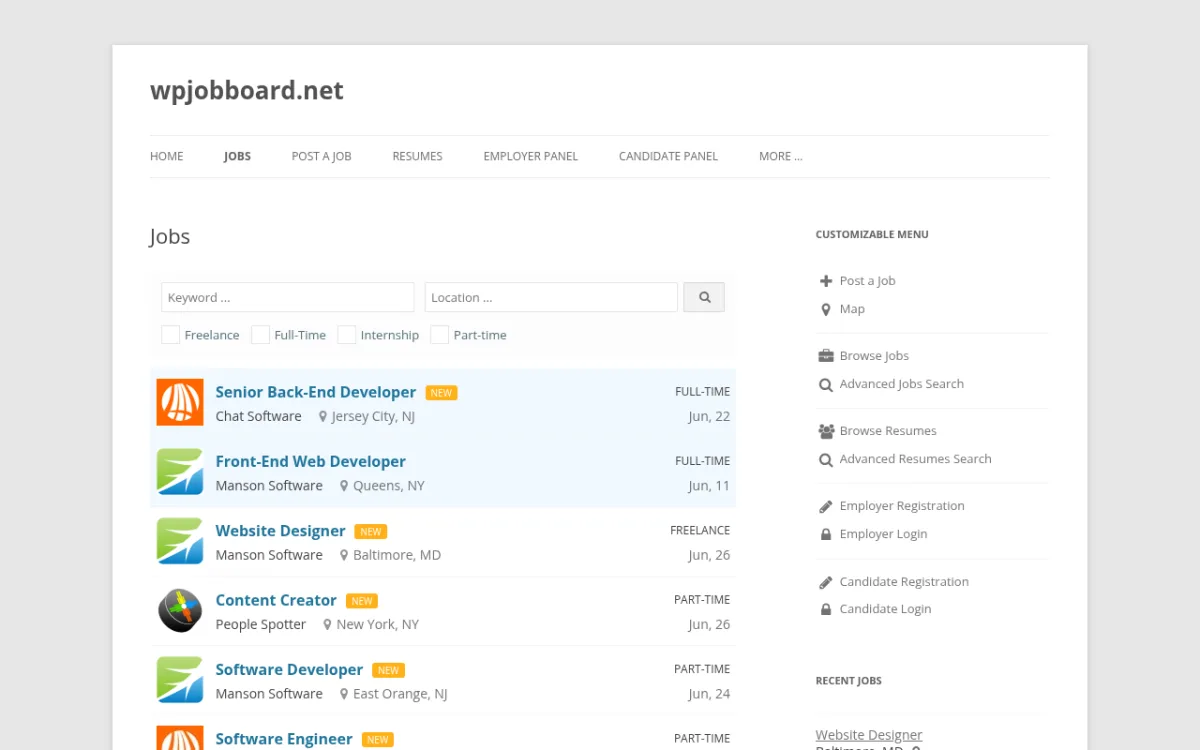 WPJobBoard live demo at demo.wpjobboard.net showing frontend job listings with keyword and location search, job type checkboxes, and sidebar navigation for employer and candidate sections.
What I checked:
Homepage at wpjobboard.net, features page at wpjobboard.net/features, and purchase page at wpjobboard.net/purchase. I also navigated the live frontend demo at demo.wpjobboard.net/jobs/, where I confirmed the job listing interface with keyword and location search, Freelance/Full-Time/Internship/Part-time checkboxes, actual job listings with company logos, job type badges, date posted, and location. The sidebar at demo.wpjobboard.net/jobs/ showed the full navigation structure: Post a Job, Map, Browse Jobs, Advanced Jobs Search, Browse Resumes, Advanced Resumes Search, Employer Registration, Employer Login, Candidate Registration, Candidate Login. This confirmed the dual employer and candidate portal structure. Public reviews were checked on Capterra and G2 (the plugin is not on WP.org). Pricing verified at wpjobboard.net/purchase/ June 2026.
Practical strengths:
- Full built-in monetization: paid listings, employer memberships, resume access fees
- No WooCommerce dependency for payments
- PayPal and Stripe support included
- Job syndication to Indeed, SimplyHired, and Juju
- Employer self-service portal (no backend access needed)
- Drag-and-drop application form builder
- Full ATS (applicant tracking) built in
- Job alerts and RSS feeds included
- Schema markup included
- Jobeleon theme included (worth $79)
- Unlimited jobs, resumes, and applications on all plans
- Perpetual license (one-time payment, not a recurring subscription)
Practical limitations:
- No free version or trial
- Premium-only product; higher cost of entry
- Not distributed on WordPress.org (no public install count)
- Support and updates included for 1 year from purchase; renewal required to continue receiving updates
- Setup and customization takes longer than simpler free options
Pricing:
- Personal: $97 (1 site, unlimited jobs/resumes/applications, free Jobeleon theme, 1 year support and upgrades)
- Business: $199 (unlimited sites you own, same features plus extra business extensions)
- Upgrade from Personal to Business: $110 additional
- No free trial; perpetual license (you own the code after purchase)
- Accepts major credit/debit cards and PayPal
Who should use it: Entrepreneurs and agencies building a revenue-generating job board business where paid listings, employer packages, or resume access fees are part of the business model. Not the right choice for a simple company career page.
Official links: wpjobboard.net
8. JobSearch WP
Best for: building a full-platform premium job board with geolocation, social login, and WooCommerce monetization
JobSearch WP is sold on CodeCanyon by eyecix (an Elite Author status developer). It is the most feature-rich premium option for building a comprehensive job board platform. With 2,632 sales and a 4.54 out of 5 rating from 259 reviews, it has the strongest track record of the paid options in this list.
The plugin provides separate dashboards for employers and candidates. Employers manage job postings, company profiles, applicants, and subscription settings. Candidates build resumes, track applications, save jobs, and set up job alerts. The advanced search includes keyword, location with radius, salary range, category, job type, career level, skills, industry, qualifications, and publication date range. Google Maps integration shows job locations on a map.
Social login is available for both employers and candidates via Facebook, Twitter, and LinkedIn. This lowers the friction of registration on a busy job board.
For monetization, JobSearch WP uses WooCommerce. Job packages, featured listing upgrades, and per-listing fees are all handled through WooCommerce products. If you have WooCommerce already on your site, this integrates cleanly. If not, you need to install it first.
The plugin also supports Indeed integration to pull external job listings onto your board, and email job alerts with frequency options for candidates.
At $79 for a Regular License (one-time payment, 6 months support included), it is a significant step above free options but far cheaper than SaaS job board platforms. The trade-off is setup complexity: getting a production-ready JobSearch site running takes more time than the simpler free alternatives.
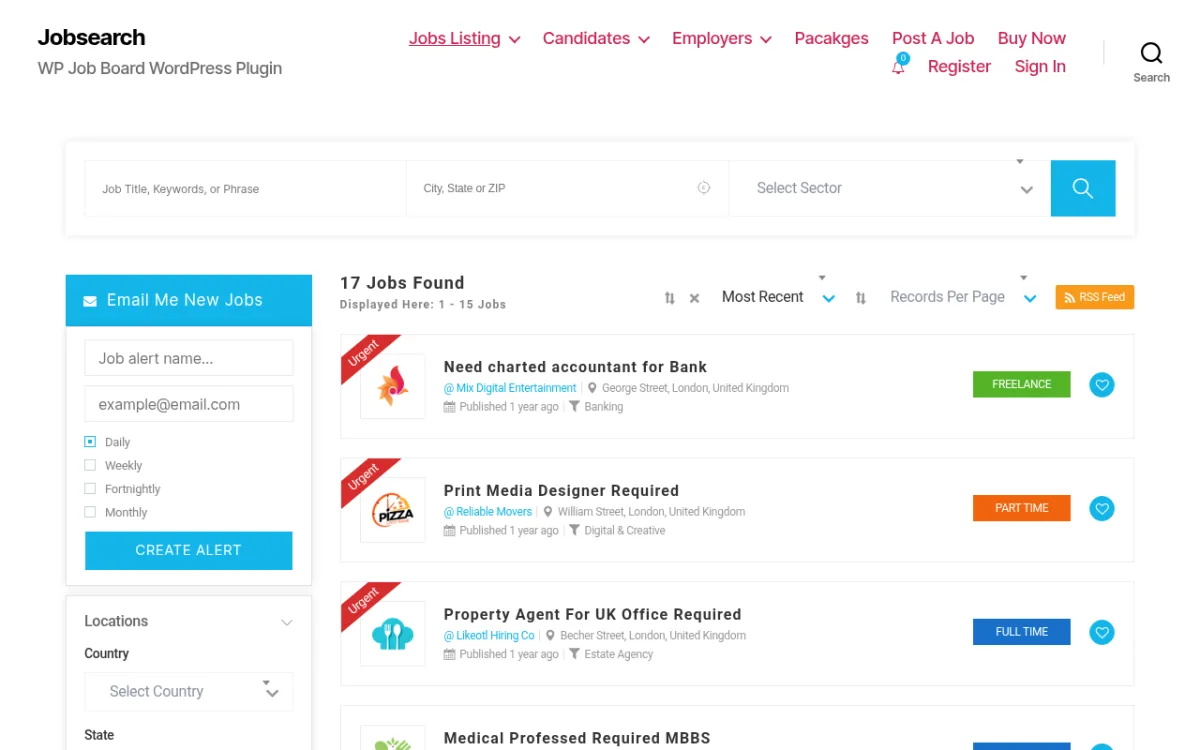 JobSearch WP demo at eyecix.com showing the job listing with advanced search (Job Title, City/State/ZIP, Sector), left sidebar with Email Me New Jobs alert frequency options, and job cards with employer logos, job type badges, and locations.
What I checked:
I navigated the live demo at eyecix.com/plugins/jobsearch/, where I confirmed the full job listing interface: three-field advanced search (Job Title/Keywords/Phrase, City/State/ZIP, Sector), 17 sample job listings with sort options, RSS Feed link, and sidebar with job alert subscription form (job alert name, email, Daily/Weekly/Fortnightly/Monthly frequency, Create Alert button). I also confirmed the Locations sidebar filter with Country and State dropdowns. The navigation confirmed the full platform structure: Jobs Listing, Candidates, Employers, Packages, Post A Job, Buy Now, Register, Sign In. I also reviewed the CodeCanyon listing at codecanyon.net/item/jobsearch-wp-job-board-wordpress-plugin/21066856 (2,632 sales, last updated June 19, 2026), the eyecix developer page at eyecix.com/plugins/jobsearch, and CodeCanyon buyer reviews including the most recent. CodeCanyon rating: 4.54/5 from 259 reviews.
Practical strengths:
- Dual employer and candidate dashboards
- Most advanced search filtering in this list (location radius, salary range, career level, skills, industry, publication date)
- Google Maps integration for geographic job search
- Social login: Facebook, Twitter, LinkedIn
- WooCommerce integration for paid listings, featured upgrades, job packages
- Resume builder and candidate profile management
- Indeed integration for external job imports
- Email job alerts with frequency controls
- WPML compatible
- 2,632+ sales and 4.54/5 rating from 259 reviews
- $79 one-time purchase; no monthly fees
- Actively maintained (last updated June 2026)
Practical limitations:
- No free version; CodeCanyon purchase required
- WooCommerce dependency for all monetization features
- More complex setup than simpler free options
- Support limited to 6 months from purchase (extended support available)
- Requires WooCommerce for payment flows, adding another layer of setup
- Regular License is for one end product (additional licenses for reselling)
Pricing:
- Regular License: $79 one-time (single site/end product)
- Extended License: $1,825 (for use in paid end products or templates)
- 6 months support from eyecix included
- CodeCanyon extended support available for additional fee
- Own the code permanently; no subscription
Who should use it: Developers or agencies building a client's dedicated job board platform, or advanced users who want the most comprehensive set of features from a single purchase and are comfortable with WooCommerce.
Official links: JobSearch WP on CodeCanyon
How to Choose the Right Job Board Plugin
The right choice depends on what you are building:
For a simple company career page where HR manages postings and applicants apply via a form, use HireZoot or Simple Job Board. Both are ready in minutes. HireZoot has a cleaner modern UI. Simple Job Board has more filter options out of the box. If you want the same career page to be Gutenberg-native with frontend candidate tracking, WP Career Board is also a strong fit.
For a free platform with employer and job seeker accounts, use WP Career Board if you want a block-native workflow with BuddyPress/Reign integration, or WP Job Portal if you want the deepest all-in-one free feature set with resume builder included.
For a completely free, zero-cost lightweight board with no hidden gates, use JobBoardWP. It is small but solid and permanently free.
For a serious extensible job board where you want to add features over time without switching plugins, use WP Job Manager. Its ecosystem of add-ons and 80,000+ install base give it the most long-term flexibility. Budget for the Pro Bundle ($159/yr) if you need applications, job alerts, and paid listings.
For a job board business with paid listings and employer memberships, use WPJobBoard. Its built-in monetization stack is the cleanest option if revenue from the job board itself is the goal. If you already have WooCommerce running and want a more comprehensive platform, JobSearch WP is worth the $79.
If you are building a site that combines job listings with membership access, take a look at the best WordPress membership plugins to complement any of these options. And for job boards that charge for listings via WooCommerce, the best WooCommerce plugins can help you extend your payment setup.
Frequently Asked Questions
What is the best free WordPress job board plugin?
HireZoot is still a very strong free option for simple company career pages because it has a high rating, modern UI, a built-in application form, and AJAX-powered filtering. WP Career Board is the better free choice if you want a Gutenberg-native job board with employer and candidate dashboards, company profiles, applications, BuddyPress integration, and JobPosting schema included. WP Job Portal is also worth considering when you want the deepest all-in-one free feature set with resume builder included.
Can I charge employers to post jobs on my WordPress job board?
Yes. WP Job Manager supports paid listings via WooCommerce (requires the WC Paid Listings add-on). WP Career Board Pro uses WooCommerce credits for paid listings and monetization. WPJobBoard includes paid listings, memberships, and resume access fees without WooCommerce. JobSearch WP uses WooCommerce for monetization.
Does my job board show up in Google Jobs results?
Most plugins in this list include JobPosting schema markup. Specifically: WP Job Manager, WP Career Board, HireZoot (v4), JobBoardWP, and WP Job Portal all generate structured data that makes listings eligible for Google for Jobs. JobSearch WP also supports schema.
What is the difference between WP Job Manager and WPJobBoard?
WP Job Manager is a free WordPress plugin from Automattic with a modular add-on approach. It requires paid extensions for applications, job alerts, and paid listings. WPJobBoard is a premium-only standalone plugin ($97 one-time for a single site) with monetization, ATS, and job syndication built in. WP Job Manager is better for sites that want flexibility and an add-on ecosystem. WPJobBoard is better for commercial job board businesses.
Can I let employers manage their own job postings without giving them backend access?
Yes. WP Job Manager, WP Career Board, HireZoot (with User Access Control add-on), WP Job Portal, WPJobBoard, and JobSearch WP all support frontend employer portals. In the free tier, WP Job Manager, WP Career Board, and WP Job Portal offer frontend employer management without backend access.
Which plugin is best for a niche job board (e.g., tech, healthcare, remote jobs)?
Any plugin in this list can support a niche job board by creating custom job categories and types. For advanced filtering by industry, skills, and career level, JobSearch WP has the most filter options. For a block-native niche board with community features, WP Career Board is a good fit. For a simpler niche board without developer work, HireZoot or WP Job Manager with appropriate categories work well.
Conclusion
For most WordPress site owners in 2026, the best starting point is WP Career Board if you want a Gutenberg-native job board with frontend employer and candidate dashboards, HireZoot if you want a clean, fast company career page with a built-in application form, or WP Job Manager if you want the most widely used foundation with room to grow. WP Job Portal is still a strong choice for anyone who wants a deep dual-dashboard job board for free.
If you are building a paid job board business, WPJobBoard's built-in monetization is the cleanest choice. For maximum feature depth on a premium budget, JobSearch WP at $79 is hard to beat.
Not sure what type of site to build next? Check out the full guide to the types of websites you can build with WordPress for more ideas and plugin recommendations across every site type.
Plugin data for the original 7 plugins was verified on 2026-06-27. WP Career Board positioning and pricing were verified from official pages on 2026-07-17. Pricing is subject to change; check vendor pages for current rates.
Similar Blogs


