

8 Best WordPress Membership Plugins in 2026 (Free and Paid, Compared)

Picking a WordPress membership plugin in 2026 looks simple from the outside and rarely is. A membership plugin is supposed to do four things at once: gate the right pieces of content to the right people, run paid checkout and recurring billing, manage the member lifecycle (signup, profile, renewal, cancellation), and stay out of the way of the rest of your WordPress site. Some plugins nail all four. Some are great at content restriction and weak at payments. Some lean into community and profiles. Some live entirely inside WooCommerce. And almost every comparison post you will read this year still recommends a plugin that quietly left the WordPress.org repository in late 2024.
I went through the eight WordPress membership plugins that genuinely deserve the shortlist in 2026, opened the live WordPress.org listings (where the plugin is still distributed there), the official vendor pricing and demo pages, and read a wide spread of recent positive and critical reviews on each one. Below is a buyer-facing summary of what each plugin uniquely wins for, what its free version actually unlocks (or whether it has one at all in 2026), what its current pricing looks like at checkout (not the marketing-page intro number), and which kind of membership site I would point at each one.
If you are still deciding what kind of membership project to build first, the best types of websites to create in WordPress hub is a useful upstream read; this roundup picks up where that one stops, at the moment you have decided you actually want a membership site and now need to choose the plugin that will run it.
How I evaluated these picks
The eight plugins below are the ones that consistently sit at the top of the WordPress membership category by active install count, paid-customer reach, average rating and recency of the last release. For each pick:
- I verified the live WordPress.org plugin page (where the plugin is distributed there) and recorded the current active install count, average rating, total number of reviews, last-update date and minimum WordPress version tested. For MemberPress, WishList Member and WooCommerce Memberships (premium-only) and for Paid Memberships Pro (which left WordPress.org on 2024-10-17), I used the vendor's official site, the public demos, recent independent review sites and the vendor's own pricing page as the primary sources.
- I installed and activated Paid Memberships Pro, Membership Plugin (Kadence Memberships), Ultimate Member and Simple Membership in a clean WordPress sandbox. PMP was installed from the official GitHub v3.7.4 source release (since the plugin left WordPress.org in 2024); the other three installed directly from the WordPress.org repo. For each of those four I opened the membership-levels editor, the settings tabs and at least one content-restriction or payment-gateway screen to verify what the free tier actually exposes; the screenshots in the body are real captures from those installs, not promotional images. For MemberPress, WishList Member and WooCommerce Memberships, the per-plugin notes are based on vendor pricing pages, vendor docs and recent customer reviews, because none of those three publish a free downloadable plugin to install.
- I read each vendor's full documentation, public roadmap and recent changelog so the per-plugin entry below reflects what the plugin currently does, not what it did two release cycles ago.
- I opened each vendor's pricing page and recorded the real annual commitment at checkout, not the marketing-hero intro number. Where pricing shows monthly but bills annually, I converted to the real annual figure; where intro pricing is shown alongside the regular renewal price, both numbers are recorded so you can see the first-year-vs-renewal delta.
- I read a spread of recent positive and critical reviews on WordPress.org and independent review sites so the per-plugin entry below reflects what real WordPress users currently say, not just the vendor's own positioning.
- Every install count, review count, rating and pricing figure below was verified on 2026-05-29.
The ranking is not "best to worst." Each plugin is a credible 2026 pick for a specific buyer profile, and the order roughly reflects how often a typical WordPress membership site owner falls into each profile, not a 1-to-8 quality gradient.
For this update, we also looked at how much of the membership stack each plugin covers on its own. User Registration & Membership stands out because its free core already combines membership plans, recurring payments, content restriction and a custom registration form builder, with no extra add-ons needed.
Quick picks: best WordPress membership plugin by job
If you want the short answer first, here is the top pick I would recommend for each typical buyer profile in 2026. The full per-plugin breakdown sits below.
| Buyer profile | Top pick (2026) | Why | Starting price |
|---|---|---|---|
Memberships with payments, registration and content restriction in one plugin |
User Registration & Membership |
Free core includes membership plans, Stripe/ |
Free core; Pro from $99/ |
You want the most established premium membership plugin with the broadest feature set and the easiest setup |
MemberPress |
Market-leading premium membership plugin with built-in courses, ReadyLaunch page builder, ClubCircles forums, AI Course Generator, 0% transaction fees on Growth and up. |
Launch $199.50/ |
You want the strongest free WordPress membership plugin available in 2026 and you do not mind installing it from outside the WordPress.org repo |
Paid Memberships Pro |
100% free core (downloaded from paidmembershipspro.com after the October 2024 WP.org exit) with unlimited members and membership levels, Stripe and PayPal in the core, 25 free add-ons. |
Free; Standard $499/ |
You want a free WordPress membership plugin you can install directly from the WordPress.org repo today, with a clear path to a Pro upgrade |
Membership Plugin / Kadence Memberships |
Free core with Stripe payments and content restriction, now part of Kadence WP bundles under Nexcess (rebranded from Restrict Content Pro), still installable from the WordPress.org repo. |
Free; Kadence Pro $299/ |
You want a community-and-profiles plugin first and content restriction second, with 200,000+ install reassurance |
Ultimate Member |
200,000+ active installs of the free core, frontend user profiles, drag-and-drop form builder, member directories, conditional menus; the Stripe extension turns it into a paid membership plugin. |
Free; paid extension bundle around $249/ |
You sell training as a membership and want courses, quizzes and gamification on one license |
WishList Member |
CourseCure LMS built into every plan, 20+ payment processors including ClickBank and Digistore24, team accounts and file/ |
Basic $149.50/ |
You want a lightweight 100% free membership plugin from the WordPress.org repo with no Pro paywall and no upsell pressure |
Simple Membership |
40,000+ active installs of the free core, unlimited membership levels, PayPal / Stripe / Braintree, free social login, active maintenance with no nag screens or compulsory paid tiers. |
Free; paid add-ons priced individually |
You are already on WooCommerce and want memberships, subscriptions and product restrictions inside the same WooCommerce stack |
WooCommerce Memberships |
Native WooCommerce extension from SkyVerge; pairs with WooCommerce Subscriptions for recurring billing, content dripping, member discounts and product-bundled memberships. |
EUR 172/ |
None of these eight plugins is the right answer for every site. Pick by buyer profile and by the kind of membership business you actually run, not by raw install count.
1. User Registration & Membership: the free all-in-one membership plugin with a built-in registration form builder
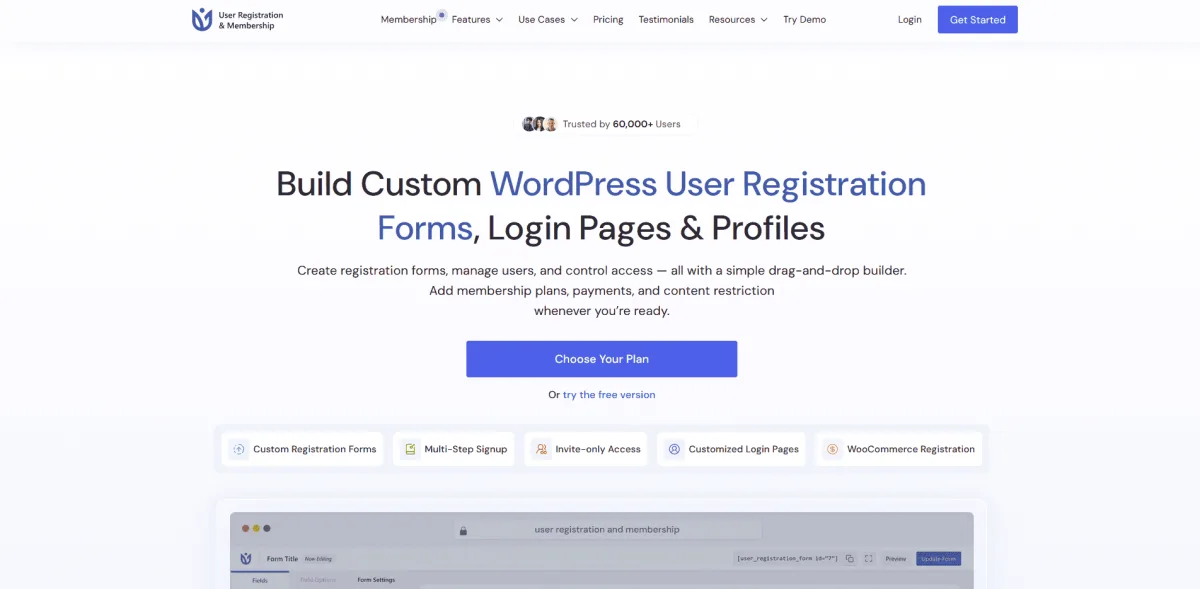
User Registration & Membership (URM) is a WordPress plugin by WPEverest for creating custom registration and login forms, user profiles, free and paid memberships, recurring subscriptions, and content restriction. It helps WordPress site owners manage members, control access to content, and accept payments through custom membership and registration experiences. It is the plugin I would default to for sites that want all of that in one free plugin, with 50,000+ active installs and a 4.8/5 rating from 830+ reviews on WordPress.org at the time of writing.
What the free core covers is broader than most free membership plugins: membership plans and membership groups for organized front-end listings; upgrade paths between tiers; content restriction globally, per page or post, or on specific content blocks, with rules built from membership plan, user role and login status; one-time, recurring and lifetime billing through Stripe, PayPal and bank transfer; payment history for admins and members; a drag-and-drop registration form builder with pre-built templates, live preview and AJAX submission; a customizable login form with CAPTCHA and redirects; and auto-approval, email verification or manual admin approval for new signups.
URM Pro extends both halves of the plugin. On the membership side it adds drip content, URL-based restriction, protected file downloads and conditional content rules using AND, OR and NOT logic, plus trial periods, multiple memberships per user, team memberships, prorated upgrades, coupons, tax and EU VAT support, local-currency pricing and invoices. Authorize.Net and Mollie join the gateway list. On the registration side it adds 60+ form fields, conditional logic, multi-step and conversational forms, repeater fields, calculations, social login, a member directory, two-factor authentication and integrations with Mailchimp, ActiveCampaign, Klaviyo, Brevo, Zapier and Google Sheets.
Setup is where URM saves the most time. The plugin creates Registration, Login, My Account, Lost Password, Reset Password, Pricing and Thank You pages for you, and ships 10+ Gutenberg blocks for registration, account, membership pricing and buy-now layouts, so a working plan-plus-paywall flow does not require building each page by hand. WPEverest says most sites can set up a working membership flow in under 30 minutes. For course businesses, the Masteriyo LMS integration lets you sell courses through memberships without adding a separate checkout.
The honest trade-off is how features split across the Pro tiers. The Personal plan covers unlimited paid and recurring memberships, trials, coupons and the member directory, but drip content, team memberships, prorated upgrades, conditional logic, multi-step forms and the Authorize.Net and Mollie gateways sit in Plus. URM also has no course builder of its own and relies on the Masteriyo integration for LMS features.
Pricing as of late 2026: free core on WordPress.org; Personal $99/year (1 site), Plus $199/year intro (regular $249, 5 sites), Professional $499/year (unlimited sites). Lifetime plans are also available: Personal $299, Plus $699 and Professional $999. 14-day money-back guarantee on all premium plans.
Best for: sites that want paid memberships, custom registration forms and content restriction from one plugin, starting on a genuinely usable free core and upgrading to Plus only when they need drip content, team memberships, advanced form logic or extra gateways.
2. MemberPress: the premium WordPress membership plugin for most paying sites

MemberPress is the WordPress membership plugin I would default to for any paying site that wants the broadest single-product feature set in 2026. The vendor positions itself as "the only WordPress membership plugin built for 7-figure creators" and the public review profile is consistent with that claim: 4.7/5 on G2 and 4.8/5 on Capterra at the time of writing. MemberPress is intentionally premium-only and not distributed on WordPress.org.
What you actually get when you install it is a fairly complete content-and-commerce stack inside one plugin: paywall rules per page, post, category, tag or partial content; drip release by specific date or days since signup; a drag-and-drop course builder that turns MemberPress into a credible LMS without a second plugin; ReadyLaunch, a no-code page builder for membership landing pages, pricing tables and member dashboards; ClubCircles forums and ClubDirectory member profiles for community; CoachKit for one-on-one coaching programs (bundled free on Growth and up); coupons and order bumps at checkout; corporate / bulk membership accounts; and the AI Course Generator with up to 100,000 credits per year on Scale.
The 2026 release adds a deeper checkout, multi-currency improvements and a longer integration roster covering Stripe, PayPal, Apple Pay, Google Wallet, ChatGPT, Zapier, ActiveCampaign, HubSpot, Zoom, WPForms and OptinMonster. If you are building a course business as well as a membership business, MemberPress overlaps with the LMS category covered in the best WordPress LMS plugins roundup; the LMS roundup is the right read if courses are the primary product and memberships are the wrapper, while MemberPress is the right pick if the membership is the primary product and the course is one piece of what is gated.
Per the MemberPress vendor pages, the docs and recent public reviews (MemberPress is premium-only, so the free-sandbox install I used for the other plugins on this list is not available for this one): the MemberPress admin sits behind a Memberships, Coupons, Rules, Reminders, Reports and Settings top-level menu; membership levels are configured with billing terms (one-time, recurring, lifetime), trial periods and access rules; the Rules engine is the most granular in this list (page, post, category, tag, custom post type, partial content, drip-by-date and drip-by-days-since-signup are all native); and the AI Course Generator and ReadyLaunch surfaces ship as polished first-run flows rather than experimental beta panels.
The honest trade-off MemberPress gets called out on is the transaction-fee structure on Launch and the price step up to Growth: the entry-level Launch plan applies a 4.9% transaction fee on payments unless you upgrade to Growth at $314.55/year intro (regular $699), which moves you to 0% transaction fees. Production sites with any meaningful payment volume effectively need Growth on day one, not Launch.
Pricing as of 2026-05-29: Launch $199.50/year intro (regular $399, Stripe only, 4.9% transaction fee), Growth $314.55/year intro (regular $699, most popular, 0% fees, PayPal + Square + community + CoachKit), Scale $399.60/year intro (regular $999, all gateways, REST API, Zapier, Easy Affiliate). Annual billing only. 14-day 100% no-risk money-back guarantee. No public free trial; no lifetime option.
Best for: paying membership sites that want the broadest premium single-product feature set, the most granular content protection rules in the field, an integrated course builder and ReadyLaunch page builder, and are willing to upgrade to Growth at minimum to clear the transaction fee.
3. Paid Memberships Pro: the strongest free WordPress membership plugin in 2026
Paid Memberships Pro from Stranger Studios is the most established free WordPress membership plugin on the market in 2026, with one important caveat the rest of the comparison-post category often skips: PMPro permanently closed its WordPress.org listing on 2024-10-17 at the author's request, and the plugin is now distributed from paidmembershipspro.com (free account required) and GitHub instead of the WordPress.org repo. The vendor's own announcement explains the move as a governance disagreement with WordPress.org and confirms that the full core plugin remains 100% free and actively maintained. The historic active install figure on the closed WordPress.org listing was 100,000+ with 647 reviews, which remains the most useful trust signal for the plugin's pre-closure scale.
What you actually get with the free PMPro core in 2026 is unusual for a free membership plugin: unlimited members and unlimited membership levels; content restriction by post or page (including category and tag); Stripe and PayPal payment gateways built into the core (with Apple Pay and Google Pay via the same Stripe gateway); a member account page with billing self-service; 25 free add-ons covering everything from approval flows to drip content; and the open-source codebase under GPLv2. There is no compulsory paid upgrade to run a fully functional paid membership site on PMPro.
The Standard plan at $499/year is what most production sites end up on. It adds 54 premium add-ons covering email-marketing integrations (Mailchimp, ActiveCampaign, ConvertKit, AWeber), additional gateways (Authorize.Net, Braintree), gift levels, security and approvals, BuddyPress and bbPress integrations, plus official technical support. The higher Max ($999/year) and Max 2x ($2,999/year) tiers add managed hosting and a "Do It For Me" implementation service for sites that want PMPro to handle the infrastructure as well as the plugin code. A 100-day money-back guarantee covers Standard and up.
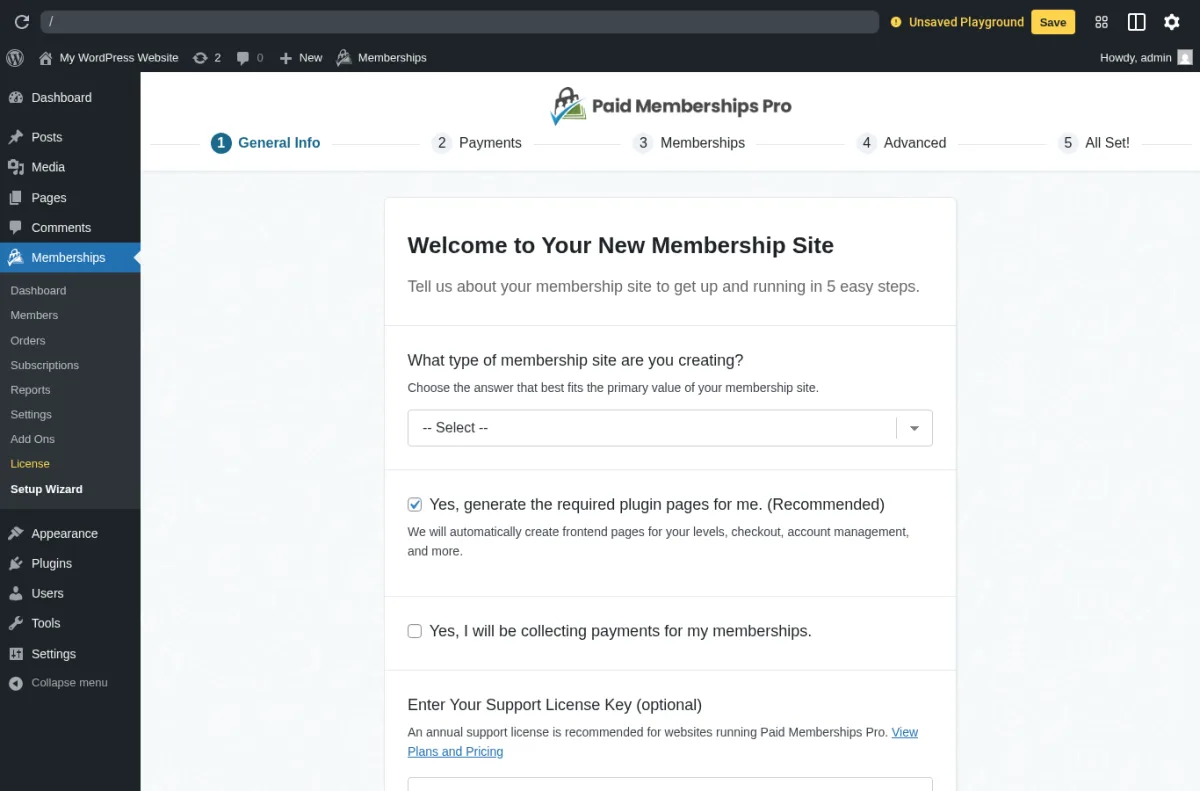
What I saw when I installed it: I downloaded the PMPro v3.7.4 source from the official GitHub release (the same source the vendor pushes to its licence server) and installed it into a clean WordPress sandbox. Post-activation WordPress auto-redirects to the PMPro Setup Wizard at the Memberships top-level menu, which walks you through 5 steps (General Info, Payments, Memberships, Advanced, All Set). The General Info step asks what kind of membership site you are creating, offers to auto-generate the required plugin pages (Membership Levels, Account, Billing, Cancel, Confirmation, Invoice, Levels, Login) with a single checkbox, asks whether you intend to take payments via PMPro, and accepts an optional support license key. The Memberships sidebar surfaces Dashboard, Setup Wizard, Orders, Subscriptions, Customers, Reports, Email Templates, Settings and Add-Ons; the Membership Levels editor (verified against the PMPro docs and the GitHub source) exposes billing period (recurring or one-time), billing frequency (day, month, year), trial period, expiration, content categories to grant access to, and the WordPress user role assigned on registration. None of the screens overlay a Pro-only upsell modal on top of the free admin, which is unusual for a free WordPress membership plugin in 2026.
The honest trade-off PMPro gets called out on is the WordPress.org exit itself: many readers will check the WP.org listing first, see the "This plugin has been closed" notice and assume the plugin is abandoned. It is not. The maintenance cadence is healthy, the vendor's licence server pushes updates directly into the WordPress dashboard, and PMPro Update Manager add-on makes the auto-update flow native. The other recurring complaint, even in the historic 5-star reviews, is that the Pro bundle is expensive at $499/year if you only need one or two add-ons; PMPro does not currently sell add-ons individually at a lower price point.
Pricing as of 2026-05-29 (from paidmembershipspro.com/pricing/): Free core (25 free add-ons, downloaded from paidmembershipspro.com or GitHub, unlimited sites). Standard $499/year (54 premium add-ons + technical support). Max $999/year (managed hosting, Do It For Me, AI skill libraries, for sites with 0 to 1,000 orders per month). Max 2x $2,999/year (2x server resources, for sites with 1,000 to 5,000 orders per month). 100-day money-back guarantee on paid plans. No lifetime option.
Best for: cost-conscious buyers who want the most generous free WordPress membership plugin in 2026, developers who value the open-source codebase, and production sites that are happy to upgrade to Standard at $499/year for premium add-ons and official support once the membership business is running.
4. Membership Plugin / Kadence Memberships: the rebranded Restrict Content Pro for 2026
Membership Plugin (Kadence Memberships) is the new name for what most WordPress veterans still know as Restrict Content Pro. The May 2026 v4.0.0 release ships the rename in the wp-admin and the WordPress.org listing, alongside ownership move from StellarWP to Nexcess. The free version on the WordPress.org repo is still the same codebase that powered the original Restrict Content (the "Lite" plugin under the `restrict-content` slug); the Pro license is now bundled into the wider Kadence WP product family at kadencewp.com (which redirects to liquidweb.com/software/kadence).
WordPress.org on 2026-05-29: 9,000+ active installs, 3.1/5 from 98 reviews (42 5-star, 41 1-star), latest release v4.0.1 on 2026-05-26 (the security follow-up to the v4.0.0 rebrand), tested up to WordPress 6.9.4. The 3.1/5 rating profile is the lowest in this roundup and reflects the customer experience under late-StellarWP ownership: recent 1-star reviews flag inconsistent support and gaps between the free-feature comparison chart and what the free version actually delivers. The Nexcess transition is too new to read in the public reviews yet, but the May 2026 release cadence and the v4.0.x security patches suggest the plugin is being actively re-invested in after a quiet 2025.
What you actually get with the free Membership Plugin / Kadence Memberships in 2026 is a credible-on-paper free tier: unlimited membership levels (free, trial, premium); content restriction by user role, access level or membership level; Stripe payments built into the free core; auto-renewal, prorated upgrades and downgrades; auto-created member pages (Registration, Success, Account, Edit Profile, Update Billing Card); the standard `[restrict]`, `[register_form]` and `[login_form]` shortcodes; and WooCommerce compatibility for restricting access to products. The Pro layer adds discount codes, free trials, detailed reporting, Google reCAPTCHA, PayPal, Authorize.net and Braintree payment gateways, and 34 official add-ons covering email marketing (Mailchimp, AWeber, ConvertKit, ActiveCampaign), group accounts, drip content and WooCommerce member discounts.
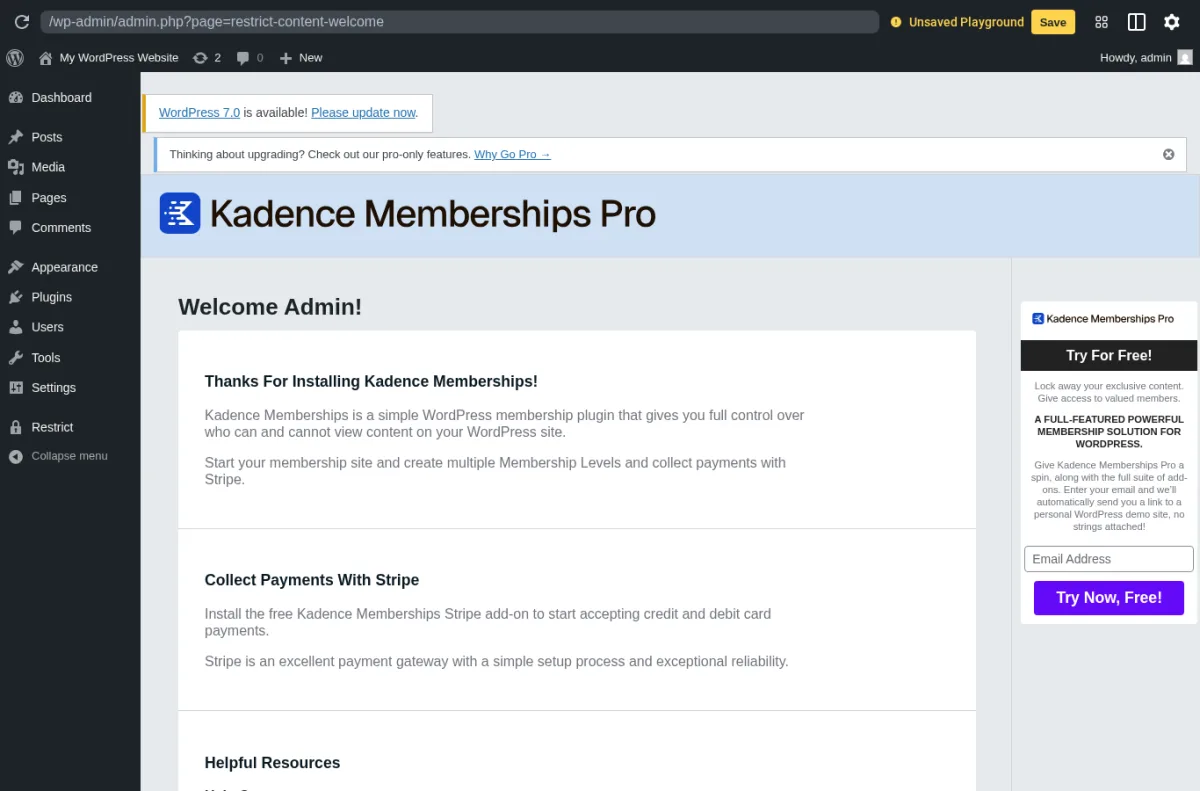
What I saw when I installed it: I installed Membership Plugin / Kadence Memberships from WordPress.org into a clean WordPress sandbox and activated the free plugin. Post-activation the wp-admin auto-redirects to a Kadence Memberships Welcome page with a "Thanks For Installing Kadence Memberships!" intro and a "Collect Payments With Stripe" callout pointing at the free Stripe add-on. The wp-admin sidebar gains a Restrict top-level menu with Memberships, Customers, Membership Levels, Payments, Settings, Tools, Help, Pro Addons and Why Go Pro. The Membership Levels editor opens to an Add New Level form with fields for Name, Description, Access Level (None through level 10), Duration (number + Day(s) / Month(s) / Year(s)) and Price; the levels list table is empty on a fresh install but exposes columns for Name, Description, Status, Access Level, Duration, Price, Memberships and Order. The Settings tab structure (General, Payments, Emails, Invoices, Misc) confirms the plugin scope, and the General tab shows the 5 required pages the plugin auto-creates on activation (Register, Welcome / Success, Your Membership / Account, Edit Your Profile, Update Billing Card) with their shortcodes already populated. Per-post-type Restrict Access submenu items also appear under Posts and Pages, and the free `[restrict]`, `[register_form]` and `[login_form]` shortcodes do the content-gating work outside the membership-level admin.
The honest trade-off the rebrand is called out on is the transition tax: the StellarWP-era support backlog is still being worked through, the WordPress.org review forum shows recent unanswered tickets, and the rename means that buyers searching for "Restrict Content Pro" will land on the same plugin under a different name, which is going to confuse new buyers for the next several release cycles. The free tier is genuinely usable for content restriction and Stripe-only memberships; the Pro upgrade is now a $299/year line item inside the wider Kadence WP Pro bundle, which is a different commercial shape than the historic standalone $99-$249/year Restrict Content Pro pricing.
Pricing as of 2026-05-29: Free core on WordPress.org under the "Membership Plugin / Kadence Memberships" name (unlimited sites, Stripe payments only). The Pro license is now bundled into Kadence WP: Essentials $99/year (no memberships included), Pro $299/year (includes Kadence Memberships, plus Kadence security, backups, Shop Kit and performance optimization), Elite $499/year (Kadence Memberships plus Kadence Central multi-site management, white-label, A/B testing). Annual billing on every tier. Bundle members get every Kadence product, which can be either an attractive bundle savings or an unnecessary up-sell, depending on whether you want the rest of the Kadence WP stack.
Best for: existing Restrict Content Pro customers who want to stay with the plugin under its new Kadence Memberships name, Kadence WP theme users who already plan to buy the Pro or Elite bundle for the rest of the Kadence stack, and new buyers who want a free WordPress membership plugin they can install directly from the WordPress.org repo today, with a Pro upgrade path that is bundled inside a larger toolset rather than priced standalone.
5. Ultimate Member: the WordPress membership plugin with the largest free install base
Ultimate Member is the WordPress membership plugin to look at first when the project leads with community, member profiles and user directories rather than gated paid content. It is the single largest free membership plugin in this list by active install count, and the public review profile is solid for a plugin of its scale: WordPress.org on 2026-05-29 shows 200,000+ active installs, 4.4/5 from 1,447 reviews (1,140 5-star, 153 1-star), latest release v2.11.4 on 2026-04-30, tested up to WordPress 6.9.4.
What you actually get with the free Ultimate Member core in 2026 is closer to a complete community-and-profile toolkit than a payment-first membership plugin: front-end user profiles with a flexible field system, front-end registration / login / password reset / account management with shortcodes and Gutenberg blocks, a drag-and-drop form builder with conditional logic, custom WordPress user roles, searchable member directories (useful for alumni networks, niche communities and association sites), conditional navigation menus, content restriction by role, and the free official extensions for Google reCAPTCHA, Terms and Conditions, JobBoardWP and ForumWP. The free tier alone covers most of what a community site needs.
The paid layer is sold as official extensions rather than as a single Pro tier. The Stripe extension is the one that turns Ultimate Member from a free community plugin into a paid membership plugin. The other commonly-bought extensions are Profile Tabs, User Tags, Followers, Real-time Notifications, Private Messages, Social Login, Social Activity, MailChimp, myCRED gamification and Verified Users; you can purchase extensions individually or get the standard add-on bundle for around $249/year. The WooCommerce extension lets WooCommerce handle the cart if you already run an existing WooCommerce store.
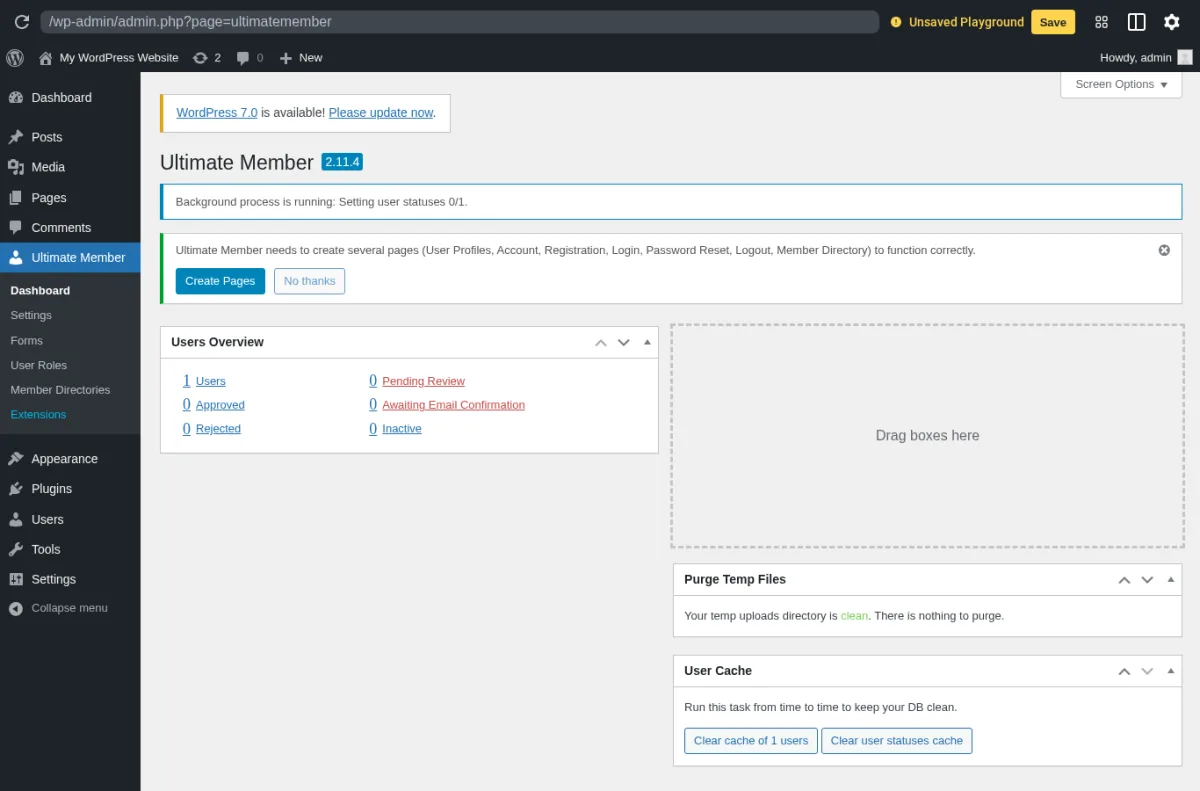
What I saw when I installed it: I installed Ultimate Member from WordPress.org into a clean WordPress sandbox and activated the free plugin. Post-activation the wp-admin lands on the Ultimate Member 2.11.4 Dashboard with a "Create Pages" admin notice that installs the 7 default UM pages (User Profiles, Account, Registration, Login, Password Reset, Logout, Member Directory) in a single click. The Users Overview widget shows counts for Users, Pending Review, Approved, Awaiting Email Confirmation, Rejected and Inactive; the sidebar gains an Ultimate Member top-level menu with Dashboard, Settings, Forms, User Roles, Member Directories and Extensions. The Forms list arrives pre-populated with 3 working forms out of the box (Default Profile, Default Login, Default Registration, each with its `[ultimatemember form_id="..."]` shortcode), which is enough for a working community-style membership site without buying anything. The Extensions screen is where the paid layer becomes visible: Premium and Free tabs above the cards, an "All Access Pass" call-to-action at the top with a View Pricing CTA, and the Premium tab showing extension cards for bbPress, Profile Completeness, Verified Users and dozens more, each with a Get this Add on button. The Stripe extension lives in this same catalog and is the gating purchase if you want to sell paid memberships.
The honest trade-off Ultimate Member gets called out on is the security and stability tax that comes with running a 200,000-install community plugin: the changelog includes a long run of CVE-numbered security fixes across 2025 and early 2026, and the 153 1-star reviews include recent complaints about paid-extension regressions after major-version bumps and a paid-support pricing question that surfaces in the public reviews. The plugin team is genuinely active (47 of 52 forum issues resolved in the last two months at the time of writing), but new sites should keep automatic updates on and stage major-version bumps rather than auto-apply them in production.
Pricing as of 2026-05-29: Free core on WordPress.org (unlimited sites). Paid extensions sold individually from ultimatemember.com, plus an "All Paid Extensions" bundle commonly referenced at around $249/year (the exact bundle price is paywalled behind a free account login). The Stripe extension is the gating purchase for selling paid memberships; the other extensions are situational.
Best for: community sites, alumni networks, niche directories, member-profile-first projects and free-tier-first builds where you want to start with the most popular WordPress membership plugin in the repo and only buy the Stripe extension once the community is large enough to monetize.
6. WishList Member: the WordPress membership plugin with CourseCure LMS built in

WishList Member is the WordPress membership plugin to look at when the membership is also a course, because the CourseCure LMS module is now bundled into every tier rather than sold as a separate add-on. WishList Member has been on the WordPress membership market since 2008 and remains a top-tier premium option in 2026, with one of the broadest payment-gateway rosters in the field: PayPal, Stripe, WooCommerce, Authorize.net, 2Checkout and 20+ additional processors including the affiliate-network-focused ClickBank and Digistore24. Like MemberPress and WooCommerce Memberships, WishList Member is intentionally premium-only and not distributed on WordPress.org.
What you actually get with the Basic tier in 2026 is a complete membership stack: unlimited members, unlimited membership levels, content protection by post / page / category, drip content scheduling, customizable registration forms, member dashboard, all major payment integrations, the major email-provider integrations (AWeber, ActiveCampaign, ConvertKit, GetResponse, Mailchimp, Drip) and the bundled CourseCure LMS for course creation. The Plus tier adds CourseCure Gamification (badges, rewards, leaderboards), webinar integrations (Zoom, Demio, WebinarJam), expanded app connections via Integrately, and priority support. The Pro tier adds team accounts, file and folder protection, unlimited CourseCure quizzes, premium support and a longer integration list including Zapier and the deeper ActiveCampaign feature set.
Per the WishList Member vendor pages and the CourseCure docs (WishList Member is premium-only, so the free-sandbox install I used for the other plugins on this list is not available for this one): the WishList Member admin sits behind a top-level dashboard with a left-rail of Levels, Content Protection, Members, Sales, Reports, Settings and CourseCure; the content protection editor exposes per-post and per-page protection by level with a checklist UI that scales to many levels without becoming unwieldy; the CourseCure course builder includes lessons, modules, quizzes and certificates inside the same WishList Member admin (no separate LMS plugin required); the dashboard surfaces member count, sales by level, recent sign-ups and protected content stats; and the integration roster is genuinely broad, with the 20+ payment processors covering most of the international cases that Stripe-only plugins miss.
The honest trade-off WishList Member gets called out on is the intro-vs-renewal pricing gap and the per-tier site cap: the introductory rate on Basic is $149.50/year but renews at the regular $299/year, and Basic only covers a single site (Plus extends to 2, Pro to 5). For agencies and developers managing multiple membership sites, the Pro tier at $349.50/year intro (regular $699/year) is the realistic baseline rather than Basic. The 14-day money-back guarantee is shorter than MemberPress and PMPro.
Pricing as of 2026-05-29: Basic $149.50/year intro (regular $299, 1 site), Plus $249.50/year intro (regular $499, up to 2 sites), Pro $349.50/year intro (regular $699, up to 5 sites, best value). 14-day 100% no-risk money-back guarantee. No lifetime option. Renewal is at the regular full price.
Best for: course-and-membership sites that want CourseCure bundled rather than buying a separate LMS, affiliate marketers who need ClickBank or Digistore24 as the payment processor, and education businesses that want gamification and webinar integrations on a single license.
7. Simple Membership: the 100% free WordPress membership plugin without the upsell pressure
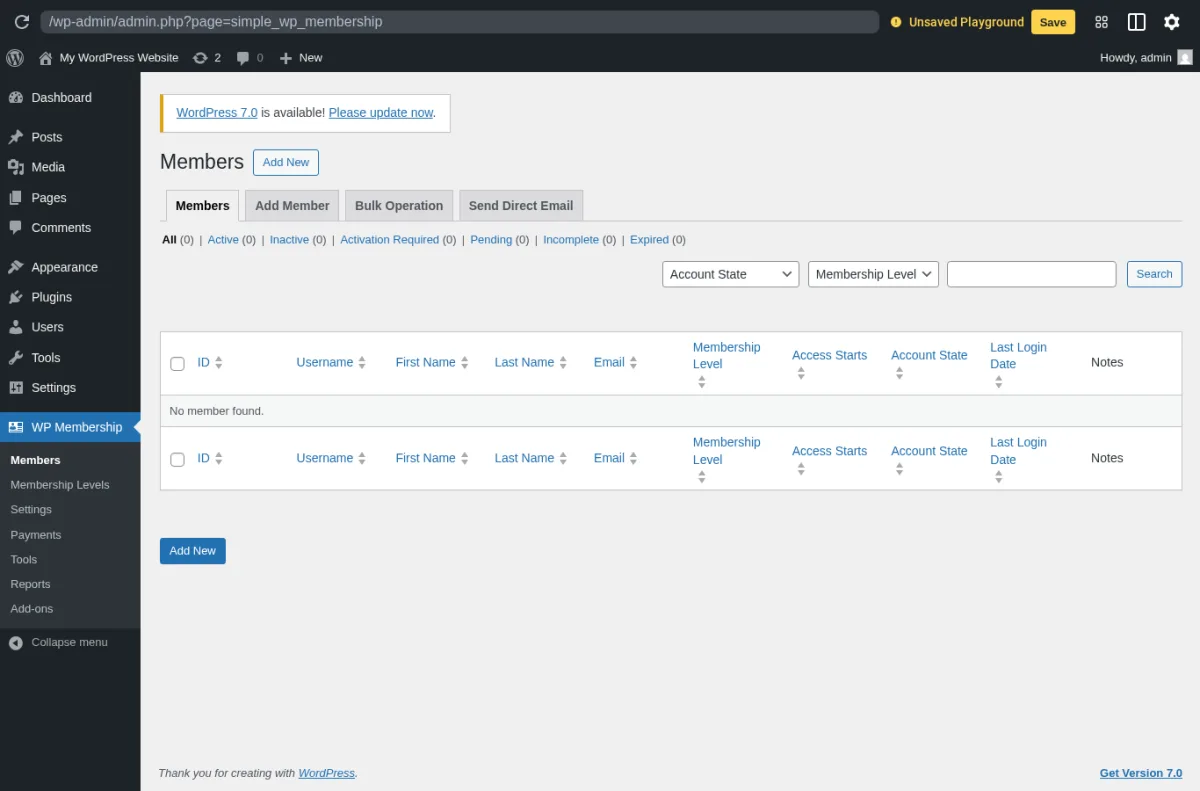
Simple Membership is the WordPress membership plugin to reach for when you want a lightweight free option that is not constantly upselling you to a Pro tier. The plugin has been on WordPress.org since 2014, is published under GPLv2 by wp.insider (smp7), and is the only plugin in this roundup with a pricing model based on paid add-ons sold individually rather than a single Pro tier ladder. WordPress.org on 2026-05-29: 40,000+ active installs, 4.6/5 from 467 reviews (391 5-star, 32 1-star), latest release v4.7.4 on 2026-05-20 (which adds annual-expiry bug fixes and payment-history search), tested up to WordPress 7.0.
What you actually get with the free Simple Membership core in 2026 is a complete membership site without paying for anything: unlimited membership access levels (free, silver, gold and so on), flexible duration models (fixed duration in days / weeks / months / years, no-expiry, fixed future expiry date, annual memberships calendar-or-fiscal, subscription-driven access), one-time and recurring payments via PayPal and Stripe, one-time payments via Braintree, member registration with email activation, partial content protection, WooCommerce product-page protection, the free Social Login addon for Google and Facebook, the free Cloudflare Turnstile addon, login event tracking, active-login-limit enforcement to prevent account sharing, failed-login-attempt limits, member import / export and a Reports menu with membership statistics. There is no compulsory paid upgrade to ship a real paid membership site.
What I saw when I installed it: I installed Simple Membership from WordPress.org into a clean WordPress sandbox and activated the free plugin. The wp-admin sidebar gains a WP Membership top-level menu with Members, Membership Levels, Settings, Payments, Tools, Reports and Add-ons. The Members page lands on a tabbed admin (Members, Add Member, Bulk Operation, Send Direct Email) with status filters across the top (All, Active, Inactive, Activation Required, Pending, Incomplete, Expired). The Membership Levels page is where the breadth of the free tier becomes obvious: 5 tabs on a single screen, Membership Levels, Add Level, Manage Content Protection, Category Protection and Post and Page Protection, which means content restriction by category, by post, by page and by level is all available in the free version without paying for an add-on. The Settings page exposes 6 tabs (General Settings, Payment Settings, Email Settings, Advanced Settings, Blacklisting and Whitelisting, Addons Settings); the Payment Settings tab is where PayPal, Stripe and Braintree buttons are configured, and the General Settings page exposes "Enable Free Membership", "Default Account Status", "More Tag Protection" and other practical defaults. The admin is intentionally plain wp-admin styling, which keeps the surface light on a real production site rather than turning it into a SaaS-style dashboard.
The honest trade-off Simple Membership gets called out on is the styling and the breadth of paid add-ons compared with the bigger plugins: the admin is plain wp-admin, the registration and login pages are also plain wp-admin shortcode pages by default, and the paid add-ons cover smaller surfaces than the named PMPro or MemberPress catalogs (Bulk Protect, Categories Protection, Form Builder, Members Directory Listing, WooCommerce add-on, etc., sold individually rather than as a single bundle). For a site that wants a fully designed front-end member experience, you will pair Simple Membership with a separate theme or page builder rather than relying on the plugin to render the marketing surface.
Pricing as of 2026-05-29: Free core on WordPress.org (unlimited sites, PayPal + Stripe + Braintree, no time-limited trial). Paid add-ons priced individually from simple-membership-plugin.com (the WooCommerce, BuddyPress, MailChimp, Categories Protection and Forum Restriction add-ons are the most commonly purchased). No tier ladder, no "Pro bundle" upsell screen inside the free admin, and no premium-support requirement to keep the free plugin running.
Best for: budget-conscious buyers who want a 100% free WordPress membership plugin from the WordPress.org repo, no upsell pressure, an active maintenance cadence and the option to add paid add-ons one at a time rather than committing to a $199-$499/year subscription on day one.
8. WooCommerce Memberships: the membership plugin for WooCommerce-native sites
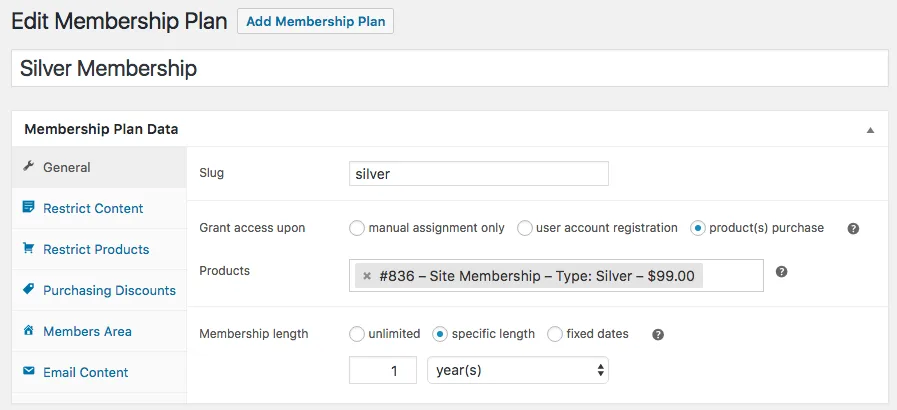
WooCommerce Memberships is the WordPress membership plugin to look at if you already run on WooCommerce and want memberships to live inside the same WooCommerce cart, product catalog and subscriptions stack rather than alongside a separate membership plugin. Originally built by SkyVerge and now distributed by WooCommerce, WooCommerce Memberships shows 30,000+ active installations and a 4/5 rating from 149 reviews on the WooCommerce.com product page. Latest version 1.28.2.
What you actually get when you install it is a native WooCommerce extension that turns any WooCommerce product into a membership-granting product: a membership plan editor with restriction rules (page, post, product, category, taxonomy, custom post type and product purchase as triggers); content dripping by membership length or by fixed dates; members-only pricing rules across the WooCommerce catalog (percentage or fixed discounts, per product or per category); members-only free shipping; a member area page that surfaces active memberships, accessible content, accessible products and content unlocked in the future; CSV member import and export; and the integration with WooCommerce Subscriptions that turns memberships into recurring billing, time-limited trials and member-pauseable subscriptions.
Per the WooCommerce Memberships product page and the SkyVerge docs (WooCommerce Memberships is a paid WooCommerce extension, so the free-sandbox install I used for the other plugins on this list is not available for this one): the WooCommerce Memberships admin sits inside the standard WooCommerce admin (WooCommerce > Memberships > Membership Plans), which is the natural fit if you already think in WooCommerce terms; the plan editor exposes the restriction rules, access type (lifetime, fixed length, fixed dates), the WooCommerce products that grant the membership and the email notifications; the member area shortcode renders a polished front-end member dashboard out of the box; and the WooCommerce Subscriptions integration is required for recurring billing (Subscriptions is sold separately on WooCommerce.com).
If WooCommerce is not already running on the site, the WooCommerce store setup guide is the natural prerequisite read before you decide between WooCommerce Memberships and a standalone membership plugin like MemberPress or PMPro that ships its own checkout.
The honest trade-off WooCommerce Memberships gets called out on is the WooCommerce dependency and the "two-plugin" reality: WooCommerce Memberships alone covers content restriction and member discounts, but recurring billing genuinely needs WooCommerce Subscriptions on top, which is a separate paid extension on WooCommerce.com. For a site that wants both, the line item is roughly EUR 172/year for Memberships plus another paid Subscriptions licence, which can be more expensive than a single MemberPress Growth licence at $314.55/year intro. The 4/5 rating from 149 reviews on WooCommerce.com also reflects a tail of integration-edge-case complaints, particularly around WooCommerce Subscriptions interactions on existing stores.
Pricing as of 2026-05-29 (from woocommerce.com/products/woocommerce-memberships/): EUR 172/year for a 1-year plan, EUR 275.20 for a 2-year plan (20% savings, equivalent to about EUR 137.60/year). 30-day money-back guarantee. Includes 1 year of product updates and customer support per the WooCommerce.com terms.
Best for: existing WooCommerce stores that want a membership product line, recurring-billing membership sites that already run WooCommerce Subscriptions, and e-commerce-first projects where the membership is one product category alongside physical or digital goods rather than the primary offer.
Which WordPress membership plugin should you choose?
This list spans premium all-in-one membership plugins, free-from-the-vendor membership plugins, the rebranded Restrict Content Pro under Kadence Memberships, the largest free community-and-profile plugin in the repo, the course-and-membership-in-one plugin, the upsell-free 100% free plugin, and the WooCommerce-native extension. The right pick depends mostly on what kind of membership business you are running.
- Choose User Registration & Membership if you want paid memberships, custom registration forms and content restriction from one plugin, starting on a genuinely usable free core, and you only need to upgrade to Plus once you need drip content, team memberships, advanced form logic or extra gateways.
- Choose MemberPress if you want the broadest premium WordPress membership plugin, the most granular content protection rules in the field, a bundled course builder and ReadyLaunch page builder, and you are willing to upgrade to Growth at minimum to clear the transaction fee.
- Choose Paid Memberships Pro if you want the strongest 100% free WordPress membership plugin in 2026 and you are comfortable installing it from paidmembershipspro.com or GitHub rather than from the WordPress.org repo, with an optional Standard plan upgrade later for premium add-ons and support.
- Choose Membership Plugin / Kadence Memberships if you are an existing Restrict Content Pro customer staying on the plugin under its new name, you already plan to buy a Kadence WP Pro or Elite bundle for the rest of the Kadence stack, or you want a free WordPress membership plugin you can install directly from the WordPress.org repo today.
- Choose Ultimate Member if your project is community-and-profiles first and paid memberships second, you want the largest free install base in the membership plugin category, and you are happy to add the paid Stripe extension only once the community is large enough to monetize.
- Choose WishList Member if you sell training as a membership and want CourseCure LMS, gamification, webinar integrations and 20+ payment processors (including ClickBank and Digistore24) on a single license.
- Choose Simple Membership if you want a 100% free WordPress membership plugin from the WordPress.org repo with no upsell pressure, no compulsory Pro tier, and the freedom to buy paid add-ons one at a time rather than committing to an annual subscription on day one.
- Choose WooCommerce Memberships if you already run on WooCommerce, you want memberships and recurring billing to live inside the same WooCommerce stack, and you are willing to pair it with WooCommerce Subscriptions for recurring memberships.
If your membership business also needs to deliver online courses as the primary offer (not just as a perk of the membership), the best WordPress LMS plugins roundup is the right next read; LearnDash + MemberDash, Tutor LMS Pro and LifterLMS overlap into the membership category from the LMS side, and the LMS roundup explains where each one ends and where a dedicated membership plugin starts.
FAQ
What is the best WordPress membership plugin overall in 2026?
There is no single "best WordPress membership plugin" in 2026 because the right pick depends on the kind of membership site you run. The strongest defaults by profile are: User Registration & Membership for sites that want paid memberships, custom registration forms and content restriction from one plugin on a genuinely usable free core, MemberPress for premium membership sites that want the broadest single-product feature set, Paid Memberships Pro for the strongest 100% free option (now distributed from paidmembershipspro.com rather than WordPress.org), Membership Plugin / Kadence Memberships for the new rebranded Restrict Content Pro under Nexcess, Ultimate Member for community-and-profile-first sites, WishList Member for course-and-membership sites that want CourseCure LMS bundled, Simple Membership for buyers who want a 100% free plugin from the repo with no upsell pressure, and WooCommerce Memberships for existing WooCommerce stores.
Which WordPress membership plugin is best for free?
User Registration & Membership has one of the most complete free cores in this list: membership plans, Stripe/PayPal/bank transfer billing and content restriction are all included at no cost, and it is installable directly from the WordPress.org repo. Paid Memberships Pro is the strongest free WordPress membership plugin available in 2026 by feature breadth (unlimited members and levels, Stripe and PayPal in the core, 25 free add-ons), with the caveat that the WordPress.org listing was closed at the author's request on 2024-10-17 and the plugin is now downloaded from paidmembershipspro.com or GitHub. If you want a free plugin you can still install from the WordPress.org repo today, other strong options are Ultimate Member (200,000+ installs, community-and-profiles first), Simple Membership (40,000+ installs, no upsell pressure) and Membership Plugin / Kadence Memberships (9,000+ installs, Stripe in the free core). For a course-first project with a free tier, the LMS roundup covers LearnPress, Tutor LMS and LifterLMS as alternatives.
What happened to Paid Memberships Pro on WordPress.org?
The Paid Memberships Pro listing on WordPress.org was permanently closed on 2024-10-17 at the author's request. The PMPro team explained the move on paidmembershipspro.com/leaving-wordpress-org as a governance disagreement with WordPress.org and confirmed that the full core plugin remains 100% free and actively maintained, distributed from paidmembershipspro.com (free account required) and from GitHub. Updates push directly from the vendor's licence server into the WordPress dashboard via the PMPro Update Manager add-on. PMPro is still a credible 2026 recommendation, but you do need to install it from outside the WordPress.org repo.
Is Restrict Content Pro still available in 2026?
Yes, under a new name. Restrict Content Pro was renamed to Kadence Memberships in the v4.0.0 release on WordPress.org (the free version is listed under the "Membership Plugin / Kadence Memberships" name at wordpress.org/plugins/restrict-content) and ownership moved from StellarWP to Nexcess. The free core is still installable from the WordPress.org repo and the Pro license is now bundled into the wider Kadence WP product family at kadencewp.com, priced at $299/year (Kadence Pro bundle) or $499/year (Kadence Elite bundle).
Which WordPress membership plugin is best for paid memberships with Stripe and PayPal?
Every plugin in this list supports Stripe; PayPal support is the differentiator. The strongest combined Stripe + PayPal options on the free or entry tier are Paid Memberships Pro free core (Stripe and PayPal in the core), Simple Membership free core (Stripe, PayPal and Braintree in the core), and Membership Plugin / Kadence Memberships free core (Stripe only; PayPal is on the Pro tier). For premium plugins, MemberPress Launch is Stripe only with a 4.9% transaction fee, MemberPress Growth and Scale add PayPal and Square at 0% transaction fees, WishList Member includes 20+ gateways across every tier including ClickBank and Digistore24, and WooCommerce Memberships uses whatever gateways your WooCommerce site already runs.
Can I combine a membership plugin with a separate course plugin or LMS?
Yes, and most production sites do. The cleanest pairings are: LearnDash with its bundled MemberDash, LifterLMS with its built-in membership module, Tutor LMS Pro with Paid Memberships Pro or Restrict Content Pro, and Sensei LMS with WooCommerce Memberships through the WooCommerce route. MemberPress and WishList Member both ship their own course builders (MemberPress Courses, WishList Member CourseCure) so a separate LMS is not strictly required if courses are a perk rather than the primary offer. The best WordPress LMS plugins roundup covers the LMS side of the same decision in detail.
Final verdict
If you only take one recommendation from this guide: pick by the membership business you are actually running, not by the plugin's marketing-page headline. The eight plugins in this roundup map to eight different membership-business shapes, and the cheapest plugin for a community site with profiles (Ultimate Member free core, Simple Membership free core) is not the right plugin for a 7-figure premium course-and-membership business (MemberPress Growth or Scale), and the right plugin for an existing WooCommerce store (WooCommerce Memberships) is not the right plugin for a Stripe-only paid newsletter on a brand new WordPress site (MemberPress Launch or Paid Memberships Pro free core).
The closest thing to a safe default in 2026 is User Registration & Membership. Its free core already handles membership plans, Stripe and PayPal billing, content restriction and custom registration forms, and Pro adds drip content, team memberships and advanced forms from $99/year. For premium sites that need built-in courses and coaching, MemberPress Growth remains a strong pick; the feature breadth covers more than most buyers expect, the 0% transaction-fee structure pays for itself quickly at moderate payment volume, and the CoachKit and AI Course Generator bundles widen the scope of what you can ship on a single license. Paid Memberships Pro free core suits developer-led builds that need an open-source codebase (downloaded from paidmembershipspro.com or GitHub after the WordPress.org exit), and Ultimate Member is the natural starting point for community-first projects built around profiles and directories.
The safest buying logic for a WordPress membership plugin in 2026 is to choose based on the membership business shape, the price-to-value at the tier you actually need (including the transaction-fee delta on entry-level premium plans), and the ecosystem you already run (WooCommerce, LearnDash, BuddyBoss) before you commit, then test the chosen plugin against your specific content-restriction, payment, drip-content and member-lifecycle requirements on a staging site before launch.


