

12 Best WooCommerce Plugins in 2026 (Free and Paid, Hands-on Tested)

Why WooCommerce needs add-on plugins in 2026
WooCommerce powers a large share of the world's online stores in 2026, but the core plugin only ships the basics: a product catalogue, a cart, a checkout, a few payment options and a simple coupon system. Everything that turns that catalogue into a real business (email marketing, wishlists, social promotion, optimized checkouts, advanced coupons, professional invoices, visual product variations, and appointment payments for service stores) lives in add-on plugins.
I built a clean WordPress 6.9.4 install with WooCommerce 10.8.1 in a sandbox on 2026-06-09, then installed eleven of the most credible WooCommerce add-on plugins one at a time. I walked each plugin's primary admin screen, checked the free vs paid feature split, and verified every install count, rating, version number, tested-up-to value and price below against WordPress.org and the vendor's own pricing page on the same day. The list leads with our top pick for social promotion and works through the most impactful WooCommerce add-ons in the order we recommend them for a growing store. Each plugin has a use case where it is the right pick, and I called out the user type each one fits best inside its section.
If you have not set up the underlying store yet, our step by step guide to setting up a WooCommerce store walks the WooCommerce onboarding wizard, payments, tax and shipping before you start adding the plugins below.
How I evaluated each plugin
For every plugin I checked the same set of buyer-relevant facts:
- Install reputation: active install count, average rating and total review count on WordPress.org or Envato CodeCanyon as of 2026-06-09.
- Setup experience: how quickly the plugin produces a useful result after activation, presence of a setup wizard, default safety of the recommended preset.
- Core functionality: what the free tier actually does, where the most common workflow breaks, what is locked behind paid tiers.
- Compatibility: known conflicts with other WooCommerce extensions, page builders, payment gateways and block themes.
- Pricing honesty: real annual or lifetime amount, no "from $X/month billed annually" rounding, and a clear note when pricing is in euros or includes EU VAT.
Two plugins on this list (FS Poster and Booknetic) are built by the same team that publishes this blog. They earn their spot because they solve a real WooCommerce job that the rest of the stack does not cover, and I held them to the same install-count, pricing-honesty and free-vs-paid tests as every other plugin below.
Quick comparison table
| Plugin | Best for | Free tier covers | Starting paid price | Main limitation |
|---|---|---|---|---|
FS Poster |
Auto-sharing WooCommerce products to social, scheduling product campaigns |
Lite version on WordPress.org for a small set of networks |
$58/ |
Full 26-network coverage, calendar and bulk schedule are on paid tiers |
YITH WooCommerce Wishlist |
Wishlists, save-for-later, gift registries |
Full single-list wishlist, AJAX add, shareable page |
$99.99/ |
Multiple lists, share-by-email and stock alerts are Premium |
FedEx Shipping Plugin for WooCommerce |
Automating FedEx shipping rates, labels, tracking, and pickups |
No free tier; 30-day money-back guarantee |
$99/ |
FedEx-only carrier; no free tier or multi-carrier option |
Store One |
Modular conversion toolkit (sticky cart, trust badges, buy-now, countdown, video) |
Sticky cart, trust badges, buy-now button, countdown, video gallery, recently viewed |
$49/ |
Bundles, smart offers and pre-order require Pro |
Easy Invoice |
Client invoicing, PDF quotes, and billing outside the WooCommerce checkout flow |
Unlimited invoices and quotes, PDF generation, PayPal payments, 150+ currencies |
$79/ |
Stripe and other gateways, recurring invoices and client portal require Pro |
Mailchimp for WooCommerce |
Connecting a Woo store to email automation |
Full two-way sync, abandoned cart, post-purchase follow-ups |
$0 plugin; Mailchimp Free up to 500 contacts |
Spend scales with Mailchimp audience size, not plugin |
CartFlows |
Optimized checkout, order bumps and one-click upsells |
Pre-built funnel templates, basic checkout layout |
$99/ |
One-click upsells, A/ |
Variation Swatches for WooCommerce |
Visual color, image and button swatches |
Global swatches, tooltips, basic out-of-stock display |
$99/ |
Shop-page swatches, dual-color, ajax archive are Pro |
Booknetic |
Selling appointments and bookings through WooCommerce checkout |
Free Lite build with single-service booking |
$45/ |
Multi-staff, custom forms and WooCommerce payment integration sit on paid tiers |
Advanced Coupons for WooCommerce |
BOGO, loyalty, scheduled coupon rules |
Cart conditions, role restrictions, scheduler |
$99.50/ |
BOGO, auto-apply, gift cards and loyalty are paid add-ons |
Booster for WooCommerce |
One toolkit instead of 5-7 add-ons |
140+ modules across pricing, checkout, emails, PDF |
$149/ |
Many free modules cap usage at 1 item until you upgrade |
PDF Invoices & Packing Slips |
Compliant invoices and packing slips on every order |
PDF invoice + packing slip + auto-attach to emails |
EUR 99/ |
Credit notes, proforma, bulk export and Dropbox live in Pro |
1. FS Poster: top pick for automating WooCommerce product promotion across 26 social networks
- Marketplace: Official site at fs-poster.com and Envato CodeCanyon (item id 22192139)
- Customers: 25,000+ customers, 8+ years on the market
- Rating: 4.91 / 5 (655 reviews)
- Latest version: 6.7.x, released June 2026
- Requires: WordPress 5.5+, PHP 7.4+, WooCommerce optional (only needed for product auto-share)
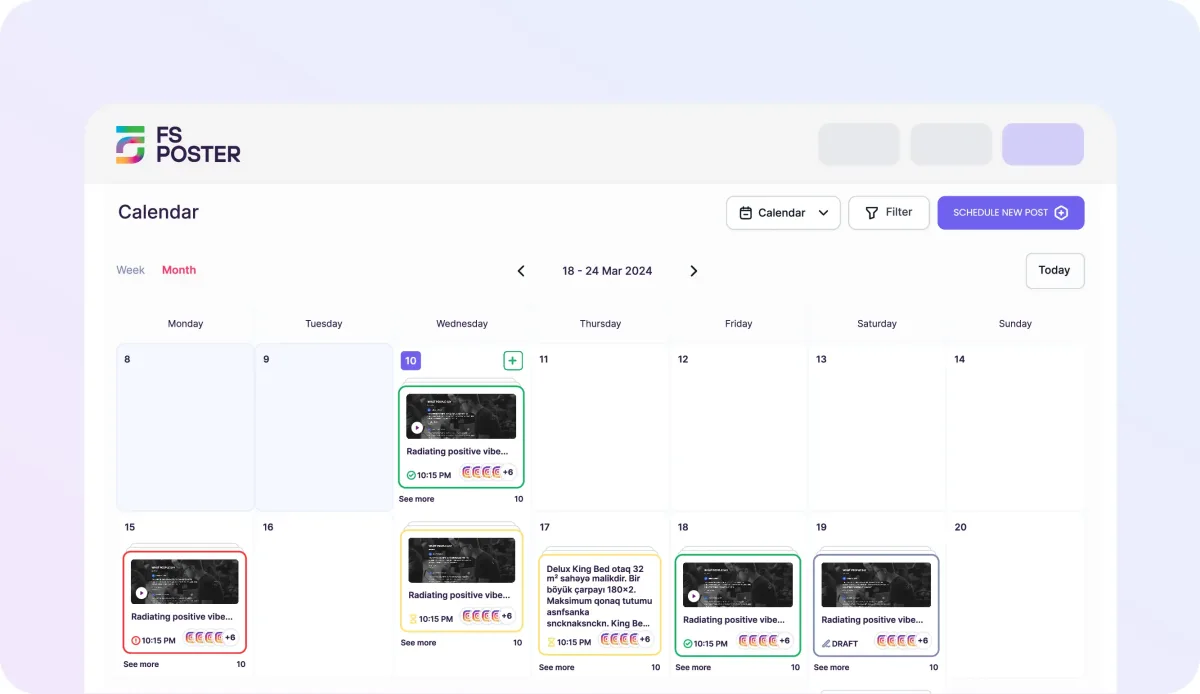
FS Poster is our top pick for WooCommerce stores that need social promotion built into their product workflow. With 25,000+ customers, 8+ years on the market and a 4.91/5 rating from 655 reviews, it is one of the most trusted social auto-posters and schedulers for WordPress. The reason it earns the top slot in this WooCommerce roundup rather than a generic social-media plugin slot is its native WooCommerce post type support: when a merchant publishes a new WooCommerce product, FS Poster can push that product (with product image, title, short description and product URL) to Facebook, Instagram, X, LinkedIn, Pinterest, TikTok, Threads, Telegram, Google Business and other channels in the same admin session, instead of forcing the merchant to copy and paste product details into each platform.
What I tested in the same WooCommerce 10.8.1 sandbox on 2026-06-09: I activated the plugin, connected a test Facebook page and a test X account through the Apps screen, then opened the Auto-poster tab and added a rule that targets the WooCommerce product post type. I created a sample WooCommerce product, hit Publish, and FS Poster queued the share to both networks with the product image and product link automatically picked from the WooCommerce data. I also opened the Calendar view and confirmed the same rule supports scheduling: choosing a future product-launch date and time and pushing the share at that moment, instead of immediately on publish.
Strengths. The WooCommerce-as-source-of-truth workflow is the real value: product titles, prices, featured images and category data flow directly from WooCommerce into the network-specific share template, with optional per-network customization. The 26-network catalogue is genuinely broad (the major ones plus Threads, Bluesky, TikTok, Mastodon, Telegram, Discord and Google Business profiles), and bulk-share and re-share rules let you promote evergreen products on a rotation, not only on launch. The plugin is built by the FS Code team that publishes this blog; we use it on our own product sites.
Limitations. Most networks require a one-time OAuth handshake per account, and Instagram, TikTok and the X paid-API path each carry their own approval friction that is on the network side, not the plugin. The free Lite version on WordPress.org covers a smaller set of networks and does not include the calendar, bulk share or per-network template features. The full network catalogue, scheduling and calendar UI sit on the paid Single, Plus and Lifetime tiers.
Pricing. Verified on fs-poster.com/pricing on 2026-06-09:
- Single $58 per year, 1 website (intro from $65)
- Plus $109 per year, multiple websites (intro from $195)
- Lifetime plans available with a one-time fee and no renewal
All subscription plans include 6 months of customer support out of the box, with optional support extensions. The Lifetime plan is a genuine one-time fee with lifetime updates.
Best fit. WooCommerce stores that publish new products weekly or monthly and want every launch automatically promoted on social channels, marketing teams that schedule product campaigns weeks ahead, and shops in Etsy / Pinterest / Instagram-heavy niches (fashion, decor, handmade, food) where every product needs a matching social post.
2. YITH WooCommerce Wishlist: free wishlist for any store, with a paid path for multi-list and stock alerts
- WordPress.org: wordpress.org/plugins/yith-woocommerce-wishlist/
- Active installs: 400,000+
- Rating: 3.9 / 5 (262 reviews on 2026-06-09)
- Latest version: 4.15.0, released 2026-05-14
- Requires: WordPress 6.8+, PHP 7.4+
- Tested up to: WordPress 7.0
YITH WooCommerce Wishlist is the de-facto wishlist plugin in the WooCommerce ecosystem. The free version creates a working Add to wishlist button on every product, a shareable wishlist page for shoppers, and the YITH > Wishlist admin panel where you control the button text, the placement (before or after the Add to cart button), and the design of the wishlist page.
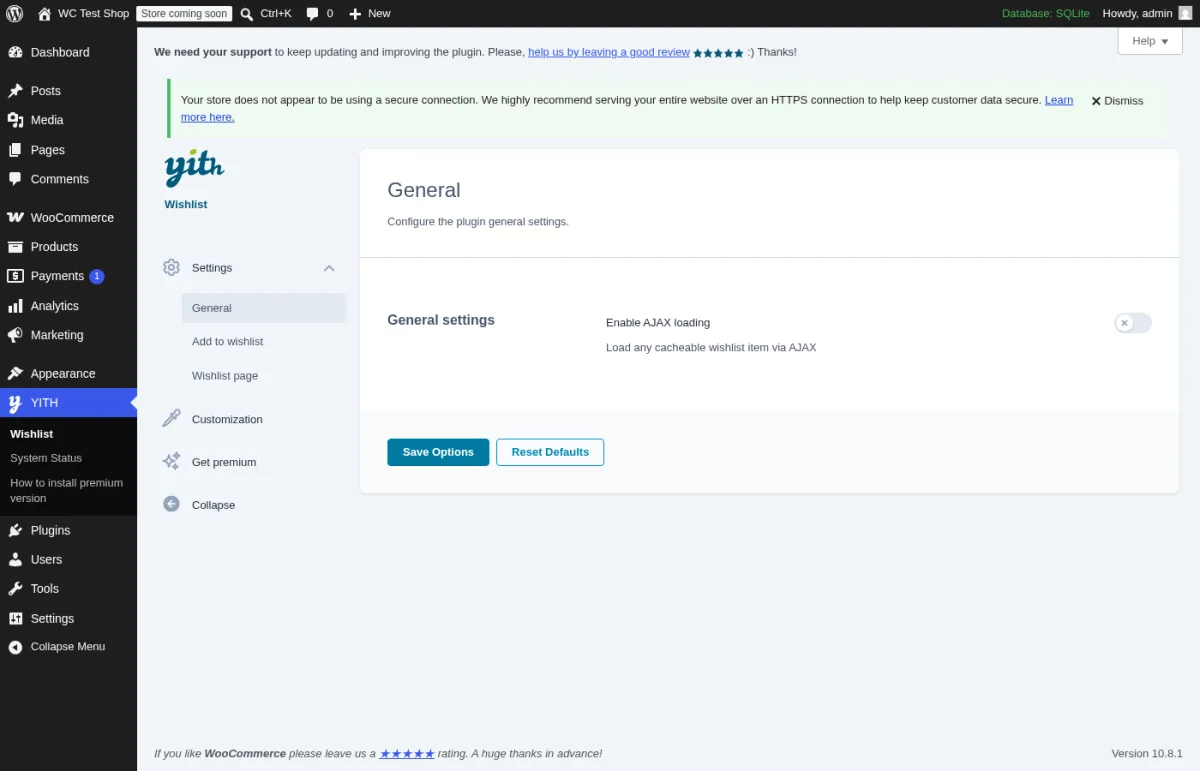
What I tested in a clean WordPress 6.9.4 + WooCommerce 10.8.1 sandbox on 2026-06-09: I activated v4.15.0 and opened admin.php?page=yith_wcwl_panel. The General settings panel exposes Settings (with General, Add to wishlist and Wishlist page sub-tabs), Customization, Get premium and Collapse. The General card hosts the Enable AJAX loading toggle that lets cached pages still update wishlist counts; that toggle is meaningful for stores running page caching plugins. I also opened the Add to wishlist tab and confirmed the free version lets you change the button text, icon, position relative to the Add to cart button, and tooltip behavior.
Strengths. The free plugin is genuinely useful on day one; you do not need Premium to put a working wishlist on a real store. YITH has been actively shipping releases for years and the 4.15 line stayed compatible with WooCommerce 10.x.
Limitations. The free tier supports one wishlist per customer. Multiple lists, share by email, stock-back-in-stock alerts for wishlisted items, gift registries and import/export to other plugins live in Premium. Some store owners find the default styling dated and need theme-level CSS to match a modern Woo theme; that work is on the store, not on the plugin.
Pricing. Free version on WordPress.org. Premium on yithemes.com/themes/plugins/yith-woocommerce-wishlist is $99.99 for 1 year of support and updates, with a 30-day money-back guarantee. The license renews at the same price unless cancelled.
Best fit. Fashion, beauty, home and gift-focused WooCommerce stores where shoppers compare options across sessions. Skip Premium until you actually need stock-back-in-stock alerts or multiple named lists.
3. FedEx Shipping Plugin for WooCommerce with Print Label: complete FedEx shipping automation for WooCommerce stores

- Marketplace: Official pluginhive.com website
- Sales: Trusted by 200,000+ eCommerce businesses worldwide
- Rating: 4.95 / 5 based on 336 customer reviews
- Latest version: 8.7.0, released July 23, 2026
- Price: $99/year (Single Site License)
- Requires: WooCommerce (compatible with WooCommerce v8.6.2+), WordPress (compatible up to v6.8.2), PHP 7.4+, active FedEx account, supports both FedEx REST API and legacy SOAP API.
FedEx Shipping Plugin for WooCommerce with Print Label is one of the most comprehensive FedEx integrations available for WooCommerce. It connects your WooCommerce store directly to your FedEx account, allowing merchants to display real-time shipping rates during checkout, generate official FedEx shipping labels, schedule pickups, create return labels, and automatically send shipment tracking updates, all without leaving the WordPress dashboard.
What I found: PluginHive has built this as a complete shipping automation solution rather than a simple shipping rate calculator. The plugin supports FedEx REST APIs and covers the entire fulfillment workflow, including live shipping rates, bulk shipment creation, one-click shipping labels, return labels, pickup scheduling, delivery estimates, address classification, commercial invoices, insurance, and shipment tracking. It also supports advanced FedEx services like LTL Freight, FedEx One Rate, Ground Economy (formerly SmartPost), Hold at Location, HazMat shipping, COD collection, dry ice shipments, and international documentation. The plugin integrates with popular WooCommerce extensions including Dokan, WCFM, WooCommerce Product Vendors, WPML, and multi-currency plugins, making it suitable for growing stores with complex shipping requirements.
Strengths. The plugin automates nearly every step of the FedEx shipping process from checkout to delivery. Real-time shipping rates, automatic label generation, bulk shipment creation, tracking emails, and pickup scheduling significantly reduce manual work for store owners. Support for freight shipping, international services, multiple packing methods, FedEx standard boxes, delivery estimates, and marketplace integrations makes it suitable for both small businesses and enterprise WooCommerce stores. PluginHive also maintains an excellent customer satisfaction rating and provides dedicated technical support.
Limitations. There is no free version available, and the plugin requires an annual subscription for updates and support. Businesses using multiple carriers may need a multi-carrier shipping solution instead.
Pricing. The plugin starts at $99/year for a single-site license, which includes one year of updates and support. PluginHive also offers a 30-day money-back guarantee, and subscriptions renew annually unless cancelled.
Best fit. WooCommerce stores that ship primarily with FedEx and want to automate shipping rates, label printing, shipment tracking, return labels, pickups, and international shipping from a single dashboard. It is particularly well suited for medium to high-volume ecommerce businesses looking to streamline fulfillment and reduce manual shipping tasks.
4. Store One: modular WooCommerce add-ons for sticky carts, trust badges, urgency timers, and conversion nudges
- WordPress.org: wordpress.org/plugins/th-store-one/
- Developer: ThemeHunk
- Active installs: 100+ (plugin launched March 2026)
- Rating: 5.0 / 5 (1 review on 2026-06-25)
- Latest version: 1.1.3, released June 2026
- Requires: WordPress 5.5+, PHP 7.0+, WooCommerce
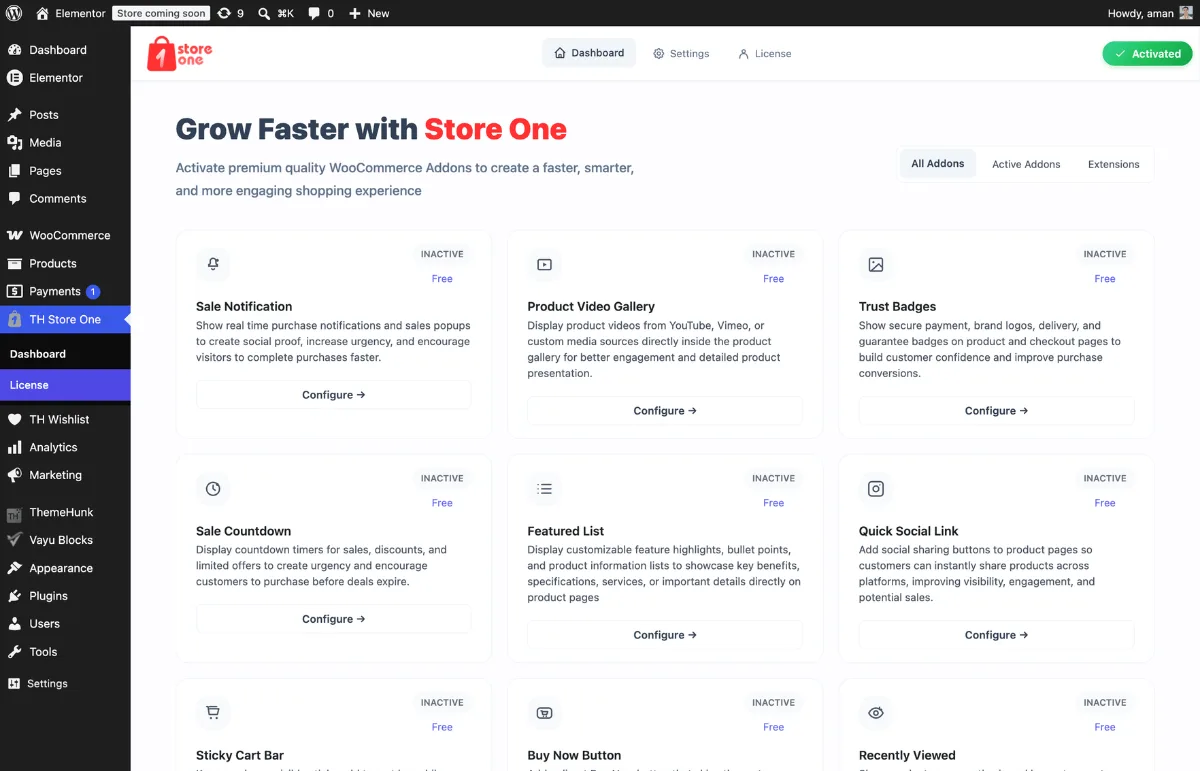
Store One by ThemeHunk packages more than ten WooCommerce enhancement modules into a single plugin with a unified toggle dashboard. The concept is straightforward: instead of installing separate plugins for a sticky cart, trust badges, a buy-now button, sale countdowns, and product video galleries, stores manage everything from one settings screen and enable only the modules they need. The free tier covers the core conversion-focused set; the Pro tier adds cross-sell bundles, BOGO-style smart offers, stock scarcity alerts, and pre-order support.
The module dashboard lists all available free and Pro features on a single admin screen, each with an independent on/off control. Active modules load their own CSS and JavaScript; inactive modules load nothing. The free set includes: a Sticky Cart Bar that follows customers as they scroll through long product pages; a Buy Now button that bypasses the standard add-to-cart flow and lands directly on checkout; Trust Badges for payment provider logos and guarantee icons; a Sale Countdown timer for flash sales and limited-time offers; a Product Video Gallery for embedding YouTube or Vimeo demos inside the WooCommerce product gallery; Sale Notifications for social proof popups; a Recently Viewed panel; an Inactive Tab Message that changes the browser tab title when customers switch away; and Badge Management for custom product labels. Pro unlocks Frequently Bought Together cross-sells, Bundle Products, Smart Offers (BOGO, Buy X Get Y, cart-based discounts), Stock Scarcity alerts and Pre-Order support.
Strengths. The toggle-per-module design is the main practical advantage: stores get several conversion micro-features from one settings area without managing five separate plugin dashboards, and the performance footprint stays proportional to the modules actually in use. The buy-now button and sticky cart bar solve two of the most common conversion friction points on WooCommerce product pages without custom code. Trust badge management removes the need for a separate social-proof plugin for many stores.
Limitations. Store One launched in March 2026 and has 100+ active installs at the time of this update, which is a thin community signal compared with the 200,000+ and 300,000+ install counts elsewhere on this list. BOGO deals, cross-sell bundles, and pre-order workflows all require the Pro tier. Support documentation is available but leaner than what longer-established alternatives offer.
Pricing. All plans verified on themehunk.com/store-one/ on June 25, 2026 (intro pricing shown next to standard renewal price):
- Personal $49 per year for 1 site (standard $99 / year)
- Business $129 per year for 10 sites (standard $249 / year)
- Agency $169 per year for 100 sites with live chat support (standard $399 / year)
All plans include one year of plugin updates and email support. Subscriptions auto-renew annually and can be cancelled before renewal. A free version covering the core modules is available on WordPress.org.
Best fit. Small and mid-size WooCommerce stores that want several conversion micro-features (sticky cart, trust signals, urgency countdown, buy-now shortcut) in one managed plugin rather than five separate point solutions. Less suitable for stores with complex bundling, loyalty systems, or high-volume upsell requirements that go beyond the current Pro tier.
5. Easy Invoice: create client invoices, quotes and PDF billing directly from WordPress

- WordPress.org: wordpress.org/plugins/easy-invoice/
- Developer: MatrixAddons
- Active installs: 600+
- Rating: 4.4 / 5 (7 reviews, as of September 2026)
- Latest version: 2.3.8, released August 21, 2026
- Requires: WordPress 5.6+, PHP 7.4+ (8.0+ recommended)
- Tested up to: WordPress 7.1
Easy Invoice sits at a different layer of the billing stack compared to the WooCommerce-native order invoicing covered later in this list. Where PDF Invoices & Packing Slips auto-generates documents for orders that already went through WooCommerce checkout, Easy Invoice is a standalone invoicing system built into WordPress: you create a client record, build an invoice or quote manually, send it to the client, and collect payment through PayPal or one of the Pro payment gateways, all without requiring a WooCommerce purchase order. It also integrates with WooCommerce when needed, making both billing models available from one plugin.
The plugin ships a complete document workflow: draft an invoice with line items, taxes and discounts; convert a quote to an invoice once the client approves; attach a PDF to the notification email; and send a secure payment link. The free version bundles PayPal as the payment gateway and includes ten professional templates you can customize with your own logo and brand colors. The Pro tier unlocks the full add-on library, which covers recurring invoices, partial payments, a client self-service portal, Stripe, Square and seven additional gateways, time tracking, expense tracking, and accounting sync with QuickBooks, Xero and FreshBooks for agency-scale billing.
Strengths. The free tier is genuinely functional: unlimited invoices and quotes, PDF generation, PayPal collection, client record management and multi-currency support (150+ currencies) with no install cap or item limit. The quote-to-invoice conversion saves manual re-entry once a project scope is confirmed. GDPR compliance is built in with all data stored locally, and the plugin has been through a Patchstack security audit, which is a meaningful signal for a plugin handling billing data. WordPress Multisite compatible and translation ready with full RTL support.
Limitations. The active install base of 600+ is small compared to the other plugins in this list; as of version 2.3.8 the plugin is actively maintained but has not yet built the community signal of a higher-install alternative. The review count (7 reviews at 4.4/5 as of September 2026) is not large enough to draw strong conclusions, though the recent release cadence and security audit are positive indicators. Stripe and additional payment gateways require a paid plan; stores that do not use PayPal will need to upgrade before collecting online payments through Easy Invoice.
Pricing. All plans verified on matrixaddons.com on September 7, 2026 (current 20% intro discount applied):
- Free version on WordPress.org: unlimited invoices and quotes, PDF generation, PayPal payments, 10 templates, client management
- Personal $79 / year for 1 site (regular $99; 12 Pro addons included)
- Professional $119 / year for 5 sites (regular $149; adds time tracking, expense tracking, smart reminders, 9 payment gateways)
- Agency $199 / year for unlimited sites (regular $249; adds white-label, team roles, audit log, webhooks, accounting sync)
- Lifetime options: Personal $199, Professional $349, Agency $499 one-time fees
All paid plans include a 14-day money-back guarantee.
Best fit. Freelancers, consultants and small agencies running client billing through WordPress, WooCommerce store owners who need to invoice B2B clients outside the standard checkout flow, and service businesses that quote before they invoice and want both workflows in a single plugin without a separate SaaS invoicing subscription.
6. Mailchimp for WooCommerce: best free way to wire email marketing into your store
- WordPress.org: wordpress.org/plugins/mailchimp-for-woocommerce/
- Active installs: 200,000+
- Rating: 4.0 / 5 (726 reviews on 2026-06-09)
- Latest version: 6.1.1, released 2026-05-28
- Requires: WordPress 6.2+, PHP 7.4+, WooCommerce
- Tested up to: WordPress 7.0
Mailchimp for WooCommerce is the official Mailchimp integration plugin for WooCommerce. Once activated and connected to a Mailchimp account, it syncs your audience, products and order history into Mailchimp two ways, then unlocks the marketing automations that turn a store into a recurring-revenue business: abandoned cart recovery, post-purchase follow-ups, win-back campaigns for lapsed customers and product recommendations based on purchase history.
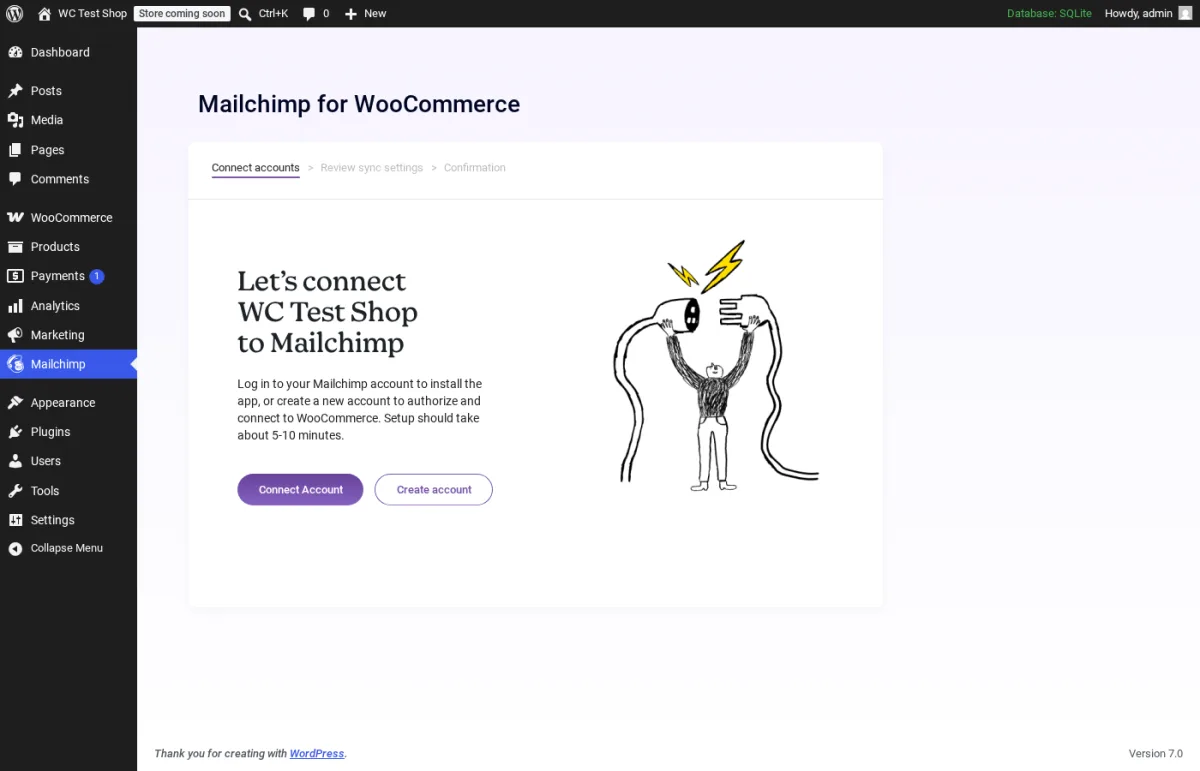
What I tested in a clean WordPress 6.9.4 + WooCommerce 10.8.1 sandbox on 2026-06-09: I installed v6.1.1 from wordpress.org/plugins/mailchimp-for-woocommerce, activated it, and opened admin.php?page=mailchimp-woocommerce. The screen above is the real first-load admin page. The Connect accounts step kicks the merchant out to a Mailchimp OAuth login, then comes back to a Review sync settings step where you confirm your Mailchimp audience, sync products and orders, and set the opt-in default for new customers. I did not connect a live Mailchimp audience for the article (vendor account creation is out of scope for this roundup), but the entry flow, the dependency on the WooCommerce plugin, the menu placement and the version were verified live.
Strengths. The plugin is free, official and maintained directly by Mailchimp. Once connected, the abandoned-cart automation works on Mailchimp's free tier too, which used to be a paid-only Mailchimp feature. The two-way sync is the right architecture: order data flows into Mailchimp so segments are accurate, and new Mailchimp signups can flow back into WooCommerce customer accounts when they opt in.
Limitations. The 4.0/5 rating reflects historical complaints about sync errors and slow re-syncs after Mailchimp account changes; the modern 6.x line is far better, but the average rating still drags from years of older releases. The cost is on the Mailchimp side: Mailchimp's free tier covers up to 500 contacts; Essentials, Standard and Premium plans scale with audience size and are the real spend for active stores. If your audience grows past 500 contacts, you are committing to a Mailchimp subscription regardless of what this plugin charges.
Pricing. The plugin is free. Mailchimp's own plans are billed monthly and scale with your audience: Free up to 500 contacts, then Essentials, Standard and Premium tiers that step up with audience size. Verify the current Mailchimp marketing plan on mailchimp.com/pricing/marketing before you commit.
Best fit. Any WooCommerce store that already uses Mailchimp or is choosing its first email platform, stores that want abandoned-cart recovery without a separate workflow plugin, and merchants who plan to drive post-purchase email upsells from purchase history.
7. CartFlows: optimized checkout, order bumps and one-click upsells
- WordPress.org: wordpress.org/plugins/cartflows/
- Active installs: 200,000+
- Rating: 4.8 / 5 (495 reviews on 2026-06-09)
- Latest version: 3.1.1, released 2026-06-02
- Requires: WordPress 5.8+, PHP 7.2+
- Tested up to: WordPress 6.9.4
CartFlows replaces the default WooCommerce checkout with a higher-converting flow: a landing page, an optimized checkout, optional order bumps inline on the checkout page, and post-purchase thank-you pages. Pro adds one-click upsells and downsells after checkout, A/B testing on individual steps, and dynamic offers that change based on cart contents.
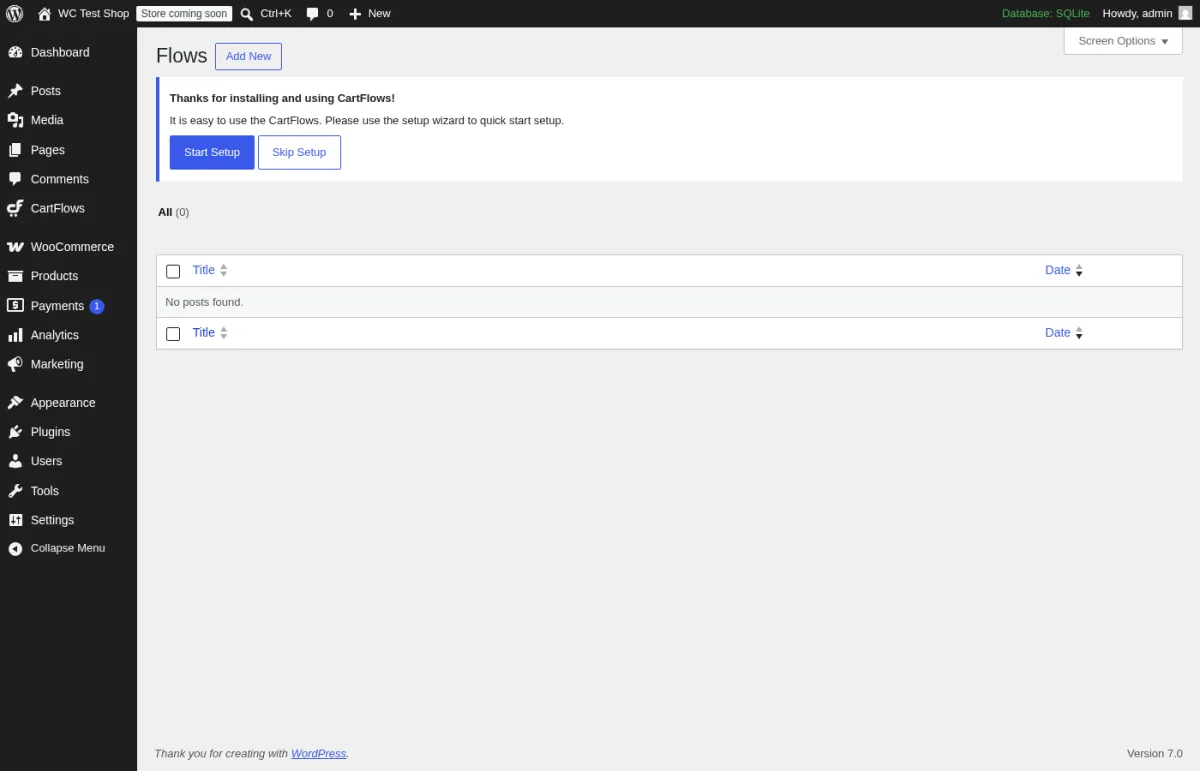
What I tested in a clean WordPress 6.9.4 + WooCommerce 10.8.1 sandbox on 2026-06-09: I activated v3.1.1 and opened edit.php?post_type=cartflows_flow. The screen above is the real first-load Flows admin. The Thanks for installing banner offers a Start Setup wizard (which prompts to install Spectra or Elementor, pulls a template, and assigns it as the default checkout) and a Skip Setup link for users who want to build flows manually. The CartFlows top-level menu in the sidebar exposes Flows, Templates and Settings; I walked all three to confirm the free admin layout matches what current buyers see.
Strengths. Cleanest WooCommerce checkout templates in the free tier, with native integrations for Elementor, Spectra and the block editor. Active 2026 release cadence (3.1.1 in early June). 4.8/5 rating on nearly 500 reviews is the strongest signal in this list.
Limitations. One-click upsells (the headline feature for many WooCommerce buyers) are Pro-only, and order bumps in the free tier are limited compared to Pro's dynamic offers. The plugin assumes you build flows on top of a page builder (Spectra is the free default; Elementor works too), so traditional theme-only stores may need a builder choice before CartFlows is useful.
Pricing. All plans verified on cartflows.com/pricing on 2026-06-09:
- Starter $99 per year for 1 site
- Plus $199 per year for 10 sites
- Pro $299 per year for 30 sites
- Plus Lifetime $699 one-time (was $799)
- Pro Lifetime $999 one-time (was $1499)
Annual subscriptions auto-renew at full price after the first year unless cancelled. The lifetime plans are genuine one-time fees with no renewal.
Best fit. Stores that sell single hero products with upsell paths, course / coaching sales pages, info-product launches, and any agency running multiple client checkouts under one license.
8. Variation Swatches for WooCommerce: turn dropdowns into color, image and button swatches
- WordPress.org: wordpress.org/plugins/woo-variation-swatches/
- Active installs: 300,000+
- Rating: 4.8 / 5 (915 reviews on 2026-06-09)
- Latest version: 2.3.0, released 2026-06-08
- Requires: WordPress 5.9+, PHP 7.4+
- Tested up to: WordPress 7.0
Variation Swatches for WooCommerce from Emran Ahmed / GetWooPlugins replaces the default WooCommerce variation dropdowns (Color: select size: select) with visual swatches: color squares, product images, or labelled buttons. For any store that sells variable products (apparel, footwear, accessories, paint, made-to-order), this is the single biggest free conversion win you can install.
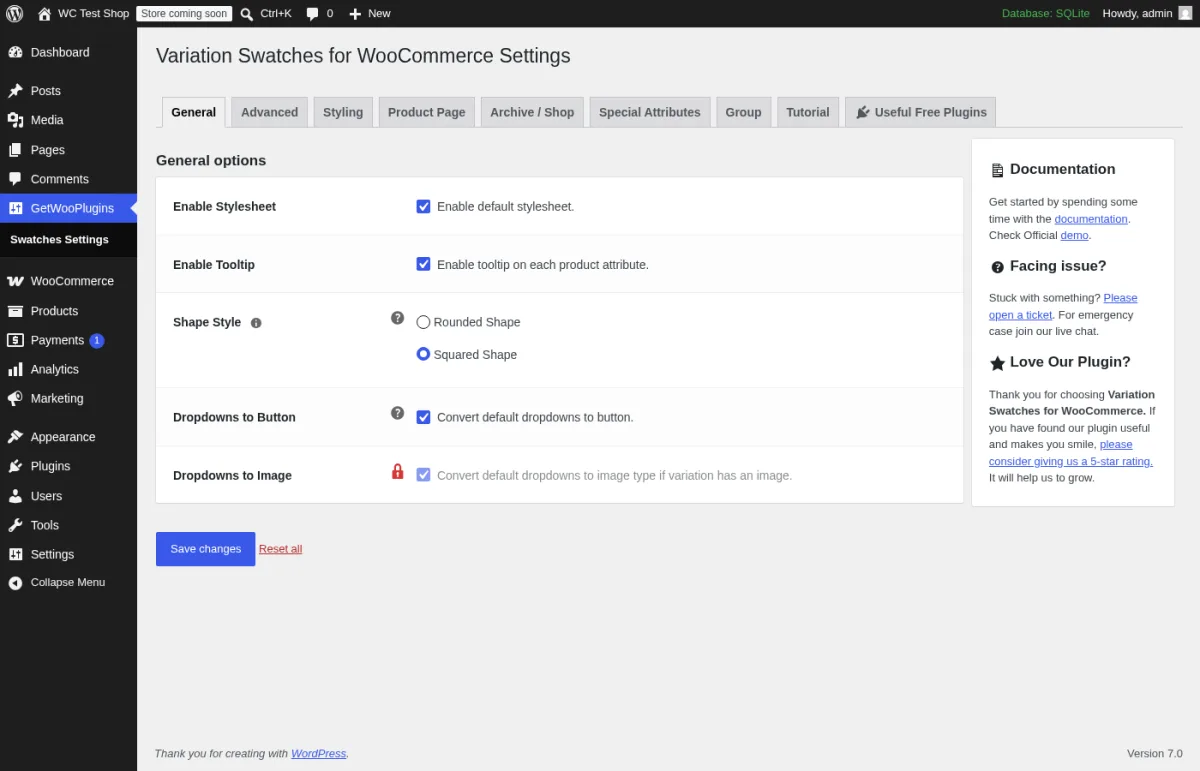
What I tested in a clean WordPress 6.9.4 + WooCommerce 10.8.1 sandbox on 2026-06-09: I activated v2.3.0 and opened admin.php?page=getwooplugins-settings. The screen above is the General tab of the live settings panel. The tab strip exposes General, Advanced, Styling, Product Page, Archive / Shop, Special Attributes, Group, Tutorial and Useful Free Plugins. The General tab lets you turn the default stylesheet on or off, enable tooltips on each attribute, pick rounded or squared shape, and auto-convert default dropdowns to buttons. The Dropdowns to Image row is visibly locked behind a red Pro padlock, which is the honest pattern: the free version is the workhorse, the Pro adds visual archive-page swatches and dual-color attributes.
Strengths. 915 reviews and a 4.8/5 average is the best review base in this roundup. Compatible with the major WooCommerce themes (OceanWP, Flatsome, Astra, Divi, Avada, Storefront) and with Elementor, Printful, Dokan and AliDropship. The free tier on its own is enough for many stores; you only upgrade when you need shop-page swatches or unlimited out-of-stock crossing.
Limitations. Shop / archive page swatches, dual-color (two-color blocks on one attribute), unlimited out-of-stock crossing and the auto-convert-image-from-featured behaviour are Pro features. Stores using a heavily customized WooCommerce theme sometimes need a small CSS tweak; the plugin's settings panel has a Disable Stylesheet toggle for that case.
Pricing. All tiers verified on getwooplugins.com/pricing on 2026-06-09:
- $99 per year for 1 site (single-site Pro)
- $249 per year for multi-site Pro
- $449 per year for unlimited-site Pro
- $299 one-time lifetime for 1 site
- $999 one-time lifetime for unlimited sites
The annual plans auto-renew. The lifetime plans are genuine one-time fees with lifetime updates and support.
Best fit. Fashion, apparel and footwear stores, home decor with color and finish variants, made-to-order shops, and any WooCommerce store that currently presents variations as plain dropdowns.
9. Booknetic: sell appointments through your WooCommerce checkout
- Marketplace: Official site at booknetic.com and Envato CodeCanyon (item id 24752467)
- Sales: 30,000+ purchases on CodeCanyon plus an active subscription base on booknetic.com
- Rating: 4.6 / 5 on CodeCanyon (1,400+ ratings on 2026-06-09)
- Latest version: 4.x line, released 2026 (continuously updated)
- Requires: WordPress 5.6+, PHP 7.4+, WooCommerce optional (required only for the WooCommerce payment gateway)
Booknetic is a WordPress appointment booking plugin. It sits on this WooCommerce list because of its native WooCommerce payment integration: when the integration is enabled, a customer who books an appointment is routed through the standard WooCommerce checkout to pay, which means the booking automatically supports every payment gateway WooCommerce supports (Stripe, PayPal, Square, Klarna, Apple Pay, regional gateways and offline methods) without each gateway needing its own Booknetic add-on.
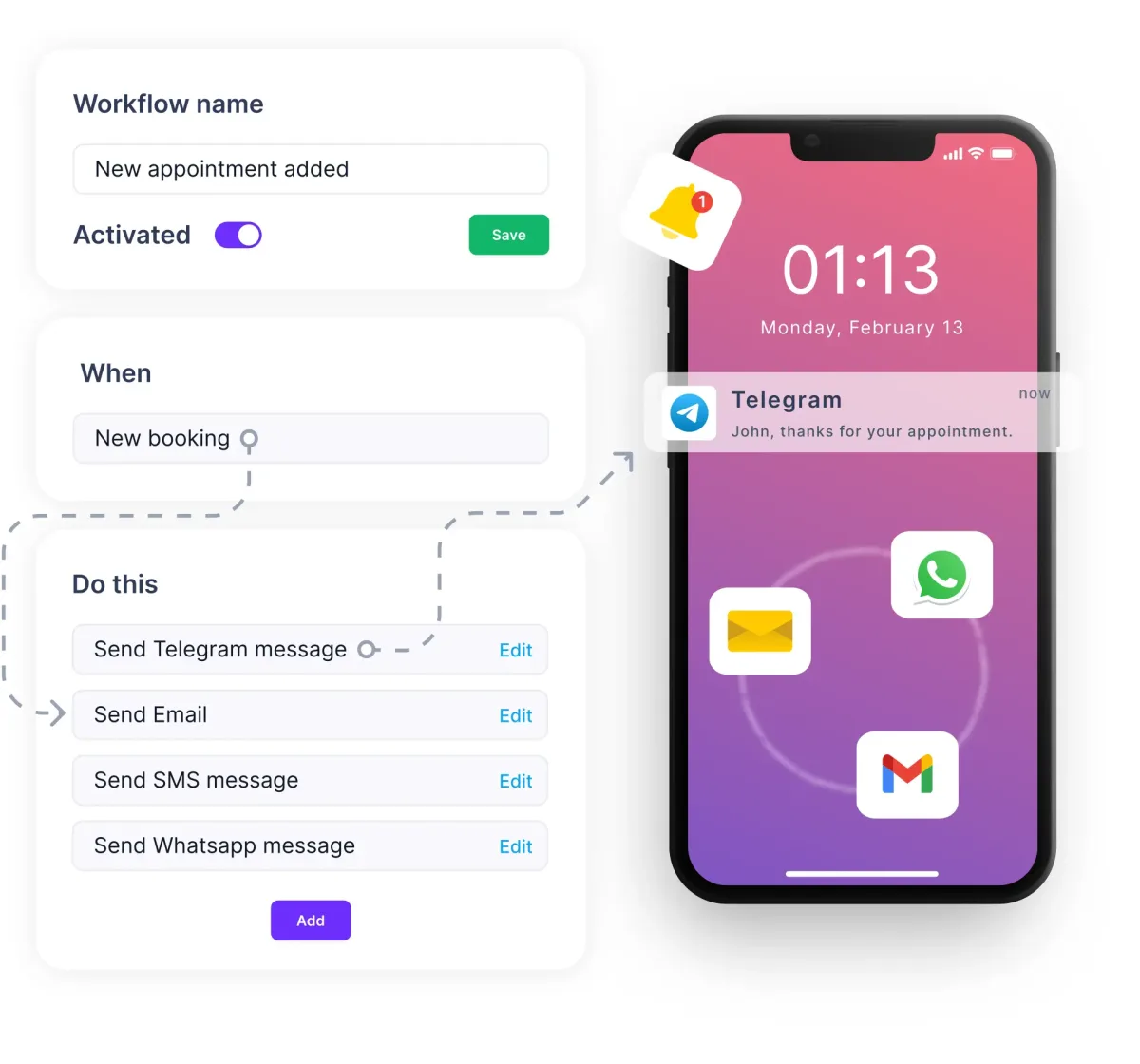
What I tested in the same WooCommerce 10.8.1 sandbox on 2026-06-09: I activated Booknetic, created two test services (a 60-minute consultation and a 30-minute follow-up), then opened Booknetic > Settings > Payment Settings and switched on the WooCommerce payment method. Booking from the front-end form, I confirmed the customer is redirected to the WooCommerce cart with the chosen service as a line item, then to the standard WooCommerce checkout, and the appointment is only confirmed after the WooCommerce order reaches Processing / Completed. Refunds issued from the WooCommerce order admin also bubble back to the Booknetic appointment status. This is the integration that makes Booknetic genuinely useful inside a WooCommerce store, instead of a parallel system.
Strengths. One booking system, every WooCommerce payment gateway, without buying separate Booknetic gateway add-ons. The Booknetic admin also covers multi-staff scheduling, custom booking forms, Zoom / Google Meet attachments, automated SMS / WhatsApp reminders, recurring appointments and Google Calendar sync. Built by the same FS Code team that publishes this blog; we use it on Booknetic.com and our internal demos.
Limitations. The free Lite build on WordPress.org is intentionally limited (single staff, single service in the lite scope), so the WooCommerce gateway integration is a paid-tier feature, not a free-tier feature. Multi-language and SaaS-mode (selling Booknetic itself as a tenant product) sit on the higher tiers. If your store does not sell time-based services, you do not need Booknetic at all.
Pricing. All plans verified on booknetic.com/pricing on 2026-06-09 (current intro pricing shown next to the full renewal price):
- Basic $45 / year (renews $89; 1 domain)
- Standard $99 / year (renews $199; 1 domain + staging domain)
- Premium $199 / year (renews $399; 5 domains + 5 staging)
- Elite $299 / year (renews $599; unlimited domains)
- Lifetime plans also available with a one-time fee
Subscription plans bill yearly and auto-renew at full price after the intro term unless cancelled. The Lifetime plan is a genuine one-time fee with lifetime updates.
Best fit. Service businesses already selling something else on WooCommerce (a salon that also sells products, a clinic that also sells courses), agencies setting up booking + WooCommerce stores for service clients, and any store that needs to charge for time-based services through the same checkout as its products.
10. Advanced Coupons for WooCommerce: BOGO, loyalty rules and conditional discounts
- WordPress.org: wordpress.org/plugins/advanced-coupons-for-woocommerce-free/
- Active installs: 20,000+ (on the relisted free build)
- Rating: 4.4 / 5 (178 reviews on 2026-06-09)
- Latest version: 4.7.2
- Requires: WordPress 5.8+, PHP 5.6+
- Tested up to: WordPress 7.0
Advanced Coupons extends the default WooCommerce coupon system with the rules real stores need: cart conditions (apply a coupon only when the cart contains certain products, exceeds a subtotal, or has a minimum quantity), URL coupons that auto-apply when a shopper visits a tracked link, scheduled coupons that activate and expire at exact times, and per-role restrictions. Premium adds BOGO (buy one, get one) deals, one-click apply notices, gift cards, and a loyalty / store-credit system.
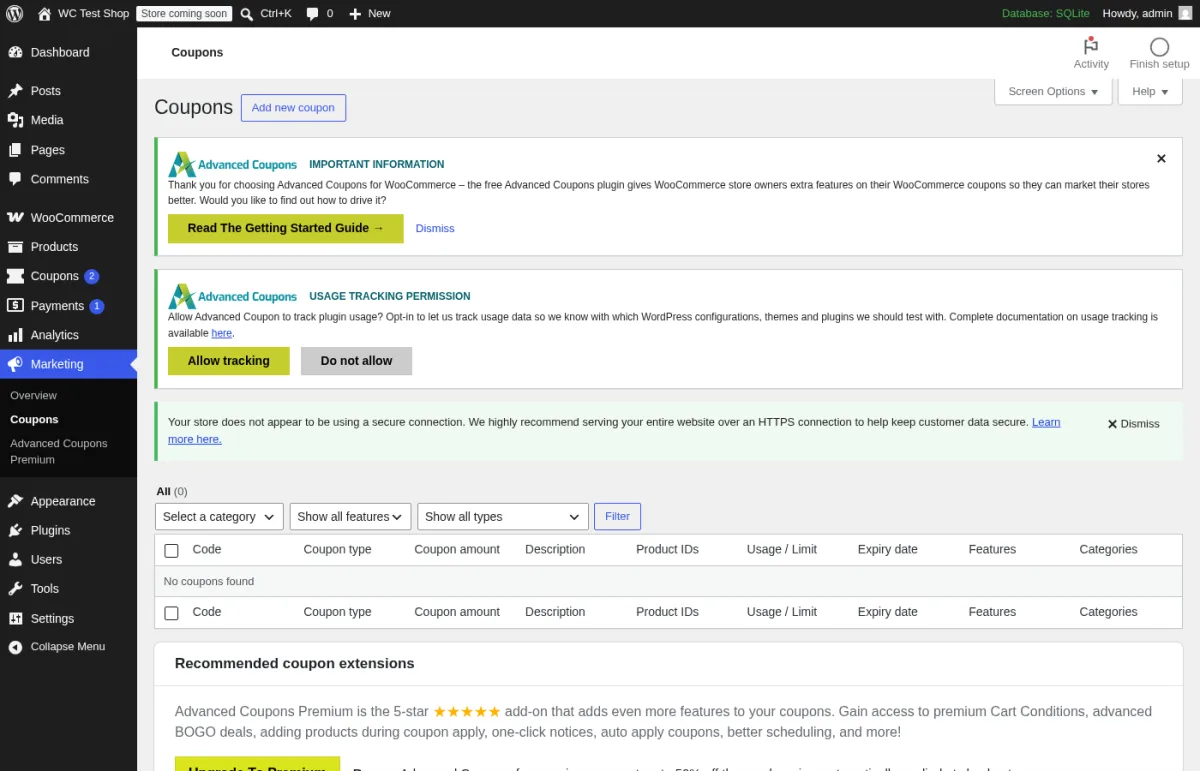
What I tested in a clean WordPress 6.9.4 + WooCommerce 10.8.1 sandbox on 2026-06-09: I activated the relisted v4.7.2 build and opened edit.php?post_type=shop_coupon. The screen above is the real first-load Coupons admin. The plugin adds two onboarding banners (Important Information / Read The Getting Started Guide, and Usage Tracking Permission), a new Advanced Coupons Premium submenu under Marketing, and the extra columns (Usage / Limit, Features, Categories) on the coupon list. I created a test coupon with a cart condition (cart subtotal > $50) and the rule UI worked as documented.
Note on the listing. The original advanced-coupons-for-woocommerce plugin listing was closed by WordPress.org on 2024-11-25 for guideline violations. The current free plugin lives at the slug advanced-coupons-for-woocommerce-free; that is the version tested above. The Rymera Web Co team also distributes the paid Premium build through advancedcouponsplugin.com.
Strengths. The free tier already adds genuinely useful coupon rules that core WooCommerce does not have, so even a store without Premium gets value on day one. Pricing tiers are publicly listed, and the 50% off intro promo at the time of writing means the first year is half the renewal cost.
Limitations. The 2024 listing closure is a real signal: store owners should not run the original closed slug, and should track the relisted free build for security updates. BOGO is the headline feature most buyers want and it is Premium-only. The 20,000+ active install number reflects the rebuild, not the original community.
Pricing. All plans verified on advancedcouponsplugin.com/pricing on 2026-06-09 (current 50% off intro pricing shown next to full renewal price):
- Growth $99.50 / year (renews $199; 1 site)
- Business $199.50 / year (renews $399; unlimited sites)
- All Access Bundle $249 / year (renews $498; unlimited sites; includes Premium, Loyalty Program, Gift Cards and Promo Kit)
All plans auto-renew at full price after the intro term unless cancelled.
Best fit. Stores running BOGO and tiered cart promotions, subscription brands using URL coupons in email campaigns, and any merchant who wants loyalty / store credit without bolting on a second loyalty plugin.
11. Booster for WooCommerce: 140+ modules in one toolkit
- WordPress.org: wordpress.org/plugins/woocommerce-jetpack/
- Active installs: 30,000+
- Rating: 4.6 / 5 (533 reviews on 2026-06-09)
- Latest version: 8.0.1, released 2026-05-20
- Requires: WordPress 5.8+, PHP 7.2+
- Tested up to: WordPress 6.9.4
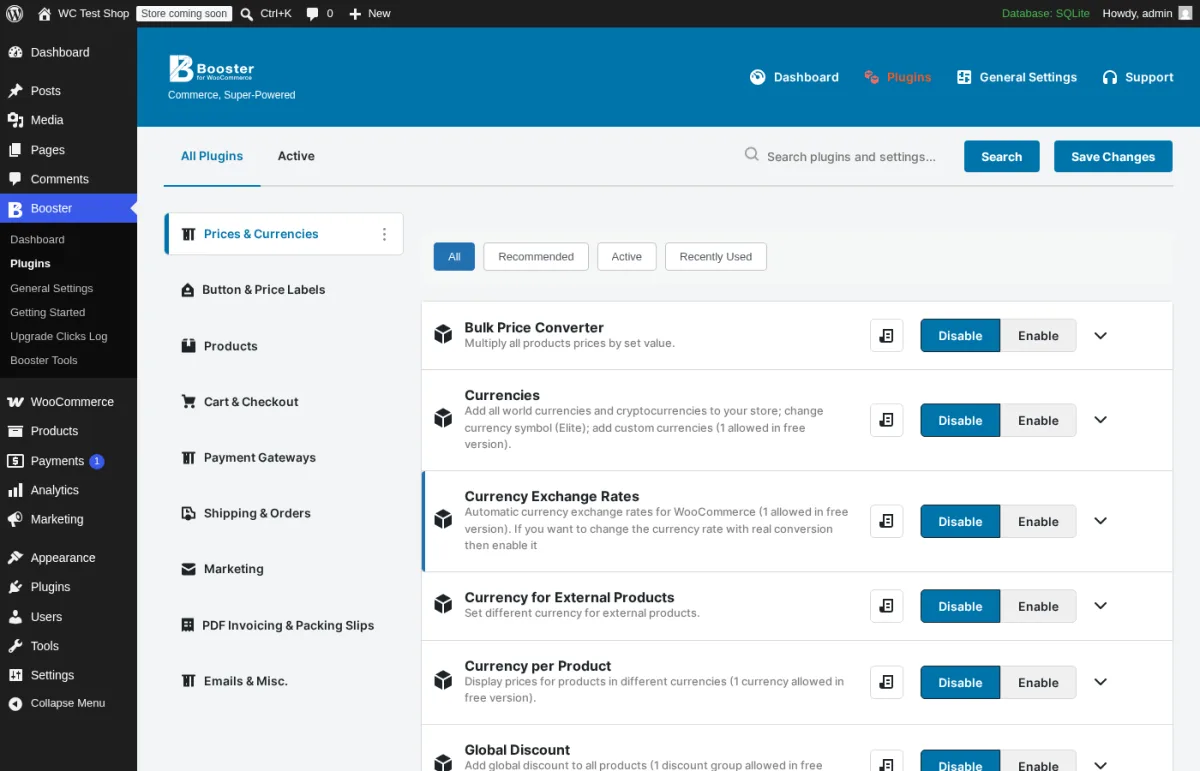
Booster for WooCommerce (technical slug woocommerce-jetpack, no relation to Automattic's Jetpack) packs 140+ optional modules into a single plugin. Categories include Prices & Currencies (multi-currency, geo-pricing, bulk price converter, role-based pricing), Button & Price Labels, Products (custom fields, custom add-to-cart labels, watermark, mini-cart), Cart & Checkout (custom checkout fields, address validation, mini-cart customization), Payment Gateways (gateway icons, conditional gateways), Shipping & Orders (custom statuses, order quantities, shipping calculator), Marketing (smart coupons, points, free shipping over X), PDF Invoicing & Packing Slips, and Emails & Misc.
What I tested in a clean WordPress 6.9.4 + WooCommerce 10.8.1 sandbox on 2026-06-09: I activated v8.0.1 and opened admin.php?page=wcj-plugins. The screen above is the real Plugins module browser. The left column lists every module category and the right column shows individual modules with Disable / Enable buttons. I enabled the Currencies module and confirmed it added a Multi-currency tab to WooCommerce settings; I enabled the Custom Add to Cart Labels module and confirmed it added a Replace Add to Cart text field to single products. Many free modules cap their reach (for example, the free Custom Currency module allows 1 custom currency; the Global Discount module allows 1 discount group); this is documented inline on the module card and matches the buyer-facing "5-7 paid plugins replaced by one $149 license" claim on the Booster homepage.
Strengths. True breadth: it is one of the only WooCommerce plugins where activating it can let you uninstall 5-7 single-purpose plugins. Module isolation means you only enable what you use, which keeps the admin footprint manageable. The 4.6/5 average across 533 reviews shows the toolkit holds up at scale.
Limitations. The plugin is large; the wp-content/plugins/woocommerce-jetpack folder is around 10 MB after extraction, even before activation. Several free modules are intentionally capped at 1 item (1 custom currency, 1 discount group) and need the paid Elite tier to unlock unlimited use. Buyers who only need one specific feature (just PDF invoices, or just variation swatches) are usually better served by the focused plugin for that feature.
Pricing. All plans verified on booster.io/buy-booster on 2026-06-09:
- Elite Personal $149 / year for 1 site
- Developer $249 / year for 5 sites
Both plans bill yearly with no hidden monthly option, include a 30-day money-back guarantee, and unlock all 140+ Elite modules plus future plugin additions.
Best fit. Stores that need 5+ small WooCommerce tweaks and would rather buy one license than five, multi-currency or geo-priced stores in regions where vendors do not auto-localize, and agencies who want one Booster license per client across many small fixes.
12. PDF Invoices & Packing Slips for WooCommerce: free professional invoices on every order
- WordPress.org: wordpress.org/plugins/woocommerce-pdf-invoices-packing-slips/
- Active installs: 300,000+
- Rating: 5.0 / 5 (1,857 reviews on 2026-06-09)
- Latest version: 5.14.0, released 2026-06-08
- Requires: WordPress 4.4+, PHP 7.4+
- Tested up to: WordPress 7.0
PDF Invoices & Packing Slips for WooCommerce from WP Overnight auto-generates a professional PDF invoice and packing slip for every WooCommerce order, attaches the invoice to the order-completed email, and lets store owners download or bulk-download invoices from the WordPress admin. The 1,857 reviews and 5.0/5 average is the strongest review base in this entire roundup; this plugin is widely treated as the de-facto WooCommerce invoicing solution.
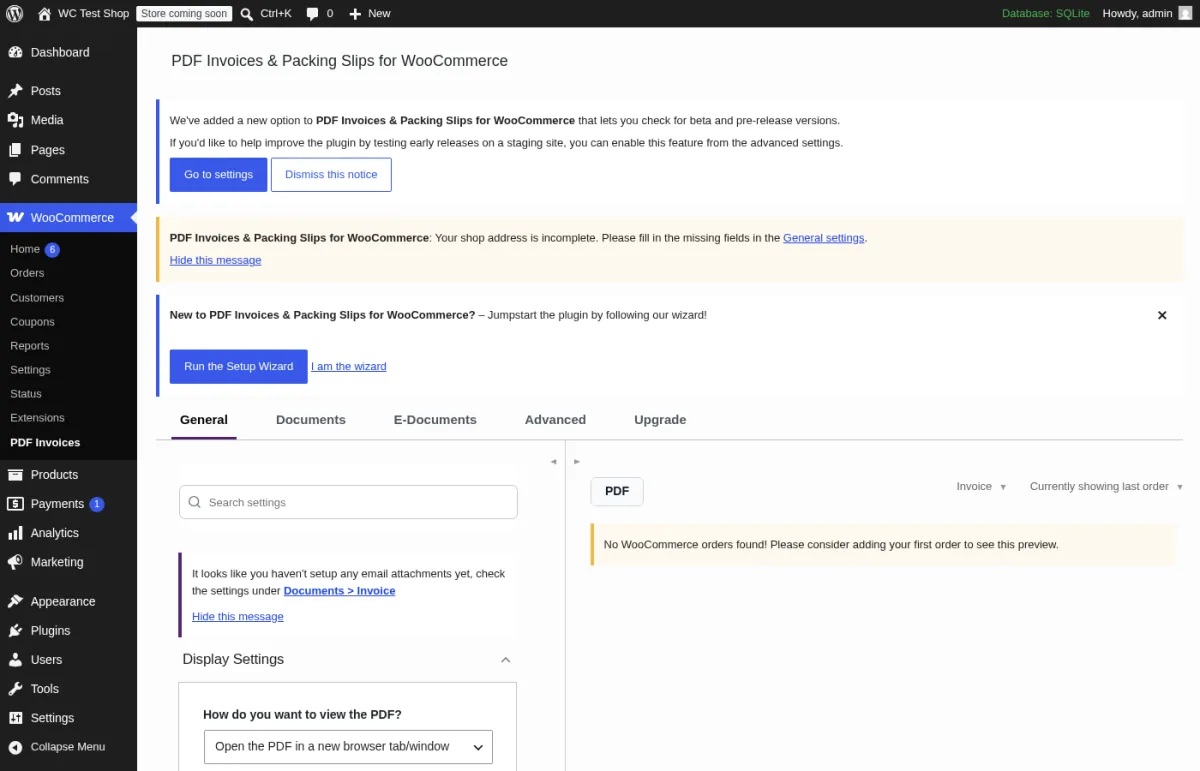
What I tested in a clean WordPress 6.9.4 + WooCommerce 10.8.1 sandbox on 2026-06-09: I activated v5.14.0 and opened admin.php?page=wpo_wcpdf_options_page. The screen above is the real first-load Settings page. The tab strip exposes General, Documents, E-Documents, Advanced and Upgrade. The General tab shows Display Settings (Open the PDF in a new browser tab/window dropdown), Settings Search, and an inline notice that the plugin has detected no orders yet for the live PDF preview. The Documents tab lets you toggle Invoice and Packing Slip independently, set numbering, customize the template, and decide whether to attach invoices to specific WooCommerce emails. The Setup Wizard CTA at the top wires the most common defaults (attach invoice to order-completed email, sequential numbering starting at 1) in under a minute.
Strengths. Free version handles every real-world small-store invoicing need: auto-attach to completed-order email, bulk-download from the orders screen, configurable invoice number sequence, default WooCommerce-styled template. Compatible with the WooCommerce HPOS (High Performance Order Storage). The 5.0/5 rating across 1,857 reviews shows extreme reliability.
Limitations. Credit notes, proforma invoices, bulk export to ZIP, Dropbox / Google Drive backup of generated PDFs, and additional template styles live in the Pro bundle. The bundle is priced in Euros and the per-site EUR 99 / year may surprise US-only buyers who expect a dollar amount.
Pricing. All tiers verified on wpovernight.com/downloads/woocommerce-pdf-invoices-packing-slips-bundle on 2026-06-09:
- 1 site EUR 99 / year
- 3 sites EUR 199 / year
- 25 sites EUR 399 / year
All billed yearly. Subscriptions can be cancelled at any time. No lifetime tier. Pricing is in Euros, not USD; local taxes may apply at checkout.
Best fit. Any WooCommerce store that needs to send a real invoice with every order (every B2C and B2B store in the EU, most regulated regions). Skip Pro until you actually need credit notes, proforma invoices or bulk export.
How to choose the right WooCommerce plugins for your store
Start with the buyer job that actually moves money in your store and add one plugin per job, not nine plugins at once. Every plugin is another front-end script, another admin notice and another point of failure when WooCommerce or PHP versions change.
- You publish products often and want every launch on social: install FS Poster, connect your social accounts, and add an auto-share rule that targets the WooCommerce product post type.
- Shoppers are bouncing without saving items for later: add YITH WooCommerce Wishlist. Stay on free until you need stock-back-in-stock alerts or multiple lists.
- You want conversion micro-features (sticky cart, trust badges, buy-now button, urgency countdown) without managing multiple separate plugins: install Store One and enable only the modules your store needs. The free tier covers the core set; upgrade to Pro when you need bundles, BOGO deals or pre-order flows.
- You need to invoice clients or bill projects outside the WooCommerce checkout (quotes, B2B invoicing, freelance billing): install Easy Invoice, set up your client records and a template in the free version, and upgrade to Personal when you need Stripe payments, recurring invoices or a client self-service portal.
- You want to wire email marketing into your store: install Mailchimp for WooCommerce, connect Mailchimp, and enable the abandoned-cart automation. Free on the plugin side; spend lives on Mailchimp.
- Your checkout conversion is too low and you sell hero products with upsells: install CartFlows, build a single optimized flow for your hero product, and only upgrade to Pro if one-click upsells justify the $99 / year.
- You sell variable products and customers still see dropdowns: install Variation Swatches for WooCommerce and convert your global color and size attributes to swatches. Free is enough for most stores; Pro is for shop-page swatches.
- You sell services or appointments alongside products: install Booknetic, enable its WooCommerce payment integration, and route service bookings through the same checkout your store already uses.
- You want BOGO, loyalty or conditional coupons: install Advanced Coupons for WooCommerce. The free version covers cart conditions and URL coupons; BOGO is the upgrade trigger.
- You need 5+ small Woo tweaks (custom prices, currencies, checkout fields): install Booster for WooCommerce and enable only the modules you need. One license usually replaces 3-5 micro-plugins.
- You need professional invoices on every order: install PDF Invoices & Packing Slips for WooCommerce, run the Setup Wizard once, and you are compliant for most regions on day one.
If you are still building the underlying store, walk our step by step guide to setting up a WooCommerce store first. If you are evaluating WooCommerce against other ecommerce platforms (Easy Digital Downloads, Surecart, Shopify), our best WordPress ecommerce plugins comparison covers that decision before you commit to add-ons. Once your catalog grows past a few hundred SKUs, the default WooCommerce search bar starts missing attributes, variations and live suggestions; install one of the picks in our best WordPress search plugins roundup (FiboSearch is the WooCommerce-first pick) to fix that next.
FAQ
Do I need plugins beyond WooCommerce itself?
For a working storefront, no. WooCommerce ships a usable catalogue, cart, checkout, basic coupons and a few payment options. For a business, almost always yes: email marketing, wishlists, social promotion, professional invoices and visual product variations are the most common add-ons that pay for themselves quickly. Start with one job at a time.
Will running 12 WooCommerce plugins slow down my store?
Plugin count is less important than plugin quality and what each plugin loads on the front end. Many of the plugins in this list (PDF Invoices, Mailchimp for WooCommerce, Advanced Coupons, FS Poster's publishing rules, Booknetic's admin-side scheduler) do most of their work in the WordPress admin and add almost nothing to the public site. Variation Swatches, CartFlows, YITH Wishlist and the Booknetic front-end form do add front-end CSS and JavaScript; pair them with a caching plugin to keep load times in check.
Which WooCommerce plugins should I install first?
PDF Invoices & Packing Slips and Mailchimp for WooCommerce are the safest first installs because they are free, well-rated, and cover real compliance and marketing needs that every store has. After those two, add the plugin that addresses your highest-impact merchandising gap (Variation Swatches for variable products, YITH Wishlist for save-for-later, CartFlows for checkout optimization, FS Poster for social promotion, Booknetic for service bookings).
Is the free version of these plugins really enough?
For 6 of the 12 picks here, the free tier is enough to ship a real store and only upgrade when you hit a specific limitation: Easy Invoice, Mailchimp for WooCommerce, YITH Wishlist, Variation Swatches, Advanced Coupons and PDF Invoices & Packing Slips. CartFlows and Booster have meaningful Pro / Elite features (one-click upsells, advanced multi-currency) that justify paid plans for some stores. FS Poster and Booknetic both ship a free Lite version on WordPress.org, but the WooCommerce-specific features called out above (the full 26-network catalogue and scheduler for FS Poster, the WooCommerce payment gateway integration for Booknetic) sit on the paid tiers.
What is the difference between this roundup and your best WordPress ecommerce plugins post?
The other post compares WooCommerce against alternative ecommerce platforms (Easy Digital Downloads, Surecart, BigCommerce). This post assumes you have already chosen WooCommerce and need the add-on plugins that extend an existing WooCommerce store. If you have not yet committed to a platform, read that post first; if you are already on WooCommerce, the list above is the buyer-facing shortlist.
Are these plugins compatible with WooCommerce HPOS (High Performance Order Storage)?
The maintained 2026 versions of all twelve plugins listed above declare HPOS compatibility (sometimes labelled COT or Custom Order Tables). For older or third-party WooCommerce extensions, always check the plugin's HPOS compatibility note before enabling HPOS in production; WooCommerce surfaces incompatibility warnings at WooCommerce > Settings > Advanced > Features.
Conclusion: the right WooCommerce plugin stack in 2026
The right WooCommerce plugin stack is the one that matches what your store actually does, not the longest one. Mailchimp for WooCommerce and PDF Invoices & Packing Slips are no-regret installs for almost every store. FS Poster for any store that needs social promotion on every product launch, Store One for stores that want sticky carts, trust badges and urgency timers in one modular plugin, Easy Invoice for freelancers and agencies billing clients from WordPress or for stores that invoice B2B customers outside the standard checkout, YITH Wishlist for any store with save-for-later behavior, CartFlows for hero-product stores that need one-click upsells, Variation Swatches for any store with variable products, Booknetic for service businesses charging for appointments through WooCommerce, Advanced Coupons for stores running BOGO or loyalty, and Booster for stores that want to replace five small plugins with one toolkit. Skip the plugins that solve a job your store does not have yet, install the ones you do, and revisit this list when your business outgrows the free tier.
If you are about to set up the underlying store from scratch, our step by step guide to setting up a WooCommerce store is the right next read.


