

Amelia vs BookingPress: Pricing, Features & Which One to Choose for WordPress Bookings

If you are choosing between Amelia and BookingPress, you are picking between two of the most modern WordPress appointment booking plugins on the market — and the wrong call can quietly cost you a year of plan upgrades, integration rework, and staff retraining. Both run a real service business on WordPress, both ship a polished step-by-step booking widget, and both bundle a serious feature catalog into tiered annual or lifetime plans. The honest decision comes down to whether you want the polished WordPress.org-distributed plugin with a built-in events module, or the cheaper bundled-add-on plugin with a real free Lite tier and the strongest live-preview widget customization in the category.
I tested both plugins end-to-end. For Amelia, that meant a licensed v9.4 install on WordPress 6.9.4 — building a location, an employee, and a service from an empty environment, then walking the public widget through Date & Time → Your Information → Payments and verifying the booking landed in Bookings, Calendar, Customers, and Dashboard counters. For BookingPress, I worked inside the official BookingPress sandbox on the latest stable build with the full paid add-on catalog enabled, configured a service category, a $120 60-minute deep-tissue massage service, and a multi-location record, then walked the entire customer booking journey and confirmed it landed in Appointments, Calendar, Customers and Payments. I cross-checked both pricing pages, read public reviews on WordPress.org, Capterra, GetApp, Trustpilot, Reddit, and a few WordPress community threads, and aligned the verdict with the cluster's testing notes and review drafts.
This is a practical comparison, not a brand pitch. Below is the side-by-side evidence, an honest verdict per use case, and a clear recommendation for the buyer profiles each plugin actually fits.
Quick Verdict: Amelia vs BookingPress
Both plugins are good answers to the WordPress appointment booking question. The right pick depends on what your business actually does.
- Choose Amelia if you also run ticketed events alongside appointments, you want one of the most polished WordPress booking admins available, you care about WordPress.org distribution and a 90,000+ active-installation footprint, or you need Apple Calendar / Microsoft Teams / WP Fusion at the right tier.
- Choose BookingPress if you want a real free Lite tier with unlimited websites, the cheapest broad-bundle paid lifetime license in this category, the strongest live-preview widget customization for non-developers, or 20+ bundled payment gateways unlocked at the entry paid tier — and you are comfortable installing the plugin from the official site rather than the WordPress plugin directory.
Quick mapping by buyer profile:
- Best for appointments plus ticketed events in one plugin: Amelia — the events module with one-time and recurring events, ticket tiers (VIP / General / Early Bird), waiting lists, and QR-coded e-tickets is genuinely rare in this category. BookingPress does not currently match it.
- Best free starting tier for unlimited websites: BookingPress — Free Lite covers unlimited websites and unlimited appointments. Amelia's free Lite is capped at 1 domain and 1 employee with Square as the only payment gateway.
- Best WordPress.org distribution and trust profile: Amelia — currently distributed on WordPress.org with 90,000+ active installations. BookingPress was removed from WordPress.org on Feb 1, 2025; install and updates flow through bookingpressplugin.com.
- Best top-tier multi-domain coverage: Amelia — Elite covers unlimited domains. BookingPress Enterprise caps at 20 sites.
- Best widget customization for non-developers: BookingPress — the live-preview Customize hub with drag-and-drop step reorder and tab-position selector is the strongest in this category for non-technical admins.
- Best lifetime entry for a single site: BookingPress — Standard Lifetime $229 unlocks 45+ add-ons and 20+ payment gateways. Amelia Standard Lifetime is $299 with a narrower gateway list at the same paid tier.
- Best bundled payment gateway breadth at the entry paid tier: BookingPress — 20+ gateways unlock at Standard; Amelia's gateway list is narrower at the equivalent tier.
- Best Capterra customer service reputation: Amelia — Customer Service 4.9 across 245 reviews.
Quick Comparison Table
| Criteria | Amelia | BookingPress |
|---|---|---|
| Best for | Service businesses and event organizers wanting a polished admin and a built-in events module | WordPress service businesses that want a broad bundled feature set in one plan with a real free entry path |
| Starting price | Free Lite on WordPress.org; Starter from $49/ | Free Lite (unlimited websites); Standard from $89/ |
| Free version / trial | Free Lite on WordPress.org (1 domain, 1 employee, Square only); 15-day money-back on paid plans | Free Lite plan (unlimited websites, unlimited appointments); 14-day money-back on paid plans |
| Core workflow fit | Three-step widget + Vue + Element Plus admin SPA + Catalog data model + Customize hub + Events module | 4-step widget + in-app top-tab admin + live-preview Customize hub + bundled add-on plans |
| Feature depth | Broad core; tier-gated unlocks; built-in events with QR e-tickets; WP Fusion connector | Broad core; 60+ bundled add-ons at Professional+; 20+ payment gateways at Standard |
| UI/ | Modern SPA with dark/ | Modern in-app top-tab navigation inside WP admin shell (8.0/ |
| Pricing/ | Cheaper across most paid tiers; Pro is the rational floor for most production sites | Cheapest broad-bundle paid lifetime ($229 Standard); free Lite removes upfront risk |
| Integrations / payments | Square (every paid plan), PayPal, Stripe, Mollie, RazorPay, WooCommerce, Stripe Connect; Apple Calendar / Microsoft Teams / WP Fusion are Amelia-only | 20+ gateways from Standard: Stripe, PayPal, Mollie, Square, Braintree, Worldpay, Skrill, Klarna, Paddle, 2Checkout, Authorize.net, WooCommerce, Razorpay, PayUMoney, Paystack, PayFast, Pagseguro, Mercado Pago, ECPay, PayMongo, Airwallex |
| Support / reputation | WordPress.org 4.6/ | WordPress.org 4.6/ |
| Best reason to choose it | Built-in events module with QR e-tickets, WordPress.org distribution, and the highest Capterra Customer Service rating in this comparison | Genuine free Lite tier with unlimited websites, the cheapest broad-bundle paid lifetime, and 20+ bundled payment gateways at Standard |
| Main reason to skip it | Plan-tier gating pushes most production sites onto Pro for calendar sync and video meetings; v9 launch tail in public reviews | Not currently distributed through WordPress.org; reporting is visually thin; no events module |
| Full review | Amelia review | BookingPress review |
Product Overview
What is Amelia?
Amelia is a WordPress booking plugin from Melograno Ventures (originally TMS) that handles appointments, group bookings, packages, recurring services, and ticketed events from inside the WordPress admin and renders a step-by-step or catalog-style widget on any page through a shortcode. It is built for service businesses and event organizers — beauty and wellness, healthcare, fitness, photography, coaching, event agencies — that want bookings on their own WordPress site rather than on a separate SaaS scheduler. The plugin has one of the most polished admin SPAs in this category, a dedicated Customize hub for branding with live preview, and a built-in events module with QR-coded e-tickets that almost no competitor offers in the same product. There is a free Lite edition on WordPress.org plus four paid plans, with most production sites landing on Pro to unlock Google Calendar two-way sync, video meetings, and event tickets.
What is BookingPress?
BookingPress is a self-hosted WordPress appointment booking plugin built by Repute InfoSystems. It runs entirely inside WordPress, renders a 4-step booking widget on the front-end, and ships a modern admin with an in-app top-tab navigation for managing services, staff, locations, customers, and payments. It targets WordPress service businesses — salons, spas, clinics, coaching practices, fitness studios, photographers, consultants — that prefer a self-hosted plugin with bundled add-on plans over a per-add-on shopping list. The commercial pitch is value density: paid plans bundle a wide catalog of add-ons (45+ on Standard, 60+ on Professional and Enterprise, 20+ payment gateways) instead of metering features one by one, and a real free Lite plan with unlimited websites lets prospective buyers test the booking widget on a live site before paying. Note: BookingPress was removed from WordPress.org on Feb 1, 2025, so installation and updates flow through bookingpressplugin.com rather than the WP plugin directory.
Setup and Onboarding
BookingPress is faster on day one when you avoid the Location Addon. The official sandbox auto-installs every BookingPress front-end page (Book an Appointment, Thank you, My Bookings, Gift Cards, Our Package, Cancel/Complete/Waiting List Payment, Rating and review, plus the cancellation and reschedule pages), so the path from a fresh sandbox to a confirmed front-end booking takes about 15 minutes — close the post-install Setup Wizard, create a Service Category, create a Service, and submit. The friction shows up the first time the Location Addon is active: every Service form silently requires at least one location before it will save, and the validation toast doesn't anchor visually to the offending section. The Staff Member Addon adds the same kind of friction — its Add Staff form requires an existing WordPress User and silently rejects save if the chosen user is already linked to another staff record.
Amelia's onboarding is more deliberate, partly because the licensed environment ships completely empty — no demo data, no sample services, no employees, no locations, no booking page. To take the first booking I had to create a Location, then an Employee (which requires a Location to save, with no helpful empty-state pointer), then a Service, then a WordPress page with the [ameliastepbooking] shortcode. Plan for ~10 minutes of clean clicking before the front-end is live. The upside is the Vue + Element Plus SPA admin and the Customize hub — both of those make the post-setup environment feel polished from the first screen.
Winner: BookingPress — faster first-time setup and an auto-published front-end page set get a working booking on the screen in fewer steps. Amelia's empty default state is closer to a real "first install" experience and adds a few more clicks before the widget renders.
Admin UI and Ease of Use
The two admins represent two different design philosophies, and both are credible.
Amelia keeps you inside the WordPress admin chrome — non-technical staff still see Posts, Pages, and Plugins alongside the booking screens — but the SPA inside that chrome is one of the most modern booking-plugin admins available. The dark/light theme, the Customize hub with six dedicated live-preview editors (Step-by-step, Catalog, Events calendar, Events list, Customer panel, Employee panel), and the Features & Integrations toggle panel make Amelia feel like a SaaS product that happens to render in WordPress. The cognitive cost is that configuration is split across three places (Settings tabs, Features & Integrations, per-module Customize editors), and knowing where a given setting lives is part of getting fluent.
BookingPress also keeps you inside the WordPress admin chrome but adds a SaaS-style in-app top-tab navigation (Calendar / Appointments / Payments / Customers / Services / Locations / Staff Members / Discounts / Reports / Customize / More) above the page content. Datatables are searchable, sortable, and filterable, with clean pagination. The Customize module is a real differentiator: four tabs (Booking Form / Customer Panel / Package Booking / Gift Card) each render a live preview alongside font, color, and step-order controls, you can drag-and-drop reorder the booking steps, and the wizard tabs can be switched between Left and Top. For a non-developer who wants a branded widget without writing CSS, this is the strongest customization surface in this category. Reports is the visible weak spot — three tabs (Appointment / Revenue / Customers) with date-range filters and a Quick Stats card, but the chart canvas is visually thin compared to a SaaS-style dashboard.
Winner: Tie — Amelia wins on first-impression polish and the breadth of live-preview editors (six surfaces vs four); BookingPress wins on the practical drag-and-drop step reorder, the tab-position selector, and the cleaner top-tab admin navigation. The right answer depends on whether your team values a polished SPA with deeper customization or a faster-to-learn top-tab admin with a stronger widget step builder.
Frontend User Experience
Both front-end widgets are clean, short, and convert cleanly to a confirmation. The differences are step count and how much the widget anticipates the customer.
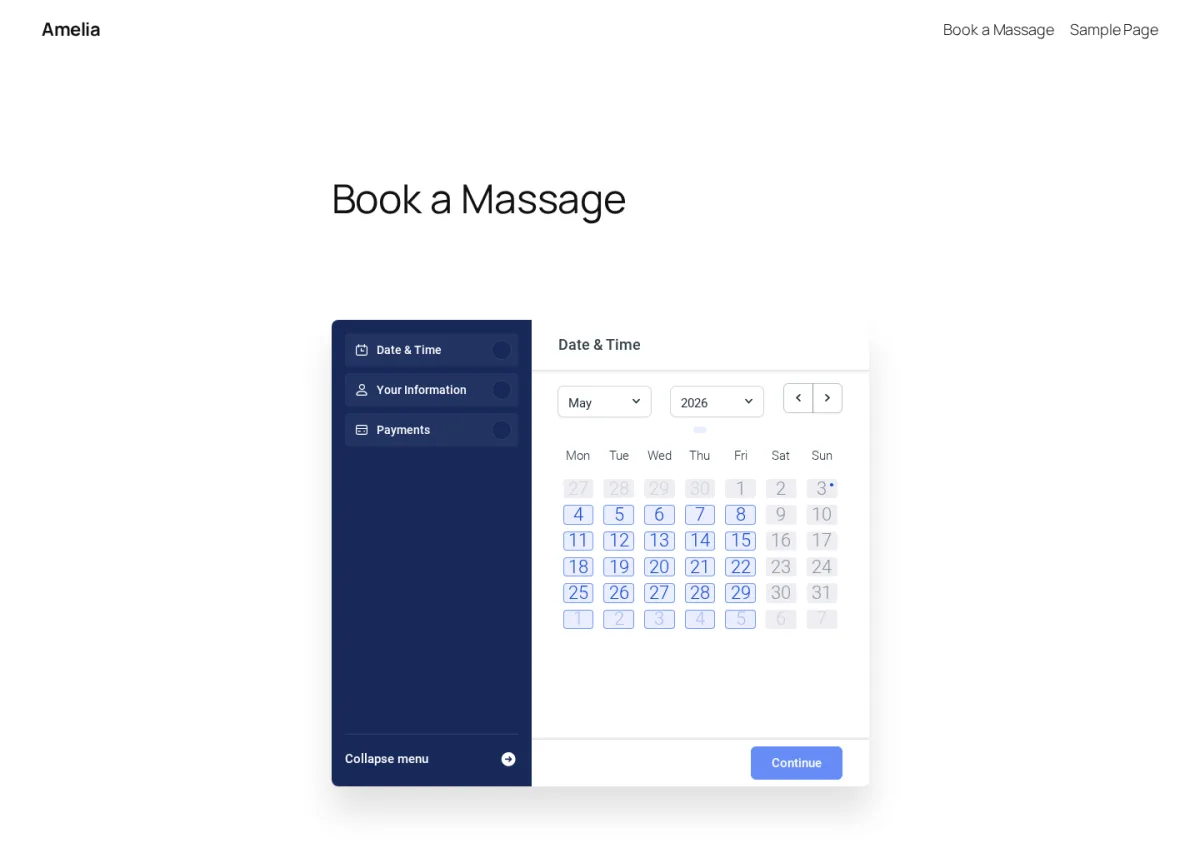
Amelia renders a tight three-step strip — Date & Time → Your Information → Payments — with a left-side step menu and a single Continue button per step. With one category and one service, Amelia auto-skipped the explicit service-picker screen and put the customer straight into the calendar. Picking a date instantly revealed a 30-minute slot strip for the assigned employee, and the chosen slot showed up in the side menu before I needed to confirm — small but real conversion details. The post-submit page surfaces Add to Calendar (Google / Outlook / Yahoo / Apple) and the full appointment summary.
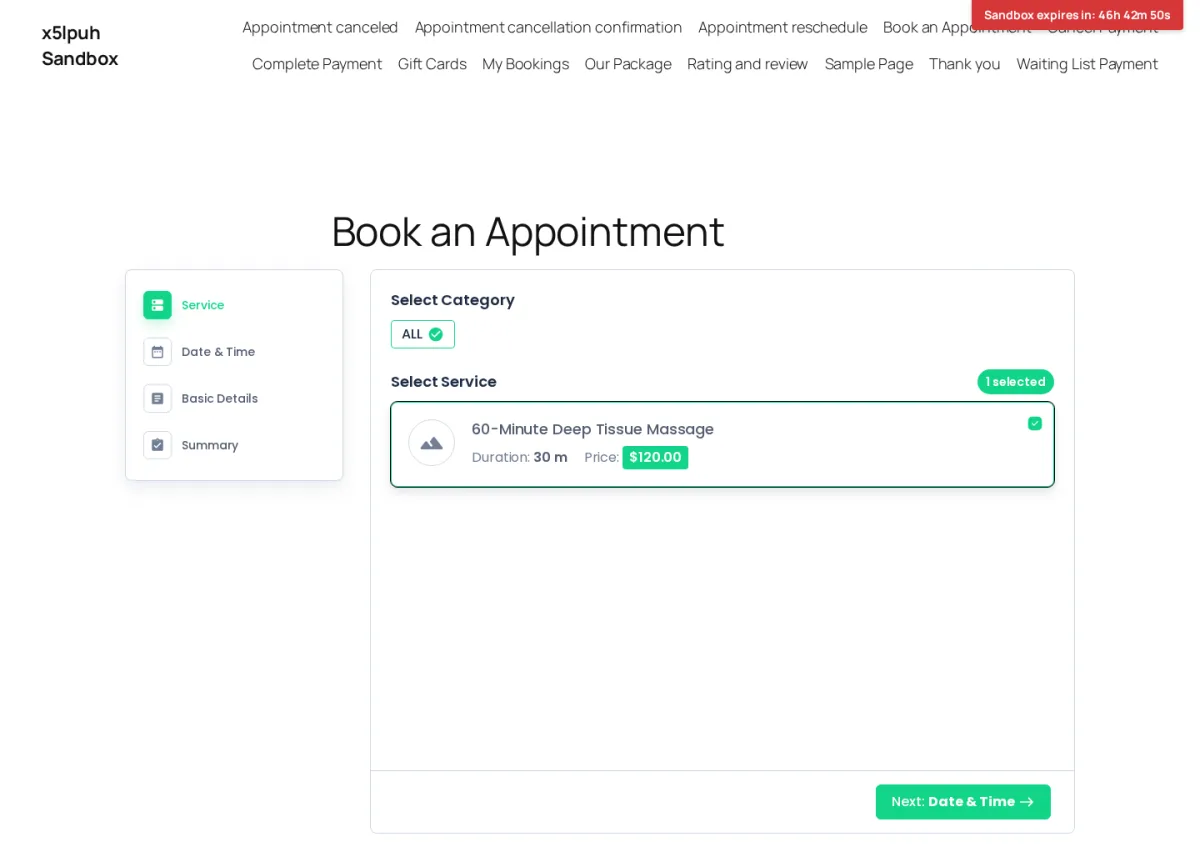
BookingPress renders a 4-step strip — Service → Date & Time → Basic Details → Summary — with rounded cards, a left-side step navigation, and generous spacing. Selecting the service was a single click on a + icon, the indicator updated cleanly, and the Next button enabled. The Date & Time step uses a full-month calendar plus a vertical time-slot list grouped by Morning / Afternoon / Evening, and clicking a slot auto-advances to Basic Details — no manual "Next" click. The post-submit confirmation page is a quiet win: a green check, the Booking ID surfaced prominently, and four Add-to-Calendar shortcuts (Google / Yahoo / Outlook / iCal) on the screen rather than only by email.
Winner: Tie — Amelia's three-step flow is shorter and converts more cleanly when you only have one service or one employee; BookingPress's 4-step flow with auto-advance after slot selection and a more generous on-screen confirmation page is a stronger out-of-the-box conversion experience for service businesses with a multi-service catalog. Both are above the WordPress booking-plugin baseline.
Features and Workflow Depth
Both plugins cover the foundational booking jobs — services, staff, locations, schedules, deposits, recurring appointments, group bookings, multilingual, coupons, taxes, invoices, custom forms, REST API. The differentiation lives at the edges.
Amelia is stronger on ticketed events, branding, and notifications matrix design. The Events module handles one-time and recurring events, multiple ticket tiers (VIP / General / Early Bird), waiting lists, and QR-coded e-tickets attached to confirmation emails — the rare differentiator that almost no other WordPress booking plugin includes in the same product. The Customize hub is the second real differentiator: six dedicated live-preview editors (Step-by-step, Catalog, Events calendar, Events list, Customer panel, Employee panel) cover more surfaces than any competing plugin in this comparison. The Notifications module is a third strength — Email, SMS, and WhatsApp tabs in one matrix with placeholder pills for safer template editing, and dedicated Events templates including E-ticket. Amelia also includes WP Fusion at Pro, which connects a single Amelia install to 50+ CRM and marketing platforms in one integration — BookingPress does not match this.
BookingPress is stronger on bundled-plan economics, widget customization ergonomics, and breadth of payment gateways at a single tier. The Customize hub is the obvious differentiator on widget polish — the drag-and-drop step builder and tab-position selector are the strongest in this category for non-developers. The Notifications module ships a deep template catalog covering On Approval, Pending, Rejection, Cancellation, Rescheduled, Share Appointment URL, Complete Payment URL, Refund, Package Order, Gift Card events, with separate To Customer / To Admin tabs and an unusually long named-placeholder library. The Add-ons catalog covers Staff Member, Service Extras, Service Package, Cart, Recurring Appointments, Waiting List, Custom Service Duration, Happy Hours Pricing, Multi-Location, Multi-Language, Deposit Payment, Coupons, Tax, Invoice, Gift Card, Tip, Ratings & Review, Roles & Capabilities, Two-Factor Authentication, REST API, plus the POS Addon (Stripe) at Enterprise — a single-plan bundle that Amelia does not currently match on per-tier breadth.
Neither plugin currently ships a native mobile app for staff or admins. Both admins are accessible via a mobile browser, but there is no dedicated iOS or Android application from either vendor.
Winner: Amelia for the events module, the breadth of live-preview Customize surfaces, the WhatsApp-native Notifications matrix, and the WP Fusion route to 50+ CRM/marketing platforms; BookingPress for the drag-to-reorder step builder, the breadth of bundled payment gateways at a single paid tier, and the wider native marketing/CRM connector list (Mailchimp, AWeber, Omnisend, FluentCRM, Zapier, n8n, Make.com). Pick the one whose strongest feature set matches your business model.
Pricing and Add-on Model
The pricing models are structurally similar — both are tier-gated by feature unlock — but the bundled feature mix at each tier is different.
Amelia gates features by tier:
- Lite — Free on WordPress.org — 1 domain, 1 employee, Square-only payments, basic step booking
- Starter — from $49/yr — 1 domain — annual only — adds notifications, group bookings, coupons, extras, taxes, invoices, multilingual, custom reminders, recurring appointments, deposits
- Standard — from $89/yr or $299 lifetime — 1 domain — adds REST API, packages, resources, cart, marketing analytics, WhatsApp, refunds, multi-gateway payments
- Pro — from $149/yr or $449 lifetime — 5 domains — adds Google / Apple Calendar two-way sync, Zoom / Google Meet / Microsoft Teams, event tickets with QR codes, waiting list, custom service duration, pricing-by-people, webhooks, WP Fusion
- Elite — from $259/yr or $799 lifetime — unlimited domains — adds developer-level customization across all modules
Amelia ships a 15-day money-back guarantee on paid plans and runs sales that show alongside regular pricing — verify exact numbers on the official Amelia pricing page before buying.
BookingPress also gates features by tier and bundles a wide add-on catalog at each paid level:
- Lite (Free) — $0 — unlimited websites — unlimited appointments — Pay Locally + PayPal — limited support
- Standard — $89/yr (regular $99) or $229 lifetime — 1 site — 45+ add-ons, 20+ payment gateways, premium support
- Professional — $139/yr (regular $199) or $379 lifetime — up to 3 sites — 60+ add-ons, 20+ payment gateways, premium support — adds Location, Recurring Appointments, Service Package, Advanced Discount, Gift Card, Multi-Staff/Multi-Service Bookings
- Enterprise — $249/yr (regular $499) or $599 lifetime — up to 20 sites — 60+ add-ons, 20+ payment gateways, premium support — adds POS Addon (Stripe), Roles & Capabilities, REST API as Enterprise-only
BookingPress ships a 14-day money-back guarantee on paid plans, and the Standard Lifetime card explicitly advertises 3 Year Premium Support.
The honest take: BookingPress is the cheaper way into a broad bundled feature set on lifetime — Free Lite removes the upfront risk and Standard Lifetime ($229) is the lowest broad-bundle entry in this comparison, with 45+ add-ons and 20+ payment gateways unlocked at one tier. Amelia is the cheaper way to access calendar sync, video meetings, and event tickets at the right tier — Pro at $149/yr or $449 lifetime is the gate that unlocks Google/Apple Calendar two-way sync, Zoom/Meet/Teams, event tickets with QR codes, waiting lists, WP Fusion. For unlimited-domain coverage, Amelia Elite ($259/yr or $799 lifetime) is the only tier in this comparison that advertises unlimited domains; BookingPress Enterprise tops out at 20 sites for $599 lifetime.
Winner: BookingPress for cheapest broad-bundle paid lifetime at the entry tier and a real free Lite with unlimited websites; Amelia for cheaper access to the calendar-sync / video-meeting / event-tickets stack at Pro and the only unlimited-domain top tier in this comparison. Map your add-on list to the tier before choosing.
Pricing Comparison
Quick side-by-side at the official tiers (verify current sale or regular pricing on each vendor's pricing page before buying):
- Free tier: Both plugins ship a free Lite tier. Amelia's Lite is on WordPress.org but capped at 1 domain, 1 employee, and Square-only payments. BookingPress Lite has unlimited websites and unlimited appointments but limited features and Pay Locally + PayPal as the only gateways.
- Entry paid tier: Amelia Starter from $49/yr (1 domain, annual only — no lifetime) unlocks notifications, group bookings, coupons, extras, taxes, invoices, multilingual, custom reminders, recurring appointments, deposits. BookingPress Standard from $89/yr or $229 lifetime (1 site) unlocks 45+ add-ons and 20+ payment gateways, premium support, and 3 Year Premium Support on the lifetime SKU.
- Mid tier: Amelia Standard from $89/yr or $299 lifetime (1 domain) unlocks multi-gateway payments, REST API, packages, resources, cart, marketing analytics, WhatsApp, refunds. BookingPress Professional from $139/yr or $379 lifetime (up to 3 sites) unlocks 60+ add-ons including Location, Recurring Appointments, Service Package, Advanced Discount, Gift Card, Multi-Staff/Multi-Service Bookings.
- Pro tier: Amelia Pro from $149/yr or $449 lifetime (5 domains) unlocks Google / Apple Calendar two-way sync, Zoom / Google Meet / Microsoft Teams, event tickets with QR codes, waiting list, custom service duration, pricing-by-people, webhooks, WP Fusion. BookingPress Enterprise from $249/yr or $599 lifetime (up to 20 sites) adds POS Addon (Stripe), Roles & Capabilities, REST API as Enterprise-only.
- Top tier: Amelia Elite from $259/yr or $799 lifetime (unlimited domains) adds developer-level customization across all modules. BookingPress does not currently advertise an unlimited-domain tier; Enterprise's 20-site cap is the ceiling.
- Refund policy: Amelia 15-day money-back; BookingPress 14-day money-back.
- Distribution note: Amelia is on WordPress.org with 90,000+ active installations. BookingPress was removed from WordPress.org on Feb 1, 2025; install and updates flow through bookingpressplugin.com.
The honest pricing conclusion: BookingPress is the cheaper paid plugin at the entry-lifetime tier and ships a more useful free Lite for buyers who run multiple websites. Amelia is the cheaper way to unlock calendar sync / video meetings / event tickets at the right tier (Pro is the rational floor for production sites that need those integrations) and the only single-license fit for unlimited-domain agency work. The right answer depends on where on the tier ladder your integration list lands.
Integrations and Payments
Both plugins ship the integrations most production sites need, but at different tiers and with different gaps.
Both support Stripe, PayPal, Mollie, Square, and 2Checkout at the right tier (Amelia Standard or higher; BookingPress Standard). Both support Google Calendar two-way sync, Zoom, Google Meet, and Microsoft Teams at paid tiers (Amelia Pro; BookingPress as bundled add-ons). Both expose a REST API at the right tier (Amelia Standard; BookingPress Enterprise per the official pricing card). Past that, the catalogs diverge.
BookingPress's bundled payment gateway catalog is the wider single-tier list: 20+ providers — Stripe, PayPal, Mollie, Square, Braintree, Worldpay, Skrill, Klarna, Paddle, 2Checkout, Authorize.net, WooCommerce, Razorpay, PayUMoney, Paystack, PayFast, Pagseguro, Mercado Pago, ECPay, PayMongo, Airwallex — and they all unlock at Standard. BookingPress also ships native Mailchimp, AWeber, Omnisend, FluentCRM and automation via Zapier / n8n / Make.com, plus a POS Addon (Stripe) at Enterprise for in-person checkout.
Amelia's gateway list at Standard covers Square (every paid tier including Lite), PayPal, Stripe, Mollie, RazorPay, WooCommerce, and Stripe Connect. Narrower than BookingPress at the same paid tier, but Amelia compensates with three exclusives at Pro: Apple Calendar two-way sync, Microsoft Teams, and WP Fusion. The last one is the biggest hidden lever — WP Fusion connects to 50+ CRM and marketing platforms in a single integration, so an Amelia + WP Fusion install can talk to almost any modern CRM/marketing stack out of the box. BookingPress does not have an equivalent.
Notifications: Both ship email and SMS templates. Amelia's Notifications matrix natively covers Email + SMS + WhatsApp tabs in one place with To Customer / To Employee sub-tabs. BookingPress ships SMS, WhatsApp, and Telegram via add-ons, plus a long named-placeholder library inside the template editor.
Winner: BookingPress for breadth of bundled payment gateways and marketing/CRM integrations at a single paid tier; Amelia for Apple Calendar two-way sync, Microsoft Teams, the WhatsApp-native Notifications matrix, and the WP Fusion connector route to 50+ CRMs in a single integration. Pick on the integration that actually moves the booking conversion or staff workflow you care about.
Support, Documentation, and Reputation
Both vendors run serious documentation libraries and active YouTube channels. The public review picture is mixed for both, in different ways.
Amelia — WordPress.org 4.6/5 from 761 reviews on the free Lite plugin reflects 90,000+ active installations. Capterra is the bright spot at 4.9/5 from 245 reviews with Customer Service rated 4.9 — the highest sub-score in this comparison. Trustpilot sits at 3.6/5 from 232 reviews — the larger sample in this comparison — with recurring complaints around the December 2025 v9 launch breakage, ticket response latency, and a "blamed on user setup" pattern. The fast bugfix cycle (v9.0 through v9.4 between December 2025 and April 2026) suggests Amelia has been working through the v9 tail. Support runs through ticket and email plus a Discord community; there is no live-chat channel.
BookingPress — WordPress.org reviews still surface a 4.6/5 average from 175 historical reviews even though the plugin is no longer distributed there (removed Feb 1, 2025); the reviews page remains publicly readable. Capterra sits at 4.5/5 from ~71 reviews and GetApp mirrors that with the same dataset. Trustpilot is at 4.3/5 from ~81 reviews — higher than Amelia's Trustpilot rating but over a smaller sample — where 1-star reviews flag slow enterprise-tier responses and a strict no-refund stance. G2 has minimal coverage. Support runs through email and a ticket system; there is no live-chat channel, and Standard Lifetime advertises 3 Year Premium Support.
Common praise themes for both: modern UI, broad feature coverage, helpful documentation. Common criticism themes for Amelia: plan-tier gating, v9 launch tail, support latency on Trustpilot. Common criticism themes for BookingPress: WordPress.org availability change, calendar-sync flakiness, reporting depth.
Winner: Tie — Amelia has the higher Capterra Customer Service rating (4.9/5 over 245 reviews) and a much larger WordPress.org footprint, balanced against the v9 launch tail. BookingPress has a higher Trustpilot rating over a smaller comparable sample, balanced against the WordPress.org distribution change. Both publishers are responsive in their respective communities.
Performance and Reliability Impression
Performance was a tie in testing.
Amelia's SPA navigation between admin screens was instant once the admin loaded; the front-end widget transitioned without lag and the time-slot strip rendered immediately after picking a date. The widget script bootstraps on first load via ameliaShortcodeData, so the first paint takes ~1–2 seconds.
BookingPress admin pages loaded in ~1–2 seconds on the sandbox. The booking widget transitioned between Service → Date & Time → Basic Details → Summary without visible lag, the calendar grid and time-slot grid both rendered instantly, and there were no console errors during the booking flow.
Reliability impression diverges slightly on the public record. Amelia's December 2025 v9.0 launch caused calendar breakage for multiple users and triggered a fast bugfix cycle that ran into May 2026 — the public-record reliability tail on Amelia is real, although the v9.4 build I tested was stable end-to-end. BookingPress's public-record reliability is mostly clean; the recurring criticism in public reviews is calendar-sync flakiness — usually traced back to provider OAuth refresh edge cases — rather than core widget reliability.
Winner: BookingPress on the recent public-record reliability profile; the v9 launch tail is the operational signal worth weighing against Amelia today, even though the v9.4 build I tested was stable end-to-end.
Who Should Choose Amelia?
- Service businesses that also run ticketed events and want one plugin to handle both — the events module with QR-coded e-tickets is the genuine differentiator BookingPress does not match
- Buyers who want a free Lite tier on WordPress.org with a clear paid upgrade path once feature caps bite, and who value the trust signal of WordPress.org distribution
- Teams that prioritize admin polish — Vue + Element Plus SPA, dark/light theme, the dedicated Customize hub with six live-preview editors (Step-by-step, Catalog, Events calendar, Events list, Customer panel, Employee panel)
- WordPress sites already using WP Fusion or planning to connect to 50+ CRM and marketing platforms through one integration
- Apple-ecosystem teams that need Apple Calendar two-way sync, or Microsoft-ecosystem teams that need Microsoft Teams integration as a tier-level unlock rather than a separate add-on
- Buyers who weigh Capterra's 4.9/5 (245 reviews — Customer Service 4.9) and a 90,000+ active-installation WordPress.org footprint as the strongest public trust signals in this comparison
- Agencies that need unlimited-domain coverage on a single license — Amelia Elite ($259/yr or $799 lifetime) is the only tier in this comparison that advertises unlimited domains
If Amelia is close but not quite the right fit, the round-up of Amelia alternatives groups the closest WordPress booking plugins by workflow fit and pricing model.
Who Should Choose BookingPress?
- WordPress service businesses that want a broad bundled feature set in one plan instead of building a per-add-on shopping list
- Buyers who want a real free starting tier with unlimited websites and a clear paid upgrade path once feature caps bite
- Lifetime-license buyers who want the cheapest broad-bundle entry — Standard Lifetime at $229 unlocks 45+ add-ons and 20+ payment gateways
- Operators who care about booking widget polish — the live-preview Customize module with drag-and-drop step reorder and a tab-position selector is the strongest in this category for non-developers
- WordPress sites that need a wide bundled payment gateway catalog at a single paid tier (Stripe, PayPal, Mollie, Square, Braintree, Worldpay, Skrill, Klarna, Paddle, 2Checkout, Authorize.net, WooCommerce, Razorpay, PayUMoney, Paystack, PayFast, Pagseguro, Mercado Pago, ECPay, PayMongo, Airwallex)
- Service businesses that want native marketing/CRM connectors (Mailchimp, AWeber, Omnisend, FluentCRM) and automation via Zapier / n8n / Make.com bundled in the plan
- Buyers comfortable installing the plugin from the official site rather than the WordPress plugin directory, and who do not need a built-in events module or a dedicated Apple Calendar / Microsoft Teams / WP Fusion route
If BookingPress is close but not quite the right fit, the round-up of BookingPress alternatives groups the closest WordPress booking plugins by workflow fit and pricing model.
Alternatives to Both
If neither plugin is a perfect fit, two alternatives are worth a serious look before you decide.
Booknetic
A polished WordPress booking plugin built by FS Code that ships a dedicated SaaS-style admin panel that replaces the WP chrome, a drag-and-drop admin Calendar with Month / Week / Day / List views, a Workflow engine mapping booking events to email/SMS/WhatsApp/Telegram/webhook/Mailchimp actions, and a native mobile app for staff included in its plans — none of which Amelia or BookingPress currently match. A better pick than Amelia or BookingPress when operational depth, white labeling on Elite, or staff-on-mobile workflows are central. See the Booknetic review for the full plan ladder.
LatePoint
A modern WordPress booking plugin with a fully isolated SaaS-style admin and an all-features-in-every-paid-plan licensing model — paid tiers differ only by site count, not by feature set. A better pick than Amelia or BookingPress when you specifically prefer one all-inclusive paid plan with no per-tier feature gates and no per-add-on math, and you do not need the events module or the bundled payment gateway breadth. See the LatePoint review for the full plan ladder.
For the broader picture of plugins tested side-by-side in this category, the cluster's best WordPress appointment booking plugins roundup is the next stop.
FAQ
Is Amelia better than BookingPress?
It depends on the use case. Amelia is the better choice if you also run ticketed events alongside appointments — the events module with QR-coded e-tickets is a genuine differentiator BookingPress does not match — or if you need WordPress.org distribution, Apple Calendar two-way sync, Microsoft Teams, WP Fusion, or unlimited-domain agency coverage. BookingPress is the better choice if you want a real free Lite tier with unlimited websites, the cheapest broad-bundle paid lifetime in this category, the strongest live-preview widget customization for non-developers, or 20+ bundled payment gateways unlocked at the entry paid tier. Both are credible picks; the right answer is the one whose strongest feature set matches your business model.
Which is cheaper: Amelia or BookingPress?
BookingPress is the cheaper way into a broad bundled feature set at the entry lifetime tier — Standard Lifetime at $229 already unlocks 45+ add-ons and 20+ payment gateways for one site. Amelia Standard Lifetime is $299 with a narrower gateway list at the same tier. At the top end, the comparison flips on bundled features per dollar: Amelia Elite ($259/yr or $799 lifetime) covers unlimited domains and adds developer-level customization, while BookingPress Enterprise ($249/yr or $599 lifetime, 20 sites) is cheaper per-tier but caps at 20 sites. For agencies needing unlimited domains, Amelia Elite is the only single-license fit in this comparison.
Which is easier for beginners?
BookingPress, when you avoid the Location and Staff Member add-on friction in the first hour. The official sandbox auto-installs every BookingPress front-end page, the in-app top-tab admin is approachable, and the Customize hub with live preview removes most of the styling guesswork. Amelia has a polished SPA admin too, but the empty default state means you have to create a Location, an Employee, a Service, and a WordPress page with the [ameliastepbooking] shortcode before the front-end widget renders, and Settings is dense across three places (Settings tabs, Features & Integrations, per-module Customize editors). For non-technical owners on day one, BookingPress is the shorter path to a working booking.
Which is better for agencies or multiple sites?
Amelia for unlimited-domain coverage on a single license — Elite ($259/yr or $799 lifetime) is the only tier in this comparison that advertises unlimited domains. BookingPress Enterprise covers up to 20 sites at $249/yr or $599 lifetime, which is cheaper per site but caps the agency footprint. Neither plugin currently advertises a backend white-label rebrand or a native mobile app for staff — for agencies whose clients want either of those, both fall short on that axis today.
Does BookingPress have an events module like Amelia?
Not as a built-in module today. Amelia's events module — one-time and recurring events, multiple ticket tiers (VIP / General / Early Bird), waiting lists, and QR-coded e-tickets attached to confirmation emails — is a genuine differentiator that almost no other WordPress booking plugin includes in the same product. If ticketed events are central to your business, Amelia is the more natural pick today.
Is BookingPress on WordPress.org like Amelia?
No. BookingPress was removed from WordPress.org on Feb 1, 2025; install and updates now flow through bookingpressplugin.com. The historical WordPress.org reviews page (175 reviews at 4.6/5) is still publicly readable, but the plugin is no longer distributed there. Amelia is currently on WordPress.org with a free Lite plugin and 90,000+ active installations. For buyers who treat WordPress.org distribution as a non-negotiable trust and update channel, Amelia is the more natural pick today.
Final Verdict
Amelia and BookingPress are both serious WordPress appointment booking plugins, and the right pick depends on what your business actually does. For service businesses that also run ticketed events, buyers who want WordPress.org distribution and a 90,000+ active-installation footprint, teams that need Apple Calendar two-way sync, Microsoft Teams, or WP Fusion at the right tier, or agencies that need unlimited-domain coverage on a single license, Amelia is the better fit — and the events module with QR-coded e-tickets is genuinely rare in this category. For buyers who want a real free Lite tier with unlimited websites, the cheapest broad-bundle paid lifetime in this category, the strongest live-preview widget customization for non-developers, or 20+ bundled payment gateways unlocked at the entry paid tier, BookingPress is the better fit — and Standard Lifetime at $229 is the cheapest broad-bundle paid entry in this comparison.
The biggest trade-off either way is honest. Amelia loses some appeal once your integration list pushes you onto Pro at $149/yr or $449 lifetime to unlock Google Calendar, video meetings, and event tickets, and the December 2025 v9 launch tail is still visible in public reviews even though the v9.4 build I tested was stable. BookingPress loses some appeal because it is no longer distributed through WordPress.org, the Reports module is visually thin compared to a SaaS-style dashboard, and there is no events module or a dedicated Apple/Teams/WP Fusion route at any paid tier today. If your business straddles both profiles — appointments plus ticketed events on a multi-domain agency footprint — Amelia is the more natural single-plugin answer; if your priority is the cheapest broad-bundle paid lifetime with a real free entry path, BookingPress wins on that axis. Either way, the cluster's best WordPress appointment booking plugins roundup is worth reading before you commit.
Similar Blogs


