

7 Best WordPress Cookie Consent Plugins in 2026

Cookie banners used to be simple notices. In 2026, a serious WordPress cookie banner plugin has to do more: block scripts before consent, separate analytics from marketing cookies, support GDPR and CCPA-style regions, store proof of consent, and work with Google Consent Mode v2 if you run Google Analytics, Google Ads, or Google Tag Manager.
To make this comparison practical, the FS Code research team installed seven leading plugins on a clean WordPress sandbox and checked the setup flow, banner behavior, consent categories, script blocking surface, Google Consent Mode support, design controls, pricing, and free-version limits.
This guide is for site owners, marketers, agencies, and developers choosing the best WordPress cookie consent plugins for real projects. It is not legal advice. If your site handles sensitive data, serves multiple regions, or depends heavily on advertising, confirm your setup with a qualified privacy professional.
Quick comparison: best WordPress cookie consent plugins
| Plugin | Best for | Free version covers | Starting paid plan | Hands-on takeaway |
|---|---|---|---|---|
Complianz |
All-rounder for EU and multi-region sites |
Banner, script blocking, basic Google Consent Mode v2, WP Consent API, cookie scan |
$59/ |
Most complete self-hosted setup, but the wizard must be completed before the banner appears. |
CookieYes |
Fastest working banner after activation |
5,000 pageviews/ |
$10/ |
A real opt-in banner appeared immediately in the sandbox. |
Cookiebot by Usercentrics |
Publishers, multilingual sites and ad-heavy sites |
1 domain, 50 subpages |
€7/ |
Strong CMP platform, but the WordPress plugin is mainly a connector. |
Real Cookie Banner |
EU and DACH sites that need detailed service templates |
Unlimited custom services, content blockers, native consent storage, basic design |
€59/ |
Powerful checklist and content-blocking model, with many advanced features in PRO. |
GDPR Cookie Compliance by Moove |
Sites that want strong free design control |
Banner, color and logo controls, script fields, refuse and revoke controls |
£59/ |
The most ready-to-use free banner in testing. |
WPConsent |
Awesome Motive users and sites wanting a polished Lite plugin |
Unlimited pageviews and scans, banner, scanner, categories, GCM v2 |
$99/ |
Clean in-WP setup and a self-hosted scanner, but some trust signals are still maturing. |
Compliance by Hu-manity.co |
Simple notice banners where a full CMP is overkill |
Notice banner, head/ |
$14.95/ |
Long-running plugin, but the new model pushes serious CMP features into the SaaS app. |
How we tested these plugins
For each cookie consent plugin WordPress buyers are likely to shortlist, we checked live WordPress.org metadata, vendor pricing pages, and a hands-on WordPress admin walkthrough on 26 June 2026. Every plugin was installed one at a time on a clean WordPress sandbox, with active plugins reset between tests.
The test focused on practical buyer questions:
- Does a banner or notice appear immediately, or does the admin need to complete a setup wizard first?
- Can the free version separate necessary, analytics, marketing, functional, or performance cookies?
- Does the plugin expose prior-consent script blocking or only display a notice?
- Is Google Consent Mode v2 supported, and is it free or paid?
- How much control does the free version give over layout, colors, copy, refusal, revoke, and preferences?
- Where does the plugin move from free to paid?
We did not run a live GA4 or Google Tag Manager wire test, because that requires a production analytics container and live consent debug capture. We also did not create paid SaaS accounts for cloud-first CMPs. Where a vendor account was required, we tested the connection screen and documented what could not be verified inside the sandbox.
If you are also choosing analytics software, read our best WordPress analytics plugins comparison next. Analytics tags are often the first scripts you need to hold until consent is granted.
1. Complianz: best all-round WordPress cookie consent plugin
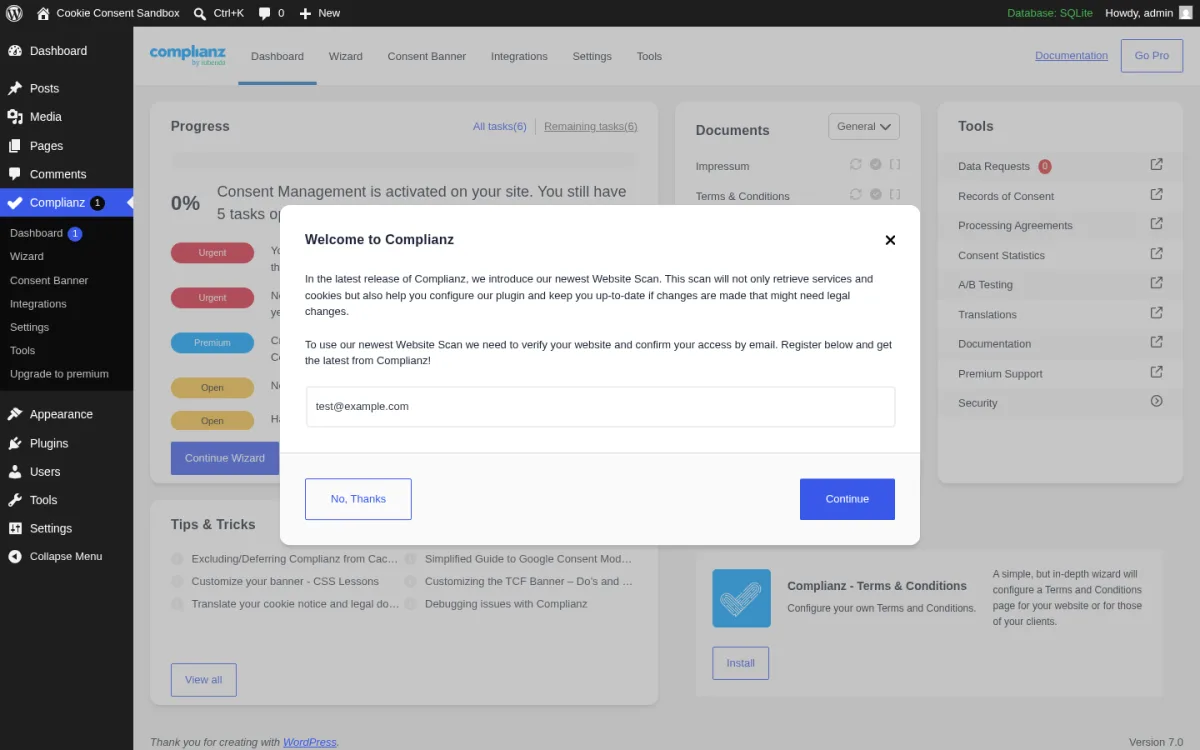
Complianz is the strongest all-round choice if you want one GDPR cookie plugin WordPress can use across a serious business site. It combines a consent banner, cookie scanning, script blocking, WP Consent API support, region-specific configuration, Google Consent Mode v2 basics, and a guided setup workflow.
In testing, Complianz installed cleanly and added a full React-based dashboard with Dashboard, Wizard, Consent Banner, Integrations, Settings, Tools, Documentation, and Go Pro sections. The important behavior: Complianz did not show a visitor-facing banner until the wizard was completed. That is slower than CookieYes or Moove, but it is also a sensible default. The plugin avoids publishing a half-configured legal banner.
The free version is unusually capable. You get functional, statistics, marketing, statistics-anonymous, preferences, and social-media category logic, granular prior-consent blocking, a cookie scan flow, basic Google Consent Mode v2 support, and WP Consent API integration. Complianz also auto-detects many common WordPress plugins and services, including forms, WooCommerce, Google Analytics, Google Tag Manager, Matomo, and other integrations.
Paid plans start at $59 per year for one site. The Privacy Suite adds broader regional coverage, consent records, consent statistics, legal documents, IAB TCF, advanced Google Consent Mode v2 support, and deeper proof-of-consent features. There are no pageview caps, which matters if you run a high-traffic blog or store.
Complianz pros
- Best balance of WordPress-native control, legal breadth, and free features.
- No free-tier pageview cap.
- Strong script-blocking and category model.
- Good fit for sites that want a CMP without moving everything into a cloud dashboard.
Complianz cons
- The setup wizard must be completed before the banner appears.
- Records of consent, statistics, IAB TCF, and advanced GCM are paid.
- The cookie scan flow requires email verification of the live site URL.
Best fit: Choose Complianz if you want the safest overall recommendation and prefer a WordPress-native setup with no pageview cap.
2. CookieYes: best WordPress cookie banner plugin for fast setup
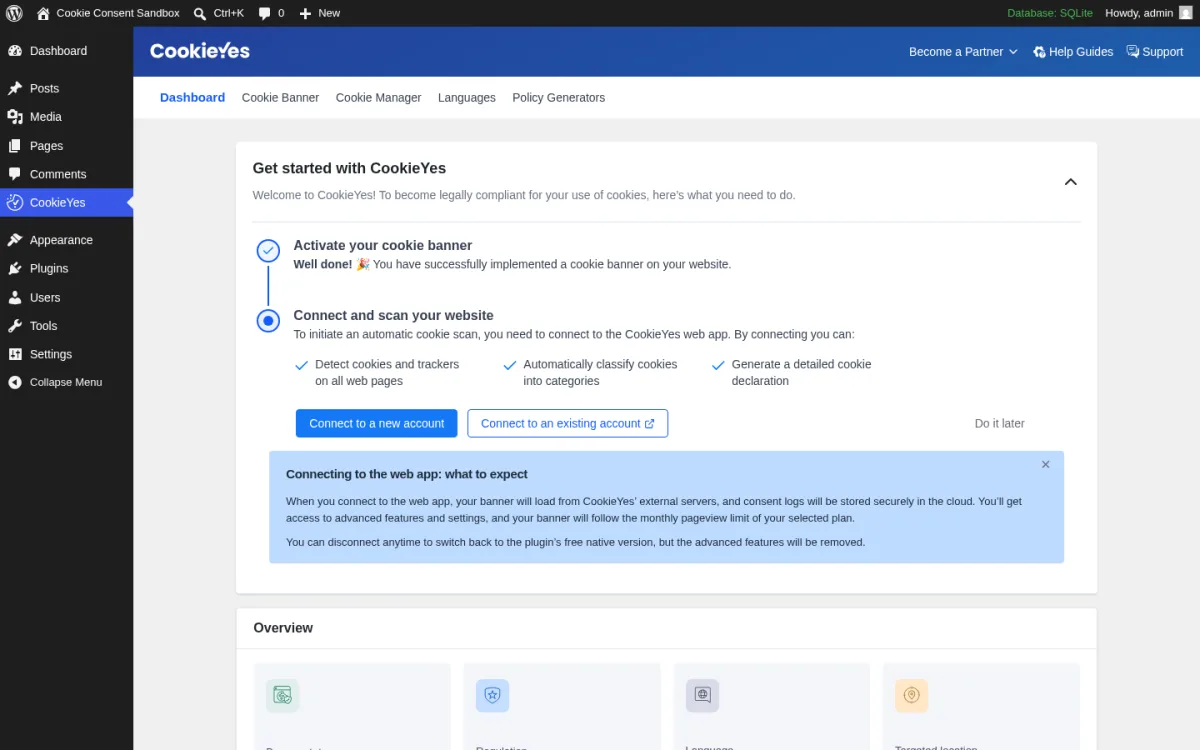
CookieYes is the easiest plugin to recommend when a site owner wants a working banner quickly. In the sandbox, CookieYes showed an opt-in banner immediately after activation with Customise, Reject All, and Accept All buttons. That made it the fastest WordPress cookie banner plugin in this test.
The admin experience is polished. The WordPress dashboard includes Cookie Banner, Cookie Manager, Languages, and Policy Generators. The banner editor has layout controls, content and color settings, Custom CSS, and consent templates for GDPR, LGPD, PIPEDA, Quebec Law 25, POPIA, Swiss nFADP, Australian Privacy Act, Saudi PDPL, and more. Even without connecting the web app, the plugin-native mode was usable.
CookieYes also has a clear cloud-CMP path. The plugin tells you that if you connect the web app, the banner loads from CookieYes external servers and consent logs are stored in the cloud. That is a positive if you want centralized scanning, consent storage, and multi-domain management. It is a drawback if you want everything self-hosted.
The free plan includes 5,000 pageviews per month per domain, 100 pages per scan, prior-consent script blocking, Google Consent Mode v2, Microsoft UET consent mode, and GDPR plus CCPA-style templates. Paid plans start at $10 per month per domain for Basic, which includes 100,000 pageviews and 600 pages per scan. Pro and Ultimate raise scan limits, add more advanced controls, and remove branding at higher tiers.
CookieYes pros
- Banner appears immediately after activation.
- Strong template library for different privacy regulations.
- Good balance of in-WordPress controls and cloud CMP features.
- Google-certified CMP positioning and visible GCM-related settings.
CookieYes cons
- Free tier is capped at 5,000 pageviews per month.
- Cloud features require a web-app connection.
- Pricing is per domain, so agency costs can rise quickly.
Best fit: Choose CookieYes if you want a banner live in minutes and are comfortable with a cloud CMP upgrade path.
3. Cookiebot by Usercentrics: best for publisher-style compliance and languages
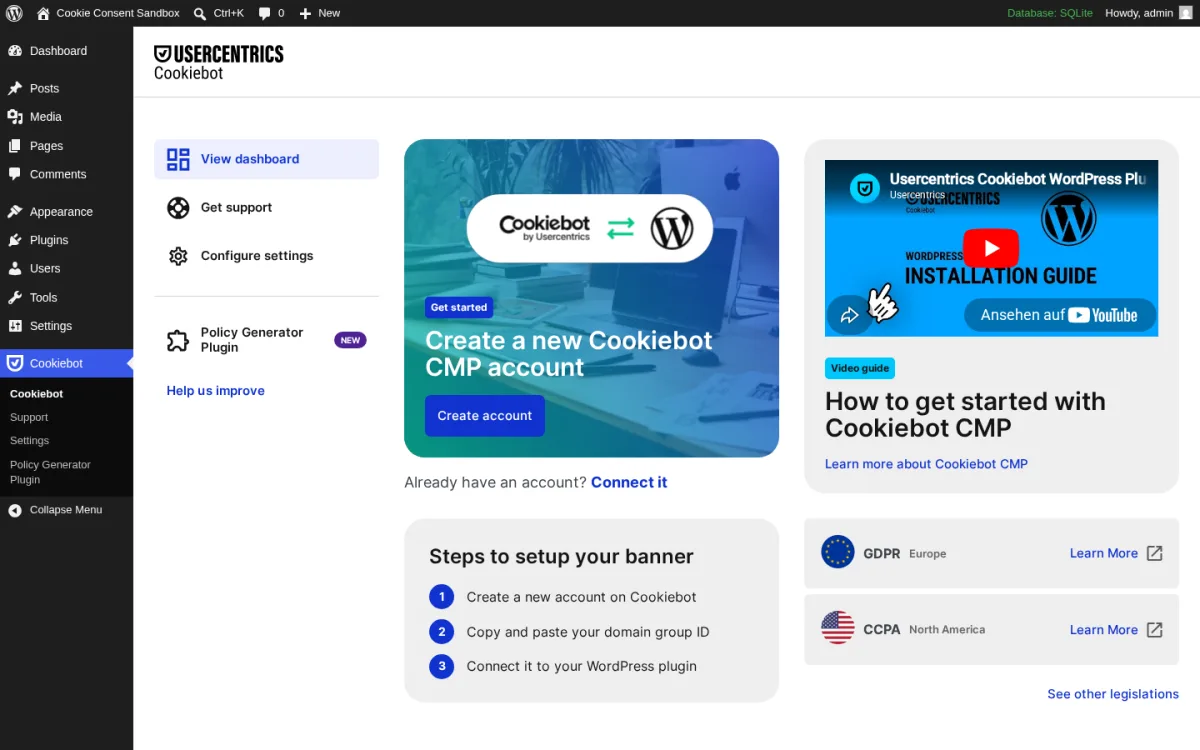
Cookiebot by Usercentrics is less of a self-contained WordPress plugin and more of a bridge between WordPress and the Cookiebot CMP platform. That distinction matters. If you want a full dashboard inside WordPress, Cookiebot is not the smoothest option. If you want a mature CMP platform with strong publisher and ad-tech credibility, it belongs on your shortlist.
In testing, the WordPress plugin opened with two main options: create a new Cookiebot CMP account or connect an existing account. The settings page asks for a Settings ID or Domain Group ID. No banner appeared on the frontend until that ID was added. Design, categories, scanner behavior, and deeper compliance settings live in the Cookiebot platform, not in WordPress.
Cookiebot is a good fit for multilingual sites, publishers, and advertising-heavy websites that care about standardized prior consent, Google Consent Mode, and IAB-oriented workflows. Premium Lite includes 47+ languages, and higher plans scale by domain and subpage count.
The free plan covers 1 domain and up to 50 subpages. That can work for a small brochure site or early-stage blog, but it is too restrictive for most growing WordPress sites. Paid plans start at €7 per month for Premium Lite with 50 subpages, then move up based on subpage volume and domain count.
Cookiebot pros
- Mature CMP platform from Usercentrics.
- Good option for multilingual and ad-heavy sites.
- Strong fit when you need centralized consent management outside WordPress.
- Google Consent Mode support is a core part of the product positioning.
Cookiebot cons
- The WordPress plugin is mostly a connector.
- No frontend banner appears until a platform ID is connected.
- The free 50-subpage limit is easy to outgrow.
Best fit: Choose Cookiebot if you prefer a CMP platform first and a WordPress plugin second.
4. Real Cookie Banner: best for EU sites that need detailed service templates
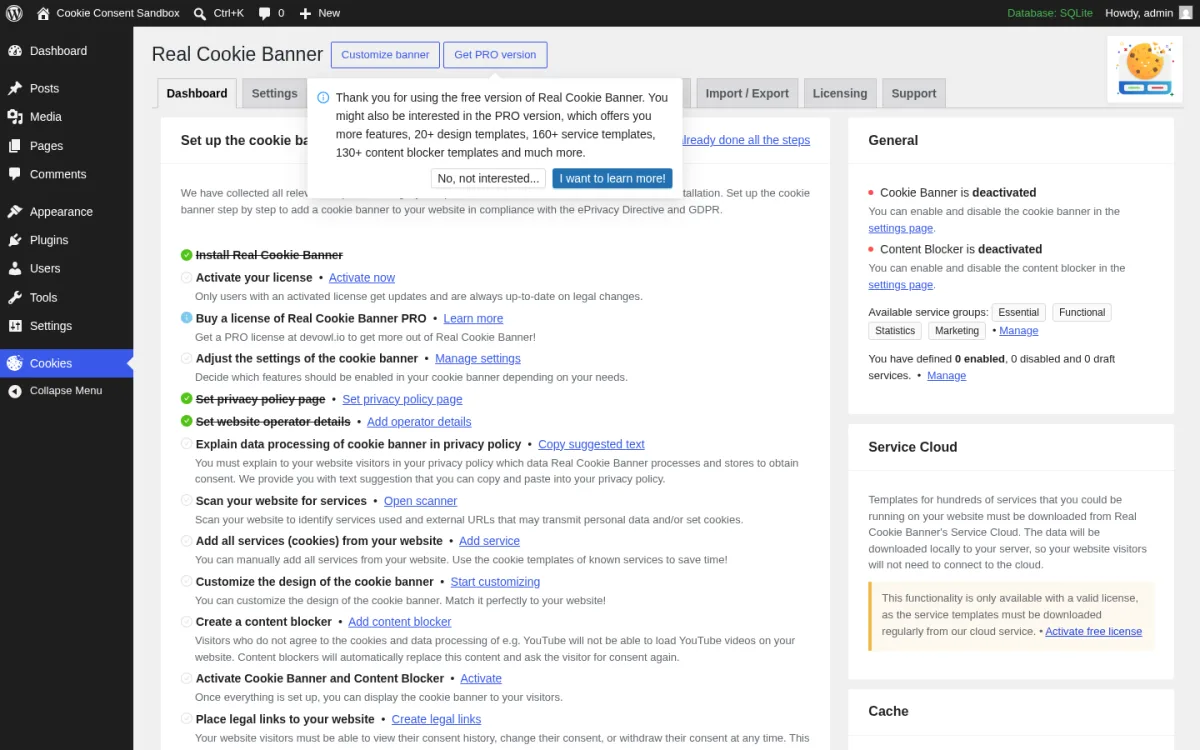
Real Cookie Banner is a strong privacy-first option, especially for EU and DACH sites. It has a detailed setup checklist, service groups, content blockers, native consent storage, and a very strong WordPress.org rating. It is not the fastest plugin to activate and forget. It is built for users who want to configure services carefully.
The free version includes unlimited custom services and content blockers, native consent storage, basic design settings, and 17+ EU languages. In the sandbox, the dashboard exposed Settings, Scanner, Services, Content Blocker, Consent, Import / Export, Licensing, and Support. The checklist walked through operator details, privacy policy placement, website scan, service setup, design, content blockers, and legal links.
On a fresh install, the banner stayed deactivated until the admin completed configuration and turned it on. That is conservative, but understandable. Real Cookie Banner does not pretend an empty service list is enough for compliance.
One testing note: we verified the admin interface on a local WordPress installation. The plugin runs without issue on standard WordPress hosting with MySQL or MariaDB, consistent with its 4.9/5 rating from 487 reviews.
PRO starts at €59 per year for one site. It unlocks 160+ service templates, 130+ content blocker templates, 20+ design presets, 200+ design options, IAB TCF, advanced Google Consent Mode v2 support, geo-restriction, consent forwarding, policy generation, and consent statistics.
Real Cookie Banner pros
- Excellent service and content-blocker model.
- Strong EU and ePrivacy positioning.
- Native consent storage in the free version.
- Many advanced templates and design options in PRO.
Real Cookie Banner cons
- The best templates, GCM v2 advanced support, TCF, and geo controls are PRO.
- Banner is not active until setup is completed.
- Annual-only pricing may not suit short-term projects.
Best fit: Choose Real Cookie Banner if you want detailed EU-style consent configuration and are willing to spend time on setup.
5. GDPR Cookie Compliance by Moove Agency: best free design controls
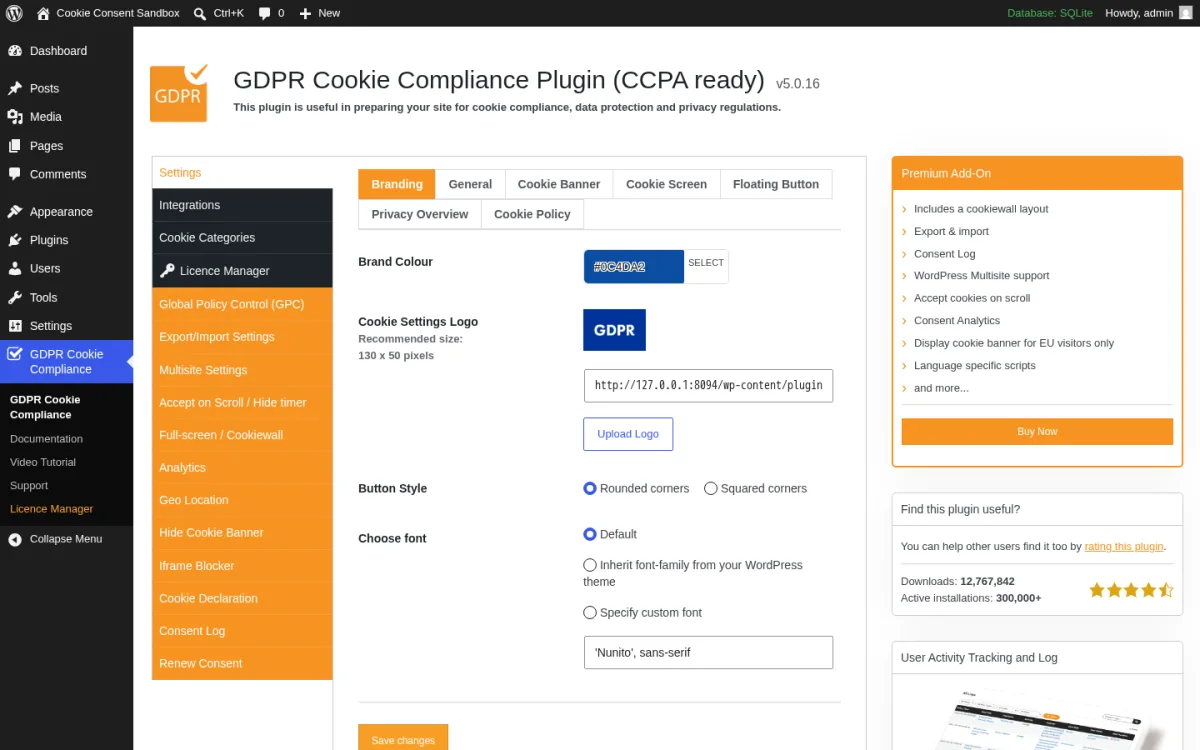
GDPR Cookie Compliance by Moove Agency is the best free choice if design control matters. In the sandbox, it showed a bottom banner immediately after activation. No wizard was required, and the default banner copy was visible on the frontend right away.
The free settings are more generous than expected. You can configure the floating button, Privacy Overview, Cookie Policy panel, brand color, custom logo, button style, fonts, refuse consent, revoke consent, and page reload after acceptance. You also get script-injection fields for Head and Body scripts that fire only after the visitor has consented to a category.
Consent categories include Strictly Necessary, Third Party, and Advanced custom sections. Each category includes a description, default state, and cookie list field. For a small business site that mainly needs a clean banner, basic categories, and controlled script insertion, the free plugin may be enough.
The Premium add-on starts at £59 per year for one site. Premium adds a cookiewall layout, export and import, consent logs, multisite, accept-on-scroll, consent analytics, EU-visitors-only geo targeting, and language-specific scripts. Vendor documentation lists Google Consent Mode v2 support through the existing autoblock mechanism in the free version.
GDPR Cookie Compliance pros
- Banner appears immediately after activation.
- Very strong design controls for a free plugin.
- No cloud account required for the core setup.
- Good practical fit for small business sites.
GDPR Cookie Compliance cons
- Consent logs and analytics are paid.
- EU-only geotargeting is paid.
- Advanced multi-language script handling is paid.
Best fit: Choose GDPR Cookie Compliance if you want a self-hosted free banner that looks polished without much work.
6. WPConsent: best newer option from a major WordPress publisher
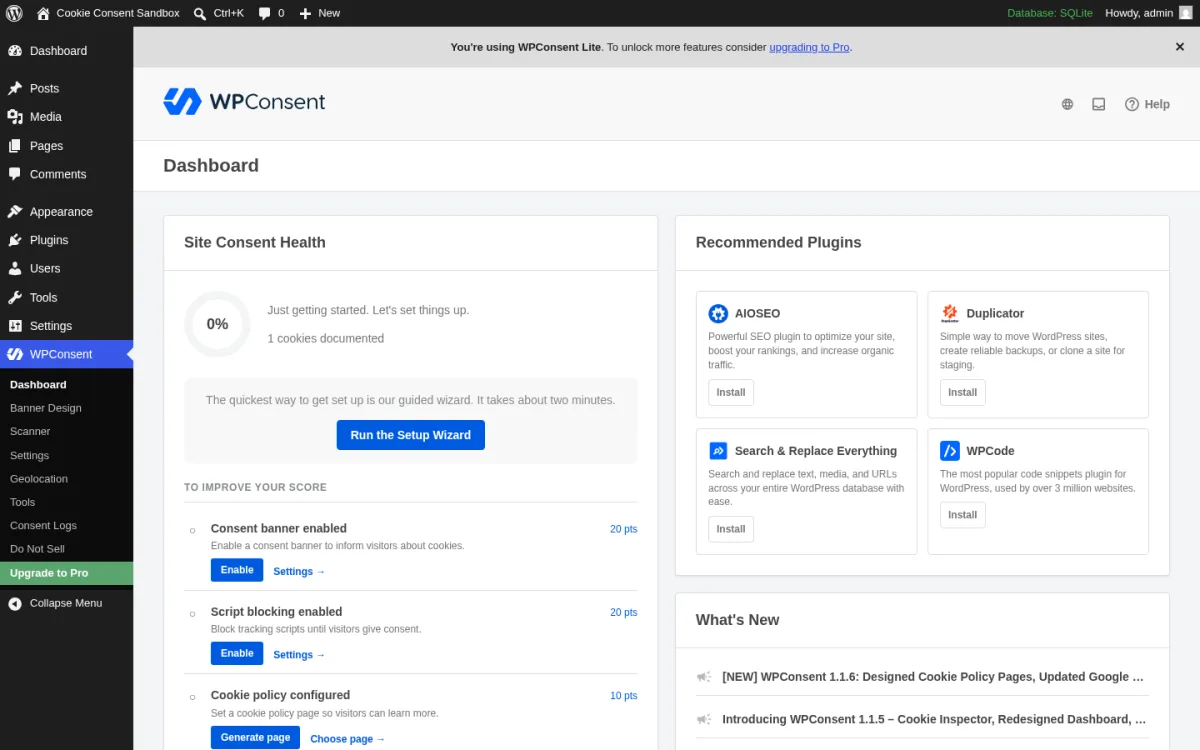
WPConsent is the newest-feeling plugin in this list, backed by Awesome Motive, the company behind WPBeginner, WPForms, MonsterInsights, OptinMonster, and other large WordPress products. That gives it strong product polish even though its WordPress.org review count is lower than older plugins.
In testing, WPConsent added a complete in-WordPress admin experience with Dashboard, Banner Design, Scanner, Settings, Geolocation, Tools, Consent Logs, Do Not Sell, and Upgrade to Pro. The Lite plugin does not require a cloud signup to publish a banner, and the design page includes layout, colors, copy editing, and a live preview.
The biggest Lite differentiator is the scanner. WPConsent advertises unlimited pageviews and unlimited scans in the free version. It can detect third-party scripts and categorize them inside WordPress. Categories include Necessary, Functional, Analytics, Marketing, Performance, and custom categories. The dashboard also exposes content blocking, show banner, and show settings button controls per regulation profile.
Google Consent Mode v2 support is included in recent Lite versions according to vendor documentation and changelog notes. Paid plans start at $99 per year for Basic at introductory pricing. Plus and higher tiers unlock consent logs, geolocation rules, Do Not Sell, auto-translations, and additional integrations. The pricing page notes that renewals happen at full price, so check renewal costs before buying.
WPConsent pros
- Polished WordPress-native user experience.
- Unlimited pageviews and scans in Lite.
- Self-hosted scanner is useful for non-technical site owners.
- Strong ecosystem backing from Awesome Motive.
WPConsent cons
- Consent logs, geolocation, and Do Not Sell are paid.
- Lower review count than mature alternatives.
- Introductory pricing means renewal costs need a second look.
Best fit: Choose WPConsent if you already trust the Awesome Motive ecosystem and want a modern Lite plugin with unlimited scans.
7. Compliance by Hu-manity.co: best simple notice option
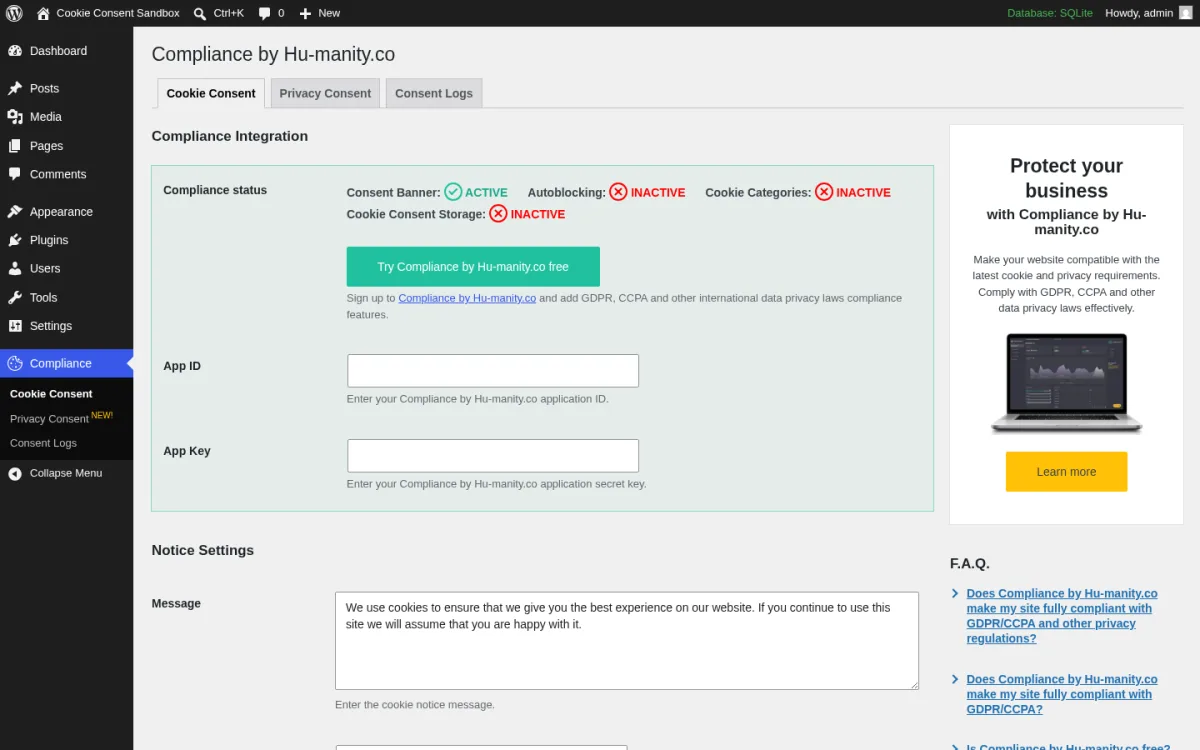
Compliance by Hu-manity.co is the plugin many WordPress users remember as Cookie Notice & Compliance for GDPR/CCPA by dFactory. It still has a huge install base and strong rating, but buyers need to understand the current model. The local plugin can still run a simple notice, while more complete CMP features are tied to the cookie-compliance.co web app.
In testing, the plugin added Cookie Consent, Privacy Consent, and Consent Logs tabs. On a fresh install, the integration card showed Consent Banner as active, but Autoblocking, Cookie Categories, and Cookie Consent Storage as inactive until an App ID and App Key were entered. No frontend banner appeared automatically in the sandbox.
Without the web-app connection, the plugin is best treated as a lightweight notice banner. You can configure the message, button text, privacy policy link, refuse consent, revoke consent, head/body script injection, autoblocking flag, and page reloading. Cookie categories, full autoblocking, consent storage, and logs are part of the SaaS direction.
The free web-app tier includes 1,000 visits per month and 30-day consent retention. Pro is $14.95 per month and adds unlimited visits, lifetime consent storage, Google and Facebook consent modes, geolocation, unlimited languages, and premium support.
Compliance by Hu-manity.co pros
- Long-running plugin with 900,000+ active installs.
- Useful if you only need a simple notice and script fields.
- Refuse and revoke controls are available locally.
- Web-app upgrade path adds more complete CMP features.
Compliance by Hu-manity.co cons
- No banner appeared automatically during sandbox testing.
- Cookie categories and consent storage depend on the web-app model.
- The free web-app visit limit is low for many sites.
Best fit: Choose Compliance by Hu-manity.co if you want a simple notice plugin or already use the connected SaaS product.
Which WordPress cookie consent plugin should you choose?
If you want the safest all-round pick, start with Complianz. It gives most sites the best mix of legal breadth, WordPress-native controls, script blocking, and no free-tier pageview cap.
If you need a banner live as fast as possible, CookieYes and GDPR Cookie Compliance by Moove were the quickest in testing. CookieYes is better if you want a cloud CMP path. Moove is better if you want strong free styling inside WordPress.
If your site runs advertising, multilingual content, or publisher-style tracking, Cookiebot by Usercentrics deserves a look. Just remember that the WordPress plugin is a connector, not the full configuration surface.
If your priority is detailed EU consent setup with service templates and content blockers, Real Cookie Banner is a strong choice, especially once you budget for PRO. If you like Awesome Motive products and want a newer self-hosted scanner, WPConsent is promising. If you only need a lightweight notice, Compliance by Hu-manity.co can still work, but full CMP behavior now points toward its SaaS app.
Buying checklist before you install a cookie banner
- Check whether you need a notice or a CMP. A notice only informs visitors. A CMP manages categories, blocks scripts, stores consent, and can update Google consent signals.
- List every third-party script first. Analytics, ads, embeds, chat widgets, forms, heatmaps, and social pixels all affect the plugin choice.
- Confirm Google Consent Mode v2 support. If you use Google Ads, GA4, or GTM, make sure your chosen Google Consent Mode WordPress plugin handles your exact setup.
- Watch pageview and subpage limits. CookieYes, Cookiebot, and Compliance by Hu-manity.co use caps that can matter as traffic grows.
- Decide whether cloud storage is acceptable. Some plugins keep more inside WordPress, while others store consent in a vendor platform.
- Budget for consent records if needed. Proof of consent, logs, analytics, and geotargeting are often paid features.
- Test refusal, revoke, and category changes. A banner that accepts cookies is only half the job. Users must be able to reject and change preferences where the law requires it.
For broader privacy tooling, compare this list with our guide to the best GDPR compliance WordPress plugins. If your consent flow touches lead capture, our best WordPress contact form plugins roundup can also help you choose forms that fit your privacy workflow.
FAQ
What is the best WordPress cookie consent plugin in 2026?
Complianz is the best overall choice for most WordPress sites because it combines a strong free version, script blocking, consent categories, Google Consent Mode v2 basics, WP Consent API support, and no pageview cap. CookieYes is better for fastest setup, and GDPR Cookie Compliance by Moove is excellent if you want free design controls.
Do I need a cookie consent plugin for WordPress?
You likely need one if your site serves visitors in regions with privacy rules and uses non-essential cookies or third-party scripts, such as analytics, advertising pixels, embedded videos, chat tools, or tracking scripts. Requirements vary by location and use case, so treat plugin setup as part of a broader compliance process.
Which free WordPress cookie banner plugin is best?
For the richest free tier, Complianz is the strongest all-round option. For a banner that appears immediately and is easy to style, GDPR Cookie Compliance by Moove performed very well in testing. CookieYes also works quickly, but its free plan has a 5,000 pageview-per-month cap.
Which cookie consent plugin supports Google Consent Mode v2?
Complianz, CookieYes, Cookiebot by Usercentrics, Real Cookie Banner, GDPR Cookie Compliance by Moove, and WPConsent all have Google Consent Mode v2 support documented in some form. The details differ. Some offer basic support in free plans, while advanced controls, IAB TCF, geotargeting, or consent logs may require paid plans.
Are cookie consent plugins legally enough for GDPR?
No plugin can guarantee legal compliance by itself. A plugin can help you collect and manage consent, but your cookie policy, privacy policy, script inventory, legal basis, data processors, retention rules, and regional settings still need to be correct.
Final recommendation
For most readers searching for the best WordPress cookie consent plugins, the shortlist should start with Complianz, CookieYes, and GDPR Cookie Compliance by Moove. Complianz is the most balanced all-rounder, CookieYes is the fastest path to a polished active banner, and Moove offers the best free design controls.
From there, choose based on your compliance depth. Pick Cookiebot if you want a platform CMP, Real Cookie Banner if you want detailed EU service templates, WPConsent if you want a modern Lite plugin backed by a major WordPress publisher, and Compliance by Hu-manity.co if a simple notice is enough.
Similar Blogs


