

7 Best WordPress Analytics Plugins in 2026 (Free and Paid, Compared)

Picking a WordPress analytics plugin in 2026 should be a small decision and it usually is not. Some plugins pipe Google Analytics 4 into your WordPress dashboard. Some replace Google Analytics entirely and keep every visitor record on your own server. Some are designed to be invisible to your page speed score. Some are designed to give you Heatmaps, Funnels, Session Recording and Form Analytics out of the box. They all call themselves "the best WordPress analytics plugin" on the marketing page.
I went through the seven WordPress analytics plugins that genuinely deserve the shortlist in 2026, opened the live WordPress.org listings, the official vendor demos and the live pricing pages, and read a wide spread of recent positive and critical reviews on each one. Below is a buyer-facing summary of what each plugin uniquely wins for, what its free version actually unlocks, what its current 2026 pricing looks like at checkout (not the marketing-page intro number), and which kind of WordPress site I would point at each one.
How I evaluated these picks
The seven plugins below are the ones that consistently sit at the top of the WordPress.org analytics category by active install count, average rating and recency of the last release, and that still have a credible 2026 use case I could verify. For each pick:
- I installed the plugin in a fresh WordPress sandbox, walked through its activation flow, captured the admin menu items it added, and clicked into the dashboard, reports and settings pages. Four of the seven plugins (Site Kit by Google, MonsterInsights, WP Statistics and Koko Analytics) ran cleanly inside the sandbox; the other three (Burst Statistics, Independent Analytics, Matomo) require MySQL or MariaDB to finish their activation migrations, so for those I worked through the vendor's live demo or the WordPress.org Live Preview instead and noted the constraint in the buyer-facing summary.
- I opened the live WordPress.org plugin page and recorded the current active install count, average rating, total number of reviews, last-update date and minimum WordPress version tested.
- I worked through the official documentation pages each vendor publishes, looking at the setup flow, Google Analytics connection requirements (or the lack of them), dashboard report layout, GDPR and consent tooling, and any tracking limitations.
- I opened each vendor's pricing page and recorded the real annual commitment at checkout, not the first-month or first-year discount in the marketing hero. Where pricing shows monthly but bills annually, I converted to the real annual figure.
- I read a spread of recent positive and critical reviews on WordPress.org so the per-plugin entries below reflect what real WordPress users currently say, not just the vendor's own positioning.
- Every install count, review count, rating and pricing figure below was verified on 2026-05-25.
The ranking is not "best to worst." Each plugin is a credible 2026 pick for a specific buyer profile, and the order roughly reflects how often a typical WordPress site owner falls into each profile, not a 1-to-7 quality gradient.
Quick picks: best WordPress analytics plugin by job
If you want the short answer first, here is the top pick I would recommend for each typical buyer profile in 2026. The full per-plugin breakdown sits below.
| Buyer profile | Top pick (2026) | Why | Starting price |
|---|---|---|---|
You want the official Google plugin and all your Google data in wp-admin |
Site Kit by Google |
Free, made by Google, connects GA4, Search Console, PageSpeed, AdSense and Tag Manager in one setup flow. |
Free |
You want the easiest way to put GA4 reports inside WordPress with eCommerce and forms tracking |
MonsterInsights |
The most popular GA4 plugin by review count, point-and-click setup, deepest WooCommerce and forms reports on the Pro tier. |
Free Lite; Pro from $99.50/ |
You want a clean self-hosted analytics dashboard that does not need Google at all |
Burst Statistics |
Modern dashboard, cookieless option, 100% data on your server, built by the UpdraftPlus/ |
Free; Pro from €42.63/ |
You want per-post analytics natively in WordPress with no consent banner needed |
Independent Analytics |
No cookies, no external servers, per-post view counts in the Posts menu, full free tier with no view cap. |
Free; Pro from $49/ |
You want a full self-hosted Google Analytics replacement, including Heatmaps and Session Recording |
Matomo Analytics |
The original GA alternative, deepest feature set, premium add-ons cover Heatmaps, Funnels, Form Analytics and more. |
Free core; premium add-ons from 33€/ |
You want the widest free tier among long-running self-hosted plugins |
WP Statistics |
600,000+ installs, deep free tier with content/ |
Free; Premium from $119/ |
You want the absolute lightest analytics plugin and only the core numbers |
Koko Analytics |
Adds less than 1KB to your HTML, bypasses WordPress for the collection endpoint, 5.0/ |
Free; Pro from $59/ |
None of these seven plugins is the right answer for every site. Pick by buyer profile and by your stance on Google, not by raw install count.
1. Site Kit by Google: the official Google plugin and the default beginner pick

Site Kit by Google is the analytics plugin I would install first on almost any new WordPress site. It is the official plugin from Google itself, it is free and open source, and it pipes data from Google Search Console, Google Analytics 4, PageSpeed Insights, AdSense, Tag Manager and Google Ads into a single WordPress dashboard page with one connected Google account. On WordPress.org on 2026-05-25 the plugin sits at 5+ million active installs and 4.2/5 from 1,007 reviews, with the latest release v1.179.0 shipped on 2026-05-18.
What you get for installing it is the headline KPIs from each connected Google product inside wp-admin (sessions and engaged sessions from GA4, impressions and clicks from Search Console, the Core Web Vitals pass/fail and lab score from PageSpeed Insights, the earnings line from AdSense, your Tag Manager container snippet automatically inserted). Per-post stats are available too, so on the editor screen for a given post you can see how that exact URL is performing in Google Search and GA4. Site Kit will also offer to create a GA4 property and a Tag Manager container for you if you do not already have them, which is the biggest reason it is the right starting point for non-technical owners.
The trade-off worth knowing is that Site Kit is a reporting and connection plugin, not a tracking plugin. The actual tracking still happens inside GA4, Search Console and AdSense, which means the headline reports in Site Kit are as deep as GA4 and Search Console allow inside their iframe-friendly endpoints. You do not get GA4-level event drill-down, audience builders, exploration reports or custom dimensions inside Site Kit; for those you still click through to the GA4 web app. Site Kit also requires every WordPress admin who wants to see the data to connect their own Google account.
Privacy and GDPR notes: Site Kit anonymizes IP addresses by default on the Google Analytics module (a setting you can turn off). Consent handling for EEA, UK and Swiss traffic is your responsibility; Site Kit works with several Google-certified Consent Management Platforms on WordPress, including Complianz and CookieYes.
What I found in setup: Site Kit installs and activates without complaint, and the plugin row immediately switches from "Activate" to "Start setup / Deactivate" so the next click is obvious. The very first admin screen is a splash that asks you to "Connect Google account," after which the plugin walks you through Search Console, GA4 and (optionally) PageSpeed Insights / AdSense / Tag Manager in a guided sign-in flow. Each connected service uses a separate OAuth scope, which is the friction point worth flagging up front: every wp-admin user who needs to see Site Kit data has to connect their own Google account.
If you are also building out the broader free Google toolset for your site, the wider free Google tools for your WordPress website roundup covers everything Site Kit connects to (Search Console, GA4, PageSpeed Insights, Looker Studio, Tag Manager, Business Profile, Rich Results Test, Trends, Keyword Planner and AdSense) in more depth.
Best for: WordPress beginners and small business owners who want the official Google plugin, GA4 and Search Console data inside wp-admin, and a Google account they already have.
2. MonsterInsights: the deepest GA4 reporting plugin for WordPress
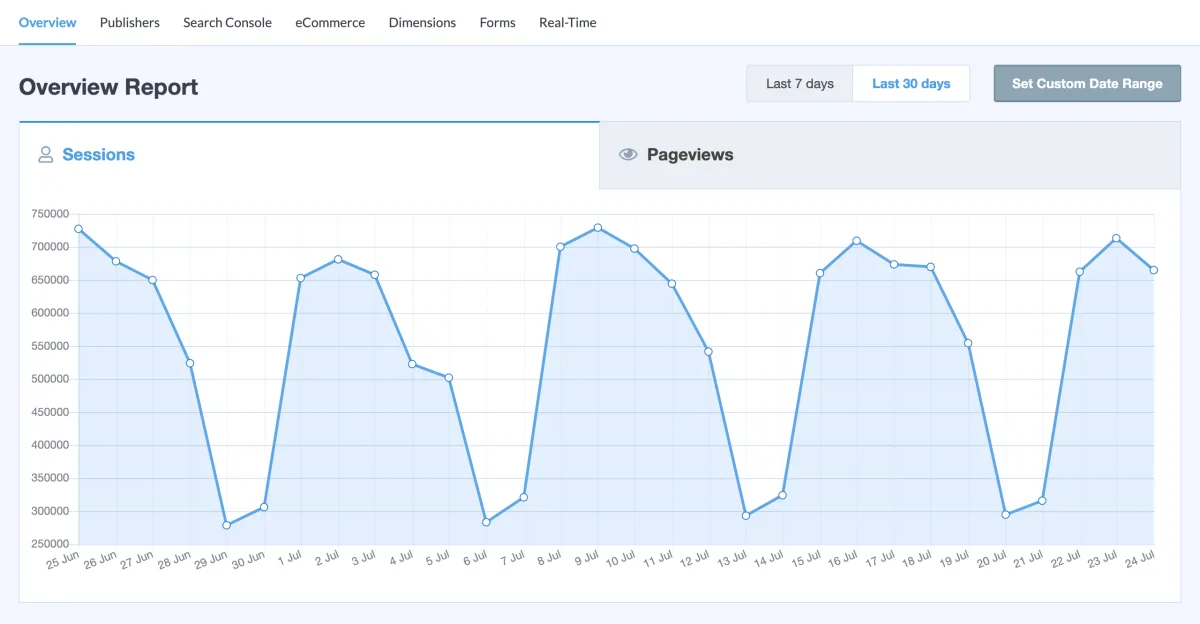
MonsterInsights is the plugin I would recommend to any WordPress site that already runs on Google Analytics 4 and wants the GA4 reports rebuilt as native WordPress dashboards with WooCommerce, Easy Digital Downloads, MemberPress and form-plugin integrations layered on top. The Lite version is free and ships the GA4 setup wizard, the headline overview report (sessions, pageviews, average session duration, bounce rate), the top countries, top sources and top posts widgets, and admin/editor exclusion from tracking. WordPress.org on 2026-05-25: 2+ million active installs, 4.5/5 from 3,140 reviews, latest release v10.2.0 on 2026-05-20 (the AI chat addition in 10.2.0 is the headline change for 2026).
The Pro tier is where MonsterInsights pulls ahead of Site Kit on the reporting side. You get the eCommerce report (revenue, conversion rate, average order value, top referral sources, coupon usage, cart abandonment, Funnel report) wired up natively to WooCommerce and EDD; the Forms report wired to WPForms, Gravity Forms, Formidable Forms, Contact Form 7 and Ninja Forms; the Custom Dimensions report wired to Yoast SEO, AIOSEO, Rank Math and SEOPress so you can pivot your GA4 data by author, focus keyword, category, tag or publication time; and the Site Speed report wired to PageSpeed Insights for per-page Core Web Vitals tracking. Pricing as of 2026-05-25: Plus $99.50/year intro (1 site, renews $199/year), Pro $199.50/year intro (5 sites, renews $399/year), Elite $299.50/year intro (5 sites, renews $599/year), Agency $399.50/year intro (25 sites, renews $799/year). 14-day money-back guarantee on every tier.
The honest trade-off MonsterInsights gets called out on in recent reviews is the upsell density. The Lite plugin shows a steady stream of "this report is a Pro feature" badges across the admin UI, which some users find pushy. The reporting depth, the integrations roster and the GA4 setup wizard genuinely earn their place; the upsell volume is the price of admission. If you only want the headline numbers and nothing else, Site Kit by Google does the same job for free.
Privacy and GDPR notes: MonsterInsights ships an EU Compliance add-on (on Pro) that anonymizes IPs, disables Demographics and Interest reports, disables UserID and author-name tracking, and integrates with Cookie Notice, CookieBot, Google AMP Consent Box and the Google Analytics opt-out browser extension. The Lite tier exposes admin/editor exclusion from tracking out of the box. None of this removes the need for a consent banner on EEA, UK and Swiss traffic.
What I found in setup: activation immediately redirects you out of the Plugins screen and into a multi-step onboarding wizard, which is a real piece of the upsell-density complaint that recurs in MonsterInsights reviews; it starts the moment you activate the Lite version. A "MonsterInsights" widget also drops into the main WordPress dashboard right away with the message "Your website analytics dashboard is not currently configured. Please use our setup wizard to get started." The Reports, Settings and Overview Report screens themselves render with the WordPress chrome, but the central report panels stay empty until a real Google Analytics 4 property is connected, so plan on completing the GA4 connection before the in-WordPress reports become useful.
Best for: WooCommerce, Easy Digital Downloads or content sites that are already on GA4 and want the deepest GA4 reports rebuilt inside the WordPress dashboard, plus native eCommerce, forms, SEO-plugin and site-speed integrations.
3. Burst Statistics: the cleanest self-hosted dashboard in 2026
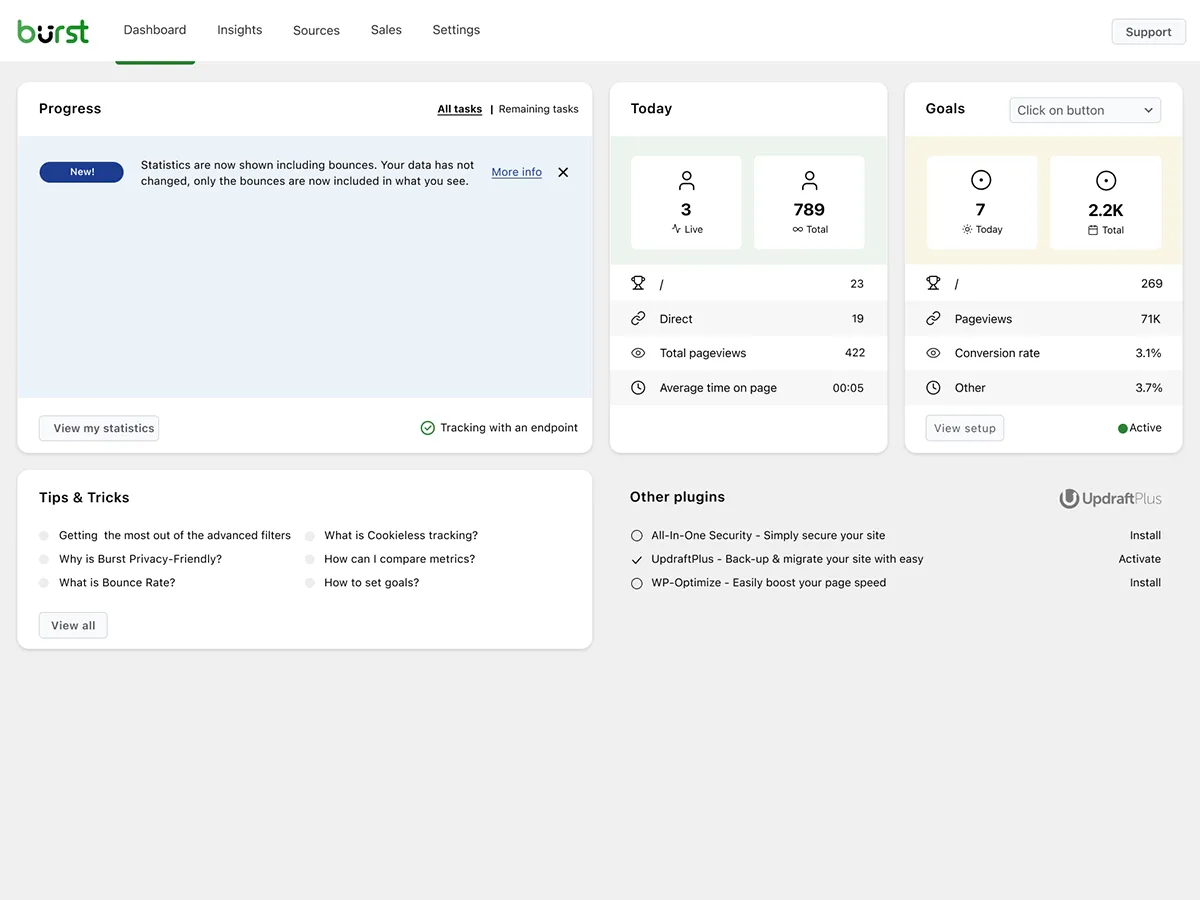
Burst Statistics is the self-hosted analytics plugin I would put in front of any WordPress owner who is tired of GA4's complexity and just wants to see clean numbers on what is happening on their site. The plugin is built by Burst Statistics B.V., the same team behind UpdraftPlus, WP-Optimize and All-In-One Security, which is a useful pedigree on the reliability side. Numbers on WordPress.org as of 2026-05-25: 200,000+ active installs, 4.9/5 from 181 reviews (170 5-star, 3 1-star), latest release v3.4.3 on 2026-05-20.
The free version is genuinely usable on its own. You get the visitors/pageviews/bounce-rate/sessions overview, a real-time visitors view with the active count and pages people are on right now, a top pages and posts table, a referrers breakdown, a device breakdown (desktop/tablet/mobile), date-range filtering with period comparisons, custom conversion tracking for views, clicks and WordPress hooks, weekly or monthly email reports, and an explicit cookieless tracking mode that skips the consent banner where local law allows. Tracking is under 4KB and a Turbo Mode is offered when the site is behind aggressive caching.
Pricing on Burst Pro as of 2026-05-25 is Euro-denominated: Creator €42.63/year (1 site, ~€3.55/month equivalent) adds geographic data, UTM campaign tracking, advanced filtering, archiving and priority support; Business €86.13/year (1 site, marked "popular") adds the full sales dashboard and revenue attribution; Agency €173.13/year (unlimited sites) adds reporting with multi-recipient delivery. There is a 14-day free trial plus a 30-day money-back guarantee on top, which is the longest combined try-before-buy window in this comparison.
Privacy and GDPR notes: all statistics are stored in your own WordPress database, never leave your server, and the plugin offers cookieless tracking out of the box. Burst Statistics is designed to support GDPR, CCPA, DSGVO, AVG, RGPD and PECR compliance. There is an optional, off-by-default anonymized data-sharing program that sends aggregated benchmark metrics to api.burst-statistics.com; you can confirm it stays disabled from Settings > Data Sharing.
What I found in setup: there is one host requirement worth checking before you install. Burst Statistics needs MySQL or MariaDB, the standard combo on almost every commercial WordPress host. In our hands-on sandbox tests we tried the plugin under a SQLite WordPress install (the configuration WordPress Playground and a handful of lightweight local-dev tools default to) and the activation hooks fail there because the plugin runs MySQL-flavour ALTER TABLE migrations. Under any normal MySQL/MariaDB host (which is essentially everything from Bluehost to WP Engine to Kinsta to a stock cPanel install) the install + activation is one click and the dashboard renders immediately, exactly the way the live WordPress.org Live Preview demonstrates it.
Best for: WordPress sites that want a self-hosted analytics dashboard that genuinely looks designed in 2026, no Google account, cookieless tracking, and the longest combined trial plus refund window in this list.
4. Independent Analytics: per-post stats inside the Posts menu, no Google connection
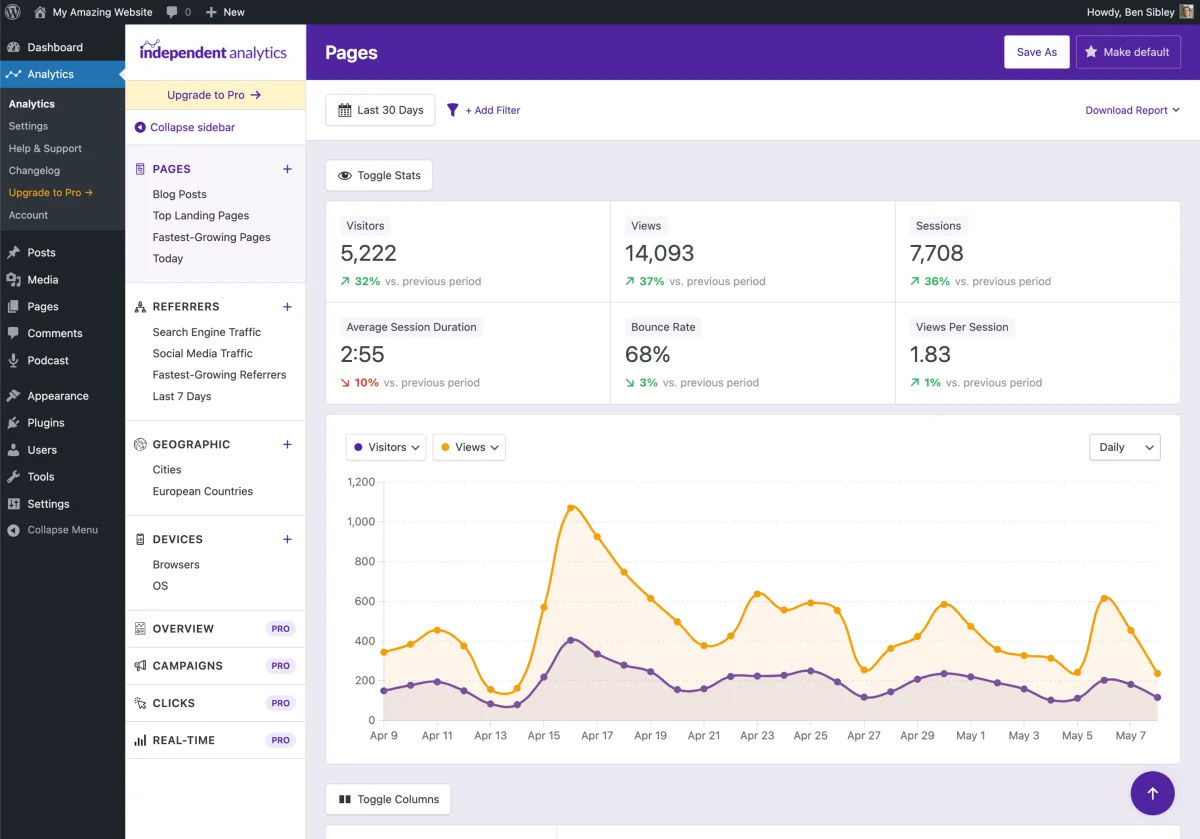
Independent Analytics is the analytics plugin I would pick if "I just want to see how each post is doing, inside WordPress, without sending any data to Google" is the literal sentence in your head. The plugin records views straight into your WordPress database via a deferred REST API request, surfaces a clean Pages, Referrers, Geographic and Devices report inside the admin, and adds a per-post view count column in the Posts menu so you can sort your content library by views without ever opening an analytics page. Numbers on WordPress.org as of 2026-05-25: 100,000+ active installs, 4.8/5 from 161 reviews (147 5-star, 5 1-star), latest release v2.14.10 on 2026-05-19.
The free tier is one of the most generous in this list. You get unlimited views with no event cap, the Pages/Referrers/Geographic (country-level)/Devices reports, the data table you can sort by views/visitors/sessions/bounce rate/session duration, CSV and PDF export, saved reports, a dashboard widget, admin-toolbar stats while viewing a page, a public view counter shortcode, ignore-by-user-role and ignore-by-IP, automatic deletion of old data, and a developer API. The vendor lists "100,000+ websites" using the plugin and the recent review distribution backs that up; multiple reviewers in 2026 specifically mention switching from Burst Statistics or Jetpack Stats for the per-post Posts menu integration and the cleaner free-tier feature set.
Pricing on Independent Analytics Pro as of 2026-05-25 is the friendliest in this list once you factor in the lifetime option: PRO Standard $49/year (1 site) or $147 lifetime, PRO Hobbyist $79/year (3 sites) or $237 lifetime, PRO Agency $199/year (unlimited sites) or $597 lifetime. The Pro tier adds the Campaigns/UTM report, real-time analytics, click tracking, form tracking for 20+ form plugins (WPForms, Gravity Forms, Fluent Forms, Contact Form 7, MC4WP, Kadence Blocks, Newsletter, Everest Forms and the rest), eCommerce tracking for WooCommerce/FluentCart/EDD/SureCart/PaidMembershipsPro, User Journeys, HTML email reports, the customizable Overview report and Solo Reports for individual pages and referrers. 30-day money-back guarantee.
Privacy and GDPR notes: the plugin uses no cookies, stores no personal data, and never communicates with external servers. Repeat visitors are identified via a salted hash of the IP address plus User Agent string (the IP itself is not stored), and there is a setting to refresh the salt token weekly or monthly. By default a cookie consent banner is not required.
What I found in setup: as with Burst Statistics, Independent Analytics needs MySQL or MariaDB. Activation under the SQLite-only WordPress configuration we used in our sandbox testing throws the same MySQL-DDL incompatibility, so confirm your host runs MySQL or MariaDB before installing (which is the default on essentially every commercial WordPress host). Once it activates on a real host the plugin starts tracking immediately, drops a per-post Views column into the standard WordPress Posts menu, and surfaces the Pages, Referrers, Geographic and Devices reports under a top-level "Analytics" admin item without any wizard.
Best for: bloggers, content sites and agencies who want per-post analytics native to the WordPress Posts menu, no Google account, no cookies, no consent banner in most jurisdictions, and an affordable lifetime upgrade path.
5. Matomo Analytics: the full-fat self-hosted Google Analytics replacement
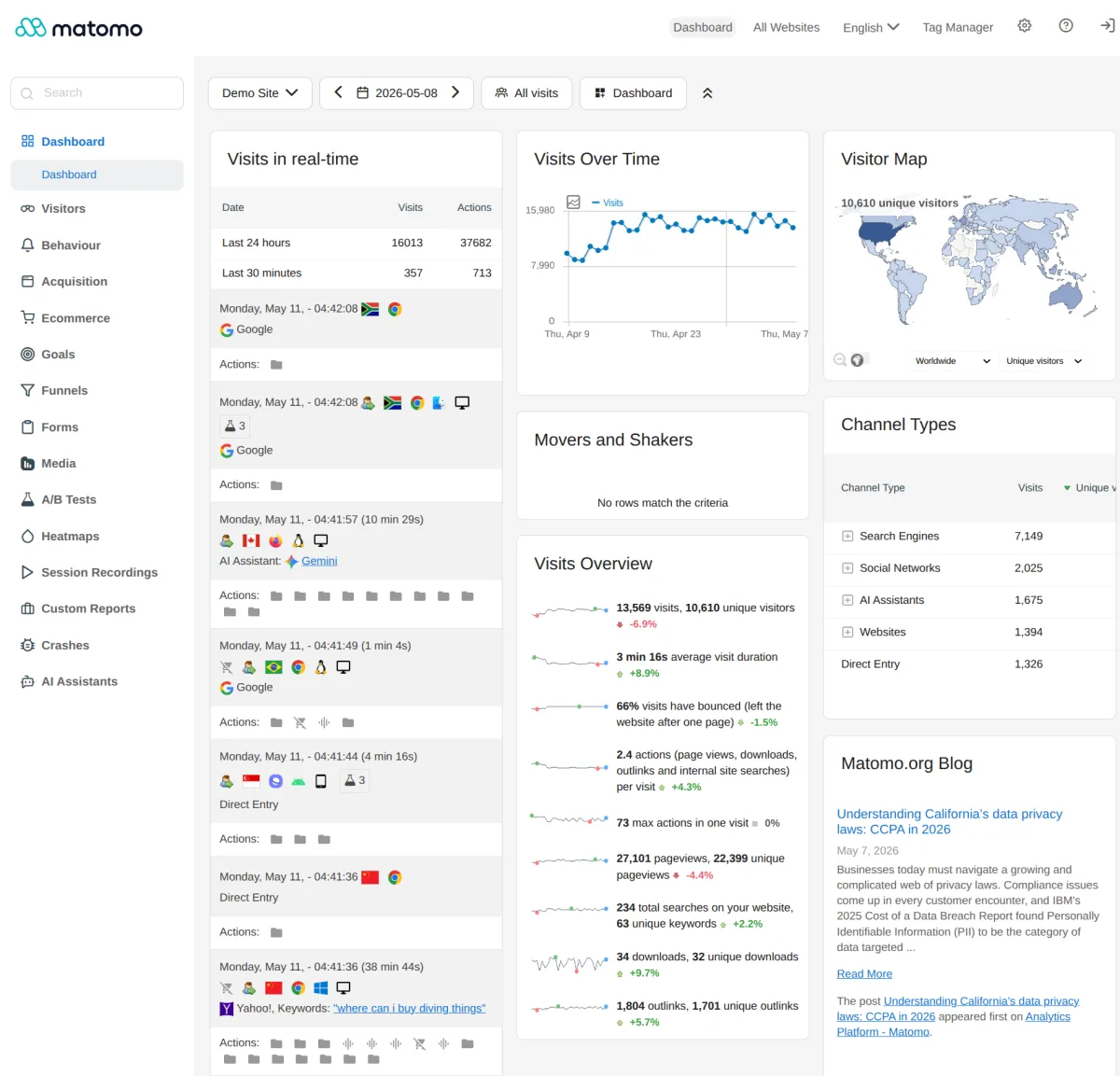
Matomo (formerly Piwik) is the analytics plugin to install when you genuinely want every Google Analytics feature, on your own server, with your own data, and without the GA4 learning curve plus consent-banner friction that GA4 currently carries in Europe. The official WordPress integration is Matomo Analytics for WordPress, maintained by the Matomo core team. WordPress.org on 2026-05-25: 100,000+ active installs, 4.6/5 from 174 reviews (145 5-star, 12 1-star), latest release v5.10.0, last updated about two weeks before publish.
The free core ships an unusually deep feature set for a self-hosted analytics plugin. Visitor profiles, Visits Log (every action by every visitor), Tag Manager, Dashboards with rearrangeable widgets, Segmentation, Real-time reports, Transitions (where visitors came from on a given page and where they went next), JavaScript error tracking, extensive Geolocation maps, Row evolution, Report comparisons, eCommerce reports out of the box for WooCommerce/EDD/MemberPress, GDPR Manager, configurable data retention, opt-out shortcode, and historical import from Google Analytics or WP Statistics. Matomo Tag Manager is included free and works the same way Google Tag Manager does for site-level tag deployment without theme edits.
Where Matomo really pulls away from every other plugin in this list is the premium add-on roster. As of 2026-05-25 on plugins.matomo.org/premium: Heatmaps and Session Recording from 219€/year, Form Analytics from 169€/year, Funnels from 193€/year, Media Analytics (video and audio engagement) from 176€/year, A/B Testing from 219€/year, Custom Reports from 219€/year, Roll-Up Reporting from 219€/year, Cohorts from 94€/year, Users Flow from 94€/year, WooCommerce Analytics from 39€/year, and Activity Log from 33€/year. A Premium Bundle is also offered. All premium add-ons come with a 30-day free trial.
The honest trade-off is exactly the one repeat reviewers call out: Matomo is powerful and not particularly fast or simple to absorb. The dashboard exposes a lot of widgets, the configuration covers a lot of options, and the WordPress integration uses real server resources for tracking (the official guidance suggests at least 256MB PHP memory). If your site has a lot of traffic or runs on a small shared host, the vendor recommends running the full Matomo On-Premise install on a separate server and connecting via the Connect Matomo plugin instead.
Privacy and GDPR notes: 100% data ownership, no third-party servers, IP anonymization, opt-out shortcode you can drop into your privacy policy page, data retention controls, GDPR export and delete tooling, and full support for cookieless tracking. This is the analytics plugin most European public-sector and healthcare WordPress installs end up on.
What I found in setup: Matomo is the heaviest plugin in this list and it shows on the setup side as well. The vendor recommends at least 128 MB of PHP memory (256 MB preferred), MySQL or MariaDB on the database side, and a host that lets WordPress run a real PHP application alongside it rather than a heavily restricted shared environment. In our sandbox tests Matomo's activation step needed MySQL-flavour DDL the WordPress Playground SQLite shim does not translate, which matches the vendor's own guidance that high-traffic sites should run Matomo On-Premise on a separate server and connect via the Connect Matomo plugin. On any normal MySQL host the in-WordPress activation is one click, after which Matomo Analytics drops a top-level admin menu with Reporting, Goals, Tag Manager and Settings sections, the same layout as the public demo at demo.matomo.cloud.
Best for: WordPress sites that want a full Google Analytics replacement on their own server, the full Heatmaps and Session Recording feature set as paid add-ons, and the strongest privacy story in the entire category.
6. WP Statistics: the long-running freemium self-hosted plugin with a deep free tier
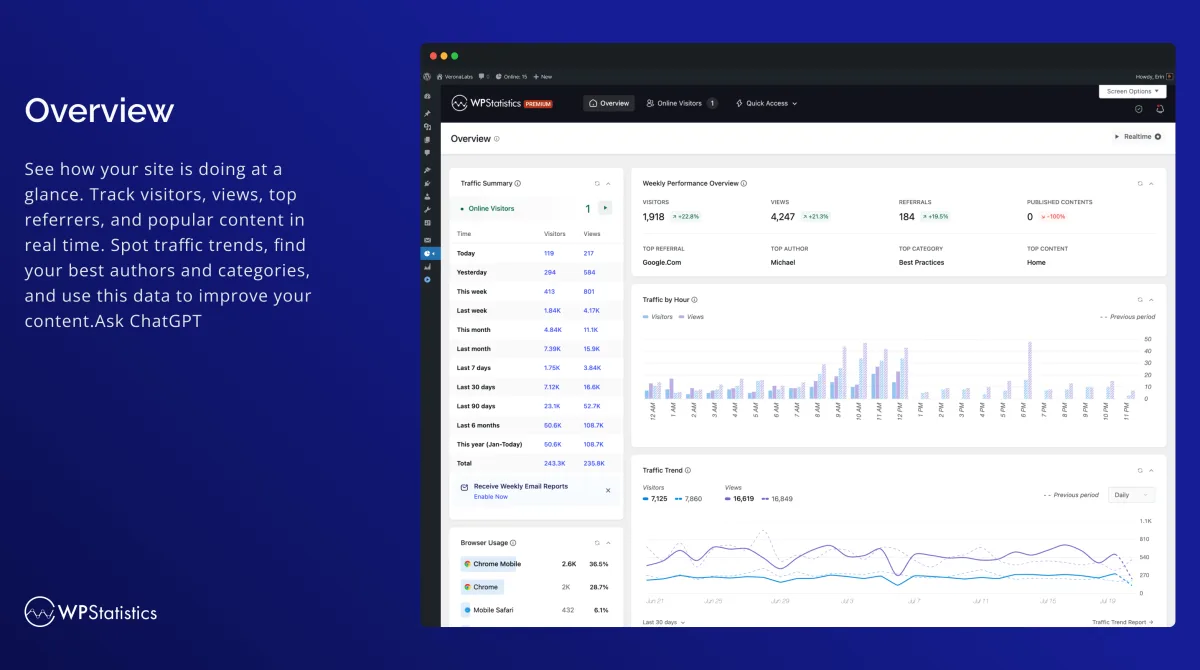
WP Statistics is the analytics plugin that has been on WordPress.org since March 2011 and is still being actively maintained in 2026. Numbers on WordPress.org as of 2026-05-25: 600,000+ active installs, 4.1/5 from 754 reviews (539 5-star, 110 1-star), latest release v14.16.8 on 2026-05-19. By install count this is the largest dedicated self-hosted analytics plugin in the WordPress.org directory.
The free version is unusually deep. You get GDPR-compliant cookieless tracking by default, the overview dashboard, content and category analytics, author analytics, geographic reports (country, city, European countries, US states, regions within your country), device reports (browser, OS, device category, device model), real-time online user count, configurable role-based access, advanced filtering and exclusions, email reports, an ad-blocker bypass option that dynamically renames the tracking script, WP Consent API integration (so it works natively with Complianz and Cookiebot), full historical data preservation when migrating from another plugin, and an explicit Privacy Audit tool that checks your site against GDPR/CCPA/PECR rules.
Pricing on WP Statistics Premium add-ons as of 2026-05-25: Single Site $119/year, 5 Sites $249/year, Unlimited (up to 100 sites under a fair-usage policy) $449/year. The premium bundle adds custom post type and custom taxonomy tracking via the Data Plus add-on, real-time stats, outbound link and download tracking, individual author performance, country-level deep analytics, advanced reporting, the Mini Chart quick view, the Marketing add-on (UTM campaign tracking, Google Search Console integration, custom event/goal tracking, the built-in UTM link builder), white-label and custom branding. 14-day money-back guarantee.
The honest trade-off is the rating distribution. 4.1/5 across 754 reviews is materially lower than the other self-hosted picks (Burst at 4.9, Independent Analytics at 4.8, Matomo at 4.6, Koko at 5.0). Recent 2026 reviews show the classic split: long-time users praising the breadth of the free version, newer users frustrated by the persistent premium upsell badges across the admin UI and a handful of installs reporting accuracy issues. The community feedback on bot exclusion has improved meaningfully through the v14.16.x releases (the 14.16.6 release explicitly excluded headless browsers like Headless Chrome, Puppeteer and Playwright that were inflating counts).
Privacy and GDPR notes: cookieless tracking is the default; no PII is stored by default; IP hashing uses a random daily salt by default; the Privacy Audit tool is included free; WP Consent API integration is included free. By default a cookie consent banner is not required.
What I found in setup: WP Statistics is the most "just works" of the long-running self-hosted picks. Installation, activation and the start of tracking happen on a single click; no setup wizard, no required GA connection, no required account. In our sandbox the plugin added 14 admin menu items under a top-level "Statistics" entry (Overview, Visitor Insights, Page Insights, Referrals, Content Analytics, Author Analytics, Category Analytics, Geographic, Devices, Plugins, Privacy Audit, Settings, Optimization and Help Center) and dropped a Traffic Overview, Traffic Trend, Referrals from Search Engines and Top Pages widget set into the main WordPress dashboard. The Overview screen does carry a "Discover the Full Power of WP Statistics" Premium promo at the top, which is the upsell-density complaint that recurs in 2026 reviews; it does not block any free feature, but it is the first thing you see.
Best for: long-running WordPress sites that want a self-hosted analytics plugin with one of the broadest free tiers on the market, deep multisite support, and an explicit Privacy Audit tool included in the free version.
7. Koko Analytics: the lightest analytics plugin in the WordPress directory
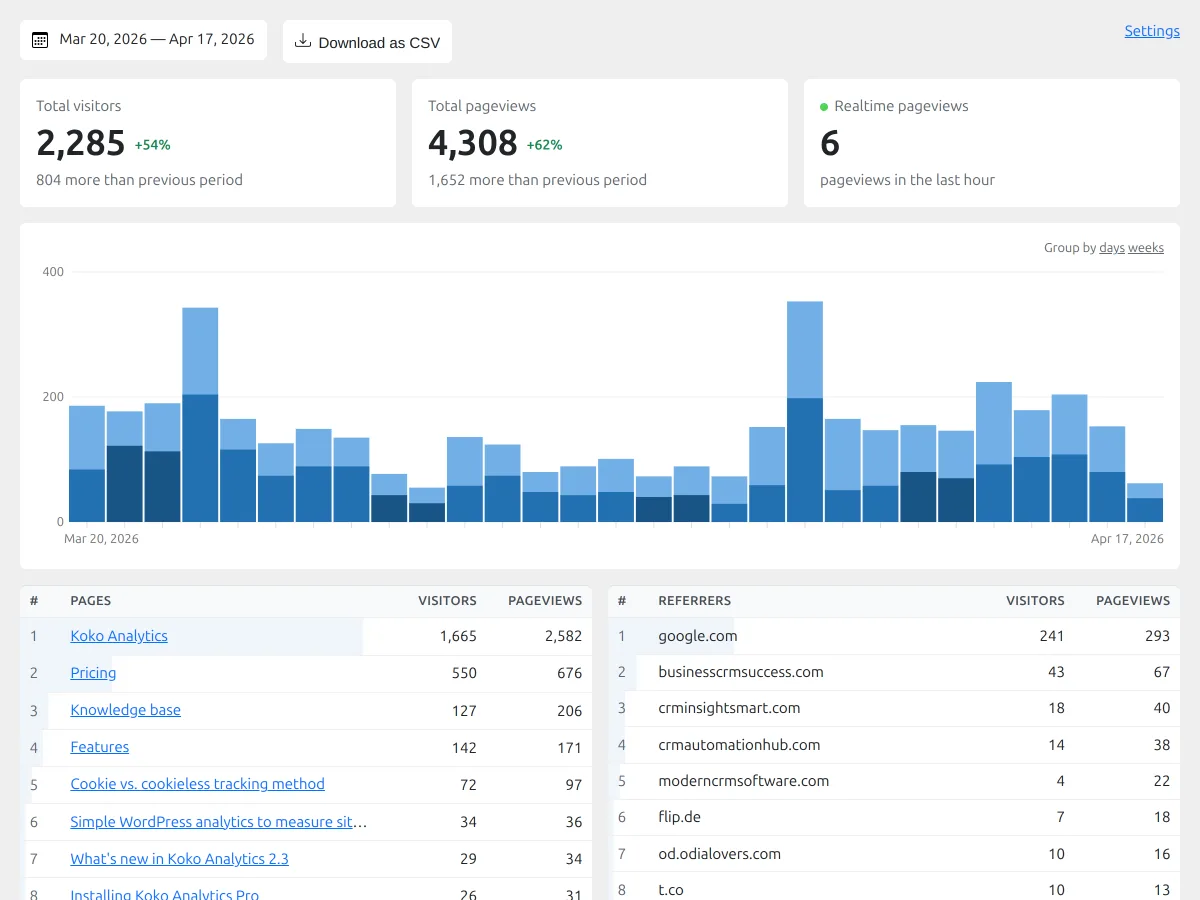
Koko Analytics from Danny van Kooten and ibericode is the analytics plugin to install when your only real requirement is "I want pageviews, visitors, top posts and referrers, on my own server, with the smallest possible impact on my Core Web Vitals score." The tracking snippet adds less than 1KB to your HTML, the collection endpoint deliberately bypasses WordPress so it works with full-page caching out of the box, and the dashboard is a single page rather than a multi-screen menu. Numbers on WordPress.org as of 2026-05-25: 60,000+ active installs, 5.0/5 from 235 reviews (231 5-star, 0 1-star), latest release v2.3.6 four days before publish.
The free version covers the entire core analytics use case: pageviews, unique visitors, top posts and pages, referrer statistics, path-based tracking (custom post types, archives, search pages, 404s), returning visitor detection without cookies, exclusion by user role or IP, automatic cleanup of old data on a configurable schedule, historical import from Jetpack Stats, Plausible or Burst Statistics, a popular-posts widget/Gutenberg block/shortcode, and a pageview-count Gutenberg block. There are no upsell badges in the free dashboard.
Pricing on Koko Analytics Pro as of 2026-05-25: Single $59/year (1 site), Multi $99/year (5 sites), Agency $249/year (25 sites). Pro adds country statistics, browser/OS/device statistics, custom event tracking (outbound link clicks, contact form submissions, add-to-cart actions and custom JavaScript events), email reports and traffic spike alerts. 30-day money-back guarantee.
The honest trade-off is the deliberate simplicity. There is no per-post Posts-menu integration like Independent Analytics has, there is no Heatmaps add-on like Matomo has, there is no eCommerce dashboard like MonsterInsights or Burst Pro have, there is no Google Analytics import. Koko Analytics solves the "show me the basics with the lowest possible site impact" problem extremely well; if you want anything beyond that, one of the other six picks in this list is the right call.
Privacy and GDPR notes: no cookies in the default mode, no personal data processed or stored, no third-party services involved. Returning visitors are detected without cookies using path-based heuristics. By default a cookie consent banner is not required.
What I found in setup: Koko Analytics is the cleanest "install and you are done" of any plugin in this list. Activation is instantaneous, there is no wizard, no settings to fill in before tracking starts, and no upsell badges in the free dashboard. The plugin adds exactly two admin entries: an "Analytics" page under the WordPress Dashboard menu (one chart plus Top Pages and Top Referrers on a single screen) and a "Koko Analytics" page under Settings (a single Tracking settings tab covering cookies, IP filtering, user-role exclusions and data retention). A small Koko Analytics widget also drops into the main WordPress dashboard for at-a-glance numbers. The deliberate simplicity is the entire pitch.
Best for: performance-sensitive WordPress sites, blogs with very tight Core Web Vitals targets, and owners who want only the core analytics numbers with the smallest possible frontend payload.
Bonus: Jetpack Stats, the easiest path if you already run Jetpack
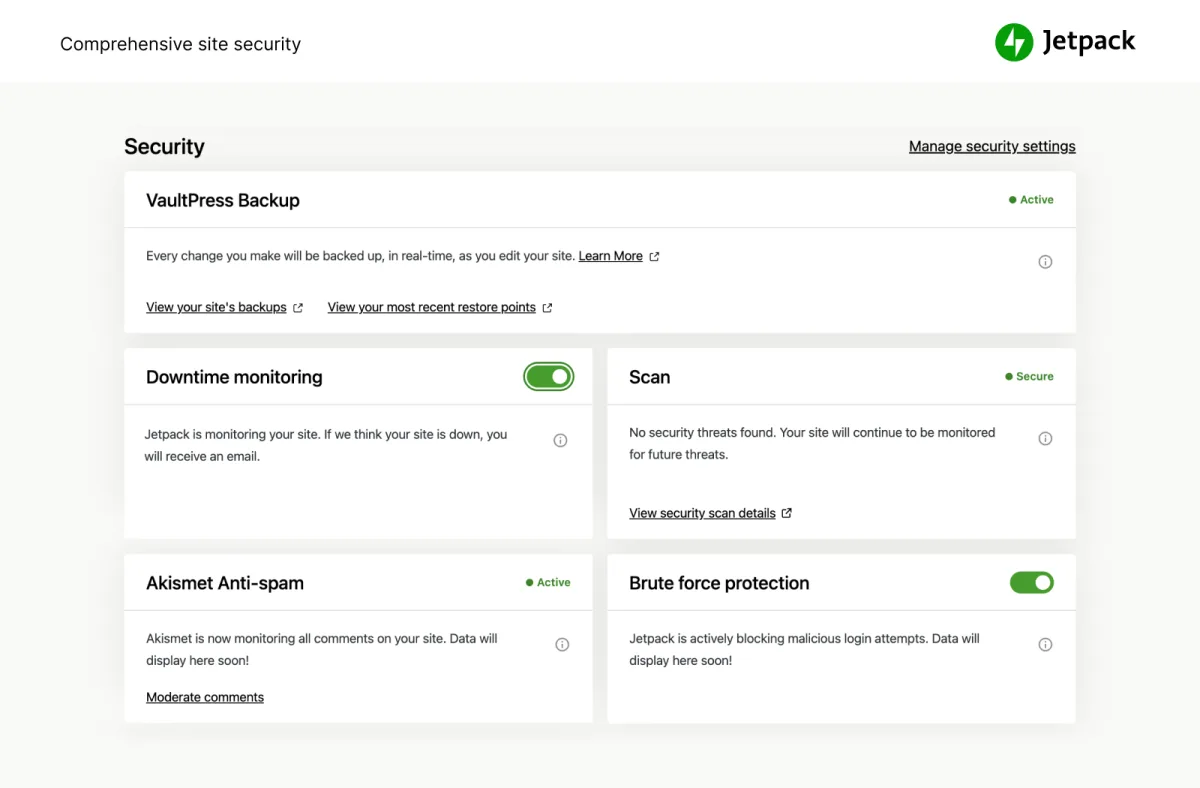
Jetpack Stats sits just outside the main shortlist but deserves a mention because for any WordPress site that already runs Jetpack (Automattic markets a 14.5 million-user installed base on the marketing page), the stats module is genuinely the lowest-friction analytics setup you can do. There is no Google account to create, no GA4 property to provision, no Tag Manager container to wire up; Jetpack Stats turns on inside the existing Jetpack connection to WordPress.com and starts collecting page views, top posts and pages, top referrers, country distribution and a daily traffic chart inside wp-admin in one click.
What changed in 2024/2025 is the pricing structure. Jetpack Stats now has a free tier for personal/non-commercial sites with no minimum traffic, a "Personal" pay-what-you-can tier still tied to non-commercial use, and a Commercial tier that starts at €7.95/month billed yearly with 10,000 monthly site views included and overage-priced upgrades for larger sites. Several 2026 WP Statistics reviews and similar competitive listings explicitly mention switching away from Jetpack Stats after hitting the commercial threshold, which is the realistic upgrade trigger for any growing site running ads, eCommerce or any other commercial activity.
Privacy and GDPR notes: Jetpack respects Do Not Track via a configuration snippet, hides user-identifying data (IPs, usernames) from site owners by default, and Automattic positions the stats module as GDPR compliant. The trade-off is that data is processed on WordPress.com servers, which is the opposite of the self-hosted privacy story that Burst, Independent Analytics, Matomo, WP Statistics and Koko Analytics all offer.
Best for: WordPress sites that are already on Jetpack (or about to install it for security/backup/CDN reasons) and that want a simple one-click stats dashboard without configuring Google Analytics.
How to choose the right WordPress analytics plugin
The seven plugins above (plus the Jetpack Stats bonus) genuinely win for different buyer profiles. The short decision guide:
- If you want the official Google plugin and you do not mind connecting GA4, Search Console and PageSpeed to your WordPress site, install Site Kit by Google. It is free, it is made by Google, and it covers the broadest Google stack without any per-product configuration work.
- If you want the deepest GA4 reports rebuilt as native WordPress dashboards with WooCommerce/EDD/MemberPress, forms and SEO-plugin integrations, install MonsterInsights. The Lite version covers the headline numbers; Pro Plus at $99.50/year intro is the realistic upgrade trigger once you need the eCommerce report.
- If you want a clean self-hosted dashboard with no Google account and you want cookieless tracking by default, install Burst Statistics. The free tier is enough for most blogs; Burst Pro Creator at €42.63/year unlocks the UTM and geographic data once your marketing reporting needs it.
- If you want per-post analytics inside the WordPress Posts menu and an affordable lifetime upgrade path, install Independent Analytics. The free tier is unusually generous; the $147 lifetime PRO Standard is the right buy for a long-lived single-site project.
- If you want a full Google Analytics replacement with Heatmaps, Funnels, Form Analytics and Session Recording on your own server, install Matomo Analytics for WordPress. The core is free; the premium add-ons cover everything GA4 (and the GA4 ecosystem) offer, and a 30-day free trial is included on every premium add-on.
- If you want the broadest free feature set of any long-running self-hosted plugin, including content/category/author analytics, the Privacy Audit tool, ad-blocker bypass and WP Consent API integration, install WP Statistics. The free version is enough for most sites.
- If your only priority is "lightest possible analytics with the smallest frontend payload", install Koko Analytics. Less than 1KB of HTML, no cookies, no consent banner, no upsell badges in the free admin.
- If you already run Jetpack, the bundled Jetpack Stats module is the one-click answer. Watch the commercial threshold once your site monetizes.
The single most common mistake to avoid is installing more than one tracking plugin at the same time. MonsterInsights, Site Kit and Jetpack Stats are reporting/connection plugins (the underlying GA4 or WordPress.com tracker is shared, so running both Site Kit and MonsterInsights side by side is fine and is a documented pattern) but Burst Statistics, Independent Analytics, Matomo, WP Statistics and Koko Analytics each load their own first-party tracker. Stacking two of those on the same page enqueues duplicate trackers, inflates traffic numbers and makes the resulting reports impossible to trust. Pick one self-hosted plugin and use the import flow if you switch later (Koko Analytics imports from Jetpack/Plausible/Burst; Matomo imports from WP Statistics or GA).
FAQ: WordPress analytics plugins
What is the best WordPress analytics plugin overall?
There is no single answer because the seven plugins above win for different buyer profiles. For most WordPress beginners the safest pick is Site Kit by Google because it is free, made by Google, and connects GA4, Search Console, PageSpeed Insights and AdSense in a single setup flow. For deeper GA4 reporting inside the WordPress dashboard with eCommerce and forms tracking, MonsterInsights is the standard answer. For a self-hosted analytics plugin that does not need Google at all, Burst Statistics, Independent Analytics, Matomo, WP Statistics and Koko Analytics are all credible 2026 picks depending on how deep your feature requirements go.
Do I need a WordPress analytics plugin if I already have Google Analytics 4?
Strictly no, but in practice yes. GA4 itself runs in a separate browser tab and has a steep learning curve. A WordPress analytics plugin pulls the headline numbers (sessions, pageviews, top posts, top referrers, conversion goals) into wp-admin where you do the rest of your site work, and either uses GA4 as the underlying data source (Site Kit, MonsterInsights) or replaces GA4 entirely with first-party tracking (Burst, Independent Analytics, Matomo, WP Statistics, Koko). The reporting layer on top of GA4 is the main value-add of plugins like MonsterInsights and Site Kit.
Which WordPress analytics plugin is best for privacy and GDPR compliance?
Of the seven main picks, the four with the strongest privacy story are Independent Analytics, Burst Statistics, Matomo Analytics for WordPress and Koko Analytics. All four are self-hosted, do not send visitor data to any third party, support cookieless tracking, and do not require a cookie consent banner in most jurisdictions when configured with their default privacy settings. WP Statistics is also strong on this axis and ships an explicit Privacy Audit tool. Site Kit and MonsterInsights both pipe data into Google Analytics 4 by design, so the GDPR profile is the GA4 profile: anonymized IPs by default, but you still need a Google-certified Consent Management Platform for EEA, UK and Swiss traffic.
Will an analytics plugin slow my WordPress site down?
The well-maintained plugins in this guide are designed not to. Site Kit, MonsterInsights and Jetpack Stats use the underlying Google Analytics 4 or WordPress.com tracker, which loads asynchronously and has near-zero impact on Largest Contentful Paint when configured correctly. Koko Analytics adds under 1KB to your HTML and bypasses WordPress entirely for its collection endpoint. Burst Statistics ships under 4KB of tracking script and offers a Turbo Mode for aggressive caching. Independent Analytics records visits via a deferred REST API request and explicitly does not affect Core Web Vitals. Matomo is the heaviest of the group because it runs the full Matomo application on your server; for very high-traffic sites the vendor recommends running Matomo On-Premise on a separate server and connecting from WordPress.
How do I read the GA4 numbers once they show up?
Pageviews, sessions, engaged sessions, average engagement time, events and conversions in GA4 mean different things than the page-views/visits/bounce-rate model the old Universal Analytics used. Our deeper guide to understanding Google Analytics for WordPress walks through the GA4 reports that matter for a typical blog or content site.
Which WordPress analytics plugin tracks form conversions?
Of the seven main picks, the strongest form-conversion tracking lives in MonsterInsights Pro (WPForms, Gravity Forms, Formidable Forms, Contact Form 7, Ninja Forms, plus generic-form support), Matomo Form Analytics (the premium add-on at 169€/year), and Independent Analytics Pro (20+ form plugins, including Mailchimp for WordPress, Kadence Blocks forms, Newsletter and Everest Forms added in v2.14.0 in January 2026). Burst Statistics tracks form submissions via custom hooks in the free tier and a richer dashboard on Pro. If you are still picking the form plugin itself, our roundup of the best WordPress contact form plugins covers that category separately.
Can I run Google Analytics and a self-hosted analytics plugin at the same time?
Yes, and it is a common 2026 pattern. Many WordPress owners run Site Kit (which connects GA4) for the search-side data plus a self-hosted plugin (Burst, Independent Analytics, Matomo, Koko or WP Statistics) for the privacy-friendly first-party stats. The two trackers do not interfere; they record into different stores. The one thing to avoid is stacking two self-hosted analytics plugins side by side, because their separate trackers will each count the same visit.
Do these analytics plugins need a cookie consent banner?
It depends on the plugin. Site Kit (with GA4) and MonsterInsights pipe data into Google Analytics 4, which sets cookies and processes personal data, so you need a Google-certified Consent Management Platform for EEA, UK and Swiss traffic and a standard cookie banner. Jetpack Stats also sets cookies on the WordPress.com side. Burst Statistics, Independent Analytics, Matomo (in its default privacy-friendly configuration), WP Statistics and Koko Analytics all support fully cookieless tracking out of the box; with the default settings, a cookie consent banner is generally not required in most jurisdictions. Always confirm the exact requirement with a local lawyer or your DPO.
Which WordPress analytics plugin should I install for an SEO-focused content site?
If SEO is your primary use case, Site Kit by Google is the strongest pick because it surfaces Google Search Console impressions, clicks, average position, top queries and top pages inside wp-admin and connects to GA4 for the post-click behavior. Pair it with one of the dedicated SEO plugins for the on-page work; our comparison of the best free WordPress SEO plugins covers Rank Math, Yoast, AIOSEO, SEOPress and The SEO Framework side by side.
Final verdict
If you take only one thing away from this guide, let it be that "best WordPress analytics plugin" is a question with seven defensible answers in 2026, not one. Pick by buyer profile and by your stance on Google, not by raw install count.
For most WordPress sites the right pick is Site Kit by Google (the official Google plugin, free, and the broadest Google product coverage) or MonsterInsights (the deepest GA4 reporting inside the WordPress dashboard). For sites that do not want to send any data to Google, Burst Statistics, Independent Analytics and WP Statistics are the three strongest self-hosted picks today, with Matomo as the answer once your feature requirements include Heatmaps, Session Recording, Funnels or Form Analytics. For performance-first sites that just need pageviews and top posts with the smallest possible frontend payload, Koko Analytics is the right call. If you already run Jetpack, the bundled Jetpack Stats module is the lowest-friction starting point and the right place to live until you outgrow the commercial threshold.
Whichever plugin you pick, install it, configure the privacy and consent settings to match your jurisdiction, exclude logged-in admins/editors from tracking, set a sensible data retention policy, and resist the urge to install a second tracking plugin "to compare numbers." If you have not yet configured a cookie consent banner alongside your analytics setup, our hands-on comparison of the best WordPress cookie consent plugins<\/a> covers the plugins that pair most naturally with GA4 and GTM on WordPress. If you also want to round out the broader Google toolset around whichever analytics pick you make, our 2026 roundup of the free Google tools for your WordPress website covers everything Search Console, GA4, PageSpeed Insights, Tag Manager, Looker Studio and Business Profile add on top.


