

Why WordPress SEO Is Important in 2026 (and What Has Actually Changed)

SEO has not gone away in 2026, it has just become harder to fake. Google still sends free, compounding traffic to WordPress sites that actually answer a question better than the next ten results, but the ranking system, the search results page, and the way readers consume answers all look very different from 2021.
If you run a WordPress site (a blog, a small business site, an online store, or a service business), this is the short version of why SEO still matters, what changed, and where to start.
Why WordPress SEO still matters in 2026
Three things have not changed in the last five years, and they are still the reason SEO is worth the effort:
- Organic search is the cheapest scalable traffic source. Ads stop the day you stop paying. A page that ranks well keeps bringing visitors month after month, often for years.
- Search intent is high. Someone typing "best appointment booking plugin" or "how to fix WordPress critical error" is already looking for what you sell or solve. That is much warmer than an interruption ad on social media.
- Search is bigger, not smaller. Google still handles the majority of web searches worldwide, and AI assistants like ChatGPT, Perplexity, Gemini, and Copilot pull most of their answers from the same indexed web that classic SEO targets. Ranking well now means visibility in both blue links and AI-generated answers.
The flip side is real too. Thin "written-for-Google" content has stopped working. The bar for what ranks is higher, and WordPress out of the box does not handle most of it for you.
How SEO works (the 2026 version)
The classic explanation still holds: search engines act like a giant library. They crawl the web, store copies of pages in an index, and then pick which pages best answer each query.
What changed is what happens after the index. In 2026, three layers sit between your page and the reader:
- Crawling and indexing. Googlebot (and now also bots like GPTBot, ClaudeBot, PerplexityBot, and Google-Extended) discover URLs through links, sitemaps, and internal navigation, then decide whether the page is worth keeping in the index. Pages with thin content, duplicate content, or broken rendering quietly get dropped.
- Ranking. Hundreds of signals decide the order of results. The ones that move the needle the most for WordPress sites are content quality, topical authority, search intent match, internal linking, page experience (Core Web Vitals), and backlinks from relevant sites.
- Generative answers. Google's AI Overviews, plus standalone AI assistants, synthesize answers from a handful of trusted sources. Those sources are picked from the same index, and they tend to be pages that already rank well, have clean structure, and contain direct, factual statements.
The takeaway: if you write for a real reader, structure the page so it is easy to extract a clean answer, and earn a few legitimate links and mentions, you can show up in both the classic 10 blue links and the AI answer box.
What changed since the 2021 SEO playbook
If the last time you thought seriously about WordPress SEO was a few years ago, here is what shifted that you cannot ignore:
1. AI Overviews and answer engines
Google's AI Overviews now appear above the classic results for a large share of informational queries. ChatGPT Search, Perplexity, and Gemini answer many questions without sending the user to your site at all. To stay visible, your page has to be the source those systems cite, which means clear structure (real headings, bullet lists, definitions, short paragraphs), accurate facts, and original information.
2. E-E-A-T is now an editorial standard
Experience, Expertise, Authoritativeness, and Trustworthiness are not a ranking factor by name, but every helpful-content and reviews update has pushed in that direction. Posts that show first-hand experience (real screenshots, real tests, named authors with bios, transparent methodology) consistently outrank generic AI-spun rewrites of the same topic.
3. The Helpful Content system is permanent
Google's helpful-content signal is now part of the core ranking system. A few thin or AI-padded pages can drag down rankings for the whole site, not only those pages. For WordPress publishers, this means a cleanup of old, low-value posts is often more profitable than writing new ones.
4. Core Web Vitals changed (INP replaced FID)
Since March 2024, Interaction to Next Paint (INP) replaced First Input Delay as a Core Web Vital. INP measures how responsive the page feels to clicks, taps, and key presses, not just the first one. Heavy WordPress themes, bloated page builders, and unoptimized third-party scripts hurt INP first.
5. Mobile-first indexing is the default
Google indexes the mobile version of your WordPress site, not the desktop one. If your theme hides content on mobile, breaks layout, or loads slowly on a mid-range phone, that is the version Google judges.
6. Structured data is a visibility multiplier
Schema.org markup for Articles, Products, FAQs, How-tos, Reviews, Local Business, and Events helps Google understand the page and unlocks rich results (star ratings, prices, FAQ accordions, sitelinks). Most quality WordPress SEO plugins can add this for you without code.
The ranking factors that still matter most
Hundreds of signals exist, but for a WordPress site you should focus on the ones that move rankings in practice:

- Search intent match. The page format has to match what the SERP rewards. If the top results are listicles, do not publish a single-product page. If they are how-to guides, do not publish a sales page.
- Content depth (not length). "How to turn off iPhone" needs 200 words. "How to set up a WooCommerce store" needs much more. Depth means fully solving the query, not hitting a word count.
- Topical authority. Sites that cover a topic in depth across many connected posts outrank single-page contenders. Internal links between related posts are how Google sees that structure.
- Backlinks from relevant sites. Still a strong signal, but the threshold for "relevant" got stricter. A handful of links from real industry sites beats hundreds of low-quality directory links.
- Page experience. Core Web Vitals (LCP, INP, CLS), HTTPS, no intrusive interstitials, and a clean mobile layout.
- Freshness. For queries where users expect current information (pricing, version numbers, comparisons, best-of lists), updated content outranks stale content even if the older page used to dominate.

Why WordPress sites need deliberate SEO work
WordPress is friendly to SEO but it does not do SEO for you. A default install gives you clean URLs, an XML sitemap (since WordPress 5.5), and a reasonable robots.txt, and that is roughly where the built-in help ends.
You still have to make decisions about:
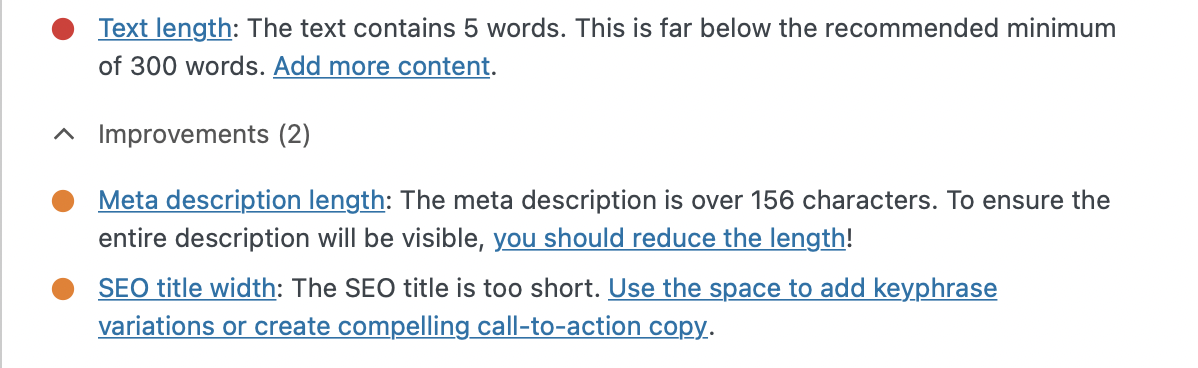
- title tags and meta descriptions for every page
- internal linking and category/tag structure
- image optimization, lazy loading, and modern formats
- caching, hosting quality, and theme/plugin bloat
- schema markup and breadcrumbs
- indexation control (which tag, category, author, and attachment pages should be indexed at all)
- HTTPS, redirects, and clean URL structure
- content updates and pruning of stale posts
Practical first steps for a WordPress site in 2026
If you want a short, ordered checklist to start with, do these in this order:
- Install one SEO plugin and configure it properly. Yoast SEO, Rank Math, or SEOPress all handle titles, meta, sitemaps, schema, and breadcrumbs. Pick one, do not stack two. Our comparison of the top free WordPress SEO plugins walks through the trade-offs.
- Connect Google Search Console and Bing Webmaster Tools. Submit the sitemap, then watch the Indexing and Performance reports weekly.
- Fix the speed basics. Use a lightweight theme, a quality host, a caching plugin, image compression, and lazy loading. Our WordPress speed optimization guide covers what actually moves Core Web Vitals.
- Audit what is already on the site. Before writing new content, run an audit of the existing posts: thin pages, duplicate content, orphan pages, broken links, weak titles. Follow our WordPress SEO audit checklist for a structured pass.
- Pick a topical focus and build it out. Decide on a few core topics that match your business and write deep, useful posts around each one. Then link them together. Our WordPress SEO optimization guide goes deeper on on-page tactics.
- Set up the right Google tools. Search Console, Analytics 4, PageSpeed Insights, and Trends are all free. See our roundup of the best Google tools for WordPress for what each one is good for.
- Write for a real reader first. Use plain language, real examples, original screenshots where possible, and answer the question fully. Our SEO tips checklist for blog posts is a one-page summary you can apply to every new draft.
Frequently asked questions
Is SEO still worth it in 2026 with AI search around?
Yes. AI Overviews and assistants like ChatGPT and Perplexity rely on the same indexed web that classic SEO targets. Pages that rank well and have clear structure are the ones AI systems cite. SEO is still the most reliable way to be both clicked and quoted.
Does WordPress have SEO built in?
Only partly. WordPress gives you clean URLs, an XML sitemap, and basic crawl behavior out of the box. Titles, meta descriptions, schema, breadcrumbs, image optimization, redirects, and indexation rules still require a plugin and conscious setup.
How long does WordPress SEO take to show results?
For a new site, expect three to six months before steady organic growth shows up, and longer for competitive niches. For an existing site, technical fixes and content updates can move rankings within a few weeks.
Do I need a paid SEO plugin?
Not to start. The free versions of Yoast SEO, Rank Math, and SEOPress already cover titles, meta, sitemaps, and basic schema. Paid features (redirects manager, advanced schema, internal link suggestions, multi-site, AI summaries) are worth it once your site is large enough that they save real hours of work.
What are Core Web Vitals and why do they matter?
They are Google's measurable signals for page experience: LCP (loading), INP (interaction responsiveness, replaced FID in March 2024), and CLS (visual stability). Pages that fail Core Web Vitals can still rank, but they lose ground to faster, more stable competitors, especially on mobile.
How do I rank in Google's AI Overviews?
There is no separate AI Overviews ranking system. The pages cited in AI Overviews are usually pages that already rank well for the query, have clear structure (real headings, lists, definitions), and state facts directly. Strong on-page SEO is still the path in.
Conclusion
WordPress SEO in 2026 is less about chasing tricks and more about being genuinely useful, technically clean, and consistently published. Search engines, AI assistants, and human readers all reward the same thing: pages that answer the question better than the alternatives, on a site that loads fast and is easy to trust.
WordPress will not do that for you automatically, but the building blocks (a real SEO plugin, a fast theme, Search Console, and a topical content plan) are all free or near-free. Start with the seven steps above, keep going, and the compounding traffic will follow.


