

7 Best WordPress Two-Factor Authentication Plugins in 2026 (Free and Paid, Compared)

Why a WordPress 2FA plugin is a separate decision in 2026
A WordPress two-factor authentication plugin solves one specific problem: when an attacker already knows the right username and password, can they still get in? Without 2FA, the answer is almost always yes. With 2FA, the attacker also has to steal the user's authenticator app, security key, mobile push, SMS code, or email link, which is a much higher bar.
Login security is a separate decision from "do I need a general security plugin." Most WordPress sites should run one main security plugin for firewall, malware scanning, and hardening, and our existing comparison of the 10 best free WordPress security plugins goes deep on that side of the stack. This roundup zooms in on the 2FA layer: which dedicated plugin to install when the goal is a strong second factor on wp-login.php, WooCommerce login, and the supported custom login forms.
For this post I installed each plugin on a clean WordPress 7.0 test site, completed the first-time setup flow, walked through every settings screen the plugin ships, and verified the user-side experience on the WordPress profile page or vendor prompt. For every plugin I also read the WordPress.org listing on 2026-06-14 (active installs, rating, last update, tested-up-to, recent changelog, supported methods) and the vendor's pricing page. Where a plugin is a SaaS connector (Duo Universal and Rublon, and partly miniOrange's SMS, Telegram, and WhatsApp delivery), the section is explicit about what is plugin-side and what is vendor-side.
My top free pick for most sites is the open-source Two Factor plugin maintained by George Stephanis and the WordPress.org Contributors team. If you need to enforce 2FA across user roles with a wizard and grace periods, WP 2FA by Melapress is the better fit. The other five plugins each cover a specific buyer need that the first two do not: free reCAPTCHA bundled with 2FA, the widest method buffet in one plugin, deep integration with non-WP login forms, Duo's passkey and push stack, or Rublon's organization-wide MFA dashboard.
How I compared each WordPress 2FA plugin
For every plugin I checked the same data:
- Hands-on activation: install from the WordPress.org repo, activate, and walk through the first-time admin notice or wizard flow, then visit every settings tab the plugin ships.
- User-side setup: confirm the user profile page or vendor prompt shows the 2FA enrollment options the plugin advertises (QR code, backup codes, passkey, push, email link, and so on).
- Install reputation: active install count and average rating on WordPress.org, total review count, and recent reviews from the last 60 days, so the rating is not skewed by old complaints that no longer apply.
- Maintenance signals: last updated date, tested-up-to WordPress version, current major version, and the highlights of the most recent changelog.
- Free methods: which 2FA methods are usable on the free plan today (authenticator app or TOTP, email codes, SMS, push, passkeys or WebAuthn or FIDO2, hardware security keys, backup codes).
- Enforcement model: can an admin force 2FA on selected roles, set a grace period, and require setup at next login, or is the plugin opt-in only.
- Login form coverage: stock
wp-login.phponly, or also WooCommerce, Theme My Login, Ultimate Member, Elementor Pro, bbPress, and custom shortcode forms. - Free vs paid line: what is actually unlocked on the paid plan, with the current price taken directly from the vendor pricing page on 2026-06-14.
- Best fit: which site type the plugin is the right answer for, and a one-line honest limitation so you know what you give up by picking it.
Quick comparison: WordPress 2FA plugins at a glance
| Plugin | Best for | Free methods | Free user limit | Paid plan starts at |
|---|---|---|---|---|
| Two Factor | Free, official feature plugin | TOTP, Email codes, Backup codes (plus WebAuthn via companion plugin) | Unlimited users | Free only (community plugin) |
| WP 2FA by Melapress | Enforcing 2FA across user roles | TOTP, Email, Passkeys, Backup codes, role policies | Unlimited users on free | Premium $79 / yr (1 site), Enterprise $89 / yr (1 site) |
| Wordfence Login Security | Free TOTP plus reCAPTCHA plus XML-RPC bundle | TOTP for any role, reCAPTCHA v3, XML-RPC 2FA | Unlimited users on free | Free (move to the full Wordfence plugin after 2026-07-01) |
| miniOrange 2FA | Widest method buffet (Email, SMS, Telegram, TOTP) | TOTP, Email OTP, SMS OTP, Telegram OTP, KBA, Backup codes | Up to 5 users on free | Starter $69 / yr, Enterprise $99 / yr, All-Inclusive $149 / yr |
| Two Factor Authentication (David Anderson) | Lightweight TOTP / HOTP from the UpdraftPlus team | TOTP, HOTP, per-role enable, WooCommerce, Theme My Login | Unlimited users on free | Premium from £19.00 / 12 months (1-site license) |
| Duo Universal | Free push plus passkeys plus biometrics | Duo Push, TOTP, SMS, phone callback, passkeys, FIDO2 (vendor SaaS) | Up to 10 users on Duo Free | Duo Essentials $3 / mo / user, Advantage $6 / mo / user, Premier $9 / mo / user |
| Rublon MFA | Multi-method MFA across many apps | Mobile Push, TOTP, QR, SMS, WebAuthn, YubiKey, Email link (vendor SaaS) | 1 user on Rublon Free | Business 2 EUR / user / mo (15-user minimum), Enterprise 4 EUR / user / mo (300-user minimum) |
Active installs, ratings, and pricing in the table are sourced from each WordPress.org plugin page and each vendor's pricing page on 2026-06-14. Duo and Rublon are SaaS-backed plugins: pricing is per Duo or Rublon user, not per WordPress site.
1. Two Factor: the best free overall WordPress 2FA plugin
- WordPress.org: wordpress.org/plugins/two-factor/
- Active installs: 100,000+
- Rating: 4.8 / 5 (208 reviews on 2026-06-14)
- Latest version: 0.16.0, released 2026-03-27
- Requires: WordPress 6.8+, PHP 7.2+
- Tested up to: WordPress 6.9.4
- Pricing: free, no premium upsell
Two Factor is the open-source 2FA plugin maintained by the WordPress.org Contributors team, including George Stephanis (who originally proposed feature-plugin-style 2FA inside WordPress core in 2013) and Kaspars Dambis. It is what I recommend installing on most WordPress sites in 2026 if you only need a clean second factor for a small admin team, you trust the same community that ships WordPress core to maintain a security-critical plugin, and you do not want a paid upsell sitting inside your dashboard.
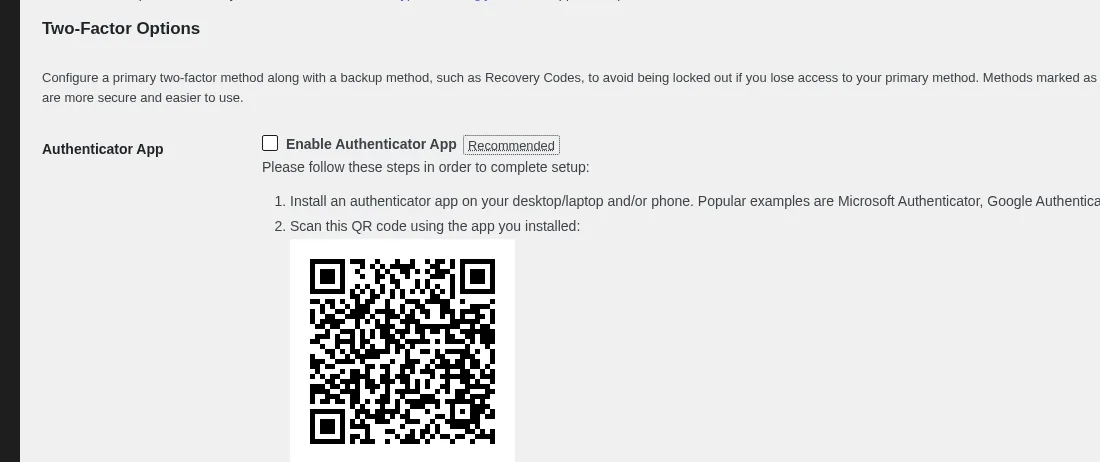
What I saw after activation matches the advertised free version: the plugin drops a new Two-Factor Options block onto every user profile, and from that block I could enable Authenticator App (TOTP) with a QR code that pairs with any standards-compliant app (Google Authenticator, Authy, 1Password, Microsoft Authenticator, FreeOTP, Bitwarden Authenticator, Aegis, Raivo), enable Email Codes for users who do not want an app, and generate ten single-use Backup Codes. There is no separate settings page to configure (the 0.16.0 release moved heavier configuration into the profile screen itself), and there is no upsell anywhere in the admin.
If you also want passkeys, WebAuthn, or FIDO2 hardware keys, the recommended path is to keep Two Factor as the core plugin and install the companion Two-Factor Provider: WebAuthn plugin. The two plugins are designed to work together. WebAuthn shows up as an additional provider inside Two Factor's profile screen. The original FIDO U2F support was removed in 0.16.0 because browsers no longer ship the legacy U2F API.
Strengths. Free, open-source, maintained by the same community that ships WordPress core, no upsell. Translated into 40+ locales. Active 2026 release cadence with two meaningful releases (0.15.0 in February, 0.16.0 in March) and a 4.8 / 5 rating from a real review base. Light footprint: the plugin adds an extra step to wp-login.php, a Two-Factor Options block on every user profile, and very little else.
Honest limitation. Each user enables 2FA from their own profile page. An admin cannot force enrollment without a custom function or a complementary plugin. A recent 1-star review on the wp.org page captures the real concern: a user can also disable their own 2FA from the same profile screen, which means Two Factor is best for a single admin or a small editorial team you actually trust, not for a 500-user membership site where you need org-wide policy enforcement. For that scenario, WP 2FA is the better pick.
Best fit. A solo blogger, a small business site, an agency that just wants a clean second factor on every admin account, and any owner who prefers an open-source plugin from the WordPress.org Contributors team over a vendor-controlled product.
2. WP 2FA by Melapress: best for enforcing 2FA across user roles
- WordPress.org: wordpress.org/plugins/wp-2fa/
- Active installs: 100,000+
- Rating: 4.7 / 5 (168 reviews on 2026-06-14)
- Latest version: 3.1.1.2, released 2026-02-25 (main 3.1.x branch updated 2026-05-20)
- Requires: WordPress 5.5+, PHP 7.4+
- Tested up to: WordPress 7.0
- Pricing: free on WordPress.org. Premium $79 / yr (1-site license) and Enterprise $89 / yr (1-site license), with tiered licenses up to 25 sites and a 30-day money-back guarantee on the Melapress pricing page
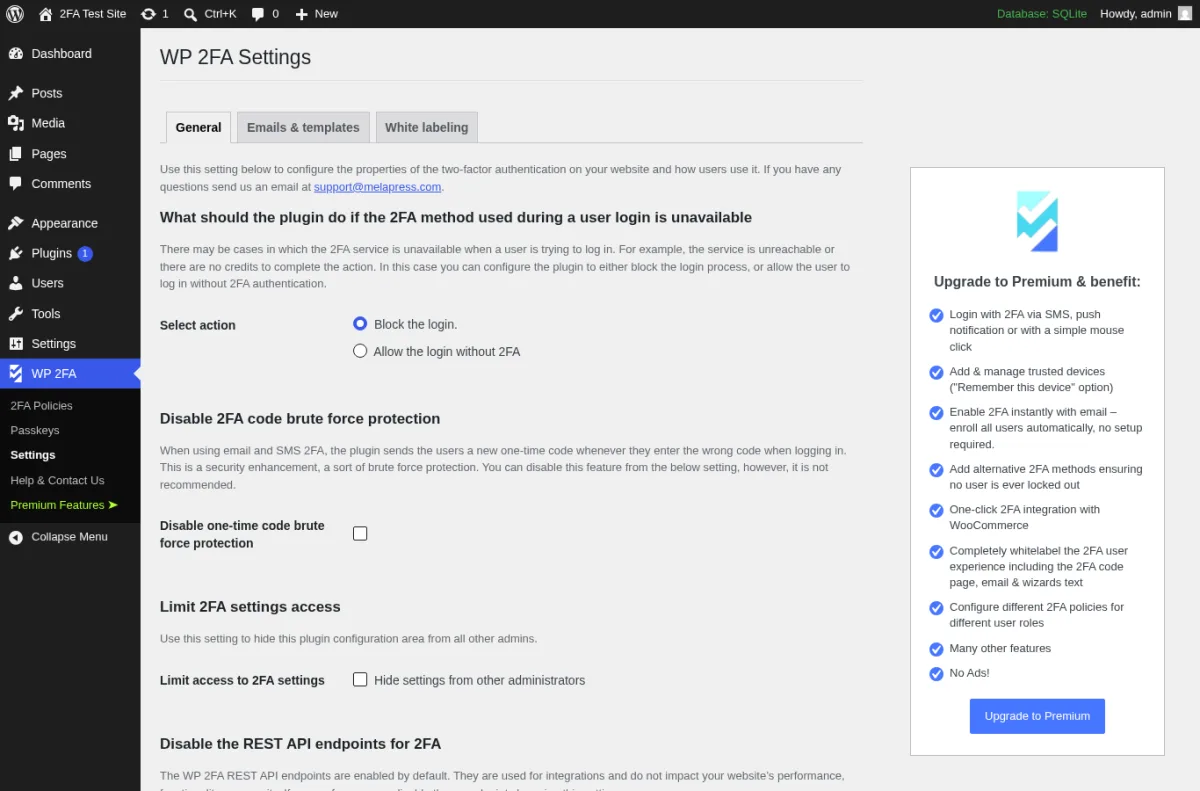
WP 2FA from Melapress is the right answer when you actually need 2FA enforced across a user role, not just available to whoever decides to opt in. Where Two Factor sits inside each user's profile, WP 2FA gives the admin a first-time install wizard, a 2FA policy screen, and a grace period: pick the roles, pick the method, pick how long users have to set 2FA up before they are blocked from logging in, and the plugin handles the rest. The wizard makes the setup feel like a SaaS onboarding flow, which is the right experience for non-technical users.
On the test site I activated WP 2FA, walked through the wizard's "Choose the 2FA method" modal (which offered One-time code via 2FA app and One-time code via email on the free tier), generated backup codes, and then opened the 2FA Policies page to apply enforcement to administrators with a configurable grace period. Premium adds YubiKey hardware key support, SMS 2FA, email-link 2FA, Authy push notifications, trusted devices, WooCommerce integration, require-2FA-on-password-reset, and white-labeling of the wizard and emails.
Strengths. Wizard-driven setup with grace-period policies is the strongest "make a hundred users actually enable 2FA" experience in this roundup. Passkeys are in the free tier (not behind a paywall like most other 2FA plugins). 4.7 / 5 from 168 reviews. The vendor maintains WP Activity Log and Melapress Login Security too, so the 2FA, activity log, and login-hardening stories share a stack. Active 2026 release cadence.
Honest limitation. The plugin layers a wizard, a policy engine, and a settings page on top of WordPress, so it is heavier than Two Factor for a site that only needs a second factor on a single admin account. Premium pricing starts at $79 / yr for a 1-site license and is cleanly published on the Melapress pricing page, though the multi-site tiered licensing means the total cost moves quickly once you cover an agency portfolio (5, 10, or 25 sites are the published tiers).
Best fit. Multi-author blogs, membership sites, WooCommerce stores with a real staff, and agencies that need to deploy 2FA across many client sites with the same role policy.
3. Wordfence Login Security: free TOTP plus reCAPTCHA plus XML-RPC
- WordPress.org: wordpress.org/plugins/wordfence-login-security/
- Active installs: 70,000+
- Rating: 3.9 / 5 (26 reviews on 2026-06-14)
- Latest version: 1.1.16, released 2026-04-29
- Requires: WordPress 4.7+, PHP 7.0+
- Tested up to: WordPress 7.0
- End-of-life notice: standalone plugin discontinued on or around 2026-07-01. The same features remain free in the full Wordfence plugin (5+ million active installs, 4.7 / 5, v8.2.2)
- Pricing: free. Wordfence Premium $149 / yr / site, Care $590 / yr / site, Response $1,250 / yr / site. 2FA stays free in every tier
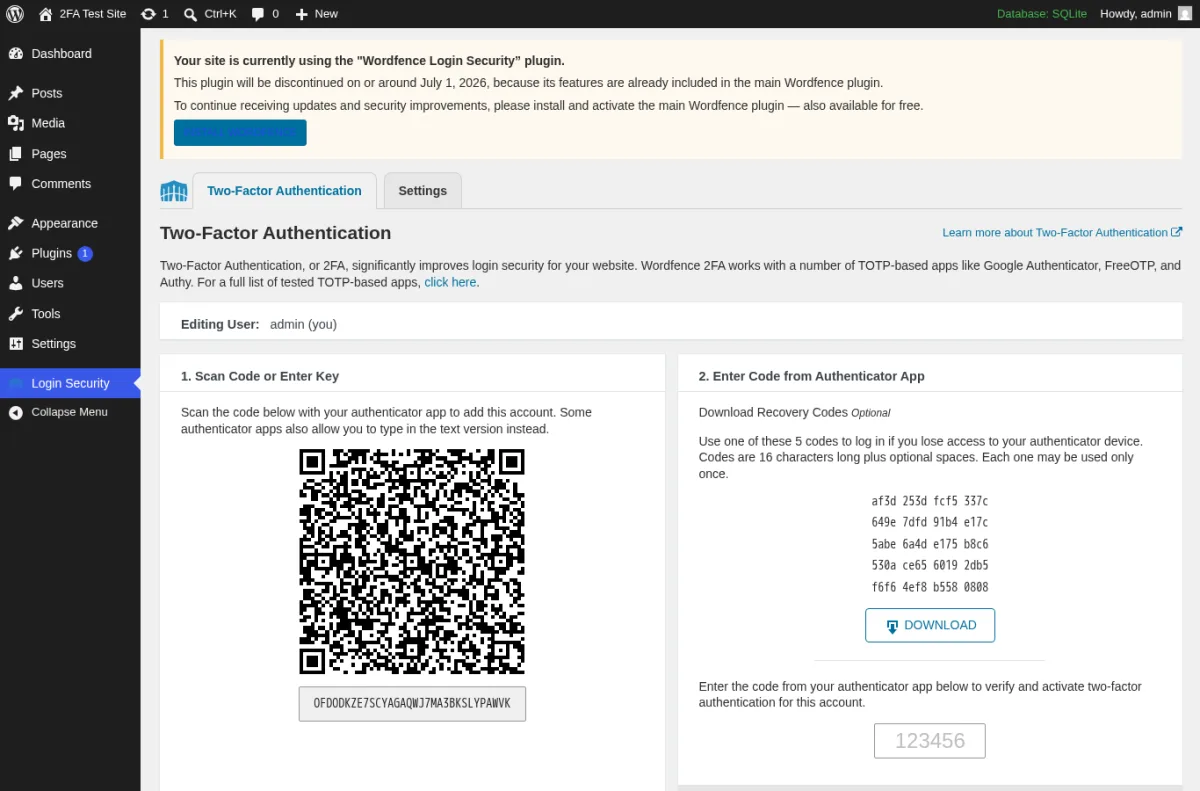
Wordfence Login Security is the focused 2FA plus reCAPTCHA plus XML-RPC subset of the full Wordfence plugin, packaged for site owners who want login hardening without the firewall and the malware scanner. On the test site, activation immediately surfaced an in-plugin notice that the standalone plugin will be discontinued on or around 2026-07-01. The 2FA setup screen still works exactly the same way it has for years: scan the QR code with any standards-compliant authenticator app (Google Authenticator, Authy, 1Password, FreeOTP, Microsoft Authenticator), download five recovery codes, and confirm the activation code to turn 2FA on. Per-role enable (so you can require it for administrators and editors and leave subscribers alone), Google reCAPTCHA v3 on wp-login.php and wp-register.php, and either block XML-RPC entirely or require 2FA on XML-RPC calls are all in the same Login Security menu. The 1.1.16 release (2026-04-29) migrated the admin UI to a Vue-based infrastructure and added better aria- accessibility coverage.
The reason this plugin still earns a spot in the 2026 list, despite the upcoming end-of-life, is the bundle. No other free 2FA plugin in this roundup ships reCAPTCHA v3 plus XML-RPC protection alongside TOTP in the same admin screen. If you install only one free plugin for login hardening today (before 2026-07-01), this one covers the three login-side attack surfaces (password guessing, credential stuffing via bots, and XML-RPC brute force) in a single Login Security menu.
Important migration note. The plugin description and the 1.1.16 changelog both state that Wordfence Login Security will be retired on or around 2026-07-01. The same TOTP plus reCAPTCHA plus XML-RPC features stay free inside the full Wordfence plugin (the firewall and the scanner come along for the ride). If you are installing this for the first time after July 2026, install the full Wordfence plugin from the start. You get the same 2FA UI plus the firewall.
Strengths. Free TOTP, reCAPTCHA v3, and XML-RPC protection in one plugin. WooCommerce login plus registration form support since 1.1.0. Per-role enable and disable. Backed by one of the largest WordPress security teams in the industry. 2FA stays free in every Wordfence tier.
Honest limitation. The plugin is being retired on or around 2026-07-01. Anyone reading this listicle after that date should install the full Wordfence plugin instead. The full Wordfence plugin is heavier than Login Security; on a small shared host it adds a firewall and a scanner you may not want. Recent 1-star reviews include "Rug-pulling this feature plugin," and that complaint is fair to acknowledge.
Best fit. Site owners who want a single free plugin to enable TOTP for all roles, drop Google reCAPTCHA v3 on the login page, and either block XML-RPC or force 2FA on it. Install Wordfence Login Security if you are reading this before 2026-07-01, or the full Wordfence plugin if you are reading it after.
4. miniOrange 2FA: widest 2FA method buffet in one plugin
- WordPress.org: wordpress.org/plugins/miniorange-2-factor-authentication/
- Active installs: 10,000+
- Rating: 4.5 / 5 (383 reviews on 2026-06-14)
- Latest version: 6.2.5, released 2026-05-21
- Requires: WordPress 3.0.1+, PHP 5.3+
- Tested up to: WordPress 7.0
- Pricing: free for up to 5 users. Starter $69 / yr, Enterprise $99 / yr, All-Inclusive $149 / yr (verified on plugins.miniorange.com on 2026-06-14)
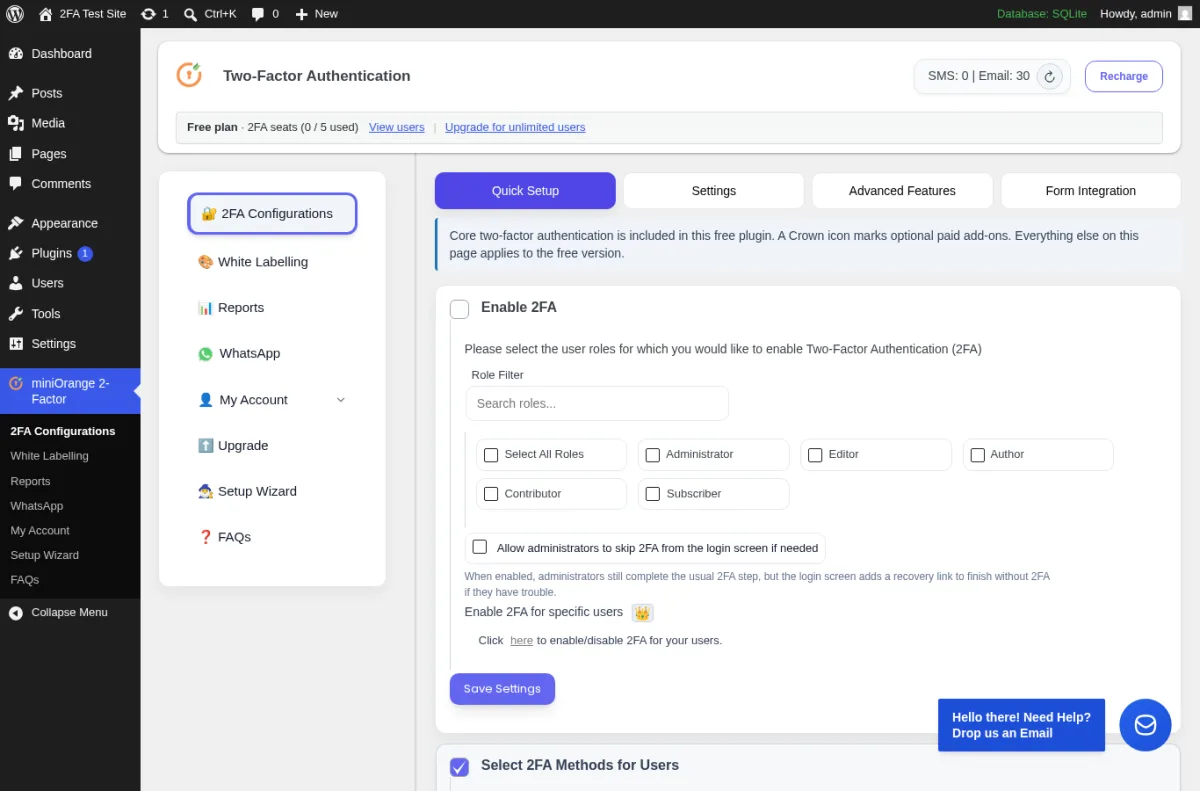
miniOrange 2FA is the right answer when "the widest method list in one plugin" matters more than "the cleanest free tier." On the test site, activation opened a dedicated Two-Factor Authentication dashboard with the free plan counter ("Free plan, 2FA seats 0 / 5 used") and a Quick Setup tab that surfaced exactly the methods the wp.org listing advertises: Google Authenticator, Microsoft Authenticator, Authy, Duo Authenticator, and LastPass Authenticator via TOTP, OTP delivered via Email, OTP delivered via SMS, OTP delivered via Telegram, security questions (KBA), backup codes, and an email-link verification method. Premium adds OTP via WhatsApp, trusted devices, passwordless login, force-2FA-at-next-login, role-based policies for the full user base (instead of 5), custom SMS gateways, white-labeling, multisite enforcement, and session and access control.
This is the only plugin in this roundup with built-in Telegram OTP delivery on the free tier, and the only one that gives you both KBA (security questions) and TOTP under the same admin screen. For a community site where some users want an authenticator app and other users still prefer "send me a code by email or SMS," the method coverage saves you from stacking two plugins.
Strengths. Method coverage is the widest on this list (TOTP, Email, SMS, Telegram, KBA, and email-link in the free tier). 6.2.5 raised the free user cap from 3 to 5. Strong WooCommerce and custom login form support. Active changelog with explicit vulnerability fix entries: 6.1.0 closed a 2FA bypass and a weak KBA validation, 6.1.1 closed a session hijacking / replay path on Google Authentication, 6.1.2 closed a broken access control, and 6.1.3 closed an admin XSS / MITM risk in the IP lookup feature. The vendor publishes the fix entries in the public changelog instead of burying them in a vendor blog, which is the right behavior for a security plugin.
Honest limitation. The free user cap (5 users) is real. A WooCommerce store with 200 customers cannot enforce store-wide 2FA on the free tier; the cheapest path to "all users" is Starter ($69 / yr). One reviewer in late 2025 reported a "potential vulnerability" tied to the OTP delivery flow. The vendor confirmed it on the wp.org thread and acted on it. The 6.1.x and 6.2.x security-fix releases shown in the changelog support that the vendor is responsive, but the public history is worth being honest about.
Best fit. Community sites and membership sites where users prefer different verification channels (some want TOTP, some want email, some want SMS, some want Telegram), agencies that resell client 2FA setups, and any owner who wants the option to use WhatsApp OTP delivery without switching plugins later.
5. Two Factor Authentication by David Anderson (UpdraftPlus team)
- WordPress.org: wordpress.org/plugins/two-factor-authentication/
- Active installs: 20,000+
- Rating: 4.4 / 5
- Latest version: 1.16.0, released 2026-03-25
- Requires: WordPress 3.4+, PHP 5.6+ with php-openssl or PHP mcrypt
- Tested up to: WordPress 7.0
- Pricing: free on WordPress.org. Premium from £19.00 / 12 months (1-site license) at the Simba Hosting shop, with multi-site tiers above
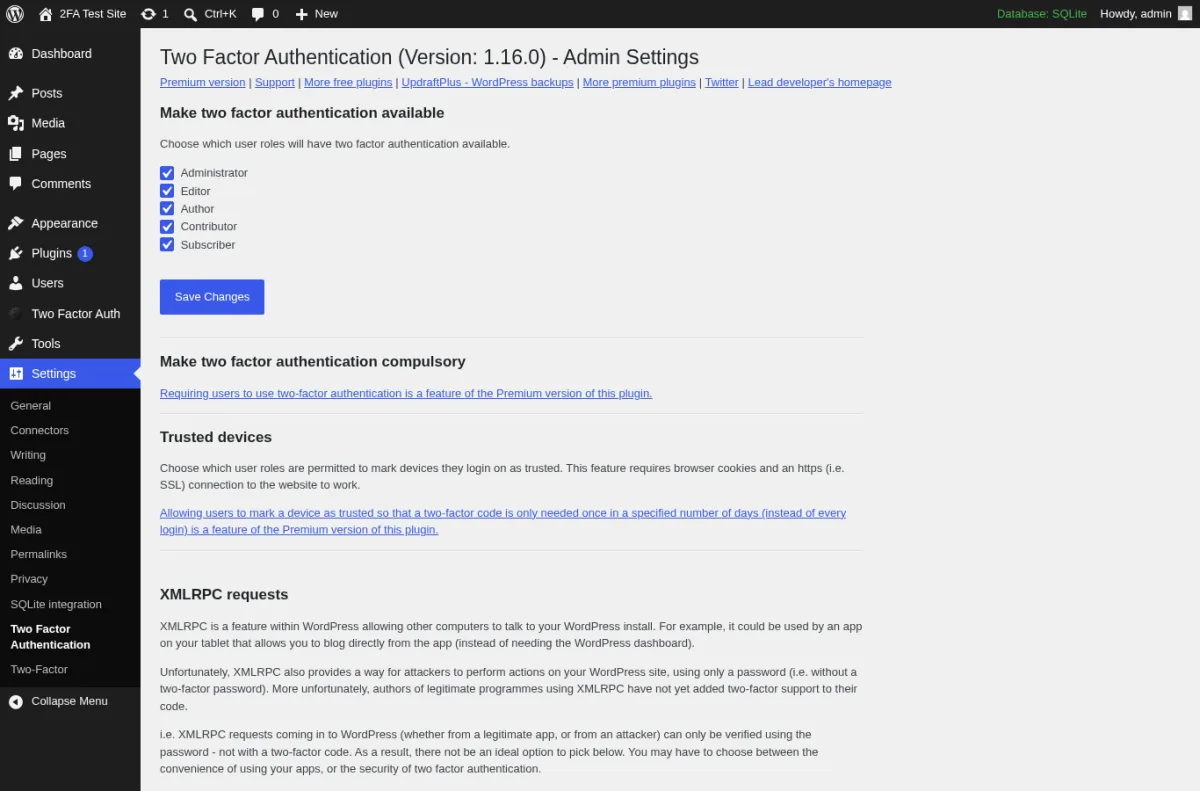
This is the focused 2FA plugin from David Anderson and the Team Updraft crew, the same team behind UpdraftPlus, the most-installed WordPress backup plugin. On the test site, activation added a Two Factor Auth menu to the admin sidebar with two screens: an Admin Settings page where I picked the roles allowed to use 2FA and configured "Trusted devices," and a user-facing Two Factor Auth page that showed the current one-time password, the QR code, the private key in plain text for manual entry into an authenticator app, and an Emergency codes section. The free version supports the standard TOTP and HOTP protocols (so it works with Google Authenticator, Authy, 1Password, and any standards-compliant app) and the most useful features other plugins gatekeep: a front-end [twofactor_user_settings] shortcode so users can manage 2FA without wp-admin access, encryption of the TFA-generating secret on disk (so an attacker has to break both the WP database and the filesystem to use the codes), Multisite network activation, and built-in support for WooCommerce, Affiliates-WP, Ultimate Membership Pro, and Theme My Login login forms.
Premium adds trusted devices ("skip 2FA for X days on this known device"), emergency backup codes, admin-side reset of other users' 2FA, time-delayed enforcement (require all admins to have 2FA once their accounts are at least 7 days old, for example), and support for an even longer list of login forms: Ultimate Member, Elementor Pro, bbPress, Easy Digital Downloads, RegistrationMagic, Gravity Forms User Registration, Paid Memberships Pro, and a generic "append your TFA code to the end of your password" fallback that lets you protect any third-party login form without writing code.
Strengths. Encryption-at-rest of the TFA secret is the strongest "what if the database leaks" story on this list. Front-end shortcode means users can configure 2FA from the front of the site, which is the right behavior for membership sites that hide wp-admin. Multisite-network-activate is a one-step deploy. Comes from the same team that ships UpdraftPlus, which is the most-installed WordPress backup plugin.
Honest limitation. The admin UI is less wizard-driven than WP 2FA. First-time owners may spend more time figuring out the Admin Settings page and the Two Factor Auth user menu than they would with WP 2FA's setup wizard. Premium pricing starts at £19.00 / 12 months for a 1-site license, which is one of the cheapest paid 2FA upgrades in this roundup, but the public product page does not always render every multi-site tier inline, so plan to check the Simba Hosting checkout for the exact total if you need more than one site.
Best fit. Sites that already use UpdraftPlus or another Updraft or Simba product, membership sites that need the front-end shortcode, and any owner who wants encrypted-at-rest TFA secrets without bolting on a security plugin.
6. Duo Universal: free push and passkeys for up to 10 users
- WordPress.org: wordpress.org/plugins/duo-universal/
- Active installs: 2,000+
- Rating: 4.0 / 5 (1 review on 2026-06-14)
- Latest version: 1.2.1, released around 2026-01-06
- Requires: WordPress 6.0+, PHP 7.3.16+
- Tested up to: WordPress 6.9.4
- Pricing: Duo Free $0 / mo for up to 10 users. Essentials $3 / mo / user, Advantage $6 / mo / user, Premier $9 / mo / user (verified on duo.com/editions-and-pricing on 2026-06-14)
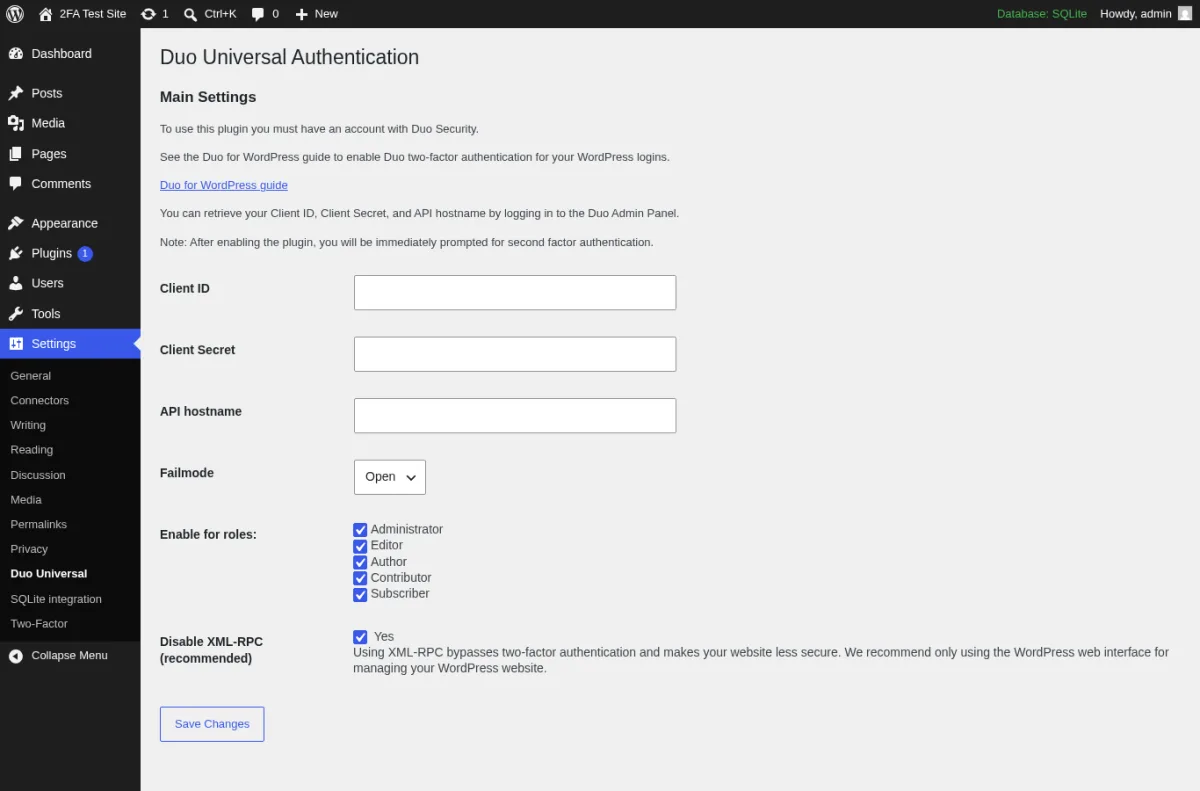
Duo Universal is the official WordPress plugin from Cisco Duo, the SaaS MFA service used by many enterprise teams to protect VPNs, email, and other apps. The plugin is a connector: the WordPress side handles the login redirect, and the actual second-factor prompt is served by Duo's Universal Prompt. After activating Duo Universal on the test site, the Settings > Duo Universal page asked for three things to talk to the Duo Admin Panel: Client ID, Client Secret, and API hostname. Below those inputs the same page exposes a Failmode dropdown (Open or Closed), a per-role enable checklist, and a "Disable XML-RPC (recommended)" toggle. Once the application is provisioned in the Duo Admin Console, the Duo Universal Prompt supports Duo Push (one-tap approval from the Duo Mobile app), TOTP from Duo Mobile, SMS one-time codes, phone callback to any phone, passkeys (Touch ID, Face ID, Windows Hello), and FIDO2 hardware security keys (YubiKey, Titan, Feitian), a wider modern-MFA buffet than any WordPress-native plugin on this list.
Duo Free is genuinely free for up to 10 users, which is the right tier for almost every solo blog, small business site, or agency that just wants Duo Push and passkeys on the admin team. Paid tiers add SSO across other applications, risk-based authentication, session theft protection, and Cisco support. The legacy "Duo Two-Factor Authentication" plugin (duo-wordpress) reached end-of-support on 2024-09-30; Duo Universal is the replacement, and the new plugin is the one to install today.
Strengths. Free up to 10 users with the full Duo Push plus passkey stack. The Duo Universal Prompt is the cleanest "tap a notification on your phone to approve the login" experience available to WordPress without paying. Passkeys, FIDO2, and biometrics are all part of the standard Duo product, not a paid add-on. The plugin is published and maintained by Cisco Duo.
Honest limitation. The plugin requires a Duo account and a publicly reachable WordPress site, because Duo's cloud calls back to the site during the prompt. Duo cannot reach a site that only listens on localhost, so a strictly internal install will not complete the round-trip prompt even after the settings page and the role policy are filled in correctly. Plugin install base on the WP repo is still small (2,000+) because most sites move to Duo via Cisco's documentation rather than through WordPress search. The single public review on the wp.org page also flags that passkeys enrolled during the trial period work only on the device they were enrolled on; that constraint comes from Duo's product, not the plugin.
Best fit. WordPress sites that need passkeys, Duo Push, and SSO without a Premium subscription, businesses already running Duo in front of VPNs, email, or other SaaS apps, and any team of 10 or fewer admins that wants a modern MFA stack at zero ongoing cost.
7. Rublon Multi-Factor Authentication
- WordPress.org: wordpress.org/plugins/rublon/
- Active installs: 500+ (WordPress connector; Rublon's customer base lives in the SaaS dashboard)
- Rating: 4.2 / 5 (88 reviews on 2026-06-14)
- Latest version: 4.4.5, released 2026-06-02
- Requires: WordPress 5.0+, PHP 5.5.1+
- Tested up to: WordPress 7.0
- Pricing: Free tier protects 1 user. Business 2 EUR / user / mo (minimum 15 users), Enterprise 4 EUR / user / mo (minimum 300 users), 30-day free trial of all features (verified on rublon.com/pricing on 2026-06-14)
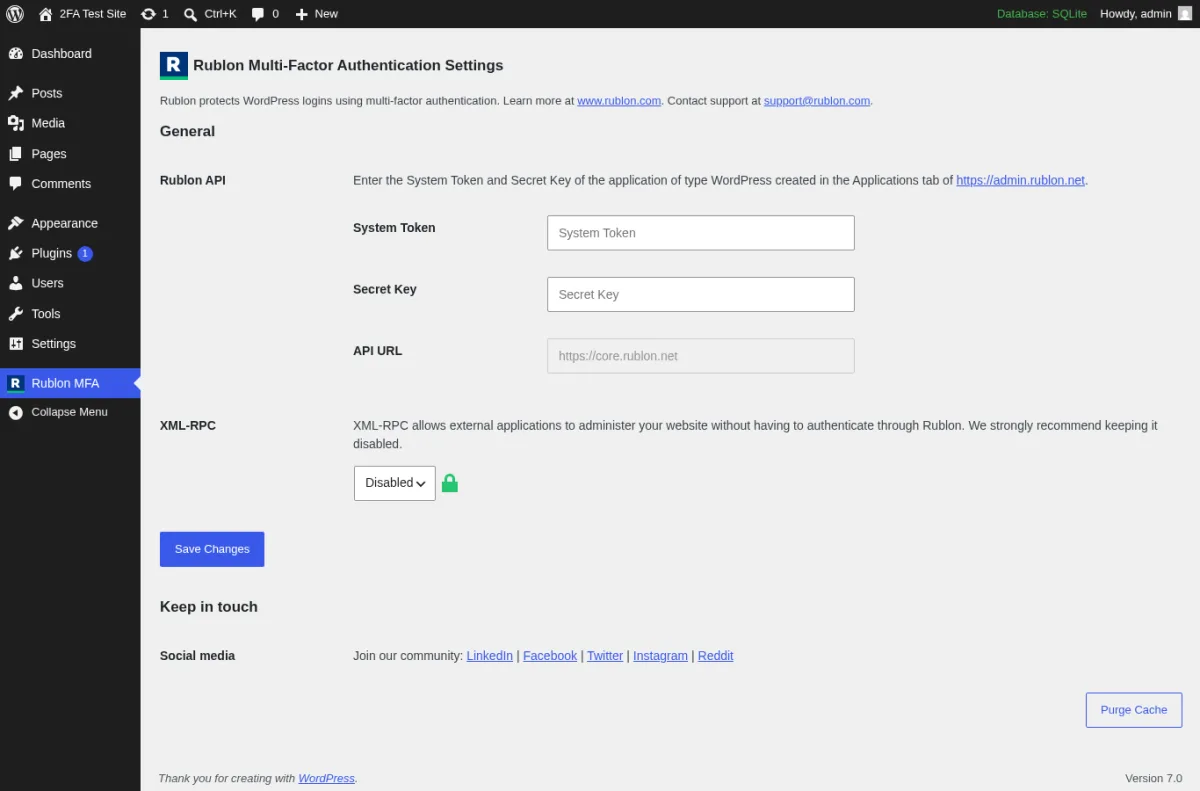
Rublon is a multi-factor authentication SaaS that protects WordPress as one of many integrations. The same platform also covers VPNs, Remote Desktop Services, Outlook Web App, LDAP, and RADIUS. After activating the plugin on the test site, the Rublon MFA menu opened a single Settings page that asked for the System Token and Secret Key from the Rublon Admin Console (https://admin.rublon.net), with the API URL pre-filled, and an XML-RPC dropdown defaulting to "Disabled" because XML-RPC bypasses Rublon by design. Once the connector is paired with a Rublon application, the Rublon Prompt that appears during login lets the user pick Mobile Push from the Rublon Authenticator app, a Mobile Passcode (TOTP from the same app), a QR code, an SMS Passcode, a WebAuthn / U2F security key, a YubiKey OTP, or an email link in one screen. That "many methods in one prompt" experience is the right model when your team includes users on different devices and you do not want to dictate which authenticator they use.
For a single WordPress admin account, the free tier is enough: install the connector, register your application in the Rublon Admin Console, copy the System Token and Secret Key into the plugin, and you are done. Past the first protected account, the cheapest path is the Business tier at 2 EUR / user / mo with a 15-user minimum. Rublon's pricing model is per Rublon user across the whole stack, not per WordPress site, which is the right model for an organization but a step up from a free WordPress-native plugin if you only run one site.
Strengths. The Rublon Prompt is the cleanest "pick a method" overlay on this list. Group Policies let you decide who is protected and which authentication methods are allowed. The same MFA layer covers VPNs, RDS, OWA, and LDAP under one identity. Active release cadence (4.4.5 on 2026-06-02).
Honest limitation. The free tier protects exactly one user per site, which several wp.org reviewers have flagged. Past versions (2016 to 2017) earned a stack of 1-star reviews for lock-out behavior on the legacy "remember this device" cookie. The 4.4.x branch (with the improved cookie saving in 4.4.4 and the API credential validation in 4.4.0) is a different product, but the lock-out fear lives on in the review history. Rublon also requires a publicly reachable site so the Rublon SaaS can call back during the prompt; same constraint as Duo.
Best fit. Organizations that need MFA across many applications (VPN, RDS, email, WordPress) under one identity layer with push, WebAuthn, and email link in the same prompt, and any team that already runs Rublon and wants to bring WordPress into the same MFA dashboard.
How to choose the right WordPress 2FA plugin
A quick decision guide based on the seven plugins above:
- If you want a clean free 2FA plugin for a small admin team, install Two Factor. Add the Two-Factor Provider: WebAuthn companion plugin if you want passkeys.
- If you need to enforce 2FA across user roles with a wizard and a grace period, install WP 2FA by Melapress. The free tier already covers passkeys and policy enforcement. Premium ($79 / yr) adds YubiKey, SMS, and trusted devices.
- If you also want Google reCAPTCHA v3 and XML-RPC protection in the same plugin, install Wordfence Login Security today, then migrate to the full Wordfence plugin after 2026-07-01. Same 2FA UX, plus the firewall and the scanner come along for the ride.
- If your community uses many channels (some users prefer Telegram, some prefer email, some prefer SMS), install miniOrange 2FA. Watch the 5-user free cap and jump to Starter at $69 / yr when you outgrow it.
- If you already use UpdraftPlus, or you need encryption-at-rest of the TFA secret plus broad third-party login form support, install Two Factor Authentication by David Anderson. The front-end shortcode is the right tool for membership sites that hide wp-admin.
- If you want passkeys plus Duo Push plus SSO at zero cost on a team of 10 or fewer admins, install Duo Universal. Duo Free is genuinely free for up to 10 users.
- If you need MFA across more than just WordPress (VPN, RDS, OWA, LDAP), install Rublon Multi-Factor Authentication. The free tier protects one user; team pricing is per Rublon user across the whole platform.
A few login-hardening basics matter more than the plugin choice itself. Combine the 2FA plugin you pick with the rest of your login stack:
- Change your WordPress login URL so automated bots cannot brute-force
/wp-login.php. - Avoid nulled WordPress plugins. They are still the fastest way to import a credential-stealer into a clean site.
- Run regular WordPress maintenance (updates, backups, log review) on a schedule, so a stolen credential cannot sit unused for months before it is used.
- Keep a working offsite backup. Even the best 2FA layer cannot replace a tested backup when something goes badly wrong.
FAQ: WordPress two-factor authentication plugins
Do I really need a 2FA plugin if I already use a strong password and a security plugin?
Yes. A strong password protects you against guessing and against most credential-stuffing attacks, and a security plugin protects you against bots, vulnerable code, and brute-force loops. None of those layers protect you when an attacker already knows the right username and password (a phishing site, a reused credential leaked from another service, a malicious browser extension). A 2FA plugin adds the second factor that breaks the attack at that point.
What is the best free WordPress 2FA plugin in 2026?
For most sites, the open-source Two Factor plugin maintained by the WordPress.org Contributors team. It is free, it covers TOTP, email, and backup codes out of the box, it pairs with the Two-Factor Provider: WebAuthn companion plugin for passkeys, and it has no paid upsell inside the admin. If you need to enforce 2FA across user roles instead of letting users opt in, install WP 2FA by Melapress instead. The free tier already covers passkeys and policy enforcement.
Are passkeys really safer than a TOTP code from Google Authenticator?
Yes, for most attack surfaces. A TOTP code from a standards-compliant app (Google Authenticator, Authy, 1Password, Microsoft Authenticator) is much harder to phish than a password, but a real-time phishing site can still proxy the code if the user types it into the wrong page. Passkeys, FIDO2, and WebAuthn are bound to the website's origin and the user's device, so they refuse to authenticate against a phishing domain. Two Factor (with the WebAuthn companion plugin), WP 2FA (free), Duo Universal, and Rublon all support passkeys today.
Can I run more than one 2FA plugin at the same time?
In almost all cases, no. Two 2FA plugins on the same site will fight each other over the wp-login.php flow, can lock out the admin if the verification screens collide, and make the recovery story much harder. Pick one main 2FA plugin from this list. The only safe combination is Two Factor plus the Two-Factor Provider: WebAuthn companion plugin, which is designed to extend Two Factor (not duplicate it).
What happens if I lose my phone with the authenticator app?
Every plugin in this list ships some recovery option, but you have to enable it before you lose access. Backup codes are the most common safety net (Two Factor, WP 2FA, miniOrange, Simba TFA, Wordfence). Email codes work if you still have access to the WordPress account's email address (Two Factor, WP 2FA, miniOrange). Trusted devices keep you logged in on a known browser (Duo Universal, Rublon, miniOrange Premium). The classic last-resort path also still works: rename the plugin folder via SFTP or your host's File Manager, log in without 2FA, set up 2FA again on the new device, and rename the folder back. Always generate and store backup codes the first time you set up 2FA.
Is a free 2FA plugin enough for a WooCommerce store?
For a small store with a single admin and one or two staff accounts, yes. Two Factor or WP 2FA's free tier is enough to protect the admin login. For a larger WooCommerce store where customers also have accounts (membership sites, subscription stores, B2B portals), you want to enforce 2FA on the customer role too, and that is where the paid tiers earn their cost: WP 2FA Premium adds WooCommerce one-click integration, miniOrange All-Inclusive adds 2FA on every login form including WooCommerce checkout, and Two Factor Authentication Premium ships WooCommerce, Easy Digital Downloads, and Paid Memberships Pro form support. If you also process EU user data, see our best GDPR compliance WordPress plugins guide for the data-protection side.
What if my 2FA plugin locks me out of the WordPress admin?
If you still have your codes, use one of the backup codes you generated at setup. If your backup codes are gone, the documented recovery path is to log into your host (SFTP, cPanel File Manager, hosting dashboard SSH) and rename the plugin folder under /wp-content/plugins/ so WordPress auto-deactivates it. You will be able to log in with just your password; reconfigure 2FA on the new device, then rename the folder back. If WordPress is throwing a critical error after recovery, our guide to WordPress critical errors covers the next steps.
Conclusion
A WordPress 2FA plugin is the single highest-leverage change you can make to login security in 2026. Even a free, focused plugin moves the bar from "the attacker only needs your password" to "the attacker needs your password and your phone or your security key." That is the difference between a leaked credential becoming a compromised site and a leaked credential being shrugged off.
If you want one safe pick for a typical WordPress site, install Two Factor (community plugin) for the free tier, generate backup codes the first time you set 2FA up, and add passkeys via the Two-Factor Provider: WebAuthn companion plugin. If you have a team and you need policy enforcement, install WP 2FA by Melapress instead. The other five plugins each cover a specific workflow (reCAPTCHA plus XML-RPC bundle, widest method buffet, encrypted-at-rest TFA, free Duo passkeys, organization-wide MFA): pick the one that fits your stack, then keep it updated.
Similar Blogs


