

10 Best Free WordPress Security Plugins to Protect Your Site in 2026 (Compared)

Do you really need a security plugin on your WordPress website?
The answer is yes, yes, and yes. WordPress runs an enormous share of the web, and that makes it the most targeted CMS by bots and automated attacks. A clean install with a good host is a great start, but on its own it does not stop brute-force login attempts, vulnerable third-party code, malicious file uploads, or admin-side mistakes.
A WordPress security plugin closes that gap. It adds a firewall, a malware scanner, login hardening, an activity log, and, in most cases, an alert system that tells you when something looks wrong. The good news in 2026 is that the most trusted security plugins on the market all have capable free versions. You can pick one that fits your site, install it in a few minutes, and immediately raise your baseline protection.
I compared the 10 most installed and most trusted free WordPress security plugins for this update. For each one I checked the WordPress.org plugin page (active installs, ratings, last update, WordPress compatibility), the vendor pricing page (what the free plan really includes vs. paid, and exact current prices where they are publicly visible), and the public reputation around setup difficulty, performance impact, and support. The list below is ordered roughly by how broadly useful the free plan is for a typical WordPress site, not strictly by install count.
A quick note before the list: do not install five of these at once. Security plugins overlap heavily on firewalls, login limits, and scanners, and stacking them usually causes conflicts and false positives. Pick one main plugin from this list, then add at most one focused helper (for example, a dedicated activity log) if your main pick does not cover it.
At a glance: free WordPress security plugins compared
| Plugin | Active installs | Free plan strength | Paid plan starts at | Best for |
|---|---|---|---|---|
Wordfence Security | 5M+ | Excellent | Wordfence Premium $149/ | Sites that want a serious firewall + malware scanner without paying |
Jetpack | 3M+ | Good (bundled) | Jetpack Security ~$20/ | Sites that already use Jetpack for stats, CDN, or backups |
All-In-One Security (AIOS) | 1M+ | Excellent | AIOS Premium $105.91/ | Beginners who want a simple security dashboard with a score |
Kadence Security (ex iThemes Security) | 700K+ | Good | Bundled in Kadence Pro Essential $99/ | Site hardening, login protection, 2FA basics |
Sucuri Security | 600K+ | Moderate | Sucuri Website Security Platform from $229/ | Activity auditing plus a paid edge WAF when needed |
WP Activity Log (ex WP Security Audit Log) | 300K+ | Good (audit log only) | WP Activity Log Premium from $139/ | Multi-author sites and agencies that need a real user activity log |
MalCare Security | 200K+ | Good | MalCare Personal $99/ | Sites that want safe cloud-based scanning and guided cleanup |
Anti-Malware Security & Brute-Force Firewall | 100K+ | Good | Premium scan engines unlocked by donation key on the plugin author site (no fixed public price) | Targeted malware cleanup and brute-force blocking |
Defender Security | 80K+ | Good | Defender Pro single product approx $60/ | WPMU DEV users and sites that want clean 2FA + login UX |
Really Simple Security (ex Really Simple SSL) | 3M+ | Good | Really Simple Security Pro from $49/ | Sites that want SSL done right plus lightweight hardening |
Install counts, ratings, and prices are taken from WordPress.org and the official vendor pricing pages at the time of writing. Where pricing is part of a larger bundle and not a clean per-product price, this is noted in the plugin section below.
How I compared these WordPress security plugins
For each plugin I looked at:
- Active installs and current rating on WordPress.org (signal of trust and ongoing maintenance).
- Last updated date and tested-up-to WordPress version (signal that the plugin is actively maintained).
- What the free plan actually covers: firewall, malware scanner, login security, 2FA, activity log, brute-force protection.
- What the paid plan unlocks, and exactly how much it costs today where the vendor publishes a public price.
- Realistic best fit (a small blog, a busy WooCommerce store, an agency managing many sites, a site that just had a malware scare).
- Known performance impact and known support quality, based on official changelogs, vendor docs, and public reviews.
Now to the plugins.
1. Wordfence Security
Active installs: 5M+. Rating: 4.7 out of 5 on WordPress.org. Pricing: Free; Wordfence Premium $149/year per site; Wordfence Care $590/year per site (managed install, scan, cleanup).
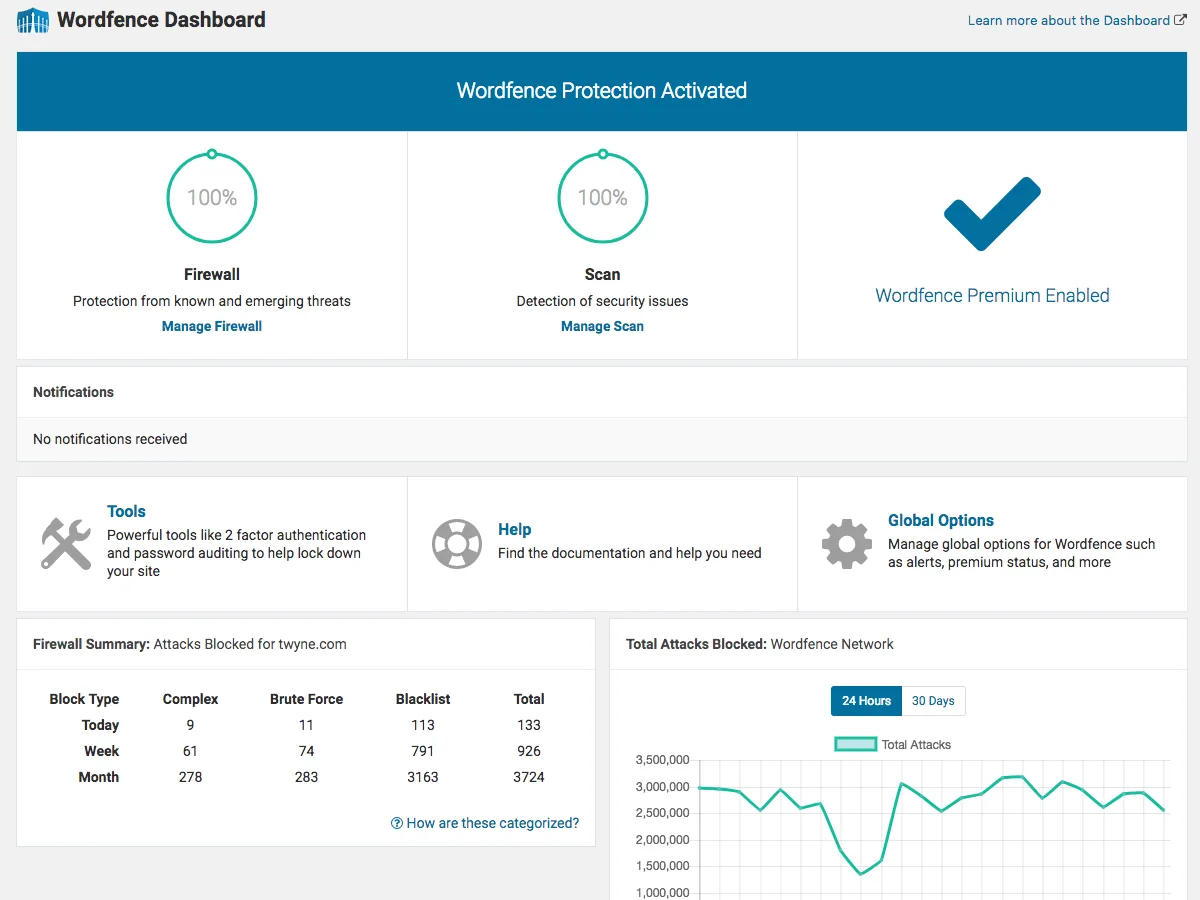
Wordfence Security is still the default heavyweight when people search for a WordPress security plugin, and the free version is genuinely good. You get an endpoint firewall that runs inside WordPress, a malware scanner that checks core files, themes, plugins, file changes, and known bad patterns, plus login security with 2FA, reCAPTCHA, and a strong limit-login system.
The main catch on the free plan is the Threat Defense Feed. Premium users get new firewall rules and malware signatures in real time, while free users get the same rules 30 days later. For most personal blogs and small business sites that delay is acceptable, especially if you also keep WordPress core, themes, and plugins updated.
Wordfence is heavier than the lighter security plugins on this list, so on shared hosting you may want to schedule scans for off-peak hours instead of running them continuously.
Best for: site owners who want one main security plugin and are willing to spend a bit of time learning a real firewall + scanner UI.
2. Jetpack
Active installs: 3M+. Rating: 3.8 out of 5 on WordPress.org. Pricing: Free; Jetpack Security plan around €18.95/month regular, billed yearly (intro around €8.95/month for the first year), roughly $20/month at the regular rate per site.
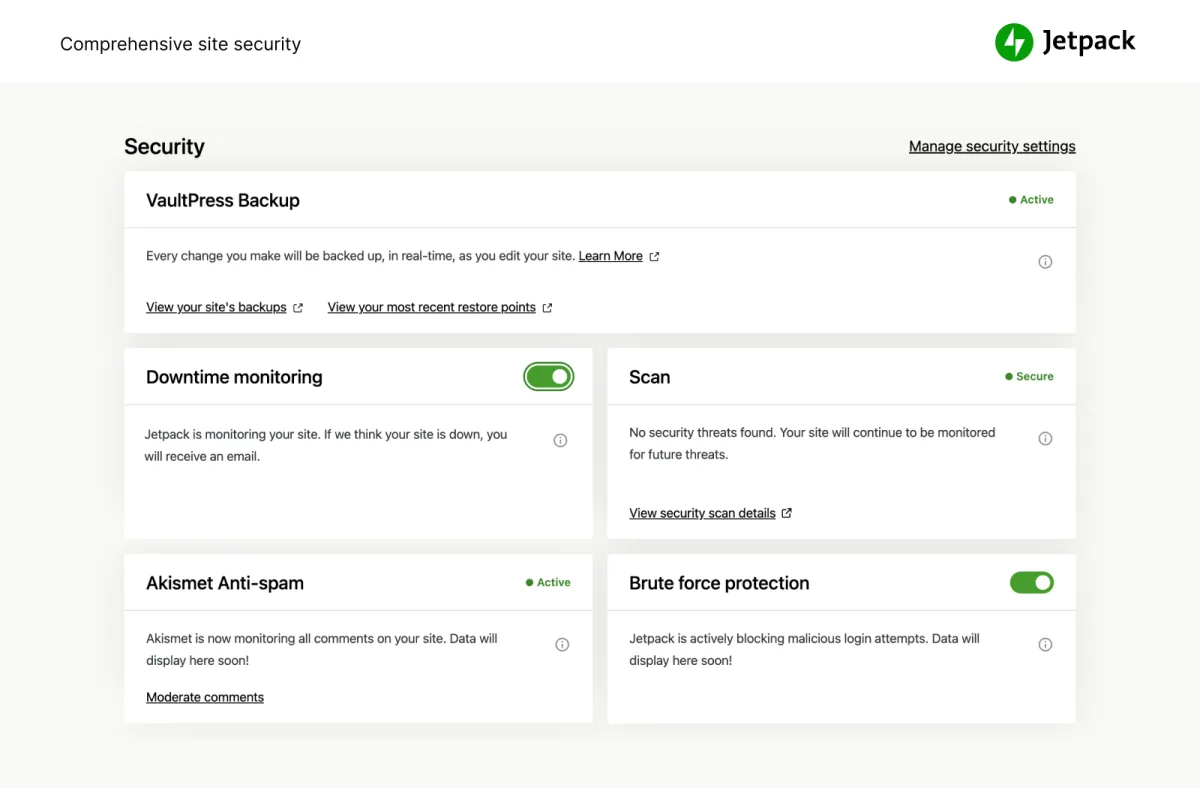
Jetpack is the Automattic-built all-in-one plugin, and it bundles a useful set of free security features: brute-force attack protection, downtime monitoring, secure logins with optional 2FA, and basic activity logging. If you already use Jetpack for stats, CDN, or Site Accelerator, turning on the security modules costs you nothing.
The trade-offs are real, though. Real-time backups, full malware scanning, one-click threat fix, and the comprehensive 30-day activity log all live behind the paid Jetpack Security, Complete, or VaultPress Backup plans. Jetpack also requires a WordPress.com account, which some site owners do not want.
If you want only the security pieces without the bundle, look at Jetpack Protect (a leaner free standalone plugin from Automattic focused on vulnerability scanning) or pair Jetpack with a more focused firewall like Wordfence.
Best for: sites that already use Jetpack for other reasons and want decent baseline security included.
3. All-In-One Security (AIOS)
Active installs: 1M+. Rating: 4.7 out of 5 on WordPress.org. Pricing: Free; AIOS Premium $105.91/year per site at the regular rate, $52.96 for the first year intro (single-site plan), with multi-site plans up to $415.31/year per the public pricing page.
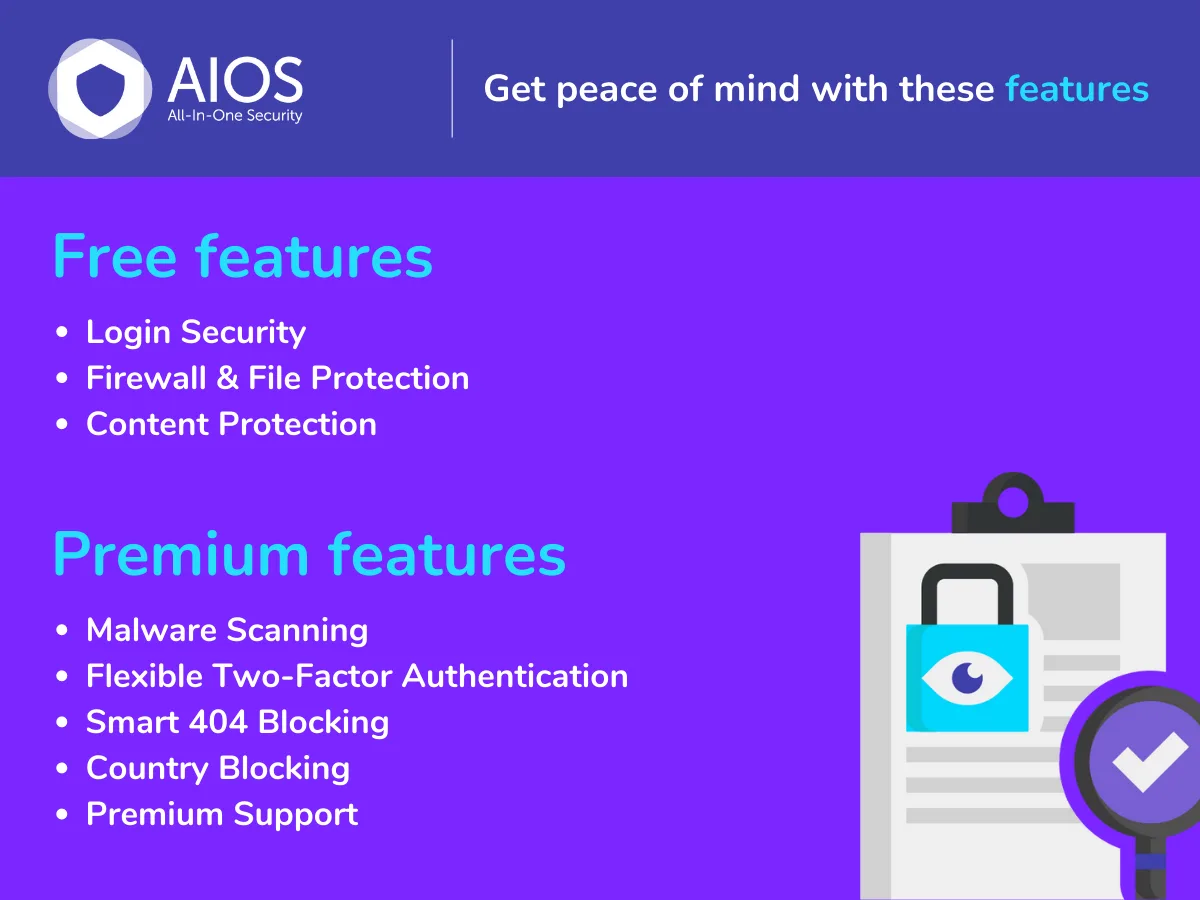
All-In-One Security (AIOS) is the modern successor to the old "All In One WP Security & Firewall" plugin and is now maintained by the team behind UpdraftPlus. The free plan is unusually generous: a layered firewall split into Basic / Intermediate / Advanced presets, brute-force login protection, login lockdown, database security, file system checks, comment spam protection, and a security strength score that grades your setup as you turn features on.
The progressive firewall presets are the standout feature. You can activate basic rules first, confirm nothing on your site breaks, then move to Intermediate and Advanced. That makes AIOS one of the easiest security plugins for non-technical owners to roll out.
Premium adds smart 2FA UX, country blocking, additional firewall rules, and priority support, but for many small and mid-size sites the free version is enough by itself.
Best for: beginners and small business owners who want a clean dashboard, a score, and progressive controls.
4. Kadence Security (formerly iThemes Security)
Active installs: 700K+. Rating: 4.6 out of 5 on WordPress.org. Pricing: Free; the Pro features are bundled into Kadence WP plans, starting at $99/year for the Essential Bundle, $299/year for the Full Bundle, or $499 for a Lifetime Bundle. There is no separate single-product price for Kadence Security at the moment.
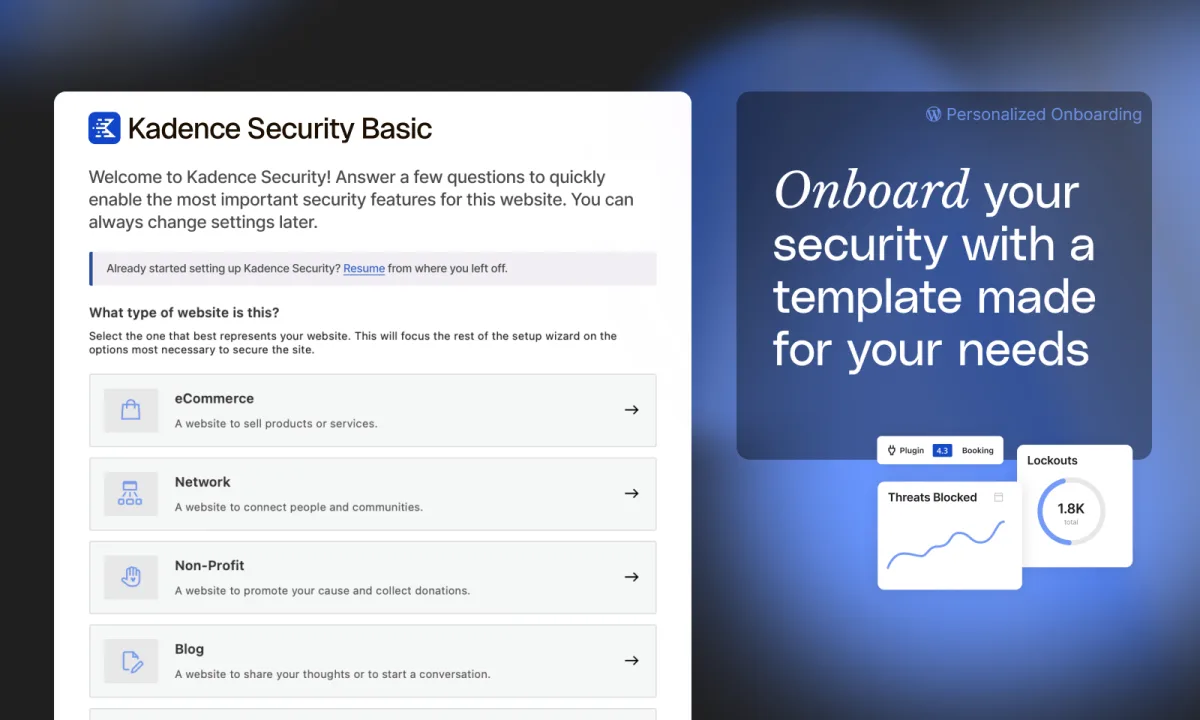
Kadence Security is the latest brand name for the plugin many WordPress users still know as iThemes Security (and, briefly, as Solid Security). The slug better-wp-security is the same, so existing installs simply keep updating to the current version.
The strength of this plugin is site hardening: secure passwords, password expiration, magic login links, 2FA, brute-force protection, file change detection, database backups, and a long list of small checks that close common WordPress holes. The interface walks you through hardening one step at a time, which is a much friendlier experience than reading a manual hardening guide.
Real-time vulnerability scanning, ticketed support, user security profiles, and version management sit behind the paid Kadence bundles. The free plan is still a solid hardening toolkit on its own.
Best for: owners who want a guided hardening checklist rather than a heavyweight firewall.
5. Sucuri Security
Active installs: 600K+. Rating: 4.2 out of 5 on WordPress.org. Pricing: Free plugin; the Sucuri Website Security Platform (which adds the cloud WAF and managed malware cleanup) starts at $229/year (Basic), $339/year (Pro), $549/year (Business), and $999.98/year for higher tiers per the current Sucuri pricing page.
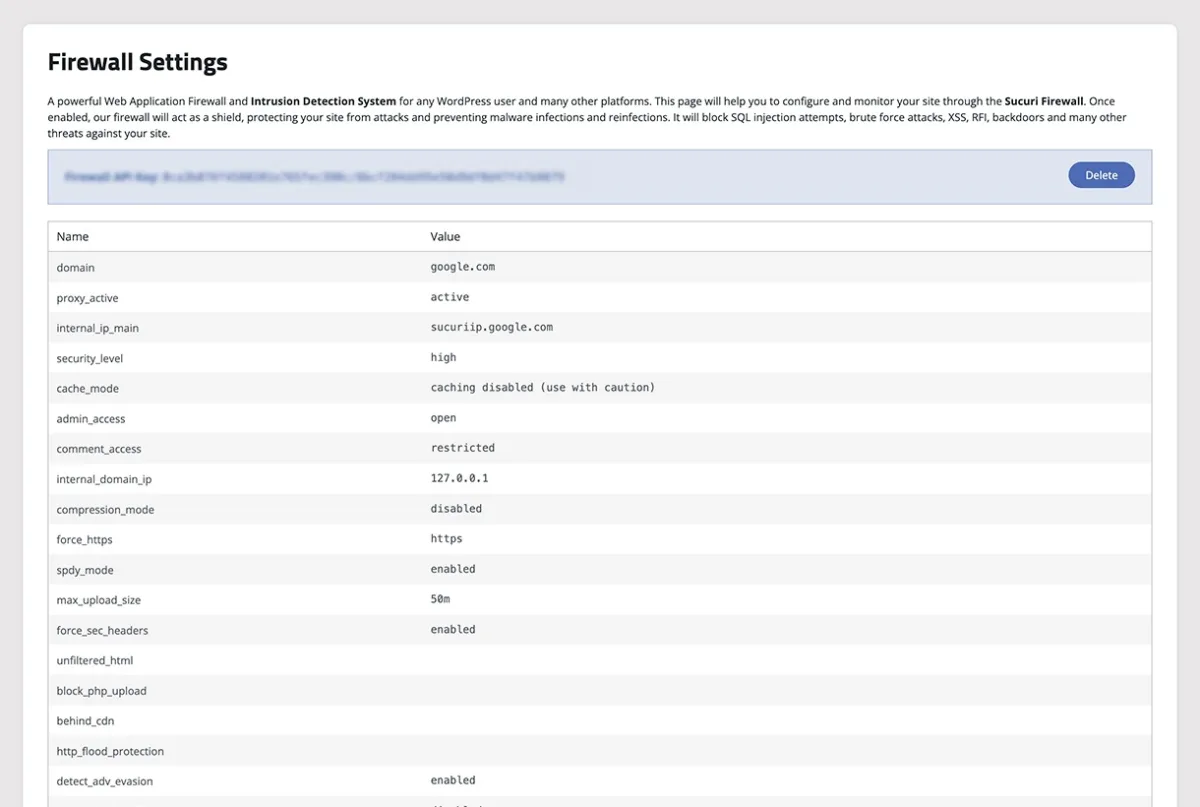
Sucuri Security is the free WordPress companion to the paid Sucuri website security platform. The free plugin gives you security activity auditing, file integrity monitoring, remote malware scanning, blacklist monitoring, security hardening recommendations, post-hack actions, and email alerts.
What it does not do, in the free version, is firewall traffic at the edge. The Sucuri Website Firewall (WAF) is a paid cloud service, and that is the part of Sucuri that actually blocks attacks before they reach your server. So the free plugin is best read as a strong audit and detection layer that pairs well with another firewall plugin, or with the paid Sucuri WAF if your site is high-risk.
Best for: site owners who want a respected auditing and integrity-monitoring layer, and may upgrade to the cloud WAF later.
6. WP Activity Log (formerly WP Security Audit Log)
Active installs: 300K+. Rating: 4.7 out of 5 on WordPress.org. Pricing: Free; WP Activity Log Premium from Melapress starts at $139/year for a single-site plan, with higher tiers around $189/year for multi-site usage per the current Melapress pricing page.
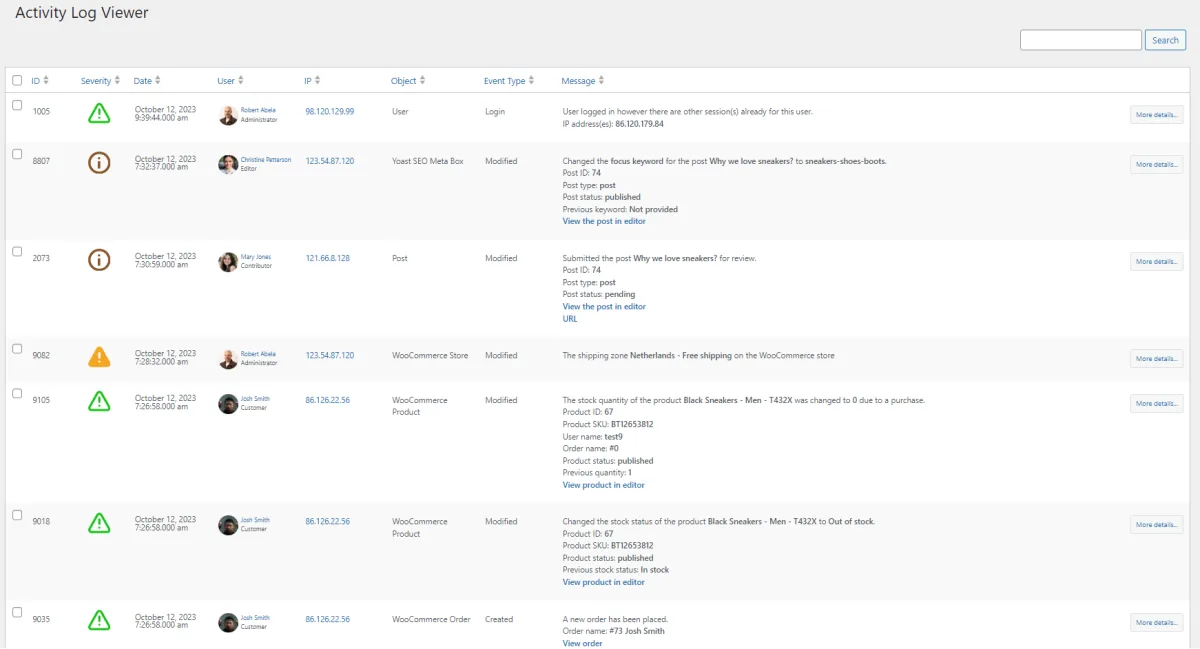
WP Activity Log is the dedicated activity log plugin for WordPress and WordPress Multisite. It records who logged in, what they changed in posts, pages, users, plugins, themes, settings, files, and even WooCommerce or Yoast configurations, all in a searchable timeline.
This is not a full security plugin in the firewall + scanner sense. It is a forensic tool. The reason it deserves a spot on this list is simple: if your site does get compromised, or a contributor changes something they should not have, a clean activity log is the fastest way to find out what happened and when.
Premium adds external log storage (database, AWS, Loggly, Papertrail, Slack, email reports), search filters, reports, and integrations. The free version is enough for a single-site owner who wants to see who did what.
Best for: multi-author sites, membership sites, agencies, and any site where more than one person can log in.
7. MalCare Security
Active installs: 200K+. Rating: 4.3 out of 5 on WordPress.org. Pricing: Free; MalCare paid plans are Personal $99/year (1 site), Plus $299/year (5 sites), Pro $899/year, and Custom $1499/year per the current MalCare pricing page. Some plans bundle BlogVault backups.
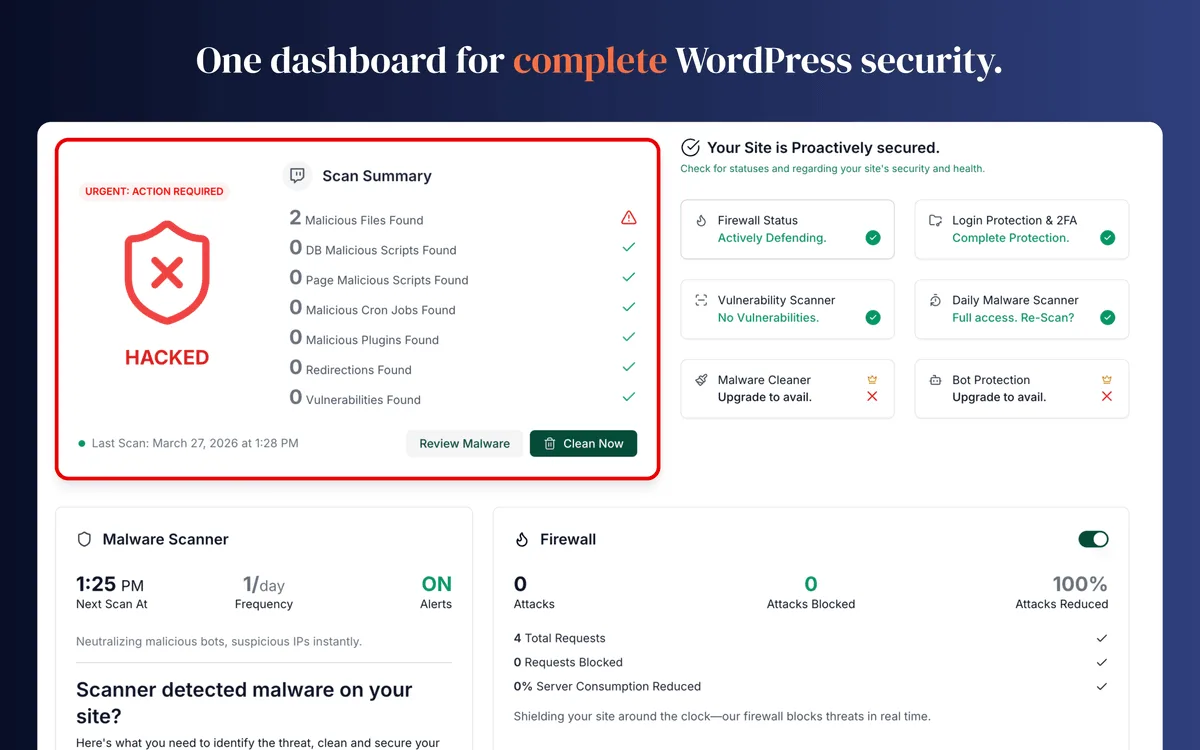
MalCare Security takes a different approach from the firewall-and-scanner classics: the scan runs on MalCare's cloud, not on your server, so the malware scanner does not slow down your site or eat your hosting CPU during a scan. The free plan includes the cloud scanner, basic firewall protection, and a single management dashboard.
Auto-cleanup, the advanced firewall, login protection on multiple sites, white-label client reports, and the website management features are part of the paid plans. MalCare is owned by the same team behind BlogVault, which is a well-known backup product, so the paid tiers often bundle backup + security together.
Best for: sites on lower-resource shared hosting that want a scanner that does not burn CPU, and anyone who wants safe, guided cleanup if they get hacked.
8. Anti-Malware Security and Brute-Force Firewall
Active installs: 100K+. Rating: 4.9 out of 5 on WordPress.org. Pricing: Free; premium scan engines and automatic definition updates are unlocked by a donation key on the plugin author's site (gotmls.net). There is no fixed public per-year price; the unlock is positioned as a donation tier rather than a standard subscription.
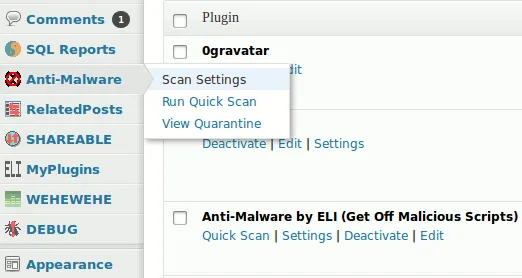
Anti-Malware Security and Brute-Force Firewall (often called GOTMLS) is the focused malware-cleanup plugin on this list. It downloads a current set of malware definitions, scans for known threats, backdoors, and database injections, and can remove them directly. It also includes a brute-force firewall for login protection and patches for old vulnerable scripts (timthumb and similar).
Some of the strongest features (premium scan engines and automatic definition updates) are tied to a small donation key that unlocks them, so calling this plugin "fully free" is slightly generous. Still, it has one of the highest ratings in the whole security category and is a long-trusted choice for fixing malware on a budget.
Best for: site owners who suspect malware right now and want a focused tool to find and remove it.
9. Defender Security
Active installs: 80K+. Rating: 4.8 out of 5 on WordPress.org. Pricing: Free; Defender Pro on its own is approximately $60/year per site. Full access (Defender Pro plus the rest of WPMU DEV's plugins, hosting, and Hub features) is bundled into WPMU DEV membership plans, which start at approximately $3/month at the lowest tier per the current WPMU DEV pricing page. Pricing varies often; use the WPMU DEV pricing page for the exact tier you need.
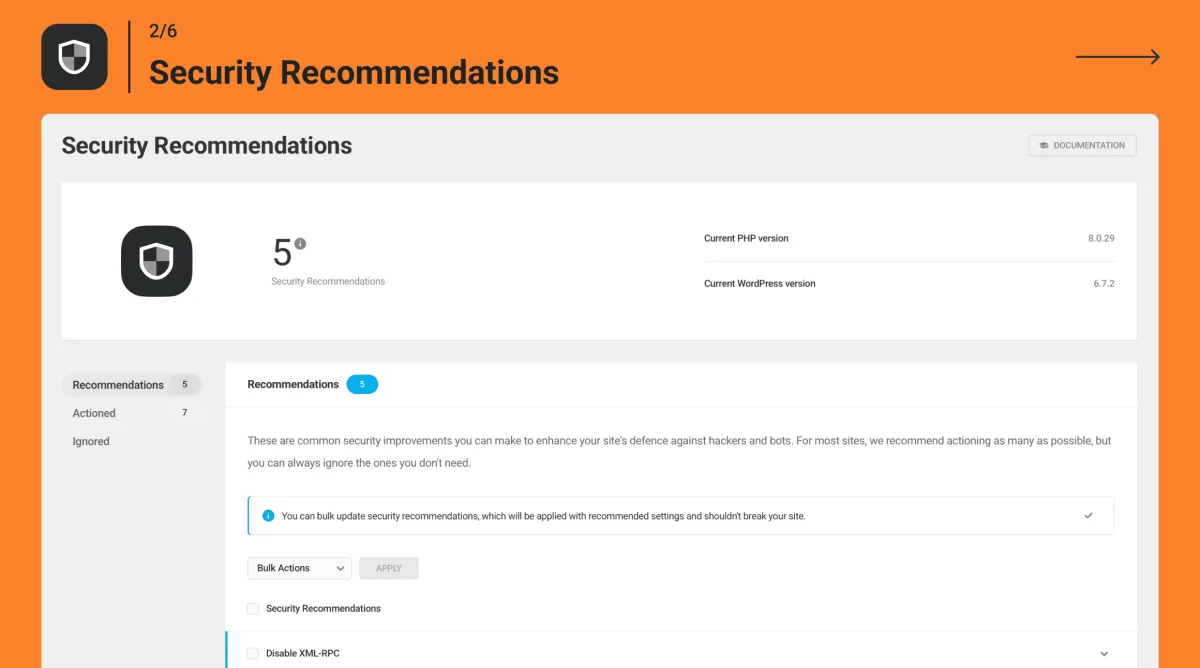
Defender Security from WPMU DEV is the security plugin most WPMU DEV customers use, but the free standalone version is also solid. The free plan covers a firewall, malware scanner, 2FA, hardening tweaks (rename login URL, disable file editor, disable trackbacks/pingbacks, change database prefix, prevent PHP execution in uploads), login lockout, 404 detection, and IP-based geo blocking.
Defender's UI is one of the cleanest in this list, and the recommendations panel walks you through each hardening step in plain language. The full Defender Pro feature set, audit log, cloud backups, and continuous scanning are part of the WPMU DEV subscription.
Best for: site owners who want a simple, friendly 2FA + hardening + login security setup, especially WPMU DEV users.
10. Really Simple Security (formerly Really Simple SSL)
Active installs: 3M+. Rating: 4.9 out of 5 on WordPress.org. Pricing: Free; Really Simple Security Pro starts at $49/year (1 site, intro), $99/year (5 sites, intro), and $199/year (up to 100 sites, intro) per the current Really Simple Security pricing page. Renewal prices on the same page are listed at roughly $69, $119, and $209 respectively.
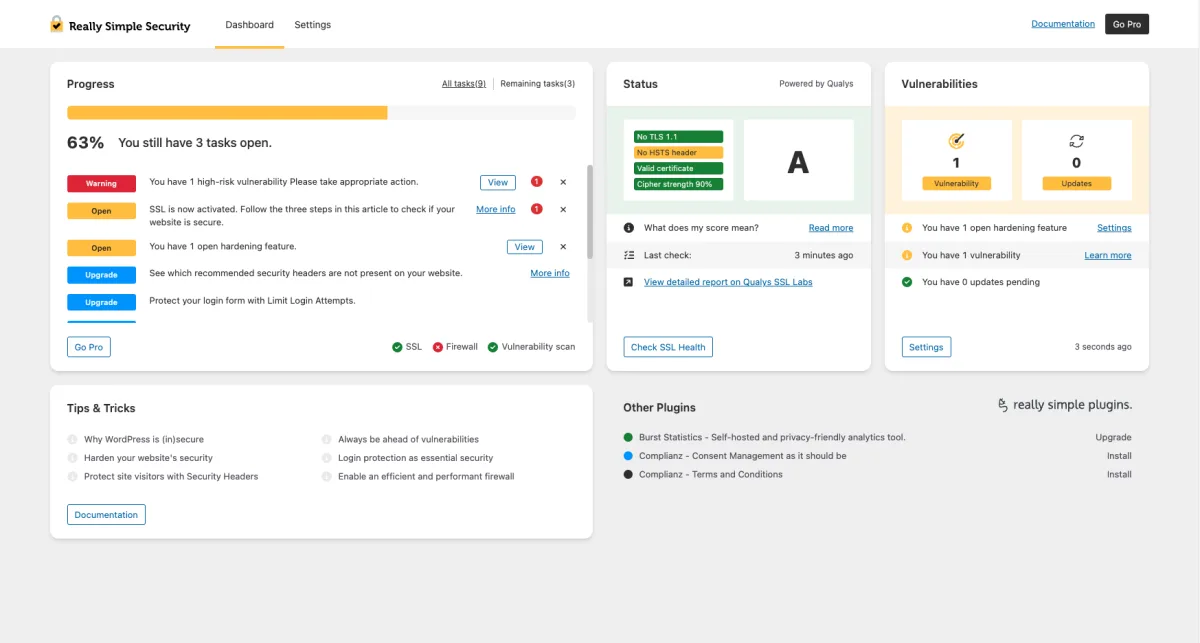
Really Simple Security started life as the dominant SSL helper plugin for WordPress and has grown into a lightweight all-around security plugin. The free version handles SSL (forced HTTPS, mixed content fixes, HSTS), security headers, basic hardening recommendations, and a clean dashboard with a security score similar to AIOS.
Pro adds vulnerability detection tied to a vulnerability database, two-factor authentication, login protection, mixed content scan, and limit-login features. If you have a smaller site that mainly needs SSL done right plus a few sensible hardening defaults, the free version is one of the most efficient security plugins in this list.
Best for: smaller sites, blogs, and portfolios that want SSL done correctly and a light hardening layer without a heavy firewall plugin.
How to choose the right WordPress security plugin
There is no single "best" WordPress security plugin for every site. The right choice depends on what you are trying to protect, how many people log in, and how much hands-on time you can spend.
A simple way to decide:
- If you want one main plugin that covers firewall + scanner + login security, pick Wordfence Security or All-In-One Security (AIOS).
- If you mainly need site hardening and 2FA, pick Kadence Security or Defender Security.
- If you already use the Automattic ecosystem (Jetpack stats, WordPress.com, VaultPress Backup), turn on the Jetpack security modules and skip a duplicate plugin.
- If you want SSL done right plus a light hardening layer, use Really Simple Security and add WP Activity Log on top if more than one person can log in.
- If you suspect malware right now and want a safe cleanup, install MalCare Security or Anti-Malware Security and Brute-Force Firewall as a one-off intervention, then return to your main security plugin.
Pair your main pick with these basics, all of which matter more than the plugin choice itself:
- Keep WordPress core, themes, and plugins on supported versions. Outdated software is still the most common entry point for attackers.
- Avoid nulled WordPress plugins. They are the fastest way to import malware into a clean site.
- Change your default WordPress login URL and use strong passwords plus 2FA for every admin user. For a focused, hands-on comparison of the dedicated 2FA layer, see our roundup of the best WordPress two-factor authentication plugins.
- Run regular WordPress maintenance tasks (updates, backups, log review, dead-plugin cleanup) on a fixed schedule.
- Keep an offsite backup. Even the best security plugin cannot replace a tested backup if something goes badly wrong.
FAQ
Do I really need a WordPress security plugin?
Yes, for almost every site. WordPress itself is solid, but the typical attack surface comes from third-party plugins and themes, weak passwords, and exposed login pages. A security plugin closes those gaps with a firewall, login limits, scanning, and alerts. If you have any traffic at all, an automated bot will eventually try your /wp-login.php.
Can I install more than one security plugin?
Usually no. Two firewalls, two malware scanners, or two login-limit modules will fight each other, cause false positives, and slow your site down. Pick one main plugin from this list. The only safe combination is your main plugin plus one focused tool that does not overlap, for example a dedicated activity log (WP Activity Log) or a one-time malware cleanup tool (Anti-Malware Security or MalCare) when you actually need it.
Are these plugins really free, or is everything in the paid plan?
The free versions are genuinely useful. Every plugin in this list ships a free plan with real firewall, scanner, login, or hardening features. The paid plans add real-time threat feeds, automated cleanup, scheduled scans, vulnerability databases, advanced 2FA UX, ticketed support, or multi-site management. For a small or mid-size WordPress site, the free version of one of these plugins is often enough on its own. Exact paid prices for each plugin are listed in the comparison table and inside each plugin section.
Will a security plugin slow down my WordPress site?
It depends on the plugin and your host. Heavier firewall plugins like Wordfence run scans inside WordPress, which can be noticeable on small shared hosting. Cloud-scan plugins (MalCare) or lightweight hardening plugins (Really Simple Security, Defender) tend to be lighter. If speed is a concern, also see the free plugins to speed up your WordPress site.
What should I do if my WordPress site is already hacked?
First, stop adding plugins and instead focus on cleanup. Use a guided cleaner like MalCare Security or Anti-Malware Security and Brute-Force Firewall to identify and remove the infection. Restore from a clean backup if you have one, change all admin passwords, rotate hosting credentials, and only then install a long-term security plugin so it does not happen again. If your site is throwing a critical error after cleanup, this guide to WordPress critical errors walks through the common fixes.
Is a free WordPress security plugin enough for an e-commerce or membership site?
For a small store with low traffic, often yes. For a larger e-commerce or membership site that processes payments and personal data, treat free plugins as the baseline only, and budget for at least one paid layer (real-time firewall feed, cloud WAF, real-time backups, or a managed security service). Compliance requirements like GDPR also add their own considerations; see the best GDPR compliance WordPress plugins for that side of the picture.
Conclusion
WordPress security is not a single product. It is a stack: solid hosting, a maintained core, a well-chosen security plugin, login hygiene, and a working backup. The 10 plugins above are the ones I would recommend in 2026 for the free layer of that stack, in different scenarios.
If you just want a single safe pick for a typical WordPress site, install Wordfence Security or All-In-One Security (AIOS), run the initial scan and hardening recommendations, enable 2FA for every admin, and revisit the setup once a quarter. Most sites that follow even that minimum routine never have a serious security incident. If your site also accepts comments, contact-form submissions or registrations, pair the security plugin with one of the best WordPress anti-spam plugins to cover the form/comment half of the picture.


