

7 Best WordPress Forum Plugins in 2026 (Free + Paid, Hands-on Tested)

WordPress core ships posts, pages and threaded comments under each post. That is enough for a blog. The minute you try to host a real discussion, the cracks show: comments do not have topics, replies do not have separate threads, there is no member profile, no moderation queue beyond approve/trash/spam, no group permissions, and no front-end posting form for members.
A real WordPress forum plugin adds five things at once. It registers a forum, topic and reply data model so each discussion has its own page and URL. It adds a member profile, usually with a signature, avatar and post history. It gives moderators tools (close, sticky, move, merge, split, ban, report). It exposes a permission system per forum or per usergroup so you can hide a forum from non-members. And it renders a front-end UI that looks like a forum instead of a comments thread.
For this roundup I checked twelve well-known WordPress forum plugins and narrowed them down to seven. For four of them (bbPress, Asgaros Forum, BuddyPress, CM Answers) I installed the plugin and either created a forum, posted a real topic, posted a real reply, exercised a moderation action, or swapped a user role, plus visited the front-end pages. For wpForo Forum I installed the plugin and walked the admin and the default front-end community page; topic and reply posting did not complete cleanly in this run and the section says so honestly. For Simple:Press and FluentCommunity the section is research-based only and the in-body image is the vendor's own product screenshot, clearly flagged. The plugins are compared on what really matters to a WordPress site owner in 2026: forum-vs-Q-and-A-vs-community shape, what works for free, moderation depth, user roles and permissions, frontend UX, scalability and pricing.
How I evaluated these forum plugins
I evaluated each plugin against the same criteria, in this order:
- Forum shape: classic threaded forum, Q and A, social community, or hybrid.
- What you get for free: does the free version actually run a community, or is it a trial that pushes you to a paid tier?
- Moderation depth: spam controls, flood protection, approval queue, reporting, banning, moderator roles.
- User roles and permissions: per-forum access, usergroups, public/private forum toggle, guest posting.
- Frontend UX: layout choices, mobile UX, member profile, subscription/notification flow, search.
- Scalability: how the plugin behaves on large boards (thousands of topics, hundreds of thousands of posts).
- Pricing fairness: real 2026 prices on the vendor pricing pages, including site limits.
- Public adoption: WordPress.org active install counts, rating distribution and recent changelog activity, checked on 2026-06-19.
- Best-fit user: knowledge base vs hobby community vs commercial community vs Q and A vs social network with forum.
For four plugins (bbPress, Asgaros Forum, BuddyPress, CM Answers) I installed the latest WordPress.org build and performed at least one concrete create, post or moderate action per plugin (the per-plugin section says exactly what I did). For wpForo Forum I installed the plugin and walked the admin plus the default front-end board, but topic posting did not complete cleanly in this run, so that section limits itself to install, admin and default-board language. For Simple:Press and FluentCommunity this run is source-only and the in-body image is the vendor's own WordPress.org-hosted product screenshot.
Each plugin entry below uses the same structure: what the plugin does, what I checked, strengths, drawbacks, pricing, and best fit.
Quick comparison: 7 best WordPress forum plugins
| Plugin | Best for | Free version | Paid starts at | Strongest point | Main limitation |
|---|---|---|---|---|---|
| bbPress | Lightweight forums on any WordPress theme | Yes (fully free) | None | The canonical, theme-friendly, low-resource WordPress forum | UI feels dated next to modern alternatives |
| wpForo Forum | Modern free forum with layout choice | Yes (free + paid addons) | Addons $29 to $150 each on gvectors.com | 5 forum layouts, AI Edition, built-in SEO and antispam | Some genuinely useful extras are paid addons |
| Asgaros Forum | Small community with no upsell | Yes (100% free) | None | Truly free with no pro tier; lightweight | No premium roadmap if you grow into a large board |
| BuddyPress | Forum inside a full social community | Yes (fully free) | None | Profiles, groups, activity feeds, messaging, with optional bbPress for the forum | Needs bbPress (or similar) for classic topics/replies |
| Simple:Press Forum | Large or monetized commercial forums | Yes (free core) | $199/year (1 site Small) | 70-plus Pro addons and per-usergroup permission depth | Small free install base; Pro is annual and not cheap |
| CM Answers | Stack Overflow or Quora style Q and A site | Yes (free) | Pro starts around $39 first year on cminds.com | Q and A shape with voting, best-answer and AI integration on Pro | Pro features rotate behind add-ons, not one tier |
| FluentCommunity | Modern community with built-in courses | Yes (free) | Pro on fluentcommunity.co (14-day refund) | Spaces, real-time chat, leaderboards, LMS in one plugin | A community feed rather than a classic thread/reply forum |
All install counts, ratings and version numbers were verified on 2026-06-19 directly on the WordPress.org plugin pages and vendor sites.
1. bbPress, the canonical and most lightweight WordPress forum plugin
Category: classic threaded WordPress forum plugin, fully free, by the WordPress core contributor John James Jacoby.
Best for: site owners who want a stable, theme-friendly forum that gets out of the way and stays lightweight.
bbPress is the original WordPress forum plugin and is still the baseline every other plugin compares itself against. It registers three post types (Forum, Topic, Reply), adds a Forum, Topic and Reply admin under wp-admin, and ships a robust theme-compatibility layer that does its best to render the forum cleanly in whatever WordPress theme you are running. It is the official forum companion to BuddyPress and integrates with Akismet for spam.
What I checked
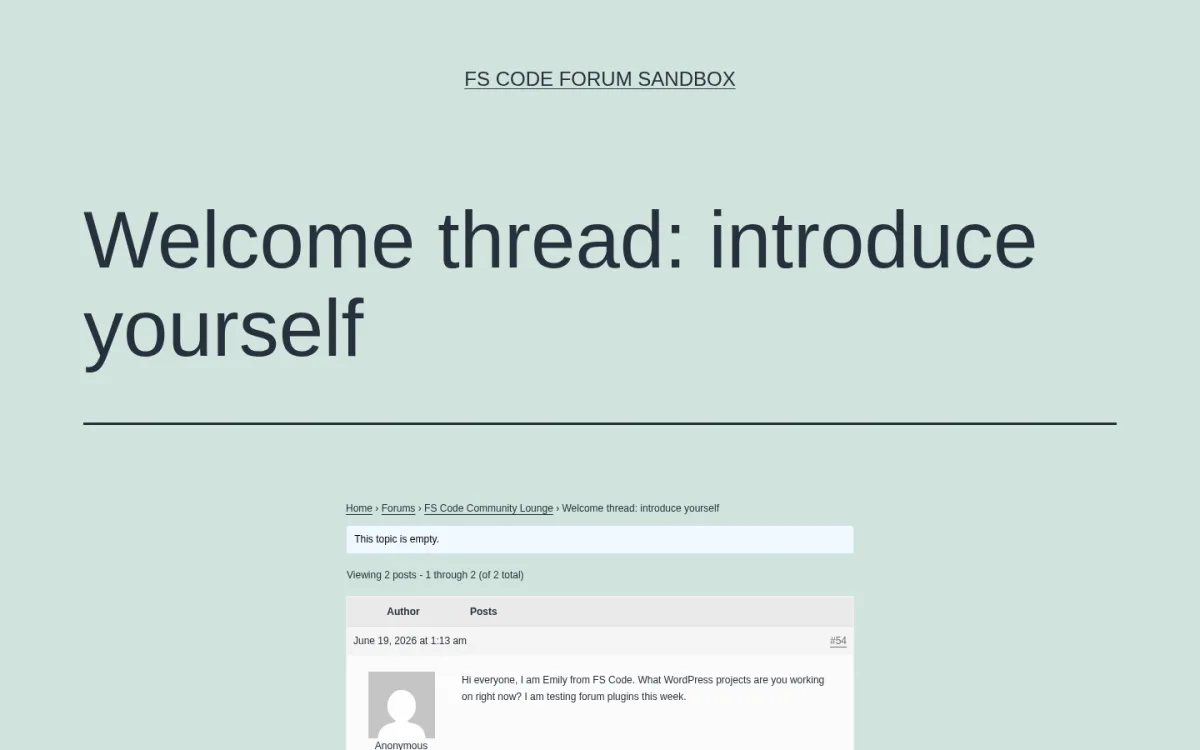
- Installed bbPress 2.6.14 and created a real Forum ("FS Code Community Lounge"), a Topic ("Welcome thread: introduce yourself") and a Reply.
- Walked Settings > Forums and confirmed the participant role default, flood protection (10 seconds), edit window (5 minutes), the anonymous-posting toggle, the auto-embed setting, the reply-threading control, and the favorites and subscriptions toggles.
- Created a
demo_usersubscriber, promoted them to bbPress Moderator, and confirmed bbPress registers its ownbbp_keymaster,bbp_moderatorandbbp_participantroles alongside the WordPress defaults. - Visited the
/forums/archive, the single-forum page (with topic + reply count, last-post time and the "You must be logged in to create new topics" gating notice), and the single-topic page (with the breadcrumb, Author and Posts columns, post numbering and content). - The current bbPress listing on WordPress.org on 2026-06-19: version 2.6.14, last updated July 2, 2025, tested up to WordPress 6.9.4.
- Public adoption: 100,000+ active installs and 3.9/5 from 343 ratings.
Strengths
- 100% free and GPL, with no paid tier from the bbPress project itself.
- Easiest forum plugin to drop into any existing WordPress theme.
- Hands-off resource footprint; safe for low-end shared hosting.
- Built-in Akismet hook and built-in BuddyPress hook out of the box.
- Theme-compatibility API renders the forum reasonably on most modern themes without custom templates.
- Topic-level favorites, subscriptions and revision logging are all on the free tier.
Drawbacks
- Release cadence has slowed; the current 2.6.14 build is from July 2025, and recent reviews call out the UI as feeling dated next to wpForo or Asgaros.
- The default styling looks like the bbpress.org forums; on a custom-branded theme you will likely tweak CSS.
- No built-in modern features like reactions, badges or multi-layout view; for those you stack a separate plugin.
Pricing
- Free. There is no paid version of bbPress.
Verdict: pick bbPress if you want the safest, lightest, theme-friendliest classic forum and you do not want a vendor upsell. It is still the right call as a quiet support forum or community sidebar, especially when paired with BuddyPress for member profiles.
2. wpForo Forum, the most modern free WordPress forum with multiple layouts
Category: full-featured WordPress forum plugin with free core and a paid addon ecosystem, by Tomdever / gVectors Team (same publisher as wpDiscuz).
Best for: anyone replacing or migrating off bbPress who wants a more modern admin UI, choice of forum layouts and an optional AI moderation/translation layer.
wpForo positions itself as the "best alternative to bbPress" and ships five forum layouts in the free core: Extended, Simplified, Question and Answer, Threaded and Boxed. It includes a Phrase System for fast translation without .po files, a built-in forum-level SEO module, built-in caching, built-in antispam plus Akismet, member ratings and badges, drag-and-drop forum hierarchy, and integrations with BuddyPress, Ultimate Member, Paid Memberships Pro, MemberPress, Groups and SureMembers. The 3.0+ "AI Edition" adds opt-in AI semantic search, AI translation, AI spam detection and an AI chatbot.
What I checked
- Installed wpForo 3.1.1, dismissed the 3.0 AI Edition welcome tour, and walked the Overview, Forums, Settings, AI, Moderations, Phrases, Tools, Boards and Accesses admin pages.
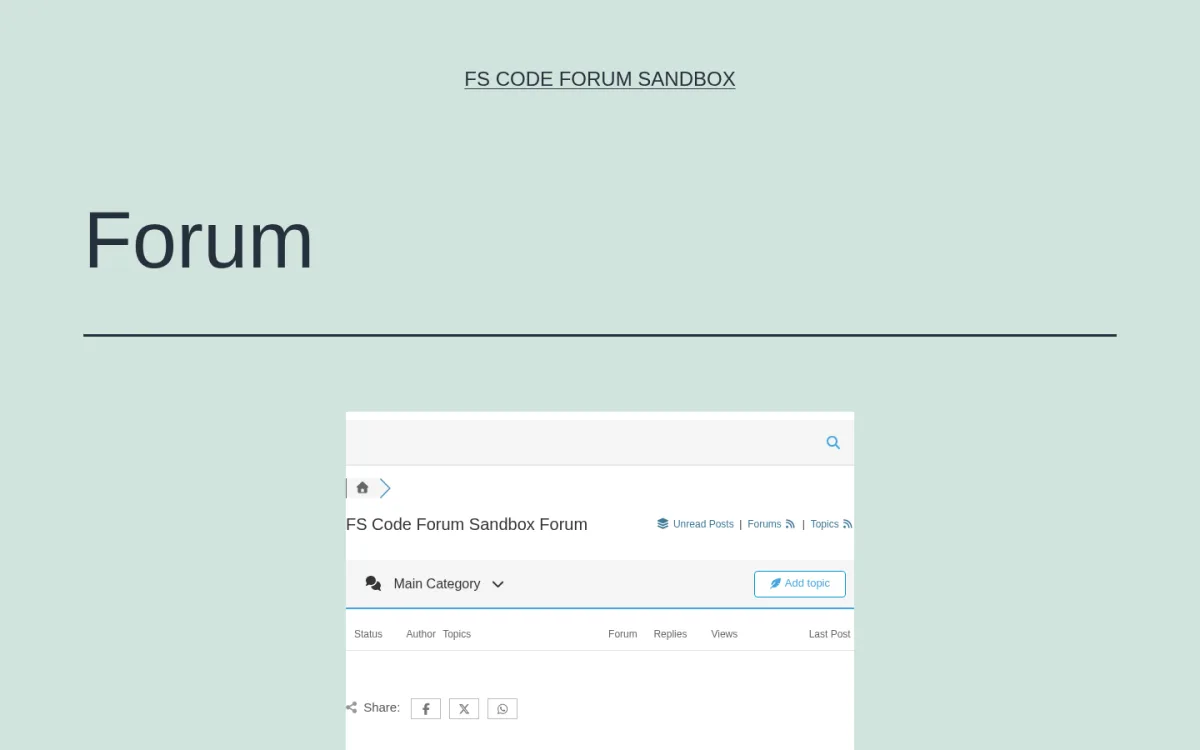
- Visited the auto-created
/community/page and confirmed the default Simplified layout renders with a search bar, breadcrumb, board title, "Unread Posts / Forums / Topics" RSS feeds, the Main Category drop, the "Add topic" front-end CTA, the Status / Author / Topics / Forum / Replies / Views / Last Post columns and the Facebook / Twitter / WhatsApp share buttons. - Confirmed the Settings > Colors and Styles screen exposes the six color sets (default blue, red, green, orange, grey, dark) and that the Phrase System sub-menu lists every on-screen string for in-place translation.
- For this run I did not complete an end-to-end topic + reply post on the default
/community/board. The capability claims below come from a combination of the live wpForo admin pages I walked, the wpForo v3 documentation, the WordPress.org listing and the wpforo.com pricing and addon catalog. - The current wpForo listing on WordPress.org on 2026-06-19: version 3.1.1 (May 31, 2026), tested up to WordPress 7.0.
- Public adoption: 20,000+ active installs and 4.7/5 from 390 ratings.
Strengths
- Five forum layouts on the free core, including a real Question and Answer layout for hybrid forums.
- Built-in forum SEO with sitemap and search-engine ping, plus a discussion forum structured-data feed for Google.
- Built-in antispam, Akismet, reCAPTCHA v2 Invisible and v3 support, flood protection rate-limiting.
- Built-in member rating and badges, drag-and-drop forum hierarchy, board-level multi-language support.
- Free Go2wpForo migration tool from bbPress, Asgaros, SimplePress, phpBB, SMF, Joomla Kunena and MyBB.
- The 3.0+ AI Edition (opt-in) adds AI moderation, AI translation, AI chatbot and AI semantic search.
Drawbacks
- Several genuinely useful features (Advanced Reactions, Polls, Embed, Mentions, Private Messages, SEO Plus) live in the paid addon catalog at gvectors.com rather than the free core.
- The AI Edition is metered: enabling AI features sends content to the gVectors AI API and requires a separate subscription. AI is opt-in by design.
- Release notes call out a steady stream of security fixes through 2025-2026; like any large forum plugin you should keep auto-updates on.
Pricing (2026)
- Free version on WordPress.org with the full core feature set and five layouts.
- Paid addons sold individually at gvectors.com, typically $29 to $150 per addon, with no annual core licence.
- AI Edition: a metered gVectors AI subscription with a Business+ tier for Custom Knowledge file uploads.
Verdict: if you want a modern, actively maintained free forum with real layout choices and an optional AI layer, wpForo Forum is the strongest pick in 2026. The free core is enough for most editorial/support communities; only add addons when you actually need them.
3. Asgaros Forum, the best 100% free WordPress forum with no upsell
Category: lightweight discussion-board plugin maintained by an independent developer (Thomas Belser) under a donation model.
Best for: small to medium community sites and niche/hobby boards where the owner wants a one-plugin solution, no annual fees, and no upsell drumbeat.
Asgaros Forum is the rare WordPress forum plugin that is 100% free with no paid tier. The whole feature set, including profiles, members list, notifications, polls, reactions, uploads, moderators, permissions, usergroups, multilingualism and multisite support, sits in the free WordPress.org build. The vendor accepts donations on asgaros.com.
What I checked
- Installed Asgaros Forum 3.4.0 and verified that activation auto-creates a
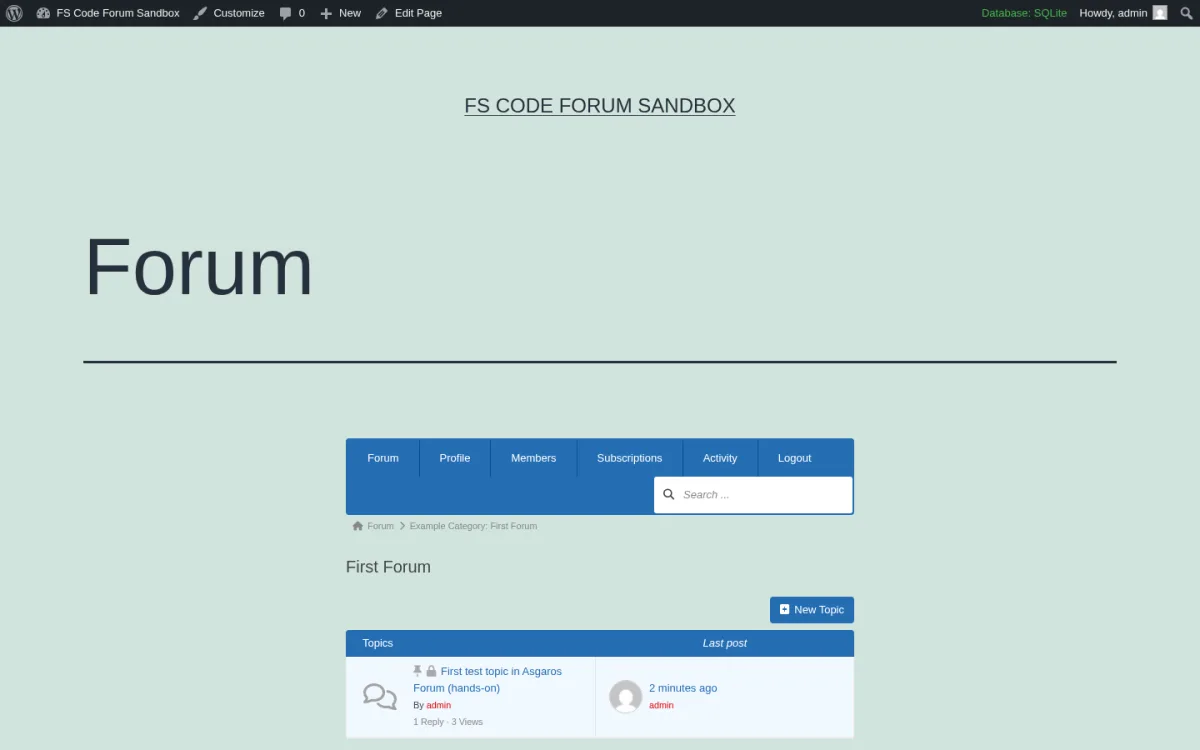
Forumpage on the front-end with the[forum]shortcode and seeds an "Example Category" containing a "First Forum". - Posted a real topic, "First test topic in Asgaros Forum (hands-on)", through the front-end New Topic form: filled the Subject field, typed the body into the rich-text editor, submitted. Asgaros rendered the topic at
/forum-2/topic/first-test-topic-in-asgaros-forum-hands-on/#postid-1with author, post number "#1", date, and Edit / Quote / Report buttons. - Posted a real reply through the same front-end Reply form. Asgaros rendered the reply at
#postid-2with the "Topic Author" badge and Delete / Edit / Quote / Report buttons. - Exercised moderation by marking the topic Sticky and Closed. Re-loaded the First Forum listing and confirmed the topic row now shows the pin (sticky) icon and the lock (closed) icon directly to the left of the title, with "1 Reply · 3 Views" and "Last post 2 minutes ago by admin".
- Walked Forum > Settings > General with the section nav (General, Features, URLs and SEO, Permissions, Breadcrumbs, Notifications, Mentioning, Members List, Profiles, Uploads, Reports, Signatures) and confirmed the General-tab form (forum title, description, location, replies/topics per page, embed/highlight options, hide-from-logged-out toggle).
- The current Asgaros Forum listing on WordPress.org on 2026-06-19: version 3.4.0, tested up to WordPress 6.9.4.
- Public adoption: 10,000+ active installs and 4.8/5 from 208 ratings.
Strengths
- True 100% free with no paid version. The developer takes donations and runs the support forum publicly.
- Lightweight: one of the smallest forum-plugin footprints on this list.
- Polls, reactions, uploads, mentions, signatures, banning, reporting and approval are all in the free build.
- Multi-language, multisite and myCRED gamification integration on the free tier.
- Active maintenance, clear security disclosure program via Patchstack.
Drawbacks
- Block-theme support has been a friction point; one recent reviewer reported widget regressions after moving to a block theme.
- No premium roadmap, so if your community grows into a large commercial board with monetization needs, you will eventually outgrow it.
- UI styling is functional rather than flashy, similar in spirit to bbPress.
Pricing
- Free, with an optional donation. There is no paid tier.
Verdict: install Asgaros Forum if you want a small to mid-size community plugin you do not have to budget for. For volunteer-run boards, hobby communities and small support forums it is the friendliest option on this list.
4. BuddyPress, the best WordPress forum-inside-a-social-network
Category: open-source social-network plugin by the BuddyPress contributors team (also John James Jacoby and many WordPress core contributors).
Best for: site owners who treat the forum as one feature inside a broader social community of member profiles, groups, friend connections, activity streams and private messaging.
BuddyPress is not a pure forum plugin. It is a community framework: extended profiles with custom xProfile fields, activity streams with threaded comments and @mentions, public/private/hidden groups, friend connections, private messaging and notifications. The forum part comes from the native bbPress integration: when you enable group forums in Settings > BuddyPress, each group can choose to have its own forum and each user's topics, replies, favorites and subscriptions appear in their profile.
What I checked
- Installed BuddyPress 14.4.0 and verified that activation auto-creates the
/activity/and/members/pages. - Walked Settings > BuddyPress > Components and confirmed the active vs available picker for Extended Profiles, Account Settings, Friend Connections, Private Messaging, Activity Streams, Notifications, User Groups, Site Tracking, BuddyPress Core and Community Members.
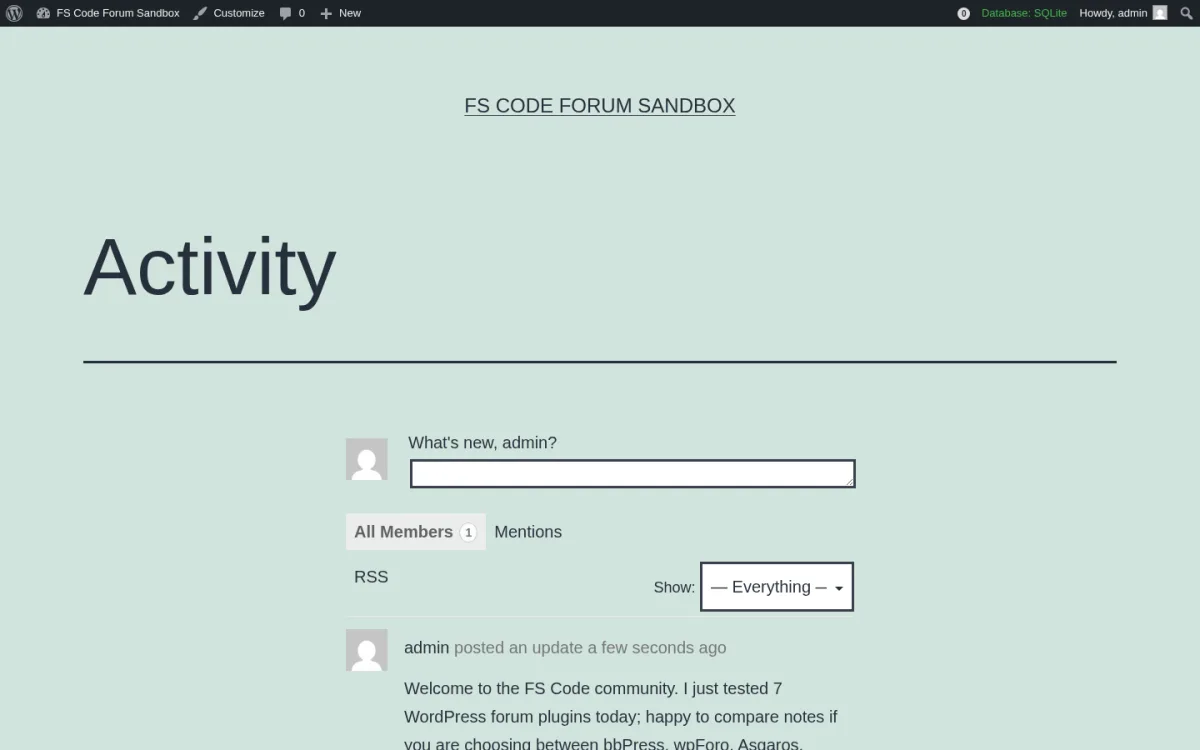
- Posted a real activity update through the
#whats-newcomposer on the front-end and confirmed it rendered in the All Members tab with the "admin posted an update a few seconds ago" line, the Show: Everything filter and the RSS link. - Activated bbPress and BuddyPress together and verified the integration anchor: bbPress Settings > Forums now exposes a "Forum Integration for BuddyPress" section with the "Allow BuddyPress Groups to have their own forums" toggle and a Primary Forum picker.
- For this run I did not push the integration test all the way through to a working group with a posted forum thread. The article's BuddyPress claims about group forums therefore rest on (i) the live integration toggle in bbPress Settings, (ii) the bbPress hands-on test in section 1, and (iii) the BuddyPress documentation and Codex.
- The current BuddyPress listing on WordPress.org on 2026-06-19: version 14.4.0, tested up to WordPress 6.8.5.
- Public adoption: 100,000+ active installs and 4.1/5 from 375 ratings.
Strengths
- Best-in-class community feature set on the free tier (profiles, activity feeds, messaging, groups).
- Native bbPress integration means each BuddyPress group can have its own forum thread.
- Real friend connections, private messaging and an @mentions stream that most pure forum plugins do not ship.
- Multisite and Multiblog support, with documented activation modes.
- Long contributor list including WordPress core engineers; the trac is active and there is a clear release cadence.
Drawbacks
- Out of the box BuddyPress does not include a classic threaded forum; you need bbPress (or wpForo) as a companion plugin for forum topics and replies.
- Several reviews note the default templates look like the BuddyPress reference theme, so a custom-branded site will need styling work or a BuddyPress-aware theme like BuddyX.
- Some 14.x dependencies (PHP 7.4, the BP Classic add-on for sites that prefer the legacy URL parser) require a small admin decision on first install.
Pricing
- Free. Donations support the WordPress Foundation.
Verdict: if your site is a community first and a forum second, especially member directories, alumni groups, or niche social networks, BuddyPress is the right base layer. Pair it with bbPress for the forum side. If you also want a branded theme tuned for this stack, the FS Code guide on how to build a social network website with BuddyX Pro walks through the same pattern.
5. Simple:Press Forum, the best premium WordPress forum for large or monetized communities
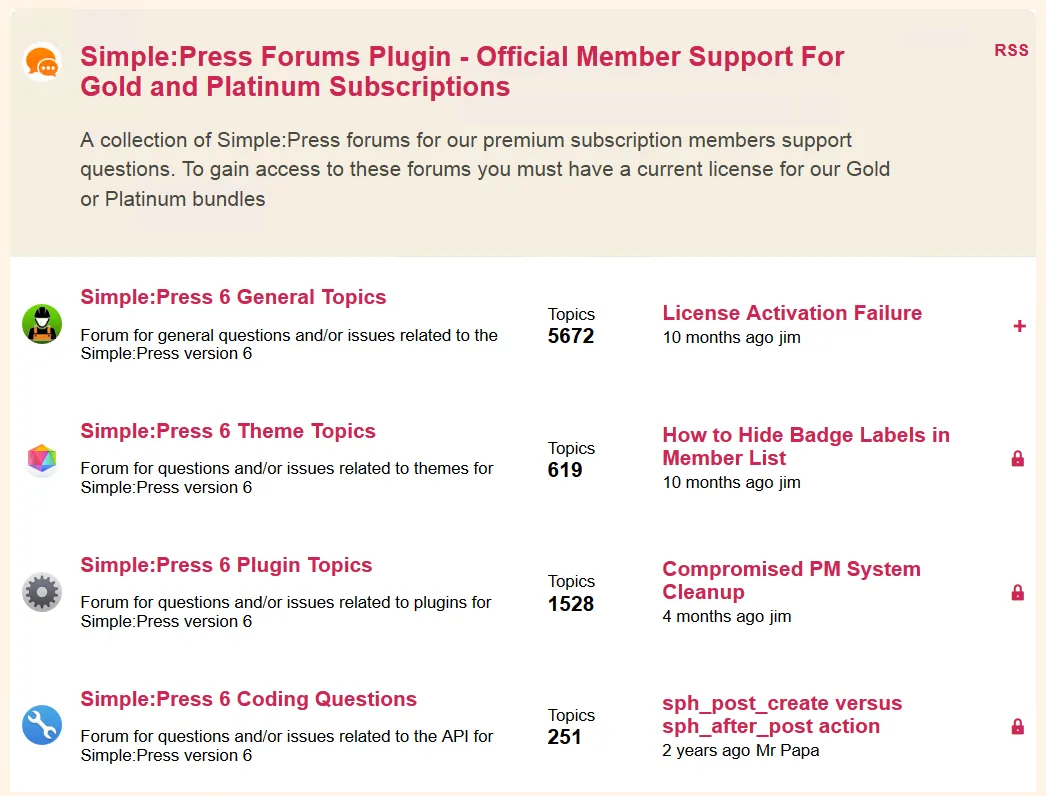
Category: premium-leaning WordPress forum plugin with a free WordPress.org core and a Pro bundle of 70-plus addons, by simplepress.
Best for: large or commercial communities with paid memberships, monetized forums and a real moderation/admin team that values per-usergroup permissions and 70-plus addons.
Simple:Press has been around since 2006 and is the oldest mature forum plugin in this roundup. The free core gives you unlimited forums and unlimited users, multi-level forum structures with sub-forums, public and private forums, a robust user-group and permission system, SEO-friendly URLs, and data importers from bbPress, Asgaros and other forum platforms. Simple:Press Pro adds an analytics dashboard, an advertising engine, a private messaging system, push notifications (SMS, Pushover, PushBullet, Slack), a reputation system, polls, a front-end admin bar, an image/media/file uploader, the TinyMCE editor and a Who's Online module, among 70-plus add-ons.
Note on testing scope
For this roundup, Simple:Press was researched from vendor and source materials rather than installed end-to-end. The image above is the vendor's own screenshot of a real Simple:Press 6 production forum, captured from the Simple:Press WordPress.org listing on 2026-06-19. The buyer-decision claims below come from the live Simple:Press homepage, pricing page, store, documentation and add-on catalog, plus the WordPress.org listing and public reviews.
What the public sources confirm
- Reviewed the WordPress.org listing changelog (6.11.0 through 6.11.14 from June 2025 to January 2026), the Simple:Press features page and the Simple:Press pricing page on simple-press.com.
- Confirmed the Pro tiers: Small $199/year (1 site), Medium $358/year (2-5 sites), Enterprise $644/year (unlimited sites). All three tiers include the same 70+ Pro addon bundle and premium themes.
- The current Simple:Press listing on WordPress.org on 2026-06-19: version 6.11.14, tested up to WordPress 6.8.5.
- Public adoption: 300+ active installs and 4.2/5 from 23 ratings.
Strengths
- Designed for scale; the vendor positions it as enterprise-grade for thousands of users.
- Per-usergroup permission system is one of the deepest on this list: define what each group can read, post, edit, delete, attach, search and moderate, per forum.
- Importers from bbPress and Asgaros mean an existing forum is not stuck.
- 70-plus Pro addons mean monetization (Ads, micropayments, reputation), private messaging, polls and a real WYSIWYG editor are all first-party rather than third-party glue.
- Multi-site support.
Drawbacks
- Small WordPress.org install base (300+) compared with bbPress or wpForo, so community-level help is thinner; you rely on Simple:Press support forums.
- Pro tiers start at $199/year and are annual, which is the most expensive entry on this list.
- Free core looks plain out of the box; most of the polish is in Pro themes.
- Recent reviews include both five-star praise and a one-star crash report on activation; keep a backup before flipping it on.
Pricing (2026)
- Free version on WordPress.org.
- Small: $199/year, 1 site.
- Medium: $358/year, 2-5 sites.
- Enterprise: $644/year, unlimited sites.
- All Pro tiers ship the same 70-plus addon bundle and the premium themes.
Verdict: pick Simple:Press Forum if you are running a commercial community, you already have, or plan, a paid-membership stack, and you want the deepest per-usergroup permission system on this list. Combine it with the FS Code guide to the best WordPress membership plugins for the access-control side and user roles in WordPress for the permission baseline.
6. CM Answers, the best Q and A style WordPress forum plugin
Category: question-and-answer discussion forum plugin by CreativeMinds (CMinds).
Best for: knowledge bases, support communities and expert-led sites that want a Stack Overflow or Quora pattern rather than a classic threaded forum.
CM Answers turns your WordPress site into a Q and A discussion board where users ask questions, post answers, vote on the best answer and earn badges. It registers Questions and Answers as separate post types and ships a Setup Wizard, admin-side moderation, AJAX-powered front-end interactions, Gravatar integration, editable front-end labels and shortcodes (cma-questions, cma-my-questions, cma-my-answers). The Pro version adds anonymous posting, private answers, multiple attachments, comments, categories with two-level navigation, tags + tags widget, user dashboards, badges, sticky questions, BuddyPress, Ultimate Member, PeepSo, GamiPress integrations, ChatGPT and Gemini AI answers in selected categories, micropayments and AdSense.
What I checked
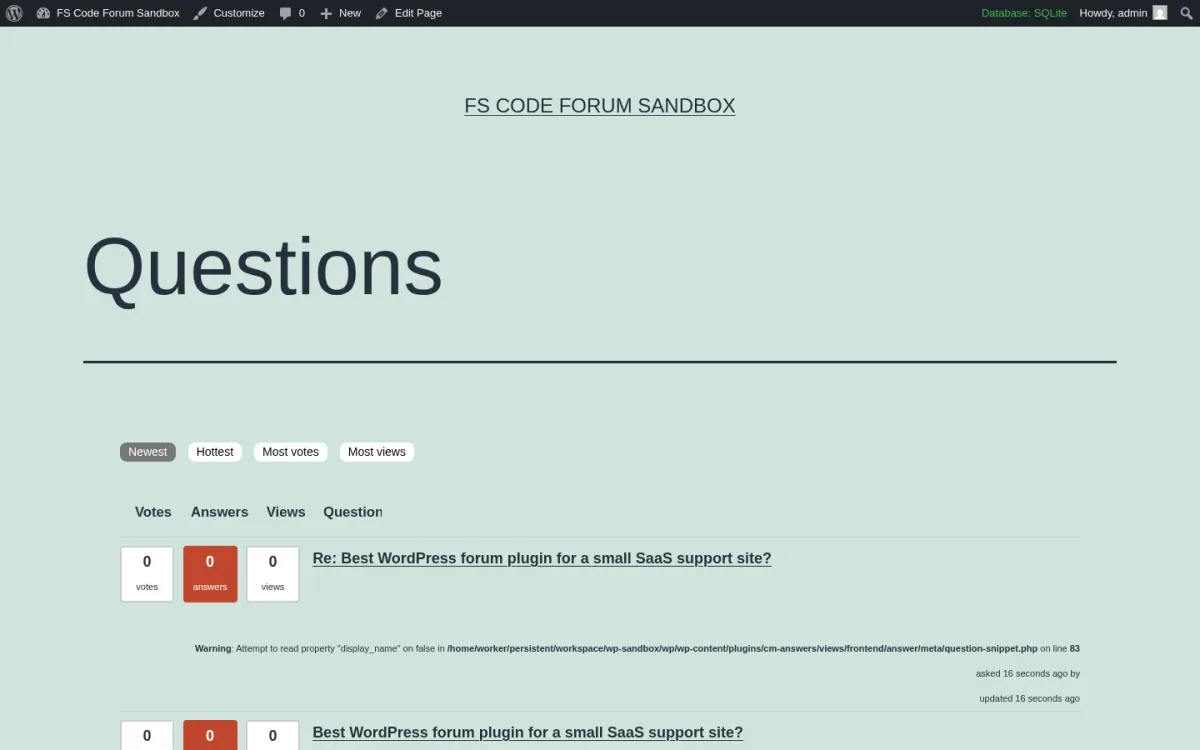
- Installed CM Answers 3.4.1 and created a real Question ("Best WordPress forum plugin for a small SaaS support site?") and an Answer with a realistic buyer body.
- Walked CM Answers > Questions / Answers / Categories / Difficulty Levels / Reassign Content / Logs / Settings / Shortcodes / Upgrade / User Guide / Related Plugins / Setup Wizard.
- Confirmed Settings exposes role-based "who can ask" rules, optional email notifications, moderator exemption lists and the editable front-end labels.
- Visited the auto-created Questions index page and confirmed the sorting tabs (Newest, Hottest, Most votes, Most views) and the Votes / Answers / Views / Question columns rendered correctly with the seeded data.
- Visited the single Question page and confirmed the question body, the "Posted by" line, the "Asked on" timestamp and the "Back to Previous Page" link render.
- The current CM Answers listing on WordPress.org on 2026-06-19: version 3.4.1, tested up to WordPress 7.0.
- Public adoption: 300+ active installs and 3.8/5 from 86 ratings.
Strengths
- The clearest Q and A shape on this list. Voting, best-answer selection, view counters, status filtering and answer counts are all on the free tier.
- Free Setup Wizard for first-time configuration and a healthy library of front-end shortcodes for custom layouts.
- Admin moderation queue, role-based "who can ask" rules, optional email notifications.
- Pro AI integration (ChatGPT and Gemini) for auto-answering selected categories is rare in this category.
- Multilingual translation files for Spanish, German, Polish, Russian, French and Czech.
Drawbacks
- Active install base is small (300+); some of the harshest 1-star reviews are about Pro-tier support and refunds. Treat the Pro purchase as an evaluation, not an impulse.
- Pro features rotate behind a list of separate add-ons (Anonymous Posting, MicroPayments, PeepSo, Ask the Expert, Idea Stimulator, Widgets, Import/Export) rather than one bundle.
- Default front-end design feels utilitarian; most teams will spend time customizing the templates.
Pricing (2026)
- Free version on WordPress.org.
- Pro and Pro add-ons sold individually on cminds.com (Pro typically starts around $39 for the first year on rotating promos; confirm on the live cminds.com pricing page before purchase).
Verdict: if your community is a question-and-answer site rather than a chat-style forum (think a Quora-style support hub, a learning-platform Q and A board, or an expert directory), CM Answers is the most accurate pick on this list. For full course-and-community sites, pair it with the FS Code best WordPress LMS plugins roundup.
7. FluentCommunity, the best modern WordPress community plus LMS plugin

Category: ultra-fast community plus LMS plugin by WPManageNinja / Shahjahan Jewel (the team behind Fluent Forms, FluentCRM and Fluent Support).
Best for: WordPress site owners who currently use, or want to leave, Circle, Skool or BuddyBoss for a modern feed-style community, especially when courses and a community share the same audience.
FluentCommunity is the newest plugin on this list and is best described as a Circle / Skool / BuddyBoss-style community plugin built natively for WordPress. The free build ships Spaces (unlimited groups), user profiles, activity feeds, real-time chat, posts, comments and reactions, notifications, polls and surveys, leaderboard, bookmarks, branding customizations, search, member directory, file upload, GIF and emoji, role manager, email digest and dark/light mode. The built-in LMS layer ships a Gutenberg course editor, lesson discussion, progress tracking, drip content, quiz module (since 1.7) and one-click migration from BuddyBoss and BuddyPress (data, settings, media and user profiles).
Note on testing scope
For this roundup, FluentCommunity was researched from vendor and source materials rather than installed end-to-end. The image above is the vendor's own screenshot of a real FluentCommunity Feed view, captured from the FluentCommunity WordPress.org listing on 2026-06-19. The buyer-decision claims below come from the live FluentCommunity homepage, pricing page, docs, GitHub repository, the WordPress.org listing and public reviews.
What the public sources confirm
- Reviewed the WordPress.org listing (version 2.6.01, June 11, 2026, tested up to WordPress 7.0, 8,000+ active installs, 4.9/5 from 84 ratings).
- Read the full 2026 changelog (Community Plugin 1.0 to 2.6.01) on the WordPress.org listing and the FluentCommunity docs.
- Confirmed the Pro feature differential (Manager Role, Leaderboards, User Badges, Verification Sign, Giphy Module, Emoji Module, Topic Management, Media Module, Welcome Screen, Automation Actions) plus the FluentCart and FluentCRM monetization tie-ins for paid Spaces and paid Courses.
Strengths
- Modern feed-style UX out of the box: Spaces, posts, real-time chat, leaderboards, dark mode, mobile responsive.
- LMS layer is bundled (Gutenberg course editor, lesson discussion, drip, quizzes, progress tracking) so courses + community can run on one plugin.
- One-click migration tooling from BuddyBoss and BuddyPress, including media and user data.
- Native FluentCRM, FluentCart and FluentForms integrations for monetization, automation and signup flows.
- 4.9/5 rating on WordPress.org from 84 reviews with consistently fast support responses.
Drawbacks
- Not a classic threaded "forum" with topics and replies; it is a community feed plus Spaces. If you want a bbPress-style forum thread per topic, this is not your tool.
- Younger codebase (1.0 in November 2024); reviewers occasionally see edge-case bugs that get fixed in the next hotfix.
- Some of the most useful gamification (Leaderboards, Badges, Verification, Welcome Screen, Automations) sits in Pro.
Pricing (2026)
- Free version on WordPress.org with the full community + LMS core (excluding the Pro modules above).
- Pro tiers on fluentcommunity.co with a 14-day refund policy. Native monetization for paid courses and paid Spaces uses the FluentCart integration introduced in 2.0.
Verdict: pick FluentCommunity if you want a modern community-feed-plus-courses experience inside WordPress instead of a classic forum, especially when you already use Fluent Forms or FluentCRM. For deeper monetization patterns, the FS Code best WordPress membership plugins and best WordPress LMS plugins roundups pair well.
How to choose the best WordPress forum plugin for your site
Most of the buying decision in 2026 comes down to two questions: what shape of conversation you want, and how much of the community you want to monetize.
- If your site is a content site adding a forum sidebar and you do not want to manage a heavy plugin, install bbPress. It is still the lightest, theme-friendliest option and stays out of the way.
- If you are leaving bbPress for something more modern and you want layout choices (Q and A, threaded, boxed) plus optional AI moderation, install wpForo Forum. The free core does more than bbPress + 3 addons, and you only pay for the addons you actually need.
- If you are running a small, volunteer, hobby or niche board and you do not want any upsell pressure, install Asgaros Forum. The whole feature set is free, including polls, reactions, uploads, mentions, signatures and usergroups.
- If you are building a social community first and a forum second (member profiles, friend connections, group activity feeds), start with BuddyPress and add bbPress for the forum threads inside groups. A BuddyPress-aware theme like BuddyX cuts most of the styling work.
- If you are running a large or commercial community with paid memberships, monetized forums and a real moderation team, Simple:Press Forum is the deepest per-usergroup permission system on this list. Be ready to pay annually.
- If your community is fundamentally a Question and Answer site (support knowledge base, expert directory, learning community), CM Answers is the right shape: voting, best-answer selection, view counters and optional AI answers.
- If your community is a modern feed-style community plus courses (the Circle, Skool, BuddyBoss pattern) inside WordPress, install FluentCommunity. Spaces, real-time chat and the built-in LMS in one plugin are unusual at this price.
A practical pattern for 2026 is to install one core forum or community plugin from this list and pair it with the rest of your stack: an anti-spam plugin so the forum signup form does not drown in bots, a user-roles guide so moderators have the right capabilities, and a clear answer to the question "what kind of site am I building?", which the FS Code roundup of the best types of websites to build with WordPress helps with.
FAQ
What is the best free WordPress forum plugin in 2026?
For most content sites and small communities, bbPress is still the most reliable free WordPress forum plugin in 2026. It is theme-friendly, lightweight, integrates natively with BuddyPress and has 100,000+ active installs. For a more modern free core with layout choices and an optional AI Edition, wpForo Forum is the strongest pick at version 3.1.1 (May 31, 2026). For a 100% free plugin with no paid tier at all, Asgaros Forum is the friendliest option.
What is the best alternative to bbPress?
wpForo Forum is the most-cited bbPress alternative in 2026. It ships five forum layouts (Extended, Simplified, Q and A, Threaded, Boxed) on the free core, includes a free Go2wpForo migration tool from bbPress and is actively maintained. Asgaros Forum is a strong bbPress alternative for smaller communities that want a 100% free plugin with no paid tier. Simple:Press Forum is the premium alternative for large or commercial boards that need 70-plus addons and per-usergroup permissions.
Does WordPress have a built-in forum?
No. WordPress core ships posts, pages and threaded comments under each post, but it does not include a real forum with topics, replies, member profiles, moderator tools or per-forum permissions. To run a forum on WordPress in 2026 you install one of the seven plugins in this roundup.
What is the difference between bbPress and BuddyPress?
bbPress is a focused forum plugin: it adds Forum, Topic and Reply post types, a Forums admin and a front-end forum UI. BuddyPress is a social-network plugin: it adds member profiles, friend connections, activity streams, private messaging and groups. The two are built by overlapping contributors and integrate natively; many WordPress communities run both together so each BuddyPress group has its own bbPress forum.
Can I build a Stack Overflow style site with WordPress?
Yes. CM Answers is the closest in shape to Stack Overflow or Quora on WordPress: questions and answers as separate post types, voting, best-answer selection, view and rating counters, badges, and on Pro an optional ChatGPT or Gemini auto-answer in selected categories. wpForo Forum also ships a Question and Answer layout in its free core, but it is one layout option among five rather than the whole product.
Do I need a separate anti-spam plugin if I run a forum?
A good idea, yes. bbPress, wpForo Forum, Asgaros Forum, BuddyPress, Simple:Press, CM Answers and FluentCommunity all ship some level of flood protection, role-gated posting and Akismet hooks, but a focused anti-spam layer catches signup spam, link-bait registrations and bot replies that the forum's built-ins miss. The FS Code best WordPress anti-spam plugins roundup compares the seven anti-spam plugins worth running on a forum.
How do I monetize a WordPress forum?
The cleanest pattern in 2026 is to combine a forum plugin with a membership plugin so the paywall lives in one place. Pair Simple:Press with a membership plugin for paid forums, or pair FluentCommunity with FluentCart for paid Spaces and paid Courses, or pair bbPress / wpForo with Paid Memberships Pro or MemberPress for per-tier forum access. See the FS Code best WordPress membership plugins roundup for the access-control side.
Conclusion
There is no single "best WordPress forum plugin" that fits every site. The right pick in 2026 depends on whether you are running a content site, a small hobby board, a social community, a large commercial forum, a Q and A knowledge base or a modern community-plus-courses platform.
- The strongest lightweight free pick is bbPress.
- The strongest modern free pick is wpForo Forum.
- The most genuinely free with no upsell is Asgaros Forum.
- The strongest forum-inside-a-community is BuddyPress.
- The strongest premium pick for large or monetized communities is Simple:Press Forum.
- The best Q and A shape is CM Answers.
- The most modern community-plus-LMS platform is FluentCommunity.
If you already know the shape of your conversation (classic threaded forum, Q and A, social community or modern feed), install that plugin first, give it a real moderation policy, and only add a second plugin (or jump to a paid tier) when you see something the free core cannot do.
Similar Blogs


