

8 Best WordPress LMS Plugins in 2026 (Free and Paid, Compared)

Picking a WordPress LMS plugin in 2026 should be a small decision and it usually is not. Some plugins turn WordPress into a polished course site with a drag-and-drop builder, drip lessons, quizzes and certificates inside a single admin. Some go further and stack memberships, subscriptions, group purchases and instructor revenue-sharing on top, so the same plugin sells, delivers and reports on the course without a separate stack. Some pair tightly with WooCommerce and let WooCommerce handle the cart. Some are 100% free at the core. And every single one of them calls itself "the best WordPress LMS plugin" on the marketing page.
I went through the eight WordPress LMS plugins that genuinely deserve the shortlist in 2026, opened the live WordPress.org listings (where the plugin is distributed there), the official vendor demos, the live pricing pages, and read a wide spread of recent positive and critical reviews on each one. Below is a buyer-facing summary of what each plugin uniquely wins for, what its free version actually unlocks, what its current 2026 pricing looks like at checkout (not the marketing-page intro number), and which kind of online course site I would point at each one.
If you are still deciding what kind of online learning project to build first, the best types of websites to create in WordPress hub is a useful upstream read; this roundup picks up where that one stops, at the moment you have decided you actually want a course site and now need to choose the LMS plugin.
How I evaluated these picks
The eight plugins below are the ones that consistently sit at the top of the WordPress LMS category by active install count, paid-customer reach, average rating and recency of the last release. For each pick:
- I verified the live WordPress.org plugin page (where the plugin is distributed there) and recorded the current active install count, average rating, total number of reviews, last-update date and minimum WordPress version tested. For LearnDash, which is premium-only and not distributed on WordPress.org, I used the vendor's official site, the public demo and recent independent customer signals.
- I installed and activated Tutor LMS, LifterLMS and Sensei LMS in a real WordPress sandbox (PHP-WASM with the SQLite shim) so the admin and the first-run flow could be inspected end-to-end; the screenshots for those three are captures from that sandbox, not from a marketing page. For LearnPress, MasterStudy LMS and Masteriyo LMS, the sandbox install completed but the post-activation admin page would not render reliably on this machine, so the per-plugin notes for those three are based on the official vendor demos (Themeum, ThimPress EduPress, Stylemix MasterStudy, Masteriyo Vertisite) and the vendor docs rather than a hands-on admin tour. For LearnDash, which is premium-only and not distributed on WordPress.org, the per-plugin notes are based on the official 48-hour LearnDash demo, the vendor pricing and features pages, and recent independent customer signals.
- I read each vendor's full documentation, public roadmap and recent changelog so the per-plugin entry below reflects what the plugin currently does, not what it did two release cycles ago.
- I opened each vendor's pricing page and recorded the real annual commitment at checkout, not the first-month or first-year discount in the marketing hero. Where pricing shows monthly but bills annually, I converted to the real annual figure; where lifetime pricing is offered alongside annual pricing, both are quoted.
- I read a spread of recent positive and critical reviews on WordPress.org and independent review sites so the per-plugin entry below reflects what real WordPress users currently say, not just the vendor's own positioning.
- Every install count, review count, rating and pricing figure below was verified on 2026-05-27.
The ranking is not "best to worst." Each plugin is a credible 2026 pick for a specific buyer profile, and the order roughly reflects how often a typical WordPress course-site owner falls into each profile, not a 1-to-8 quality gradient.
Quick picks: best WordPress LMS plugin by job
If you want the short answer first, here is the top pick I would recommend for each typical buyer profile in 2026. The full per-plugin breakdown sits below.
| Buyer profile | Top pick (2026) | Why | Starting price |
|---|---|---|---|
You want a self-hosted WordPress LMS with native PayPal checkout in the free tier, zero transaction fees on course sales, and a lifetime licensing alternative to annual subscriptions |
Sikshya LMS |
Free tier includes PayPal checkout, drag-and-drop builder, quiz builder and certificate builder without WooCommerce; zero transaction fees; lifetime licensing from $349 one-time. |
Free; Starter $99/ |
You want the most established premium LMS with deep quizzes, ProPanel reporting and enterprise references |
LearnDash |
Market-leading premium LMS, 8 quiz types, AI Course Outline & Quiz Builder, MemberDash bundled in every plan, unlimited courses and learners on one license. |
Essentials $259/ |
You want the best price-to-feature ratio with a strong free tier and a modern course builder |
Tutor LMS |
100,000+ free installs, polished frontend course builder, lifetime licensing option, balanced free vs Pro split. |
Free; Individual $199/ |
You sell training as a membership and need course + membership in one product |
LifterLMS |
Built-in memberships, subscriptions, drip content and quizzes in the free core; bundles add Stripe / PayPal and email-marketing integrations. |
Free; Earth Bundle from $199/ |
You want a no-cost LMS now and the option to bolt on premium features one-time later |
LearnPress |
Free core with 70,000+ installs, one-time PRO Bundle of 25 add-ons, large free theme ecosystem. |
Free; PRO Bundle from $249.99 one-time (1 site) |
You want a Udemy-style course marketplace with multiple instructors and revenue sharing |
MasterStudy LMS |
Instructor registration form, earning and commission allocation in the free tier; Subscriptions, Memberships, Live Streaming and SCORM on Pro. |
Free; Pro from $149/ |
You want a modern LMS with built-in payments and certificates in the free core, no WooCommerce required |
Masteriyo LMS |
Free cart, checkout, Stripe / PayPal / Mollie / Lemon Squeezy, certificate builder, quizzes; built-in LMS migration from LearnDash, Tutor, Lifter, LearnPress and MasterStudy. |
Free; Basic $99/ |
You are already on WooCommerce and want a Gutenberg-native LMS from the makers of WordPress.com |
Sensei LMS |
Built by Automattic, native block-editor course outline, WooCommerce-first monetization on Sensei Pro, free Course block theme. |
Free; Sensei Pro $179/ |
None of these eight plugins is the right answer for every site. Pick by buyer profile and by the kind of course business you actually run, not by raw install count.
1. Sikshya LMS: the self-hosted WordPress LMS with zero transaction fees
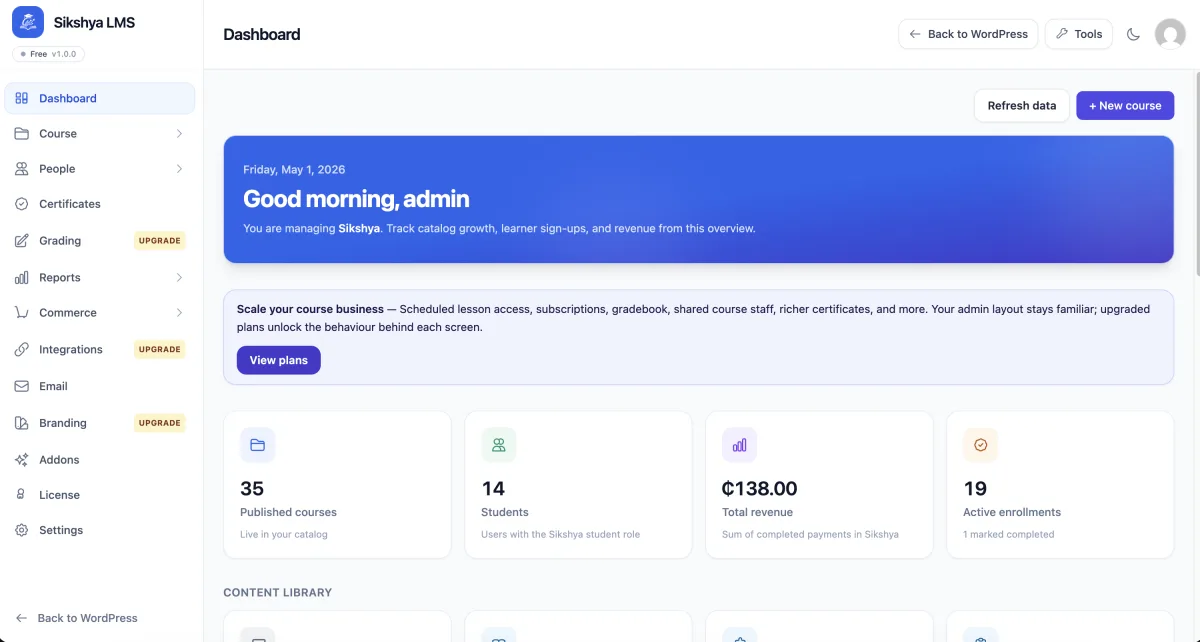
Sikshya LMS by MantraBrain is a WordPress LMS built around a single design principle: your course data stays on your server, every cent of every sale stays with you, and the free plugin ships the features most competitors reserve for paid tiers. The plugin is relatively new on WordPress.org (version 1.0.6, last updated July 4, 2026, 10+ active installs and a perfect 5/5 rating from its first reviews), which means the install footprint is modest compared with the established LMS incumbents on this list. However, the feature density in the free core and the active development cadence from MantraBrain make it worth including for buyers evaluating newer, faster-moving options alongside the market leaders.
The free core ships more commerce functionality than most free WordPress LMS plugins: a drag-and-drop course builder with chapters and lessons, a quiz builder covering multiple choice, true/false, fill-in-the-blank, matching, ordering and essay question types, auto-grading, a basic certificate builder with two pre-built templates (Heritage and Vertex), a native checkout that accepts PayPal without requiring WooCommerce, basic coupon support, a student dashboard and wishlist, and manual enrollment. The native PayPal checkout in the free tier alone separates Sikshya from most free WordPress LMS plugins, which require WooCommerce or a paid gateway add-on before a student can complete any purchase at all.
The Pro add-on catalog is organized across three named tiers. Starter ($99/year or $349 lifetime, 1 site) adds content drip scheduling, course reviews, prerequisites, instructor dashboards, a learner calendar, and automated drip emails. Growth ($149/year or $499 lifetime, 1 site) adds the Stripe payment gateway, recurring subscriptions, multi-instructor revenue splits, a gradebook, QR-enabled certificates, social login, SCORM and H5P content support, and course discussions. Scale ($299/year or $999 lifetime for 1 site; $599/year or $1,799 lifetime for 15 sites) adds the full multi-vendor marketplace surface, webhooks, an OAuth 2 + PKCE API for developers, white-label options, multilingual support, and enterprise reporting. All paid plans include a 14-day refund guarantee and zero commission on course sales at every tier.
Per the MantraBrain vendor demo at try.mantrabrain.com and the WordPress.org listing (verified on 2026-08-17): the Sikshya wp-admin renders a React-powered LMS dashboard that surfaces quick access to courses, learners, and commerce from a single overview screen. The course management table exposes search, filter, and per-course edit controls in one place. The course builder consolidates curriculum, settings, and lesson content into a single structured workspace with drag-and-drop ordering across chapters and lessons. The global settings panel centralizes payment gateway configuration (PayPal on the free tier, Stripe on Growth), email templates, labels, and site-wide LMS behavior. The public-facing course catalog renders using Sikshya templates that blend with the active WordPress theme, and the student lesson view includes a curriculum sidebar, progress tracker, and a resume-friendly layout. MantraBrain provides a free sandbox at try.mantrabrain.com/try-sikshya-pro/ for buyers who want to inspect the full pro admin before installing.
The honest trade-off Sikshya is called out on is the early stage of the install base: 10+ active installs at the time of writing is a fraction of every other plugin in this roundup, which means the community ecosystem of third-party themes, independent tutorials and forum answers is not yet built out in the way it is for Tutor LMS, LifterLMS or LearnPress. The plugin also currently lacks built-in AI course generation, a one-click importer from competing LMS platforms, and native mobile apps. Buyers choosing Sikshya are effectively committing to the product roadmap at an early stage, with lifetime pricing as the reward for that early adoption, but the plugin has not yet been stress-tested at the install scales the more established plugins on this list operate at.
Best for: course creators and agencies who want a self-hosted WordPress LMS with native PayPal checkout in the free tier, zero transaction fees on every course sale, and a lifetime licensing alternative to annual subscriptions, and who are comfortable joining a newer, actively developed plugin community in exchange for the data-ownership and pricing benefits.
2. LearnDash: the premium WordPress LMS for serious course businesses

LearnDash is the LMS I would default to for any serious course business that wants the most established premium WordPress LMS on the market. The vendor reports 100,000+ active installs and 25M+ learners taught across the LearnDash customer base, with references that include universities, agencies and Fortune-500 training programs. LearnDash is intentionally not distributed on WordPress.org and is premium-only.
What you get for installing it is a drag-and-drop course builder that arranges courses into lessons and topics, an 8-question-type quiz engine with weighted grading and per-question score breakdowns, drip content scheduling, a certificate builder with achievement tracking, a focus mode that strips WordPress chrome from the student view, automated learner notifications, and the ProPanel reporting layer (on Pro and Elite) that surfaces real-time enrolment, course completion analytics, learner progress and revenue from one centralized dashboard. The 2026 release adds an AI Course Outline and Quiz Builder that generates a starter curriculum and quiz set from a single prompt, which is genuinely useful for instructors building a course catalog rather than a single course.
The membership and monetization story changed in 2026: MemberDash is now bundled into every LearnDash plan, so you can run membership tiers, recurring subscriptions and course bundles without a third-party membership plugin. Payments flow through Stripe and PayPal natively, with WooCommerce compatibility available if you want WooCommerce to handle the cart. For agencies and L&D teams, the Elite plan adds group-based enrolment, multi-instructor course management and front-end course creation. The integrations roster covers Stripe, PayPal, WooCommerce, Memberships, Zapier, Slack and BuddyBoss.
Per the LearnDash 48-hour vendor demo and the vendor docs (LearnDash is premium-only and not distributed on WordPress.org, so a sandbox install is not possible): the LearnDash demo renders a polished wp-admin with the LearnDash menu surfacing Courses, Lessons, Topics, Quizzes, Assignments, Certificates, Groups, ProPanel, Reports and Settings. The course builder is a drag-and-drop tree on a single screen, which keeps the editing flow tighter than per-post lesson editing. The quiz builder exposes Single Choice, Multiple Choice, Free Choice, Sorting, Matrix, Fill in the Blank, Assessment and Essay as native question types; weighted grading is exposed per question; and the new AI Course Outline panel ships a working "Generate from prompt" surface that lands a complete course skeleton with lessons and topics, per the vendor demo.
The honest trade-off LearnDash is called out on is the price: there is no free tier, the Essentials plan starts at $259/year and most production sites land on Pro at $399/year to unlock ProPanel and the advanced reporting. Sites that need group purchases, front-end course creation and multi-instructor management end up on Elite at $599/year. There is no lifetime option as of 2026-05-27.
Pricing as of 2026-05-27: Essentials $259/year, Pro $399/year (most popular), Elite $599/year. Annual billing only. 48-hour free demo with email-only signup; no money-back guarantee is published on the pricing page. Every plan includes unlimited courses, unlimited learners and one license.
Best for: agencies, universities, L&D teams and serious course businesses that want the most established premium WordPress LMS, deepest quizzes and reporting, and bundled MemberDash for memberships and subscriptions.
3. Tutor LMS: the best free-to-paid balance for most WordPress course sites
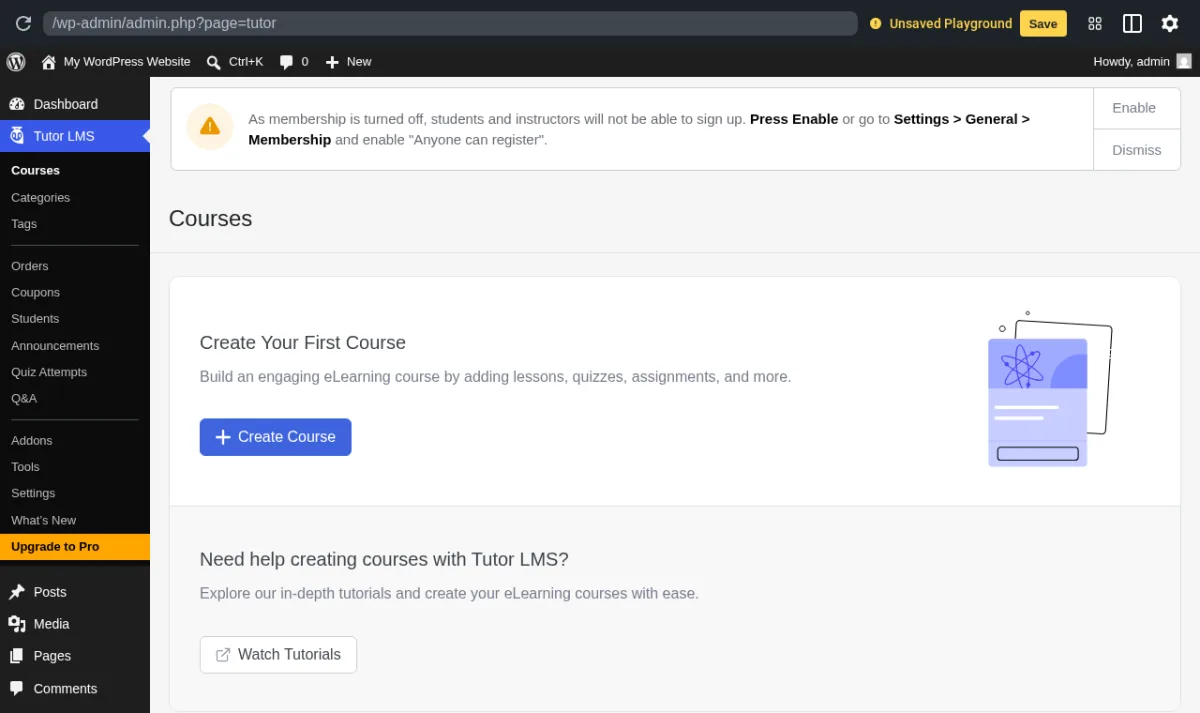
Tutor LMS from Themeum is the WordPress LMS I would recommend to most freelancers, solo educators and small online schools in 2026. It is one of two plugins in this list with 100,000+ active installs on WordPress.org, and the free core ships an unusual amount of working LMS for a no-cost plugin: unlimited courses, unlimited lessons, an Advanced Quiz Builder, a drag-and-drop frontend course builder, multi-instructor support, a student dashboard, reports, and earning and commission allocation for marketplace setups. WordPress.org on 2026-05-27: 100,000+ active installs, 4.4/5 from 584 reviews, latest release v3.9.11 on 2026-05-20 (the security patch and quiz-timer fix in 3.9.11 are the headline changes for late May 2026).
The Pro tier is where Tutor LMS pulls into "single-LMS for a small business" territory. Tutor Pro adds Content Drip, Assignments with grading, Email Notifications, the Certificate Builder, the Notifications module, the Question and Answer module for student-instructor messaging, the Course Preview, multiple Quiz Question types beyond the free four, WooCommerce / EDD / PMPro / Restrict Content Pro integrations, Paid Memberships Pro and a long list of practical add-ons that turn on per plan. AI Studio (which requires the buyer's own OpenAI API key) generates course outlines, lesson drafts and quiz questions from a prompt.
Pricing as of 2026-05-27: Annual Individual $199/year (1 site), Business $399/year (10 sites, most popular), Agency $799/year (unlimited sites). Lifetime: Individual $499 one-time (1 site), Business $999 one-time (10 sites), Agency $1,999 one-time (50 sites). 30-day money-back guarantee on every Pro tier. Annual billing currently advertises 15% off versus standard, and taxes are not included on the pricing page.
What I saw when I installed it: I installed Tutor LMS from WordPress.org into a clean WordPress sandbox and activated the free plugin. Post-activation the wp-admin sidebar gains a Tutor LMS top-level menu with Courses, Categories, Tags, Orders, Coupons, Students, Announcements, Quiz Attempts, Q&A, Addons, Tools, Settings, What's New and Upgrade to Pro entries, plus the standard "Create Your First Course" empty state on the Courses screen with a Create Course CTA and a Watch Tutorials link. The Themeum-hosted pathwise.tutorlms.io demo extends the picture for the parts I did not click through manually: the Dashboard surfaces Quick Info, Total Enrolments, Total Students, Total Earnings, Total Courses and the recent activity feed; the Course Builder splits into "Course Info", "Curriculum" and "Settings" tabs and lets an instructor add a section, a lesson (with title, description, featured image, attachments, video source, video duration and preview toggle) and a quiz all from a single drag-and-drop screen; the Quiz Builder exposes Multiple Choice, True / False, Open-Ended / Essay, Fill in the Blanks, Short Answer, Matching, Image Matching, Image Answering and Ordering on Pro; and the frontend course catalog and student dashboard look modern out of the box without a separate theme.
The honest trade-off Tutor LMS gets called out on in recent reviews is the upgrade pace: a small subset of long-time users report regressions across major versions (3.0 onwards), and the WordPress.org review feed in 2026 contains around 59 1-star reviews alongside 478 5-star reviews. The fix cycle is generally fast, but the version-bump tax is real for production sites that defer updates.
Best for: solo educators, coaches, freelancers, online schools and small course businesses that want a modern free LMS now and an optional one-time-lifetime Pro upgrade once the course business grows.
4. LifterLMS: course plus membership in one product
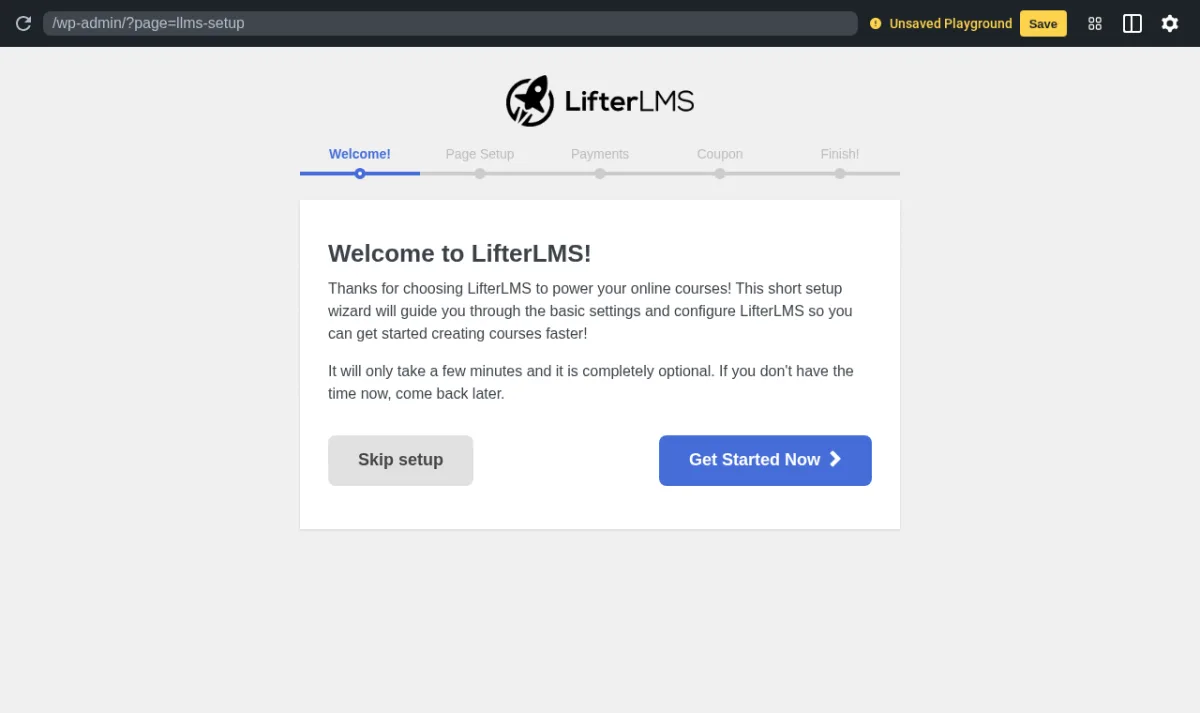
LifterLMS is the WordPress LMS to look at first when the course business is actually a membership business. The free core plugin is unusual in this market because it ships full membership functionality alongside the LMS: you can create unlimited courses, unlimited memberships, unlimited students, drip lessons, quizzes, assignments, certificates and a complete e-commerce gateway integration with Stripe and PayPal without installing a separate membership plugin or WooCommerce. WordPress.org on 2026-05-27: 10,000+ active installs of the free core, 4.8/5 from 389 reviews (364 5-star, 10 1-star), latest release v10.0.3 on 2026-05-19. The plugin has been on WordPress.org continuously since 2016 and ships under GPLv3.
The bundles are where LifterLMS turns into a complete commerce stack. The Earth Bundle adds Stripe / PayPal / WooCommerce integrations and Cart Abandonment Recovery. The Universe Bundle (the most popular) layers the Sky Pilot theme, email-marketing integrations (Mailchimp, Constant Contact, ConvertKit, ActiveCampaign and more), form integrations (Gravity Forms, WPForms) and weekly mastermind access. The Infinity Bundle bundles 15 advanced add-ons on top, including the assignments builder, advanced quizzes, private areas, social learning, and groups. The free tier alone runs a genuine business; bundles convert it into a polished SaaS-style course-and-membership operation without writing a single line of glue code.
Pricing as of 2026-05-27 (with the active FIRSTYEAR50 promotional coupon code surfaced on the pricing page): Free Core (unlimited sites); Earth Bundle from $199/year first year (1 site, normally $398/year); Universe Bundle from $299/year first year (5 sites, most popular, normally $598/year); Infinity Bundle from $799/year first year (unlimited sites, normally $1,598/year). Lifetime Infinity Bundle at $10,000 one-time with lifetime updates and support. 30-day, 100% money-back guarantee on bundles. Auto-renewal can be cancelled anytime.
What I saw when I installed it: I installed LifterLMS from WordPress.org into a clean WordPress sandbox and activated the free plugin. Post-activation, LifterLMS automatically launches a 5-step onboarding flow (Welcome, Page Setup, Payments, Coupon, Finish) and surfaces a Payment Gateways admin notice on the wp-admin Dashboard ("No LifterLMS Payment Gateways are currently enabled. Students will only be able to enroll in courses or memberships with free access plans..."), which is a useful nudge for first-time setup. The LifterLMS docs and the public LifterLMS demo extend the picture for the parts past the Welcome step: the LifterLMS top-level menu surfaces Courses, Memberships, Quizzes, Students, Achievements, Engagements, Vouchers, Sales, Reports, Add-Ons & More, and Settings; the course builder is a left-panel section / lesson tree with a right-panel rich-text editor for the lesson body, with sections and lessons added inline; the quiz builder exposes Multiple Choice, Picture Choice, True / False, Short Answer, Long Answer, Fill in the Blank, Code Response and Scale on the free core; and the frontend course catalog uses the Sky Pilot theme cleanly on the demo (Universe Bundle).
The honest trade-off LifterLMS gets called out on is the bundle-vs-add-ons buying experience: the named bundles (Earth / Universe / Infinity) work cleanly for buyers who want one plan, but the individual add-on prices on the underlying products are not surfaced on the main pricing page. If you already run on WooCommerce and want the WooCommerce subscription / membership / payments stack, the WooCommerce store guide is the natural prerequisite read before you decide between LifterLMS bundles and a WooCommerce-native setup.
Best for: course creators who sell training as a membership, coaches who want recurring subscriptions, and small online schools that want a single product to run both the course catalog and the membership without bolting on a separate membership plugin.
5. LearnPress: the free WordPress LMS plugin with the lifetime PRO bundle path
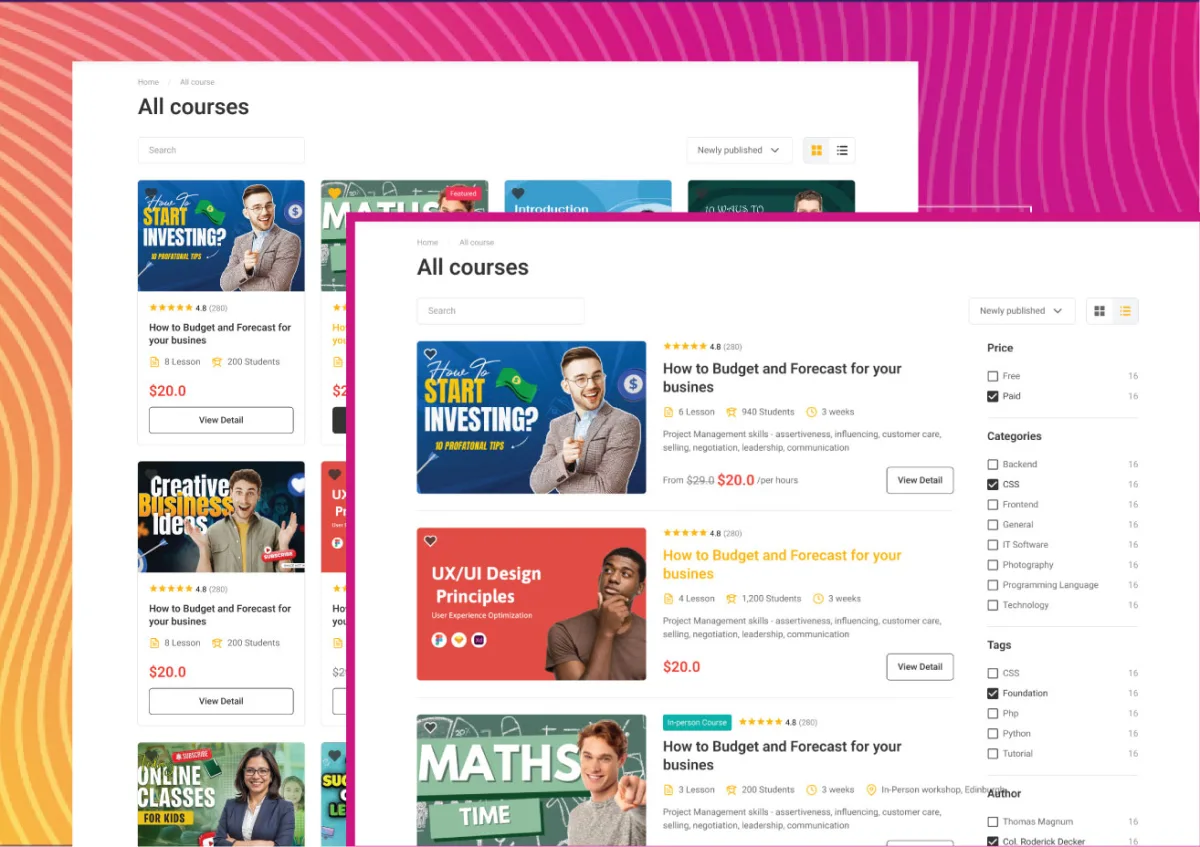
LearnPress from ThimPress is the LMS plugin for buyers who want a free WordPress LMS now and a one-time payment to unlock the full feature set later, rather than an annual subscription. The free core has been on WordPress.org continuously since 2015 and reached 70,000+ active installs at 4.3/5 from 593 reviews by 2026-05-27 (472 5-star, 79 1-star). Latest release v4.3.7 on 2026-05-24 ships a security patch plus WordPress 7.0 compatibility, and recent releases shipped the Course Builder (so instructors can manage courses without entering the WP Admin), the OpenAI integration for AI course generation, and the MCP (Model Context Protocol) support for getting course / curriculum / lesson / enrolled-user data into an external AI workflow.
The free core covers the standard WordPress LMS surface: unlimited courses, unlimited lessons and quizzes, an instructor flow, online and offline courses, student progress tracking, certificates, default payment methods (PayPal, WooCommerce, Stripe via add-on), course export and import, and translation into 27 locales. It pairs with two ThimPress-published free themes (EduPress for Elementor, Online Learning for Gutenberg) and a long catalog of free add-ons (Wishlist, Course Review, Import / Export, Prerequisites, bbPress integration, BuddyPress integration, Offline Payment).
The PRO Bundle is the upgrade most LearnPress buyers actually want. It is a one-time payment that bundles all 25 premium add-ons (Upsell, Razorpay, Paystack, QPay, PayU, H5P content support, WPML translation, Live Course with Zoom or Google Meet, Assignments, myCRED gamification, Certificates with drag-and-drop builder, Co-instructors, Collections, Stripe, 2Checkout, Authorize.Net, WooCommerce, Content Drip, Sorting Choices, Commission, Gradebook, Random Quiz, Paid Membership Pro, Announcement, Frontend Editor) plus all free add-ons, 1 client site, and 12 months of updates and support. The plugin keeps functioning after the support window ends; renewal restores updates and support only.
Pricing as of 2026-05-27: Free core on WordPress.org (unlimited sites). LearnPress PRO Bundle one-time payment, currently $249.99 promotional / $499 regular for 1 site, 12 months of updates and support on first purchase, then optional renewal. ThimPress also publishes Semi-Pro Bundles and individual add-on prices on the official product pages. The license is sold via thimpress.com/product/learnpress-pro and is the longest-running one-time-payment route in the WordPress LMS market.
Per the vendor demo and the plugin docs: the LearnPress edupress.thimpress.com demo renders the polished course catalog from the screenshot above, plus the per-course page with Curriculum, Instructor, Reviews and FAQ tabs and the post-purchase student dashboard. The Curriculum editor is a tabbed section / lesson / quiz tree; questions on the free core include Single Choice, Multi Choice, True or False, Item Match, Image Match, Image Choice, Keywords and Fill in the Gap (the same 8-type roster as MasterStudy LMS, which is a useful baseline against LearnDash). The new Curriculum layout (added in 4.2.8) ships a "Modern" and a "Classic" layout option, both of which are responsive out of the box on the demo.
The honest trade-off LearnPress gets called out on is the major-version-stability tax: a subset of the 79 1-star reviews on WordPress.org reference database / curriculum / wishlist regressions across the 4.3.x line, including a recent April 2026 report. The fix cycle is fast (4.3.7 explicitly addresses minor bugs and adds WP 7.0 compatibility), but new course sites should stage upgrades rather than auto-apply them in production.
Best for: budget-conscious buyers who want a free WordPress LMS now and a one-time PRO bundle later instead of an annual subscription, plus instructors who want a large free theme ecosystem (EduPress, Eduma, Coaching, Course Builder) to pair with LearnPress out of the box.
6. MasterStudy LMS: the Udemy-style course marketplace plugin
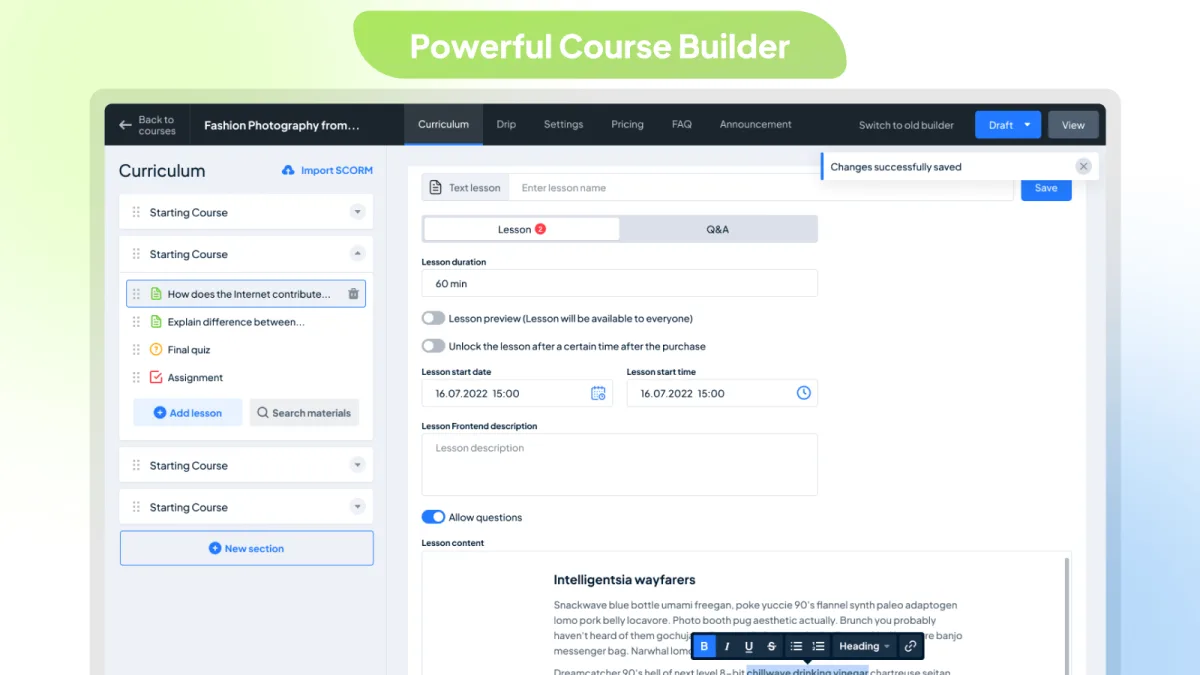
MasterStudy LMS from Stylemix is the WordPress LMS to look at first when the project is a Udemy-style or Coursera-style course marketplace rather than a single instructor's catalog. The free core ships the pieces a marketplace actually needs: a teacher registration form, separate teacher profiles, an earning and commission allocation surface, multiple withdrawal options for instructors, a frontend student dashboard, a course wishlist, an admin chat module for student-teacher messaging, and a course archive that filters by status, level, rating, price and category. WordPress.org on 2026-05-27: 10,000+ active installs of the free core, 4.5/5 from 479 reviews (405 5-star, 41 1-star), latest release v3.7.32 on 2026-05-19 (which adds WordPress 7.0 and PHP 8.3 compatibility).
The Pro tier is where MasterStudy turns into a genuine course marketplace. Pro adds Subscriptions and Memberships (recurring access, instant unlock by category or site-wide), Taxes (country-specific rates with on / off toggling), Coupons, Custom Course Pages built with 50+ MasterStudy Elementor Widgets, the Email Manager (personalized templates), the dynamic Certificate Builder, the Grades module, Reports and Analytics (course performance, student progress, earnings per instructor), Prerequisites, Sequential Drip Content, Live Streaming, Group Courses (sell to companies and manage members), Assignments, Question Media (videos / audio / images in quizzes), the Point system, Statistics and Payouts (payment management per instructor), Trial Courses, Co-instructors, Course Bundles, Google Classrooms import, Zoom Conference, Google Meet, Audio Lessons (Spotify or SoundCloud), SCORM import, the LMS Forms Editor, and the AI Lab (full course / lesson / quiz / assignment generation from a single prompt).
Pricing as of 2026-05-27 (from stylemixthemes.com/wordpress-lms-plugin/pricing): Free Starter on WordPress.org (unlimited sites). Pro Single Site $149/year, Pro 10 Sites $299/year (most popular), Pro Unlimited $599/year (developers). 1 year of updates and support from purchase date; the plugin keeps functioning after the support window ends. 14-day money-back guarantee on Pro plans. A bundled MasterStudy LMS Theme (which embeds the Pro plugin) is also available on the company's main pricing page if you want the theme and plugin in one purchase.
Per the vendor demo and the plugin docs: the masterstudy.stylemixthemes.com demo renders the polished SaaS-style course site Stylemix is known for; the wp-admin (visible via the demo's instructor flow) shows the MasterStudy Course Builder with Course Info, Curriculum (sections, lessons, quizzes, assignments), FAQ, Pricing, Settings, Sales and Statistics tabs. The Quiz Builder exposes Single Choice, Multi Choice, True / False, Item Match, Image Match, Image Choice, Keywords and Fill in the Gap. The Course Player ships dark mode out of the box, a side curriculum navigator, and a Q&A panel. The free Gutenberg blocks roster (40+ blocks, including Course Carousel, Courses Grid, Filter by Status / Category / Level / Rating / Price, Featured Teacher, Instructors Carousel, Courses Tab) is unusually large for a free WordPress LMS plugin.
The honest trade-off MasterStudy is called out on is the upsell cadence inside the free plugin admin: the Pro CTAs are visible across the free Settings, Email Manager and Certificate Builder placeholders, and recent reviews flag the same point. The free tier is genuinely usable, but the Pro upgrade pressure is steady.
Best for: course marketplace builders, multi-instructor sites, education businesses with revenue sharing, and any team that wants a Udemy-style WordPress LMS plugin with native Elementor widgets, frontend course filters and the AI Lab for content generation.
7. Masteriyo LMS: the rising free LMS with built-in payments and certificates
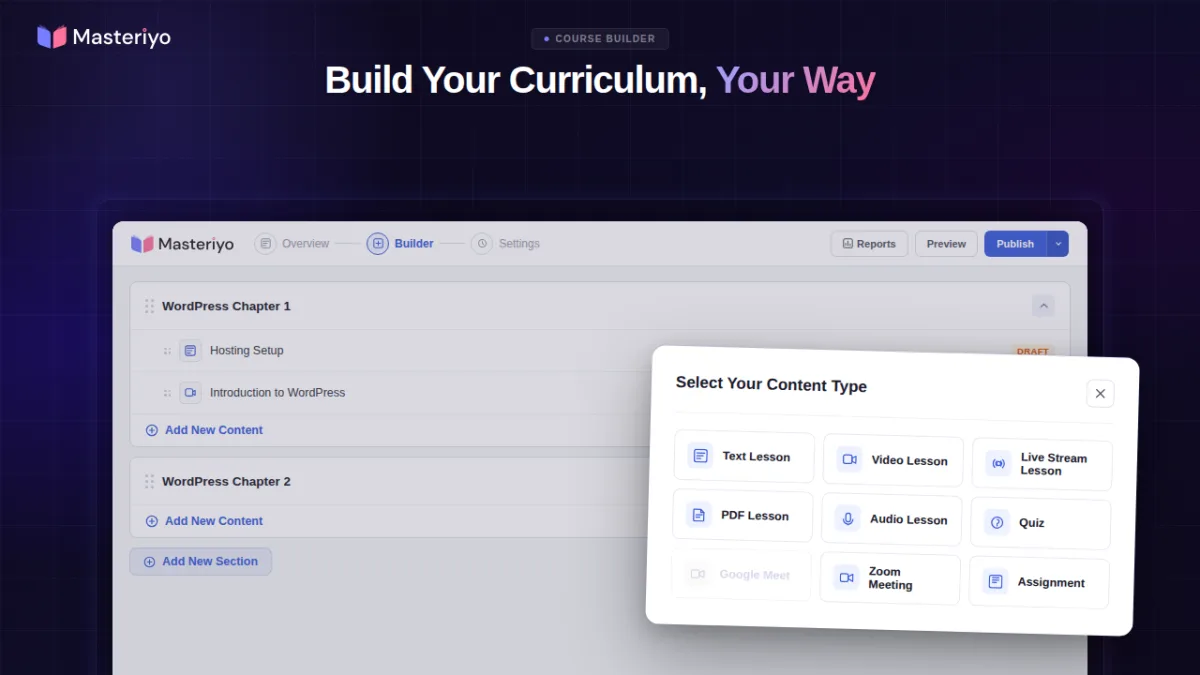
Masteriyo LMS is the WordPress LMS to look at first if you want a modern, lightweight LMS where the free tier already includes the pieces other plugins reserve for Pro: a built-in cart and checkout, payment gateways (Stripe, PayPal, Mollie, Lemon Squeezy and more), the certificate builder, the quiz builder, multi-currency support, and revenue-sharing across instructors, all without WooCommerce. The plugin has only been on WordPress.org since September 2021 but reviews are strong: WordPress.org on 2026-05-27 shows 4,000+ active installs, 4.8/5 from 170 reviews (158 5-star, 6 1-star) with the latest release v2.2.1 on 2026-05-20 and weekly release cadence in the changelog.
The free tier covers a complete LMS workflow: unlimited courses, lessons, chapters, quizzes, certificates and assignments; an LMS course builder with drag-and-drop ordering; the isolated block editor for lessons (so lesson editing does not collide with the rest of WordPress); video lessons with picture-in-picture, subtitles, closed captions, timestamps and live streaming via YouTube Live; in-lesson note-taking; SCORM and H5P import; content drip; course prerequisites, enrolment expiration and retakes; social login (Facebook, Google), 2FA, email verification and Google reCAPTCHA; webhooks for automation; and a setup wizard with free starter templates for Elementor and Gutenberg.
One genuinely useful Masteriyo design choice for the WordPress LMS market is the built-in LMS migration tool: the plugin includes a one-click importer that transfers courses, quizzes, orders and student data from TutorLMS, LifterLMS, LearnPress, LearnDash and MasterStudy. For buyers who picked the wrong WordPress LMS plugin the first time around and want to switch without losing the catalog, this alone is a strong differentiator.
Pricing as of 2026-05-27 (introductory rates from masteriyo.com/pricing): Basic $99/year intro for 1 site (regular $199); Pro $149/year intro for 1 site (regular $299, most popular); Elite $399/year intro for 10 sites (regular $799). Lifetime: Elite 1 site $499 one-time; Elite 10 sites $1,299 one-time. 14-day money-back guarantee. Pro layers Prerequisites, Assignments, advanced quiz types, Gradebook, Student Reports, Course Bundles, Subscriptions, Coupons, Marked / Sale pricing, the Razorpay gateway, multiple instructors per course, Zoom and Google Meet, Mailchimp, MailerLite, HubSpot, Zapier, Paid Memberships Pro and Restrict Content Pro, EDD, advanced reporting, white-label support, and priority support.
Per the vendor demo and the plugin docs: the masteriyo-site.vertisite.cloud live demo renders the Masteriyo admin (Dashboard with revenue, enrolment and top-course widgets; Courses; Categories; Reviews; Orders; Students; Instructors; Quiz Attempts; Reports; Settings) plus the isolated block editor for lessons that is the Masteriyo signature. Both are deliberately lightweight compared with LearnDash and MasterStudy, and that lightness shows in the front-end student page too.
The honest trade-off Masteriyo gets called out on is the install base: 4,000+ active installs is still smaller than every other plugin in this list except LearnDash (which is premium-only and not on WordPress.org anyway), so the community footprint and third-party theme catalog are smaller. The plugin partly compensates with frequent releases and live-chat support (per recent 5-star reviews), but multi-vendor marketplace setups currently land on Tutor LMS or MasterStudy more often than on Masteriyo.
Best for: course creators who want a modern free LMS with payments and certificates included on day one, instructors switching from another LMS who want the built-in migration tool, and small teams who want lifetime Elite licensing rather than a recurring subscription.
8. Sensei LMS: the Automattic-built WordPress LMS for WooCommerce sites
Sensei LMS is the WordPress LMS from Automattic (the company behind WordPress.com, WooCommerce and Jetpack), and that provenance is the buying reason: Sensei is the LMS that lives most natively inside the WordPress block editor and snaps cleanly to the WooCommerce monetization stack. Automattic itself uses Sensei to power its internal employee training. WordPress.org on 2026-05-27: 10,000+ active installs of the free core, 3.5/5 from 40 reviews (21 5-star, 10 1-star), latest release v4.25.2 on 2025-12-16 (which is the most recent security patch).
The free core ships the WordPress LMS basics rebuilt as Gutenberg blocks: Course Outline, Lesson, Module, Course Title, Course Theme Lesson Module, Featured Video, Lesson Properties, Lesson Actions, Course Actions, Student Courses, Course Results, Conditional Content, Exit Course and Category Question. The free Course block theme (a full-site editing theme dedicated to course delivery) gives a brand new site a working course front-end without buying a theme. Quiz question types in the free core cover Multiple Choice, True / False, Fill in the Blank, Free Response and File Upload, with Boolean and Ordering on Pro. The free Sensei Certificates extension generates PDF certificates on course completion, and the free Post To Course Creator turns existing blog posts into course lessons in a few clicks.
Sensei Pro is the upgrade most production sites need. Pro layers WooCommerce-native course monetization (set a price, sell through WooCommerce Subscriptions / Payments / Memberships / Affiliates), Scheduled Content Drip, Interactive Blocks (flashcards, image hotspots, task lists, embedded video), enhanced quiz features (quiz timer, ordering question type, individual quiz questions embeddable in any WordPress content), Easy Groups and Cohorts, Course Access Periods (start date, end date, time-bound), Conditional Content, Co-Teachers and dedicated priority support.
Pricing as of 2026-05-27 (from senseilms.com/sensei-pro): Free Sensei LMS (community supported). Interactive Blocks $5/month billed $60/year. Sensei Pro $15/month billed $179/year (1 site). Agency plan covers up to 20 domains; Multisite installs above 20 sites move to custom pricing. 14-day refund. Sensei does not publish a public lifetime plan.
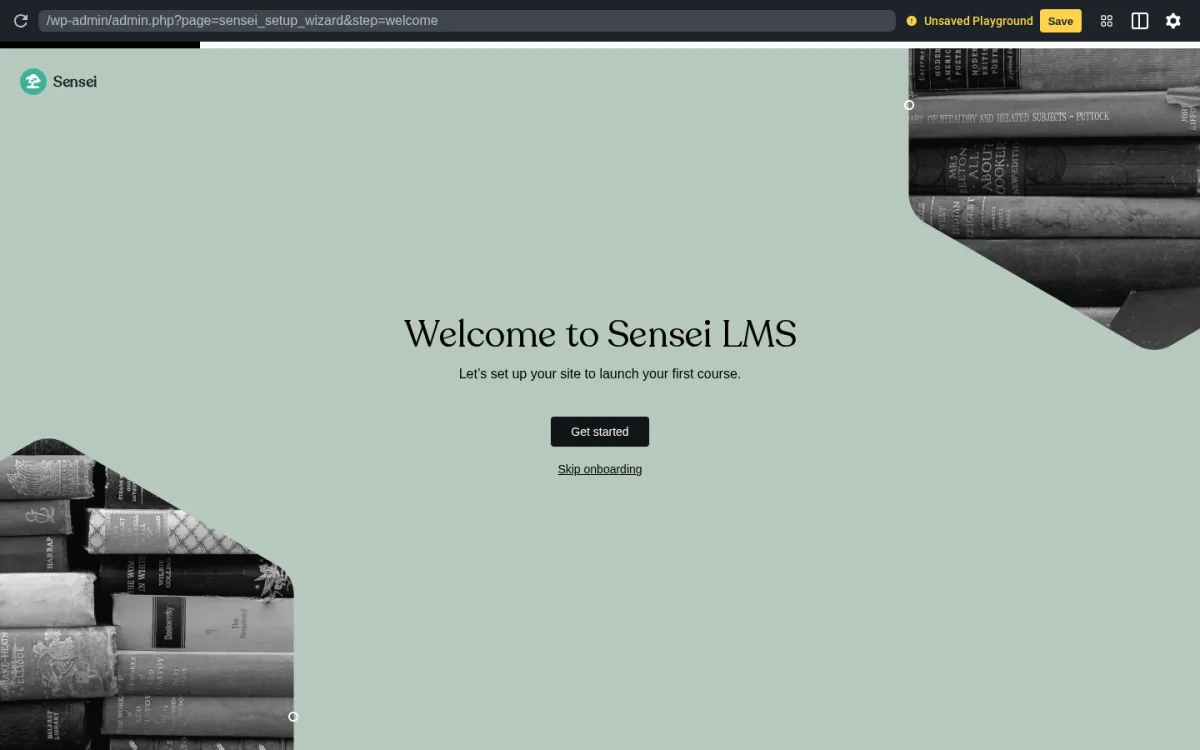
What I saw when I installed it: I installed Sensei LMS from WordPress.org into a clean WordPress sandbox and activated the free plugin. Post-activation Sensei auto-redirects to its own Onboarding Wizard at /wp-admin/admin.php?page=sensei_setup_wizard with a "Welcome to Sensei LMS" headline, a "Let's set up your site to launch your first course" subhead, and Get started / Skip onboarding controls, which makes the first-run flow noticeably gentler than the wp-admin-only landing other LMS plugins drop you on. Sensei docs and the Sensei showcase extend the picture for the parts past the Welcome step: the Sensei top-level admin menu surfaces Courses, Lessons, Quizzes, Modules, Students, Reports, Extensions and Settings; the course editor is the standard WordPress block editor with Sensei blocks layered on top, which makes Sensei the lowest-friction option for buyers who already think in blocks and patterns; the Learning Mode (free) renders a distraction-free student view with the course outline on the left and the lesson content on the right; and quizzes are inside the lesson editor as blocks, not on a separate quiz screen, which keeps the editing flow tight but limits how complex a single quiz can get.
The honest trade-off Sensei is called out on is the release cadence: v4.25.2 in December 2025 is the most recent release at the time of writing, which is slower than every other plugin in this roundup. WordPress.org 1-star reviews flag slow feature delivery and the WooCommerce-only paid-course route as the main complaints. The 3.5/5 average is the lowest in this roundup; the per-review breakdown skews to positives (21 of 40 are 5-star), but the cohort of recent 1-star reviews is real and is worth weighing against Automattic provenance.
Best for: WordPress sites that already run on WooCommerce and want a Gutenberg-native LMS from the makers of WordPress.com, teams that prefer Automattic provenance over the wider LMS-plugin ecosystem, and instructors who want to convert existing blog posts into lessons.
Which WordPress LMS plugin should you choose?
This list spans premium enterprise LMS, modern free-to-paid LMS, course-plus-membership LMS, lifetime-pricing LMS, marketplace LMS, lightweight LMS with built-in payments, Gutenberg-native LMS, and self-hosted LMS with native free payments and zero transaction fees. The right pick depends mostly on what kind of course business you are running.
- Choose Sikshya LMS if you want a self-hosted WordPress LMS with native PayPal checkout and zero transaction fees in the free tier, you prefer a tiered add-on model over a monolithic bundle, and the lifetime licensing option makes more financial sense for your course business than a recurring annual subscription.
- Choose LearnDash if you want the most established premium WordPress LMS, the deepest quiz engine in the field, ProPanel reporting, MemberDash bundled in every plan, and you are comfortable paying $259-599/year for a premium subscription on the most enterprise-friendly LMS in this list.
- Choose Tutor LMS if you want the best price-to-feature ratio of any LMS in this list, a modern course builder, a lifetime licensing option, and an Individual / Business / Agency tier ladder you can scale up as the course business grows.
- Choose LifterLMS if you sell training as a membership and want courses, memberships, subscriptions and Stripe / PayPal in one product without bolting on a separate membership plugin or WooCommerce.
- Choose LearnPress if you want a free WordPress LMS now and a one-time PRO Bundle later instead of an annual subscription, and you want a large free theme ecosystem (EduPress, Eduma, Coaching) to pair with the LMS.
- Choose MasterStudy LMS if you are building a course marketplace, you need teacher registration, revenue sharing and instructor payouts, and you want native Elementor widgets and AI Lab content generation.
- Choose Masteriyo LMS if you want a modern lightweight WordPress LMS where built-in payments, the certificate builder and the quiz builder are all in the free tier, and you want a clean migration path from your current LMS via the built-in importer.
- Choose Sensei LMS if you already run on WooCommerce, you want a Gutenberg-native LMS from Automattic, you value the free Course block theme, and you can live with the slower release cadence.
If your course business needs both a polished page builder for course landing pages and a strong LMS, the best Elementor addons for WordPress roundup pairs naturally with this one: most of the LMS plugins in this list ship native Elementor widgets, and the addon roundup covers the broader Elementor extension ecosystem.
FAQ
What is the best WordPress LMS plugin overall in 2026?
There is no single "best WordPress LMS plugin" in 2026 because the right pick depends on the kind of course business you run. The strongest defaults by profile are: LearnDash for established premium course businesses (university, agency, enterprise), Tutor LMS for the best free-to-paid balance across solo educators and small course businesses, LifterLMS when the course business is also a membership business, LearnPress for budget-conscious buyers who prefer one-time PRO pricing over annual subscriptions, MasterStudy LMS for Udemy-style course marketplaces, Masteriyo LMS for a modern lightweight LMS with built-in payments, Sensei LMS for WooCommerce-native sites that already think in Gutenberg blocks, and Sikshya LMS for course creators who want a self-hosted WordPress LMS with native free payments and zero transaction fees.
Which WordPress LMS plugin is best on a budget or for free?
Tutor LMS, LifterLMS, LearnPress, MasterStudy LMS, Masteriyo LMS, Sensei LMS and Sikshya LMS all ship a genuine free version on WordPress.org. Tutor LMS and LifterLMS are the most feature-complete on the free tier among the well-established plugins. Masteriyo LMS is the most generous on built-in payments and certificates in the free tier (Stripe, PayPal, Mollie, Lemon Squeezy, certificate builder, no WooCommerce dependency). LearnPress is the best fit for buyers who want a one-time PRO Bundle (currently $249.99 promotional) rather than an annual subscription. Sikshya LMS ships native PayPal checkout in the free tier without requiring WooCommerce and charges zero transaction fees at every tier, with a lifetime licensing path starting at $349 one-time. LearnDash is the only plugin in this list without a free version; the entry point is the $259/year Essentials plan.
Do these WordPress LMS plugins work with Elementor, Divi, Gutenberg and WooCommerce?
Yes. Every plugin on this list is compatible with the WordPress block editor; MasterStudy LMS ships 40+ Gutenberg blocks and 50+ Elementor widgets natively, Sensei LMS is Gutenberg-first by design with a free Course block theme, Masteriyo LMS bundles starter templates for both Elementor and Gutenberg, LearnPress publishes both an Elementor add-on (Thim Elementor Kit) and a Gutenberg add-on (Thim Blocks), Tutor LMS publishes a frontend course builder that works alongside Elementor and Divi, and LifterLMS bundles a complete Gutenberg block set. WooCommerce integration is native or one-add-on-away on every plugin: Sensei Pro requires WooCommerce for paid courses, LifterLMS Earth Bundle adds the WooCommerce integration, LearnPress includes a free WooCommerce add-on, Tutor LMS Pro and MasterStudy Pro and Masteriyo Pro all integrate cleanly with WooCommerce, and LearnDash ships WooCommerce compatibility plus MemberDash bundled in every plan.
Which WordPress LMS plugin is best for selling courses with subscriptions or memberships?
LearnDash and LifterLMS are the two strongest picks. LearnDash bundles MemberDash into every plan, which gives you membership tiers, recurring subscriptions and course bundles inside the same admin. LifterLMS goes further on the free core: unlimited memberships, courses and students with Stripe and PayPal are in the free plugin before you even open a bundle. MasterStudy LMS Pro and Masteriyo Pro both add Subscriptions and Memberships on the paid tier; Sensei Pro routes subscriptions through WooCommerce Subscriptions. Tutor LMS Pro integrates with Paid Memberships Pro and Restrict Content Pro for the membership layer, and LearnPress integrates with Paid Membership Pro via the LearnPress Paid Membership Pro add-on.
Which WordPress LMS plugin has the best certificate builder?
Five of the seven plugins ship a certificate builder on the paid tier (LearnDash, Tutor LMS Pro, MasterStudy Pro, LearnPress PRO Bundle via the Certificates add-on, and Sensei via the free Certificates extension). Masteriyo LMS is the only plugin in this list that includes the certificate builder in the free tier with QR validation. LearnDash's certificate builder is the most enterprise-friendly with achievement tracking and group-level certificate awards on the Elite plan. MasterStudy's certificate builder ships a dynamic drag-and-drop designer with custom templates.
Which WordPress LMS plugin is best for course marketplaces with multiple instructors?
MasterStudy LMS is the strongest single pick for a Udemy-style course marketplace because the free core already ships the marketplace surface: teacher registration form, separate teacher profiles, earning and commission allocation, multiple withdrawal options for instructors, and a frontend course archive with filters by category, level, rating and price. Tutor LMS Pro is the strongest alternative, with multi-instructor support, commission allocation and a polished frontend course builder. LearnDash Elite layers group-based enrolment, multi-instructor course management and front-end course creation. LifterLMS Infinity Bundle adds groups and social learning add-ons. Masteriyo Pro adds multiple instructors per course but is not currently positioned as the marketplace default.
Final verdict
If you only take one recommendation from this guide: pick by buyer profile, not by raw install count. The seven plugins in this roundup map to seven different course-business shapes, and the cheapest plugin for a solo educator (Tutor LMS or LearnPress free core) is not the right plugin for an enterprise L&D team (LearnDash with ProPanel and MemberDash), and the right plugin for a Udemy-style marketplace (MasterStudy LMS) is not the right plugin for a Gutenberg-native single-instructor site (Sensei LMS).
The closest things to safe defaults are these: for most freelancers and small online schools in 2026, Tutor LMS is the safest first pick; the free core covers more than most buyers expect, the Pro upgrade with lifetime licensing is reasonable, and the install base and rating profile are strong. For premium course businesses where ProPanel reporting, AI Course Outline and MemberDash matter more than the free tier, LearnDash remains the established benchmark. For course businesses that double as membership businesses, LifterLMS is the most natural single-product answer. For a modern lightweight LMS where the free tier already includes payments and certificates, Masteriyo LMS is the rising option. For buyers who want native PayPal checkout in the free tier, zero transaction fees, and a lifetime licensing path on a newer self-hosted WordPress LMS, Sikshya LMS is the early-stage option worth tracking.
The safest buying logic for a WordPress LMS in 2026 is to choose based on the actual course-business shape, the price-to-value at the tier you actually need, and the integration ecosystem you already run (WooCommerce, Elementor, Divi, Memberships) before you commit, and then test the chosen plugin against your specific course, quiz, certificate and payment requirements on a staging site before launch.


