

7 Best WordPress Filter Plugins in 2026 (Free + Paid, Hands-on Tested)

Why WordPress filtering needs a plugin in 2026
The default WooCommerce shop page sorts products by date or menu order and gives you a stock "filter by attribute" widget that reloads the whole page on every click. The default WordPress archive page has no filters at all. On any site with more than a handful of categories, attributes or custom fields, that gap shows up fast: the visitor sees a wall of cards, gives up after the second scroll, and leaves.
A real WordPress filter plugin fixes three things at once. It gives the visitor a faceted sidebar (or a horizontal toolbar) with checkboxes, sliders, color swatches and search, all wired to the catalog. It runs over AJAX so each click updates the results in place rather than reloading the page. And it widens the index so attributes, custom fields, brands, taxonomies and even post meta become filterable, not just the WooCommerce attributes the theme already knows about.
For this roundup, I looked at twelve well-known filter plugins, narrowed them to seven, and installed the five with a usable free version on a clean WordPress 6.9.4 sandbox so I could see the actual admin UI, the on-activation experience and the real free-tier limits. WooCommerce 10.8.1 was activated alongside every WooCommerce-bound plugin and six simple products were seeded with color, size, brand and price so the filter UIs had real data to work against. For the two premium-only picks (FacetWP and JetSmartFilters), I worked from the live vendor pages and documentation. The plugins are compared on what really matters to a site owner in 2026: AJAX UX, what works for free, WooCommerce coverage, custom-field and CPT scope, page-builder support, performance ceiling, and the right pick for which kind of site.
How I evaluated these filter plugins
I evaluated each plugin against the same criteria, in this order:
- AJAX UX: does the filter update results in place, with chips for active selections, without a page reload?
- What you get for free: does the free version actually solve the filtering problem, or is it a trial pulse for a premium upsell?
- WooCommerce coverage: filter by attribute, brand, category, tag, price, rating, stock status and SKU. Variation-aware where relevant.
- Custom field and CPT scope: filter posts, custom post types, ACF / Meta Box fields and taxonomies, not only products.
- Page-builder integration: native widgets / blocks for Gutenberg, Elementor, Bricks, Divi.
- Performance ceiling: indexed lookups for catalogs above 10,000 products, dynamic count cache and AJAX response times.
- Pricing fairness: real 2026 annual or one-time prices on the vendor pricing pages, including site limits.
- Public adoption: WordPress.org active install counts and ratings, checked on 2026-06-17. Premium-only plugins are judged on vendor footprint and independent review coverage instead.
- Best-fit user: editorial / content site vs WooCommerce store vs page-builder-led build vs developer / agency.
For each of the five plugins with a usable free version (Filter Everything, HUSKY, BeRocket, YITH and Search & Filter), I installed the latest WordPress.org build into a clean WordPress 6.9.4 sandbox (FrankenPHP + MariaDB 10.11.7), activated it on its own (plus WooCommerce 10.8.1 where required), and clicked into the main admin pages so the screenshots show the actual product UI rather than a stock vendor image. For FacetWP and JetSmartFilters, which have no free tier, I worked from the live vendor pages and documentation. The "What I checked" block in each section below records what I actually did, in this run.
Each plugin entry below uses the same structure: what the plugin does, what I checked, strengths, drawbacks, pricing, and best fit.
Quick comparison: 7 best WordPress filter plugins
| Plugin | Best for | Free version | Paid starts at | Strongest point | Main limitation |
|---|---|---|---|---|---|
| FacetWP | Custom-data, large catalogs | No | $99/year (1-3 sites) | Indexed facets with ACF, Meta Box, Toolset compatibility | No free trial in production, no refunds |
| JetSmartFilters | Page-builder-led stores | No | $75/year (single plugin) | Native widgets/blocks for Elementor, Gutenberg, Bricks, Divi | Subscription-only, no free tier |
| Filter Everything | Any content type | Yes | Filter Everything PRO (annual) | Best free general-purpose filter on WP.org | Free version works on archive pages only |
| HUSKY (WOOF) | Largest free WooCommerce filter | Yes | One-time CodeCanyon purchase | 90k+ installs, color/image/SKU on premium | Settings live under WooCommerce > Settings, not a top-level menu |
| Advanced AJAX Product Filters (BeRocket) | Modern free Woo builder | Yes | Pro/Business annual | Drag-drop builder, Elementor/Divi support | SEO controls + statistics are Pro/Business-only |
| YITH WooCommerce Ajax Product Filter | YITH-ecosystem stores | Yes | YITH Premium annual | Free Presets system + color swatches | Price slider, modal-mobile and variations filter are Premium-only |
| Search & Filter (Code Amp) | Lightweight free post/taxonomy filter | Yes | Search & Filter Pro annual | Simple shortcode-based filter on any taxonomy or CPT | Free version has no AJAX and no custom-field search |
All install counts, ratings and version numbers in the entries below were verified on 2026-06-17 directly on the WordPress.org plugin pages and vendor sites.
1. FacetWP, best overall premium WordPress filter plugin
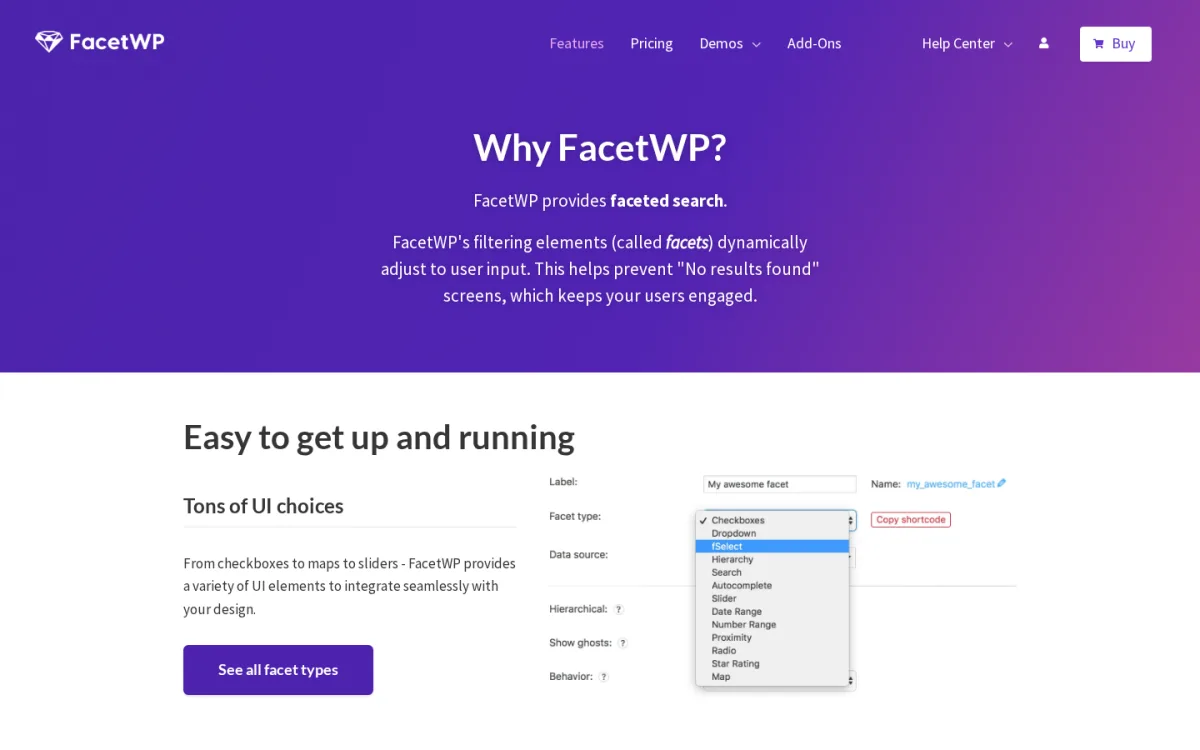
Category: premium WordPress faceted filter engine (no free version, no WordPress.org listing). Best for: custom-data sites, large catalogs and developer-built sites where filter sources go beyond the standard WooCommerce attributes.
FacetWP replaces the front-end filtering layer with a real indexed faceted system. You define facets (checkbox, dropdown, slider, hierarchy, search, autocomplete, date range, proximity) and bind each one to a taxonomy, custom field or user field, then drop a single shortcode or block where the facets and listing should appear. Because FacetWP maintains its own index, queries stay fast on catalogs that would otherwise grind WooCommerce's MySQL lookups. The plugin integrates with WooCommerce, ACF, Meta Box, Toolset, Pods, BeaverBuilder, Elementor, Bricks and Gutenberg out of the box.
What I checked
- The current FacetWP Features and Pricing pages on facetwp.com on 2026-06-17.
- The official add-ons catalogue covering WooCommerce, ACF, Meta Box, Toolset, Pods and Cache.
- Pricing tiers and the vendor's stated refund policy (no refunds, free trial available for evaluation).
- Cross-references against independent FacetWP reviews on Crocoblock, HeroThemes and SearchWP's filter roundup.
Strengths
- True indexed faceted filtering, not live MySQL queries on the main query.
- Compatibility with ACF, Meta Box, Toolset, Pods, custom taxonomies and the user object.
- Per-facet types: checkbox, dropdown, slider, hierarchy, autocomplete, search, proximity, date range.
- Template-friendly: facets and the matching listing template can live in any builder or theme.
- Strong reputation across agency builds and independent review sites.
- 1 year of updates plus all official add-ons on every plan.
Drawbacks
- No free version. You cannot install FacetWP on a live site without paying for a license.
- Not listed on WordPress.org. Install is a manual zip upload, updates are license-keyed.
- Vendor publishes "no refunds" and uses a free trial as the evaluation path. That is fair, but not the same as a money-back guarantee.
- The annual renewal auto-applies a 20% discount but it is still an annual renewal.
Pricing (2026)
- Basic: $99/year, 1-3 websites, all official add-ons.
- Professional: $249/year, 20 websites, all official add-ons.
- Agency: $349/year, 100 websites, all official add-ons.
- Enterprise: $499/year, 500 websites, all official add-ons.
- 20% renewal discount automatically applied. No refunds.
Verdict: if you treat filtering as a product surface and your data lives across custom fields, taxonomies and CPTs (not only WooCommerce attributes), FacetWP is the safest premium pick in 2026.
2. JetSmartFilters by Crocoblock, best filter plugin for page-builder-led WordPress stores
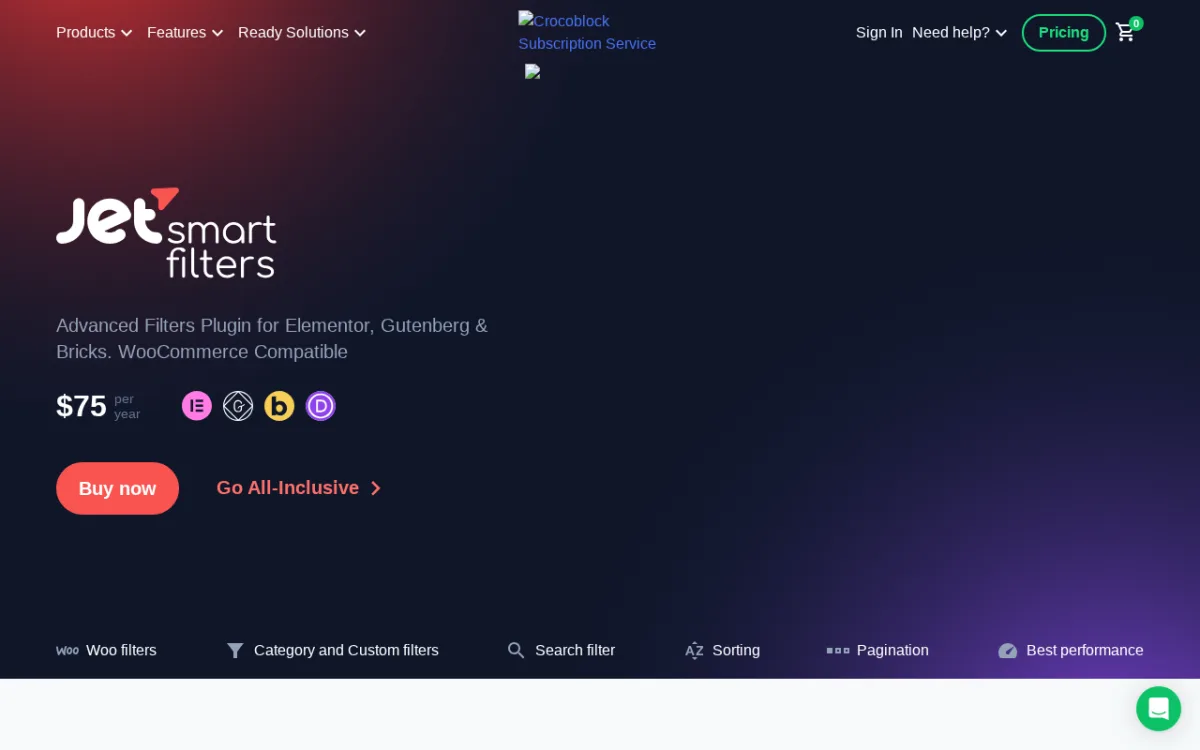
Category: premium WordPress filter plugin (no free version, no WordPress.org listing). Best for: stores and content sites built with Elementor, Gutenberg, Bricks or Divi, especially Crocoblock JetEngine users.
JetSmartFilters is Crocoblock's filter plugin and the most popular pick when the filter UI is dragged into a page builder rather than a sidebar widget. It ships native widgets and blocks for Elementor, Gutenberg, Bricks and Divi, covers checkboxes, radio, range, color, search, date range, alphabetical, rating, hierarchy and Active Tags chips, and runs AJAX without a page reload. Filters can be wired to native WordPress queries, JetEngine, ACF, Pods and Meta Box, with a built-in query builder and a dynamic count index for performance.
What I checked
- The current JetSmartFilters product page on crocoblock.com on 2026-06-17.
- The Crocoblock pricing page: $75/year for the Custom plan (single plugin) and All-Inclusive bundle from $199/year for 22 JetPlugins.
- The vendor's 30-day money-back policy and 1-year updates and Zoom-chat support promise.
- Cross-references against Crocoblock's own FacetWP vs JetSmartFilters comparison and the Toolset / Search & Filter / FacetWP / JetSmartFilters feature matrix.
Strengths
- Native widgets and blocks for Elementor, Gutenberg, Bricks and Divi. No theme tweaks required.
- WooCommerce-aware filters for attributes, brand, price, rating, stock and sale status.
- Filter sources include native WP queries, JetEngine, ACF, Pods and Meta Box.
- AJAX results, Active Tags chips, pagination, sorting and Load More all built in.
- 30-day money-back guarantee is unusually generous for this category.
Drawbacks
- No free version. Custom plan is subscription-based at $75/year.
- The natural buyer path is the All-Inclusive Crocoblock bundle, which is great value if you already use JetEngine but expensive if you only need the filter plugin.
- Vendor video walkthroughs for the free-only version are unavailable because there is no free version.
Pricing (2026)
- Custom (JetSmartFilters single plugin): $75/year, 1 year of updates and support.
- All-Inclusive (22 JetPlugins bundle including JetSmartFilters, JetEngine, JetWooBuilder, JetBooking and more): from $199/year.
- 30-day money-back guarantee on all plans.
Verdict: if your stack is Elementor, Bricks, Gutenberg or Divi and especially if you already run any Crocoblock JetPlugin, JetSmartFilters is the right premium pick in 2026. For a wider page-builder stack to pair it with, see the FS Code roundup of the best Elementor add-ons for WordPress.
3. Filter Everything, best free general-purpose WordPress filter plugin
Category: faceted WordPress filter plugin with free and Pro tiers. Best for: editorial sites, listing sites, portfolios, blogs, magazines and small to mid-size WooCommerce stores that want a real filter UI without paying for a premium engine.
Filter Everything is the strongest free general-purpose filter plugin on WordPress.org. It works with WooCommerce products, posts and any custom post type, exposes 25+ filter options out of the box (checkboxes, radio buttons, dropdowns, labels, color swatches, rating stars, numeric range and date range), and supports horizontal toolbars or vertical sidebars. Submission can be auto, Apply Button or step by step. Native widgets are provided for Gutenberg, Elementor, Divi, Breakdance and Beaver Builder. The plugin reads from standard WordPress queries, taxonomies, custom fields, ACF and Meta Box without requiring a separate index table.
What I checked
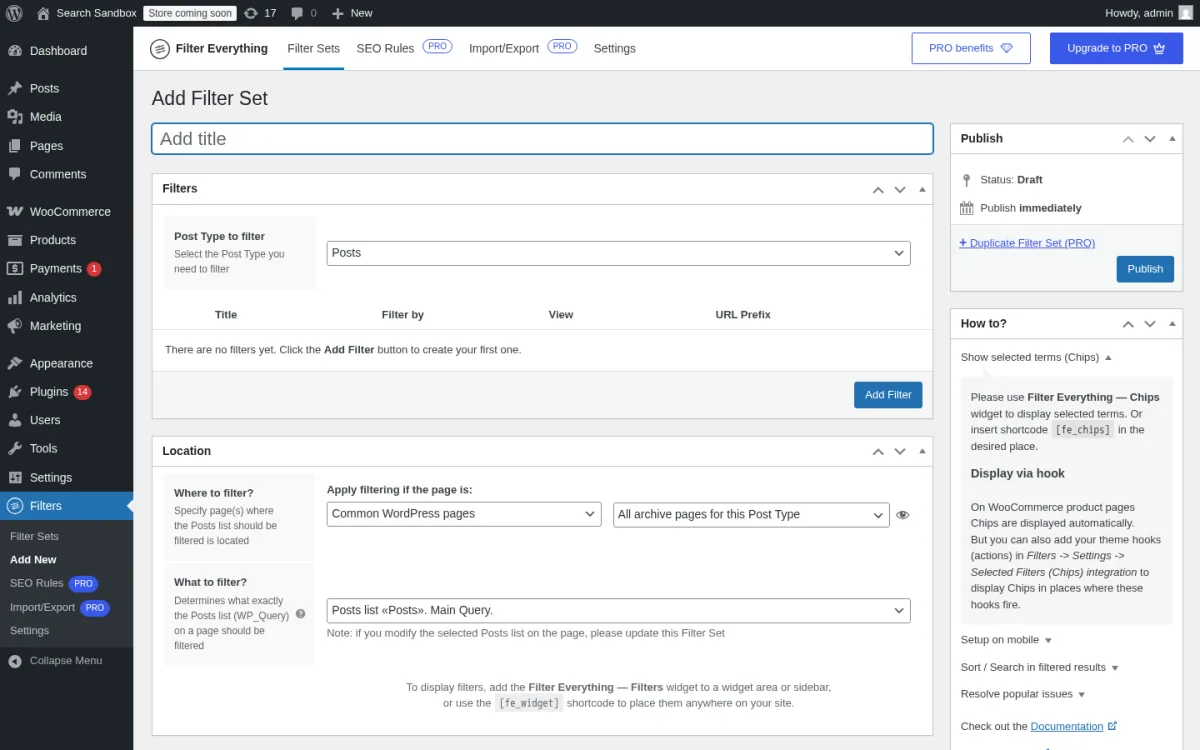
- Installed Filter Everything 1.9.2.2 from WordPress.org on a clean WordPress 6.9.4 sandbox and walked the admin pages.
- Created a Filter Set in wp-admin titled "Shop Filters" and bound it to post_type=Product and the Shop archive page.
- Embedded the filter via the
[fe_widget set_id=39]shortcode on a custom test page next to a[products]loop and confirmed the wpc-filter chips container rendered, plus also confirmed the filter set markers (wpc-filter) on the live/shop/archive. - Opened the "Add new Filter Set" page (Title, Location meta box with Where to filter and What to filter, Filters meta box, Sorting meta box, plus the How to advice panel).
- The current Filter Everything listing on WordPress.org on 2026-06-17: version 1.9.2.2, last updated 2026-06-15, tested up to WordPress 7.0.
- Public adoption: 50,000+ active installs and 4.6/5 from 143 ratings.
- The Pro feature matrix and pricing on filtereverything.pro, including the singular-pages limitation flagged in recent free-tier reviews.
Strengths
- Free build handles WooCommerce, posts and any CPT in one plugin, not store-only.
- 25+ filter views including color swatches, rating stars, range sliders and date pickers.
- Native widgets for Gutenberg, Elementor, Divi, Breakdance and Beaver Builder.
- Three submission modes (step-by-step, auto, Apply Button) on the free tier.
- ACF and Meta Box compatibility without a separate paid integration.
- Active development: latest version 1.9.2.2 shipped 2026-06-15.
Drawbacks
- Free version filters archive pages by default, not singular pages. Recent 1-star reviews flagged this and the plugin docs confirm it. Pro removes the restriction.
- Smart filtering for WooCommerce variable and out-of-stock products is Pro-only.
- SEO rules, unlimited Filter Sets and import/export are Pro-only.
- UI looks dated next to FacetWP, although it is functional.
Pricing (2026)
- Free version on WordPress.org.
- Filter Everything PRO: annual subscription on filtereverything.pro/pricing. The vendor adds custom WP_Query support, unlimited Filter Sets, SEO tools, smart variable/out-of-stock filtering, advanced mobile features, import/export, duplicate Filter Sets and priority support.
Verdict: if you run a content site, listing site or smaller WooCommerce store and you want one plugin that fixes archive-page filtering without a credit card, install Filter Everything. Upgrade to PRO only when you need singular-page filtering, SEO rules or smart variable/out-of-stock handling.
4. HUSKY (WOOF), largest-install free WordPress filter plugin for WooCommerce
Category: WooCommerce-first product filter (formerly known as WOOF). Best for: WooCommerce stores from a few products up to large catalogs of 23,000+ SKUs (the vendor's largest public demo).
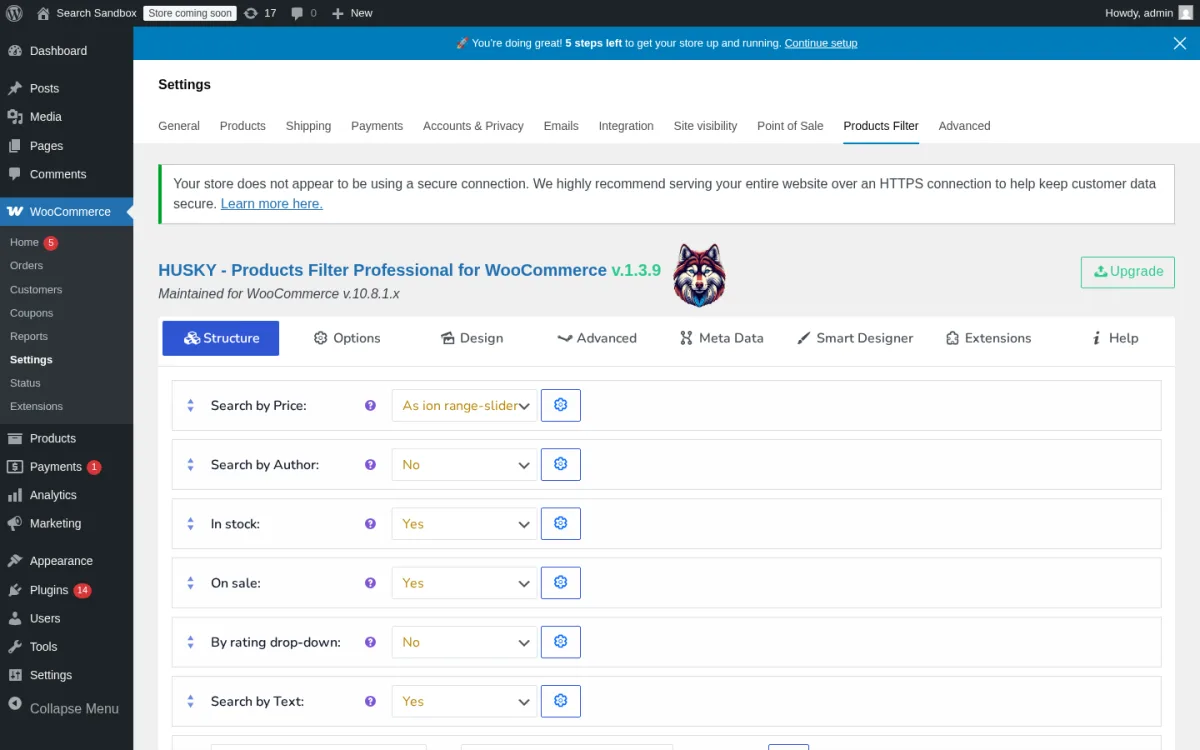
HUSKY is the rebranded name for WOOF, the largest-install WooCommerce filter plugin on WordPress.org. The free build gives you a configurable shortcode ([woof]) and a widget, checkbox / radio / dropdown / multi-dropdown filter elements, AJAX filtering, dynamic recount of available terms, filter by category, tag, attribute, taxonomy, price (slider or dropdown), text search across title / content / excerpt, and a SKU filter. Mobile-friendly widget is built in. HUSKY settings live inside WooCommerce > Settings > Products Filter rather than a top-level admin menu, which is one of the few real surprises in the setup flow.
What I checked
- Installed HUSKY 1.3.9 from WordPress.org on the same WordPress 6.9.4 sandbox after activating WooCommerce 10.8.1 and seeding 6 simple products with real pa_color, pa_size, pa_brand attribute terms and prices from $19 to $59.
- Opened the WooCommerce > Settings > Products Filter tab and confirmed the global settings panel renders inside the WooCommerce settings nav (the plugin does not register a top-level admin menu).
- Enabled the Color, Size, Brand and Price filters in the HUSKY settings, dropped
[woof tax_only="pa_color,pa_brand,pa_size" enable_by_price=1]plus[woof_products is_ajax=1]on a test page, and clicked Color = Black in the live UI. The URL pushState moved to/test-filters/swoof/color-black/, the products grid swapped in place via AJAX, and no full page reload was triggered. - The current HUSKY listing on WordPress.org on 2026-06-17: version 1.3.9, last updated 2026-06-01, tested up to WordPress 7.0.
- Public adoption: 90,000+ active installs and 4.6/5 from 334 ratings, which is the largest install base of any free WooCommerce filter on WP.org.
- The premium vs free split on products-filter.com and the vendor's "premium is a CodeCanyon one-time purchase" note.
Strengths
- Largest install base of any free WooCommerce filter (90,000+ installs).
- Free build covers AJAX filtering, dynamic recount, price slider, text search, SKU filter and term suggestions.
- Multilingual via WPML, currency-switcher integrations (WOOCS, CURCY) out of the box.
- Premium is a one-time CodeCanyon purchase rather than an annual subscription.
- Active 2026 development with regular security and compatibility fixes (1.3.9 shipped 2026-06-01).
Drawbacks
- Color swatches, image swatches, hierarchy drop-downs, ACF filtering, Smart Designer and Step-by-Step wizard are premium-only.
- Settings page lives inside WooCommerce > Settings, which can take new users a minute to find.
- Long historical changelog has notes about security fixes; auto-updates should stay on.
- Admin UI looks dated compared to BeRocket or YITH, but it is functional.
Pricing (2026)
- Free version on WordPress.org.
- HUSKY premium ("Products Filter Professional"): one-time CodeCanyon purchase. No annual renewal.
Verdict: if you run a WooCommerce store and you want a free filter with the largest community footprint, install HUSKY and upgrade to the CodeCanyon premium tier when you need color/image swatches, the Smart Designer or the Turbo Mode for large catalogs. Pair it with the right rest-of-the-stack from the FS Code roundup of the best WooCommerce plugins.
5. Advanced AJAX Product Filters by BeRocket, best free WooCommerce filter with a drag-drop builder
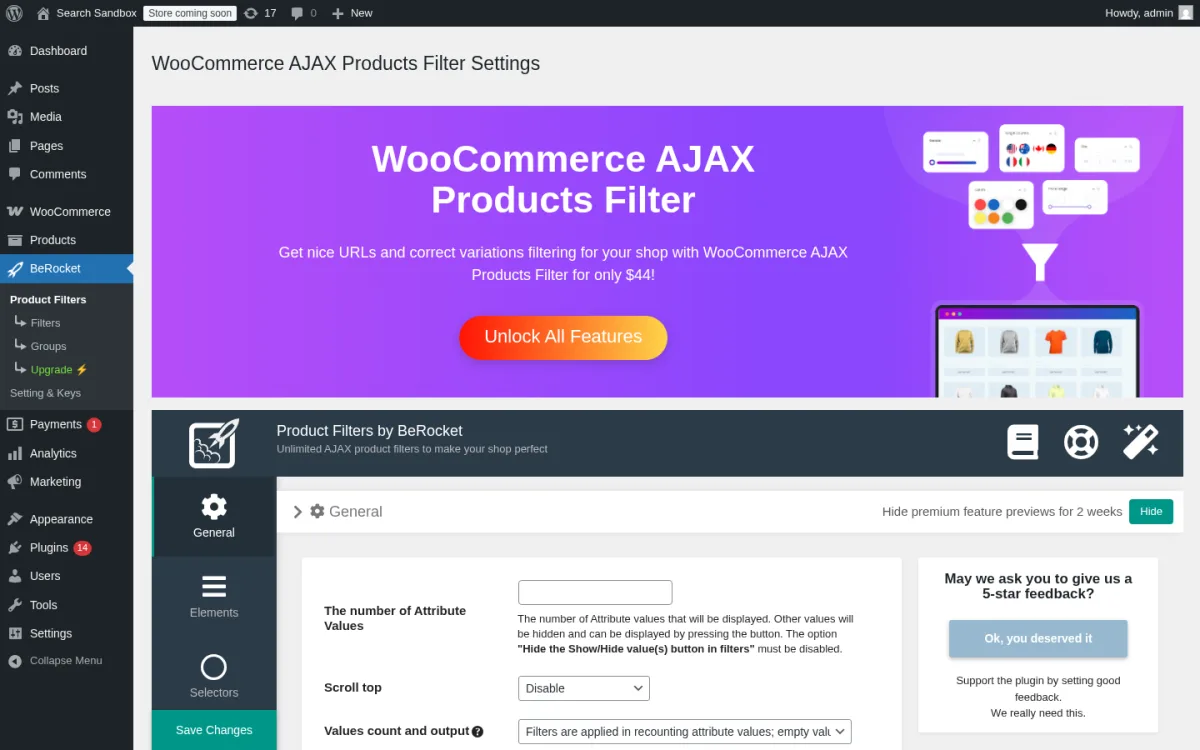
Category: modern free WooCommerce AJAX filter with Pro and Business tiers. Best for: WooCommerce stores that want a builder-friendly free AJAX filter with explicit Elementor, Divi and Beaver Builder hooks.
BeRocket's Advanced AJAX Product Filters is the most-rated free WooCommerce filter on WordPress.org. The free build is unusually well-stocked: a drag-and-drop filter builder, AJAX filtering, pagination and sorting, checkbox / dropdown / radio / slider / color / image filter types, filter by categories, attributes, tags, price, ratings and product meta (custom fields), apply button, reset button, selected-filters area, nested filters, show-more buttons, scroll-to-top after filtering and clean filter URLs. Compatibility is documented for Elementor, Divi and Beaver Builder, plus ACF Pro, WPML, Polylang and Relevanssi.
What I checked
- Installed Advanced AJAX Product Filters 3.2.0.3 from WordPress.org on the sandbox after WooCommerce 10.8.1 was active.
- Opened the BeRocket Product Filters admin landing (Filter Groups list, sidebar nav, BeRocket account panel) and confirmed the wizard surface on a fresh install.
- Built a Filter Group with three single filter posts (Color/pa_color checkbox, Brand/pa_brand checkbox, Price slider) through the wp-admin Add New Product Filter form and bound the group to AJAX filtering.
- Confirmed BeRocket's free-tier behaviour on placement: dropping
[br_filters_group group_id=44]on a custom test page rendered the BeRocket widget containers but the JS bundle that hydrates them only auto-loads on a real WooCommerce shop / product-category archive context. On a builder site, BeRocket's free version expects Filter Groups to be placed inside the Shop sidebar (classic theme) or via the Elementor, Divi, Beaver Builder, Bricks or WPBakery integrations. - The current listing on WordPress.org on 2026-06-17: version 3.2.0.3, last updated 2026-05-26, tested up to WordPress 7.0.
- Public adoption: 50,000+ active installs and 4.7/5 from 386 ratings, the highest rating in the free WooCommerce filter category.
- The Pro and Business feature matrix on berocket.com.
Strengths
- Drag-and-drop filter builder on the free tier.
- Filter types include slider, color swatch and image swatch on the free tier.
- AJAX filtering, pagination and sorting, plus browser back/next support out of the box.
- Explicit compatibility with Elementor, Divi and Beaver Builder.
- 4.7/5 across 386 ratings is the highest in this category.
- Active development: 3.2.0.3 shipped 2026-05-26 with WordPress 7.0 compatibility.
Drawbacks
- SEO-friendly URLs with canonical and per-filter meta are Pro-only.
- New filter types (stock status, sale status, custom taxonomy slider, datepicker) are Pro-only.
- Filter statistics and custom SEO meta per filtered page are Business-only.
- Free admin landing pushes the BeRocket account / premium upsell, which is normal but visible on every page.
- Placement matters on the free tier. BeRocket's frontend JS only auto-loads on the real WooCommerce shop / product-category archive context. If you build a custom Shop with the
[products]shortcode on a regular WordPress page, plan to add BeRocket through Elementor, Divi, Beaver Builder, Bricks or the Shop sidebar widget rather than the raw[br_filters_group]shortcode.
Pricing (2026)
- Free version on WordPress.org.
- Pro and Business plans on berocket.com (vendor sells annual licenses; current plans not always visible without contact for all regions).
Verdict: if you want a modern, builder-friendly free WooCommerce filter with a real upgrade path, install Advanced AJAX Product Filters and only consider Pro or Business when you need filter-level SEO control or usage statistics. For the page-builder stack around it, the FS Code roundup of the top WordPress page builder plugins is the right companion read.
6. YITH WooCommerce Ajax Product Filter, best free filter for YITH-ecosystem stores
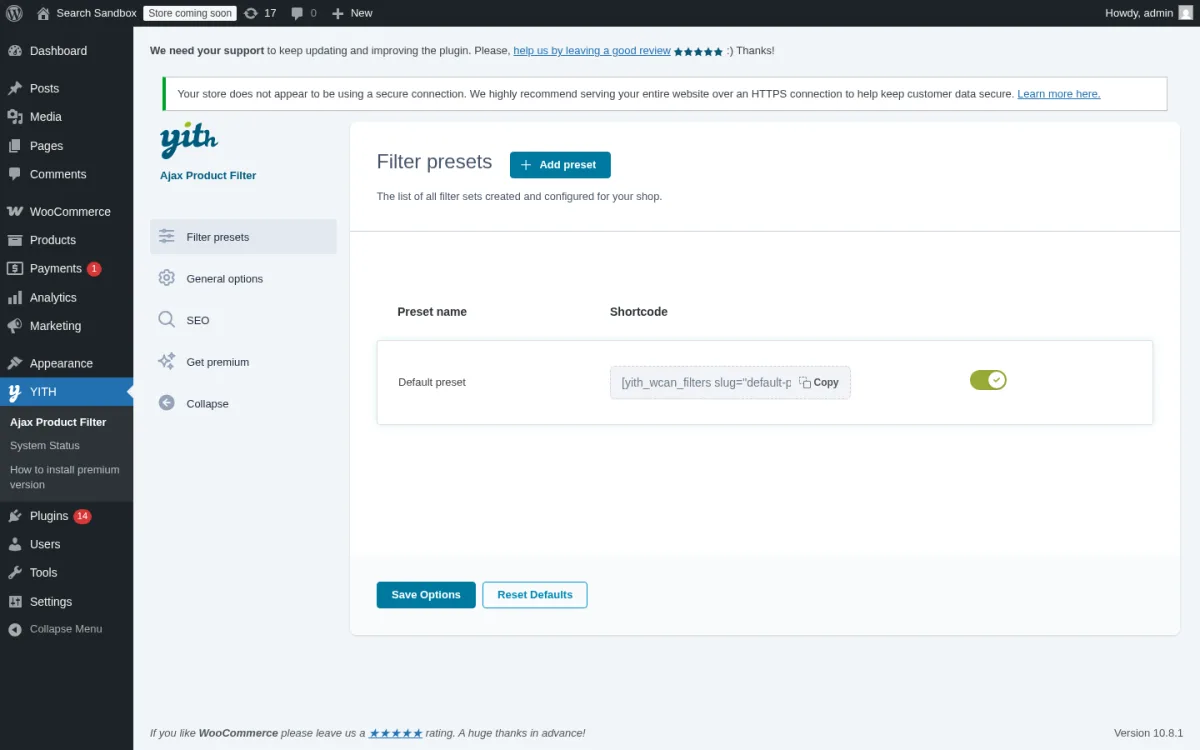
Category: WooCommerce AJAX filter from YITH. Best for: WooCommerce stores already inside the YITH ecosystem (YITH themes plus other YITH plugins) or shops that want a familiar YITH workflow with a Preset system on the free tier.
The YITH WooCommerce Ajax Product Filter was significantly rebuilt in version 4.x: the old widget pattern was replaced with a Preset system you can configure once and reuse via widget, shortcode or Gutenberg block. The free version covers filter presets, filter by product categories, tags and any attribute (color, size, material, brand, etc.), checkbox / select / text / color-swatch filter styles, AND / OR multiple selection, adaptive filtering (hide terms with no results), reset button, scroll-to-top on mobile and desktop, an SEO option to toggle indexing of filtered URLs, and lazy-loaded filters with AJAX pagination for the terms list.
What I checked
- Installed YITH WooCommerce Ajax Product Filter 5.20.0 from WordPress.org on the sandbox after WooCommerce 10.8.1 was active.
- Opened the YITH > Ajax Product Filter > Presets admin landing and confirmed the in-product Free vs Premium comparison rendered on a fresh install.
- Created a "Shop Filters" Preset with two filter rows (Filter by Color on pa_color, Filter by Brand on pa_brand) and placed it via
[yith_wcan_filters slug=shop-filters]. Confirmed the YITH preset shell rendered (yith-wcan-filters data-preset-id=54, the form, and the placeholder checkboxes for Color and Brand) and watched YITH's free lazy-hydration XHR fire (/?wc-ajax=yith_wcan_render_filter&_preset_id=54&_filter_id=0). - Observed that YITH's free build lazy-hydrates the filter terms only when the page's main query is a WooCommerce product loop. On a regular WordPress page that uses the
[products]shortcode (not a real shop archive), the hydration response returnedhtml=""and the filter terms did not populate. The right home for a free YITH Preset is the Shop sidebar or a product-category sidebar. - The current YITH listing on WordPress.org on 2026-06-17: version 5.20.0, last updated 2026-05-14, tested up to WordPress 7.0.
- Public adoption: 80,000+ active installs and 3.5/5 across 99 ratings. The skew reflects the v3 to v4 Preset migration pains rather than the current 5.x experience; recent reviews are positive.
- The premium feature matrix on yithemes.com and the 100% money-back guarantee badge.
Strengths
- Preset system on the free tier is unusual and useful.
- Filter by category, tag and any product attribute on the free tier.
- Color-swatch filter style is included on the free tier.
- SEO option to control indexing of filtered URLs is on the free tier.
- 100% money-back guarantee on premium is generous.
- Strong fit if the store is already inside the YITH theme + plugin ecosystem.
Drawbacks
- 3.5/5 rating still reflects the v3 to v4 migration backlash, even though current versions are much better.
- Bicolor / image color swatches, label / image filter style, modal mobile layout, price slider, price ranges, review filter, in-stock and on-sale filters, AJAX product sorting, tooltips, toggle filters and "keep visible but not clickable" terms are premium-only.
- Variations filtering and full permalink management are premium-only.
- Free presets need a real WooCommerce archive context (Shop sidebar or product-category sidebar) to populate. On a custom page with the
[products]shortcode, YITH lazy-hydration returns empty terms because the main query is not a product loop. - Pushing the YITH support track is part of the upsell; that is normal but worth budgeting for.
Pricing (2026)
- Free version on WordPress.org.
- YITH Premium: annual subscription on yithemes.com with a 100% money-back guarantee.
Verdict: if you already run YITH themes or other YITH plugins and you want a filter that ships with a Preset system on the free tier, install YITH WooCommerce Ajax Product Filter. For the bigger store stack around it, the FS Code guide to setting up a WooCommerce store is a useful next step.
7. Search & Filter by Code Amp, best lightweight free post and taxonomy filter
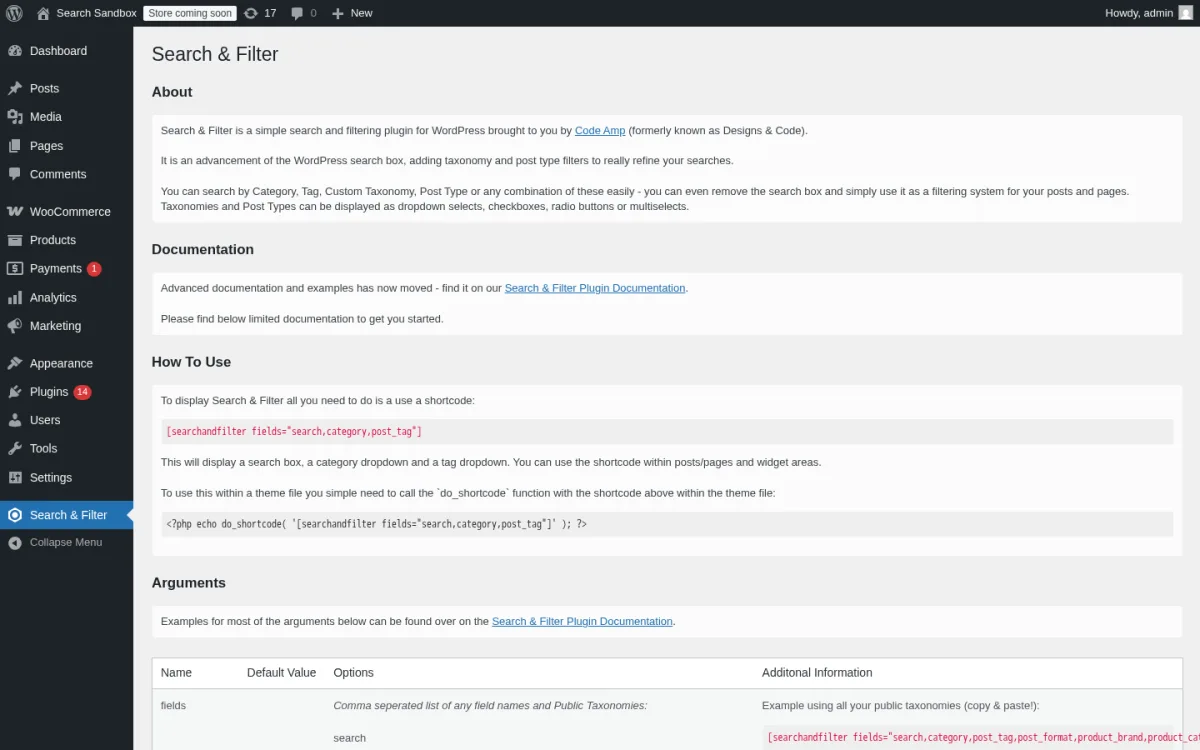
Category: free shortcode-based WordPress filter for posts, custom post types and taxonomies. Best for: editorial, magazine, knowledge-base and content-site owners who want a small, predictable, free filter that does not bring a WooCommerce-style settings tree with it.
Search & Filter is the longest-running general-purpose filter plugin on WordPress.org (first released 2013). The free build is purposefully small: you place a shortcode and configure it with arguments (categories, tags, custom taxonomies, post types, post dates, search) and the filter form renders inline with dropdowns, checkboxes, radios or multiselects. The Pro version (paid, on searchandfilter.com) adds AJAX, custom-field search, range sliders, date pickers, auto-complete, a drag-and-drop editor and custom templates.
What I checked
- Installed Search & Filter 1.2.18 from WordPress.org on the sandbox.
- Opened the Search & Filter settings page and confirmed the shortcode helper and field list render correctly with a clean WordPress install.
- Placed
[searchandfilter taxonomies="category" types="checkbox" submit_label="Filter"]on a test page over 4 seeded posts across the Tech, News, Reviews and Uncategorized categories. Checked the "Tech" category checkbox, hit the Filter submit button, and confirmed the form posted normally: the browser navigated from/test-posts-filter/to/category/tech/with a full page reload and no XHR. This is the documented free-tier behavior. - The current Search & Filter listing on WordPress.org on 2026-06-17: version 1.2.18, last updated 2025-12-14, tested up to WordPress 6.9.4.
- Public adoption: 50,000+ active installs and 4.5/5 from 174 ratings.
- The Pro vs Free comparison on searchandfilter.com and the v3 development notes (v2 to v3 changeover has been bumpy per reviews).
Strengths
- 50,000+ active installs over 12+ years means a very stable plugin with predictable behaviour.
- Free version handles category, tag, custom taxonomy, post type and post date in a single shortcode.
- Multiple field types: dropdown, checkbox, radio, multiselect.
- AND/OR operators for checkboxes and multiselects on the free tier.
- "Tested up to: WordPress 6.9.4" lines up with sandbox WordPress 6.9.4 exactly, so no version-notice noise on fresh installs.
Drawbacks
- No AJAX in the free version. Every filter submit reloads the page.
- No custom-field or post-meta filtering in the free version.
- The settings UI is shortcode-driven, which is fast for developers and slow for non-technical owners.
- Multiple reviewers flagged that the v3 changeover removed combined-field search (you can search title OR content OR taxonomy, not all three at once). The article calls this out so readers do not get blindsided.
Pricing (2026)
- Free version on WordPress.org.
- Search & Filter Pro: paid annual licence on searchandfilter.com. Pro adds AJAX, post-meta and custom-field search, range sliders, date pickers, auto-complete, drag-and-drop editor and custom templates.
Verdict: if you want a tiny, free, predictable shortcode-based filter for posts, custom post types and taxonomies and you do not need AJAX, install Search & Filter. When AJAX or custom-field search becomes a requirement, the Pro upgrade is the obvious next step.
How to choose the best WordPress filter plugin for your site
Most of the buying decision comes down to two questions: what kind of site you run, and how much of the setup work you want to do yourself.
- If you run a WooCommerce store and the filter sources are standard attributes plus brand and SKU, start with HUSKY for the largest free community footprint or Advanced AJAX Product Filters by BeRocket for the most builder-friendly free UI. Both have real upgrade paths to premium.
- If your store is already inside the YITH ecosystem or you want a YITH-style Preset system on the free tier, install YITH WooCommerce Ajax Product Filter.
- If you run a content site, blog, knowledge base or magazine and you want a real filter UI on archive pages without paying, start with Filter Everything. It is the strongest free general-purpose option on WP.org in 2026.
- If your site already runs on Elementor, Bricks, Gutenberg or Divi and especially if you use Crocoblock's JetEngine, pay for JetSmartFilters. The page-builder integration is what makes it worth the licence.
- If your data lives in custom fields, ACF, Meta Box or Toolset and your catalog is large (50,000+ items) or your site is built by an agency, pay for FacetWP. The indexed faceted architecture is the right ceiling.
- If you only need a small free shortcode-based filter for posts and taxonomies, install Search & Filter. It will not give you AJAX on the free tier and that is the trade-off.
A practical pattern for medium-traffic stores in 2026 is to install one core filter plugin from this list and pair it with the rest of your stack: a search plugin so visitors can also type queries, a cache plugin so the filter results return instantly, and a page builder so the filter UI is part of the same template system as the listing. If you are still building the rest of that stack, the FS Code best WordPress search plugins for 2026 is a useful next step.
FAQ
What is the best free WordPress filter plugin in 2026?
For WooCommerce stores, HUSKY (WOOF) has the largest install base (90,000+) and the strongest free WooCommerce coverage, while Advanced AJAX Product Filters by BeRocket has the highest rating (4.7/5 from 386 ratings) and the most modern builder-friendly free UI. For content sites that need to filter posts, custom post types and ACF fields, Filter Everything is the strongest free general-purpose pick. Pick HUSKY for the largest community footprint, BeRocket for the cleanest builder UX, or Filter Everything for non-store sites.
Why does the default WooCommerce filter widget feel slow on busy stores?
The stock WooCommerce "filter by attribute" widget runs a fresh database query on every click and reloads the entire shop page to display the result. On any store with a few hundred SKUs or a handful of attributes, that pattern feels slow because each click is a full page load. A real filter plugin runs the same query over AJAX, updates only the product list and the active-filters chips, and skips the full page reload. The plugins above with explicit AJAX support (FacetWP, JetSmartFilters, Filter Everything, HUSKY, BeRocket, YITH) all do this on the free or paid tier as called out per plugin.
Which WordPress filter plugin is best for Elementor or Bricks?
JetSmartFilters by Crocoblock is the strongest pick if your store or content site is built with Elementor, Bricks, Gutenberg or Divi. It ships native widgets and blocks for all four builders, supports AJAX out of the box, and integrates with JetEngine, ACF, Pods and Meta Box as filter sources. For free alternatives that still work with Elementor or Divi, Filter Everything and Advanced AJAX Product Filters by BeRocket both expose explicit builder widgets, although neither matches JetSmartFilters' depth.
Can I filter by ACF custom fields on the free tier?
On the free tier: Filter Everything filters ACF and Meta Box fields out of the box, Advanced AJAX Product Filters by BeRocket supports product meta (which covers many ACF Pro fields), and HUSKY filters by text/SKU but only filters ACF fields in the premium tier. YITH and Search & Filter require premium for custom-field filtering. On the paid tier, FacetWP is the most flexible: it indexes ACF, Meta Box, Toolset and Pods fields by default.
Do WordPress filter plugins slow down a site?
A well-built filter plugin runs the filter logic only when a visitor uses the filter, so it has no measurable impact on normal page loads. Plugins that maintain their own index (FacetWP, JetSmartFilters with its dynamic count indexing) stay fast even on 50,000+ item catalogs because they avoid live WP_Query joins for every filter click. Plugins that run live MySQL queries (Filter Everything, HUSKY, YITH, BeRocket, Search & Filter) are perfectly fine on most stores, but very large catalogs are where the indexed engines justify their license cost.
Should I use a premium filter plugin or stay free?
If your catalog is under 10,000 products and your filter sources are standard WooCommerce attributes, the free builds of HUSKY, BeRocket or YITH will solve the problem. If you need filter-level SEO control, custom-field facets or a builder-first widget set, the premium tiers (FacetWP, JetSmartFilters, Filter Everything PRO, HUSKY premium, BeRocket Pro/Business, YITH Premium, Search & Filter Pro) are the obvious upgrade path. The right pattern is to install the free version first, see whether you hit a real limitation, and only then pay.
Conclusion
There is no single "best WordPress filter plugin" that fits every site. The right pick in 2026 depends on whether you are running a WooCommerce store, a content site or a custom-data build, and whether your stack is page-builder-led or theme-led.
- The strongest all-around premium pick is FacetWP.
- The strongest premium pick for builder-led stacks is JetSmartFilters by Crocoblock.
- The strongest free pick for posts, products and any CPT is Filter Everything.
- The largest-install free WooCommerce filter is HUSKY (WOOF) by RealMag777.
- The highest-rated free WooCommerce filter is Advanced AJAX Product Filters by BeRocket.
- The strongest free filter inside the YITH ecosystem is YITH WooCommerce Ajax Product Filter.
- The lightest free post and taxonomy filter is Search & Filter by Code Amp.
If you already have a clear answer in your head about which kind of site you run, install the matching free plugin first, give it a real catalog and a real query, and only add a premium tier when you see something it cannot do.
Similar Blogs


