

8 Best WordPress Search Plugins in 2026 (Free + Paid, Hands-on Tested)

The default WordPress search is the same simple MySQL LIKE query it has been for years. It orders results by date, not by how well they match what the user typed, and it does not look inside custom fields, product attributes, PDFs, comments or media metadata. On any site with more than a few hundred posts or a real product catalog, that gap shows up fast: visitors type a query, get noise back, and bounce.
A real WordPress search plugin fixes three things at once. It replaces the relevance engine so the best match comes first. It expands what gets indexed so custom fields, SKUs, taxonomies and attachments are searchable. And it adds a usable front end, usually a live AJAX bar with thumbnails, prices and suggestions, so users see the right result before they finish typing.
For this roundup, I evaluated eight WordPress search plugins. Six of the eight have a usable free version that I installed on a clean WordPress 7.0 sandbox so I could see the actual admin UI, the on-activation experience and the real free-tier limits. For SearchWP, which has no free tier, I worked from the live vendor pages and documentation. For Advance Product Search by ThemeHunk, I reviewed the current WordPress.org listing and ThemeHunk's product documentation; the entry is framed accordingly throughout. The plugins are compared on what really matters to a site owner in 2026: relevance quality, what works for free, WooCommerce coverage, index scope, live-search UX, performance ceiling, and the right pick for which kind of site.
How I evaluated these search plugins
I evaluated each plugin against the same criteria, in this order:
- Relevance quality: does the plugin replace the default date-sorted search with a proper scoring engine, including weighting for titles, custom fields and taxonomies?
- What you get for free: does the free version actually solve the problem, or is it a trial pulse for a premium upsell?
- WooCommerce coverage: live product suggestions with image, price and SKU, plus search in attributes, variations and brands.
- Index scope: custom post types, custom fields, taxonomies, comments, PDF/Office documents and media metadata.
- Front-end UX: live AJAX suggestions, faceted filters, instant-results overlay, theme integrations, mobile UX and accessibility.
- Performance ceiling: how the engine behaves on catalogs above 50,000 posts or products and whether it offloads work from MySQL.
- Pricing fairness: real 2026 annual or one-time prices on the vendor pricing pages, including site limits and document/record caps.
- Public adoption: WordPress.org active install counts, rating distribution and recent changelog activity, checked on 2026-06-16.
- Best-fit user: blog vs editorial site vs WooCommerce store vs enterprise.
For each of the six plugins with a usable free version (Relevanssi, FiboSearch, Ivory Search, Ajax Search Lite, Jetpack Search and ElasticPress), I installed the latest WordPress.org build into a clean WordPress 7.0 sandbox, activated it on its own (no other plugins competing), and clicked into the main admin pages so the screenshots show the actual product UI rather than a stock vendor image. For SearchWP, which has no free tier, I worked from the live vendor pages and documentation. For Advance Product Search by ThemeHunk, I worked from the current WordPress.org listing and ThemeHunk's product page. The "What I checked" block in each section below records what I actually did, in this run.
Each plugin entry below uses the same structure: what the plugin does, what I checked, strengths, drawbacks, pricing, and best fit. If you are still mapping out the rest of your WordPress stack, the FS Code best types of websites to create in WordPress hub is a useful upstream read.
Quick comparison: 8 best WordPress search plugins
| Plugin | Best for | Free version | Paid starts at | Strongest point | Main limitation |
|---|---|---|---|---|---|
| SearchWP | Premium, all-in-one search | No | $99/year (1 site) | Custom-field, PDF and WooCommerce indexing with relevance weighting | No free tier and no WordPress.org listing |
| Advance Product Search (ThemeHunk) | WooCommerce stores needing fast AJAX product search | Yes | $29/year (Personal) | AJAX live search with SKU, category, autocomplete, search analytics, and voice search | Voice search, fuzzy search, and advanced customization are Pro-only |
| Relevanssi | Blogs and editorial sites | Yes | $120/year (Premium) | Best free relevance engine on WordPress.org | PDF, multisite cross-search and user-profile search are Premium-only |
| FiboSearch | WooCommerce stores | Yes | $49/year (Shop) | Live product suggestions with image, price and SKU | Search inside ACF, brands, variations and posts is Pro-only |
| Ivory Search | Flexible search-form builder | Yes | $19.99/year (Pro) | Unlimited custom search forms with WooCommerce support on free | Pro Plus needed for PDF and SKU search |
| Ajax Search Lite (WPDreams) | Visual live-search UI | Yes | One-time Pro on CodeCanyon | Themed live results without a subscription | Many advanced filters and file search are Pro-only |
| Jetpack Search | Small hosted sites | Yes (up to 5k records, 500 searches/mo) | ~EUR 7.95/mo billed yearly | Cloud-indexed, instant overlay, zero setup | Record and request caps; "Shows Jetpack logo" branding on free tier |
| ElasticPress | Developers and agencies | Yes (BYO Elasticsearch) | Cost of hosted Elasticsearch | Sub-second search and facets at very large scale | Requires you to operate an Elasticsearch endpoint |
All install counts, ratings and version numbers in the entries below were verified directly on the WordPress.org plugin pages and vendor sites (original entries verified 2026-06-16; Advance Product Search by ThemeHunk verified June 2026).
1. SearchWP, best overall premium WordPress search plugin
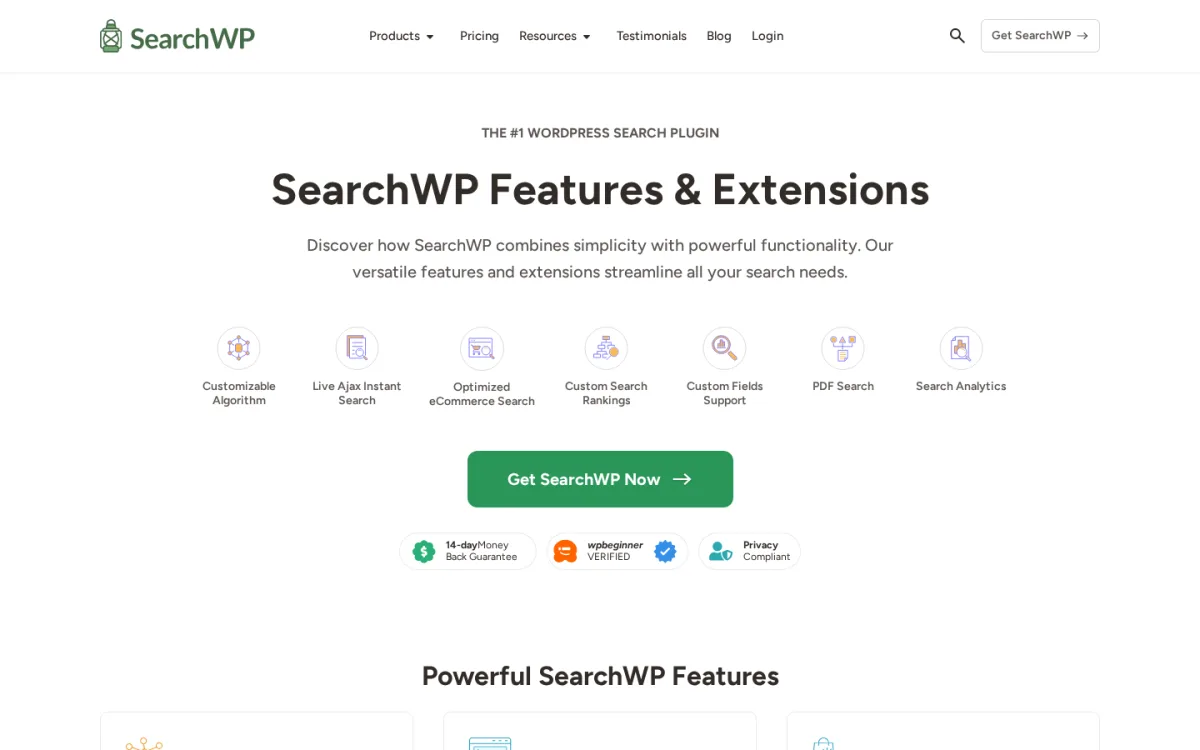
Category: premium WordPress search engine (no free version, no WordPress.org listing).
Best for: editorial sites, knowledge bases, WooCommerce stores and agencies that need fine control over what gets indexed and how it is ranked.
SearchWP replaces the default WordPress search with a fully configurable relevance engine. You decide which post types, taxonomies, custom fields and document types are searchable, then assign weights so titles or SKUs can outrank body content. It also includes a live AJAX search bar, search analytics with no-result tracking, redirect rules from search phrases to landing URLs and a WooCommerce integration that indexes product attributes and SKUs.
What I checked
- The current SearchWP Features and Pricing pages on searchwp.com on 2026-06-16.
- The extension catalog covering WooCommerce, PDFs, Metrics, Related Content, Redirects and Custom Results Order.
- The vendor's documented compatibility, including the 14-day money-back policy.
- Cross-references against independent SearchWP reviews on WPBeginner, Oxygen Builder, WPAllImport and RafflePress.
Strengths
- True relevance engine with per-attribute weighting (title vs content vs custom field vs SKU).
- PDF, Office and CSV document indexing with the right extension.
- WooCommerce attribute, SKU and variation search through the Pro extension.
- Search analytics that surface no-result queries you should actually create content for.
- Search-to-URL redirect rules, useful for steering brand and FAQ queries to a landing page.
- One of the cleanest admin UIs in this category.
Drawbacks
- No free version, so you cannot try it on a live site without paying.
- Not listed on WordPress.org, which means installation is a manual zip upload and update is license-keyed.
- Pricing is per-year and resets the next year, even though the plugin keeps working after expiry on the same WordPress version.
Pricing (2026)
- Standard: $99/year, 1 site, standard extensions and support.
- Pro: $199/year, 3 sites, WooCommerce, Metrics, Related Content, Redirects and Custom Results Order included.
- Agency / All Access: $399/year, unlimited sites and every extension.
- 14-day refund policy on all plans.
Verdict: if you treat search as a real product surface and want to control exactly what is searchable and how it is scored, SearchWP is the safest premium pick in 2026. The official site is at SearchWP.
2. Advance Product Search by ThemeHunk, best lightweight AJAX search for WooCommerce stores
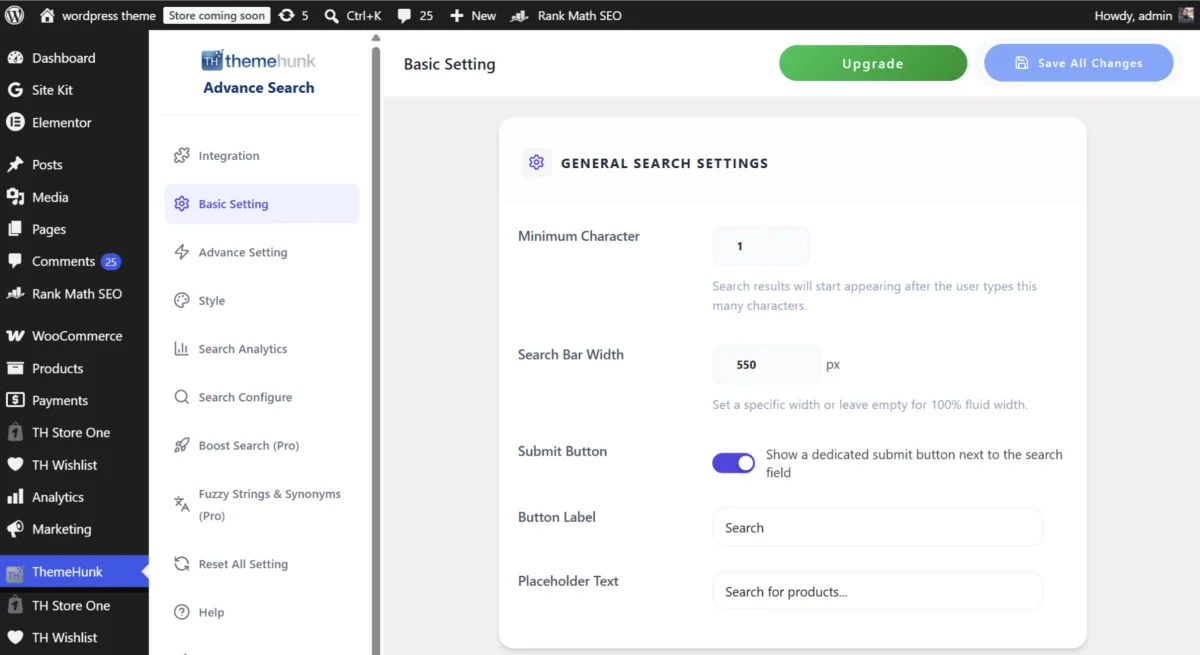
Category: WooCommerce AJAX search plugin with free and premium versions.
Best for: WooCommerce stores that want fast live product search, SKU search, category filtering, and a lightweight search experience without sacrificing performance.
Advance Product Search by ThemeHunk replaces the default WooCommerce search with a faster AJAX-powered product search experience. It shows live results as customers type, which helps shoppers find products without reloading the page or digging through category pages.
The free version supports product, post, and page search. For WooCommerce products, it can search product titles, descriptions, categories, images, IDs, and SKUs. It also includes autocomplete, category-based search, multilingual support, search analytics, responsive layouts, color customization, and placement options through widgets and shortcodes.
The premium version expands the plugin with voice search, fuzzy matching, multiple search styles, deeper customization, additional search scopes, intelligent caching, and more advanced WooCommerce search controls.
What we checked
- Current WordPress.org listing for Advance Product Search – Voice and Ajax Search for WooCommerce.
- Admin panel structure, including Basic Settings, Advanced Settings, Search Configure, Style, Boost Search, Search Queries, and Search Analytics.
- WordPress.org listing details as of 2026: version 1.4.6, tested up to WordPress 7.0.
- Public adoption signals: 10,000+ active installations and a 5.0/5 rating from 5 reviews.
- Free version features compared with the premium feature set on ThemeHunk's official product page.
Strengths
- Fast AJAX live search with instant product suggestions.
- Searches product titles, descriptions, categories, images, IDs, and SKUs.
- Flexible placement through shortcodes, widgets, menus, and PHP code.
- Built-in search analytics for understanding popular customer searches.
- Mobile-friendly and multilingual.
- Premium version adds voice search, fuzzy matching, multiple layouts, caching, and deeper customization.
Drawbacks
- Voice search, fuzzy matching, search indexing, advanced search scope customization, and direct Add to Cart require the Pro version.
- It can search posts and pages, but the plugin is mainly built for WooCommerce product discovery rather than editorial or documentation search.
Pricing (2026)
- Free version available on WordPress.org.
- Personal: $29/year for 1 site.
- Business: $59/year for 1 site and access to all 10 ThemeHunk premium plugins.
- Agency: $149 one-time payment for lifetime updates and 1 year of support for up to 3 sites.
Verdict: Advance Product Search is a strong option for WooCommerce stores that need faster product discovery. If your store has many products, SKUs, or categories, its AJAX search, autocomplete, and analytics can make the shopping experience smoother without adding a heavy search platform. Find it at Advance Product Search by ThemeHunk.
3. Relevanssi, best free WordPress search plugin for blogs and editorial sites
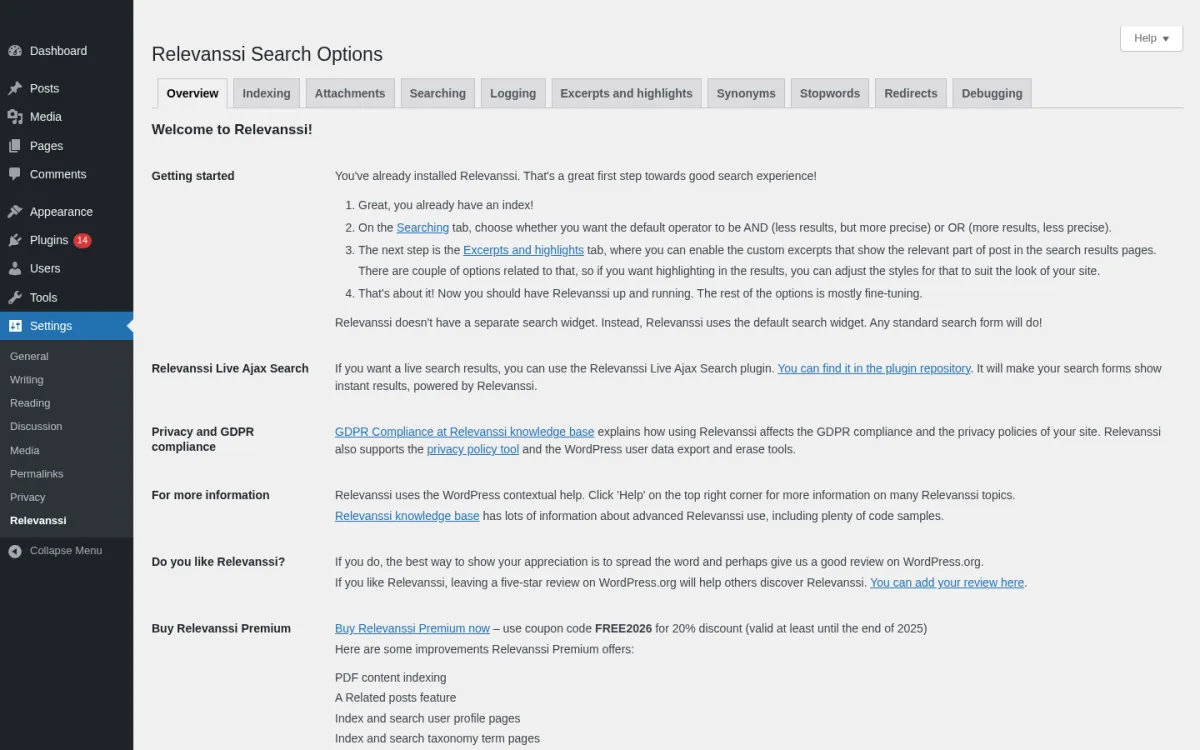
Category: relevance-based WordPress search engine with free and premium tiers.
Best for: content-heavy sites such as blogs, magazines, knowledge bases and large editorial publishers where the default search already loses you readers.
Relevanssi has been the de-facto free relevance replacement on WordPress.org for over a decade. It replaces the standard search with a proper TF-IDF-style scoring engine, supports fuzzy partial-word matching, AND/OR queries, phrase search with quotes, and indexes custom fields, comments, tags, categories and custom post types. The plugin is Gutenberg-friendly, multisite-friendly and supports bbPress.
What I checked
- Installed Relevanssi 4.27.1 from WordPress.org on a clean WordPress 7.0 sandbox and walked the admin pages.
- Opened the Overview tab (welcome screen with the Free vs Premium comparison), the Indexing tab (post types, taxonomies, custom fields, comments), the Searching tab (AND/OR operator, fuzzy matching, weighting controls) and the Logging tab (search log + did-you-mean).
- The current Relevanssi listing on WordPress.org on 2026-06-16: version 4.27.1, last updated 2026-06-12, tested up to WordPress 7.0.
- Public adoption: 100,000+ active installs and 4.8/5 from 404 ratings.
- The Premium feature matrix and pricing page on relevanssi.com.
Strengths
- Free version genuinely fixes the relevance problem on real sites, not a trial.
- Custom-excerpt generator that highlights search terms in the result preview.
- Built-in did-you-mean suggestions based on past successful searches.
- Search log with most-popular and zero-hit queries you should review monthly.
- Throttling and indexing controls so large databases stay performant.
- Premium adds PDF, Office and Open Office attachment indexing, user-profile indexing, taxonomy-term indexing and multisite cross-search.
Drawbacks
- Relevanssi stores its own index in MySQL, so on very large catalogs you should expect extra database space (the official guidance is roughly three times the size of
wp_posts). - The free version cannot search inside PDF or Office files; that is Premium-only.
- The UI looks dated next to SearchWP, although it is functional and well documented.
Pricing (2026)
- Free version on WordPress.org.
- Relevanssi Premium: $120/year for unlimited sites, or $402 for a permanent license.
Verdict: if you run a blog, magazine or knowledge base and you want one plugin that fixes WordPress search without a credit card, install Relevanssi. Most editorial sites never need the Premium tier.
4. FiboSearch, best WordPress search plugin for WooCommerce

Category: WooCommerce-first AJAX product search.
Best for: any WooCommerce store that wants a real live product search bar, from a few products up to large catalogs of 100,000-plus SKUs.
FiboSearch (formerly Ajax Search for WooCommerce) is the most-installed WooCommerce search plugin on WordPress.org. The free version gives you a live AJAX search bar with product image, price, SKU and description in the suggestion rows, an "as-you-type" details panel with quantity and add-to-cart, mobile search mode, multilingual support through WPML/Polylang/qTranslate-XT, and one-click replacement of the default search bar on more than 50 popular WooCommerce themes including Storefront, Astra, Divi, Flatsome, OceanWP, Avada, WoodMart, Bricks and Salient.
What I checked
- Installed FiboSearch 1.33.0 from WordPress.org on the same WordPress 7.0 sandbox after activating WooCommerce 10.8.1 and seeding a small set of test products with SKUs.
- Opened the FiboSearch Settings page (Starting tab with the five placement options, plus the Search bar, Autocomplete, Search config, Analytics and Increase sales PRO tabs) and confirmed the embed options (menu item, block, shortcode, widget, PHP) work on a default WordPress theme.
- The current FiboSearch listing on WordPress.org on 2026-06-16: version 1.33.0, tested up to WordPress 7.0.
- Public adoption: 100,000+ active installs and 4.9/5 from 1,813 ratings.
- The Pro vs Free comparison and pricing on fibosearch.com.
Strengths
- Free tier is genuinely store-ready: product image, price, SKU and description all in the live suggestion rows.
- Details panel with add-to-cart on hover removes a click from the buyer journey.
- Built-in mobile search overlay that does not need a separate theme tweak.
- One-click theme replacement for the most-used WooCommerce themes.
- Pro adds an inverted-index engine that the vendor measures at up to 10x faster on 100,000-plus product catalogs.
- Pro covers ACF custom fields, product attributes, brands (multiple brand plugins supported), variation SKUs and synonyms.
Drawbacks
- Free version cannot search inside ACF custom fields, brands or variation SKUs; those are Pro-only.
- It is WooCommerce-first, so it is not the right pick for a non-store site.
- Pro support for very specific themes can need a small CSS tweak from the vendor support team.
Pricing (2026)
- Free version on WordPress.org.
- Pro plans start at $49/year (Shop plan, 1 store).
- Agency: $249 for the first year, up to 25 sites and 150,000 products per site.
- 30-day money-back guarantee, priority email support for 1 year.
Verdict: if you run a WooCommerce store and search is part of the buyer journey, FiboSearch is the strongest pick in 2026. For a fuller stack around the store, see the FS Code roundup of the best WooCommerce plugins as a companion read.
5. Ivory Search, best flexible search-form builder for general WordPress sites
![Ivory Search Edit Search Form page on a clean WordPress 7.0 plus WooCommerce sandbox showing the Default Search Form configuration with the [ivory-search id=26] shortcode, the section nav (Search, Exclude, Design, AJAX, Options) and the Configure Searchable Content accordion (Post Types, Posts, Pages, Products WooCommerce, Extras).](https://www.fs-code.com/storage/posts/1CvcIWhIxWExtmVvogYO85tWRkk6VSHDpcl3mjXH.webp)
Category: search-form builder with AJAX, WooCommerce and multilingual support.
Best for: editorial sites, business sites and small to mid-size e-shops that need more than one search form on the same site (one in the menu, one in the knowledge base, one on the product pages, and so on).
Ivory Search lets you create as many search forms as you need, configure each one independently and place them anywhere via shortcode, widget, menu item or block. The free version already covers WooCommerce products, AJAX/live search, image and attachment search, exclusion rules, term highlighting on the results page and integrations with WPML, Polylang, Weglot and bbPress. Premium tiers add document and SKU indexing, keyword stemming and richer ordering controls.
What I checked
- Installed Ivory Search 5.5.15 from WordPress.org on the sandbox and opened the Edit Search Form page for the Default Search Form.
- Walked the section nav (Search, Exclude, Design, AJAX, Options) and confirmed the Searchable Content accordion covers Post Types, Posts, Pages, Products (WooCommerce) and Extras.
- The current Ivory Search listing on WordPress.org on 2026-06-16: version 5.5.15, tested up to WordPress 7.0.
- Public adoption: 100,000+ active installs and 4.9/5 from 1,553 ratings.
- The Pro vs Free matrix on ivorysearch.com.
Strengths
- Unlimited custom search forms is unusual on a free tier and very useful for content sites with several content types.
- Built-in AJAX search across posts, pages, WooCommerce products, images, files and any custom post type.
- Strong exclusion rules: hide specific post types, posts, products, attachments, sticky posts, password-protected posts or out-of-stock products from search (Pro for some of these).
- Direct WooCommerce integration on the free tier for basic product search.
- Multilingual coverage with Polylang, WPML and Weglot.
Drawbacks
- The settings UI spans many tabs and submenus, which can feel heavier than FiboSearch for a pure store use case.
- Some of the genuinely high-value capabilities (PDF/document search, SKU search, keyword stemming, advanced ordering) are paywalled behind Pro or Pro Plus.
Pricing (2026)
- Free version on WordPress.org.
- Pro: starts at $19.99/year for 1 site.
- Pro Plus: $49.99/year, adds document, PDF and WooCommerce SKU indexing.
Verdict: if you need different search forms in different parts of the same site and you do not want to manage a premium engine, Ivory Search is the most flexible free-first option in 2026.
6. Ajax Search Lite by WPDreams, best free live-search UI with a one-time Pro option
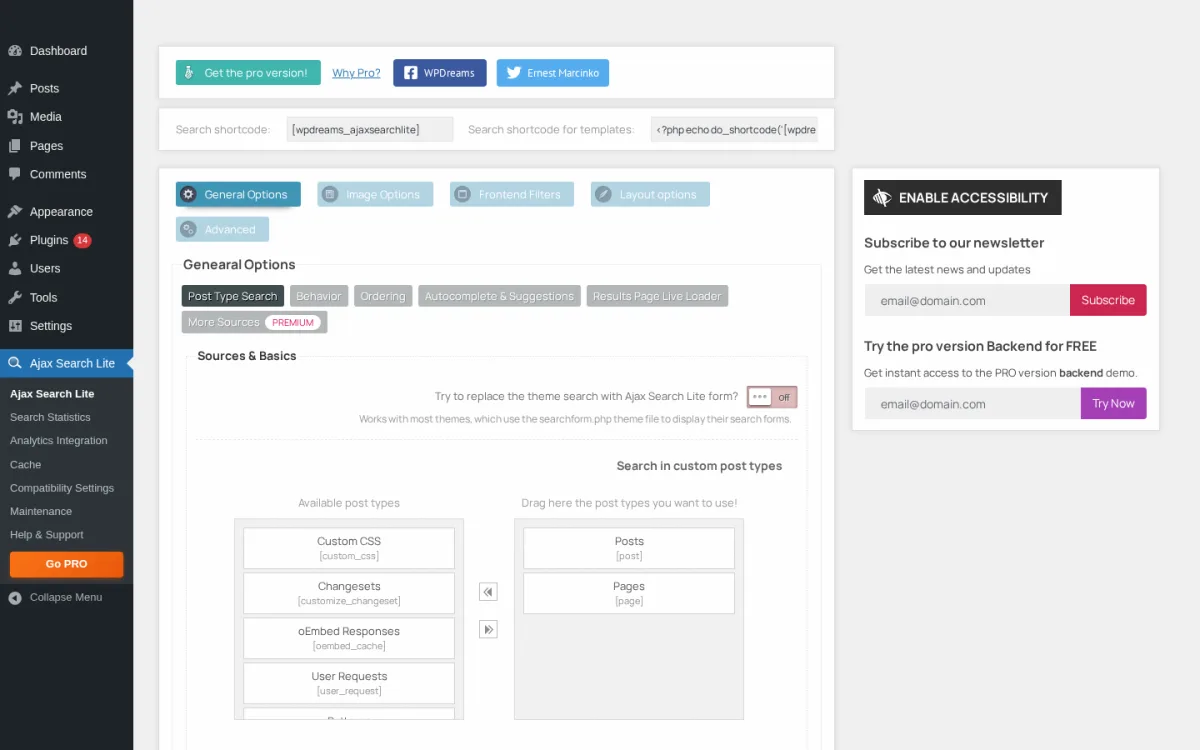
Category: live AJAX search bar with a strong visual front end.
Best for: editorial, portfolio and CPT-heavy sites that care about how the live search drawer looks and behaves, and that prefer paying once rather than renewing every year.
Ajax Search Lite is the free version of Ajax Search Pro by WPDreams. The free build already gives you a live AJAX search bar with templated UI, search in posts, pages, custom post types, custom fields and excerpts, results-page live loader, filter boxes for categories and post types, image-in-results parsing, WPML/Polylang support and a backend with around 50 options. WPDreams explicitly state that everything runs locally on your server, and that Ajax Search Pro is a one-time purchase rather than an annual subscription.
What I checked
- Installed Ajax Search Lite 4.14.3 from WordPress.org on the sandbox and opened the main settings page.
- Confirmed the tab nav (General Options, Image Options, Frontend Filters, Layout options, Advanced) and the Sources and Basics panel with the drag-here post-type picker.
- The current Ajax Search Lite listing on WordPress.org on 2026-06-16: version 4.14.3, tested up to WordPress 7.0.
- Public adoption: 80,000+ active installs and 4.8/5 from 263 ratings.
- The Pro vs Lite comparison and pricing on ajaxsearchpro.com (Pro listed as a one-time purchase via CodeCanyon).
Strengths
- One of the most visually customizable live-search front ends in this category (10-plus built-in templates on free, 100-plus themes on Pro).
- Built-in search statistics and results cache, including a real-time cache hit/miss chart in recent versions.
- Image parsing in results without a separate gallery plugin.
- WPML, Polylang and qTranslate-X support out of the box.
- Pro is a one-time purchase (no annual renewal), which is increasingly rare in the WordPress search market.
Drawbacks
- Many of the most useful features for large sites (PDF/Office attachment search, advanced filters such as sliders and multiselects, BuddyPress/PeepSo, Elementor Loop or JetEngine Listing Grid filtering) are Pro-only.
- The plugin has an active security history through Patchstack disclosures, which is normal for a mature plugin but means you should keep auto-updates on.
- The free admin UI shows a persistent WPDreams promo strip and newsletter card; both are part of the real free-version product, not a dismissable popup.
Pricing (2026)
- Free version on WordPress.org (Ajax Search Lite).
- Ajax Search Pro: one-time purchase via CodeCanyon. No annual subscription; updates come with the license.
Verdict: pick Ajax Search Lite if you want a polished live-search drawer for free, and upgrade to Ajax Search Pro if you want owned software you do not have to renew every year.
7. Jetpack Search, best hosted WordPress search for small sites
Category: cloud-hosted instant search with faceted filters, by Automattic.
Best for: small WordPress sites and small WooCommerce shops that want a hosted, zero-maintenance search experience without running their own index.
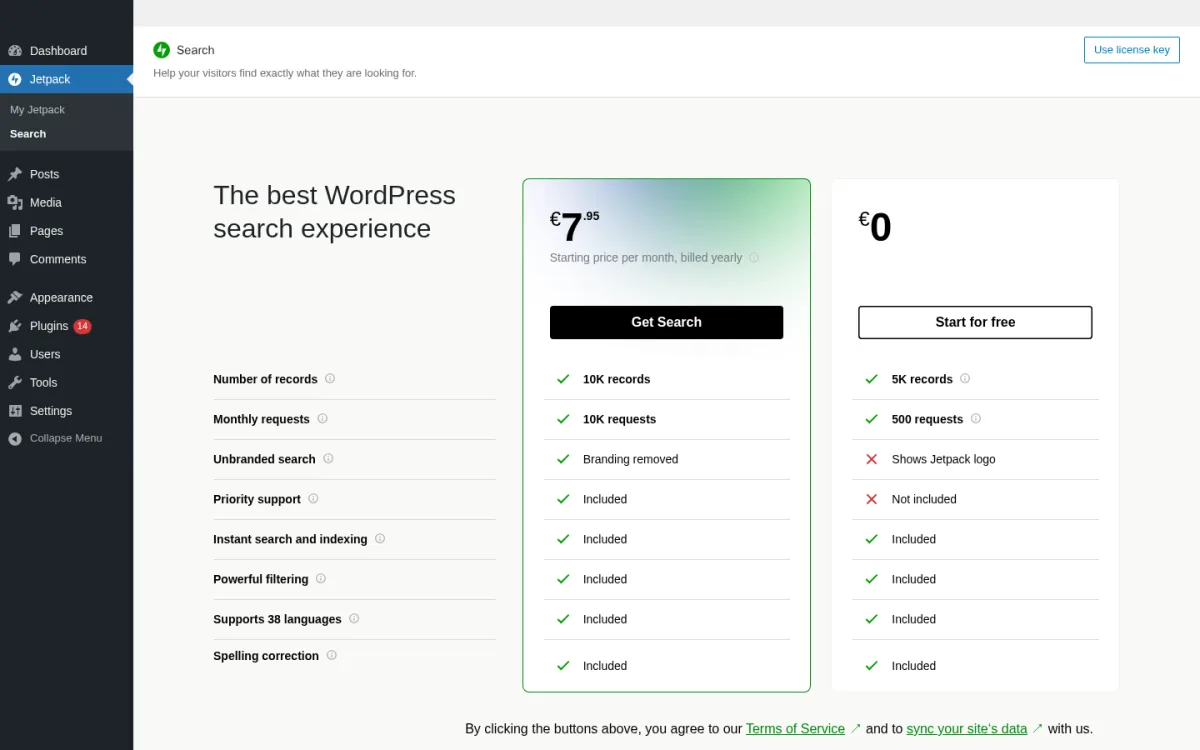
Jetpack Search is a managed service from Automattic that ships your index to Jetpack's cloud and serves an instant-search overlay with faceted filters (categories, tags, dates, custom taxonomies, post types). It includes a modern ranking algorithm, real-time indexing within minutes of content changes, advanced language analysis for 38 languages, native WooCommerce filters and spelling correction. Recent versions added product-aware filters specifically for WooCommerce stores.
What I checked
- Installed Jetpack Search 6.0.0 from WordPress.org on the sandbox and opened the Jetpack > Search admin page.
- Inspected the free vs paid plan comparison Jetpack shows on first visit: 5K records / 500 requests / Shows Jetpack logo on free; 10K records / 10K requests / branding removed from EUR 7.95 per month billed yearly on paid; Priority support, Instant search and indexing, Powerful filtering, 38 languages and Spelling correction are included on the paid tier.
- The current Jetpack Search listing on WordPress.org on 2026-06-16: version 6.0.0 (April 10, 2026), tested up to WordPress 6.9.4.
- Public adoption: 5,000+ active installs and 4.5/5 across recent reviews.
- The Jetpack Search product page on jetpack.com and the 2026 release notes covering the WooCommerce product-aware filters.
Strengths
- Zero infrastructure work: Jetpack hosts the index and serves results.
- Instant-search overlay with real faceted filters out of the box.
- Strong language support including 38 languages with advanced analysis.
- Free tier up to 5,000 records and 500 searches per month is enough for many personal and small business sites.
- Native WooCommerce integration with product-aware filters.
Drawbacks
- Hard record cap of 5,000 and request cap of 500 per month on the free tier, with metered paid tiers above that.
- Jetpack logo branding is shown on the free tier and only removed on a paid plan.
- Requires a Jetpack connection, which some sites avoid for privacy or hosting policy reasons.
- The "Tested up to" line is WordPress 6.9.4 rather than 7.0 at the time of writing, so you may see a compatibility notice on a clean WP 7.0 install. The plugin works in practice, but track the next release.
Pricing (2026)
- Free up to 5,000 records and 500 searches per month.
- Paid tiers start at around EUR 7.95 per month billed yearly for 10,000 records and 10,000 requests, with metered increases above that. Check the live Jetpack Search billing page for your region.
Verdict: install Jetpack Search if your site fits comfortably inside the 5,000-record / 500-search-per-month free tier and you want a hosted experience you do not have to maintain.
8. ElasticPress by 10up, best WordPress search plugin for developers and agencies
Category: Elasticsearch-powered WordPress search engine by 10up.
Best for: developer-led WordPress builds, agencies, large publishers and stores that already operate Elasticsearch (or want to pay for managed Elasticsearch via ElasticPress.io).
ElasticPress is an open-source plugin that connects your WordPress site to an Elasticsearch (or OpenSearch) cluster and replaces the default search with a much faster, more flexible engine. It supports Instant Results (a search overlay routed through a dedicated API), Autosuggest, Faceted Filters, WooCommerce product filtering, Related Posts and custom queries. Because the heavy lifting happens on the Elasticsearch side, queries on very large catalogs stay sub-second.
What I checked
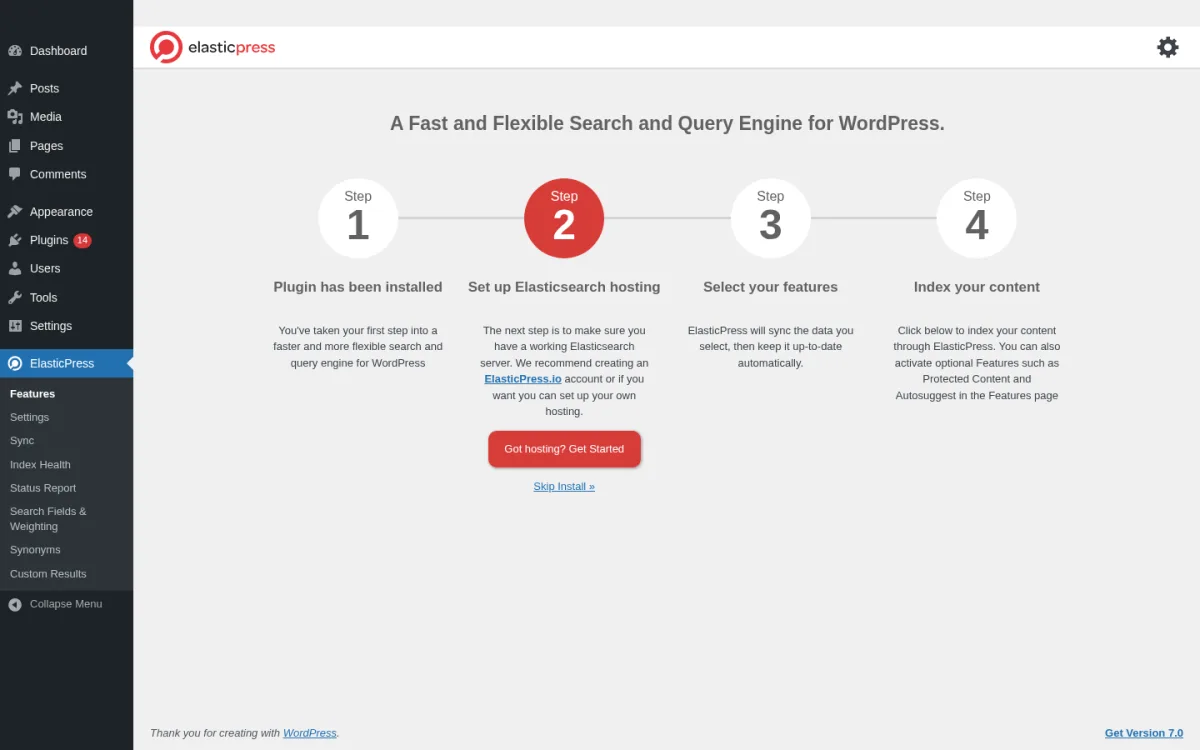
- Installed ElasticPress 5.3.3 from WordPress.org on the sandbox and went through the on-activation setup wizard ("A Fast and Flexible Search and Query Engine for WordPress").
- The wizard explicitly asks for an Elasticsearch hosting endpoint at Step 2 and shows a Skip Install link, which is the buyer-useful confirmation that you cannot use ElasticPress without an Elasticsearch or OpenSearch cluster (ElasticPress.io managed, Elastic Cloud, AWS OpenSearch or self-hosted).
- Confirmed the ElasticPress sidebar exposes Features, Settings, Sync, Index Health, Status Report, Search Fields and Weighting, Synonyms and Custom Results.
- The current ElasticPress listing on WordPress.org on 2026-06-16: version 5.3.3, tested up to WordPress 7.0.
- Public adoption: 8,000+ active installs and 4.1/5 from 29 ratings.
- The ElasticPress.io managed hosting and feature pages, and reference deployments mentioned on 10up.com.
Strengths
- Sub-second search and facets at large catalog sizes that would stress a MySQL-only plugin.
- Faceted filters and WooCommerce filtering out of the box.
- Designed for developer extensibility, with documented hooks and a separate ElasticPress.io managed-hosting option from 10up.
- Backed by 10up, the same team behind a lot of enterprise WordPress engineering.
Drawbacks
- You must run Elasticsearch (or OpenSearch) somewhere. That is either ElasticPress.io's managed tier, Elastic Cloud, AWS OpenSearch or self-hosted Elasticsearch. There is no MySQL-only mode. This is visible in the setup wizard the first time you activate the plugin.
- Free WP.org rating (4.1 / 5) is lower than the other plugins on this list. Most of the complaints are configuration and cluster-version issues, which is expected for a plugin with a hard infrastructure dependency.
- Smaller user base (8,000-plus installs) than Relevanssi or FiboSearch, because the audience is narrower.
Pricing (2026)
- The plugin itself is free and open source.
- Cluster cost depends on your provider: ElasticPress.io (managed, contact sales), Elastic Cloud or AWS OpenSearch (consumption-based).
Verdict: if you have engineering capacity and your site has outgrown MySQL-based search, ElasticPress is the right call. For everyone else, use one of the seven picks above first.
How to choose the best WordPress search plugin for your site
Most of the buying decision comes down to two questions: what kind of site you run, and how much of the heavy lifting you want to do yourself.
- If you run a WooCommerce store and search is part of the buyer journey, start with FiboSearch. The free tier already covers image-plus-price-plus-SKU suggestions, and you can upgrade to Pro for custom fields, brands and variation SKUs only when you outgrow the free engine. If you want a lightweight WooCommerce option with a built-in search analytics dashboard and a lower Pro price point, Advance Product Search by ThemeHunk is worth considering. If your store is small and you want a hosted overlay with no server work, Jetpack Search is a fair alternative on the free tier.
- If you run a content site, blog, knowledge base or magazine, start with Relevanssi. The free version genuinely solves the relevance problem on its own. Only upgrade to Premium when you need PDF or Office search, user-profile indexing or multisite cross-search.
- If your site needs several different search forms (one in the menu, one inside the knowledge base, one for products) and you do not want a premium engine, install Ivory Search. The form-builder pattern is rare on a free tier.
- If the look and feel of the live-search drawer is part of your brand and you do not want an annual subscription, install Ajax Search Lite and consider the one-time Ajax Search Pro upgrade through CodeCanyon.
- If you have an agency or developer team behind the site and you can operate an Elasticsearch cluster, ElasticPress is the right ceiling.
- If you want one paid plugin to rule them all and you treat search as a product surface (relevance weighting, PDFs, redirects, analytics, WooCommerce, all in one admin), pay for SearchWP.
A practical pattern for medium-traffic sites in 2026 is to install one core search plugin from this list and pair it with the rest of your stack: an SEO plugin so the search-result content is crawlable in the first place, a cache plugin so the live-search bar feels instant, and product or content-type-specific extensions only where you need them. If you are still building the rest of that stack, the FS Code WordPress SEO audit checklist for 2026 is a useful next step, and the free WordPress SEO plugins comparison and 13 SEO tips checklist are the right reads to make sure search engines can actually surface the content your new on-site search is now ranking well.
FAQ
What is the best free WordPress search plugin in 2026?
For most blogs, magazines and knowledge bases, Relevanssi is the best free WordPress search plugin in 2026. It replaces the default search with a real relevance engine, supports fuzzy matching, custom fields and custom post types, and is actively maintained (version 4.27.1 as of June 12, 2026, with 100,000-plus active installs). For WooCommerce stores, the best free pick is FiboSearch, whose free tier already covers live product suggestions with image, price and SKU.
Why is the default WordPress search not enough on most sites?
The default WordPress search uses a simple SQL LIKE query that scans the post title and content, ignores custom fields, taxonomies and attachments, and sorts results by date instead of relevance. On any site with custom post types, a knowledge base, product attributes or PDFs, the default search misses important results and shows them in the wrong order. A search plugin replaces that engine with one that indexes more content and scores results by how well they match the query.
Which WordPress search plugin is best for WooCommerce?
FiboSearch is the strongest WooCommerce search plugin in 2026. The free tier already covers live AJAX suggestions with product image, price, SKU and description, a mobile search overlay and one-click integration with the most-used WooCommerce themes. SearchWP and Jetpack Search also work well with WooCommerce, but FiboSearch is purpose-built for WooCommerce and has 100,000-plus active installs with a 4.9 / 5 rating across 1,800-plus reviews. For a lightweight alternative with a built-in analytics dashboard, Advance Product Search by ThemeHunk is a practical free-first option for smaller stores.
Do WordPress search plugins slow down a site?
A well-built search plugin should not noticeably slow down your site for normal page loads, because the search engine only runs on search requests. Plugins that index content into MySQL (Relevanssi, Ivory Search, Ajax Search Lite, FiboSearch free) trade extra database space for faster search queries. Plugins that offload search to an external service (Jetpack Search to Automattic's cloud, ElasticPress to Elasticsearch) keep the WordPress database lean but add a network hop. On very large catalogs, the Elasticsearch-backed approach scales the best.
Can I have more than one search form on the same WordPress site?
Yes. Ivory Search is built around this use case: you can create an unlimited number of search forms and configure each one to search a different subset of content. SearchWP also supports multiple search engines that you bind to different forms. With FiboSearch, you typically have one main store search; for a separate non-product search you would combine it with Ivory Search or Relevanssi.
Should I use a hosted search service like Jetpack Search or Algolia, or a self-hosted plugin?
Hosted services like Jetpack Search remove the indexing and infrastructure work, give you an instant-results overlay out of the box and handle scaling for you, but they meter records and queries and add an external dependency. Self-hosted plugins like Relevanssi, FiboSearch and SearchWP keep your data on your server and have no per-record fees, but you are responsible for index size and performance. For small and medium sites that fit comfortably in the Jetpack Search free tier (up to 5,000 records and 500 searches per month), hosted is the easier path. For large sites with custom requirements, a self-hosted relevance engine or Elasticsearch-backed setup is usually better.
Conclusion
There is no single "best WordPress search plugin" that fits every site. The right pick in 2026 depends on whether you are running a blog, a knowledge base or a WooCommerce store, and how much of the search stack you want to own.
- The strongest all-around premium pick is SearchWP.
- The strongest free pick for content sites is Relevanssi.
- The strongest WooCommerce pick is FiboSearch.
- For a lightweight WooCommerce option with built-in search analytics, Advance Product Search by ThemeHunk is a practical free-first pick.
- The most flexible free form builder is Ivory Search.
- The best one-time-paid live-search UI is Ajax Search Lite by WPDreams (with Ajax Search Pro as the upgrade).
- The easiest hosted experience for small sites is Jetpack Search.
- The right call for developer-led builds is ElasticPress by 10up.
If you already have a clear answer in your head about which kind of site you run, install that plugin first, give it a real query log, and only add a second plugin if you see something it cannot do.
Similar Blogs


