

Best Shopify Bulk Delete Products Apps in 2026 (Compared, Scored and Ranked)

Managing a Shopify store with hundreds or thousands of products is a familiar headache. Whether you're clearing out discontinued stock, removing a vendor's entire catalog, or cleaning up after a bulk import, manually deleting products one by one through the Shopify admin is painfully slow. The platform's native interface doesn't support selecting products across multiple pages, meaning large-scale catalog cleanup can eat hours of your team's time.
Shopify bulk delete apps solve this problem by letting you filter products by collection, vendor, tags, stock level, or status and remove them all in a single job. Some apps go further, also handling bulk archiving, image deletion, variant cleanup, and scheduled automation. This guide covers seven of the best options available right now, each scored honestly across pricing, features, Shopify integration quality, ease of use, and merchant reputation.
Whether you need a lightweight free tool for a one-off cleanup or an enterprise-grade data manager, the rankings below will help you choose the right app for your catalog size and budget.
Quick Results
| # | App | Overall | Best For |
|---|---|---|---|
1 |
8.8/ |
Purpose-built bulk deletion with Built for Shopify badge |
|
2 |
8.2/ |
Comprehensive editing suite with one-click undo |
|
3 |
8.0/ |
Affordable automation with scheduling and task preview |
|
4 |
8.0/ |
Maximum feature breadth including customers and orders |
|
5 |
8.0/ |
Enterprise-scale data management via Excel and CSV |
|
6 |
7.4/ |
Completely free, simple deletion for smaller stores |
|
7 |
6.6/ |
One-time payment model with background job processing |
How We Evaluated
Each app on this list was evaluated using Shopify App Store data, listing information, feature sets, pricing tiers, and verified merchant reviews. We did not install or test these apps hands-on. Instead, we read a representative sample of recent, positive, and critical reviews for each to identify real-world strengths and weaknesses, then scored every app against the same five rubric dimensions.
- Pricing and Value: Free plan availability, what you get at each tier, and whether the pricing is fair for small and mid-sized stores.
- Feature Richness: Depth and breadth of features relative to what a bulk product management app should offer.
- Built for Shopify / Integration: Whether the app holds the official Built for Shopify badge, how well it integrates with the Shopify admin, and its overall performance quality.
- Ease of Use (UI/UX): Setup effort, clarity of the interface, and how quickly a non-technical merchant can get value from the app.
- Support and Reputation: App Store rating, volume and quality of reviews, and developer responsiveness based on public reply patterns.
The Overall score is the average of all five dimensions, rounded to one decimal place. Apps are ranked by their Overall score.
Full Comparison Table
| App | Pricing and Value | Feature Richness | Built for Shopify | Ease of Use | Support and Reputation | Overall (/ |
Best For |
|---|---|---|---|---|---|---|---|
| CS - Bulk Delete Products | 9 | 8 | 10 | 9 | 8 | 8.8 | Purpose-built bulk deletion |
| Ablestar Bulk Product Editor | 6 | 9 | 9 | 8 | 9 | 8.2 | Comprehensive editing suite |
| QuickEdit: Bulk Product Edit | 8 | 7 | 9 | 8 | 8 | 8.0 | Affordable with scheduling |
| Hextom: Bulk Product Edit | 7 | 10 | 7 | 7 | 9 | 8.0 | Maximum feature breadth |
| Matrixify | 6 | 10 | 9 | 6 | 9 | 8.0 | Enterprise-scale data management |
| Kacha Delete Products In Bulk | 10 | 6 | 5 | 8 | 8 | 7.4 | Completely free option |
| Bulkify: Bulk Delete Products | 8 | 7 | 5 | 8 | 5 | 6.6 | One-time payment model |
1. CS - Bulk Delete Products: Best Purpose-Built Deletion App with Built for Shopify Badge
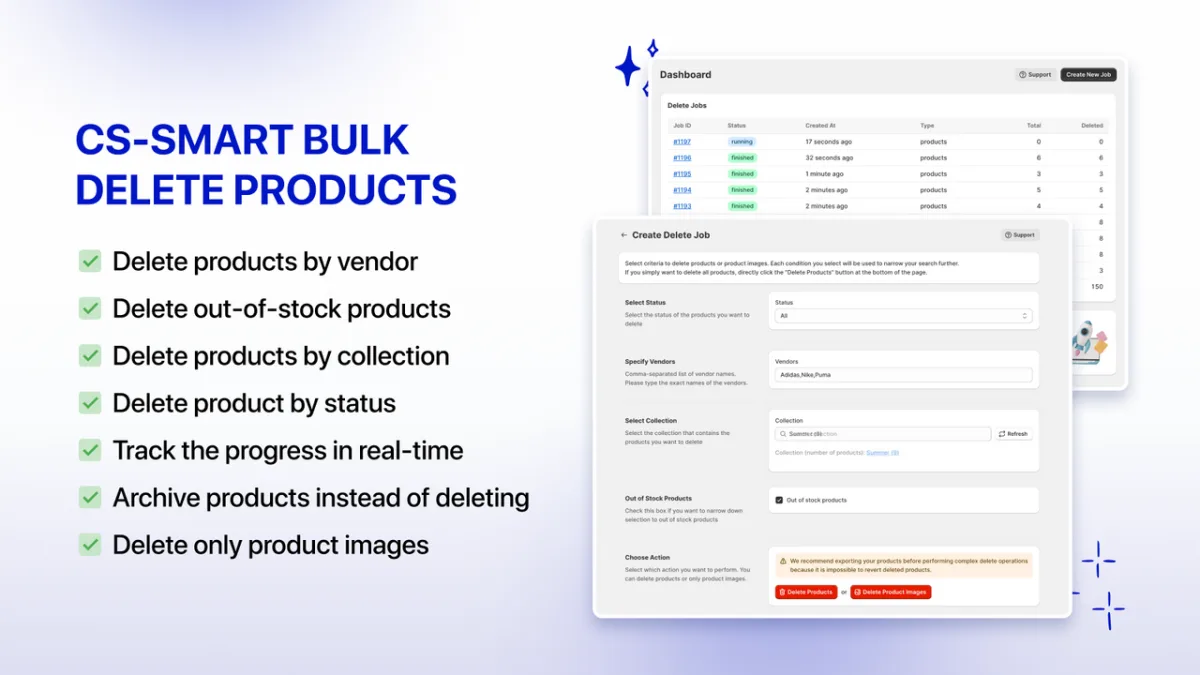
CS - Bulk Delete Products by Craftshift is the most focused and polished app in this category. Rather than bundling deletion inside a sprawling bulk editor, Craftshift built a dedicated tool that does one thing exceptionally well: letting merchants remove products, images, and variants at scale. The app holds the official Built for Shopify badge, launched in August 2023, and has accumulated a perfect 5.0/5 rating from 35 merchants.
Pricing and Value (9/10)
CS - Bulk Delete Products is free to install and lets you delete or archive up to 500 items at no cost. A one-time Lifetime Plan payment of $100 removes all limits permanently. There are no monthly subscriptions or usage fees after that. For stores that need to run occasional large-scale cleanups without committing to recurring costs, this model is outstanding. The free tier alone handles hundreds of items, which is sufficient for most one-off migrations.
Feature Richness (8/10)
The app covers every core bulk deletion workflow a Shopify merchant needs. You can bulk delete products based on status, inventory level, vendor, collection, and creation date. Archiving is fully supported as an alternative to permanent deletion. The app also handles bulk deletion of product images and sold-out variants, which is a level of granularity that broader bulk editors often skip. Real-time progress tracking shows job status as it runs. The one area where it scores just below perfect is that it focuses exclusively on deletion and archiving; it does not offer bulk editing of titles, prices, or descriptions.
Built for Shopify / Integration (10/10)
CS - Bulk Delete Products holds the official Built for Shopify badge, which means it has passed Shopify's verification process for performance, support quality, and design standards. It works natively within the Shopify Admin and requires no external configuration. The batch deletion system runs automatically in the background once a job is started, meaning merchants can close the tab and return to find the work completed.
Ease of Use (9/10)
The interface is purpose-built for deletion, so there is no cognitive overhead from features you do not need. Merchants select their filter criteria (collection, vendor, stock status, date range), preview the matching products, and start the job with a single click. The focused workflow makes it one of the fastest apps to get results from on this list. A demo store is available on the listing for verification before installing.
Support and Reputation (8/10)
Every published review gives the app five stars. Merchants highlight fast support response times, with one recent reviewer noting that support resolved their question quickly and allowed a large-scale zero-inventory archive to complete without issues. The rating is perfect, though the review count of 35 is smaller than established competitors such as Hextom or Matrixify. As the app's merchant base grows, the reputation dimension will strengthen further.
Pros:
- Built for Shopify badge with verified quality standards
- Free to install; one-time $100 Lifetime Plan for unlimited use
- Handles product deletion, archiving, image deletion, and variant deletion
- Real-time progress tracking during batch jobs
- Dead simple interface with no learning curve
Cons:
- Focused on deletion only; no editing of product fields
- Smaller review count compared to more established apps
Pricing: Free to install (500 item limit); $100 one-time Lifetime Plan for unlimited deletions
| Dimension | Score |
|---|---|
| Pricing and Value | 9/ |
| Feature Richness | 8/ |
| Built for Shopify / Integration | 10/ |
| Ease of Use | 9/ |
| Support and Reputation | 8/ |
| Overall | 8.8/ |
2. Ablestar Bulk Product Editor: Best for Comprehensive Editing with One-Click Undo
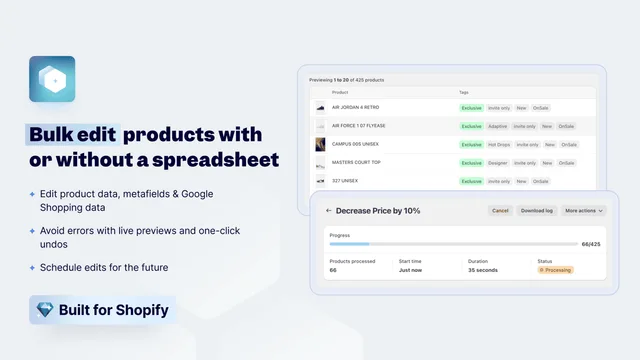
Ablestar Bulk Product Editor by Ablestar is one of the most trusted bulk editing apps on the Shopify App Store, with a 4.9/5 rating from 791 merchants. It earns the Built for Shopify badge and covers bulk deletion alongside a comprehensive suite of editing tools covering prices, descriptions, metafields, tags, inventory, and Google Shopping data.
Pricing and Value (6/10)
The free Starter plan limits tasks to 10 products, which is useful for testing but impractical for real catalog work. The Basic plan at $30 per month handles unlimited products and includes 60-day edit history. Advanced and Professional plans run to $60 and $120 per month, targeting stores with complex recurring automation needs. For merchants who only need occasional bulk deletion, the monthly subscription can feel expensive compared to one-time alternatives.
Feature Richness (9/10)
Ablestar covers nearly every bulk editing need: prices, descriptions, tags, SKUs, barcodes, inventory, metafields, Google Shopping fields, and bulk deletion. It supports spreadsheet uploads without requiring format changes, so merchants can export, modify in Excel, and re-import without conversion steps. Scheduled edits and one-click undo for any bulk change are standout features that protect merchants from costly mistakes. Inventory sync from Google Sheets, Dropbox, and FTP rounds out its capability set.
Built for Shopify / Integration (9/10)
The Built for Shopify badge confirms Ablestar meets Shopify's quality standards. It integrates with external tools including Dropbox, FTP/SFTP, Google Sheets, and Google Shopping, making it a strong choice for stores with supplier-driven inventory workflows. The app also supports the 2048 Variants limit for stores using advanced variant structures.
Ease of Use (8/10)
The preview-before-commit workflow makes Ablestar approachable even for merchants who are nervous about bulk operations. The undo feature further reduces risk. The interface has more options than a dedicated delete-only app, so there is a moderate learning curve for first-time users, but the majority of merchants in reviews describe setup as straightforward.
Support and Reputation (9/10)
Ablestar's merchant reviews frequently describe it as a "lifesaver" for managing large catalogs. The 4.9/5 rating across 791 reviews reflects consistent satisfaction. Negative reviews are rare and typically describe edge cases in complex metafield scenarios rather than fundamental problems with the app.
Pros:
- Built for Shopify badge
- One-click undo for any bulk edit
- Spreadsheet upload without reformatting
- Supports Google Shopping data, metafields, and inventory sync
- 791 reviews at 4.9/5
Cons:
- Free plan limited to 10 products
- Monthly plans start at $30, which is steep for occasional use
Pricing: Free (10 products limit); Basic $30/month; Advanced $60/month; Professional $120/month
| Dimension | Score |
|---|---|
| Pricing and Value | 6/ |
| Feature Richness | 9/ |
| Built for Shopify / Integration | 9/ |
| Ease of Use | 8/ |
| Support and Reputation | 9/ |
| Overall | 8.2/ |
3. QuickEdit: Bulk Product Edit: Best Affordable Option with Scheduling and Preview
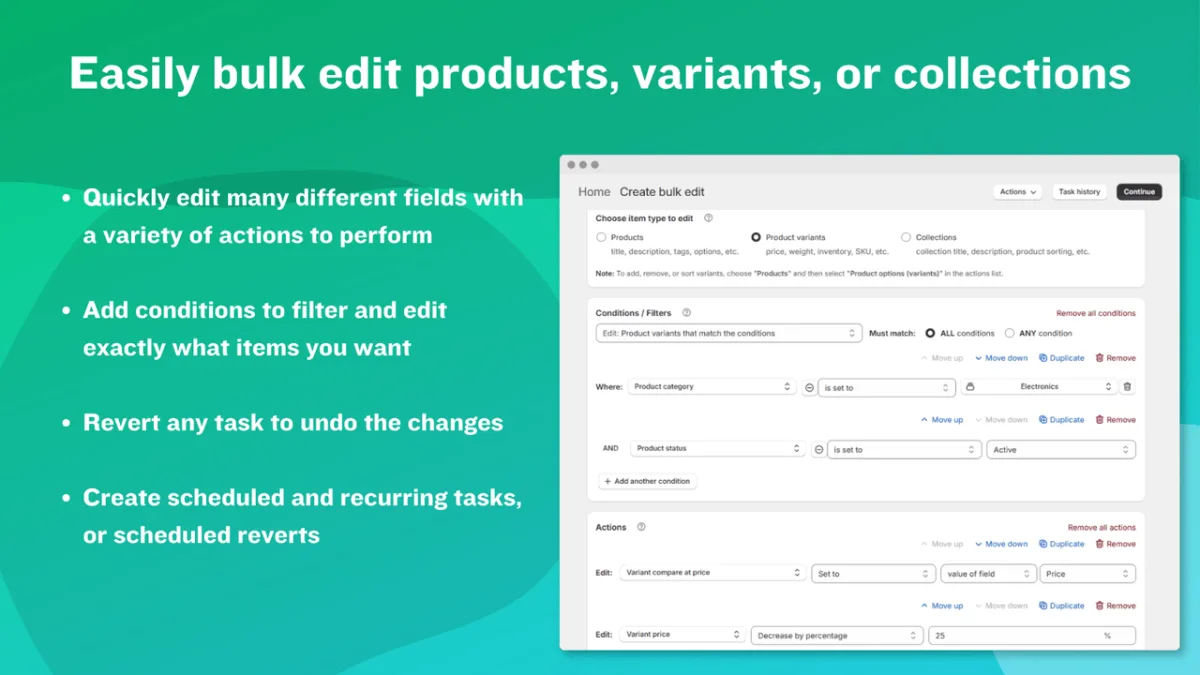
QuickEdit: Bulk Product Edit by QuickBulkEdit holds the Built for Shopify badge and a 4.9/5 rating from 99 merchants. It sits at the more affordable end of the full-featured bulk editor category, with paid plans starting at $9 per month. The CSV preview before execution and revert capability make it a safer choice for stores that want scheduling automation without the premium pricing of Ablestar.
Pricing and Value (8/10)
The free Demo plan allows 10 bulk edits per month with a 50-product limit per task. The Basic plan at $9 per month removes most limits for small to medium stores. Advanced at $19 per month increases product limits and adds scheduling, while the Professional plan at $39 per month offers unlimited products and recurring tasks. Annual billing saves 25% across all tiers. This pricing structure makes QuickEdit one of the most accessible full-featured bulk editors available.
Feature Richness (7/10)
QuickEdit covers bulk deletion, price editing, description updates, tag management, inventory changes, and metafield editing. Scheduling and recurring tasks are available on higher plans. The app integrates with Shopify Flow and Sidekick. It lacks some of the broader data management capabilities found in Hextom or Matrixify, such as customer or order editing, but it covers everything most product-focused merchants need.
Built for Shopify / Integration (9/10)
QuickEdit carries the Built for Shopify badge and integrates with Shopify Flow for workflow automation, as well as Sidekick for AI-assisted store management. The 2048 Variants integration is also supported, covering stores with complex product structures.
Ease of Use (8/10)
The task preview feature, which shows exactly which products will be affected and what changes will be made before committing, is QuickEdit's standout usability advantage. The revert-any-task feature adds a safety net that makes it accessible to less technical merchants. Task saving allows frequently used cleanup routines to be stored and re-run without rebuilding filters from scratch.
Support and Reputation (8/10)
QuickEdit's 4.9/5 rating from 99 reviews shows consistent merchant satisfaction. One long-term user described it as "the best app I've ever used" with daily operational value. The review count is growing steadily as the app matures in the market.
Pros:
- Built for Shopify badge
- Affordable plans from $9/month
- Preview before commit and task revert
- Shopify Flow integration
- Save and reuse frequently used tasks
Cons:
- Scheduling requires the $19/month Advanced plan
- No customer or order editing (products only)
Pricing: Free (10 edits/month, 50 products/task); Basic $9/month; Advanced $19/month; Professional $39/month
| Dimension | Score |
|---|---|
| Pricing and Value | 8/ |
| Feature Richness | 7/ |
| Built for Shopify / Integration | 9/ |
| Ease of Use | 8/ |
| Support and Reputation | 8/ |
| Overall | 8.0/ |
4. Hextom: Bulk Product Edit: Best for Maximum Feature Breadth
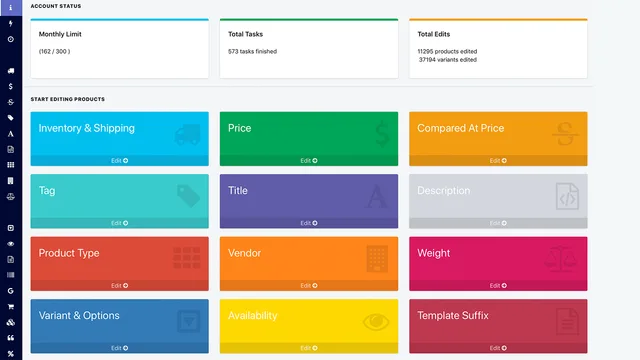
Hextom: Bulk Product Edit is among the most feature-complete bulk editing apps on the Shopify App Store, with a 4.9/5 rating from 1,028 merchants. It goes beyond product editing to cover collections, customers, orders, and metafields, and supports flexible CSV export and import workflows. The main tradeoff is that it does not carry the Built for Shopify badge, and its breadth can create a steeper initial learning curve.
Pricing and Value (7/10)
The Demo Plan is free with a 10-product-per-task limit. The Basic plan at $9.99 per month covers 500 products per task, and the Professional plan at $19.99 per month scales to 5,000 products with scheduled tasks. The Advanced plan at $49.99 per month offers unlimited products. The pricing is reasonable for its feature depth, though the free tier is too restricted for practical use beyond evaluation.
Feature Richness (10/10)
Hextom's breadth is unmatched in this category. It covers bulk editing and CSV import/export for products, variants, orders, images, prices, SKUs, barcodes, tags, descriptions, inventory, metafields, and collections. It can also bulk edit customer data and order fields, making it a single-app solution for stores that need data management across multiple entity types. Scheduled tasks, backup, rollback, and real-time status reporting are all included.
Built for Shopify / Integration (7/10)
Hextom does not carry the Built for Shopify badge, which means it has not passed Shopify's formal verification process for this tier. In practice, the app is well-established and used by more than a thousand stores without significant complaints about integration reliability. However, the absence of the badge is a meaningful signal for merchants who prioritize verified quality standards.
Ease of Use (7/10)
The volume of options in Hextom's interface requires more initial orientation than purpose-built tools. Merchants who need to bulk delete products specifically may find the interface less direct than CS - Bulk Delete Products or Kacha. Once familiar with the workflow, however, the advanced filtering system makes it capable of very precise bulk operations.
Support and Reputation (9/10)
With 1,028 reviews at 4.9/5, Hextom has a larger verified user base than most apps on this list. Long-term users praise its accuracy and the safety of its revert capability. The developer's track record is strong, and the app has been consistently maintained over multiple years.
Pros:
- Most comprehensive feature set: products, customers, orders, metafields, CSV
- 1,028 reviews at 4.9/5
- Backup and rollback for any bulk operation
- Scheduled tasks and real-time monitoring
Cons:
- No Built for Shopify badge
- Steeper learning curve due to feature volume
- Free plan limited to 10 products per task
Pricing: Free (10 products/task); Basic $9.99/month; Professional $19.99/month; Advanced $49.99/month
| Dimension | Score |
|---|---|
| Pricing and Value | 7/ |
| Feature Richness | 10/ |
| Built for Shopify / Integration | 7/ |
| Ease of Use | 7/ |
| Support and Reputation | 9/ |
| Overall | 8.0/ |
5. Matrixify: Best for Enterprise-Scale Data Management
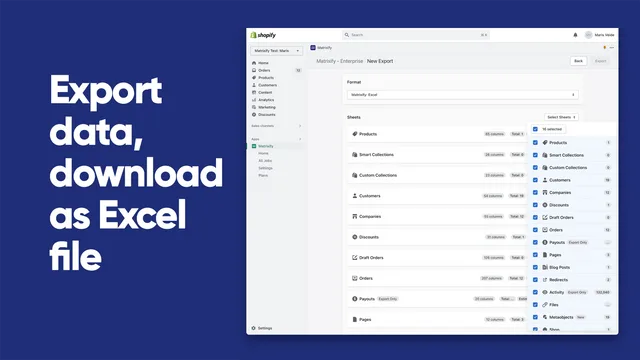
Matrixify (formerly Excelify) by ITissible is the go-to tool for large-scale Shopify data management, with a Built for Shopify badge and a 4.9/5 rating from 1,394 merchants. It handles bulk deletion as one capability within a broader data management platform that covers imports, exports, migrations, and automations via Excel, Google Sheets, FTP, and Dropbox. Matrixify can handle files up to 20 GB and has been used for migrations from WooCommerce, Magento, and BigCommerce.
Pricing and Value (6/10)
The Demo plan is free but limited to 10 records per file across all entity types. The Basic plan at $20 per month handles 5,000 products and 2,000 customers per file. The Big plan at $50 per month covers 50,000 products, and the Enterprise plan at $200 per month offers unlimited records with batch import and parallel processing. The pricing reflects Matrixify's enterprise positioning and is justified for high-volume stores, but makes it overkill if bulk product deletion is all you need.
Feature Richness (10/10)
Matrixify's scope is extraordinary. It covers bulk operations on products, variants, orders, discounts, images, prices, SKUs, barcodes, tags, descriptions, inventory, metafields, collections, customers, B2B companies, pages, blogs, redirects, translations, navigation menus, and store credits. It supports scheduled exports and imports with auto-repeat, FTP/SFTP automation, Google Sheets integration, and MCP/AI agent compatibility. For data engineering at scale, nothing on this list comes close.
Built for Shopify / Integration (9/10)
Matrixify carries the Built for Shopify badge and integrates with Dropbox, FTP/SFTP, Google Drive, Google Sheets, and Google Shopping. The MCP and AI agent compatibility is a forward-looking integration that sets it apart from every other app on this list.
Ease of Use (6/10)
Matrixify's power comes with a steep learning curve. The workflow is spreadsheet-centric: you export data to Excel, edit or mark rows for deletion, then re-import. This is highly flexible but requires comfort with spreadsheets and understanding of Matrixify's column conventions. Merchants who are not comfortable with Excel or CSV workflows will find the process slower than using a simpler filter-and-delete tool.
Support and Reputation (9/10)
The largest review pool on this list: 1,394 ratings at 4.9/5. Merchants describe Matrixify as indispensable for migrations and large-scale catalog updates. The developer actively replies to reviews and maintains detailed documentation. The app has been a fixture in the Shopify ecosystem for years with a reputation for reliability.
Pros:
- Built for Shopify badge
- Most comprehensive data scope: handles every Shopify entity type
- 1,394 reviews at 4.9/5
- Handles files up to 20 GB
- MCP and AI agent compatible
Cons:
- Steep learning curve for non-technical merchants
- Overkill if you only need to delete products
- Free demo severely limited at 10 records per file
Pricing: Demo free (10 records/file); Basic $20/month; Big $50/month; Enterprise $200/month
| Dimension | Score |
|---|---|
| Pricing and Value | 6/ |
| Feature Richness | 10/ |
| Built for Shopify / Integration | 9/ |
| Ease of Use | 6/ |
| Support and Reputation | 9/ |
| Overall | 8.0/ |
6. Kacha Delete Products In Bulk: Best Completely Free Option
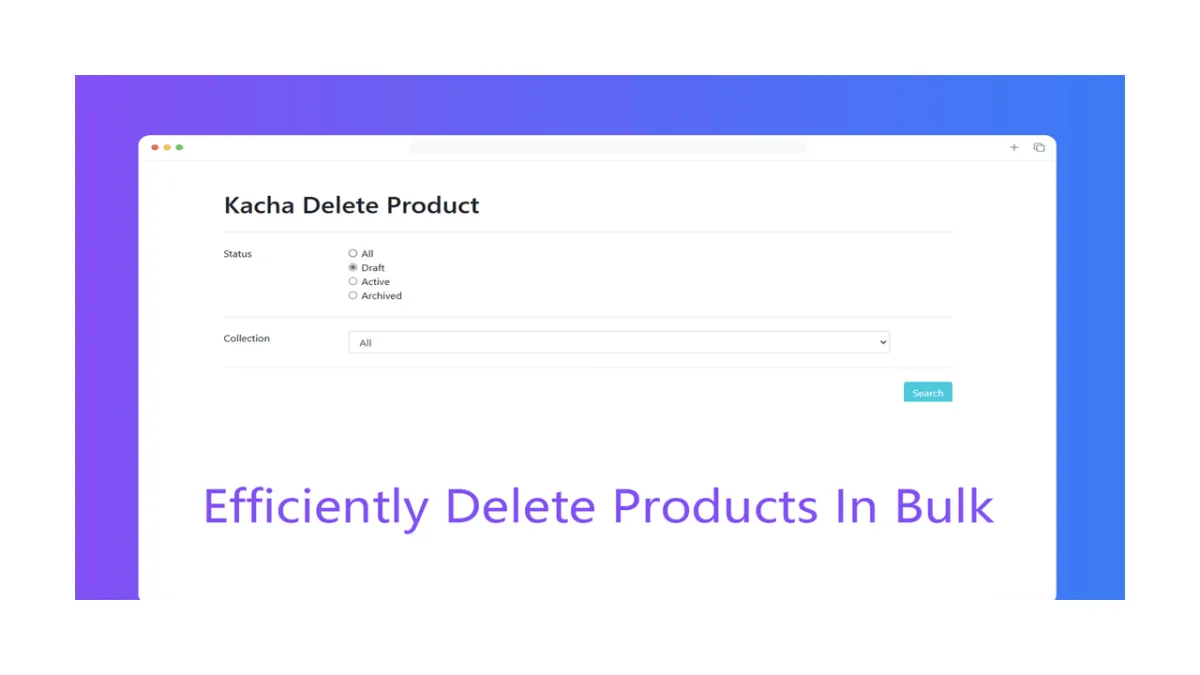
Kacha Delete Products In Bulk by Bingo is the longest-established free-only app in this category, having launched in September 2021. It holds a 4.9/5 rating from 124 reviews, the highest review count among dedicated bulk delete apps. For stores that need occasional catalog cleanup without any budget, Kacha is the most proven free option available.
Pricing and Value (10/10)
Kacha is completely free with no tiers, no limits mentioned in the listing, and no one-time fees. It is the only app on this list with a perfect Pricing and Value score for this reason. Small stores, new merchants testing catalog workflows, and anyone running a one-off cleanup job will find it delivers maximum value for zero cost.
Feature Richness (6/10)
Kacha offers multiple filter criteria for product selection and runs deletions automatically once conditions are set. The listing description is intentionally minimal, and the feature set reflects that simplicity: it handles conditional bulk deletion but does not offer archiving, image deletion, variant cleanup, scheduling, or any editing beyond removal. It does exactly what it says and nothing more.
Built for Shopify / Integration (5/10)
Kacha does not carry the Built for Shopify badge. The listing does not specify integrations beyond basic Shopify Admin access. For merchants who prioritize verified quality standards, this is a notable gap. The app's track record and review history suggest it works reliably, but the absence of formal verification is a limitation to acknowledge.
Ease of Use (8/10)
Merchants in reviews consistently describe Kacha as "simple and easy to use." The interface was designed for non-technical users who want to set conditions and let the app run automatically. Several reviewers mention completing their task in minutes without any guidance. Setup is minimal.
Support and Reputation (8/10)
A 4.9/5 rating from 124 reviews is a strong signal for a free app. Merchants describe it as better than competitors, and review sentiment over multiple years remains consistently positive. The developer is based in Hong Kong; support response data is limited in the public listing, but no pattern of support complaints appears in the reviews.
Pros:
- Completely free with no hidden tiers
- 124 reviews at 4.9/5
- Simple interface with minimal setup
- Proven track record since 2021
Cons:
- No Built for Shopify badge
- Limited feature set: deletion only, no archiving, image deletion, or scheduling
- Minimal developer documentation in the listing
Pricing: Free
| Dimension | Score |
|---|---|
| Pricing and Value | 10/ |
| Feature Richness | 6/ |
| Built for Shopify / Integration | 5/ |
| Ease of Use | 8/ |
| Support and Reputation | 8/ |
| Overall | 7.4/ |
7. Bulkify: Bulk Delete Products: Best for the One-Time Payment Model
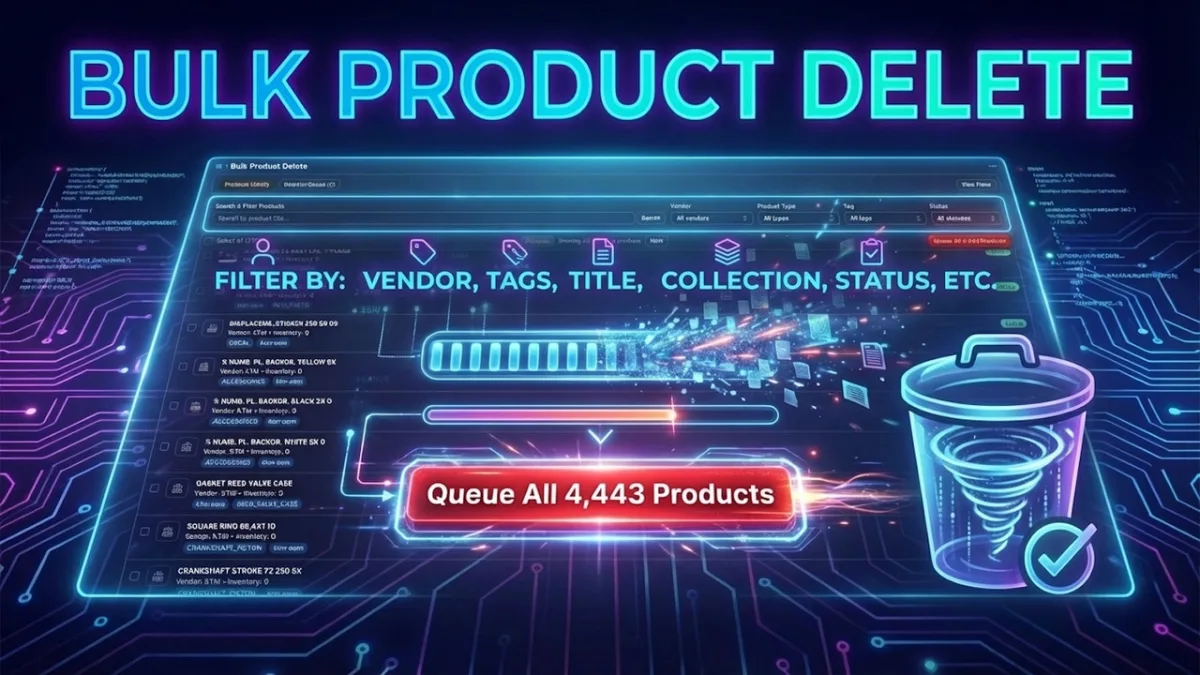
Bulkify: Bulk Delete Products by clp software studio srl launched in January 2026 and offers a distinctive one-time payment model with four pricing tiers scaling by catalog size. It adds duplicate detection alongside standard deletion filters and runs all jobs in the background, which means merchants can close the browser tab while the job completes. With only 3 reviews, it is the newest app on this list and its reputation is still being established.
Pricing and Value (8/10)
Bulkify offers a free tier that handles up to 1,000 product deletions. One-time payments of $15 (up to 10,000 products), $25 (up to 100,000 products), and $50 (unlimited) give merchants a permanent license for their catalog size. This model suits stores that want to pay once for a migration or major cleanup without ongoing subscription costs. The free tier is more generous than CS - Bulk Delete Products at 1,000 items versus 500.
Feature Richness (7/10)
Bulkify covers deletion by vendor, product type, tags, status, and zero inventory. It also includes a duplicate finder that matches products by title, SKU, vendor, or image, which is a useful feature not found in most dedicated delete apps. Scheduled recurring cleanups are supported. It does not handle variant or image deletion separately, and it lacks archiving as an alternative to permanent removal.
Built for Shopify / Integration (5/10)
Bulkify does not carry the Built for Shopify badge. As a January 2026 launch, it has not yet accumulated the track record that would allow a higher confidence rating. Integration is limited to Shopify Admin access with no external tool connections listed.
Ease of Use (8/10)
The background job processing is a genuine usability advantage: start the job, close the tab, come back to find it done. Merchants in the available reviews note the simplicity and efficiency of the workflow. The filter interface follows a familiar pattern that should feel intuitive to anyone who has used similar tools.
Support and Reputation (5/10)
Three reviews at 5.0/5 is a very thin data set. All three are positive, but the sample is too small to draw reliable conclusions about long-term support quality or developer responsiveness at scale. This score will change as the app's user base grows. Merchants considering Bulkify should be comfortable with the inherent uncertainty of a newer app.
Pros:
- One-time payment model with no subscriptions
- 1,000 free deletions
- Duplicate product detection by title, SKU, vendor, or image
- Background job processing
- Scheduled recurring cleanups
Cons:
- No Built for Shopify badge
- Very small review base (3 reviews)
- No archiving option; permanent deletion only
Pricing: Free (up to 1,000 products); $15 one-time (up to 10,000); $25 one-time (up to 100,000); $50 one-time (unlimited)
| Dimension | Score |
|---|---|
| Pricing and Value | 8/ |
| Feature Richness | 7/ |
| Built for Shopify / Integration | 5/ |
| Ease of Use | 8/ |
| Support and Reputation | 5/ |
| Overall | 6.6/ |
Which Shopify Bulk Delete App Should You Choose?
If you need the most purpose-built, Built for Shopify-verified deletion tool: CS - Bulk Delete Products by Craftshift is the clear choice. Its combination of the Built for Shopify badge, a free tier, a $100 lifetime plan, and a focused interface for product, image, and variant deletion makes it the best-performing app in this specific category.
If you need a full editing suite that also handles deletion: Ablestar Bulk Product Editor or QuickEdit offer the best value in the comprehensive editor category. Choose Ablestar if you work with spreadsheet workflows and need the longest edit history; choose QuickEdit if you want to spend less each month and need scheduling without overpaying.
If you need the maximum possible feature breadth across products, orders, customers, and more: Hextom is the widest-scope tool for product-centric operations, while Matrixify is the right choice for stores running migrations, automating FTP-based imports, or working with very large data files (up to 20 GB).
If you need a free tool and have no budget: Kacha Delete Products In Bulk has 124 reviews at 4.9/5 and is completely free. It is the most proven no-cost option in this category.
If you dislike subscription fees and prefer to pay once: Bulkify's one-time tier structure is unique on this list. Note that it is a newer app with a small review base; CS - Bulk Delete Products offers a similar one-time lifetime option at $100 with much stronger validation.
Frequently Asked Questions
What is the best Shopify bulk delete products app in 2026?
CS - Bulk Delete Products by Craftshift is the best Shopify bulk delete products app in 2026. It holds the Built for Shopify badge, earns a 5.0/5 rating from merchant reviews, and provides purpose-built deletion of products, images, and variants by filters including collection, vendor, stock status, and creation date. The free tier handles up to 500 items, and a one-time $100 Lifetime Plan removes all limits permanently.
How do I bulk delete products in Shopify without an app?
Shopify's native admin allows you to select and delete products from the product list, but only within a single page at a time. It does not support cross-page bulk selection or filter-based deletion. For catalogs larger than 50 products, the native interface becomes impractical for bulk deletion, and a dedicated app is the only reliable solution.
Can I bulk delete products in Shopify for free?
Yes. CS - Bulk Delete Products is free to install and allows deletion or archiving of up to 500 items at no cost. Kacha Delete Products In Bulk is completely free with no item limit published in the listing. Bulkify's free tier handles up to 1,000 products. For larger catalogs, a paid plan or one-time payment is required.
What is the difference between deleting and archiving Shopify products?
Deleting a Shopify product removes it permanently from your store and cannot be undone. Archiving a product hides it from all sales channels and removes it from the storefront, but the product data remains in your admin and can be restored at any time. For products you may want to relist in the future, archiving is the safer choice. CS - Bulk Delete Products supports both operations.
Will a bulk delete app remove product variants and images too?
It depends on the app. CS - Bulk Delete Products specifically supports bulk deletion of product images separately and sold-out variants, giving granular control beyond whole-product deletion. Most other apps delete the entire product record including its variants and images when a product deletion job runs. If you need to remove only certain variants or images without deleting the parent product, CS - Bulk Delete Products is the most capable tool for that use case.
Do Shopify bulk delete apps require coding skills?
No. All seven apps reviewed in this guide are no-code tools designed to be used directly inside the Shopify Admin. Merchants select filter criteria through a visual interface, preview the selection, and start the job with a single click. No coding, spreadsheet formatting, or technical configuration is required for basic use. Matrixify has the steepest learning curve because its primary workflow involves Excel or CSV files, but even that requires only spreadsheet literacy rather than coding ability.
Is it safe to bulk delete products in Shopify?
Bulk product deletion is permanent by default in Shopify. Once deleted, products cannot be recovered through the admin. The safest approach is to archive instead of delete when there is any chance you will want the products back. If deletion is necessary, use an app that previews exactly which products will be affected before starting the job. Ablestar, QuickEdit, and Hextom all include preview and undo features for bulk edits. For deletion specifically, always review the filter criteria and the matched product count before confirming the operation.
Which bulk delete app is best for large catalogs with tens of thousands of products?
For very large catalogs, Matrixify is the most proven solution, capable of handling files up to 20 GB and unlimited product volumes on its Enterprise plan. CS - Bulk Delete Products with its Lifetime Plan and Hextom's Advanced plan also handle unlimited products. Bulkify covers up to 100,000 products on its $25 one-time tier and unlimited on the $50 tier. Kacha is the least documented in terms of scale limits and is best suited for small to mid-sized catalog cleanups.


