

7 Best WordPress Backup Plugins in 2026 (Free and Paid, Tested and Researched)

Why every WordPress site needs a real backup plan in 2026
A WordPress backup plugin is the difference between a 15-minute restore and a 3-day rebuild after a bad plugin update, a host outage, a malware infection or a fat-fingered Multisite delete. In 2026, four backup behaviors actually matter: a real schedule that runs without you remembering, copies stored off the same server, a one-click restore that does not need command-line access, and a way to test the restore (or a staging copy) before the worst day happens. When staging is the main job, compare dedicated staging tools rather than choosing on backup features alone.
I built a clean WordPress 7.0 sandbox on 2026-06-12, then installed and walked the four backup plugins that have a usable free version on WordPress.org. For the three plugins that are paid-only and require a vendor account plus a public-Internet-reachable site (BlogVault, Jetpack VaultPress Backup, Solid Backups / Kadence Backups), I verified pricing, retention, cloud architecture, restore and staging claims live on the vendor pricing pages on the same day. Each section flags whether the screenshot is a real sandbox capture or a vendor product page so you can tell what was tested and what was researched.
After walking every option, my strongest overall recommendation for a business-critical WordPress site is BlogVault: a fully managed off-site backup service with one-click restore, an emergency connector that recovers a dead site without a working WordPress admin, and staging included on every plan. If you only want a free pick, UpdraftPlus is still the most-installed and most-trusted free backup plugin on WordPress.org. The rest of the list fills in the right answer when a specific workflow (real-time backups for high-change sites, a built-in staging site at zero cost, manual cross-site migration, an existing Kadence Pro license) outweighs the default choice.
This roundup is the focused list of plugins that run scheduled backups, restores and cloud storage on an existing site. If you are moving a site between hosts or making a one-shot clone, our best WordPress migration plugins roundup covers that decision instead. The two roundups intentionally share UpdraftPlus and WPvivid because both plugins genuinely do both jobs; the difference is which workflow you are running.
How I evaluated each plugin
For every plugin I checked the same set of buyer-relevant facts:
- Install reputation: active install count, average rating and total review count on WordPress.org as of 2026-06-12.
- Scheduled backups: what schedule presets the free tier supports, whether files and database can run on separate schedules, and what the retention controls look like.
- Restore workflow: how restore is triggered from the admin, whether you can restore individual components (database only, plugins only, files only), and whether the free version restores at all.
- Cloud storage: which off-site destinations are included for free vs paid, and whether multiple simultaneous destinations are supported.
- Staging / rollback: whether a usable staging site or pre-update rollback is part of the free or paid tier.
- Free vs paid limits: the exact line between the free version and the cheapest paid tier, with honest pricing that reflects what you actually commit to.
Quick comparison table
| Plugin | Best for | Free tier covers | Starting paid price | Main limitation |
|---|---|---|---|---|
BlogVault | Best overall for business-critical sites: managed off-site backups, staging and emergency restore | None (paid only) | $99/ | SaaS, no on-prem storage option |
UpdraftPlus | Best free workhorse, with Premium for incremental and staging | Schedule + restore + Dropbox/ | ~$91/ | Incremental, encryption and staging are Premium |
Jetpack VaultPress Backup | Real-time backups for high-change sites already on Jetpack | None (paid only) | EUR 4.95/ | Paid only and tied to Jetpack stack |
Solid Backups (Kadence Backups) | Premium one-time setup for owners already on the Kadence stack | None (paid only) | Kadence Pro bundle ~$129/ | Now sold inside the Kadence Pro bundle, not standalone |
BackWPup | Free veteran with a modern onboarding wizard | Schedule + Dropbox/ | $49/ | Full restore + encryption are Pro |
WPvivid Backup | Free cloud + manual migration in one plugin | Schedule + 1 cloud destination + restore + manual migration | $49/ | Multiple destinations + scheduled remote sync are Pro |
Backup Migration (BackupBliss) | Modern free admin with a built-in staging site | Schedule + restore + cross-site migration + 1 staging site | Premium via sellcodes.com checkout | 2 GB free backup-size cap; external cloud is Premium |
1. BlogVault: best overall WordPress backup, managed off-site with one-click restore
- Vendor: blogvault.net
- Connector plugin: wordpress.org/plugins/blogvault-real-time-backup (links the site to the BlogVault SaaS dashboard)
- Architecture: SaaS dashboard plus a small WordPress connector
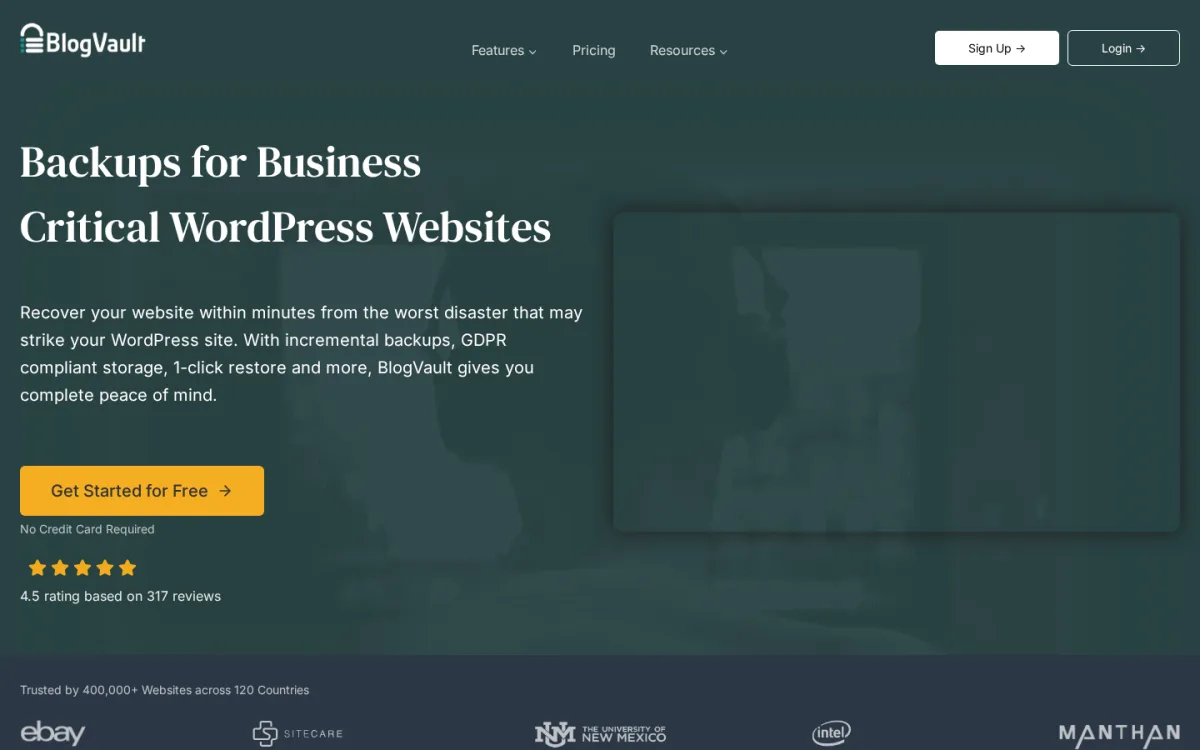
- Coverage claim: Trusted by 400,000+ websites across 120 countries (per the BlogVault homepage on 2026-06-12)
- Vendor rating: 4.5 / 5 (357 reviews on 2026-06-12, per the homepage indicator)
BlogVault is my top overall pick for WordPress backups in 2026. It is the cleanest answer to the question every site owner actually asks: "how do I make sure my site can survive a bad day, with backups stored somewhere safe and a restore I can run before the worst day happens." The plugin is a small WordPress connector; the real product lives on the BlogVault dashboard, where every backup is stored in BlogVault's own off-site cloud, restored with one click, and pushable into a staging environment before you promote it back to production. The emergency connector means BlogVault can recover a site even when the WordPress admin is hard down, because the backup stream and the restore both run off-server.
What I verified on 2026-06-12 against blogvault.net/pricing and the homepage above (the plugin is a SaaS connector that requires a BlogVault account and a public-Internet-reachable site; the sandbox runs on 127.0.0.1 and was not enrolled). All three plans (Personal, Business, WooCommerce) include off-site cloud storage with no separate Dropbox / S3 / OneDrive setup, one-click restore, an emergency restore path that does not need a working admin, and a staging site. Backup frequency steps up by tier: Personal daily (24-hour intervals, 30-day retention), Business 2x daily (12-hour intervals, 90-day retention), WooCommerce real-time at 1-hour intervals customizable, 365-day retention. Staging retention follows the same pattern (1-day on Personal, 30-day on Business, 6-month on WooCommerce). A 14-day money-back guarantee covers every plan.
Why it is the strongest overall pick. Most WordPress operators do not actually want to maintain another plugin and another cloud bucket. They want backups they can trust, a restore they can run in a panic, and a staging site they can use to test the next plugin update. BlogVault is the only product in this roundup that ships all three out of the box, with the off-site storage included instead of bolted on. The emergency connector and the "restore even when the admin is dead" workflow are the right disaster-recovery story for any site that earns money. Coverage and reputation are strong: 400,000+ sites across 120 countries on the vendor homepage and a 4.5/5 rating from real customers. The same team also builds MalCare (security) and Migrate Guru (one-shot migrations), so the backup, security and migration stories share a stack that has been refined since 2010.
Strengths. No remote-storage setup work: you sign up, install the connector, and BlogVault stores backups in its own cloud. Off-site restore works even when the WordPress admin will not load. Staging is on every plan, not behind an upsell. WooCommerce plan retention (365 days) is the longest in this roundup, and the WooCommerce plan's real-time, 1-hour-interval backups capture every order without the all-or-nothing 24-hour gap that pure daily backups leave. Incremental backups are part of the architecture instead of a paid add-on (per the vendor product page), which keeps long-running sites from re-uploading the same gigabytes every night.
Honest limitation. BlogVault is SaaS only. You cannot bring your own Dropbox, Amazon S3 or OneDrive bucket as the primary backup destination, and the off-site copy lives in BlogVault's cloud rather than something you control end-to-end. Per-site annual pricing is also higher than a single multi-site UpdraftPlus or WPvivid Pro license, so a freelancer with twenty small client sites will pay more here than with a multi-site plugin license. There is no usable free tier; pricing starts at $99/yr (Personal, 1 site). If your priorities are "everything must run inside WordPress" or "I want zero ongoing spend," UpdraftPlus on the free tier is the better fit.
Pricing. All tiers verified on blogvault.net/pricing on 2026-06-12 (the vendor was running a "Flat 50% Off" annual-plan promotion on the same day; the listed prices below are the standard rates):
- Personal $99 / year for 1 site, daily backups, 30-day retention, up to 20 GB site size, 1-day staging
- Personal $299 / year for 5 sites (same Personal feature set, scaled)
- Business $299 / year for 1 site, 2x daily backups, 90-day retention, up to 50 GB site size, 30-day staging
- Business $899 / year for 5 sites
- WooCommerce $499 / year for 1 site, real-time backups, 365-day retention, up to 100 GB site size, 6-month staging
- WooCommerce $1,499 / year for 5 sites
All plans include a 14-day money-back guarantee. The vendor frequently runs promotional discounts (the 50% off banner was visible on 2026-06-12), so the live checkout price is often lower than the rates above.
Best fit. Business-critical WordPress sites that want a fully managed backup service instead of one more plugin to maintain, WooCommerce stores that need real-time backups without bolting on extra add-ons, agencies that prefer one SaaS dashboard to several plugin admins, and any owner who wants the strongest "I can recover this even when the admin is dead" story available in 2026.
2. UpdraftPlus: the most-installed free WordPress backup plugin
- WordPress.org: wordpress.org/plugins/updraftplus/
- Active installs: 3+ million
- Rating: 4.8 / 5 (8,533 reviews on 2026-06-12)
- Latest version: 1.26.5, released 2026-06-05
- Requires: WordPress 6.2+, PHP 7.4+
- Tested up to: WordPress 7.0
UpdraftPlus is the most-installed WordPress backup plugin in the world and my top free recommendation in this roundup. The free version already covers scheduled backups (independent schedules for files vs database), one-click restore, and direct upload to Dropbox, Google Drive, Amazon S3 and S3-compatible buckets, Rackspace, Microsoft OneDrive, FTP and email. Premium adds incremental backups, encryption, additional cloud destinations, network/Multisite, and the Migrator / staging tools.
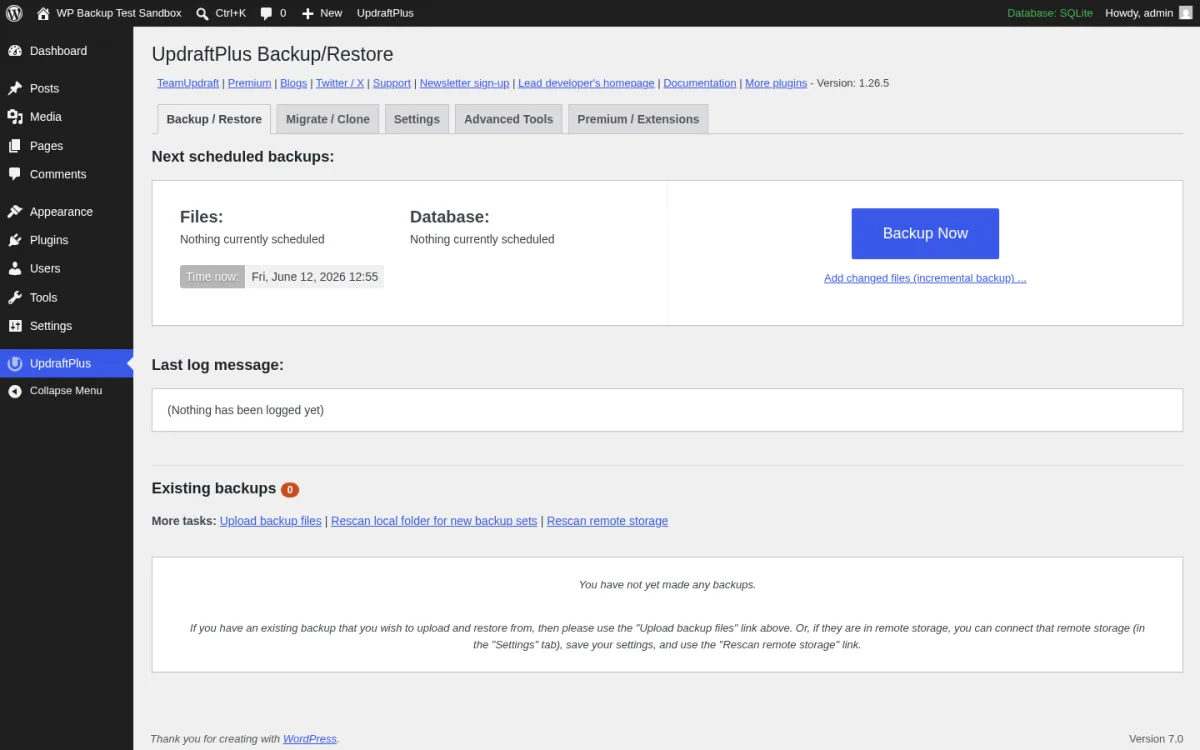
What I tested in a clean WordPress 7.0 sandbox on 2026-06-12: I installed v1.26.5 from wordpress.org/plugins/updraftplus, activated it, and opened options-general.php?page=updraftplus. The screen above is the real first-load Backup / Restore tab with the five-tab layout (Backup / Restore, Migrate / Clone, Settings, Advanced Tools, Premium / Extensions). The Next scheduled backups panel splits Files and Database into independent rows, which is correct behavior: most stores want a daily database backup and a weekly file backup, not the same schedule for both. I clicked Backup Now and the modal exposes the right component toggles (Include the database, Include any files, Send this backup to remote storage, only show this backup in the list of existing backups). I walked Settings > Choose your remote storage and confirmed the free tier exposes Dropbox, Google Drive, Amazon S3, Rackspace, Microsoft OneDrive, FTP and email; Premium destinations (Backblaze B2, Microsoft Azure, Google Cloud Storage, pCloud, SFTP/SCP, WebDAV) are visibly flagged in the same tile grid.
Strengths. Free version is genuinely complete for a small or medium site: you can schedule files and database independently, ship to any major cloud, and restore individual components. Active 2026 release cadence (1.26.5 in early June, 8,533 ratings) is the strongest install reputation in this roundup. The Premium / Extensions tab is honest about which features are paid; the free admin does not nag.
Limitations. Incremental backups (the headline feature for large sites) are Premium. Encryption is Premium. The Migrator / staging tools are Premium. The free version restores fine for normal recovery, but very large sites should plan for a Premium subscription to keep nightly archives small. Pricing on teamupdraft.com is locale-driven; the German EUR price is shown by default, with USD available via the selector.
Pricing. All annual plans verified on teamupdraft.com/updraftplus/pricing on 2026-06-12 (USD equivalents via the country / currency selector; the page defaults to EUR for German visitors):
- Personal ~$91 / year for 2 sites, 1 GB UpdraftVault storage
- Business ~$123 / year for 10 sites, with standard staging
- Agency ~$188 / year for 35 sites, with advanced staging
- Enterprise ~$253 / year for unlimited sites, with ultimate staging
- Gold ~$518 / year for unlimited sites, 50 GB storage and UpdraftCentral management
All Premium plans bill annually with a 10-day money-back guarantee. Switch the country / currency selector on teamupdraft.com to USD before checkout to confirm the exact USD amount; the EUR display is geo-detected.
Best fit. Any WordPress owner who needs a real free backup plan today, agencies running multiple client sites on the same Premium license, and sites that need a single plugin that covers backup, restore and (with Premium) migration in one toolkit.
3. Jetpack VaultPress Backup: real-time backups for high-change sites
- WordPress.org connector: wordpress.org/plugins/jetpack-backup/
- Active installs (connector): 20,000+
- Rating: 4.5 / 5 (35 reviews on 2026-06-12)
- Latest version: 3.8, released 2026-04-11
- Requires: WordPress 6.7+, PHP 7.2+
- Tested up to: WordPress 6.9.4
Jetpack VaultPress Backup is Automattic's official real-time cloud backup product, built on top of the original VaultPress engine that Matt Mullenweg's team has been refining since 2010. Every change you make in WordPress, from a published post to a WooCommerce order to a new comment, is captured and shipped off-site as it happens. When something breaks, you restore the whole site or a specific table from the Jetpack cloud with a single click, including from the Jetpack mobile app when your dashboard is unreachable.
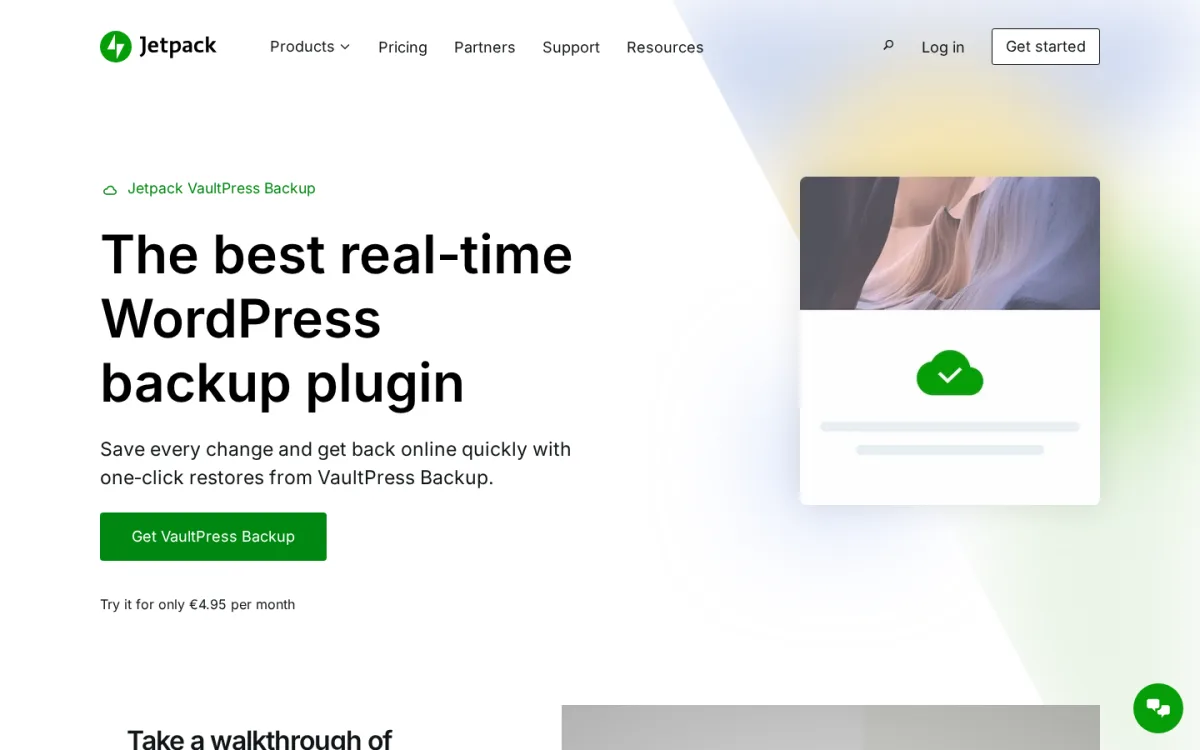
What I verified on 2026-06-12 against jetpack.com/upgrade/backup and the WordPress.org connector listing (the plugin itself cannot be installed without a paid Jetpack subscription, a connected WP.com account and a public-Internet-reachable site; the sandbox runs on 127.0.0.1 and was not enrolled). The product page confirms real-time cloud backups across both paid tiers, a 30-day activity log and archive, one-click restores including unlimited restores on the Security bundle, and the mobile-app-driven restore for cases where the site is hard down. The connector plugin (v3.8) lives at wordpress.org/plugins/jetpack-backup and is the bridge between WordPress and the VaultPress backup stream.
Strengths. True real-time (not "every 24 hours") backups across both tiers. The 30-day archive plus activity log lets you scroll back through what changed, not just restore a single full archive. Restore from the Jetpack mobile app is the right disaster-recovery story for sites where the WordPress admin is down. Automattic is the most credible long-term owner of this product.
Limitations. Paid only and tied to the broader Jetpack stack. The intro EUR 4.95/mo price is the first-year discount; renewals are at full price. Pricing is displayed in EUR for European visitors and your local currency selector will show the corresponding amount. Storage starts at 10 GB; sites that grow past that need to upgrade. Restore depends on the Jetpack cloud being reachable.
Pricing. All tiers verified on jetpack.com/upgrade/backup on 2026-06-12:
- VaultPress Backup EUR 4.95 / month intro (45% off the first year, billed yearly), EUR 8.95 / month regular
- Security Bundle EUR 8.95 / month intro, EUR 18.95 / month regular (adds Jetpack Scan + Akismet anti-spam)
All renewals are at full price after the first year unless cancelled. Pricing detected against the geo-IP currency; switch the selector to your local currency before checkout.
Best fit. WooCommerce stores where every order needs to be recoverable, news / magazine sites that publish dozens of posts per day, and any site that already pays for Jetpack and wants the bundle savings of the Security plan.
4. Solid Backups (now Kadence Backups): the premium veteran inside the Kadence Pro bundle
- Vendor: liquidweb.com/software/kadence/add-ons/
- Brand history: iThemes BackupBuddy (2010s-2023) > SolidWP Solid Backups (2023-2025) > Kadence Backups inside Kadence Pro (2025-2026 rebrand by Liquid Web)
- Architecture: Closed-source premium WordPress plugin, distributed via the Kadence Pro bundle
- Distribution: Licensed through Liquid Web; not available on WordPress.org
Solid Backups is the modern name for the veteran iThemes BackupBuddy plugin that has been backing up WordPress sites since 2010. In 2023 the iThemes brand became SolidWP, and the plugin was renamed Solid Backups. In 2025-2026 Liquid Web (which now owns SolidWP and Kadence) folded Solid Backups into the Kadence Pro bundle and is rolling it out under the name Kadence Backups. Existing Solid Backups customers continue to receive updates under the Solid Backups name; new buyers see Kadence Backups in the same Kadence Pro purchase flow.
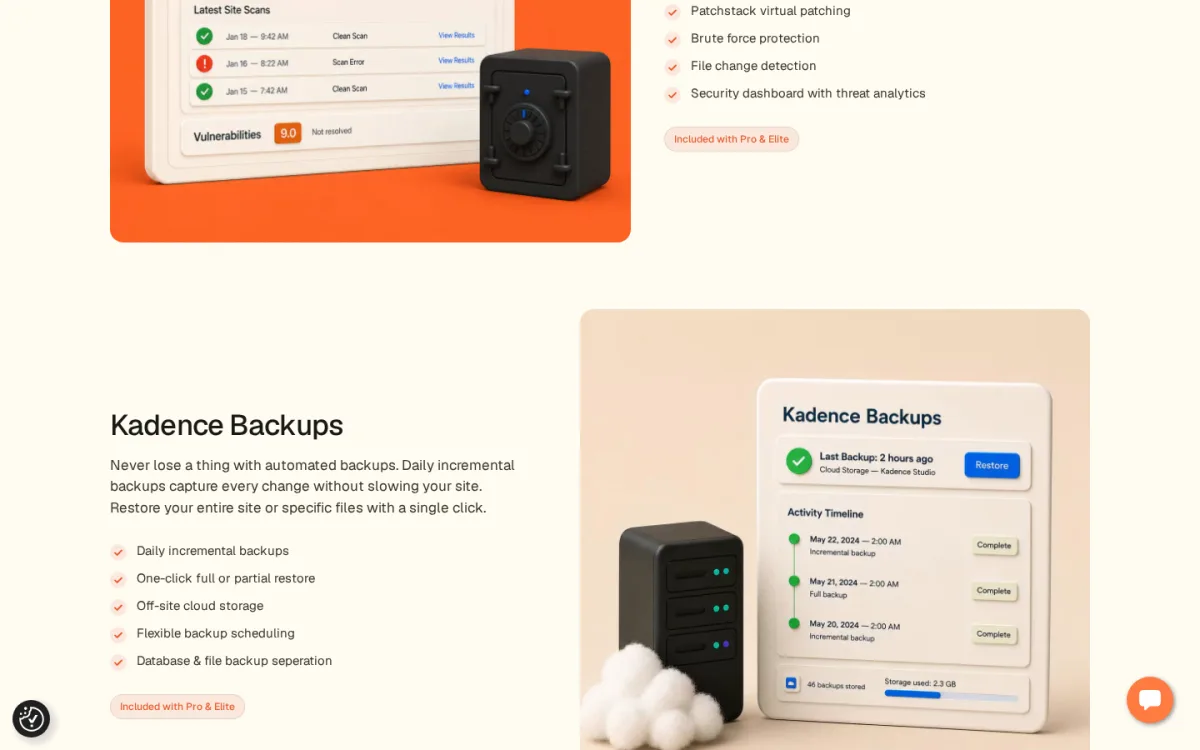
What I verified on 2026-06-12 against liquidweb.com/software/kadence/add-ons (the plugin is closed source and cannot be installed without a Kadence Pro license, so it was not enrolled in the sandbox). The Kadence Backups card lists the same five capabilities that defined Solid Backups (and BackupBuddy before it): daily incremental backups, one-click full or partial restore, off-site cloud storage, flexible backup scheduling, and database & file backup separation. The off-site cloud destinations BackupBuddy/Solid Backups has supported historically include BackupBuddy Stash (vendor cloud), Amazon S3, Google Drive, Dropbox, Rackspace and FTP/SFTP.
Strengths. Database and file backup separation is the right pattern for large sites where a nightly database snapshot is cheap but a full-file archive is expensive. Daily incremental backups keep archive sizes manageable. Partial restore (a single file or a single database table) is unusual in this list. Existing iThemes / SolidWP customers get the same plugin under the new branding with no migration work.
Limitations. No free tier; you must buy into Kadence Pro to get Backups. The standalone Solid Backups checkout page no longer exists; the public path is the Kadence Pro bundle. Pricing depends on the Liquid Web selector and is bundled with Security, Shop Kit and Memberships, so the bundle is great value if you actually use those tools and overpriced if you only want backups.
Pricing. Verified on the Kadence add-ons page at liquidweb.com/software/kadence/add-ons on 2026-06-12. Kadence Pro starts around $129 / year for the smallest tier covering 1-2 sites and includes Kadence Backups alongside Kadence Security, Kadence Shop Kit and Kadence Memberships. Kadence Elite adds Kadence Central (multi-site management). Confirm the current price on the Liquid Web selector before checkout because Liquid Web rotates bundle promotions through the year.
Best fit. Existing iThemes BackupBuddy or SolidWP Solid Backups customers, agencies and operators who are already invested in the Kadence theme + Pro stack, and sites that want partial restore (single file or single database table) as a first-class workflow.
5. BackWPup: the free veteran with a modern onboarding wizard
- WordPress.org: wordpress.org/plugins/backwpup/
- Active installs: 500,000+
- Rating: 4.0 / 5 (1,320 reviews on 2026-06-12)
- Latest version: 5.7.2, released 2026-06-08
- Requires: WordPress 5.5+, PHP 7.4+
- Tested up to: WordPress 7.0
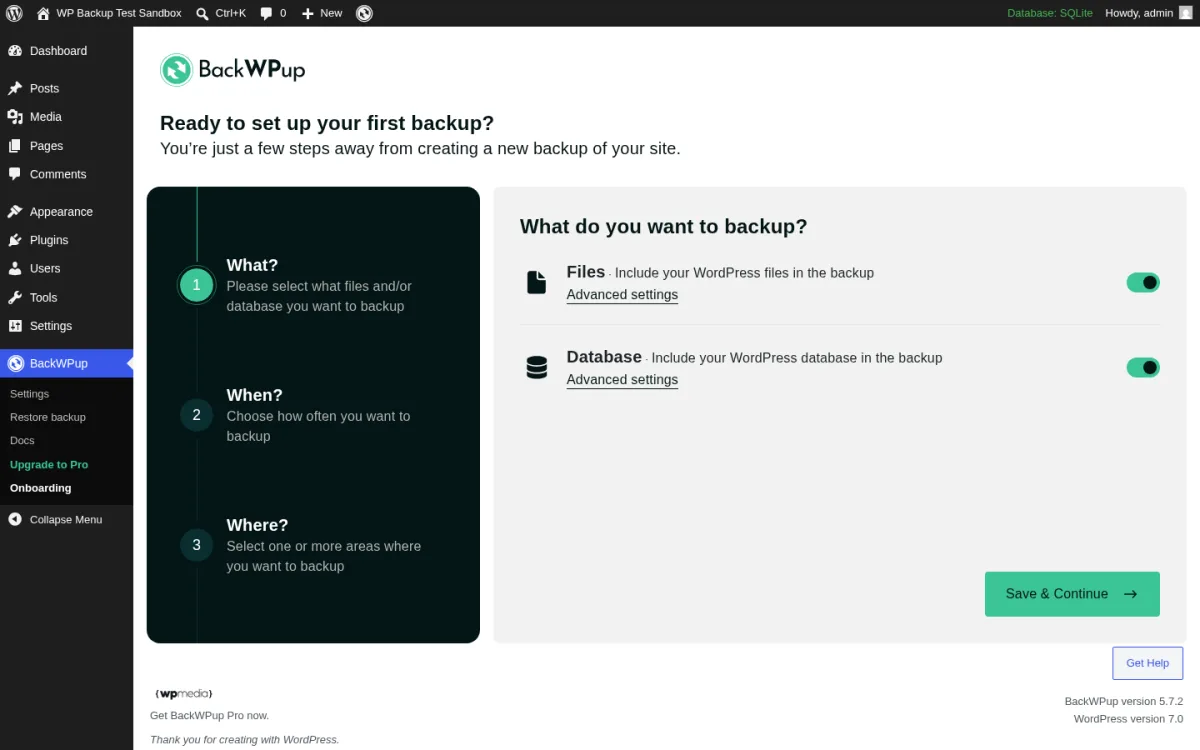
BackWPup has been backing up WordPress sites for more than a decade. Inpsyde rebuilt the plugin under the WP Media (WP Rocket / Imagify) team in 2024-2025 with a modern What / When / Where onboarding wizard that walks first-time users through their first scheduled backup. The free version still ships destination drivers for local folders, Dropbox, Amazon S3, Microsoft Azure, Rackspace Cloud Files, SugarSync, FTP and email; Pro adds the full restore app, encryption and premium storage.
What I tested in a clean WordPress 7.0 sandbox on 2026-06-12: I installed v5.7.2 from wordpress.org/plugins/backwpup, activated it, and opened admin.php?page=backwpup. The screen above is the real onboarding wizard. The three labelled steps are What (Files + Database toggles, each with an Advanced settings link to scope folders and tables), When (Manual / Hourly / Daily / Weekly / Monthly schedule presets with a time picker) and Where (the destination grid with Folder, Dropbox, S3, Azure, Rackspace, SugarSync, FTP, Email). I clicked through Save & Continue and the wizard creates a saved job that runs on the chosen schedule. The Restore backup submenu under BackWPup links to the BackWPup Restore companion (free for restoring the most recent backup; full restore is Pro).
Strengths. Modern wizard is the cleanest first-time backup setup of any free plugin in this list; you go from "no backups" to "scheduled daily backup to Dropbox" in under two minutes. Long history under Inpsyde / WP Media means the plugin survives WordPress core releases reliably. Free version is genuinely useful: you can ship scheduled backups to Dropbox or S3 at zero cost.
Limitations. Encryption and the full restore tooling sit in Pro. The 4.0/5 average reflects a long historical tail of older release complaints; the modern 5.7.x line is far better, but the rating still drags. Translation strings are inconsistent in non-English admin locales.
Pricing. All annual plans verified on backwpup.com/pricing on 2026-06-12:
- Starter $49 / year (EUR 45) for 2 sites
- Advanced $99 / year (EUR 91) for 5 sites
- Pro $199 / year (EUR 183) for 20 sites
All Pro plans add encryption, the full restore app, migration tools and premium storage drivers.
Best fit. Owners who already have a Dropbox or Amazon S3 bucket and want a zero-spend scheduled backup to push to it, sites with strict change windows that need the modern What / When / Where wizard, and operators who prefer Inpsyde's release cadence over UpdraftPlus's release cadence.
6. WPvivid Backup: free cloud backups plus manual migration
- WordPress.org: wordpress.org/plugins/wpvivid-backuprestore/
- Active installs: 900,000+
- Rating: 4.9 / 5 (1,493 reviews on 2026-06-12)
- Latest version: 0.9.129, released 2026-06-01
- Requires: WordPress 5.0+, PHP 7.4+
- Tested up to: WordPress 7.0
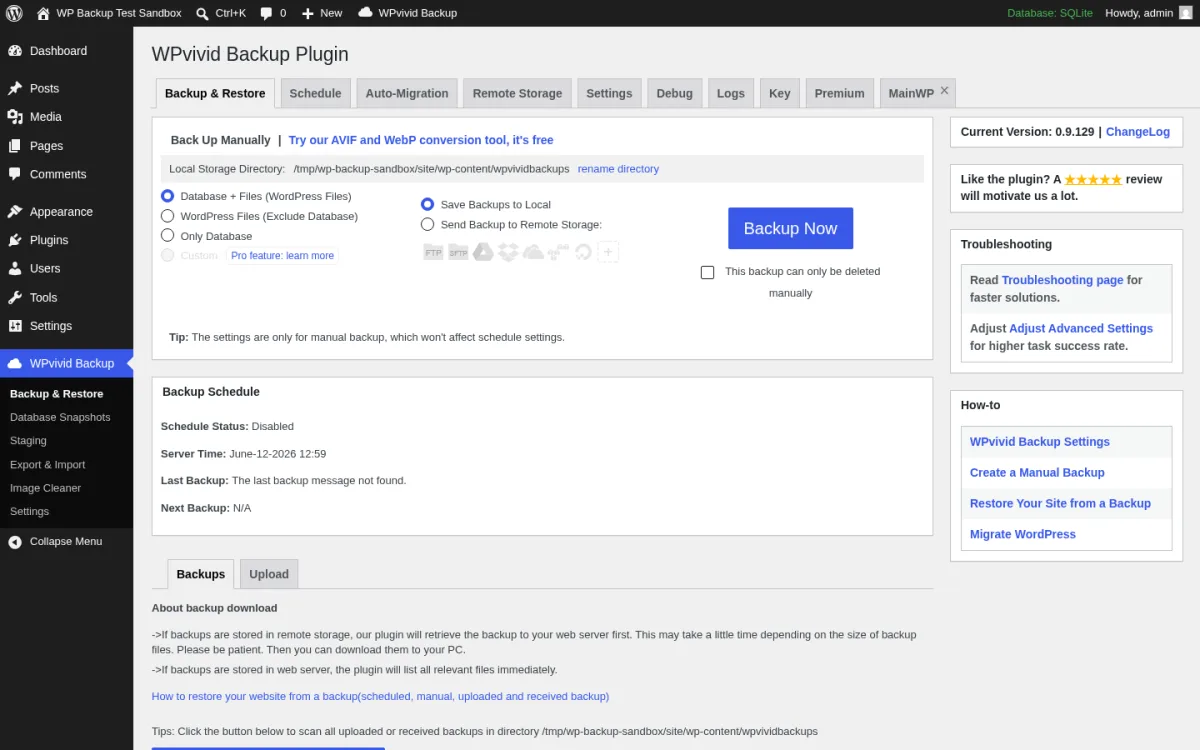
WPvivid Backup is the most highly-rated free backup plugin in the WordPress.org listing (4.9 / 5 from 1,493 reviews). The free version covers the four jobs that matter: scheduled backups, one configurable cloud destination (Amazon S3, Google Drive, OneDrive, Dropbox, FTP, SFTP, DigitalOcean Spaces or Wasabi), one-click restore, and manual key-based migration into another WPvivid-equipped site. Pro adds multiple simultaneous destinations, scheduled remote sync, role and capability controls, white labelling, and multiple staging sites.
What I tested in a clean WordPress 7.0 sandbox on 2026-06-12: I installed v0.9.129 from wordpress.org/plugins/wpvivid-backuprestore, activated it, and opened admin.php?page=WPvivid. The screen above is the real first-load Backup & Restore tab. The Manual Backup panel lets me pick what to back up (Database + Files, Files only excluding database, Database only) and where to send it (Local Web Server or Remote Storage if configured). The Backup Schedule panel directly below shows the schedule status. The multi-tab strip across the top (Backup & Restore, Schedule, Auto-Migration, Remote Storage, Settings, Diag, Log, Pro, Premium) is the right buyer-facing layout: each tab is a single decision. I walked Remote Storage and confirmed the free version registers one cloud destination at a time; the Pro tab makes the multi-destination unlock explicit.
Strengths. Cleanest free Backup admin in the list. Single-destination free cloud is enough for most sites: pick S3 or Google Drive and schedule a daily backup. The 4.9 / 5 rating is the strongest review base of any free backup plugin. Auto-Migration tab is a legitimately useful free workflow for one-shot moves into a sister site.
Limitations. Free version registers only one cloud destination at a time; you cannot ship to both Dropbox and S3 simultaneously without Pro. Scheduled push to remote storage requires Pro. The plugin's version numbering (0.9.x) is unusual; this is the long-running stable line, not a beta.
Pricing. All plans verified on wpvivid.com/pricing on 2026-06-12:
Annual:
- Blogger $49 / year for 2 sites
- Freelancer $69 / year for 10 sites
- Small Business $99 / year for 50 sites
- Ultimate $149 / year for unlimited sites
Lifetime:
- Blogger $99 one-time for 2 sites
- Freelancer $139 one-time for 10 sites
- Small Business $199 one-time for 50 sites
- Ultimate $299 one-time for unlimited sites
All Pro tiers (annual or lifetime) unlock multiple cloud destinations, scheduled remote sync, role and capability controls, white labelling, multiple staging sites and priority support.
Best fit. Freelancers and small agencies who want a Pro license that scales to 10 to 50 client sites for a one-time lifetime fee, owners who only need one cloud destination and want a clean free experience, and sites that want manual cross-site migration without buying a separate migration plugin.
7. Backup Migration by BackupBliss: modern free with a built-in staging site
- WordPress.org: wordpress.org/plugins/backup-backup/
- Active installs: 80,000+
- Rating: 4.9 / 5 (1,317 reviews on 2026-06-12)
- Latest version: 2.1.6, released 2026-06-05
- Requires: WordPress 5.0+, PHP 7.4+
- Tested up to: WordPress 7.0
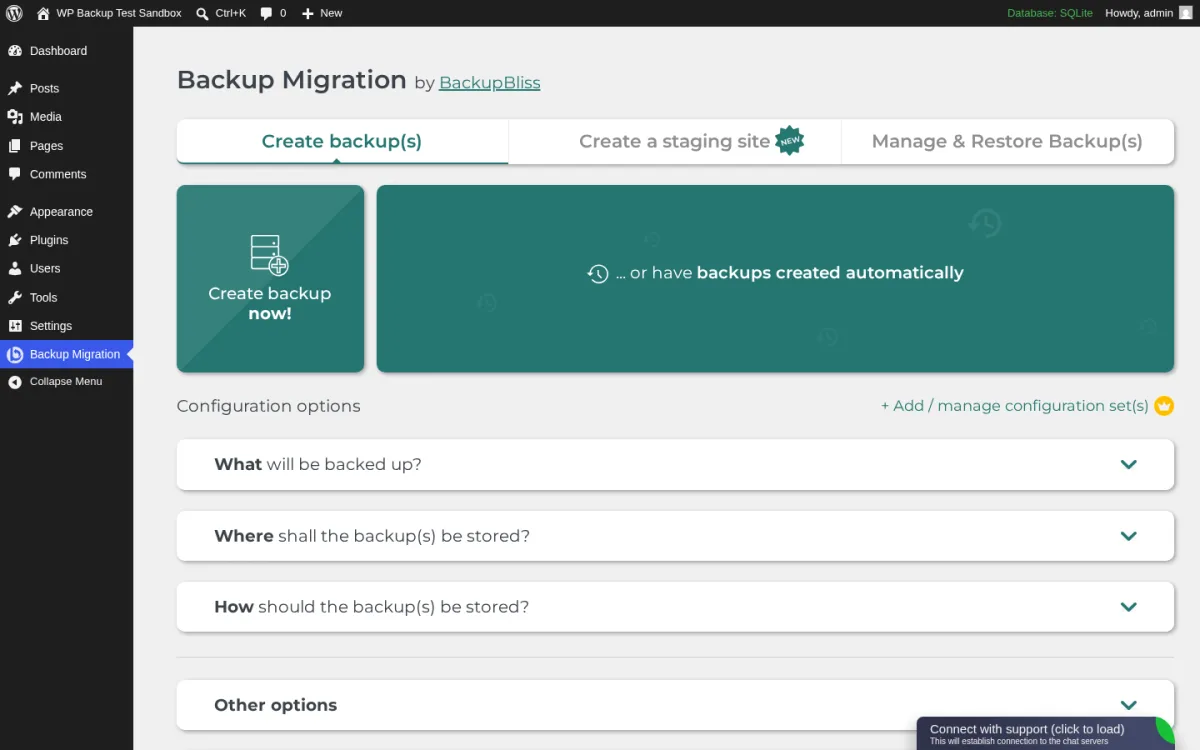
Backup Migration by BackupBliss is the modern dark horse of this category: an 80,000-install plugin with a 4.9 / 5 rating across 1,317 reviews, an opinionated three-tab admin, a built-in on-server staging site at zero cost, and a cross-site migration code that does not need an external service. The free tier covers the workflow most small sites actually want: schedule backups, restore from the admin, push the site to another server with a code, and spin up a staging copy for a plugin update test.
What I tested in a clean WordPress 7.0 sandbox on 2026-06-12: I installed v2.1.6 from wordpress.org/plugins/backup-backup, activated it, and opened admin.php?page=backup-migration. The screen above is the real first-load admin. The three large tabs (Create backup(s), Create a staging site with the NEW badge, Manage & Restore Backup(s)) are the right buyer-facing layout: each tab is one decision. The Create backup now! tile fires a full local backup; the configuration accordions below (What, Where, How, Other) let you scope the backup before running it. I created a backup, then walked the Create a staging site flow, which spins up a sub-path copy of the site. The Connect with support widget in the bottom-right is the only nag in the free admin; that is acceptable.
Strengths. Built-in staging site at zero cost is a genuinely novel free-tier feature in this category. Cross-site migration via a Migration Code is the cleanest manual migration UX of any plugin in this list. The 4.9 / 5 rating with 1,317 reviews shows real customer satisfaction, not just early adopters. Active 2026 release cadence (2.1.6 in early June).
Limitations. The free build caps a single backup archive at 2 GB; sites past that need Premium. External cloud destinations (Google Drive, Dropbox, Amazon S3, OneDrive, FTP, SFTP, pCloud) are Premium. Premium pricing surfaces inside the sellcodes.com checkout linked from backupbliss.com rather than on the marketing site itself, which is unusual.
Pricing. Premium plans are linked from backupbliss.com via a sellcodes.com checkout page. The vendor lists unlimited backup size, external storage destinations, file-level browsing and priority support as the headline Premium features, but does not publish numeric tier prices on the marketing site. Visit https://premium.backupbliss.com before committing to confirm the current Premium pricing in your local currency.
Best fit. Small to medium sites that want a built-in staging site for plugin tests without paying for a separate Pro license, owners who prefer a modern opinionated admin over UpdraftPlus's older UI, and sites that need cross-site migration via a code rather than a vendor SaaS account.
How to choose the right WordPress backup plugin
Start with the question you actually need answered: do you want a managed off-site backup service, or do you want a plugin you maintain inside WordPress? Then layer in restore UX, cloud storage and staging from there.
- You run a business-critical site and want a managed off-site backup service: subscribe to BlogVault Personal or Business. The connector installs in a minute, backups land in the BlogVault cloud, and the emergency restore path works even when the WordPress admin is dead. This is the strongest overall pick in this roundup.
- You sell on WooCommerce and cannot lose an order: upgrade to BlogVault WooCommerce or install Jetpack VaultPress Backup. Both ship real-time backups and one-click restore. BlogVault WooCommerce keeps a 365-day archive and includes a 6-month staging environment; Jetpack keeps a 30-day archive and ties into the broader Jetpack Security bundle.
- You can tolerate up to 24 hours of data loss and want zero spend: install UpdraftPlus, schedule daily database and weekly file backups, and ship them to your existing Dropbox or Google Drive. Free covers everything you need, and it is the most-trusted free backup plugin on WordPress.org.
- You can tolerate up to 24 hours of data loss but want a clean modern admin: install BackWPup or WPvivid Backup. Both are free, both schedule cleanly, and both restore from the admin. WPvivid is better if you want manual migration; BackWPup is better if you want the modern What / When / Where onboarding.
- You want a built-in staging site at zero cost: install Backup Migration by BackupBliss. The free tier ships a working on-server staging copy you can use for plugin update tests.
- You are on the Kadence Pro / SolidWP stack: activate Kadence Backups (the renamed Solid Backups) from your Kadence Pro license. You already paid for it; use it.
If you have not yet built out an ongoing care plan, our regular maintenance for your WordPress site walkthrough is the right next read; backup scheduling is one of the four pillars in that plan.
FAQ
What is the best WordPress backup plugin in 2026?
For most business-critical sites, BlogVault is the strongest overall pick: a managed off-site backup service with one-click restore, an emergency restore path that works even when the WordPress admin is dead, and staging included on every plan. If you only want a free plugin you maintain inside WordPress, UpdraftPlus is still the most-installed and most-trusted free backup plugin, with 3+ million active installs and a 4.8 / 5 rating across 8,533 reviews on 2026-06-12.
Which is the best free WordPress backup plugin in 2026?
UpdraftPlus remains the most-installed and most-trusted free backup plugin, with 3+ million active installs and a 4.8 / 5 rating across 8,533 reviews. WPvivid Backup is the highest-rated free alternative (4.9 / 5 across 1,493 reviews) and is the best pick if you want one cloud destination plus manual migration in the free tier. Backup Migration by BackupBliss is the right pick if you want a built-in staging site at zero cost.
How often should I back up a WordPress site?
For a low-change site (a brochure or portfolio), a weekly file backup and a daily database backup is enough. For a content site that publishes daily, schedule a daily file backup and a daily database backup. For WooCommerce or membership sites where every order matters, use a real-time backup product like BlogVault WooCommerce or Jetpack VaultPress Backup so no individual order is lost between snapshots.
Where should I store WordPress backups?
Never on the same server as the live site. Pick at least one off-site destination: Dropbox, Google Drive, Amazon S3, Microsoft OneDrive, Backblaze B2 or a vendor cloud like the BlogVault cloud or UpdraftVault. For business-critical sites, store two copies in two different clouds (or one cloud plus one local download) so a single account compromise does not destroy every copy.
Can I restore a WordPress site from a backup plugin if the admin is broken?
It depends on the plugin. UpdraftPlus, BackWPup, WPvivid and Backup Migration restore from the WordPress admin, so the admin needs to load for the restore button to work. If the admin is hard down, you can usually re-upload the latest plugin archive via FTP and then run the restore. BlogVault and Jetpack VaultPress Backup restore from their own SaaS dashboard, which means they can recover a site even when the WordPress admin is offline; BlogVault's emergency connector is the cleanest of these workflows. Your post-restore work usually requires a quick read of our guide to solving WordPress critical errors if the original failure was a fatal error.
Is the free version of a backup plugin enough for a business site?
For most small business sites, yes. The free versions of UpdraftPlus, BackWPup, WPvivid and Backup Migration all schedule backups, push to at least one cloud destination, and restore from the admin. Upgrade to a paid plan when you need real-time backups, incremental backups, encryption, multiple simultaneous cloud destinations, an emergency off-admin restore, or a managed SaaS service like BlogVault that handles off-site storage and staging for you.
What is the difference between this roundup and your best WordPress migration plugins post?
The other post compares plugins that handle one-shot site moves between hosts: cloning a site, pushing it to a new domain, or splitting a Multisite. This post assumes you already run a WordPress site and need an ongoing backup plan: scheduled backups, restore, cloud storage and staging. UpdraftPlus and WPvivid appear in both posts because both plugins genuinely do both jobs; the rest of the list is different.
Conclusion: the right WordPress backup plugin stack in 2026
The right WordPress backup plugin is the one whose default schedule, restore UX and cloud destination match your actual recovery needs. For most business-critical sites, that means BlogVault: a managed off-site backup service with one-click restore, an emergency connector that recovers a dead site without a working WordPress admin, and staging on every plan. For owners who want a free, plugin-only setup they maintain themselves, UpdraftPlus on the free tier shipped to your existing Dropbox or Google Drive is still the most-trusted answer. For real-time recovery on WooCommerce or news sites, BlogVault WooCommerce or Jetpack VaultPress Backup. For Kadence Pro customers, Kadence Backups is already in the bundle and should be activated. For builders who want a modern free admin, BackWPup or WPvivid Backup. For a built-in staging site at zero cost, Backup Migration by BackupBliss.
The backup plugin itself is only half the story. Pair it with a security plugin so the site stays out of trouble in the first place: our 10 best free WordPress security plugins roundup covers the right pair. If you are between hosts and need a one-shot move rather than scheduled backups, our best WordPress migration plugins post is the right read.


