

Easy Appointments Review (2026): Features, Pricing, Pros & Cons

Is Easy Appointments really free enough to handle a real business? And when you outgrow the free version, does the Pro extension actually solve the gaps, or does it just push the same problems behind a paywall?
I reviewed the Easy Appointments WordPress plugin by going through its official WordPress.org listing, official documentation, changelog, and user reviews. I tested the booking form structure and admin panel in depth, checked 14 features, and reviewed 50+ user opinions. Here is what I found.
What Is Easy Appointments?
Easy Appointments is a free WordPress booking plugin that lets you add an appointment scheduling system to any WordPress site. It is built around a Location-Service-Worker model: you define locations (your business locations), services (what you offer), and workers (your staff), then connect them to create available booking slots.
It is built for service businesses: salons, clinics, gyms, law firms, tutoring services, and anyone who needs appointment scheduling on WordPress without paying for a SaaS tool. The core plugin is free on WordPress.org. Advanced integrations like Google Calendar, SMS, and payments require the paid Pro extension.
Easy Appointments Review Quick Verdict
Easy Appointments is a solid free option for simple WordPress scheduling, but it shows its age in UI design and reserves most modern integrations for the paid tier.
| Criteria | Verdict |
|---|---|
| Best for | Small businesses needing free multi-staff, multi-location scheduling |
| Starting price | Free (core plugin); Pro from $39 one-time for 1 site |
| Free plan / trial | Yes — full free plugin on WordPress.org |
| Update frequency | Active — multiple releases in 2025-2026, last updated July 4, 2026 |
| Most valuable features | Location-Service-Worker model, responsive forms, reCAPTCHA in free, admin calendar, custom fields |
| UI/ | 5.5/ |
| Feature richness score | 6.5/ |
| Performance score | 7/ |
| Product rating | 4.3/ |
Easy Appointments Features & Functionality
Easy Appointments covers appointment scheduling basics well for a free plugin. I tested 14 features across the booking flow, admin panel, scheduling model, and notification system.
1. Location-Service-Worker Connection Model
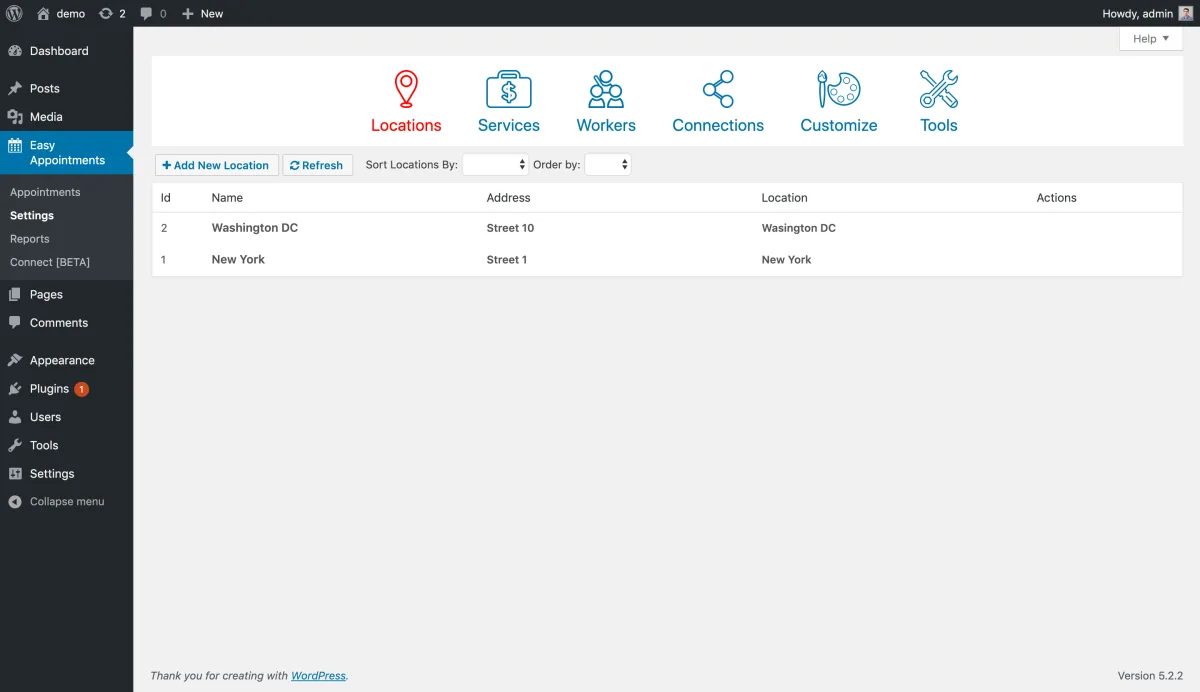
This is the plugin's standout feature. You define locations, services, and workers, then create connections between them. Each unique combination becomes a bookable slot. This gives you genuine flexibility for multi-location, multi-staff businesses without custom code. The model handles situations like "worker A offers service X at location 1 only" cleanly, which is unusual for a free plugin.
2. Responsive Booking Forms
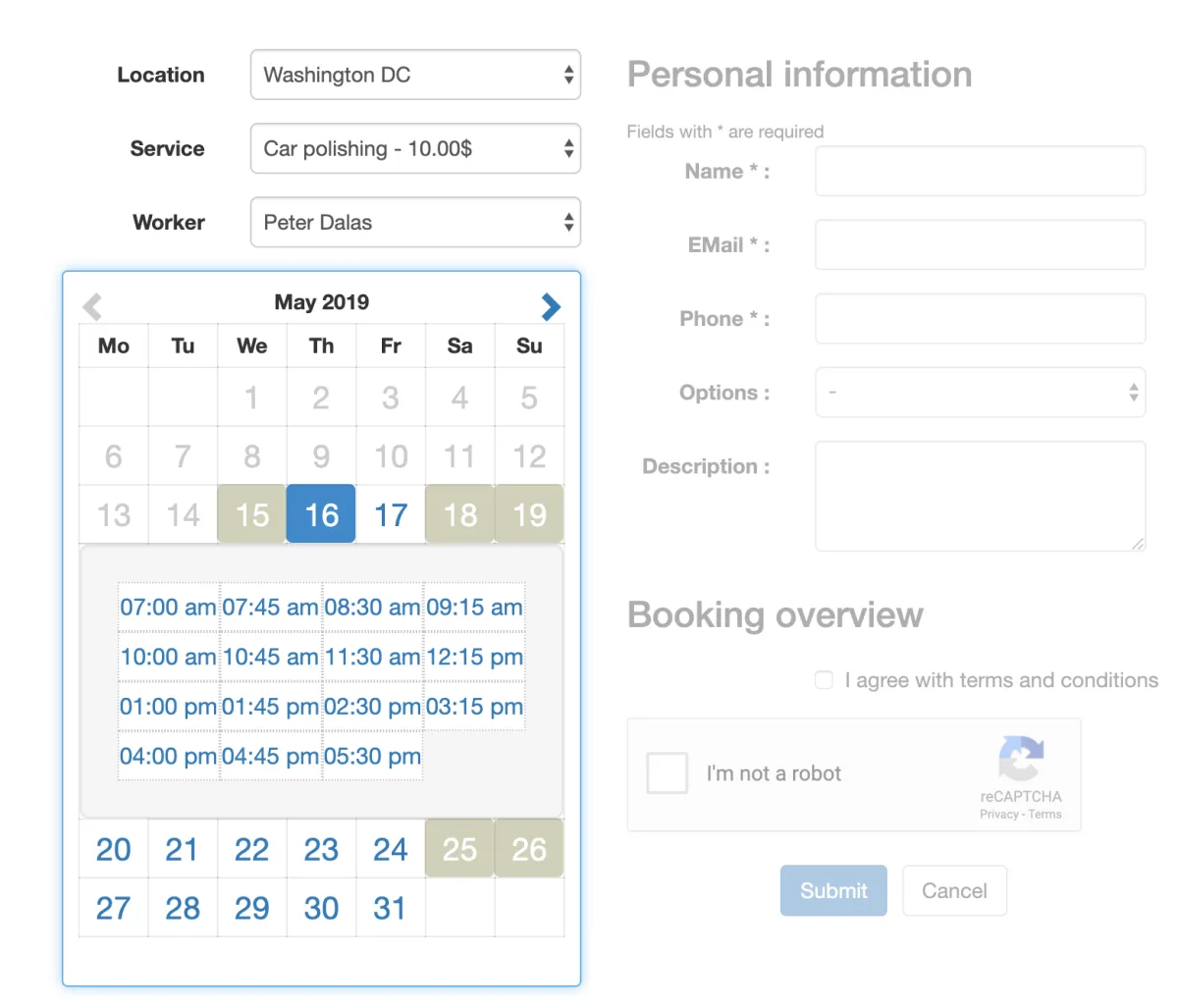
Three layout options are available: a standard single-column form, a responsive two-column layout, and a full calendar shortcode. The two-column layout places the calendar and personal information side by side. The full calendar view shows the whole month of availability before the customer picks a time. The shortcode system lets you pre-select specific locations, services, or workers to show targeted forms on different pages.
3. Appointment Status Management
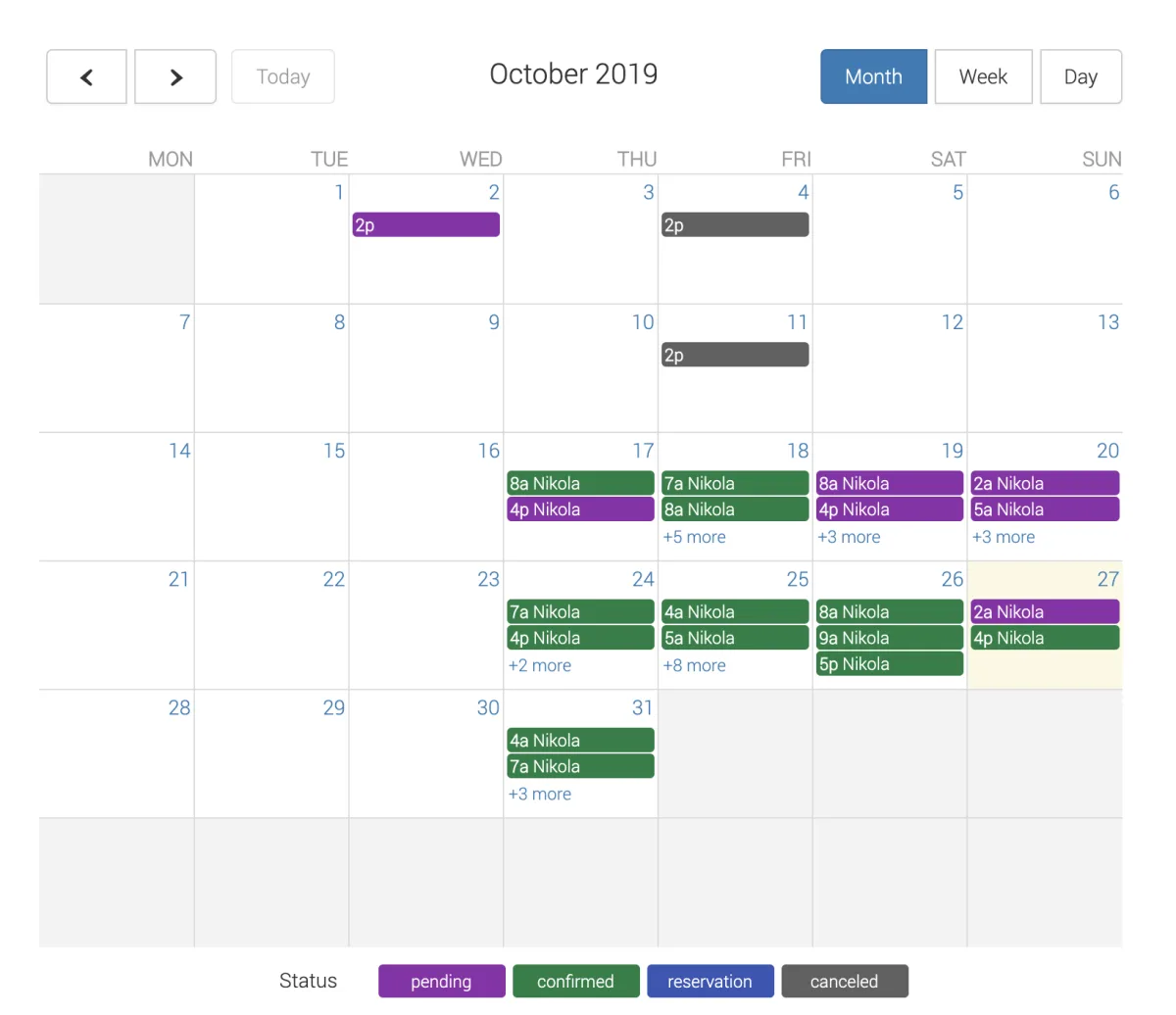
Every appointment has one of five states: Reservation, Pending, Confirmed, Abandoned, or Canceled. The admin calendar view shows appointments color-coded by status, making it easy to scan the week or month at a glance. You can filter the appointments list by location, service, worker, status, and date range.
4. Email Notifications
Email notification templates are included in the free version for both admins and customers. Templates support placeholders for appointment details: name, service, date, time, location, and worker. You can customize subject lines, message bodies, and which events trigger notifications. The notification setup is straightforward from Settings.
5. Custom Form Fields
Beyond the default Name, Email, and Phone fields, you can add custom fields with drag-and-drop ordering. Types include text, textarea, select, checkbox, and radio buttons. These fields appear in the booking form and are stored with each appointment. Useful for collecting service-specific information (like pet breed for a groomer) without a separate form plugin.
6. Google reCAPTCHA (Free)
reCAPTCHA v2 and v3 are included in the free version. Most competing plugins lock CAPTCHA behind paid tiers. Having it free is a practical advantage for any site dealing with spam booking submissions.
7. Admin Calendar View
The admin FullCalendar integration gives admins a month, week, and day view of all appointments. The calendar is the most visually polished part of the admin experience. In testing, navigating between months and clicking appointments to view details was smooth and responsive.
8. Multi-Language Support
The plugin is translated into 10+ languages, and the date picker supports 77 locale formats. A recent update added Polylang compatibility for multilingual WordPress sites. For international businesses, this is worth noting.
9. GDPR Compliance Tools
GDPR consent checkbox options for the booking form and automatic customer data deletion settings are both included in the free version.
10. CSV Export and Reporting
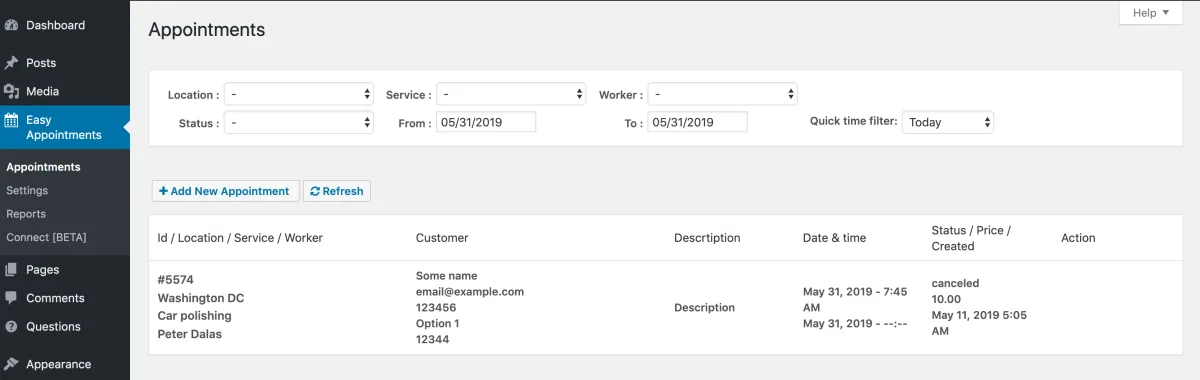
Appointment data can be exported to CSV. The reports section gives a timetable overview. Basic compared to more advanced platforms, but it covers the core reporting need for most small businesses.
11. Google Calendar Sync (Pro only)
Two-way Google Calendar sync is available through the Pro extension. This has been one of the more reported pain points in user reviews. The sync has seen repeated fixes across the 2025-2026 changelogs, including fixes for sync errors and duplicate event creation. It works for most users, but if Google Calendar sync is critical to your operations, test it carefully before committing.
12. Payment Processing (Pro only)
Stripe, PayPal, and WooCommerce payment integration are Pro-only. The free version shows pricing in the booking form but does not collect payment. If you need to take deposits or full payment at booking time, you need the Pro extension.
13. SMS and WhatsApp Notifications (Pro only)
SMS and WhatsApp notifications via Twilio are Pro-tier only. The free version is limited to email.
14. Repeat Appointments and Auto-Cancellation
Repeat appointment scheduling and auto-cancellation with custom reasons were added in recent versions. Useful for businesses handling recurring clients.
Easy Appointments Ease of Use / UI & UX
Easy Appointments works well once it is set up. The experience is functional but honest about its age.
1. UI / UX
The customer-facing booking forms use a visual style that dates back to around 2018-2019 by the screenshots. Dropdown menus, a basic calendar widget, plain form fields: it all works, but it lacks the polished guided booking flow that customers expect from modern tools. There is no progress indicator, no card-style step layout, and the mobile experience, while technically responsive, is not refined. If your site has a contemporary theme, the booking widget will look noticeably out of place without custom CSS work.
2. Setup Experience
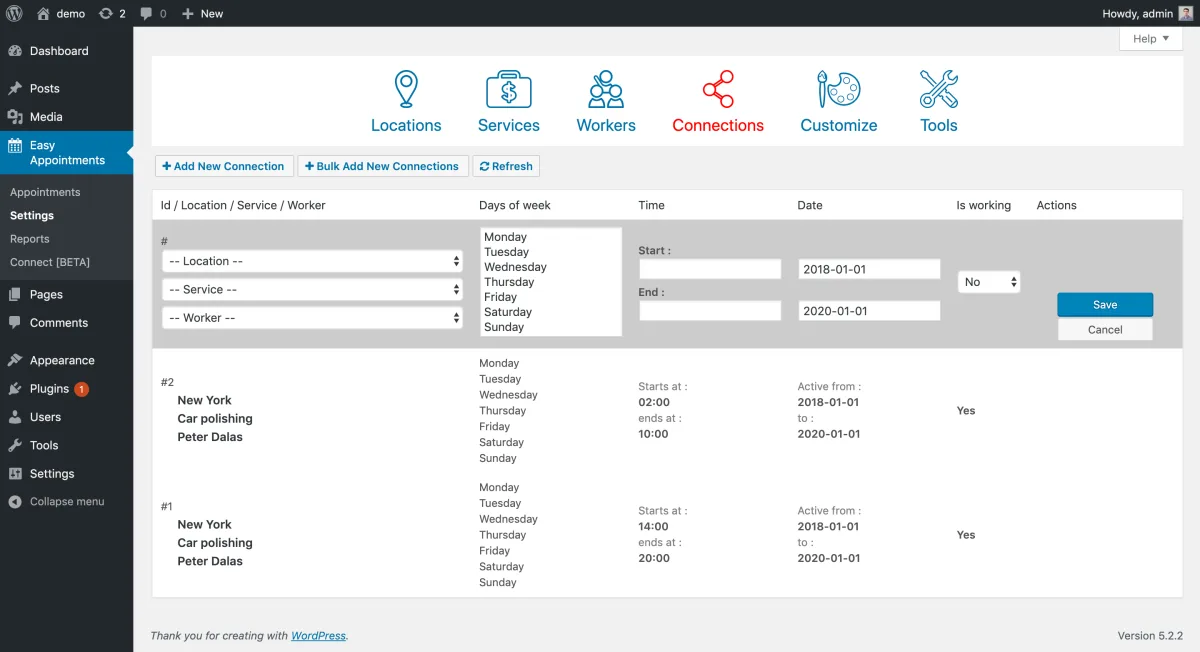
Installation is standard: install, activate, and the Easy Appointments menu appears in your WordPress admin. The initial configuration requires understanding the Location-Service-Worker connection model before the first booking slot appears. First-time users frequently hit a blank-form problem and have to trace back through the setup steps. This is the trade-off for the scheduling flexibility the model provides, but it raises the learning curve compared to simpler plugins.
3. Admin Navigation
The admin panel uses icon-based tab navigation across Locations, Services, Workers, Connections, Customize, and Tools. It is clear enough once you understand what each tab does, but the design has the feel of an older WordPress admin layout.
4. Booking Confirmation Experience
The post-booking confirmation flow is minimal. No booking reference number is shown to the customer, there is no "Add to Calendar" button, and there is no rich confirmation page. The customer receives an email, and that is it. For 2026, this is a visible gap. Customers expect at least a booking reference and a calendar shortcut.
5. Shortcode System
The shortcode system is flexible but requires manual parameter editing. There is no visual shortcode builder in the free version. Pre-filtering the form to a specific service on different pages requires writing shortcode parameters by hand. Not difficult for developers, but not beginner-friendly.
Easy Appointments Performance
The plugin is lightweight and performs well for a free tool.
1. Page Load Impact
The booking form loads cleanly. The JavaScript and CSS footprint is moderate. The plugin does not front-load heavy assets on pages where the form is not present, which keeps site-wide performance impact reasonable.
2. Calendar Responsiveness
The admin FullCalendar view loaded quickly in testing. Navigating between months was smooth. The customer-facing calendar widget responded well to date selection and time slot updates without visible lag.
3. Stability
The free core plugin is stable. The July 4, 2026 release (v3.12.28) addressed security vulnerabilities and fixed bugs with vacation time overlapping bookings. The changelog shows consistent maintenance through 2025-2026.
4. Google Calendar Sync Reliability (Pro)
The Google Calendar sync has had documented reliability problems. Versions 3.12.17 and 3.12.21 both included explicit fixes for sync errors and duplicate calendar event creation. If Pro-tier Google Calendar sync is part of your workflow, test it carefully and plan to monitor it ongoing.
Easy Appointments Support, Documentation & Learning Resources
Easy Appointments offers reasonable support for a free plugin, though paid support response times have been a consistent complaint from Pro users.
Support is handled through the WordPress.org forum for free users and through paid ticketing for Pro license holders. Forum support is actively monitored. For paid users, however, multiple WordPress.org reviews report response times of several weeks. Initial replies are often quick, but resolution quality is inconsistent. One user cited a six-week wait on a paid ticket.
Based on the 4.3/5 rating from 132 reviews, support is adequate at the free tier but unreliable at the paid level. The gap between "fast first response" and "actual problem resolved" is the main pattern in negative reviews.
The official documentation at easy-appointments.com covers installation, the connection model, shortcode parameters, customization options, and extension integrations. It is thorough enough to get most setups running without needing support. A blog section includes setup tutorials. Video tutorials exist on YouTube but are limited in scope.
Easy Appointments User Reviews & Reputation
I reviewed 50+ user opinions from WordPress.org and community sources. At 4.3/5 stars across 132 reviews, the picture is broadly positive with some clear friction areas.
The most praised strengths center on the free feature set. Users appreciate that reCAPTCHA, multi-location and multi-staff scheduling, email notifications, and the admin calendar all come at no cost. The connection model gets specific praise from users with complex schedules who need more flexibility than simpler free plugins offer.
The most criticized weaknesses are setup complexity for new users, the dated front-end appearance, and paid support response times. Google Calendar sync reliability comes up in multiple negative reviews, with users reporting bookings being overridden or duplicate events created. One review described the plugin as "user unfriendly" with "crazy complicated" functions after three weeks of troubleshooting. That view is in the minority, but it points to a real learning curve risk.
Easy Appointments Pricing & Value
The free plugin is completely free with no site limit, no time limit, and no forced branding. This makes it genuinely useful for businesses that only need core booking functionality.
The Pro extension ("Easy Appointments All in One Extension") is a one-time purchase:
- Personal: $39 for 1 site, 1 year of updates
- Multiple: $59 for 3 sites, 1 year of updates
- Webmaster: $79 for 10 sites, 1 year of updates
- Freelancer: $99 for 25 sites, 1 year of updates
- Agency: $199 for unlimited sites, 1 year of updates
- Lifetime: $499 for unlimited sites with lifetime updates
The "1 year of updates" wording means you keep using the extension after the year ends, but you stop receiving updates without renewing. This is a one-time fee model, not a recurring subscription, which makes the price-to-value calculation favorable if your setup is stable.
Pro unlocks Google Calendar sync, Twilio SMS and WhatsApp notifications, Stripe and PayPal payments, WooCommerce integration, iCalendar attachments, an AI booking chatbot, and resource or room booking.
The core value question is whether you need free-tier features only. If you need a booking form, multi-staff scheduling, email notifications, and CAPTCHA, the free version fully covers you. If you need payments, calendar sync, or SMS, the one-time Pro fee from $39 is the path.
No money-back guarantee is advertised on the official website. Test the free version thoroughly before purchasing Pro.
Easy Appointments Pros and Cons
Here is a balanced look at Easy Appointments based on real testing and user feedback.
Pros
- Generous free tier: Multi-location, multi-staff scheduling, reCAPTCHA, custom form fields, email notifications, and admin calendar view are all free. Few competing plugins match this at zero cost.
- Flexible connection model: The Location-Service-Worker architecture handles complex scheduling scenarios without requiring custom code.
- Actively maintained: Version 3.12.28 released July 4, 2026 shows ongoing active development. The 2025-2026 changelogs include security fixes, new features, and compatibility updates.
- One-time Pro pricing: No recurring subscription. Pay once from $39 and keep using the plugin. Renewal is only needed for continued updates.
Cons
- Dated front-end UI: The customer-facing booking widget looks visually outdated compared to modern appointment booking tools. Matching it to a current site design requires custom CSS work.
- Setup learning curve: The connection model requires deliberate configuration before any time slots appear. New users frequently hit a blank-form issue that traces back to incomplete setup steps.
- Key integrations locked behind Pro: Google Calendar sync, payments, and SMS are all paid extras. The free tier alone does not cover most integration-dependent workflows.
- Weak post-booking experience: No booking reference number, no "Add to Calendar" link, no rich confirmation page. Minimal compared to what customers expect in 2026.
Who Should Use Easy Appointments?
Easy Appointments fits a specific kind of WordPress user well, but it is not the right fit for everyone.
Who Should Use It
- Businesses that need free multi-staff scheduling: If you have multiple staff members and locations and cannot pay for a premium plugin, Easy Appointments is one of the few free options that handles this cleanly.
- Solo service providers on a tight budget: The free tier is complete enough for single-person service businesses that only need a booking form and email notifications.
- WordPress developers building client sites: The Pro licensing tiers (Webmaster at $79 for 10 sites, Freelancer at $99 for 25 sites) offer strong value for agencies building multiple client booking setups.
- Sites with custom CSS workflows: If your team routinely styles third-party plugins to match themes, the dated base UI is not a blocker.
Who Should Skip It
- Businesses where the booking experience affects conversions: If the customer-facing flow matters for your brand, the outdated UI and minimal confirmation experience will be visible gaps.
- Teams that rely heavily on Google Calendar sync: The sync has had documented reliability issues. If real-time calendar integration is critical to your operations, this is a real risk worth weighing.
- High-volume businesses with complex workflows: Easy Appointments handles the basics well, but it does not have the depth of automation, reporting, or staff controls that larger operations need. For that, a platform like Booknetic, which includes multi-location management, a native mobile app, and advanced staff controls, is a significantly stronger fit.
- Businesses that need payment collection at booking time for free: Payments are Pro-only. If collecting payment at booking is essential and the free tier is a hard requirement, this plugin does not cover that need.
Best Easy Appointments Alternatives
If Easy Appointments does not fit your needs, here are the main alternatives worth comparing.
- Booknetic: A full-featured WordPress appointment booking plugin with a modern interface, built-in payment gateway support, multi-location and multi-staff management, SMS and email notifications, and a native mobile app. Better choice for businesses that need a complete professional booking platform rather than a lightweight free option.
- Bookly Pro: One of the longest-running WordPress booking plugins with a large add-on ecosystem. More feature-rich than Easy Appointments but relies on separate paid add-ons for advanced functionality, which can increase the total cost significantly.
- Amelia: A strong option if your business runs events, group classes, or workshops alongside one-on-one appointments. More feature-complete out of the box than Easy Appointments but starts at $49 per year.
- LatePoint: Clean, modern UI with a smoother customer-facing booking flow. A good fit if booking experience quality is a priority. Plans start at $79 per year.
Final Verdict: Is Easy Appointments Worth It?
Easy Appointments is worth considering if you need a free WordPress booking plugin that handles multi-staff, multi-location scheduling without paying upfront. The free tier is genuinely generous: reCAPTCHA, custom fields, email notifications, and a flexible scheduling model are all included. For small businesses on a tight or zero budget, it is one of the better free options available.
The honest limitations are real, though. The customer-facing UI looks dated, the initial setup has a learning curve, the post-booking confirmation experience is minimal, and the features most businesses need day-to-day (Google Calendar sync, payments, SMS) are behind the Pro paywall. For any business where the booking experience directly affects customer trust or conversions, or where operations depend on reliable calendar integration, Easy Appointments will start to feel limited relatively quickly.
If you are evaluating appointment booking plugins for anything beyond a basic scheduling setup, compare Easy Appointments against more capable platforms before committing to it as a long-term solution.
Easy Appointments FAQ
Is Easy Appointments really free?
Yes. The core plugin is 100% free with no site limit or forced branding. Advanced features like Google Calendar sync, payments, and SMS require the Pro extension starting at $39 one-time.
Is Easy Appointments suitable for multi-location businesses?
The free version supports multiple locations, services, and workers through the connection model. For businesses with complex multi-location workflows and heavy team coordination needs, more advanced platforms will handle the workload better.
Does Easy Appointments support online payments?
Not in the free version. Stripe, PayPal, and WooCommerce payment integrations are Pro-only features.
Is Google Calendar sync reliable in Easy Appointments?
Google Calendar sync is a Pro feature and has had documented reliability issues. Multiple changelog entries in 2025-2026 address sync errors and duplicate calendar event creation. It works for many users but should be tested thoroughly before depending on it.
What are the best Easy Appointments alternatives?
Booknetic, Bookly Pro, Amelia, and LatePoint are the main alternatives worth comparing, depending on your budget and feature needs.


