

Best Shopify Product Image Export Apps in 2026 (Compared, Scored and Ranked)

Every Shopify merchant running a catalog of any size has faced the same problem: you need your product images off Shopify and onto your hard drive, your Amazon seller account, your design team's computer, or a new platform. Shopify's built-in admin has no bulk image download feature. You can export a product CSV, but your actual image files stay locked behind individual product pages, accessible only one at a time.
That is the gap these apps fill. Shopify product image export tools let you download your entire image library, or a filtered subset of it, in one ZIP file, with naming conventions that keep files organized the moment they land on your device. Whether you are migrating stores, syncing a multichannel catalog, handing raw images to a designer, or simply backing up years of product photography, the right export tool saves hours of manual work.
We researched and scored seven leading Shopify image export apps available in 2026 using Shopify App Store data, listing information, feature sets, pricing tiers, and verified merchant reviews. No hands-on installation was performed; all findings are based on public listing pages and merchant feedback.
Quick Results
- #1 CS - Export Product Images - Overall: 8.6/10 - Best for professional catalog operations for multichannel sellers and works fluently with CS - Smart Bulk Image Upload for uploading those exported images back to the store in bulk
- #2 Filey - Files Backup and Export - Overall: 8.4/10 - Best for complete store backup beyond images
- #3 Mega Media and Image Exporter - Overall: 7.2/10 - Best for image and video export combined
- #4 WTE - Images Manager - Overall: 6.6/10 - Best for spreadsheet-based image workflows
- #5 Exportify - Image Exporter - Overall: 6.3/10 - Best value for budget-conscious stores
- #6 Product Media Exporter - Overall: 5.8/10 - Best free entry point with video support
- #7 Vast - Export Product Images - Overall: 5.8/10 - Best for simple one-click ZIP downloads
How We Evaluated
Each app was evaluated using publicly available data from the Shopify App Store, including pricing tiers, feature descriptions, Built for Shopify badge status, merchant star ratings, review volume, and qualitative review content. We read a representative sample of positive, recent, and critical reviews to surface real strengths and pain points for each tool. No hands-on testing was performed; all scoring is based on public listing information and verified merchant feedback.
Five scoring dimensions were applied, each rated out of 10:
- Pricing and Value: free plan availability, cost per export volume relative to features included, and fairness for stores of different sizes.
- Feature Richness: depth of image export capabilities, including filtering options, naming conventions, format support, integrations, and category-specific differentiators.
- Built for Shopify / Integration: whether the app holds Shopify's official Built for Shopify certification, the quality of native admin integration, and available third-party connections.
- Ease of Use: setup effort, clarity of the export workflow, real-time feedback, and overall admin experience.
- Support and Reputation: App Store rating, number and quality of reviews, developer track record, and support responsiveness.
The overall score is the average of all five dimensions, rounded to one decimal place. Apps are ranked by their overall score.
Full Comparison Table
| App | Pricing and Value | Feature Richness | Built for Shopify | Ease of Use | Support and Reputation | Overall (/ |
Best for |
|---|---|---|---|---|---|---|---|
| CS - Export Product Images | 6.5 | 9.5 | 9.5 | 9.0 | 8.5 | 8.6 | Professional catalog ops, for multichannel sellers |
| Filey - Files Backup and Export | 9.5 | 7.0 | 8.5 | 8.0 | 9.0 | 8.4 | Full store backup and migration |
| Mega Media and Image Exporter | 5.5 | 8.5 | 9.0 | 7.0 | 6.0 | 7.2 | Image and video export at scale |
| WTE - Images Manager | 9.0 | 6.5 | 4.0 | 7.0 | 6.5 | 6.6 | Spreadsheet-based workflows |
| Exportify - Image Exporter | 9.5 | 7.5 | 4.0 | 7.5 | 3.0 | 6.3 | Budget-first stores |
| Product Media Exporter | 8.5 | 6.5 | 4.0 | 7.0 | 3.0 | 5.8 | Free image and video combo export |
| Vast - Export Product Images | 8.5 | 6.0 | 4.0 | 7.5 | 3.0 | 5.8 | Simple one-click ZIP downloads |
1. CS - Export Product Images: Best for Professional Catalog Operations for multichannel sellers
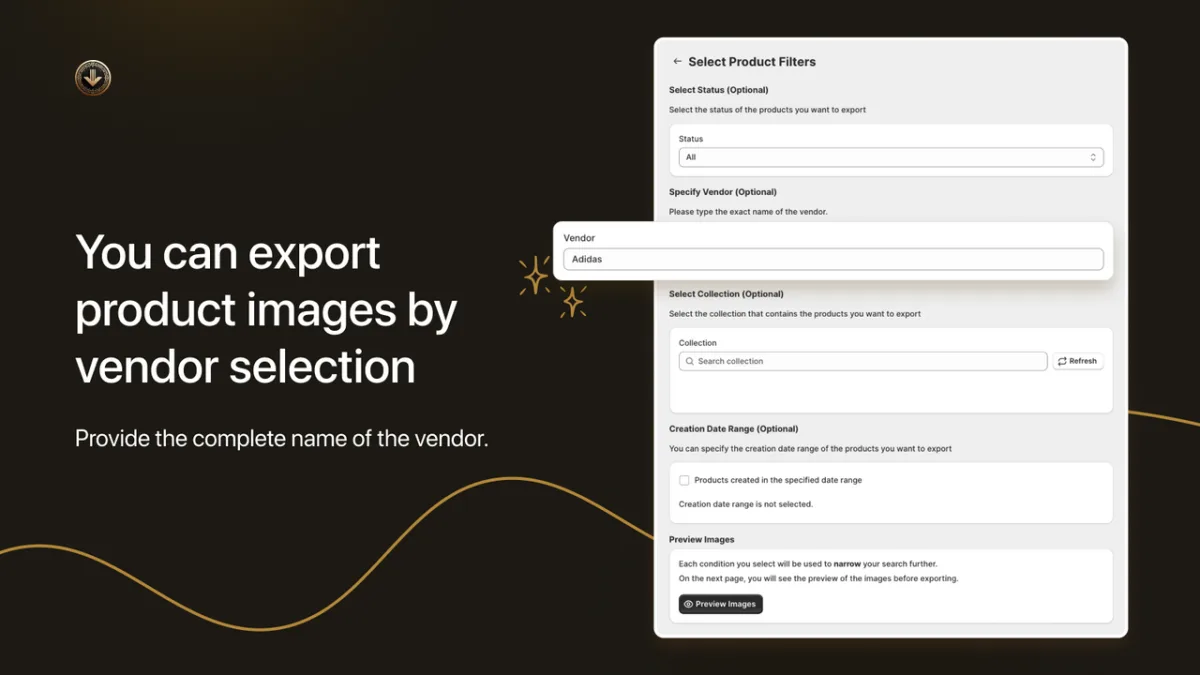
CS - Export Product Images by CraftShift is the most purpose-built product image exporter in this category. Launched in March 2024, it carries the Built for Shopify badge and comes from a developer whose portfolio includes tools trusted by Yamaha, BaubleBar, and Anine Bing, with over 10,000 active installs across their apps. Where most competitors treat image download as a secondary feature, CS - Export Product Images treats it as the entire product, and the feature depth reflects that focus.
Pricing and Value (6.5/10): A free tier allows up to 100 image exports with no priority queue access. Paid plans start at $29/month for 1,000 exports, $69/month for 10,000 exports, and $99/month for unlimited exports. This is the most expensive image-only export tool in this roundup by a wide margin. The pricing is justified by professional-grade features and Shopify's own certification, but smaller stores with occasional export needs will feel the cost compared to budget alternatives in this category.
Feature Richness (9.5/10): CS - Export Product Images leads the category on feature depth. Merchants can filter exports by product status, collection, date range, and vendor before triggering a download. Images are named automatically using SKU, barcode, or product ID, which is critical for multichannel sellers who need consistent file names across Shopify, Amazon, and wholesale channels. Variant images are fully supported. The CS - Smart Bulk Image Upload compatibility is unique in this category: no other reviewed app imports back directly to Shopify stores as fluently as these two apps. Real-time export logs display progress as jobs run, eliminating the guesswork of waiting blindly for an email confirmation.
Built for Shopify / Integration (9.5/10): The Built for Shopify certification confirms that CS - Export Product Images meets Shopify's highest standards for performance, data handling, and admin integration. The Amazon integration sets it apart from every other app in this roundup. CraftShift also maintains CS - Smart Bulk Image Upload, which pairs naturally with this app as a two-way image workflow: export from one store, bulk import into another.
Ease of Use (9.0/10): The workflow is built around the Shopify admin: filter by the criteria you need, set naming options, trigger the export, monitor progress in real-time logs, and download the ZIP. There is no complex setup or technical configuration required. The real-time progress display is a significant quality-of-life improvement over simpler tools that leave merchants waiting with no visibility into job status.
Support and Reputation (8.5/10): CS - Export Product Images holds a 4.8-star rating from 27 reviews, with 96% being five-star. The review count is modest for an app launched in early 2024, but the developer's broader portfolio has accumulated 600+ reviews across its apps, demonstrating an established and responsive support operation. All paid plans include dedicated customer support.
Pros:
- Built for Shopify certified from an established developer with enterprise-level clients
- Best-in-class filtering by status, collection, date range, and vendor
- SKU, barcode, or product ID naming conventions, essential for multichannel sellers
- Only image exporter in this category for multichannel sellers and those who need to import back to Shopify
- Real-time export progress logs for full visibility
- Variant image support included
Cons:
- Image-only: no video export capability for now
- 27 reviews is a relatively small sample size, though trending strongly positive
Pricing:
- Free (Demo): 100 image exports, no priority queue
- Starter: $29/month, 1,000 exports, priority queue, customer support
- Advanced: $69/month, 10,000 exports, priority queue, customer support
- Premium: $99/month, unlimited exports, priority queue, customer support
Overall score: 8.6/10
2. Filey - Files Backup and Export: Best for Complete Store Backup Beyond Images
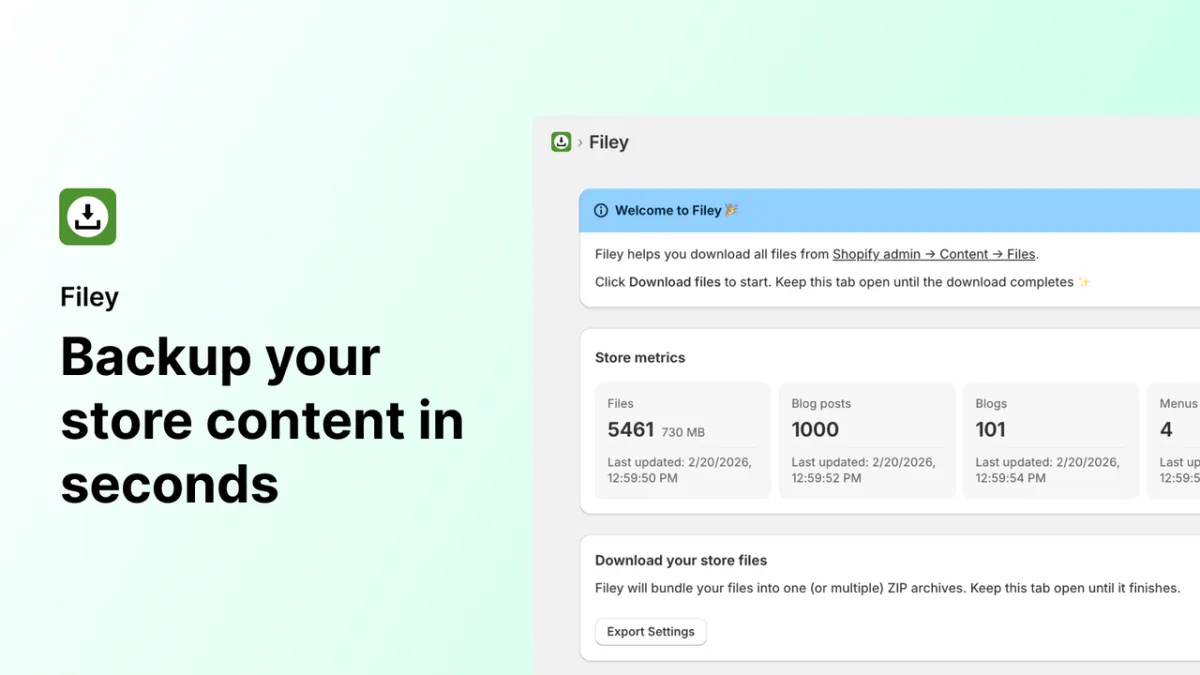
Filey - Files Backup and Export by INSO.codes takes a broader approach than any other app in this roundup. While CS - Export Product Images focuses exclusively on product images, Filey exports and imports files, product media, blog posts, pages, and menus. It is also Built for Shopify certified, holds a 4.8-star rating from 212 reviews (the highest review volume in this category by a factor of eight), and charges just $4.99/month for its Pro plan. But doesn't give flexibility as much as CS - Export Product Images about naming and folder structure. For stores that need more than image export alone, Filey is the most mature option available.
Pricing and Value (9.5/10): A free Basic plan handles store content export and import with a full dashboard. The Pro plan at $4.99/month unlocks files, product media, blogs, pages, and menus, with auto-matching on import and the option to replace or keep existing content.
Feature Richness (7.0/10): Filey's product image export works reliably, but it is one capability within a broader backup suite rather than the primary design focus. There is no SKU or barcode-based file naming, no multichannel selling support, and no per-export filtering by vendor or date range. Stores that need precise image organization for multichannel workflows will find it less configurable than CS - Export Product Images. Where Filey excels is its two-way sync capability: exported product photos can be automatically re-matched and re-attached to a store on import, making it uniquely useful for store migrations.
Built for Shopify / Integration (8.5/10): Built for Shopify certified. Handles large stores automatically by splitting exports when needed. No third-party channel integrations such as Amazon or Google Shopping are included.
Ease of Use (8.0/10): The broader scope adds some complexity: users need to select which content types to include in each export. For merchants who only need product images, the additional options can feel like overhead. The interface is well-organized, and the two-way import-export flow is intuitive once configured.
Support and Reputation (9.0/10): With 212 reviews at 4.8 stars (96% five-star), Filey has the strongest verified reputation in this category by a significant margin. INSO.codes has a track record no other competitor in this roundup can match.
Cons:
- Not purpose-built for image export: no SKU or barcode naming, no multichannel sales support
- Less filtering granularity for image-specific exports compared to CS - Export Product Images
- Broader scope may be more than smaller stores need for simple image downloads
Pros:
- Built for Shopify certified with 212 reviews: the most established app in the category
- Covers full store backup including files, blogs, pages, and menus
- Free plan available; Pro at only $4.99/month, additional payments may be needed
- Handles large stores with automatic export splitting
Pricing:
- Basic: Free, store content export and import, content dashboard
- Pro: $4.99/month, files, product media, blogs, pages, menus, auto-match on import. Additional payments may be needed
Overall score: 8.4/10
3. Mega Media and Image Exporter: Best for Image and Video Export at Scale
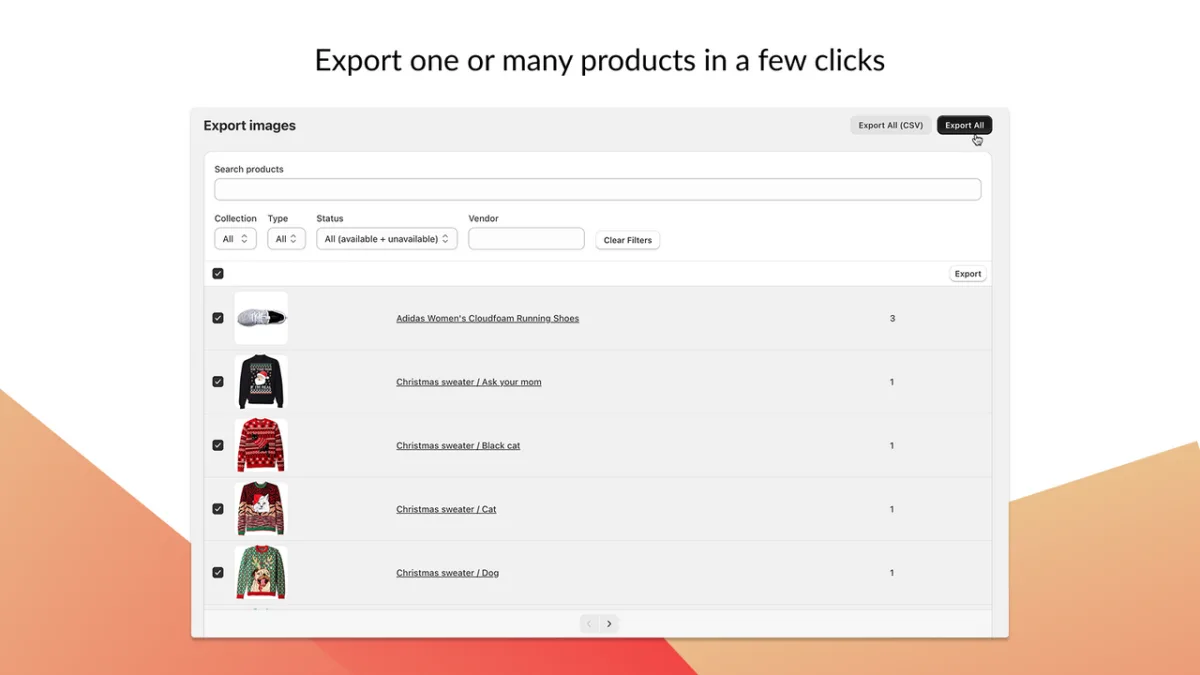
Mega Media and Image Exporter by Architechpro OÜ is the only app in this roundup that handles both product image and video export. If your store produces video demonstrations or lifestyle clips alongside product photos, this is the only certified option for exporting both in bulk. The app holds a 5.0-star rating, though from only 5 reviews, so treat that as an early positive signal rather than a confirmed track record.
Pricing and Value (5.5/10): The free tier is quite limited: 10 products for images and 2 products for video. The Basic paid plan at $29.99/month covers 100 products for images and 20 for video, which is restrictive for mid-size stores. The Enterprise plan at $199.99/month for unlimited content is the most expensive option in this roundup. Annual billing provides approximately a 17% discount. For stores that only need image export, the pricing is hard to justify when cheaper and better alternatives exist.
Feature Richness (8.5/10): The combination of image and video export in a Built for Shopify certified app is unique in this category. Format support covers JPG, PNG, WEBP, and JPEG. Filtering by product, collection, and variant is available. The automated export process reduces manual steps, and high-quality output is emphasized across all plans.
Built for Shopify / Integration (9.0/10): Built for Shopify certified. Architechpro OÜ is an established developer with multiple Shopify apps in the store. Native admin integration is confirmed by the certification.
Ease of Use (7.0/10): The product-count-based pricing model rather than total image count can create confusion when estimating usage and costs. The interface is functional but the app is newer with fewer independent reviews to validate the onboarding experience.
Support and Reputation (6.0/10): A 5.0-star average from 5 reviews is an encouraging start, but the sample is too small to draw firm conclusions. Annual billing options signal a serious product roadmap and developer commitment.
Cons:
- Most expensive option in the roundup ($199.99/month for unlimited)
- Free tier limited to 10 products for images and 2 for video
- Only 5 reviews: reputation not yet established
- No Amazon or other third-party channel integration
Pros:
- Only app in this roundup supporting video export
Pricing:
- Free: 10 products images, 2 products videos
- Basic: $29.99/month (or $300/year), 100 products images, 20 products videos
- Professional: $49.99/month (or $500/year), 1,000 products images, 200 products videos
- Enterprise: $199.99/month (or $2,000/year), unlimited images and videos
Overall score: 7.2/10
4. WTE - Images Manager: Best for Spreadsheet-Based Image Workflows
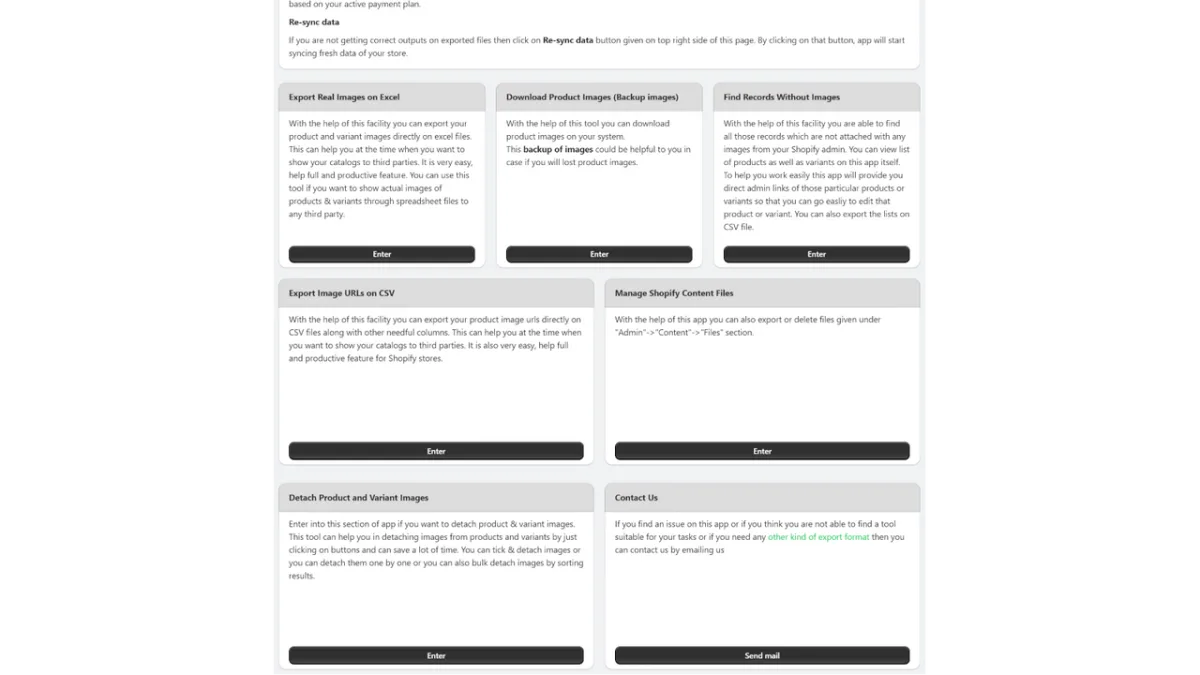
WTE - Images Manager by webTecheasy FZCO takes a spreadsheet-centric approach to image management. It can export image URLs to CSV, embed real images into Excel or Google Sheets files, and download product images as files. It also includes bulk image delete, a feature none of the other apps in this roundup offer. At $1.55 to $5.15 per month, it is the lowest-priced option overall and suits teams whose image workflows are built around spreadsheets rather than ZIP downloads.
Pricing and Value (9.0/10): At $5.15/month for the full Basic plan including all export features, WTE is extremely affordable. The Starter plan at $1.55/month covers bulk delete only. There is no free tier for the export features, but the entry cost is negligible for any operating store.
Feature Richness (6.5/10): WTE exports image URLs to CSV and can embed actual image files into Excel or spreadsheet format, a capability unique to this app in the category. It also downloads product images and Shopify content files directly. However, there is no advanced filtering by collection, vendor, or date range, no SKU-based naming, and no Amazon integration. The bulk delete feature is a useful bonus, though it falls outside the core export workflow.
Built for Shopify / Integration (4.0/10): WTE does not hold the Built for Shopify badge. No third-party integrations are listed beyond Shopify Admin.
Ease of Use (7.0/10): Teams already using Excel or CSV-based catalog workflows will feel at home with WTE. For merchants who simply want a bulk ZIP download, the spreadsheet-based approach adds an extra step compared to more focused tools.
Support and Reputation (6.5/10): A 4.3-star rating from 7 reviews provides a modest but usable baseline. The review count is not yet sufficient to fully validate the support experience, but no significant red flags appear in the available review content.
Pros:
- Lowest price in the roundup ($1.55-$5.15/month)
- Unique spreadsheet and Excel-based export format not available in any other reviewed app
- Bulk image delete included: no other app in this list offers it
- Find products with no images feature
Cons:
- No Built for Shopify badge
- No advanced filtering by collection, vendor, or date
- No SKU or barcode naming conventions
- Only 7 reviews; reputation still developing
Pricing:
- Starter: $1.55/month, bulk image delete only
- Basic: $5.15/month, all export and download features
Overall score: 6.6/10
5. Exportify - Image Exporter
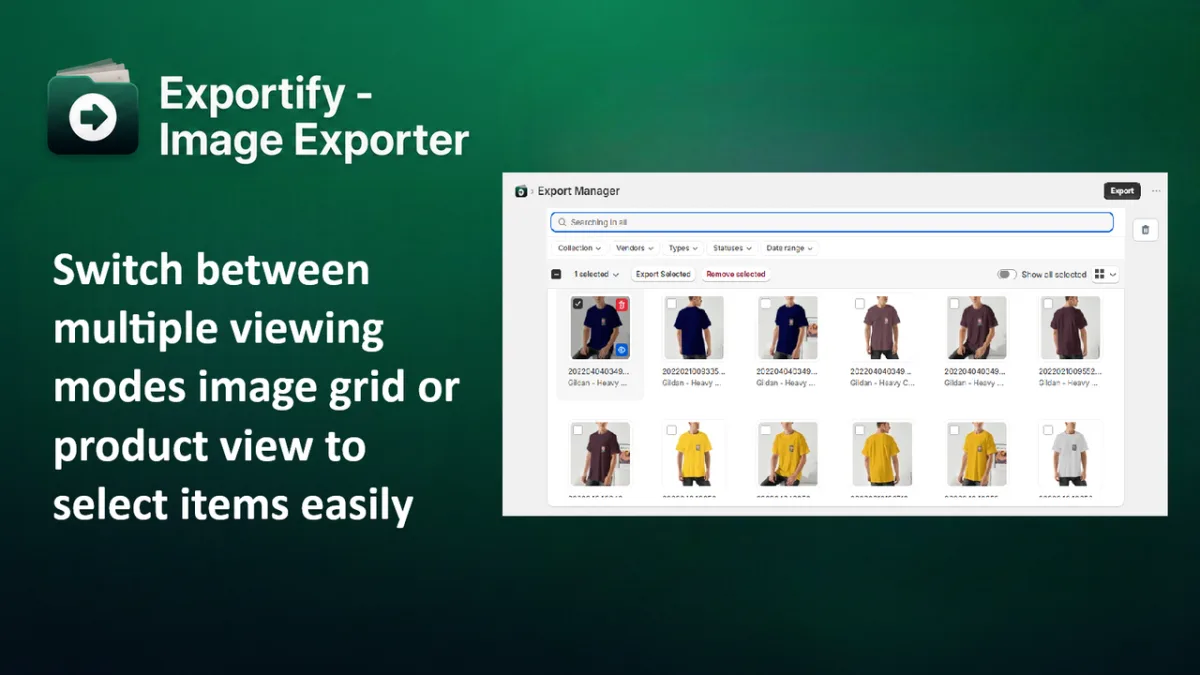
Exportify - Image Exporter by Webomnific launched in May 2026 and directly mirrors the export structure of CS - Export Product Images. The caveat is significant: Exportify has no reviews and no developer track record on Shopify. Merchants willing to accept early-adopter risk for a lower price point may find it worth trialing.
Pricing and Value (9.5/10): The best price-per-export-volume ratio in this roundup. The free plan allows 100 exports. Paid plans run from $1.99 to $9.99/month for less export volumes and it gets higher for more exports.
Feature Richness (7.5/10): Grid and product-based view modes, filtering options, a recycle bin to exclude unwanted images before download, and organized structured format downloads. Priority queue access is included on all paid plans. Lacks SKU or barcode naming, and advanced filtering by vendor or date, all of which are available in CS - Export Product Images.
Built for Shopify / Integration (4.0/10): No Built for Shopify badge. No documented third-party integrations.
Ease of Use (7.5/10): The grid view mode and recycle bin concept suggest a well-considered user experience. Without independent merchant reviews, the actual experience in practice cannot be verified.
Support and Reputation (3.0/10): Zero reviews as of the research date. The developer has no other publicly visible Shopify apps. This is the highest risk factor in Exportify's profile and the primary reason it scores below its feature and pricing strengths.
Cons:
- No reviews and no developer track record: significant trust risk
- No Built for Shopify certification
- Missing key features: SKU naming, multichannel sales support, advanced filtering
- Very new app (May 2026 launch)
Pros:
- Cheapest paid tiers in the category ($1.99-$9.99/month)
- Free 100-export tier with priority queue access on paid plans
- Recycle bin to exclude specific images from export
- Grid and product-based view modes
Pricing:
- Free: 100 image exports
- Starter: $1.99/month, 1,000 exports, priority queue
- Pro: $4.99/month, 10,000 exports, priority queue
- Unlimited: $9.99/month, unlimited exports, priority queue
Overall score: 6.3/10
6. Product Media Exporter: Best Free Entry Point with Image and Video Support
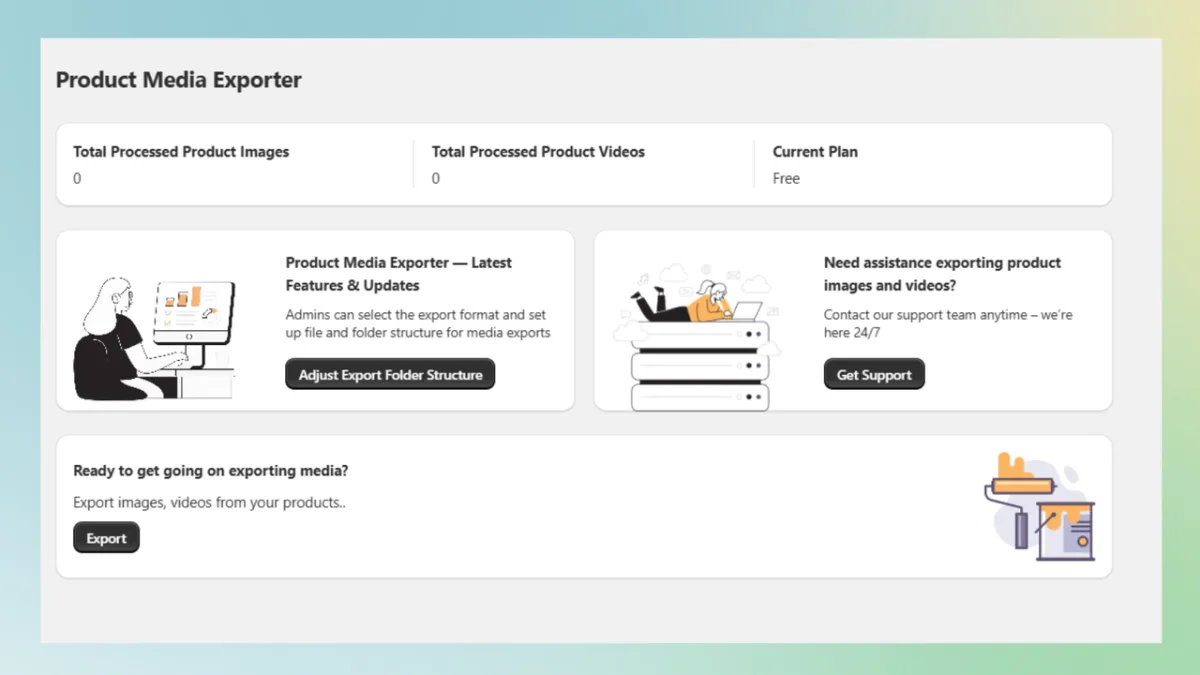
Product Media Exporter by SIAR Digital offers image and video export with a free tier, custom folder naming, and bulk download starting at $5/month for paid plans. Like Exportify, it has no reviews and is a new entrant. The combination of image and video support at a very low cost makes it worth considering for stores that need occasional media downloads and cannot justify a premium tool.
Pricing and Value (8.5/10): The free tier covers 10 images and 2 videos. Paid plans run $5 to $15/month, making this the most affordable option for combined image and video export in this roundup, substantially undercutting Mega Media's $199.99/month unlimited plan.
Feature Richness (6.5/10): Bulk download for images and videos, custom filters for selective downloads, customizable folder naming and structure, and separate image and video download paths. The feature set is narrower than CS - Export Product Images: no multichannel sales support and import-back compatibility like CS - Smart Bulk Image Upload, no SKU or barcode naming, no real-time progress logs. For combined media exports at a low price, the core workflow is functional.
Built for Shopify / Integration (4.0/10): No Built for Shopify badge. No documented third-party integrations.
Ease of Use (7.0/10): The simple $5-$15 tier structure and emphasis on custom folder organization keep decisions straightforward. 24/7 support is listed for all plans, though this cannot be independently verified at this stage since there are no reviews for the app.
Support and Reputation (3.0/10): Zero reviews. SIAR Digital's track record on Shopify is not yet publicly established. The 24/7 support claim is noted but unverified by independent merchant feedback.
Cons:
- No reviews: no merchant validation available
- No Built for Shopify badge
- Very limited free tier (10 images, 2 videos)
- No advanced filtering or multichannel integrations
Pros:
- Image and video export in the same app
- Custom folder structure and naming
- 24/7 support listed across all plans
Pricing:
- Free: 10 images, 2 videos
- Standard: $5/month, 50 images, 20 videos
- Enterprise: $10/month, 1,000 images, 200 videos
- Business: $15/month, unlimited images and videos
Overall score: 5.8/10
7. Vast - Export Product Images: Best for Simple One-Click ZIP Downloads
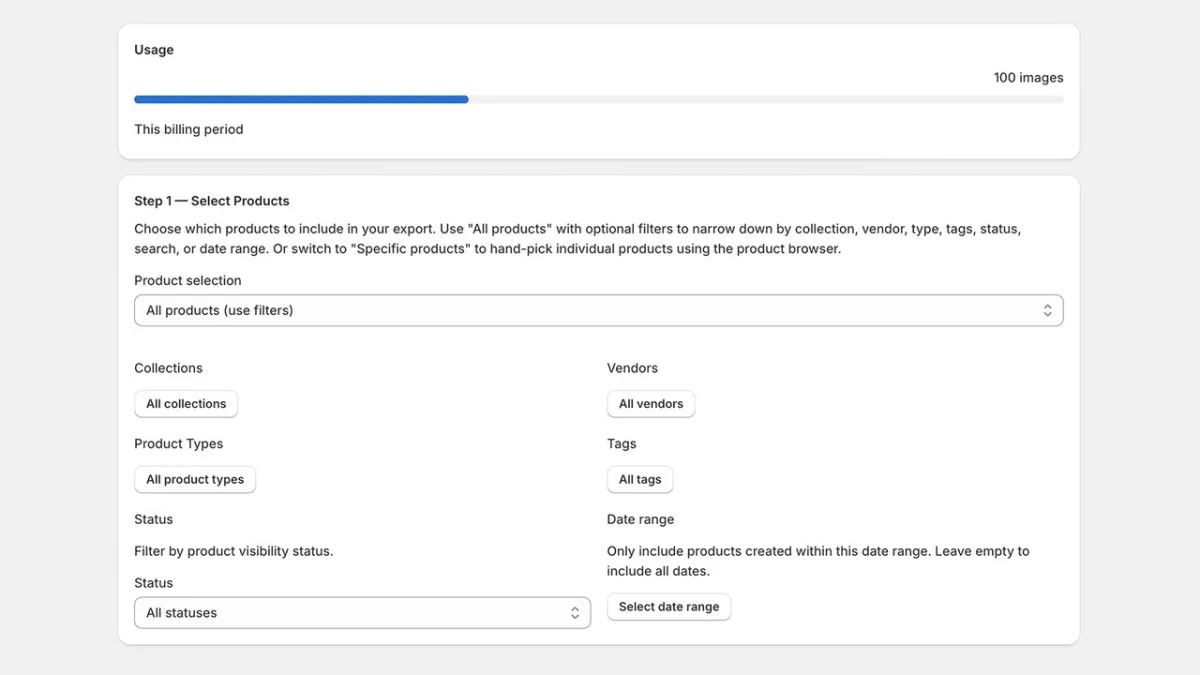
Vast - Export Product Images by Massive Monkey Ltd. takes the simplest possible approach to image export: apply filters, trigger the download, receive the ZIP by email. There are only two pricing tiers (Free or $10/month for unlimited), no complexity around naming conventions or channel integrations, and no minimum export volume beyond the free tier's 100-image monthly limit. For merchants who export images occasionally and want zero learning curve, Vast delivers a no-fuss solution.
Pricing and Value (8.5/10): The Free plan covers 100 monthly exports. The Unlimited plan costs $10/month for unrestricted exports. Simple, transparent pricing with no hidden volume tiers to navigate.
Feature Richness (6.0/10): One-click bulk export to ZIP, filtering by collection, vendor, type, tags, and date, automatic naming by product title and variant, and ZIP delivery by email. Email delivery rather than direct in-browser download is a meaningful UX difference: useful for large exports that take time to compile, but adds a step compared to direct download tools. No SKU or barcode naming, no Amazon integration, no video export.
Built for Shopify / Integration (4.0/10): No Built for Shopify badge. Works from the Shopify Admin but has no documented third-party integrations.
Ease of Use (7.5/10): The two-tier pricing and email-delivery model make Vast conceptually the easiest to adopt in this roundup. No decisions about naming schemes, export queues, or multiple content types. Filter, export, receive email.
Support and Reputation (3.0/10): Zero reviews. Massive Monkey Ltd. is not publicly established in the Shopify ecosystem based on available data.
Cons:
- No reviews
- No Built for Shopify badge
- Email delivery instead of direct download adds an extra step
- No SKU or barcode naming, no video, no Amazon integration
Pros:
- Simplest pricing in the roundup: Free or $10/month, no complex tiers
- Good filtering options including collection, vendor, type, tags, and date
- No coding required
- Email ZIP delivery works well for large or slow-processing exports
Pricing:
- Free: 100 monthly image exports, filtering, automatic naming, email delivery
- Unlimited: $10/month, unlimited exports, same features
Overall score: 5.8/10
Which App Should You Choose?
Choose CS - Export Product Images if you run a professional catalog operation, sell on Amazon, Etsy, multiple Shopify stores and other sales channels or need reliable SKU or barcode-based naming to keep image files organized across platforms. The Built for Shopify certification, and established developer behind it make this the safest long-term choice for medium and large stores that depend on image exports as part of a larger multichannel workflow. The feature depth justifies it for stores with serious export needs.
Choose Filey if image export is one piece of a broader backup strategy. At $4.99/month, it covers blog posts, pages, and menus in a single tool, making it indispensable for store migrations. If you are moving from one Shopify store to another and want to preserve all content, Filey handles the entire content layer at a price that is hard to beat.
Choose Mega Media and Image Exporter if you produce video content alongside your product photography and need to export both in bulk from a Built for Shopify certified tool.
Choose WTE - Images Manager if your team's catalog workflow is spreadsheet-based. No other app in this category exports image data directly into Excel or CSV format with embedded images.
Frequently Asked Questions
What is the best Shopify app for bulk product image export?
CS - Export Product Images by CraftShift is the best Shopify app for bulk product image export in 2026. It holds the Built for Shopify badge, offers advanced filtering by collection, vendor, status, and date, supports SKU and barcode-based file naming for multichannel sellers. It scored 8.6/10 in our evaluation, the highest in this category. And bulk uploading exported product images is easy with CS - Smart Bulk Image Upload compatibility.
Can you export product images from Shopify for free?
Yes. Several apps in this category include free tiers. CS - Export Product Images provides a free plan for up to 100 image exports. Filey - Files Backup and Export offers a free Basic plan covering product media export. Exportify, Product Media Exporter, and Vast also have free tiers with limited export volumes. Shopify itself does not include a native bulk image download feature in its admin.
What is the difference between a product image export app and a store backup app?
A product image export app such as CS - Export Product Images focuses specifically on downloading product photos from your Shopify store, typically with filtering by collection or vendor, custom naming conventions, and optional sales channels. A store backup app such as Filey exports a broader set of store content: images, files, blog posts, pages, and menus. For stores that only need product photos, a dedicated exporter provides more granular controls for image workflows. For full store recovery or migration, a backup app is more appropriate.
Do I need a Built for Shopify certified app for image export?
Certification is not required, but the Built for Shopify badge means Shopify's team has reviewed and verified the app against performance, data handling, and security standards. In this roundup, three apps hold the badge: CS - Export Product Images, Filey - Files Backup and Export, and Mega Media and Image Exporter. For business-critical export workflows, certified apps carry lower operational risk.
How do Shopify image export apps name the downloaded files?
Naming conventions vary by app. CS - Export Product Images lets merchants choose between SKU, barcode, or product ID as the file naming basis, giving multichannel sellers consistent file names that map directly to their catalog system. Vast names files by product title and variant. Most other apps use default or product-title-based naming. If consistent SKU-based naming is critical for your workflow, CS - Export Product Images is the strongest option.
Are there Shopify apps that export both product images and videos?
Yes. Mega Media and Image Exporter and Product Media Exporter both support combined image and video export. Mega Media holds a Built for Shopify badge and exports images and video across multiple formats including JPG, PNG, WEBP, and JPEG. Product Media Exporter is newer and unreviewed but offers combined media downloads at a significantly lower price, with an unlimited plan at $15/month.
What should I look for when choosing a Shopify image export app?
The most important factors are: Built for Shopify certification for platform trust and performance assurance, filtering options so you can export targeted subsets rather than your entire catalog, naming convention flexibility so exported files align with your catalog system or ERP, pricing relative to your monthly export volume, and developer reputation as measured by review count, star rating, and track record across other apps. For stores with multichannel operations, multichannel sales support and import back options are also worth evaluating.


