

7 Best WordPress Table Plugins in 2026 (Free and Paid, Compared)

Picking a WordPress table plugin in 2026 looks like the easiest decision in the plugin store and usually is not. A table on a WordPress site rarely sits on its own; it is almost always inside something bigger, a comparison post, a pricing page, a product catalog, a sports league, a documentation lookup, a CSV-driven dashboard. The plugin you pick has to do four things at once: build the table without forcing you to write HTML, pull data from wherever it lives (CSV, Excel, Google Sheets, WooCommerce, a database, a form), render cleanly on mobile, and embed back into your post or page without breaking your theme. Some plugins nail all four. Some are amazing free table builders but charge for responsive layouts. Some are designed around big-data datasets and feel heavy on a marketing site. Some are native Gutenberg blocks. And the comparison posts you will read this year still quietly leave out which features actually ship in each plugin's free tier in 2026.
I went through the seven WordPress table plugins that genuinely deserve the shortlist in 2026, installed every one of them into a clean WordPress sandbox, created a real table in each one (or rendered the table-creation flow end to end where the editor is wizard-based), opened the data-source picker and the styling panels, and read a wide spread of recent positive and critical reviews. Below is a buyer-facing summary of what each plugin uniquely wins for, what its free version actually unlocks, what its current pricing looks like at checkout (not the marketing-page intro number), and which kind of WordPress site I would point at each one.
If you are still deciding what kind of site you are building first, the best types of websites to create in WordPress hub is a useful upstream read; this roundup picks up where that one stops, at the moment you have decided the site needs structured data on the page and now need to choose the table plugin that will render it.
How I evaluated these picks
The seven plugins below are the ones that consistently sit at the top of the WordPress table category by active install count, average rating, recency of the last release and feature breadth on the free tier. For each pick:
- I verified the live WordPress.org plugin page and recorded the current active install count, average rating, total number of reviews, last-update date and minimum WordPress version tested. Every pick in this roundup ships a usable free version on WordPress.org; there are no SaaS-only entries.
- I installed and activated all seven plugins in a clean WordPress sandbox and, for each one, exercised the actual table-creation flow end to end: created a table or rendered the data-source picker, opened the editor, inspected the styling panel and the responsive options, and looked at what the front-end shortcode or block would render. The screenshots in the body are real captures from those installs, not vendor promotional images.
- I read each vendor's full documentation, public roadmap and recent changelog so the per-plugin entry below reflects what the plugin currently does on the free tier, not what it did two release cycles ago.
- I opened each vendor's pricing page and recorded the real annual commitment at checkout, not the marketing-hero intro number. Where pricing shows monthly but bills annually, I converted to the real annual figure; where intro pricing is shown alongside the regular renewal price, both numbers are recorded so you can see the first-year-versus-renewal delta.
- I read a spread of recent positive and critical reviews on WordPress.org and independent review sites so the per-plugin entry below reflects what real WordPress users currently say, not just the vendor's own positioning.
- Every install count, review count, rating and pricing figure below was verified on 2026-06-01.
Posts Table Pro from Barn2 is a credible 2026 product for listing posts, pages and custom post types as a table, but it does not have a free WordPress.org distribution; the Barn2 free "Posts Table with Search and Sort" plugin is too narrow to stand alone, so the Posts Table Pro family is intentionally left off this top-7 list. If you specifically need to publish a long, filterable list of your existing WordPress posts as a table, the paid Posts Table Pro is worth a look outside this roundup.
The ranking is not "best to worst." Each plugin is a credible 2026 pick for a specific buyer profile, and the order roughly reflects how often a typical WordPress site owner falls into each profile, not a 1-to-7 quality gradient.
Quick picks: best WordPress table plugin by job
If you want the short answer first, here is the top pick I would recommend for each typical buyer profile in 2026. The full per-plugin breakdown sits below.
| Buyer profile | Top pick (2026) | Why | Free tier covers it? |
|---|---|---|---|
You want the most popular, most-trusted free WordPress table plugin and a spreadsheet-style editor that anyone on your team can learn in five minutes |
TablePress |
700,000+ installs, 5.0 average rating, the de facto standard, Excel-style editor, CSV/ |
Yes; responsive/ |
You want a polished modern UI, multiple data sources out of the box (Google Sheets, WP Posts, External CSV, Custom SQL), and a real path to WooCommerce product tables later |
Ninja Tables |
Six free data sources, FooTable rendering for mobile row collapse on the free tier, a clean Vue-style admin, and a strong Pro upsell for drag-and-drop, frontend editing and WooCommerce. |
Mostly; drag-and-drop and frontend editing are Pro. |
You have a real dataset (Excel, CSV, MySQL, a WordPress query) and you need filtering, sorting, charts and the ability to scale to thousands of rows without choking the page |
wpDataTables |
The strongest data-pipeline product in the WordPress table category. Lite handles simple and linked tables; Premium adds database-driven tables, formulas, the SQL query builder, WooCommerce and HighCharts Stock. |
For simple and linked tables; database-driven and front-end editing are Premium. |
You build affiliate, comparison and pricing tables and you want a visual drag-and-drop builder with star ratings, buttons, images, lists and custom HTML cells |
WP Table Builder |
The visual cell-element builder is faster to use than any spreadsheet editor for an affiliate review or a side-by-side comparison, and the free Employee Table is a real starting point. |
Yes for the core builder; 25+ premium templates and lazy loading sit on Pro. |
You publish data, not just tables, and a chart is sometimes a better answer than a row of cells |
Visualizer |
15 free chart types, a free AI Chart Builder that turns natural-language prompts into charts with no API key, and table-type rendering for the simple cases. |
Yes for the 15 chart types and the AI builder; 11 more chart types and live data sync are Pro. |
You want a free editor that lets your client edit tables from the front end without touching the WordPress admin, and the data is small enough to live in WordPress itself |
Data Tables Generator by Supsystic |
Frontend table editing is in the free build, the editor is drag-and-drop, and the new MCP/ |
Yes; conditional formatting, WooCommerce and per-cell custom CSS are Pro. |
You live in the Gutenberg Block Editor and you want a native block, not a shortcode that drops into a "Classic" block |
Tableberg |
Native Block Editor experience, Free Forever ships nearly all Pro features (the 30 pre-built templates, AI tables and WooCommerce integration are the four real Pro adds), unlimited sites on every tier. |
Yes; templates, AI tables, WooCommerce table and 1 year of priority support sit on Pro. |
1. TablePress
If you only know one WordPress table plugin in 2026, it is TablePress. With 700,000+ active installs and a near-perfect 5.0 rating from 4,624 reviews, it is the most installed, most trusted and most actively maintained free table plugin on WordPress.org, and the only top table plugin that has stayed entirely free at the core for more than a decade. The current release (v3.3.1, shipped 2026-05-20) is tested up to WordPress 7.0 and requires PHP 7.4.
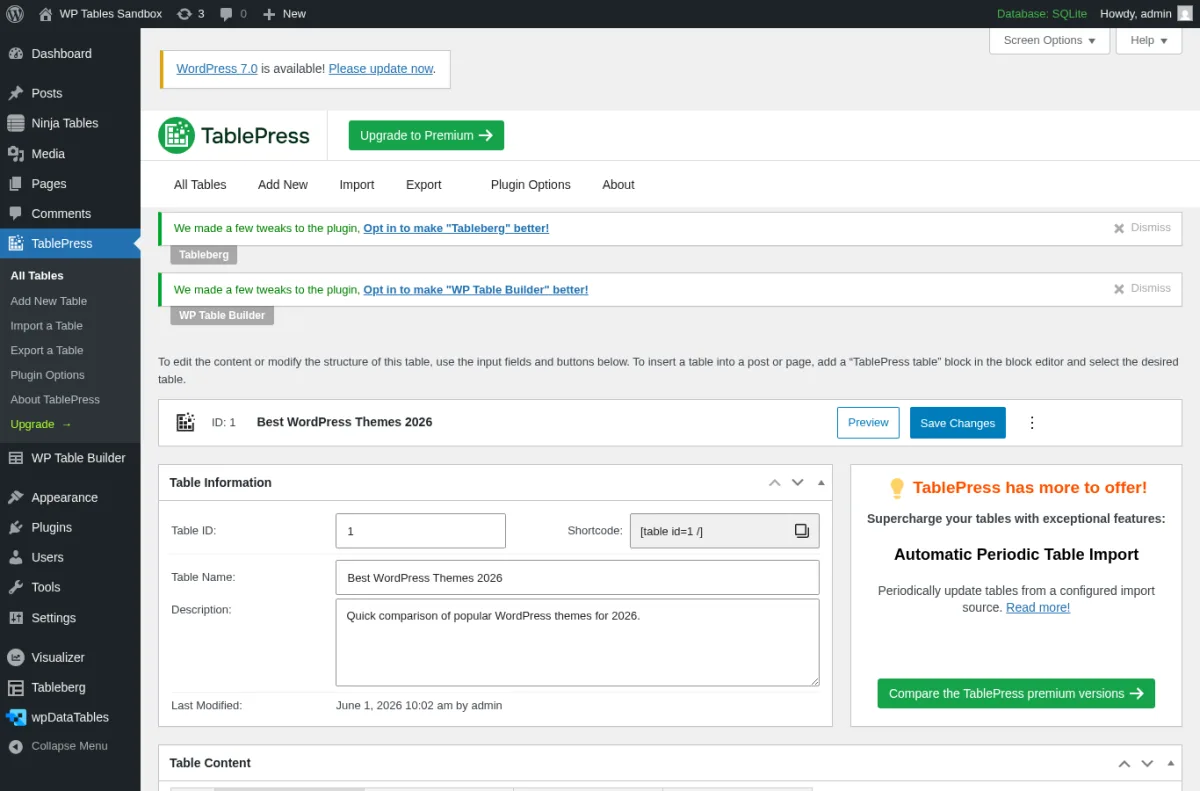
I installed TablePress in a clean WordPress 6.9.4 sandbox on 2026-06-01, created a "Best WordPress Themes 2026" table, and used the standard Add New Table form to set 4 rows and 4 columns. The editor that loads is a real spreadsheet, not a paginated grid of textareas. Type into a cell, press Tab to move right, press Enter to drop a row. Headers, three data rows (Astra Pro / Kadence Pro / Divi with price, best-for and rating columns) and a manage-row toolbar were all present in the free build. CSV, Excel, HTML and JSON import are free; CSV, HTML and JSON export are free; sorting, pagination, searching, filtering and horizontal scrolling at the front end are free; the shortcode is the friendly [table id=1 /] and there is a native "TablePress table" Gutenberg block too.
What sits on the paid tier is everything that turns a table into a polished publication: responsive layouts with column priority and row collapse on mobile, fixed headers and columns when the row count climbs, the visual default-style customizer, row grouping, cell and row highlighting, filter dropdowns, alphabet search, search highlighting and search panes, automatic table export, and direct email support. Per the TablePress pricing page on 2026-06-01, TablePress Pro is €89/year for one site and TablePress Max is €189/year for one site, with multi-site discounts at 5, 25 and 100 sites and a lifetime license option as a one-time payment. Both tiers carry a 30-day money-back guarantee. If you need server-side processing for tables with thousands of rows, automatic periodic table import, inverted filtering, fuzzy search, email notifications or the REST API, those are TablePress Max only.
Pick TablePress when you want the most-trusted free WordPress table plugin and a spreadsheet editor anyone on your team can learn in five minutes. The free tier is genuinely useful on its own. Upgrade to Pro the moment you need a clean mobile layout for a long table, and to Max only if you have a real big-table use case (thousands of rows) or a CSV/API import that needs to run on a schedule.
2. Ninja Tables
Where TablePress is the spreadsheet-style classic, Ninja Tables is the modern multi-source builder. With 80,000+ active installs and a 4.6 average rating from 470 reviews on WordPress.org, plus a focused Pro upsell around drag-and-drop and frontend editing, Ninja Tables earns its place as the second-most installed table plugin in the category. The current release (v5.2.9, shipped 2026-05-25) is tested up to WordPress 7.0 and requires PHP 7.4.

I installed Ninja Tables in the same sandbox and clicked "Create Your First Table." The modal that opens is the real differentiator. Instead of a single Add New Table form, Ninja Tables asks how you want to build the table: Default (manual entry, the conventional table builder), Drag and Drop (Pro-only), Connect Fluent Forms (live form-submission tables), WP Posts (turn a custom query of your posts into a table), Connect Google Sheets (live sync from a published sheet), Connect External CSV (upload or URL), and Custom SQL Query. Six of those data sources are free out of the box, which is meaningfully more than TablePress free or wpDataTables Lite. The modal also lets you choose the rendering engine between FooTable (lightweight and responsive, the default) and DataTables (advanced, better for large datasets); the FooTable engine on the free tier is the one that collapses rows on narrow viewports without a Pro upgrade, which is a real differentiator.
I created the "Best WordPress Themes 2026" table (id 9) using the Default source and confirmed the green "Table saved successfully" notice and the [ninja_tables id="9"] shortcode preview. The edit screen exposes Table Rows, Table Configuration, Table Design, Frontend Editing, Custom CSS/JS and Import/Export tabs. Frontend Editing as a feature is Pro-locked, but the tab is visible so you can see what is on offer; this is honest UX that I respect.
What sits on the paid tier is Drag and Drop Table mode, the Frontend Editing capability itself, conditional formatting, advanced custom filters, native WooCommerce product tables, the native chart builder, and the premium template library. Per the Ninja Tables pricing page on 2026-06-01, Pro is $63/year for one domain (intro from $79), $103/year for the Agency tier covering 20 domains, and $239/year for Unlimited domains; lifetime licenses start at $247 for one domain and run up to $599 for unlimited. The vendor advertises a 14-day money-back guarantee.
Pick Ninja Tables when you want a polished modern UI, multiple data sources out of the box (Google Sheets and Custom SQL on the free tier are the standouts), and a real path to WooCommerce product tables or frontend editing later. If you are already running Fluent Forms or FluentCRM, the same vendor's table plugin is a sensible pick and the integrations are deeper.
3. wpDataTables
If your problem is data, not styling, wpDataTables is the WordPress table plugin built for it. With 70,000+ active installs and a 4.5 average rating from 448 reviews on WordPress.org, it is the most established data-pipeline product in the category. The current release (v6.5.0.8, shipped 2026-05-25) is tested up to WordPress 7.0 and requires PHP 7.4.

I installed the wpDataTables Lite plugin in the same sandbox and opened the Create a Table screen at admin.php?page=wpdatatables-constructor. The data-source picker that loads is the most expansive in the category. The Lite version supports two of the tiles for full creation: "Create a simple table from scratch" (an Excel-like editor with merged cells, styling, star rating and media) and "Create a data table linked to an existing data source" (Excel, CSV, XML, JSON, nested JSON, serialized PHP array). The other tiles, the myForms / wpForms linked tables, the data-based class, the import-from-data-source workflow, the queries to the existing database, the queries to the WordPress database and the REST Connect, sit on the Premium tiers. Lite also ships two of the wpDataCharts engines (HighCharts Line and Pie).
What sits on the paid tier is the rest of the data pipeline: database-driven tables (manual, imported, or queried via MySQL with the SQL query builder), formula columns, the WP Post Builder, native WooCommerce integration, fixed headers and columns, hidden dynamic columns, periodic data sync, HighCharts Stock charts plus additional chart types, and the front-end editor that lets a non-admin edit rows from the live page. Pricing on 2026-06-01 from wpdatatables.com/pricing shows four annual tiers (Starter, Standard, Pro, Developer) with a visible 10-50% discount and a "Up to 60% off your first year" intro promo banner. The Developer tier covers unlimited domains; lifetime upgrade options sit on the higher tiers. 15-day money-back guarantee.
Pick wpDataTables when you have a real dataset that lives outside WordPress (Excel, CSV, Google Sheets, MySQL, REST) and you need the table to sync to that source, scale to thousands of rows, support filters and charts side by side, and run inside a WooCommerce shop. The free Lite is genuinely useful for simple Excel/CSV imports; everything past the data-source link is a Premium decision.
4. WP Table Builder
For affiliate, comparison and pricing tables, the spreadsheet model is the wrong tool. The right tool is a visual cell-element builder, and WP Table Builder is the cleanest one on WordPress.org in 2026. With 50,000+ active installs and a 4.8 rating from 681 reviews, it has the highest average rating of any general-purpose table plugin in this roundup. The current release (v2.1.14, shipped 2026-05-11) is tested up to WordPress 6.9.4 and requires PHP 7.4.
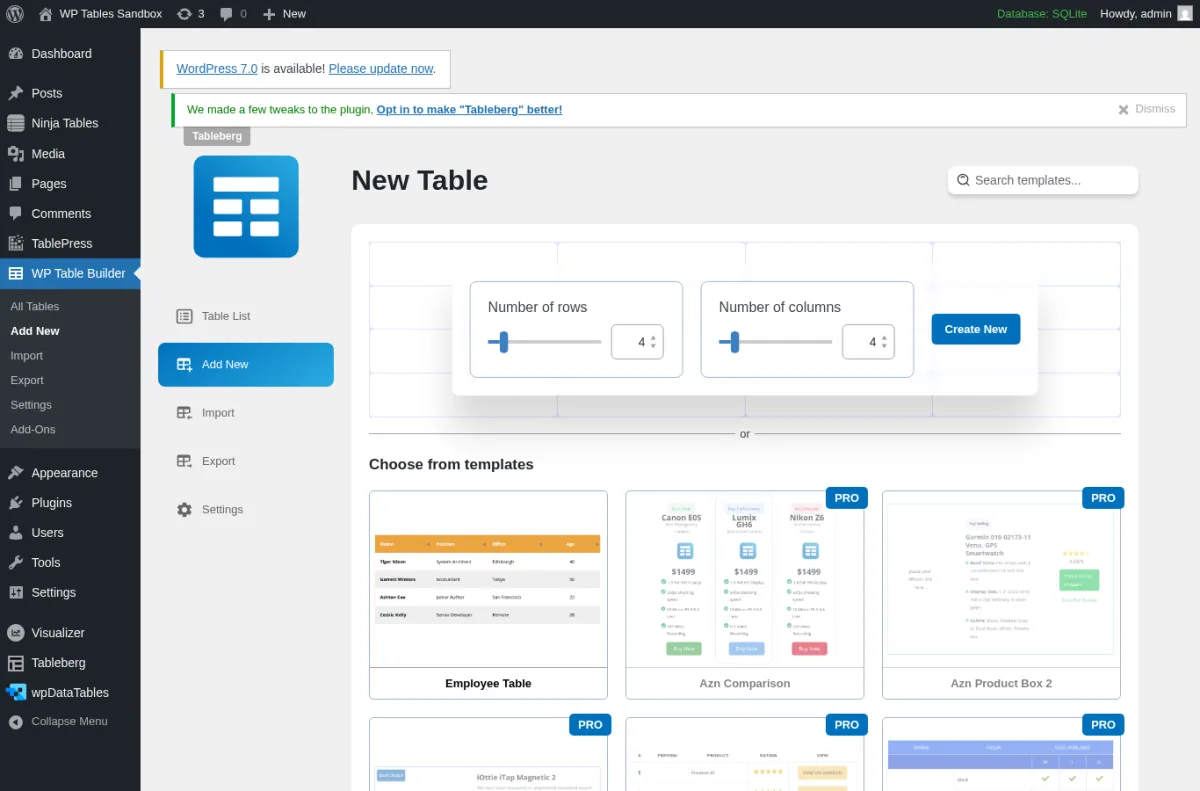
I installed WP Table Builder in the sandbox, skipped the Freemius opt-in, and opened the New Table screen at admin.php?page=wptb-create. The setup is honest about what is free and what is not: rows and columns sliders at the top (default 4 and 4, max 10 free), the "Create New" blue button, and a "Choose from templates" gallery with the free Employee Table sitting alongside a clearly PRO-badged set including Camera EOS, Azn Comparison, Azn Product Box 2, Cosmetic Comparison and more. There is no upsell intercepting the workflow; you can click Create New, drop straight into the drag-and-drop builder, and ship a table without paying.
The drag-and-drop builder is where this plugin earns its place. Each cell can host a Text element, an Image element, a List element, a Button element, a Star Rating element, a Custom HTML element or a Shortcode element. Cell management ships Add Row, Add Column, Merge Cells and Split Cells in the free build, and there is a per-row/column responsive toggle so you can hide noisy columns on tablet or mobile breakpoints without paying. CSV and XML import are free; TablePress import is free; a native Gutenberg block is free; the shortcode is [wptb id="N" /].
What sits on the paid tier is 25+ pre-built templates (the camera/product/comparison set in the gallery), pagination, search, lazy loading for image-heavy tables, sticky headers, highlights and tooltips, duplicate/move column operations, template saving, global font settings, per-breakpoint customisation, and additional cell elements (icon, ribbon, styled list). Pricing on 2026-06-01 from wptablebuilder.com/pricing: Starter $39/year for one site, Pro Yearly $59/year for unlimited sites, Pro Lifetime $179 one-time for unlimited sites. 30-day money-back guarantee, plus a 20% intro promo with code HS20.
Pick WP Table Builder when you build affiliate reviews, side-by-side product comparisons, software pricing tables or any layout that benefits from images, star ratings, buttons and lists in the same cell. The Pro Lifetime at $179 with unlimited sites is one of the better pure-value picks in this roundup if you ship affiliate sites for a living.
If you are pairing WP Table Builder with Elementor, the best Elementor addons for WordPress roundup is a sensible next read, because the same buyer profile that picks a visual table builder usually also picks a visual page builder.
5. Visualizer (by ThemeIsle)
Sometimes the right answer is not a table at all. A chart can carry a row of numbers more clearly than a four-column grid. Visualizer from ThemeIsle is the WordPress plugin that lets you do both: it ships table-type rendering for the simple cases, and it ships fifteen chart types for everything else, with a free AI Chart Builder that turns a natural-language prompt into a real D3-rendered chart without an API key. 20,000+ active installs, 4.4 rating from 225 reviews, v4.0.2 shipped 2026-05-19, tested up to WordPress 7.0, requires PHP 7.4.
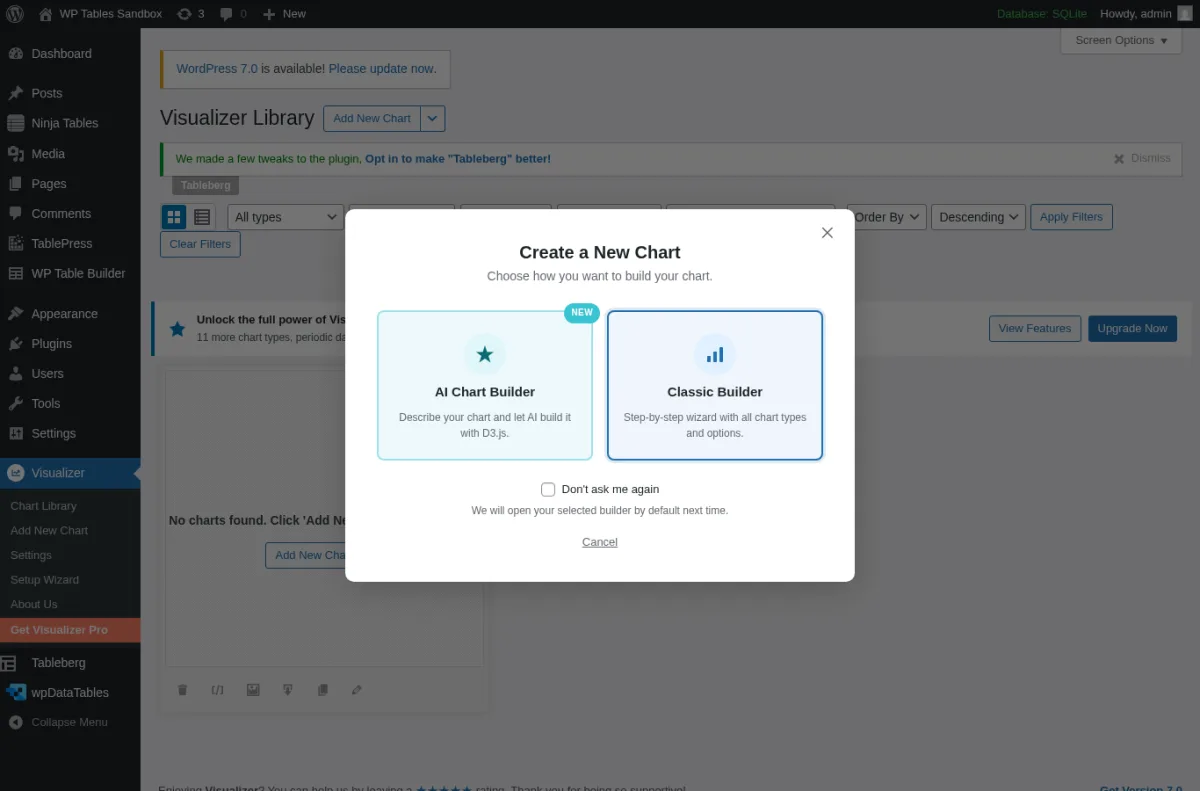
I installed Visualizer in the sandbox and clicked "Add New Chart" from the Chart Library. The modal that opens is the most decision-rich entry-screen in the free product. You can pick the AI Chart Builder ("Describe your chart and let AI build it with D3.js") or the Classic Builder ("Step-by-step wizard with all chart types and options"). The AI path is genuinely free in 2026: there is no API key field, no OpenAI billing handshake, no rate-limited preview. The Classic path advances to the chart-type wizard, where the 15 free chart types (Line, Area, Bar, Column, Pie, Geo, Bubble, Scatter, Table, Combo, Gauge, Timeline, PolarArea, Radar and a few more) are selectable without paying. Data can come from CSV upload, Google Sheets URL or manual data input. The table chart type renders a sortable HTML table on the front-end, which makes Visualizer a credible choice when you genuinely want a table but you also want the option to swap it for a bar chart next week.
What sits on the paid tier is the rest of the data pipeline and 11 more chart types: periodic data sync from URL, JSON or Google Sheets, an on-page data editor, custom permissions, a manual frontend data editor, chart filters and gauge customisation, plus chart types like Sankey and TreeMap. Pricing on 2026-06-01 from themeisle.com: Personal $99/year (intro from $199, 1 website), Plus $199/year (intro from $399, 3 websites), Infinite $399/year (intro from $799, unlimited websites). 30-day money-back guarantee. There is no lifetime option and all renewals are at full price after the intro year.
Pick Visualizer when you publish data, not just tables, and the page would be clearer with a chart for at least half the time. The free AI Chart Builder by itself is the cleanest free chart-from-prompt feature on WordPress.org in 2026 and is worth installing even if you keep using TablePress for everything that is genuinely a table.
6. Data Tables Generator by Supsystic
If your client edits the table, not you, the right plugin is the one with the cleanest frontend editing on the free tier. Data Tables Generator by Supsystic is that plugin in 2026. 20,000+ active installs, 4.7 rating from 495 reviews, v1.11.2 shipped 2026-05-27, tested up to WordPress 7.0.
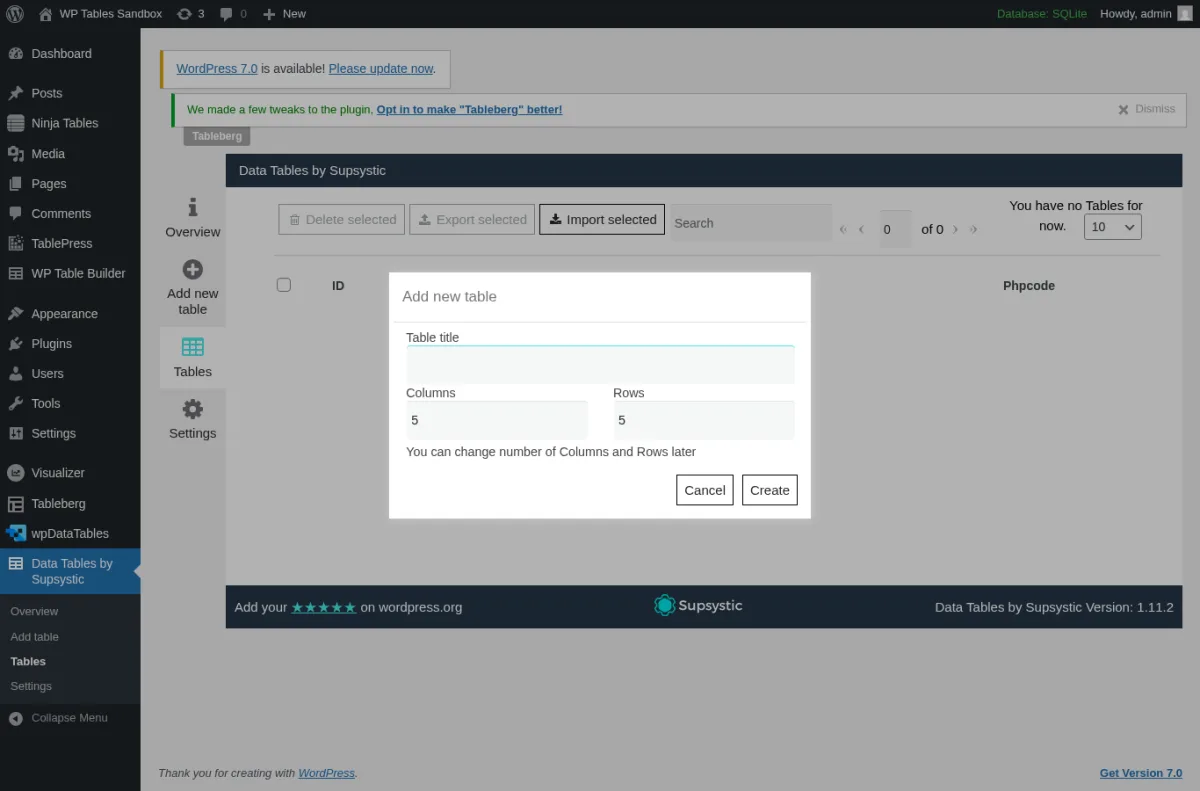
I installed the plugin in the sandbox, dismissed the first-load Subscribe modal (the X icon at the top-right closes it, and the "Do not disturb me again" button is the durable choice), and opened the "Add new table" modal via the left vertical tab strip. The modal is intentionally simple: Table title, Columns (default 5), Rows (default 5), with the helper text "You can change number of Columns and Rows later" and a Cancel / Create action pair. The drag-and-drop visual editor that follows supports cell merging, formatting, styling, formulas, CSV/PHP/JSON/XML import and the unusual feature: frontend editing of the table by the right user role, without leaving the published page. The Tables list shows both the standard Shortcode column and a Phpcode column, so you can embed via shortcode in a post or directly via PHP in a theme template.
The standout 2026 feature here is the new MCP integration at the top of the admin: "Data Tables now speak AI." The plugin ships a free MCP connector that lets Claude, Cursor or any other MCP-compatible AI agent read, analyse, export, import, create and edit tables in plain language. This is currently genuinely on the free tier; the Pro upsell is at the WooCommerce, conditional-formatting and advanced-filter layer.
What sits on the paid tier is WooCommerce integration (turn a WooCommerce product list into a sortable table), conditional formatting (colour cells based on value or content), pagination, advanced search and filtering, custom per-cell CSS, and premium support. Pricing on 2026-06-01 from supsystic.com: Personal $49/year (1 site), Developer $99/year (5 sites), Enterprise $199/year (unlimited sites). 30-day money-back guarantee. 3-year and lifetime upgrade options at higher tiers.
Pick Data Tables Generator by Supsystic when the table is going to be edited by someone other than you (a client, an editor, a marketing teammate) and you want them to be able to update it from the front of the published page without learning the WordPress admin. The MCP/AI connector is a nice bonus for a team that already uses Claude or Cursor in its workflow.
7. Tableberg
The native Block Editor pick of this roundup is Tableberg. It is the newest plugin on this list (3,000+ active installs, 4.8 rating from 45 reviews, v1.0.2 shipped 2026-05-18) and the only one designed as a Gutenberg block from day one, not a shortcode bolted onto the Classic Editor. Tableberg requires WordPress 6.1+ and PHP 7.0+.
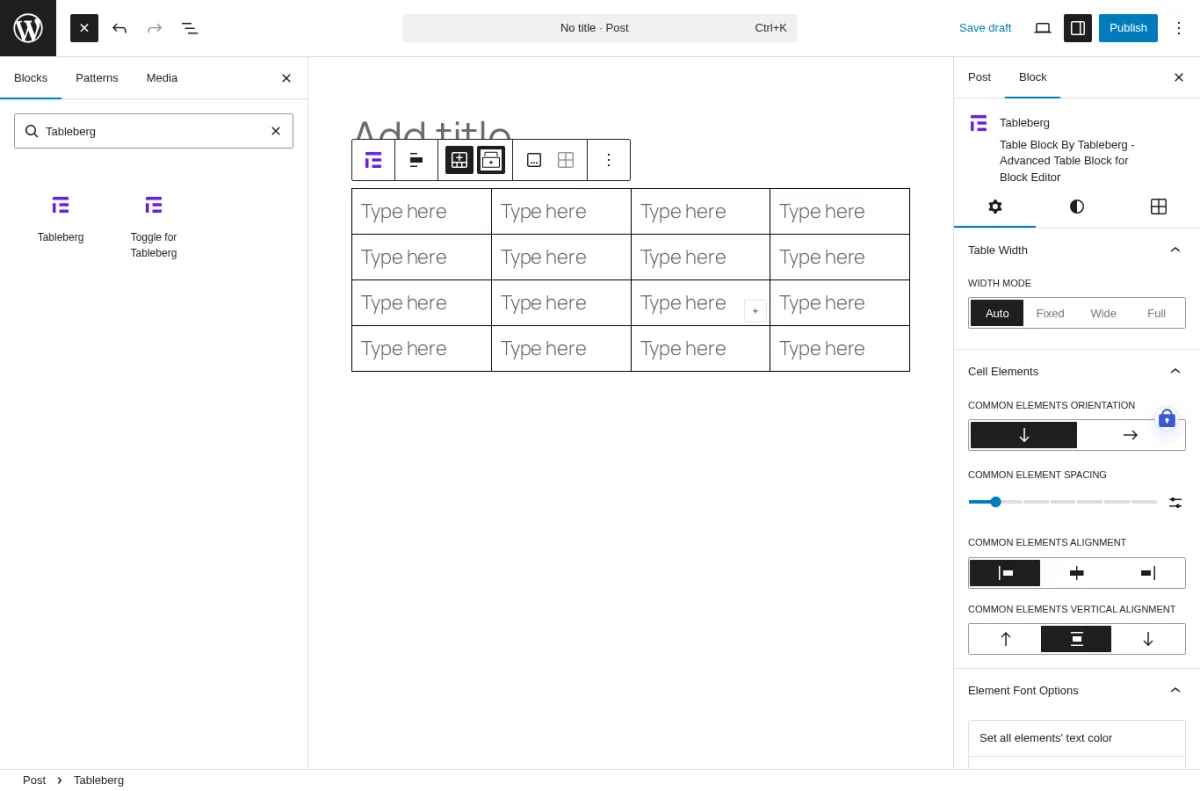
I opened a new draft post in the Block Editor, used the Block Inserter, searched "Tableberg" and inserted the Tableberg block. The block's setup card asks for COLUMN COUNT and ROW COUNT (4 and 4 by default) and then renders a real native table inside the post body. The right-rail Block Inspector panel exposes Table Width (Auto, Fixed, Wide, Full), Cell Elements, Common Elements Orientation (vertical or horizontal stacking inside cells), Common Element Spacing, Common Elements Alignment, Common Elements Vertical Alignment and Element Font Options sections. The "Cell Elements" model is borrowed from the WP Table Builder visual builder but expressed as native Gutenberg controls, which is genuinely fresh for a 2026 product.
The pricing structure is unusually buyer-friendly: the Free Forever tier ships unlimited sites and almost all Pro features. The four real Pro differentiators on Tableberg are the 30 pre-built table templates, the WooCommerce table integration, the AI Tables feature, and the 1 year of priority support and updates. Everything else sits on Free. Pro Yearly is $49/year (regular $99, unlimited sites), Pro Lifetime is $149 one-time (regular $249, unlimited sites), and the WP Block Suite Lifetime Bundle at $299 bundles Tableberg with Ultimate Blocks, Galleryberg and the upcoming Sliderberg. 30-day money-back guarantee.
One honest caveat: Tableberg's install count is the lowest in this roundup (3,000+ vs TablePress's 700,000+), and the product is on its v1.0.x line, which means there is less battle-tested production usage than the older incumbents. The trade-off is a noticeably more modern admin experience and a Free Forever tier that genuinely punches above its weight.
Pick Tableberg when you live entirely in the Block Editor, you do not want a Classic-style shortcode in your content, and you want a native block experience that does not require you to upgrade to Pro for the basics. If you already use the Tableberg author's other Block Suite plugins (Ultimate Blocks, Galleryberg) the lifetime bundle is a strong consolidation play.
How to choose the right WordPress table plugin for your site
Picking among these seven is mostly a question of where your data lives, who edits the table, and how you publish.
- If you want the safest, free default: install TablePress. It is the most trusted free table plugin on WordPress.org, the editor is a real spreadsheet, the import/export covers Excel, CSV, HTML and JSON, and you can move to TablePress Pro the moment you need responsive layouts or fixed headers.
- If your data already lives in Google Sheets, an external CSV, or a Custom SQL query: install Ninja Tables. Six free data sources is a real edge over TablePress, and the FooTable rendering engine collapses rows on mobile without paying.
- If your data lives in Excel, a database, or you need to scale to thousands of rows with filters and charts: install wpDataTables. The Lite handles simple and linked tables; the Premium adds database-driven tables, the SQL query builder, WooCommerce and HighCharts Stock.
- If you build affiliate reviews, comparison tables or pricing tables: install WP Table Builder. The drag-and-drop builder with star ratings, buttons, images and lists in any cell is faster than any spreadsheet editor for that workload, and the free tier is genuinely shippable.
- If you publish data and a chart would often be clearer than a table: install Visualizer. Fifteen free chart types and a free AI Chart Builder make it the cleanest chart-from-prompt experience on WordPress.org in 2026.
- If the table will be edited by someone other than you: install Data Tables Generator by Supsystic. Frontend editing is on the free tier, and the new MCP connector is a nice bonus for teams already using Claude or Cursor.
- If you live entirely in the Block Editor: install Tableberg. The Free Forever tier ships almost all Pro features and the block experience is the most native of any plugin in this roundup.
One practical note: do not stack multiple table plugins on the same site. Each one ships its own CSS and JavaScript, and the front-end weight adds up quickly on a content-heavy page. Pick the one that fits your dominant use case and stick with it. If your site is a WooCommerce store, the table plugin choice tends to interact with the rest of your stack, so the guide to setting up a WooCommerce store covers the upstream decisions that frame the table choice. And because most table plugins ultimately render inside a page builder layout, the best WordPress page builders roundup is a useful companion read for picking the editor that the table will live inside.
FAQ
What is the best free WordPress table plugin in 2026?
TablePress. It is the only WordPress table plugin in 2026 with more than 700,000 active installs and a 5.0 average rating, the free core handles Excel, CSV, HTML and JSON import, the editor is a real spreadsheet, and the plugin has been actively maintained for more than a decade. The free tier is genuinely useful on its own; Pro and Max are upgrades for responsive layouts, fixed headers, big-table server-side processing and the REST API.
Which WordPress table plugin is best for responsive mobile tables on the free tier?
Ninja Tables, because the FooTable rendering engine collapses rows on narrow viewports without a Pro upgrade. TablePress free uses horizontal scrolling on mobile (the responsive column-priority layouts are a Pro feature), and WP Table Builder free exposes a per-column responsive toggle but full per-breakpoint scaling is Pro.
Which WordPress table plugin handles large datasets and database queries?
wpDataTables. The Premium tiers (Starter, Standard, Pro, Developer) ship database-driven tables, the SQL query builder, formula columns, fixed headers and columns, hidden dynamic columns and periodic data sync. The Lite version is fine for simple Excel/CSV imports but does not query a database.
Which WordPress table plugin is best for affiliate and comparison tables?
WP Table Builder. The visual drag-and-drop builder with Text, Image, List, Button, Star Rating, Custom HTML and Shortcode cell elements is faster than any spreadsheet for an affiliate review or a side-by-side comparison. The Pro Lifetime at $179 with unlimited sites is a strong pick if you ship affiliate sites for a living.
Can I edit a WordPress table from the front end of the published page?
Yes, in two places. Data Tables Generator by Supsystic ships frontend table editing on the free tier (for users with the right role). Ninja Tables has a Frontend Editing tab on its edit screen, but the editing capability itself is gated to Ninja Tables Pro. wpDataTables also offers a frontend editor on its Premium tiers.
Which WordPress table plugin is native to the Gutenberg Block Editor?
Tableberg, as a block-first design from day one with a Block Inspector panel that exposes Table Width, Cell Elements, Common Elements Orientation and Element Font Options. Several other plugins in this roundup (TablePress, Ninja Tables, WP Table Builder, Visualizer, wpDataTables) also register Gutenberg blocks alongside their shortcode, but Tableberg is the only product designed around the block model from the start.
Are any of these plugins free for unlimited sites?
Two of them advertise unlimited-site coverage on their free tier: Tableberg Free Forever and WP Table Builder's free core. WP Table Builder's free Employee Table template and core builder are usable as-is; Tableberg's Free Forever ships almost all Pro features minus the 30 pre-built templates, the WooCommerce table integration, AI tables and the 1 year of priority support and updates. TablePress, Ninja Tables, wpDataTables, Visualizer and Data Tables Generator by Supsystic are also free at the core but their paid tiers are where the unlimited-site licensing lives.
Conclusion
There is no single "best" WordPress table plugin in 2026 because there is no single buyer profile. If you want the safest free default with the deepest install base, install TablePress. If your data already lives in Google Sheets or a Custom SQL query, install Ninja Tables. If you have a real dataset and need filtering, charts and big-row scaling, install wpDataTables. If you build affiliate or pricing tables, install WP Table Builder. If a chart would be clearer than a table half the time, install Visualizer. If the table will be edited by a client from the front-end, install Data Tables Generator by Supsystic. If you live in the Block Editor, install Tableberg.
Most WordPress sites need exactly one of these plugins, not all of them. Pick the profile that matches your dominant use case, install the free version first, ship the table you actually need, and only upgrade to the paid tier when the limitation you hit is a real product limitation, not a hypothetical one.


