

7 Best WordPress Accessibility Plugins in 2026 (Free and Paid, Compared)

Why a WordPress accessibility plugin is a 2026 decision
If you run a WordPress site in 2026, web accessibility is no longer a "nice to have." The European Accessibility Act (EAA) reached its enforcement deadline in mid-2025, the U.S. Department of Justice's Title II web rule is rolling state and local government sites onto WCAG 2.1 AA, and U.S. ADA Title III lawsuits over inaccessible commercial websites are still being filed every week. Most readers landing on this page are trying to answer one of two questions: which plugin actually finds and fixes accessibility problems on my WordPress site, or which plugin adds the floating "accessibility menu" widget my client asked for.
Both questions are valid. The honest answer is that they need different plugins. A real WCAG scanner runs in the WordPress editor, reports problems against WCAG 2.2 success criteria, and either fixes them or hands you a clear remediation path. A "toolbar" or "overlay widget" puts a floating icon on your site so visitors can adjust font size, contrast, animations, and similar preferences. Toolbars do not fix the underlying HTML, and no plugin in this roundup, free or paid, makes your site automatically ADA, WCAG, EAA, or Section 508 compliant. Real conformance still needs a combination of automated scans, manual review, content fixes, and (for many organizations) a third-party audit.
For this roundup I installed each plugin on a clean WordPress 6.9 test site, walked every settings tab the plugin ships, ran a scan or opened the widget configuration where applicable, and verified the public-facing widget on the front end. For every plugin I also read the WordPress.org listing on 2026-06-16 (active installs, rating, last update, tested-up-to, recent changelog, supported standards) and the vendor's pricing page. Where a plugin is a SaaS connector (UserWay, accessiBe, and partly Ally), the section is explicit about what is plugin-side and what is vendor-side.
My top free pick for sites that need real WCAG scanning is Equalize Digital's Accessibility Checker. If you only need to quietly fix the common theme-level problems (skip links, focus outlines, viewport, title attributes, alt-text enforcement), WP Accessibility by Joe Dolson is the better fit. The other five plugins each cover a specific buyer need that the first two do not.
How I compared each WordPress accessibility plugin
For every plugin I checked the same data:
- Hands-on activation: install from the WordPress.org repo, activate, and walk through every settings page and tab the plugin ships.
- Real scan or widget test: trigger a scan on a sample page that I seeded with a missing alt attribute, ambiguous link text, and a content-level H1, and confirm what the scanner reports. For toolbar plugins, open the widget on the front end and confirm the menu options the listing advertises actually render.
- WCAG coverage: which Web Content Accessibility Guidelines level the plugin actually addresses (Level A, AA, or AAA) and which specific WCAG 2.2 success criteria the documentation maps to.
- Free vs paid line: what is actually unlocked on the paid plan, with the current price taken directly from the vendor pricing page on 2026-06-16.
- Install reputation: active install count and average rating on WordPress.org, total review count, and recent reviews from the last 60 days.
- Maintenance signals: last updated date, tested-up-to WordPress version, current major version, and the highlights of the most recent changelog.
- Compliance honesty: does the plugin overpromise on ADA / WCAG / EAA "compliance," or does it stay clear that real conformance needs human review and remediation? This matters more than most buyers realize.
- Best fit: which site type the plugin is the right answer for, and a one-line honest limitation so you know what you give up by picking it.
Quick comparison: WordPress accessibility plugins at a glance
| Plugin | Best for | Free version | Strongest point | Paid plan starts at |
|---|---|---|---|---|
| Equalize Digital Accessibility Checker | In-editor WCAG scanning + automated fixes | Unlimited post and page scans, 12 free fixes | 40+ WCAG 2.2 checks with linked remediation docs | $190 / yr (1 site) |
| WP Accessibility by Joe Dolson | Quietly fixing common theme issues | Fully free, no paid tier | Long-running, maintained by a known accessibility contributor | Free only |
| Ally by Elementor | Widget + scanner + statement in one plugin | 5 URL scans, full usability widget, statement generator | All-in-one accessibility surface inside the Elementor stack | Elementor One (AI fixes and quotas vary) |
| AccessiYes by CookieYes | Free toolbar widget with statement generator | All current widget features in free | No paywall on the front-end toolbar | Free only |
| Accessibility Widget by OneTap | Lightweight EU-made widget with lifetime Pro | 40+ language widget, 10+ free modules | One-time lifetime license instead of recurring SaaS | $69 lifetime (1 site) |
| UserWay | SaaS overlay with Litigation Support Program | Marketed "free widget" tier on userway.org/get | Vendor-managed widget with support brand recognition | $490 / yr (up to 100K monthly page views) |
| accessiBe accessWidget | Enterprise SaaS overlay with AI remediation | 7-day free trial only | Largest commercial overlay install base | $490 / yr (up to 5,000 monthly visits) |
Active installs, ratings, and pricing in the table are sourced from each WordPress.org plugin page and each vendor's pricing page on 2026-06-16. UserWay and accessiBe price on monthly traffic; OneTap is one-time; Equalize Digital and Ally price on sites and feature tier.
1. Equalize Digital Accessibility Checker: best free WordPress WCAG scanner
- WordPress.org: wordpress.org/plugins/accessibility-checker/
- Active installs: 10,000+
- Rating: 5.0 / 5 (75 reviews on 2026-06-16)
- Latest version: 1.43.0, released 2026-05-28
- Requires: WordPress 6.7+, PHP 7.4+
- Tested up to: WordPress 7.0
- Pricing: Personal Free; Professional $190 / yr (1 site); Small Business $750 / yr (5 sites); Agency $2,250 / yr (25 sites); 30-day refund
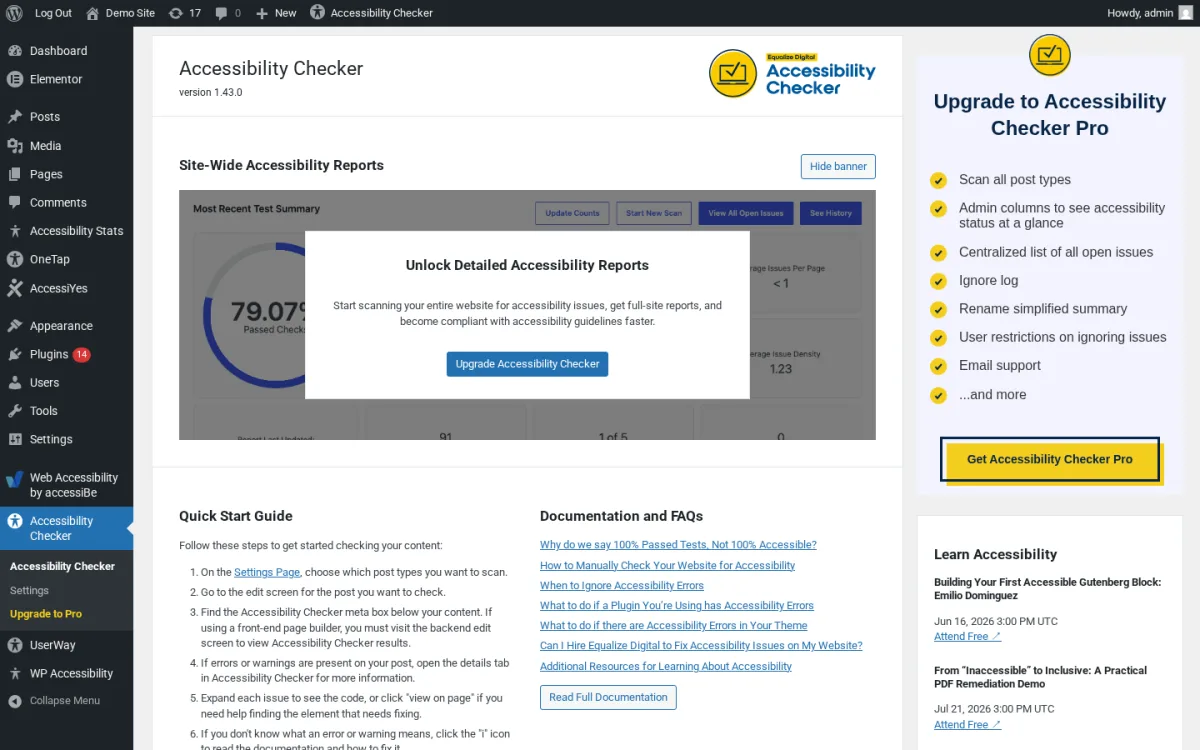
Accessibility Checker from Equalize Digital is the plugin I install first on any new WordPress site that needs to take accessibility seriously. It sits inside the post editor and runs over 40 automated checks based on Web Content Accessibility Guidelines (WCAG) 2.2 each time you save or publish. Every issue includes a short explanation, the offending code, a link to a public help article, and a one-click Dismiss action with a reason (False positive, Remediated, or Confirmed accessible). The scan runs locally on your server, so there is no per-URL fee and no external API quota.
On the test site I seeded a post with a missing alt attribute, an ambiguous "click here" link, an H1 inside the content body, and a near-duplicate heading order. The plugin flagged each one in the block-editor sidebar with the right severity (Problems vs. Needs Review) and the corresponding WCAG success criterion. The same plugin also ships 12 free automated fixes I can toggle from the Fixes tab: add skip links, add focus outlines, prevent links from opening new windows, force underlines on links, label comment and search fields, add missing lang and dir attributes, make the viewport scalable, remove positive tabindex values, remove redundant title attributes, add new-tab warnings, and force an error message on empty search submissions. Pro adds four more (label form fields, add missing page titles, block PDF uploads, add file size / type to links).
Why Accessibility Checker wins on credibility. The team behind it includes certified accessibility professionals (IAAP CPACC), runs the free, twice-monthly WordPress Accessibility Meetup, and publishes the well-known "Don't Fall for the WordPress ADA Compliance Plugin Myth" essay. The plugin's own FAQ is blunt: "Accessibility Checker will fix common accessibility problems, but it will not make your website 100% accessible on its own. There is NO way for any automated tool or plugin to ensure your website is fully accessible." That is the right tone for a scanner.
Strengths. Real WCAG 2.2 scanning with linked remediation docs for every issue. 12 free automated fixes that target the most common theme problems. No URL or API fee. Unlimited scans of posts and pages. Active 2026 release cadence with monthly meaningful releases (1.37.0 through 1.43.0 between January and May). Strong support presence on the WordPress.org forums.
Honest limitation. Free version scans posts and pages only. Custom post types (WooCommerce products, portfolios, team members) and bulk full-site reports are Pro. The dashboard widget that aggregates Site-Wide Accessibility Reports across the whole site is partially blurred until you upgrade to Pro.
Best fit. Any WordPress publisher that wants a credible scanner inside the editor, including agencies, government and education sites, and any business owner that wants to learn WCAG while fixing real issues.
2. WP Accessibility (Joe Dolson): best free fixer for common theme issues
- WordPress.org: wordpress.org/plugins/wp-accessibility/
- Active installs: 60,000+
- Rating: 4.8 / 5 (68 reviews on 2026-06-16)
- Latest version: 2.3.3, released 2026-03-26
- Requires: WordPress 5.9+, PHP 7.4+
- Tested up to: WordPress 6.9.4
- Pricing: free. Joe Dolson accepts donations on joedolson.com
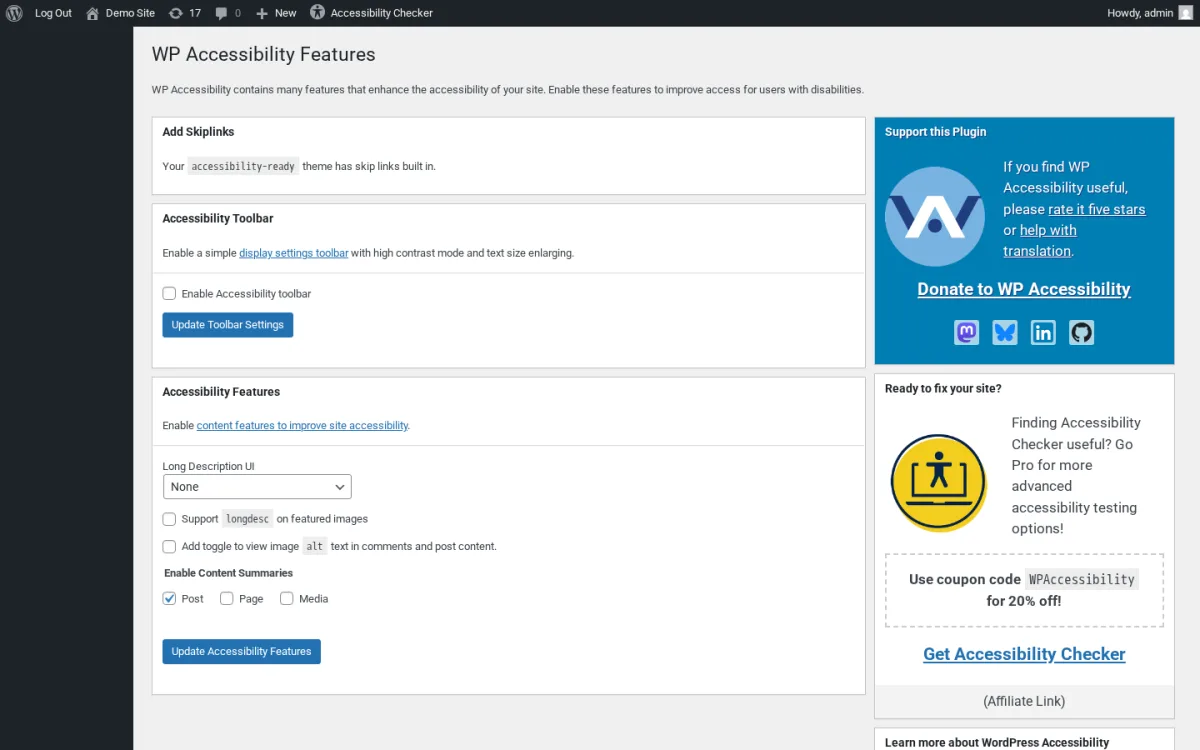
WP Accessibility is the quiet, longest-running accessibility plugin on this list, shipped since 2012 and maintained by Joe Dolson, the WordPress contributor behind WordPress Accessibility Day. The pitch is intentionally narrow: it does not scan, it does not generate reports, and it does not add a flashy widget. It works in the background to plug the most common gaps a default WordPress theme creates: missing skip links, no keyboard focus outline, missing lang and dir attributes, search forms with no labels, links that open new windows without warning, redundant title attributes, and viewport user-scalable=no settings that block visitors from pinch-zooming.
On the test site I walked the three tabs the plugin ships (Features, Accessibility Fixes, Testing & Admin). Features lets me enable a basic display-settings toolbar (high contrast plus text-size switcher), choose how long descriptions on images should be exposed, enforce alt attributes in the Classic Editor, and add labels to comments and search forms. Accessibility Fixes is where most of the work happens: I can toggle "Prevent links from opening in new windows," "Remove tabindex from focusable elements," "Add outline to elements on keyboard focus," "Ensure that viewport does not restrict zoom," and similar one-checkbox remediations. Testing & Admin ships a color contrast checker (paste two hex values and get the contrast ratio), a diagnostic CSS toggle that highlights detectable problems in the editor and on the front end, and a media-library search across alt text fields.
What I like. The plugin is honest: the README says "WP Accessibility is not intended to make your site compatible with any accessibility guidelines." It is a toolkit, not a compliance product. The right side of the settings page promotes Equalize Digital's Accessibility Checker as a paid scanner you can pair with this plugin, and that combination (Accessibility Checker + WP Accessibility) is the cleanest free-plus-low-cost stack on WordPress today.
Strengths. Free, open-source, maintained by a long-time WordPress accessibility contributor. Each fix can be toggled independently. Strong defaults: skip links, viewport scaling, lang attributes, and label additions are on by default. Translated into 22+ locales. No upsell inside the admin (only the affiliate link to Accessibility Checker).
Honest limitation. No scanner. The plugin does not tell you what is wrong on your site, it just fixes a fixed list of common issues. Some toggles (force underline on links, the front-end toolbar) interact with theme styles and need a visual review after you enable them.
Best fit. Solo bloggers, small business owners, and any site already paired with a real scanner. Combine it with Accessibility Checker for the strongest free-tier WordPress accessibility stack.
3. Ally, Web Accessibility & Usability (Elementor): widget + scanner + statement in one plugin
- WordPress.org: wordpress.org/plugins/pojo-accessibility/
- Active installs: 500,000+
- Rating: 2.9 / 5 (157 reviews on 2026-06-16)
- Latest version: 4.1.2, released 2026-06-01
- Requires: WordPress 6.7+, PHP 7.4+
- Tested up to: WordPress 7.0
- Pricing: free tier (5 URL scans, full usability widget, statement generator); paid features (AI fixes, more scan credits, screen reader compatibility, white label, in-widget language selector, analytics) are part of Elementor One subscriptions
Ally is the plugin you almost certainly already know as One Click Accessibility. Elementor acquired the original Pojo Themes / Pojome plugin and rebuilt it in 2025 as Ally, a hybrid scanner plus usability widget plus accessibility statement plugin. With 500,000+ active installs it has the largest user base on this list, but the 2.9 / 5 rating reflects a polarized review base: positive reviewers like the new dashboard and the AI-assisted remediation, while negative reviewers complain that fixes "come back unless you pay" and that the previously simple "One Click Accessibility" toolbar is now part of an Elementor billing system.
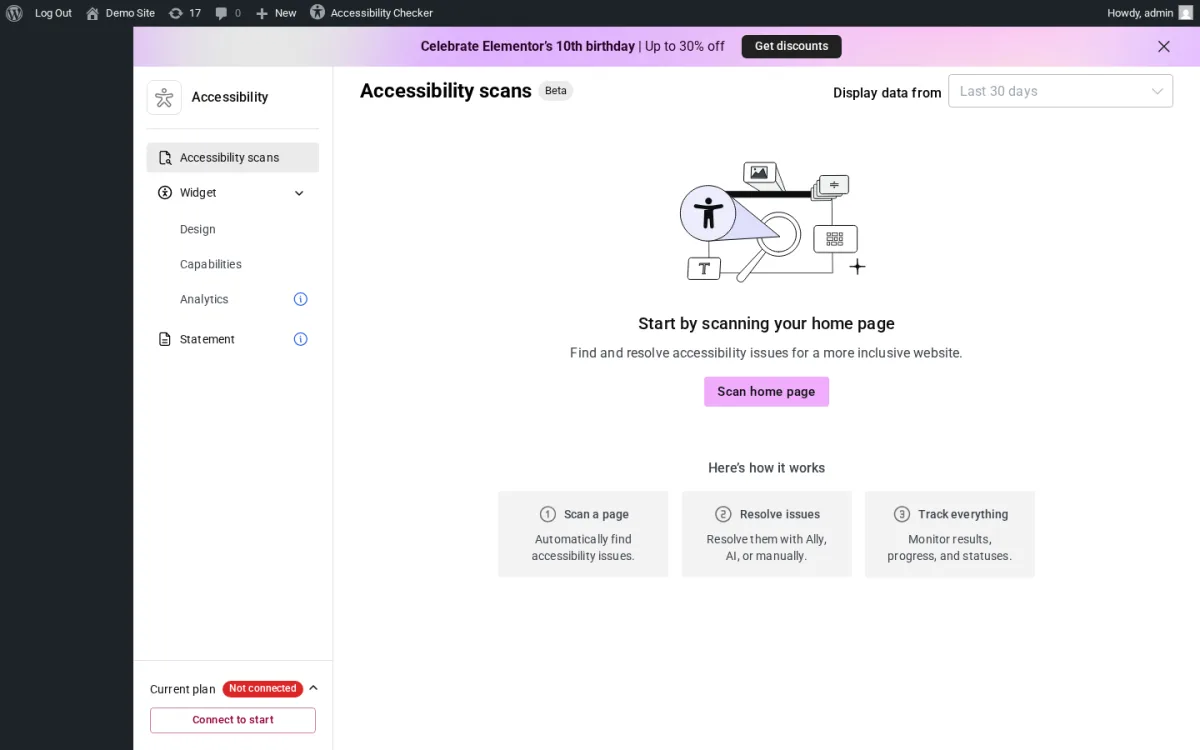
On the test site I activated Ally and walked the three surfaces. Accessibility scans is the new scanner; it scans an individual URL for 180+ WCAG 2.1 AA issues and presents them in a guided remediation flow. Widget covers the front-end usability menu (icon picker, icon size, design, capabilities, analytics), and the front-end widget rendered correctly on my demo page out of the box. Statement is the built-in accessibility statement generator. A "Current plan: Not connected" badge at the bottom-left of the admin reminds me that the scanner and AI fixes require a connected Elementor account. The free tier ships 5 URL scans with unlimited rescans on the same page; you can run the same scan as many times as you want, but you cannot scan beyond five distinct URLs without upgrading.
Strengths. One plugin covers three things that often need three plugins: a scanner, a usability widget, and a statement generator. 180+ WCAG 2.1 AA checks. AI-assisted alt-text suggestions inside the editor (paid). Default usability widget already includes contrast modes (high, dark, light, negative), font resizing, pause animations, hide images, line height, text alignment, keyboard navigation enhancements, underlined links, reading guide, skip to content, sitemap viewer, and reading mask. Active 2026 release cadence (4.0.0 in January, 4.1.x in February through June). Translated into 23+ locales.
Honest limitation. Tying the widget to Elementor billing makes Ally heavier than a single-purpose toolbar. The free tier's 5-URL scan cap is real, and recent reviews flag that some fixes require an active Elementor One subscription to persist. The plugin loads a CDN-hosted script from Elementor for the widget; one negative review on 2026-04-10 flagged that this means a Google Analytics call from the Elementor CDN, which can be relevant for GDPR setups. Audit the front-end requests before going live in the EU.
Best fit. Sites already on the Elementor stack (Elementor Pro, Site Mailer, Image Optimizer, Hello Elementor) that want one accessibility surface under the same vendor. Otherwise pair Accessibility Checker + WP Accessibility + a dedicated widget.
4. AccessiYes Accessibility Widget by CookieYes: best fully free toolbar
- WordPress.org: wordpress.org/plugins/accessibility-widget/
- Active installs: 10,000+
- Rating: 4.7 / 5 (29 reviews on 2026-06-16)
- Latest version: 3.2.2, released 2026-05-21
- Requires: WordPress 5.0+, PHP 5.6+
- Tested up to: WordPress 7.0
- Pricing: free. CookieYes does not currently sell a paid AccessiYes tier on WordPress.org
AccessiYes is the standalone accessibility widget from CookieYes, the team behind the popular CookieYes cookie consent plugin. The pitch is the cleanest of the three free toolbar widgets in this roundup: install, activate, the widget renders on the front end immediately, every adjustment lives in the free tier, no account or sign-up is required, and no user data is tracked. The plugin pairs naturally with CookieYes's existing GDPR-focused consent product, but AccessiYes is a standalone tool that does not require CookieYes to work.
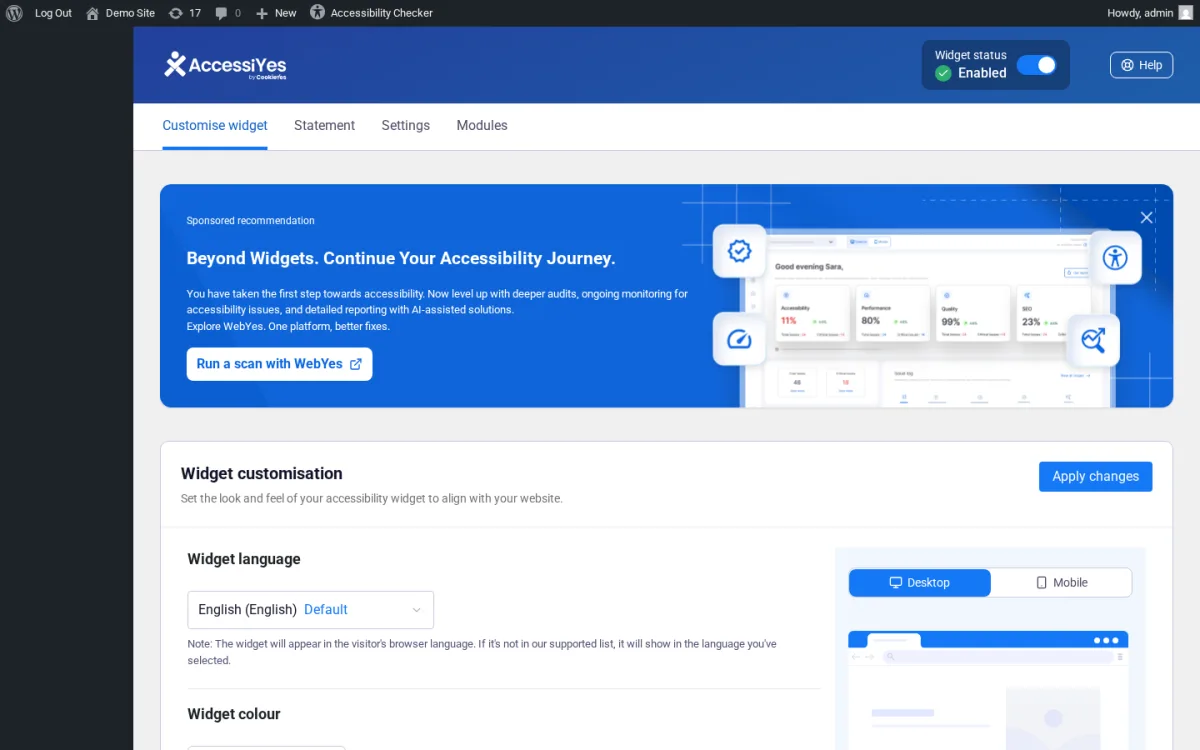
On the test site I activated AccessiYes and walked the four tabs in the admin. Customise widget covers the widget language, color, size, position (desktop and mobile), and a live preview that updates as I change settings. Statement provides the built-in accessibility statement generator (or you can link an existing statement / VPAT). Settings exposes general toggles. Modules is where I enable or disable individual visitor-facing adjustments across three categories: Content (font size, highlight title, highlight features, dyslexia-friendly font, font weight, letter spacing and line height, text alignment), Color (dark, light, and high contrast modes; high or low saturation; monochrome), and Navigation (reading guide, pause animations, big cursor, Alt+A keyboard shortcut, page reader, mute sounds). Preset Accessibility Profiles let visitors apply a one-click combination of settings tailored for a specific need.
Strengths. Fully free with all features included. No account, sign-up, or CDN call to a vendor SaaS. GDPR-friendly by design (no user data tracked). 50+ widget UI languages with automatic visitor-language detection. Active 2026 release cadence (3.0 in 2026-04, 3.1.x and 3.2.x through May). Backed by CookieYes, which is a known WordPress vendor.
Honest limitation. AccessiYes is a widget only. It does not include a scanner, it does not edit your underlying HTML, and it does not generate a WCAG conformance report. The plugin's own FAQ is explicit: "AccessiYes Accessibility Widget is intended to support your accessibility efforts. It does not guarantee conformance with WCAG or compliance with laws such as the ADA, EAA, or other regulations." Pair it with a real scanner.
Best fit. Small business sites and blogs that want a no-cost toolbar widget without a subscription, particularly EU sites that need GDPR-safe behavior and an accessibility statement generated in the same place.
5. Accessibility Widget by OneTap: free toolbar with lifetime Pro
- WordPress.org: wordpress.org/plugins/accessibility-onetap/
- Active installs: 50,000+
- Rating: 4.9 / 5 (78 reviews on 2026-06-16)
- Latest version: 2.11.0, released 2026-06-03
- Requires: WordPress 6.6+, PHP 7.4+
- Tested up to: WordPress 6.9.4
- Pricing: free. Lifetime Pro: 1 Website $69 (June special; regular $129), 3 Websites $118 (regular $169), Agency from $199 with unlimited sites. 14-day money-back guarantee
OneTap is the other strong free toolbar widget on this list, made in Europe with the EAA (European Accessibility Act) explicitly in mind. The free tier ships a lightweight floating button with content modules (font size, highlight links, line height, readable font, big cursor, text align, letter spacing, font weight), color modules (light contrast, high contrast, monochrome), and orientation modules (reading line, reading mask, hide images, highlight content, stop animations). The Pro tier adds a Text Magnifier, Dyslexic Font, Dark Contrast, Saturation, Text-to-Speech, Keyboard Navigation, Mute Sounds, Highlight Titles, and five predefined accessibility profiles (Vision Impaired, Seizure Safe, ADHD Friendly, Blindness, Epilepsy Safe).
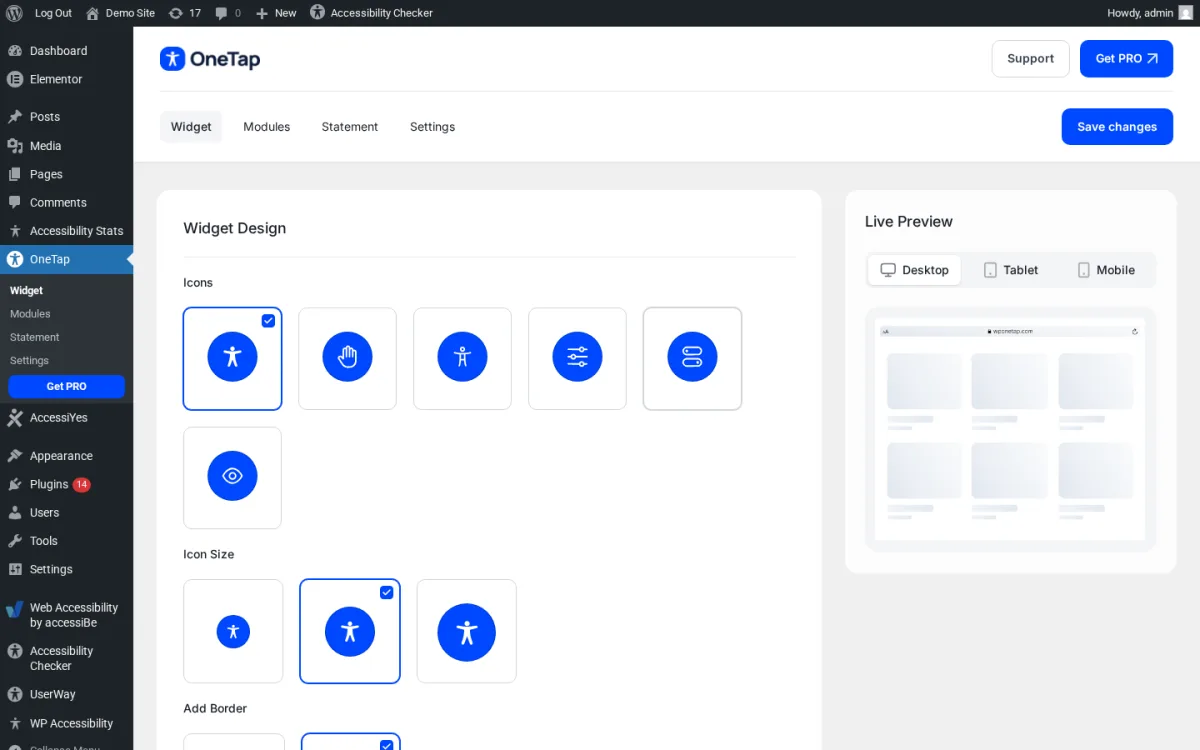
What I tested. Activation lands me on the Widget Design tab with an icon picker (6 icons), icon size (small / medium / large), an Add Border toggle, and a live preview iframe on the right that updates as I change settings. The Modules tab lets me enable or disable individual features and clearly labels which are Pro. The Statement tab is a guided accessibility statement generator. The Settings tab exposes a per-device hide toggle (desktop, tablet, mobile), a custom shortcode trigger, and a banner-review opt-out. The front-end widget rendered as a clean blue accessibility icon (bottom-right by default) on the test page out of the box. 40 widget UI languages including all 27 EU member-state languages.
What sets OneTap apart in pricing. Most overlay widgets are billed per-month based on page views. OneTap sells a one-time lifetime license, which is unusual in the category. A $69 lifetime license for one website plus a 14-day money-back guarantee is significantly cheaper than UserWay or accessiBe's entry tiers if your site stays under 100K page views per month. For agencies, the $199 lifetime Agency license covers unlimited client sites.
Strengths. 50,000+ installs and a 4.9 / 5 rating from 78 reviews. Made-in-EU positioning that explicitly aligns with the EAA. 40 widget UI languages with EU coverage. Lightweight (the readme highlights compatibility tests across page builders). Lifetime Pro pricing instead of recurring SaaS. 24/7 multilingual support.
Honest limitation. Free version unlocks the most common modules but reserves a long list (Pro profiles, Text-to-Speech, Dyslexic Font, Dark Contrast, Saturation) for paid. If you want one of those, you have to upgrade. Free tier does not include a scanner. Like every widget, OneTap does not guarantee EAA / ADA / WCAG compliance on its own (the FAQ is explicit on this).
Best fit. EU sites that want a credible Made-in-Europe widget, multilingual sites, and agencies that prefer a one-time lifetime fee over recurring SaaS. Pair with Accessibility Checker or WP Accessibility for actual issue identification.
6. UserWay: SaaS accessibility widget with Litigation Support Program
- WordPress.org: wordpress.org/plugins/userway-accessibility-widget/
- Active installs: 80,000+
- Rating: 4.0 / 5 (57 reviews on 2026-06-16)
- Latest version: 2.6.6, released 2025-12-08
- Requires: WordPress 4.7+
- Tested up to: WordPress 6.9.4
- Pricing: Small Website $49 / month or $490 / year (up to 100K monthly page views); Medium $149 / month or $1,490 / year (up to 1M); Large custom. 16% annual discount. A separately marketed Free Widget tier is advertised at userway.org/get/
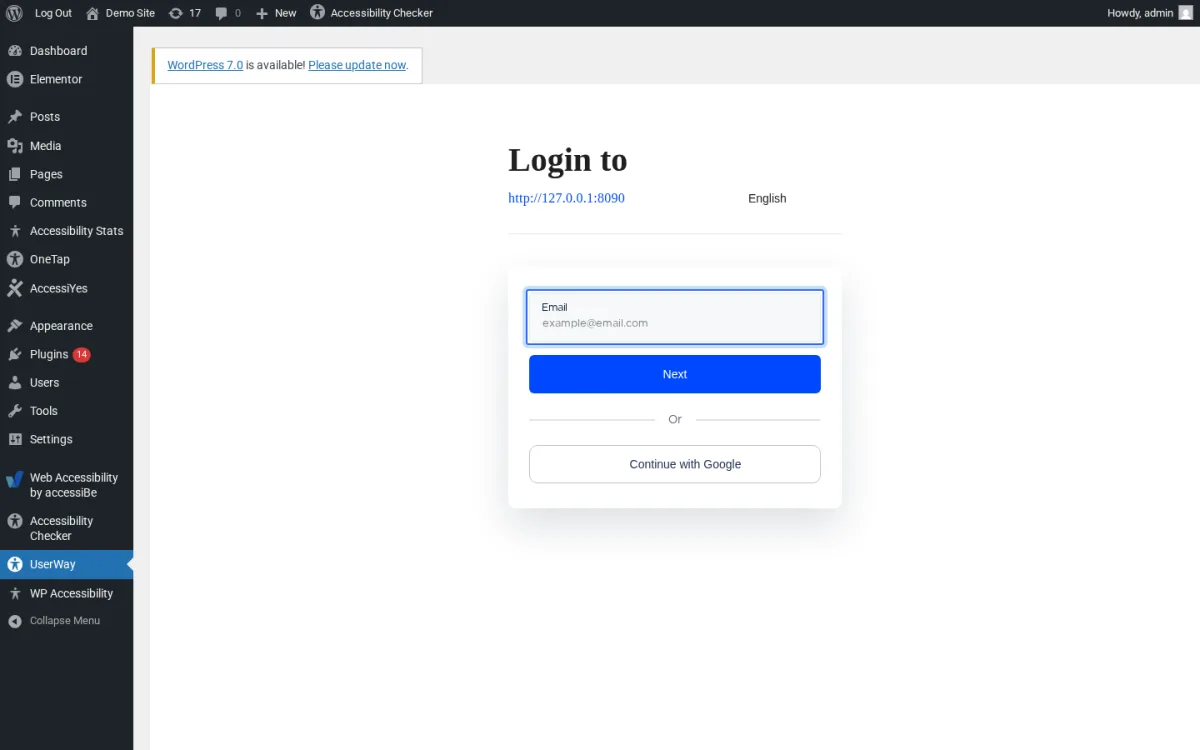
UserWay is the first of two commercial SaaS overlay widgets in this roundup. The WordPress plugin is a connector. After activation, opening the UserWay menu does not show a local settings page. It shows a UserWay-hosted sign-in / sign-up screen rendered inside the WordPress admin, with email plus Continue with Google plus a language switcher. The widget configuration, customer dashboard, Litigation Support Program documentation, and accessibility statement live in your UserWay account at userway.org.
The vendor product itself is widely deployed (80,000+ WordPress installs plus a much larger non-WordPress footprint) and documents WCAG 2.1, WCAG 2.2, ATAG 2.0, ADA, Section 508, and EN 301 549 compliance support. The widget covers screen reader compatibility, keyboard navigation, color contrast, font size and family adjustments, dyslexia-friendly fonts, link emphasis, page structure highlighting, and an accessibility statement. UserWay's marketing prominently positions a Litigation Support Program "informed by legal and accessibility expertise" as a differentiator.
What I tested vs. what is vendor-side. On the test site I verified the connector screen rendered correctly inside the WordPress admin, confirmed the plugin requires email or Google sign-in before any widget configuration is available, and confirmed the plugin is the same connector pattern as accessiBe (rather than a locally configured widget like AccessiYes or OneTap). I did not commit a payment method to walk the full vendor dashboard. The vendor pricing structure is unambiguous on userway.org: Small at $49/mo, Medium at $149/mo, Large custom, all tiered by monthly page views.
Strengths. Well-known brand with one of the largest commercial install bases. Vendor-managed widget with a documented support program. 17 widget UI languages. WCAG 2.1 and 2.2 alignment claimed in marketing.
Honest limitation. UserWay is a SaaS overlay. Overlay widgets are an actively debated category in the accessibility community. They can help visitors customize the experience, but they do not fix the underlying HTML, and a significant body of accessibility practitioners argues that overlays sometimes make screen-reader navigation harder. Recent WordPress.org reviews flag a persistent in-admin banner with no permanent dismiss, and a sentiment that "you have to sign up just to test." Page-view based pricing scales with traffic. The plugin's most recent release on WordPress.org is from December 2025, so the release cadence is slower than Accessibility Checker or Ally.
Best fit. Organizations that want a vendor-managed widget plus marketed legal-support resources, and that are comfortable with monthly SaaS pricing scaled to traffic. Treat the widget as a convenience layer on top of real accessibility work, not as a substitute.
7. accessiBe accessWidget: AI-powered SaaS overlay
- WordPress.org: wordpress.org/plugins/accessibe/
- Active installs: 10,000+
- Rating: 4.1 / 5 (31 reviews on 2026-06-16)
- Latest version: 2.13, released 2026-02-23
- Requires: WordPress 4.7+, PHP 7.0+
- Tested up to: WordPress 6.9.4
- Pricing: Micro $490 / year (up to 5,000 monthly visits); Growth $1,490 / year (up to 30,000); Scale $3,990 / year (up to 100,000); Enterprise custom. 7-day free trial. 30% annual discount versus monthly billing
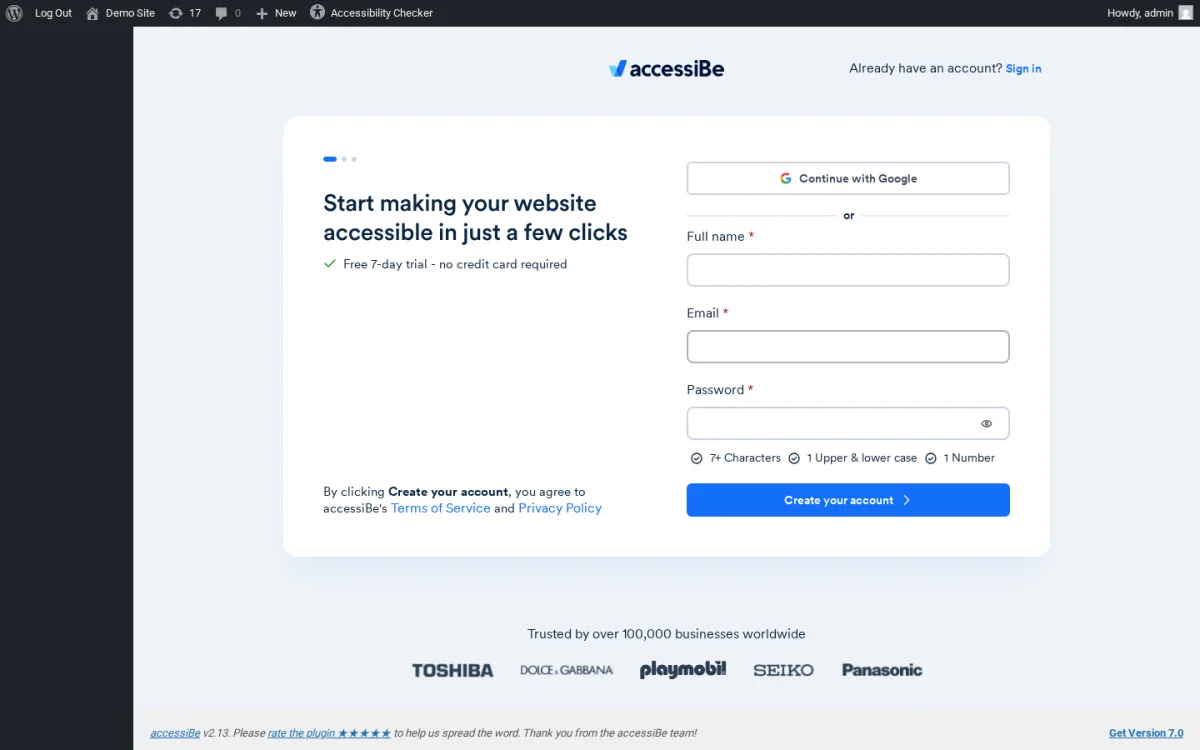
accessiBe's accessWidget is the most-marketed AI-driven overlay widget on this list. As with UserWay, the WordPress plugin is a connector that opens accessiBe's sign-up flow inside the WordPress admin. The vendor's value proposition is that an AI engine scans the site and applies session-based remediation every 24 hours, plus the visitor-facing widget for personalization. The vendor positions the product as supporting ADA and WCAG-based accessibility statements and prominently features a "Trusted by over 100,000 businesses worldwide" claim with Toshiba, Dolce & Gabbana, Playmobil, Seiko, and Panasonic logos on the sign-up screen.
Two pieces of context the honest buyer should know. First, accessiBe's overlay model and marketing have been the subject of significant accessibility-community criticism, including a long-running set of accessibility advocate critiques and a documented set of legal disputes. The Equalize Digital essay "Don't Fall for the WordPress ADA Compliance Plugin Myth" is a good summary of the other side of the argument and should be required reading before you commit to any overlay product. Second, accessWidget is the most expensive product per traffic tier on this list. The Micro tier is $490 / year but caps at only 5,000 monthly visits. A small business with 30,000 visits pays $1,490 / year.
What I tested vs. what is vendor-side. On the test site I verified that the plugin renders accessiBe's sign-up form inside the WordPress admin (Full name, Email, Password, plus a Continue with Google button and a 7-day free trial badge), and that no local settings exist until the site is connected to an accessiBe account. The widget itself is rendered via accessiBe's CDN once the account is connected; the plugin is the connector. I did not start the 7-day trial.
Strengths. Largest commercial overlay install base outside of UserWay. Vendor markets a 24-hour scan and re-remediation cycle. WordPress.org changelog shows steady 2025 and 2026 security and bug-fix releases. ADA, EAA, and WCAG-based accessibility statement support marketed.
Honest limitation. SaaS overlay, with the same caveats as UserWay plus a much louder public controversy. The plugin and the vendor cannot make a site legally compliant on their own. Pricing per traffic tier is the steepest on this list. WordPress.org reviews include both five-star endorsements and one-star criticism of the underlying overlay approach (a 2025-09-16 review by Geoffrey calls out that the widget "added accessibility issues instead of solving them" for screen reader users on a managed site).
Best fit. Organizations that have already standardized on an overlay product elsewhere and want a connector to keep their WordPress install under the same vendor. For most WordPress publishers reading this roundup for the first time, start with Accessibility Checker + WP Accessibility for the markup work and AccessiYes or OneTap for the front-end widget.
How to choose a WordPress accessibility plugin
The right plugin depends on what you actually need.
- You want to find and fix WCAG problems. Install Equalize Digital Accessibility Checker (free) and turn on the 12 automated fixes inside the editor. Pair it with WP Accessibility (free) for the theme-level remediations that Accessibility Checker does not handle. This is the strongest free combination.
- You want a free accessibility menu on the front end and you do not have a budget. AccessiYes by CookieYes ships a full free toolbar with no account or paywall. OneTap is the strongest alternative if you want a more polished UI and you are open to a one-time Pro upgrade later.
- You want one plugin that scans, gives you a toolbar widget, and generates a statement. Ally by Elementor is the only plugin in this roundup that does all three. The free tier is a real free tier (5 URL scans plus full widget plus statement), with paid AI fixes inside Elementor One.
- You want a vendor-managed SaaS overlay with documented legal-support marketing. UserWay is the established choice and pricing scales by page views. accessiBe is the AI-marketed alternative, more expensive per traffic tier and with a louder public controversy.
- You want to take WordPress accessibility seriously beyond a plugin. Treat any plugin as the start, not the finish. After you install the scanner, fix the issues, and publish a statement, schedule a manual review with a real accessibility professional, run a third-party test through screen readers like NVDA and VoiceOver, and add accessibility into your WordPress SEO audit checklist and your regular WordPress maintenance cadence.
If you only install one plugin from this list and you cannot afford a paid plan, install Equalize Digital Accessibility Checker. The 12 free automated fixes, the WCAG 2.2 mapping, and the linked remediation docs will do more for your actual conformance than any toolbar widget on the market.
Frequently asked questions about WordPress accessibility plugins
Does a WordPress accessibility plugin make my site ADA, WCAG, or EAA compliant?
No. No plugin in this roundup, free or paid, makes a WordPress site automatically ADA-compliant, WCAG-conformant, or EAA-ready. Real conformance requires a combination of automated scans, manual review by a person who understands the WCAG success criteria, content and markup fixes, and (for many organizations) a third-party audit. The plugins above help you do this work faster, not skip it. The plugin vendors that are the most credible say this directly in their own FAQs.
What is the difference between an accessibility scanner and an accessibility toolbar?
A scanner reads your pages and reports specific issues against WCAG (missing alt text, low color contrast, missing form labels, broken heading order, ambiguous link text, and similar items). It does not change what visitors see; it tells you and your team what to fix. Equalize Digital Accessibility Checker is a scanner. A toolbar (or overlay widget) is a floating menu on your live site that lets visitors adjust font size, contrast, animations, and reading aids in their own browser session. AccessiYes, OneTap, UserWay, accessiBe, and the widget side of Ally are toolbars. Most credible WordPress sites need both: a scanner to find and fix real issues in the underlying HTML, and a toolbar to give visitors personalization. Some plugins (Ally, the front-end toolbar in WP Accessibility) include both surfaces in one product.
Are accessibility overlay widgets controversial?
Yes, and the buyer should know why before installing one. Overlays are a popular commercial category because they are quick to deploy and they look like a fix, but a significant part of the accessibility practitioner community argues that overlays do not address the underlying HTML, can sometimes confuse screen-reader users, and have been involved in ADA-related legal disputes anyway. Equalize Digital's essay "Don't Fall for the WordPress ADA Compliance Plugin Myth" is the most-cited summary of the practitioner view. The defensible position in 2026: fix the source markup first (Accessibility Checker + WP Accessibility), treat an overlay as a convenience layer on top, and never represent an overlay as a substitute for real accessibility work.
Which is the best free WordPress accessibility plugin?
For real WCAG scanning and fixes, the best free plugin is Equalize Digital Accessibility Checker. For quietly fixing common theme accessibility issues, the best free plugin is WP Accessibility by Joe Dolson. For a free front-end accessibility toolbar with no account or paywall, the best free plugins are AccessiYes by CookieYes (no paid tier) and Accessibility Widget by OneTap (free tier with optional lifetime Pro). Most sites should install at least one scanner and one toolbar.
Do these plugins work with Elementor, Divi, Beaver Builder, or Bricks?
Accessibility Checker is officially tested with Elementor, Beaver Builder, Divi, Avada, Oxygen, WP Bakery, and the Block and Classic editors. WP Accessibility works with any theme. Ally is from Elementor and works on any WordPress site (Elementor Pro is not required), with extra integration for Elementor users. The widget plugins (AccessiYes, OneTap, UserWay, accessiBe) work on any theme because they inject a floating button at the body level. If you use a page builder and a heavy theme, run a contrast and keyboard-navigation test after install; some builder-generated CSS can interact with the widget's contrast modes.
How much should I expect to pay for a WordPress accessibility plugin?
Free is a real option for most small sites. Equalize Digital Accessibility Checker (free), WP Accessibility (free), AccessiYes (free), and OneTap (free) cover most of what a small business needs. If you upgrade, Equalize Digital Pro starts at $190 / year for one site, OneTap Lifetime starts at $69 (one time), Elementor One adds Ally's AI fixes and analytics, UserWay starts at $490 / year for up to 100K monthly page views, and accessiBe starts at $490 / year for up to 5,000 monthly visits. SaaS overlay pricing scales with traffic, so a high-traffic site usually pays more under UserWay or accessiBe than under OneTap Lifetime or Accessibility Checker Pro.
Conclusion: the strongest WordPress accessibility plugin stack for 2026
For most WordPress publishers reading this in 2026, the strongest accessibility stack is also one of the cheapest. Install Equalize Digital Accessibility Checker for in-editor WCAG scanning and 12 automated remediations, turn on WP Accessibility by Joe Dolson for the standard theme-level fixes the scanner does not handle, and add either AccessiYes by CookieYes or Accessibility Widget by OneTap for a free visitor-facing toolbar with an accessibility statement. That trio is free, gives you both surfaces (scanner and widget), and avoids the overlay legitimacy debate entirely.
If you specifically want one plugin to cover scanner plus widget plus statement, Ally by Elementor is the only entrant in this list that ships all three. Pay attention to the free-tier 5-URL scan limit and the Elementor One billing if you go this route.
If you are buying a vendor-managed SaaS overlay because your stakeholders want one and a free toolbar will not satisfy them, UserWay is the better-known choice and accessiBe is the AI-marketed alternative. Either way, run a real WCAG audit first, treat the overlay as a convenience layer (not as a compliance product), and pair it with one of the free remediation plugins above so the underlying markup actually improves over time.
The plugin landscape will not stop changing. Bookmark this article and re-check the pricing table when you renew. In the meantime, the right move today is to scan your pages with a real scanner, fix the issues you can fix in content, and have a real human walk your site with a screen reader before you call it done. Pair that work with a sensible content plan in our roundup of essential WordPress plugins, and you will be in a much stronger 2026 accessibility position than 90% of WordPress sites on the open web.
Similar Blogs


