

8 Best WordPress Directory Plugins in 2026

Building a directory website with WordPress sounds simple until you try to choose between 20+ plugins that all claim to do the same job. A plugin designed for a Craigslist-style classifieds board is almost nothing like one built for a Google Maps-style city business directory. The right pick depends on whether you need maps, custom listing fields, vendor profiles, payment collection, or just a clean submission form that works out of the box.
I reviewed and tested 8 WordPress directory plugins in 2026. For plugins with a usable free version, I installed each one in a clean WordPress sandbox and checked the listing submission flow, custom field setup, search configuration, map options, monetization features, and display quality. For features locked to paid tiers, I reviewed official documentation, pricing pages, and verified WordPress.org ratings and user reviews.
Here is what I found.
How I evaluated these WordPress directory plugins
I focused on six areas that matter most when building a real directory site:
- Listing submission: How smooth is the first-run experience? Can users submit listings from the front end?
- Custom fields: Are they available in the free tier? What field types are included?
- Search and filter: Is there a built-in search form builder? What filters are available without paying?
- Maps: Which providers are supported? Is free OpenStreetMap available?
- Monetization and payments: What payment options work in the free version?
- Display quality: How does the frontend look out of the box? Are there multiple layout options?
I also checked WordPress.org active install counts, ratings, review counts, and last-updated dates, since these signals matter for long-term plugin maintenance.
Quick comparison: 8 best WordPress directory plugins in 2026
| Plugin | Best for | Free version | Starting paid price | Strongest point | Main limitation |
|---|---|---|---|---|---|
Listora |
Monetized business directories and service marketplaces |
Yes |
$48/ |
Lead capture, claims, reviews, and credit-based monetization |
Newer ecosystem than long-established directory plugins |
Directorist |
General business directories |
Yes |
$103/ |
Broadest feature scope, 20,000+ active installs |
Payments and monetization tools need a paid plan |
GeoDirectory |
City and location-based directories |
Yes |
$49/ |
Map-first setup with free OpenStreetMap |
Paid listing monetization requires the Pricing Manager add-on |
Listdom |
Rich visual business directories |
Yes |
$144/ |
80+ display views, custom fields, and maps all free |
Only 1,000+ active installs (newer plugin) |
HivePress |
Marketplace and vendor directories |
Yes |
Varies by extension |
Built-in vendor model with clean listing editor |
Maps and advanced features need separate extensions |
Business Directory Plugin |
Classic member and provider directories |
Yes (Lite) |
$199/ |
Mature, well-documented, strong field and search control |
Maps are module-based; setup needs manual page creation |
Classified Listing |
Classified ads and listing marketplaces |
Yes |
$39/ |
AI tools, auto-generated pages, modern interface |
Stripe and Authorize.net require a paid plan |
AWP Classifieds |
Simple Craigslist-style classified boards |
Yes |
$49.50/ |
PayPal and free ad posting work without any paid plan |
No map display in any tier; custom fields require paid plan |
1. Listora: Best for monetized business directories
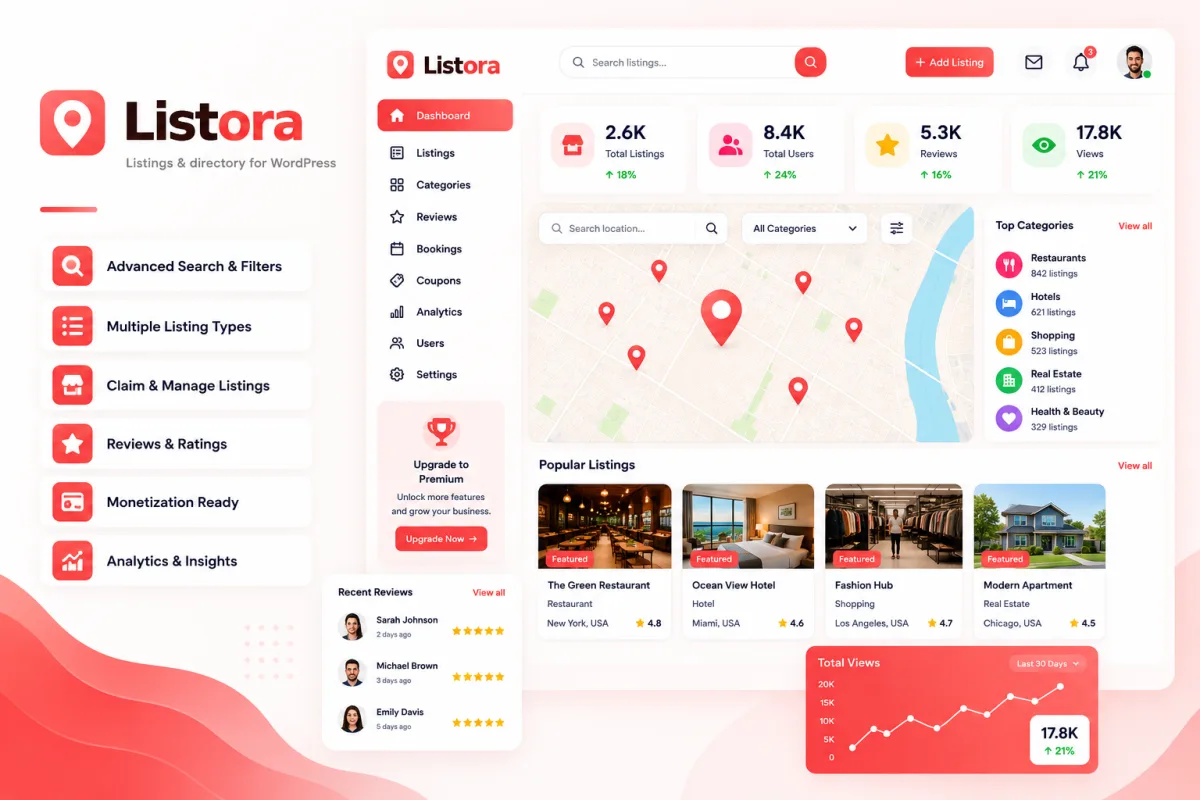
Listora is a WordPress business directory plugin for building local directories, service marketplaces, city guides, and niche listing websites. It focuses on the features many directory owners need after launch: frontend submissions, claim requests, reviews, search filters, lead capture, verification, and monetization.
The free version gives you the base for creating and managing a directory site. You can collect listing submissions from the front end, organize directory pages with Gutenberg blocks, and use customizable layouts to fit different site designs. This makes Listora a practical option if you want a modern directory setup without combining several separate plugins from day one.
Listora Pro adds the business-side tools. Credit-based monetization, lead capture, Google Maps integration, verification badges, analytics, and payment gateway integrations help directory owners turn listing activity into revenue. That is the main reason it earns the top position in this update.
Strengths:
- Frontend listing submissions and business claim requests
- Advanced faceted search with geolocation support
- Reviews with owner replies and built-in spam protection
- Native Gutenberg blocks and customizable directory layouts
- Lead capture and verification badge features
- Credit-based monetization in the Pro version
- Google Maps integration, analytics, and payment gateway integrations in Pro
Limitations:
- Advanced monetization and growth features require Listora Pro
- The ecosystem is newer than long-established plugins such as Directorist, GeoDirectory, and Business Directory Plugin
- Highly specialized directory projects should check the available integrations before committing
Pricing: Free version available. Annual plans start at $48/yr for 1 site, $69/yr for 5 sites, and $139/yr for unlimited sites. One-time plans start at $139 for 1 site, $209 for 5 sites, and $349 for unlimited sites. A 30-day money-back guarantee applies to paid plans.
Best for: Businesses, agencies, and entrepreneurs building a scalable business directory, service marketplace, city guide, or monetized listings website.
2. Directorist: Best overall WordPress directory plugin
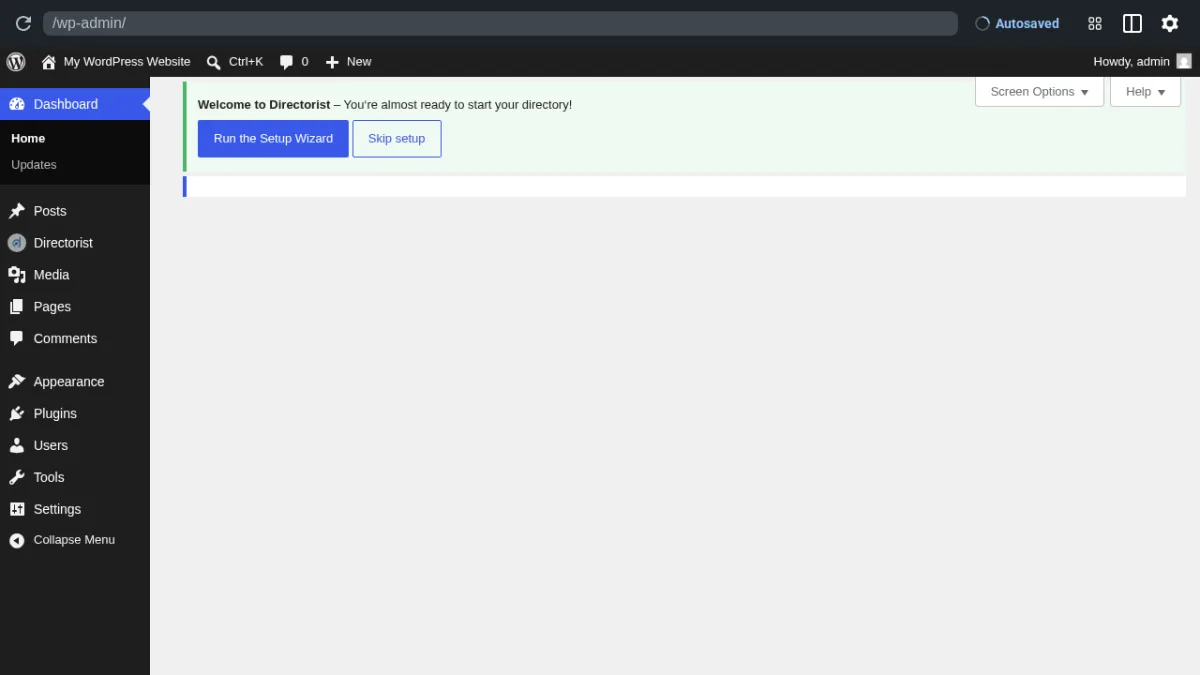
Directorist is the most widely installed WordPress directory plugin in this roundup, with 20,000+ active installs and a 4.6/5 rating across 693 reviews. It is positioned as an AI-powered directory builder that supports multiple directory types from a single install: business directories, classified listings, car sales directories, job boards, hotel directories, restaurant directories, and more.
When I installed the free version and ran through the setup wizard, I had access to the full admin surface. The wizard asks you to choose a directory type and a layout before landing in the main dashboard. The admin menu covers All Listings, Add New Listing, Categories, Locations, Tags, Directory Builder, Reviews, Settings, Tools, and Themes and Extensions. The Directory Builder handles drag-and-drop custom listing form layouts.
Strengths:
- Largest active user base in this category (20,000+ installs)
- Setup wizard walks through directory type, layout, and map configuration
- Drag-and-drop Directory Builder for custom listing form layouts
- Supports multiple directory types from a single install
- Google Maps and OpenStreetMap both supported
- Advanced search with category, location, custom field, and geolocation filters
- Multi-criteria reviews and verified business badge system
- 30+ extensions available for booking, memberships, WooCommerce, and more
- Updated June 2026
Limitations:
- PayPal and Stripe payment collection and paid listing monetization require a paid plan
- Premium themes and the full extension library are bundled in paid tiers
- Frontend display quality depends on the theme you pair with the free version
Pricing: Free version available on WordPress.org. Paid plans start at $103/yr for 1 site (Starter), $118/yr for 5 sites (Pro), and $142/yr for unlimited sites (Agency). Lifetime plans start at $379 for a single site. A 14-day money-back guarantee applies to all plans.
Best for: WordPress site owners who want the most widely used, best-documented directory platform with support for multiple directory types and a broad extension ecosystem.
Visit Directorist | WordPress.org listing
3. GeoDirectory: Best for city and location-based directories
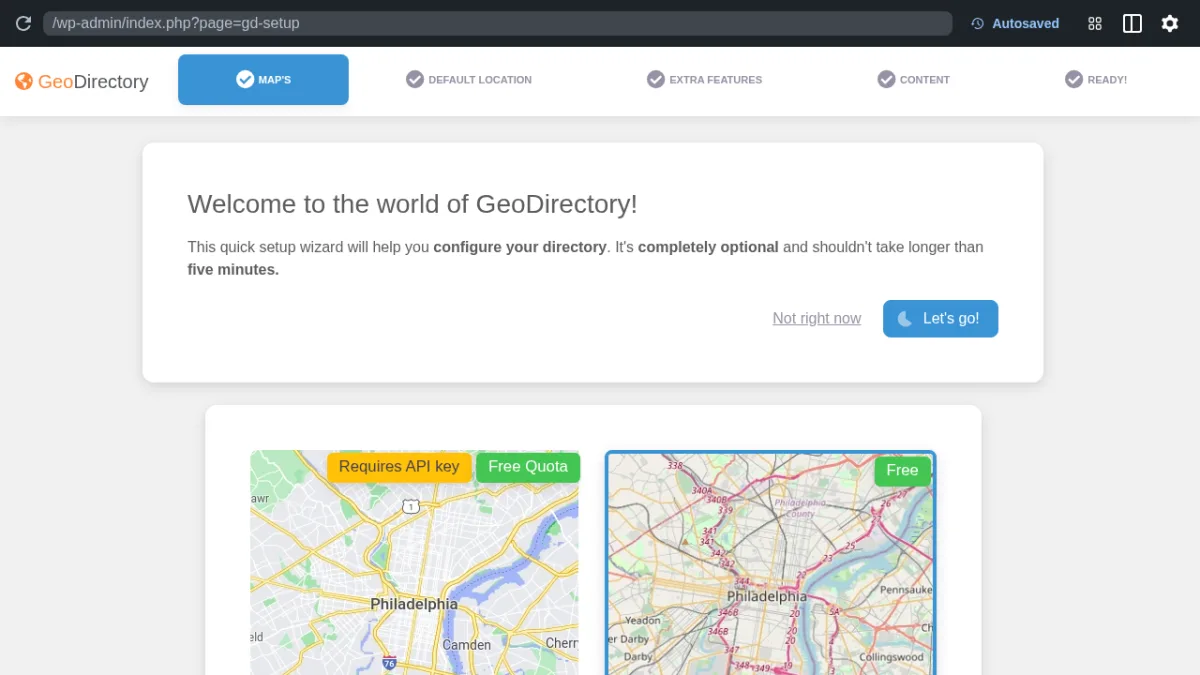
GeoDirectory is built around a specific use case: a location-first directory where a map is the center of the experience, not an optional add-on. It is the go-to plugin for building city guides, local business directories, and Yelp-style sites. With 10,000+ active installs and a 4.8/5 rating across 715 reviews, it has one of the strongest reputations in this category.
The setup wizard asks you to choose a map provider first. Google Maps requires an API key. OpenStreetMap is free. The next step shows a Leaflet map where you set the default location for your directory. That map-first onboarding immediately signals what this plugin is optimized for. After setup, the admin menu exposes Places, Add New Place, Place Tags, Place Categories, and GeoDirectory settings.
Strengths:
- Map-first architecture: every listing has a location on the map by default
- OpenStreetMap/Leaflet available free, no Google Maps API key required
- Setup wizard walks through default location and map configuration step by step
- Drag-and-drop custom fields for listing detail pages
- Blocks, shortcodes, and widgets for embedding maps, listing grids, and search forms
- Multisite support for running multiple directories from one WordPress install
- 4.8/5 rating from 715 reviews
- Updated June 2026
Limitations:
- Charging businesses for listings (paid placements, recurring plans) requires the Pricing Manager add-on, from $49/yr
- Many useful add-ons for events, reviews, claims, and community features are separate paid purchases
- The free core plugin alone is a listing display and submission tool; a monetized directory will require add-ons
Pricing: Free core plugin on WordPress.org. The Pricing Manager add-on (needed for paid listings) starts at $49 for a single site, $69 for 2 to 5 sites, and $99 for unlimited sites. Other add-ons are priced individually at wpgeodirectory.com/downloads.
Best for: Developers and site owners building city guides, local business directories, or any directory where a map is the primary navigation element rather than a secondary feature.
Visit GeoDirectory | WordPress.org listing
4. Listdom: Best free tier for WordPress directory plugins
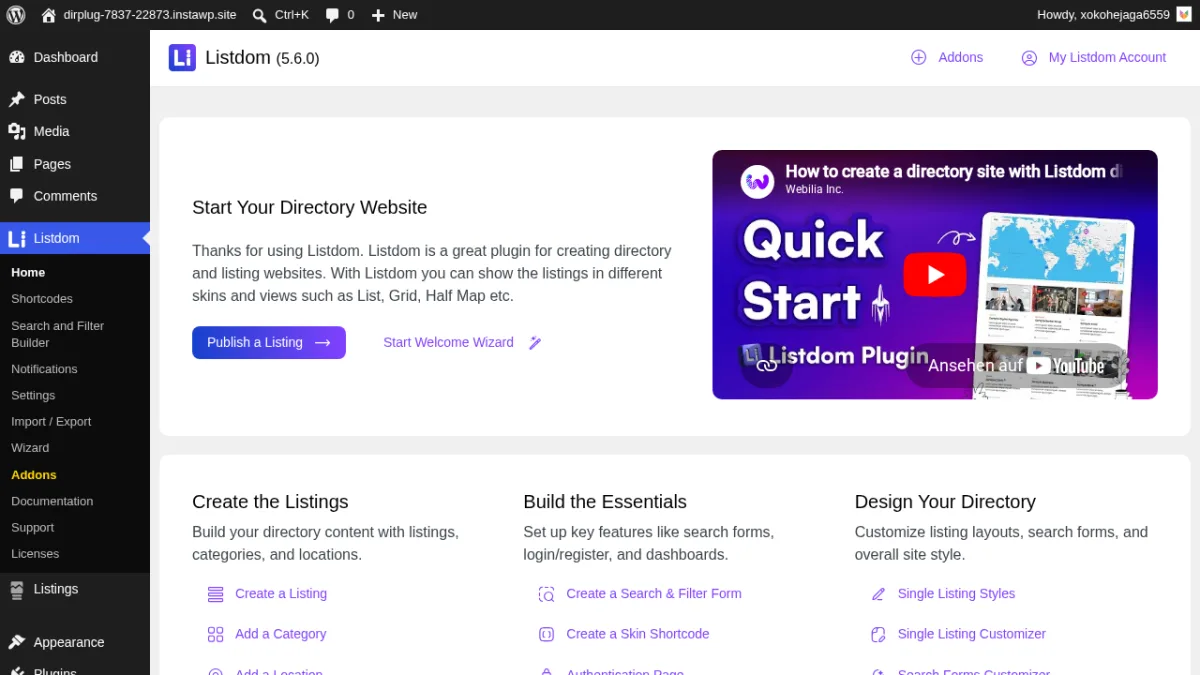
Listdom stands out because its free tier is genuinely complete. Custom fields (all field types), Google Maps, OpenStreetMap, a visual search form builder, 80+ display views, CSV import and export, and AI content tools are all included without paying anything. Most directory plugins gate several of these behind a paid plan.
I installed Listdom 5.6.0 on a clean WordPress 7.0 sandbox via InstaWP and verified the full admin surface. The Add New Listing screen integrates with the block editor and includes Listdom metaboxes for price, gallery, address and map pin, work hours, contact info, categories, locations, tags, features, labels, and custom fields. The Search and Filter Form Builder creates reusable search form templates as custom post types, each with a shortcode for embedding anywhere. The Settings panel confirms Google Maps, OpenStreetMap/Leaflet, and Mapbox are all available free. I also confirmed the Addons page, which shows 30+ extensions that unlock with a paid All-Pass plan.
Strengths:
- Custom fields fully free since v4.2.0 (text, number, dropdown, checkbox, radio, file, image, date, and more)
- Google Maps and OpenStreetMap/Leaflet both free
- 80+ display views including List, Grid, Masonry, Carousel, Table, Cover, and Slider
- Visual Search and Filter Form Builder (CPT-based templates, shortcode output)
- Block editor integration for listing creation
- AI content generation via OpenAI, Claude, or Gemini (API key required)
- CSV import and export for bulk listing management
- 4.9/5 rating from 55 reviews (53 five-star)
- Updated June 2026
Limitations:
- Only 1,000+ active installs. The plugin is newer than the others in this group; the install count is growing but reflects a shorter track record rather than a quality issue
- Advanced map search features (radius search, GPS locate me, drawing tool) are Pro-only
- Stripe payments and recurring memberships require paid add-ons
- 30+ add-ons (Claim Listings, Reviews, Booking, Elementor, Bricks, ACF, MemberPress) all need the paid All-Pass subscription
Pricing: Free on WordPress.org. Paid plan: $144/yr for unlimited sites (Yearly), or $21/mo for a single site. Lifetime plans start at $249 for 2 sites. A 30-day money-back guarantee applies to annual and lifetime plans.
Best for: Developers and site owners who want the most complete free directory plugin with multiple display layouts, custom fields, and maps all included before paying anything.
Visit Listdom | WordPress.org listing
5. HivePress: Best for marketplace and vendor directories
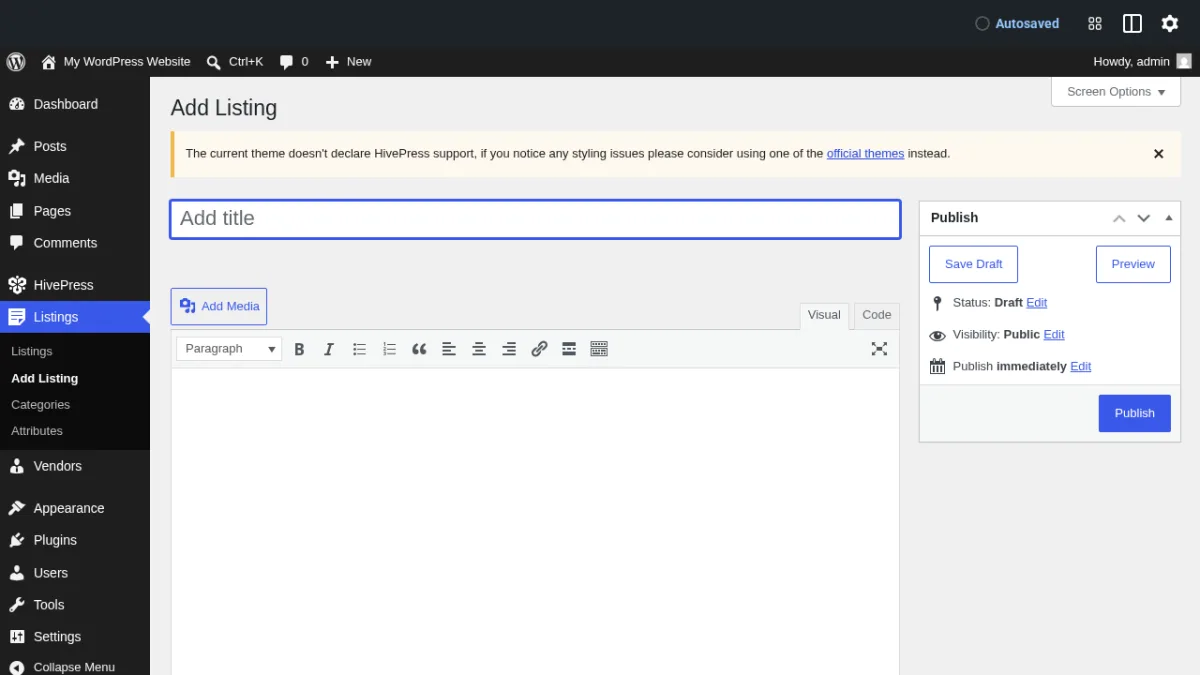
HivePress takes a different approach from the other plugins in this list. Instead of a traditional directory builder, it is a marketplace platform where vendors have their own profiles and listings are tied to vendor accounts. This makes it the strongest option for building a directory where service providers, freelancers, or businesses each manage their own public profile and listings independently.
When I installed the free version in a clean WordPress sandbox, there was no blocking setup wizard. The listing editor was accessible immediately. The admin menu exposed Listings, Add Listing, Categories, Attributes, Vendors, Add Vendor, Vendor Categories, and Vendor Attributes. The Add Listing editor loaded cleanly with panels for vendor assignment, verified status, featured flag, expiration date, and images. HivePress has 10,000+ active installs and the highest rating in this roundup at 4.9/5 from 216 reviews. If your use case includes booking or appointment flows tied to vendor profiles, HivePress also has extensions for those scenarios.
Strengths:
- Built-in vendor model: each listing is tied to a vendor profile account
- Attribute system for both listings and vendors (configurable from admin, free)
- No blocking setup wizard; the listing editor is accessible immediately after activation
- Geolocation extension available free as a separate WordPress.org plugin
- Claim Listings extension is free
- 4.9/5 overall rating (highest in this group)
- Updated June 2026
- Wide range of themes at hivepress.io designed for directory and marketplace use cases
Limitations:
- Map display requires installing the separate Geolocation extension; maps are not bundled in the base plugin
- Marketplace payment features (vendor payouts, commissions) and Memberships require paid extensions
- Frontend visual quality depends heavily on which HivePress-compatible theme you use; the default WordPress theme shows a notice that HivePress support is not declared
- Advanced search features are extension-driven
Pricing: The core HivePress plugin is free on WordPress.org. Individual extensions and themes are sold separately at hivepress.io. Prices vary by extension. Check the HivePress extensions page for current pricing on Marketplace, Memberships, Reviews, and other add-ons.
Best for: Site owners building multi-vendor directories, freelancer marketplaces, service provider directories, or any directory where each listing belongs to a verified vendor account with its own public profile.
Visit HivePress | WordPress.org listing
6. Business Directory Plugin: Best classic shortcode-based directory
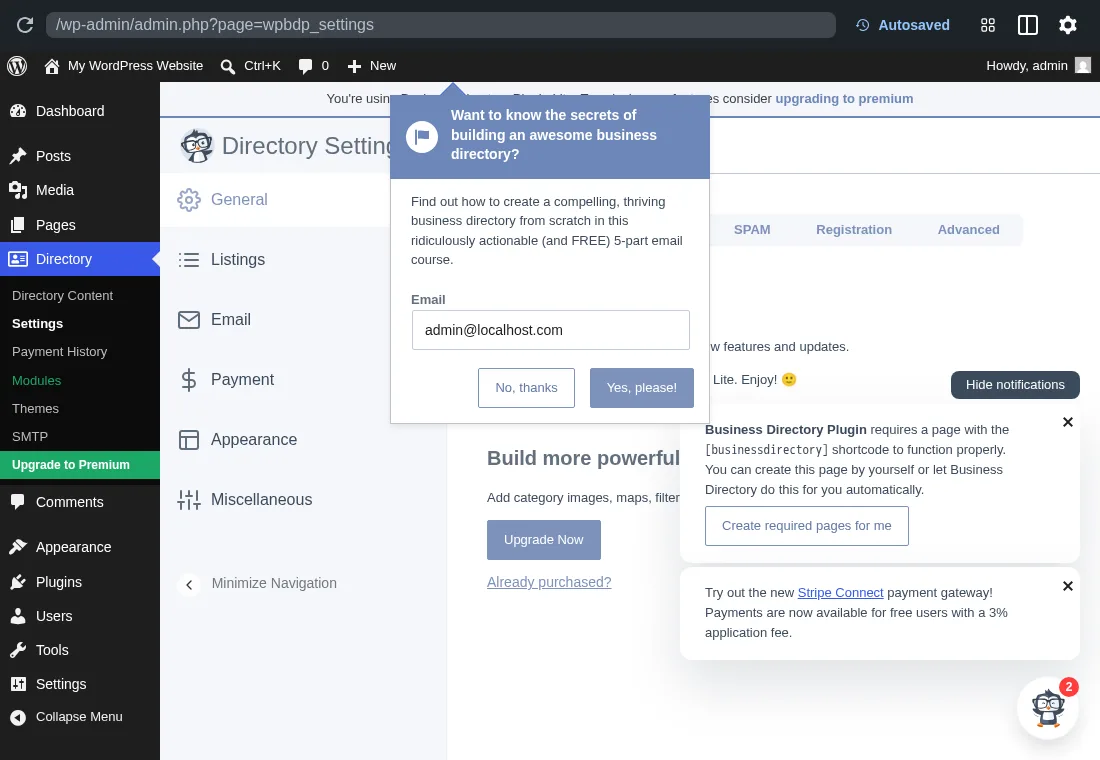
Business Directory Plugin is one of the most established options in this category, with 10,000+ active installs and a 4.6/5 rating from 504 reviews. It takes a shortcode-based approach: you create a page, add the [businessdirectory] shortcode, and the plugin renders your directory there. The Lite version is free on WordPress.org, and paid plans unlock modules for maps, premium themes, payment gateways, and additional field and layout options.
I installed the Lite version and went through the onboarding flow. The settings screen clearly identifies the installed version as Business Directory Plugin Lite and shows a Stripe Connect option with a 3% application fee for free-tier users. The admin menu adds Directory Content, Settings, Payment History, Modules, Themes, SMTP, and Upgrade to Premium. Documentation is detailed and organized into knowledge base articles for every major feature area.
Strengths:
- Mature plugin with 10,000+ installs and a long track record
- Rich documentation covering setup, shortcodes, form fields, search, and payments
- Form Fields system gives per-field control over which fields appear in listings, excerpts, and search
- Quick search and advanced search included
- Stripe Connect available in the free Lite tier (3% application fee applies)
- Shortcode-based embedding allows placement in any page, post, or widget area
- Updated May 2026
Limitations:
- Google Maps integration is a separate module, not included in the free Lite version
- Premium listing templates and advanced field layouts need paid modules
- Setup requires manually creating a WordPress page and adding the
[businessdirectory]shortcode, which is more friction than wizard-driven alternatives - Paid plans start at $199/yr, the highest starting price in this roundup
Pricing: Lite version free on WordPress.org. Paid plans start at $199/yr per the vendor's own comparison page at businessdirectoryplugin.com. Premium modules are included in paid plans rather than sold separately.
Best for: Site owners building classic business member directories, provider listings, or professional association directories who want a mature, documentation-rich plugin with proven shortcode-based output and fine-grained field control.
Visit Business Directory Plugin | WordPress.org listing
7. Classified Listing: Best for modern classifieds and listing marketplaces
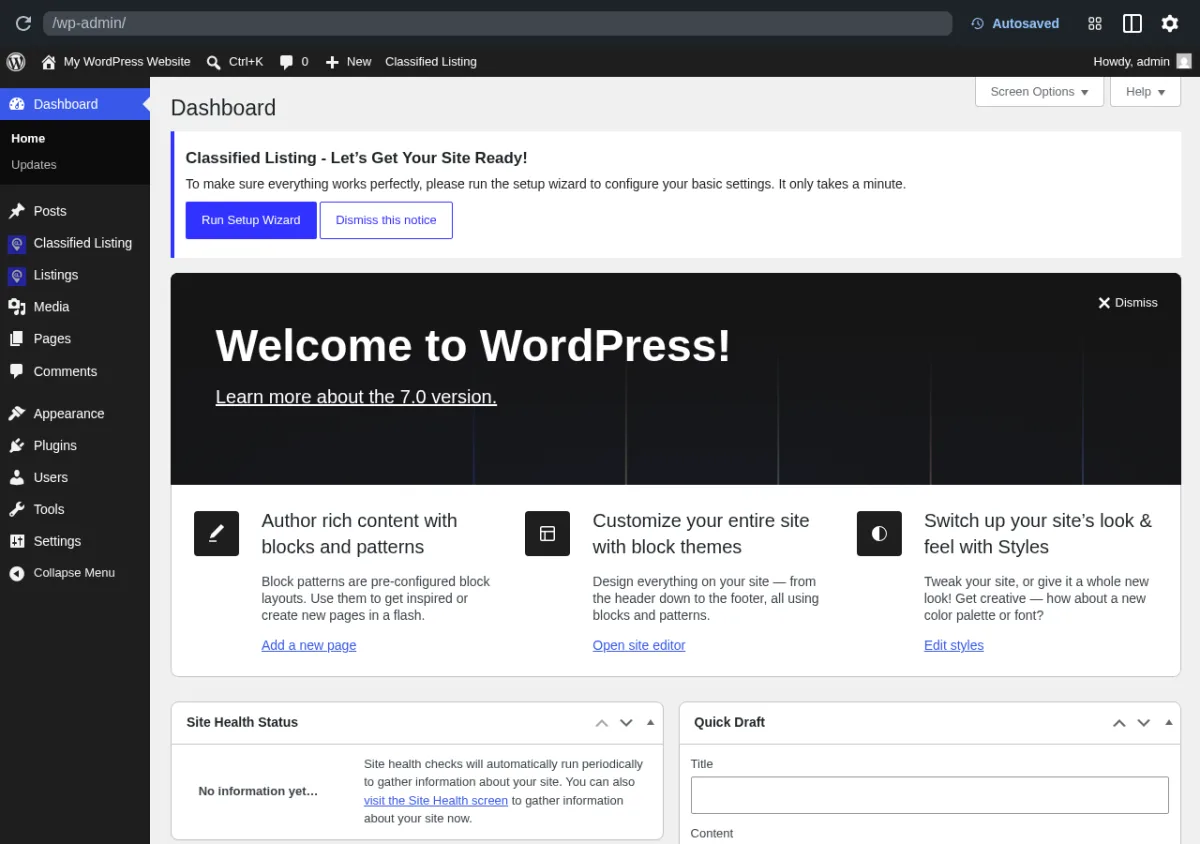
Classified Listing by RadiusTheme is positioned as a modern classified ads and listing marketplace plugin. It has 9,000+ active installs and a 4.8/5 rating from 133 reviews. Its standout feature for new sites is the out-of-the-box page structure: on activation, the plugin automatically creates four front-end pages (Checkout, Listing Form, Listings, and My Account) along with a setup wizard to guide initial configuration. You get a usable directory structure without creating any pages manually.
I installed Classified Listing in a clean hosted WordPress sandbox and confirmed the auto-created page structure and admin menus. The plugin also includes a built-in AI form generator and a drag-and-drop form builder with multi-category custom fields and conditional field logic. A REST API covers listing creation and search for headless or custom integrations.
Strengths:
- Auto-generates Checkout, Listing Form, Listings, and My Account pages on activation
- Setup wizard for initial configuration
- Drag-and-drop form builder with multi-category custom fields and conditional logic
- REST API for listings, search, and listing creation
- Built-in AI form generator
- Front-end user account and listing management (My Account page)
- PayPal gateway available in the free version
- 30-day money-back guarantee on all paid plans
- Updated June 2026
Limitations:
- Stripe and Authorize.net payment gateways require the paid Bundle plan
- Advanced ad promotion features (featured placements, paid memberships) require add-ons
- 9,000+ active installs is the lowest among the full-featured directory plugins in this group
Pricing: Free core version on WordPress.org. Core Plugin (1 site): $39/yr. Bundle (1 site, all add-ons and themes): $90/yr. Bundle Unlimited Sites: $244/yr. Lifetime Bundle (1 site): $279. A 30-day money-back guarantee applies to all plans. Check radiustheme.com pricing for current promotional offers.
Best for: Site owners building classified ad boards, listing marketplaces, or modern directory sites who want auto-generated pages, AI tools, and a form builder included in the free version.
Visit Classified Listing | WordPress.org listing
8. AWP Classifieds: Best for simple free classified ad boards
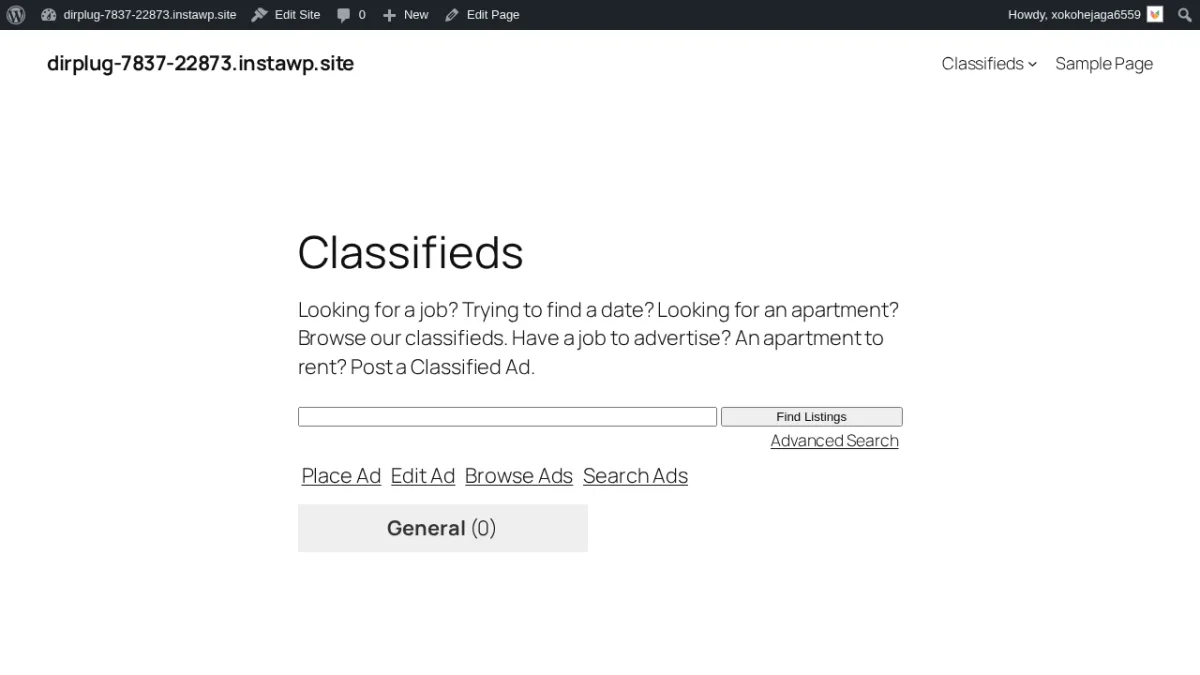
AWP Classifieds (AWPCP) has been on WordPress.org since 2009, making it the oldest and most battle-tested plugin in this list. It has 3,000+ active installs and a 4.6/5 rating across 301 reviews. The free version covers a lot: PayPal Standard payments, a configurable fee plan system (including $0 free ad plans), a full frontend submission workflow, guest posting without registration, a blind email contact system for poster privacy, and ad renewal. All required classified pages are created automatically on activation.
I installed AWP Classifieds 4.4.7 in a clean WordPress 7.0 sandbox on InstaWP and confirmed the full frontend works out of the box. The plugin creates eight pages automatically (/classifieds/, /classifieds/place-ad/, /classifieds/search-ads/, /classifieds/edit-ad/, /classifieds/renew-ad/, and more). The place-ad flow shows a category selector and fee plan selector on step one, including a $0 free plan option. The frontend renders cleanly on the default Twenty Twenty-Five theme with no conflicts.
Strengths:
- In active use since 2009, with 300+ reviews and a long maintenance history
- Frontend submission workflow confirmed working in the free tier: category selector, fee plan, and ad form all function
- Auto-creates all required classified pages on activation with no manual setup
- PayPal Standard and 2Checkout available free
- Credit system for selling ad credits also included free
- Guest posting supported without account registration
- Blind email system hides poster email from inquirers
- Akismet and Google reCAPTCHA anti-spam integrations
- Yoast SEO integration
Limitations:
- No map display in any tier. Location handling is text-based (city, state, and country fields)
- Custom fields (Extra Fields module) require the Pro plan at $149.50/yr
- Stripe requires the Pro plan; Authorize.net requires the Elite plan
- No built-in skin or layout system. Frontend appearance depends entirely on the active WordPress theme
- A SQL injection vulnerability (CVE) was publicly disclosed in May 2026 for versions up to 4.4.5. Version 4.4.7 (the current release at time of testing) includes the security fix. Keep the plugin updated
Pricing: Free on WordPress.org. Basic plan: $49.50/yr for 1 site (adds Comments and Ratings, BuddyPress, Category Icons, Attachments). Pro plan: $149.50/yr for up to 5 sites (adds Stripe, Extra Fields, Regions Control, Featured Ads). Elite plan: $249.50/yr for unlimited sites (adds Memberships, Coupons, ZIP Code Search, Authorize.net). A 14-day money-back guarantee applies. Note: these are current promotional prices; renewal rates may differ.
Best for: Site owners building a simple Craigslist-style classified board where maps are not required, PayPal is acceptable, and the priority is a zero-friction free ad posting experience with a long-established plugin.
Visit AWP Classifieds | WordPress.org listing
How to choose the right WordPress directory plugin
The most common mistake when choosing a directory plugin is treating all directory sites as the same project. A city business guide and a classifieds board have almost nothing in common functionally, even though both appear in the same plugin comparison lists.
Start with these four questions before picking:
- Do you need a map? If yes, GeoDirectory and Listdom offer OpenStreetMap free with no API key required. Directorist supports both Google Maps and OpenStreetMap. HivePress needs the separate Geolocation extension. AWP Classifieds has no map in any tier. Skip it if maps matter to your site.
- Do you need paid listing monetization? Charging businesses for placement or upgrades is not free in most directory plugins. GeoDirectory needs the Pricing Manager add-on ($49+/yr). Directorist requires a paid plan. HivePress uses paid extensions. If a PayPal-based fee plan is enough, AWP Classifieds handles this without any paid plan.
- Do you need a vendor or multi-seller model? If each listing should be tied to a verified vendor with their own account and profile page, HivePress is the purpose-built choice. The other plugins in this list treat listings as admin-managed or anonymous submissions.
- How many display layouts do you need? Listdom's 80+ view options put it well ahead of the field here. Most other plugins offer a handful of templates or rely on the active WordPress theme for display variety.
If you want to monetize a directory with claims, leads, credits, and verification features, Listora is the first option to review. If you prefer the most established ecosystem and the widest active user base, Directorist remains a safe choice for many new directory projects.
Frequently asked questions
What is the best free WordPress directory plugin?
Listdom offers the most complete free tier of any plugin tested here. Custom fields (all field types), Google Maps, OpenStreetMap, a visual search form builder, and 80+ display views are all available without a paid plan. GeoDirectory and HivePress are close runners-up with strong free cores, but GeoDirectory requires the paid Pricing Manager for monetized listings, and HivePress needs a separate extension for maps.
Can I collect payments from businesses without a paid directory plugin?
AWP Classifieds supports PayPal Standard and a credit system in its free version, making it one of the few directory plugins that lets you charge for ad placement without any paid plan. Business Directory Plugin Lite also shows Stripe Connect for free users, but a 3% application fee applies. Most other directory plugins (Directorist, GeoDirectory, HivePress, Listdom) require a paid plan before you can enable payment collection.
Which WordPress directory plugin has the best map support for free?
Listdom confirms support for Google Maps, OpenStreetMap/Leaflet, and Mapbox all in the free tier, with no Google API key required for OpenStreetMap. GeoDirectory also includes map setup in the free core plugin, with OpenStreetMap available without an API key. Directorist supports maps but the full geo-search feature set is tied to the paid plan. AWP Classifieds has no map display in any tier.
What is the difference between a directory plugin and a classifieds plugin?
A directory plugin is designed for persistent, curated listings. Each business or service provider has a permanent page, usually reviewed and approved. A classifieds plugin is built for user-submitted ads that expire after a set period. Most of the plugins in this roundup can handle both cases. GeoDirectory and Directorist are more directory-focused. AWP Classifieds and Classified Listing lean toward classifieds. Listdom and HivePress sit comfortably in the middle.
Can I build a Yelp-style local business directory with WordPress?
Yes. GeoDirectory is the most direct choice for this use case. It is built around location-first listing submission, business categories, a free OpenStreetMap display, and a reviews system. Add-ons extend it with paid listing monetization, events, advanced reviews, and community features. For a Yelp-style city directory, GeoDirectory is the most purpose-built starting point in this group.
Which WordPress directory plugin is easiest to set up?
Classified Listing is the fastest to get running. On activation it automatically creates all required pages including Listings, Listing Form, My Account, and Checkout, then opens a setup wizard. AWP Classifieds also auto-creates all required pages, so no manual shortcode-page setup is needed. HivePress has no blocking setup wizard at all. Business Directory Plugin requires the most manual setup: you must create a page, add the shortcode, and then configure the plugin before anything is visible on the front end.
The bottom line
There is no single best WordPress directory plugin because the category covers very different site types. Match the plugin to what your directory actually does:
- Best for monetized business directories: Listora
- Most versatile, widest community: Directorist
- Best for maps and location-based directories: GeoDirectory
- Most generous free tier: Listdom
- Best for vendor and marketplace directories: HivePress
- Best classic business directory with detailed documentation: Business Directory Plugin
- Best modern classifieds with auto-setup: Classified Listing
- Best for simple free classified boards: AWP Classifieds
Start with the comparison table at the top. Match the plugin to your directory type and the features your free tier actually needs. That will narrow the choice faster than any single ranking can.
Similar Blogs


