

7 Best WordPress Caching Plugins in 2026 (Free and Paid, Hands-on Tested)

Why your WordPress site still needs a cache plugin in 2026
If your WordPress site rebuilds the same page from PHP, MySQL and your active theme every time a visitor lands on it, you are paying the rendering cost over and over. A caching plugin saves the rendered HTML once, then serves the static copy until the content changes. The difference is usually two to ten times faster page loads, lower hosting bills, and Core Web Vitals scores that finally clear the "Good" threshold instead of sitting in "Needs Improvement".
I tested every caching plugin in this list on a clean WordPress 6.9.4 install on 2026-06-07. Six of the seven have usable free versions; I installed each from WordPress.org, walked through the setup flow, toggled cache controls, exercised minify and preload settings where safe, and captured the real admin screens. The seventh, WP Rocket, has no free version, so its coverage is built from the vendor's own pricing page, feature pages, changelog and help center documentation, with a clearly labeled vendor screenshot. Every install count, rating, version number, tested-up-to value and price below was verified live on 2026-06-07 against WordPress.org and the vendor's own pricing page.
If you want a wider stack that goes beyond caching, our roundup of free WordPress speed plugins covers image optimization, minification and database cleanup alongside the four free caching picks that also appear here.
How I evaluated each plugin
For each plugin I checked the same set of buyer-relevant facts:
- Install reputation: active install count, average rating and total review count on WordPress.org (or the vendor's own update channel when the plugin is paid-only).
- Setup experience: time to first cached page, presence of a setup wizard, default safety of the recommended preset.
- Cache controls: page cache method, expiry/lifespan, mobile and logged-in user handling, cookie and query-string exclusions, cache purge behavior.
- Minify, combine and preload: what the free tier actually includes for CSS, JS and HTML optimization; whether preload is in free or Pro.
- Compatibility: known conflicts with other cache plugins, page builders, WooCommerce and reverse proxies (Cloudflare, Varnish, Sucuri, NGINX FastCGI).
- Pricing honesty: real annual or one-time amount, no "from $X/month billed annually" rounding tricks.
The order below reflects our current recommendation, while still noting the use case where each plugin makes the most sense.
Quick comparison table
| Plugin | Best for | Free tier covers | Starting paid price | Main limitation |
|---|---|---|---|---|
WP Fastest Cache |
Single-screen settings with a lifetime paid tier |
Page cache, Gzip, browser cache, basic minify, render-blocking JS, combine CSS, combine JS header |
$49 one-time (1 site) |
Render-blocking JS handling is free but lazy load, delay JS and image opt are Premium |
LiteSpeed Cache |
All-in-one free cache on LiteSpeed or OpenLiteSpeed hosts |
Page, object, browser cache, image opt, minify, CDN, ESI, critical CSS |
Usage-based QUIC.cloud top-ups (free monthly quotas) |
Server-level cache only kicks in on LiteSpeed servers |
WP Rocket |
Plug-and-play premium with the cleanest defaults |
Not available (paid only) |
$59/ |
No free version, no public WordPress.org listing |
WP-Optimize |
Best free all-in-one for non-LiteSpeed hosts |
Page cache, image compression, minify, database cleanup |
$58.31/ |
Combine-JS off by default and not recommended without testing |
W3 Total Cache |
Most configurable free cache for technical users |
Page, object, db, browser, fragment cache, minify, 12+ CDN providers |
$99/ |
Steepest learning curve; wrong combinations break sites |
WP Super Cache |
Simplest reliable cache from Automattic |
Page cache only with three delivery methods, preload, CDN, mobile theme |
Free forever |
No minify, no image opt; pair with other plugins |
Hummingbird |
Free Cloudflare or Varnish purge plus asset optimization |
Page cache, browser cache, Gzip, minify, lazy load, Cloudflare and Varnish purge |
$3/ |
Performance test inside the dashboard needs a WPMU DEV account |
1. WP Fastest Cache: best overall simple caching plugin for most WordPress sites
- Official website: WP Fastest Cache
- WordPress.org: wordpress.org/plugins/wp-fastest-cache/
- Active installs: 1+ million
- Rating: 4.9 / 5 (4,219 reviews on 2026-06-07)
- Latest version: 1.4.9, released 2026-05-20
- Tested up to: WordPress 7.0
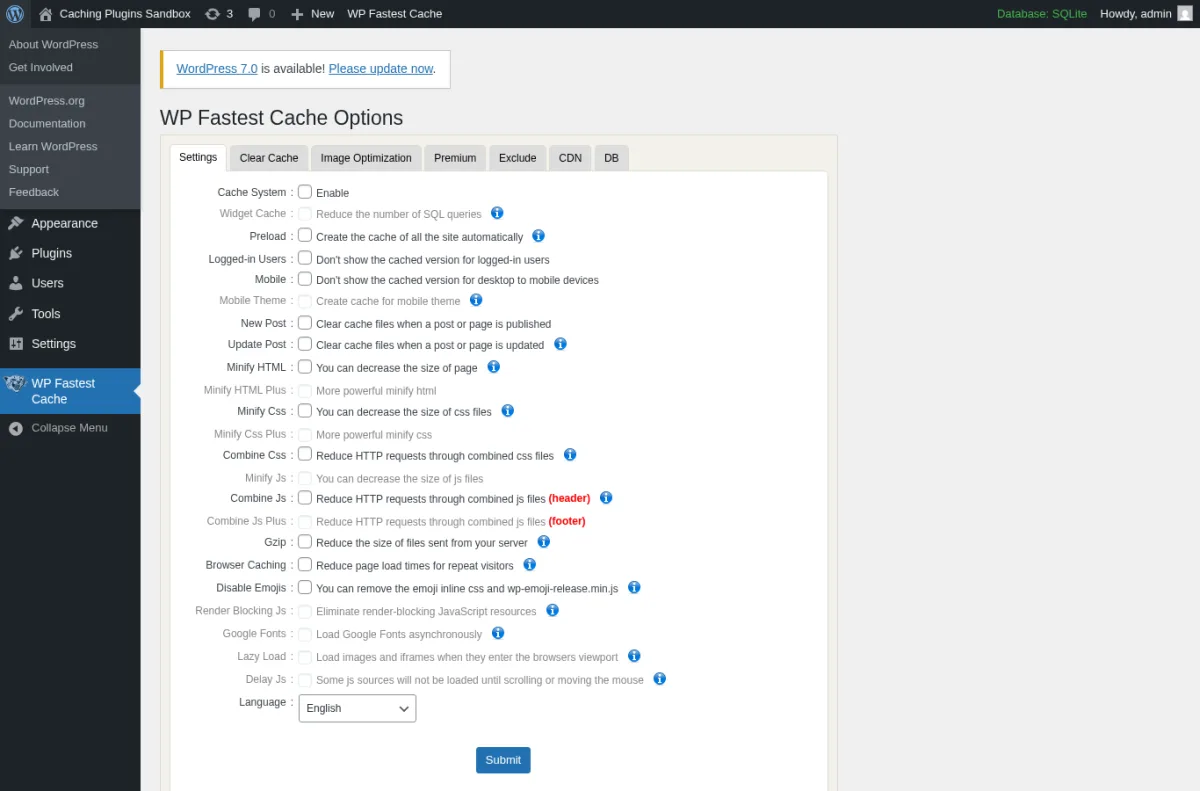
WP Fastest Cache from Emre Vona takes the opposite approach to W3 Total Cache: every setting is on one screen, every toggle has a one-sentence description, and the configuration interview that other cache plugins make you sit through does not exist. Activate, tick the boxes you want, hit Submit. The free tier covers page cache, Gzip, browser cache, basic HTML and CSS minify, CSS combine, JS combine for the header, render-blocking JS handling, mobile theme separation, preload and a clear-cache scheduler.
What I tested in a clean WordPress 6.9.4 sandbox on 2026-06-07: I activated v1.4.9 and opened the WP Fastest Cache Options page. The Settings tab is one long list of toggles. I enabled Cache System, Combine CSS, Gzip and Browser Caching, then saved. The plugin wrote rewrite rules and started caching homepage requests to wp-content/cache/all/. The Clear Cache tab offers Delete Cache and Delete Cache and Minified CSS/JS with cron-based time expiry. The free tier handles render-blocking JS handling, which is unusual for a free plugin.
Strengths. Single-screen settings page that even a non-technical site owner can complete in five minutes. One-time lifetime price is the only such pricing on this list; if you hate annual renewals, this is the natural pick. The plugin's 4.9 average rating on 4,200+ reviews reflects long-term user satisfaction.
Limitations. Lazy Load, Delay JS, Google Fonts optimization, advanced Minify CSS/JS and image optimization are gated behind Premium. The free tier covers the basics well but stops short of the Core Web Vitals fixes that WP Rocket or LiteSpeed bundle for free.
Pricing. All one-time lifetime fees with a 30-day money-back guarantee, verified on wpfastestcache.com/premium on 2026-06-07:
- Bronze $49 one-time for 1 license
- Silver $125 one-time for 3 licenses
- Gold $175 one-time for 5 licenses
- Platinum $300 one-time for 10 licenses
Premium adds Lazy Load, Delay JS, Google Fonts optimization, Render Blocking JS Plus, automatic image optimization, widget cache, and full minify-CSS and minify-JS options.
Best fit. Site owners who hate annual subscription renewals, agencies that prefer one-time purchases for client sites, and beginners who want every setting on one page they can reason about.
2. LiteSpeed Cache: best all-in-one free cache if your host runs LiteSpeed
- WordPress.org: wordpress.org/plugins/litespeed-cache/
- Active installs: 7+ million
- Rating: 4.8 / 5 (2,757 reviews on 2026-06-07)
- Latest version: 7.8.1, released 2026-04-01
- Requires: WordPress 5.3+, PHP 7.2+
- Tested up to: WordPress 6.9.4
LiteSpeed Cache from LiteSpeed Technologies (often called LSCWP) is the most feature-dense free caching plugin in 2026. The free plugin alone gives you server-level page caching on LiteSpeed Web Server, OpenLiteSpeed and LiteSpeed Web ADC, plus object caching (Memcached, Redis, LSMCD), browser caching, image optimization with WebP and AVIF conversion, critical CSS generation, CSS / JS / HTML minify and combine, lazy load, the free QUIC.cloud CDN, and ESI for caching dynamic fragments like the WooCommerce cart on otherwise-cached pages.
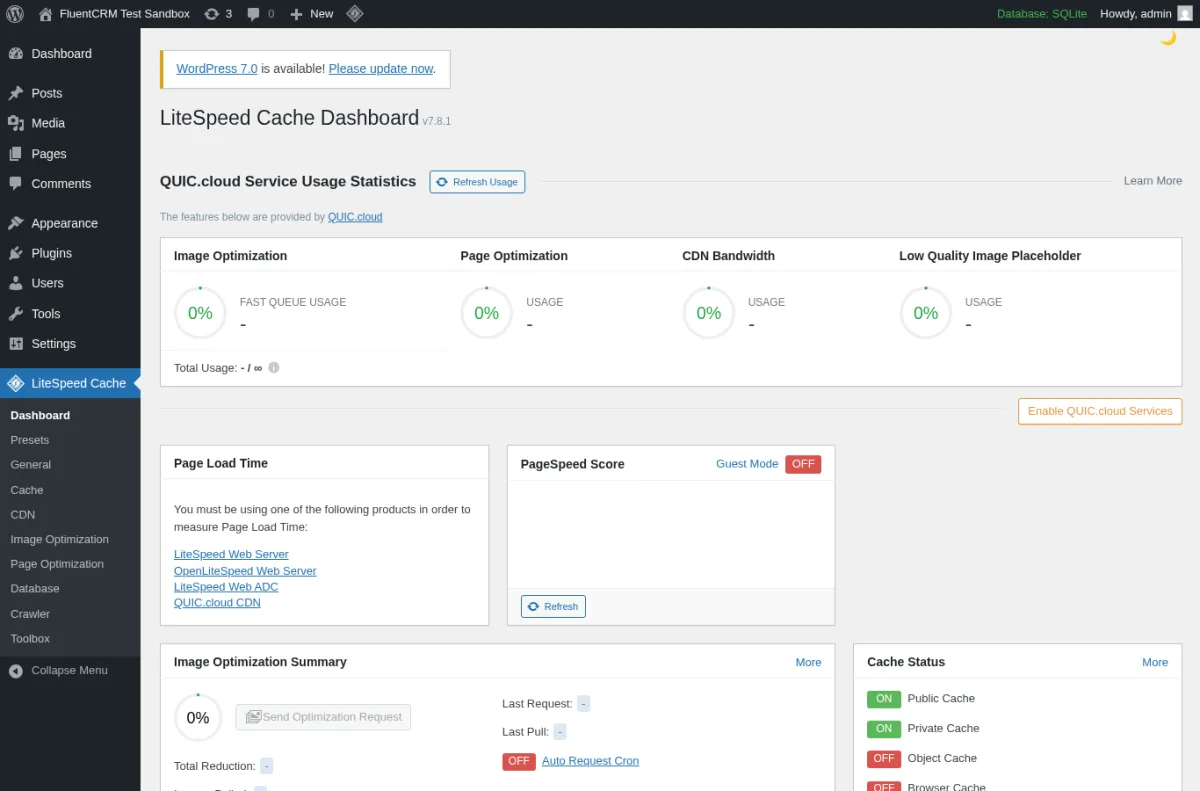
What I tested in a clean WordPress 6.9.4 sandbox on 2026-06-07: I activated v7.8.1 and walked the Dashboard, Cache, Page Optimization and Toolbox screens. The Cache panel exposes Public Cache, Private Cache, Object Cache and Browser Cache toggles. The Page Optimization tabs (CSS Settings, JS Settings, HTML Settings, Media Settings, VPI, Localization, Tuning) cover everything you would normally need a second plugin for. The dashboard's QUIC.cloud Service Usage Statistics show how much of your free monthly quota you have used for image optimization, page optimization, CDN bandwidth and low-quality image placeholders.
Strengths. Free. Feature-complete on LiteSpeed and OpenLiteSpeed hosts (Hostinger's premium plans, ChemiCloud, Namecheap Stellar Plus, A2 Turbo and most modern LiteSpeed cloud configurations). The QUIC.cloud add-on services (image opt, critical CSS, CDN) work even on non-LiteSpeed hosts, so the plugin is still useful on Apache or NGINX, just without server-level cache.
Limitations. Server-level caching only kicks in if your hosting runs LiteSpeed; on a generic Apache or NGINX host you get PHP-level cache and the QUIC.cloud services, which is fine but not the headline feature. The settings panel is dense and "enable everything" is rarely the right call; start with the recommended preset and add features one at a time. Image optimization is asynchronous and can take several hours to process a large media library.
Pricing. The plugin is GPLv2+ and fully free, forever. The only spend is optional QUIC.cloud top-ups when your free monthly quota for image optimization, critical CSS or CDN bandwidth is not enough. Most small and mid-sized sites never exceed the free monthly quota.
Best fit. Any site hosted on LiteSpeed Web Server, OpenLiteSpeed or QUIC.cloud, WooCommerce stores that need ESI for cart fragments, and anyone who wants one free plugin instead of a four-plugin stack.
3. WP Rocket: most polished premium cache, plug-and-play defaults
- Vendor: wp-rocket.me
- WordPress.org: not listed (paid only)
- Latest version: 3.20.x line per wp-rocket.me/changelog
- Free version: no
- Tested up to: latest WordPress release per vendor changelog
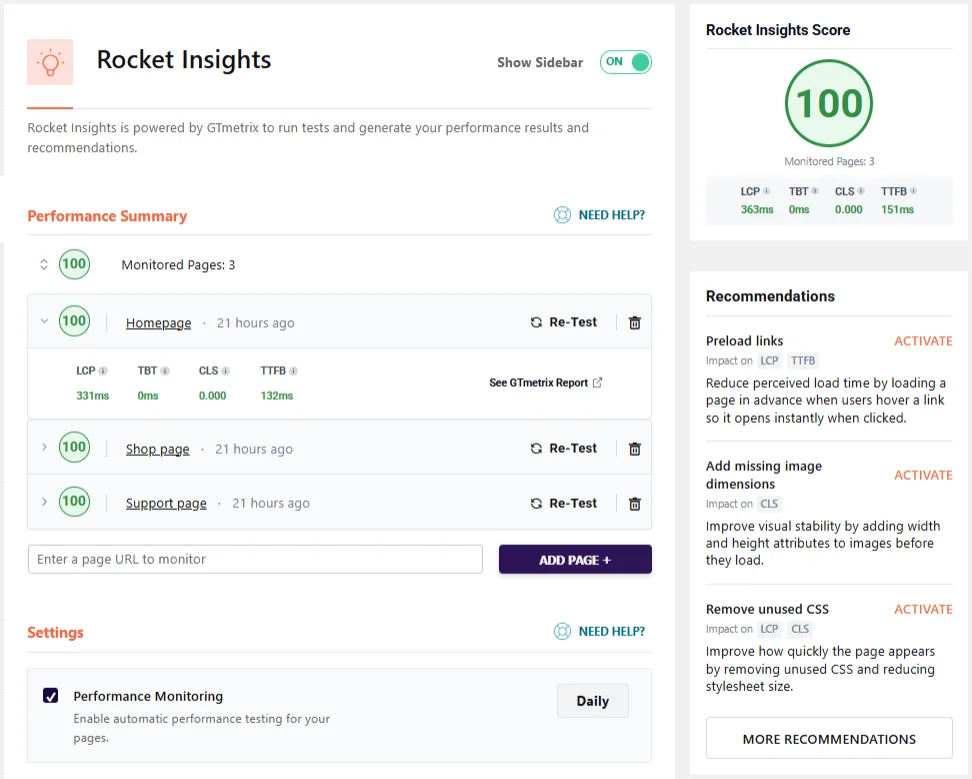
WP Rocket from WP Media is the most polished premium cache plugin in the WordPress ecosystem in 2026. It applies roughly 80% of standard web performance best practices the second you activate it (page cache, browser cache, Gzip, lazy load images and iframes), and the rest of the dashboard is a short list of clearly labeled toggles for things you would normally need a developer to configure: delay JavaScript execution, remove unused CSS, preload links on hover, eliminate render-blocking resources, optimize Google Fonts, lazy load CSS background images, defer non-critical JavaScript and clean up the WordPress database. The 3.20 line added Rocket Insights, a GTmetrix-backed performance monitor embedded in the dashboard that pings your pages on a schedule, shows the LCP, TBT, CLS and TTFB scores per page, and surfaces fixes you can activate with one click.
What I verified instead of installing: WP Rocket is not distributed through WordPress.org, so there is no public free build to download. The safe-testing rule for this cluster is to avoid creating paid vendor accounts for a roundup, so I sourced the 2026 coverage from the vendor's own pricing page, features page, changelog and the Rocket Insights help center article. The screenshot above is the vendor's own Rocket Insights screen from the official help center, used with attribution.
Strengths. Zero-config defaults that are safer than almost any free plugin's defaults. Delay JS on user interaction is a real Core Web Vitals win on theme-heavy sites. Cloudflare, Sucuri and Varnish add-ons exist for sites behind a reverse proxy. Rocket Insights is a useful 2026 add-on for site owners who never opened GTmetrix or PageSpeed Insights on their own.
Limitations. No free tier and no free trial. Annual renewal is automatic until you turn it off from the Billing section of your account; if you forget, your second-year invoice arrives without warning. Some power users still prefer the granular cache-zone control of W3 Total Cache.
Pricing. Annual subscription, three tiers, all verified on wp-rocket.me/pricing on 2026-06-07:
- Single $59 per year for 1 website
- Plus $119 per year for 3 websites
- Multi $299 per year for 50 websites
Rocket Insights is included on every plan at no extra cost. RocketCDN is a separate optional add-on.
Best fit. Site owners who want a premium plugin that just works, agencies running many client sites under one Plus or Multi license, and Core Web Vitals consultants who want one polished plugin to recommend across clients.
4. WP-Optimize: best free all-in-one for sites without LiteSpeed hosting
- WordPress.org: wordpress.org/plugins/wp-optimize/
- Active installs: 1+ million
- Rating: 4.8 / 5 (2,582 reviews on 2026-06-07)
- Latest version: 4.5.5, released 2026-06-05
- Requires: WordPress 4.9+, PHP 7.2+
- Tested up to: WordPress 7.0
WP-Optimize from Team Updraft (the team behind UpdraftPlus) packs page caching, image compression, HTML / CSS / JS minify, Gzip compression, static-file-header tuning and database cleanup into one free plugin. For most sites that do not run LiteSpeed hosting, this single plugin replaces three or four separate plugins.
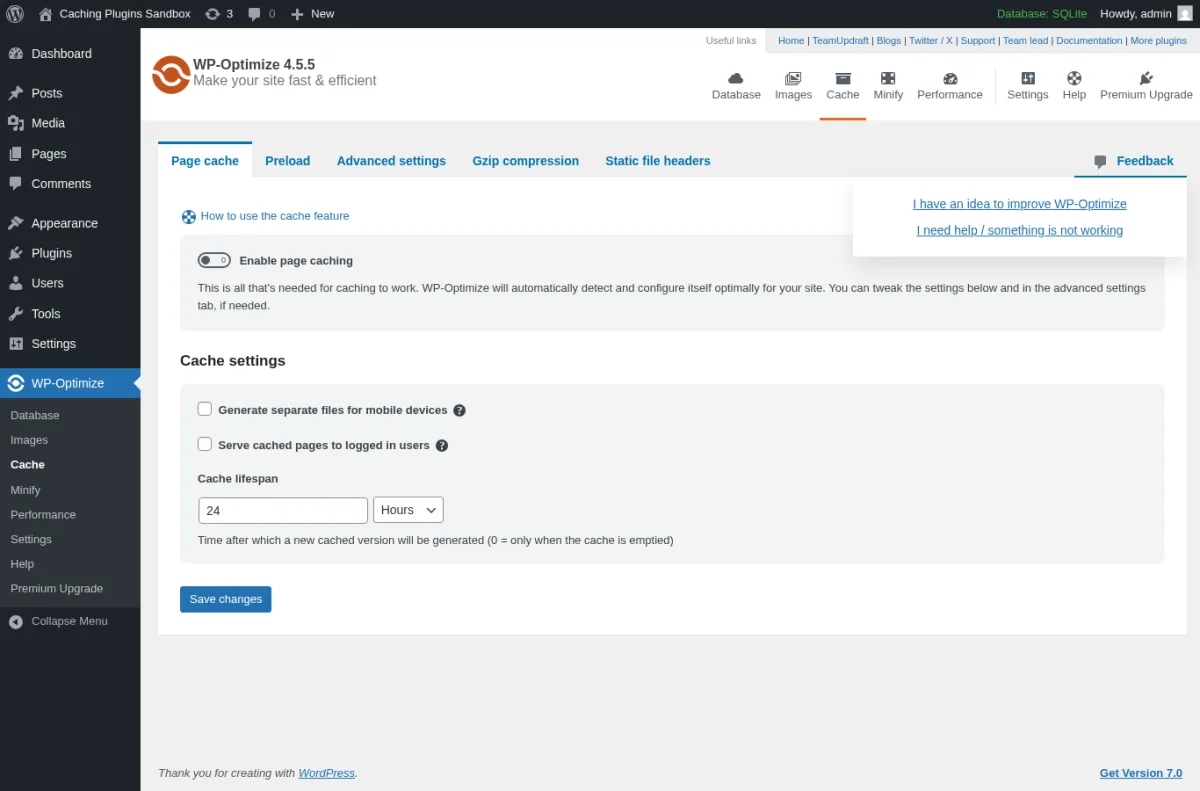
What I tested in a clean WordPress 6.9.4 sandbox on 2026-06-07: I activated v4.5.5 and opened the WP-Optimize Cache page. The screen exposes five tabs (Page cache, Preload, Advanced settings, Gzip compression, Static file headers). The Page cache tab has a single Enable page caching toggle and three options I actually used: Generate separate files for mobile devices, Serve cached pages to logged in users, and Cache lifespan (24 Hours by default). The Preload tab in free supports cron-driven preload of the sitemap. I also opened the Minify module and tested HTML and CSS minify; both ran clean on the empty theme. The Database module ran a safe pass of orphaned-transients cleanup (zero rows removed on an empty sandbox, which is the expected result).
Strengths. One plugin instead of four. Active development with monthly releases. Sensible defaults: cache off until you turn it on, JS-combine off until you tested every page builder script, mobile cache off by default. The Preload tab is in free, which is unusual for a free WordPress cache plugin. The Database module is the same engine that powers UpdraftPlus's pre-backup cleanups, so it is battle-tested on millions of sites.
Limitations. Combine-JS is off by default for good reason (it can break complex sites); leave it off unless you can test every page builder and analytics script. The free tier does not include WebP image conversion or async bulk image optimization; those land in Premium. Like every cache plugin, WP-Optimize's cache will conflict with another cache plugin; pick one.
Pricing. All annual, verified on teamupdraft.com/wp-optimize/pricing on 2026-06-07. The public page shows EU VAT included, so non-EU buyers may see a different headline number at checkout:
- Starter $58.31 per year for up to 2 sites
- Business $117.81 per year for up to 5 sites
- Enterprise $230.86 per year for unlimited sites
Premium adds image lazy load, WebP, preload key requests, unused-image deletion, scheduled cleanups beyond the free schedule and 24-hour developer support.
Best fit. Bloggers, small businesses and agencies running 1 to 5 sites on Apache or NGINX shared hosting. The single best free all-in-one for any site that is not on a LiteSpeed server.
5. W3 Total Cache: most configurable free cache for technical users
- WordPress.org: wordpress.org/plugins/w3-total-cache/
- Active installs: 900,000+
- Rating: 4.4 / 5 (5,417 reviews on 2026-06-07)
- Latest version: 2.9.4, released 2026-05-19
- Requires: WordPress 5.3+, PHP 7.2.5+
- Tested up to: WordPress 7.0
W3 Total Cache (W3TC), now maintained by BoldGrid, has been the configurability champion of WordPress caching since 2009 and remains so in 2026. The free plugin separates cache concerns into independent zones (page, object, database, browser, fragment, minify) and lets you pick a different backend per zone: Disk Basic, Disk Enhanced (mod_rewrite), Memcached, Redis, APC, eAccelerator or WinCache. CDN integration in free supports 12+ providers (Cloudflare, BunnyCDN, KeyCDN, StackPath replacement, Amazon CloudFront, MaxCDN, Akamai, MS Azure, RackSpace, plus generic origin pull and mirror CDN).
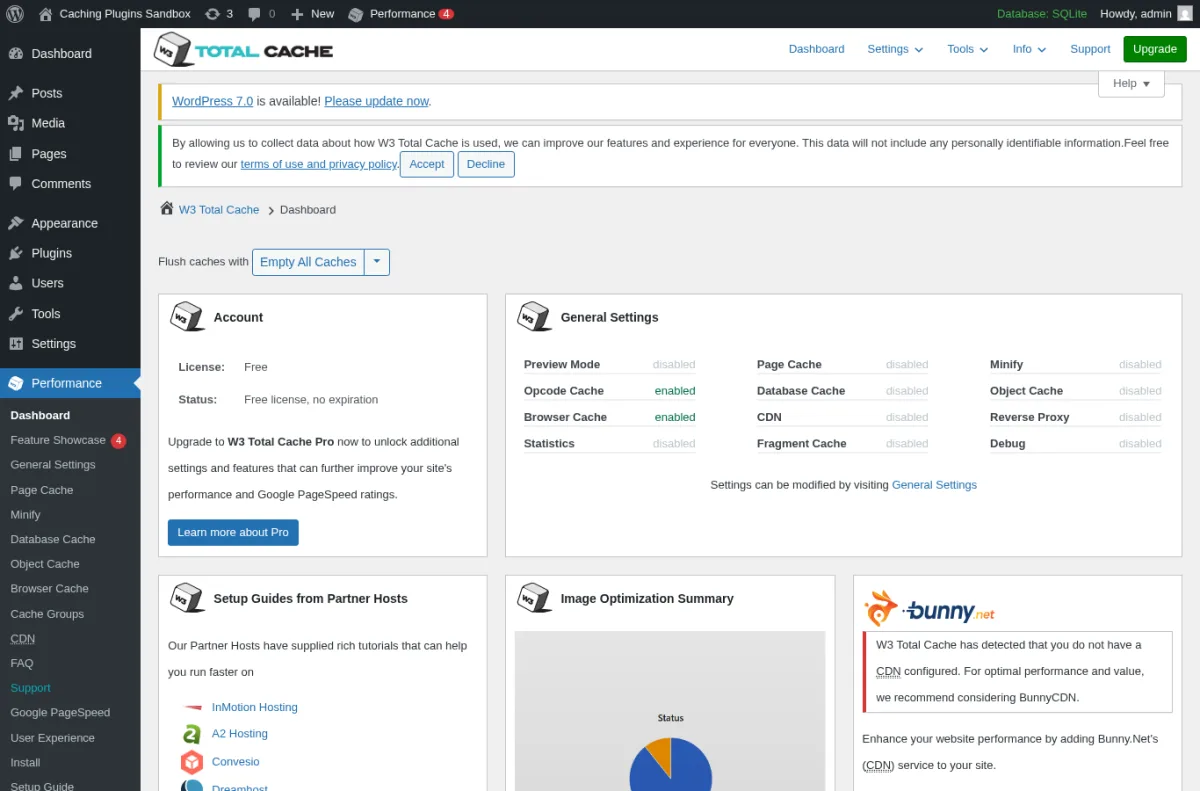
What I tested in a clean WordPress 6.9.4 sandbox on 2026-06-07: I activated v2.9.4 and opened the W3TC Dashboard. The General Settings panel lists every cache zone the plugin can manage (Preview Mode, Page Cache, Database Cache, Object Cache, Browser Cache, Statistics, Reverse Proxy, Fragment Cache, CDN, Minify, Security). I enabled Page Cache with the Disk: Basic method and Browser Cache, then enabled Auto Minify for HTML and CSS only. Saved settings rendered cleanly. The Combine-JS option was left off because aggressive JS combination breaks page builders and the W3TC docs flag this clearly. Memcached / Redis object cache was not enabled because the sandbox has no Redis running.
Strengths. The deepest free configuration of any caching plugin. Best choice if you want explicit, separate cache zones and full CDN control. Plays well with Cloudflare, Varnish, NGINX FastCGI and Memcached / Redis object cache on hosts where those are available.
Limitations. Easily the steepest learning curve on this list, and the most "shoot yourself in the foot" potential when wrong combinations are enabled. Start with Page Cache (Disk Basic) plus Browser Cache plus Minify Auto for HTML / CSS only, and only enable Object / Database cache after you confirm your host actually runs Redis or Memcached. Do not combine W3TC with any other cache plugin.
Pricing. All annual, verified on boldgrid.com/w3-total-cache on 2026-06-07. 30-day money-back guarantee:
- 1 site $99 per year
- 5 sites $350 per year ($70 per site)
- 10 sites $500 per year ($50 per site)
- Bulk licenses available on request
W3TC Pro adds Full Site Delivery (cache entire HTML at CDN edge), Delay Scripts, REST API caching, Fragment caching for logged-in users, unlimited monthly WebP conversion (vs. 100 per month in free) and cache statistics.
Best fit. Technical users, developers, agencies and managed-WordPress setups where someone wants explicit control over each cache layer and is comfortable testing combinations on staging.
6. WP Super Cache: simplest reliable free cache from Automattic
- WordPress.org: wordpress.org/plugins/wp-super-cache/
- Active installs: 1+ million
- Rating: 4.3 / 5 (1,342 reviews on 2026-06-07)
- Latest version: 3.1.1, released 2026-05-27
- Requires: WordPress 6.8+, PHP 7.4+
- Tested up to: WordPress 7.0
WP Super Cache is the official caching plugin from Automattic, the company behind WordPress.com. It generates static HTML files from your dynamic WordPress site and serves them to logged-out visitors without running PHP. There are three delivery modes: Expert (mod_rewrite, fastest, Apache only), Simple (PHP-served, recommended for most users) and WP-Cache (most flexible, slightly slower).
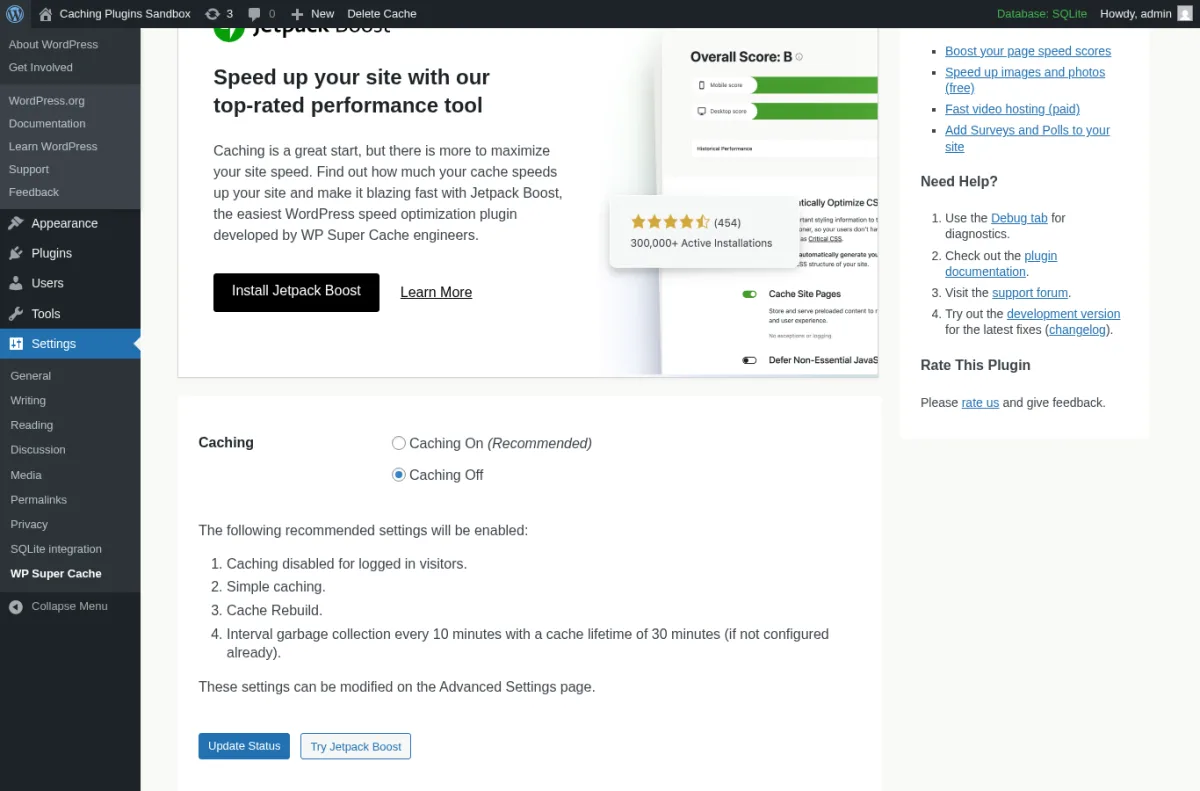
What I tested in a clean WordPress 6.9.4 sandbox on 2026-06-07: I activated v3.1.1. The first attempt failed because LiteSpeed's leftover advanced-cache.php was still in wp-content/ from an earlier test, which is a real-world warning every cache plugin shows when another cache plugin has been activated before. After cleanup, activation succeeded. The Easy tab gave a Caching On / Caching Off radio and a four-sentence explanation of what enabling the preset does (Simple caching, Cache Rebuild, 4 internal cleanup jobs every 10 minutes, 30-minute cache lifetime). I clicked Caching On, then Test Cache; the plugin wrote wp-content/cache/supercache/ files for the homepage and reported the page was cached successfully. The Advanced tab exposes cache delivery method, miscellaneous toggles (compress pages, 304 not modified, cache rebuild), restrictions (logged-in users, query strings, cookies), mobile theme handling, expiry and garbage collection. The Preload tab supports refresh interval, preload all posts and preload tag / category archives.
Strengths. Free forever, GPL, no paid tier, no upsell, no telemetry. Automattic maintains it as a stable utility. The Easy preset is genuinely safe for almost any blog. Three delivery modes give you control without overwhelming you.
Limitations. Page caching only. It does not minify CSS / JS or optimize images. You will want to pair it with Autoptimize for minification and Smush or ShortPixel for image optimization. No built-in object cache; if you need that, look at LiteSpeed Cache or W3 Total Cache. Sometimes fails on first install if another cache plugin's leftover drop-in is still present (the plugin tells you exactly what to delete, but it is a real friction).
Pricing. Free forever. No paid tier exists.
Best fit. Small blogs, brochure sites, hobby and nonprofit sites where the priority is "set it once, never think about it again". Also a sensible pick when you want a caching plugin that has zero possibility of trying to upsell anyone on your team.
7. Hummingbird: free Cloudflare or Varnish purge plus asset optimization
- WordPress.org: wordpress.org/plugins/hummingbird-performance/
- Active installs: 70,000+
- Rating: 4.7 / 5 (1,487 reviews on 2026-06-07)
- Latest version: 3.19.0, released 2026-05-18
- Requires: WordPress 6.4+, PHP 7.4+
- Tested up to: WordPress 7.0
Hummingbird from WPMU DEV (the same team behind Smush) is the smaller-install but feature-broad option on this list. The free tier covers page caching, browser caching, Gzip, CSS / JS minify and async / defer, lazy load and, unusually, integrated Cloudflare and Varnish cache purge so that flushing the WordPress cache also flushes the upstream cache without manual intervention. The 2026 3.19 release added a success notification when the cache is cleared from the admin bar and refined the onboarding wizard labels.
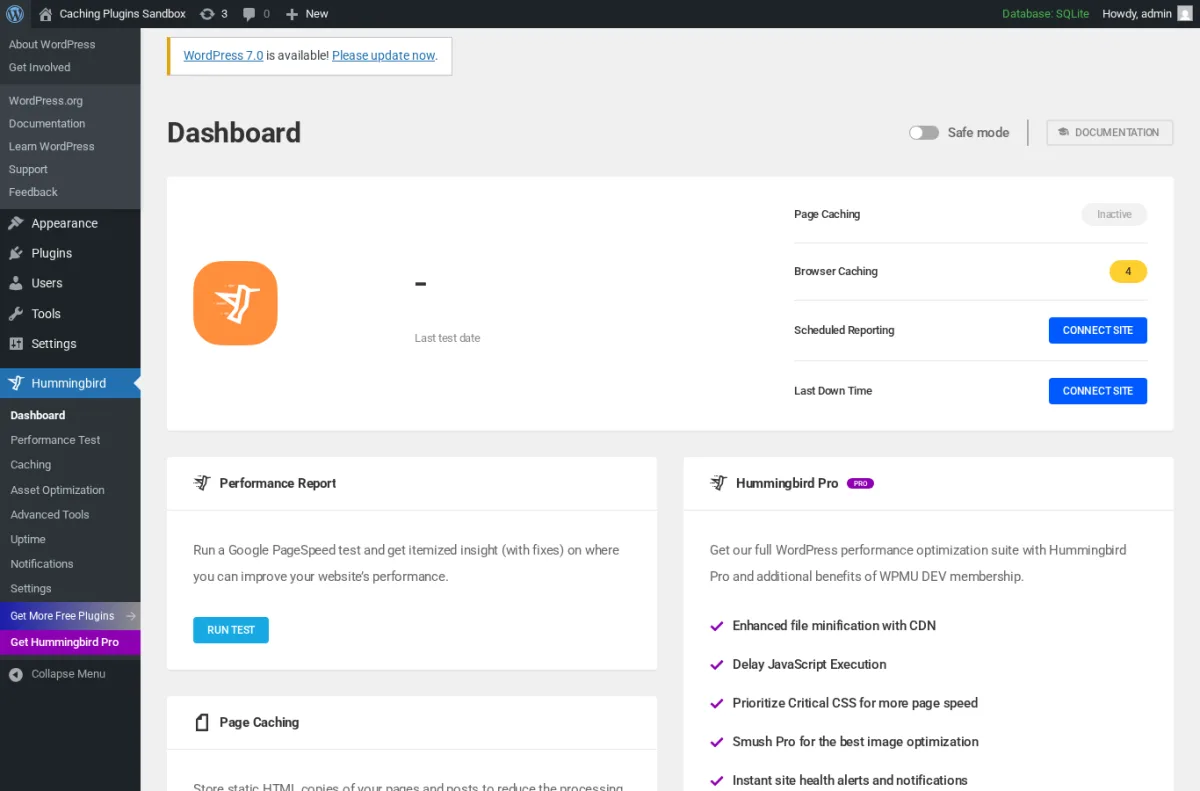
What I tested in a clean WordPress 6.9.4 sandbox on 2026-06-07: I activated v3.19.0. The plugin opens with a 5-step setup wizard (Getting Started -> Asset Optimization -> Page Caching -> Advanced Tools -> Finish). I skipped the wizard to inspect the real dashboard. The dashboard renders Page Caching (Inactive), Browser Caching (4 fixes available), Scheduled Reporting (Connect Site CTA), Last Down Time, a Performance Report card with a Run Test button (which calls Google PageSpeed Insights via the WPMU DEV API once you connect a WPMU DEV account), and a Hummingbird Pro upsell card. The Caching submenu exposes Page Caching with file location, Cloudflare integration, Varnish integration, exclusions, Gravatar caching, RSS caching and Browser Caching. The Asset Optimization submenu supports CSS / JS minify, defer, inline, async, compress and font compression.
Strengths. Free Cloudflare and Varnish purge integration is rare and useful. Free lazy load is included. The Pro upsell exists but is honest about what is free vs Pro on the upsell card. Good fit alongside Smush if you already use WPMU DEV.
Limitations. Smaller install base (70,000+) than the other names on this list. The performance test runs inside the dashboard but needs a WPMU DEV account to connect; without that account, you can still cache and optimize but cannot run the in-dashboard performance test. Critical CSS generation is a Pro feature.
Pricing. Monthly billing on WPMU DEV, verified on wpmudev.com/project/wp-hummingbird on 2026-06-07. Annual pre-pay gets a discount but the headline price is monthly:
- Pro Basic $3 per month, 1 site, 50 GB CDN
- Pro Standard $5 per month, 3 sites, 100 GB CDN
- Pro Plus $10 per month, 10 sites, 250 GB CDN
- Premium tier for unlimited sites and 500 GB CDN; contact WPMU DEV
Pro adds Delay JavaScript Execution, Critical CSS generation, the WPMU DEV CDN and a bundled Smush Pro license for image optimization.
Best fit. Existing WPMU DEV customers, agencies that already use Smush Pro and want a matched caching plugin, and any site that needs cache-purge coordination with Cloudflare or Varnish.
How to choose: pick one cache plugin per site
You do not install all seven of these. You pick one cache plugin per site, optionally pair it with a non-conflicting minify or image-optimization plugin if your cache plugin does not handle those, and you are done. The two most common mistakes I see are installing two cache plugins together (always breaks something) and enabling every available toggle in one cache plugin without testing (also always breaks something).
- If your host runs LiteSpeed Web Server or OpenLiteSpeed (Hostinger premium, ChemiCloud, Namecheap Stellar Plus, A2 Turbo, most modern LiteSpeed cloud configurations): install LiteSpeed Cache. It is the only caching plugin that gives you server-level cache outside of paid managed hosting, and the rest of its features (image opt, minify, CDN) are still useful even on non-LiteSpeed servers.
- If you want plug-and-play premium and you do not want to think about cache settings ever again: buy WP Rocket at $59 per year for one site. Single biggest time-saver on this list if your time has any opportunity cost.
- If you host on shared Apache or NGINX and you want a free all-in-one: WP-Optimize is the best free choice. Cache + minify + image compression + database cleanup in one plugin from a maintained vendor with an active 2026 release cadence.
- If you are technical and want explicit control of every cache layer: W3 Total Cache is the most configurable free option. Start with Page Cache (Disk Basic) + Browser Cache + Minify Auto for HTML and CSS only, then add Object Cache (Redis / Memcached) once you confirm your host runs that backend.
- If you run a small blog and want the safest possible "set it and forget it": WP Super Cache is the right pick. Pair it with WP Smush or our best WordPress image optimization plugins roundup for an image-optimization layer.
- If you do not want an annual subscription and you prefer a single-screen settings page: WP Fastest Cache Premium at $49 one-time for one site is the only lifetime-priced option on this list.
- If you already use WPMU DEV / Smush Pro: Hummingbird matches the rest of the WPMU DEV plugin family and bundles with Smush Pro at the Plus tier and above.
Whichever plugin you pick, do one thing first: run a baseline measurement with PageSpeed Insights or GTmetrix before installing any plugin. Then install, configure, and measure again. If a setting did not measurably help, turn it off. Plugin bloat is the number-one cause of "I installed a speed plugin and my site got slower". For a wider, non-plugin view of speed work, our WordPress speed optimization guide covers hosting, CDN, font and database work that no plugin can do for you.
A reminder: no plugin can fix bad hosting. If your TTFB is over 800 ms before any plugin is installed, the bottleneck is your server, not your code.
FAQ
Which WordPress caching plugin is the fastest in 2026?
On LiteSpeed or OpenLiteSpeed hosts, LiteSpeed Cache is measurably the fastest because the cache lives at the server level rather than inside PHP. On Apache or NGINX hosts the gap narrows: a properly configured WP Rocket, WP-Optimize or W3 Total Cache setup will land within a handful of PageSpeed points of each other. The difference between cache plugins on the same host is usually smaller than the difference between two different hosts. Pick the plugin that fits your skill level and budget, then spend the rest of your time on hosting, images and theme cleanup.
Can I install more than one caching plugin?
No. Two cache plugins will fight each other for the same wp-content/advanced-cache.php drop-in, double-cache the HTML, and either serve stale pages or 500 errors. WP Super Cache will actively refuse to activate if it detects another cache plugin's leftover advanced-cache file, which is the correct behavior. Pick one cache plugin and uninstall any other cache plugin first. You can safely pair your chosen cache plugin with one image optimizer (Smush, ShortPixel, EWWW) and one CSS/JS optimizer (Autoptimize) that do not also try to do page caching.
Is the free version of LiteSpeed Cache really worth using on a non-LiteSpeed host?
Yes, but with a smaller upside. On Apache or NGINX you do not get the server-level cache, but you do still get LiteSpeed Cache's image optimization (with WebP and AVIF), critical CSS generation, CSS / JS / HTML minify, lazy load, the free QUIC.cloud CDN and ESI. That is already more free features than most cache plugins ship in a free tier. The trade-off is that on a non-LiteSpeed host you may be better served by WP-Optimize, which gives you a comparable feature set with a simpler settings panel.
Do I need a paid cache plugin if my host is already fast?
Probably not. Modern managed-WordPress hosts (Kinsta, WP Engine, Pressable, Cloudways, Pantheon, Rocket.net, RunCloud) already do server-level page caching at the NGINX or Varnish layer. On those hosts your job is to keep your origin fast (cache busts, dynamic logged-in pages, slow plugins). A free cache plugin is often enough; a paid cache plugin like WP Rocket helps mainly with non-caching optimizations (delay JS, remove unused CSS, lazy load, database cleanup) that your host does not do for you.
What is the difference between page cache, object cache, and browser cache?
Page cache stores the fully rendered HTML for a URL and serves it without running PHP. This is the biggest win for logged-out visitors. Object cache stores expensive WordPress queries and PHP objects in memory (Redis, Memcached, APCu) so the next request reuses them; it speeds up logged-in admin work and dynamic pages that cannot be page-cached. Browser cache sets HTTP cache headers so visitors' browsers reuse your CSS, JS and images on repeat visits without re-downloading them. The best cache plugins on this list handle all three. Free plugins that only do page cache (WP Super Cache, WP Fastest Cache free tier) pair well with a separate Redis / Memcached object cache plugin if your host supports it.
Will a cache plugin break my WooCommerce cart or login?
It should not, but misconfigured cache plugins are the number-one cause of "my logged-in dashboard shows yesterday's data" or "my cart empties between pages" complaints. Three rules: cache page content for logged-out visitors only (every plugin on this list does this by default), exclude cart, checkout and my-account URLs (most plugins do this automatically for WooCommerce; double-check the exclude list), and use ESI or fragment caching for header cart counts on otherwise-cached pages (LiteSpeed Cache and W3 Total Cache Pro support ESI / fragment cache). If you run WooCommerce at any scale, LiteSpeed Cache and WP Rocket are the two safest defaults.
Conclusion
A fast WordPress site in 2026 is still mostly about four boring fixes: cache the rendered HTML, optimize CSS and JavaScript, compress images, and keep the database lean. The seven plugins on this list cover the first one well, four of them cover the first two well, and three of them cover all four in one install.
If you want a single recommendation for most WordPress sites, start with WP Fastest Cache. It is simple to configure, covers the core caching features most sites need, and keeps the setup understandable for non-technical site owners. LiteSpeed Cache is still a strong choice if your hosting stack runs LiteSpeed and you want server-level cache. WP Rocket remains a good premium option if you prefer polished defaults and do not need a free tier. Measure with PageSpeed Insights before and after. Turn off any toggle that did not measurably help. Then go back to writing content, because the second-biggest factor in WordPress speed (after hosting) is not adding a tenth plugin to your stack.


