

6 Best Free Restaurant WordPress Plugins in 2026 (Reservations, Menus and Online Ordering)


Restaurants pick up where the menu used to end. In 2026 a working WordPress restaurant site needs at least one of three things, and usually two: a reservation system that handles party size and seat capacity, a digital menu that customers can read on their phone, and an online ordering flow for pickup or delivery. The good news is that all three exist as free, actively maintained WordPress plugins. The bad news is that the listicles you find when you search "best free restaurant WordPress plugins" still recommend a 2019-era plugin that has not been updated in six years.
I went through the WordPress.org restaurant category, opened the official listings for every plugin that still had more than 500 active installs and a release in the last 18 months, read the vendor pricing pages and free-version documentation, and picked the six plugins that genuinely deserve the shortlist in 2026. The article below is a buyer-facing summary of each pick: what its free version actually unlocks, what its current 2026 pricing looks like when you reach checkout (not the marketing-page first-line discount), and which restaurant sites I would point at each one.
How I evaluated these picks
The six plugins below are the ones that combine three things: an active WordPress.org listing with a current release in 2026, more than 500 active installs, and a credible free-tier feature surface I could verify against the vendor's own documentation. For each pick:
- I opened the live WordPress.org plugin page and recorded the current active install count, average rating, total number of reviews, last-update date and the WordPress version it has been tested up to.
- I worked through the official documentation and the live vendor demo where one is provided (Five Star Restaurant Reservations, Five Star Restaurant Menu, MotoPress Restaurant Menu, RestroPress and WPCafe all expose public demos).
- I opened each vendor's pricing page and recorded the real annual commitment at checkout, the lifetime path if one exists, the money-back guarantee, and any free-tier limits that buyers commonly miss.
- I read a spread of recent positive and critical user reviews on WordPress.org so the entries below reflect what real WordPress restaurant owners currently say about each plugin, not just the vendor's own positioning.
- Every install count, review count, rating and pricing figure below was verified on 2026-05-23.
The list is not "best to worst." Restaurant plugins split into three different buyer jobs in 2026, and the order below reflects how common each job is on a typical restaurant WordPress site, not a 1-to-6 quality gradient.
Quick picks: best free restaurant WordPress plugin by job
If you want the short answer first, here is the top free pick I would recommend for each typical restaurant job in 2026. The full per-plugin breakdown sits below.
| Restaurant job | Top free pick (2026) | Why | Paid path |
|---|---|---|---|
| Online table reservations and bookings | Five Star Restaurant Reservations | 10,000+ active installs, 4.7/5 from 210 reviews, modern Gutenberg block and shortcode, free multi-location support via the companion Business Profile plugin. | Premium from €167/year intro, 1 site |
| Reservations with instant availability and a real waiter dashboard | ReDi Restaurant Reservation | Free instant availability check, waitlist, custom fields and a tablet-friendly waiter dashboard; useful if free reservation volume stays under 100 per month. | Basic 19 EUR/month plus VAT |
| Beautiful restaurant menu with schema and QR code | Five Star Restaurant Menu and Food Ordering | Unlimited menus, unlimited items, Gutenberg menu blocks, native restaurant menu schema for Google and a built-in QR code generator in the free version. | Premium for layouts/dietary icons; Ultimate for full ordering |
| Restaurant menu plus online ordering on the same plugin | Restaurant Menu by MotoPress | Free PayPal and Cash on Delivery checkout, grid/list/simple layouts, free taxes and email templates. The only plugin in this list where checkout is free without WooCommerce. | Add-ons: Food Delivery from $49/year, Toppings, Menu Cart |
| All-in-one menu plus ordering plus reservations on one plugin | WPCafe | 34+ menu templates, full reservation system, pickup/delivery scheduling, mini-cart and multi-location dashboard in the free version. Requires WooCommerce. | Pro Annual from $79/year; Lifetime from $99 |
| Standalone online food ordering for pickup and delivery (no WooCommerce) | RestroPress | Unlimited free pickup and delivery orders, native Stripe hosted checkout, PayPal and Cash on Delivery, customer dashboard and delivery zones. Does not require WooCommerce. | Starter $199/year (1 site), Pro $429/year (5 sites) |
None of these six plugins is the right answer for every restaurant. Pick by the job your site needs done, not by raw install count.
1. Five Star Restaurant Reservations: the most installed reservations plugin in 2026
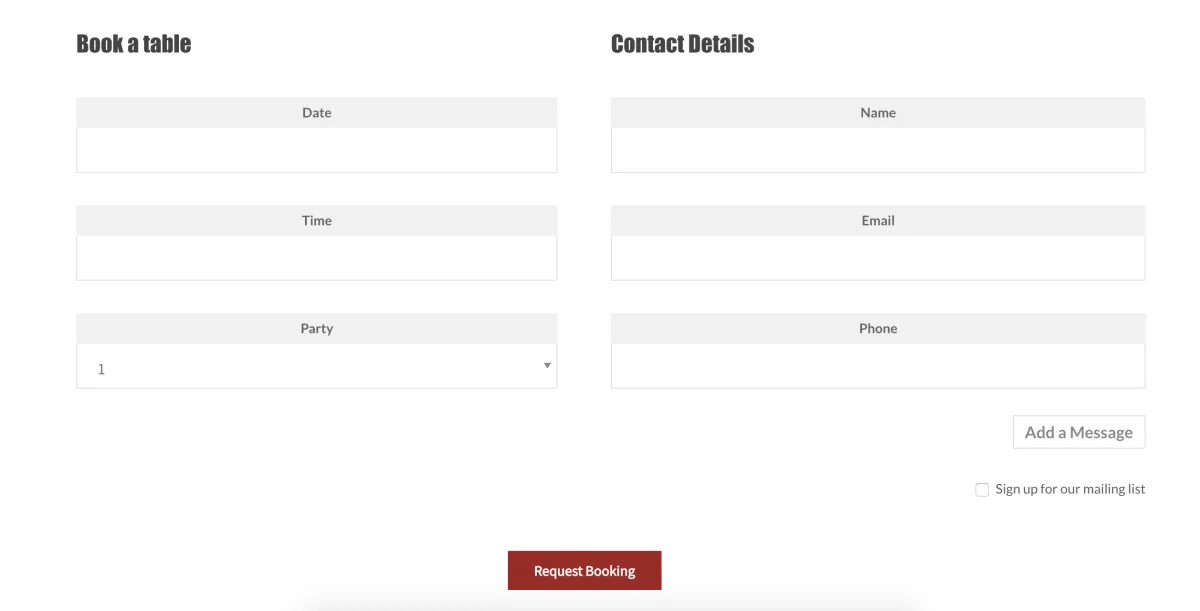
Five Star Restaurant Reservations from Rustaurius is the reservation plugin I would recommend to most WordPress restaurant sites in 2026. It sits at 10,000+ active installs and 4.7/5 from 210 reviews on WordPress.org (verified 2026-05-23), which makes it the highest-volume free restaurant reservations plugin in the WordPress directory by a wide margin. The most recent release (v2.7.18, May 18, 2026) is six days old at the time of writing, tested up to WordPress 7.0.
The free version covers more of the booking workflow than most buyers expect. You get a real reservation form (drop in via the included Gutenberg Booking Form block, the [booking-form] shortcode, or via Booking Page in the settings), a configurable schedule with open hours, intervals, earliest/latest bookings and exception dates, configurable minimum/maximum party size, automatic email notifications to both the customer and the admin, an admin bookings panel where you can confirm, reject, edit and search bookings, a frontend cancel form for guests, optional auto-confirmation below a chosen party size, and abusive-customer banning. Multi-location is also free if you also install the sister Five Star Business Profile plugin, which lets you add a location selector to the booking form and run separate schedules per location.
What I checked: the WordPress.org Live Preview, the public Rustaurius demo, the full notification template-tag list, and the changelog for the last 12 months. Five Star has been releasing roughly monthly through 2026, the changelog is mostly maintenance and Patchstack-reported vulnerability patches (which is a good sign), and the v2.7.0 release in July 2025 also redesigned the Minimal form layout and the plugin admin so the UI no longer looks like a 2017 plugin.
Strengths: the free version is genuinely usable for a single-location restaurant or cafe; the Gutenberg block makes the booking form a one-click add to any page; the notification configuration table is unusually flexible for a free reservation plugin; the multi-location path is free if you accept the extra plugin. Limitations: anything that involves capacity control (a maximum number of reservations or seats per dining block) sits behind Premium; SMS notifications, Stripe/PayPal booking deposits, table-by-table booking and the Five Star Restaurant Manager iOS/Android app sit behind Ultimate.
Pricing on 2026-05-23 with the vendor's intro discount: Premium Single Site €167/year intro (regular €247), Premium 5 Sites €247/year intro (regular €297), Premium 10 Sites €397/year intro (regular €497), Ultimate Single Site €297/year intro (regular €397). A 7-day free trial of either Premium or Ultimate is available, which is enough to test capacity control and table booking on a staging site before committing.
Best for: a single-location or small-chain restaurant that wants a free, modern, actively maintained reservation plugin and a clear upgrade path if it eventually needs SMS, deposits or per-table booking.
2. ReDi Restaurant Reservation: instant availability with a waiter dashboard
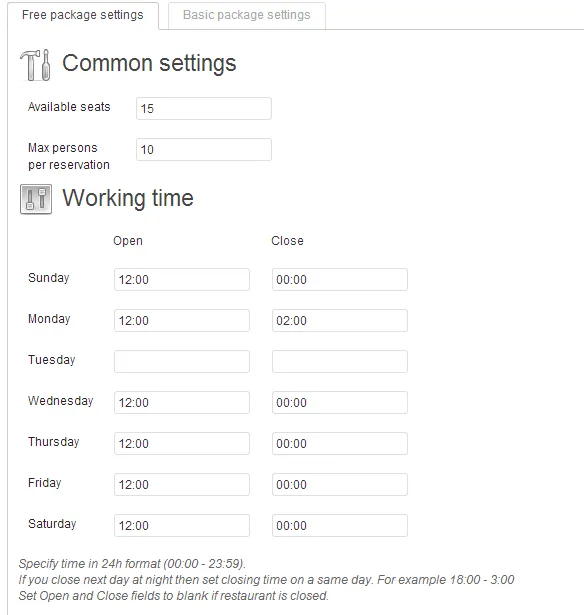
ReDi Restaurant Reservation from ReservationDiary (catkin) is the smaller, more European-leaning alternative to Five Star. WordPress.org numbers on 2026-05-23: 800+ active installs, 4.5/5 from 27 reviews, v26.1.0 (May 21, 2026), tested up to WordPress 6.9.0. The release cadence has been steady through 2024, 2025 and 2026, with the calendar-versioned scheme (year + week) telling you at a glance which release you are looking at.
ReDi's positioning is "instant availability and confirmation." On the customer side that means a multi-step reservation flow (restaurant, party size, date, time slot, contact details, confirmation) where the available time slots are calculated live against the restaurant's capacity, working hours and existing bookings. The free version includes the instant availability check itself, instant + manual confirmation, custom fields, a waitlist for fully booked slots, and customer-facing reservation cancel and modify flows. A Tablet-PC view of upcoming reservations is also free, which is unusual; the page auto-refreshes every 15 minutes and is the closest thing to a built-in "waiter dashboard" in this category.
What I checked: the WordPress.org listing, the live ReservationDiary demo, the changelog, the v26.1.0 release notes (server-side Google Tag Manager support, reservation webhook for integrations), and the explicit free-tier monthly limit. That last point is what most buyer guides skip: the ReDi free tier is capped at 100 reservations per month. For a busy restaurant taking 30+ bookings on a Friday and Saturday that cap is hit by mid-month. For a smaller cafe, a bistro or a venue with a controlled booking window, the free tier is sufficient. The Basic plan removes the cap and adds a real reservation-management dashboard, more open-hour bands per day, CSV export, feedback collection and reports.
Strengths: the instant availability flow is the cleanest in this category; the customer cancel and modify pages are first-class; the multilingual coverage (20+ languages in the supported list, including Hebrew and Japanese) is wider than any other free reservation plugin in this list. Limitations: the 100-reservations-per-month free cap is the most aggressive in this list and is the single biggest decision criterion against ReDi for higher-volume sites; the Basic plan is a monthly subscription rather than an annual one-time payment, which is unusual in the WordPress plugin market; and the UI design, while improving, is still less polished than Five Star or WPCafe.
Pricing on 2026-05-23: free with the 100-reservations-per-month cap, Basic 19 EUR/month plus VAT (no monthly cap, full management dashboard, multiple working-hour bands per day, statistics, CSV export, daily notes, feedback collection). A 30-day free Basic trial is available. Pre-payment, discount, and integrations with Brevo, MailChimp and BulkSMS are sold as one-time add-ons.
Best for: cafes, bistros, small wine bars and lower-volume reservation sites in the EU, especially multilingual ones, where the 100-reservations-per-month free cap is enough and the customer-side instant availability flow matters more than admin polish.
3. Five Star Restaurant Menu and Food Ordering: free menus with Google schema and QR codes
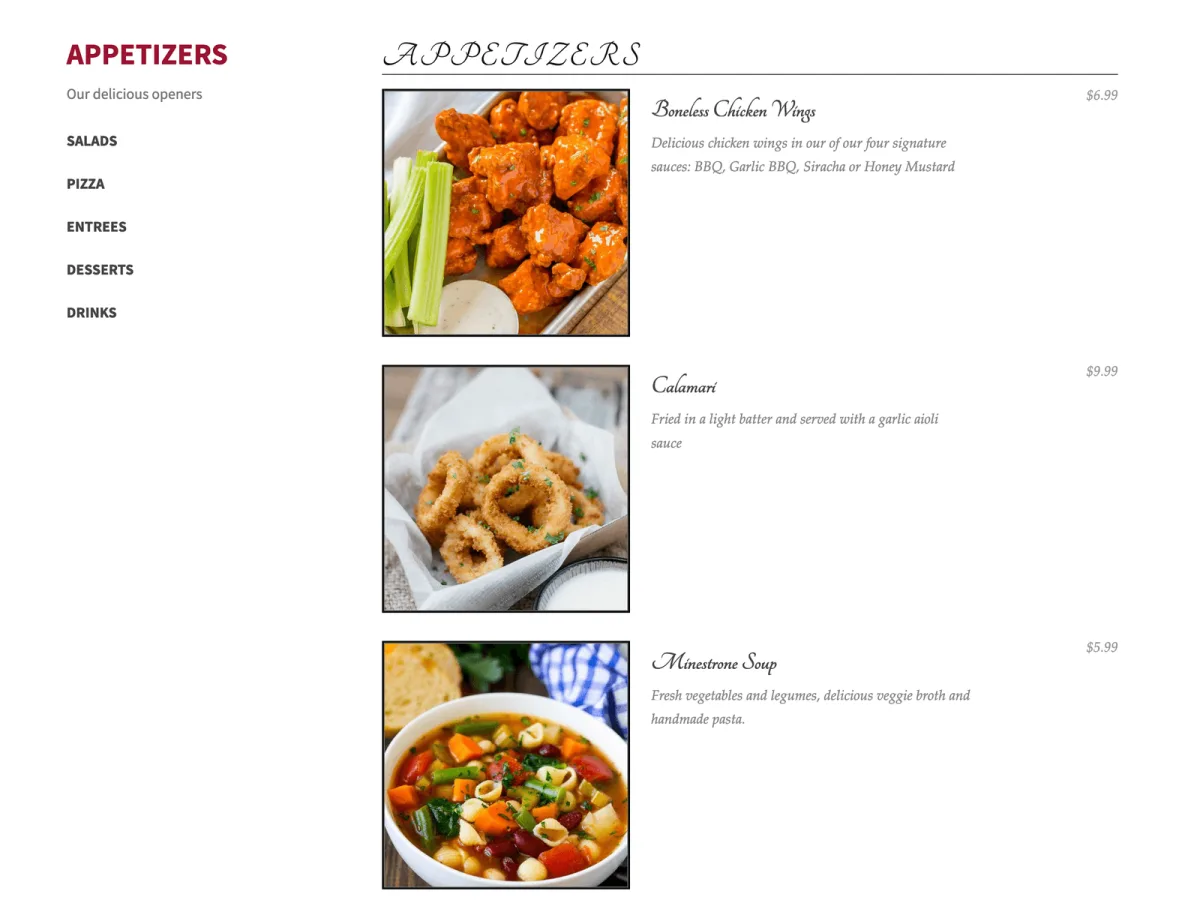
Five Star Restaurant Menu and Food Ordering (the WordPress.org slug is food-and-drink-menu) is the menu sister plugin to Five Star Restaurant Reservations, also by Rustaurius. WordPress.org numbers on 2026-05-23: 5,000+ active installs, 4.6/5 from 107 reviews, v2.5.2 (May 18, 2026), tested up to WordPress 7.0.
The free version is built around three Gutenberg blocks (Menu, Menu Section, Menu Item), three matching shortcodes and a set of block-theme patterns. You can create unlimited menus and unlimited items, group items into sections with descriptions, add multiple prices to a single item (useful for size variations), add unique photos, set an item-level "order" sort value, drop the menu onto any page with the block or [fdm-menu id="X"], generate a QR code that points at the menu page, and write a menu footer for legal disclaimers or dietary notes. Crucially the plugin emits the full restaurant menu schema markup automatically, which means Google can identify your menu page as a menu and surface it accordingly in search results. The schema-markup support is the single biggest free-version differentiator versus the more common "drop in a static menu image" workflow.
What I checked: the WordPress.org listing, both vendor demos (menu demo and the separate ordering demo), the documentation page for menu schema and QR codes, and the major v2.5.0 changelog entry from January 2026 (refresh of the Classic and Image menu styles, refresh of the side cart and lightbox, new discount codes, new tip feature, new order time, new delivery toggle with fee and minimum, new ETA field, order export). The vendor is treating the plugin as an actively-developed flagship product rather than a side project.
Strengths: the free tier is one of the most generous in this comparison (unlimited menus, unlimited items, schema markup and QR codes all without a paywall); the Gutenberg block coverage is best-in-category; the QR code generator removes the need for a separate QR plugin. Limitations: extra layouts (Refined, Image, Ordering, Luxe), dietary icons (organic, gluten-free, kosher, halal), badges, custom fields and sorting/filtering all sit behind Premium; full food ordering with cart, checkout and Stripe/PayPal sits behind Ultimate. Pricing tiers and exact figures are not headline-displayed on the WordPress.org page; the 7-day free trial of Premium or Ultimate is the practical way to evaluate the paid layouts before buying.
Best for: any WordPress restaurant site that needs a clean, fast, schema-friendly menu page in the free tier, and that may eventually want to upgrade to the same vendor's ordering flow without juggling two plugins from two different developers.
4. WPCafe: free restaurant menu, ordering and reservations on one plugin
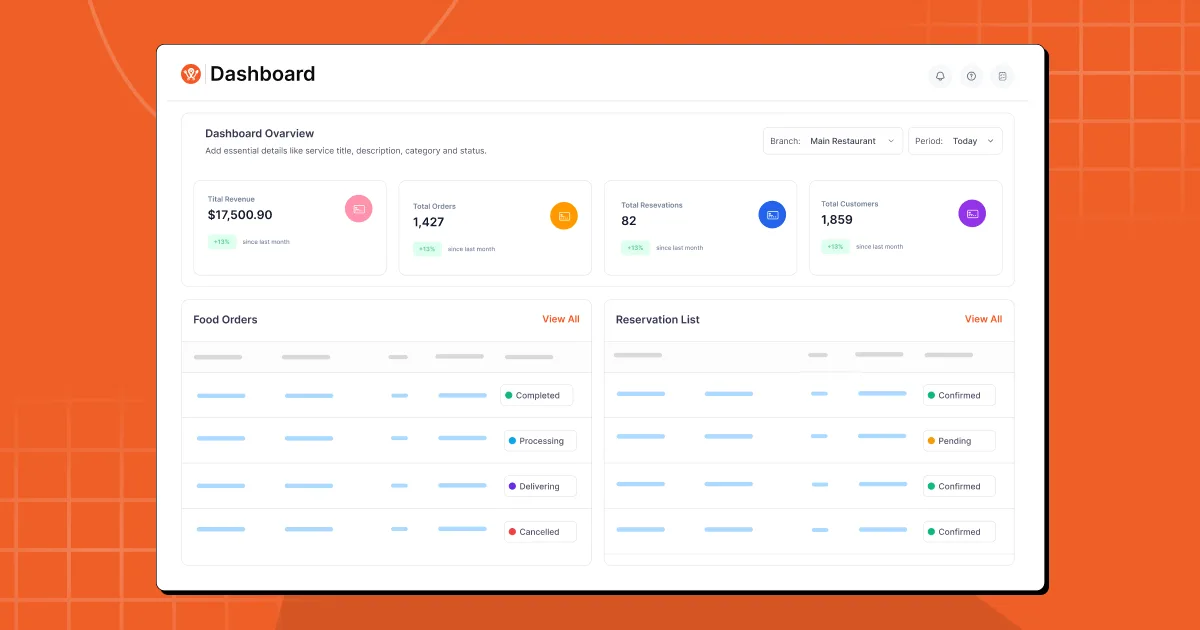
WPCafe from Arraytics (Themewinter) is the all-in-one option in this category and the closest you can get to a full restaurant operations plugin without buying a SaaS subscription. WordPress.org numbers on 2026-05-23: 6,000+ active installs, 4.5/5 from 106 reviews, v3.0.12 (May 19, 2026), tested up to WordPress 6.9.4, requires PHP 7.4+. The 3.0 release on December 8, 2025 was the biggest in the plugin's history and reset the admin around a dashboard view, single + multi-location management, a customizable reservation form builder, automated reservation emails, a Modules page that lets you turn ordering or reservations on/off independently, and OpenStreetMap delivery zones.
The free version covers three jobs at once. For menus you get 34+ pre-built templates as Gutenberg blocks and Elementor widgets, food list and tab widgets, an order bump (cross-sell at checkout), product add-ons and modifiers, advanced search and filtering, sales reports and shortcode support. For reservations you get a single + multiple-slot reservation system with seat capacity and guest limits, automated confirmation and reminder emails and a customizable reservation form builder. For ordering you get pickup and delivery scheduling, time-interval selection (e.g. every 15 or 30 minutes), and a floating mini-cart. The catch: WPCafe routes all checkout through WooCommerce, so you need WooCommerce installed for food ordering to work. Reservations work without WooCommerce.
What I checked: the WordPress.org listing, the public Themewinter live demo, the wpcafe.io/pricing page, the v3.0 changelog and the full 2024 to 2026 update history, and a spread of recent positive and critical reviews on WordPress.org. The support reviews skew unusually positive in the last 30 days, with several restaurant owners citing hotfix delivery inside 24 hours.
Strengths: the only plugin in this list that delivers menus + reservations + pickup/delivery on a single free install; the v3.0 admin is genuinely modern; the Pro path has both annual and lifetime tiers, which is rare in this category; the WooCommerce dependency means you inherit every payment gateway WooCommerce supports (Stripe, PayPal, Square, Apple Pay, Google Pay, Razorpay and the wider WooCommerce list). Limitations: the WooCommerce dependency is also the biggest gotcha for restaurants that did not want a full WooCommerce stack; the visual interactive table reservation, QR code ordering, location-based menu, multi-location-aware reservations and the loyalty program all sit behind Pro.
Pricing on 2026-05-23: free, Annual Pro from $79/year intro (regular $99, 2 domains), Lifetime Pro from $99 intro (regular $199, 1 domain), Lifetime Premium $299 (regular $599, 20 domains), Lifetime Agency $499 (regular $999, 500 domains), Lifetime Enterprise $749 (regular $1,499, unlimited). 15-day money-back guarantee. The Lifetime Standard at $99 is the strongest entry-tier value in this comparison if a buyer wants to avoid annual renewals entirely.
Best for: restaurants that want one plugin doing menus, reservations and pickup/delivery from a single admin, that are already on (or fine with) WooCommerce, and that prefer a lifetime license to an annual renewal.
5. Restaurant Menu by MotoPress: free PayPal and Cash on Delivery checkout, without WooCommerce
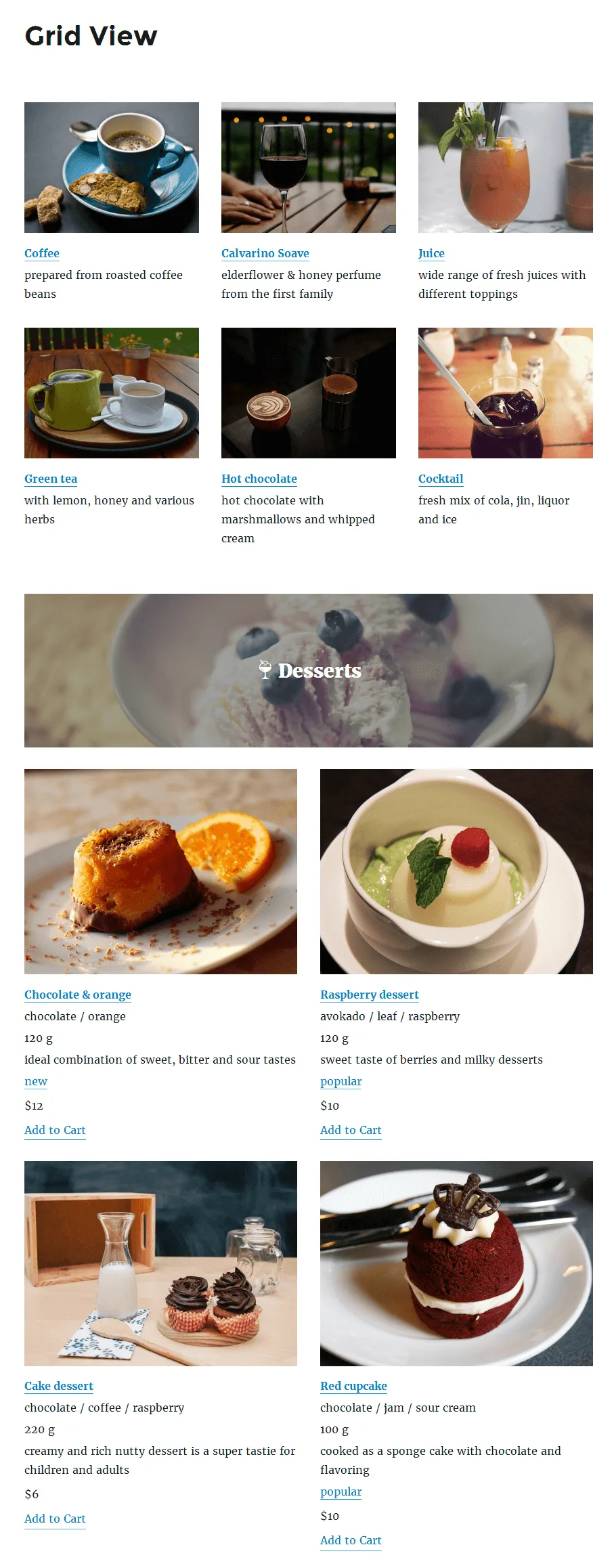
Restaurant Menu and Food Ordering from MotoPress (the WordPress.org developer profile is jetmonsters, the plugin slug is mp-restaurant-menu) is the right fit when you want a restaurant menu plus genuine in-WordPress checkout but you do not want to install WooCommerce. WordPress.org numbers on 2026-05-23: 2,000+ active installs, 4.5/5 from 15 reviews, v2.4.10 (March 23, 2026), tested up to WordPress 6.9.4.
The free version ships a complete WordPress food ordering loop in one plugin: categorized menu database, grid and list and simple-list layouts (single column up to 6-column), full menu item presentation with title, description, photo, price, detailed nutrition info, attributes (size, bulk, weight), tags and ingredients, a checkout flow, PayPal and Cash on Delivery payment methods (both integrated for free), test payments, order statuses (cooking, shipping, shipped, payment complete), customizable customer + admin email templates, taxes and tax rates, currency settings, and import/export of menus between WordPress installations. The grid and list layouts work in Gutenberg, Elementor, Divi and any other builder via shortcodes.
What I checked: the WordPress.org listing, the live MotoPress demo at mprmdemo.getmotopress.com, the changelog, and the vendor pricing pages for the Food Delivery and Toppings add-ons. The plugin has been getting smaller maintenance and security updates through 2025 and into 2026 (v2.4.5 March 2025, v2.4.6 May 2025, v2.4.7 and v2.4.8 June 2025, v2.4.9 November 2025, v2.4.10 March 2026), which is steady rather than fast but enough to keep the plugin on currently supported WordPress versions.
Strengths: the only plugin in this comparison that includes PayPal and Cash on Delivery checkout in the free tier without a WooCommerce dependency; the nutrition information, ingredient list and attributes fields are unusually rich; import/export between sites makes it easy to migrate menus across staging and production. Limitations: there is no Stripe option in the free core (PayPal-only is acceptable for some markets, restrictive for others); delivery and pickup logistics, toppings/extras and the menu-cart icon are sold as separate add-ons rather than bundled; the visual design of the front-end menu is more "blog" than "restaurant" and benefits from theme styling work; the review count is the smallest in this comparison and the install base is mid-tier.
Pricing on 2026-05-23: free, Food Delivery add-on $49/year for 1 site or $99/year for up to 25 sites, Toppings add-on per the vendor pricing page, or the "All Plugins and Themes" membership at $349/year for the full MotoPress catalog. MotoPress maintains a public refund policy but does not headline a fixed-day money-back guarantee on the restaurant-menu add-on pages.
Best for: restaurants that want a menu plus a checkout flow without committing to the WooCommerce stack, that are comfortable with PayPal and Cash on Delivery as the free-tier payment options, and that can either skip Stripe entirely or buy the dedicated add-on later.
6. RestroPress: unlimited free pickup and delivery orders without WooCommerce
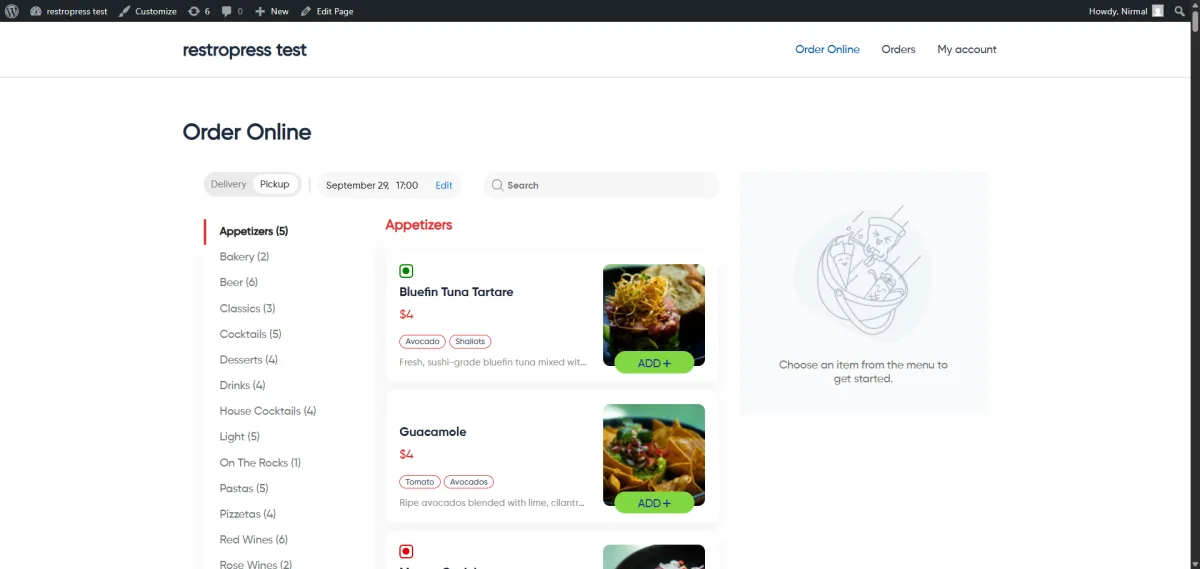
RestroPress from Magnigenie is the closest thing in this list to a standalone, takeout-and-delivery-first ordering system. WordPress.org numbers on 2026-05-23: 1,000+ active installs, 4.4/5 from 102 reviews, v3.2.8.8.1 (May 14, 2026), tested up to WordPress 7.0. The release cadence in spring 2026 has been unusually fast (v3.2.5 in February, v3.2.6 in March, v3.2.7, v3.2.8, and v3.2.8.1 through v3.2.8.8.1 in April and May), which is partly maintenance and partly a rolling UI redesign of the cart, dashboard, theme color system and mobile layout.
The free version ships a fully working pickup-and-delivery ordering loop with no order-volume cap. You get unlimited pickup and delivery orders, customizable menus with addons and modifiers, a customer dashboard with order history and quick reorder, real-time order management with live status updates, automatic creation of the cart/checkout/account pages with their shortcodes, mobile-responsive ordering, multi-currency settings, and a recently added core Stripe hosted checkout (added in v3.2.8.8 on May 12, 2026) alongside PayPal and Cash on Delivery. The plugin is explicitly built as a "freedom from WooCommerce" alternative and runs as a standalone solution, which matters for restaurant sites that found WooCommerce too heavy for what they actually needed.
What I checked: the WordPress.org listing, the public restropress.com/pricing page, the v3.2.8.8 and v3.2.8.8.1 changelog entries (the Amazon Payments gateway was removed and replaced with a native Stripe hosted checkout in May 2026), the extension catalog, and a spread of recent positive and critical reviews. The critical reviews skew toward older versions of the plugin and earlier UI issues; the most recent positive reviews emphasize the support team's response time and the fact that the new Stripe checkout removed a previous extension dependency.
Strengths: unlimited free orders is rare in the WordPress food-ordering category (most competitors either require WooCommerce or cap free orders at a few dozen per month); the standalone architecture is genuinely lightweight compared to a WooCommerce stack; the recently added native Stripe hosted checkout closes the most common free-tier payment gap; the extension ecosystem (Driver App, Customer App, KDS, Dine-In QR, Clover/Square POS, WhatsApp notifications) is the deepest in this list. Limitations: the average rating (4.4/5) is the lowest in this comparison and the 1-star count (14) is the highest, almost all of which date to older releases and UX problems that the 2026 rolling redesign is addressing; the standalone architecture means you do not inherit WooCommerce's payment gateway catalog and have to stay inside RestroPress's own list; QR ordering is a paid extension rather than a free feature; multi-location and the mobile apps all sit behind paid tiers.
Pricing on 2026-05-23: free with unlimited orders, Starter $199/year (1 site), Professional $429/year (5 sites), Business $799/year (15 sites), Agency $1,499/year (30 sites). 14-day money-back guarantee on non-discounted purchases. No lifetime path.
Best for: takeout-first, delivery-first, cloud-kitchen and food-truck WordPress sites that want a real ordering loop without installing WooCommerce, that can live inside the RestroPress payment-gateway catalog, and that may grow into the Driver, Customer and KDS app ecosystem later.
Plugins that used to make the shortlist and no longer should
Older "best free restaurant WordPress plugins" listicles, including the 2022 version of this article, still recommend RestaurantPress by WPEverest. RestaurantPress had its last release in April 2019 (v1.8.1), is tested only up to WordPress 5.4.19, and WordPress.org now explicitly flags it as "hasn't been tested with the latest 3 major releases of WordPress." It has been six years since the last update. I have intentionally left it off the 2026 shortlist and would not install it on a new WordPress restaurant site today. If your existing site still runs RestaurantPress, the cleanest migrations are to Five Star Restaurant Menu (for menu-only sites) or to WPCafe or Restaurant Menu by MotoPress (for menu + ordering sites).
How to choose the right free restaurant WordPress plugin
The category has no single "best" plugin because the six picks above win for different restaurant jobs. The short decision guide:
- If you only need online table reservations, install Five Star Restaurant Reservations. It is the highest-installed reservation plugin on WordPress.org, the free tier covers the booking workflow most single-location restaurants need, and the upgrade path is clean if you eventually need SMS reminders, Stripe deposits or per-table booking.
- If your restaurant is in the EU, multilingual, and reservation volume stays under 100 per month, ReDi Restaurant Reservation's instant availability flow and tablet waiter dashboard are stronger than Five Star's. Above 100 reservations per month you need the Basic plan (19 EUR/month plus VAT), at which point you should also compare Five Star Premium's single-site annual price.
- If you only need a digital menu on your site, install Five Star Restaurant Menu and Food Ordering. The free menu schema markup and QR code generator alone justify the install, and the upgrade paths (Premium for layouts, Ultimate for ordering) are honest.
- If you want a menu plus checkout in one plugin and you do not want WooCommerce, install Restaurant Menu by MotoPress. The free tier includes PayPal and Cash on Delivery and a complete menu and checkout loop. Add the Food Delivery add-on at $49/year only when you actually need delivery zones and slot scheduling.
- If you want menus, reservations and pickup or delivery on a single plugin, install WPCafe. It is the only plugin in this list that ships all three jobs in the free tier, and the lifetime Pro path at $99 is the best long-term value for restaurants that do not want annual renewals. Plan for the WooCommerce dependency on the ordering side.
- If you want a standalone, takeout-first online ordering system with unlimited free orders, native Stripe hosted checkout and a real extension ecosystem (Driver App, KDS, multi-location, Clover and Square), install RestroPress. It is the only plugin in this comparison built explicitly to avoid the WooCommerce stack.
The mistake to avoid is installing two plugins that solve the same job. A reservations plugin plus an ordering plugin is fine. A menu plugin from one vendor and an ordering plugin from another vendor is fine. Two reservations plugins or two ordering plugins side by side will collide on shortcodes, scripts, email triggers and front-end styling. Pick one per job and stick with it.
FAQ: free restaurant WordPress plugins
What is the best free restaurant WordPress plugin overall?
There is no single answer because restaurant sites need different things. For online table reservations, Five Star Restaurant Reservations is the safest pick on volume, rating and release cadence in 2026. For a digital menu with Google schema and QR codes, Five Star Restaurant Menu and Food Ordering is the cleanest free option. For one plugin that handles menus, reservations and pickup or delivery, WPCafe is the only credible all-in-one. For standalone online ordering without WooCommerce, RestroPress is the strongest pick.
Is there a single free WordPress plugin that does reservations, menus and online ordering?
Yes. WPCafe is the only plugin in this list that delivers all three jobs in its free tier on a single install. The trade-off is that the online ordering side of WPCafe runs through WooCommerce, so you also need WooCommerce installed for checkout. Reservations and menus work without WooCommerce.
Can I take online food orders for free without installing WooCommerce?
Yes, two of the plugins in this list are explicitly built to avoid the WooCommerce dependency. Restaurant Menu by MotoPress includes free PayPal and Cash on Delivery checkout out of the box. RestroPress is fully standalone, supports unlimited free pickup and delivery orders, and as of May 2026 includes a native Stripe hosted checkout in the free core. WPCafe takes the opposite approach and routes all checkout through WooCommerce.
Will a restaurant plugin slow my WordPress site down?
The well-maintained plugins in this guide are designed not to. Five Star Restaurant Reservations, Five Star Restaurant Menu and Restaurant Menu by MotoPress only enqueue their scripts on pages that actually contain the relevant block or shortcode. WPCafe v3.0 (December 2025) ran a major performance pass on the admin and frontend bundles. RestroPress moved to filemtime-based asset versioning in v3.2.8.6 to avoid stale-cache regressions. The plugin most likely to hurt Core Web Vitals is whichever one you stack on top of another plugin that already solves the same job; pick one per job and uninstall the others.
Should I use a dedicated restaurant reservation plugin or a general WordPress booking plugin for table reservations?
It depends on whether the site also needs to handle non-restaurant bookings. A general WordPress booking plugin is the better pick if the same business also takes appointments, classes, consultations or events, because you avoid running two booking plugins. A dedicated restaurant reservation plugin is the better pick if you want restaurant-specific fields (party size, dietary requirements, table layout), dining-block-aware capacity limits, restaurant-specific notification templates and a workflow that does not look like a salon scheduler. If you are still picking the underlying booking plugin, our roundup of the best WordPress booking plugins covers the broader category, and the appointment-booking-specific picks sit in the best WordPress appointment booking plugins roundup.
What about RestaurantPress and other plugins from older "best free restaurant plugins" lists?
Most older listicles still recommend RestaurantPress by WPEverest, which had its last release in April 2019 and is tested only up to WordPress 5.4. WordPress.org now explicitly flags it as "hasn't been tested with the latest 3 major releases of WordPress." That is six years without an update on a category where Patchstack and Wordfence are reporting active vulnerabilities every quarter. I would not install RestaurantPress on a new WordPress restaurant site in 2026, and I would migrate any existing RestaurantPress install to Five Star Restaurant Menu or to one of the menu and ordering picks above.
Which restaurant plugin is the most GDPR-friendly?
All six plugins ship GDPR tooling, but the defaults vary. Five Star Restaurant Reservations and Five Star Restaurant Menu store reservation and order data only on your own server, do not phone home, and let you set retention policies. ReDi Restaurant Reservation processes reservations against the ReservationDiary API; if you are subject to strict EU data-residency rules, read the ReDi privacy policy before adopting. WPCafe stores everything inside WordPress and WooCommerce on your own server. MotoPress Restaurant Menu and RestroPress also store everything inside your own WordPress database. The practical step in every case is to enable per-field GDPR consent on the reservation or order form and set a retention period that matches your privacy policy.
Final verdict
If you take only one thing away from this guide, let it be that "best free restaurant WordPress plugin" is a question with six defensible answers in 2026, not one. Pick by restaurant job, not by raw install count.
For pure online reservations the right pick is Five Star Restaurant Reservations (the most installed, most maintained free reservations plugin on WordPress.org) or, for lower-volume EU restaurants, ReDi Restaurant Reservation. For a digital menu with schema markup and QR codes, Five Star Restaurant Menu and Food Ordering is the cleanest free option. For menu plus checkout without WooCommerce, Restaurant Menu by MotoPress is the natural fit. For one plugin that ships menus plus reservations plus pickup and delivery on a single install, WPCafe is the only credible all-in-one. For a standalone, takeout-first ordering system that explicitly avoids the WooCommerce stack, RestroPress is the strongest 2026 pick.
Whichever one you pick, install it, build out the menu or reservation form in a staging environment first, enable email notifications and either reCAPTCHA or Cloudflare Turnstile on any public form, set a data-retention policy that matches your privacy policy, and connect it to whichever payment gateway your country and PSP supports. That is the restaurant plugin workflow that actually works in 2026.
Similar Blogs


